buttons FORD FOCUS 2014 3.G User Guide
[x] Cancel search | Manufacturer: FORD, Model Year: 2014, Model line: FOCUS, Model: FORD FOCUS 2014 3.GPages: 492, PDF Size: 7.2 MB
Page 305 of 492
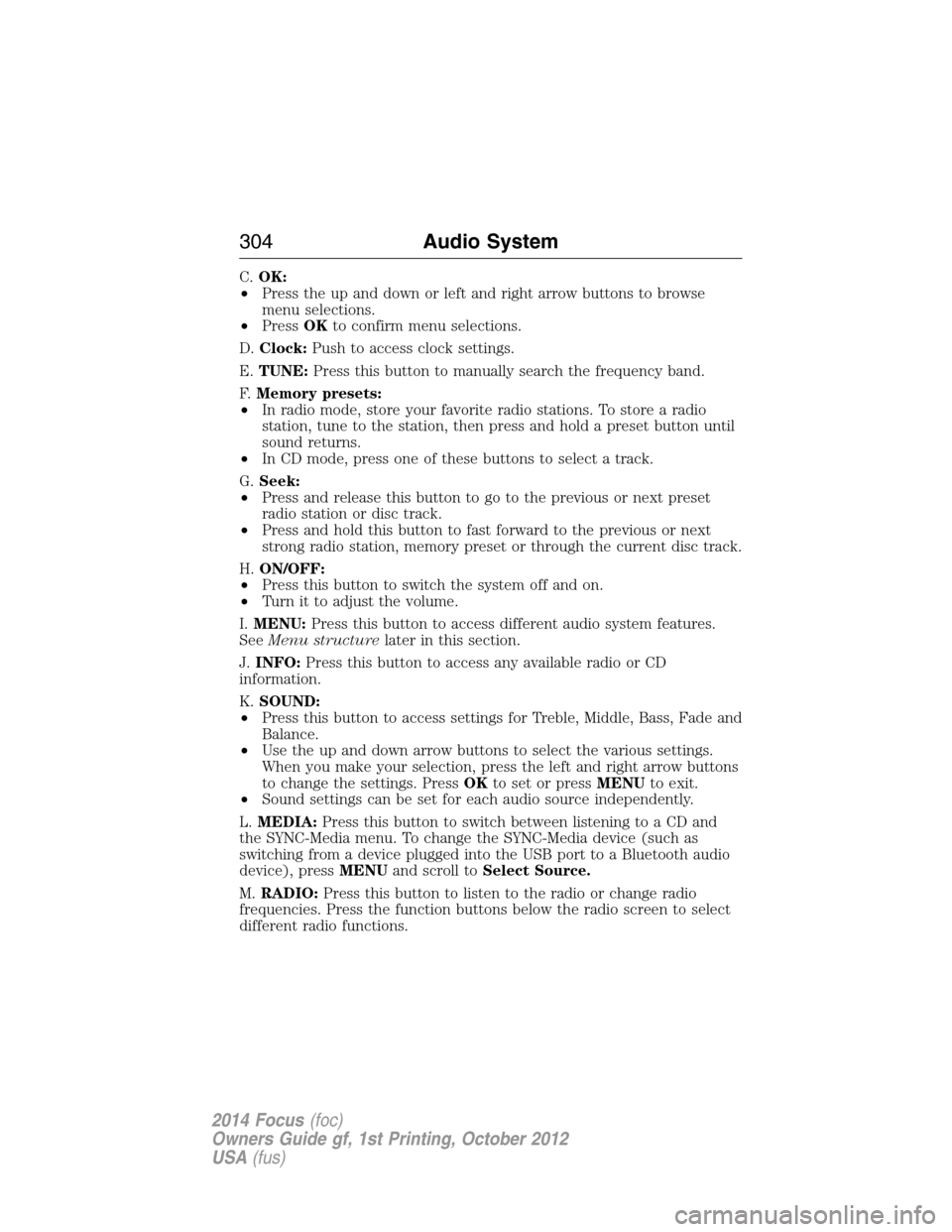
C.OK:
•Press the up and down or left and right arrow buttons to browse
menu selections.
•PressOKto confirm menu selections.
D.Clock:Push to access clock settings.
E.TUNE:Press this button to manually search the frequency band.
F.Memory presets:
•In radio mode, store your favorite radio stations. To store a radio
station, tune to the station, then press and hold a preset button until
sound returns.
•In CD mode, press one of these buttons to select a track.
G.Seek:
•Press and release this button to go to the previous or next preset
radio station or disc track.
•Press and hold this button to fast forward to the previous or next
strong radio station, memory preset or through the current disc track.
H.ON/OFF:
•Press this button to switch the system off and on.
•Turn it to adjust the volume.
I.MENU:Press this button to access different audio system features.
SeeMenu structurelater in this section.
J.INFO:Press this button to access any available radio or CD
information.
K.SOUND:
•Press this button to access settings for Treble, Middle, Bass, Fade and
Balance.
•Use the up and down arrow buttons to select the various settings.
When you make your selection, press the left and right arrow buttons
to change the settings. PressOKto set or pressMENUto exit.
•Sound settings can be set for each audio source independently.
L.MEDIA:Press this button to switch between listening to a CD and
the SYNC-Media menu. To change the SYNC-Media device (such as
switching from a device plugged into the USB port to a Bluetooth audio
device), pressMENUand scroll toSelect Source.
M.RADIO:Press this button to listen to the radio or change radio
frequencies. Press the function buttons below the radio screen to select
different radio functions.
304Audio System
2014 Focus(foc)
Owners Guide gf, 1st Printing, October 2012
USA(fus)
Page 306 of 492
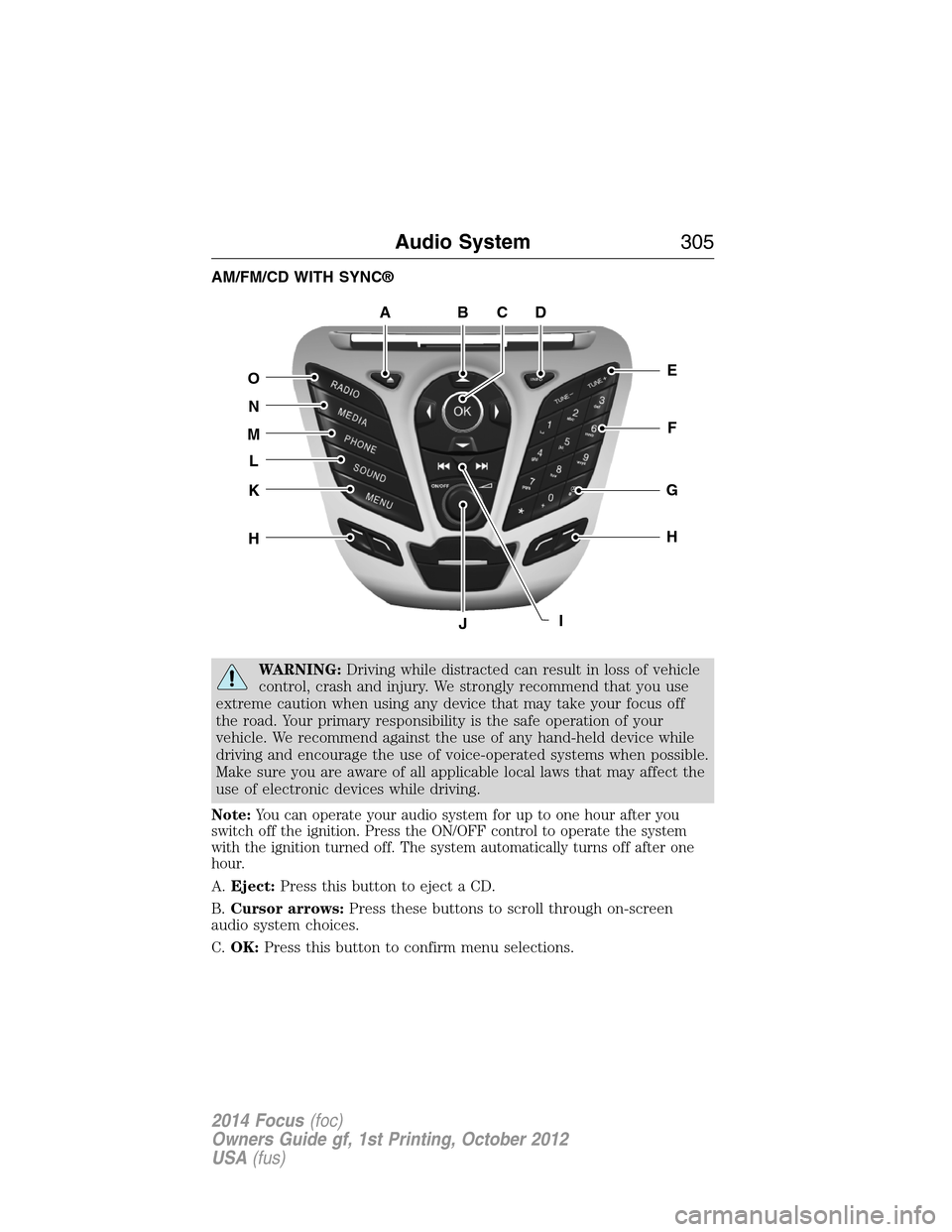
AM/FM/CD WITH SYNC®
WARNING:Driving while distracted can result in loss of vehicle
control, crash and injury. We strongly recommend that you use
extreme caution when using any device that may take your focus off
the road. Your primary responsibility is the safe operation of your
vehicle. We recommend against the use of any hand-held device while
driving and encourage the use of voice-operated systems when possible.
Make sure you are aware of all applicable local laws that may affect the
use of electronic devices while driving.
Note:You can operate your audio system for up to one hour after you
switch off the ignition. Press the ON/OFF control to operate the system
with the ignition turned off. The system automatically turns off after one
hour.
A.Eject:Press this button to eject a CD.
B.Cursor arrows:Press these buttons to scroll through on-screen
audio system choices.
C.OK:Press this button to confirm menu selections.
ABDC
E
F
G
H
IJ
H
K
L
M
N
O
Audio System305
2014 Focus(foc)
Owners Guide gf, 1st Printing, October 2012
USA(fus)
Page 307 of 492
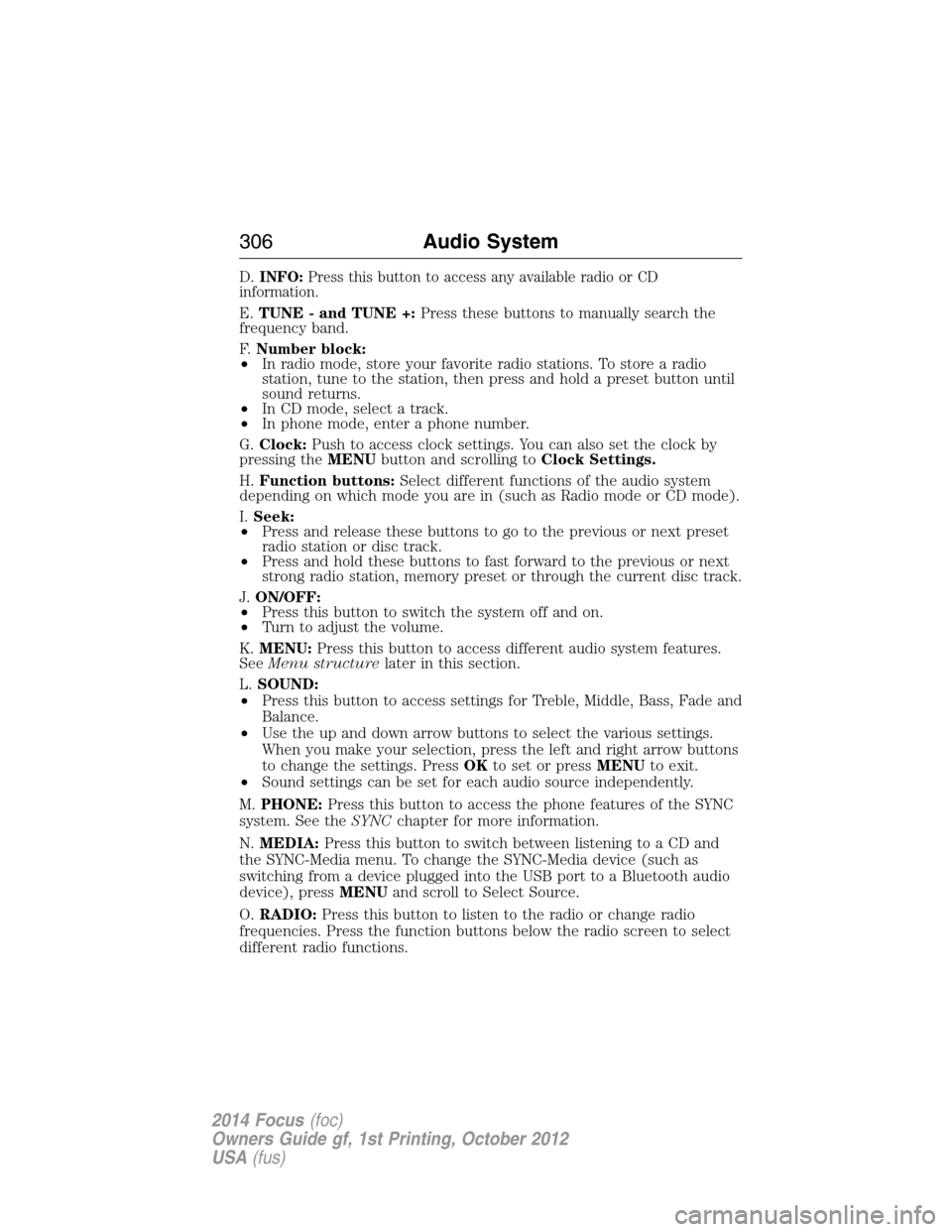
D.INFO:Press this button to access any available radio or CD
information.
E.TUNE - and TUNE +:Press these buttons to manually search the
frequency band.
F.Number block:
•In radio mode, store your favorite radio stations. To store a radio
station, tune to the station, then press and hold a preset button until
sound returns.
•In CD mode, select a track.
•In phone mode, enter a phone number.
G.Clock:Push to access clock settings. You can also set the clock by
pressing theMENUbutton and scrolling toClock Settings.
H.Function buttons:Select different functions of the audio system
depending on which mode you are in (such as Radio mode or CD mode).
I.Seek:
•Press and release these buttons to go to the previous or next preset
radio station or disc track.
•Press and hold these buttons to fast forward to the previous or next
strong radio station, memory preset or through the current disc track.
J.ON/OFF:
•Press this button to switch the system off and on.
•Turn to adjust the volume.
K.MENU:Press this button to access different audio system features.
SeeMenu structurelater in this section.
L.SOUND:
•Press this button to access settings for Treble, Middle, Bass, Fade and
Balance.
•Use the up and down arrow buttons to select the various settings.
When you make your selection, press the left and right arrow buttons
to change the settings. PressOKto set or pressMENUto exit.
•Sound settings can be set for each audio source independently.
M.PHONE:Press this button to access the phone features of the SYNC
system. See theSYNCchapter for more information.
N.MEDIA:Press this button to switch between listening to a CD and
the SYNC-Media menu. To change the SYNC-Media device (such as
switching from a device plugged into the USB port to a Bluetooth audio
device), pressMENUand scroll to Select Source.
O.RADIO:Press this button to listen to the radio or change radio
frequencies. Press the function buttons below the radio screen to select
different radio functions.
306Audio System
2014 Focus(foc)
Owners Guide gf, 1st Printing, October 2012
USA(fus)
Page 308 of 492
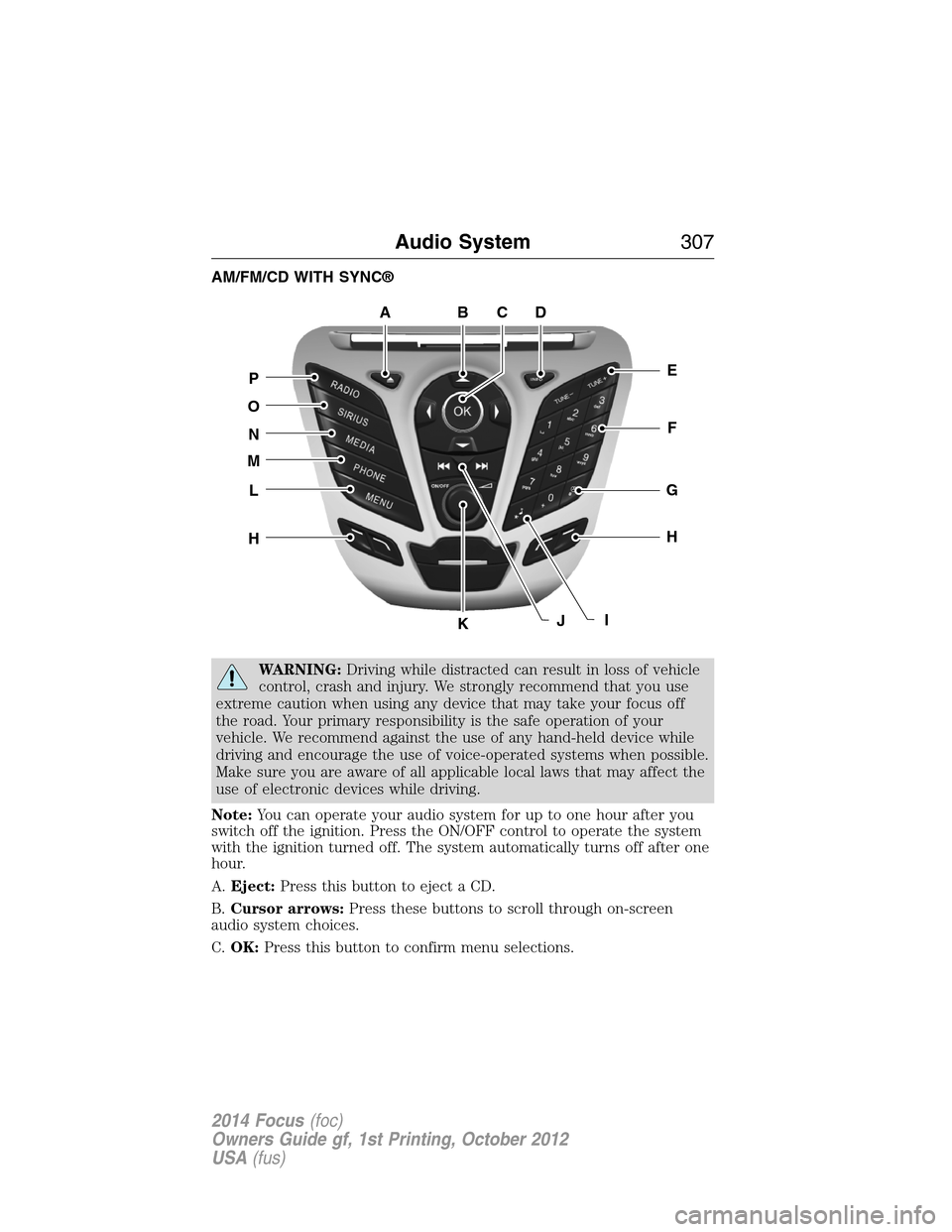
AM/FM/CD WITH SYNC®
WARNING:Driving while distracted can result in loss of vehicle
control, crash and injury. We strongly recommend that you use
extreme caution when using any device that may take your focus off
the road. Your primary responsibility is the safe operation of your
vehicle. We recommend against the use of any hand-held device while
driving and encourage the use of voice-operated systems when possible.
Make sure you are aware of all applicable local laws that may affect the
use of electronic devices while driving.
Note:You can operate your audio system for up to one hour after you
switch off the ignition. Press the ON/OFF control to operate the system
with the ignition turned off. The system automatically turns off after one
hour.
A.Eject:Press this button to eject a CD.
B.Cursor arrows:Press these buttons to scroll through on-screen
audio system choices.
C.OK:Press this button to confirm menu selections.
ABDC
E
F
G
H
JK
H
L
M
N
O
P
I
Audio System307
2014 Focus(foc)
Owners Guide gf, 1st Printing, October 2012
USA(fus)
Page 309 of 492
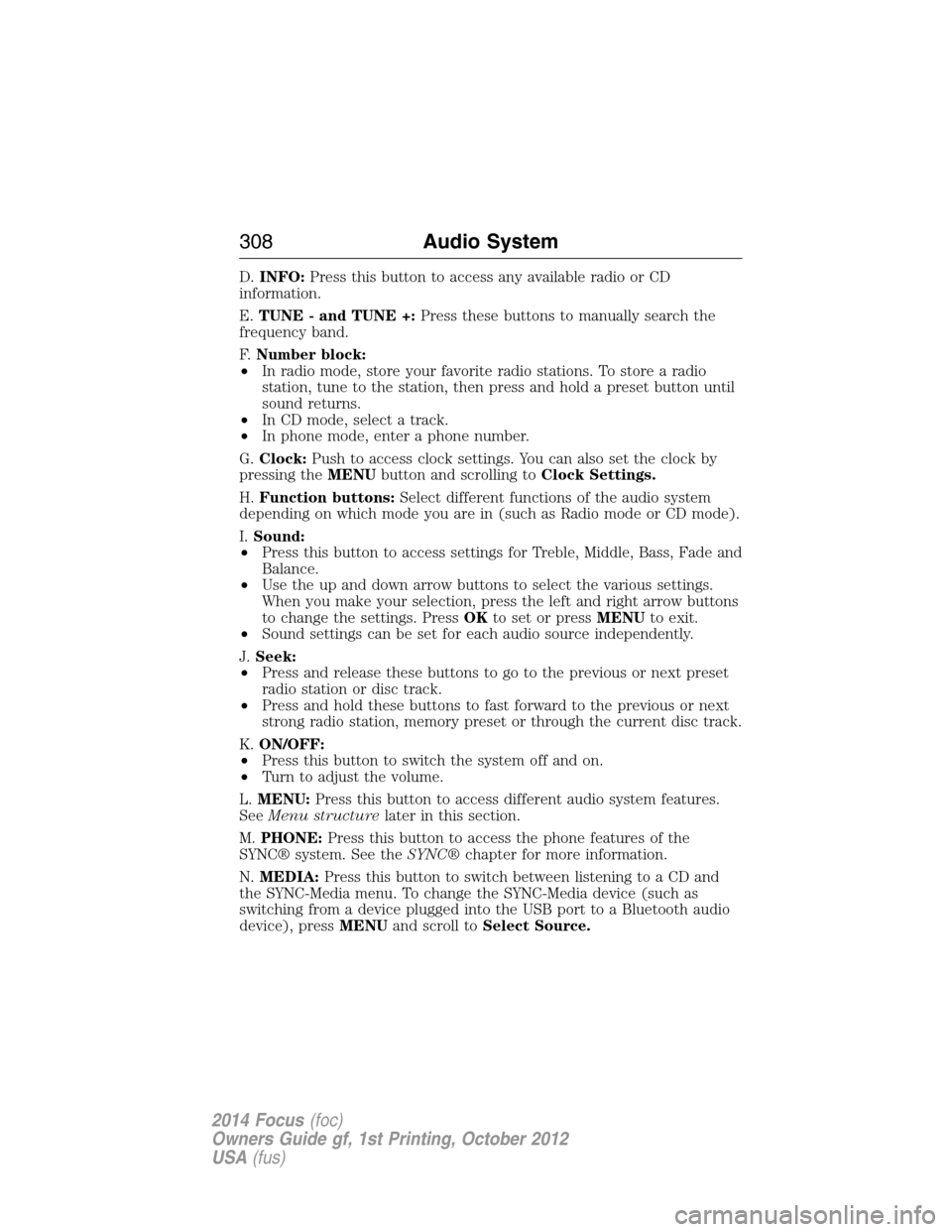
D.INFO:Press this button to access any available radio or CD
information.
E.TUNE - and TUNE +:Press these buttons to manually search the
frequency band.
F.Number block:
•In radio mode, store your favorite radio stations. To store a radio
station, tune to the station, then press and hold a preset button until
sound returns.
•In CD mode, select a track.
•In phone mode, enter a phone number.
G.Clock:Push to access clock settings. You can also set the clock by
pressing theMENUbutton and scrolling toClock Settings.
H.Function buttons:Select different functions of the audio system
depending on which mode you are in (such as Radio mode or CD mode).
I.Sound:
•Press this button to access settings for Treble, Middle, Bass, Fade and
Balance.
•Use the up and down arrow buttons to select the various settings.
When you make your selection, press the left and right arrow buttons
to change the settings. PressOKto set or pressMENUto exit.
•Sound settings can be set for each audio source independently.
J.Seek:
•Press and release these buttons to go to the previous or next preset
radio station or disc track.
•Press and hold these buttons to fast forward to the previous or next
strong radio station, memory preset or through the current disc track.
K.ON/OFF:
•Press this button to switch the system off and on.
•Turn to adjust the volume.
L.MENU:Press this button to access different audio system features.
SeeMenu structurelater in this section.
M.PHONE:Press this button to access the phone features of the
SYNC® system. See theSYNC®chapter for more information.
N.MEDIA:Press this button to switch between listening to a CD and
the SYNC-Media menu. To change the SYNC-Media device (such as
switching from a device plugged into the USB port to a Bluetooth audio
device), pressMENUand scroll toSelect Source.
308Audio System
2014 Focus(foc)
Owners Guide gf, 1st Printing, October 2012
USA(fus)
Page 310 of 492
O.SIRIUS:Press this button to listen to Sirius satellite radio.
P.RADIO:Press this button to listen to the radio or change radio
frequencies. Press the function buttons below the radio screen to select
different radio functions.
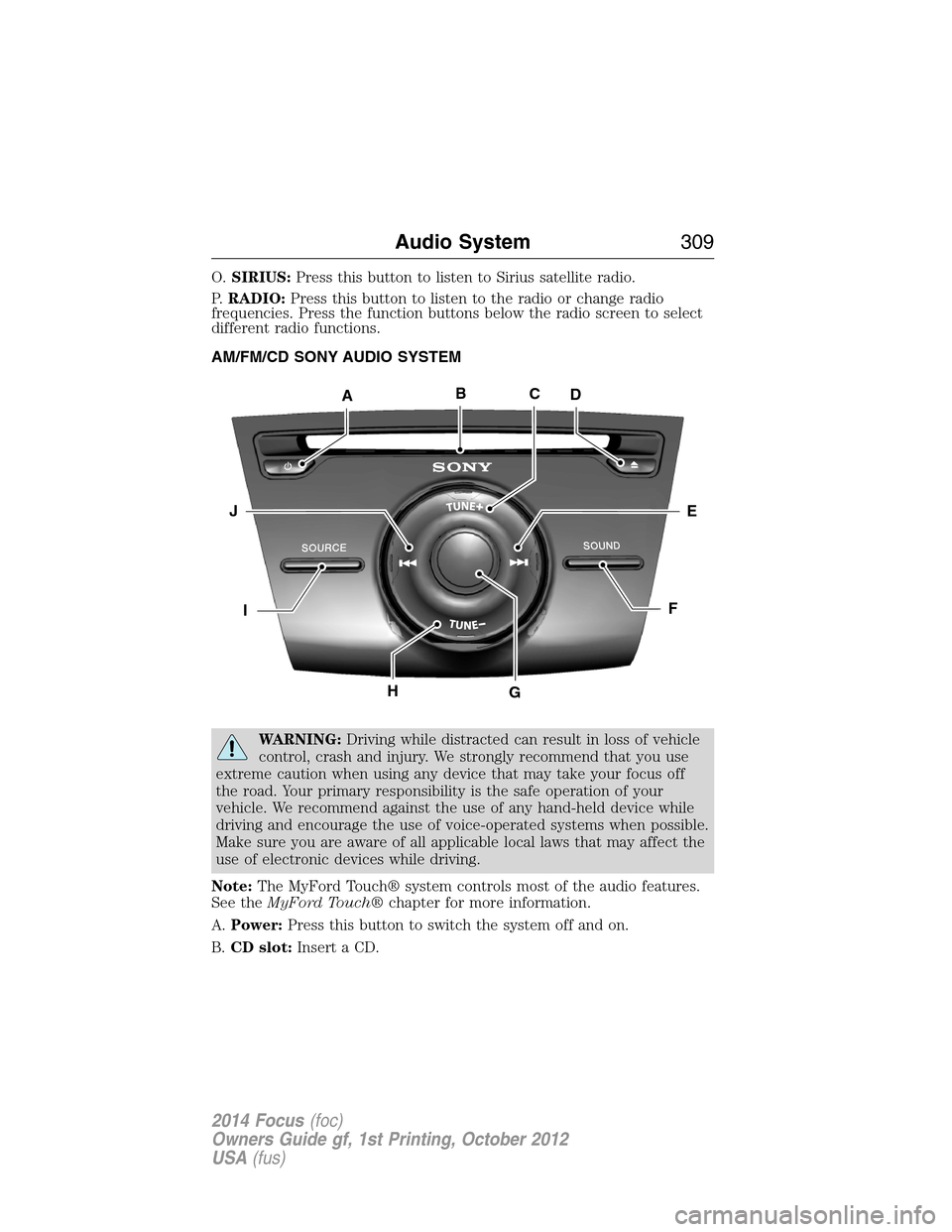
AM/FM/CD SONY AUDIO SYSTEM
WARNING:Driving while distracted can result in loss of vehicle
control, crash and injury. We strongly recommend that you use
extreme caution when using any device that may take your focus off
the road. Your primary responsibility is the safe operation of your
vehicle. We recommend against the use of any hand-held device while
driving and encourage the use of voice-operated systems when possible.
Make sure you are aware of all applicable local laws that may affect the
use of electronic devices while driving.
Note:The MyFord Touch® system controls most of the audio features.
See theMyFord Touch®chapter for more information.
A.Power:Press this button to switch the system off and on.
B.CD slot:Insert a CD.
ABCD
EJ
FI
HG
Audio System309
2014 Focus(foc)
Owners Guide gf, 1st Printing, October 2012
USA(fus)
Page 312 of 492
MENU STRUCTURE
Note:Depending on your system, some options may appear slightly
different.
PressMENU.
Press the up and down arrow buttons to scroll through the options.
Press the right arrow to enter a menu. Press the left arrow to exit a
menu.
PressOKto confirm a selection.
Radio Settings
Manual tuneUse the left and right arrows to go up or down
the frequency band
ScanSelect for a brief sampling of all available
channels.
ASTSelect to store the six strongest local stations
on the AM-AST and FM-AST frequency bands.
PTY/Set CategorySelect to have the system search by certain
music categories (such as Rock, Pop or
Country).
RBDS/RDS TextSelect to view additional broadcast data, if
available. This feature defaults to off. RBDS
must be on for you to set a category.
SIRIUS
ScanSelect for a brief sampling of all available
channels.
Show ESNSelect to view your satellite radio electronic
serial number (ESN). You need this number
when communicating with Sirius to activate,
modify or track your account.
Audio System311
2014 Focus(foc)
Owners Guide gf, 1st Printing, October 2012
USA(fus)
Page 333 of 492
Making Calls
Press the voice icon and when prompted say:
1. Say “Call
2. When the system confirms the number, say “Dial” again to initiate the
call.
To erase the last spoken digit, say “Delete” or press the left arrow
button. To erase all spoken digits, say “Clear” or press and hold the left
arrow button.
To end the call, press and hold the phone button.
Receiving Calls
When receiving a call, you can:
Answer the call by pressing this button on your steering wheel
controls.
Reject the call by pressing this button on your steering wheel
controls.
Ignore the call by doing nothing.
Phone Options during an Active Call
During an active call, you have additional menu features which become
available such as putting a call on hold, joining calls, etc. Use the arrow
buttons to scroll through the menu options.
To access:
1. Press MENU during an active call.
2. When Active Call Menu is selected, press OK.
3. Scroll to cycle through the following options:
When you select: You can:
Mute Call?Mute the call.
PrivacySwitch a call from an active hands-free
environment to your cellular phone for a
more private conversation.
Press OK when Privacy on/off appears.
(The display indicates In Privacy and the
system transfers your call.)
332SYNC®
2014 Focus(foc)
Owners Guide gf, 1st Printing, October 2012
USA(fus)
Page 341 of 492
System Settings
System Settings provide access to your Bluetooth Devices and
Advanced menu features. Use the arrow buttons to scroll through the
menu options.
The Bluetooth Devices menu allows you to add, connect, delete and set a
phone as primary as well as turn your Bluetooth feature on and off.
The Advanced menu allows you to access and set prompts, languages,
defaults, perform a master reset, install an application and view system
information.
Bluetooth Devices Menu Options
This menu allows you to add, connect, delete, set a phone as primary,
and turn Bluetooth on or off.
1. Press the phone button to enter the Phone Menu.
2. Scroll until System Settings appears and press OK.
3. Scroll until Bluetooth Devices appears and select OK.
4. Scroll to select from the following options:
If you select: You can:
Add Bluetooth
Device
*SeeUsing SYNC with your phoneearlier in
this chapter for pairing instructions.
Connect Bluetooth
DeviceConnect a previously paired
Bluetooth-enabled phone.
1. Press OK to select and view a list of
previously paired phones.
2. Scroll until the desired device is chosen,
then press OK to connect the phone.
Note:Only one device can be connected at a
time. When another phone is connected, the
previous one is disconnected.
340SYNC®
2014 Focus(foc)
Owners Guide gf, 1st Printing, October 2012
USA(fus)
Page 373 of 492
This system uses a four-corner strategy to provide quick access several
vehicle features and settings. The touchscreen provides easy interaction
with your cellular phone, multimedia, climate control and navigation
system. The corners display any active modes within those menus, such
as phone status or the climate temperature.
Note:Some features are not available while your vehicle is moving.
Note:You can also directly access the Home screen and Information
screen by pressing the Home (“house” icon) and Information (“i” icon)
buttons on your steering wheel controls
Note:Your system is equipped with a feature that allows you to access
and control audio features for 30 minutes after you switch the ignition
off (and no doors open).
PHONE
Press to select any of the following:
•Making and Receiving Calls
•Quick Dial
•Phonebook
•Call History
•Text Messaging
•Settings
NAVIGATION
Press to select any of the following:
•My Home
•Favorites
•Previous Destinations
•Point of Interest
•Emergency
•Street Address
•Intersection
•City Center
•Map
•Edit Route Cancel Route
CLIMATE
Press to select any of the following:
•Driver Settings
•Recirculated Air
•Auto
•Dual
372MyFord Touch® (If Equipped)
2014 Focus(foc)
Owners Guide gf, 1st Printing, October 2012
USA(fus)