tow FORD FOCUS 2014 3.G Owner's Manual
[x] Cancel search | Manufacturer: FORD, Model Year: 2014, Model line: FOCUS, Model: FORD FOCUS 2014 3.GPages: 492, PDF Size: 7.2 MB
Page 172 of 492
GENERAL INFORMATION
Note:Occasional brake noise is normal. If a metal-to-metal, continuous
grinding or continuous squeal sound is present, the brake linings may be
worn out. Have them inspected by an authorized dealer. If your vehicle
has continuous vibration or shudder in the steering wheel while braking,
have your vehicle inspected by an authorized dealer.
Note:Brake dust may accumulate on the wheels, even under normal
driving conditions. Some dust is inevitable as the brakes wear and does
not contribute to brake noise. See theVehicle Carechapter for wheel
cleaning instructions.
See theInstrument Clusterchapter for information on the
brake system warning light.
Wet brakes result in reduced braking efficiency. Gently press the brake
pedal a few times when driving from a car wash or standing water to dry
the brakes.
Brake Over Accelerator
In the event the accelerator pedal becomes stuck or entrapped, apply
steady and firm pressure to the brake pedal to slow your vehicle and
reduce engine power. If you experience this condition, apply the brakes
and bring your vehicle to a safe stop. Turn the engine off, shift to
positionPand apply the parking brake, then inspect the accelerator
pedal for any interferences. If none are found and the condition persists,
have your vehicle towed to the nearest authorized dealer.
Brake Assist
Brake assist detects when you brake heavily by measuring the rate at
which you press the brake pedal. It provides maximum braking efficiency
as long as you press the pedal. Brake assist can reduce stopping
distances in critical situations.
Brakes171
2014 Focus(foc)
Owners Guide gf, 1st Printing, October 2012
USA(fus)
Page 178 of 492
Using the Front and Rear Sensing System
Rear Sensing System
The rear sensors are only active when the transmission is in R (Reverse).
As the vehicle moves closer to the obstacle, the rate of the audible
warning increases. When the obstacle is fewer than 12 inches
(30 centimeters) away, the warning sounds continuously. If a stationary
or receding object is detected farther than 12 inches (30 centimeters)
from the side of the vehicle, the tone sounds for only three seconds.
Once the system detects an object approaching, the warning sounds
again.
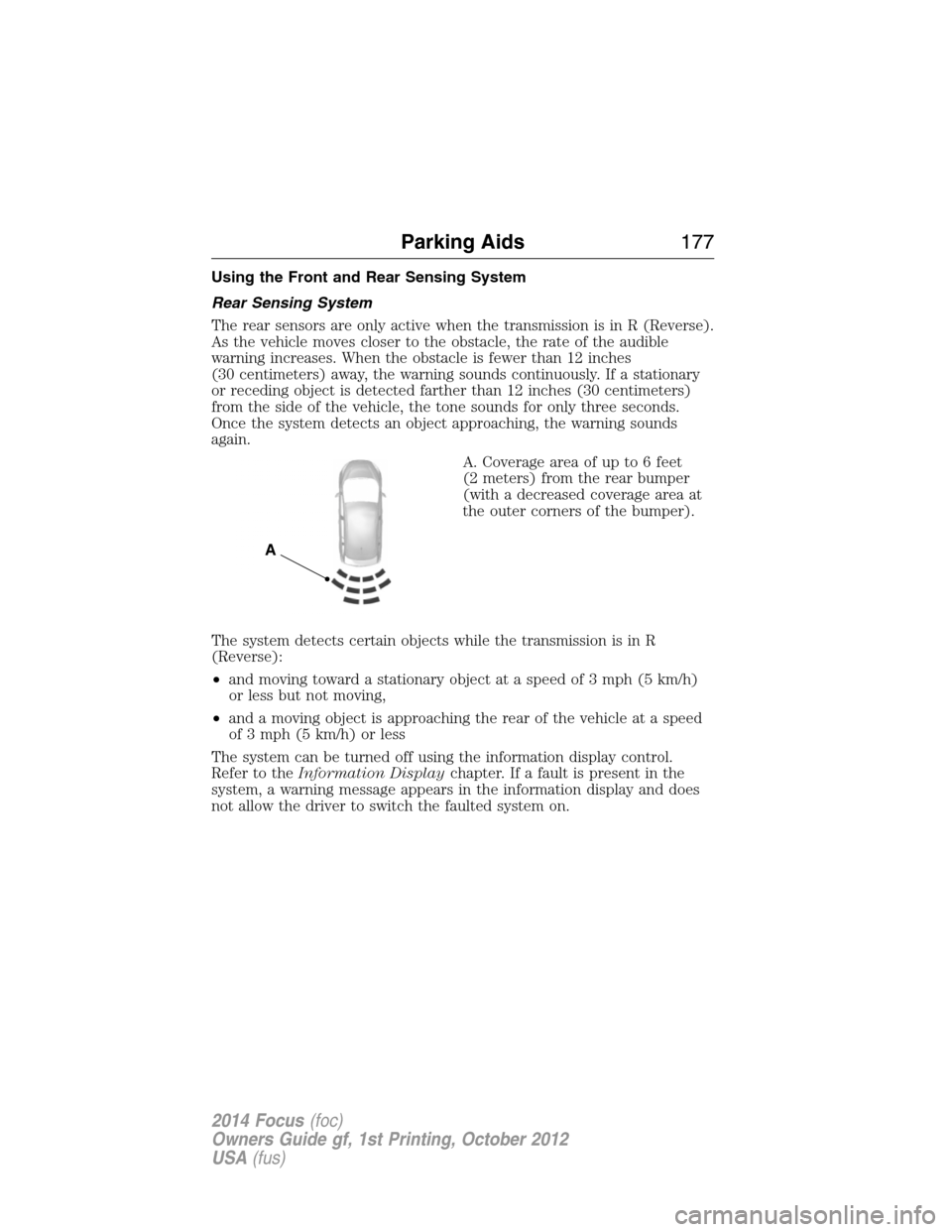
A. Coverage area of up to 6 feet
(2 meters) from the rear bumper
(with a decreased coverage area at
the outer corners of the bumper).
The system detects certain objects while the transmission is in R
(Reverse):
•and moving toward a stationary object at a speed of 3 mph (5 km/h)
or less but not moving,
•and a moving object is approaching the rear of the vehicle at a speed
of 3 mph (5 km/h) or less
The system can be turned off using the information display control.
Refer to theInformation Displaychapter. If a fault is present in the
system, a warning message appears in the information display and does
not allow the driver to switch the faulted system on.
A
Parking Aids177
2014 Focus(foc)
Owners Guide gf, 1st Printing, October 2012
USA(fus)
Page 180 of 492
Press the button to switch the
system off. It will remain off for the
entire ignition cycle.
ACTIVE PARK ASSIST (IF EQUIPPED)
WARNING:This system is designed to be a supplementary park
aid. It may not work in all conditions and is not intended to
replace the driver’s attention and judgment. The driver is responsible
for avoiding hazards and maintaining a safe distance and speed, even
when the system is in use.
Note:The driver is always responsible for controlling the vehicle,
supervising the system and intervening if required.
The system detects an available parallel parking space and automatically
steers the vehicle into the space (hands-free) while you control the
accelerator, gearshift and brakes. The system visually and/or audibly
instructs the driver to park the vehicle.
The system may not function correctly if something passes between the
front bumper and the parking space (i.e. a pedestrian or cyclist) or
if the edge of the neighboring parked vehicle is high from the ground
(i.e. a bus, tow truck or flatbed truck).
Note:The sensors may not detect objects in heavy rain or other
conditions that cause disruptive reflections.
Note:The sensors may not detect objects with surfaces that absorb
ultrasonic waves.
Note:After a tire change the system will go through a relearning
procedure. During this time the system performance may deteriorate.
Parking Aids179
2014 Focus(foc)
Owners Guide gf, 1st Printing, October 2012
USA(fus)
Page 186 of 492
Using the Rear View Camera System
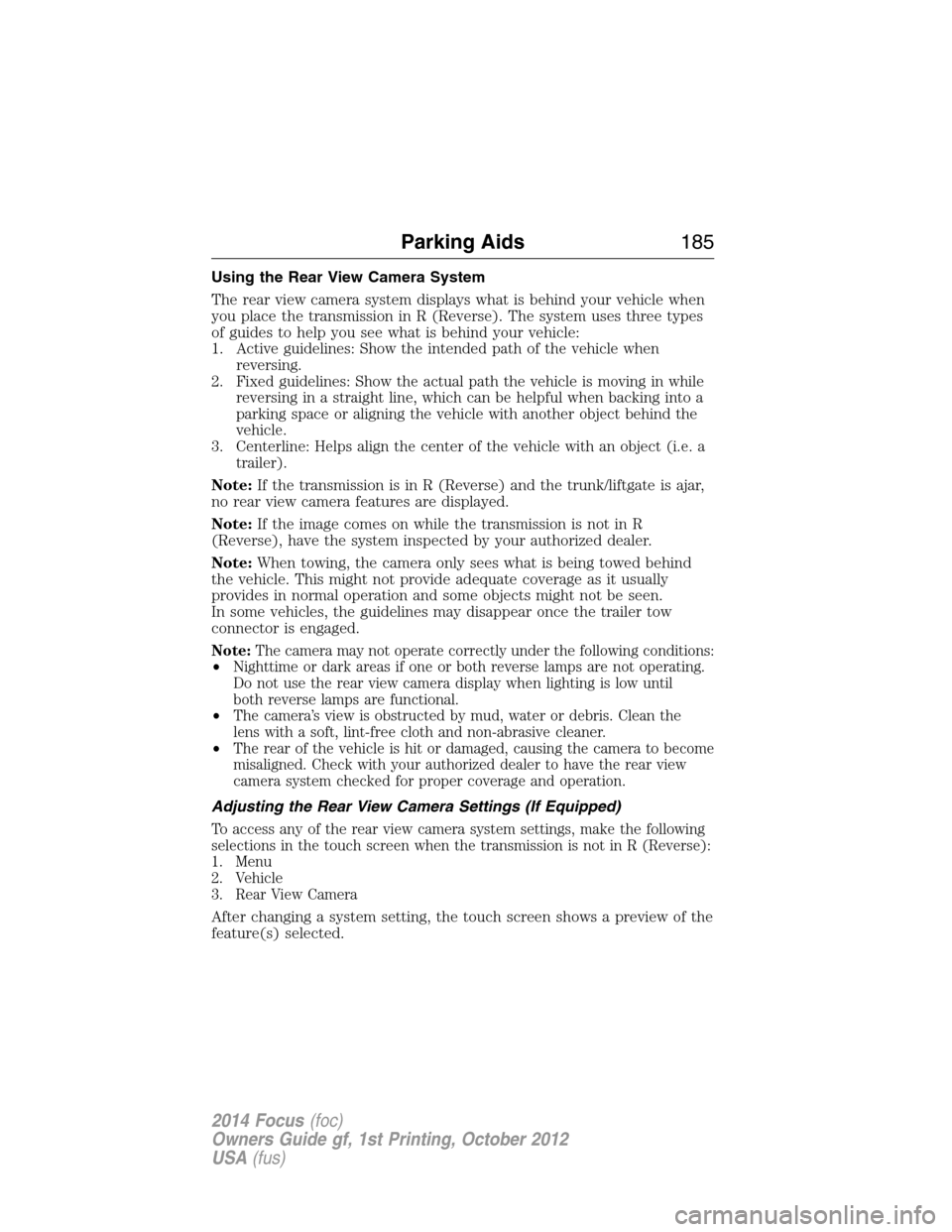
The rear view camera system displays what is behind your vehicle when
you place the transmission in R (Reverse). The system uses three types
of guides to help you see what is behind your vehicle:
1.
Active guidelines: Show the intended path of the vehicle when
reversing.
2. Fixed guidelines: Show the actual path the vehicle is moving in while
reversing in a straight line, which can be helpful when backing into a
parking space or aligning the vehicle with another object behind the
vehicle.
3. Centerline: Helps align the center of the vehicle with an object (i.e. a
trailer).
Note:If the transmission is in R (Reverse) and the trunk/liftgate is ajar,
no rear view camera features are displayed.
Note:If the image comes on while the transmission is not in R
(Reverse), have the system inspected by your authorized dealer.
Note:When towing, the camera only sees what is being towed behind
the vehicle. This might not provide adequate coverage as it usually
provides in normal operation and some objects might not be seen.
In some vehicles, the guidelines may disappear once the trailer tow
connector is engaged.
Note:The camera may not operate correctly under the following conditions:
•Nighttime or dark areas if one or both reverse lamps are not operating.
Do not use the rear view camera display when lighting is low until
both reverse lamps are functional.
•The camera’s view is obstructed by mud, water or debris. Clean the
lens with a soft, lint-free cloth and non-abrasive cleaner.
•The rear of the vehicle is hit or damaged, causing the camera to become
misaligned. Check with your authorized dealer to have the rear view
camera system checked for proper coverage and operation.
Adjusting the Rear View Camera Settings (If Equipped)
To access any of the rear view camera system settings, make the following
selections in the touch screen when the transmission is not in R (Reverse):
1. Menu
2. Vehicle
3. Rear View Camera
After changing a system setting, the touch screen shows a preview of the
feature(s) selected.
Parking Aids185
2014 Focus(foc)
Owners Guide gf, 1st Printing, October 2012
USA(fus)
Page 187 of 492
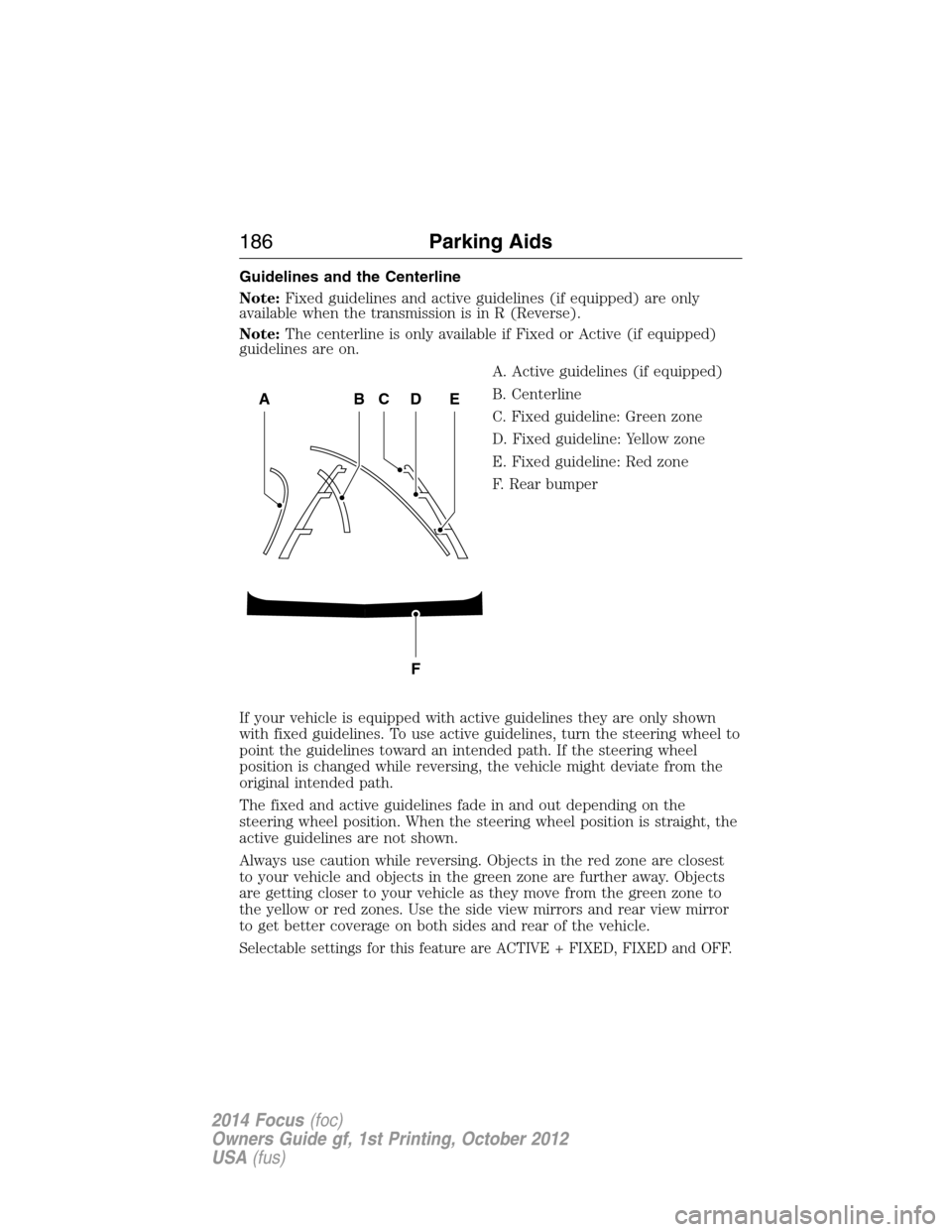
Guidelines and the Centerline
Note:Fixed guidelines and active guidelines (if equipped) are only
available when the transmission is in R (Reverse).
Note:The centerline is only available if Fixed or Active (if equipped)
guidelines are on.
A. Active guidelines (if equipped)
B. Centerline
C. Fixed guideline: Green zone
D. Fixed guideline: Yellow zone
E. Fixed guideline: Red zone
F. Rear bumper
If your vehicle is equipped with active guidelines they are only shown
with fixed guidelines. To use active guidelines, turn the steering wheel to
point the guidelines toward an intended path. If the steering wheel
position is changed while reversing, the vehicle might deviate from the
original intended path.
The fixed and active guidelines fade in and out depending on the
steering wheel position. When the steering wheel position is straight, the
active guidelines are not shown.
Always use caution while reversing. Objects in the red zone are closest
to your vehicle and objects in the green zone are further away. Objects
are getting closer to your vehicle as they move from the green zone to
the yellow or red zones. Use the side view mirrors and rear view mirror
to get better coverage on both sides and rear of the vehicle.
Selectable settings for this feature are ACTIVE + FIXED, FIXED and OFF.
ABCD
F
E
186Parking Aids
2014 Focus(foc)
Owners Guide gf, 1st Printing, October 2012
USA(fus)
Page 190 of 492
Setting a Speed
1. Accelerate to the desired speed.
2. Press and releaseSET+.
3. Take your foot off the accelerator pedal.
Changing the Set Speed
•Press and holdSET+orSET-. Release the control when you reach
the desired speed.
•Press and releaseSET+orSET-. The set speed will change in
approximately 1 mph (2 km/h) increments.
•Press the accelerator or brake pedal until you reach the desired
speed. Press and releaseSET+.
Canceling the Set Speed
PullCANtoward you and release, tap the brake pedal or press the
clutch pedal. You will not erase the set speed.
Note:When you use the clutch pedal to cancel a set speed, the engine
speed may briefly increase.
Resuming the Set Speed
PullREStoward you and release.
Switching Cruise Control Off
Note:You will erase the set speed if you switch the system off.
Press and releaseOFFor switch the ignition off.
Cruise Control189
2014 Focus(foc)
Owners Guide gf, 1st Printing, October 2012
USA(fus)
Page 201 of 492
TOWING A TRAILER
WARNING:Never tow a trailer with this vehicle. Your vehicle is
not equipped to tow. No towing packages are available through
an authorized dealer.
TRANSPORTING THE VEHICLE
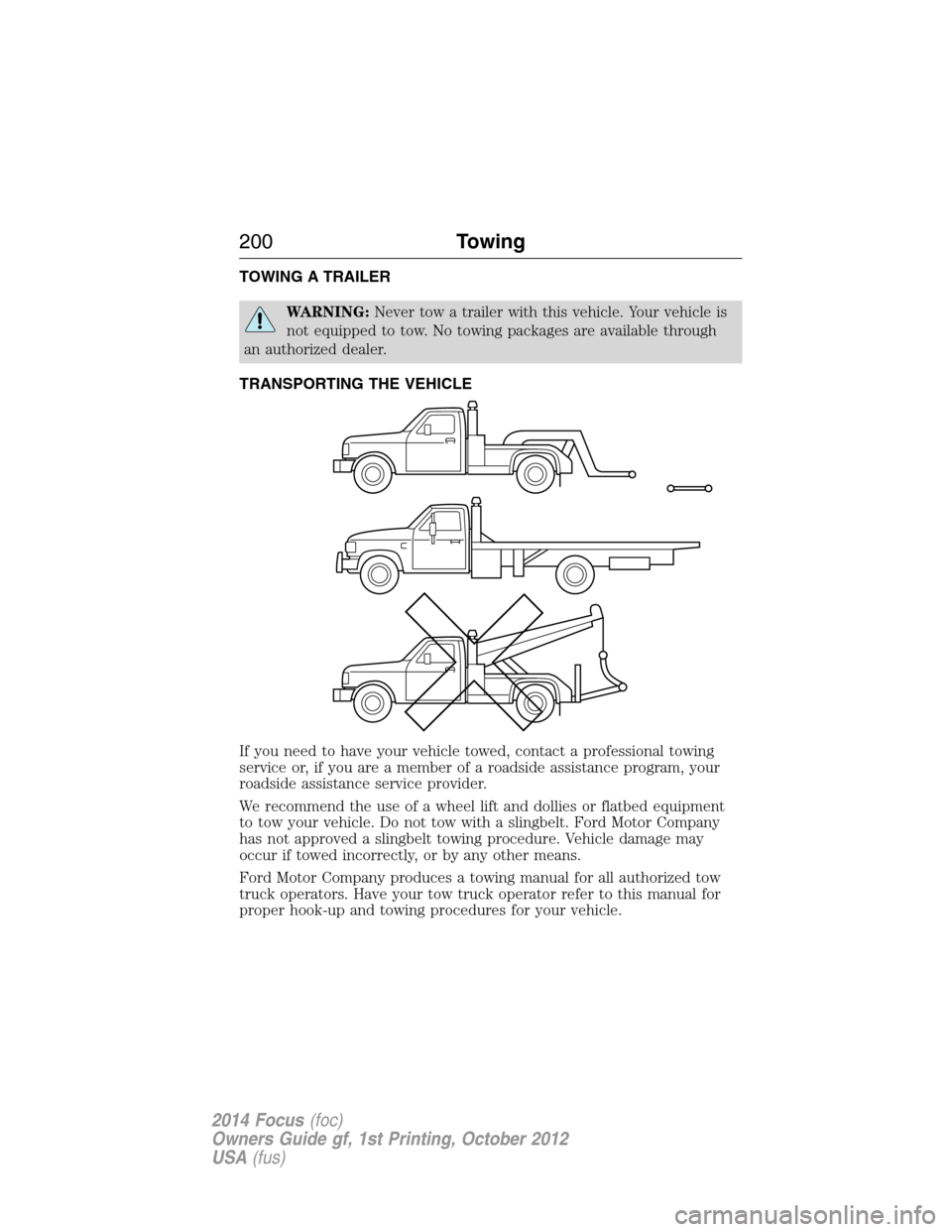
If you need to have your vehicle towed, contact a professional towing
service or, if you are a member of a roadside assistance program, your
roadside assistance service provider.
We recommend the use of a wheel lift and dollies or flatbed equipment
to tow your vehicle. Do not tow with a slingbelt. Ford Motor Company
has not approved a slingbelt towing procedure. Vehicle damage may
occur if towed incorrectly, or by any other means.
Ford Motor Company produces a towing manual for all authorized tow
truck operators. Have your tow truck operator refer to this manual for
proper hook-up and towing procedures for your vehicle.
200Towing
2014 Focus(foc)
Owners Guide gf, 1st Printing, October 2012
USA(fus)
Page 202 of 492
The front wheels (drive wheels) must be on a tow dolly when towing
your vehicle from the rear using wheel lift equipment. This prevents
damage to the transmission.
We recommend placing the rear wheels on a tow dolly when towing your
vehicle from the front using wheel lift equipment. This prevents damage
to the rear fascia.
TOWING THE VEHICLE ON FOUR WHEELS
Emergency Towing
If your vehicle becomes inoperable (without access to wheel dollies,
car-hauling trailer, or flatbed transport vehicle), it can be flat-towed
(all wheels on the ground, regardless of the powertrain and transmission
configuration) under the following conditions:
•Your vehicle is facing forward for towing in a forward direction.
•Place the transmission in positionN.SeeAutomatic transmissionin
theTransmissionchapter if you cannot move the transmission
intoN.
•Maximum speed is 35 mph (56 km/h).
•Maximum distance is 50 miles (80 kilometers).
Recreational Towing
Note:Put your climate control system in recirculated air mode to
prevent exhaust fumes from entering your vehicle. Refer to theClimate
Controlschapter for more information.
Note:You must tow your vehicle in the forward direction to avoid
damage to the internal transmission components. In addition, we
recommend you follow the instructions provided by the aftermarket
manufacturer of the towing equipment, if provided.
Follow these guidelines if you have a need for recreational towing, such
as towing your vehicle behind a motorhome. We designed these
guidelines to prevent damage to your transmission.
Towing201
2014 Focus(foc)
Owners Guide gf, 1st Printing, October 2012
USA(fus)
Page 203 of 492
Before you tow your vehicle, follow these directions for your specific
vehicle configurationafterit is hooked-up to the recreational vehicle or
tow dolly:
Vehicles with a Manual Transmission
1. Release the parking brake.
2. Move the gearshift to the neutral position.
•The maximum towing speed is 70 mph (113 km/h).
•There is no limitation on towing distance.
Vehicles with an Automatic Transmission but No Push Button Start
System
Note:Theremustbe battery power to properly move the transmission’s
internal components to positionNin Step 3. In addition, moving the
gearshift to positionNwithout first turning the ignition to the on (II)
position limits the towing capability to 35 mph (56 km/h) and 50 miles
(80 kilometers).
1. Release the parking brake.
2. Turn the ignition to the on (II) position.
3. Press the brake pedal, then move the gearshift to positionN.
4. Wait for TRANSMISSION READY to appear in the multi-function
display, then turn the ignition to the off (0) position and release
the brake pedal.
5. Disconnect the negative (black) cable from the battery.
(The anti-theft system does not function until the battery cable is
reconnected.) SeeChanging the vehicle batteryin the
Maintenancechapter when disconnecting and reconnecting the
battery cable.
•The maximum towing speed is 70 mph (113 km/h).
•There is no limitation on towing distance.
When done towing, start the engine within 15 minutes of reconnecting
the battery cable. When reconnecting that cable, tighten it until it is
snug against the terminal. Be careful not to over-tighten.
202Towing
2014 Focus(foc)
Owners Guide gf, 1st Printing, October 2012
USA(fus)
Page 204 of 492
Vehicles with an Automatic Transmission and Push Button Start
System
Note:Theremustbe battery power to properly move the transmission’s
internal components to positionNin Step 3. In addition, moving the
gearshift to positionNwithout first turning the ignition to the on (II)
position limits the towing capability to 35 mph (56 km/h) and 50 miles
(80 kilometers).
1. Release the parking brake.
2. Activate the ignition by pressing the START button, butnotapplying
the brake pedal.
3. Press the brake pedal, and then move the gearshift to positionN.
Release the brake pedal.
4. Wait for TRANSMISSION READY to appear in the multi-function
display, and then switch the ignition off by pressing the START
button.
5. Disconnect the negative (black) cable from the battery. (You need
the door key [inside the Intelligent Access Key] to lock and unlock
doors when the battery cable is disconnected. In addition, the
anti-theft system does not function until the battery cable is
reconnected.) SeeChanging the vehicle batteryin the
Maintenancechapter when disconnecting and reconnecting the
battery cable.
•The maximum towing speed is 70 mph (113 km/h).
•There is no limitation on towing distance.
When done towing, start the engine within 15 minutes of reconnecting
the battery cable. When reconnecting that cable, tighten it until it is
snug against the terminal. Be careful not to over-tighten.
Towing203
2014 Focus(foc)
Owners Guide gf, 1st Printing, October 2012
USA(fus)