brake FORD FOCUS 2015 3.G Owner's Manual
[x] Cancel search | Manufacturer: FORD, Model Year: 2015, Model line: FOCUS, Model: FORD FOCUS 2015 3.GPages: 453, PDF Size: 5.32 MB
Page 129 of 453
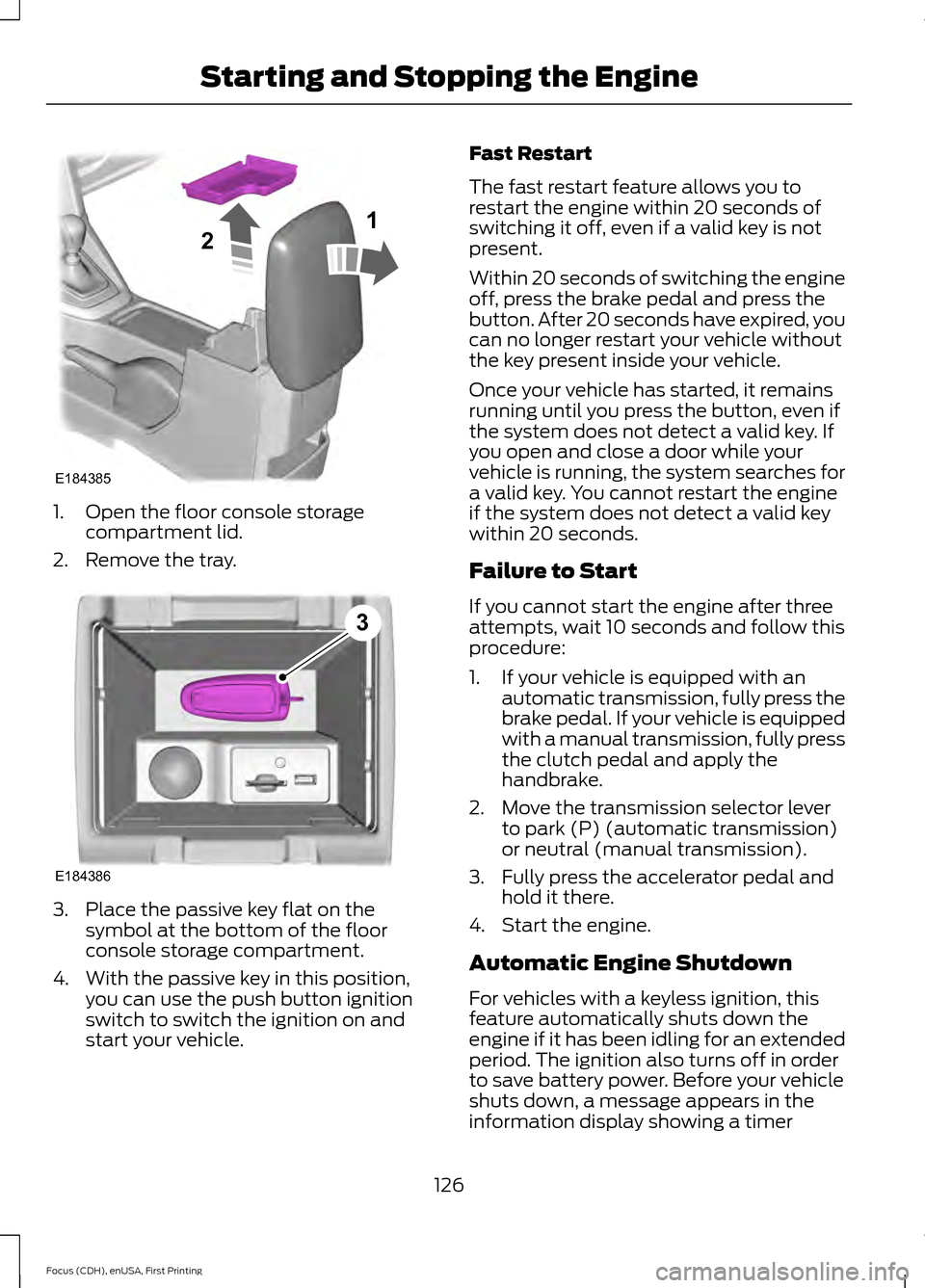
1. Open the floor console storage
compartment lid.
2. Remove the tray. 3. Place the passive key flat on the
symbol at the bottom of the floor
console storage compartment.
4. With the passive key in this position, you can use the push button ignition
switch to switch the ignition on and
start your vehicle. Fast Restart
The fast restart feature allows you to
restart the engine within 20 seconds of
switching it off, even if a valid key is not
present.
Within 20 seconds of switching the engine
off, press the brake pedal and press the
button. After 20 seconds have expired, you
can no longer restart your vehicle without
the key present inside your vehicle.
Once your vehicle has started, it remains
running until you press the button, even if
the system does not detect a valid key. If
you open and close a door while your
vehicle is running, the system searches for
a valid key. You cannot restart the engine
if the system does not detect a valid key
within 20 seconds.
Failure to Start
If you cannot start the engine after three
attempts, wait 10 seconds and follow this
procedure:
1. If your vehicle is equipped with an
automatic transmission, fully press the
brake pedal. If your vehicle is equipped
with a manual transmission, fully press
the clutch pedal and apply the
handbrake.
2. Move the transmission selector lever to park (P) (automatic transmission)
or neutral (manual transmission).
3. Fully press the accelerator pedal and hold it there.
4. Start the engine.
Automatic Engine Shutdown
For vehicles with a keyless ignition, this
feature automatically shuts down the
engine if it has been idling for an extended
period. The ignition also turns off in order
to save battery power. Before your vehicle
shuts down, a message appears in the
information display showing a timer
126
Focus (CDH), enUSA, First Printing Starting and Stopping the EngineE184385
21 E184386
3
Page 130 of 453
counting down from 30 seconds. If you do
not intervene within 30 seconds, your
vehicle shuts down. Another message
appears in the information display to
inform you that your vehicle has shut down
in order to save fuel. Start your vehicle as
you normally do.
Automatic Engine Shutdown Override
Note:
You cannot permanently switch off
the automatic shutdown feature. When you
switch it off temporarily, it turns on at the
next ignition cycle.
You can stop the shutdown, or reset the
timer, at any point before the 30-second
countdown has expired by doing any of the
following:
• You can reset the timer by interacting
with your vehicle (such as pressing the
brake pedal or accelerator pedal).
• You can temporarily switch off the
shutdown feature any time the ignition
is on (for the current ignition cycle
only). Use the information display to
do so. See Information Displays
(page 96).
• During the countdown before
shutdown, you are prompted to press
OK or RESET (depending on your type
of information display) to temporarily
switch the feature off (for the current
ignition cycle only).
Stopping the Engine When Your
Vehicle is Stationary
Vehicles with an Ignition Key
1. Shift into park (P).
2. Turn the key to position
0.
3. Apply the parking brake.
Vehicles with Keyless Start
1. Shift into park (P).
2. Press the button once. 3. Apply the parking brake.
Note:
This switches off the ignition, all
electrical circuits, warning lamps and
indicators.
Note: If the engine is idling for 30 minutes,
the ignition and engine automatically shut
down.
Stopping the Engine When Your
Vehicle is Moving WARNING
Switching off the engine when the
vehicle is still moving will result in a
loss of brake and steering assistance.
The steering will not lock, but higher effort
will be required. When the ignition is
switched off, some electrical circuits,
including air bags, warning lamps and
indicators may also be off. If the ignition
was turned off accidentally, you can shift
into neutral (N) and re-start the engine. Vehicles with an Ignition Key
1.
Shift into neutral and use the brakes to
bring your vehicle to a safe stop.
2. When your vehicle has stopped, shift into park (P) and turn the key to
position
0.
3. Apply the parking brake.
Vehicles with Keyless Start
1. Shift into neutral and use the brakes to
bring your vehicle to a safe stop.
2. When your vehicle has stopped, shift into park (P).
3. Press and hold the button for one second, or press it three times within
two seconds.
4. Apply the parking brake.
127
Focus (CDH), enUSA, First Printing Starting and Stopping the Engine
Page 133 of 453
AUTO-START-STOP (If Equipped)
The system reduces fuel consumption and
CO2 emissions by shutting down the
engine when your vehicle is idling, for
example at traffic lights. WARNINGS
The engine may restart
automatically if required by the
system.
Switch the ignition off before
opening the hood or performing any
maintenance. Failure to do so may
result in serious injuries due to automatic
engine restart. Always switch the ignition off before
leaving your vehicle, as the system
may have turned the engine off, but
the ignition will still be on and automatic
restart may occur. Note:
The auto-start-stop indicator
illuminates green when the engine shuts
down. See Warning Lamps and Indicators
(page 92). It flashes amber with a message
when the driver needs to shift to neutral or
press a pedal. See Information Messages
(page
99). If it illuminates grey, the system
is not available. Using Auto Start-Stop With a
Manual Transmission
To Stop the Engine
1. Stop your vehicle.
2. Shift into neutral.
3. Release the clutch and accelerator
pedal. To Re-Start the Engine
Press the clutch pedal.
Note:
To obtain maximum benefit from the
system, move the transmission selector
lever to neutral and release the clutch pedal
during any stop of longer than three
seconds.
Note: Auto Start-Stop also comes with
stall recovery. If you fully press the clutch
pedal after stalling the engine, the engine
automatically restarts.
Using Auto Start-Stop With an
Automatic Transmission
To Stop the Engine
1. Stop your vehicle in drive (D).
2. Release the accelerator pedal.
3. Maintain pressure on the brake pedal.
Note: If your vehicle is in an engine off Auto
Start-Stop state and you move the
transmission to reverse (R) while the brake
pedal is not pressed, a message will appear
on your instrument cluster. Press the brake
pedal within 10 seconds or you will need to
shift to park (P). A manual restart will be
required.
Note: If the Shift to P, Restart Engine
message appears and the amber Auto
Start-Stop indicator flashes, automatic
restart is not available. You must restart
your vehicle manually.
To Re-Start the Engine
Release the brake pedal or press the
accelerator pedal.
Limitations of Use
The system may not shut down the engine
under certain conditions, for example:
• Low engine operating temperature.
• To maintain the interior climate.
• The battery charge level is low.
130
Focus (CDH), enUSA, First Printing Unique Driving Characteristics
Page 144 of 453
MANUAL TRANSMISSION -
2.0L DURATEC-HE (MI4)
Using the Clutch
Note:
Failure to fully depress the clutch
pedal to the floor may cause increased shift
efforts, prematurely wear transmission
components or damage the transmission.
Note: Do not drive with your foot resting on
the clutch pedal or use the clutch pedal to
hold your vehicle at a standstill while
waiting on a hill. These actions will reduce
the life of the clutch and could nullify a
clutch warranty claim. Manual transmission vehicles have a
starter interlock that prevents cranking the
engine unless the clutch pedal is fully
depressed.
Starting Your Vehicle
WARNING
Make sure the floor mat is positioned
correctly so that it does not interfere
with the full extension of the clutch
pedal. 1.
Make sure the parking brake is fully set
and shift the gearshift lever to the
neutral position.
2. Fully depress the clutch pedal then start the engine. 3. Press the brake pedal and shift the
gearshift lever to first or reverse gear.
4. Release the parking brake and slowly release the clutch pedal while slowly
pressing on the accelerator.
During each shift, make sure you fully
depress the clutch pedal.
Recommended Shift Speeds
Note: Do not shift the gearshift lever to first
gear when your vehicle is moving faster than
15 mph (24 km/h). This will damage the
clutch.
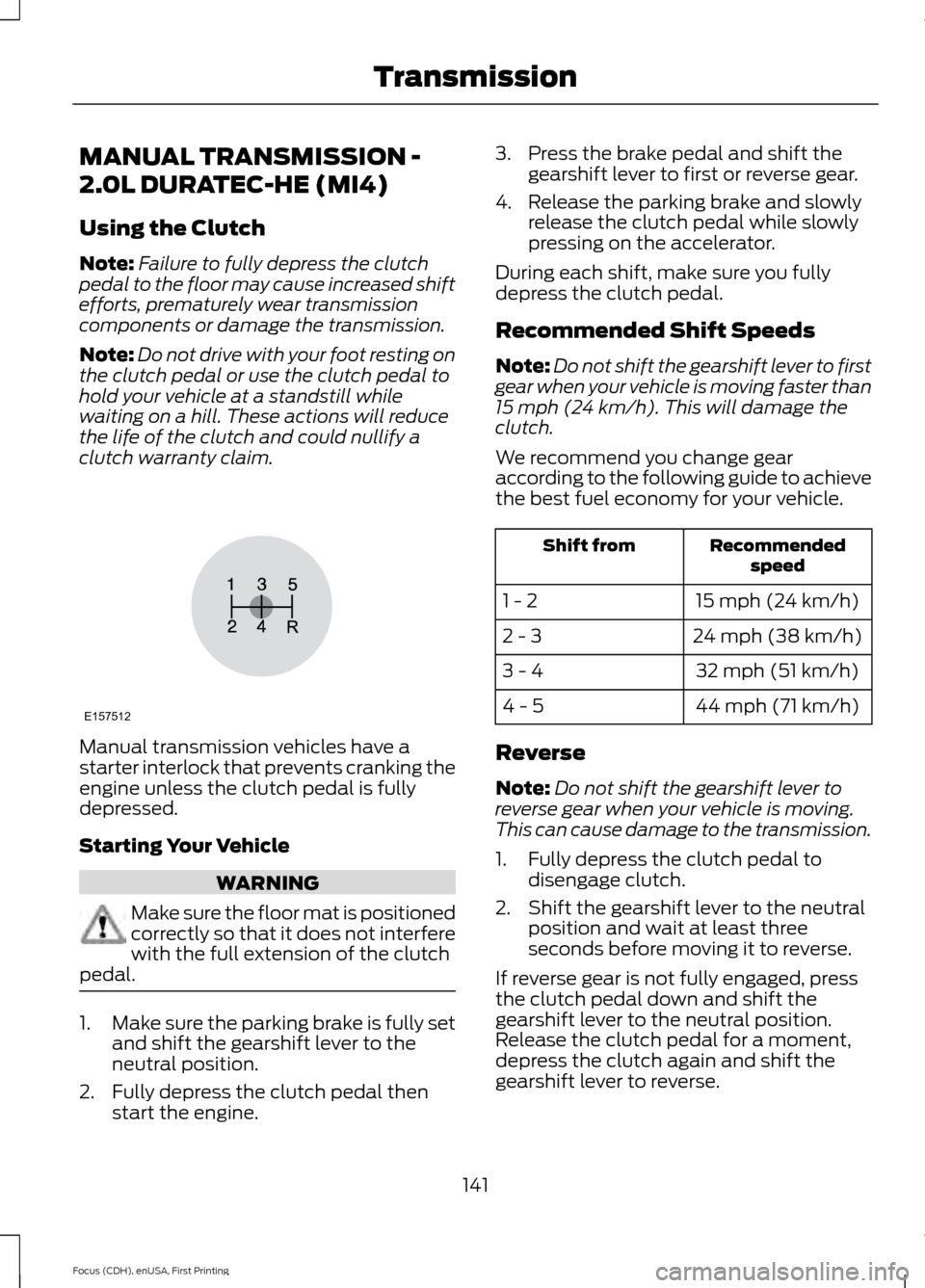
We recommend you change gear
according to the following guide to achieve
the best fuel economy for your vehicle. Recommended
speed
Shift from
15 mph (24 km/h)
1 - 2
24 mph (38 km/h)
2 - 3
32 mph (51 km/h)
3 - 4
44 mph (71 km/h)
4 - 5
Reverse
Note: Do not shift the gearshift lever to
reverse gear when your vehicle is moving.
This can cause damage to the transmission.
1. Fully depress the clutch pedal to disengage clutch.
2. Shift the gearshift lever to the neutral position and wait at least three
seconds before moving it to reverse.
If reverse gear is not fully engaged, press
the clutch pedal down and shift the
gearshift lever to the neutral position.
Release the clutch pedal for a moment,
depress the clutch again and shift the
gearshift lever to reverse.
141
Focus (CDH), enUSA, First Printing TransmissionE157512
Page 145 of 453
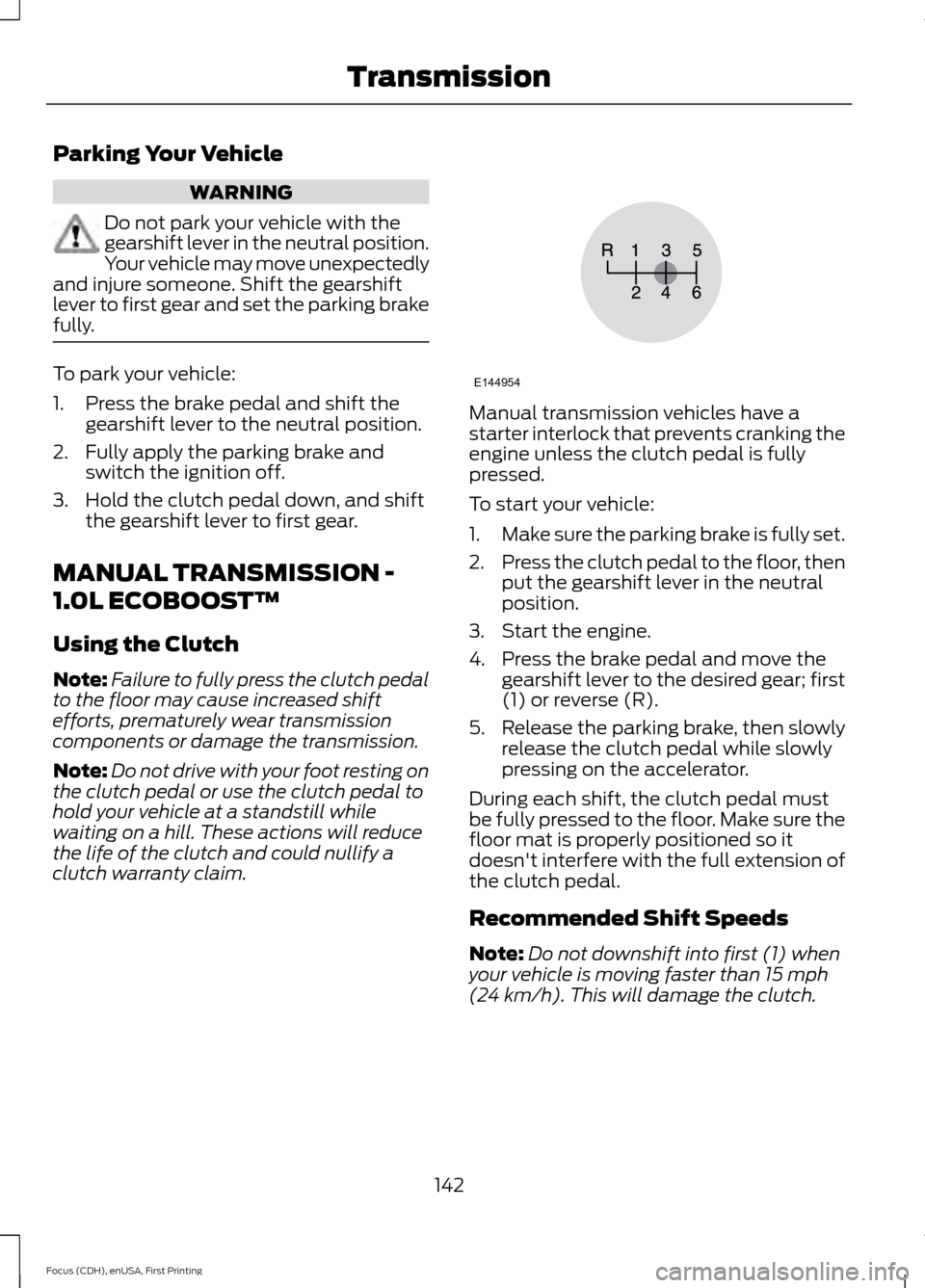
Parking Your Vehicle
WARNING
Do not park your vehicle with the
gearshift lever in the neutral position.
Your vehicle may move unexpectedly
and injure someone. Shift the gearshift
lever to first gear and set the parking brake
fully. To park your vehicle:
1. Press the brake pedal and shift the
gearshift lever to the neutral position.
2. Fully apply the parking brake and switch the ignition off.
3. Hold the clutch pedal down, and shift the gearshift lever to first gear.
MANUAL TRANSMISSION -
1.0L ECOBOOST™
Using the Clutch
Note: Failure to fully press the clutch pedal
to the floor may cause increased shift
efforts, prematurely wear transmission
components or damage the transmission.
Note: Do not drive with your foot resting on
the clutch pedal or use the clutch pedal to
hold your vehicle at a standstill while
waiting on a hill. These actions will reduce
the life of the clutch and could nullify a
clutch warranty claim. Manual transmission vehicles have a
starter interlock that prevents cranking the
engine unless the clutch pedal is fully
pressed.
To start your vehicle:
1.
Make sure the parking brake is fully set.
2. Press the clutch pedal to the floor, then
put the gearshift lever in the neutral
position.
3. Start the engine.
4. Press the brake pedal and move the gearshift lever to the desired gear; first
(1) or reverse (R).
5. Release the parking brake, then slowly
release the clutch pedal while slowly
pressing on the accelerator.
During each shift, the clutch pedal must
be fully pressed to the floor. Make sure the
floor mat is properly positioned so it
doesn't interfere with the full extension of
the clutch pedal.
Recommended Shift Speeds
Note: Do not downshift into first (1) when
your vehicle is moving faster than 15 mph
(24 km/h). This will damage the clutch.
142
Focus (CDH), enUSA, First Printing TransmissionE144954
Page 146 of 453
Recommended upshifts (for best fuel
economy) when accelerating
Shift from:15 mph (24 km/h)
1 - 2
26 mph (42 km/h)
2 - 3
38 mph (61 km/h)
3 - 4
42 mph (67 km/h)
4 - 5
50 mph (80 km/h)
5 - 6
Reverse
Note: Make sure that your vehicle is at a
complete stop before you shift into reverse
(R). Failure to do so may damage the
transmission.
1. Press the clutch pedal to the floor to disengage clutch.
2. Move the gearshift lever into the neutral position and wait at least three
seconds before shifting into reverse
(R).
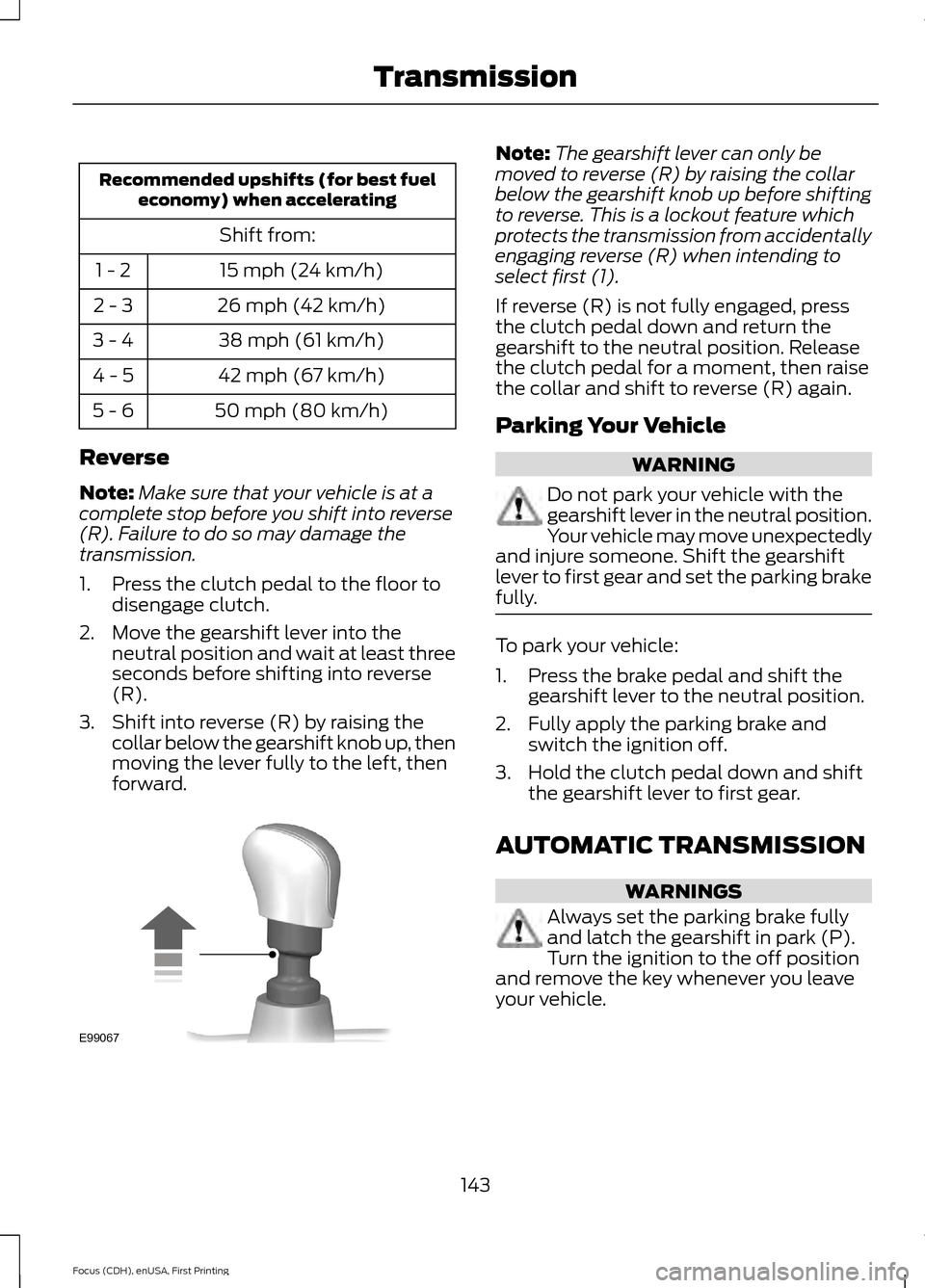
3. Shift into reverse (R) by raising the collar below the gearshift knob up, then
moving the lever fully to the left, then
forward. Note:
The gearshift lever can only be
moved to reverse (R) by raising the collar
below the gearshift knob up before shifting
to reverse. This is a lockout feature which
protects the transmission from accidentally
engaging reverse (R) when intending to
select first (1).
If reverse (R) is not fully engaged, press
the clutch pedal down and return the
gearshift to the neutral position. Release
the clutch pedal for a moment, then raise
the collar and shift to reverse (R) again.
Parking Your Vehicle WARNING
Do not park your vehicle with the
gearshift lever in the neutral position.
Your vehicle may move unexpectedly
and injure someone. Shift the gearshift
lever to first gear and set the parking brake
fully. To park your vehicle:
1. Press the brake pedal and shift the
gearshift lever to the neutral position.
2. Fully apply the parking brake and switch the ignition off.
3. Hold the clutch pedal down and shift the gearshift lever to first gear.
AUTOMATIC TRANSMISSION WARNINGS
Always set the parking brake fully
and latch the gearshift in park (P).
Turn the ignition to the off position
and remove the key whenever you leave
your vehicle.
143
Focus (CDH), enUSA, First Printing TransmissionE99067
Page 147 of 453
WARNINGS
Do not apply the brake pedal and
accelerator pedal simultaneously.
Applying both pedals simultaneously
for more than three seconds will limit
engine rpm, which may result in difficulty
maintaining speed in traffic and could lead
to serious injury. Understanding the Positions of
Your Automatic Transmission
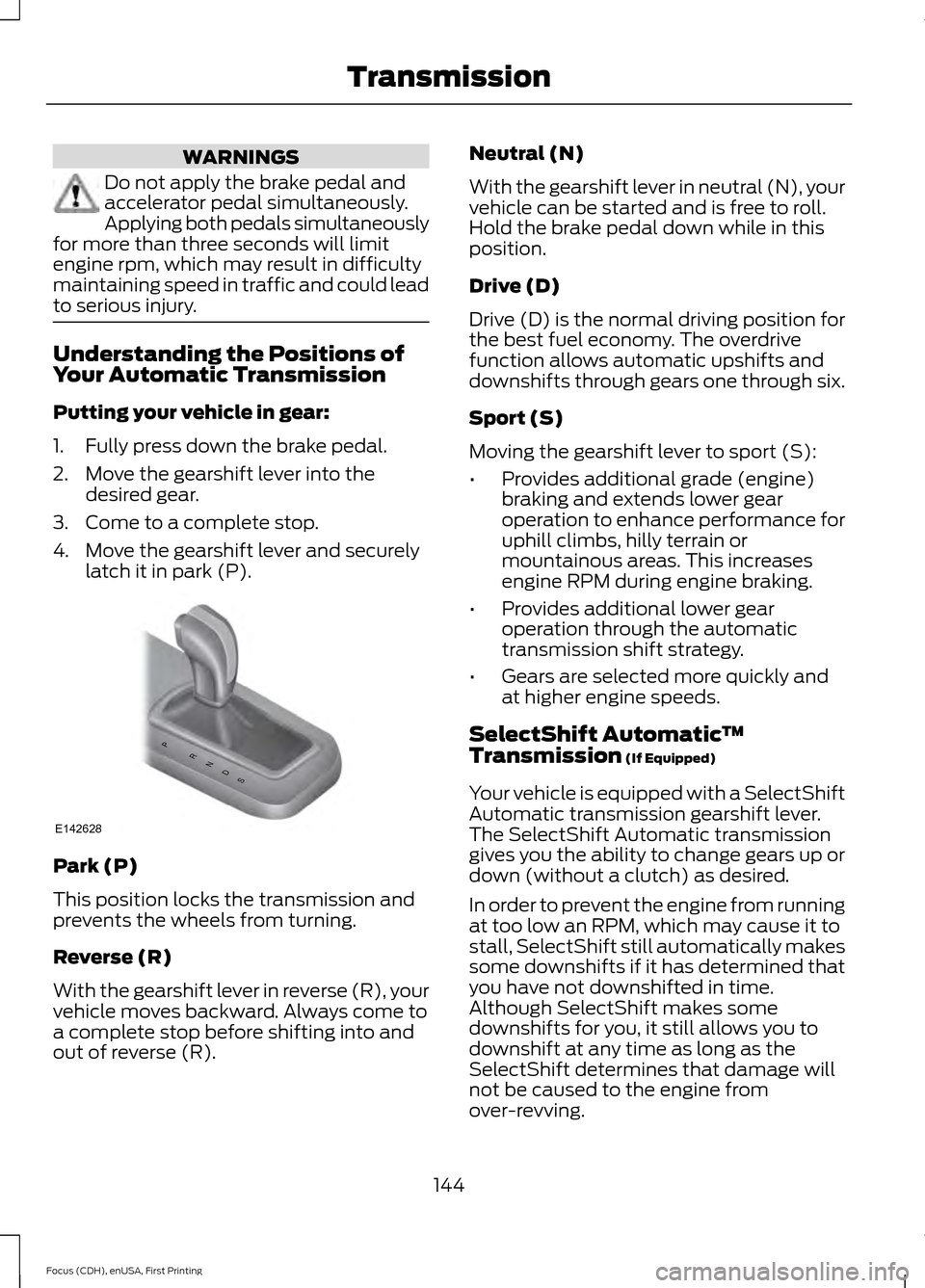
Putting your vehicle in gear:
1. Fully press down the brake pedal.
2. Move the gearshift lever into the
desired gear.
3. Come to a complete stop.
4. Move the gearshift lever and securely latch it in park (P). Park (P)
This position locks the transmission and
prevents the wheels from turning.
Reverse (R)
With the gearshift lever in reverse (R), your
vehicle moves backward. Always come to
a complete stop before shifting into and
out of reverse (R). Neutral (N)
With the gearshift lever in neutral (N), your
vehicle can be started and is free to roll.
Hold the brake pedal down while in this
position.
Drive (D)
Drive (D) is the normal driving position for
the best fuel economy. The overdrive
function allows automatic upshifts and
downshifts through gears one through six.
Sport (S)
Moving the gearshift lever to sport (S):
•
Provides additional grade (engine)
braking and extends lower gear
operation to enhance performance for
uphill climbs, hilly terrain or
mountainous areas. This increases
engine RPM during engine braking.
• Provides additional lower gear
operation through the automatic
transmission shift strategy.
• Gears are selected more quickly and
at higher engine speeds.
SelectShift Automatic ™
Transmission (If Equipped)
Your vehicle is equipped with a SelectShift
Automatic transmission gearshift lever.
The SelectShift Automatic transmission
gives you the ability to change gears up or
down (without a clutch) as desired.
In order to prevent the engine from running
at too low an RPM, which may cause it to
stall, SelectShift still automatically makes
some downshifts if it has determined that
you have not downshifted in time.
Although SelectShift makes some
downshifts for you, it still allows you to
downshift at any time as long as the
SelectShift determines that damage will
not be caused to the engine from
over-revving.
144
Focus (CDH), enUSA, First Printing TransmissionPRNDS
E142628
Page 148 of 453
Note:
Engine damage may occur if you
maintain excessive engine revving without
shifting.
SelectShift does not automatically upshift,
even if the engine is approaching the RPM
limit. It must be shifted manually by
pressing the + button.
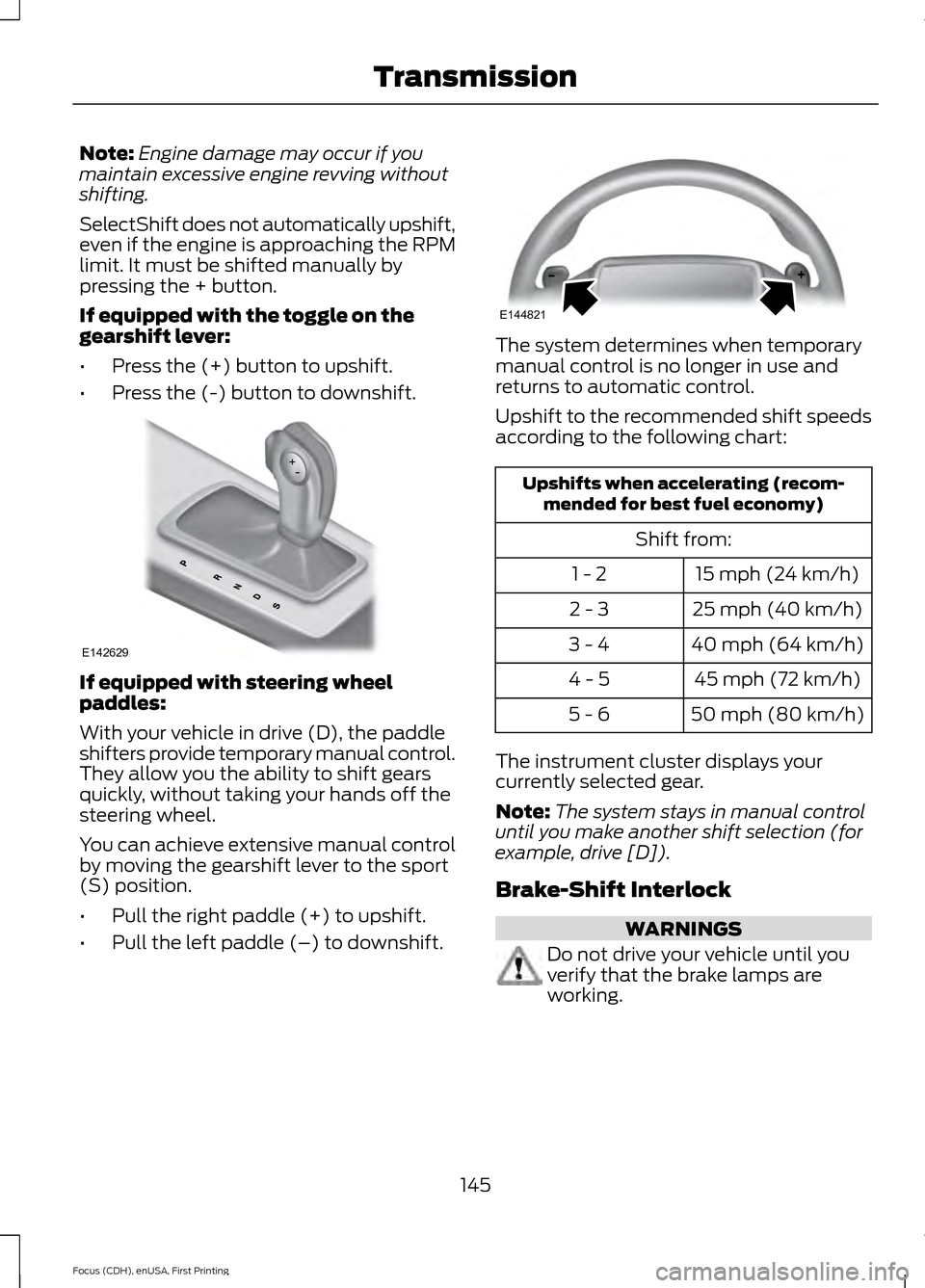
If equipped with the toggle on the
gearshift lever:
• Press the (+) button to upshift.
• Press the (-) button to downshift. If equipped with steering wheel
paddles:
With your vehicle in drive (D), the paddle
shifters provide temporary manual control.
They allow you the ability to shift gears
quickly, without taking your hands off the
steering wheel.
You can achieve extensive manual control
by moving the gearshift lever to the sport
(S) position.
•
Pull the right paddle (+) to upshift.
• Pull the left paddle (–) to downshift. The system determines when temporary
manual control is no longer in use and
returns to automatic control.
Upshift to the recommended shift speeds
according to the following chart:
Upshifts when accelerating (recom-
mended for best fuel economy)
Shift from:15 mph (24 km/h)
1 - 2
25 mph (40 km/h)
2 - 3
40 mph (64 km/h)
3 - 4
45 mph (72 km/h)
4 - 5
50 mph (80 km/h)
5 - 6
The instrument cluster displays your
currently selected gear.
Note: The system stays in manual control
until you make another shift selection (for
example, drive [D]).
Brake-Shift Interlock WARNINGS
Do not drive your vehicle until you
verify that the brake lamps are
working.
145
Focus (CDH), enUSA, First Printing TransmissionE142629 E144821
Page 149 of 453
WARNINGS
When doing this procedure, you will
be taking your vehicle out of park (P)
which means your vehicle can roll
freely. To avoid unwanted vehicle
movement, always fully set the parking
brake prior to doing this procedure. Use
wheel chocks if appropriate. If you fully release the parking brake
and the brake warning lamp remains
illuminated, the brakes may not be
working properly. See your authorized
dealer. Note:
For some markets this feature will be
disabled.
Your vehicle is equipped with a brake-shift
interlock feature that prevents moving the
gearshift lever from park (P) when the
ignition is in the on position and the brake
pedal is not pressed.
If you cannot move the gearshift lever out
of park (P) position with the ignition in the
on position and the brake pedal pressed,
a malfunction may have occurred. It is
possible that a fuse has blown or your
vehicle ’s brake lamps are not operating
properly. See Fuse Specification Chart
(page 200).
If the fuse is not blown and the brake
lamps are working properly, the following
procedure will allow you to move the
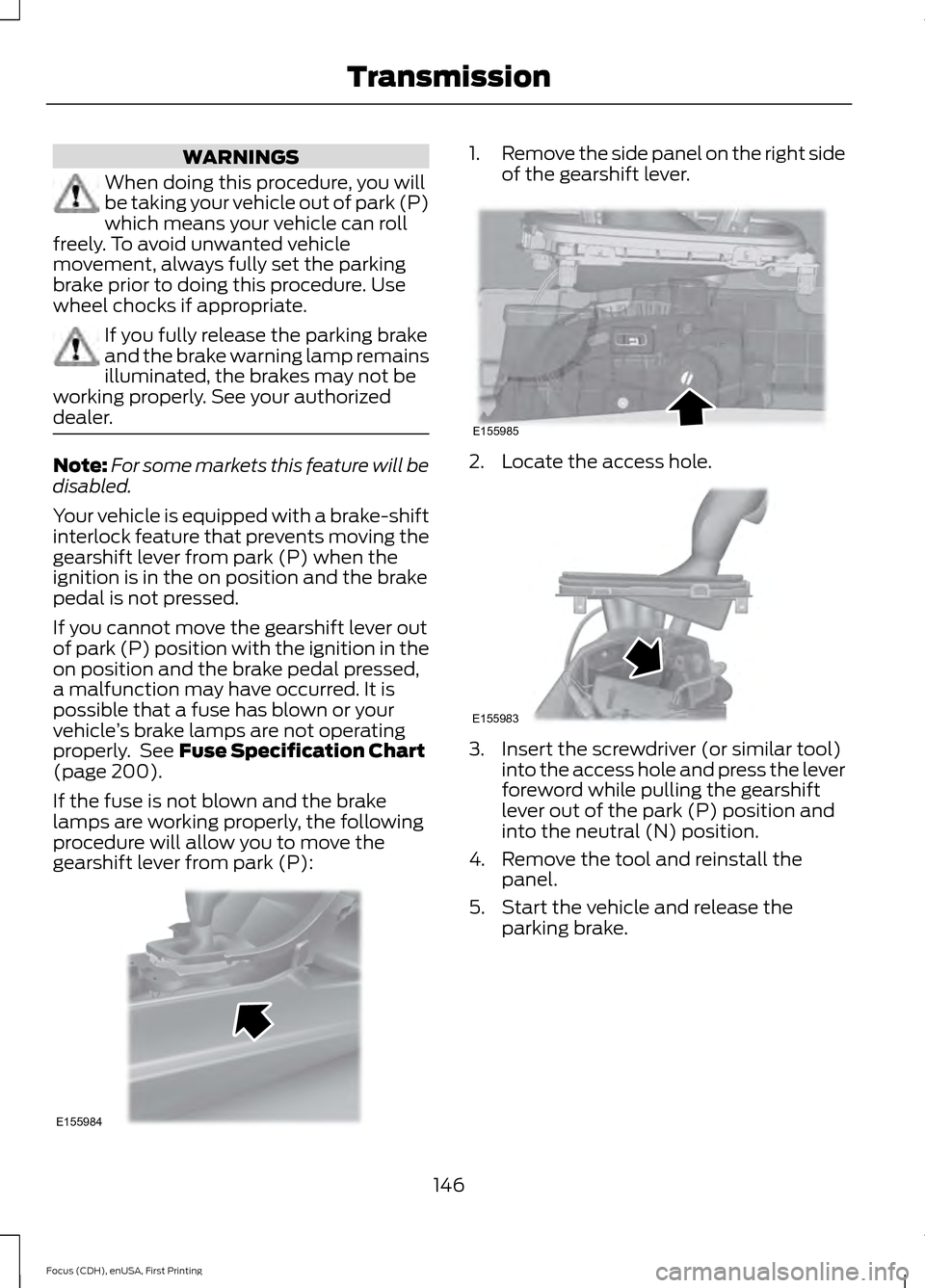
gearshift lever from park (P): 1.
Remove the side panel on the right side
of the gearshift lever. 2. Locate the access hole.
3. Insert the screwdriver (or similar tool)
into the access hole and press the lever
foreword while pulling the gearshift
lever out of the park (P) position and
into the neutral (N) position.
4. Remove the tool and reinstall the panel.
5. Start the vehicle and release the parking brake.
146
Focus (CDH), enUSA, First Printing TransmissionE155984 E155985 E155983
Page 151 of 453
GENERAL INFORMATION
Note:
Occasional brake noise is normal. If
a metal-to-metal, continuous grinding or
continuous squeal sound is present, the
brake linings may be worn-out and an
authorized dealer should check them. If the
vehicle has continuous vibration or shudder
in the steering wheel while braking, an
authorized dealer should check your vehicle.
Note: Brake dust may accumulate on the
wheels, even under normal driving
conditions. Some dust is inevitable as the
brakes wear and does not contribute to
brake noise. See Cleaning the Alloy
Wheels (page 234). See
Warning Lamps and
Indicators (page 92).
Wet brakes result in reduced braking
efficiency. Gently press the brake pedal a
few times when driving from a car wash or
standing water to dry the brakes.
Brake Over Accelerator
In the event the accelerator pedal
becomes stuck or entrapped, apply steady
and firm pressure to the brake pedal to
slow the vehicle and reduce engine power.
If you experience this condition, apply the
brakes and bring your vehicle to a safe
stop. Switch the engine off, move the
transmission to park (P) and apply the
parking brake. Inspect the accelerator
pedal and the area around it for any items
or debris that may be obstructing its
movement. If none are found and the
condition persists, have your vehicle towed
to the nearest authorized dealer. Emergency Brake Assist
Emergency brake assist detects when you
brake heavily by measuring the rate at
which you press the brake pedal. It
provides maximum braking efficiency as
long as you press the pedal. Emergency
brake assist can reduce stopping distances
in critical situations.
Anti-lock Brake System
This system helps you maintain steering
control during emergency stops by keeping
the brakes from locking.
This lamp momentarily
illuminates when you switch the
ignition on. If the light does not
illuminate during start up, remains on or
flashes, the anti-lock braking system may
be disabled. Have the system checked by
an authorized dealer. If the anti-lock brake
system is disabled, normal braking is still
effective. If the brake warning lamp
illuminates with the parking
brake released, have your brake
system serviced immediately.
HINTS ON DRIVING WITH
ANTI-LOCK BRAKES
Note: When the system is operating, the
brake pedal will pulse and may travel
further. Maintain pressure on the brake
pedal. You may also hear a noise from the
system. This is normal.
The anti-lock braking system will not
eliminate the risks when:
• You drive too closely to the vehicle in
front of you.
• Your vehicle is hydroplaning.
• You take corners too fast.
• The road surface is poor.
148
Focus (CDH), enUSA, First Printing BrakesE138644 E138644