ignition FORD FOCUS 2015 3.G Repair Manual
[x] Cancel search | Manufacturer: FORD, Model Year: 2015, Model line: FOCUS, Model: FORD FOCUS 2015 3.GPages: 453, PDF Size: 5.32 MB
Page 208 of 453
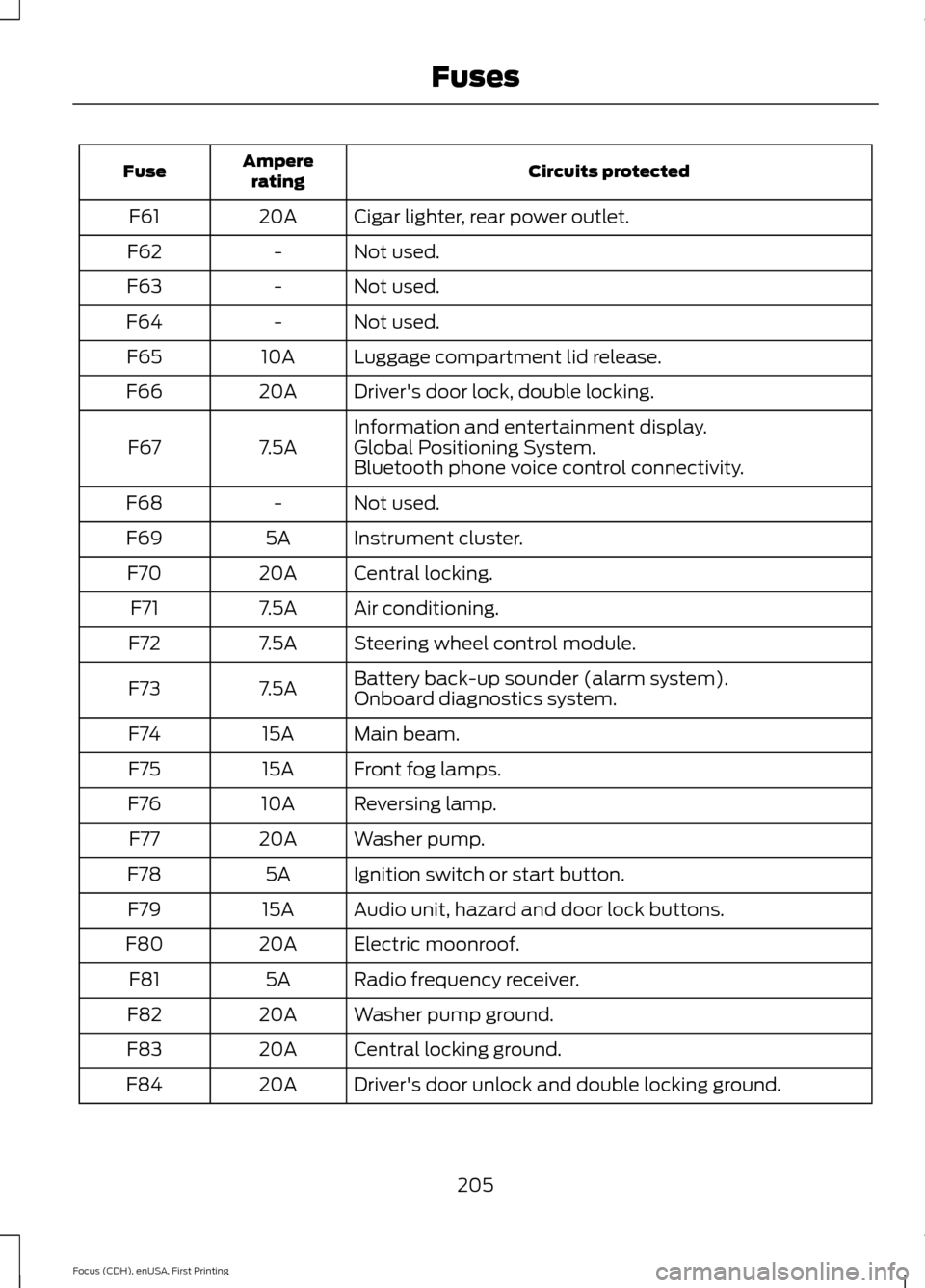
Circuits protected
Ampere
rating
Fuse
Cigar lighter, rear power outlet.
20A
F61
Not used.
-
F62
Not used.
-
F63
Not used.
-
F64
Luggage compartment lid release.
10A
F65
Driver's door lock, double locking.
20A
F66
Information and entertainment display.
7.5A
F67 Global Positioning System.
Bluetooth phone voice control connectivity.
Not used.
-
F68
Instrument cluster.
5A
F69
Central locking.
20A
F70
Air conditioning.
7.5A
F71
Steering wheel control module.
7.5A
F72
Battery back-up sounder (alarm system).
7.5A
F73
Onboard diagnostics system.
Main beam.
15A
F74
Front fog lamps.
15A
F75
Reversing lamp.
10A
F76
Washer pump.
20A
F77
Ignition switch or start button.
5A
F78
Audio unit, hazard and door lock buttons.
15A
F79
Electric moonroof.
20A
F80
Radio frequency receiver.
5A
F81
Washer pump ground.
20A
F82
Central locking ground.
20A
F83
Driver's door unlock and double locking ground.
20A
F84
205
Focus (CDH), enUSA, First Printing Fuses
Page 209 of 453
Circuits protected
Ampere
rating
Fuse
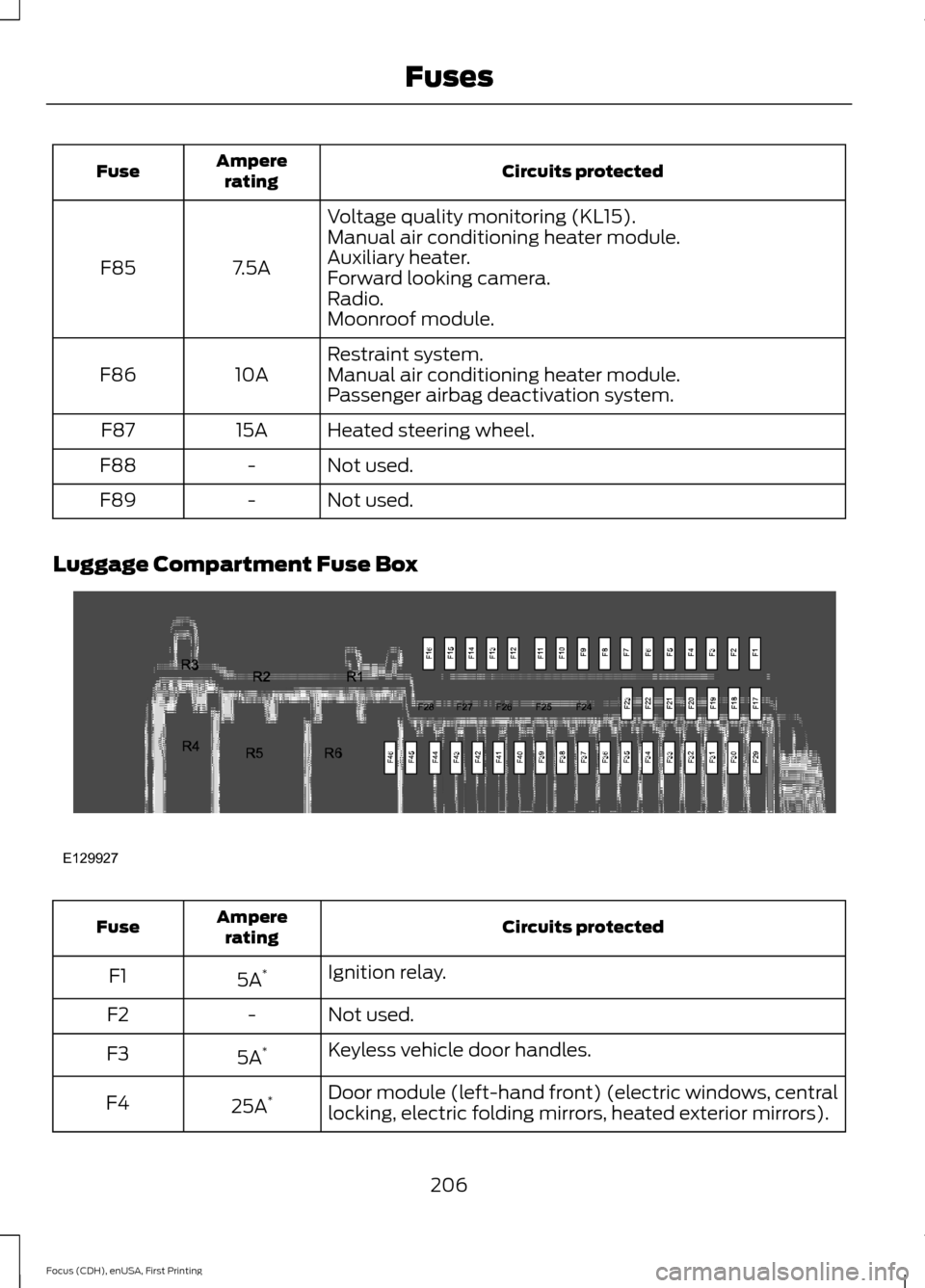
Voltage quality monitoring (KL15).
7.5A
F85 Manual air conditioning heater module.
Auxiliary heater.
Forward looking camera.
Radio.
Moonroof module.
Restraint system.
10A
F86 Manual air conditioning heater module.
Passenger airbag deactivation system.
Heated steering wheel.
15A
F87
Not used.
-
F88
Not used.
-
F89
Luggage Compartment Fuse Box Circuits protected
Ampere
rating
Fuse
Ignition relay.
5A *
F1
Not used.
-
F2
Keyless vehicle door handles.
5A *
F3
Door module (left-hand front) (electric windows, central
locking, electric folding mirrors, heated exterior mirrors).
25A *
F4
206
Focus (CDH), enUSA, First Printing FusesE129927
Page 211 of 453
Circuits protected
Ampere
rating
Fuse
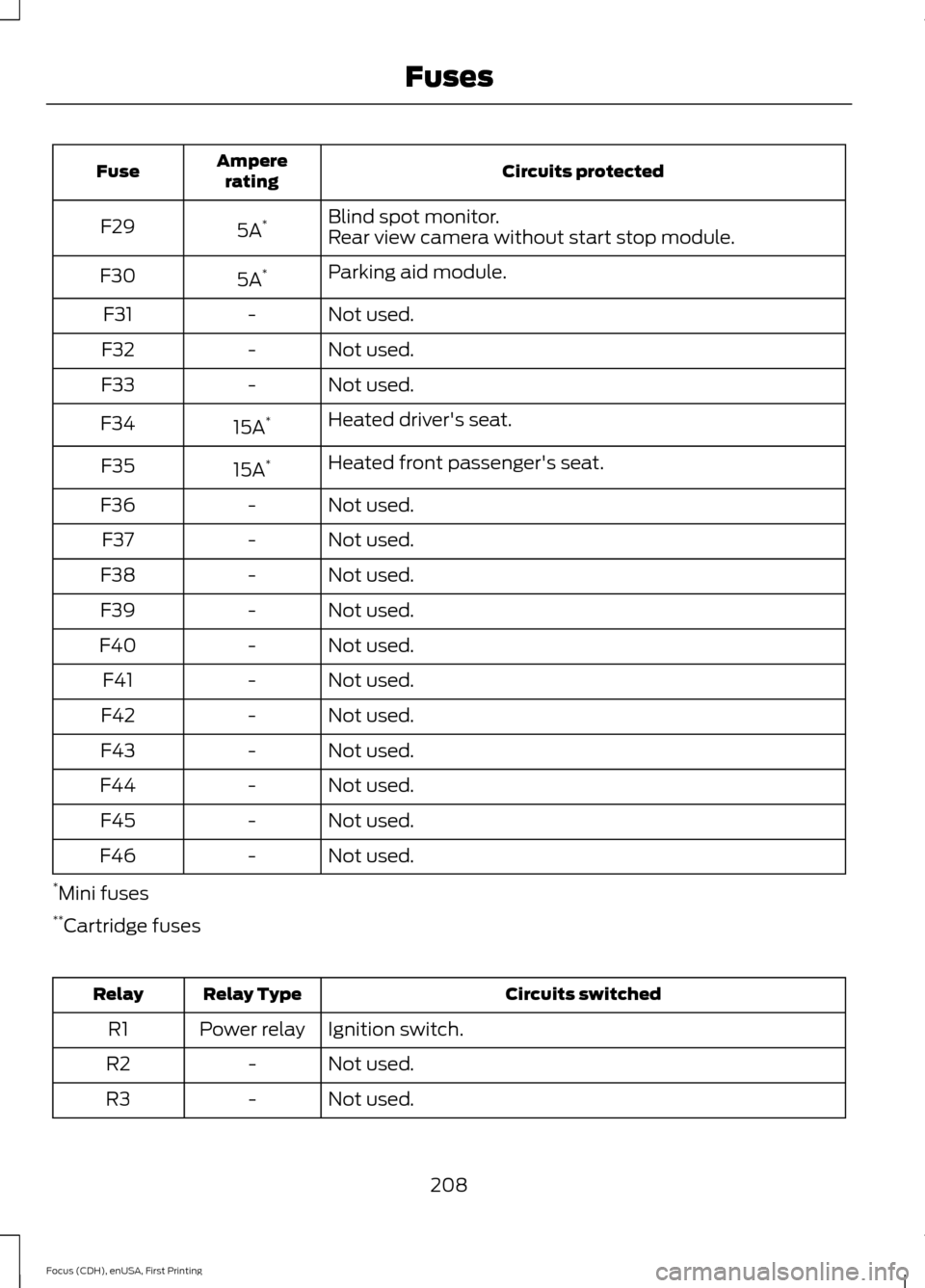
Blind spot monitor.
5A *
F29
Rear view camera without start stop module.
Parking aid module.
5A *
F30
Not used.
-
F31
Not used.
-
F32
Not used.
-
F33
Heated driver's seat.
15A *
F34
Heated front passenger's seat.
15A *
F35
Not used.
-
F36
Not used.
-
F37
Not used.
-
F38
Not used.
-
F39
Not used.
-
F40
Not used.
-
F41
Not used.
-
F42
Not used.
-
F43
Not used.
-
F44
Not used.
-
F45
Not used.
-
F46
* Mini fuses
** Cartridge fuses Circuits switched
Relay Type
Relay
Ignition switch.
Power relay
R1
Not used.
-
R2
Not used.
-
R3
208
Focus (CDH), enUSA, First Printing Fuses
Page 222 of 453
CHECKING THE WIPER
BLADES
Run the tip of your fingers over the edge of
the blade to check for roughness.
Clean the wiper blades with washer fluid
or water applied with a soft sponge or
cloth.
CHANGING THE WIPER
BLADES
Note:
If streaks or smears appear on the
windshield, clean the windshield and the
wiper blades. See Cleaning the Windows
and Wiper Blades (page 232). If that does
not resolve the issue, install new wiper
blades.
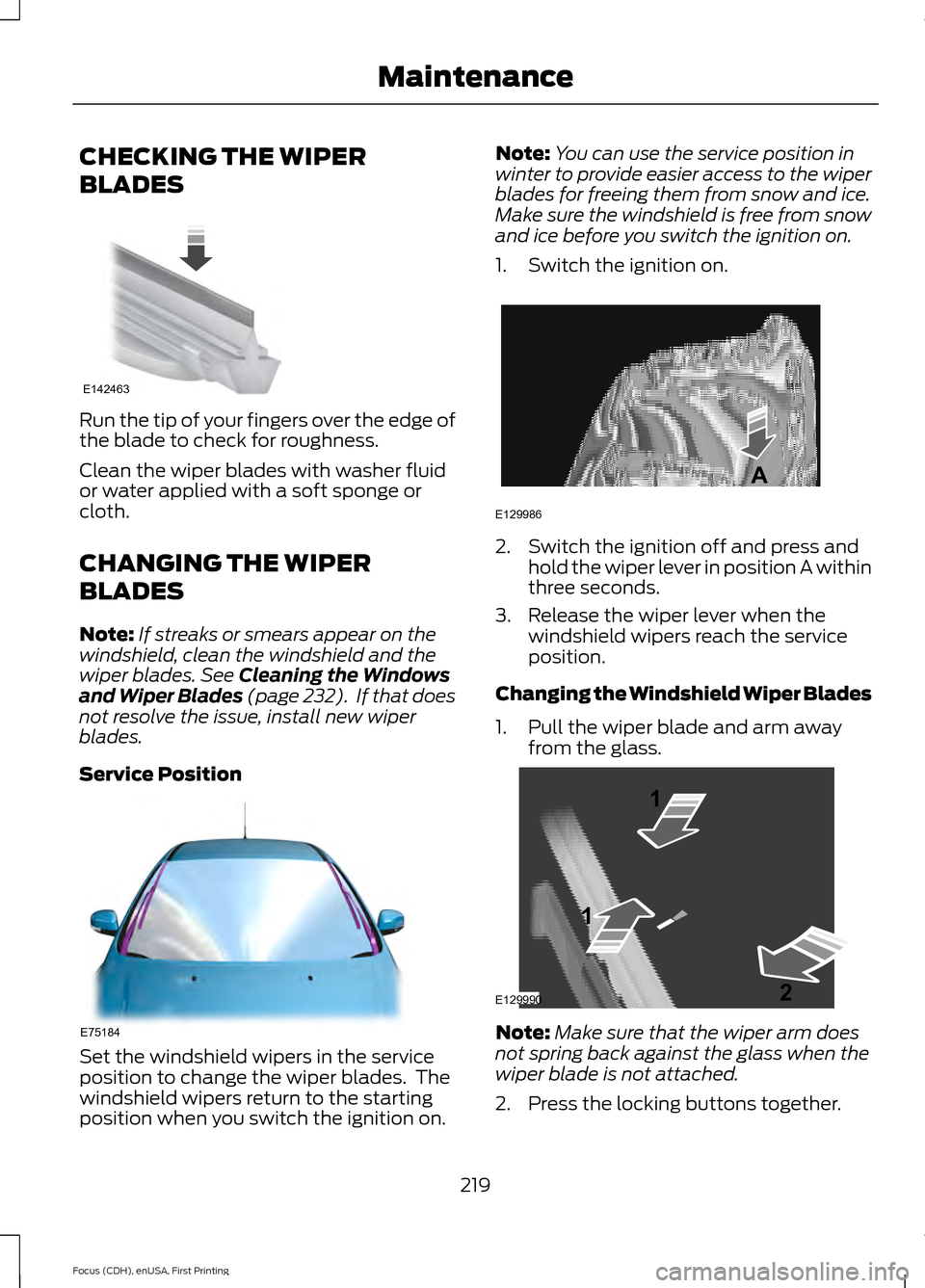
Service Position Set the windshield wipers in the service
position to change the wiper blades. The
windshield wipers return to the starting
position when you switch the ignition on. Note:
You can use the service position in
winter to provide easier access to the wiper
blades for freeing them from snow and ice.
Make sure the windshield is free from snow
and ice before you switch the ignition on.
1. Switch the ignition on. 2. Switch the ignition off and press and
hold the wiper lever in position A within
three seconds.
3. Release the wiper lever when the windshield wipers reach the service
position.
Changing the Windshield Wiper Blades
1. Pull the wiper blade and arm away from the glass. Note:
Make sure that the wiper arm does
not spring back against the glass when the
wiper blade is not attached.
2. Press the locking buttons together.
219
Focus (CDH), enUSA, First Printing MaintenanceE142463 E75184 E129986
A E129990
1
1 2
Page 235 of 453
•
Never wash or rinse any ignition coil,
spark plug wire or spark plug well, or
the area in and around these locations.
• Cover the battery, power distribution
box, and air filter assembly to prevent
water damage when cleaning the
engine.
CLEANING THE WINDOWS AND
WIPER BLADES
Car wash chemicals and environmental
fallout can result in windshield and wiper
blade contamination. Dirty windshield and
wipers will result in poor windshield wiper
operation. Keep the windshield and wiper
blades clean to maintain windshield wiper
performance.
To clean the windshield and wiper blades:
• Clean the windshield with a
non-abrasive glass cleaner.
• For windshields contaminated with
tree sap, chemicals, wax or bugs, clean
the entire windshield using steel wool
(no greater than 0000 grade) in a
circular motion and rinse with water.
• Clean the wiper blades with isopropyl
rubbing alcohol or windshield washer
concentrate.
Note: Do not use razor blades or other
sharp objects to clean or remove decals
from the inside of the heated rear window.
The vehicle warranty does not cover
damage caused to the heated rear window
grid lines.
CLEANING THE INTERIOR
Note: Do not allow air fresheners and hand
sanitizers to spill on interior surfaces. If a
spill occurs, wipe off immediately. Damage
may not be covered by your warranty. Safety Belts
Note:
Do not use abrasives, or chemical
solvents to clean them.
Note: Do not allow moisture to penetrate
the safety belt retractor mechanism.
Clean them with interior cleaner or water
applied with a soft sponge. Let them dry
naturally, away from artificial heat.
Instrument Cluster Screens, LCD
Screens and Radio Screens
Note: Do not use abrasives, alcoholic
solvents or chemical solvents to clean them.
Rear Windows
Note: Do not use any abrasive materials to
clean the interior of the rear windows.
Note: Do not install stickers or labels to the
interior of the rear windows.
CLEANING THE INSTRUMENT
PANEL AND INSTRUMENT
CLUSTER LENS WARNING
Do not use chemical solvents or
strong detergents when cleaning the
steering wheel or instrument panel
to avoid contamination of the airbag
system. Note:
Follow the same procedure as
cleaning leather seats for cleaning leather
instrument panels and leather interior trim
surfaces. See Cleaning Leather Seats
(page 233).
Clean the instrument panel and cluster
lens with a clean, damp and soft cloth,
then use a clean, dry and soft cloth to dry
these areas.
232
Focus (CDH), enUSA, First Printing Vehicle Care
Page 264 of 453
ENGINE SPECIFICATIONS - 1.0L ECOBOOST™
1.0L EcoBoost
Engine
61
Cubic inches
Minimum 87 octane
Required fuel
1-2-3
Firing order
Coil on plug
Ignition system
0.028 – 0.031 in. (0.70 – 0.80 mm)
Spark plug gap
10.0:1
Compression ratio
Drivebelt Routing
1.0L EcoBoost Engine ENGINE SPECIFICATIONS - 2.0L DURATEC-HE (MI4)
2.0L GDI
Engine
121
Cubic inches
Minimum 87 octane or E85
Required fuel
1-3-4-2
Firing order
Coil on plug
Ignition system
.034 - .036 in. (.85 - .95 mm)
Spark plug gap
12.0:1
Compression ratio
261
Focus (CDH), enUSA, First Printing Capacities and SpecificationsE163197
Page 291 of 453
Action
Condition
Message
Contact SIRIUS at 1-888-
539-7474 to resolve
subscription issues.
Your satellite service is no
longer available.
Questions? Call
1-888-539-7474
Use the channel guide to
turn off the Lock or Skip
function on that station.
All the channels in the
selected category are either
skipped or locked.
None found
Check Channel Guide
No action required.
SIRIUS has updated the
channels available for your
vehicle.
Subscription Updated
AUDIO INPUT JACK WARNINGS
Driving while distracted can result in
loss of vehicle control, crash and
injury. We strongly recommend that
you use extreme caution when using any
device that may take your focus off the
road. Your primary responsibility is the safe
operation of your vehicle. We recommend
against the use of any hand-held device
while driving and encourage the use of
voice-operated systems when possible.
Make sure you are aware of all applicable
local laws that may affect the use of
electronic devices while driving. Do not connect or adjust the settings
on your portable music player when
your vehicle is moving.
Do not place your portable music
player on the instrument panel. Hard
objects may become projectiles in a
crash or sudden stop, which may increase
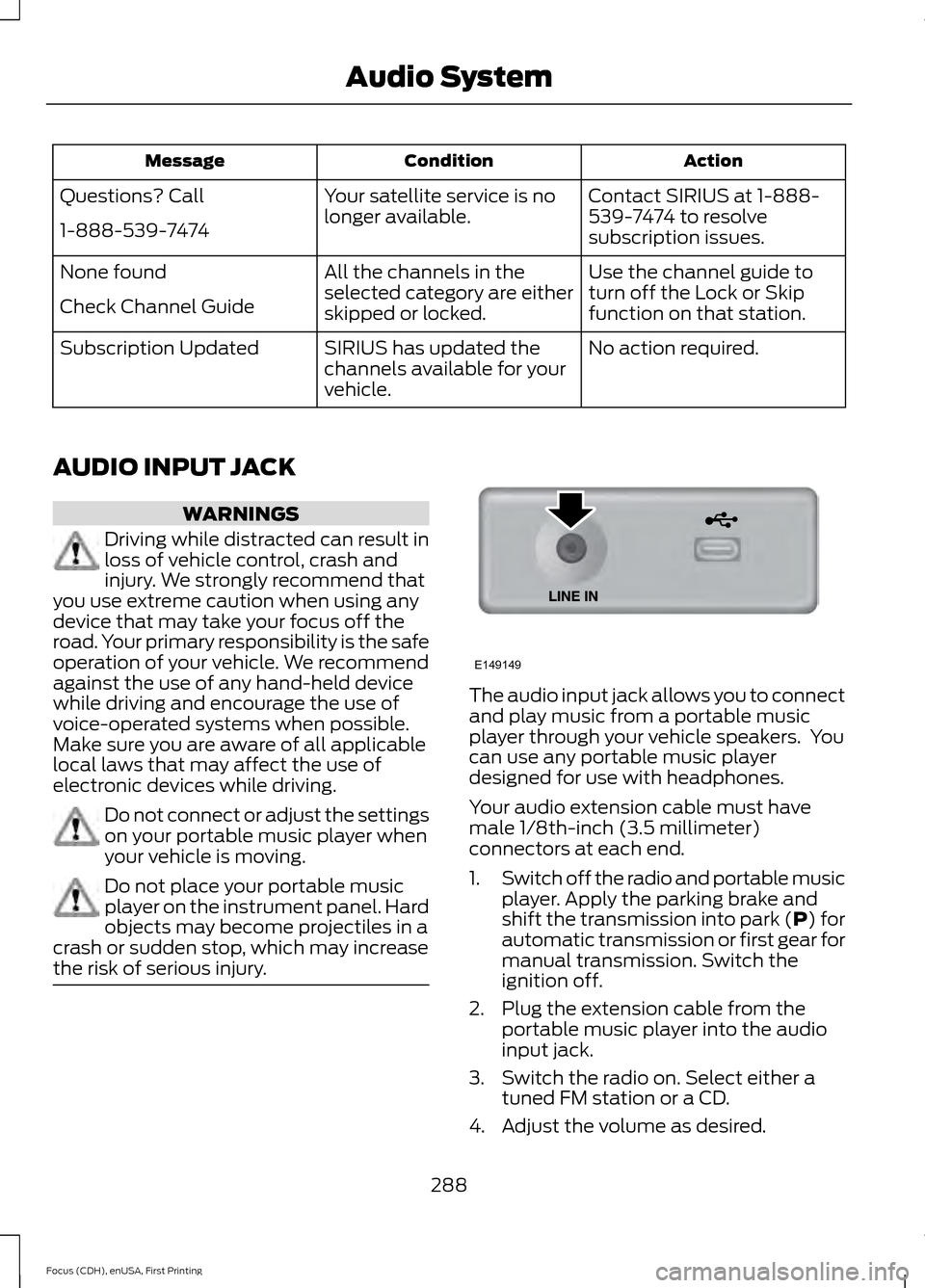
the risk of serious injury. The audio input jack allows you to connect
and play music from a portable music
player through your vehicle speakers. You
can use any portable music player
designed for use with headphones.
Your audio extension cable must have
male 1/8th-inch (3.5 millimeter)
connectors at each end.
1.
Switch off the radio and portable music
player. Apply the parking brake and
shift the transmission into park (P) for
automatic transmission or first gear for
manual transmission. Switch the
ignition off.
2. Plug the extension cable from the portable music player into the audio
input jack.
3. Switch the radio on. Select either a tuned FM station or a CD.
4. Adjust the volume as desired.
288
Focus (CDH), enUSA, First Printing Audio SystemE149149
Page 297 of 453
You can switch this feature on or off by speaking one of the following voice
commands:
Action and Description
Voice Command
Makes a best guess from the media
candidate list. The system may still occa-
sionally ask you questions.
media candidate lists off
Clarifies your voice command for media
candidates.
media candidate lists on
Makes a best guess from the phone
candidate list. The system may still occa-
sionally ask you questions.
phone candidate lists off
Clarifies your voice command for phone
candidates.
phone candidate lists on
Changing the Voice Settings
In addition to using voice commands to
change the voice settings, you can also use
the menu in the audio display.
To change the voice settings press the
Menu button then select: Menu Item
SYNC-Settings
Voice settings
USING SYNC™ WITH YOUR
PHONE
Hands-free calling is one of the main
features of SYNC. While the system
supports a variety of features, many are
dependent on your cellular phone's
functionality. At a minimum, most cellular
phones with Bluetooth wireless technology
support the following functions:
• Answering an incoming call.
• Ending a call. •
Using privacy mode.
• Dialing a number.
• Redialing.
• Call waiting notification.
• Caller ID.
Other features, such as text messaging
using Bluetooth and automatic phonebook
download, are phone-dependent features.
To check your phone's compatibility, see
your phone's manual and visit
www.SYNCMyRide.com,
www.SYNCMyRide.ca or
www.syncmaroute.ca.
Pairing a Phone for the First Time
Wirelessly pairing your phone with SYNC
allows you to make and receive hands-free
calls.
Note: SYNC can support downloading up
to approximately 4000 entries per
Bluetooth-enabled cellular phone.
Note: Make sure to switch on the ignition
and the radio. Shift the transmission into
park (P) for automatic transmission or first
gear for manual transmission.
294
Focus (CDH), enUSA, First Printing SYNC™
Page 298 of 453
Using the Audio System
Note:
To scroll through the menus, press
the up and down arrows on your audio
system.
1. Make sure to switch on your phone's Bluetooth feature before starting the
search. See your device's manual if
necessary.
2. Press the PHONE button. When the
audio display indicates there is no
paired phone, select the option to add.
3. When a message to begin pairing appears in the audio display, search for
SYNC on your phone to start the pairing
process.
4. When prompted on your phone's display, enter the six-digit PIN provided
by the system in the radio display. The
display indicates when the pairing is
successful.
Depending on your phone's capability and
your market, the system may prompt you
with questions, such as setting the current
phone as the primary phone (the phone
SYNC automatically tries to connect with
first upon vehicle start-up) and
downloading your phonebook.
Using Voice Commands Make sure to switch on your phone's
Bluetooth feature before starting the
search. See your device's manual if
necessary. Press the voice and when prompted
say: Action and Descrip-
tion
Voice Command
Follow the instruc-
tions on the audio
display.
(pair ([Bluetooth]
device | phone |
Bluetooth audio) |
add [a] phone)
Depending on your phone's capability and
your market, the system may prompt you
with questions, such as setting the current
phone as the primary phone (the phone
SYNC automatically tries to connect with
first upon vehicle start-up) and
downloading your phonebook.
Pairing Subsequent Phones
Note: Make sure to switch on the ignition
and the radio. Shift the transmission into
park (P) for automatic transmission or first
gear for manual transmission..
Note: To scroll through the menus, press
the up and down arrows on your audio
system.
1. Make sure to switch on your phone's Bluetooth feature before starting the
search. See your device's manual if
necessary.
2. Press the
PHONE button.
3. Select the option for Bluetooth Devices.
4. Press the
OK button.
5. Select the option to add. This starts the pairing process.
6. When a message to begin pairing appears in the audio display, search for
SYNC on your device.
295
Focus (CDH), enUSA, First Printing SYNC™E142599
Page 306 of 453
Phonebook preferences
Menu Item
4. When the option to set the phone as primary appears,
select either yes or no.
5. Depending on the functionality of your phone, the
system may prompt you with questions (such as if you
want to download your phonebook). Select either yes or
no to confirm your responses.
Select the delete option and confirm when the system
asks to delete the selected device. After deleting a phone
from the list, you have to repeat the pairing process to pair
it again.
Delete
The system attempts to connect with the primary cellular
phone each time you switch on the ignition. When you
select a cellular phone as primary, it appears first in the
list, marked with an asterisk. Set a previously paired phone
as master by selecting the master option and confirming
it as the primary.
Master
Connect a previously connected phone. You can only have
one phone connected at a time to use the phone's func-
tionality. When you connect another phone, the previous
phone disconnects from the telephone services. The
system allows you to use different Bluetooth devices for
the cellular phone functionality and the Bluetooth audio
music playback feature at the same time.
Conn.
Disconnects the selected cellular phone. Select this option
and confirm when asked. After disconnecting a phone,
you can reconnect it again without repeating the full pairing
process.
Discon.
System Settings
1. Press the MENU button. 2. Select the SYNC settings option, and
then press the
OK button.
303
Focus (CDH), enUSA, First Printing SYNC™