ignition FORD FOCUS 2015 3.G Workshop Manual
[x] Cancel search | Manufacturer: FORD, Model Year: 2015, Model line: FOCUS, Model: FORD FOCUS 2015 3.GPages: 453, PDF Size: 5.32 MB
Page 165 of 453
PRINCIPLE OF OPERATION
Cruise control lets you maintain a set
speed without keeping your foot on the
accelerator pedal. You can use cruise
control when your vehicle speed is greater
than 20 mph (30 km/h).
USING CRUISE CONTROL WARNINGS
Do not use cruise control on winding
roads, in heavy traffic or, when the
road surface is slippery. This could
result in loss of vehicle control, serious
injury or death. When you are going downhill, your
vehicle speed may increase above
the set speed. The system will not
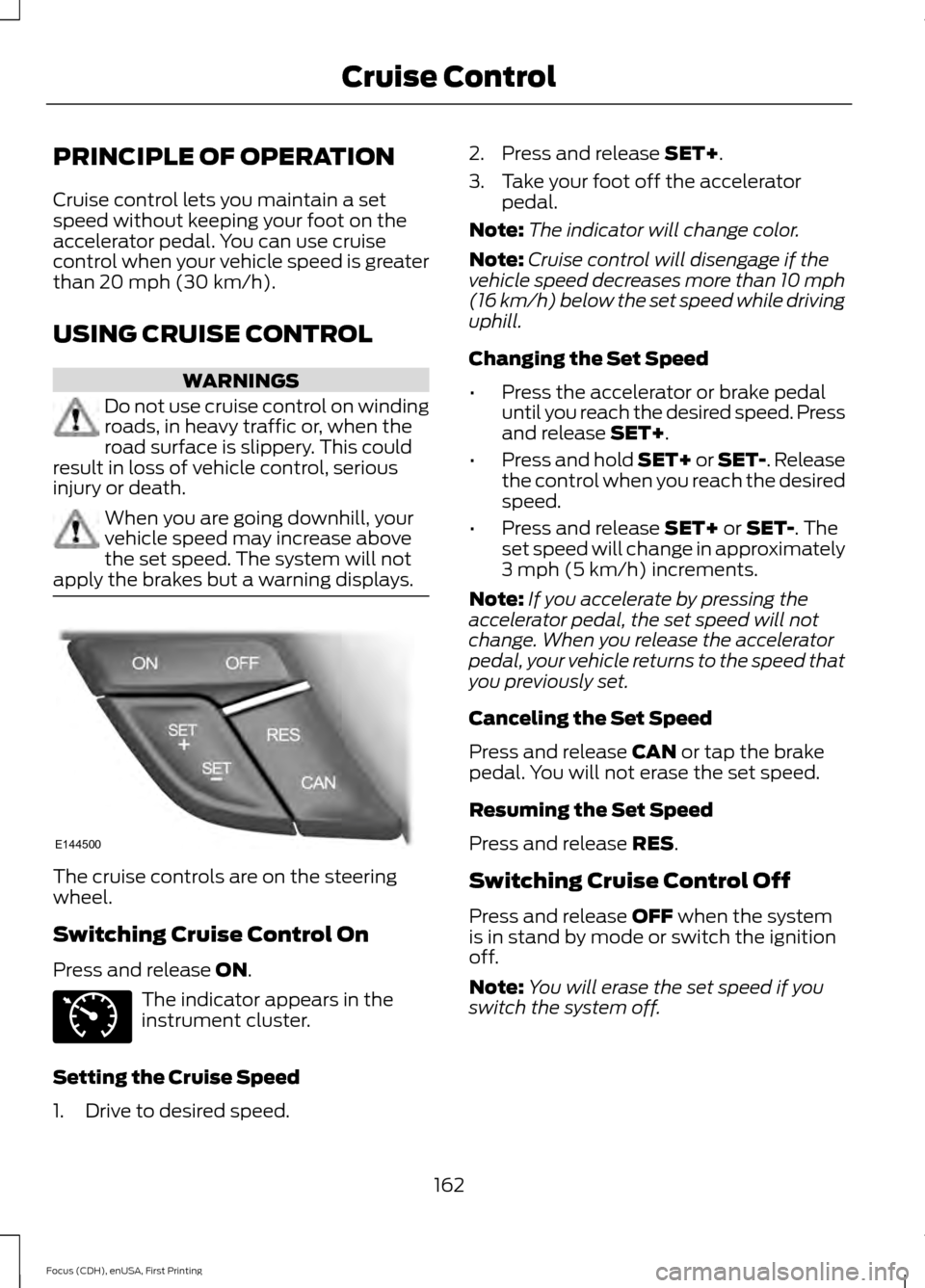
apply the brakes but a warning displays. The cruise controls are on the steering
wheel.
Switching Cruise Control On
Press and release
ON.
The indicator appears in the
instrument cluster.
Setting the Cruise Speed
1. Drive to desired speed. 2. Press and release
SET+.
3. Take your foot off the accelerator pedal.
Note: The indicator will change color.
Note: Cruise control will disengage if the
vehicle speed decreases more than 10 mph
(16 km/h) below the set speed while driving
uphill.
Changing the Set Speed
• Press the accelerator or brake pedal
until you reach the desired speed. Press
and release
SET+.
• Press and hold SET+ or SET-. Release
the control when you reach the desired
speed.
• Press and release
SET+ or SET-. The
set speed will change in approximately
3 mph (5 km/h)
increments.
Note: If you accelerate by pressing the
accelerator pedal, the set speed will not
change. When you release the accelerator
pedal, your vehicle returns to the speed that
you previously set.
Canceling the Set Speed
Press and release
CAN or tap the brake
pedal. You will not erase the set speed.
Resuming the Set Speed
Press and release
RES.
Switching Cruise Control Off
Press and release
OFF when the system
is in stand by mode or switch the ignition
off.
Note: You will erase the set speed if you
switch the system off.
162
Focus (CDH), enUSA, First Printing Cruise ControlE144500 E71340
Page 173 of 453
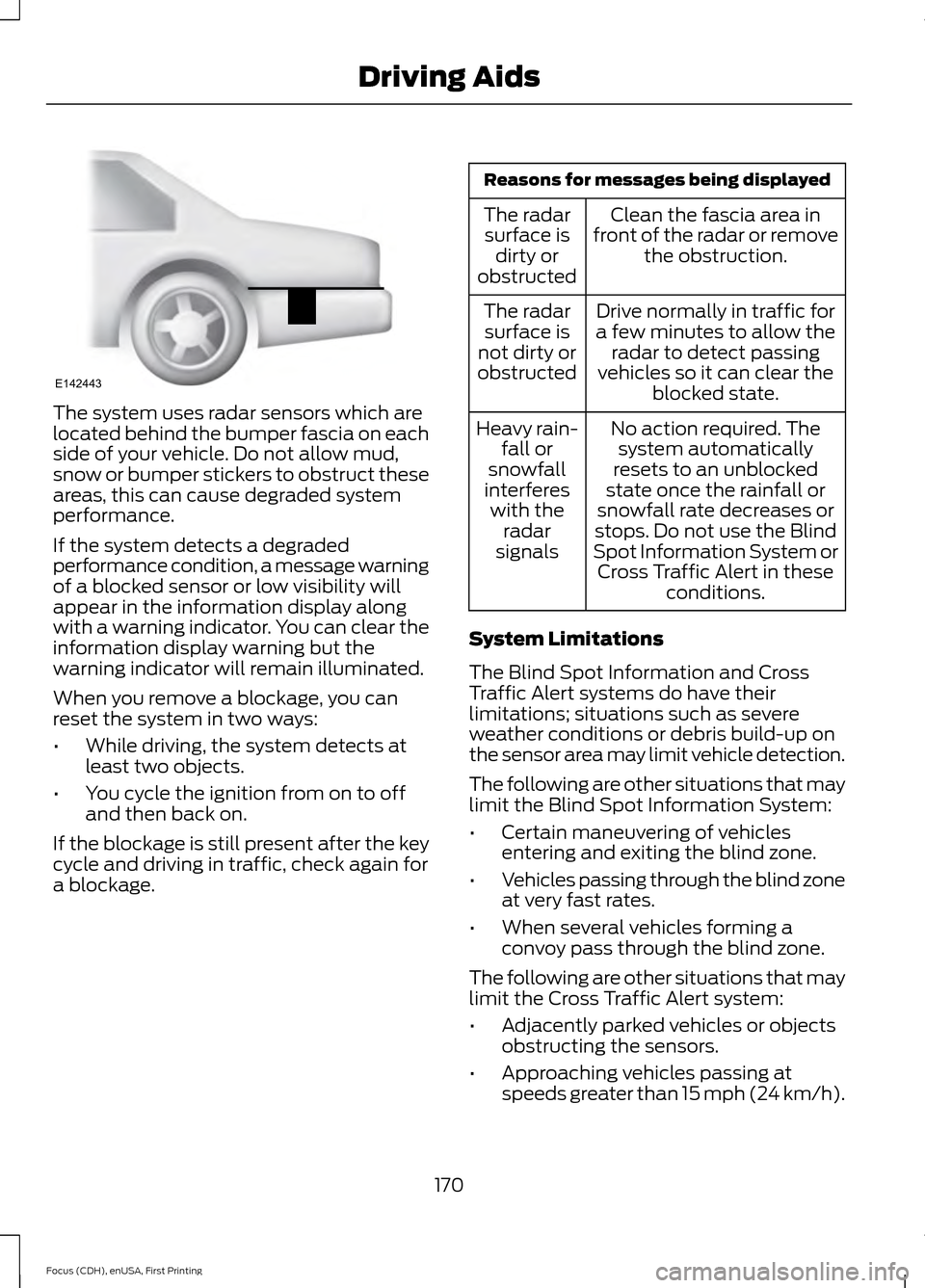
The system uses radar sensors which are
located behind the bumper fascia on each
side of your vehicle. Do not allow mud,
snow or bumper stickers to obstruct these
areas, this can cause degraded system
performance.
If the system detects a degraded
performance condition, a message warning
of a blocked sensor or low visibility will
appear in the information display along
with a warning indicator. You can clear the
information display warning but the
warning indicator will remain illuminated.
When you remove a blockage, you can
reset the system in two ways:
•
While driving, the system detects at
least two objects.
• You cycle the ignition from on to off
and then back on.
If the blockage is still present after the key
cycle and driving in traffic, check again for
a blockage. Reasons for messages being displayed
Clean the fascia area in
front of the radar or remove the obstruction.
The radar
surface is dirty or
obstructed
Drive normally in traffic for
a few minutes to allow the radar to detect passing
vehicles so it can clear the blocked state.
The radar
surface is
not dirty or
obstructed
No action required. Thesystem automatically
resets to an unblocked
state once the rainfall or
snowfall rate decreases or
stops. Do not use the Blind
Spot Information System or Cross Traffic Alert in these conditions.
Heavy rain-
fall or
snowfall
interferes with the radar
signals
System Limitations
The Blind Spot Information and Cross
Traffic Alert systems do have their
limitations; situations such as severe
weather conditions or debris build-up on
the sensor area may limit vehicle detection.
The following are other situations that may
limit the Blind Spot Information System:
• Certain maneuvering of vehicles
entering and exiting the blind zone.
• Vehicles passing through the blind zone
at very fast rates.
• When several vehicles forming a
convoy pass through the blind zone.
The following are other situations that may
limit the Cross Traffic Alert system:
• Adjacently parked vehicles or objects
obstructing the sensors.
• Approaching vehicles passing at
speeds greater than 15 mph (24 km/h).
170
Focus (CDH), enUSA, First Printing Driving AidsE142443
Page 174 of 453
•
Driving in reverse faster than 5 mph
(8 km/h).
• Backing out of an angled parking spot.
False Alerts
Note: If your vehicle has a factory equipped
tow bar and it is towing a trailer, the sensors
will detect the trailer and turn the Blind Spot
Information and Cross Traffic Alert systems
off to avoid false alerts. For non-factory
equipped tow bars, you may want to turn
the Blind Spot Information System off
manually.
There may be certain instances when there
is a false alert by either the Blind Spot
Information or the Cross Traffic Alert
systems that illuminates the alert indicator
with no vehicle in the coverage zone. Some
amount of false alerts are normal; they are
temporary and self-correct.
System Errors
If either system senses a problem with the
left or right sensor, the Blind Spot
Information System warning indicator will
illuminate and a message will appear in
the information display.
All other system faults will display only
with a message in the information display.
See
Information Messages (page 99).
Switching the Systems Off and On
You can temporarily switch off one or both
systems in the information display. See
(page
96). When you switch off the Blind
Spot Information System, you will not
receive alerts and the information display
will display a system off message.
Note: The Cross Traffic Alert system always
switches on whenever the ignition is
switched on. However, the Blind Spot
Information System will remember the last
selected on or off setting. One or both systems cannot be switched
off when MyKey is used.
See Principle of
Operation (page 58).
You can also have one or both systems
switched off permanently at an authorized
dealer. Once switched off, the system can
only be switched back on at an authorized
dealer.
ECO MODE
This system assists you in driving more
efficiently by constantly monitoring
characteristics of gear changing,
anticipation of traffic conditions and
speeds while driving.
The value of these characteristics is
represented by petals shown in the display,
with five petals being the most efficient.
The more efficiently you drive, the better
the rating, and the better your vehicle's
overall fuel economy.
Note: These efficiency values do not result
in a defined fuel consumption figure. It might
vary as it is not only related to these driving
habits, but also influenced by many other
factors such as short trips and cold starts.
Note: Frequent short trips, where the engine
does not fully warm up, will also increase
fuel consumption
The system is accessed using the
information display control. See
(page
96).
171
Focus (CDH), enUSA, First Printing Driving Aids
Page 175 of 453
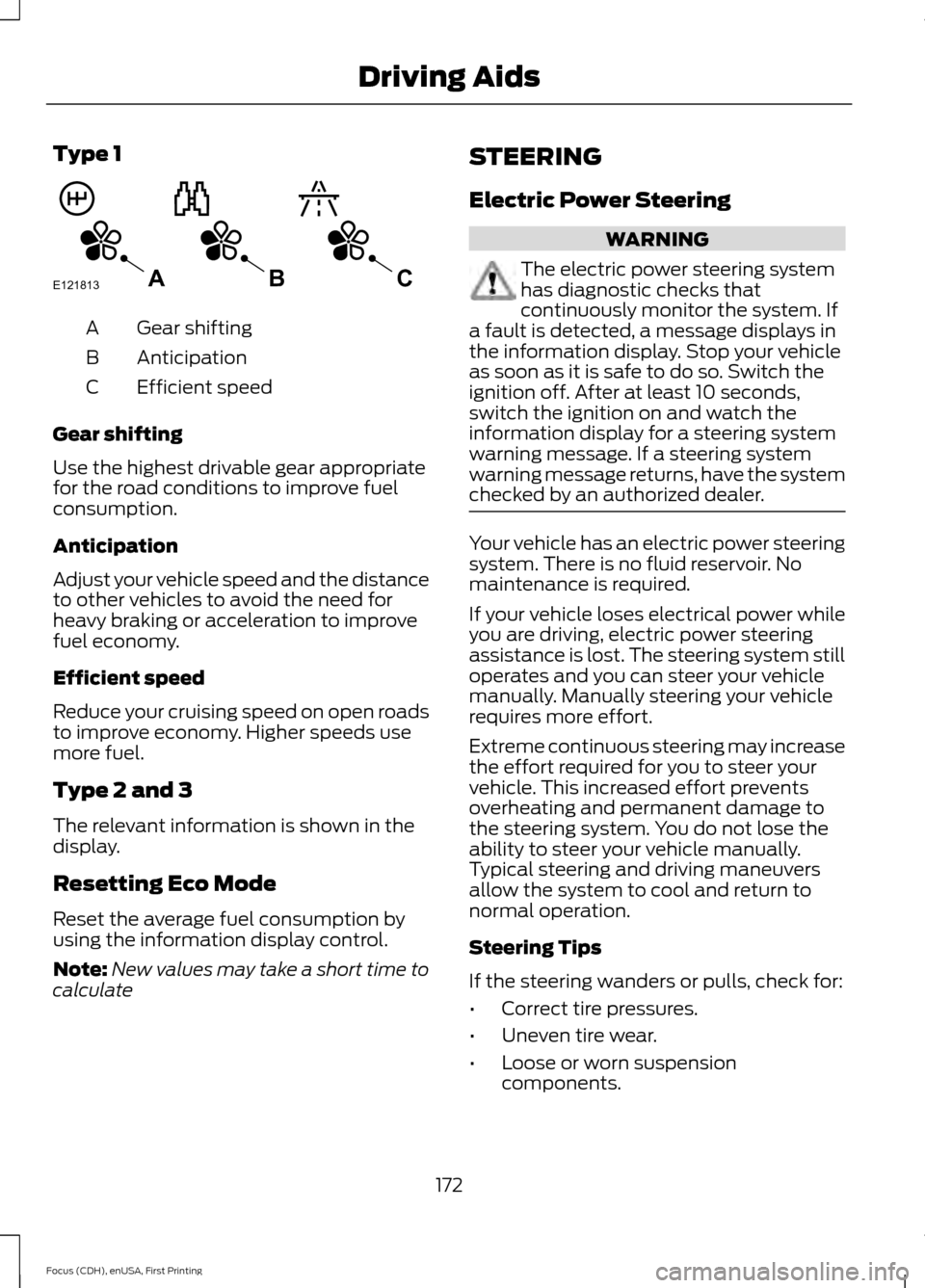
Type 1
Gear shifting
A
Anticipation
B
Efficient speed
C
Gear shifting
Use the highest drivable gear appropriate
for the road conditions to improve fuel
consumption.
Anticipation
Adjust your vehicle speed and the distance
to other vehicles to avoid the need for
heavy braking or acceleration to improve
fuel economy.
Efficient speed
Reduce your cruising speed on open roads
to improve economy. Higher speeds use
more fuel.
Type 2 and 3
The relevant information is shown in the
display.
Resetting Eco Mode
Reset the average fuel consumption by
using the information display control.
Note: New values may take a short time to
calculate STEERING
Electric Power Steering WARNING
The electric power steering system
has diagnostic checks that
continuously monitor the system. If
a fault is detected, a message displays in
the information display. Stop your vehicle
as soon as it is safe to do so. Switch the
ignition off. After at least 10 seconds,
switch the ignition on and watch the
information display for a steering system
warning message. If a steering system
warning message returns, have the system
checked by an authorized dealer. Your vehicle has an electric power steering
system. There is no fluid reservoir. No
maintenance is required.
If your vehicle loses electrical power while
you are driving, electric power steering
assistance is lost. The steering system still
operates and you can steer your vehicle
manually. Manually steering your vehicle
requires more effort.
Extreme continuous steering may increase
the effort required for you to steer your
vehicle. This increased effort prevents
overheating and permanent damage to
the steering system. You do not lose the
ability to steer your vehicle manually.
Typical steering and driving maneuvers
allow the system to cool and return to
normal operation.
Steering Tips
If the steering wanders or pulls, check for:
•
Correct tire pressures.
• Uneven tire wear.
• Loose or worn suspension
components.
172
Focus (CDH), enUSA, First Printing Driving AidsE121813CBA
Page 187 of 453
1. Tow only with your vehicle in the
forward direction. Release the parking
brake.
2. Place the transmission in neutral.
Note: The maximum towing speed is
70 mph (112 km/h).
TOWING THE VEHICLE ON
FOUR WHEELS - AUTOMATIC
TRANSMISSION
Emergency Towing WARNING
If your vehicle has a steering wheel
lock make sure the ignition is in the
accessory or on position when being
towed. You can flat-tow (all wheels on the
ground, regardless of the powertrain and
transmission configuration) your disabled
vehicle (without access to wheel dollies,
car-hauling trailer, or flatbed transport
vehicle) under the following conditions:
•
Your vehicle is facing forward so you
tow it in a forward direction.
• You place the transmission in neutral
(N). If you cannot place the
transmission in neutral (N), you may
need to override it. See Transmission
(page
141).
• Maximum speed is 35 mph (56 km/h).
• Maximum distance is
50 mi (80 km).
Recreational Towing
Vehicles with an Ignition Key
Note: Put your climate control system in
recirculated air mode to prevent exhaust
fumes from entering the vehicle. See
Climate Control
(page 107). Note:
There must be battery power to move
the transmission's internal components to
neutral (N) properly in Step 3. In addition,
moving the gearshift to the neutral (N)
position without first switching the ignition
to the on position limits the towing
capability to
35 mph (56 km/h) and 50 mi
(80 km).
1. Release the parking brake.
2. Switch the ignition to the on position.
3. Press the brake pedal, and then move the gearshift to the neutral (N)
position.
4. Wait for a message in the information and entertainment display indicating
that the transmission is ready, and then
switch off the ignition and release the
brake pedal.
5. Disconnect the negative (black) cable from the battery. See
Changing the
12V Battery (page 217).
Note: The anti-theft system does not work
until you reconnect the battery cable.
Note: The maximum towing speed is
70 mph (112 km/h)
.
Note: There is no limit on towing distance.
After towing, start the engine within 15
minutes of reconnecting the battery cable.
See Changing the 12V Battery (page
217).
Vehicles with Keyless Start
Note: Put your climate control system in
recirculated air mode to prevent exhaust
fumes from entering the vehicle. See
Climate Control
(page 107).
Note: There must be battery power to move
the transmission's internal components to
neutral (N) properly in Step 3. In addition,
moving the gearshift to the neutral (N)
position without first switching the ignition
to the on position limits the towing
capability to
35 mph (56 km/h) and 50 mi
(80 km).
184
Focus (CDH), enUSA, First Printing Towing
Page 188 of 453
1. Release the parking brake.
2. Switch on the ignition by pressing the
keyless start button, but do not apply
the brake pedal.
3. Press the brake pedal, and then move the gearshift to the neutral (N)
position. Release the brake pedal.
4. Wait for a message indicating that the transmission is ready in the information
and entertainment display, and then
switch off the ignition by pressing the
keyless start button.
5. Disconnect the negative (black) cable from the battery. You need the door
key to lock and unlock doors when the
battery cable is disconnected. See
Changing the 12V Battery (page 217).
Note: The anti-theft system does not work
until you reconnect the battery cable.
Note: The maximum towing speed is
70 mph (112 km/h).
Note: There is no limit on towing distance.
After towing, start the engine within 15
minutes of reconnecting the battery cable.
See Changing the 12V Battery (page
217).
185
Focus (CDH), enUSA, First Printing Towing
Page 193 of 453
Canadian roadside coverage and benefits
may differ from the U.S. coverage. If you
require more information, please refer to
the coverage section of your warranty
guide, call us in Canada at
1-800-665-2006, or visit our website at
www.ford.ca.
Sykes Assistance Services Corporation
administers the Roadside Assistance
program. You must receive covered
services in Canada or the continental
United States. Coverage extends to
vehicles that use public, non-seasonal,
annually traveled roadways. Roadside
Assistance coverage does not extend to
vehicles involved in cross-country driving,
logging, autocross and any other form of
off-road use. Well maintained roads and
surfaces help ensure safe travel for the
supplier, and allow their representatives
to perform service as per the standard
operating procedures.
In Remote Locations
If our supplier cannot take your vehicle by
road to the nearest authorized dealership,
transportation by rail or water may be
necessary. The program covers a tow to
the dock or rail terminal and also to the
dealership at the end of the trip.
For rail or water transportation, however,
contact your authorized dealer to confirm
if you are eligible for additional coverage
before you authorize or pay for the service.
Call the Ford Roadside Assistance at
1-800-665-2006 for additional
information.
HAZARD WARNING FLASHERS
Note:
If used when the vehicle is not
running, the battery will lose charge. There
may be insufficient power to restart your
vehicle. The hazard warning button is
located on the instrument panel.
Use it when your vehicle is
creating a safety hazard for other
motorists.
• Press the button to turn on the hazard
warning function, and the front and
rear direction indicators will flash.
• Press the button again to turn them
off.
FUEL SHUTOFF WARNING
Failure to inspect and, if necessary,
repair fuel leaks after a collision may
increase the risk of fire and serious
injury. Ford Motor Company recommends
that the fuel system be inspected by an
authorized dealer after any collision. In the event of a moderate to severe
collision, this vehicle includes a fuel pump
shutoff feature that stops the flow of fuel
to the engine. Not every impact will cause
a shutoff.
Should your vehicle shut off after a
collision, you may restart your vehicle. For
vehicles equipped with a key system:
1. Switch off the ignition.
2. Switch on the ignition.
3. Repeat Steps 1 and 2 to re-enable the
fuel pump.
For vehicles equipped with a push button
start system:
1. Press the START/STOP button to
switch off the ignition.
2. Press the brake pedal and press the START/STOP
button to start the
vehicle.
190
Focus (CDH), enUSA, First Printing Roadside Emergencies
Page 194 of 453
3.
Remove your foot from the brake pedal
and press the START/STOP button
to switch off the ignition.
4. You can either attempt to start the engine by pressing the brake pedal and
the
START/STOP button, or switch
on the ignition only by pressing the
START/STOP
button without
pressing the brake pedal. Both ways
re-enable the fuel system.
Note: When you try to restart your vehicle
after a fuel shutoff, the vehicle makes sure
that various systems are safe to restart.
Once your vehicle determines that the
systems are safe, then the vehicle will allow
you to restart.
Note: In the event that your vehicle does
not restart after your third attempt, contact
an authorized dealer.
JUMP STARTING THE VEHICLE WARNINGS
The gases around the battery can
explode if exposed to flames, sparks,
or lit cigarettes. An explosion could
result in personal injury or vehicle damage. Batteries contain sulfuric acid which
can burn skin, eyes and clothing, if
contacted.
Use only an adequate-sized cable
with insulated clamps.
Preparing Your Vehicle
Note:
Do not attempt to push-start your
automatic transmission vehicle. Automatic
transmissions do not have push-start
capability. Attempting to push-start a
vehicle with an automatic transmission may
cause transmission damage.
Note: Use only a 12-volt supply to start your
vehicle. Note:
Do not disconnect the battery of the
disabled vehicle as this could damage the
vehicle's electrical system.
Park the booster vehicle close to the hood
of the disabled vehicle, making sure the
two vehicles do not touch. Turn all
accessories off.
Connecting the Jumper Cables WARNING
Do not attach the cables to fuel lines,
engine rocker covers, the intake
manifold or electrical components
as grounding points. Stay clear of moving
parts. To avoid reverse polarity
connections, make sure that you correctly
identify the positive (+) and negative (-)
terminals on both the disabled and booster
vehicles before connecting the cables.
Battery positions may vary. Note:
In the illustration, the bottom vehicle
represents the booster vehicle.
191
Focus (CDH), enUSA, First Printing Roadside Emergencies
Page 204 of 453
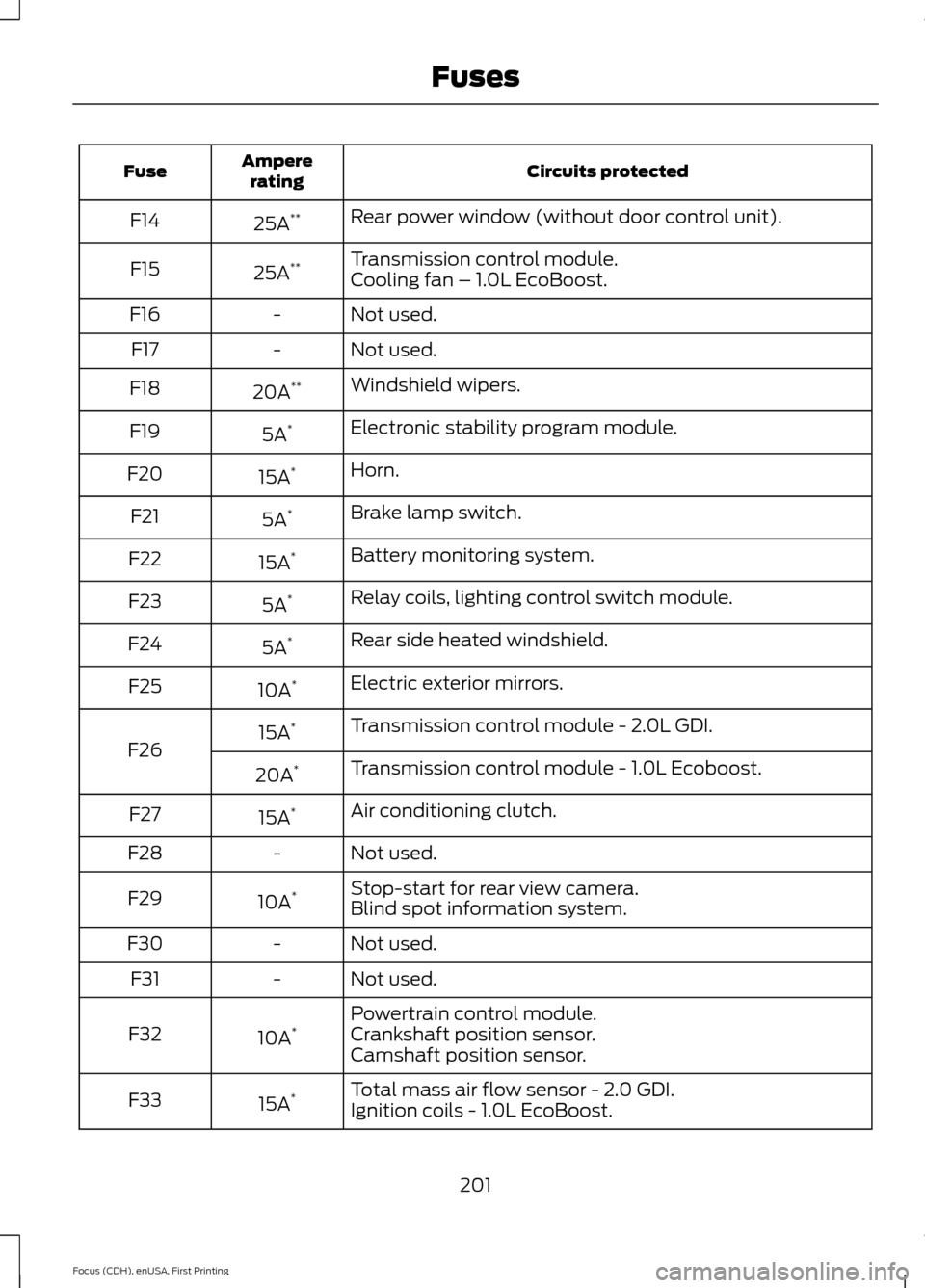
Circuits protected
Ampere
rating
Fuse
Rear power window (without door control unit).
25A **
F14
Transmission control module.
25A **
F15
Cooling fan – 1.0L EcoBoost.
Not used.
-
F16
Not used.
-
F17
Windshield wipers.
20A **
F18
Electronic stability program module.
5A *
F19
Horn.
15A *
F20
Brake lamp switch.
5A *
F21
Battery monitoring system.
15A *
F22
Relay coils, lighting control switch module.
5A *
F23
Rear side heated windshield.
5A *
F24
Electric exterior mirrors.
10A *
F25
Transmission control module - 2.0L GDI.
15A *
F26 Transmission control module - 1.0L Ecoboost.
20A *
Air conditioning clutch.
15A *
F27
Not used.
-
F28
Stop-start for rear view camera.
10A *
F29
Blind spot information system.
Not used.
-
F30
Not used.
-
F31
Powertrain control module.
10A *
F32 Crankshaft position sensor.
Camshaft position sensor.
Total mass air flow sensor - 2.0 GDI.
15A *
F33
Ignition coils - 1.0L EcoBoost.
201
Focus (CDH), enUSA, First Printing Fuses
Page 206 of 453
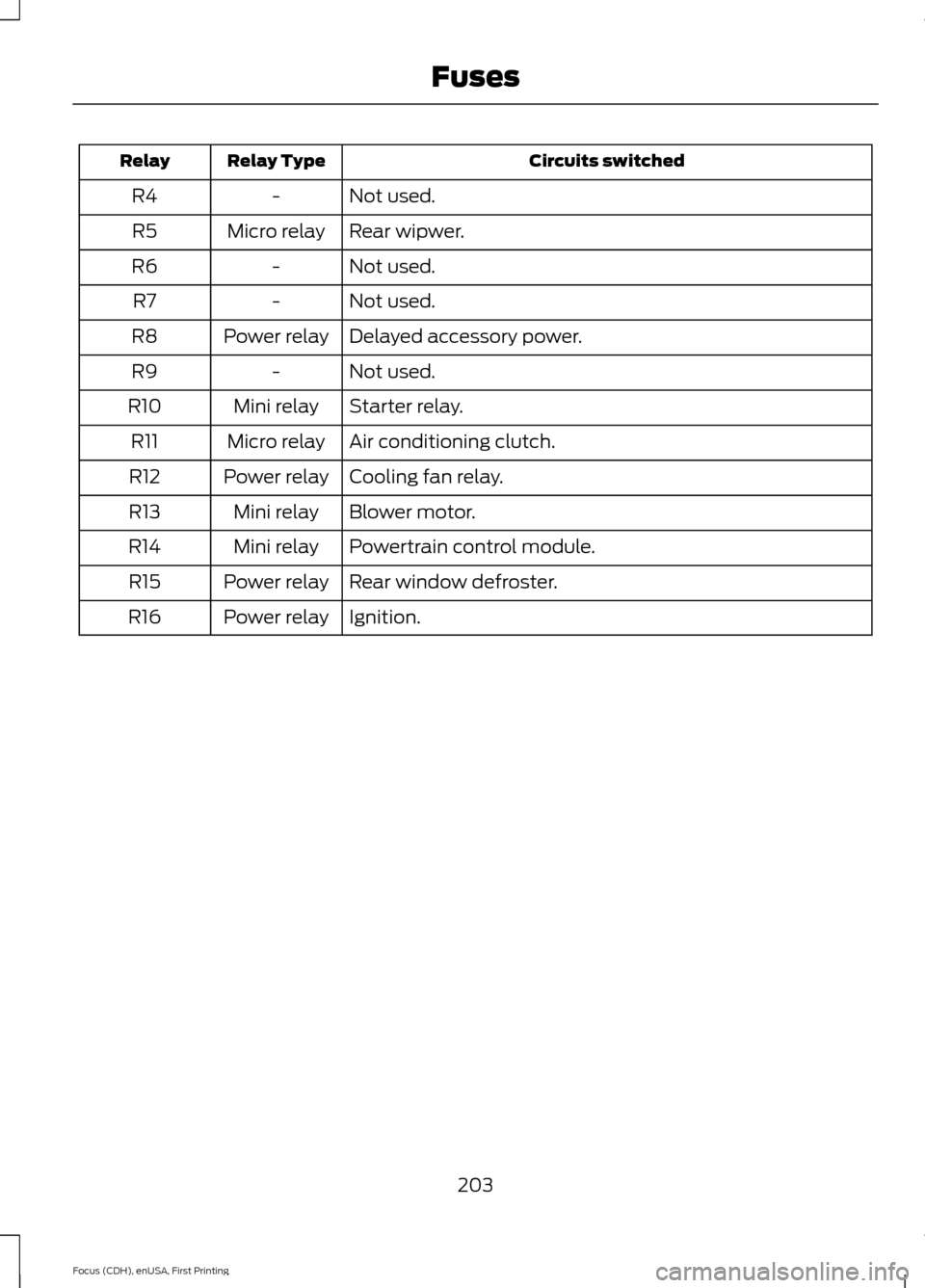
Circuits switched
Relay Type
Relay
Not used.
-
R4
Rear wipwer.
Micro relay
R5
Not used.
-
R6
Not used.
-
R7
Delayed accessory power.
Power relay
R8
Not used.
-
R9
Starter relay.
Mini relay
R10
Air conditioning clutch.
Micro relay
R11
Cooling fan relay.
Power relay
R12
Blower motor.
Mini relay
R13
Powertrain control module.
Mini relay
R14
Rear window defroster.
Power relay
R15
Ignition.
Power relay
R16
203
Focus (CDH), enUSA, First Printing Fuses