brake FORD FOCUS 2018 User Guide
[x] Cancel search | Manufacturer: FORD, Model Year: 2018, Model line: FOCUS, Model: FORD FOCUS 2018Pages: 473, PDF Size: 39.91 MB
Page 91 of 473
It also momentarily illuminates when youswitch the ignition on to confirm the lampis functional. If it does not illuminate whenyou switch the ignition on, or begins toflash at any time, have the system checkedby an authorized dealer.
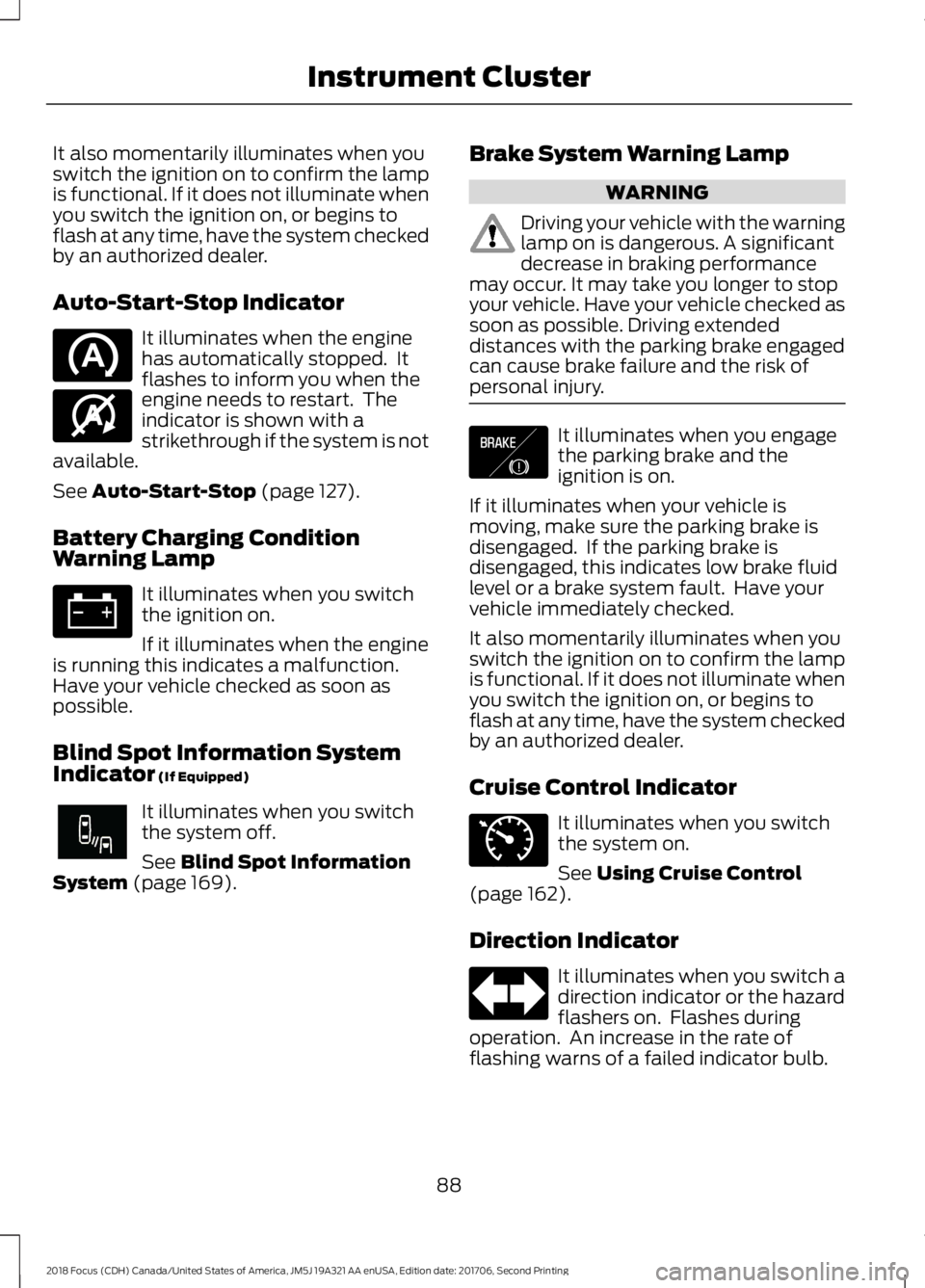
Auto-Start-Stop Indicator
It illuminates when the enginehas automatically stopped. Itflashes to inform you when theengine needs to restart. Theindicator is shown with astrikethrough if the system is notavailable.
See Auto-Start-Stop (page 127).
Battery Charging ConditionWarning Lamp
It illuminates when you switchthe ignition on.
If it illuminates when the engineis running this indicates a malfunction.Have your vehicle checked as soon aspossible.
Blind Spot Information SystemIndicator (If Equipped)
It illuminates when you switchthe system off.
See Blind Spot InformationSystem (page 169).
Brake System Warning Lamp
WARNING
Driving your vehicle with the warninglamp on is dangerous. A significantdecrease in braking performancemay occur. It may take you longer to stopyour vehicle. Have your vehicle checked assoon as possible. Driving extendeddistances with the parking brake engagedcan cause brake failure and the risk ofpersonal injury.
It illuminates when you engagethe parking brake and theignition is on.
If it illuminates when your vehicle ismoving, make sure the parking brake isdisengaged. If the parking brake isdisengaged, this indicates low brake fluidlevel or a brake system fault. Have yourvehicle immediately checked.
It also momentarily illuminates when youswitch the ignition on to confirm the lampis functional. If it does not illuminate whenyou switch the ignition on, or begins toflash at any time, have the system checkedby an authorized dealer.
Cruise Control Indicator
It illuminates when you switchthe system on.
See Using Cruise Control(page 162).
Direction Indicator
It illuminates when you switch adirection indicator or the hazardflashers on. Flashes duringoperation. An increase in the rate offlashing warns of a failed indicator bulb.
882018 Focus (CDH) Canada/United States of America, JM5J 19A321 AA enUSA, Edition date: 201706, Second PrintingInstrument Cluster E146361 E249861E249861 E138644 E71340
Page 94 of 473
Parking Brake On Warning Chime
Sounds when you have left the parkingbrake on and drive your vehicle. If thewarning chime remains on after you havereleased the parking brake, have thesystem checked by an authorized dealerimmediately.
Low Fuel Minder
A low fuel reminder triggers at about 50miles (80 km). The low fuel warning lightwill light, a warning chime will sound anda pop up will be shown in the displayindicating the remaining distance to empty.You will also get a subsequent reminderat 20, 10 and 0 miles.
Fasten Safety Belt
Sounds as a reminder to fasten your safetybelt.
912018 Focus (CDH) Canada/United States of America, JM5J 19A321 AA enUSA, Edition date: 201706, Second PrintingInstrument Cluster
Page 100 of 473
Automatic Engine Shutdown
ActionMessage
Displays if the engine is going to automatically turn off.Engine Shuts Off In{seconds to shut off:#0}Seconds
Displays if the engine automatically turns off to improve fueleconomy.Engine Shut Off For FuelEconomy
Displays if the engine is going to automatically turn off. Pressand hold the OK button to override the system.Engine Shuts Off in{time:#0} Seconds OKto Override
Auto-Start-Stop
ActionMessage
Switch the ignition off before leaving your vehicle if the systemhas shut down the engine.Auto StartStop SwitchIgnition OffSee Auto-Start-Stop (page 127).
Have your vehicle checked as soon as possible.Auto StartStop FaultService Required
Press the brake or clutch pedal. The engine requires restartingmanually.Auto StartStop Press aPedal to Start EngineSee Auto-Start-Stop (page 127).
Displays as a reminder to shift into neutral (N). The enginerequires restarting manually.Auto StartStop SelectNeutral to Start EngineSee Auto-Start-Stop (page 127).
The system is not functioning and the engine requiresrestarting manually.Auto StartStop ManualRestart Required
Battery and Charging System
ActionMessage
Stop your vehicle as soon as it is safe to do so and switch theengine off. Have your vehicle checked as soon as possible.Electrical System Over-voltage Stop Safely
Displays if the battery is low or has no charge.Battery Low See ManualHave your vehicle checked as soon as possible.
972018 Focus (CDH) Canada/United States of America, JM5J 19A321 AA enUSA, Edition date: 201706, Second PrintingInformation Displays
Page 103 of 473
Lighting
ActionMessage
Displays if a brake lamp bulb fails.Brake Lamp Bulb Fault
Displays if a low beam bulb fails.Low Beam Bulb Fault
Displays if an electrical malfunction occurs with the headlampsystem. Have your vehicle checked as soon as possible.Headlamp Fault ServiceRequired
Maintenance
ActionMessage
Displays when the engine oil life is depleted and your vehiclerequires an oil change.Oil Change Required
Displays if the brake fluid level is low or if there is a brakesystem fault.Brake Fluid Level LowService NowSee Brake Fluid Check (page 221).Have your vehicle immediately checked.
MyKey
ActionMessage
Displays when MyKey is active.MyKey Active DriveSafelySee MyKey™ (page 55).
Displays when a MyKey is in use and your vehicle speedapproaches a preset speed limit.MyKey Vehicle Near TopSpeed
Displays when a MyKey is in use and the MyKey speed limitis reached.MyKey Vehicle at TopSpeed
Displays when a MyKey is in use and the MyKey speed limitis reached.MyKey Check SpeedDrive Safely
Displays when a MyKey is in use and seatbelt reminder isactivated.MyKey Buckle Up toUnmute Audio
Displays when a MyKey is in use and the user tries to switchthe parking aid system off.MyKey Park Aid Cannotbe Deactivated
Displays when a MyKey is in use and the user tries to switchthe stability control system off.MyKey ESC Cannot beDeactivated
1002018 Focus (CDH) Canada/United States of America, JM5J 19A321 AA enUSA, Edition date: 201706, Second PrintingInformation Displays
Page 104 of 473
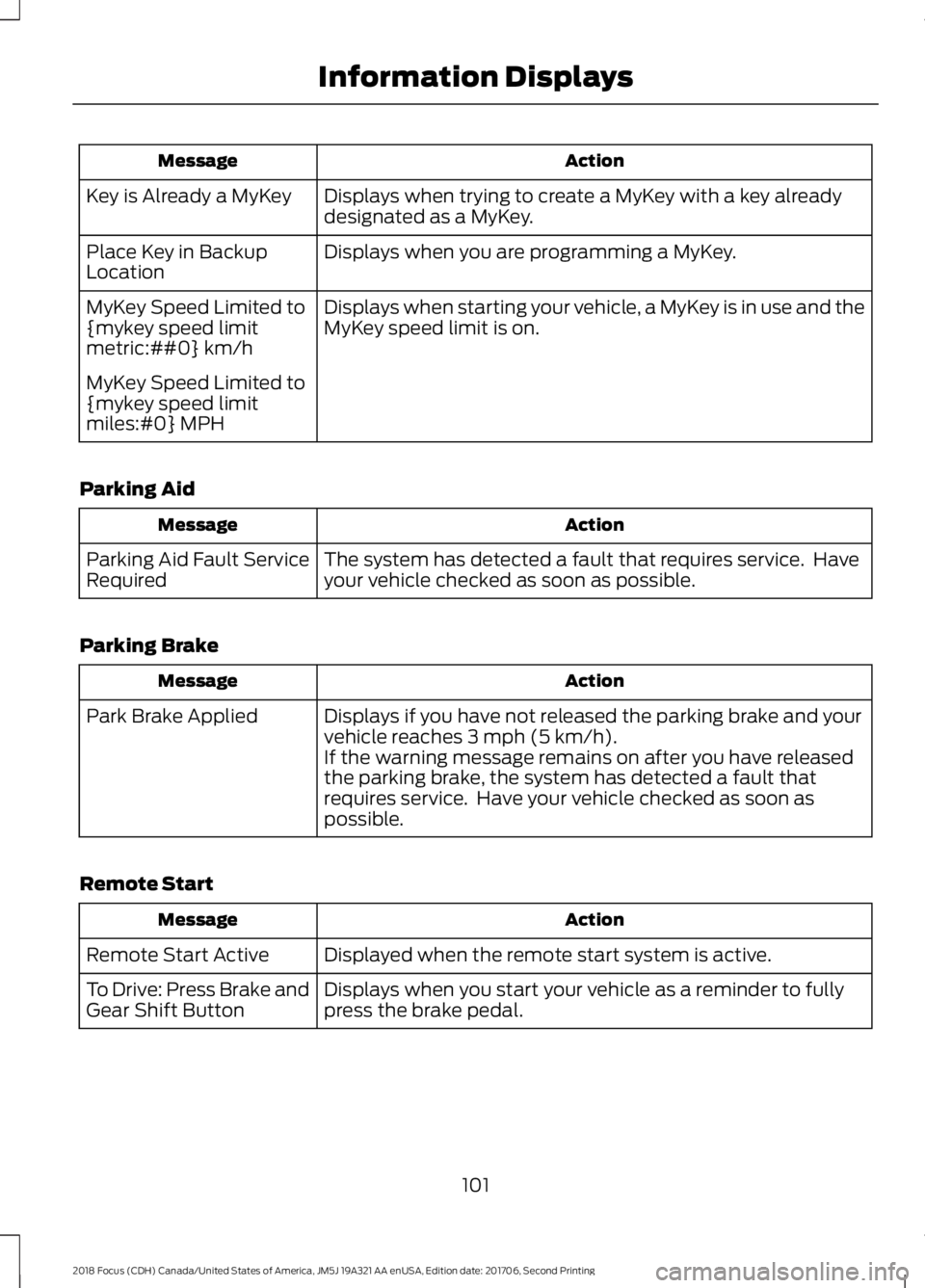
ActionMessage
Displays when trying to create a MyKey with a key alreadydesignated as a MyKey.Key is Already a MyKey
Displays when you are programming a MyKey.Place Key in BackupLocation
Displays when starting your vehicle, a MyKey is in use and theMyKey speed limit is on.MyKey Speed Limited to{mykey speed limitmetric:##0} km/h
MyKey Speed Limited to{mykey speed limitmiles:#0} MPH
Parking Aid
ActionMessage
The system has detected a fault that requires service. Haveyour vehicle checked as soon as possible.Parking Aid Fault ServiceRequired
Parking Brake
ActionMessage
Displays if you have not released the parking brake and yourvehicle reaches 3 mph (5 km/h).Park Brake Applied
If the warning message remains on after you have releasedthe parking brake, the system has detected a fault thatrequires service. Have your vehicle checked as soon aspossible.
Remote Start
ActionMessage
Displayed when the remote start system is active.Remote Start Active
Displays when you start your vehicle as a reminder to fullypress the brake pedal.To Drive: Press Brake andGear Shift Button
1012018 Focus (CDH) Canada/United States of America, JM5J 19A321 AA enUSA, Edition date: 201706, Second PrintingInformation Displays
Page 105 of 473
Seatbelt Reminder
ActionMessage
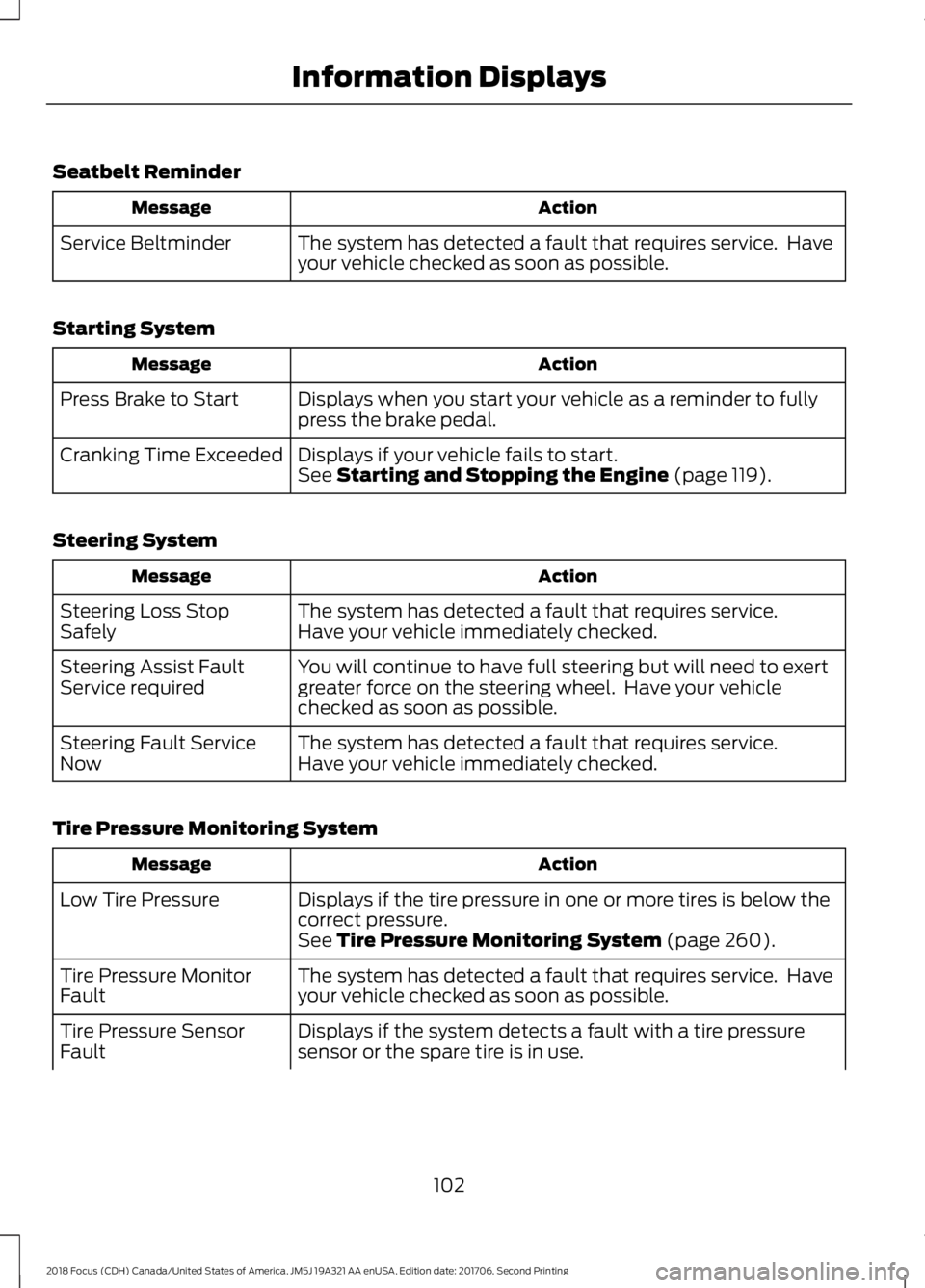
The system has detected a fault that requires service. Haveyour vehicle checked as soon as possible.Service Beltminder
Starting System
ActionMessage
Displays when you start your vehicle as a reminder to fullypress the brake pedal.Press Brake to Start
Displays if your vehicle fails to start.Cranking Time ExceededSee Starting and Stopping the Engine (page 119).
Steering System
ActionMessage
The system has detected a fault that requires service.Steering Loss StopSafelyHave your vehicle immediately checked.
You will continue to have full steering but will need to exertgreater force on the steering wheel. Have your vehiclechecked as soon as possible.
Steering Assist FaultService required
The system has detected a fault that requires service.Steering Fault ServiceNowHave your vehicle immediately checked.
Tire Pressure Monitoring System
ActionMessage
Displays if the tire pressure in one or more tires is below thecorrect pressure.Low Tire Pressure
See Tire Pressure Monitoring System (page 260).
The system has detected a fault that requires service. Haveyour vehicle checked as soon as possible.Tire Pressure MonitorFault
Displays if the system detects a fault with a tire pressuresensor or the spare tire is in use.Tire Pressure SensorFault
1022018 Focus (CDH) Canada/United States of America, JM5J 19A321 AA enUSA, Edition date: 201706, Second PrintingInformation Displays
Page 106 of 473
ActionMessage
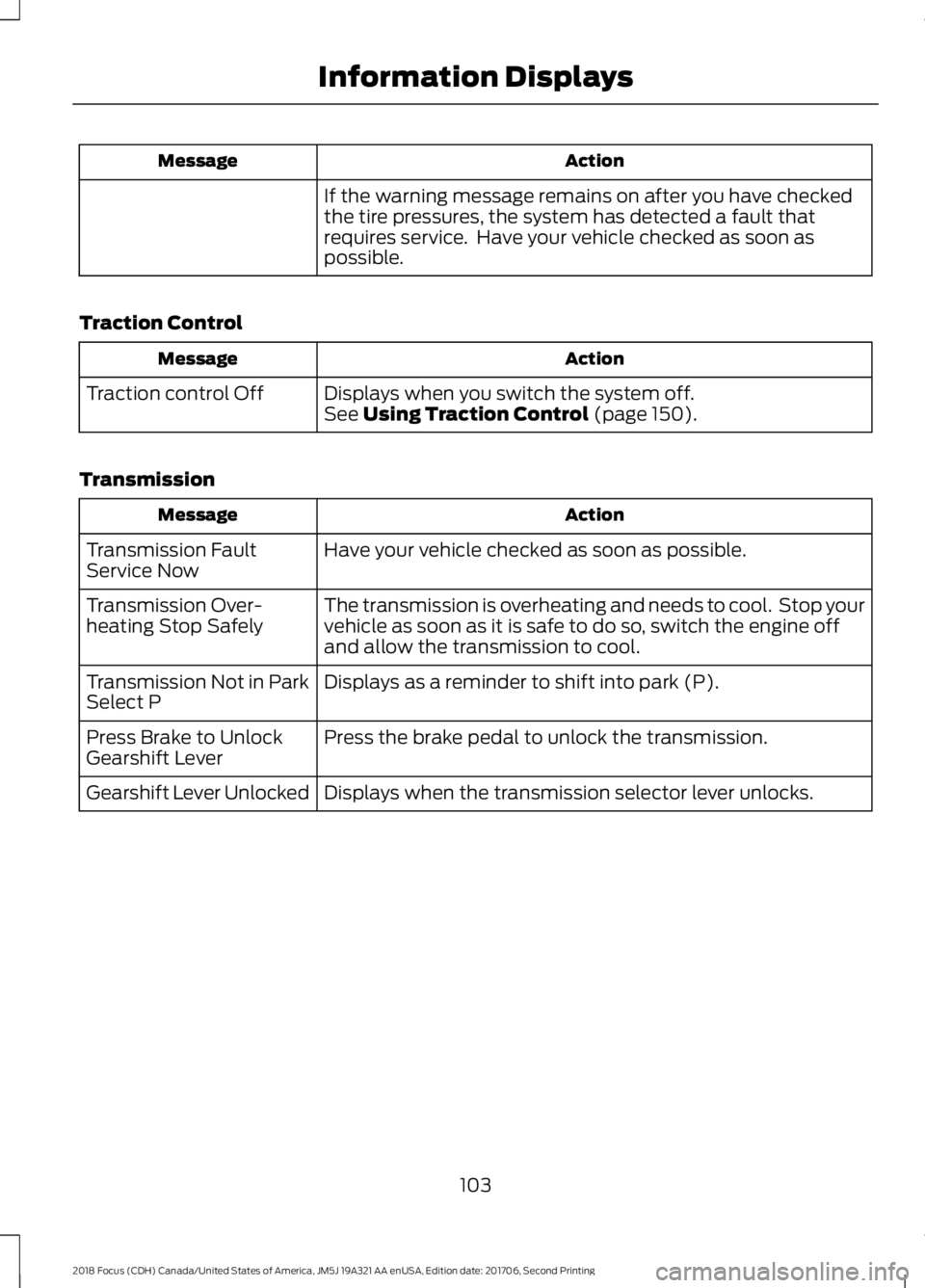
If the warning message remains on after you have checkedthe tire pressures, the system has detected a fault thatrequires service. Have your vehicle checked as soon aspossible.
Traction Control
ActionMessage
Displays when you switch the system off.Traction control OffSee Using Traction Control (page 150).
Transmission
ActionMessage
Have your vehicle checked as soon as possible.Transmission FaultService Now
The transmission is overheating and needs to cool. Stop yourvehicle as soon as it is safe to do so, switch the engine offand allow the transmission to cool.
Transmission Over-heating Stop Safely
Displays as a reminder to shift into park (P).Transmission Not in ParkSelect P
Press the brake pedal to unlock the transmission.Press Brake to UnlockGearshift Lever
Displays when the transmission selector lever unlocks.Gearshift Lever Unlocked
1032018 Focus (CDH) Canada/United States of America, JM5J 19A321 AA enUSA, Edition date: 201706, Second PrintingInformation Displays
Page 123 of 473
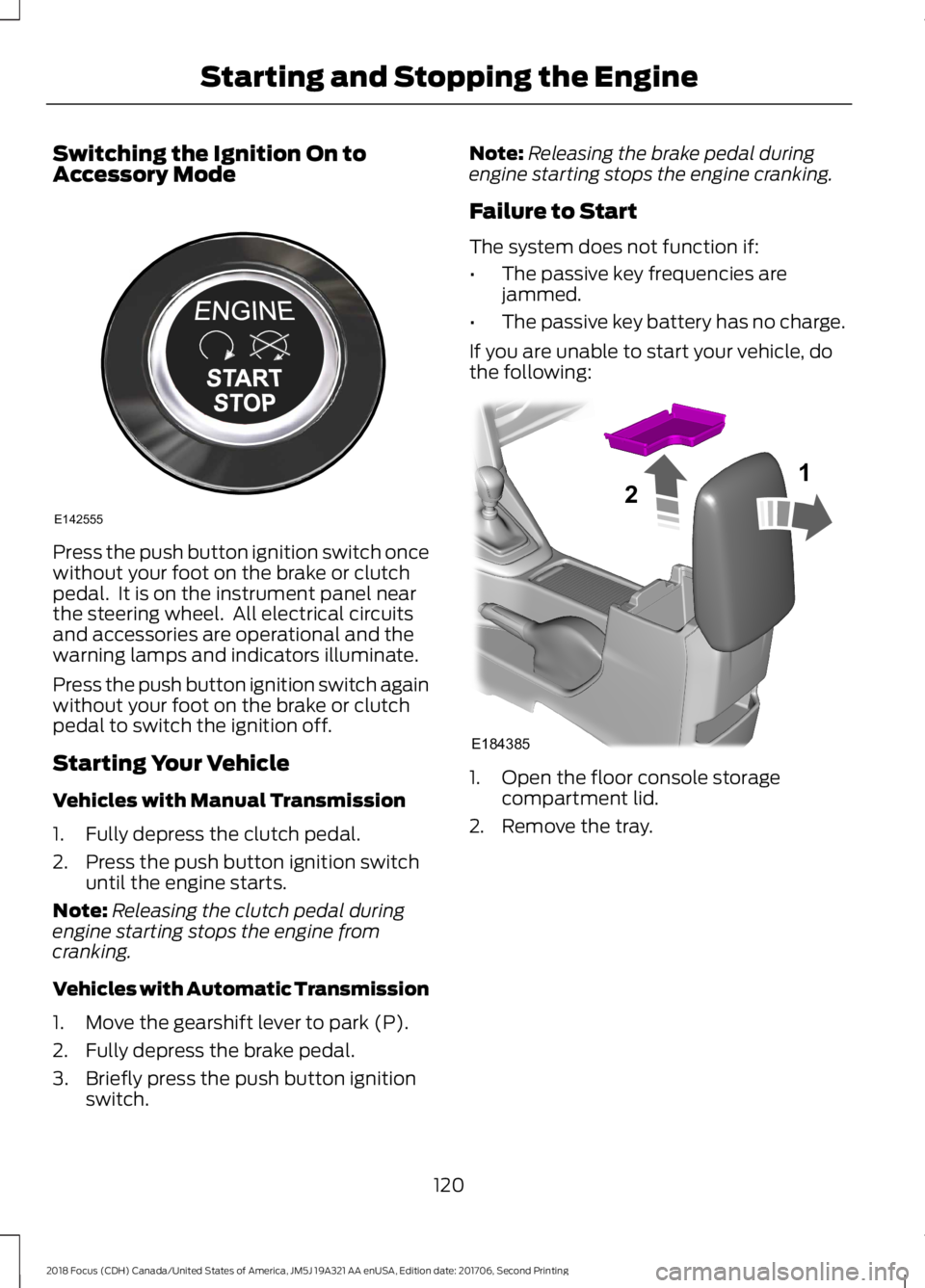
Switching the Ignition On toAccessory Mode
Press the push button ignition switch oncewithout your foot on the brake or clutchpedal. It is on the instrument panel nearthe steering wheel. All electrical circuitsand accessories are operational and thewarning lamps and indicators illuminate.
Press the push button ignition switch againwithout your foot on the brake or clutchpedal to switch the ignition off.
Starting Your Vehicle
Vehicles with Manual Transmission
1.Fully depress the clutch pedal.
2.Press the push button ignition switchuntil the engine starts.
Note:Releasing the clutch pedal duringengine starting stops the engine fromcranking.
Vehicles with Automatic Transmission
1.Move the gearshift lever to park (P).
2.Fully depress the brake pedal.
3.Briefly press the push button ignitionswitch.
Note:Releasing the brake pedal duringengine starting stops the engine cranking.
Failure to Start
The system does not function if:
•The passive key frequencies arejammed.
•The passive key battery has no charge.
If you are unable to start your vehicle, dothe following:
1.Open the floor console storagecompartment lid.
2.Remove the tray.
1202018 Focus (CDH) Canada/United States of America, JM5J 19A321 AA enUSA, Edition date: 201706, Second PrintingStarting and Stopping the EngineE142555 E18438521
Page 124 of 473
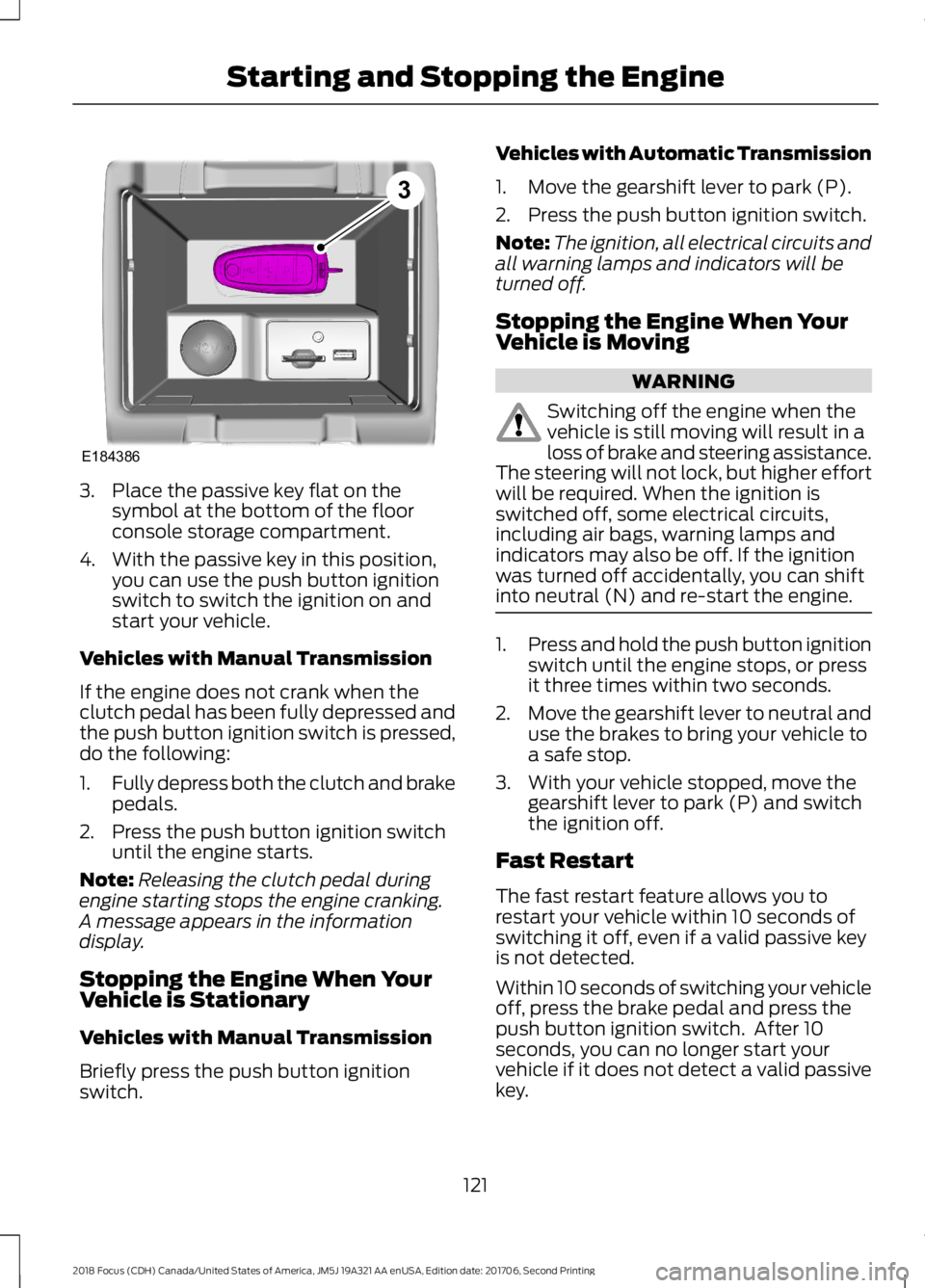
3.Place the passive key flat on thesymbol at the bottom of the floorconsole storage compartment.
4.With the passive key in this position,you can use the push button ignitionswitch to switch the ignition on andstart your vehicle.
Vehicles with Manual Transmission
If the engine does not crank when theclutch pedal has been fully depressed andthe push button ignition switch is pressed,do the following:
1.Fully depress both the clutch and brakepedals.
2.Press the push button ignition switchuntil the engine starts.
Note:Releasing the clutch pedal duringengine starting stops the engine cranking.A message appears in the informationdisplay.
Stopping the Engine When YourVehicle is Stationary
Vehicles with Manual Transmission
Briefly press the push button ignitionswitch.
Vehicles with Automatic Transmission
1.Move the gearshift lever to park (P).
2.Press the push button ignition switch.
Note:The ignition, all electrical circuits andall warning lamps and indicators will beturned off.
Stopping the Engine When YourVehicle is Moving
WARNING
Switching off the engine when thevehicle is still moving will result in aloss of brake and steering assistance.The steering will not lock, but higher effortwill be required. When the ignition isswitched off, some electrical circuits,including air bags, warning lamps andindicators may also be off. If the ignitionwas turned off accidentally, you can shiftinto neutral (N) and re-start the engine.
1.Press and hold the push button ignitionswitch until the engine stops, or pressit three times within two seconds.
2.Move the gearshift lever to neutral anduse the brakes to bring your vehicle toa safe stop.
3.With your vehicle stopped, move thegearshift lever to park (P) and switchthe ignition off.
Fast Restart
The fast restart feature allows you torestart your vehicle within 10 seconds ofswitching it off, even if a valid passive keyis not detected.
Within 10 seconds of switching your vehicleoff, press the brake pedal and press thepush button ignition switch. After 10seconds, you can no longer start yourvehicle if it does not detect a valid passivekey.
1212018 Focus (CDH) Canada/United States of America, JM5J 19A321 AA enUSA, Edition date: 201706, Second PrintingStarting and Stopping the EngineE1843863
Page 125 of 473
Once your vehicle starts, it remains runninguntil you press the push button ignitionswitch, even if your vehicle does not detecta valid passive key. If you open and closea door while your vehicle is running, thesystem searches for a valid passive key.
You cannot start your vehicle if you openthe driver door and the system does notdetect a valid passive key.
STARTING A GASOLINE
ENGINE
When you start the engine, the idle speedincreases. This helps to warm up theengine. If the engine idle speed does notslow down automatically, have yourvehicle checked by an authorized dealer.
Note:You can crank the engine for a totalof 60 seconds without the engine startingbefore the starting system temporarilydisables. The 60 seconds does not have tobe all at once. For example, if you crank theengine three times for 20 seconds eachtime, without the engine starting, youreached the 60-second time limit. Amessage appears in the information displayalerting you that you exceeded the crankingtime. You cannot attempt to start the enginefor at least 15 minutes. After 15 minutes, youare limited to a 15-second engine crankingtime. You need to wait 60 minutes beforeyou can crank the engine for 60 secondsagain.
Before starting your vehicle, check thefollowing:
•Make sure all occupants have fastenedtheir safety belts.
•Make sure the headlamps andelectrical accessories are off.
•Make sure the parking brake is on.
•Make sure the transmission is in park(P).
•Switch the ignition key to position II. Ifyour vehicle is equipped with a keylessignition, see the following instructions.
Vehicles with an Ignition Key
Note:Do not touch the accelerator pedal.
1.Fully press the brake pedal. If yourvehicle is equipped with a manualtransmission, fully press the clutchpedal.
2.Turn the key to position III to start theengine.
Note:The engine may continue crankingfor up to 15 seconds or until it starts.
Note:If you cannot start the engine on thefirst try, wait for a short period and try again.
Vehicles with Keyless Start
Note:Do not touch the accelerator pedal.
Note:You must have your intelligent accesskey in your vehicle in order to shift thetransmission out of park (P).
1.Fully depress the brake pedal.
2.Press the push button ignition switch.
The system does not function if:
•The passive key frequencies arejammed.
•The key battery has no charge.
If you are unable to start your vehicle, dothe following:
1222018 Focus (CDH) Canada/United States of America, JM5J 19A321 AA enUSA, Edition date: 201706, Second PrintingStarting and Stopping the Engine