fuel cap FORD FOCUS 2018 User Guide
[x] Cancel search | Manufacturer: FORD, Model Year: 2018, Model line: FOCUS, Model: FORD FOCUS 2018Pages: 473, PDF Size: 39.91 MB
Page 277 of 473
CAPACITIES AND
SPECIFICATIONS - 1.0L
ECOBOOST™
WARNING
The air conditioning refrigerantsystem contains refrigerant underhigh pressure. Only qualifiedpersonnel should service the airconditioning refrigerant system. Openingthe air conditioning refrigerant system cancause personal injury.
Capacities
QuantityItem
1.2 gal (4.6 L)Engine oil fill capacity including the oil filter.
1.2 gal (4.4 L)Engine oil fill capacity excluding the oil filter.
2.2 gal (8.5 L)Engine coolant fill capacity.
0.4 gal (1.67 L)Manual transmission fluid fill capacity.
2.3 gal (8.6 L)Automatic transmission fluid fill capacity.
12.4 gal (47 L)Fuel tank fill capacity.
0.7 gal (2.5 L)Washer system fill capacity.
20.8 oz (0.59 kg)Air conditioning refrigerant fill capacity.
7.0 fl oz (207 ml)Air conditioning refrigerant compressor oil fill capacity.
Adding Engine Oil
Quantity
0.7 qt (0.7 L)
The quantity of engine oil required to raisethe indicated level on the dipstick fromminimum to maximum.
Specifications
We recommend that you use Motorcraftoil and fluids for your vehicle. Only usefluid that meets Ford specifications.
Using other fluids could result in damagenot covered by the vehicle Warranty.
MaterialsSpecificationName
WSS-M2C945-AMotorcraft® SAE 5W-20 Synthetic Blend Motor Oil (U.S.)Motorcraft® SAE 5W-20 Super Premium Motor Oil / Huile moteurde très haute qualité SAE 5W-20 Motorcraft® (Canada)XO-5W20-QSP (U.S.)CXO-5W20-LSP12 (Canada)
WSS-M2C945-AMotorcraft® SAE 5W-20 Full Synthetic Motor Oil (U.S.)
2742018 Focus (CDH) Canada/United States of America, JM5J 19A321 AA enUSA, Edition date: 201706, Second PrintingCapacities and Specifications
Page 279 of 473
SpecificationName
Motorcraft® Penetrating Fluid / Liquide dégrippant Motorcraft®(Canada)XL-1 (U.S.)CXC-51-A (Canada)
Motor oils of the recommended viscositygrade that display the API CertificationMark for gasoline engines are alsoacceptable. Do not use oil labeled withAPI SN service category unless the labelalso displays the API certification mark.
Note:Automatic transmissions that requireMERCON® LV transmission fluid shouldonly use MERCON® LV transmission fluid.
An oil that displays this symbol conformsto current engine, emission system andfuel economy performance standards ofthe International Lubricants SpecificationAdvisory Committee (ILSAC).
Note:Do not use more than 1.1 qt (1 L) ofthe alternative engine oil betweenscheduled service intervals.
Using oil and fluids that do not meet thedefined specification and viscosity grademay lead to:
•Component damage which may not becovered by the vehicle Warranty.
•Longer engine cranking periods.
•Increased emission levels.
•Reduced engine performance.
•Reduced fuel economy.
•Reduced brake performance.
Do not use supplemental engine oiladditives because they are unnecessaryand could lead to engine damage that maynot be covered by the vehicle Warranty.
Alternative Engine Oil forExtremely Cold Climates
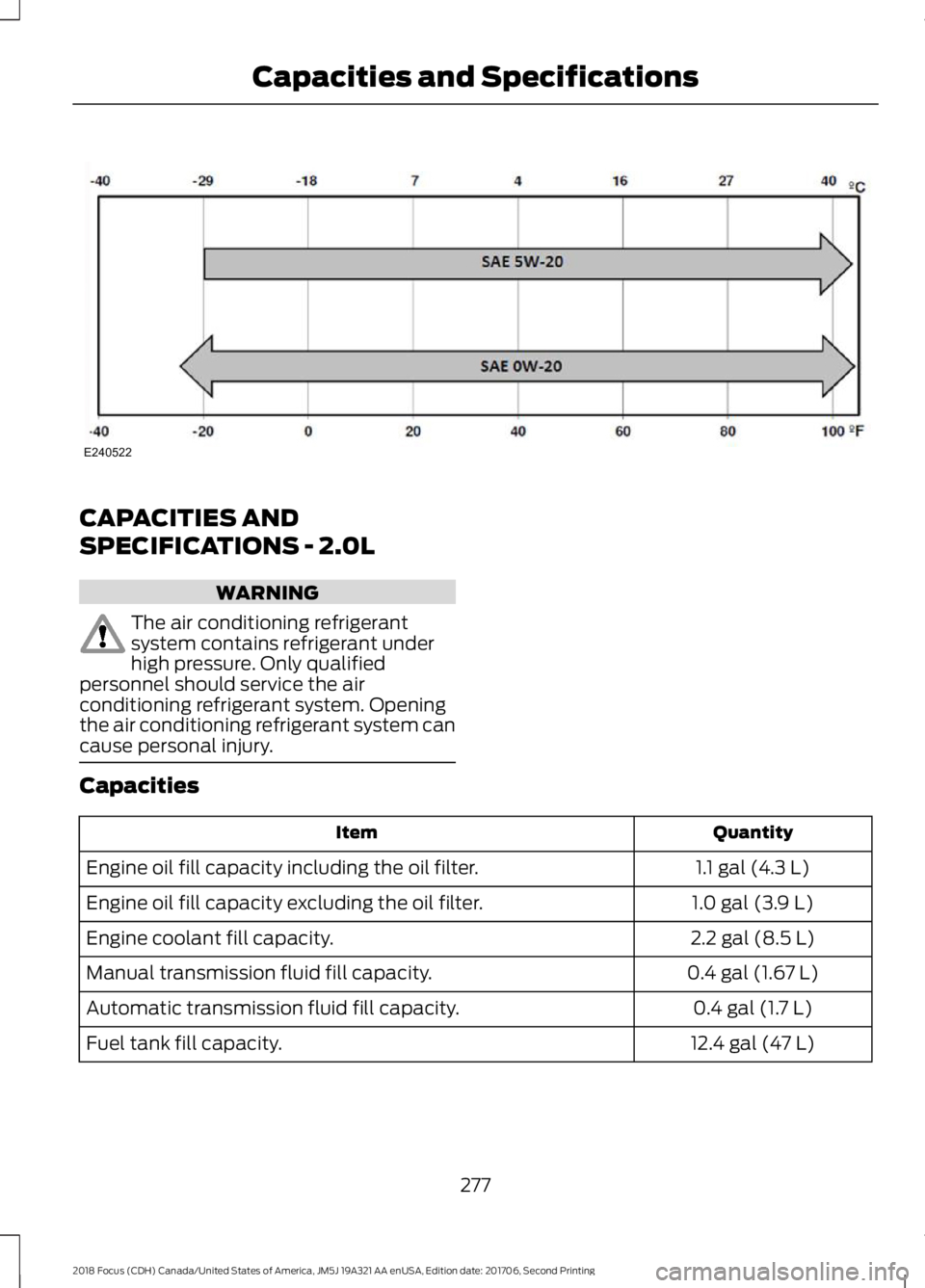
To improve engine cold start performance,we recommend that you use the followingalternative engine oil where the ambienttemperature reaches -22°F (-30°C) orbelow.
MaterialsSpecificationName
WSS-M2C947-AMotorcraft® SAE 0W-20 Synthetic Blend Motor OilEngine Oil - SAE 0W-20XO-0W20-QSP (U.S.)
2762018 Focus (CDH) Canada/United States of America, JM5J 19A321 AA enUSA, Edition date: 201706, Second PrintingCapacities and SpecificationsE142732
Page 280 of 473
CAPACITIES AND
SPECIFICATIONS - 2.0L
WARNING
The air conditioning refrigerantsystem contains refrigerant underhigh pressure. Only qualifiedpersonnel should service the airconditioning refrigerant system. Openingthe air conditioning refrigerant system cancause personal injury.
Capacities
QuantityItem
1.1 gal (4.3 L)Engine oil fill capacity including the oil filter.
1.0 gal (3.9 L)Engine oil fill capacity excluding the oil filter.
2.2 gal (8.5 L)Engine coolant fill capacity.
0.4 gal (1.67 L)Manual transmission fluid fill capacity.
0.4 gal (1.7 L)Automatic transmission fluid fill capacity.
12.4 gal (47 L)Fuel tank fill capacity.
2772018 Focus (CDH) Canada/United States of America, JM5J 19A321 AA enUSA, Edition date: 201706, Second PrintingCapacities and SpecificationsE240522
Page 282 of 473
SpecificationName
Motorcraft® Premium Quality Windshield Washer Fluid / Liquidelave-glace de haute qualité Motorcraft® (Canada)ZC-32-B2 (U.S.)CXC-37-A/B/D/F (Canada)
WSS-M17B21-AR-1234yf Refrigerant (U.S.)R-1234yf Refrigerant / Frigorigène R-1234yf (Canada)YN-33-A (U.S.)HS7Z-19B519-BA (Canada)
WSS-M2C300-A2Motorcraft® R-1234yf Refrigerant PAG Oil (U.S.)Motorcraft® R-1234yf Refrigerant PAG Oil / Huile PAG pourfrigorigène R-1234yf Motorcraft® (Canada)YN-35 (U.S. & Canada)
ESB-M1C93-BMotorcraft® Multi-Purpose Grease Spray (U.S.)Motorcraft® Multi-Purpose Grease Spray / Graisse tout usage enaérosol Motorcraft® (Canada)XL-5-A (U.S. & Canada)
-Motorcraft® Penetrating and Lock Lubricant (U.S.)Motorcraft® Penetrating Fluid / Liquide dégrippant Motorcraft®(Canada)XL-1 (U.S.)CXC-51-A (Canada)
Motor oils of the recommended viscositygrade that display the API CertificationMark for gasoline engines are alsoacceptable. Do not use oil labeled withAPI SN service category unless the labelalso displays the API certification mark.
Note:Automatic transmissions that requireMERCON® LV transmission fluid shouldonly use MERCON® LV transmission fluid.
An oil that displays this symbol conformsto current engine, emission system andfuel economy performance standards ofthe International Lubricants SpecificationAdvisory Committee (ILSAC).
Note:Do not use more than 1.1 qt (1 L) ofthe alternative engine oil betweenscheduled service intervals.
Using oil and fluids that do not meet thedefined specification and viscosity grademay lead to:
•Component damage which may not becovered by the vehicle Warranty.
•Longer engine cranking periods.
•Increased emission levels.
•Reduced engine performance.
•Reduced fuel economy.
•Reduced brake performance.
2792018 Focus (CDH) Canada/United States of America, JM5J 19A321 AA enUSA, Edition date: 201706, Second PrintingCapacities and SpecificationsE142732
Page 317 of 473
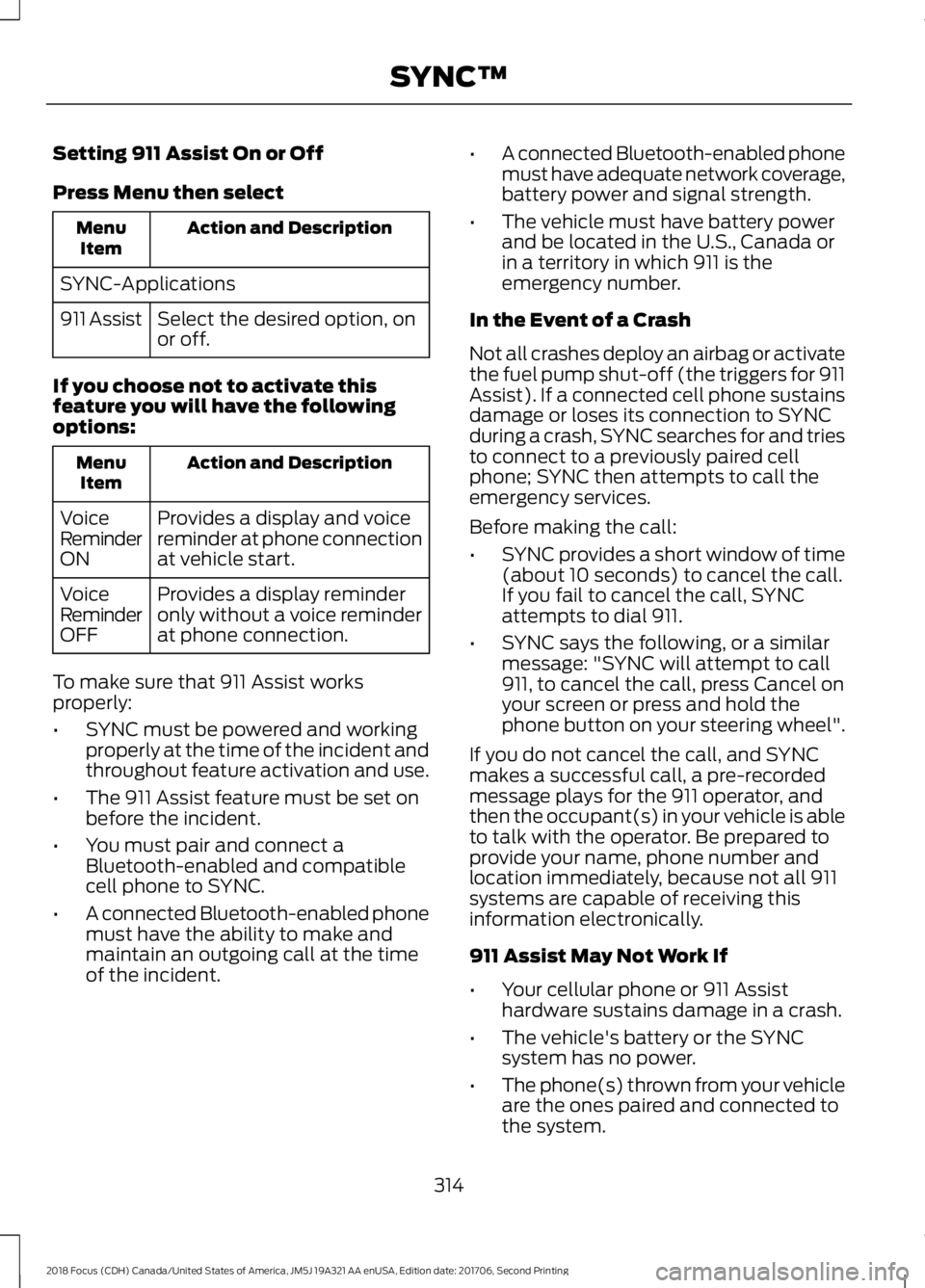
Setting 911 Assist On or Off
Press Menu then select
Action and DescriptionMenuItem
SYNC-Applications
Select the desired option, onor off.911 Assist
If you choose not to activate thisfeature you will have the followingoptions:
Action and DescriptionMenuItem
Provides a display and voicereminder at phone connectionat vehicle start.
VoiceReminderON
Provides a display reminderonly without a voice reminderat phone connection.
VoiceReminderOFF
To make sure that 911 Assist worksproperly:
•SYNC must be powered and workingproperly at the time of the incident andthroughout feature activation and use.
•The 911 Assist feature must be set onbefore the incident.
•You must pair and connect aBluetooth-enabled and compatiblecell phone to SYNC.
•A connected Bluetooth-enabled phonemust have the ability to make andmaintain an outgoing call at the timeof the incident.
•A connected Bluetooth-enabled phonemust have adequate network coverage,battery power and signal strength.
•The vehicle must have battery powerand be located in the U.S., Canada orin a territory in which 911 is theemergency number.
In the Event of a Crash
Not all crashes deploy an airbag or activatethe fuel pump shut-off (the triggers for 911Assist). If a connected cell phone sustainsdamage or loses its connection to SYNCduring a crash, SYNC searches for and triesto connect to a previously paired cellphone; SYNC then attempts to call theemergency services.
Before making the call:
•SYNC provides a short window of time(about 10 seconds) to cancel the call.If you fail to cancel the call, SYNCattempts to dial 911.
•SYNC says the following, or a similarmessage: "SYNC will attempt to call911, to cancel the call, press Cancel onyour screen or press and hold thephone button on your steering wheel".
If you do not cancel the call, and SYNCmakes a successful call, a pre-recordedmessage plays for the 911 operator, andthen the occupant(s) in your vehicle is ableto talk with the operator. Be prepared toprovide your name, phone number andlocation immediately, because not all 911systems are capable of receiving thisinformation electronically.
911 Assist May Not Work If
•Your cellular phone or 911 Assisthardware sustains damage in a crash.
•The vehicle's battery or the SYNCsystem has no power.
•The phone(s) thrown from your vehicleare the ones paired and connected tothe system.
3142018 Focus (CDH) Canada/United States of America, JM5J 19A321 AA enUSA, Edition date: 201706, Second PrintingSYNC™
Page 318 of 473
911 Assist Privacy Notice
When you switch on 911 Assist, it maydisclose to emergency services that yourvehicle has been in a crash involving thedeployment of an airbag or activation ofthe fuel pump shut-off. Certain versions orupdates to 911 Assist may also be capableof electronically or verbally disclosing to911 operators your vehicle location or otherdetails about your vehicle or crash to assist911 operators to provide the mostappropriate emergency services. If you donot want to disclose this information, donot switch the feature on.
SYNC Mobile Apps
The system enables voice and steeringwheel control of SYNC AppLink enabledsmartphone apps. When an app is runningthrough AppLink, you can control mainfeatures of the app through voicecommands and steering wheel controls.
Note:You must pair and connect yoursmartphone to SYNC to access AppLink.
Note:iPhone users need to connect thephone to the USB port.
Note:Android users need to connect thephone to SYNC using Bluetooth.
Note:For information on available apps,supported smartphone devices andtroubleshooting tips please visit the Fordwebsite.
Availability of SYNC AppLink enabled Appswill vary by region.
Note:Make sure you have an active accountfor the app that you have downloaded.Some apps work automatically with nosetup. Other apps want you to configureyour personal settings and personalize yourexperience by creating stations or favorites.We recommend you do this at home oroutside of your vehicle.
Note:AppLink is not available if yourvehicle is equipped with the MyFordTouchsystem.
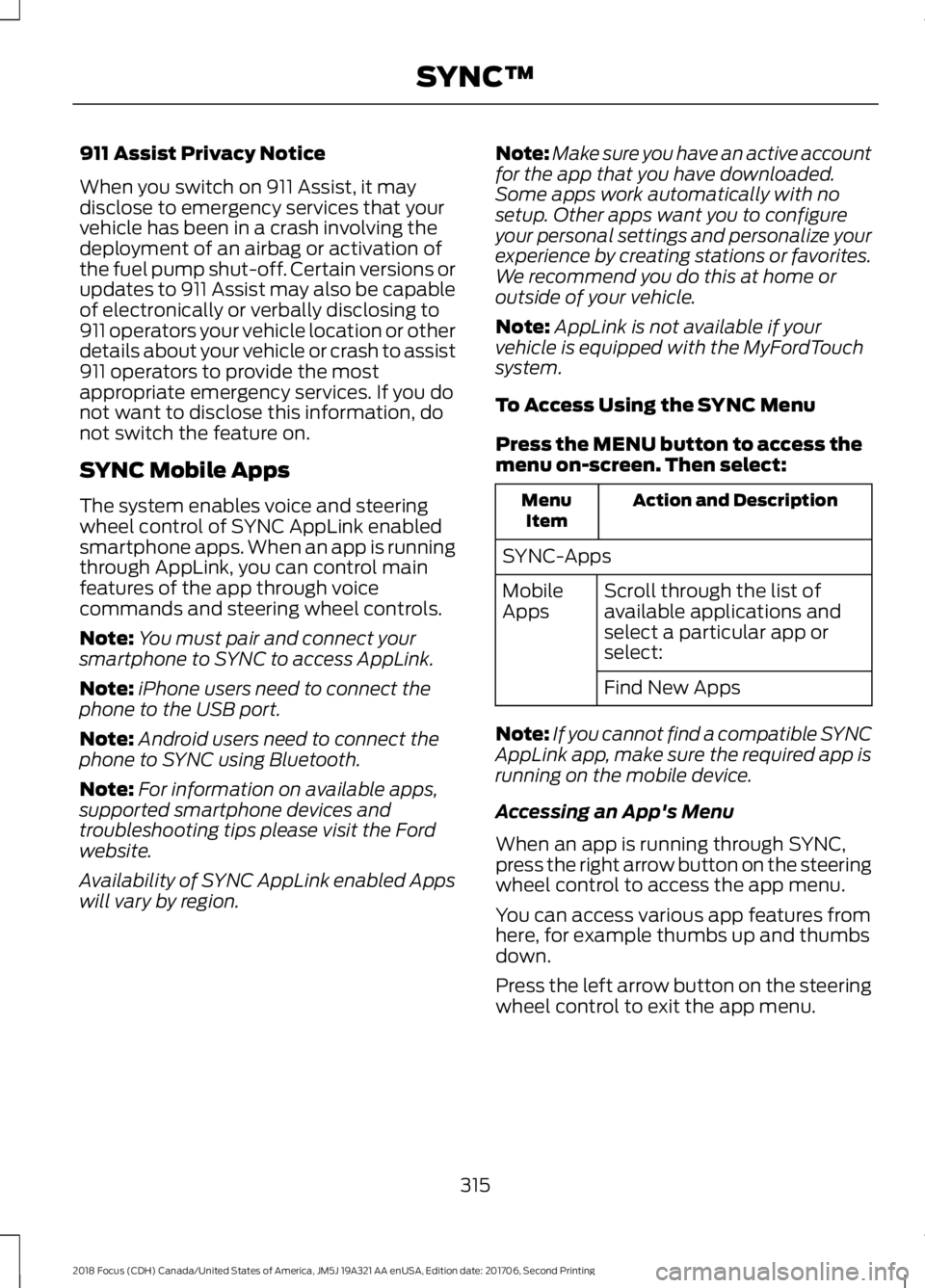
To Access Using the SYNC Menu
Press the MENU button to access themenu on-screen. Then select:
Action and DescriptionMenuItem
SYNC-Apps
Scroll through the list ofavailable applications andselect a particular app orselect:
MobileApps
Find New Apps
Note:If you cannot find a compatible SYNCAppLink app, make sure the required app isrunning on the mobile device.
Accessing an App's Menu
When an app is running through SYNC,press the right arrow button on the steeringwheel control to access the app menu.
You can access various app features fromhere, for example thumbs up and thumbsdown.
Press the left arrow button on the steeringwheel control to exit the app menu.
3152018 Focus (CDH) Canada/United States of America, JM5J 19A321 AA enUSA, Edition date: 201706, Second PrintingSYNC™
Page 344 of 473
•You must pair and connect aBluetooth-enabled and compatiblecell phone to SYNC.
•A connected Bluetooth-enabled phonemust have the ability to make andmaintain an outgoing call at the timeof the incident.
•A connected Bluetooth-enabled phonemust have adequate network coverage,battery power and signal strength.
•The vehicle must have battery powerand be located in the U.S., Canada orin a territory in which 911 is theemergency number.
In the Event of a Crash
Not all crashes will deploy an airbag oractivate the fuel pump shut-off (thetriggers for 911 Assist). If a connected cellphone sustains damage or loses itsconnection to SYNC during a crash, SYNCwill search for and try to connect to apreviously paired cell phone; SYNC willthen attempt to call the emergencyservices.
Before making the call:
•SYNC provides a short window of time(about 10 seconds) to cancel the call.If you fail to cancel the call, SYNCattempts to dial 911.
•SYNC says the following, or a similarmessage: "SYNC will attempt to call911, to cancel the call, press Cancel onyour screen or press and hold thephone button on your steering wheel."
If you do not cancel the call, and SYNCmakes a successful call, a pre-recordedmessage plays for the 911 operator, andthen the occupant(s) in your vehicle is ableto talk with the operator. Be prepared toprovide your name, phone number andlocation immediately, because not all 911systems are capable of receiving thisinformation electronically.
911 Assist May Not Work If
•Your cellular phone or 911 Assisthardware sustains damage in a crash.
•The vehicle's battery or the SYNCsystem has no power.
•The phone(s) thrown from your vehicleare the ones paired and connected tothe system.
911 Assist Privacy Notice
When you switch on 911 Assist, it maydisclose to emergency services that yourvehicle has been in a crash involving thedeployment of an airbag or activation ofthe fuel pump shut-off. Certain versions orupdates to 911 Assist may also be capableof electronically or verbally disclosing to911 operators your vehicle location or otherdetails about your vehicle or crash to assist911 operators to provide the mostappropriate emergency services. If you donot want to disclose this information, donot switch the feature on.
Safety Information
WARNING
Driving while distracted can result inloss of vehicle control, crash andinjury. We strongly recommend thatyou use extreme caution when using anydevice that may take your focus off theroad. Your primary responsibility is the safeoperation of your vehicle. We recommendagainst the use of any hand-held devicewhile driving and encourage the use ofvoice-operated systems when possible.Make sure you are aware of all applicablelocal laws that may affect the use ofelectronic devices while driving.
3412018 Focus (CDH) Canada/United States of America, JM5J 19A321 AA enUSA, Edition date: 201706, Second PrintingSYNC™ 3
Page 372 of 473
Map Mode
Map mode shows advanced viewingcomprised of 2D city maps, 3D landmarksand 3D city models (when available). 2Dcity maps show detailed outlines ofbuildings, visible land use, landscapefeatures, and detailed railroadinfrastructure for the most essential citiesaround the globe.
3D landmarks appear as clear, visibleobjects that are typically recognizable andhave a certain tourism value.
3D city models are complete 3D modelsof entire city areas including navigableroads, parks, rivers and rendered buildings.3D landmarks and city models appear in3D map mode only. Coverage of thesevaries and improves with updated mapreleases.
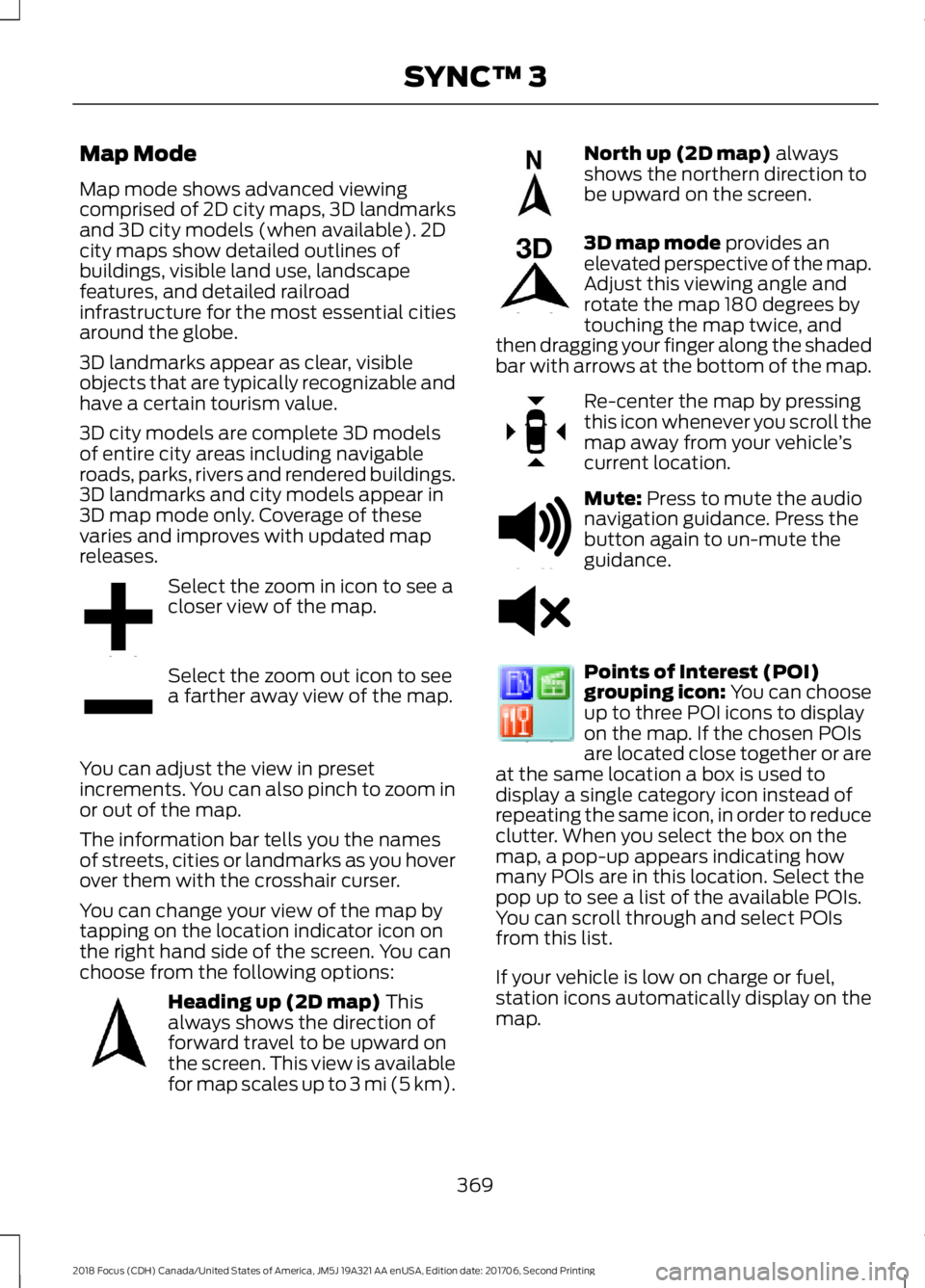
Select the zoom in icon to see acloser view of the map.
Select the zoom out icon to seea farther away view of the map.
You can adjust the view in presetincrements. You can also pinch to zoom inor out of the map.
The information bar tells you the namesof streets, cities or landmarks as you hoverover them with the crosshair curser.
You can change your view of the map bytapping on the location indicator icon onthe right hand side of the screen. You canchoose from the following options:
Heading up (2D map) Thisalways shows the direction offorward travel to be upward onthe screen. This view is availablefor map scales up to 3 mi (5 km).
North up (2D map) alwaysshows the northern direction tobe upward on the screen.
3D map mode provides anelevated perspective of the map.Adjust this viewing angle androtate the map 180 degrees bytouching the map twice, andthen dragging your finger along the shadedbar with arrows at the bottom of the map.
Re-center the map by pressingthis icon whenever you scroll themap away from your vehicle’scurrent location.
Mute: Press to mute the audionavigation guidance. Press thebutton again to un-mute theguidance.
Points of Interest (POI)grouping icon: You can chooseup to three POI icons to displayon the map. If the chosen POIsare located close together or areat the same location a box is used todisplay a single category icon instead ofrepeating the same icon, in order to reduceclutter. When you select the box on themap, a pop-up appears indicating howmany POIs are in this location. Select thepop up to see a list of the available POIs.You can scroll through and select POIsfrom this list.
If your vehicle is low on charge or fuel,station icons automatically display on themap.
3692018 Focus (CDH) Canada/United States of America, JM5J 19A321 AA enUSA, Edition date: 201706, Second PrintingSYNC™ 3E207752 E207753 E207750 E207749 E207748 E207751 E251780 E251779 E207754
Page 470 of 473
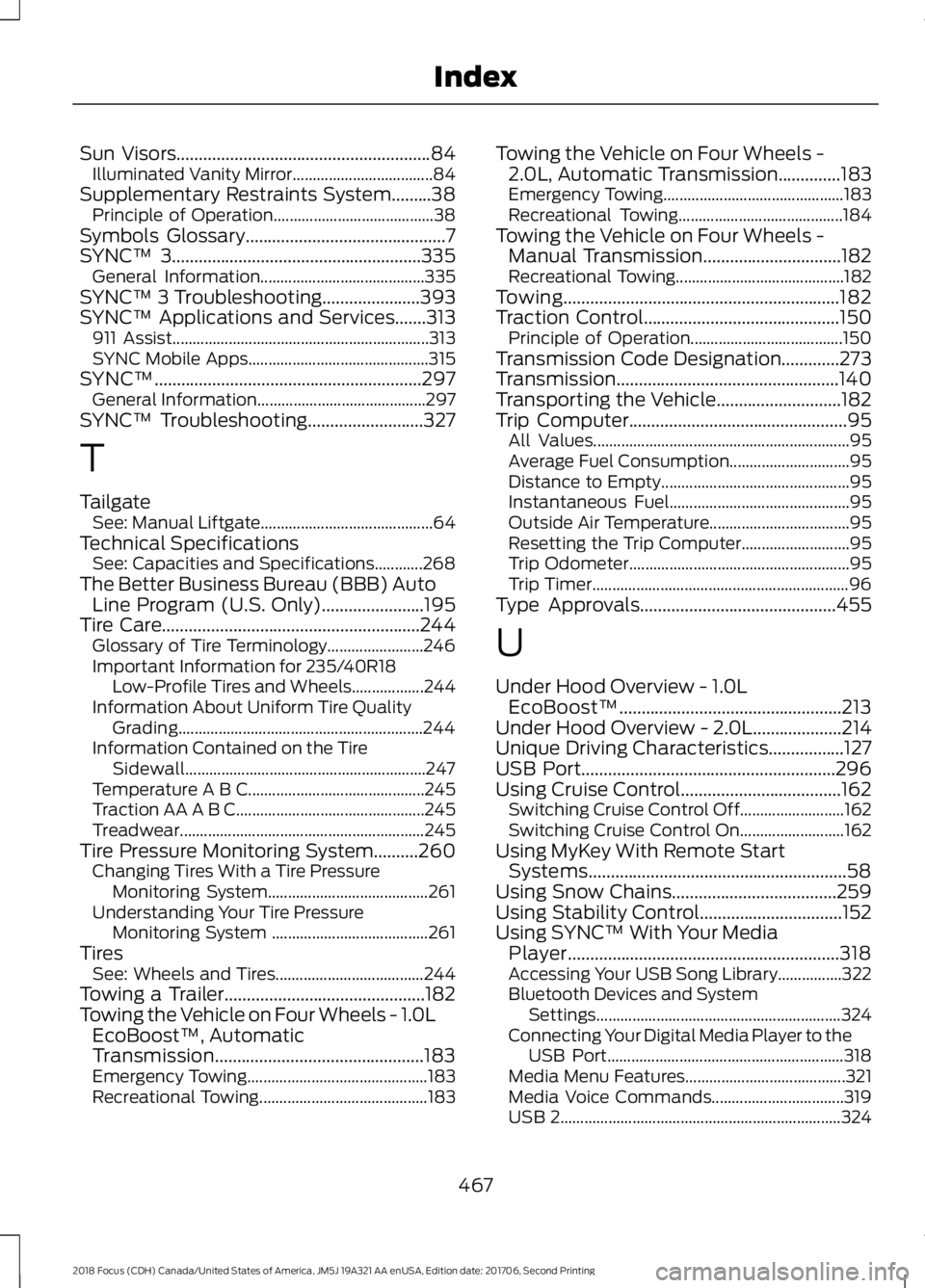
Sun Visors.........................................................84Illuminated Vanity Mirror...................................84Supplementary Restraints System.........38Principle of Operation........................................38Symbols Glossary.............................................7SYNC™ 3........................................................335General Information.........................................335SYNC™ 3 Troubleshooting......................393SYNC™ Applications and Services.......313911 Assist................................................................313SYNC Mobile Apps.............................................315SYNC™............................................................297General Information..........................................297SYNC™ Troubleshooting..........................327
T
TailgateSee: Manual Liftgate...........................................64Technical SpecificationsSee: Capacities and Specifications............268The Better Business Bureau (BBB) AutoLine Program (U.S. Only).......................195Tire Care..........................................................244Glossary of Tire Terminology........................246Important Information for 235/40R18Low-Profile Tires and Wheels..................244Information About Uniform Tire QualityGrading.............................................................244Information Contained on the TireSidewall............................................................247Temperature A B C............................................245Traction AA A B C...............................................245Treadwear.............................................................245Tire Pressure Monitoring System..........260Changing Tires With a Tire PressureMonitoring System........................................261Understanding Your Tire PressureMonitoring System .......................................261TiresSee: Wheels and Tires.....................................244Towing a Trailer.............................................182Towing the Vehicle on Four Wheels - 1.0LEcoBoost™, AutomaticTransmission...............................................183Emergency Towing.............................................183Recreational Towing..........................................183
Towing the Vehicle on Four Wheels -2.0L, Automatic Transmission..............183Emergency Towing.............................................183Recreational Towing.........................................184Towing the Vehicle on Four Wheels -Manual Transmission...............................182Recreational Towing..........................................182Towing..............................................................182Traction Control............................................150Principle of Operation......................................150Transmission Code Designation.............273Transmission..................................................140Transporting the Vehicle............................182Trip Computer.................................................95All Values................................................................95Average Fuel Consumption..............................95Distance to Empty...............................................95Instantaneous Fuel.............................................95Outside Air Temperature...................................95Resetting the Trip Computer...........................95Trip Odometer.......................................................95Trip Timer................................................................96Type Approvals............................................455
U
Under Hood Overview - 1.0LEcoBoost™..................................................213Under Hood Overview - 2.0L....................214Unique Driving Characteristics.................127USB Port.........................................................296Using Cruise Control....................................162Switching Cruise Control Off..........................162Switching Cruise Control On..........................162Using MyKey With Remote StartSystems..........................................................58Using Snow Chains.....................................259Using Stability Control................................152Using SYNC™ With Your MediaPlayer.............................................................318Accessing Your USB Song Library................322Bluetooth Devices and SystemSettings.............................................................324Connecting Your Digital Media Player to theUSB Port...........................................................318Media Menu Features........................................321Media Voice Commands.................................319USB 2......................................................................324
4672018 Focus (CDH) Canada/United States of America, JM5J 19A321 AA enUSA, Edition date: 201706, Second PrintingIndex