ignition FORD FOCUS 2018 User Guide
[x] Cancel search | Manufacturer: FORD, Model Year: 2018, Model line: FOCUS, Model: FORD FOCUS 2018Pages: 473, PDF Size: 39.91 MB
Page 56 of 473
Note:Do not wipe off any grease on thebattery terminals or on the back surface ofthe circuit board.
Note: Replacing the battery does notdelete the transmitter from your vehicle.The transmitter should operate normally.
Locating Your Vehicle
Press the lock button on the key twicewithin three seconds. The horn sounds andthe direction indicators flash. Werecommend you use this method to locateyour vehicle, rather than using the panicalarm.
The horn sounds twice and the directionindicators do not flash if:
•Locking was not successful.
•Any door or the liftgate is open.
•The hood is open on vehicles with ananti-theft alarm or remote start.
Sounding the Panic Alarm (If Equipped)
Press the button to activate thealarm. Press the button again orswitch the ignition on todeactivate it.
Note:The panic alarm only operates whenthe ignition is off.
Remote Start
WARNING
To prevent drawing exhaust fumesinto your vehicle, do not use remotestart if your vehicle is parked indoorsor areas that are not well ventilated.
The remote start button is on thetransmitter.
This feature allows you to start yourvehicle from the outside. The transmitterhas an extended operating range.
Vehicles with automatic climate controlcan be configured to operate when yourvehicle is remote started. See AutomaticClimate Control (page 105).
Many states and provinces haverestrictions for the use of remote start.Check your local and state or provinciallaws for specific requirements regardingremote start systems.
Note:Do not use remote start if your vehicleis low on fuel.
The remote start system does not work ifany of the following occur:
•The ignition is on.
•The alarm system activates.
•You turn off the feature.
•The hood is open.
•The transmission is not in park (P).
•Your vehicle battery has no charge.
•The powertrain fault indicator was onthe last time you drove your vehicle.
Remote Starting your Vehicle
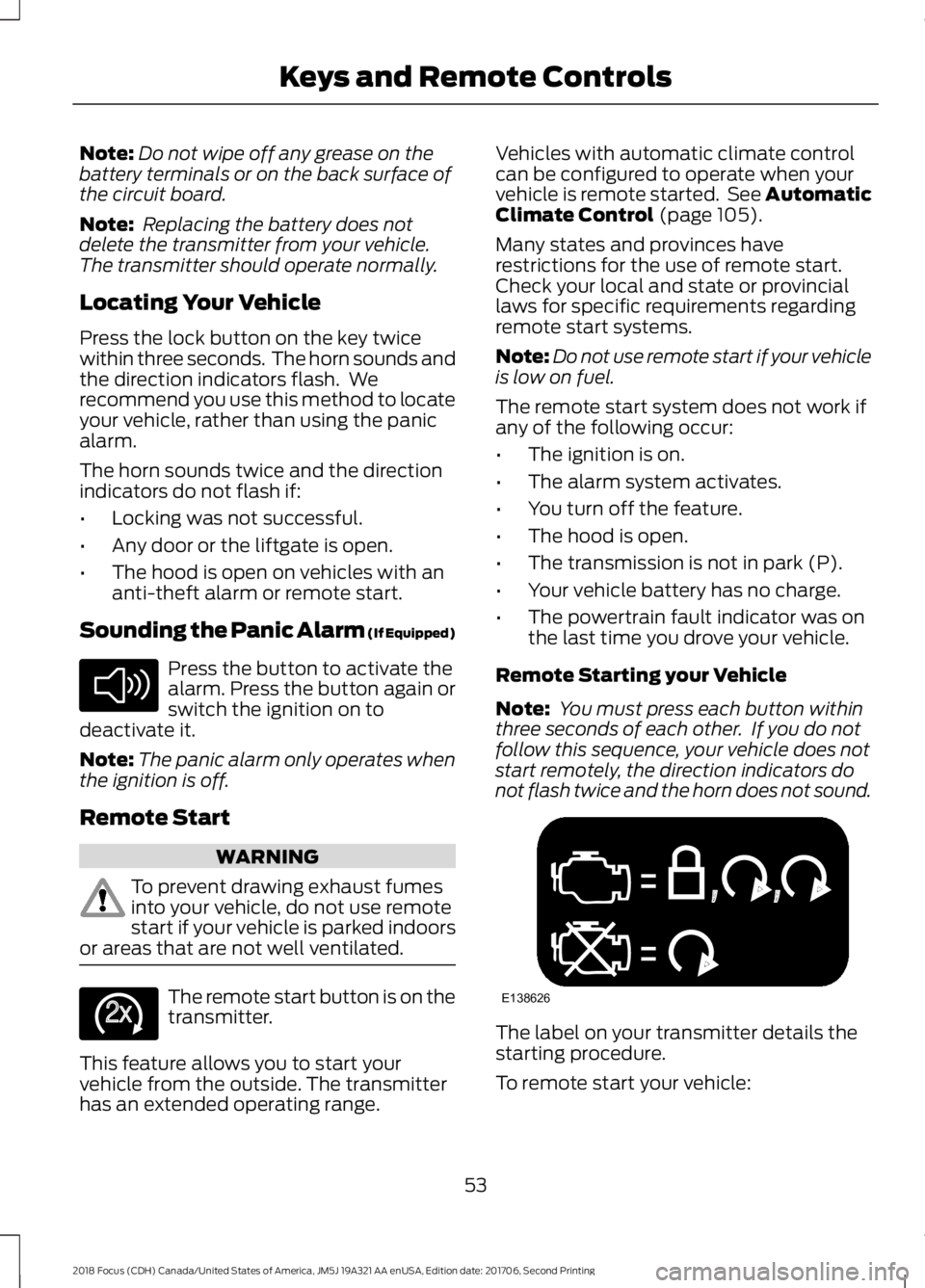
Note: You must press each button withinthree seconds of each other. If you do notfollow this sequence, your vehicle does notstart remotely, the direction indicators donot flash twice and the horn does not sound.
The label on your transmitter details thestarting procedure.
To remote start your vehicle:
532018 Focus (CDH) Canada/United States of America, JM5J 19A321 AA enUSA, Edition date: 201706, Second PrintingKeys and Remote ControlsE138624 E138625 E138626
Page 57 of 473
1.Press the lock button to lock all thedoors.
2.Press the remote start button twice.The direction indicators flash twice.
The horn sounds if the system fails to start,unless quiet start is on. Quiet start runs theblower fan at a slower speed to reducenoise. You can switch it on or off using theinformation display. See GeneralInformation (page 92).
The power windows do not work duringremote start and the radio does not turnon automatically.
The parking lamps remain on and yourvehicle runs for 5, 10 or 15 minutes,depending on the setting.
Note:If you remote start your vehicle withan intelligent access transmitter, you mustpress the push button ignition switch on theinstrument panel once while applying thebrake pedal before driving your vehicle.
Extending the Engine Running Time
To extend the engine running time durationof your vehicle during remote start, repeatsteps 1 and 2 while the engine is running.If the duration is set to 10 minutes, theduration extends by another 10 minutes.For example, if your vehicle had beenrunning from the first remote start for 5minutes, your vehicle continues to run nowfor a total of 20 minutes. You can extendthe engine running time duration to amaximum of 30 minutes.
Wait at least five seconds before remotestarting after a vehicle shutdown.
Turning Your Vehicle Off After RemoteStarting
Press the button once. Theparking lamps turn off.
You may have to be closer to your vehiclethan when starting due to ground reflectionand the added noise of the running vehicle.
You can turn the remote start system onor off using the information display. SeeGeneral Information (page 92).
REPLACING A LOST KEY OR
REMOTE CONTROL
You can purchase replacement keys orremote controls from an authorized dealer.Authorized dealers can program remotecontrols for your vehicle. See PassiveAnti-Theft System (page 68).
To re-program the passive anti-theftsystem see an authorized dealer.
542018 Focus (CDH) Canada/United States of America, JM5J 19A321 AA enUSA, Edition date: 201706, Second PrintingKeys and Remote ControlsE138625
Page 58 of 473
PRINCIPLE OF OPERATION
MyKey allows you to program keys withrestricted driving modes to promote gooddriving habits. All but one of the keys canbe activated with these restricted modes.
Any keys that remain unprogrammed arereferred to as administrator keys or adminkeys. They can be used to:
•Create a MyKey.
•Program configurable MyKey settings.
•Clear all MyKey features.
When you have created a MyKey, you canaccess the following information by usingthe information display to determine:
•How many admin keys and MyKeys areprogrammed to your vehicle.
•The total distance your vehicle traveledwith a MyKey.
Note:Switch the ignition on to use thesystem.
Note:All MyKeys are programmed to thesame settings. You cannot program themindividually.
Note:For vehicles equipped with apush-button start, when both a MyKey andan admin key are present, the admin key willbe recognized by the vehicle when you startthe vehicle.
Non-configurable Settings
The following settings cannot be changedby an admin key user:
•Safety belt reminder. You cannotdisable this feature. The audio systemwill mute when the front seatpassengers’ safety belts are notfastened.
•Early low fuel warning. The low-fuelwarning activates earlier, giving MyKeyusers more time to refuel.
•Driver assist features, if equipped onyour vehicle, are forced on: parking aidand Blind Spot Information System(BLIS) with cross traffic alert.
•Satellite radio adult contentrestrictions, if equipped on your vehicle.
•Pre-collision assist and Lane Departurewarning switches on every ignitioncycle, but can be switched off by theMyKey user.
Configurable Settings
With an admin key, you can configurecertain MyKey settings when you firstcreate a MyKey and before you recycle thekey or restart the engine. You can alsochange the settings afterward with anadmin key.
•A vehicle speed limit can be set.Warnings will be shown in the displayfollowed by an audible tone when yourvehicle reaches the set speed. Youcannot override the set speed by fullydepressing the accelerator pedal or bysetting cruise control.
WARNING
Do not set MyKey maximum speedlimit to a limit that will prevent thedriver from maintaining a safe speedconsidering posted speed limits andprevailing road conditions. The driver isalways responsible to drive in accordancewith local laws and prevailing conditions.Failure to do so could result in accident orinjury.
552018 Focus (CDH) Canada/United States of America, JM5J 19A321 AA enUSA, Edition date: 201706, Second PrintingMyKey™
Page 59 of 473
•Various vehicle speed minders can beset. Once you select a speed, it will beshown in the display, followed by anaudible tone when the preselectedvehicle speed is exceeded.
•Audio system maximum volume of45%. A message will be shown in thedisplay when you attempt to exceedthe limited volume. Also, thespeed-sensitive or compensatedautomatic volume control will bedisabled.
•Always on setting. When this isselected, you will not be able to turnoff AdvanceTrac or traction control,E911 or Emergency Assist, or the Do NotDisturb feature (if your vehicle isequipped with these features).
CREATING A MYKEY
Use the information display to create aMyKey:
1.Insert the key you want to program intothe ignition. If your vehicle is equippedwith a push-button start, place theintelligent access transmitter into thebackup position. The location of yourbackup position is in another chapter.See Starting and Stopping theEngine (page 119).
2.Switch the vehicle on.
3.Access the main menu through theinformation display controls. Use thearrow keys to get to the following menuselections:
Action and DescriptionMessage
Press the OK button or the right arrow key.Settings
Press the OK button or the right arrow key.MyKey
Press the OK button or the right arrow key.Create MyKey
When prompted, hold the OK button untilyou see a message informing you to labelthis key as a MyKey. The key will berestricted at the next start.
MyKey is successfully created. Make sureyou label it so you can distinguish it fromthe admin keys.
You can also program configurablesettings for the key(s). SeeProgramming/Changing ConfigurableSettings.
Programming/ChangingConfigurable Settings
Use the information display to access yourconfigurable MyKey settings by doing thefollowing:
1.Switch the vehicle on using an adminkey.
2.Use the arrow keys to get to thefollowing menu selections:
Action and DescriptionMessage
Press the OK button or the right arrow key.Settings
Press the OK button or the right arrow key.MyKey
562018 Focus (CDH) Canada/United States of America, JM5J 19A321 AA enUSA, Edition date: 201706, Second PrintingMyKey™
Page 60 of 473
Note:You can clear or change your MyKeysettings at any time during the same keycycle as you created the MyKey. Once youhave switched the vehicle off, however, youwill need an admin key to change or clearyour MyKey settings.
Note:When you make any changes to yourMyKey settings, you change the settings forevery MyKey. You cannot make individualchanges to apply to certain MyKeys.
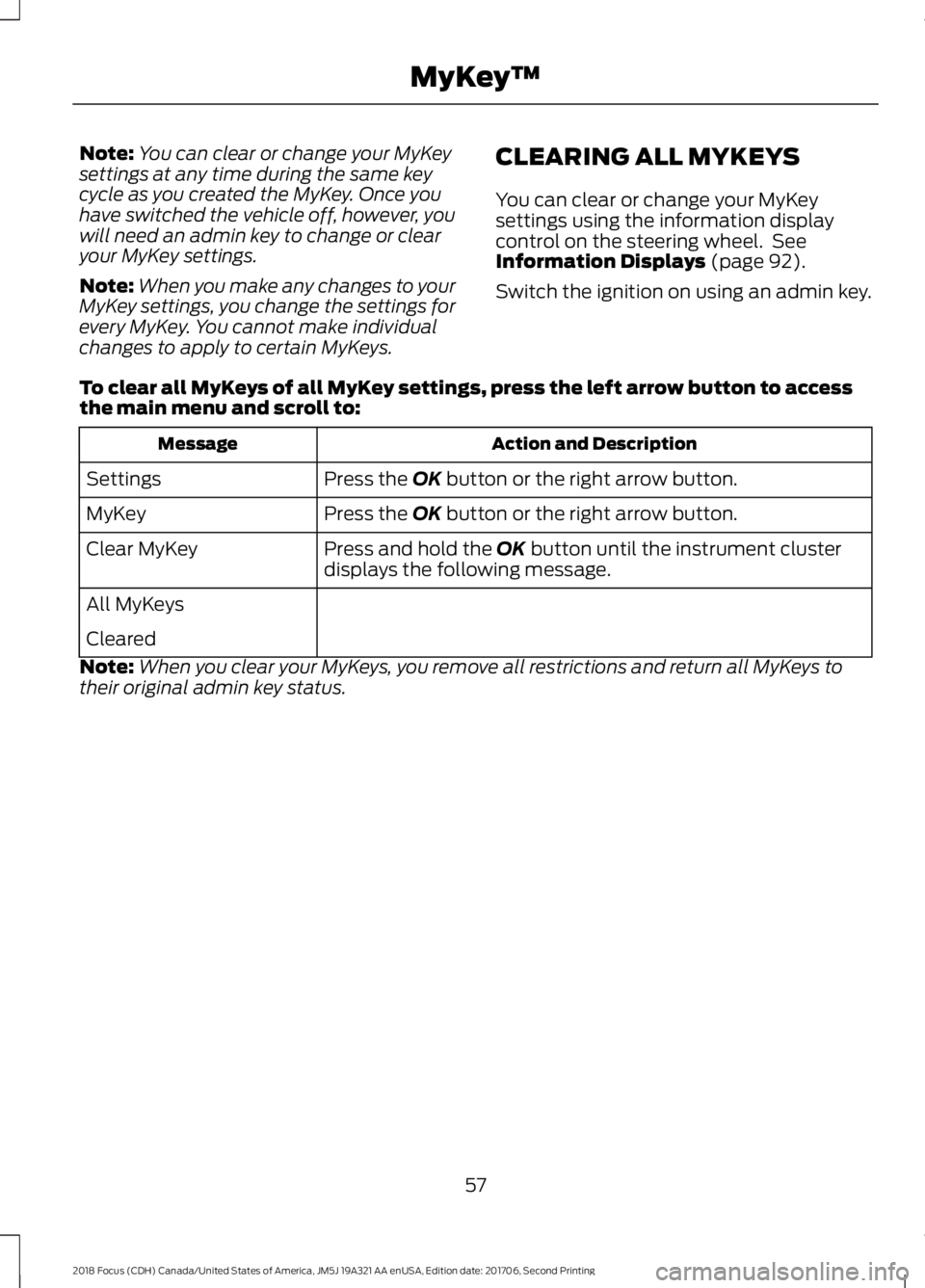
CLEARING ALL MYKEYS
You can clear or change your MyKeysettings using the information displaycontrol on the steering wheel. SeeInformation Displays (page 92).
Switch the ignition on using an admin key.
To clear all MyKeys of all MyKey settings, press the left arrow button to accessthe main menu and scroll to:
Action and DescriptionMessage
Press the OK button or the right arrow button.Settings
Press the OK button or the right arrow button.MyKey
Press and hold the OK button until the instrument clusterdisplays the following message.Clear MyKey
All MyKeys
Cleared
Note:When you clear your MyKeys, you remove all restrictions and return all MyKeys totheir original admin key status.
572018 Focus (CDH) Canada/United States of America, JM5J 19A321 AA enUSA, Edition date: 201706, Second PrintingMyKey™
Page 62 of 473
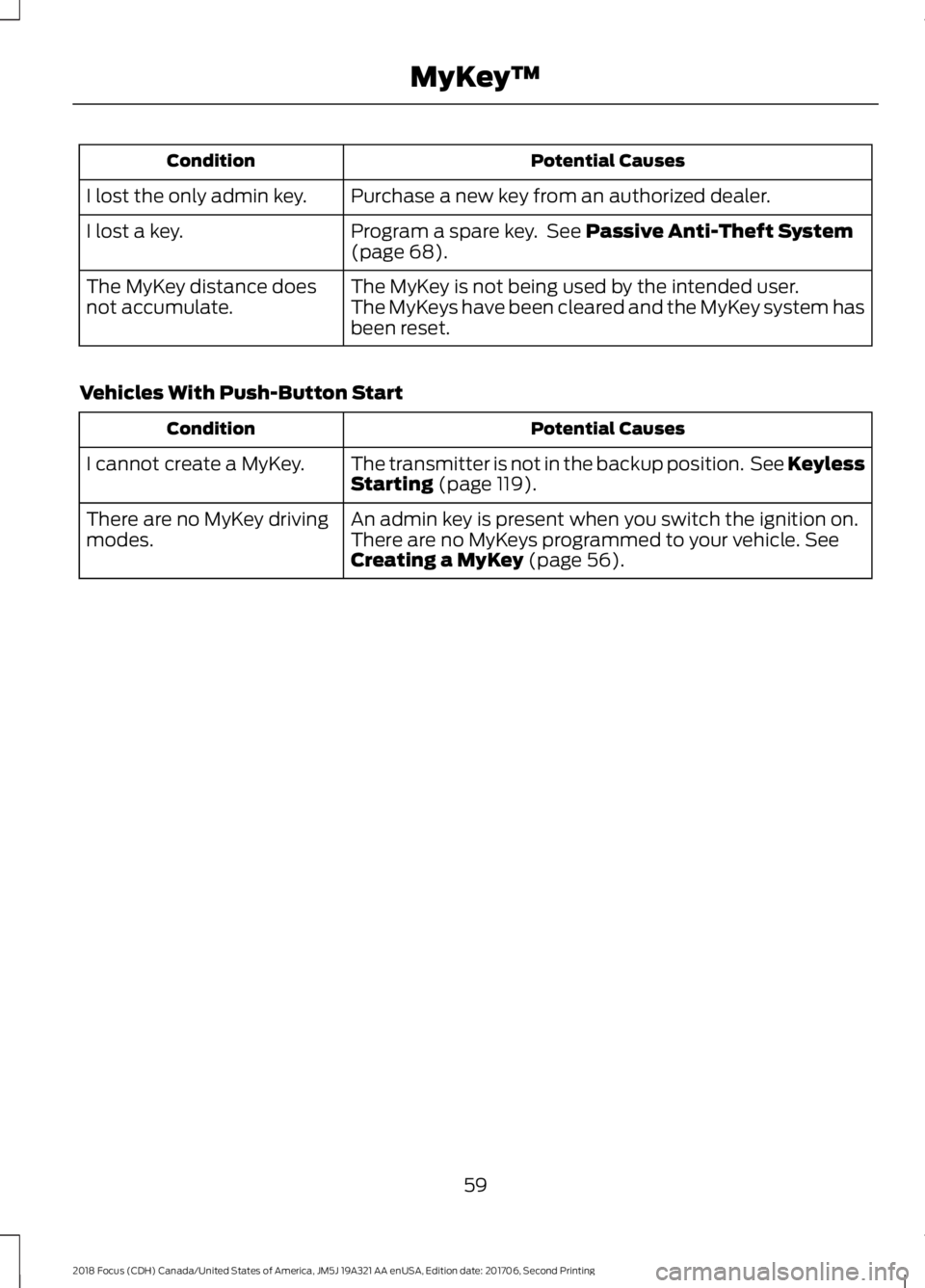
Potential CausesCondition
Purchase a new key from an authorized dealer.I lost the only admin key.
Program a spare key. See Passive Anti-Theft System(page 68).I lost a key.
The MyKey is not being used by the intended user.The MyKey distance doesnot accumulate.The MyKeys have been cleared and the MyKey system hasbeen reset.
Vehicles With Push-Button Start
Potential CausesCondition
The transmitter is not in the backup position. See KeylessStarting (page 119).I cannot create a MyKey.
An admin key is present when you switch the ignition on.There are no MyKey drivingmodes.There are no MyKeys programmed to your vehicle. SeeCreating a MyKey (page 56).
592018 Focus (CDH) Canada/United States of America, JM5J 19A321 AA enUSA, Edition date: 201706, Second PrintingMyKey™
Page 63 of 473
LOCKING AND UNLOCKING
You can use the power door lock controlor the remote control to lock and unlockyour vehicle.
Note:Always take your keys and lock alldoors when leaving your vehicle.
Power Door Locks
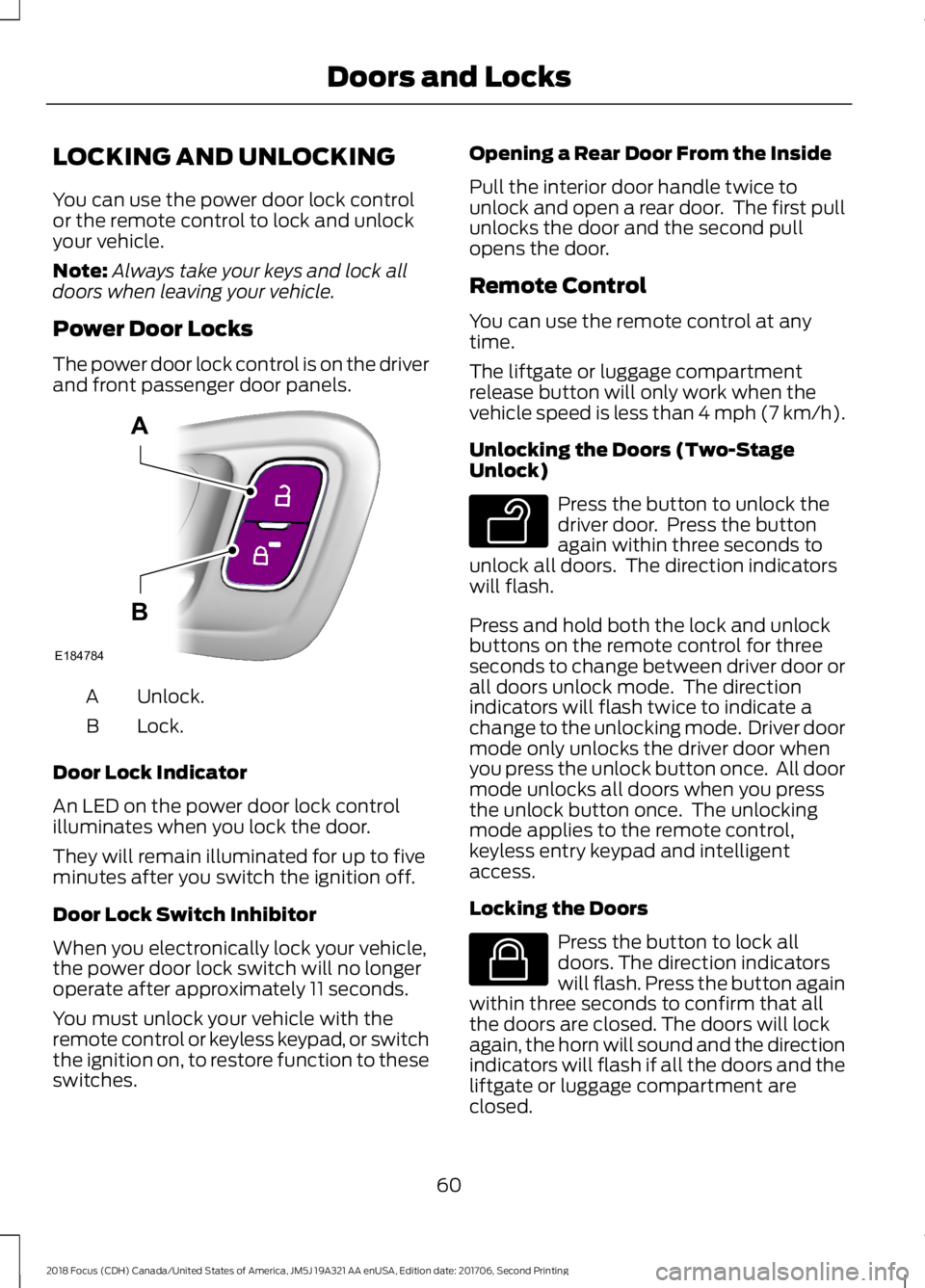
The power door lock control is on the driverand front passenger door panels.
Unlock.A
Lock.B
Door Lock Indicator
An LED on the power door lock controlilluminates when you lock the door.
They will remain illuminated for up to fiveminutes after you switch the ignition off.
Door Lock Switch Inhibitor
When you electronically lock your vehicle,the power door lock switch will no longeroperate after approximately 11 seconds.
You must unlock your vehicle with theremote control or keyless keypad, or switchthe ignition on, to restore function to theseswitches.
Opening a Rear Door From the Inside
Pull the interior door handle twice tounlock and open a rear door. The first pullunlocks the door and the second pullopens the door.
Remote Control
You can use the remote control at anytime.
The liftgate or luggage compartmentrelease button will only work when thevehicle speed is less than 4 mph (7 km/h).
Unlocking the Doors (Two-StageUnlock)
Press the button to unlock thedriver door. Press the buttonagain within three seconds tounlock all doors. The direction indicatorswill flash.
Press and hold both the lock and unlockbuttons on the remote control for threeseconds to change between driver door orall doors unlock mode. The directionindicators will flash twice to indicate achange to the unlocking mode. Driver doormode only unlocks the driver door whenyou press the unlock button once. All doormode unlocks all doors when you pressthe unlock button once. The unlockingmode applies to the remote control,keyless entry keypad and intelligentaccess.
Locking the Doors
Press the button to lock alldoors. The direction indicatorswill flash. Press the button againwithin three seconds to confirm that allthe doors are closed. The doors will lockagain, the horn will sound and the directionindicators will flash if all the doors and theliftgate or luggage compartment areclosed.
602018 Focus (CDH) Canada/United States of America, JM5J 19A321 AA enUSA, Edition date: 201706, Second PrintingDoors and LocksE184784AB E138629 E138623
Page 65 of 473
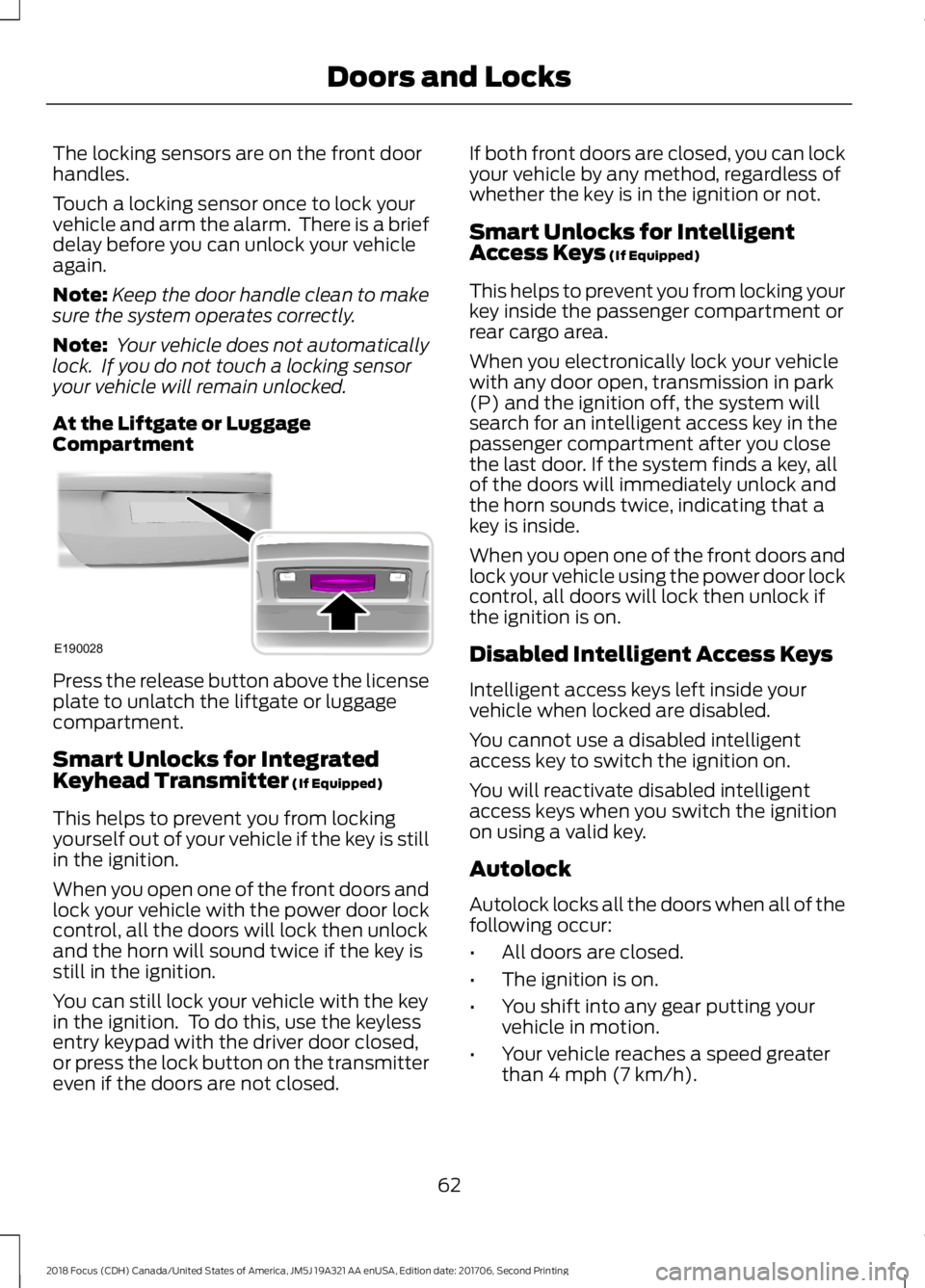
The locking sensors are on the front doorhandles.
Touch a locking sensor once to lock yourvehicle and arm the alarm. There is a briefdelay before you can unlock your vehicleagain.
Note:Keep the door handle clean to makesure the system operates correctly.
Note: Your vehicle does not automaticallylock. If you do not touch a locking sensoryour vehicle will remain unlocked.
At the Liftgate or LuggageCompartment
Press the release button above the licenseplate to unlatch the liftgate or luggagecompartment.
Smart Unlocks for IntegratedKeyhead Transmitter (If Equipped)
This helps to prevent you from lockingyourself out of your vehicle if the key is stillin the ignition.
When you open one of the front doors andlock your vehicle with the power door lockcontrol, all the doors will lock then unlockand the horn will sound twice if the key isstill in the ignition.
You can still lock your vehicle with the keyin the ignition. To do this, use the keylessentry keypad with the driver door closed,or press the lock button on the transmittereven if the doors are not closed.
If both front doors are closed, you can lockyour vehicle by any method, regardless ofwhether the key is in the ignition or not.
Smart Unlocks for IntelligentAccess Keys (If Equipped)
This helps to prevent you from locking yourkey inside the passenger compartment orrear cargo area.
When you electronically lock your vehiclewith any door open, transmission in park(P) and the ignition off, the system willsearch for an intelligent access key in thepassenger compartment after you closethe last door. If the system finds a key, allof the doors will immediately unlock andthe horn sounds twice, indicating that akey is inside.
When you open one of the front doors andlock your vehicle using the power door lockcontrol, all doors will lock then unlock ifthe ignition is on.
Disabled Intelligent Access Keys
Intelligent access keys left inside yourvehicle when locked are disabled.
You cannot use a disabled intelligentaccess key to switch the ignition on.
You will reactivate disabled intelligentaccess keys when you switch the ignitionon using a valid key.
Autolock
Autolock locks all the doors when all of thefollowing occur:
•All doors are closed.
•The ignition is on.
•You shift into any gear putting yourvehicle in motion.
•Your vehicle reaches a speed greaterthan 4 mph (7 km/h).
622018 Focus (CDH) Canada/United States of America, JM5J 19A321 AA enUSA, Edition date: 201706, Second PrintingDoors and LocksE190028
Page 66 of 473
Autounlock
Autounlock unlocks all the doors when allof the following occur:
•The ignition is on, all the doors areclosed and your vehicle has been inmotion at a speed greater than 4 mph(7 km/h).
•Your vehicle comes to a stop and youswitch the ignition off or to accessory.
•You open the driver door within 10minutes of switching the ignition off orto accessory.
Note:If you electronically lock your vehicleafter you switch the ignition off with thedriver door closed, the doors will notautounlock.
To enable or disable autounlock, do thefollowing:
1.Switch the ignition on.
2.Press the power door unlock controlthree times.
3.Switch the ignition off.
4.Press the power door unlock controlthree times.
5.Switch the ignition on. The hornsounds indicating your vehicle is inprogramming mode.
6.Press the power door lock control andwithin five seconds, press the powerdoor unlock control. The horn soundsonce if disabled or twice if enabled.
7.Switch the ignition off. The horn soundsindicating programming is complete.
Illuminated Entry
The interior lamps and select exteriorlamps illuminate when you unlock thedoors with the remote entry system.
The lamps turn off if:
•The ignition is on.
•You press the remote control lockbutton.
•25 seconds have elapsed.
The lamps will not turn off if:
•You switch them on with the lightingcontrol.
•Any door is open.
Illuminated Exit
For vehicles with an integrated keyheadtransmitter, the interior lamps and selectexterior lamps illuminate when you closeall the doors, you switch the ignition offand you remove the key from the ignition.
The lamps turn off if all the doors remainclosed and:
•25 seconds have elapsed.
•You insert the key in the ignition(integrated keyhead transmitter only).
•You press the START/STOP button(intelligent access key only).
Battery Saver
If you leave the courtesy lamps, domelamps or headlamps on, the battery saverwill turn them off 10 minutes after youswitch the ignition off.
Accessory Mode Battery Saver forIntelligent Access Keys (If Equipped)
If you leave the ignition switched on andthe engine is not running, the battery saverwill turn the ignition off when it detects acertain amount of battery drain, or after45 minutes have elapsed.
632018 Focus (CDH) Canada/United States of America, JM5J 19A321 AA enUSA, Edition date: 201706, Second PrintingDoors and Locks
Page 71 of 473
PASSIVE ANTI-THEFT
SYSTEM
Note: The system is not compatible withnon-Ford aftermarket remote start systems.Use of these systems may result in enginestarting problems and a loss of securityprotection.
Note: Metallic objects, electronic devicesor a second coded key on the same keychain may result in vehicle startingproblems, especially if they are too close tothe key when starting your vehicle. Preventthese objects from touching the coded keywhen starting your vehicle. If your vehiclefails to start, switch the ignition off, moveall objects on the key chain away from thekey and start your vehicle.
Note: Do not leave a duplicate coded keyin your vehicle. Always take your keys andlock all doors when leaving your vehicle.
SecuriLock
The system helps prevent the engine fromstarting unless you use a coded keyprogrammed to your vehicle. A messagemay appear in the information display.
If your vehicle fails to start, the system mayhave a fault. Contact an authorized dealer.A message may appear in the informationdisplay.
Automatic Arming
The system arms when you switch theignition off.
Automatic Disarming
The system disarms when you switch theignition on with a coded key.
Replacement Keys
Note:Your vehicle comes with two keys.
The intelligent access key functions as aprogrammed key that operates the driverdoor lock and turns on the intelligentaccess with push button start system, aswell as a remote control.
If your intelligent access keys are lost orstolen and you do not have an extra codedkey, you need to have your vehicle towedto an authorized dealer. You need to erasethe key codes from your vehicle andprogram new coded keys.
Store a spare intelligent access key awayfrom your vehicle in a safe place. Contactan authorized dealer to purchaseadditional spare or replacement keys.
Programming a Spare IntegratedKeyhead Transmitter
You can program your own integratedkeyhead transmitter or standardSecuriLock coded keys to your vehicle. Thisprocedure will program both the vehicleimmobilizer keycode and the remote entryportion of the remote control to yourvehicle.
Only use integrated keyhead transmittersor standard SecuriLock keys.
You must have two previouslyprogrammed coded keys and the newunprogrammed key readily accessible.Contact an authorized dealer to have thespare key programmed if two previouslyprogrammed keys are not available.
Make sure that the ignition is switched offbefore beginning this procedure. Carry outall steps within 30 seconds of starting thesequence. Stop and wait for at least oneminute before starting again if you carryout any steps out of sequence.
Note:You can program a maximum of eightcoded keys to your vehicle. All eight can beintegrated keyhead transmitters.
Read and understand the entire procedurebefore you begin.
682018 Focus (CDH) Canada/United States of America, JM5J 19A321 AA enUSA, Edition date: 201706, Second PrintingSecurity