warning FORD FOCUS 2018 Workshop Manual
[x] Cancel search | Manufacturer: FORD, Model Year: 2018, Model line: FOCUS, Model: FORD FOCUS 2018Pages: 473, PDF Size: 39.91 MB
Page 98 of 473
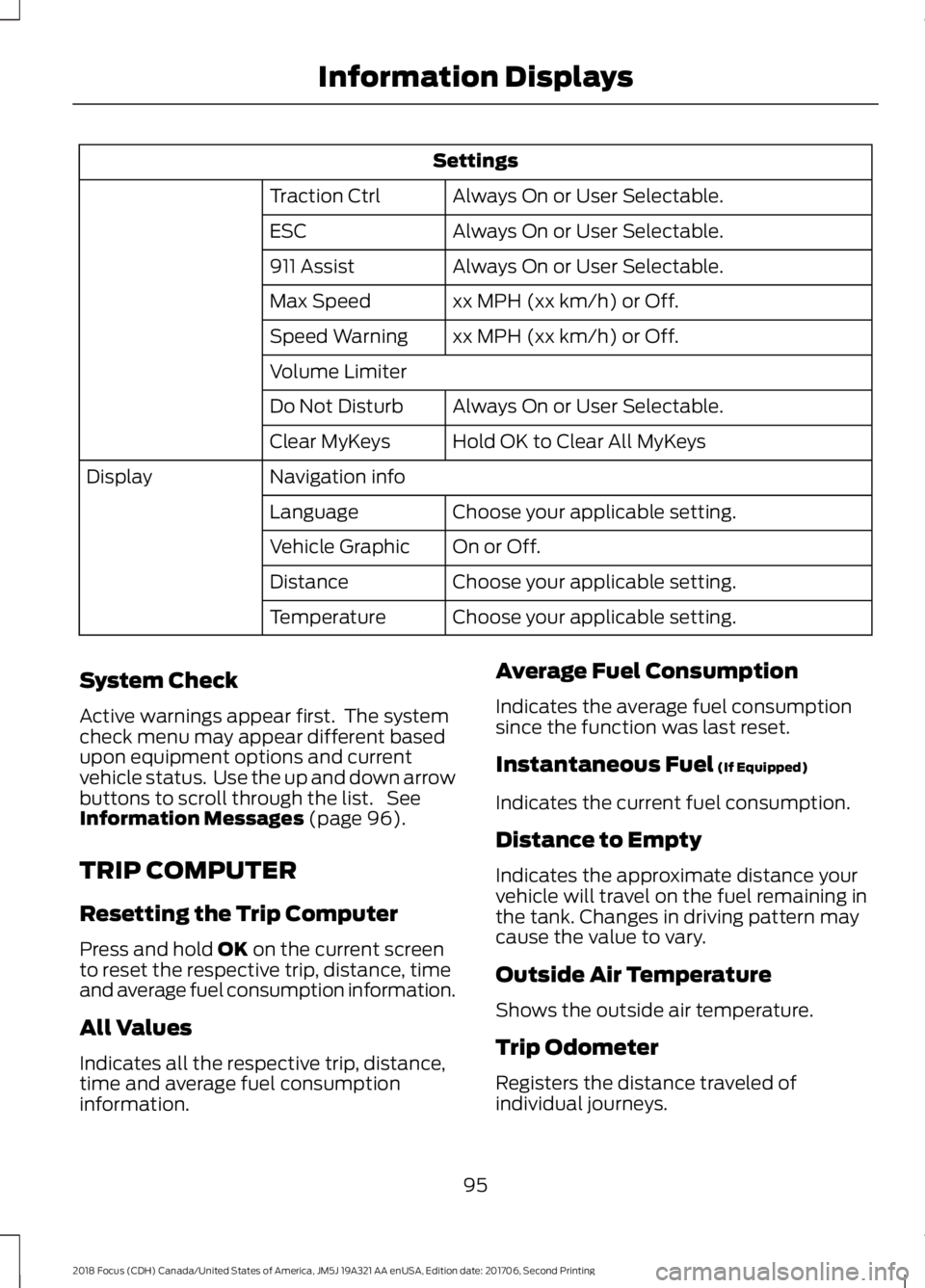
Settings
Always On or User Selectable.Traction Ctrl
Always On or User Selectable.ESC
Always On or User Selectable.911 Assist
xx MPH (xx km/h) or Off.Max Speed
xx MPH (xx km/h) or Off.Speed Warning
Volume Limiter
Always On or User Selectable.Do Not Disturb
Hold OK to Clear All MyKeysClear MyKeys
Navigation infoDisplay
Choose your applicable setting.Language
On or Off.Vehicle Graphic
Choose your applicable setting.Distance
Choose your applicable setting.Temperature
System Check
Active warnings appear first. The systemcheck menu may appear different basedupon equipment options and currentvehicle status. Use the up and down arrowbuttons to scroll through the list. SeeInformation Messages (page 96).
TRIP COMPUTER
Resetting the Trip Computer
Press and hold OK on the current screento reset the respective trip, distance, timeand average fuel consumption information.
All Values
Indicates all the respective trip, distance,time and average fuel consumptioninformation.
Average Fuel Consumption
Indicates the average fuel consumptionsince the function was last reset.
Instantaneous Fuel (If Equipped)
Indicates the current fuel consumption.
Distance to Empty
Indicates the approximate distance yourvehicle will travel on the fuel remaining inthe tank. Changes in driving pattern maycause the value to vary.
Outside Air Temperature
Shows the outside air temperature.
Trip Odometer
Registers the distance traveled ofindividual journeys.
952018 Focus (CDH) Canada/United States of America, JM5J 19A321 AA enUSA, Edition date: 201706, Second PrintingInformation Displays
Page 104 of 473
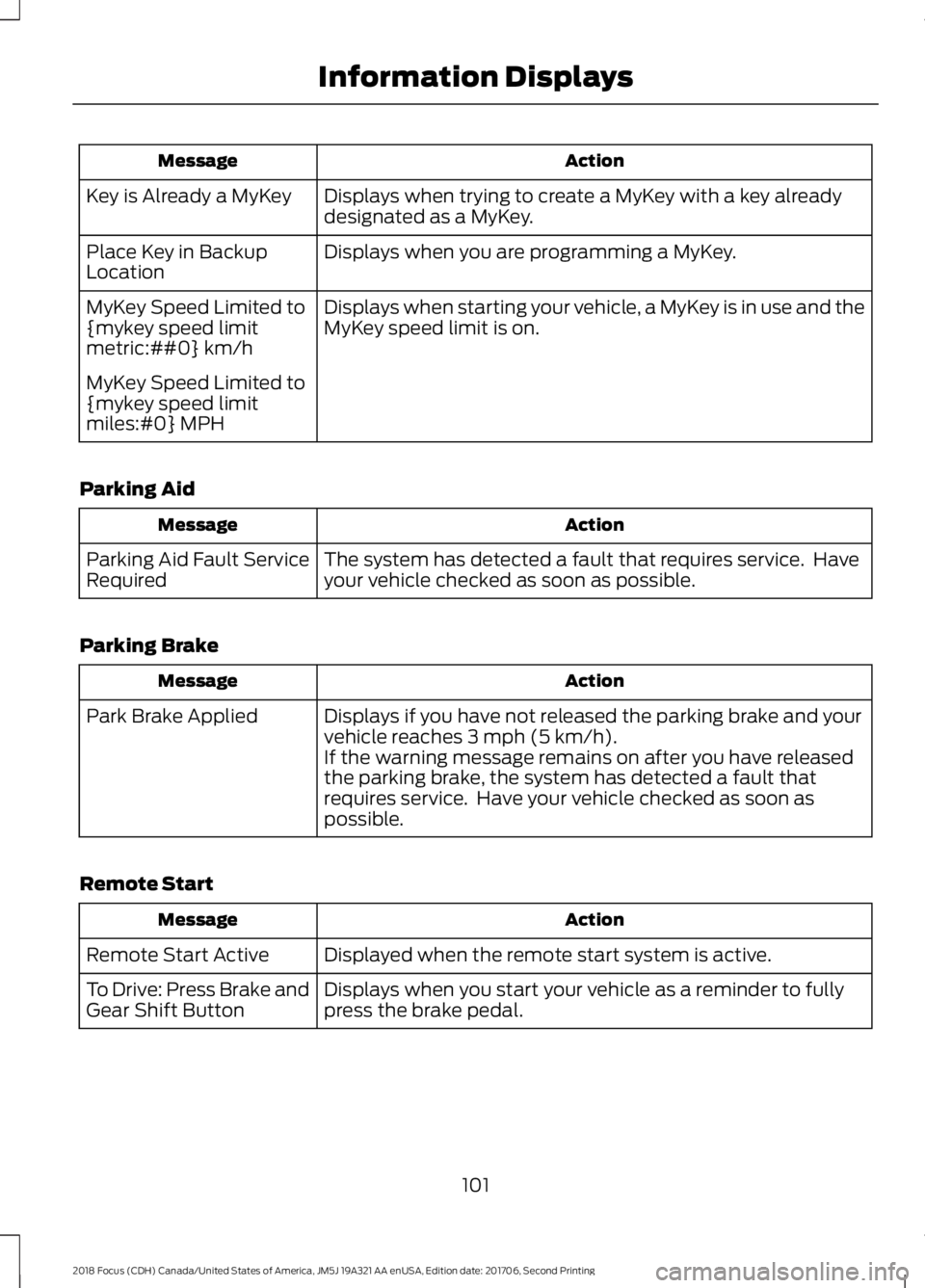
ActionMessage
Displays when trying to create a MyKey with a key alreadydesignated as a MyKey.Key is Already a MyKey
Displays when you are programming a MyKey.Place Key in BackupLocation
Displays when starting your vehicle, a MyKey is in use and theMyKey speed limit is on.MyKey Speed Limited to{mykey speed limitmetric:##0} km/h
MyKey Speed Limited to{mykey speed limitmiles:#0} MPH
Parking Aid
ActionMessage
The system has detected a fault that requires service. Haveyour vehicle checked as soon as possible.Parking Aid Fault ServiceRequired
Parking Brake
ActionMessage
Displays if you have not released the parking brake and yourvehicle reaches 3 mph (5 km/h).Park Brake Applied
If the warning message remains on after you have releasedthe parking brake, the system has detected a fault thatrequires service. Have your vehicle checked as soon aspossible.
Remote Start
ActionMessage
Displayed when the remote start system is active.Remote Start Active
Displays when you start your vehicle as a reminder to fullypress the brake pedal.To Drive: Press Brake andGear Shift Button
1012018 Focus (CDH) Canada/United States of America, JM5J 19A321 AA enUSA, Edition date: 201706, Second PrintingInformation Displays
Page 106 of 473
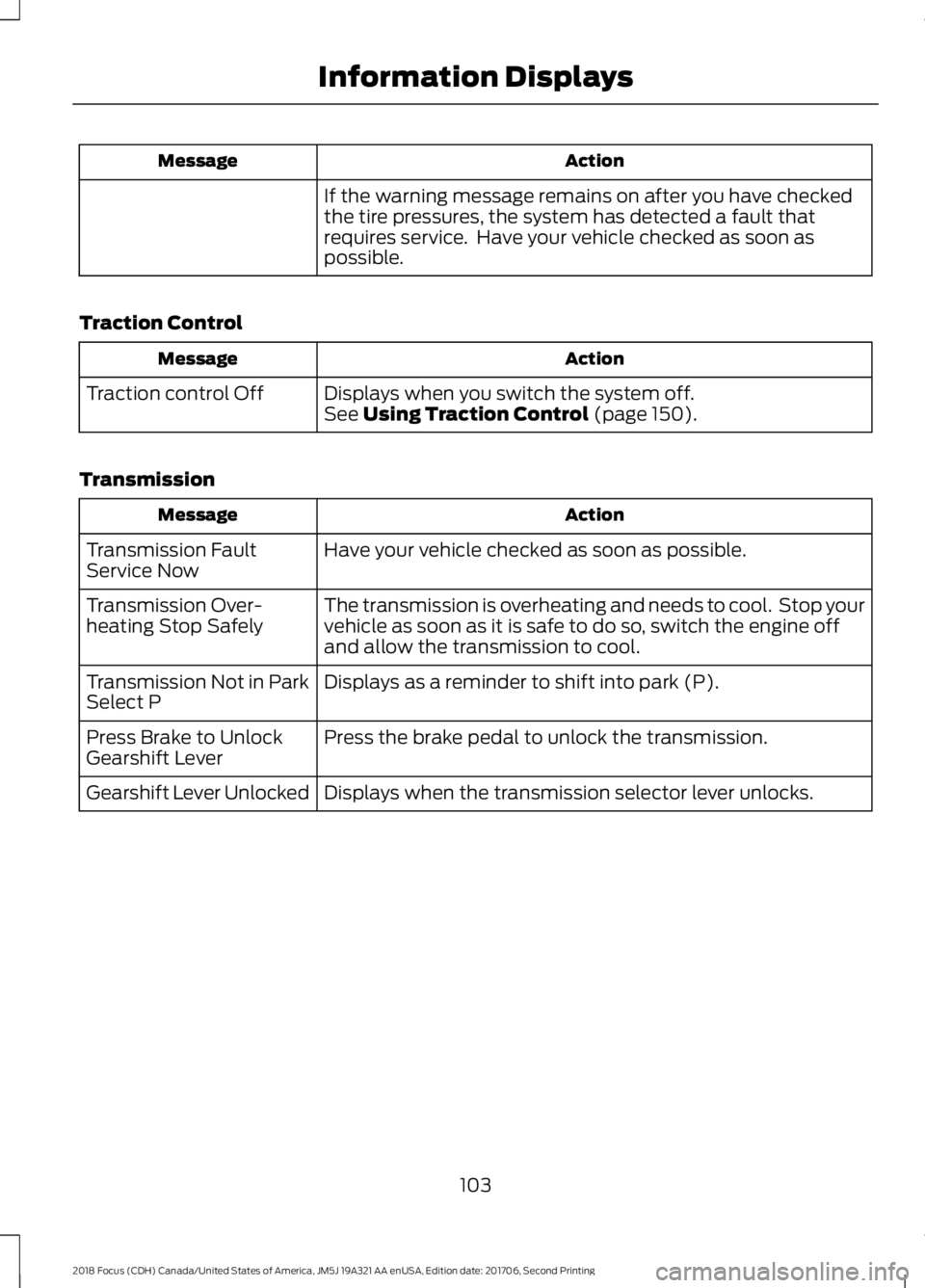
ActionMessage
If the warning message remains on after you have checkedthe tire pressures, the system has detected a fault thatrequires service. Have your vehicle checked as soon aspossible.
Traction Control
ActionMessage
Displays when you switch the system off.Traction control OffSee Using Traction Control (page 150).
Transmission
ActionMessage
Have your vehicle checked as soon as possible.Transmission FaultService Now
The transmission is overheating and needs to cool. Stop yourvehicle as soon as it is safe to do so, switch the engine offand allow the transmission to cool.
Transmission Over-heating Stop Safely
Displays as a reminder to shift into park (P).Transmission Not in ParkSelect P
Press the brake pedal to unlock the transmission.Press Brake to UnlockGearshift Lever
Displays when the transmission selector lever unlocks.Gearshift Lever Unlocked
1032018 Focus (CDH) Canada/United States of America, JM5J 19A321 AA enUSA, Edition date: 201706, Second PrintingInformation Displays
Page 114 of 473
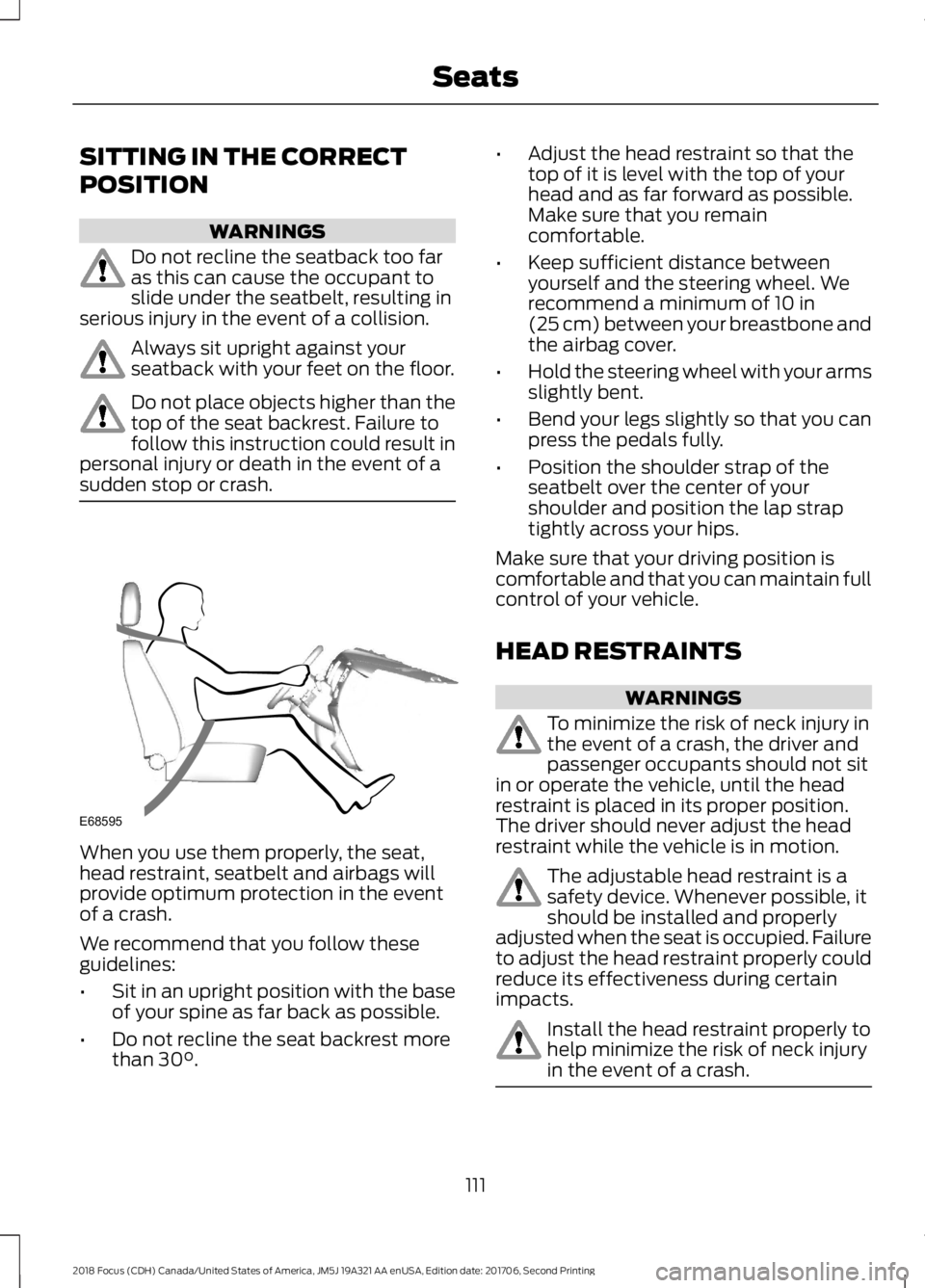
SITTING IN THE CORRECT
POSITION
WARNINGS
Do not recline the seatback too faras this can cause the occupant toslide under the seatbelt, resulting inserious injury in the event of a collision.
Always sit upright against yourseatback with your feet on the floor.
Do not place objects higher than thetop of the seat backrest. Failure tofollow this instruction could result inpersonal injury or death in the event of asudden stop or crash.
When you use them properly, the seat,head restraint, seatbelt and airbags willprovide optimum protection in the eventof a crash.
We recommend that you follow theseguidelines:
•Sit in an upright position with the baseof your spine as far back as possible.
•Do not recline the seat backrest morethan 30°.
•Adjust the head restraint so that thetop of it is level with the top of yourhead and as far forward as possible.Make sure that you remaincomfortable.
•Keep sufficient distance betweenyourself and the steering wheel. Werecommend a minimum of 10 in(25 cm) between your breastbone andthe airbag cover.
•Hold the steering wheel with your armsslightly bent.
•Bend your legs slightly so that you canpress the pedals fully.
•Position the shoulder strap of theseatbelt over the center of yourshoulder and position the lap straptightly across your hips.
Make sure that your driving position iscomfortable and that you can maintain fullcontrol of your vehicle.
HEAD RESTRAINTS
WARNINGS
To minimize the risk of neck injury inthe event of a crash, the driver andpassenger occupants should not sitin or operate the vehicle, until the headrestraint is placed in its proper position.The driver should never adjust the headrestraint while the vehicle is in motion.
The adjustable head restraint is asafety device. Whenever possible, itshould be installed and properlyadjusted when the seat is occupied. Failureto adjust the head restraint properly couldreduce its effectiveness during certainimpacts.
Install the head restraint properly tohelp minimize the risk of neck injuryin the event of a crash.
1112018 Focus (CDH) Canada/United States of America, JM5J 19A321 AA enUSA, Edition date: 201706, Second PrintingSeatsE68595
Page 116 of 473
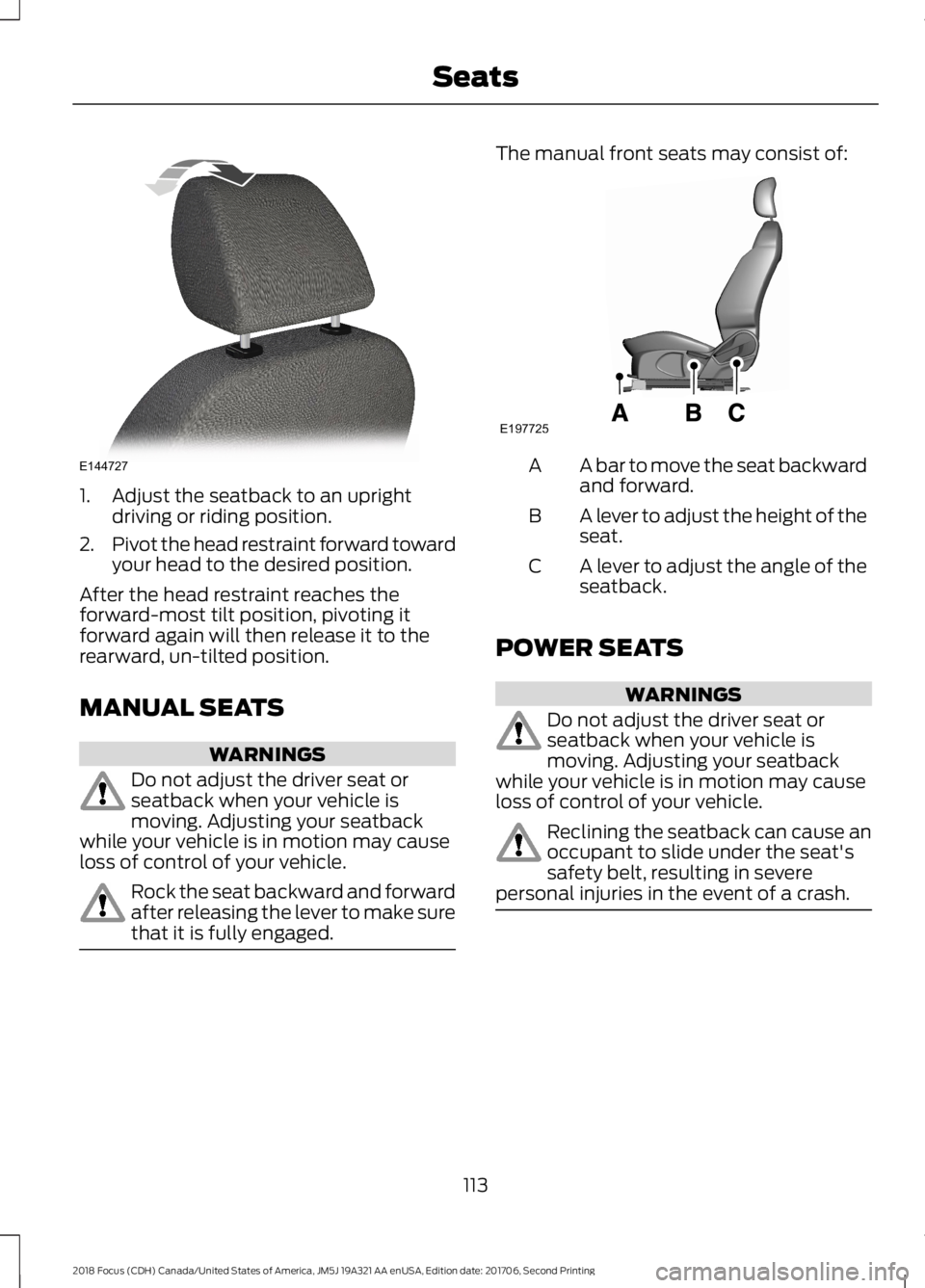
1.Adjust the seatback to an uprightdriving or riding position.
2.Pivot the head restraint forward towardyour head to the desired position.
After the head restraint reaches theforward-most tilt position, pivoting itforward again will then release it to therearward, un-tilted position.
MANUAL SEATS
WARNINGS
Do not adjust the driver seat orseatback when your vehicle ismoving. Adjusting your seatbackwhile your vehicle is in motion may causeloss of control of your vehicle.
Rock the seat backward and forwardafter releasing the lever to make surethat it is fully engaged.
The manual front seats may consist of:
A bar to move the seat backwardand forward.A
A lever to adjust the height of theseat.B
A lever to adjust the angle of theseatback.C
POWER SEATS
WARNINGS
Do not adjust the driver seat orseatback when your vehicle ismoving. Adjusting your seatbackwhile your vehicle is in motion may causeloss of control of your vehicle.
Reclining the seatback can cause anoccupant to slide under the seat'ssafety belt, resulting in severepersonal injuries in the event of a crash.
1132018 Focus (CDH) Canada/United States of America, JM5J 19A321 AA enUSA, Edition date: 201706, Second PrintingSeatsE144727 E197725
Page 118 of 473
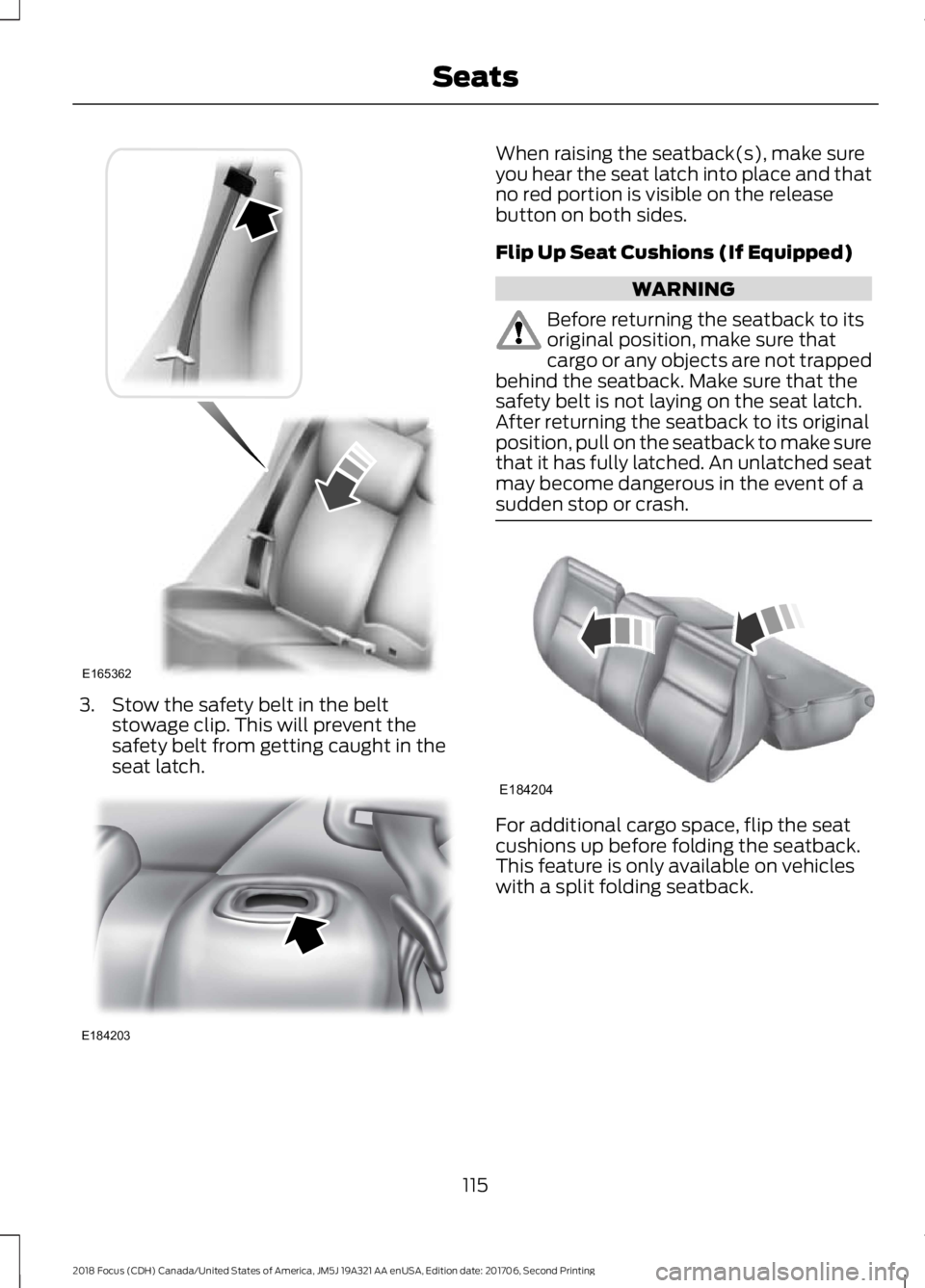
3.Stow the safety belt in the beltstowage clip. This will prevent thesafety belt from getting caught in theseat latch.
When raising the seatback(s), make sureyou hear the seat latch into place and thatno red portion is visible on the releasebutton on both sides.
Flip Up Seat Cushions (If Equipped)
WARNING
Before returning the seatback to itsoriginal position, make sure thatcargo or any objects are not trappedbehind the seatback. Make sure that thesafety belt is not laying on the seat latch.After returning the seatback to its originalposition, pull on the seatback to make surethat it has fully latched. An unlatched seatmay become dangerous in the event of asudden stop or crash.
For additional cargo space, flip the seatcushions up before folding the seatback.This feature is only available on vehicleswith a split folding seatback.
1152018 Focus (CDH) Canada/United States of America, JM5J 19A321 AA enUSA, Edition date: 201706, Second PrintingSeatsE165362 E184203 E184204
Page 119 of 473
HEATED SEATS (If Equipped)
WARNING
People who are unable to feel painto their skin because of advancedage, chronic illness, diabetes, spinalcord injury, medication, alcohol use,exhaustion or other physical conditions,must exercise care when using the heatedseat. The heated seat may cause burnseven at low temperatures, especially ifused for long periods of time. Do not placeanything on the seat that insulates againstheat, such as a blanket or cushion. Thismay cause the heated seat to overheat.Do not puncture the seat with pins, needlesor other pointed objects. This may damagethe heating element which may cause theheated seat to overheat. An overheatedseat may cause serious personal injury.
Do not do the following:
•Place heavy objects on the seat.
•Operate the heated seat if water or anyother liquid is spilled on the seat. Allowthe seat to dry thoroughly.
•Operate the heated seats unless theengine is running. Doing so can causethe battery to lose charge.
Press the heated seat symbol to cyclethrough the various heat settings and off.Warmer settings are indicated by moreindicator lights.
1162018 Focus (CDH) Canada/United States of America, JM5J 19A321 AA enUSA, Edition date: 201706, Second PrintingSeatsE146941
Page 120 of 473
12 Volt DC Power Point
WARNINGS
Do not plug optional electricalaccessories into the cigar lightersocket. Incorrect use of the cigarlighter can cause damage not covered bythe vehicle warranty, and can result in fireor serious injury.
Do not use a power point foroperating a cigar lighter. Incorrectuse of the power points can causedamage not covered by the vehiclewarranty, and can result in fire or seriousinjury.
Note:After starting your vehicle, you canuse the socket to power 12-volt applianceswith a maximum current rating of 15 amps.
After you switch your vehicle off, the powersupply works only for a maximum of 11minutes.Note:Do not insert objects other than anaccessory plug into the power point. Thisdamages the outlet and can blow the fuse.
Note:Do not hang any accessory from theaccessory plug.
Note:Do not use the power point over thevehicle capacity of 12 volt DC 180 watt or afuse may blow.
Note:Incorrect use of the power point cancause damage not covered by yourwarranty.
Note:Always keep the power point capsclosed when not in use.
Run the vehicle for full capacity use of thepower point.
To prevent the battery from running out ofcharge:
•Do not use the power point longer thannecessary after switching the vehicleoff.
•Do not leave devices plugged inovernight or when your vehicle is in park(P) for extended periods.
Location
You may find power points in the followinglocations:
•On the center console.
•In the center console.
•In the cargo area.
1172018 Focus (CDH) Canada/United States of America, JM5J 19A321 AA enUSA, Edition date: 201706, Second PrintingAuxiliary Power Points
Page 122 of 473
GENERAL INFORMATION
WARNINGS
Extended idling at high enginespeeds can produce very hightemperatures in the engine andexhaust system, creating the risk of fire orother damage.
Do not park, idle or drive your vehicleon dry grass or other dry groundcover. The emission system heats upthe engine compartment and exhaustsystem, creating the risk of fire.
Do not start the engine in a closedgarage or in other enclosed areas.Exhaust fumes can be toxic. Alwaysopen the garage door before you start theengine.
Exhaust leaks may result in entry ofharmful and potentially lethal fumesinto the passenger compartment. Ifyou smell exhaust fumes inside yourvehicle, have your vehicle inspectedimmediately. Do not drive if you smellexhaust fumes.
If you disconnect the battery, your vehiclemay exhibit some unusual drivingcharacteristics for approximately 5 mi(8 km) after you reconnect it. This isbecause the engine management systemmust realign itself with the engine. Youcan disregard any unusual drivingcharacteristics during this period.
The powertrain control system meets allCanadian interference-causing equipmentstandard requirements regulating theimpulse electrical field or radio noise.
When you start the engine, avoid pressingthe accelerator pedal before and duringoperation. Only use the accelerator pedalwhen you have difficulty starting theengine.
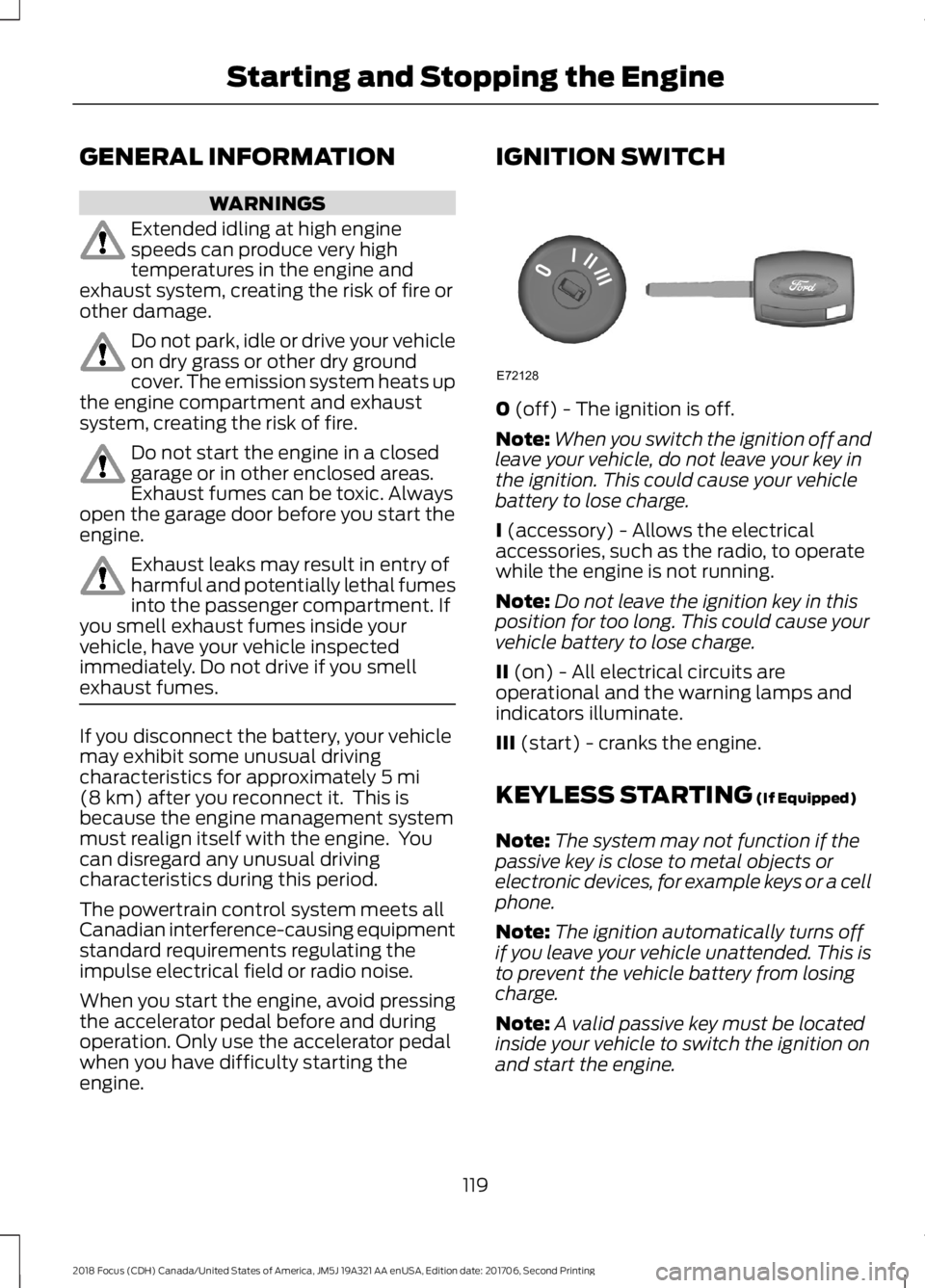
IGNITION SWITCH
0 (off) - The ignition is off.
Note:When you switch the ignition off andleave your vehicle, do not leave your key inthe ignition. This could cause your vehiclebattery to lose charge.
I (accessory) - Allows the electricalaccessories, such as the radio, to operatewhile the engine is not running.
Note:Do not leave the ignition key in thisposition for too long. This could cause yourvehicle battery to lose charge.
II (on) - All electrical circuits areoperational and the warning lamps andindicators illuminate.
III (start) - cranks the engine.
KEYLESS STARTING (If Equipped)
Note:The system may not function if thepassive key is close to metal objects orelectronic devices, for example keys or a cellphone.
Note:The ignition automatically turns offif you leave your vehicle unattended. This isto prevent the vehicle battery from losingcharge.
Note:A valid passive key must be locatedinside your vehicle to switch the ignition onand start the engine.
1192018 Focus (CDH) Canada/United States of America, JM5J 19A321 AA enUSA, Edition date: 201706, Second PrintingStarting and Stopping the EngineE72128
Page 123 of 473
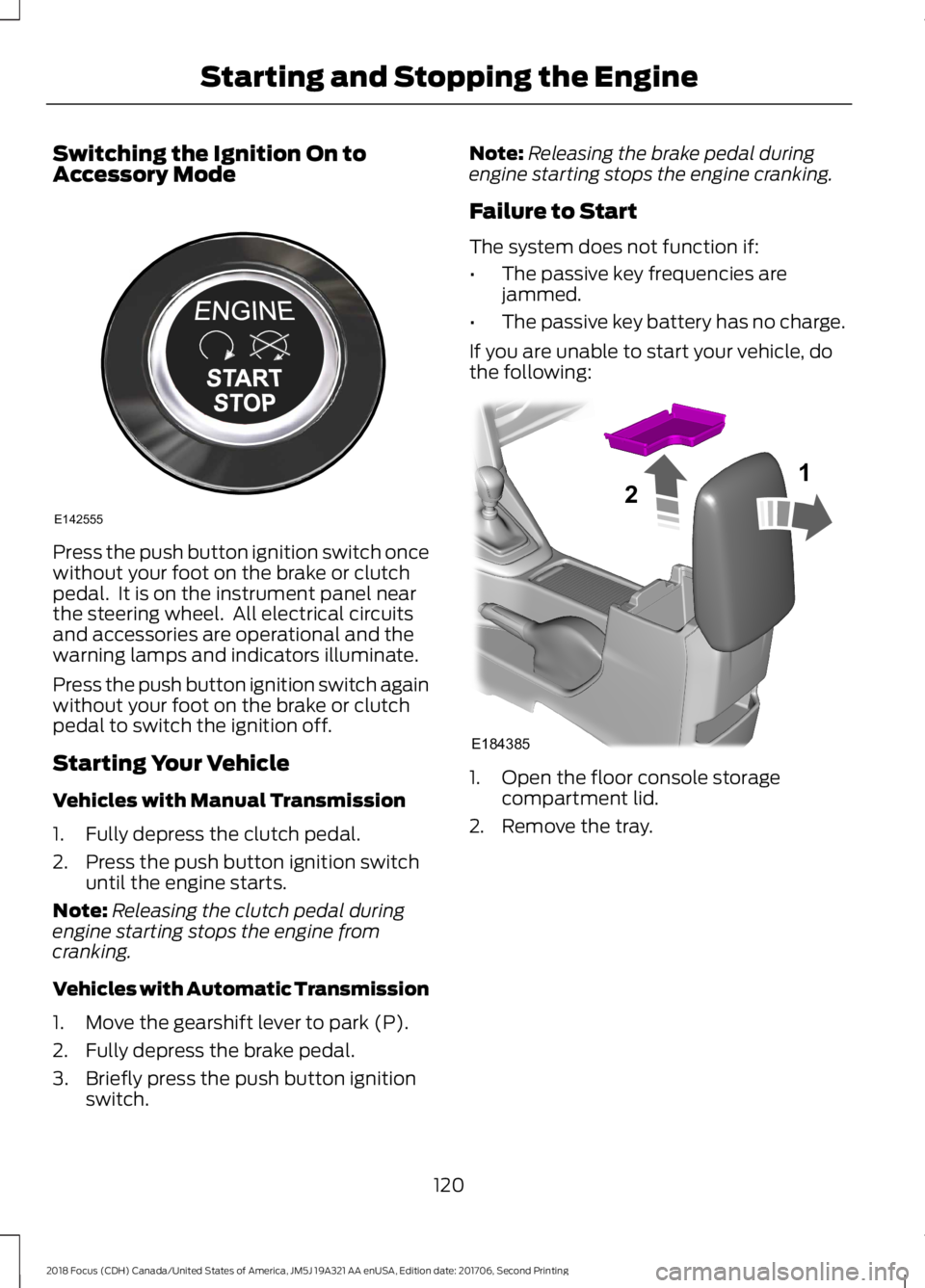
Switching the Ignition On toAccessory Mode
Press the push button ignition switch oncewithout your foot on the brake or clutchpedal. It is on the instrument panel nearthe steering wheel. All electrical circuitsand accessories are operational and thewarning lamps and indicators illuminate.
Press the push button ignition switch againwithout your foot on the brake or clutchpedal to switch the ignition off.
Starting Your Vehicle
Vehicles with Manual Transmission
1.Fully depress the clutch pedal.
2.Press the push button ignition switchuntil the engine starts.
Note:Releasing the clutch pedal duringengine starting stops the engine fromcranking.
Vehicles with Automatic Transmission
1.Move the gearshift lever to park (P).
2.Fully depress the brake pedal.
3.Briefly press the push button ignitionswitch.
Note:Releasing the brake pedal duringengine starting stops the engine cranking.
Failure to Start
The system does not function if:
•The passive key frequencies arejammed.
•The passive key battery has no charge.
If you are unable to start your vehicle, dothe following:
1.Open the floor console storagecompartment lid.
2.Remove the tray.
1202018 Focus (CDH) Canada/United States of America, JM5J 19A321 AA enUSA, Edition date: 201706, Second PrintingStarting and Stopping the EngineE142555 E18438521