display FORD FOCUS 2018 Manual PDF
[x] Cancel search | Manufacturer: FORD, Model Year: 2018, Model line: FOCUS, Model: FORD FOCUS 2018Pages: 473, PDF Size: 39.91 MB
Page 306 of 473
Depending on your phone's capability andyour market, the system may prompt youwith questions, such as setting the currentphone as the primary phone (the phoneSYNC automatically tries to connect withfirst upon vehicle start-up) anddownloading your phonebook.
Pairing Subsequent Phones
Note:Make sure to switch on the ignitionand the radio. Shift the transmission intopark (P) for automatic transmission or firstgear for manual transmission.
Note:To scroll through the menus, pressthe up and down arrows on your audiosystem.
1.Make sure to switch on your phone'sBluetooth feature before starting thesearch. See your device's manual ifnecessary.
2.Press the PHONE button.
3.Select the option for BluetoothDevices.
4.Press the OK button.
5.Select the option to add. This startsthe pairing process.
6.When a message to begin pairingappears in the audio display, search forSYNC on your device.
7.When prompted on your cell phone’sdisplay, confirm that the PIN providedby SYNC matches the PIN displayedon your cell phone. Your phone is nowpaired and the display indicates thatthe pairing was successful. If you areprompted to enter a PIN on your device,enter the PIN displayed on the screen.The display indicates when the pairingis successful.
SYNC may prompt you with more cellphone options. Your cell phone may alsoprompt you to give SYNC permission toaccess information. For more informationon your cell phone’s capability, see yourcell phone’s manual and visit the website.
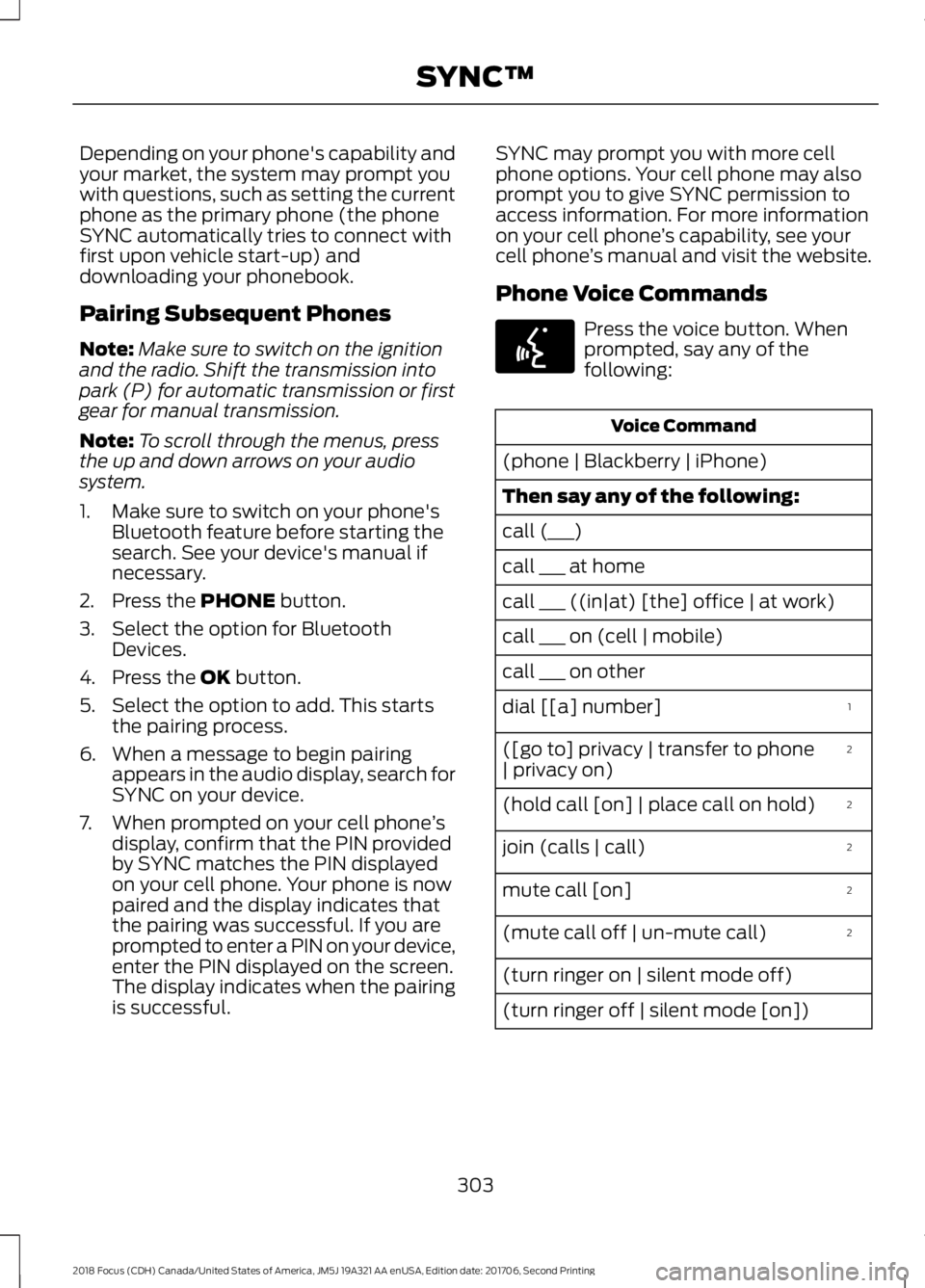
Phone Voice Commands
Press the voice button. Whenprompted, say any of thefollowing:
Voice Command
(phone | Blackberry | iPhone)
Then say any of the following:
call (___)
call ___ at home
call ___ ((in|at) [the] office | at work)
call ___ on (cell | mobile)
call ___ on other
1dial [[a] number]
2([go to] privacy | transfer to phone| privacy on)
2(hold call [on] | place call on hold)
2join (calls | call)
2mute call [on]
2(mute call off | un-mute call)
(turn ringer on | silent mode off)
(turn ringer off | silent mode [on])
3032018 Focus (CDH) Canada/United States of America, JM5J 19A321 AA enUSA, Edition date: 201706, Second PrintingSYNC™E142599
Page 308 of 473
Voice Command
You can state the name ofthe desired device, such as“My iPhone”,“My Galaxy”or“My iPod”. SYNC mayask you to confirm the typeof device (Phone, USB, orBluetooth Audio).
(connect |device) ___
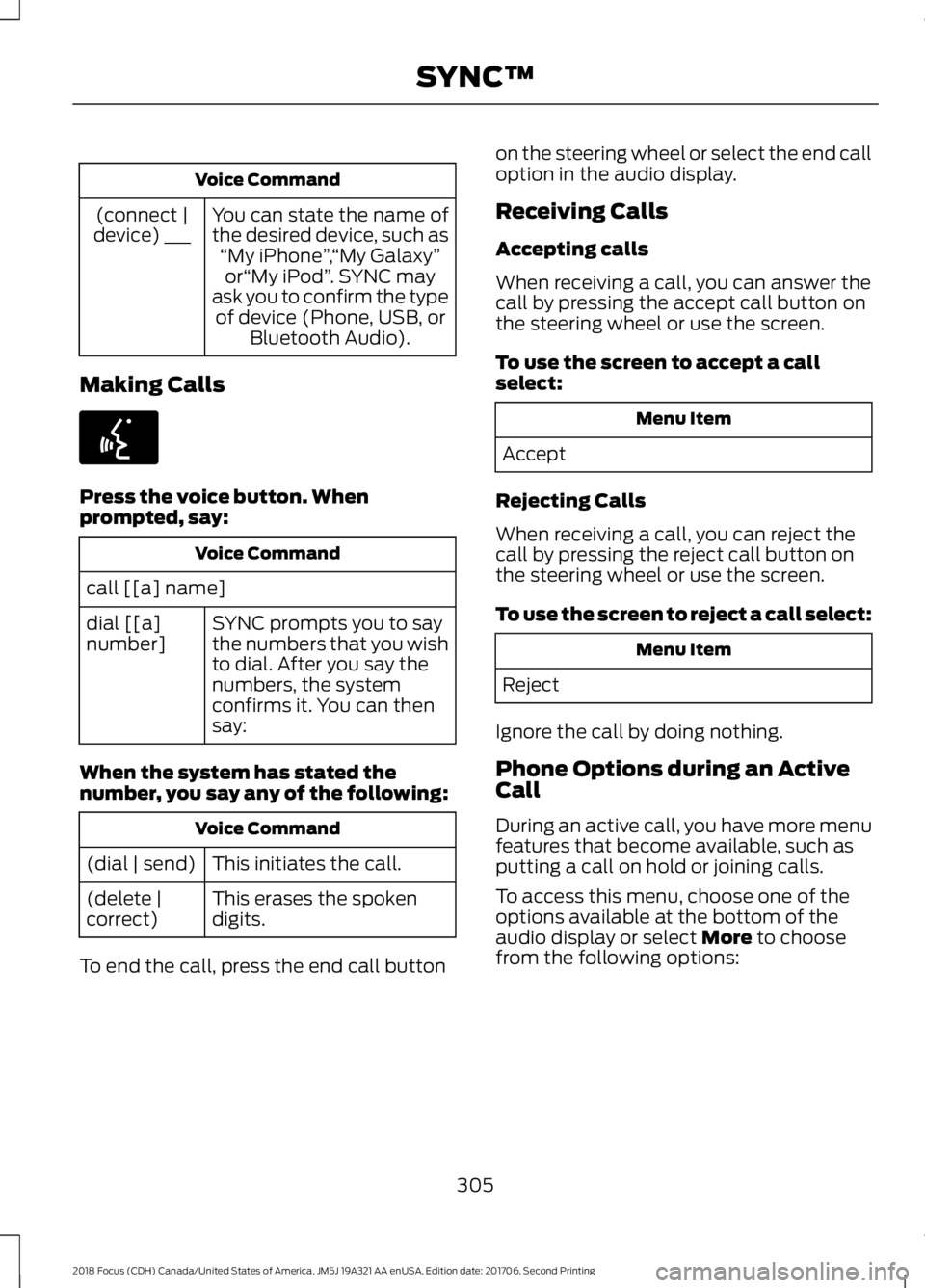
Making Calls
Press the voice button. Whenprompted, say:
Voice Command
call [[a] name]
SYNC prompts you to saythe numbers that you wishto dial. After you say thenumbers, the systemconfirms it. You can thensay:
dial [[a]number]
When the system has stated thenumber, you say any of the following:
Voice Command
This initiates the call.(dial | send)
This erases the spokendigits.(delete |correct)
To end the call, press the end call button
on the steering wheel or select the end calloption in the audio display.
Receiving Calls
Accepting calls
When receiving a call, you can answer thecall by pressing the accept call button onthe steering wheel or use the screen.
To use the screen to accept a callselect:
Menu Item
Accept
Rejecting Calls
When receiving a call, you can reject thecall by pressing the reject call button onthe steering wheel or use the screen.
To use the screen to reject a call select:
Menu Item
Reject
Ignore the call by doing nothing.
Phone Options during an ActiveCall
During an active call, you have more menufeatures that become available, such asputting a call on hold or joining calls.
To access this menu, choose one of theoptions available at the bottom of theaudio display or select More to choosefrom the following options:
3052018 Focus (CDH) Canada/United States of America, JM5J 19A321 AA enUSA, Edition date: 201706, Second PrintingSYNC™E142599
Page 309 of 473
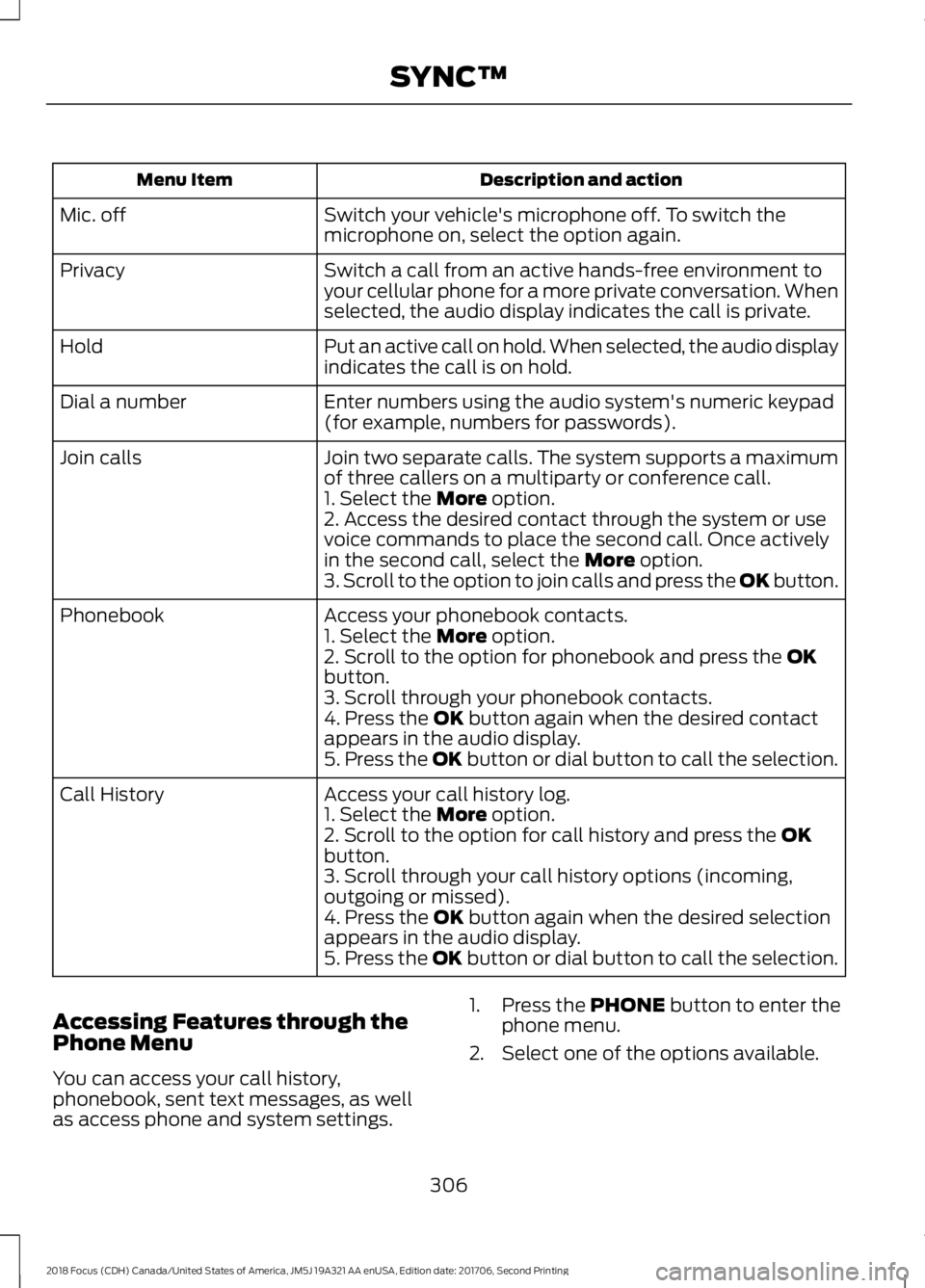
Description and actionMenu Item
Switch your vehicle's microphone off. To switch themicrophone on, select the option again.Mic. off
Switch a call from an active hands-free environment toyour cellular phone for a more private conversation. Whenselected, the audio display indicates the call is private.
Privacy
Put an active call on hold. When selected, the audio displayindicates the call is on hold.Hold
Enter numbers using the audio system's numeric keypad(for example, numbers for passwords).Dial a number
Join two separate calls. The system supports a maximumof three callers on a multiparty or conference call.Join calls
1. Select the More option.2. Access the desired contact through the system or usevoice commands to place the second call. Once activelyin the second call, select the More option.3. Scroll to the option to join calls and press the OK button.
Access your phonebook contacts.Phonebook1. Select the More option.2. Scroll to the option for phonebook and press the OKbutton.3. Scroll through your phonebook contacts.4. Press the OK button again when the desired contactappears in the audio display.5. Press the OK button or dial button to call the selection.
Access your call history log.Call History1. Select the More option.2. Scroll to the option for call history and press the OKbutton.3. Scroll through your call history options (incoming,outgoing or missed).4. Press the OK button again when the desired selectionappears in the audio display.5. Press the OK button or dial button to call the selection.
Accessing Features through thePhone Menu
You can access your call history,phonebook, sent text messages, as wellas access phone and system settings.
1.Press the PHONE button to enter thephone menu.
2.Select one of the options available.
3062018 Focus (CDH) Canada/United States of America, JM5J 19A321 AA enUSA, Edition date: 201706, Second PrintingSYNC™
Page 310 of 473
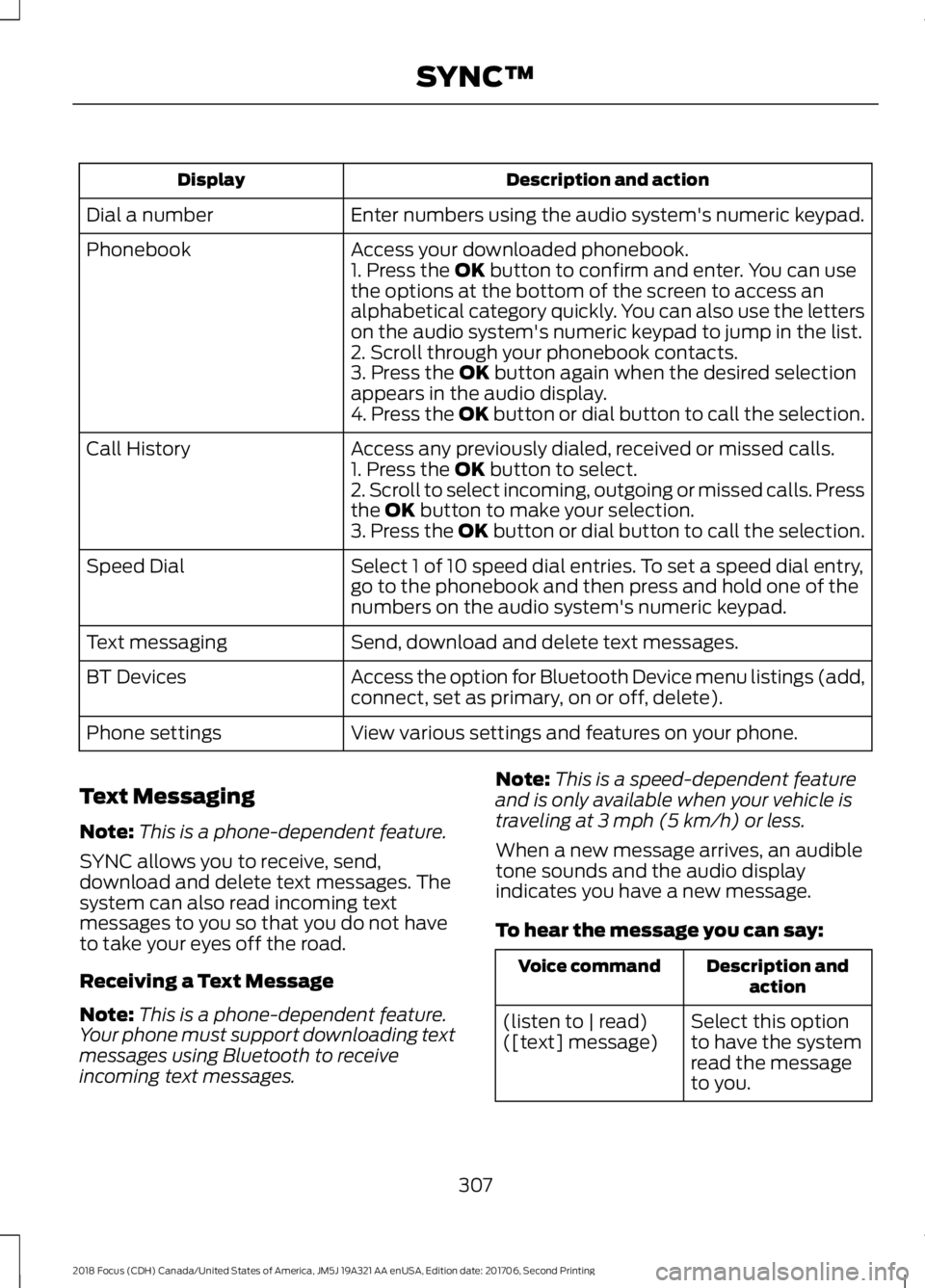
Description and actionDisplay
Enter numbers using the audio system's numeric keypad.Dial a number
Access your downloaded phonebook.Phonebook1. Press the OK button to confirm and enter. You can usethe options at the bottom of the screen to access analphabetical category quickly. You can also use the letterson the audio system's numeric keypad to jump in the list.2. Scroll through your phonebook contacts.3. Press the OK button again when the desired selectionappears in the audio display.4. Press the OK button or dial button to call the selection.
Access any previously dialed, received or missed calls.Call History1. Press the OK button to select.2. Scroll to select incoming, outgoing or missed calls. Pressthe OK button to make your selection.3. Press the OK button or dial button to call the selection.
Select 1 of 10 speed dial entries. To set a speed dial entry,go to the phonebook and then press and hold one of thenumbers on the audio system's numeric keypad.
Speed Dial
Send, download and delete text messages.Text messaging
Access the option for Bluetooth Device menu listings (add,connect, set as primary, on or off, delete).BT Devices
View various settings and features on your phone.Phone settings
Text Messaging
Note:This is a phone-dependent feature.
SYNC allows you to receive, send,download and delete text messages. Thesystem can also read incoming textmessages to you so that you do not haveto take your eyes off the road.
Receiving a Text Message
Note:This is a phone-dependent feature.Your phone must support downloading textmessages using Bluetooth to receiveincoming text messages.
Note:This is a speed-dependent featureand is only available when your vehicle istraveling at 3 mph (5 km/h) or less.
When a new message arrives, an audibletone sounds and the audio displayindicates you have a new message.
To hear the message you can say:
Description andactionVoice command
Select this optionto have the systemread the messageto you.
(listen to | read)([text] message)
3072018 Focus (CDH) Canada/United States of America, JM5J 19A321 AA enUSA, Edition date: 201706, Second PrintingSYNC™
Page 311 of 473
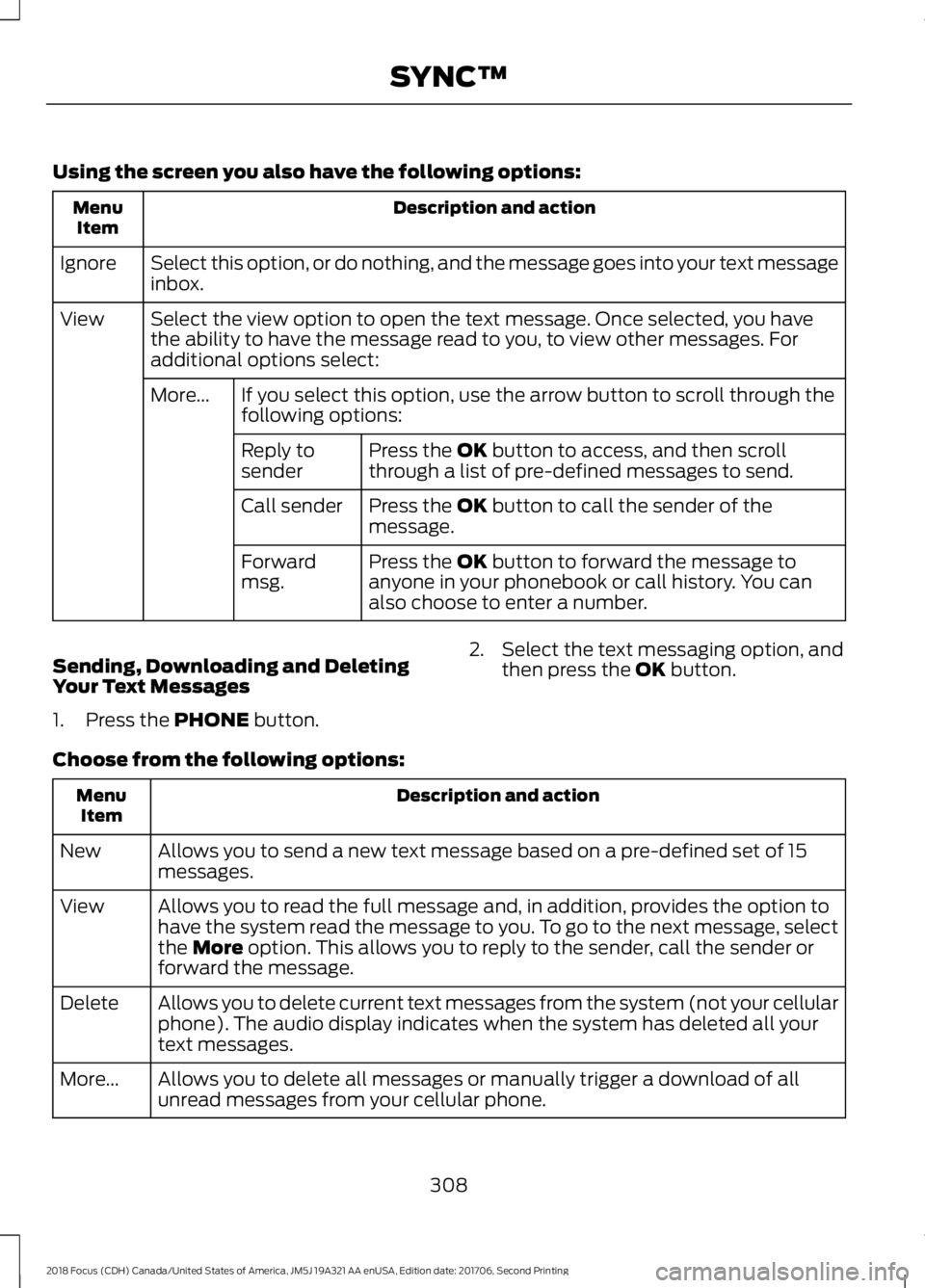
Using the screen you also have the following options:
Description and actionMenuItem
Select this option, or do nothing, and the message goes into your text messageinbox.Ignore
Select the view option to open the text message. Once selected, you havethe ability to have the message read to you, to view other messages. Foradditional options select:
View
If you select this option, use the arrow button to scroll through thefollowing options:More...
Press the OK button to access, and then scrollthrough a list of pre-defined messages to send.Reply tosender
Press the OK button to call the sender of themessage.Call sender
Press the OK button to forward the message toanyone in your phonebook or call history. You canalso choose to enter a number.
Forwardmsg.
Sending, Downloading and DeletingYour Text Messages
1.Press the PHONE button.
2.Select the text messaging option, andthen press the OK button.
Choose from the following options:
Description and actionMenuItem
Allows you to send a new text message based on a pre-defined set of 15messages.New
Allows you to read the full message and, in addition, provides the option tohave the system read the message to you. To go to the next message, selectthe More option. This allows you to reply to the sender, call the sender orforward the message.
View
Allows you to delete current text messages from the system (not your cellularphone). The audio display indicates when the system has deleted all yourtext messages.
Delete
Allows you to delete all messages or manually trigger a download of allunread messages from your cellular phone.More...
3082018 Focus (CDH) Canada/United States of America, JM5J 19A321 AA enUSA, Edition date: 201706, Second PrintingSYNC™
Page 312 of 473
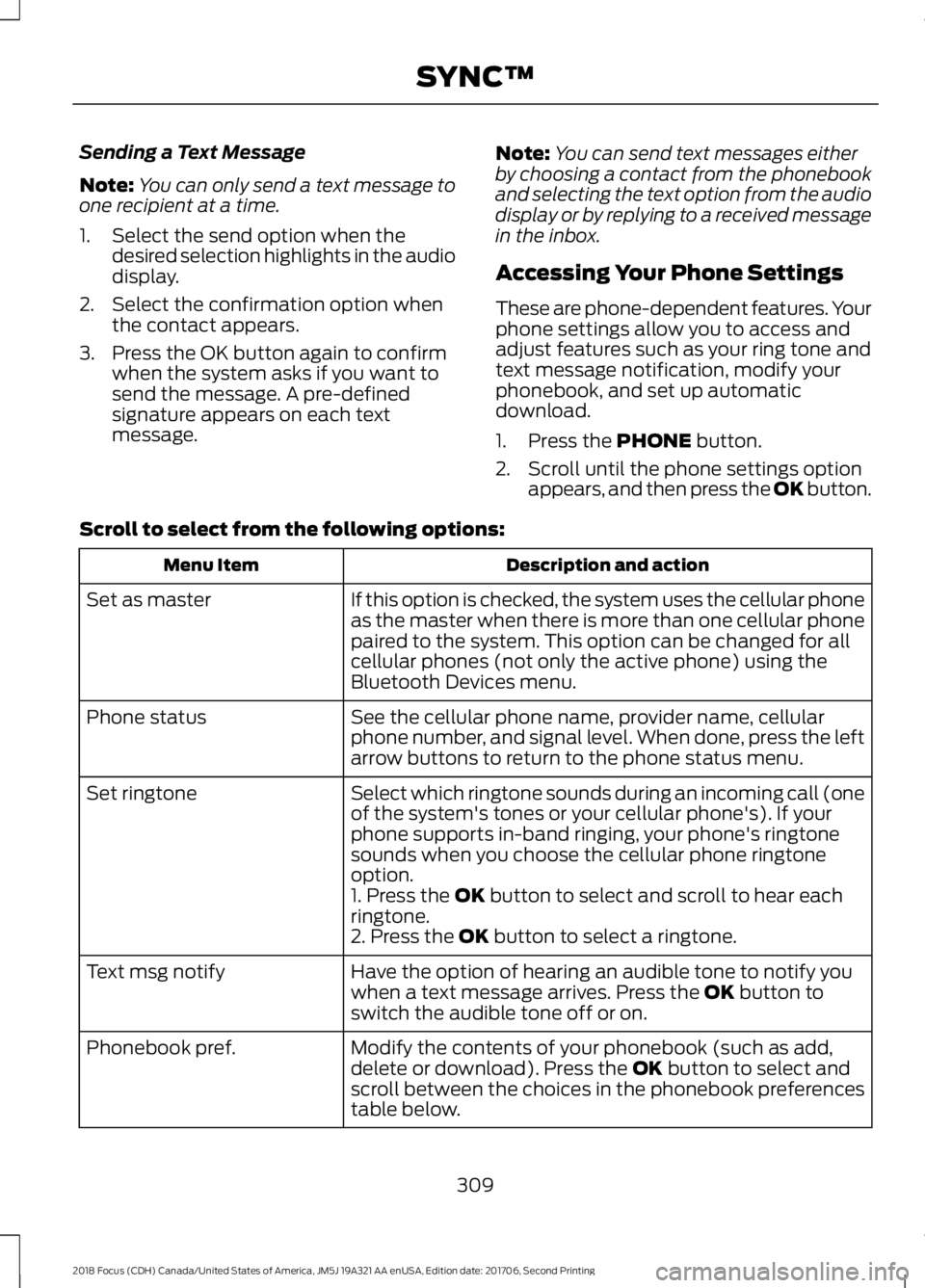
Sending a Text Message
Note:You can only send a text message toone recipient at a time.
1.Select the send option when thedesired selection highlights in the audiodisplay.
2.Select the confirmation option whenthe contact appears.
3.Press the OK button again to confirmwhen the system asks if you want tosend the message. A pre-definedsignature appears on each textmessage.
Note:You can send text messages eitherby choosing a contact from the phonebookand selecting the text option from the audiodisplay or by replying to a received messagein the inbox.
Accessing Your Phone Settings
These are phone-dependent features. Yourphone settings allow you to access andadjust features such as your ring tone andtext message notification, modify yourphonebook, and set up automaticdownload.
1.Press the PHONE button.
2.Scroll until the phone settings optionappears, and then press the OK button.
Scroll to select from the following options:
Description and actionMenu Item
If this option is checked, the system uses the cellular phoneas the master when there is more than one cellular phonepaired to the system. This option can be changed for allcellular phones (not only the active phone) using theBluetooth Devices menu.
Set as master
See the cellular phone name, provider name, cellularphone number, and signal level. When done, press the leftarrow buttons to return to the phone status menu.
Phone status
Select which ringtone sounds during an incoming call (oneof the system's tones or your cellular phone's). If yourphone supports in-band ringing, your phone's ringtonesounds when you choose the cellular phone ringtoneoption.
Set ringtone
1. Press the OK button to select and scroll to hear eachringtone.2. Press the OK button to select a ringtone.
Have the option of hearing an audible tone to notify youwhen a text message arrives. Press the OK button toswitch the audible tone off or on.
Text msg notify
Modify the contents of your phonebook (such as add,delete or download). Press the OK button to select andscroll between the choices in the phonebook preferencestable below.
Phonebook pref.
3092018 Focus (CDH) Canada/United States of America, JM5J 19A321 AA enUSA, Edition date: 201706, Second PrintingSYNC™
Page 313 of 473
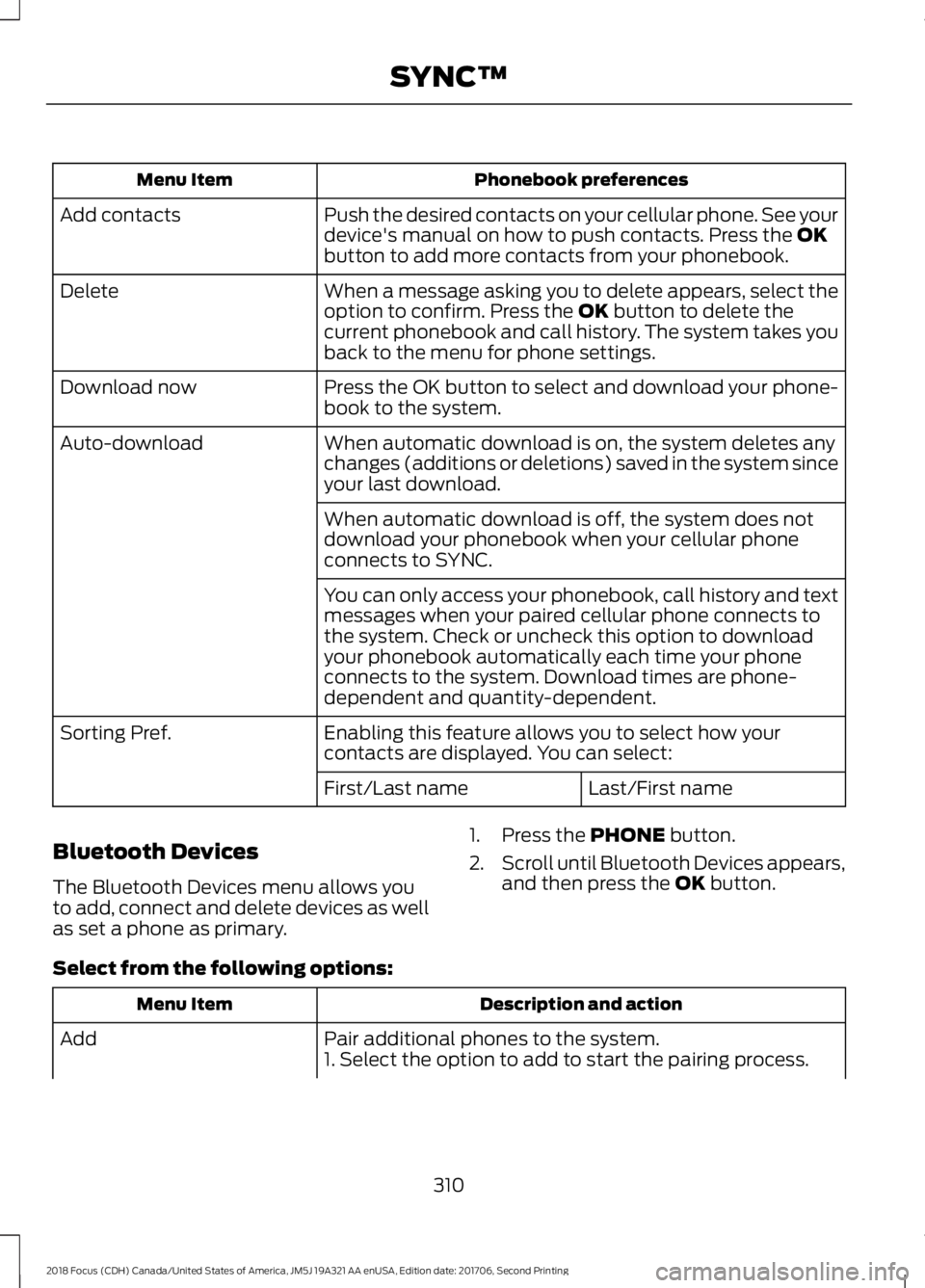
Phonebook preferencesMenu Item
Push the desired contacts on your cellular phone. See yourdevice's manual on how to push contacts. Press the OKbutton to add more contacts from your phonebook.
Add contacts
When a message asking you to delete appears, select theoption to confirm. Press the OK button to delete thecurrent phonebook and call history. The system takes youback to the menu for phone settings.
Delete
Press the OK button to select and download your phone-book to the system.Download now
When automatic download is on, the system deletes anychanges (additions or deletions) saved in the system sinceyour last download.
Auto-download
When automatic download is off, the system does notdownload your phonebook when your cellular phoneconnects to SYNC.
You can only access your phonebook, call history and textmessages when your paired cellular phone connects tothe system. Check or uncheck this option to downloadyour phonebook automatically each time your phoneconnects to the system. Download times are phone-dependent and quantity-dependent.
Enabling this feature allows you to select how yourcontacts are displayed. You can select:Sorting Pref.
Last/First nameFirst/Last name
Bluetooth Devices
The Bluetooth Devices menu allows youto add, connect and delete devices as wellas set a phone as primary.
1.Press the PHONE button.
2.Scroll until Bluetooth Devices appears,and then press the OK button.
Select from the following options:
Description and actionMenu Item
Pair additional phones to the system.Add1. Select the option to add to start the pairing process.
3102018 Focus (CDH) Canada/United States of America, JM5J 19A321 AA enUSA, Edition date: 201706, Second PrintingSYNC™
Page 314 of 473
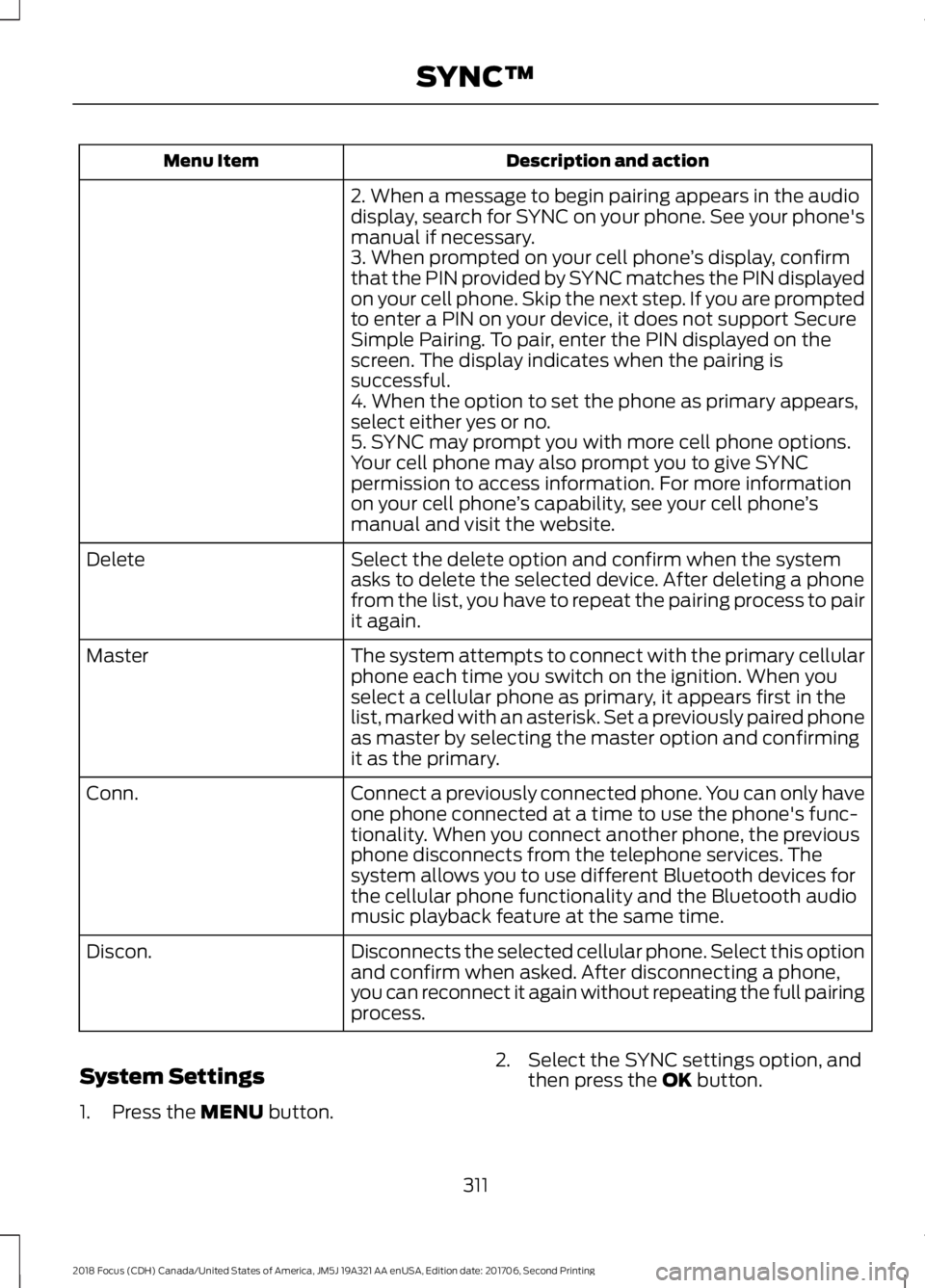
Description and actionMenu Item
2. When a message to begin pairing appears in the audiodisplay, search for SYNC on your phone. See your phone'smanual if necessary.3. When prompted on your cell phone’s display, confirmthat the PIN provided by SYNC matches the PIN displayedon your cell phone. Skip the next step. If you are promptedto enter a PIN on your device, it does not support SecureSimple Pairing. To pair, enter the PIN displayed on thescreen. The display indicates when the pairing issuccessful.4. When the option to set the phone as primary appears,select either yes or no.5. SYNC may prompt you with more cell phone options.Your cell phone may also prompt you to give SYNCpermission to access information. For more informationon your cell phone’s capability, see your cell phone’smanual and visit the website.
Select the delete option and confirm when the systemasks to delete the selected device. After deleting a phonefrom the list, you have to repeat the pairing process to pairit again.
Delete
The system attempts to connect with the primary cellularphone each time you switch on the ignition. When youselect a cellular phone as primary, it appears first in thelist, marked with an asterisk. Set a previously paired phoneas master by selecting the master option and confirmingit as the primary.
Master
Connect a previously connected phone. You can only haveone phone connected at a time to use the phone's func-tionality. When you connect another phone, the previousphone disconnects from the telephone services. Thesystem allows you to use different Bluetooth devices forthe cellular phone functionality and the Bluetooth audiomusic playback feature at the same time.
Conn.
Disconnects the selected cellular phone. Select this optionand confirm when asked. After disconnecting a phone,you can reconnect it again without repeating the full pairingprocess.
Discon.
System Settings
1.Press the MENU button.
2.Select the SYNC settings option, andthen press the OK button.
3112018 Focus (CDH) Canada/United States of America, JM5J 19A321 AA enUSA, Edition date: 201706, Second PrintingSYNC™
Page 315 of 473
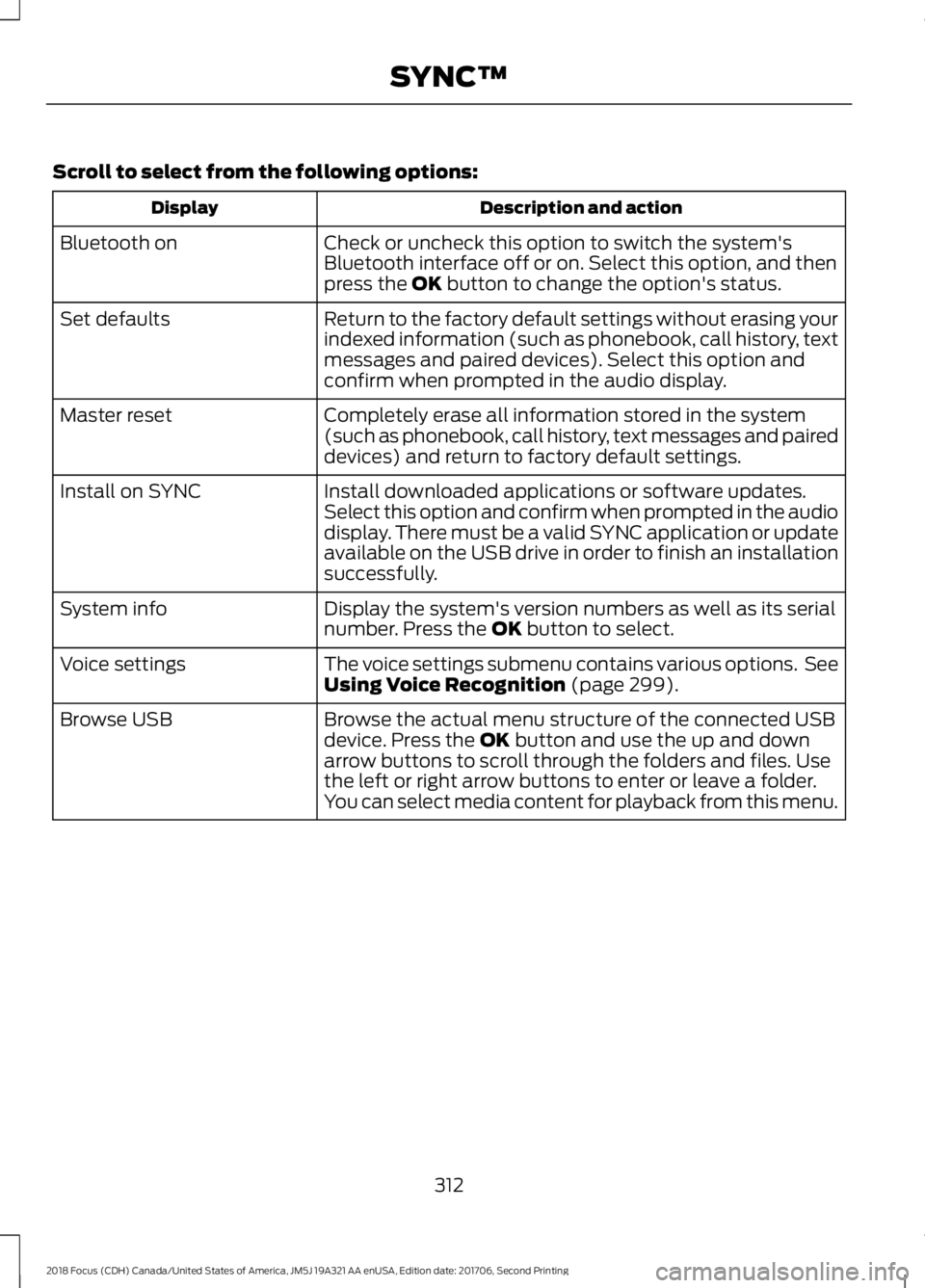
Scroll to select from the following options:
Description and actionDisplay
Check or uncheck this option to switch the system'sBluetooth interface off or on. Select this option, and thenpress the OK button to change the option's status.
Bluetooth on
Return to the factory default settings without erasing yourindexed information (such as phonebook, call history, textmessages and paired devices). Select this option andconfirm when prompted in the audio display.
Set defaults
Completely erase all information stored in the system(such as phonebook, call history, text messages and paireddevices) and return to factory default settings.
Master reset
Install downloaded applications or software updates.Select this option and confirm when prompted in the audiodisplay. There must be a valid SYNC application or updateavailable on the USB drive in order to finish an installationsuccessfully.
Install on SYNC
Display the system's version numbers as well as its serialnumber. Press the OK button to select.System info
The voice settings submenu contains various options. SeeUsing Voice Recognition (page 299).Voice settings
Browse the actual menu structure of the connected USBdevice. Press the OK button and use the up and downarrow buttons to scroll through the folders and files. Usethe left or right arrow buttons to enter or leave a folder.You can select media content for playback from this menu.
Browse USB
3122018 Focus (CDH) Canada/United States of America, JM5J 19A321 AA enUSA, Edition date: 201706, Second PrintingSYNC™
Page 316 of 473
SYNC™ APPLICATIONS AND
SERVICES (If Equipped)
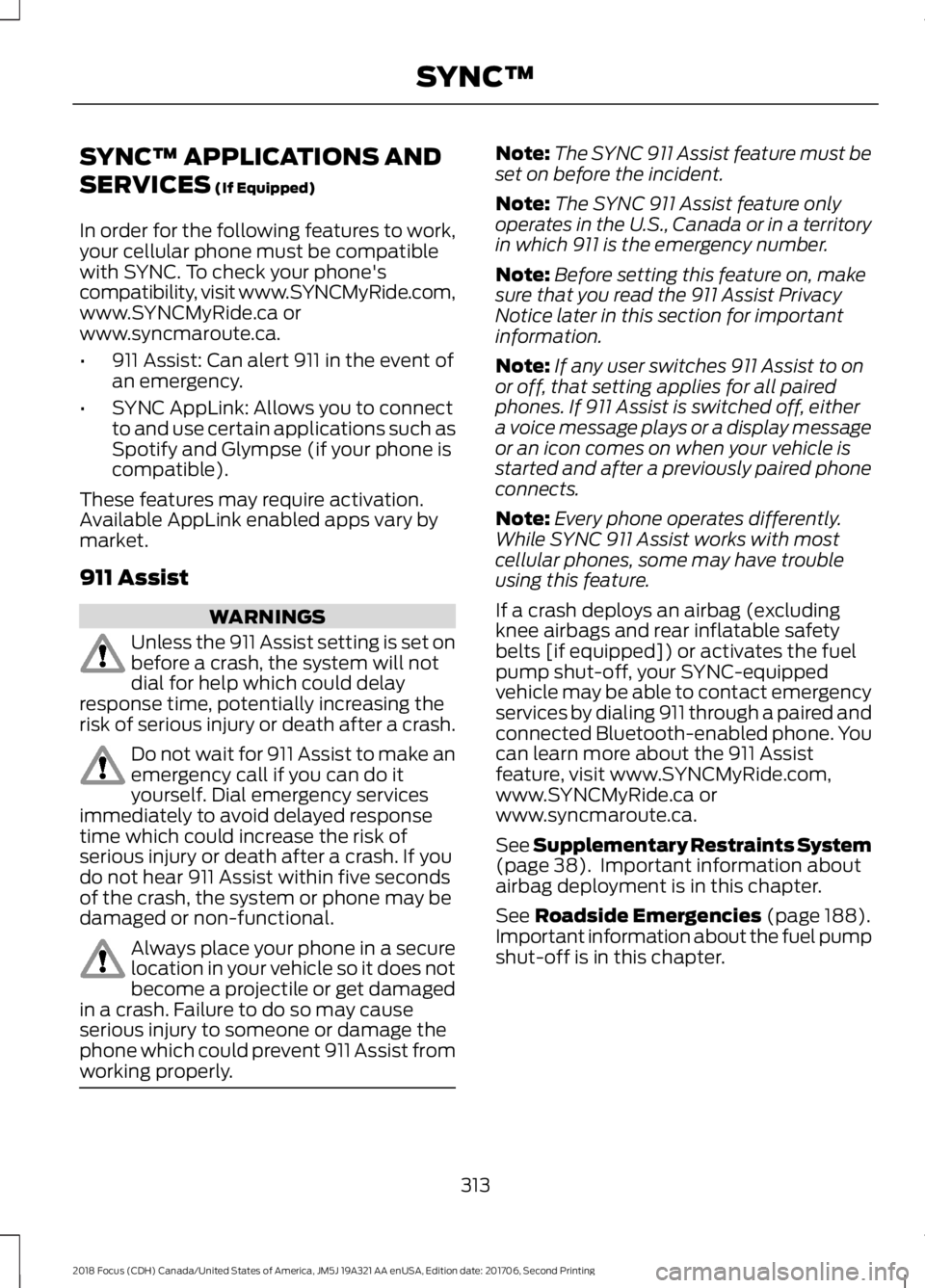
In order for the following features to work,your cellular phone must be compatiblewith SYNC. To check your phone'scompatibility, visit www.SYNCMyRide.com,www.SYNCMyRide.ca orwww.syncmaroute.ca.
•911 Assist: Can alert 911 in the event ofan emergency.
•SYNC AppLink: Allows you to connectto and use certain applications such asSpotify and Glympse (if your phone iscompatible).
These features may require activation.Available AppLink enabled apps vary bymarket.
911 Assist
WARNINGS
Unless the 911 Assist setting is set onbefore a crash, the system will notdial for help which could delayresponse time, potentially increasing therisk of serious injury or death after a crash.
Do not wait for 911 Assist to make anemergency call if you can do ityourself. Dial emergency servicesimmediately to avoid delayed responsetime which could increase the risk ofserious injury or death after a crash. If youdo not hear 911 Assist within five secondsof the crash, the system or phone may bedamaged or non-functional.
Always place your phone in a securelocation in your vehicle so it does notbecome a projectile or get damagedin a crash. Failure to do so may causeserious injury to someone or damage thephone which could prevent 911 Assist fromworking properly.
Note:The SYNC 911 Assist feature must beset on before the incident.
Note:The SYNC 911 Assist feature onlyoperates in the U.S., Canada or in a territoryin which 911 is the emergency number.
Note:Before setting this feature on, makesure that you read the 911 Assist PrivacyNotice later in this section for importantinformation.
Note:If any user switches 911 Assist to onor off, that setting applies for all pairedphones. If 911 Assist is switched off, eithera voice message plays or a display messageor an icon comes on when your vehicle isstarted and after a previously paired phoneconnects.
Note:Every phone operates differently.While SYNC 911 Assist works with mostcellular phones, some may have troubleusing this feature.
If a crash deploys an airbag (excludingknee airbags and rear inflatable safetybelts [if equipped]) or activates the fuelpump shut-off, your SYNC-equippedvehicle may be able to contact emergencyservices by dialing 911 through a paired andconnected Bluetooth-enabled phone. Youcan learn more about the 911 Assistfeature, visit www.SYNCMyRide.com,www.SYNCMyRide.ca orwww.syncmaroute.ca.
See Supplementary Restraints System(page 38). Important information aboutairbag deployment is in this chapter.
See Roadside Emergencies (page 188).Important information about the fuel pumpshut-off is in this chapter.
3132018 Focus (CDH) Canada/United States of America, JM5J 19A321 AA enUSA, Edition date: 201706, Second PrintingSYNC™