reset FORD FOCUS ELECTRIC 2015 3.G Owner's Manual
[x] Cancel search | Manufacturer: FORD, Model Year: 2015, Model line: FOCUS ELECTRIC, Model: FORD FOCUS ELECTRIC 2015 3.GPages: 369, PDF Size: 4.53 MB
Page 263 of 369
HD Radio Technology manufactured under
license from iBiquity Digital Corp. U.S. and
foreign patents. HD Radio and the HD and
HD Radio logos are proprietary trademarks
of iBiquity Digital Corp. Ford Motor
Company and iBiquity Digital Corp. are not
responsible for the content sent using HD
Radio technology. Content may be
changed, added or deleted at any time at
the station owner's discretion.
Radio Voice CommandsPress the voice button and when prompted say:
Action and Description
Voice command
Radio
Then you can say a command similar to the following: Say a frequency or preset.
FM
Off
Help
SIRIUS® Satellite Radio (If
Activated) To turn the feature on press the lower left corner of the touchscreen, and then
select:
Action and Description
Menu Item
SIRIUS
You can then select any of the following: Save a channel by pressing and holding one of the memory preset areas.
There is a brief mute while the radio saves the channel. Sound returns
when finished.
Presets
Save the current song, artist, or team as a favorite.
Alerts
If you are listening to music, you can save the song or artist, so the
system can alert you when they are playing on a satellite radio channel.
If you are listening to a sporting event, you can save your favorite teams
so the system can alert you when they are playing on a satellite radio
channel. You can also edit alerts or turn alerts on or off.
260
Focus (CDH), enUSA, First Printing MyFord Touch
™E142599 E142611
Page 265 of 369
Message
Message
DSP
Occupancy Mode
Speed Compensated Volume
This allows you to select a category of music you would like to search
for. You can then choose to either seek or scan for the stations playing
that category.
Set Category
for Seek/Scan
This allows you to lock and unlock channels, change or reset your PIN
or unlock all channels. To use this feature, you need your initial PIN,
which is 1234.
Parental
Lockout
This feature allows you turn alerts on and off.
Artist / Title /
Team Alerts
SIRIUS requires this number when communicating with you about your
account.
Electronic
Serial Number
(ESN)
Touch this button to manually enter the desired satellite channel
number. Touch Enter when you are done.
Direct Tune
Note: Your vehicle may not have all these sound settings.
SIRIUS Satellite Radio Information
Note: SIRIUS reserves the unrestricted right
to change, rearrange, add or delete
programming including canceling, moving
or adding particular channels, and its prices,
at any time, with or without notice to you.
Ford Motor Company shall not be
responsible for any such programming
changes. SIRIUS satellite radio is a
subscription-based satellite radio service
that broadcasts a variety of music, sports,
news, weather, traffic and entertainment
programming. Your factory-installed
SIRIUS satellite radio system includes
hardware and a limited subscription term
that begins on the date of sale or lease of
your vehicle. See an authorized dealer for
availability.
262
Focus (CDH), enUSA, First Printing MyFord Touch
™E142593
Page 267 of 369
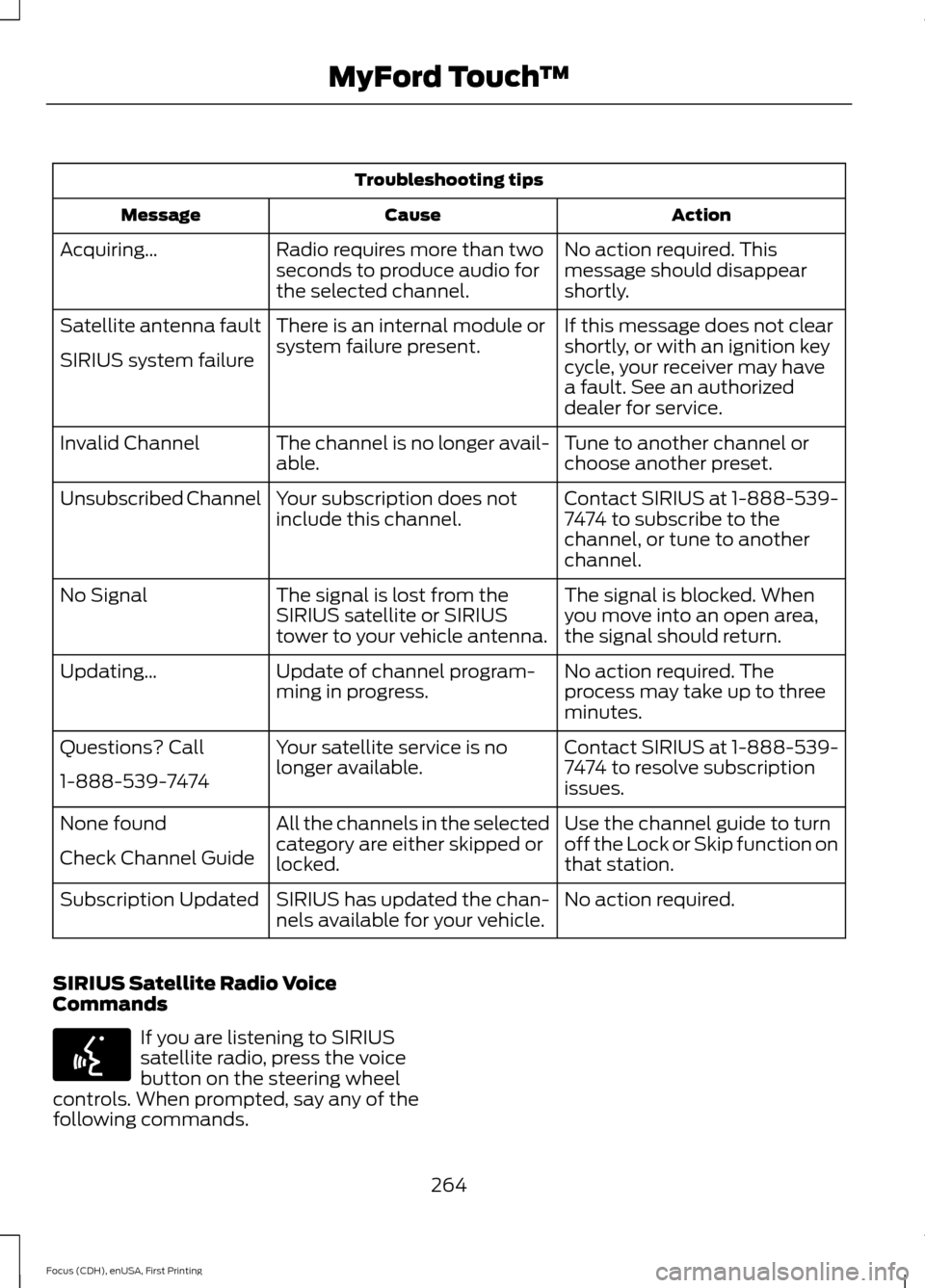
Troubleshooting tips
Action
Cause
Message
No action required. This
message should disappear
shortly.
Radio requires more than two
seconds to produce audio for
the selected channel.
Acquiring…
If this message does not clear
shortly, or with an ignition key
cycle, your receiver may have
a fault. See an authorized
dealer for service.
There is an internal module or
system failure present.
Satellite antenna fault
SIRIUS system failure
Tune to another channel or
choose another preset.
The channel is no longer avail-
able.
Invalid Channel
Contact SIRIUS at 1-888-539-
7474 to subscribe to the
channel, or tune to another
channel.
Your subscription does not
include this channel.
Unsubscribed Channel
The signal is blocked. When
you move into an open area,
the signal should return.
The signal is lost from the
SIRIUS satellite or SIRIUS
tower to your vehicle antenna.
No Signal
No action required. The
process may take up to three
minutes.
Update of channel program-
ming in progress.
Updating…
Contact SIRIUS at 1-888-539-
7474 to resolve subscription
issues.
Your satellite service is no
longer available.
Questions? Call
1-888-539-7474
Use the channel guide to turn
off the Lock or Skip function on
that station.
All the channels in the selected
category are either skipped or
locked.
None found
Check Channel Guide
No action required.
SIRIUS has updated the chan-
nels available for your vehicle.
Subscription Updated
SIRIUS Satellite Radio Voice
Commands If you are listening to SIRIUS
satellite radio, press the voice
button on the steering wheel
controls. When prompted, say any of the
following commands.
264
Focus (CDH), enUSA, First Printing MyFord Touch
™E142599
Page 284 of 369
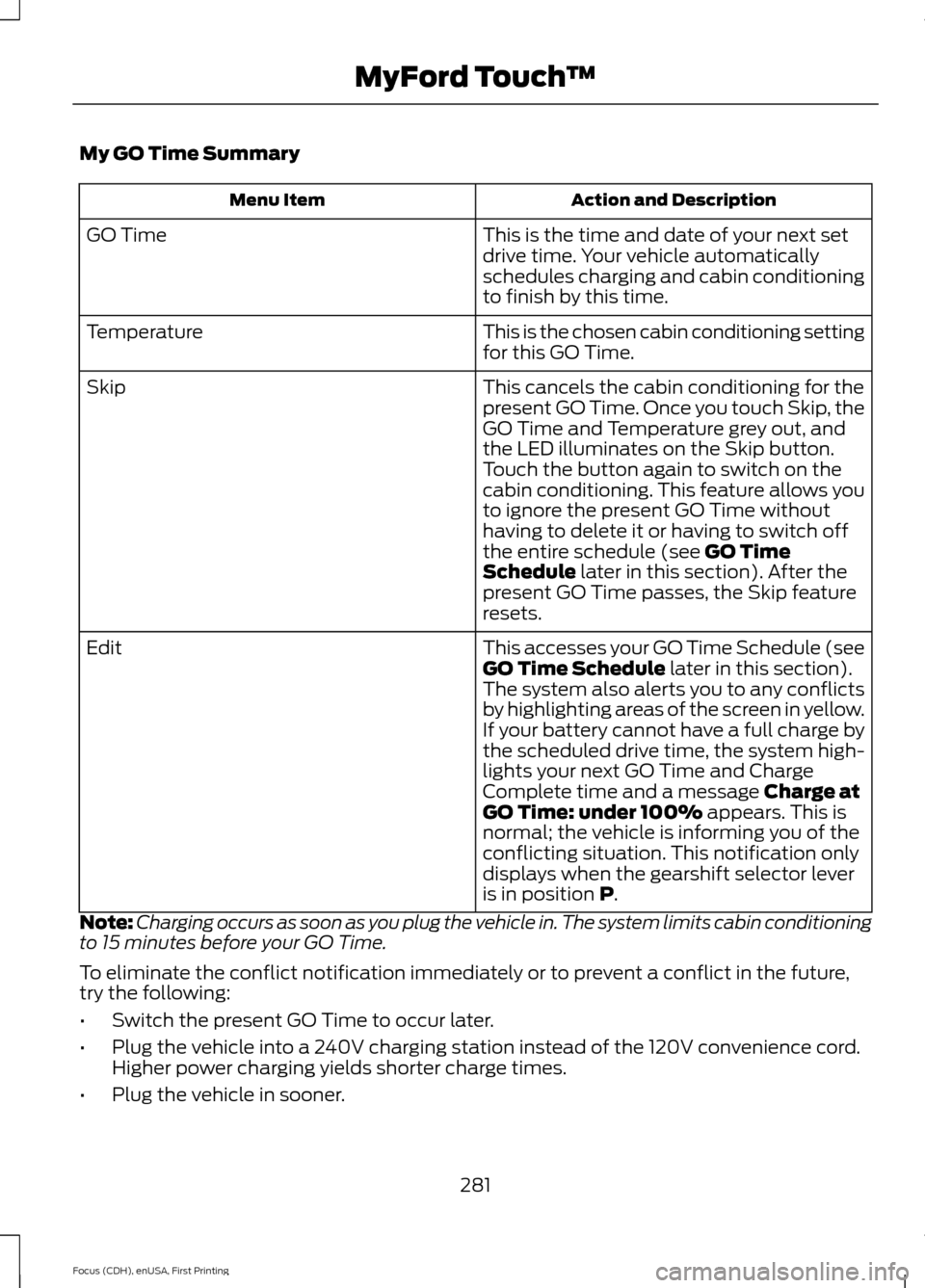
My GO Time Summary
Action and Description
Menu Item
This is the time and date of your next set
drive time. Your vehicle automatically
schedules charging and cabin conditioning
to finish by this time.
GO Time
This is the chosen cabin conditioning setting
for this GO Time.
Temperature
This cancels the cabin conditioning for the
present GO Time. Once you touch Skip, the
GO Time and Temperature grey out, and
the LED illuminates on the Skip button.
Touch the button again to switch on the
cabin conditioning. This feature allows you
to ignore the present GO Time without
having to delete it or having to switch off
the entire schedule (see GO Time
Schedule later in this section). After the
present GO Time passes, the Skip feature
resets.
Skip
This accesses your GO Time Schedule (see
GO Time Schedule
later in this section).
The system also alerts you to any conflicts
by highlighting areas of the screen in yellow.
If your battery cannot have a full charge by
the scheduled drive time, the system high-
lights your next GO Time and Charge
Complete time and a message
Charge at
GO Time: under 100% appears. This is
normal; the vehicle is informing you of the
conflicting situation. This notification only
displays when the gearshift selector lever
is in position
P.
Edit
Note: Charging occurs as soon as you plug the vehicle in. The system limits cabin conditioning
to 15 minutes before your GO Time.
To eliminate the conflict notification immediately or to prevent a conflict in the future,
try the following:
• Switch the present GO Time to occur later.
• Plug the vehicle into a 240V charging station instead of the 120V convenience cord.
Higher power charging yields shorter charge times.
• Plug the vehicle in sooner.
281
Focus (CDH), enUSA, First Printing MyFord Touch
™
Page 294 of 369
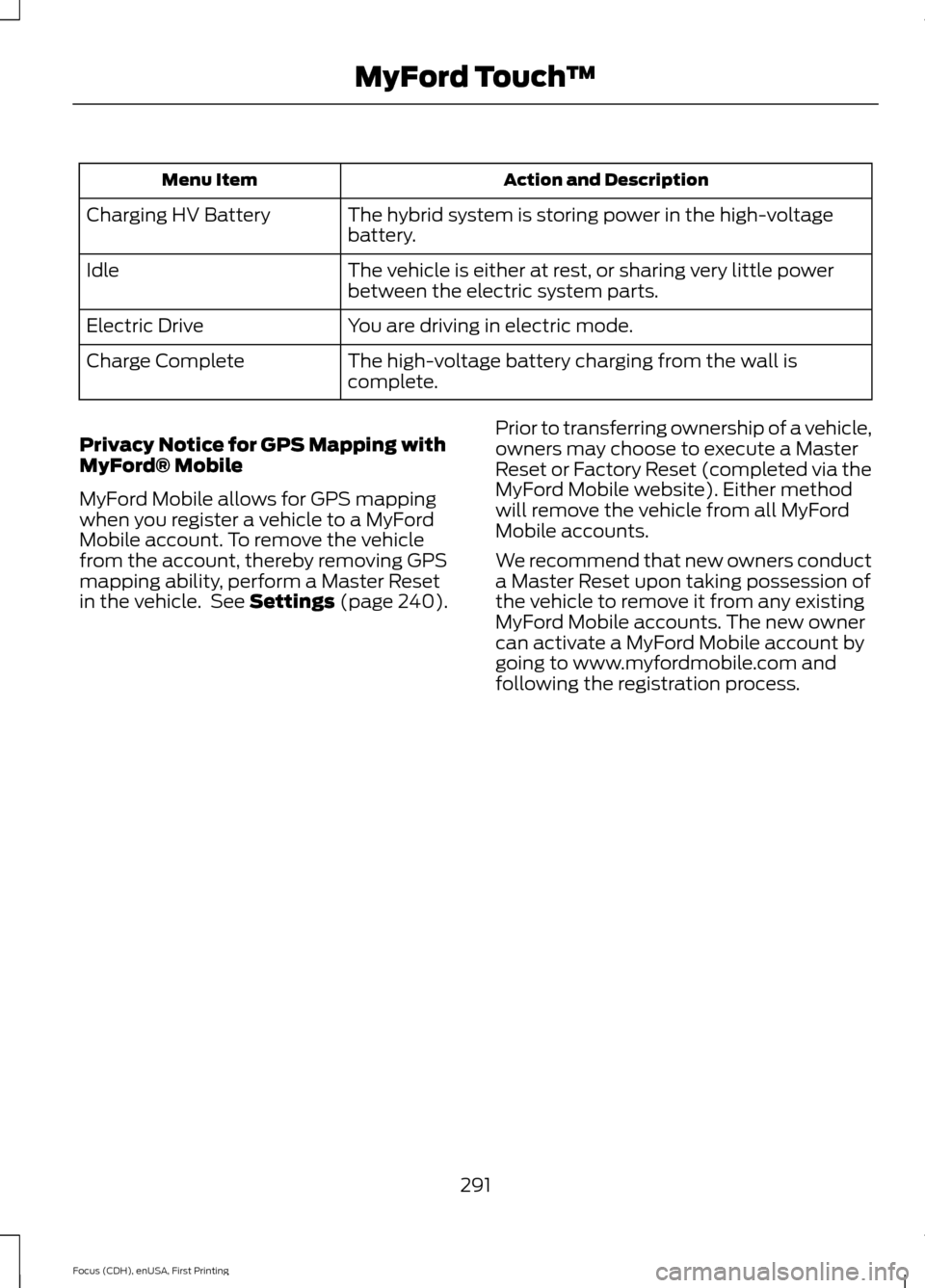
Action and Description
Menu Item
The hybrid system is storing power in the high-voltage
battery.
Charging HV Battery
The vehicle is either at rest, or sharing very little power
between the electric system parts.
Idle
You are driving in electric mode.
Electric Drive
The high-voltage battery charging from the wall is
complete.
Charge Complete
Privacy Notice for GPS Mapping with
MyFord® Mobile
MyFord Mobile allows for GPS mapping
when you register a vehicle to a MyFord
Mobile account. To remove the vehicle
from the account, thereby removing GPS
mapping ability, perform a Master Reset
in the vehicle. See Settings (page 240). Prior to transferring ownership of a vehicle,
owners may choose to execute a Master
Reset or Factory Reset (completed via the
MyFord Mobile website). Either method
will remove the vehicle from all MyFord
Mobile accounts.
We recommend that new owners conduct
a Master Reset upon taking possession of
the vehicle to remove it from any existing
MyFord Mobile accounts. The new owner
can activate a MyFord Mobile account by
going to www.myfordmobile.com and
following the registration process.
291
Focus (CDH), enUSA, First Printing MyFord Touch
™
Page 318 of 369
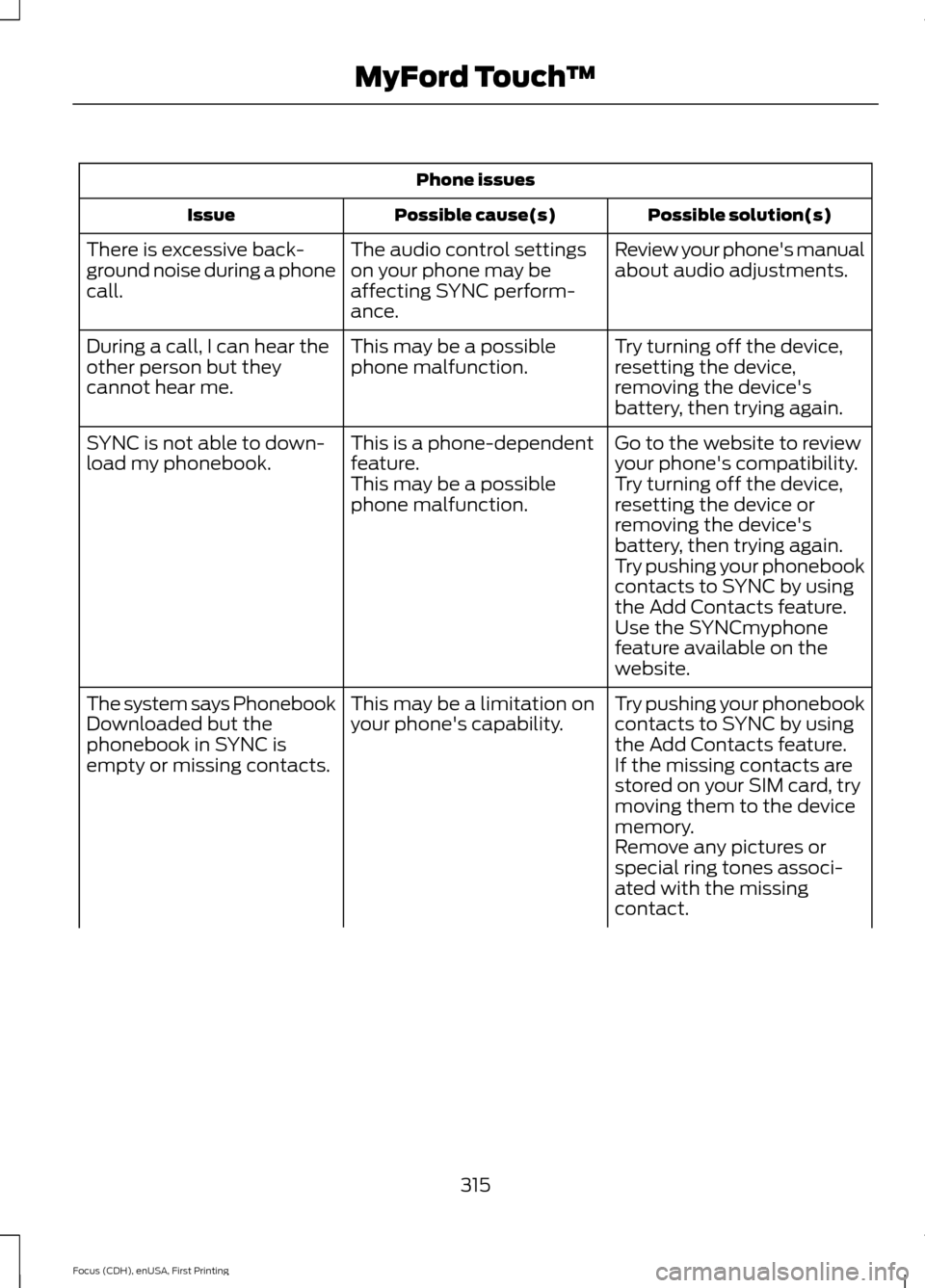
Phone issues
Possible solution(s)
Possible cause(s)
Issue
Review your phone's manual
about audio adjustments.
The audio control settings
on your phone may be
affecting SYNC perform-
ance.
There is excessive back-
ground noise during a phone
call.
Try turning off the device,
resetting the device,
removing the device's
battery, then trying again.
This may be a possible
phone malfunction.
During a call, I can hear the
other person but they
cannot hear me.
Go to the website to review
your phone's compatibility.
This is a phone-dependent
feature.
SYNC is not able to down-
load my phonebook.
Try turning off the device,
resetting the device or
removing the device's
battery, then trying again.
This may be a possible
phone malfunction.
Try pushing your phonebook
contacts to SYNC by using
the Add Contacts feature.
Use the SYNCmyphone
feature available on the
website.
Try pushing your phonebook
contacts to SYNC by using
the Add Contacts feature.
This may be a limitation on
your phone's capability.
The system says Phonebook
Downloaded but the
phonebook in SYNC is
empty or missing contacts.
If the missing contacts are
stored on your SIM card, try
moving them to the device
memory.
Remove any pictures or
special ring tones associ-
ated with the missing
contact.
315
Focus (CDH), enUSA, First Printing MyFord Touch
™
Page 319 of 369
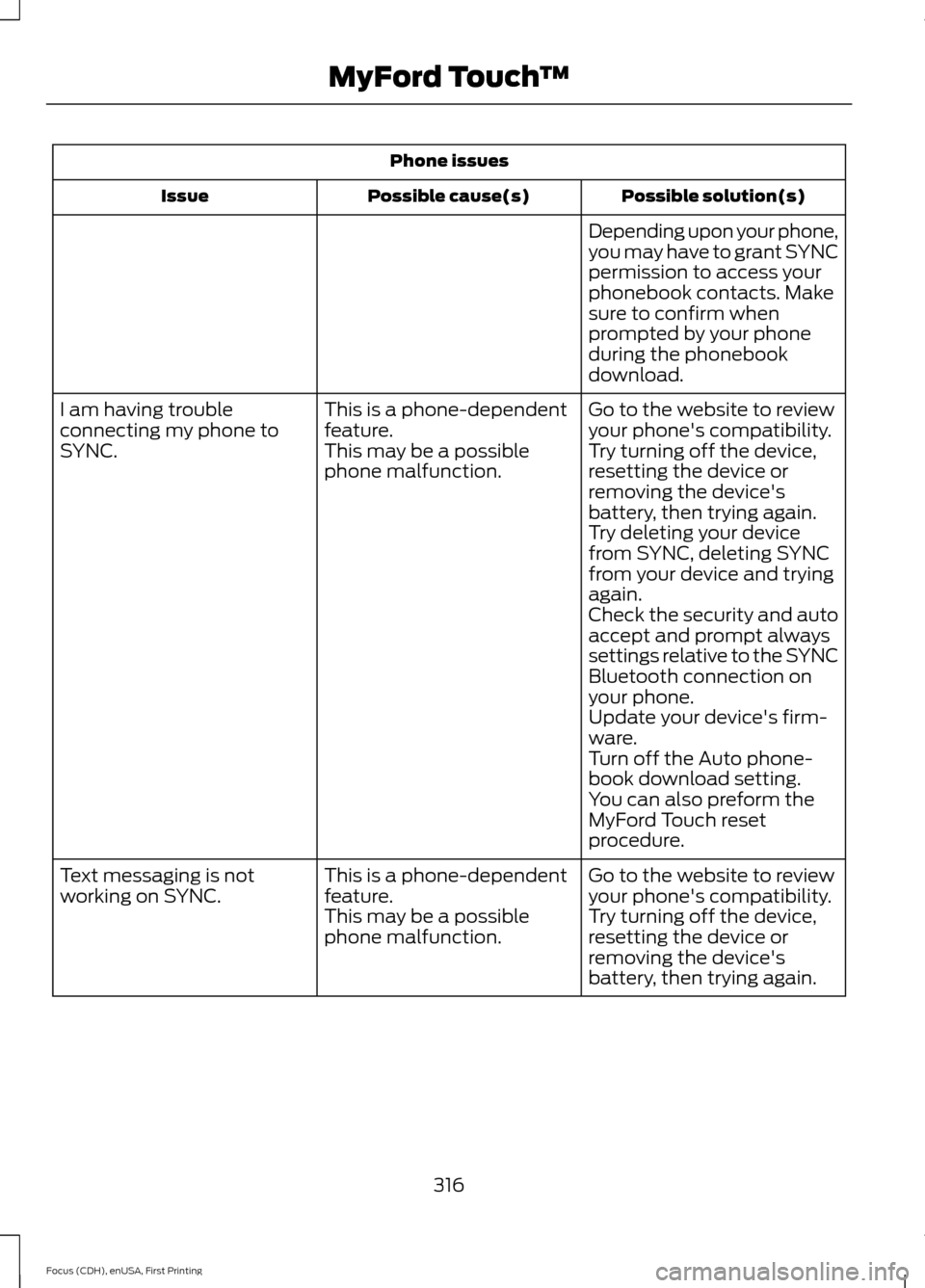
Phone issues
Possible solution(s)
Possible cause(s)
Issue
Depending upon your phone,
you may have to grant SYNC
permission to access your
phonebook contacts. Make
sure to confirm when
prompted by your phone
during the phonebook
download.
Go to the website to review
your phone's compatibility.
This is a phone-dependent
feature.
I am having trouble
connecting my phone to
SYNC.
Try turning off the device,
resetting the device or
removing the device's
battery, then trying again.
This may be a possible
phone malfunction.
Try deleting your device
from SYNC, deleting SYNC
from your device and trying
again.
Check the security and auto
accept and prompt always
settings relative to the SYNC
Bluetooth connection on
your phone.
Update your device's firm-
ware.
Turn off the Auto phone-
book download setting.
You can also preform the
MyFord Touch reset
procedure.
Go to the website to review
your phone's compatibility.
This is a phone-dependent
feature.
Text messaging is not
working on SYNC.
Try turning off the device,
resetting the device or
removing the device's
battery, then trying again.
This may be a possible
phone malfunction.
316
Focus (CDH), enUSA, First Printing MyFord Touch
™
Page 320 of 369
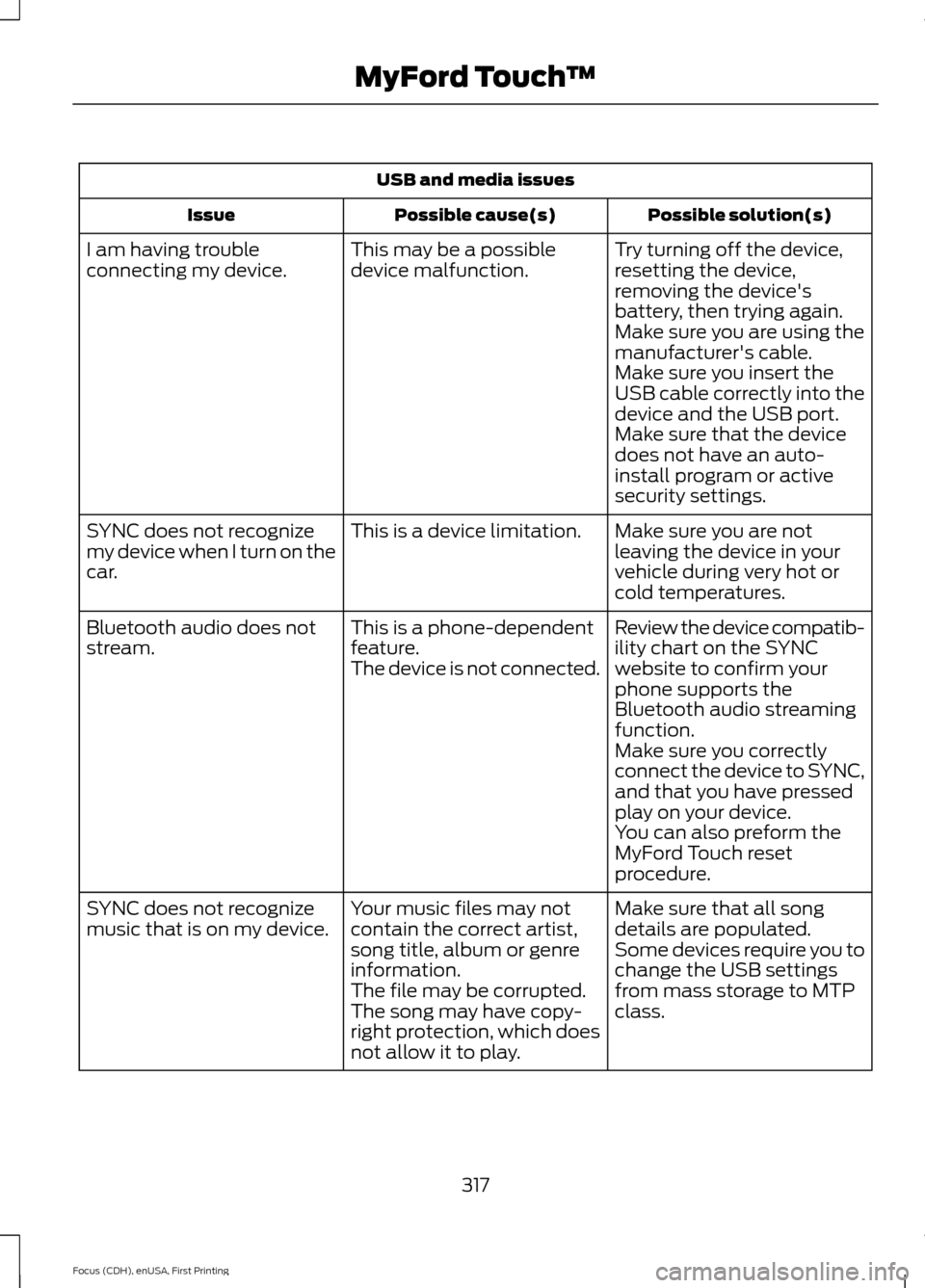
USB and media issues
Possible solution(s)
Possible cause(s)
Issue
Try turning off the device,
resetting the device,
removing the device's
battery, then trying again.
This may be a possible
device malfunction.
I am having trouble
connecting my device.
Make sure you are using the
manufacturer's cable.
Make sure you insert the
USB cable correctly into the
device and the USB port.
Make sure that the device
does not have an auto-
install program or active
security settings.
Make sure you are not
leaving the device in your
vehicle during very hot or
cold temperatures.
This is a device limitation.
SYNC does not recognize
my device when I turn on the
car.
Review the device compatib-
ility chart on the SYNC
website to confirm your
phone supports the
Bluetooth audio streaming
function.
This is a phone-dependent
feature.
The device is not connected.
Bluetooth audio does not
stream.
Make sure you correctly
connect the device to SYNC,
and that you have pressed
play on your device.
You can also preform the
MyFord Touch reset
procedure.
Make sure that all song
details are populated.
Your music files may not
contain the correct artist,
song title, album or genre
information.
SYNC does not recognize
music that is on my device.
Some devices require you to
change the USB settings
from mass storage to MTP
class.
The file may be corrupted.
The song may have copy-
right protection, which does
not allow it to play.
317
Focus (CDH), enUSA, First Printing MyFord Touch
™
Page 323 of 369
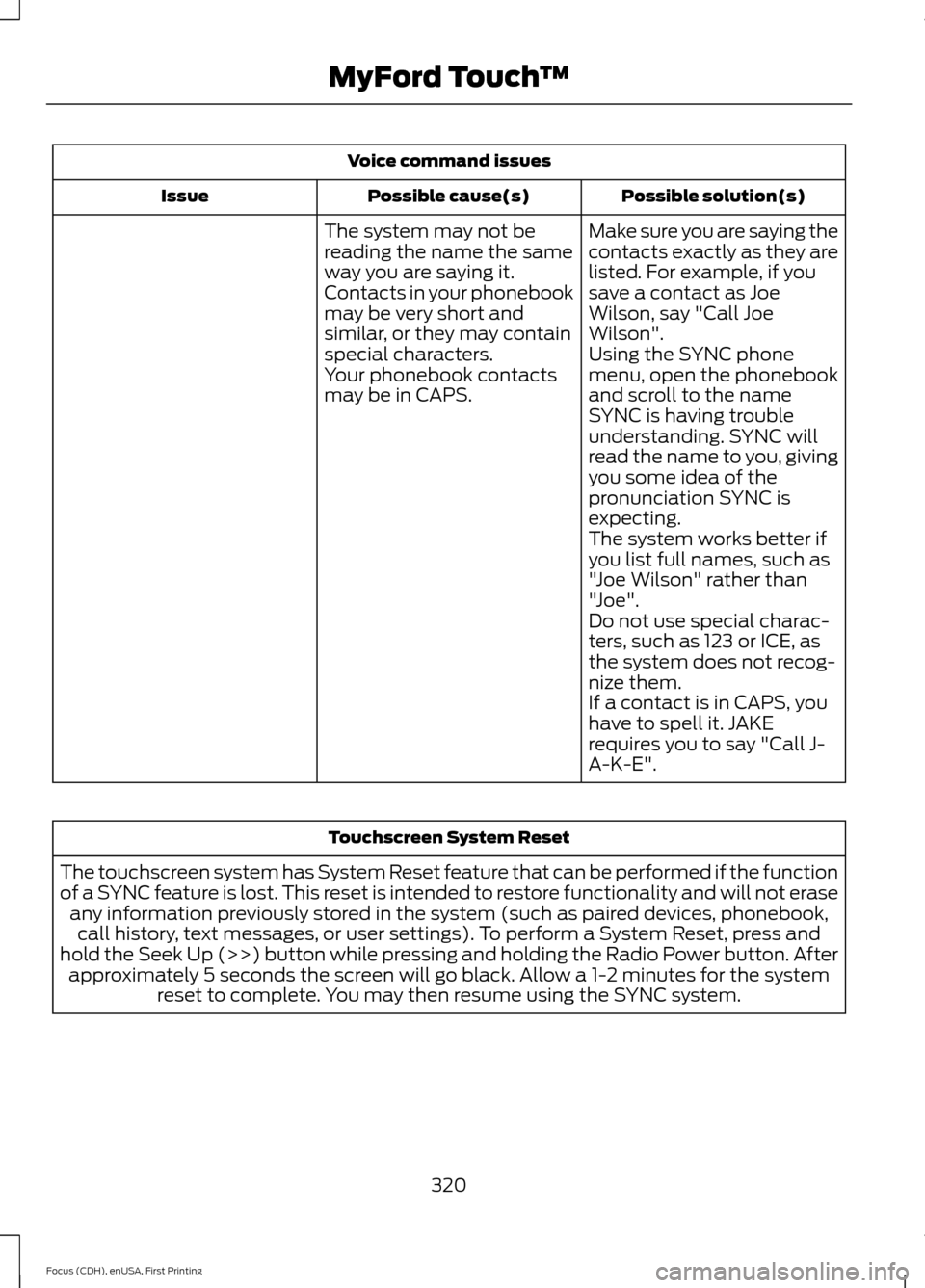
Voice command issues
Possible solution(s)
Possible cause(s)
Issue
Make sure you are saying the
contacts exactly as they are
listed. For example, if you
save a contact as Joe
Wilson, say "Call Joe
Wilson".
The system may not be
reading the name the same
way you are saying it.
Contacts in your phonebook
may be very short and
similar, or they may contain
special characters.
Using the SYNC phone
menu, open the phonebook
and scroll to the name
SYNC is having trouble
understanding. SYNC will
read the name to you, giving
you some idea of the
pronunciation SYNC is
expecting.
Your phonebook contacts
may be in CAPS.
The system works better if
you list full names, such as
"Joe Wilson" rather than
"Joe".
Do not use special charac-
ters, such as 123 or ICE, as
the system does not recog-
nize them.
If a contact is in CAPS, you
have to spell it. JAKE
requires you to say "Call J-
A-K-E". Touchscreen System Reset
The touchscreen system has System Reset feature that can be performed if the function
of a SYNC feature is lost. This reset is intended to restore functionality and will not erase any information previously stored in the system (such as paired devices, phonebook,call history, text messages, or user settings). To perform a System Reset, press and
hold the Seek Up (>>) button while pressing and holding the Radio Power button. After approximately 5 seconds the screen will go black. Allow a 1-2 minutes for the system reset to complete. You may then resume using the SYNC system.
320
Focus (CDH), enUSA, First Printing MyFord Touch
™