table FORD FUSION 2018 Owner's Manual
[x] Cancel search | Manufacturer: FORD, Model Year: 2018, Model line: FUSION, Model: FORD FUSION 2018Pages: 539, PDF Size: 6.42 MB
Page 103 of 539

Settings
Always On or User Selectable
Traction
Control
Choose desired speed or Off
Max
Speed
Choose desired speed or Off
Speed
Minder
Volume Limiter - check enabled or uncheck disabled
Hold OK to Clear All MyKeys
Clear
MyKeys
Miles & Gallons, L/100km or km/L
Distance
Display
Setup
Fahrenheit (°F) or Celsius (°C)
Temper-
ature
psi, kPa or bar
Tire Pres-
sure
Choose your applicable setting
Language
1 Type 2
Information Display Controls
(Type 3) •
Press the up or down arrow buttons to
scroll through the list.
• Press the right arrow button to enter a
sub-menu. •
Press the left arrow button to exit a
menu.
• Press and hold the left arrow button at
any time to return to the main menu
display (escape button).
• Press the
OK button to choose and
confirm settings or messages.
Main menu
From the main menu bar on the left side
of the information display, you can choose
from the following categories:
• Display Mode
• Trip 1 & 2
• Fuel Economy
• Driver Assist
• Settings
100
Fusion (CC7) Canada/United States of America, enUSA, Edition date: 201705, Second Printing Information DisplaysE144638
Page 107 of 539

Settings
Switch Inhibit - check enabled or uncheck disabled
Autofold - check enabled or uncheck disabled
Mirrors
XXX% - Hold OK to Reset
Oil Life
Rest
Auto or Last setting
Climate Control
Remote
Start
Auto or Off
Seats or Seats and
Wheel
5, 10 or 15 minutes
Duration
System - check enabled or uncheck disabled
Seatbelts Remote Open or Remote Close
Windows
Courtesy Wipe or Rain Sensing
Wipers
Hold
OK to Create MyKey
Create
MyKey
MyKey
Always On or User Selectable
911
Assist
On or Off
Do Not
Disturb
Always On or User Selectable
Traction
Control
Choose desired speed or Off
Max
Speed
Choose desired speed or Off
Speed
Minder
Volume Limiter - check enabled or uncheck disabled
Hold
OK to Clear All MyKeys
Clear
MyKeys
Miles & Gallons, l/100km or km/l
Distance
Display
Setup
Fuel Gauge or Fuel + Tach
Gauge
Display
104
Fusion (CC7) Canada/United States of America, enUSA, Edition date: 201705, Second Printing Information Displays
Page 111 of 539
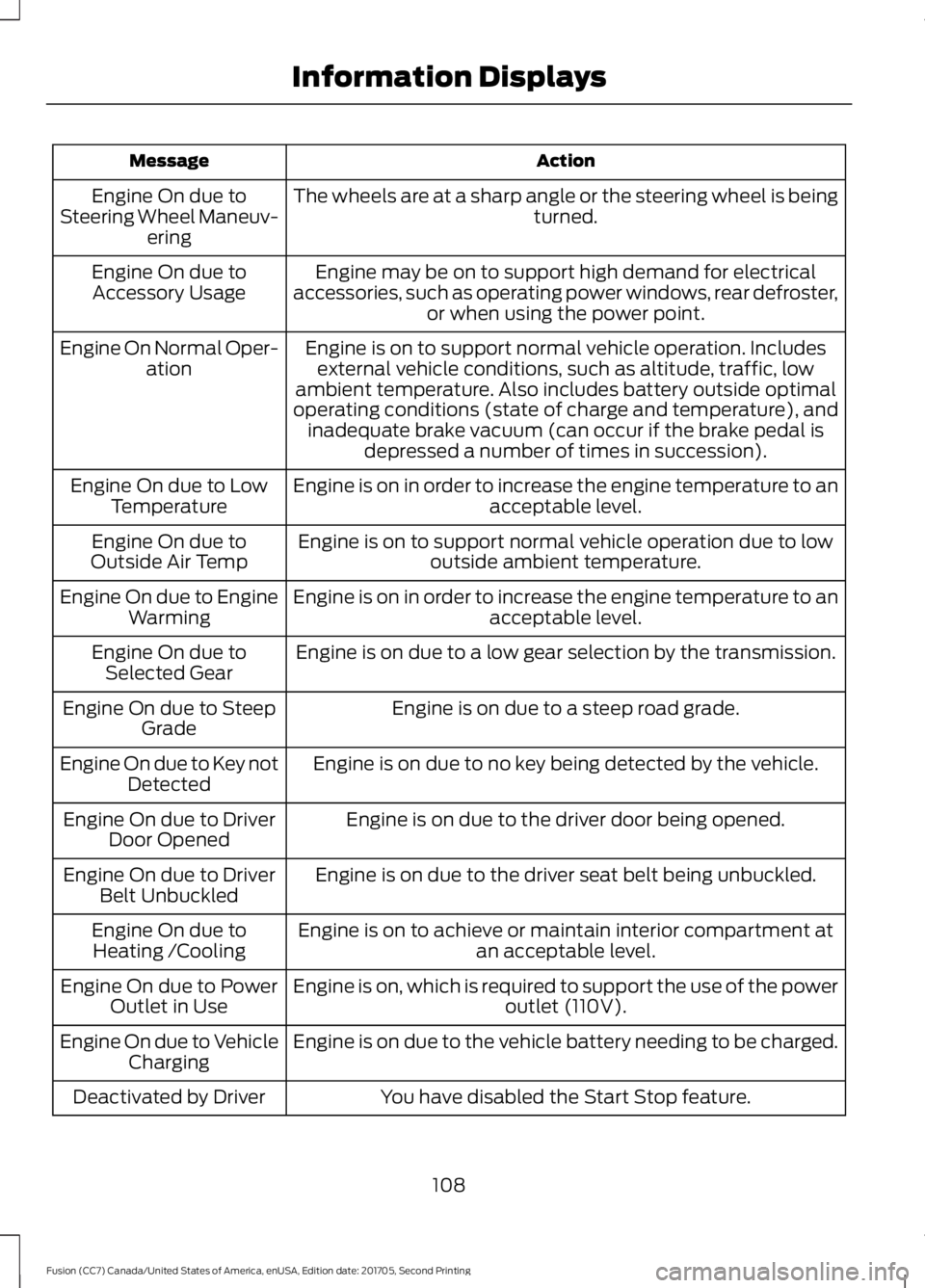
Action
Message
The wheels are at a sharp angle or the steering wheel is being turned.
Engine On due to
Steering Wheel Maneuv- ering
Engine may be on to support high demand for electrical
accessories, such as operating power windows, rear defroster, or when using the power point.
Engine On due to
Accessory Usage
Engine is on to support normal vehicle operation. Includesexternal vehicle conditions, such as altitude, traffic, low
ambient temperature. Also includes battery outside optimal
operating conditions (state of charge and temperature), and inadequate brake vacuum (can occur if the brake pedal is depressed a number of times in succession).
Engine On Normal Oper-
ation
Engine is on in order to increase the engine temperature to an acceptable level.
Engine On due to Low
Temperature
Engine is on to support normal vehicle operation due to lowoutside ambient temperature.
Engine On due to
Outside Air Temp
Engine is on in order to increase the engine temperature to anacceptable level.
Engine On due to Engine
Warming
Engine is on due to a low gear selection by the transmission.
Engine On due to
Selected Gear
Engine is on due to a steep road grade.
Engine On due to Steep
Grade
Engine is on due to no key being detected by the vehicle.
Engine On due to Key not
Detected
Engine is on due to the driver door being opened.
Engine On due to Driver
Door Opened
Engine is on due to the driver seat belt being unbuckled.
Engine On due to Driver
Belt Unbuckled
Engine is on to achieve or maintain interior compartment atan acceptable level.
Engine On due to
Heating /Cooling
Engine is on, which is required to support the use of the power outlet (110V).
Engine On due to Power
Outlet in Use
Engine is on due to the vehicle battery needing to be charged.
Engine On due to Vehicle
Charging
You have disabled the Start Stop feature.
Deactivated by Driver
108
Fusion (CC7) Canada/United States of America, enUSA, Edition date: 201705, Second Printing Information Displays
Page 129 of 539
HINTS ON CONTROLLING THE
INTERIOR CLIMATE
General Hints
Note:
Prolonged use of recirculated air may
cause the windows to fog up.
Note: You may feel a small amount of air
from the footwell air vents regardless of the
air distribution setting.
Note: To reduce humidity build-up inside
your vehicle, do not drive with the system
switched off or with recirculated air always
switched on.
Note: Do not place objects under the front
seats as this may interfere with the airflow
to the rear seats.
Note: Remove any snow, ice or leaves from
the air intake area at the base of the
windshield.
Note: To improve the time to reach a
comfortable temperature in hot weather,
drive with the windows open until you feel
cold air through the air vents. Manual Climate Control
Note:
To reduce fogging of the windshield
during humid weather, adjust the air
distribution control to the windshield air
vents position.
Automatic Climate Control
Note: Adjusting the settings when your
vehicle interior is extremely hot or cold is
not necessary. The system automatically
adjusts to heat or cool the interior to your
selected temperature as quickly as possible.
For the system to function efficiently, the
instrument panel and side air vents should
be fully open.
Note: If you select AUTO during cold
temperatures, the system directs airflow to
the windshield and side window vents. In
addition, the fan may run at a slower speed
until the engine warms up.
Note: If you select
AUTO during hot
temperatures and the inside of the vehicle
is hot, the system automatically uses
recirculated air to maximize interior cooling.
Fan speed may also reduce until the air
cools.
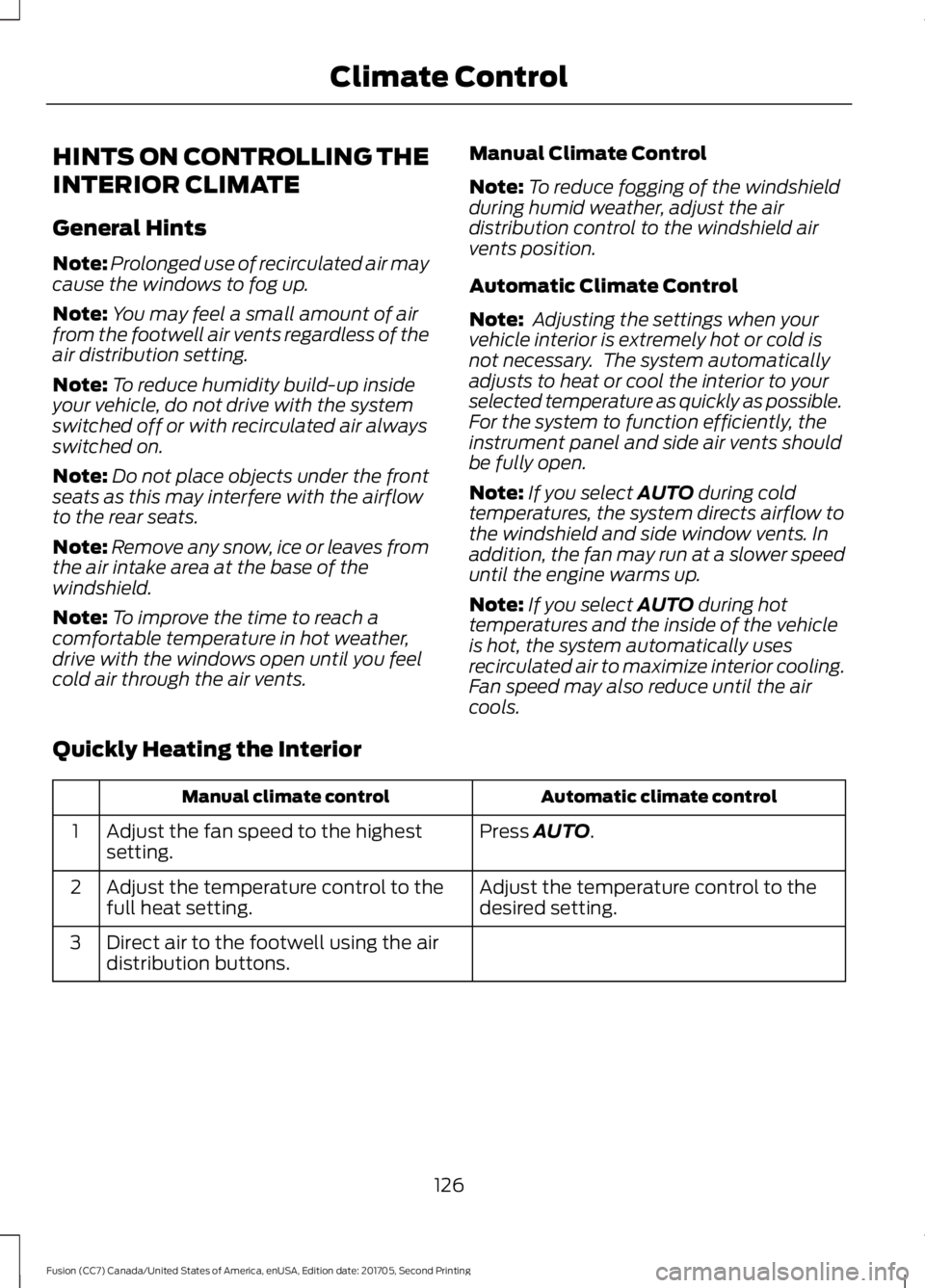
Quickly Heating the Interior Automatic climate control
Manual climate control
Press
AUTO.
Adjust the fan speed to the highest
setting.
1
Adjust the temperature control to the
desired setting.
Adjust the temperature control to the
full heat setting.
2
Direct air to the footwell using the air
distribution buttons.
3
126
Fusion (CC7) Canada/United States of America, enUSA, Edition date: 201705, Second Printing Climate Control
Page 133 of 539

SITTING IN THE CORRECT
POSITION
WARNINGS
Sitting improperly, out of position or
with the seatback reclined too far
can take weight off the seat cushion
and affect the decision of the passenger
sensing system, resulting in serious injury
or death in the event of a crash. Always sit
upright against your seat back, with your
feet on the floor. Do not recline the seatback as this
can cause the occupant to slide
under the safety belt, resulting in
serious injury in the event of a crash. Do not place objects higher than the
seatback to reduce the risk of serious
injury in the event of a crash or during
heavy braking. When you use them properly, the seat,
head restraint, safety belt and airbags will
provide optimum protection in the event
of a crash. We recommend that you follow these
guidelines:
•
Sit in an upright position with the base
of your spine as far back as possible.
• Do not recline the seatback more than
30 degrees.
• Adjust the head restraint so that the
top of it is level with the top of your
head and as far forward as possible.
Make sure that you remain
comfortable.
• Keep sufficient distance between
yourself and the steering wheel. We
recommend a minimum of 10 in
(25 cm) between your breastbone and
the airbag cover.
• Hold the steering wheel with your arms
slightly bent.
• Bend your legs slightly so that you can
press the pedals fully.
• Position the shoulder strap of the
safety belt over the center of your
shoulder and position the lap strap
tightly across your hips.
Make sure that your driving position is
comfortable and that you can maintain full
control of your vehicle.
HEAD RESTRAINTS WARNINGS
Fully adjust the head restraint before
you sit in or operate your vehicle. This
will help minimize the risk of neck
injury in the event of a crash. Do not adjust
the head restraint when your vehicle is
moving. The head restraint is a safety device.
Whenever possible it should be
installed and properly adjusted when
the seat is occupied. Failure to adjust the
head restraint properly could reduce its
effectiveness during certain impacts. 130
Fusion (CC7) Canada/United States of America, enUSA, Edition date: 201705, Second Printing SeatsE68595
Page 134 of 539

Note:
Adjust the seat backrest to an upright
driving position before adjusting the head
restraint. Adjust the head restraint so that
the top of it is level with the top of your head
and as far forward as possible. Make sure
that you remain comfortable. If you are
extremely tall, adjust the head restraint to
its highest position.
Front Seat and Rear Seat Outboard
Head Restraints Rear Center Head Restraint
The head restraints consist of:
An energy absorbing head
restraint.
A
Two steel stems.
B Guide sleeve adjust and unlock
button.
C
Guide sleeve unlock and remove
button (If Equipped).
D
Adjusting the Head Restraint
Raising the Head Restraint
Pull the head restraint up.
Lowering the Head Restraint
1. Press and hold button C.
2. Push the head restraint down.
Removing the Head Restraint (If
Equipped)
1. Pull the head restraint up until it reaches its highest position.
2. Press and hold buttons C and D.
3. Pull the head restraint up.
Installing the Head Restraint
Align the steel stems into the guide sleeves
and push the head restraint down until it
locks.
Tilting Head Restraints (If Equipped) 131
Fusion (CC7) Canada/United States of America, enUSA, Edition date: 201705, Second Printing SeatsE138642 E138645 E144727
Page 148 of 539
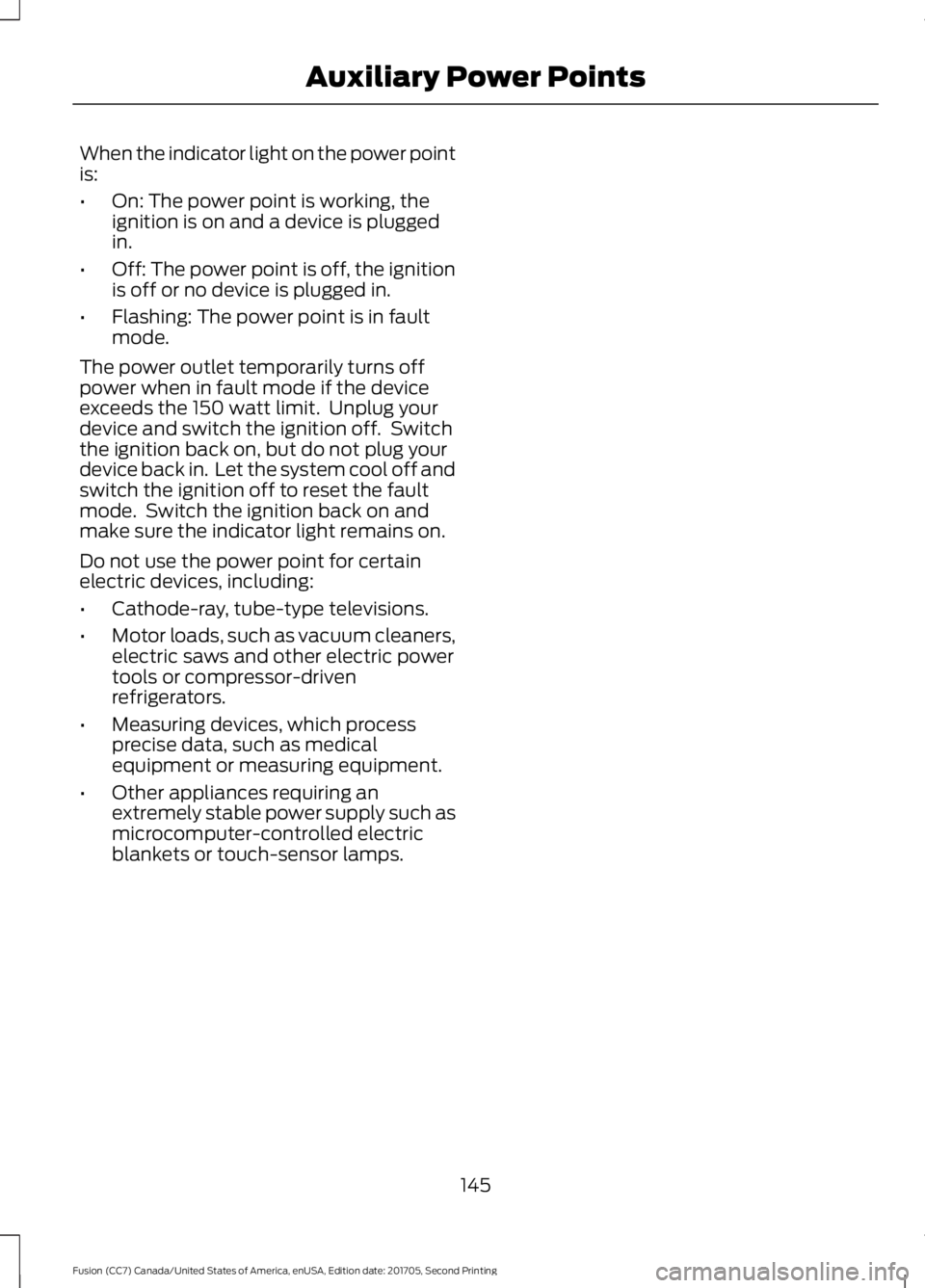
When the indicator light on the power point
is:
•
On: The power point is working, the
ignition is on and a device is plugged
in.
• Off: The power point is off, the ignition
is off or no device is plugged in.
• Flashing: The power point is in fault
mode.
The power outlet temporarily turns off
power when in fault mode if the device
exceeds the 150 watt limit. Unplug your
device and switch the ignition off. Switch
the ignition back on, but do not plug your
device back in. Let the system cool off and
switch the ignition off to reset the fault
mode. Switch the ignition back on and
make sure the indicator light remains on.
Do not use the power point for certain
electric devices, including:
• Cathode-ray, tube-type televisions.
• Motor loads, such as vacuum cleaners,
electric saws and other electric power
tools or compressor-driven
refrigerators.
• Measuring devices, which process
precise data, such as medical
equipment or measuring equipment.
• Other appliances requiring an
extremely stable power supply such as
microcomputer-controlled electric
blankets or touch-sensor lamps.
145
Fusion (CC7) Canada/United States of America, enUSA, Edition date: 201705, Second Printing Auxiliary Power Points
Page 153 of 539
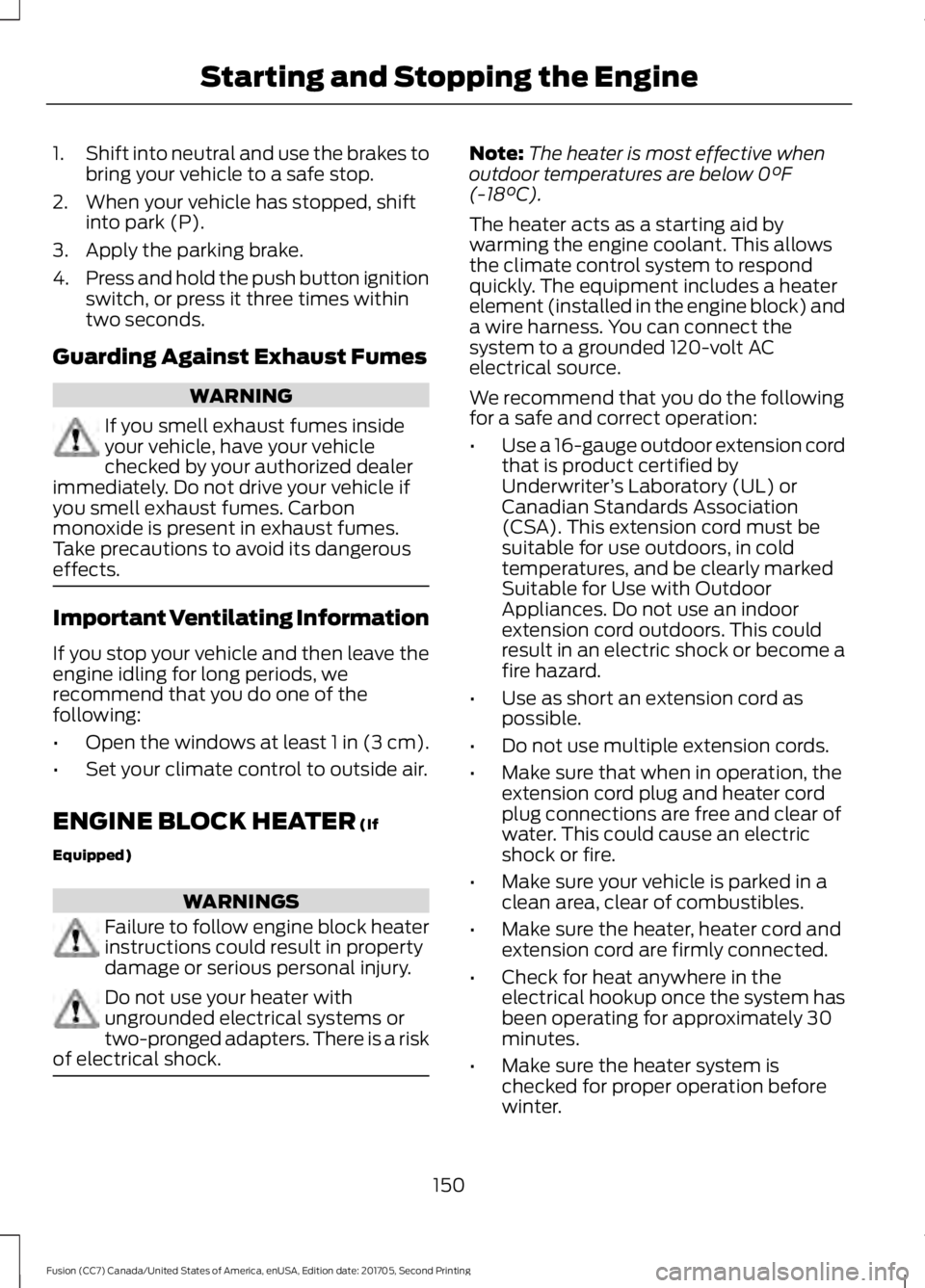
1.
Shift into neutral and use the brakes to
bring your vehicle to a safe stop.
2. When your vehicle has stopped, shift into park (P).
3. Apply the parking brake.
4. Press and hold the push button ignition
switch, or press it three times within
two seconds.
Guarding Against Exhaust Fumes WARNING
If you smell exhaust fumes inside
your vehicle, have your vehicle
checked by your authorized dealer
immediately. Do not drive your vehicle if
you smell exhaust fumes. Carbon
monoxide is present in exhaust fumes.
Take precautions to avoid its dangerous
effects. Important Ventilating Information
If you stop your vehicle and then leave the
engine idling for long periods, we
recommend that you do one of the
following:
•
Open the windows at least 1 in (3 cm).
• Set your climate control to outside air.
ENGINE BLOCK HEATER (If
Equipped) WARNINGS
Failure to follow engine block heater
instructions could result in property
damage or serious personal injury.
Do not use your heater with
ungrounded electrical systems or
two-pronged adapters. There is a risk
of electrical shock. Note:
The heater is most effective when
outdoor temperatures are below 0°F
(-18°C).
The heater acts as a starting aid by
warming the engine coolant. This allows
the climate control system to respond
quickly. The equipment includes a heater
element (installed in the engine block) and
a wire harness. You can connect the
system to a grounded 120-volt AC
electrical source.
We recommend that you do the following
for a safe and correct operation:
• Use a 16-gauge outdoor extension cord
that is product certified by
Underwriter ’s Laboratory (UL) or
Canadian Standards Association
(CSA). This extension cord must be
suitable for use outdoors, in cold
temperatures, and be clearly marked
Suitable for Use with Outdoor
Appliances. Do not use an indoor
extension cord outdoors. This could
result in an electric shock or become a
fire hazard.
• Use as short an extension cord as
possible.
• Do not use multiple extension cords.
• Make sure that when in operation, the
extension cord plug and heater cord
plug connections are free and clear of
water. This could cause an electric
shock or fire.
• Make sure your vehicle is parked in a
clean area, clear of combustibles.
• Make sure the heater, heater cord and
extension cord are firmly connected.
• Check for heat anywhere in the
electrical hookup once the system has
been operating for approximately 30
minutes.
• Make sure the heater system is
checked for proper operation before
winter.
150
Fusion (CC7) Canada/United States of America, enUSA, Edition date: 201705, Second Printing Starting and Stopping the Engine
Page 155 of 539
AUTO-START-STOP (If Equipped)
The system helps reduce fuel consumption
by automatically shutting off and restarting
the engine while your vehicle is stopped.
The engine will restart automatically when
you release the brake pedal. In some
situations, your vehicle may restart
automatically, for example:
• To maintain interior comfort
• To recharge the battery
Note: Power assist steering is turned off
when the engine is off. WARNINGS
Always fully apply the parking brake.
Make sure you shift into park (P) for
vehicles with an automatic
transmission. Switch the ignition off and
remove the key whenever you leave your
vehicle. Before opening the hood or
performing any maintenance, fully
apply the parking brake, shift into
park (P) or neutral (N) and switch the
ignition off. Always switch the ignition off before
leaving the vehicle. If the ignition is
switched on an automatic restart
may occur at any time. The system may require the engine
to automatically restart when the
auto-start-stop indicator illuminates
green or flashes amber. Failure to follow
this instruction could result in personal
injury. The Auto-Start-Stop system status is
available at a glance within the information
display. See Information Displays (page
96
). Enabling Auto-Start-Stop
The system is automatically enabled every
time you start your vehicle if the following
conditions are met:
•
The Auto-Start-Stop button is not
pressed (not illuminated).
• Your vehicle exceeds an initial speed
of
3 mph (5 km/h) after you have
initially started the vehicle.
• Your vehicle is stopped.
• Your foot is on the brake pedal.
• The transmission is in drive (D).
• The driver's door is closed.
• There is adequate brake vacuum.
• The interior compartment has been
cooled or warmed to an acceptable
level.
• The front windshield defroster is off.
• The steering wheel is not turned rapidly
or is not at a sharp angle.
• The vehicle is not on a steep road
grade.
• The battery is within optimal operating
conditions (battery state of charge and
temperature in range).
• The engine coolant is at operating
temperature.
• Elevation is below approximately
10,000 ft (3,050 m)
.
• Ambient temperature is moderate. The green Auto-Start-Stop
indicator light on the instrument
cluster will illuminate to indicate
when the automatic engine stop occurs. If the instrument cluster is
equipped with a grey
Auto-Start-Stop indicator light,
it is illuminated when automatic engine
stop is not available due to one of the
above noted conditions not being met.
152
Fusion (CC7) Canada/United States of America, enUSA, Edition date: 201705, Second Printing Unique Driving Characteristics E146361
Page 159 of 539

RUNNING OUT OF FUEL
Running out of fuel can cause damage not
covered by the vehicle Warranty.
If your vehicle runs out of fuel:
•
Add a minimum of 1.3 gal (5 L) of fuel
to restart the engine.
• You may need to switch the ignition
from off to on several times after
refueling to allow the fuel system to
pump the fuel from the tank to the
engine. When restarting, cranking time
takes a few seconds longer than
normal.
Note: If your vehicle is on a steep slope,
more fuel may be required.
Filling a Portable Fuel Container WARNING
Flow of fuel through a fuel pump
nozzle can produce static electricity.
This can cause a fire if you are filling
an ungrounded fuel container. Use the following guidelines to avoid
electrostatic charge build-up, which can
produce a spark, when filling an
ungrounded fuel container:
•
Only use an approved fuel container to
transfer fuel to your vehicle. Place the
container on the ground when filling it.
• Do not fill a fuel container when it is
inside your vehicle (including the cargo
area).
• Keep the fuel pump nozzle in contact
with the fuel container when filling it.
• Do not use a device that holds the fuel
pump nozzle lever in the fill position. Adding Fuel From a Portable Fuel
Container WARNINGS
Do not insert the nozzle of a fuel
container or an aftermarket funnel
into the fuel filler neck. This may
damage the fuel system filler neck or its
seal and cause fuel to run onto the ground. Do not try to pry open or push open
the capless fuel system with foreign
objects. This could damage the fuel
system and its seal and cause injury to you
or others. Do not dispose of fuel in the
household refuse or the public
sewage system. Use an authorized
waste disposal facility. When refueling the vehicle fuel tank from
a fuel container, use the fuel filler funnel
included with your vehicle. See Fuel Filler
Funnel Location
(page 155).
Note: Do not use aftermarket funnels as
they may not work with the capless fuel
system and can damage it.
When refueling the vehicle fuel tank from
a fuel container, do the following:
1. Fully open the fuel filler door.
2. Fully insert the fuel filler funnel into the
fuel filler inlet.
156
Fusion (CC7) Canada/United States of America, enUSA, Edition date: 201705, Second Printing Fuel and Refueling