clutch FORD FUSION (AMERICAS) 2015 2.G Owners Manual
[x] Cancel search | Manufacturer: FORD, Model Year: 2015, Model line: FUSION (AMERICAS), Model: FORD FUSION (AMERICAS) 2015 2.GPages: 488, PDF Size: 5.66 MB
Page 7 of 488
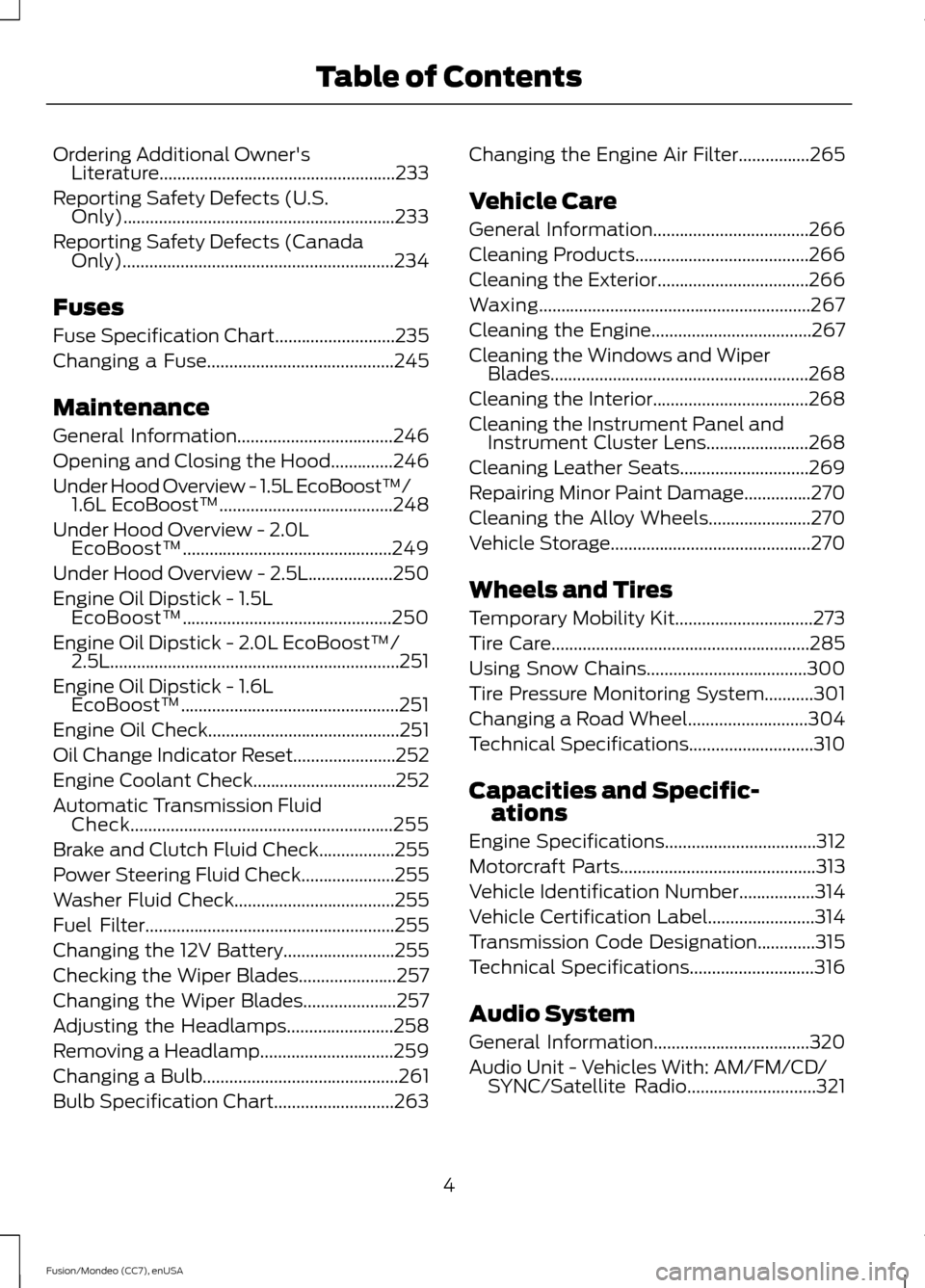
Ordering Additional Owner's
Literature.....................................................233
Reporting Safety Defects (U.S. Only).............................................................233
Reporting Safety Defects (Canada Only).............................................................234
Fuses
Fuse Specification Chart...........................235
Changing a Fuse..........................................245
Maintenance
General Information
...................................246
Opening and Closing the Hood
..............246
Under Hood Overview - 1.5L EcoBoost™/ 1.6L EcoBoost™.......................................248
Under Hood Overview -
2.0L
EcoBoost™...............................................249
Under Hood Overview - 2.5L...................250
Engine Oil Dipstick -
1.5L
EcoBoost™...............................................250
Engine Oil Dipstick -
2.0L EcoBoost™/
2.5L.................................................................251
Engine Oil Dipstick -
1.6L
EcoBoost™.................................................251
Engine Oil Check
...........................................251
Oil Change Indicator Reset
.......................252
Engine Coolant Check................................252
Automatic Transmission Fluid Check...........................................................255
Brake and Clutch Fluid Check.................255
Power Steering Fluid Check.....................255
Washer Fluid Check
....................................255
Fuel Filter........................................................255
Changing the 12V Battery.........................255
Checking the Wiper Blades......................257
Changing the Wiper Blades.....................257
Adjusting the Headlamps........................258
Removing a Headlamp..............................259
Changing a Bulb............................................261
Bulb Specification Chart...........................263 Changing the Engine Air Filter
................265
Vehicle Care
General Information...................................266
Cleaning Products.......................................266
Cleaning the Exterior..................................266
Waxing
.............................................................267
Cleaning the Engine....................................267
Cleaning the Windows and Wiper Blades..........................................................268
Cleaning the Interior...................................268
Cleaning the Instrument Panel and Instrument Cluster Lens.......................268
Cleaning Leather Seats
.............................269
Repairing Minor Paint Damage
...............270
Cleaning the Alloy Wheels.......................270
Vehicle Storage.............................................270
Wheels and Tires
Temporary Mobility Kit...............................273
Tire Care
..........................................................285
Using Snow Chains....................................300
Tire Pressure Monitoring System
...........301
Changing a Road Wheel...........................304
Technical Specifications
............................310
Capacities and Specific- ations
Engine Specifications..................................312
Motorcraft Parts
............................................313
Vehicle Identification Number.................314
Vehicle Certification Label........................314
Transmission Code Designation.............315
Technical Specifications............................316
Audio System
General Information...................................320
Audio Unit - Vehicles With: AM/FM/CD/ SYNC/
Satellite Radio.............................321
4
Fusion/Mondeo (CC7), enUSA Table of Contents
Page 108 of 488
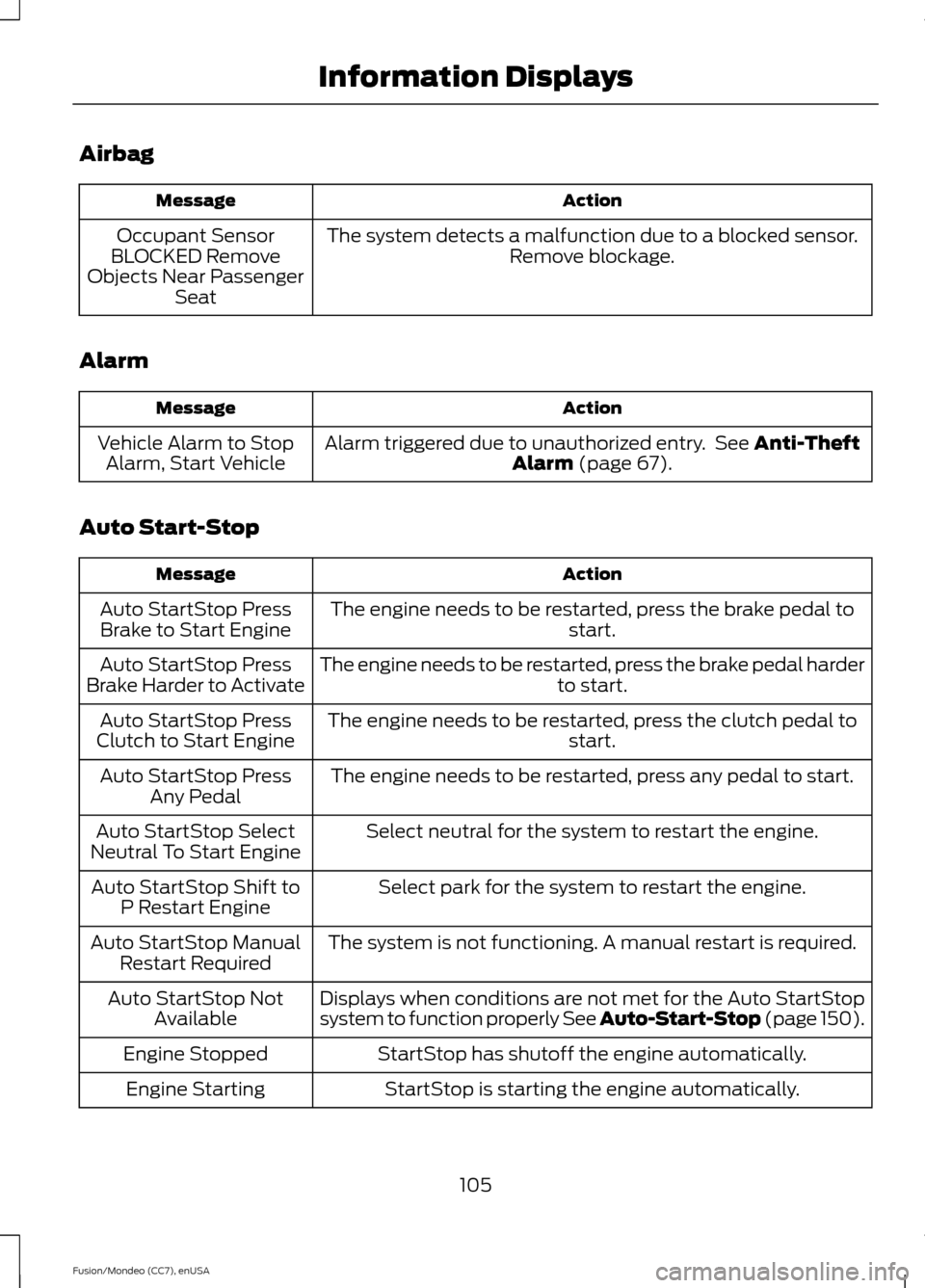
Airbag
Action
Message
The system detects a malfunction due to a blocked sensor. Remove blockage.
Occupant Sensor
BLOCKED Remove
Objects Near Passenger Seat
Alarm Action
Message
Alarm triggered due to unauthorized entry. See Anti-Theft
Alarm (page 67).
Vehicle Alarm to Stop
Alarm, Start Vehicle
Auto Start-Stop Action
Message
The engine needs to be restarted, press the brake pedal to start.
Auto StartStop Press
Brake to Start Engine
The engine needs to be restarted, press the brake pedal harder to start.
Auto StartStop Press
Brake Harder to Activate
The engine needs to be restarted, press the clutch pedal to start.
Auto StartStop Press
Clutch to Start Engine
The engine needs to be restarted, press any pedal to start.
Auto StartStop Press
Any Pedal
Select neutral for the system to restart the engine.
Auto StartStop Select
Neutral To Start Engine
Select park for the system to restart the engine.
Auto StartStop Shift to
P Restart Engine
The system is not functioning. A manual restart is required.
Auto StartStop Manual
Restart Required
Displays when conditions are not met for the Auto StartStop
system to function properly See Auto-Start-Stop (page 150).
Auto StartStop Not
Available
StartStop has shutoff the engine automatically.
Engine Stopped
StartStop is starting the engine automatically.
Engine Starting
105
Fusion/Mondeo (CC7), enUSA Information Displays
Page 110 of 488
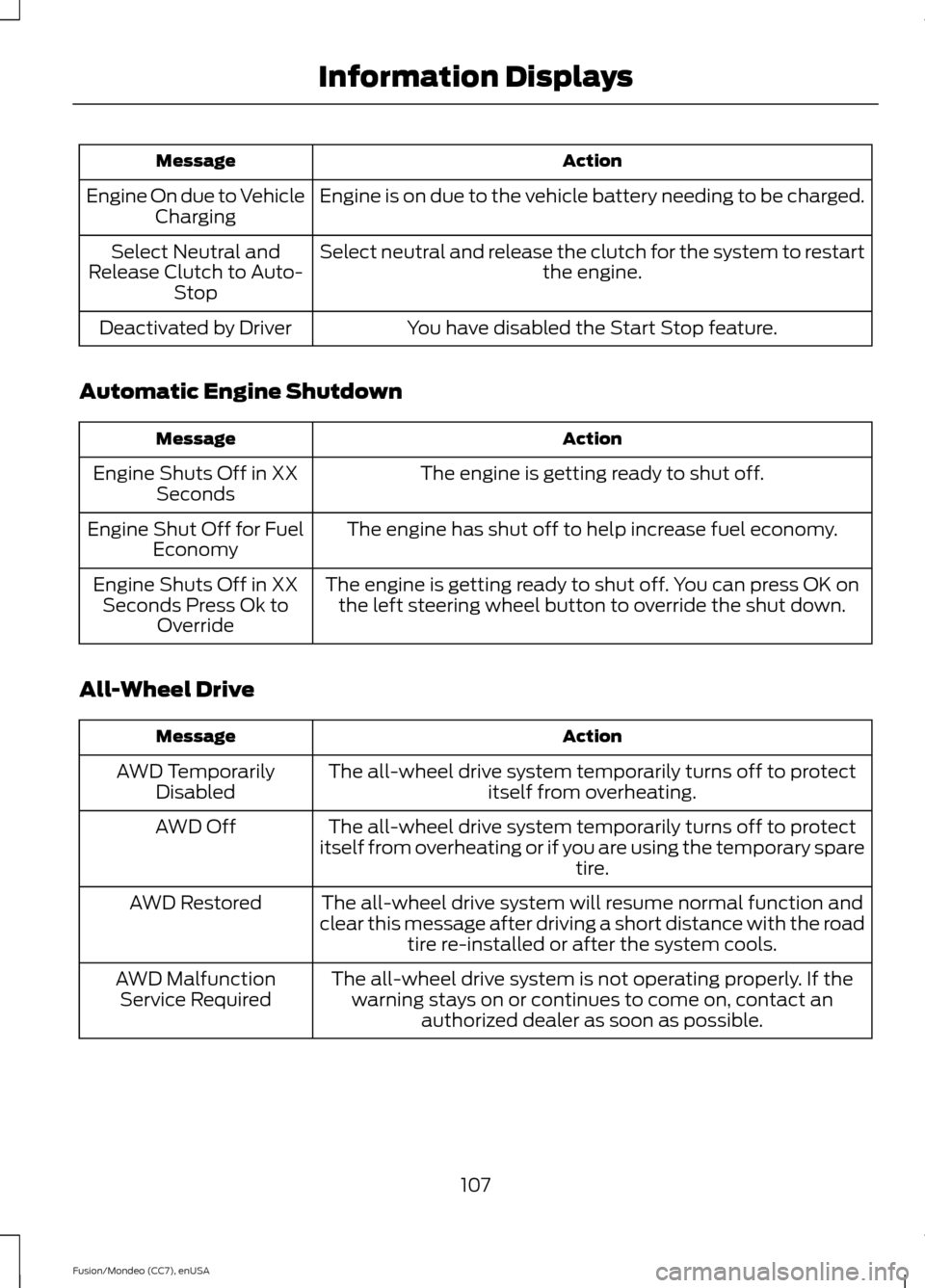
Action
Message
Engine is on due to the vehicle battery needing to be charged.
Engine On due to Vehicle
Charging
Select neutral and release the clutch for the system to restart the engine.
Select Neutral and
Release Clutch to Auto- Stop
You have disabled the Start Stop feature.
Deactivated by Driver
Automatic Engine Shutdown Action
Message
The engine is getting ready to shut off.
Engine Shuts Off in XX
Seconds
The engine has shut off to help increase fuel economy.
Engine Shut Off for Fuel
Economy
The engine is getting ready to shut off. You can press OK onthe left steering wheel button to override the shut down.
Engine Shuts Off in XX
Seconds Press Ok to Override
All-Wheel Drive Action
Message
The all-wheel drive system temporarily turns off to protectitself from overheating.
AWD Temporarily
Disabled
The all-wheel drive system temporarily turns off to protect
itself from overheating or if you are using the temporary spare tire.
AWD Off
The all-wheel drive system will resume normal function and
clear this message after driving a short distance with the road tire re-installed or after the system cools.
AWD Restored
The all-wheel drive system is not operating properly. If thewarning stays on or continues to come on, contact an authorized dealer as soon as possible.
AWD Malfunction
Service Required
107
Fusion/Mondeo (CC7), enUSA Information Displays
Page 113 of 488
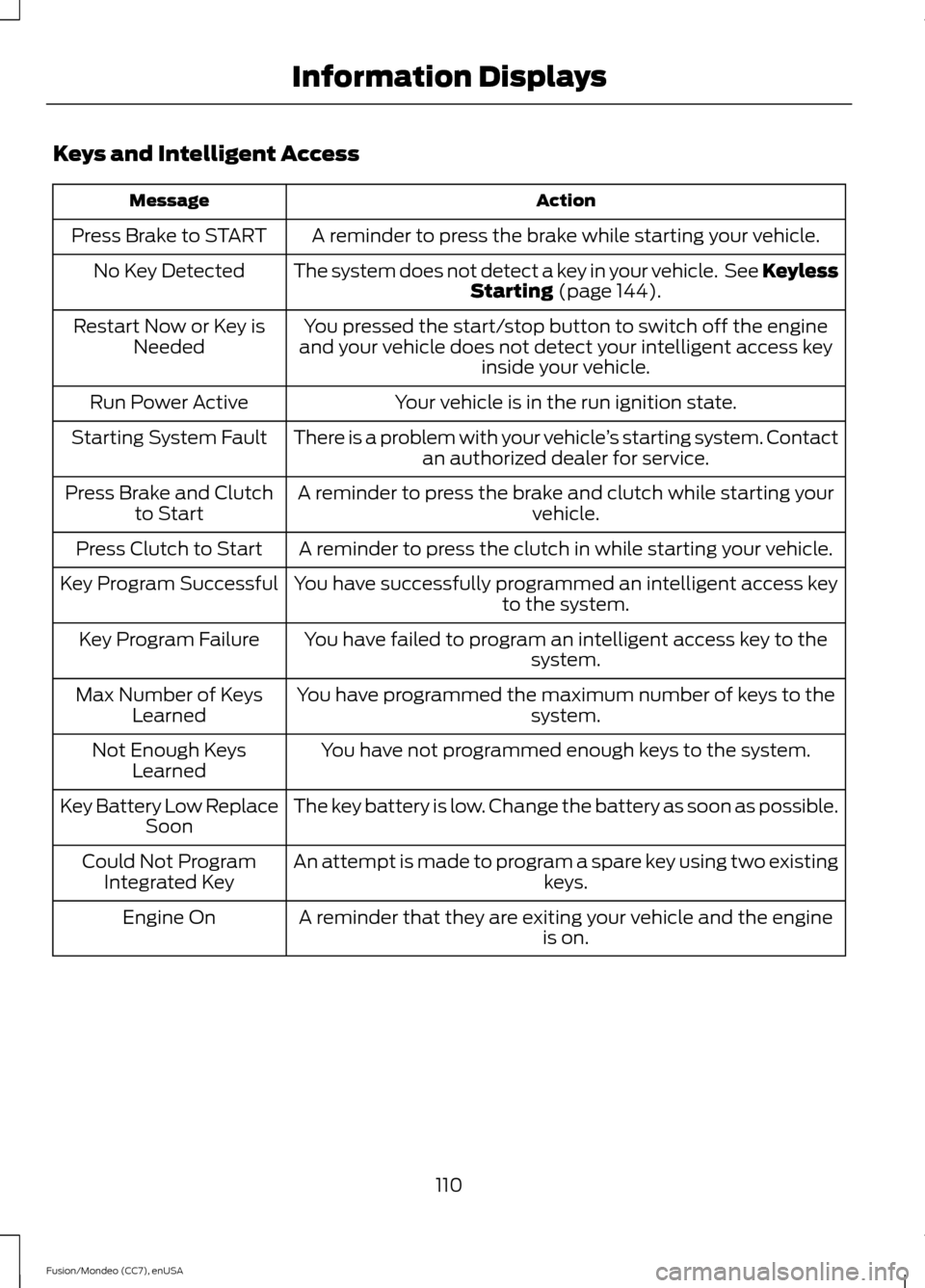
Keys and Intelligent Access
Action
Message
A reminder to press the brake while starting your vehicle.
Press Brake to START
The system does not detect a key in your vehicle. See KeylessStarting (page 144).
No Key Detected
You pressed the start/stop button to switch off the engine
and your vehicle does not detect your intelligent access key inside your vehicle.
Restart Now or Key is
Needed
Your vehicle is in the run ignition state.
Run Power Active
There is a problem with your vehicle ’s starting system. Contact
an authorized dealer for service.
Starting System Fault
A reminder to press the brake and clutch while starting your vehicle.
Press Brake and Clutch
to Start
A reminder to press the clutch in while starting your vehicle.
Press Clutch to Start
You have successfully programmed an intelligent access keyto the system.
Key Program Successful
You have failed to program an intelligent access key to thesystem.
Key Program Failure
You have programmed the maximum number of keys to the system.
Max Number of Keys
Learned
You have not programmed enough keys to the system.
Not Enough Keys
Learned
The key battery is low. Change the battery as soon as possible.
Key Battery Low Replace
Soon
An attempt is made to program a spare key using two existing keys.
Could Not Program
Integrated Key
A reminder that they are exiting your vehicle and the engine is on.
Engine On
110
Fusion/Mondeo (CC7), enUSA Information Displays
Page 114 of 488
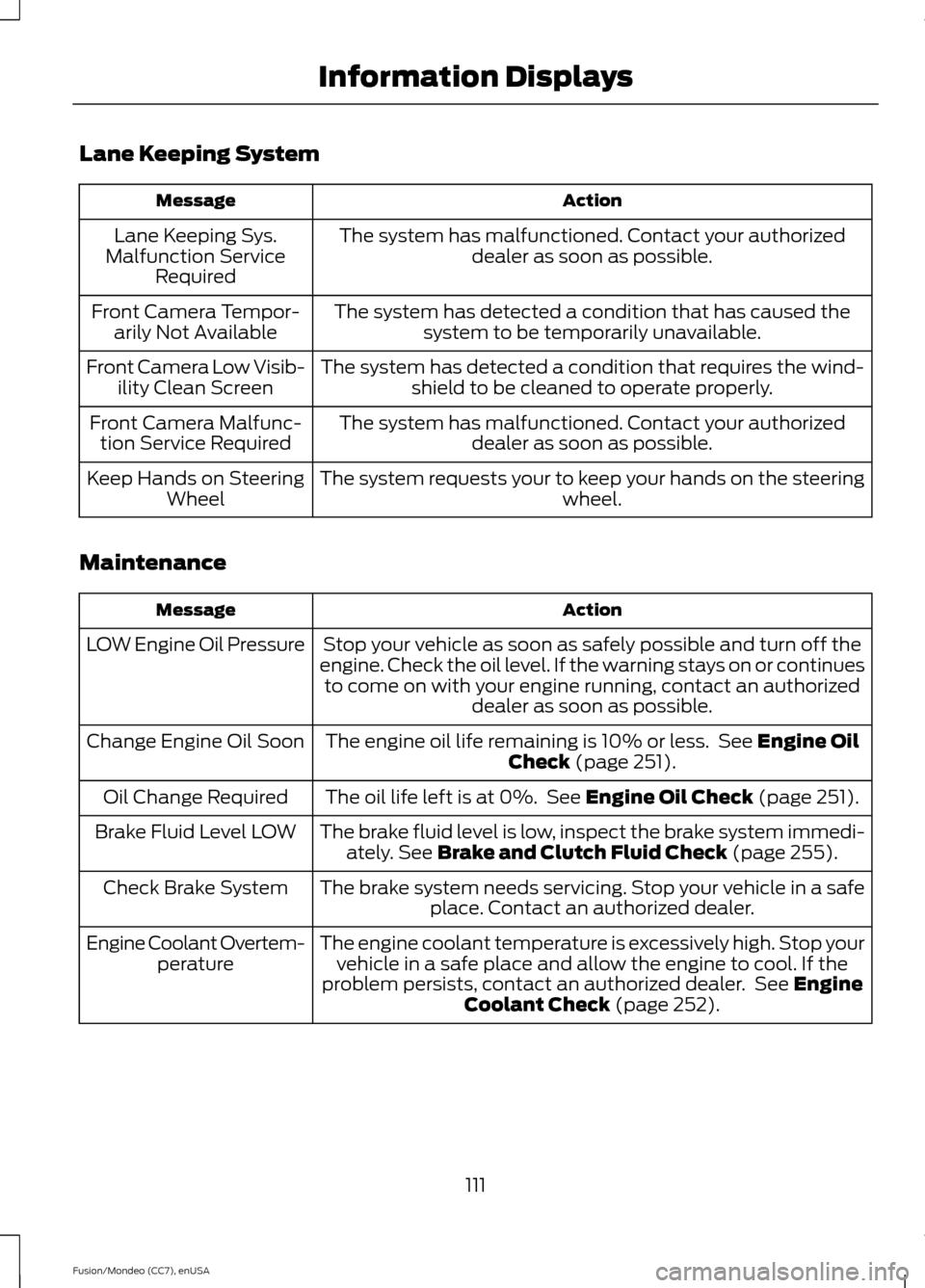
Lane Keeping System
Action
Message
The system has malfunctioned. Contact your authorizeddealer as soon as possible.
Lane Keeping Sys.
Malfunction Service Required
The system has detected a condition that has caused thesystem to be temporarily unavailable.
Front Camera Tempor-
arily Not Available
The system has detected a condition that requires the wind-shield to be cleaned to operate properly.
Front Camera Low Visib-
ility Clean Screen
The system has malfunctioned. Contact your authorizeddealer as soon as possible.
Front Camera Malfunc-
tion Service Required
The system requests your to keep your hands on the steering wheel.
Keep Hands on Steering
Wheel
Maintenance Action
Message
Stop your vehicle as soon as safely possible and turn off the
engine. Check the oil level. If the warning stays on or continues to come on with your engine running, contact an authorized dealer as soon as possible.
LOW Engine Oil Pressure
The engine oil life remaining is 10% or less. See Engine Oil
Check (page 251).
Change Engine Oil Soon
The oil life left is at 0%. See
Engine Oil Check (page 251).
Oil Change Required
The brake fluid level is low, inspect the brake system immedi-ately.
See Brake and Clutch Fluid Check (page 255).
Brake Fluid Level LOW
The brake system needs servicing. Stop your vehicle in a safeplace. Contact an authorized dealer.
Check Brake System
The engine coolant temperature is excessively high. Stop yourvehicle in a safe place and allow the engine to cool. If the
problem persists, contact an authorized dealer. See
Engine
Coolant Check (page 252).
Engine Coolant Overtem-
perature
111
Fusion/Mondeo (CC7), enUSA Information Displays
Page 148 of 488
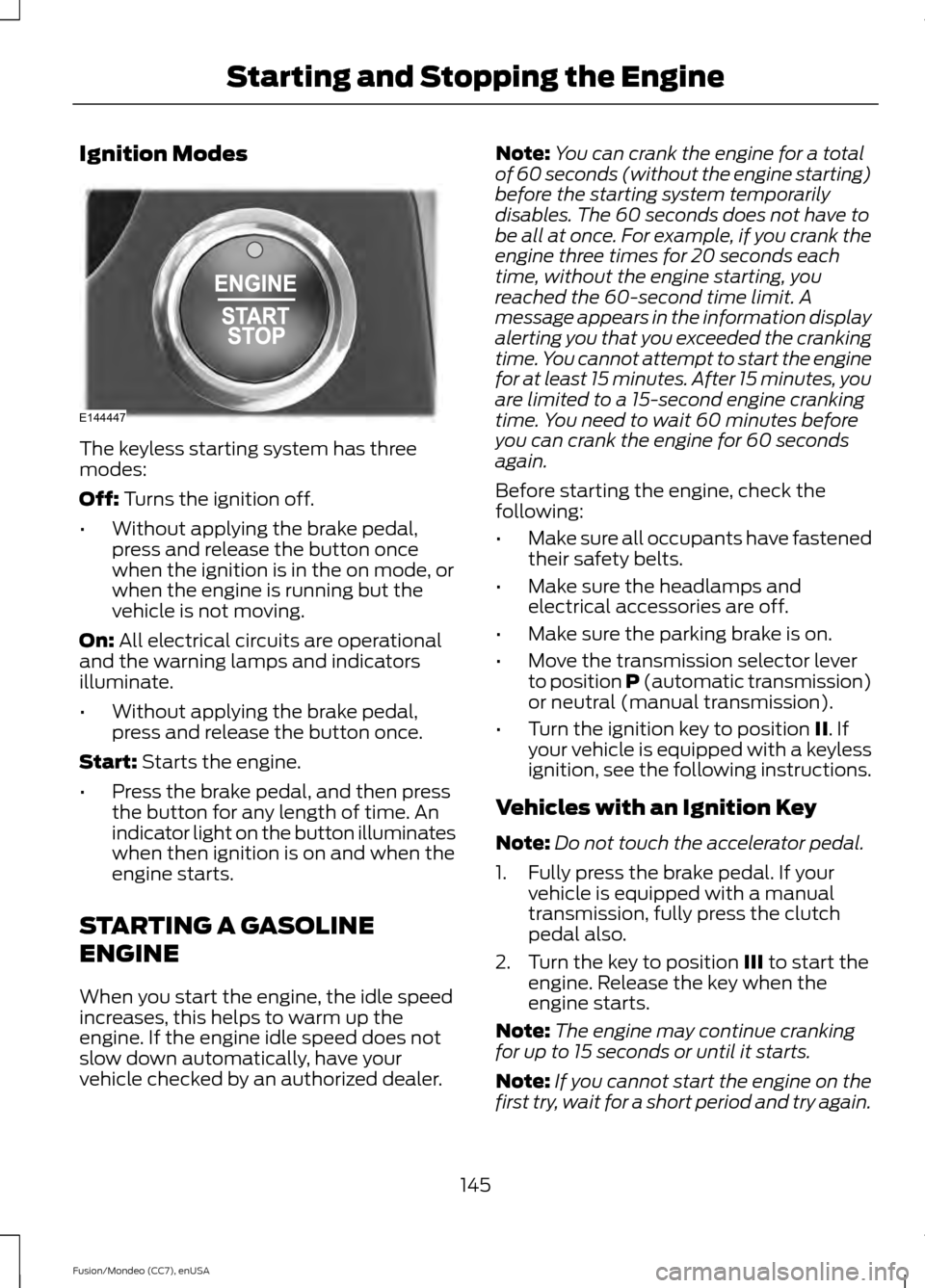
Ignition Modes
The keyless starting system has three
modes:
Off: Turns the ignition off.
• Without applying the brake pedal,
press and release the button once
when the ignition is in the on mode, or
when the engine is running but the
vehicle is not moving.
On:
All electrical circuits are operational
and the warning lamps and indicators
illuminate.
• Without applying the brake pedal,
press and release the button once.
Start:
Starts the engine.
• Press the brake pedal, and then press
the button for any length of time. An
indicator light on the button illuminates
when then ignition is on and when the
engine starts.
STARTING A GASOLINE
ENGINE
When you start the engine, the idle speed
increases, this helps to warm up the
engine. If the engine idle speed does not
slow down automatically, have your
vehicle checked by an authorized dealer. Note:
You can crank the engine for a total
of 60 seconds (without the engine starting)
before the starting system temporarily
disables. The 60 seconds does not have to
be all at once. For example, if you crank the
engine three times for 20 seconds each
time, without the engine starting, you
reached the 60-second time limit. A
message appears in the information display
alerting you that you exceeded the cranking
time. You cannot attempt to start the engine
for at least 15 minutes. After 15 minutes, you
are limited to a 15-second engine cranking
time. You need to wait 60 minutes before
you can crank the engine for 60 seconds
again.
Before starting the engine, check the
following:
• Make sure all occupants have fastened
their safety belts.
• Make sure the headlamps and
electrical accessories are off.
• Make sure the parking brake is on.
• Move the transmission selector lever
to position P (automatic transmission)
or neutral (manual transmission).
• Turn the ignition key to position
II. If
your vehicle is equipped with a keyless
ignition, see the following instructions.
Vehicles with an Ignition Key
Note: Do not touch the accelerator pedal.
1. Fully press the brake pedal. If your vehicle is equipped with a manual
transmission, fully press the clutch
pedal also.
2. Turn the key to position
III to start the
engine. Release the key when the
engine starts.
Note: The engine may continue cranking
for up to 15 seconds or until it starts.
Note: If you cannot start the engine on the
first try, wait for a short period and try again.
145
Fusion/Mondeo (CC7), enUSA Starting and Stopping the EngineE144447
Page 149 of 488
Vehicles with Keyless Start
Note:
Do not touch the accelerator pedal.
Note: You must have your intelligent access
key in the vehicle in order to shift the
transmission out of position P.
1. Fully press the brake pedal.
2. Press the button.
The system does not function if:
• The key frequencies are jammed.
• The key battery has no charge.
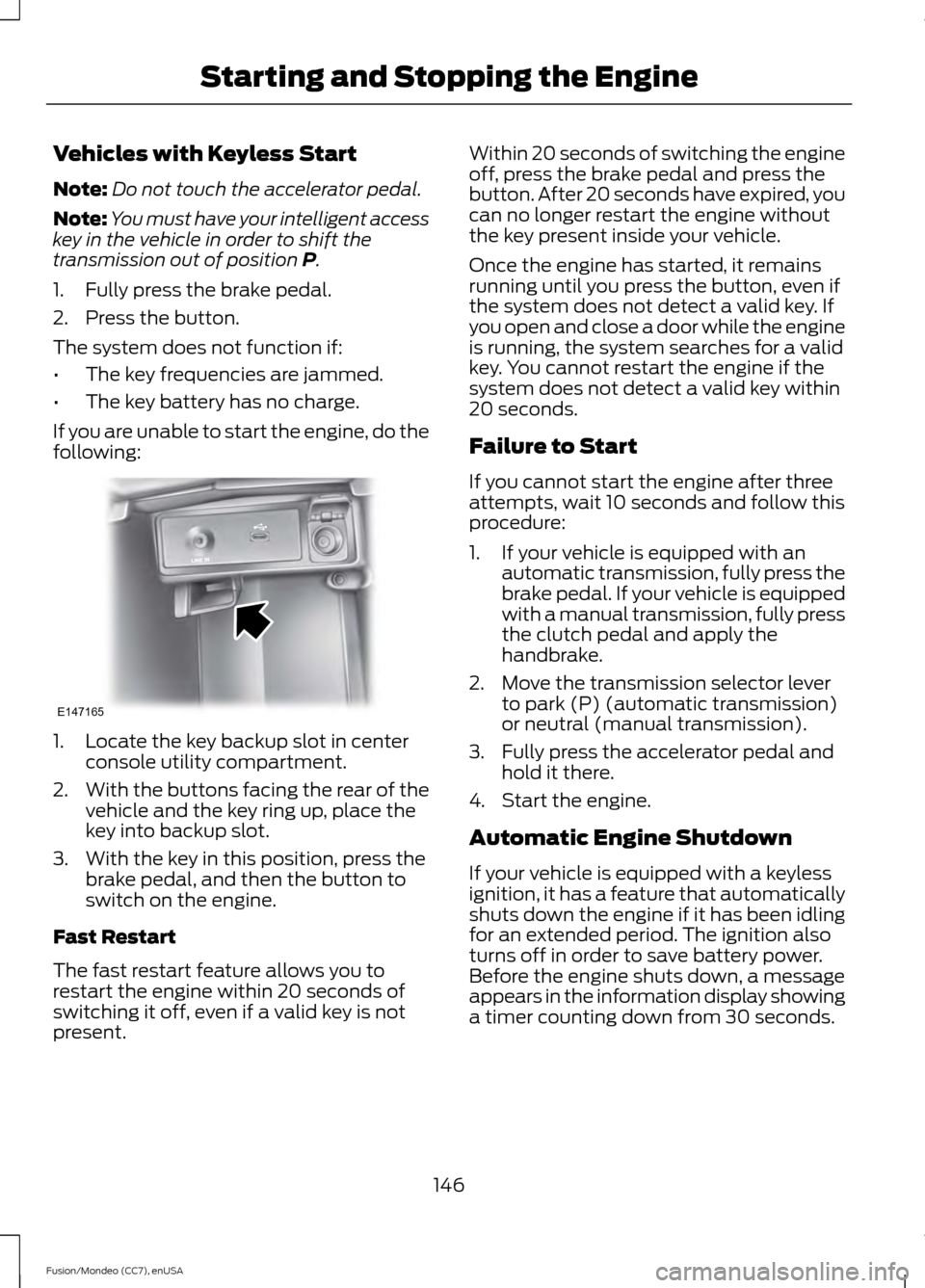
If you are unable to start the engine, do the
following: 1. Locate the key backup slot in center
console utility compartment.
2. With the buttons facing the rear of the
vehicle and the key ring up, place the
key into backup slot.
3. With the key in this position, press the brake pedal, and then the button to
switch on the engine.
Fast Restart
The fast restart feature allows you to
restart the engine within 20 seconds of
switching it off, even if a valid key is not
present. Within 20 seconds of switching the engine
off, press the brake pedal and press the
button. After 20 seconds have expired, you
can no longer restart the engine without
the key present inside your vehicle.
Once the engine has started, it remains
running until you press the button, even if
the system does not detect a valid key. If
you open and close a door while the engine
is running, the system searches for a valid
key. You cannot restart the engine if the
system does not detect a valid key within
20 seconds.
Failure to Start
If you cannot start the engine after three
attempts, wait 10 seconds and follow this
procedure:
1. If your vehicle is equipped with an
automatic transmission, fully press the
brake pedal. If your vehicle is equipped
with a manual transmission, fully press
the clutch pedal and apply the
handbrake.
2. Move the transmission selector lever to park (P) (automatic transmission)
or neutral (manual transmission).
3. Fully press the accelerator pedal and hold it there.
4. Start the engine.
Automatic Engine Shutdown
If your vehicle is equipped with a keyless
ignition, it has a feature that automatically
shuts down the engine if it has been idling
for an extended period. The ignition also
turns off in order to save battery power.
Before the engine shuts down, a message
appears in the information display showing
a timer counting down from 30 seconds.
146
Fusion/Mondeo (CC7), enUSA Starting and Stopping the EngineE147165
Page 164 of 488
MANUAL TRANSMISSION
Using the Clutch
Note:
Failure to fully press the clutch pedal
to the floor may cause increased shift
efforts, prematurely wear transmission
components or damage the transmission.
Note: Do not drive with your foot resting on
the clutch pedal or use the clutch pedal to
hold your vehicle at a standstill while
waiting on a hill. These actions will reduce
the life of the clutch and could nullify a
clutch warranty claim. Manual transmission vehicles have a
starter interlock that prevents cranking the
engine unless the clutch pedal is fully
pressed.
To start the vehicle:
1.
Make sure the parking brake is fully set.
2. Press the clutch pedal to the floor, then
put the gearshift lever in the neutral
position.
3. Start the engine.
4. Press the brake pedal and move the gearshift lever to the desired gear; first
(1) or reverse (R).
5. Release the parking brake, then slowly
release the clutch pedal while slowly
pressing on the accelerator. During each shift, the clutch pedal must
be fully pressed to the floor. Make sure the
floor mat is properly positioned so it
doesn't interfere with the full extension of
the clutch pedal.
Recommended Shift Speeds
Note:
Do not downshift into first (1) when
your vehicle is moving faster than 15 mph
(24 km/h). This will damage the clutch. Recommended upshifts (for best fuel
economy) when accelerating
Shift from:15 mph (24 km/h)
1 - 2
25 mph (40 km/h)
2 - 3
40 mph (64 km/h)
3 - 4
45 mph (72 km/h)
4 - 5
50 mph (80 km/h)
5 - 6
Reverse
Note: Make sure that your vehicle is at a
complete stop before you shift into reverse
(R). Failure to do so may damage the
transmission.
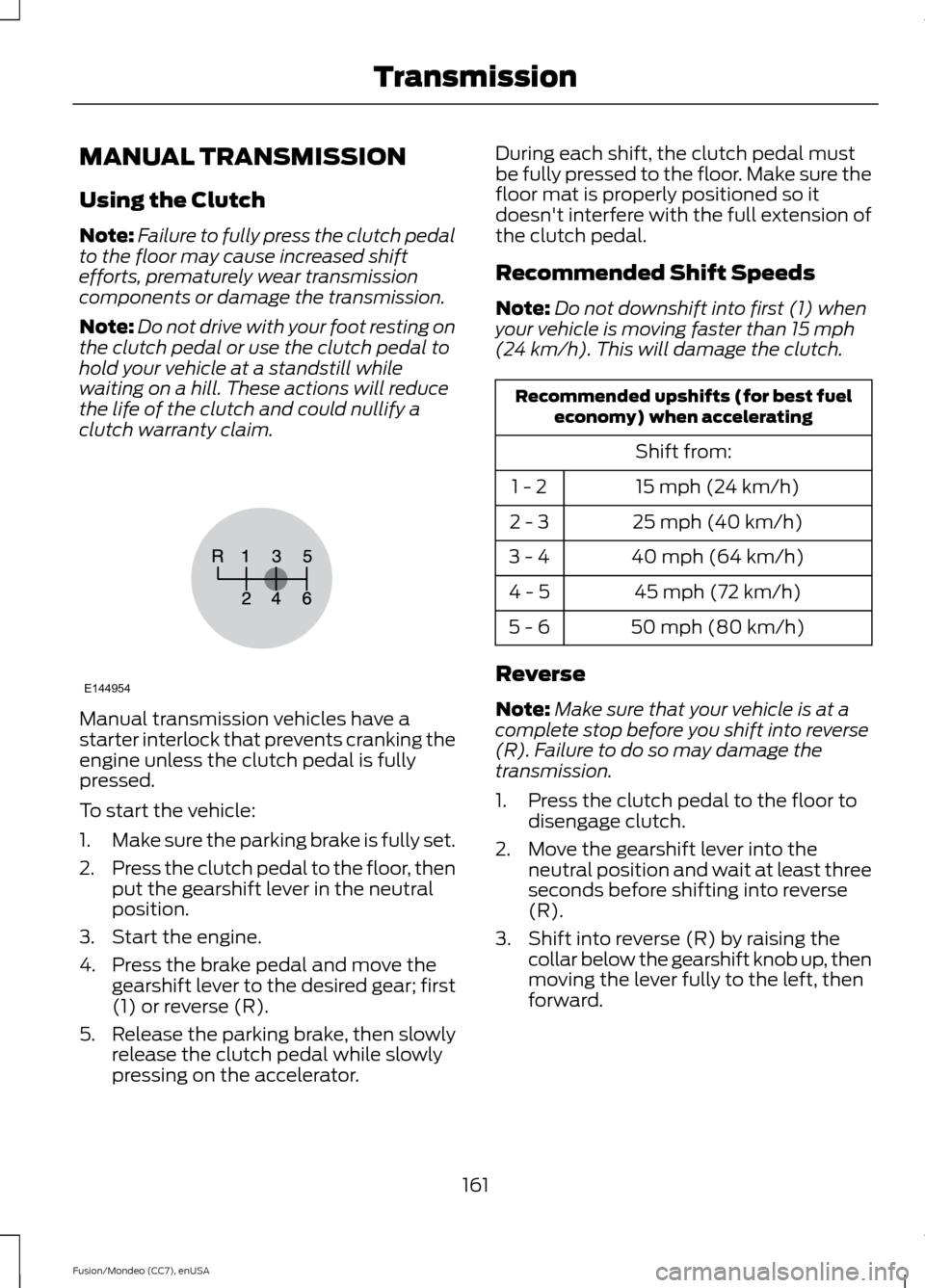
1. Press the clutch pedal to the floor to disengage clutch.
2. Move the gearshift lever into the neutral position and wait at least three
seconds before shifting into reverse
(R).
3. Shift into reverse (R) by raising the collar below the gearshift knob up, then
moving the lever fully to the left, then
forward.
161
Fusion/Mondeo (CC7), enUSA TransmissionE144954
Page 165 of 488
Note:
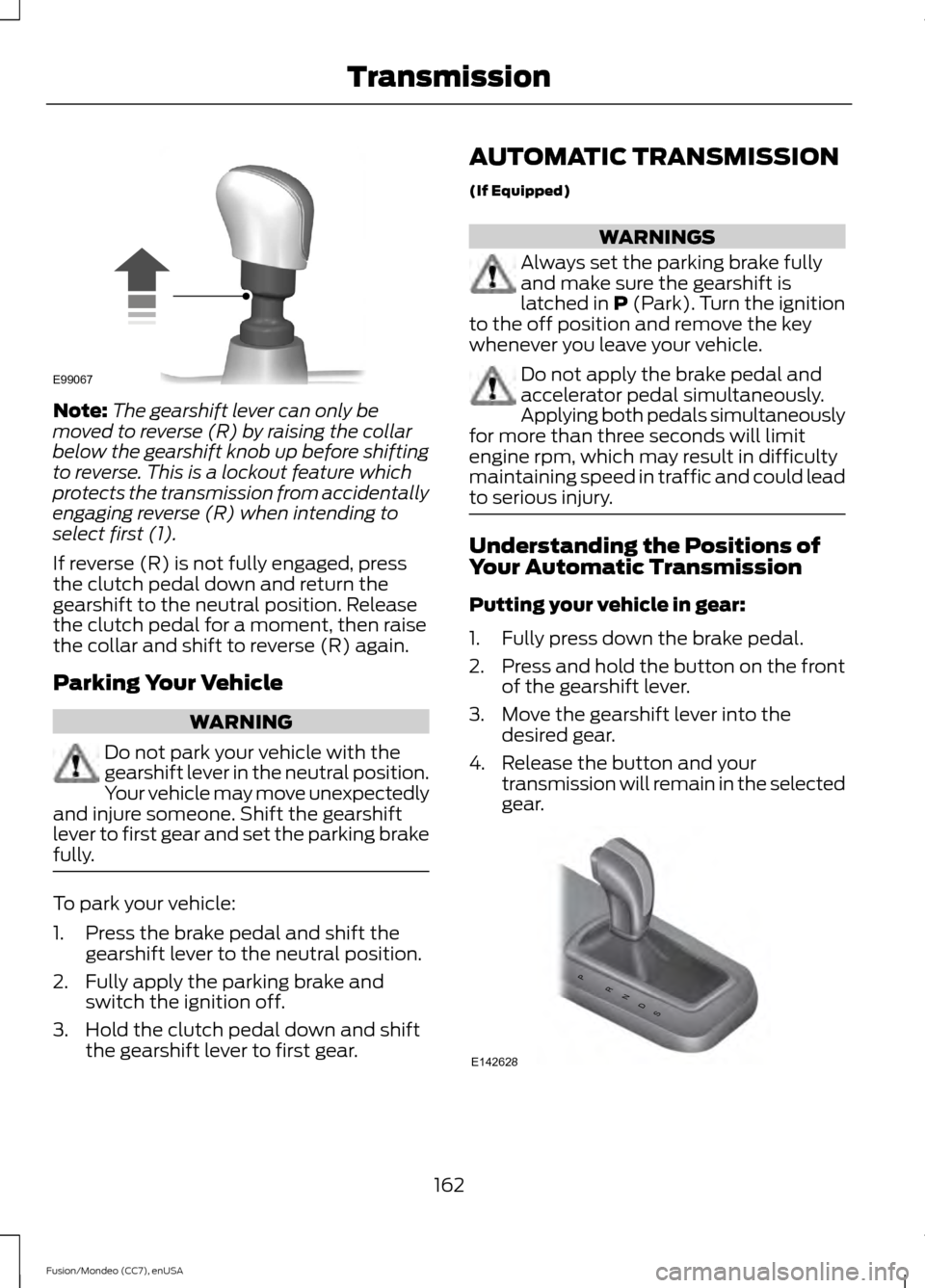
The gearshift lever can only be
moved to reverse (R) by raising the collar
below the gearshift knob up before shifting
to reverse. This is a lockout feature which
protects the transmission from accidentally
engaging reverse (R) when intending to
select first (1).
If reverse (R) is not fully engaged, press
the clutch pedal down and return the
gearshift to the neutral position. Release
the clutch pedal for a moment, then raise
the collar and shift to reverse (R) again.
Parking Your Vehicle WARNING
Do not park your vehicle with the
gearshift lever in the neutral position.
Your vehicle may move unexpectedly
and injure someone. Shift the gearshift
lever to first gear and set the parking brake
fully. To park your vehicle:
1. Press the brake pedal and shift the
gearshift lever to the neutral position.
2. Fully apply the parking brake and switch the ignition off.
3. Hold the clutch pedal down and shift the gearshift lever to first gear. AUTOMATIC TRANSMISSION
(If Equipped) WARNINGS
Always set the parking brake fully
and make sure the gearshift is
latched in P (Park). Turn the ignition
to the off position and remove the key
whenever you leave your vehicle. Do not apply the brake pedal and
accelerator pedal simultaneously.
Applying both pedals simultaneously
for more than three seconds will limit
engine rpm, which may result in difficulty
maintaining speed in traffic and could lead
to serious injury. Understanding the Positions of
Your Automatic Transmission
Putting your vehicle in gear:
1. Fully press down the brake pedal.
2.
Press and hold the button on the front
of the gearshift lever.
3. Move the gearshift lever into the desired gear.
4. Release the button and your transmission will remain in the selected
gear. 162
Fusion/Mondeo (CC7), enUSA TransmissionE99067 PRNDS
E142628
Page 177 of 488
Note:
If the electric parking brake warning
lamp stays illuminated, the electric parking
brake will not automatically release. You
must release the electric parking brake using
the electric parking brake switch.
Note: On manual transmission vehicles, if
the transmission is not in neutral (N) when
you release the clutch pedal and press the
accelerator pedal, the electric parking brake
will release automatically.
Note: On manual transmission vehicles,
you must fully press the clutch pedal before
the drive away release feature will operate.
Drive as normal using the accelerator and
clutch pedals and the electric parking brake
will be automatically released.
The brake system warning lamp will go off
to confirm that the electric parking brake
has been released.
Note: The electric parking brake drive away
release makes starting on a hill easier. This
feature will release the parking brake
automatically when the vehicle has
sufficient drive force to move up the hill. To
assure drive away release when starting
uphill, press the accelerator pedal quickly.
Battery With No Charge WARNING
You will not be able to apply or
release the electric parking brake if
the battery is low or has no charge.
If the battery is low or has no charge, use
jumper cables and a booster battery.
HILL START ASSIST
WARNINGS
The system does not replace the
parking brake. When you leave your
vehicle, always apply the parking
brake and put the transmission in park (P). WARNINGS
You must remain in your vehicle once
you have activated the system.
During all times, you are responsible
for controlling your vehicle,
supervising the system and
intervening, if required. If the engine is revved excessively, or
if a malfunction is detected, the
system will be deactivated.
The system makes it easier to pull away
when your vehicle is on a slope without the
need to use the parking brake.
When the system is active, your vehicle will
remain stationary on the slope for two to
three seconds after you release the brake
pedal. This allows you time to move your
foot from the brake to the accelerator
pedal. The brakes are released
automatically once the engine has
developed sufficient drive to prevent your
vehicle from rolling down the slope. This
is an advantage when pulling away on a
slope, (for example from a car park ramp,
traffic lights or when reversing uphill into
a parking space).
The system will activate automatically on
any slope that will cause significant vehicle
rollback.
Using Hill Start Assist
1. Press the brake pedal to bring your
vehicle to a complete standstill. Keep
the brake pedal pressed.
2. If the sensors detect that your vehicle is on a slope, the system will activate
automatically.
3. When you remove your foot from the brake pedal, your vehicle will remain
on the slope without rolling away for
about two or three seconds. This hold
time will automatically be extended if
you are in the process of driving off.
174
Fusion/Mondeo (CC7), enUSA Brakes