lights FORD FUSION ENERGI 2018 User Guide
[x] Cancel search | Manufacturer: FORD, Model Year: 2018, Model line: FUSION ENERGI, Model: FORD FUSION ENERGI 2018Pages: 538, PDF Size: 7.52 MB
Page 105 of 538
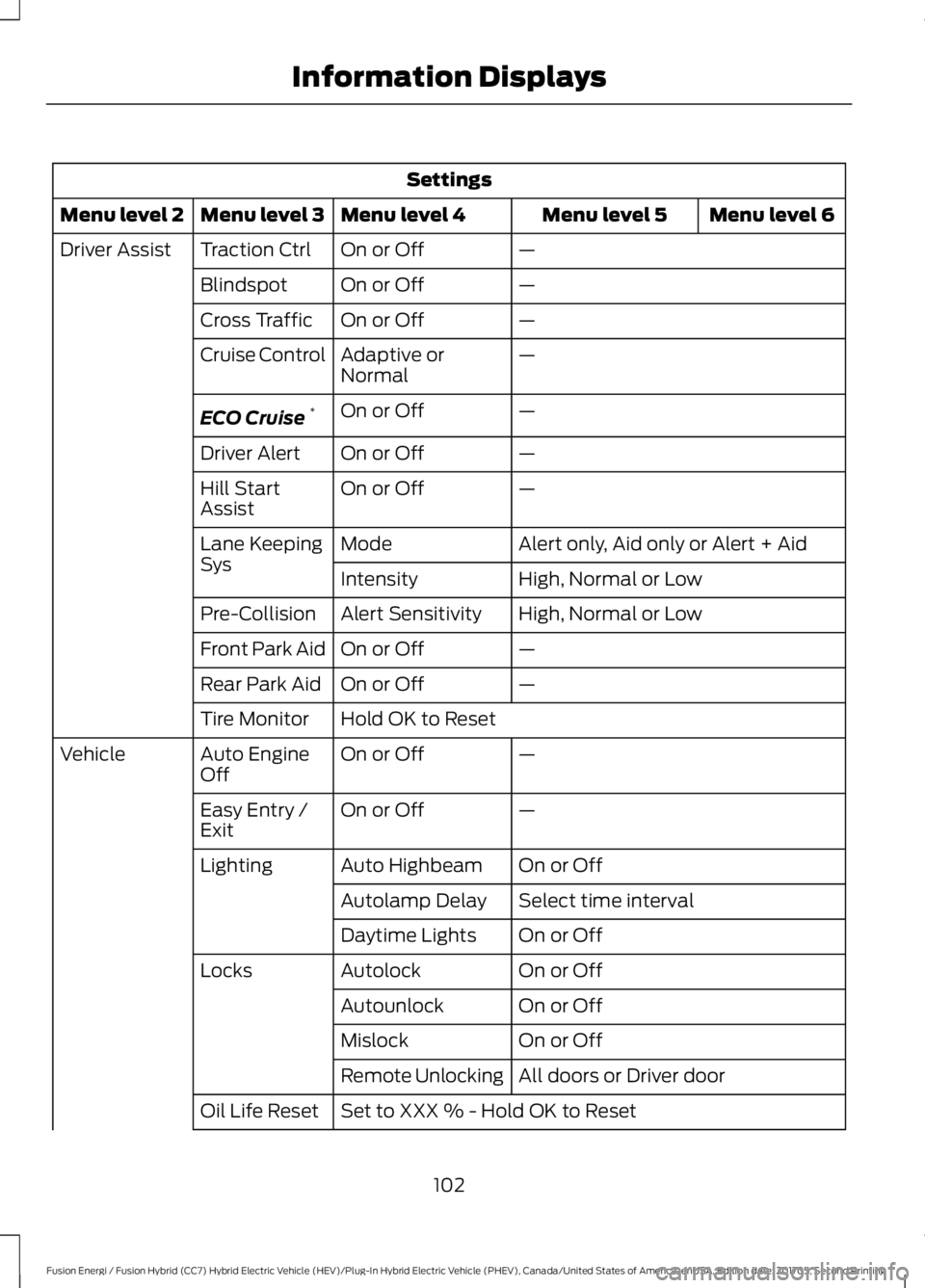
Settings
Menu level 6Menu level 5Menu level 4Menu level 3Menu level 2
—On or OffTraction CtrlDriver Assist
—On or OffBlindspot
—On or OffCross Traffic
—Adaptive orNormalCruise Control
—On or OffECO Cruise*
—On or OffDriver Alert
—On or OffHill StartAssist
Alert only, Aid only or Alert + AidModeLane KeepingSysHigh, Normal or LowIntensity
High, Normal or LowAlert SensitivityPre-Collision
—On or OffFront Park Aid
—On or OffRear Park Aid
Hold OK to ResetTire Monitor
—On or OffAuto EngineOffVehicle
—On or OffEasy Entry /Exit
On or OffAuto HighbeamLighting
Select time intervalAutolamp Delay
On or OffDaytime Lights
On or OffAutolockLocks
On or OffAutounlock
On or OffMislock
All doors or Driver doorRemote Unlocking
Set to XXX % - Hold OK to ResetOil Life Reset
102
Fusion Energi / Fusion Hybrid (CC7) Hybrid Electric Vehicle (HEV)/Plug-In Hybrid Electric Vehicle (PHEV), Canada/United States of America, enUSA, Edition date: 201705, Second Printing
Information Displays
Page 138 of 538
HEATED SEATS (If Equipped)
WARNING
People who are unable to feel painto their skin because of advancedage, chronic illness, diabetes, spinalcord injury, medication, alcohol use,exhaustion or other physical conditions,must exercise care when using the heatedseat. The heated seat may cause burnseven at low temperatures, especially ifused for long periods of time. Do not placeanything on the seat that insulates againstheat, such as a blanket or cushion. Thismay cause the heated seat to overheat.Do not puncture the seat with pins, needlesor other pointed objects. This may damagethe heating element which may cause theheated seat to overheat. An overheatedseat may cause serious personal injury.
Do not do the following:
•Place heavy objects on the seat.
•Operate the heated seat if water or anyother liquid is spilled on the seat. Allowthe seat to dry thoroughly.
•Operate the heated seats unless theengine is running. Doing so can causethe battery to lose charge.
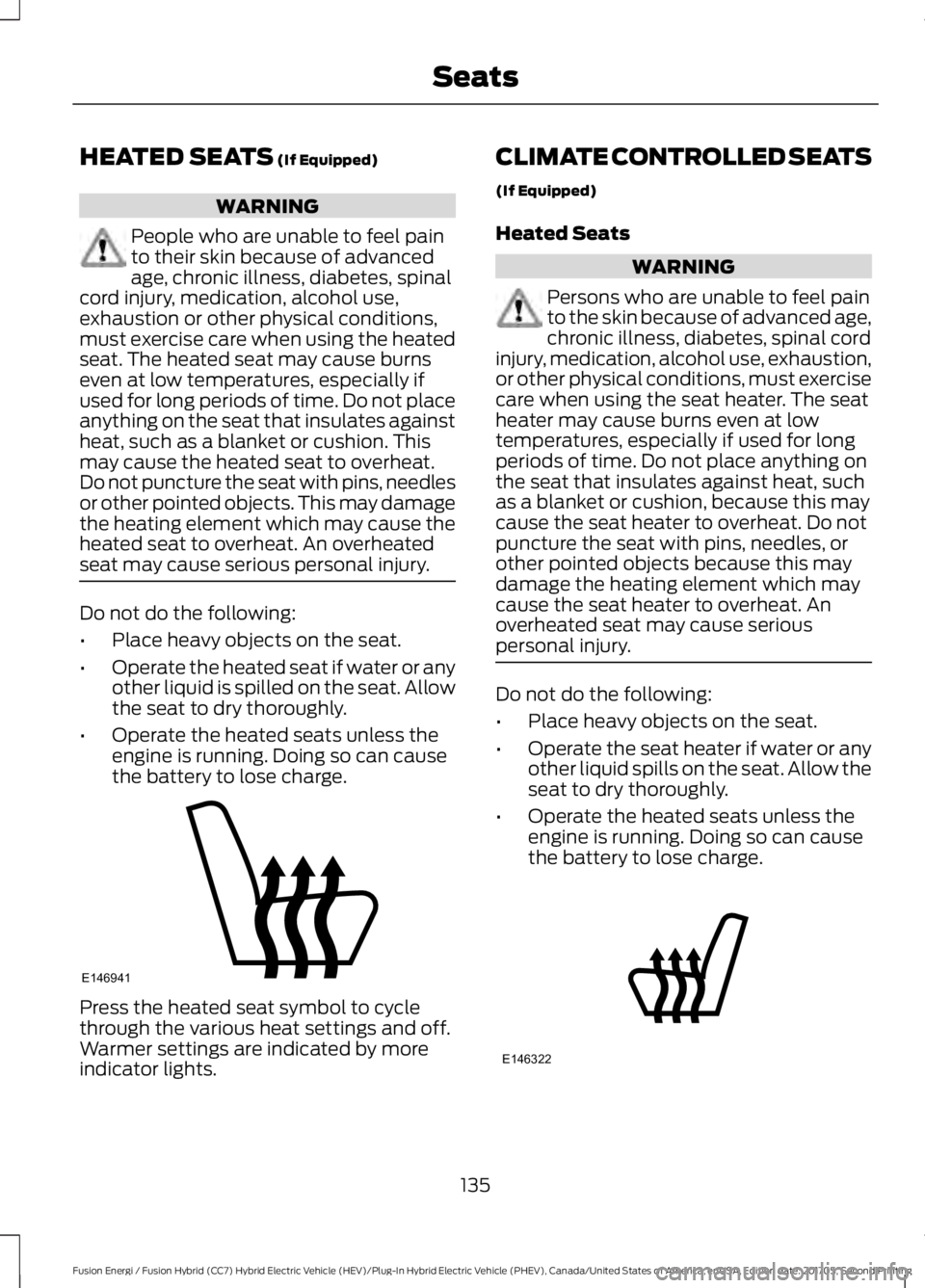
Press the heated seat symbol to cyclethrough the various heat settings and off.Warmer settings are indicated by moreindicator lights.
CLIMATE CONTROLLED SEATS
(If Equipped)
Heated Seats
WARNING
Persons who are unable to feel painto the skin because of advanced age,chronic illness, diabetes, spinal cordinjury, medication, alcohol use, exhaustion,or other physical conditions, must exercisecare when using the seat heater. The seatheater may cause burns even at lowtemperatures, especially if used for longperiods of time. Do not place anything onthe seat that insulates against heat, suchas a blanket or cushion, because this maycause the seat heater to overheat. Do notpuncture the seat with pins, needles, orother pointed objects because this maydamage the heating element which maycause the seat heater to overheat. Anoverheated seat may cause seriouspersonal injury.
Do not do the following:
•Place heavy objects on the seat.
•Operate the seat heater if water or anyother liquid spills on the seat. Allow theseat to dry thoroughly.
•Operate the heated seats unless theengine is running. Doing so can causethe battery to lose charge.
135
Fusion Energi / Fusion Hybrid (CC7) Hybrid Electric Vehicle (HEV)/Plug-In Hybrid Electric Vehicle (PHEV), Canada/United States of America, enUSA, Edition date: 201705, Second Printing
SeatsE146941 E146322
Page 139 of 538
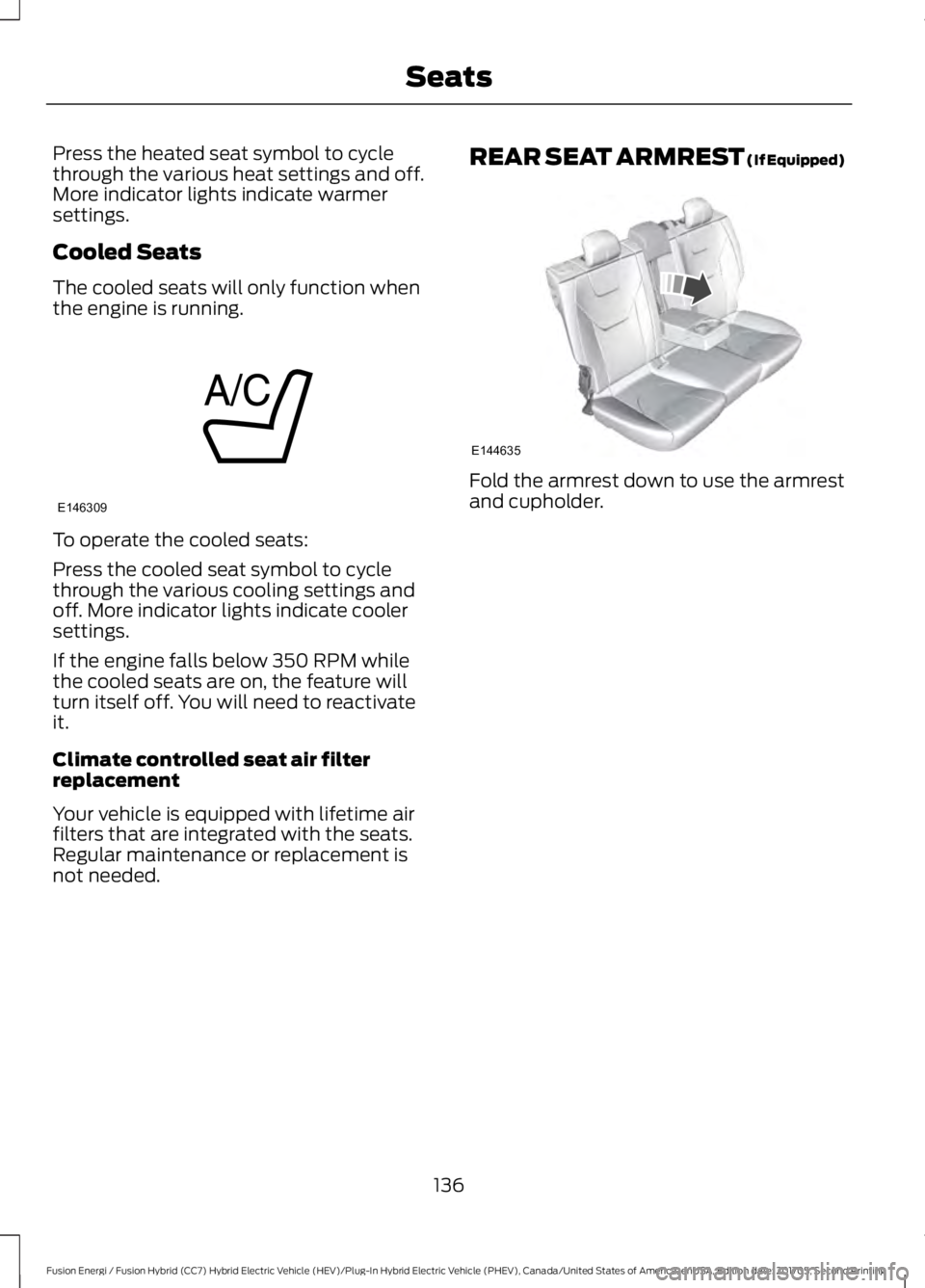
Press the heated seat symbol to cyclethrough the various heat settings and off.More indicator lights indicate warmersettings.
Cooled Seats
The cooled seats will only function whenthe engine is running.
To operate the cooled seats:
Press the cooled seat symbol to cyclethrough the various cooling settings andoff. More indicator lights indicate coolersettings.
If the engine falls below 350 RPM whilethe cooled seats are on, the feature willturn itself off. You will need to reactivateit.
Climate controlled seat air filterreplacement
Your vehicle is equipped with lifetime airfilters that are integrated with the seats.Regular maintenance or replacement isnot needed.
REAR SEAT ARMREST (If Equipped)
Fold the armrest down to use the armrestand cupholder.
136
Fusion Energi / Fusion Hybrid (CC7) Hybrid Electric Vehicle (HEV)/Plug-In Hybrid Electric Vehicle (PHEV), Canada/United States of America, enUSA, Edition date: 201705, Second Printing
SeatsE146309 E144635
Page 142 of 538
Gate Operator / CanadianProgramming
Canadian radio-frequency laws requiretransmitter signals to “time-out” (or quit)after several seconds of transmission –which may not be long enough forHomeLink to pick up the signal duringprogramming. Similar to this Canadian law,some U.S. gate operators are designed to“time-out” in the same manner.
Note:If programming a garage door openeror gate operator, it is advised to unplug thedevice during the “cycling” process toprevent possible overheating.
1. Press and hold the HomeLink buttonwhile you press and release,every twoseconds, your hand-held transmitteruntil the HomeLink indicator lightchanges from a slow to a rapidlyblinking light.
2. Release both the HomeLink andhand-held transmitter buttons.
3. Continue programing HomeLink. SeeIn-Vehicle Programming.
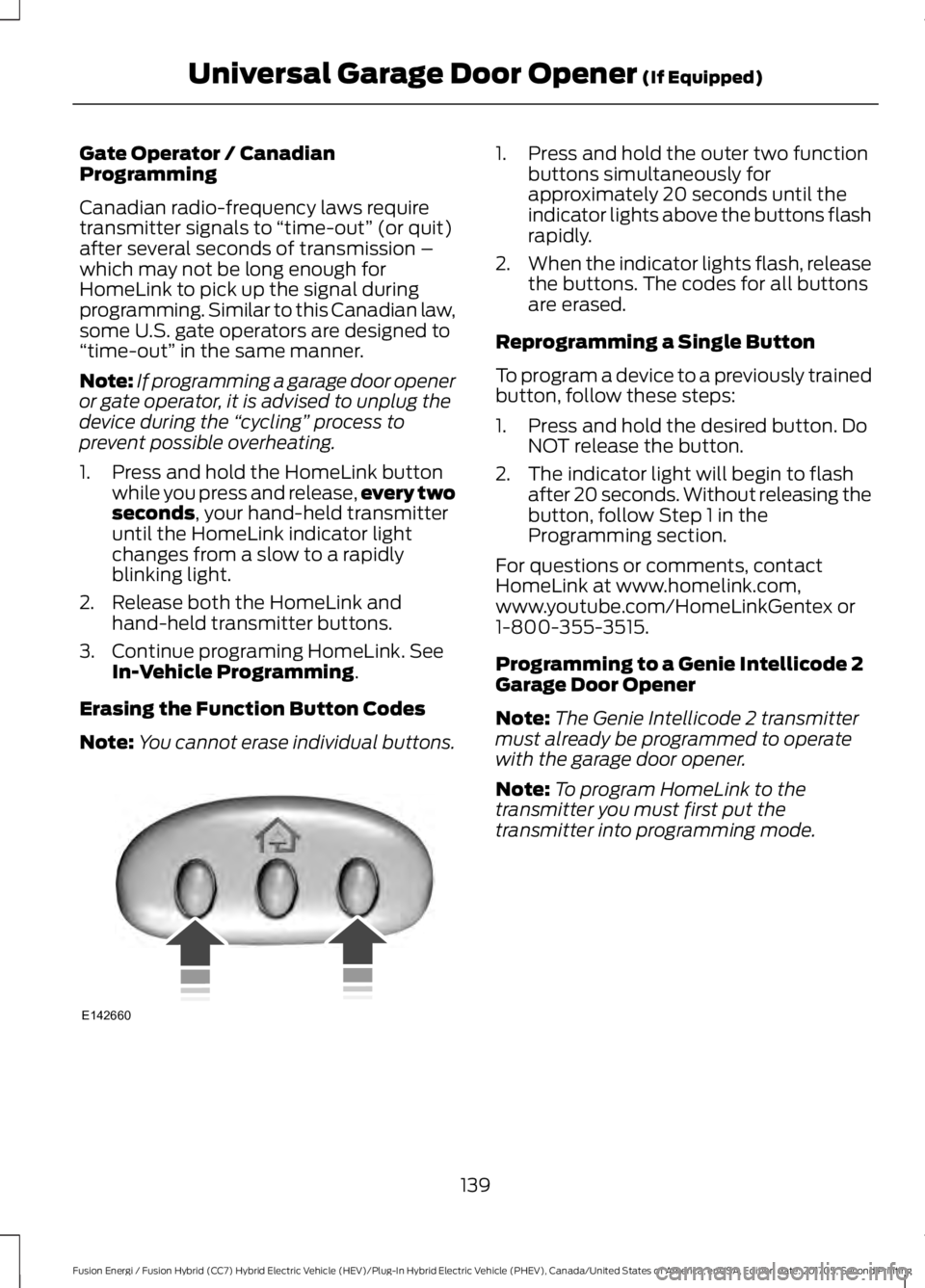
Erasing the Function Button Codes
Note:You cannot erase individual buttons.
1. Press and hold the outer two functionbuttons simultaneously forapproximately 20 seconds until theindicator lights above the buttons flashrapidly.
2.When the indicator lights flash, releasethe buttons. The codes for all buttonsare erased.
Reprogramming a Single Button
To program a device to a previously trainedbutton, follow these steps:
1. Press and hold the desired button. DoNOT release the button.
2. The indicator light will begin to flashafter 20 seconds. Without releasing thebutton, follow Step 1 in theProgramming section.
For questions or comments, contactHomeLink at www.homelink.com,www.youtube.com/HomeLinkGentex or1-800-355-3515.
Programming to a Genie Intellicode 2Garage Door Opener
Note:The Genie Intellicode 2 transmittermust already be programmed to operatewith the garage door opener.
Note:To program HomeLink to thetransmitter you must first put thetransmitter into programming mode.
139
Fusion Energi / Fusion Hybrid (CC7) Hybrid Electric Vehicle (HEV)/Plug-In Hybrid Electric Vehicle (PHEV), Canada/United States of America, enUSA, Edition date: 201705, Second Printing
Universal Garage Door Opener (If Equipped)E142660
Page 143 of 538
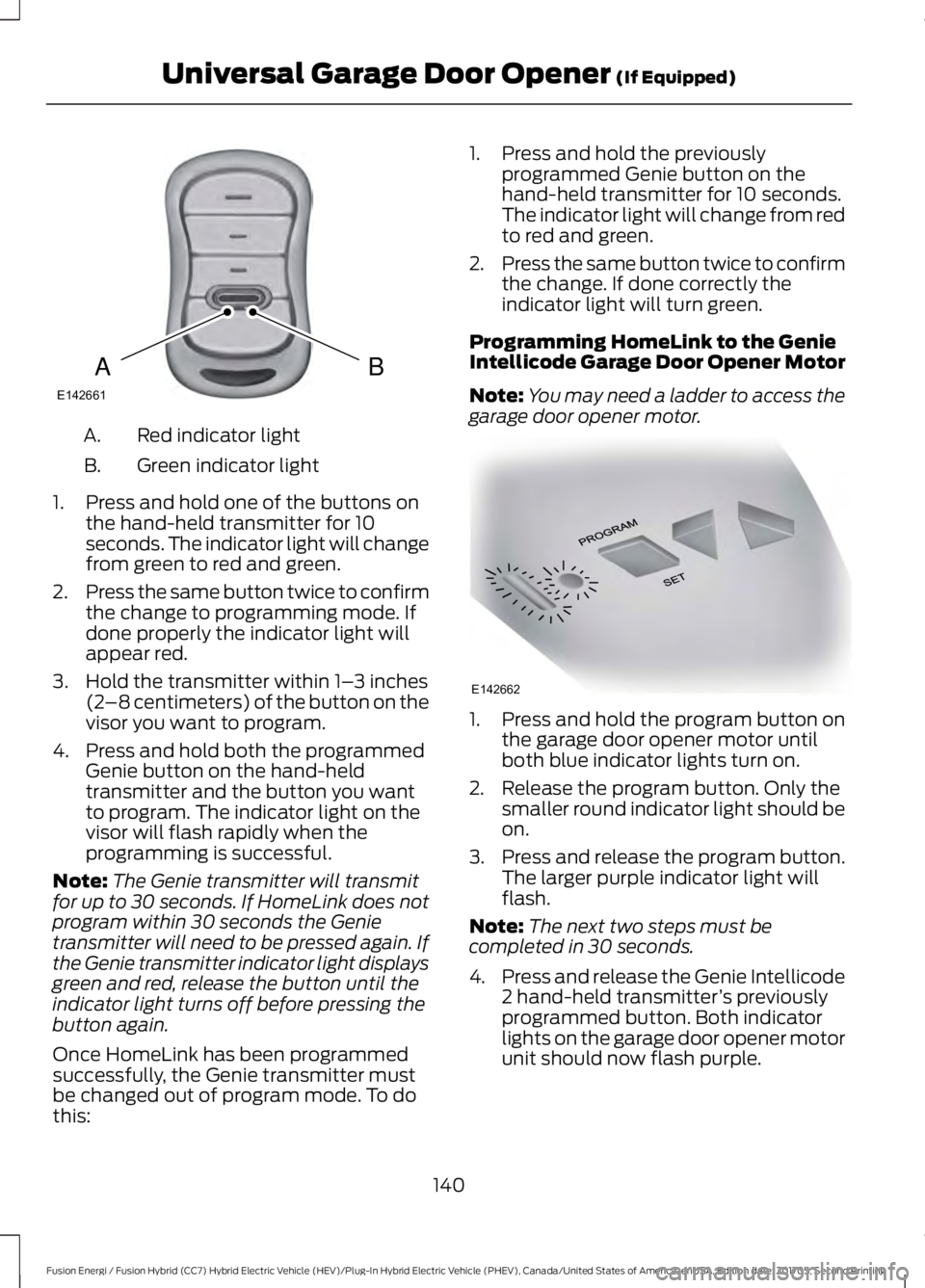
Red indicator lightA.
Green indicator lightB.
1. Press and hold one of the buttons onthe hand-held transmitter for 10seconds. The indicator light will changefrom green to red and green.
2.Press the same button twice to confirmthe change to programming mode. Ifdone properly the indicator light willappear red.
3. Hold the transmitter within 1–3 inches(2–8 centimeters) of the button on thevisor you want to program.
4. Press and hold both the programmedGenie button on the hand-heldtransmitter and the button you wantto program. The indicator light on thevisor will flash rapidly when theprogramming is successful.
Note:The Genie transmitter will transmitfor up to 30 seconds. If HomeLink does notprogram within 30 seconds the Genietransmitter will need to be pressed again. Ifthe Genie transmitter indicator light displaysgreen and red, release the button until theindicator light turns off before pressing thebutton again.
Once HomeLink has been programmedsuccessfully, the Genie transmitter mustbe changed out of program mode. To dothis:
1. Press and hold the previouslyprogrammed Genie button on thehand-held transmitter for 10 seconds.The indicator light will change from redto red and green.
2.Press the same button twice to confirmthe change. If done correctly theindicator light will turn green.
Programming HomeLink to the GenieIntellicode Garage Door Opener Motor
Note:You may need a ladder to access thegarage door opener motor.
1. Press and hold the program button onthe garage door opener motor untilboth blue indicator lights turn on.
2. Release the program button. Only thesmaller round indicator light should beon.
3.Press and release the program button.The larger purple indicator light willflash.
Note:The next two steps must becompleted in 30 seconds.
4.Press and release the Genie Intellicode2 hand-held transmitter’s previouslyprogrammed button. Both indicatorlights on the garage door opener motorunit should now flash purple.
140
Fusion Energi / Fusion Hybrid (CC7) Hybrid Electric Vehicle (HEV)/Plug-In Hybrid Electric Vehicle (PHEV), Canada/United States of America, enUSA, Edition date: 201705, Second Printing
Universal Garage Door Opener (If Equipped)BAE142661 E142662
Page 174 of 538
Note: The electrical source must meetcertain requirements for the high-voltagebatteries to charge. The AC outlet must bea three-prong 110-120 volt AC outlet that isproperly grounded, 15–20 amps (or greater)and in good condition. You must use adedicated line, which means you cannothave other appliances connected to thesame circuit. If you do not use a dedicatedcircuit, the circuit breaker could trip or open.If you do not have a dedicated circuit,contact a licensed professional electricianfor proper installation.
Make sure that the 120 volt conveniencecord is completely unwound beforecharging. Always plug the cord into the ACoutlet before connecting the chargingcoupler into the charge port on yourvehicle.
Note:When the convenience cord isplugged into an outlet, use the followingtable to determine your vehicle chargestatus. If the POWER indicator light is offafter plugging in the convenience cord, usea different outlet.
Note:When the convenience cord is plugged into an outlet, use the following table todetermine your vehicle charge status.
StatusConvenience Cord LED Indicators
FaultPower
If the POWER and FAULT indicator lights are offafter plugging in the convenience cord, use adifferent outlet.
OffOff
The convenience cord is plugged into the wall andready to charge your vehicle. Reference theCHARGE PORT section below for information onhow to tell if the vehicle is charging.
OffOn
The convenience cord is experiencing a chargingfault with the vehicle. The convenience cord willretry 3 times. If the fault persists, your vehicle isnot charging or there is an internal fault in thecharging equipment.
BlinkOff
Ground Fault Circuit Interrupter (GFCI) FaultDetected. The convenience cord is retrying tocharge.
BlinkOn
The convenience cord detected a high temper-ature at the AC plug and Wall Outlet. Your vehicleis not charging.
On SteadyBlinking
Missing Ground at AC Outlet. Connect to properlygrounded AC outlet. Your vehicle is not charging.On SteadyOff
171
Fusion Energi / Fusion Hybrid (CC7) Hybrid Electric Vehicle (HEV)/Plug-In Hybrid Electric Vehicle (PHEV), Canada/United States of America, enUSA, Edition date: 201705, Second Printing
High Voltage Battery
Page 176 of 538
5. If using a 240–volt charging station,follow the instructions on the chargestation to begin the charging process.
The light ring will display how far along thecharge is:
•When the top right quadrant is pulsing,the charge is between 0-25 percent.
•When the top right quadrant light is onand the bottom right quadrant ispulsing, the charge is between 25-50percent.
•When the lights on both right sidequadrants are on and the bottom leftquadrant is pulsing, the charge isbetween 50-75 percent.
•When the lights on the three quadrantsare on and the top left quadrant ispulsing, the charge is between 75-100percent.
•When all lights on the entire ring areon, the charge is complete.
Note:The light ring will turn off one minuteafter reaching a full charge.
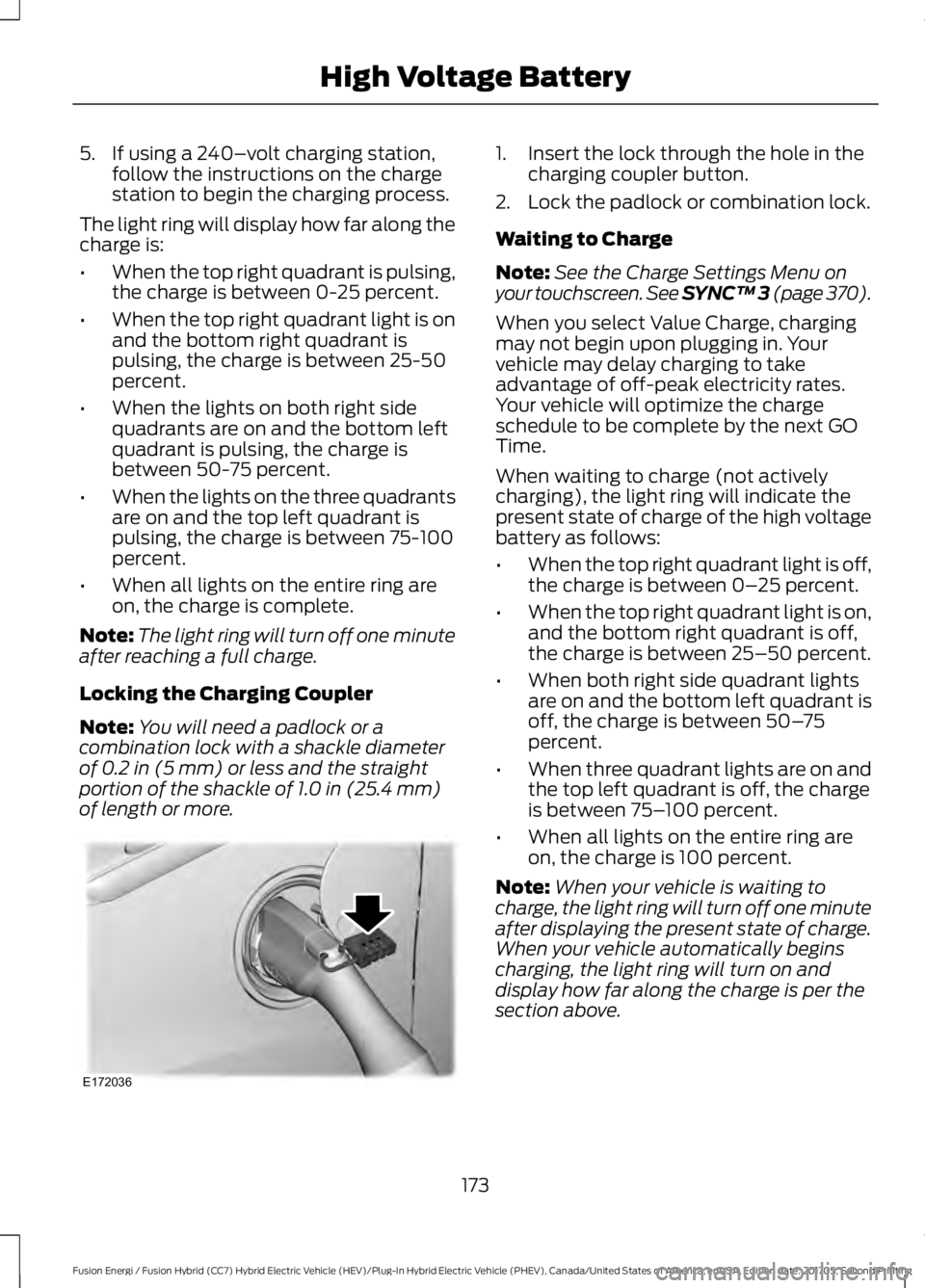
Locking the Charging Coupler
Note:You will need a padlock or acombination lock with a shackle diameterof 0.2 in (5 mm) or less and the straightportion of the shackle of 1.0 in (25.4 mm)of length or more.
1. Insert the lock through the hole in thecharging coupler button.
2. Lock the padlock or combination lock.
Waiting to Charge
Note:See the Charge Settings Menu onyour touchscreen. See SYNC™ 3 (page 370).
When you select Value Charge, chargingmay not begin upon plugging in. Yourvehicle may delay charging to takeadvantage of off-peak electricity rates.Your vehicle will optimize the chargeschedule to be complete by the next GOTime.
When waiting to charge (not activelycharging), the light ring will indicate thepresent state of charge of the high voltagebattery as follows:
•When the top right quadrant light is off,the charge is between 0–25 percent.
•When the top right quadrant light is on,and the bottom right quadrant is off,the charge is between 25–50 percent.
•When both right side quadrant lightsare on and the bottom left quadrant isoff, the charge is between 50–75percent.
•When three quadrant lights are on andthe top left quadrant is off, the chargeis between 75–100 percent.
•When all lights on the entire ring areon, the charge is 100 percent.
Note:When your vehicle is waiting tocharge, the light ring will turn off one minuteafter displaying the present state of charge.When your vehicle automatically beginscharging, the light ring will turn on anddisplay how far along the charge is per thesection above.
173
Fusion Energi / Fusion Hybrid (CC7) Hybrid Electric Vehicle (HEV)/Plug-In Hybrid Electric Vehicle (PHEV), Canada/United States of America, enUSA, Edition date: 201705, Second Printing
High Voltage BatteryE172036
Page 185 of 538
Note:If the electric parking brake warninglamp stays illuminated, the electric parkingbrake will not automatically release. Youmust release the electric parking brake usingthe electric parking brake switch.
Note:On manual transmission vehicles,when you release the clutch pedal and pressthe accelerator pedal, the electric parkingbrake releases automatically.
Note:On manual transmission vehicles,you must fully press the clutch pedal beforethe drive away release feature operates.Drive as normal using the accelerator andclutch pedals and the electric parking brakewill be automatically released.
The brake system warning lamp will go offto confirm that the electric parking brakehas been released.
Note:The electric parking brake drive awayrelease makes starting on a hill easier. Thisfeature releases the parking brakeautomatically when the vehicle hassufficient drive force to move up the hill.
Driving with a Trailer
Depending on the slope and the weight ofthe trailer, your vehicle and trailer may rollbackwards slightly when you start on aslope.
To prevent this from happening, do thefollowing:
1. Pull the switch up and hold it in thisposition.
2. Drive your vehicle, then release theswitch when you notice that the enginehas developed sufficient driving force.
Battery With No Charge
WARNING
You will not be able to apply orrelease the electric parking brake ifthe battery is low or has no charge.
If the battery is low or has no charge, usejumper cables and a booster battery.
HILL START ASSIST
WARNINGS
The system does not replace theparking brake. When you leave yourvehicle, always apply the parkingbrake and shift the transmission into park(P) for automatic transmission or first gearfor manual transmission.
You must remain in your vehiclewhen the system turns on. At alltimes, you are responsible forcontrolling your vehicle, supervising thesystem and intervening, if required. Failureto take care may result in the loss ofcontrol of your vehicle, serious personalinjury or death.
The system will turn off if amalfunction is apparent or if you revthe engine excessively. Failure totake care may result in the loss of controlof your vehicle, serious personal injury ordeath.
The system makes it easier to pull awaywhen your vehicle is on a slope without theneed to use the parking brake.
When the system is active, your vehicle willremain stationary on the slope for two tothree seconds after you release the brakepedal. This allows you time to move yourfoot from the brake to the acceleratorpedal. The brakes release automaticallywhen the engine has sufficient torque toprevent your vehicle from rolling down thegrade. This is an advantage when pullingaway on a slope, for example from a carpark ramp, traffic lights or when reversinguphill into a parking space.
The system will activate automatically onany slope that will cause significant vehiclerollback.
182
Fusion Energi / Fusion Hybrid (CC7) Hybrid Electric Vehicle (HEV)/Plug-In Hybrid Electric Vehicle (PHEV), Canada/United States of America, enUSA, Edition date: 201705, Second Printing
Brakes
Page 187 of 538
PRINCIPLE OF OPERATION
The traction control system helps avoiddrive wheel spin and loss of traction.
If your vehicle begins to slide, the systemapplies the brakes to individual wheelsand, when needed, reduces engine powerat the same time. If the wheels spin whenaccelerating on slippery or loose surfaces,the system reduces engine power in orderto increase traction.
USING TRACTION CONTROL
WARNING
The stability and traction controllight illuminates steadily if thesystem detects a failure. Make sureyou did not manually disable the tractioncontrol system using the informationdisplay controls or the switch. If thestability control and traction control lightis still illuminating steadily, have thesystem serviced by an authorized dealerimmediately. Operating your vehicle withthe traction control disabled could lead toan increased risk of loss of vehicle control,vehicle rollover, personal injury and death.
The system automatically turns on eachtime you switch the ignition on.
If your vehicle is stuck in mud or snow,switching traction control off may bebeneficial as this allows the wheels to spin.
Note:When you switch traction control off,stability control remains fully active.
Switching the System Off
When you switch the system off or on, amessage appears in the informationdisplay showing system status.
You can switch the system off by eitherusing the information display controls orthe switch.
Using the Information DisplayControls
You can switch this feature off or on in theinformation display. See GeneralInformation (page 97).
Using a Switch (If Equipped)
Use the traction control switch on theinstrument panel to switch the system offor on.
System Indicator Lights andMessages
The stability and traction controllight:
•Temporarily illuminates on enginestart-up.
•Flashes when a driving conditionactivates either of the systems.
•Illuminates if a problem occurs in eitherof the systems.
The stability and traction controloff light temporarily illuminateson engine start-up and stays onwhen you switch the traction controlsystem off.
184
Fusion Energi / Fusion Hybrid (CC7) Hybrid Electric Vehicle (HEV)/Plug-In Hybrid Electric Vehicle (PHEV), Canada/United States of America, enUSA, Edition date: 201705, Second Printing
Traction ControlE138639 E130458
Page 217 of 538
BLIND SPOT INFORMATION
SYSTEM (If Equipped)
WARNINGS
Do not use the blind spot informationsystem as a replacement for usingthe interior and exterior mirrors orlooking over your shoulder before changinglanes. The blind spot information systemis not a replacement for careful driving.
The system may not operateproperly during severe weatherconditions, for example snow, ice,heavy rain and spray. Always drive withdue care and attention. Failure to take caremay result in a crash.
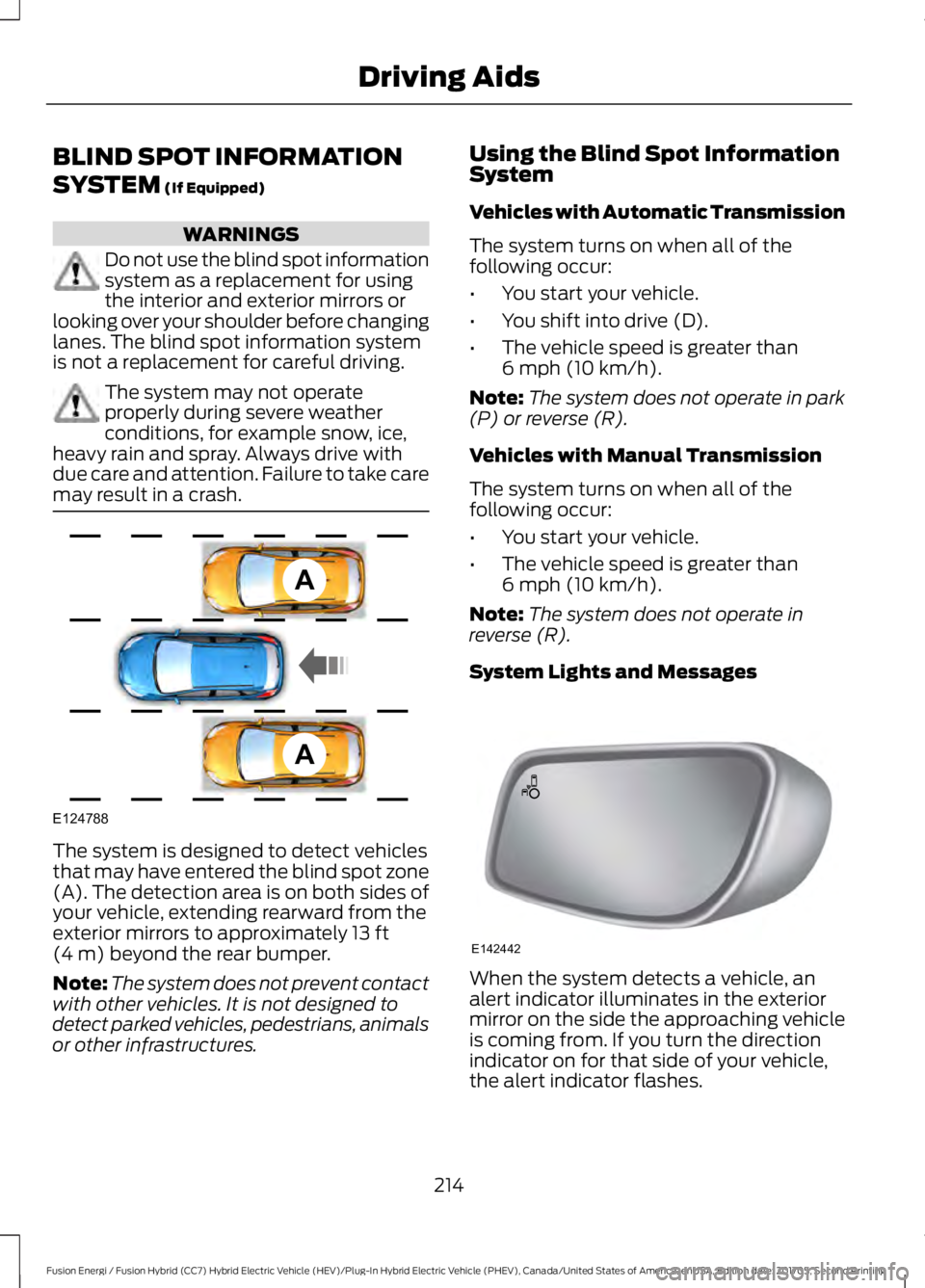
The system is designed to detect vehiclesthat may have entered the blind spot zone(A). The detection area is on both sides ofyour vehicle, extending rearward from theexterior mirrors to approximately 13 ft(4 m) beyond the rear bumper.
Note:The system does not prevent contactwith other vehicles. It is not designed todetect parked vehicles, pedestrians, animalsor other infrastructures.
Using the Blind Spot InformationSystem
Vehicles with Automatic Transmission
The system turns on when all of thefollowing occur:
•You start your vehicle.
•You shift into drive (D).
•The vehicle speed is greater than6 mph (10 km/h).
Note:The system does not operate in park(P) or reverse (R).
Vehicles with Manual Transmission
The system turns on when all of thefollowing occur:
•You start your vehicle.
•The vehicle speed is greater than6 mph (10 km/h).
Note:The system does not operate inreverse (R).
System Lights and Messages
When the system detects a vehicle, analert indicator illuminates in the exteriormirror on the side the approaching vehicleis coming from. If you turn the directionindicator on for that side of your vehicle,the alert indicator flashes.
214
Fusion Energi / Fusion Hybrid (CC7) Hybrid Electric Vehicle (HEV)/Plug-In Hybrid Electric Vehicle (PHEV), Canada/United States of America, enUSA, Edition date: 201705, Second Printing
Driving AidsA
A
E124788 E142442