warning FORD FUSION HYBRID 2014 Workshop Manual
[x] Cancel search | Manufacturer: FORD, Model Year: 2014, Model line: FUSION HYBRID, Model: FORD FUSION HYBRID 2014Pages: 473, PDF Size: 5.93 MB
Page 107 of 473
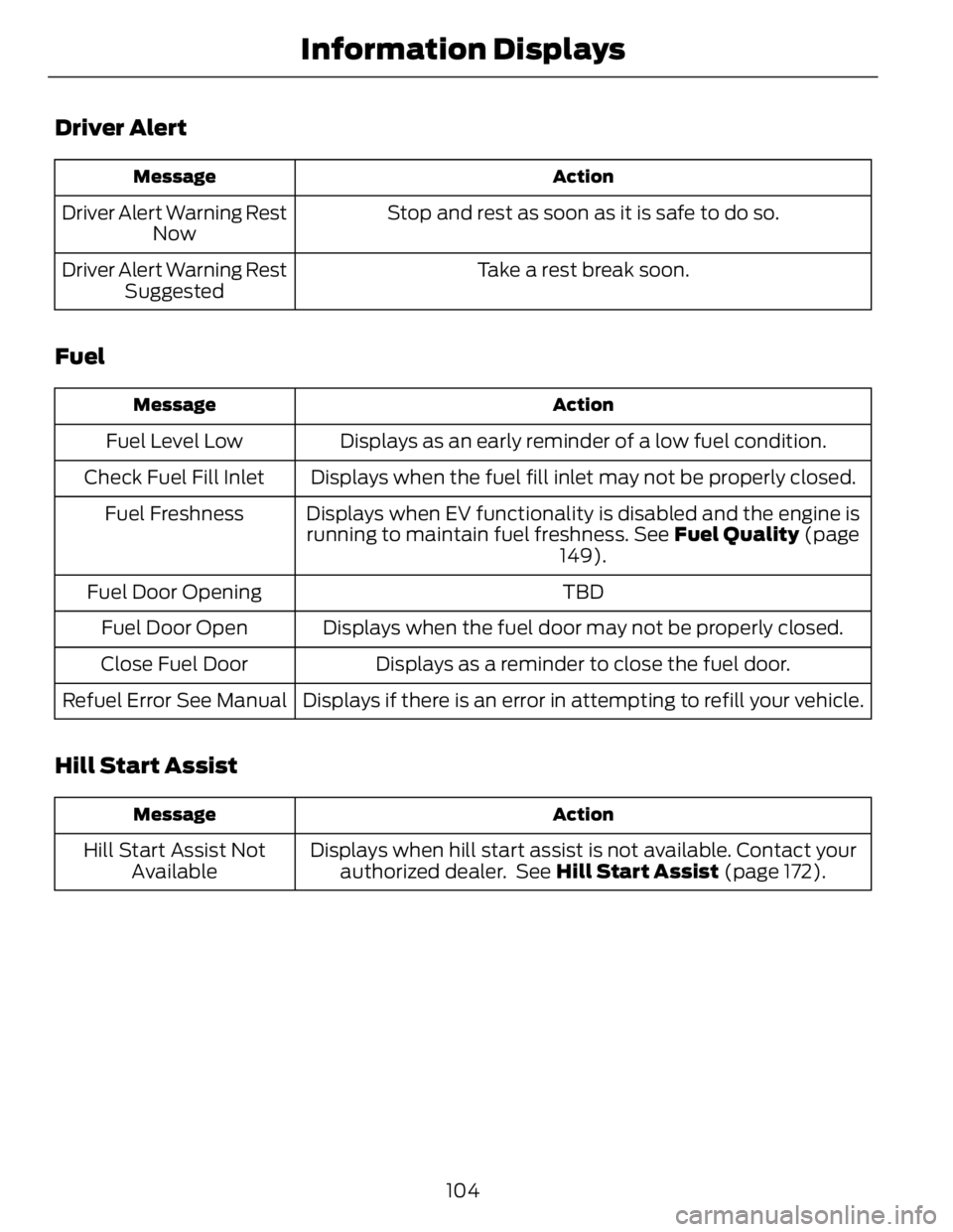
Driver Alert ActionMessage
Stop and rest as soon as it is safe to do so.Driver Alert Warning Rest
Now
Take a rest break soon.Driver Alert Warning Rest
Suggested
Fuel ActionMessage
Displays as an early reminder of a low fuel condition.Fuel Level Low
Displays when the fuel fill inlet may not be properly closed.Check Fuel Fill Inlet
Displays when EV functionality is disabled and the engine is
running to maintain fuel freshness. See Fuel Quality (page
149).Fuel Freshness
TBDFuel Door Opening
Displays when the fuel door may not be properly closed.Fuel Door Open
Displays as a reminder to close the fuel door.Close Fuel Door
Displays if there is an error in attempting to refill your vehicle.Refuel Error See Manual
Hill Start Assist ActionMessage
Displays when hill start assist is not available. Contact your
authorized dealer. See Hill Start Assist (page 172).Hill Start Assist Not
Available
104Information Displays
Page 109 of 473

Lane Keeping System ActionMessage
The system has malfunctioned. Contact your authorized
dealer as soon as possible.Lane Keeping Sys.
Malfunction Service
Required
The system has detected a condition that has caused the
system to be temporarily unavailable.Front Camera Tempor-
arily Not Available
The system has detected a condition that requires the wind-
shield to be cleaned to operate properly.Front Camera Low Visib-
ility Clean Screen
The system has malfunctioned. Contact your authorized
dealer as soon as possible.Front Camera Malfunc-
tion Service Required
Displayed when the system requests the driver to keep their
hands on the steering wheel.Keep Hands on Steering
Wheel
Maintenance ActionMessage
Stop the vehicle as soon as safely possible, turn off the engine.
Check the oil level. If the warning stays on or continues to
come on with your engine running, contact your authorized
dealer as soon as possible.LOW Engine Oil Pressure
Displayed when the engine oil life remaining is 10% or less.
See Engine Oil Check (page 244).Change Engine Oil Soon
Displayed when the oil life left reaches 0%. See Engine Oil
Check (page 244).Oil Change Required
Indicates the brake fluid level is low and the brake system
should be inspected immediately. See Brake Fluid Check
(page 249).Brake Fluid Level LOW
Displays when the brake system needs servicing. Stop the
vehicle in a safe place. Contact your authorized dealer.Check Brake System
Displays when the engine temperature is too high. Stop the
vehicle in a safe place and allow to engine to cool. If the
problem persists, contact your authorized dealer. See Engine
Coolant Check (page 245).Engine Coolant Overtem-
perature
106Information Displays
Page 110 of 473
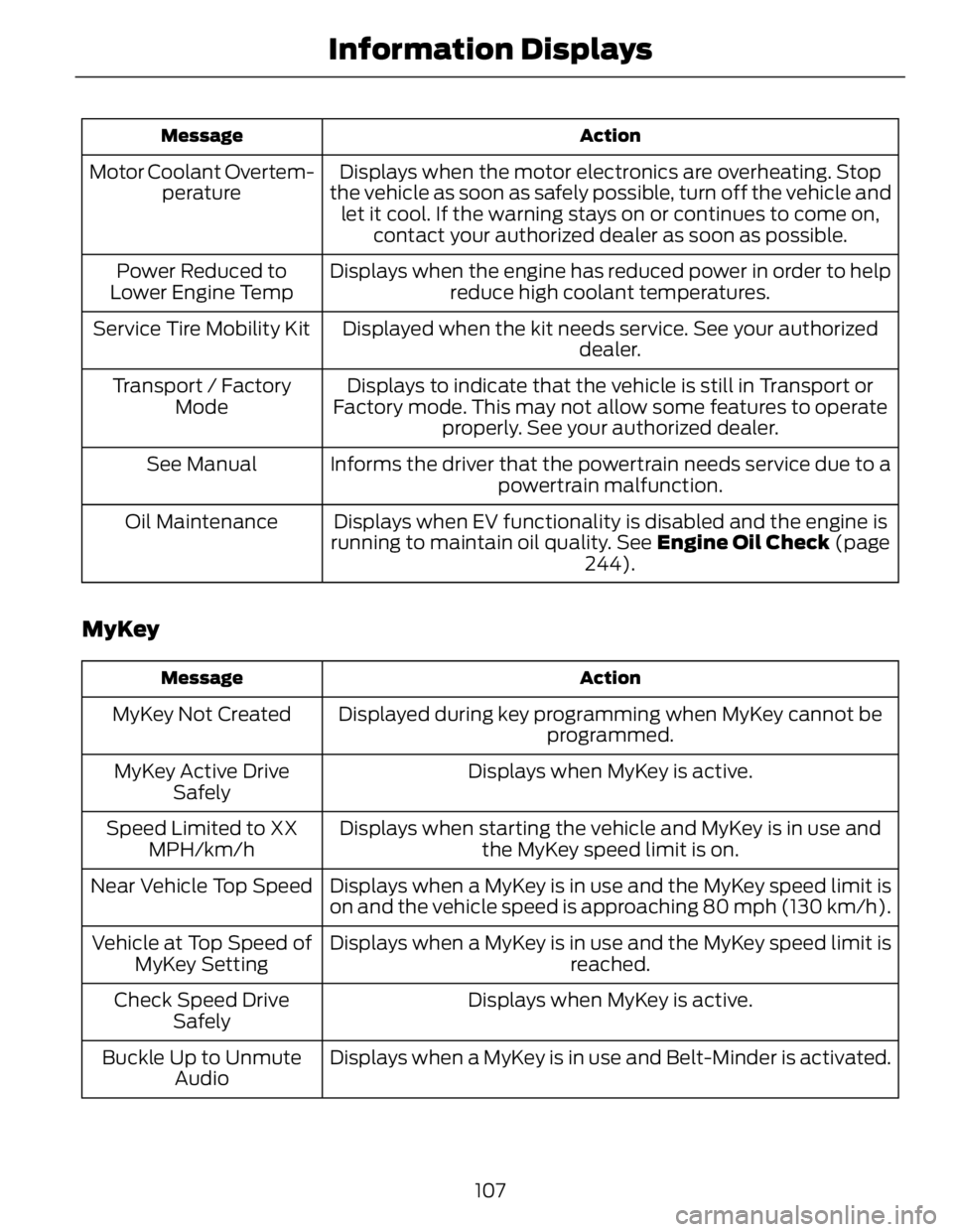
ActionMessage
Displays when the motor electronics are overheating. Stop
the vehicle as soon as safely possible, turn off the vehicle and
let it cool. If the warning stays on or continues to come on,
contact your authorized dealer as soon as possible.Motor Coolant Overtem-
perature
Displays when the engine has reduced power in order to help
reduce high coolant temperatures.Power Reduced to
Lower Engine Temp
Displayed when the kit needs service. See your authorized
dealer.Service Tire Mobility Kit
Displays to indicate that the vehicle is still in Transport or
Factory mode. This may not allow some features to operate
properly. See your authorized dealer.Transport / Factory
Mode
Informs the driver that the powertrain needs service due to a
powertrain malfunction.See Manual
Displays when EV functionality is disabled and the engine is
running to maintain oil quality. See Engine Oil Check (page
244).Oil Maintenance
MyKey ActionMessage
Displayed during key programming when MyKey cannot be
programmed.MyKey Not Created
Displays when MyKey is active.MyKey Active Drive
Safely
Displays when starting the vehicle and MyKey is in use and
the MyKey speed limit is on.Speed Limited to XX
MPH/km/h
Displays when a MyKey is in use and the MyKey speed limit is
on and the vehicle speed is approaching 80 mph (130 km/h).Near Vehicle Top Speed
Displays when a MyKey is in use and the MyKey speed limit is
reached.Vehicle at Top Speed of
MyKey Setting
Displays when MyKey is active.Check Speed Drive
Safely
Displays when a MyKey is in use and Belt-Minder is activated.Buckle Up to Unmute
Audio
107Information Displays
Page 111 of 473
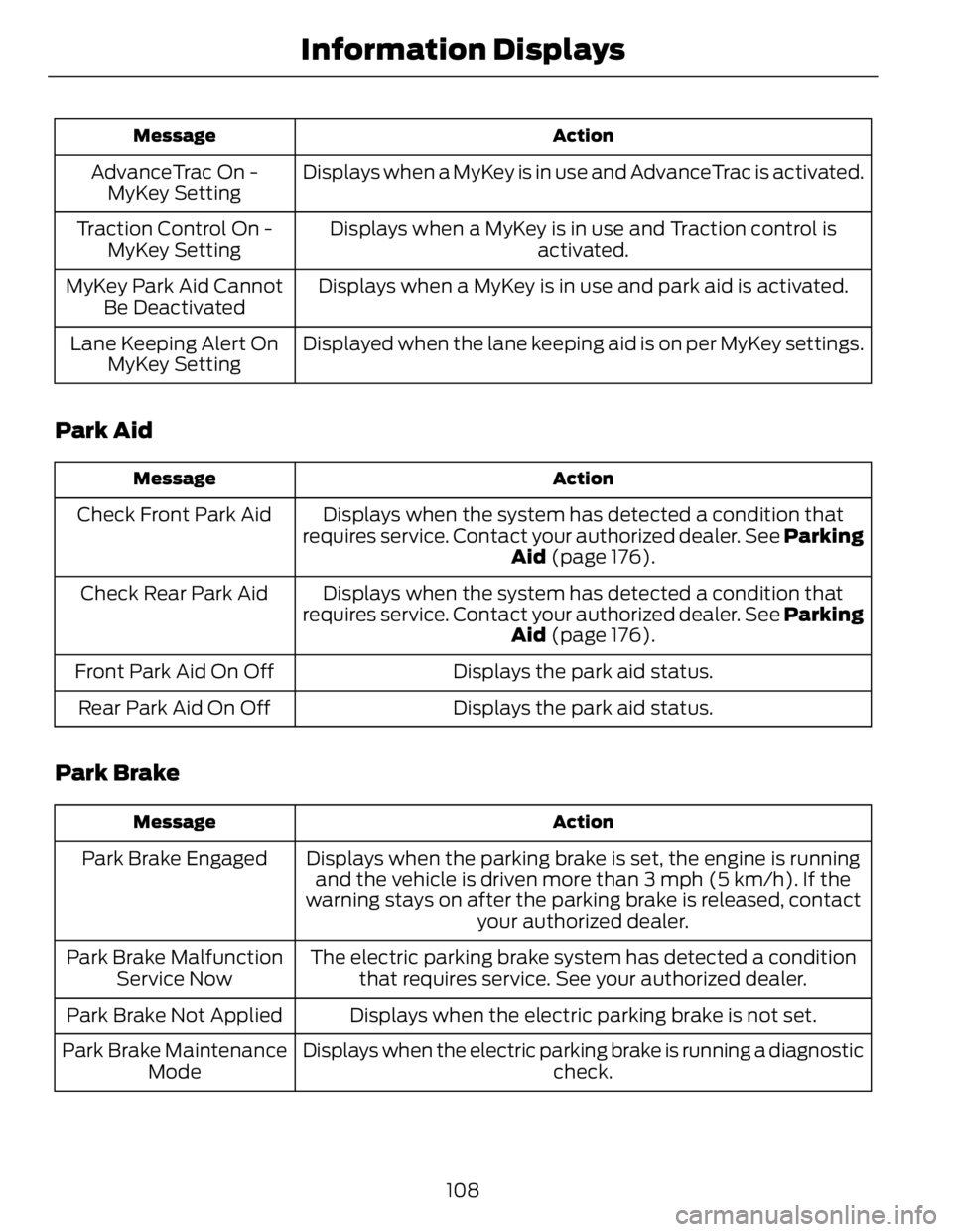
ActionMessage
Displays when a MyKey is in use and AdvanceTrac is activated.AdvanceTrac On -
MyKey Setting
Displays when a MyKey is in use and Traction control is
activated.Traction Control On -
MyKey Setting
Displays when a MyKey is in use and park aid is activated.MyKey Park Aid Cannot
Be Deactivated
Displayed when the lane keeping aid is on per MyKey settings.Lane Keeping Alert On
MyKey Setting
Park Aid ActionMessage
Displays when the system has detected a condition that
requires service. Contact your authorized dealer. See Parking
Aid (page 176).Check Front Park Aid
Displays when the system has detected a condition that
requires service. Contact your authorized dealer. See Parking
Aid (page 176).Check Rear Park Aid
Displays the park aid status.Front Park Aid On Off
Displays the park aid status.Rear Park Aid On Off
Park Brake ActionMessage
Displays when the parking brake is set, the engine is running
and the vehicle is driven more than 3 mph (5 km/h). If the
warning stays on after the parking brake is released, contact
your authorized dealer.Park Brake Engaged
The electric parking brake system has detected a condition
that requires service. See your authorized dealer.Park Brake Malfunction
Service Now
Displays when the electric parking brake is not set.Park Brake Not Applied
Displays when the electric parking brake is running a diagnostic
check.Park Brake Maintenance
Mode
108Information Displays
Page 113 of 473
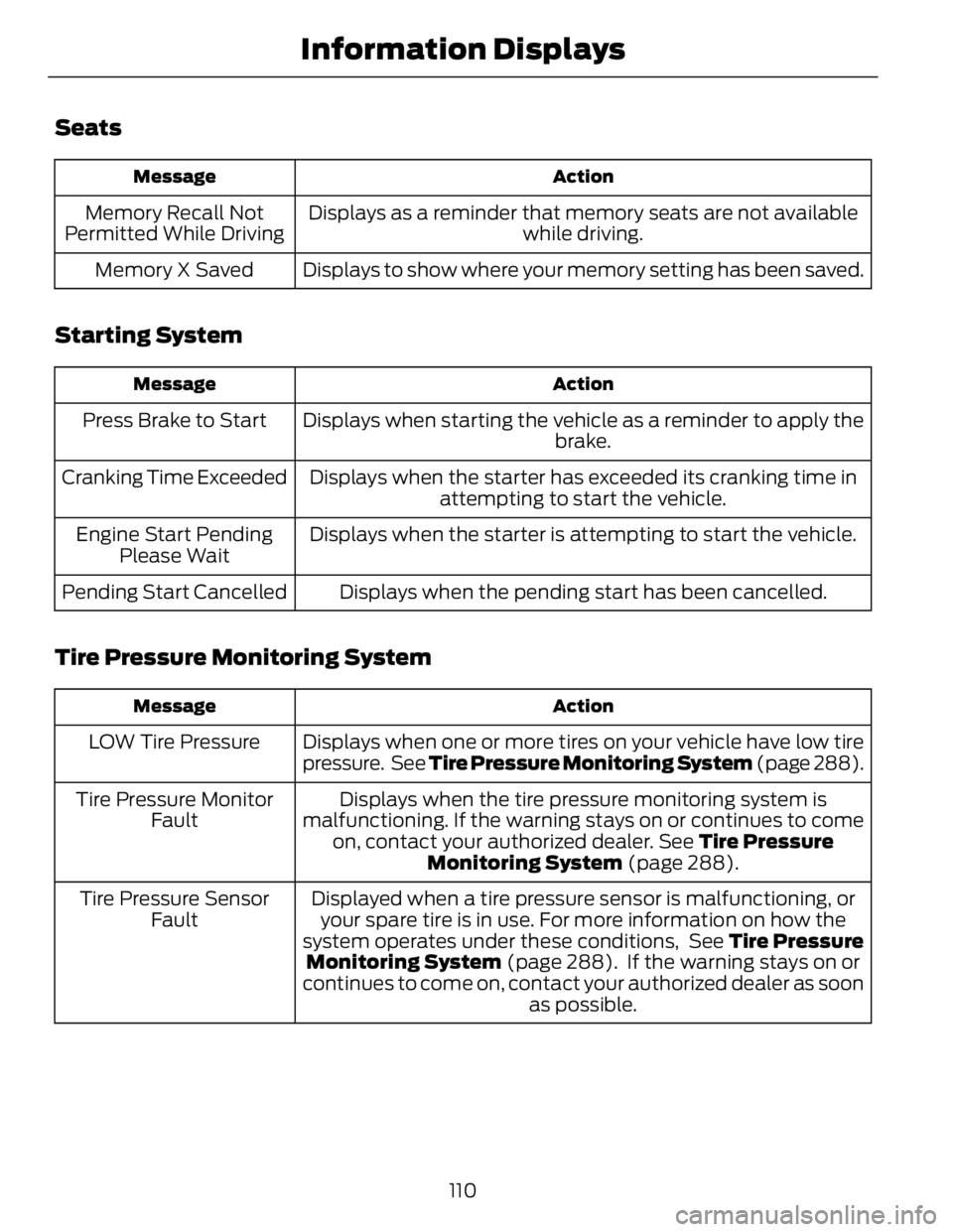
Seats ActionMessage
Displays as a reminder that memory seats are not available
while driving.Memory Recall Not
Permitted While Driving
Displays to show where your memory setting has been saved.Memory X Saved
Starting System ActionMessage
Displays when starting the vehicle as a reminder to apply the
brake.Press Brake to Start
Displays when the starter has exceeded its cranking time in
attempting to start the vehicle.Cranking Time Exceeded
Displays when the starter is attempting to start the vehicle.Engine Start Pending
Please Wait
Displays when the pending start has been cancelled.Pending Start Cancelled
Tire Pressure Monitoring System ActionMessage
Displays when one or more tires on your vehicle have low tire
pressure. See Tire Pressure Monitoring System (page 288).LOW Tire Pressure
Displays when the tire pressure monitoring system is
malfunctioning. If the warning stays on or continues to come
on, contact your authorized dealer. See Tire Pressure
Monitoring System (page 288).Tire Pressure Monitor
Fault
Displayed when a tire pressure sensor is malfunctioning, or
your spare tire is in use. For more information on how the
system operates under these conditions, See Tire Pressure
Monitoring System (page 288). If the warning stays on or
continues to come on, contact your authorized dealer as soon
as possible.Tire Pressure Sensor
Fault
110Information Displays
Page 124 of 473
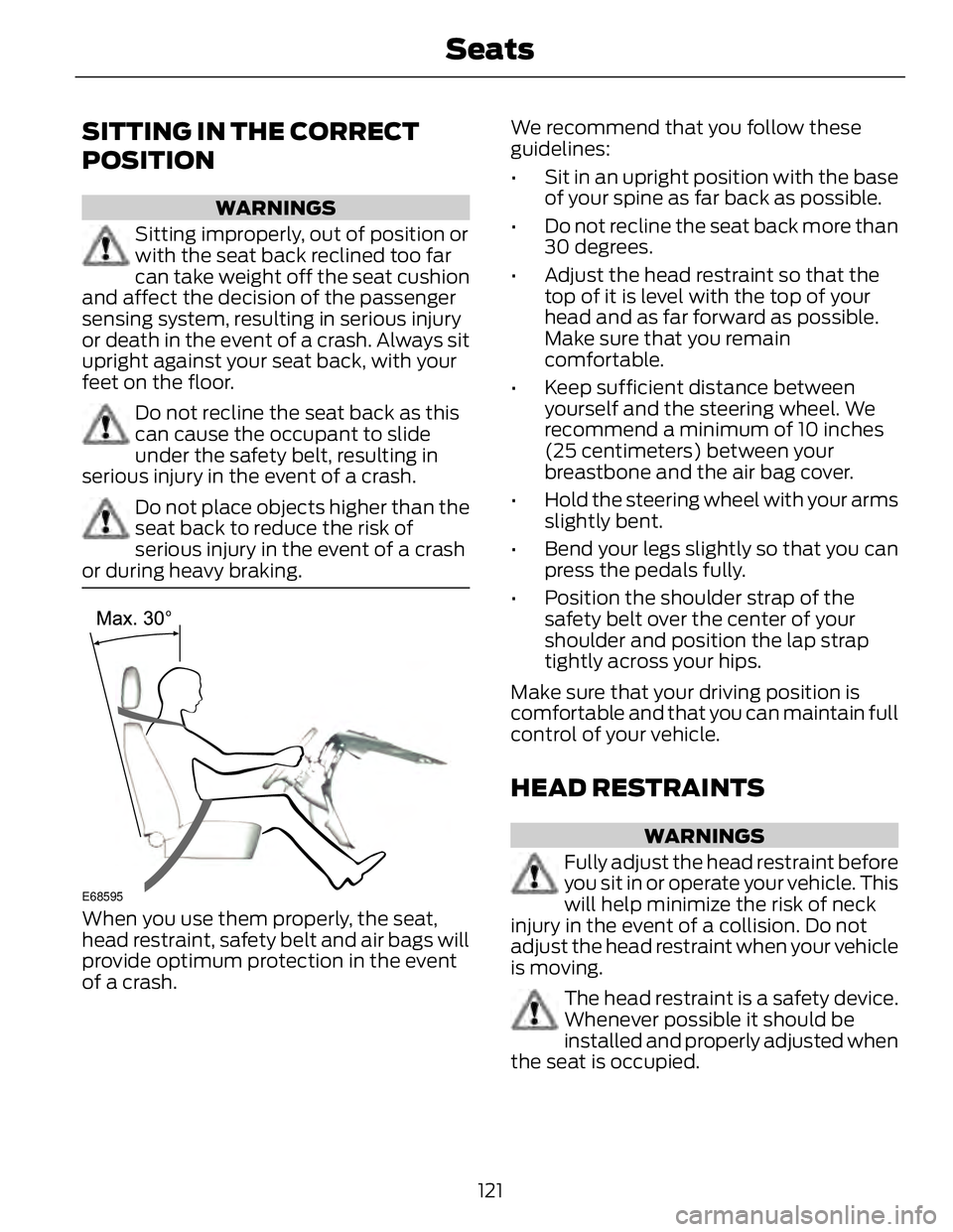
SITTING IN THE CORRECT
POSITION WARNINGS
Sitting improperly, out of position or
with the seat back reclined too far
can take weight off the seat cushion
and affect the decision of the passenger
sensing system, resulting in serious injury
or death in the event of a crash. Always sit
upright against your seat back, with your
feet on the floor.
Do not recline the seat back as this
can cause the occupant to slide
under the safety belt, resulting in
serious injury in the event of a crash.
Do not place objects higher than the
seat back to reduce the risk of
serious injury in the event of a crash
or during heavy braking.
E68595
When you use them properly, the seat,
head restraint, safety belt and air bags will
provide optimum protection in the event
of a crash. We recommend that you follow these
guidelines:
• Sit in an upright position with the base
of your spine as far back as possible.
• Do not recline the seat back more than
30 degrees.
• Adjust the head restraint so that the
top of it is level with the top of your
head and as far forward as possible.
Make sure that you remain
comfortable.
• Keep sufficient distance between
yourself and the steering wheel. We
recommend a minimum of 10 inches
(25 centimeters) between your
breastbone and the air bag cover.
• Hold the steering wheel with your arms
slightly bent.
• Bend your legs slightly so that you can
press the pedals fully.
• Position the shoulder strap of the
safety belt over the center of your
shoulder and position the lap strap
tightly across your hips.
Make sure that your driving position is
comfortable and that you can maintain full
control of your vehicle.
HEAD RESTRAINTS WARNINGS
Fully adjust the head restraint before
you sit in or operate your vehicle. This
will help minimize the risk of neck
injury in the event of a collision. Do not
adjust the head restraint when your vehicle
is moving.
The head restraint is a safety device.
Whenever possible it should be
installed and properly adjusted when
the seat is occupied.
121Seats
Page 125 of 473
WARNINGS
Install the head restraint properly to
help minimize the risk of neck injury
in the event of a collision.
Note: Adjust the seat back to an upright
driving position before adjusting the head
restraint. Adjust the head restraint so that
the top of it is level with the top of your head
and as far forward as possible. Make sure
that you remain comfortable. If you are
extremely tall, adjust the head restraint to
its highest position.
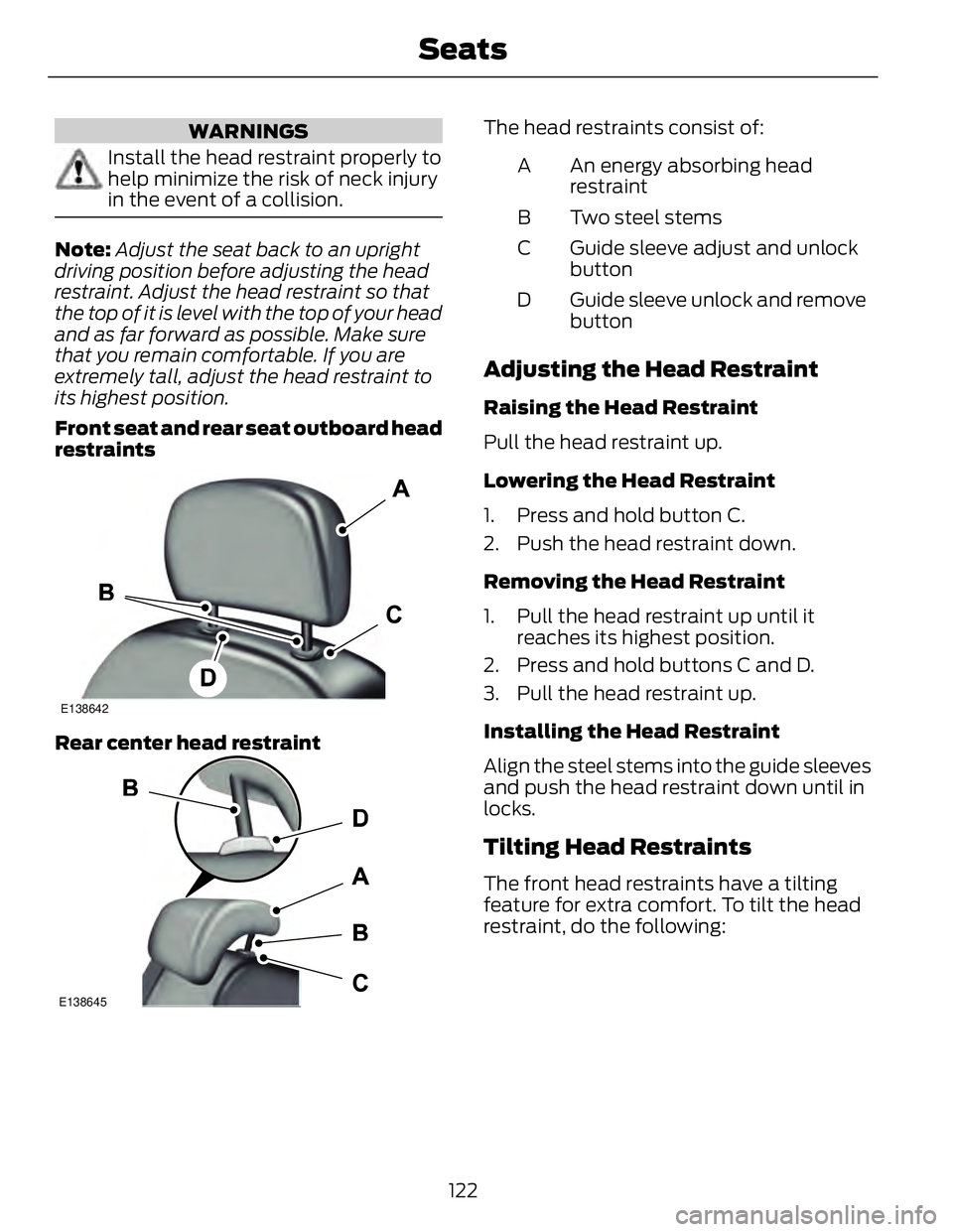
Front seat and rear seat outboard head
restraints E138642
Rear center head restraint
E138645 The head restraints consist of:
An energy absorbing head
restraintA
Two steel stemsB
Guide sleeve adjust and unlock
buttonC
Guide sleeve unlock and remove
buttonD
Adjusting the Head Restraint Raising the Head Restraint
Pull the head restraint up.
Lowering the Head Restraint
1. Press and hold button C.
2. Push the head restraint down.
Removing the Head Restraint
1. Pull the head restraint up until it
reaches its highest position.
2. Press and hold buttons C and D.
3. Pull the head restraint up.
Installing the Head Restraint
Align the steel stems into the guide sleeves
and push the head restraint down until in
locks.
Tilting Head Restraints The front head restraints have a tilting
feature for extra comfort. To tilt the head
restraint, do the following:
122Seats
Page 126 of 473
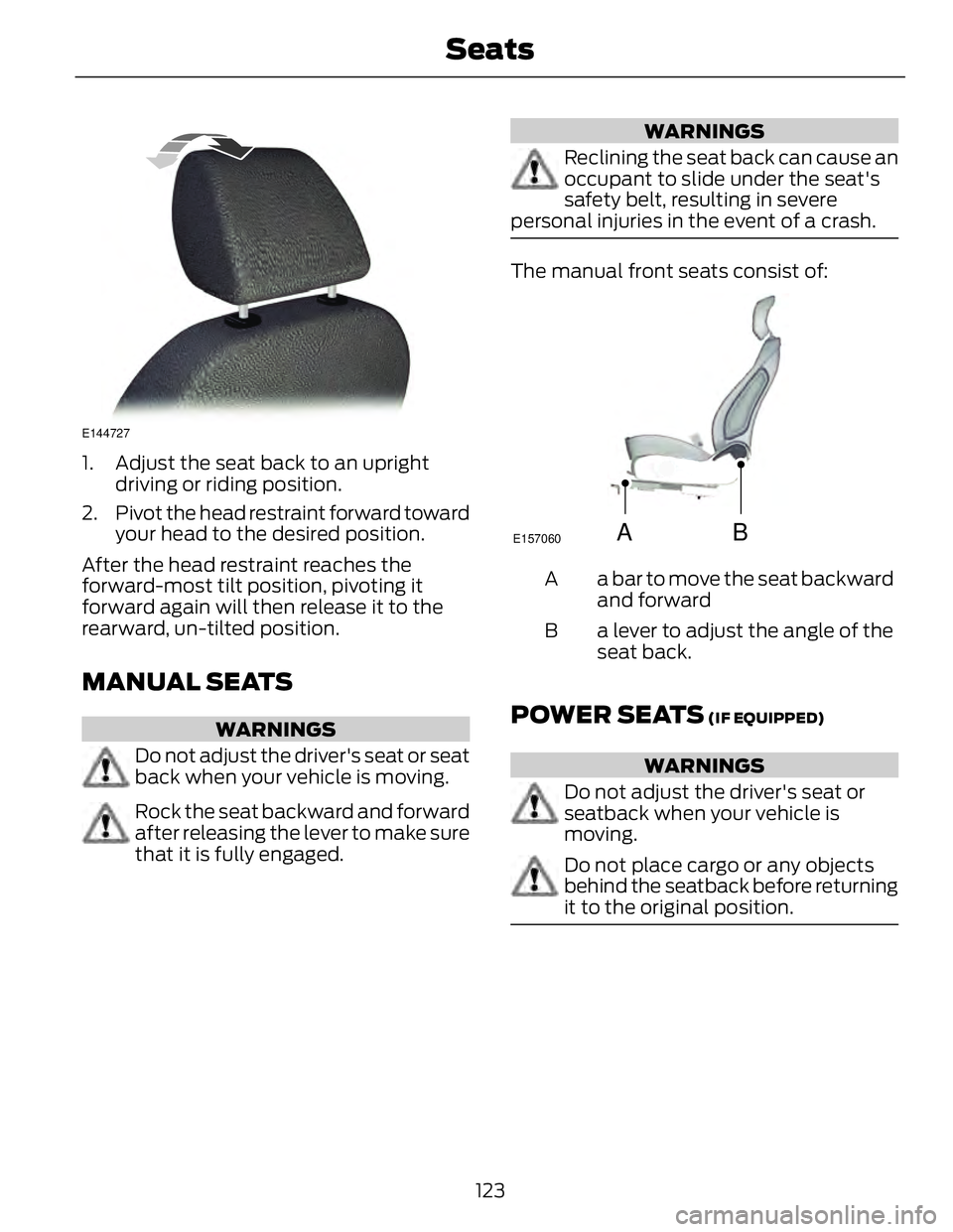
E144727
1. Adjust the seat back to an upright
driving or riding position.
2. Pivot the head restraint forward toward
your head to the desired position.
After the head restraint reaches the
forward-most tilt position, pivoting it
forward again will then release it to the
rearward, un-tilted position.
MANUAL SEATS WARNINGS
Do not adjust the driver's seat or seat
back when your vehicle is moving.
Rock the seat backward and forward
after releasing the lever to make sure
that it is fully engaged. WARNINGS
Reclining the seat back can cause an
occupant to slide under the seat's
safety belt, resulting in severe
personal injuries in the event of a crash.
The manual front seats consist of:
A B E157060
a bar to move the seat backward
and forwardA
a lever to adjust the angle of the
seat back.B
POWER SEATS (IF EQUIPPED)
WARNINGS
Do not adjust the driver's seat or
seatback when your vehicle is
moving.
Do not place cargo or any objects
behind the seatback before returning
it to the original position.
123Seats
Page 127 of 473
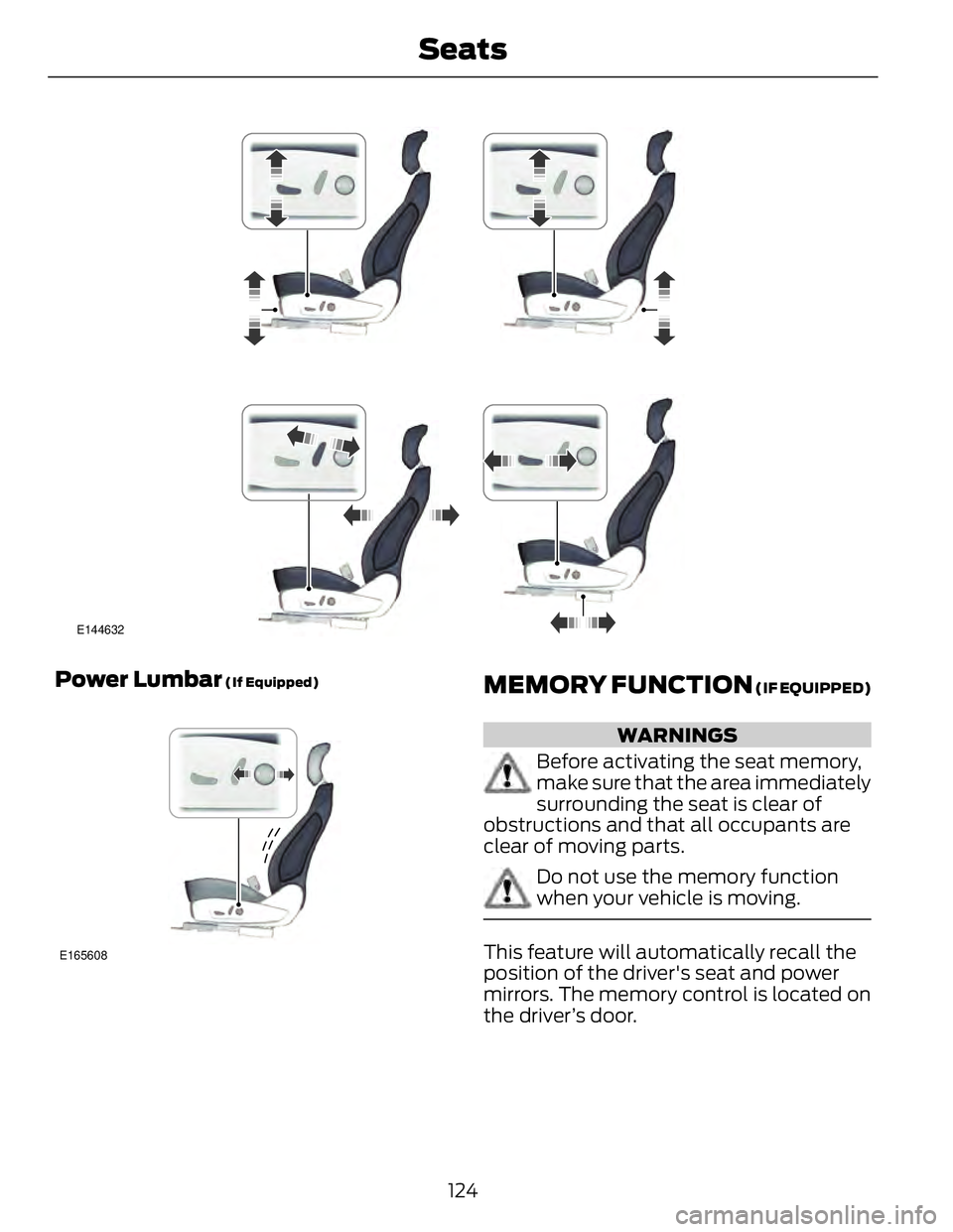
E144632
Power Lumbar (If Equipped)
E165608
MEMORY FUNCTION (IF EQUIPPED)
WARNINGS
Before activating the seat memory,
make sure that the area immediately
surrounding the seat is clear of
obstructions and that all occupants are
clear of moving parts.
Do not use the memory function
when your vehicle is moving.
This feature will automatically recall the
position of the driver's seat and power
mirrors. The memory control is located on
the driver’s door.
124Seats
Page 130 of 473
HEATED SEATS (IF EQUIPPED)
WARNING
People who are unable to feel pain
to their skin because of advanced
age, chronic illness, diabetes, spinal
cord injury, medication, alcohol use,
exhaustion or other physical conditions,
must exercise care when using the heated
seat. The heated seat may cause burns
even at low temperatures, especially if
used for long periods of time. Do not place
anything on the seat that insulates against
heat, such as a blanket or cushion. This
may cause the heated seat to overheat.
Do not puncture the seat with pins, needles
or other pointed objects. This may damage
the heating element which may cause the
heated seat to overheat. An overheated
seat may cause serious personal injury.
Do not do the following:
• Place heavy objects on the seat.
• Operate the heated seat if water or any
other liquid is spilled on the seat. Allow
the seat to dry thoroughly.
• Operate the heated seats unless the
engine is running. Doing so can cause
the battery to lose charge.
E146941
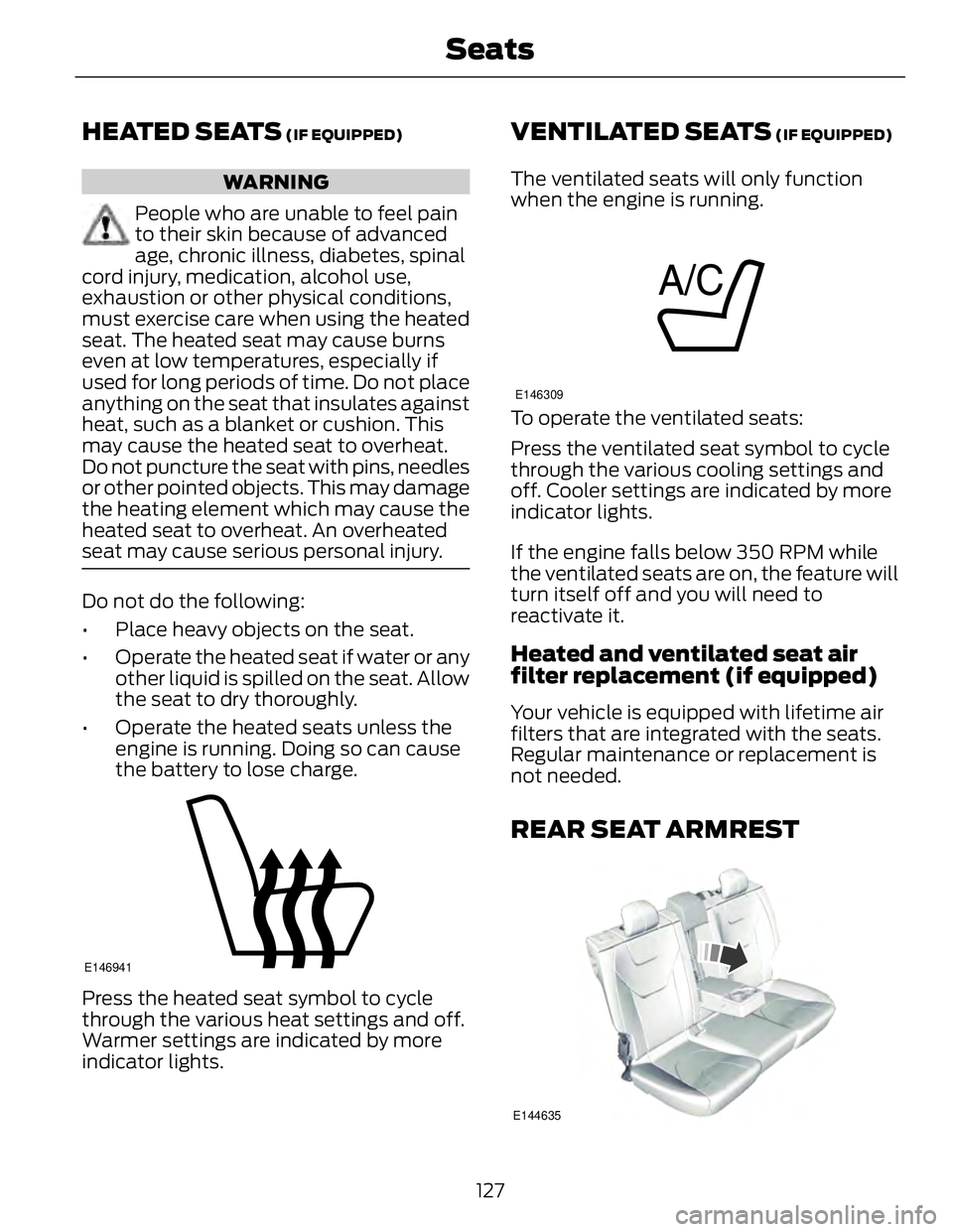
Press the heated seat symbol to cycle
through the various heat settings and off.
Warmer settings are indicated by more
indicator lights. VENTILATED SEATS (IF EQUIPPED)
The ventilated seats will only function
when the engine is running. E146309
To operate the ventilated seats:
Press the ventilated seat symbol to cycle
through the various cooling settings and
off. Cooler settings are indicated by more
indicator lights.
If the engine falls below 350 RPM while
the ventilated seats are on, the feature will
turn itself off and you will need to
reactivate it.
Heated and ventilated seat air
filter replacement (if equipped) Your vehicle is equipped with lifetime air
filters that are integrated with the seats.
Regular maintenance or replacement is
not needed.
REAR SEAT ARMREST
E144635
127Seats