open bonnet FORD GRANADA 1985 Service User Guide
[x] Cancel search | Manufacturer: FORD, Model Year: 1985, Model line: GRANADA, Model: FORD GRANADA 1985Pages: 255, PDF Size: 14.98 MB
Page 167 of 255
Later models
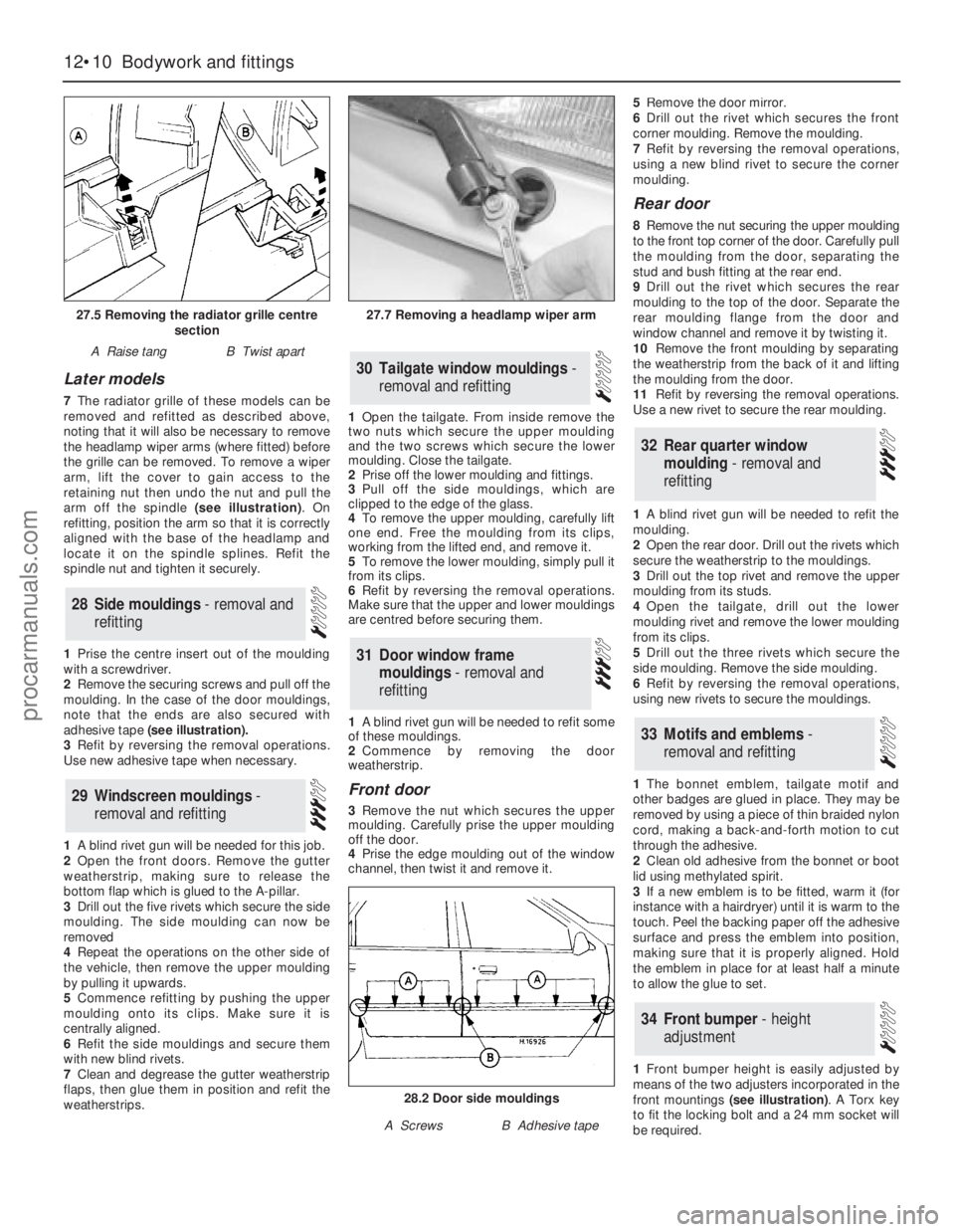
7The radiator grille of these models can be
removed and refitted as described above,
noting that it will also be necessary to remove
the headlamp wiper arms (where fitted) before
the grille can be removed. To remove a wiper
arm, lift the cover to gain access to the
retaining nut then undo the nut and pull the
arm off the spindle (see illustration). On
refitting, position the arm so that it is correctly
aligned with the base of the headlamp and
locate it on the spindle splines. Refit the
spindle nut and tighten it securely.
1Prise the centre insert out of the moulding
with a screwdriver.
2Remove the securing screws and pull off the
moulding. In the case of the door mouldings,
note that the ends are also secured with
adhesive tape (see illustration).
3Refit by reversing the removal operations.
Use new adhesive tape when necessary.
1A blind rivet gun will be needed for this job.
2Open the front doors. Remove the gutter
weatherstrip, making sure to release the
bottom flap which is glued to the A-pillar.
3Drill out the five rivets which secure the side
moulding. The side moulding can now be
removed
4Repeat the operations on the other side of
the vehicle, then remove the upper moulding
by pulling it upwards.
5Commence refitting by pushing the upper
moulding onto its clips. Make sure it is
centrally aligned.
6Refit the side mouldings and secure them
with new blind rivets.
7Clean and degrease the gutter weatherstrip
flaps, then glue them in position and refit the
weatherstrips.1Open the tailgate. From inside remove the
two nuts which secure the upper moulding
and the two screws which secure the lower
moulding. Close the tailgate.
2Prise off the lower moulding and fittings.
3Pull off the side mouldings, which are
clipped to the edge of the glass.
4To remove the upper moulding, carefully lift
one end. Free the moulding from its clips,
working from the lifted end, and remove it.
5To remove the lower moulding, simply pull it
from its clips.
6Refit by reversing the removal operations.
Make sure that the upper and lower mouldings
are centred before securing them.
1A blind rivet gun will be needed to refit some
of these mouldings.
2Commence by removing the door
weatherstrip.
Front door
3Remove the nut which secures the upper
moulding. Carefully prise the upper moulding
off the door.
4Prise the edge moulding out of the window
channel, then twist it and remove it. 5Remove the door mirror.
6Drill out the rivet which secures the front
corner moulding. Remove the moulding.
7Refit by reversing the removal operations,
using a new blind rivet to secure the corner
moulding.
Rear door
8Remove the nut securing the upper moulding
to the front top corner of the door. Carefully pull
the moulding from the door, separating the
stud and bush fitting at the rear end.
9Drill out the rivet which secures the rear
moulding to the top of the door. Separate the
rear moulding flange from the door and
window channel and remove it by twisting it.
10Remove the front moulding by separating
the weatherstrip from the back of it and lifting
the moulding from the door.
11Refit by reversing the removal operations.
Use a new rivet to secure the rear moulding.
1A blind rivet gun will be needed to refit the
moulding.
2Open the rear door. Drill out the rivets which
secure the weatherstrip to the mouldings.
3Drill out the top rivet and remove the upper
moulding from its studs.
4Open the tailgate, drill out the lower
moulding rivet and remove the lower moulding
from its clips.
5Drill out the three rivets which secure the
side moulding. Remove the side moulding.
6Refit by reversing the removal operations,
using new rivets to secure the mouldings.
1The bonnet emblem, tailgate motif and
other badges are glued in place. They may be
removed by using a piece of thin braided nylon
cord, making a back-and-forth motion to cut
through the adhesive.
2Clean old adhesive from the bonnet or boot
lid using methylated spirit.
3If a new emblem is to be fitted, warm it (for
instance with a hairdryer) until it is warm to the
touch. Peel the backing paper off the adhesive
surface and press the emblem into position,
making sure that it is properly aligned. Hold
the emblem in place for at least half a minute
to allow the glue to set.
1Front bumper height is easily adjusted by
means of the two adjusters incorporated in the
front mountings (see illustration). A Torx key
to fit the locking bolt and a 24 mm socket will
be required.
34Front bumper - height
adjustment
33Motifs and emblems -
removal and refitting
32Rear quarter window
moulding - removal and
refitting
31Door window frame
mouldings - removal and
refitting
30Tailgate window mouldings -
removal and refitting
29Windscreen mouldings -
removal and refitting
28Side mouldings - removal and
refitting
12•10Bodywork and fittings
27.5 Removing the radiator grille centre
section
A Raise tangB Twist apart
27.7 Removing a headlamp wiper arm
28.2 Door side mouldings
A ScrewsB Adhesive tape
procarmanuals.com
Page 181 of 255
the circuit between the relevant connector and
the battery is problem-free.
13Continue to check the remainder of the
circuit in the same fashion.
14When a point is reached at which no
voltage is present, the problem must lie
between that point and the previous test point
with voltage. Most problems can be traced to
a broken, corroded or loose connection.
Finding a short-circuit
15To check for a short-circuit, first disconnect
the load(s) from the circuit (loads are the
components which draw current from a circuit,
such as bulbs, motors, heating elements, etc).
16Remove the relevant fuse from the circuit,
and connect a circuit tester or voltmeter to the
fuse connections.
17Switch on the circuit, bearing in mind that
some circuits are live only when the ignition
switch is moved to a particular position.
18If voltage is present (indicated either by
the tester bulb lighting or a voltmeter reading),
this means that there is a short-circuit.
19If no voltage is present, but the fuse still
blows with the load(s) connected, this
indicates an internal fault in the load(s).
Finding an earth fault
20The battery negative terminal is connected
to “earth” - the metal of the engine/transmission
and the car body - and most systems are wired
so that they only receive a positive feed, the
current returning via the metal of the car body.
This means that the component mounting andthe body form part of that circuit. Loose or
corroded mountings can therefore cause a range
of electrical faults, ranging from total failure of a
circuit, to a puzzling partial fault. In particular,
lights may shine dimly (especially when another
circuit sharing the same earth is in operation),
motors (eg wiper motors or the radiator cooling
fan motor) may run slowly, and the operation of
one circuit may have an apparently-unrelated
effect on another. Note that on many vehicles,
earth straps are used between certain
components, such as the engine/transmission
and the body, usually where there is no metal-to-
metal contact between components, due to
flexible rubber mountings, etc.
21To check whether a component is properly
earthed, disconnect the battery, and connect
one lead of an ohmmeter to a known good
earth point. Connect the other lead to the wire
or earth connection being tested. The
resistance reading should be zero; if not,
check the connection as follows.
22If an earth connection is thought to be
faulty, dismantle the connection, and clean
back to bare metal both the bodyshell and the
wire terminal, or the component’s earth
connection mating surface. Be careful to
remove all traces of dirt and corrosion, then
use a knife to trim away any paint, so that a
clean metal-to-metal joint is made. On
reassembly, tighten the joint fasteners
securely; if a wire terminal is being refitted, use
serrated washers between the terminal and
the bodyshell, to ensure a clean and secure
connection. When the connection is remade,
prevent the onset of corrosion in the future byapplying a coat of petroleum jelly or silicone-
based grease, or by spraying on (at regular
intervals) a proprietary ignition sealer, or a
water-dispersant lubricant.
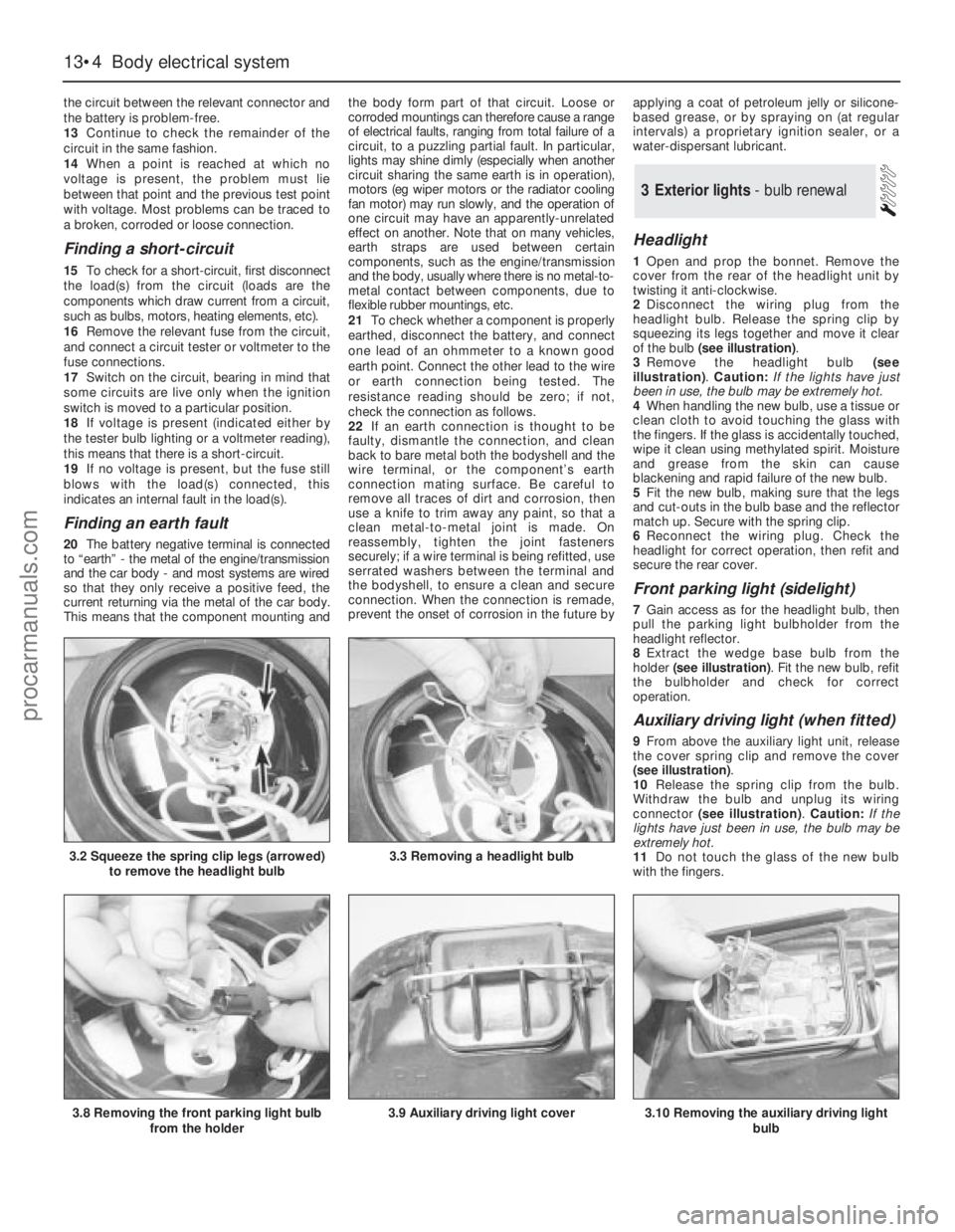
Headlight
1Open and prop the bonnet. Remove the
cover from the rear of the headlight unit by
twisting it anti-clockwise.
2Disconnect the wiring plug from the
headlight bulb. Release the spring clip by
squeezing its legs together and move it clear
of the bulb (see illustration).
3Remove the headlight bulb (see
illustration). Caution: If the lights have just
been in use, the bulb may be extremely hot.
4When handling the new bulb, use a tissue or
clean cloth to avoid touching the glass with
the fingers. If the glass is accidentally touched,
wipe it clean using methylated spirit. Moisture
and grease from the skin can cause
blackening and rapid failure of the new bulb.
5Fit the new bulb, making sure that the legs
and cut-outs in the bulb base and the reflector
match up. Secure with the spring clip.
6Reconnect the wiring plug. Check the
headlight for correct operation, then refit and
secure the rear cover.
Front parking light (sidelight)
7Gain access as for the headlight bulb, then
pull the parking light bulbholder from the
headlight reflector.
8Extract the wedge base bulb from the
holder (see illustration). Fit the new bulb, refit
the bulbholder and check for correct
operation.
Auxiliary driving light (when fitted)
9From above the auxiliary light unit, release
the cover spring clip and remove the cover
(see illustration).
10Release the spring clip from the bulb.
Withdraw the bulb and unplug its wiring
connector (see illustration). Caution: If the
lights have just been in use, the bulb may be
extremely hot.
11Do not touch the glass of the new bulb
with the fingers.
3Exterior lights - bulb renewal
13•4Body electrical system
3.2 Squeeze the spring clip legs (arrowed)
to remove the headlight bulb3.3 Removing a headlight bulb
3.8 Removing the front parking light bulb
from the holder3.9 Auxiliary driving light cover3.10 Removing the auxiliary driving light
bulb
procarmanuals.com
Page 185 of 255
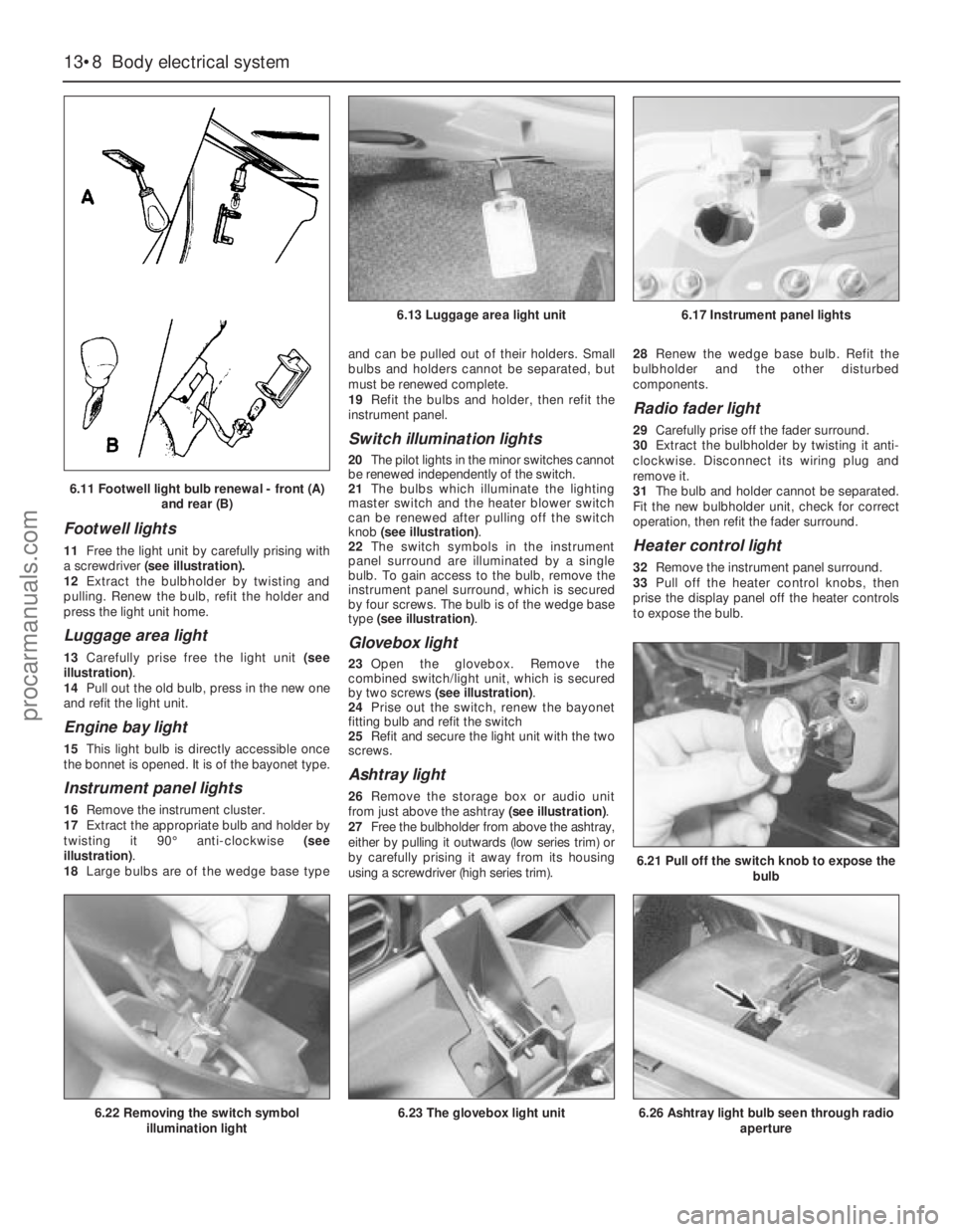
Footwell lights
11Free the light unit by carefully prising with
a screwdriver(see illustration).
12Extract the bulbholder by twisting and
pulling. Renew the bulb, refit the holder and
press the light unit home.
Luggage area light
13Carefully prise free the light unit (see
illustration).
14Pull out the old bulb, press in the new one
and refit the light unit.
Engine bay light
15This light bulb is directly accessible once
the bonnet is opened. It is of the bayonet type.
Instrument panel lights
16Remove the instrument cluster.
17Extract the appropriate bulb and holder by
twisting it 90°anti-clockwise (see
illustration).
18Large bulbs are of the wedge base typeand can be pulled out of their holders. Small
bulbs and holders cannot be separated, but
must be renewed complete.
19Refit the bulbs and holder, then refit the
instrument panel.
Switch illumination lights
20The pilot lights in the minor switches cannot
be renewed independently of the switch.
21The bulbs which illuminate the lighting
master switch and the heater blower switch
can be renewed after pulling off the switch
knob (see illustration).
22The switch symbols in the instrument
panel surround are illuminated by a single
bulb. To gain access to the bulb, remove the
instrument panel surround, which is secured
by four screws. The bulb is of the wedge base
type (see illustration).
Glovebox light
23Open the glovebox. Remove the
combined switch/light unit, which is secured
by two screws (see illustration).
24Prise out the switch, renew the bayonet
fitting bulb and refit the switch
25Refit and secure the light unit with the two
screws.
Ashtray light
26Remove the storage box or audio unit
from just above the ashtray (see illustration).
27Free the bulbholder from above the ashtray,
either by pulling it outwards (low series trim) or
by carefully prising it away from its housing
using a screwdriver (high series trim).28Renew the wedge base bulb. Refit the
bulbholder and the other disturbed
components.
Radio fader light
29Carefully prise off the fader surround.
30Extract the bulbholder by twisting it anti-
clockwise. Disconnect its wiring plug and
remove it.
31The bulb and holder cannot be separated.
Fit the new bulbholder unit, check for correct
operation, then refit the fader surround.
Heater control light
32Remove the instrument panel surround.
33Pull off the heater control knobs, then
prise the display panel off the heater controls
to expose the bulb.
13•8Body electrical system
6.21 Pull off the switch knob to expose the
bulb
6.26 Ashtray light bulb seen through radio
aperture6.22 Removing the switch symbol
illumination light6.23 The glovebox light unit
6.13 Luggage area light unit6.17 Instrument panel lights
6.11 Footwell light bulb renewal - front (A)
and rear (B)
procarmanuals.com
Page 190 of 255
Heated rear window switch
Models before April 1992
50Remove the instrument panel surround,
which is secured by four screws.
51Carefully prise the switch from its location,
disconnect the multi-plug and remove it.
Models from April 1992
52Using a small flat-bladed screwdriver,
carefully prise the switch out of the centre
facia vent panel and disconnect the wiring
connector.
53On refitting, reconnect the wiring
connector and push the switch in until it clicks
into position.
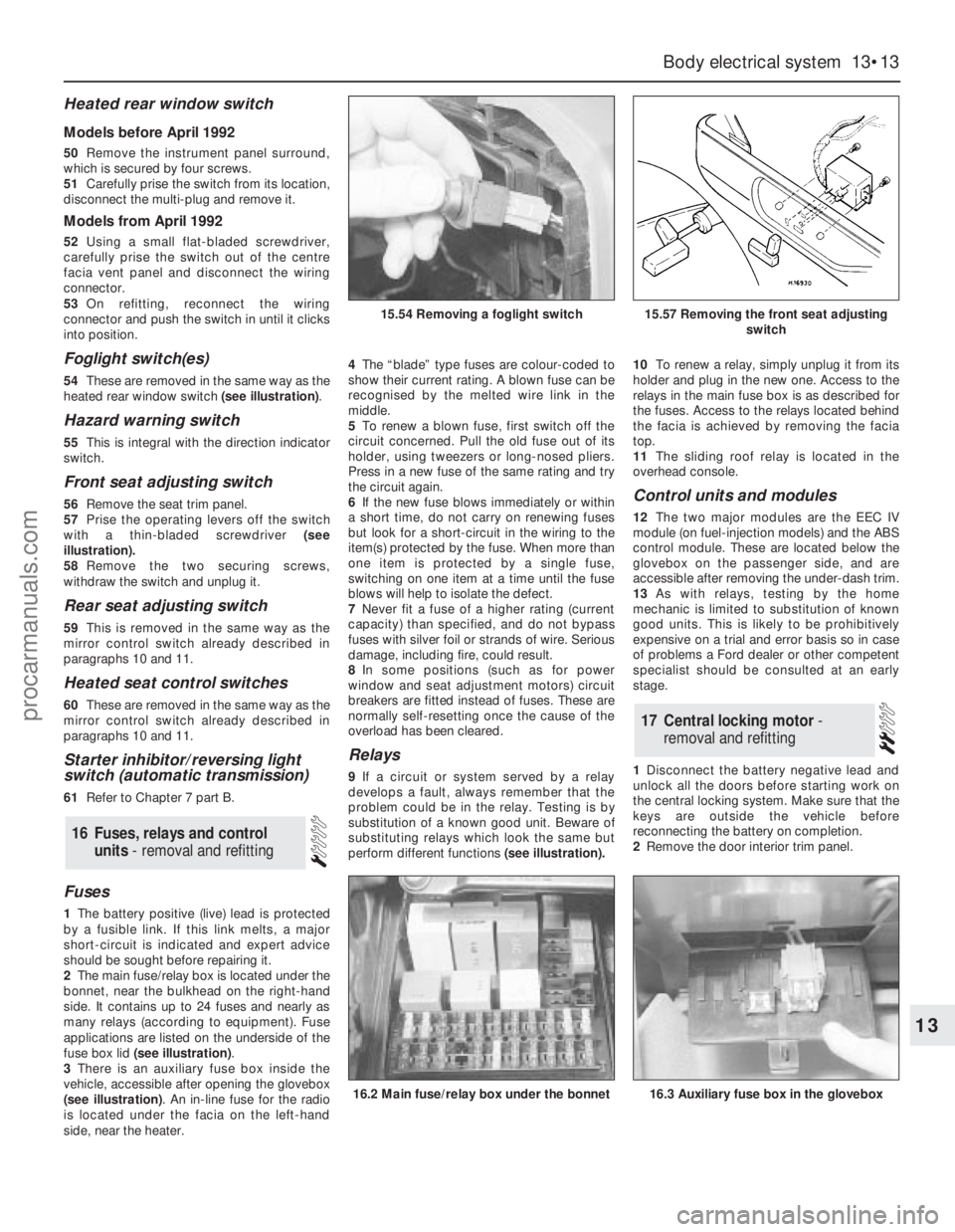
Foglight switch(es)
54These are removed in the same way as the
heated rear window switch (see illustration).
Hazard warning switch
55This is integral with the direction indicator
switch.
Front seat adjusting switch
56Remove the seat trim panel.
57Prise the operating levers off the switch
with a thin-bladed screwdriver (see
illustration).
58Remove the two securing screws,
withdraw the switch and unplug it.
Rear seat adjusting switch
59This is removed in the same way as the
mirror control switch already described in
paragraphs 10 and 11.
Heated seat control switches
60These are removed in the same way as the
mirror control switch already described in
paragraphs 10 and 11.
Starter inhibitor/reversing light
switch (automatic transmission)
61Refer to Chapter 7 part B.
Fuses
1The battery positive (live) lead is protected
by a fusible link. If this link melts, a major
short-circuit is indicated and expert advice
should be sought before repairing it.
2The main fuse/relay box is located under the
bonnet, near the bulkhead on the right-hand
side. It contains up to 24 fuses and nearly as
many relays (according to equipment). Fuse
applications are listed on the underside of the
fuse box lid (see illustration).
3There is an auxiliary fuse box inside the
vehicle, accessible after opening the glovebox
(see illustration). An in-line fuse for the radio
is located under the facia on the left-hand
side, near the heater.4The“blade” type fuses are colour-coded to
show their current rating. A blown fuse can be
recognised by the melted wire link in the
middle.
5To renew a blown fuse, first switch off the
circuit concerned. Pull the old fuse out of its
holder, using tweezers or long-nosed pliers.
Press in a new fuse of the same rating and try
the circuit again.
6If the new fuse blows immediately or within
a short time, do not carry on renewing fuses
but look for a short-circuit in the wiring to the
item(s) protected by the fuse. When more than
one item is protected by a single fuse,
switching on one item at a time until the fuse
blows will help to isolate the defect.
7Never fit a fuse of a higher rating (current
capacity) than specified, and do not bypass
fuses with silver foil or strands of wire. Serious
damage, including fire, could result.
8In some positions (such as for power
window and seat adjustment motors) circuit
breakers are fitted instead of fuses. These are
normally self-resetting once the cause of the
overload has been cleared.
Relays
9If a circuit or system served by a relay
develops a fault, always remember that the
problem could be in the relay. Testing is by
substitution of a known good unit. Beware of
substituting relays which look the same but
perform different functions(see illustration).10To renew a relay, simply unplug it from its
holder and plug in the new one. Access to the
relays in the main fuse box is as described for
the fuses. Access to the relays located behind
the facia is achieved by removing the facia
top.
11The sliding roof relay is located in the
overhead console.
Control units and modules
12The two major modules are the EEC IV
module (on fuel-injection models) and the ABS
control module. These are located below the
glovebox on the passenger side, and are
accessible after removing the under-dash trim.
13As with relays, testing by the home
mechanic is limited to substitution of known
good units. This is likely to be prohibitively
expensive on a trial and error basis so in case
of problems a Ford dealer or other competent
specialist should be consulted at an early
stage.
1Disconnect the battery negative lead and
unlock all the doors before starting work on
the central locking system. Make sure that the
keys are outside the vehicle before
reconnecting the battery on completion.
2Remove the door interior trim panel.
17Central locking motor -
removal and refitting
16Fuses, relays and control
units - removal and refitting
Body electrical system 13•13
13
15.54 Removing a foglight switch15.57 Removing the front seat adjusting
switch
16.2 Main fuse/relay box under the bonnet16.3 Auxiliary fuse box in the glovebox
procarmanuals.com
Page 193 of 255
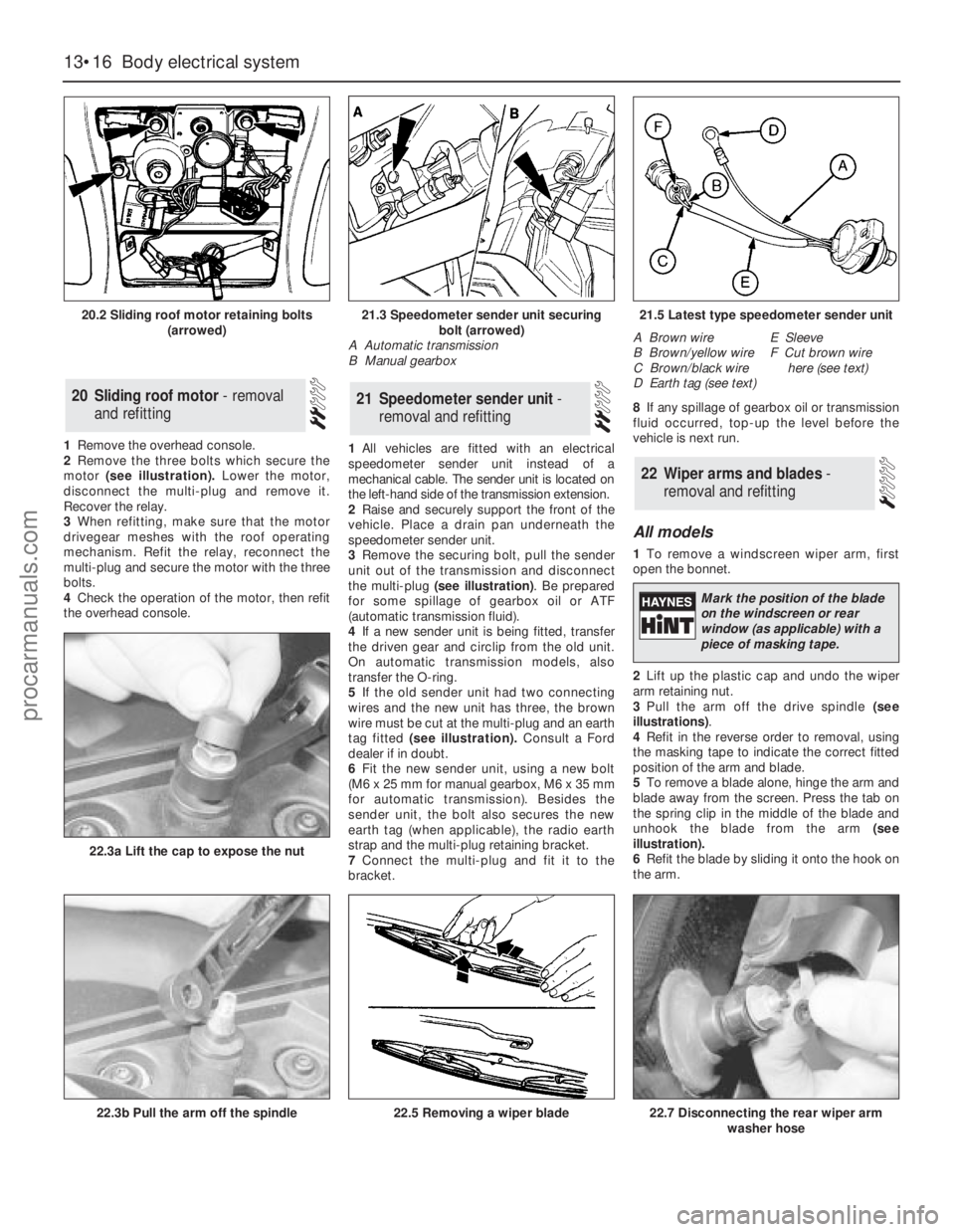
1Remove the overhead console.
2Remove the three bolts which secure the
motor (see illustration).Lower the motor,
disconnect the multi-plug and remove it.
Recover the relay.
3When refitting, make sure that the motor
drivegear meshes with the roof operating
mechanism. Refit the relay, reconnect the
multi-plug and secure the motor with the three
bolts.
4Check the operation of the motor, then refit
the overhead console.1All vehicles are fitted with an electrical
speedometer sender unit instead of a
mechanical cable. The sender unit is located on
the left-hand side of the transmission extension.
2Raise and securely support the front of the
vehicle. Place a drain pan underneath the
speedometer sender unit.
3Remove the securing bolt, pull the sender
unit out of the transmission and disconnect
the multi-plug (see illustration). Be prepared
for some spillage of gearbox oil or ATF
(automatic transmission fluid).
4If a new sender unit is being fitted, transfer
the driven gear and circlip from the old unit.
On automatic transmission models, also
transfer the O-ring.
5If the old sender unit had two connecting
wires and the new unit has three, the brown
wire must be cut at the multi-plug and an earth
tag fitted (see illustration).Consult a Ford
dealer if in doubt.
6Fit the new sender unit, using a new bolt
(M6 x 25 mm for manual gearbox, M6 x 35 mm
for automatic transmission). Besides the
sender unit, the bolt also secures the new
earth tag (when applicable), the radio earth
strap and the multi-plug retaining bracket.
7Connect the multi-plug and fit it to the
bracket.8If any spillage of gearbox oil or transmission
fluid occurred, top-up the level before the
vehicle is next run.
All models
1To remove a windscreen wiper arm, first
open the bonnet.
2Lift up the plastic cap and undo the wiper
arm retaining nut.
3Pull the arm off the drive spindle (see
illustrations).
4Refit in the reverse order to removal, using
the masking tape to indicate the correct fitted
position of the arm and blade.
5To remove a blade alone, hinge the arm and
blade away from the screen. Press the tab on
the spring clip in the middle of the blade and
unhook the blade from the arm (see
illustration).
6Refit the blade by sliding it onto the hook on
the arm.
22Wiper arms and blades -
removal and refitting
21Speedometer sender unit -
removal and refitting20Sliding roof motor - removal
and refitting
13•16Body electrical system
20.2 Sliding roof motor retaining bolts
(arrowed)
22.3b Pull the arm off the spindle
22.3a Lift the cap to expose the nut
22.5 Removing a wiper blade22.7 Disconnecting the rear wiper arm
washer hose
21.3 Speedometer sender unit securing
bolt (arrowed)
A Automatic transmission
B Manual gearbox21.5 Latest type speedometer sender unit
A Brown wire
B Brown/yellow wire
C Brown/black wire
D Earth tag (see text)E Sleeve
F Cut brown wire
here (see text)
Mark the position of the blade
on the windscreen or rear
window (as applicable) with a
piece of masking tape.
procarmanuals.com
Page 194 of 255
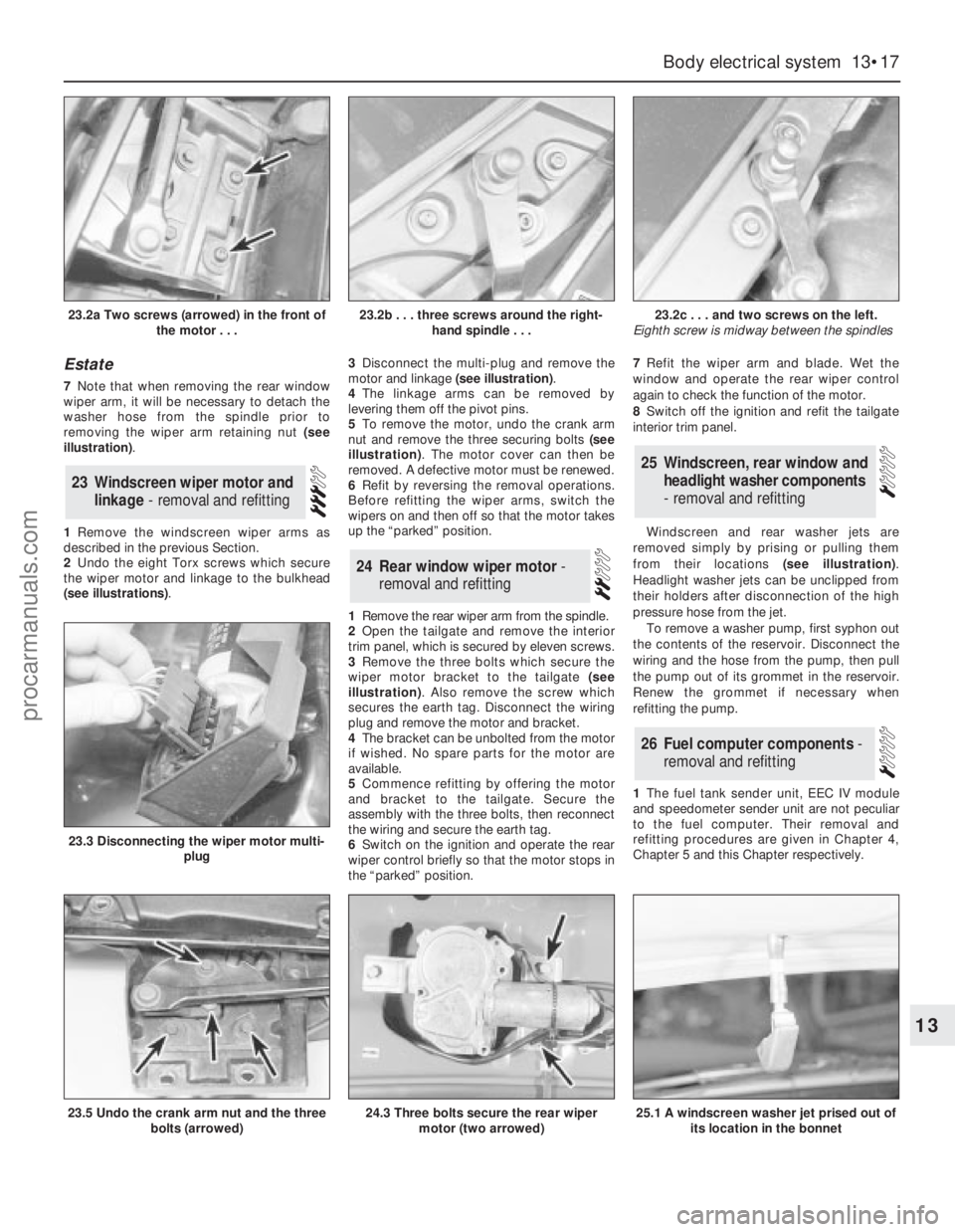
Estate
7Note that when removing the rear window
wiper arm, it will be necessary to detach the
washer hose from the spindle prior to
removing the wiper arm retaining nut (see
illustration).
1Remove the windscreen wiper arms as
described in the previous Section.
2Undo the eight Torx screws which secure
the wiper motor and linkage to the bulkhead
(see illustrations).3Disconnect the multi-plug and remove the
motor and linkage (see illustration).
4The linkage arms can be removed by
levering them off the pivot pins.
5To remove the motor, undo the crank arm
nut and remove the three securing bolts (see
illustration). The motor cover can then be
removed. A defective motor must be renewed.
6Refit by reversing the removal operations.
Before refitting the wiper arms, switch the
wipers on and then off so that the motor takes
up the “parked” position.
1Remove the rear wiper arm from the spindle.
2Open the tailgate and remove the interior
trim panel, which is secured by eleven screws.
3Remove the three bolts which secure the
wiper motor bracket to the tailgate (see
illustration). Also remove the screw which
secures the earth tag. Disconnect the wiring
plug and remove the motor and bracket.
4The bracket can be unbolted from the motor
if wished. No spare parts for the motor are
available.
5Commence refitting by offering the motor
and bracket to the tailgate. Secure the
assembly with the three bolts, then reconnect
the wiring and secure the earth tag.
6Switch on the ignition and operate the rear
wiper control briefly so that the motor stops in
the “parked” position.7Refit the wiper arm and blade. Wet the
window and operate the rear wiper control
again to check the function of the motor.
8Switch off the ignition and refit the tailgate
interior trim panel.
Windscreen and rear washer jets are
removed simply by prising or pulling them
from their locations (see illustration).
Headlight washer jets can be unclipped from
their holders after disconnection of the high
pressure hose from the jet.
To remove a washer pump, first syphon out
the contents of the reservoir. Disconnect the
wiring and the hose from the pump, then pull
the pump out of its grommet in the reservoir.
Renew the grommet if necessary when
refitting the pump.
1The fuel tank sender unit, EEC IV module
and speedometer sender unit are not peculiar
to the fuel computer. Their removal and
refitting procedures are given in Chapter 4,
Chapter 5 and this Chapter respectively.
26Fuel computer components -
removal and refitting
25Windscreen, rear window and
headlight washer components
- removal and refitting
24Rear window wiper motor -
removal and refitting
23Windscreen wiper motor and
linkage - removal and refitting
Body electrical system 13•17
13
23.2a Two screws (arrowed) in the front of
the motor . . .23.2b . . . three screws around the right-
hand spindle . . .23.2c . . . and two screws on the left.
Eighth screw is midway between the spindles
23.5 Undo the crank arm nut and the three
bolts (arrowed)
23.3 Disconnecting the wiper motor multi-
plug
24.3 Three bolts secure the rear wiper
motor (two arrowed)25.1 A windscreen washer jet prised out of
its location in the bonnet
procarmanuals.com
Page 195 of 255
Computer module and bulb
Models before April 1992
2Remove the instrument panel surround,
which is secured by four screws.
3Carefully pull the module from its location.
Release the multi-plug by pressing
downwards and disconnect it.
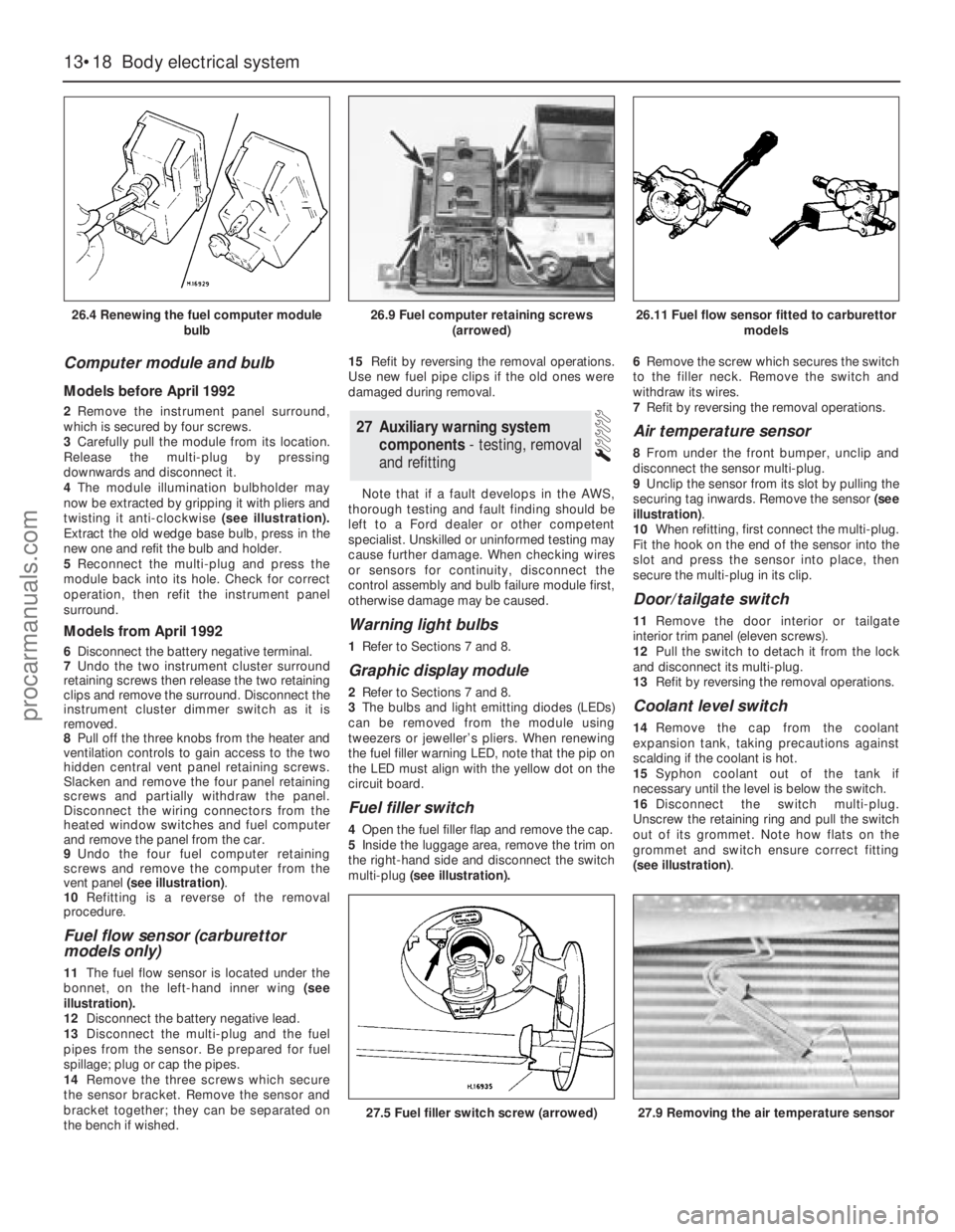
4The module illumination bulbholder may
now be extracted by gripping it with pliers and
twisting it anti-clockwise (see illustration).
Extract the old wedge base bulb, press in the
new one and refit the bulb and holder.
5Reconnect the multi-plug and press the
module back into its hole. Check for correct
operation, then refit the instrument panel
surround.
Models from April 1992
6Disconnect the battery negative terminal.
7Undo the two instrument cluster surround
retaining screws then release the two retaining
clips and remove the surround. Disconnect the
instrument cluster dimmer switch as it is
removed.
8Pull off the three knobs from the heater and
ventilation controls to gain access to the two
hidden central vent panel retaining screws.
Slacken and remove the four panel retaining
screws and partially withdraw the panel.
Disconnect the wiring connectors from the
heated window switches and fuel computer
and remove the panel from the car.
9Undo the four fuel computer retaining
screws and remove the computer from the
vent panel (see illustration).
10Refitting is a reverse of the removal
procedure.
Fuel flow sensor (carburettor
models only)
11The fuel flow sensor is located under the
bonnet, on the left-hand inner wing (see
illustration).
12Disconnect the battery negative lead.
13Disconnect the multi-plug and the fuel
pipes from the sensor. Be prepared for fuel
spillage; plug or cap the pipes.
14Remove the three screws which secure
the sensor bracket. Remove the sensor and
bracket together; they can be separated on
the bench if wished.15Refit by reversing the removal operations.
Use new fuel pipe clips if the old ones were
damaged during removal.
Note that if a fault develops in the AWS,
thorough testing and fault finding should be
left to a Ford dealer or other competent
specialist. Unskilled or uninformed testing may
cause further damage. When checking wires
or sensors for continuity, disconnect the
control assembly and bulb failure module first,
otherwise damage may be caused.
Warning light bulbs
1Refer to Sections 7 and 8.
Graphic display module
2Refer to Sections 7 and 8.
3The bulbs and light emitting diodes (LEDs)
can be removed from the module using
tweezers or jeweller’s pliers. When renewing
the fuel filler warning LED, note that the pip on
the LED must align with the yellow dot on the
circuit board.
Fuel filler switch
4Open the fuel filler flap and remove the cap.
5Inside the luggage area, remove the trim on
the right-hand side and disconnect the switch
multi-plug(see illustration).6Remove the screw which secures the switch
to the filler neck. Remove the switch and
withdraw its wires.
7Refit by reversing the removal operations.
Air temperature sensor
8From under the front bumper, unclip and
disconnect the sensor multi-plug.
9Unclip the sensor from its slot by pulling the
securing tag inwards. Remove the sensor (see
illustration).
10When refitting, first connect the multi-plug.
Fit the hook on the end of the sensor into the
slot and press the sensor into place, then
secure the multi-plug in its clip.
Door/tailgate switch
11Remove the door interior ortailgate
interior trim panel (eleven screws).
12Pull the switch to detach it from the lock
and disconnect its multi-plug.
13Refit by reversing the removal operations.
Coolant level switch
14Remove the cap from the coolant
expansion tank, taking precautions against
scalding if the coolant is hot.
15Syphon coolant out of the tank if
necessary until the level is below the switch.
16Disconnect the switch multi-plug.
Unscrew the retaining ring and pull the switch
out of its grommet. Note how flats on the
grommet and switch ensure correct fitting
(see illustration).
27Auxiliary warning system
components - testing, removal
and refitting
13•18Body electrical system
26.4 Renewing the fuel computer module
bulb
27.5 Fuel filler switch screw (arrowed)27.9 Removing the air temperature sensor
26.9 Fuel computer retaining screws
(arrowed)26.11 Fuel flow sensor fitted to carburettor
models
procarmanuals.com
Page 199 of 255
High frequency units
14Remove the instrument panel surround
and the facia top.
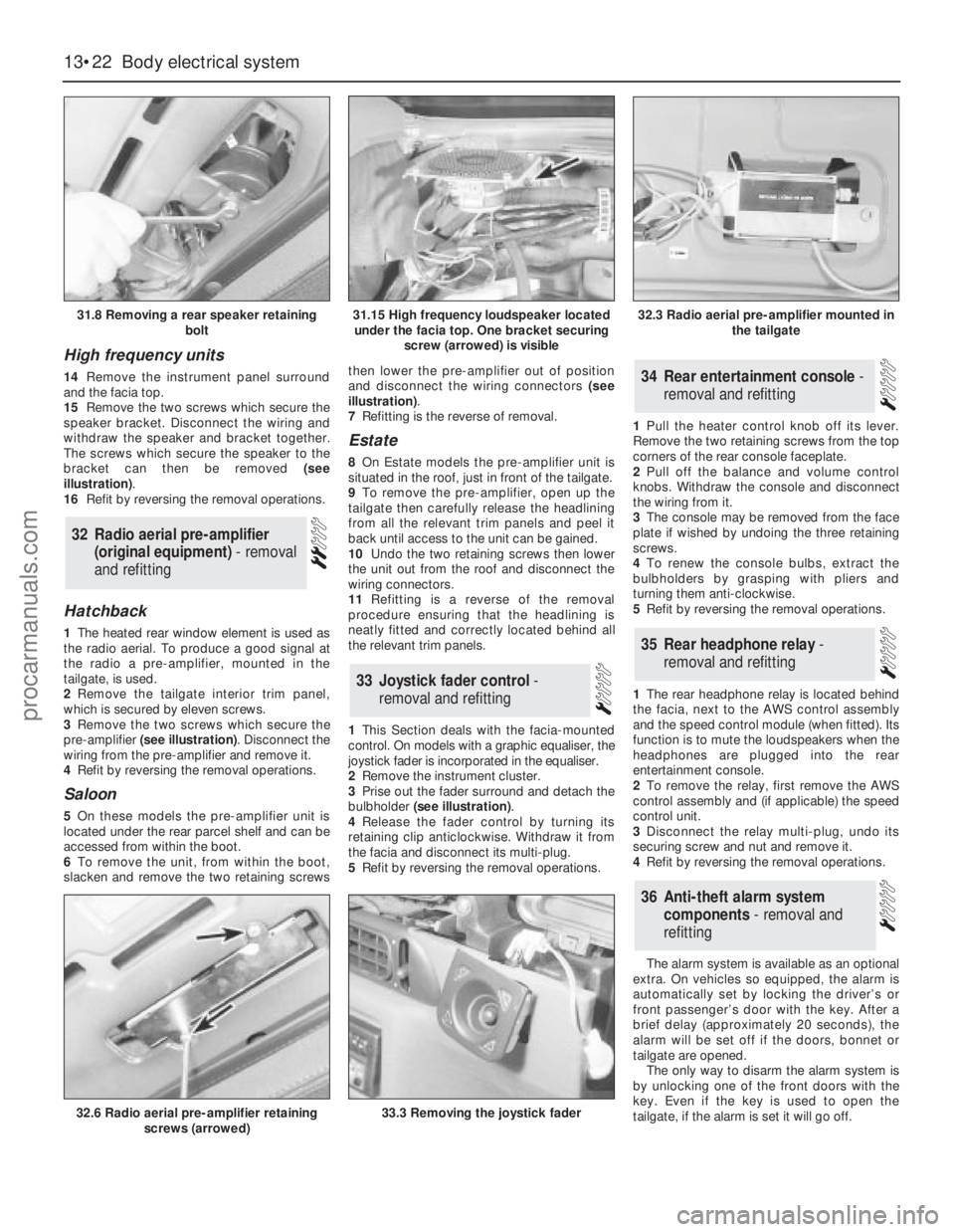
15Remove the two screws which secure the
speaker bracket. Disconnect the wiring and
withdraw the speaker and bracket together.
The screws which secure the speaker to the
bracket can then be removed (see
illustration).
16Refit by reversing the removal operations.
Hatchback
1The heated rear window element is used as
the radio aerial. To produce a good signal at
the radio a pre-amplifier, mounted in the
tailgate, is used.
2Remove the tailgate interior trim panel,
which is secured by eleven screws.
3Remove the two screws which secure the
pre-amplifier (see illustration). Disconnect the
wiring from the pre-amplifier and remove it.
4Refit by reversing the removal operations.
Saloon
5On these models the pre-amplifier unit is
located under the rear parcel shelf and can be
accessed from within the boot.
6To remove the unit, from within the boot,
slacken and remove the two retaining screwsthen lower the pre-amplifier out of position
and disconnect the wiring connectors (see
illustration).
7Refitting is the reverse of removal.
Estate
8On Estate models the pre-amplifier unit is
situated in the roof, just in front of the tailgate.
9To remove the pre-amplifier, open up the
tailgate then carefully release the headlining
from all the relevant trim panels and peel it
back until access to the unit can be gained.
10Undo the two retaining screws then lower
the unit out from the roof and disconnect the
wiring connectors.
11Refitting is a reverse of the removal
procedure ensuring that the headlining is
neatly fitted and correctly located behind all
the relevant trim panels.
1This Section deals with the facia-mounted
control. On models with a graphic equaliser, the
joystick fader is incorporated in the equaliser.
2Remove the instrument cluster.
3Prise out the fader surround and detach the
bulbholder (see illustration).
4Release the fader control by turning its
retaining clip anticlockwise. Withdraw it from
the facia and disconnect its multi-plug.
5Refit by reversing the removal operations.1Pull the heater control knob off its lever.
Remove the two retaining screws from the top
corners of the rear console faceplate.
2Pull off the balance and volume control
knobs. Withdraw the console and disconnect
the wiring from it.
3The console may be removed from the face
plate if wished by undoing the three retaining
screws.
4To renew the console bulbs, extract the
bulbholders by grasping with pliers and
turning them anti-clockwise.
5Refit by reversing the removal operations.
1The rear headphone relay is located behind
the facia, next to the AWS control assembly
and the speed control module (when fitted). Its
function is to mute the loudspeakers when the
headphones are plugged into the rear
entertainment console.
2To remove the relay, first remove the AWS
control assembly and (if applicable) the speed
control unit.
3Disconnect the relay multi-plug, undo its
securing screw and nut and remove it.
4Refit by reversing the removal operations.
The alarm system is available as an optional
extra. On vehicles so equipped, the alarm is
automatically set by locking the driver’s or
front passenger’s door with the key. After a
brief delay (approximately 20 seconds), the
alarm will be set off if the doors, bonnet or
tailgate are opened.
The only way to disarm the alarm system is
by unlocking one of the front doors with the
key. Even if the key is used to open the
tailgate, if the alarm is set it will go off.
36Anti-theft alarm system
components - removal and
refitting
35Rear headphone relay -
removal and refitting
34Rear entertainment console -
removal and refitting
33Joystick fader control -
removal and refitting
32Radio aerial pre-amplifier
(original equipment) - removal
and refitting
13•22Body electrical system
31.8 Removing a rear speaker retaining
bolt
32.6 Radio aerial pre-amplifier retaining
screws (arrowed)33.3 Removing the joystick fader
31.15 High frequency loudspeaker located
under the facia top. One bracket securing
screw (arrowed) is visible32.3 Radio aerial pre-amplifier mounted in
the tailgate
procarmanuals.com
Page 200 of 255
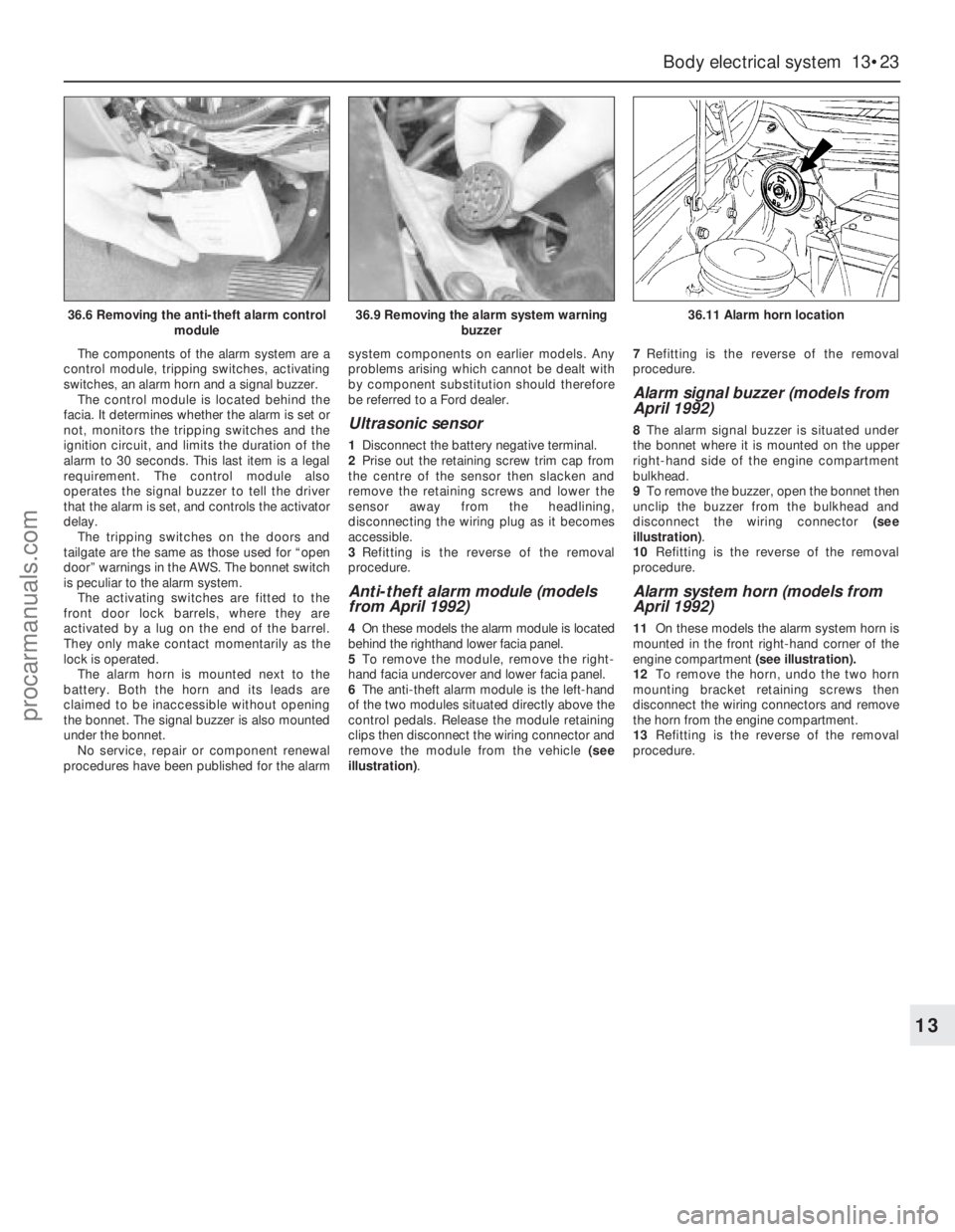
The components of the alarm system are a
control module, tripping switches, activating
switches, an alarm horn and a signal buzzer.
The control module is located behind the
facia. It determines whether the alarm is set or
not, monitors the tripping switches and the
ignition circuit, and limits the duration of the
alarm to 30 seconds. This last item is a legal
requirement. The control module also
operates the signal buzzer to tell the driver
that the alarm is set, and controls the activator
delay.
The tripping switches on the doors and
tailgate are the same as those used for “open
door” warnings in the AWS. The bonnet switch
is peculiar to the alarm system.
The activating switches are fitted to the
front door lock barrels, where they are
activated by a lug on the end of the barrel.
They only make contact momentarily as the
lock is operated.
The alarm horn is mounted next to the
battery. Both the horn and its leads are
claimed to be inaccessible without opening
the bonnet. The signal buzzer is also mounted
under the bonnet.
No service, repair or component renewal
procedures have been published for the alarmsystem components on earlier models. Any
problems arising which cannot be dealt with
by component substitution should therefore
be referred to a Ford dealer.
Ultrasonic sensor
1Disconnect the battery negative terminal.
2Prise out the retaining screw trim cap from
the centre of the sensor then slacken and
remove the retaining screws and lower the
sensor away from the headlining,
disconnecting the wiring plug as it becomes
accessible.
3Refitting is the reverse of the removal
procedure.
Anti-theft alarm module (models
from April 1992)
4On these models the alarm module is located
behind the righthand lower facia panel.
5To remove the module, remove the right-
hand facia undercover and lower facia panel.
6The anti-theft alarm module is the left-hand
of the two modules situated directly above the
control pedals. Release the module retaining
clips then disconnect the wiring connector and
remove the module from the vehicle (see
illustration).7Refitting is the reverse of the removal
procedure.
Alarm signal buzzer (models from
April 1992)
8The alarm signal buzzer is situated under
the bonnet where it is mounted on the upper
right-hand side of the engine compartment
bulkhead.
9To remove the buzzer, open the bonnet then
unclip the buzzer from the bulkhead and
disconnect the wiring connector (see
illustration).
10Refitting is the reverse of the removal
procedure.
Alarm system horn (models from
April 1992)
11On these models the alarm system horn is
mounted in the front right-hand corner of the
engine compartment (see illustration).
12To remove the horn, undo the two horn
mounting bracket retaining screws then
disconnect the wiring connectors and remove
the horn from the engine compartment.
13Refitting is the reverse of the removal
procedure.
Body electrical system 13•23
13
36.6 Removing the anti-theft alarm control
module36.9 Removing the alarm system warning
buzzer36.11 Alarm horn location
procarmanuals.com