transmission FORD GT 2017 2.G Owners Manual
[x] Cancel search | Manufacturer: FORD, Model Year: 2017, Model line: GT, Model: FORD GT 2017 2.GPages: 313, PDF Size: 6.41 MB
Page 5 of 313
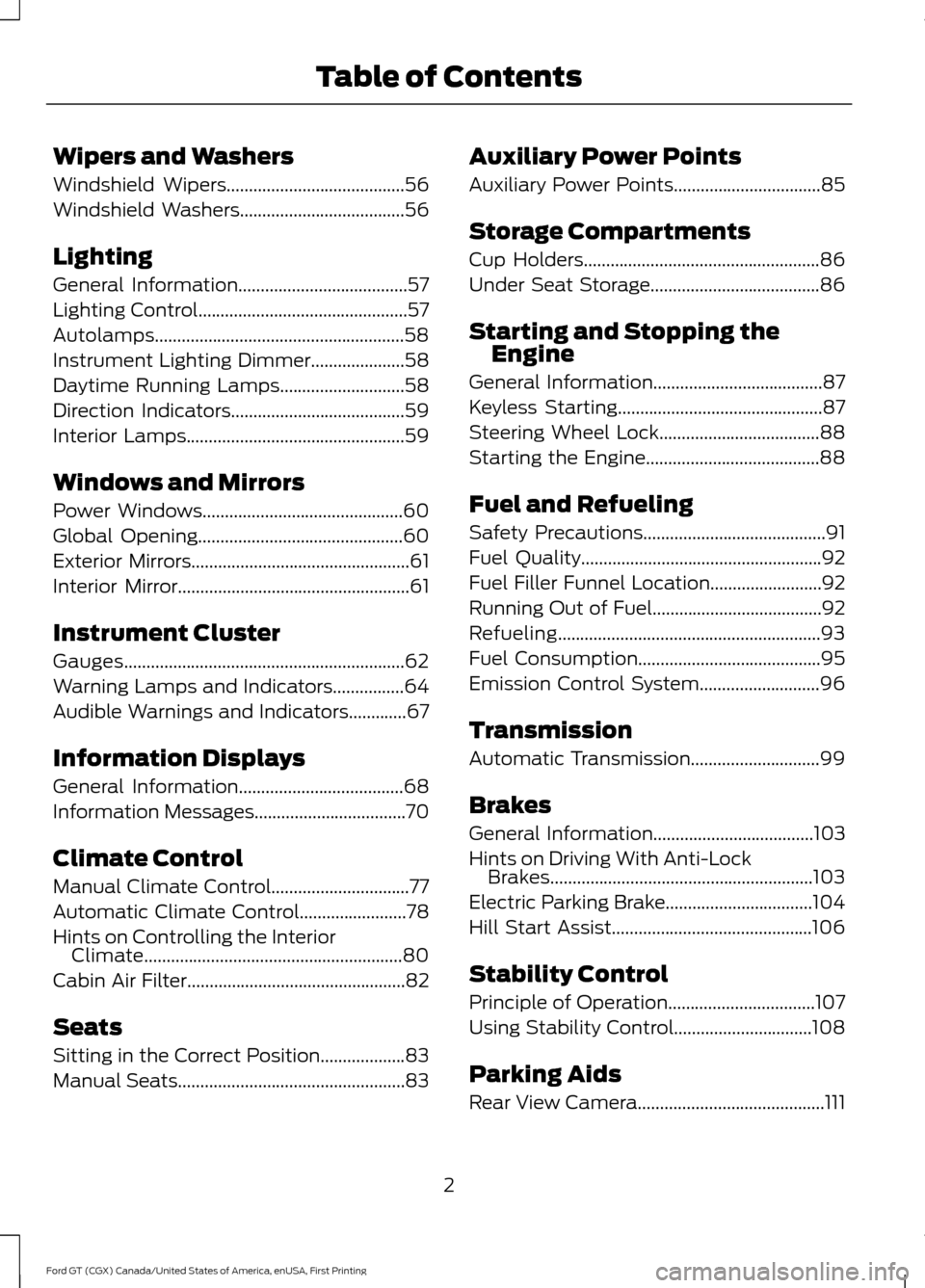
Wipers and Washers
Windshield Wipers........................................56
Windshield Washers.....................................56
Lighting
General Information......................................57
Lighting Control...............................................57
Autolamps........................................................58
Instrument Lighting Dimmer
.....................58
Daytime Running Lamps............................58
Direction Indicators
.......................................59
Interior Lamps.................................................59
Windows and Mirrors
Power Windows.............................................60
Global Opening
..............................................60
Exterior Mirrors.................................................61
Interior Mirror
....................................................61
Instrument Cluster
Gauges...............................................................62
Warning Lamps and Indicators................64
Audible Warnings and Indicators
.............67
Information Displays
General Information.....................................68
Information Messages
..................................70
Climate Control
Manual Climate Control...............................77
Automatic Climate Control........................78
Hints on Controlling the Interior Climate
..........................................................80
Cabin Air Filter.................................................82
Seats
Sitting in the Correct Position...................83
Manual Seats
...................................................83 Auxiliary Power Points
Auxiliary Power Points
.................................85
Storage Compartments
Cup Holders.....................................................86
Under Seat Storage......................................86
Starting and Stopping the Engine
General Information......................................87
Keyless Starting
..............................................87
Steering Wheel Lock
....................................88
Starting the Engine.......................................88
Fuel and Refueling
Safety Precautions
.........................................91
Fuel Quality......................................................92
Fuel Filler Funnel Location.........................92
Running Out of Fuel......................................92
Refueling
...........................................................93
Fuel Consumption.........................................95
Emission Control System...........................96
Transmission
Automatic Transmission.............................99
Brakes
General Information
....................................103
Hints on Driving With Anti-Lock Brakes...........................................................103
Electric Parking Brake.................................104
Hill Start Assist.............................................106
Stability Control
Principle of Operation.................................107
Using Stability Control...............................108
Parking Aids
Rear View Camera
..........................................111
2
Ford GT (CGX) Canada/United States of America, enUSA, First Printing Table of Contents
Page 6 of 313
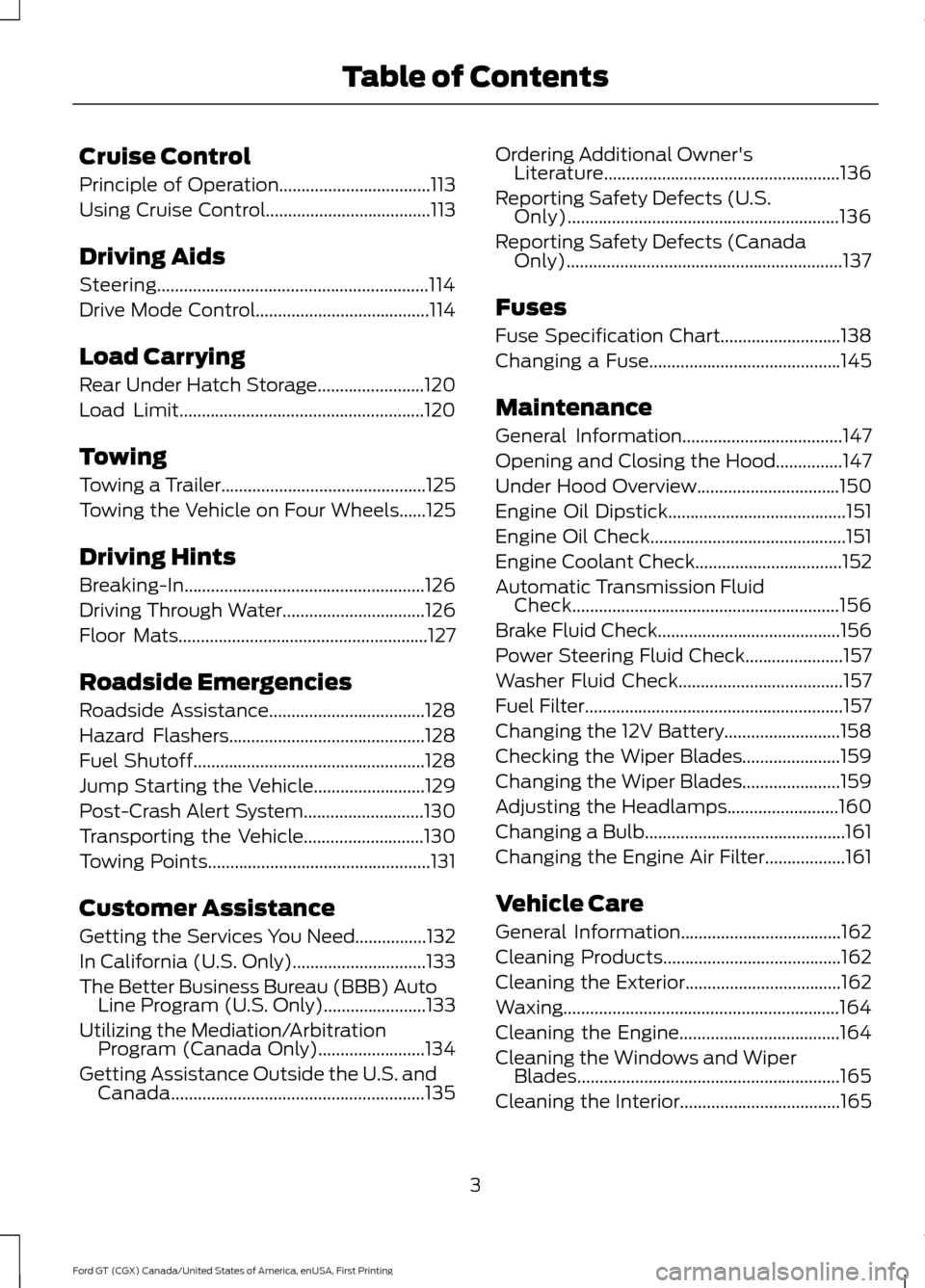
Cruise Control
Principle of Operation..................................113
Using Cruise Control.....................................113
Driving Aids
Steering.............................................................114
Drive Mode Control.......................................114
Load Carrying
Rear Under Hatch Storage
........................120
Load Limit.......................................................120
Towing
Towing a Trailer..............................................125
Towing the Vehicle on Four Wheels
......125
Driving Hints
Breaking-In......................................................126
Driving Through Water................................126
Floor Mats
........................................................127
Roadside Emergencies
Roadside Assistance...................................128
Hazard Flashers............................................128
Fuel Shutoff....................................................128
Jump Starting the Vehicle.........................129
Post-Crash Alert System
...........................130
Transporting the Vehicle
...........................130
Towing Points
..................................................131
Customer Assistance
Getting the Services You Need................132
In California (U.S. Only)
..............................133
The Better Business Bureau (BBB) Auto Line Program (U.S. Only).......................133
Utilizing the Mediation/Arbitration Program (Canada Only)........................134
Getting Assistance Outside the U.S. and Canada
.........................................................135 Ordering Additional Owner's
Literature.....................................................136
Reporting Safety Defects (U.S. Only).............................................................136
Reporting Safety Defects (Canada Only)..............................................................137
Fuses
Fuse Specification Chart...........................138
Changing a Fuse...........................................145
Maintenance
General Information
....................................147
Opening and Closing the Hood...............147
Under Hood Overview................................150
Engine Oil Dipstick
........................................151
Engine Oil Check............................................151
Engine Coolant Check
.................................152
Automatic Transmission Fluid Check............................................................156
Brake Fluid Check.........................................156
Power Steering Fluid Check......................157
Washer Fluid Check.....................................157
Fuel Filter..........................................................157
Changing the 12V Battery..........................158
Checking the Wiper Blades......................159
Changing the Wiper Blades......................159
Adjusting the Headlamps.........................160
Changing a Bulb.............................................161
Changing the Engine Air Filter
..................161
Vehicle Care
General Information....................................162
Cleaning Products........................................162
Cleaning the Exterior...................................162
Waxing..............................................................164
Cleaning the Engine....................................164
Cleaning the Windows and Wiper Blades...........................................................165
Cleaning the Interior....................................165
3
Ford GT (CGX) Canada/United States of America, enUSA, First Printing Table of Contents
Page 7 of 313
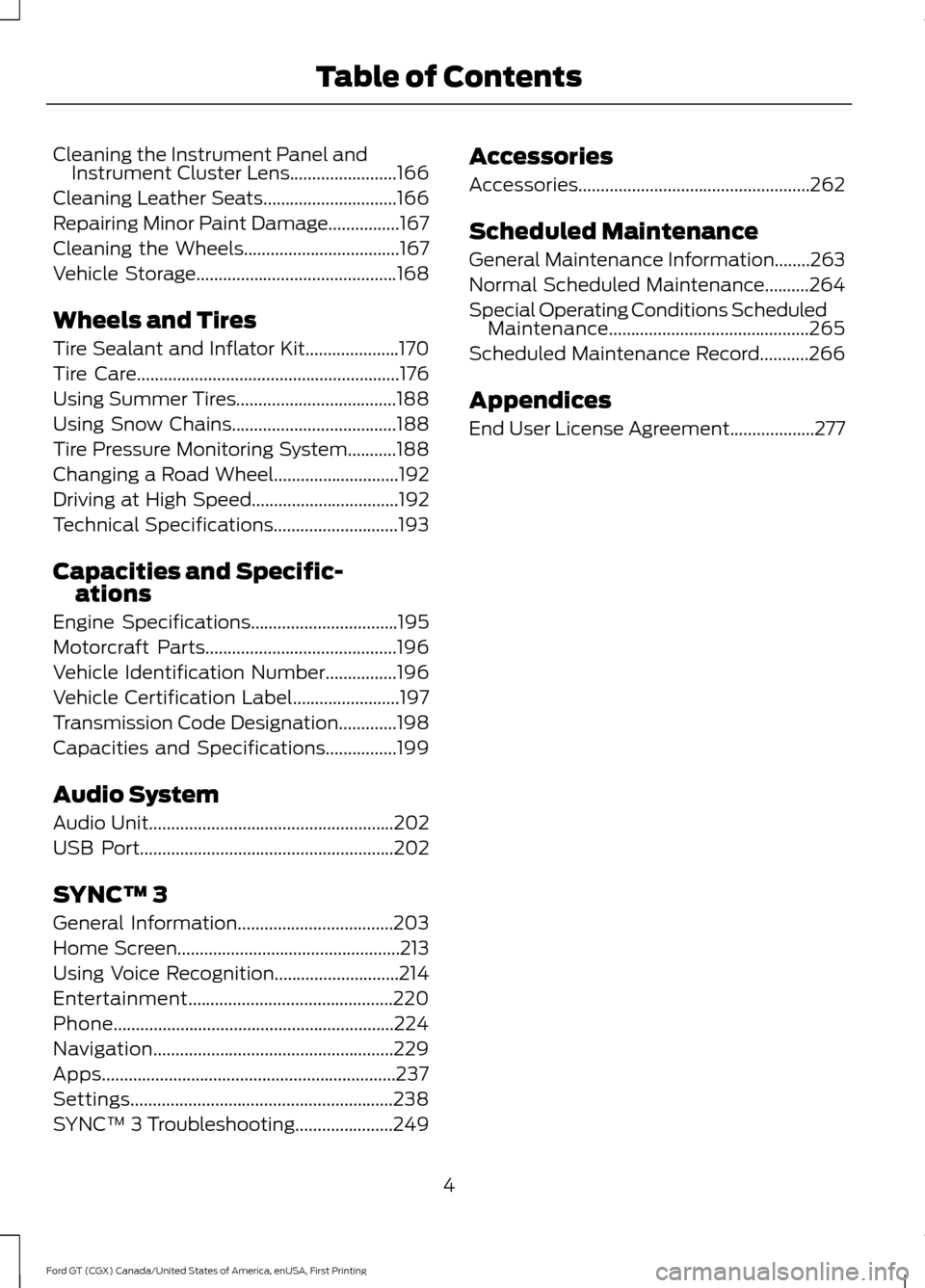
Cleaning the Instrument Panel and
Instrument Cluster Lens........................166
Cleaning Leather Seats..............................166
Repairing Minor Paint Damage................167
Cleaning the Wheels
...................................167
Vehicle Storage
.............................................168
Wheels and Tires
Tire Sealant and Inflator Kit.....................170
Tire Care
...........................................................176
Using Summer Tires....................................188
Using Snow Chains
.....................................188
Tire Pressure Monitoring System...........188
Changing a Road Wheel
............................192
Driving at High Speed.................................192
Technical Specifications............................193
Capacities and Specific- ations
Engine Specifications
.................................195
Motorcraft Parts
...........................................196
Vehicle Identification Number................196
Vehicle Certification Label........................197
Transmission Code Designation
.............198
Capacities and Specifications
................199
Audio System
Audio Unit
.......................................................202
USB Port
.........................................................202
SYNC™ 3
General Information...................................203
Home Screen
..................................................213
Using Voice Recognition............................214
Entertainment..............................................220
Phone...............................................................224
Navigation......................................................229
Apps..................................................................237
Settings...........................................................238
SYNC™ 3 Troubleshooting......................249 Accessories
Accessories....................................................262
Scheduled Maintenance
General Maintenance Information........263
Normal Scheduled Maintenance..........264
Special Operating Conditions Scheduled
Maintenance.............................................265
Scheduled Maintenance Record
...........266
Appendices
End User License Agreement...................277
4
Ford GT (CGX) Canada/United States of America, enUSA, First Printing Table of Contents
Page 14 of 313
WARNINGS
NEVER use a rearward facing child
restraint on a seat protected by an
ACTIVE AIRBAG in front of it, DEATH
or SERIOUS INJURY to the CHILD can
occur. For your added safety, your vehicle is fitted
with sophisticated electronic controls.
On Board Diagnostics Data Link
Connector
WARNING
Do not connect wireless plug-in
devices to the data link connector.
Unauthorized third parties could gain
access to vehicle data and impair the
performance of safety related systems.
Only allow repair facilities that follow our
service and repair instructions to connect
their equipment to the data link connector. Your vehicle has an OBD Data Link
Connector (DLC) that is used in
conjunction with a diagnostic scan tool for
vehicle diagnostics, repairs and
reprogramming services. Installing an
aftermarket device that uses the DLC
during normal driving for purposes such as
remote insurance company monitoring,
transmission of vehicle data to other
devices or entities, or altering the
performance of the vehicle, may cause
interference with or even damage to
vehicle systems. We do not recommend
or endorse the use of aftermarket plug-in
devices unless approved by Ford. The
vehicle Warranty will not cover damage
caused by an aftermarket plug-in device. Certified Ford GT Service Dealer
All occurrences of authorized dealer in this
manual are references to dealers who are
certified to work on the Ford GT. Not all
dealers have this certification. To locate a
certified Ford GT Service dealer, contact
your Ford GT Concierge at
1-800-210-5795.
MOBILE COMMUNICATIONS
EQUIPMENT
WARNING
Driving while distracted can result in
loss of vehicle control, crash and
injury. We strongly recommend that
you use extreme caution when using any
device that may take your focus off the
road. Your primary responsibility is the safe
operation of your vehicle. We recommend
against the use of any hand-held device
while driving and encourage the use of
voice-operated systems when possible.
Make sure you are aware of all applicable
local laws that may affect the use of
electronic devices while driving. Using mobile communications equipment
is becoming increasingly important in the
conduct of business and personal affairs.
However, you must not compromise your
own or others’
safety when using such
equipment. Mobile communications can
enhance personal safety and security when
appropriately used, particularly in
emergency situations. Safety must be
paramount when using mobile
communications equipment to avoid
negating these benefits. Mobile
communication equipment includes, but
is not limited to, cellular phones, pagers,
portable email devices, text messaging
devices and portable two-way radios.
11
Ford GT (CGX) Canada/United States of America, enUSA, First Printing Introduction
Page 17 of 313
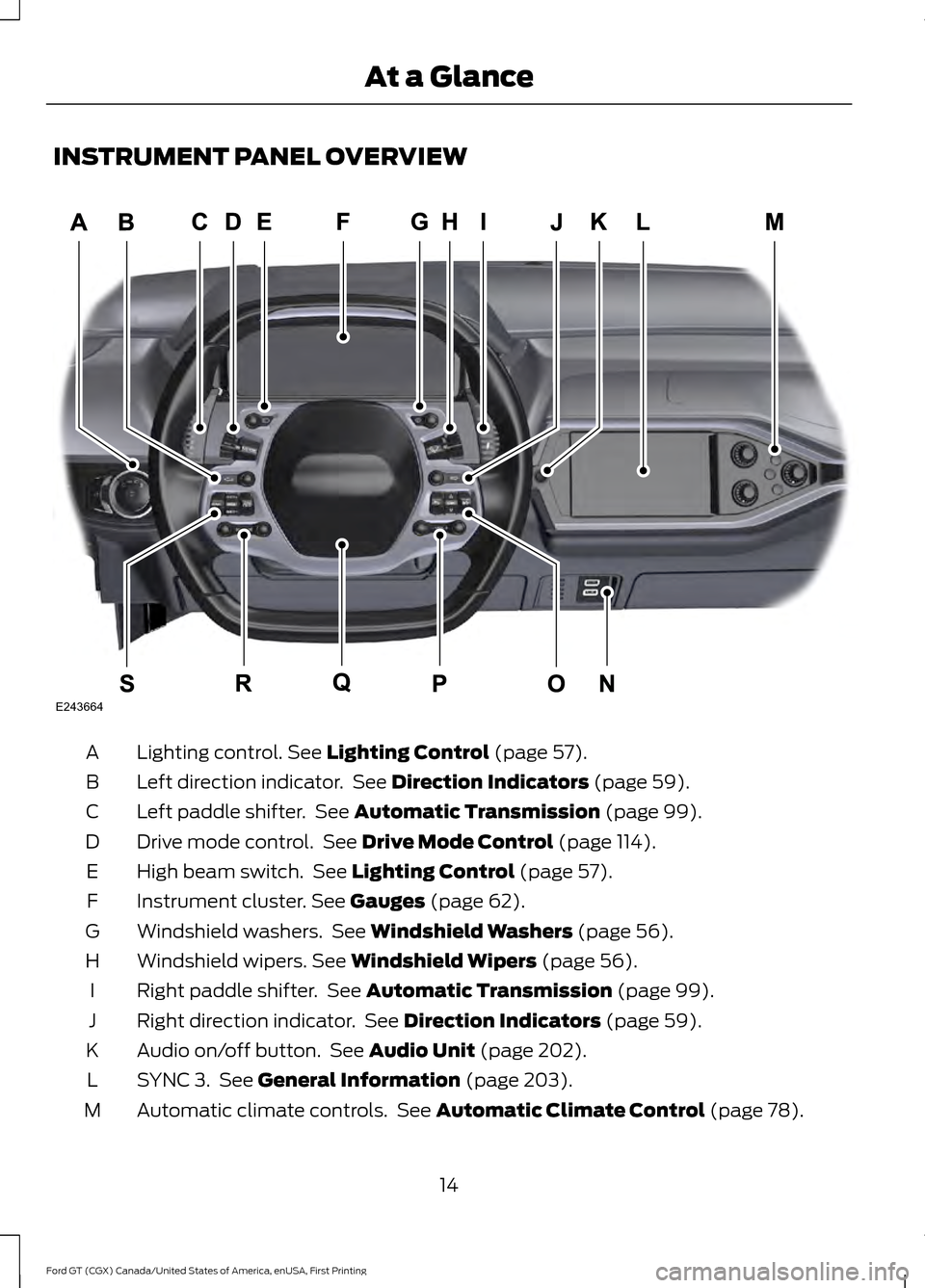
INSTRUMENT PANEL OVERVIEW
Lighting control. See Lighting Control (page 57).
A
Left direction indicator. See
Direction Indicators (page 59).
B
Left paddle shifter. See
Automatic Transmission (page 99).
C
Drive mode control. See
Drive Mode Control (page 114).
D
High beam switch. See
Lighting Control (page 57).
E
Instrument cluster.
See Gauges (page 62).
F
Windshield washers. See
Windshield Washers (page 56).
G
Windshield wipers.
See Windshield Wipers (page 56).
H
Right paddle shifter. See
Automatic Transmission (page 99).
I
Right direction indicator. See
Direction Indicators (page 59).
J
Audio on/off button. See
Audio Unit (page 202).
K
SYNC 3. See
General Information (page 203).
L
Automatic climate controls. See
Automatic Climate Control (page 78).
M
14
Ford GT (CGX) Canada/United States of America, enUSA, First Printing At a GlanceE243664
Page 33 of 313
Then...
If...
The Belt-Minder feature will not activate.
You and the front seat passenger buckle
your seatbelts before you switch the igni-
tion on or less than 1-2 minutes elapse after you switch the ignition on...
The Belt-Minder feature activates, the
seatbelt warning light illuminates and a
warning tone sounds for 6 seconds every
25 seconds, repeating for about 5 minutes or until you and the front seat passenger buckle your seatbelts.
You or the front seat passenger do not
buckle your seatbelts before your vehicle
reaches at least 6 mph (9.7 km/h) and 1-2
minutes elapse after you switch the ignition on...
The Belt-Minder feature activates, the
seatbelt warning light illuminates and a
warning tone sounds for 6 seconds every
25 seconds, repeating for about 5 minutes or until you and the front seat passenger buckle your seatbelts.
The seatbelt for the driver or front
passenger is unbuckled for about 1 minute
while the vehicle is traveling at least 6 mph (9.7 km/h)
and more than 1-2 minutes
elapse after you switch the ignition on...
Deactivating and Activating the
Belt-Minder Feature WARNING
While the system allows you to
switch it off, this system is designed
to improve your chances of being
safely belted and surviving a crash. We
recommend you leave the system
switched on. To reduce the risk of injury,
do not switch the system on or off while
driving your vehicle. Note:
The driver and front passenger
warnings switch on and off independently.
When you perform this procedure for one
seating position, do not buckle the other
position as this will terminate the process.
Read Steps 1 - 4 thoroughly before
proceeding with the programming
procedure. Before following the procedure, make sure
that:
•
The parking brake is set.
• The transmission is in park (P).
• The ignition is off.
• The driver and front passenger
seatbelts are unbuckled.
1. Switch the ignition on. Do not start the
vehicle.
2. Wait until the seatbelt warning light turns off (about one minute). After
Step 2, wait an additional 5 seconds
before proceeding with Step 3. Once
you start Step 3, you must complete
the procedure within 30 seconds.
3. For the seating position you are switching off, buckle then unbuckle the
seatbelt three times at a moderate
speed, ending in the unbuckled state.
After Step 3, the seatbelt warning light
turns on.
30
Ford GT (CGX) Canada/United States of America, enUSA, First Printing Seatbelts
Page 49 of 313
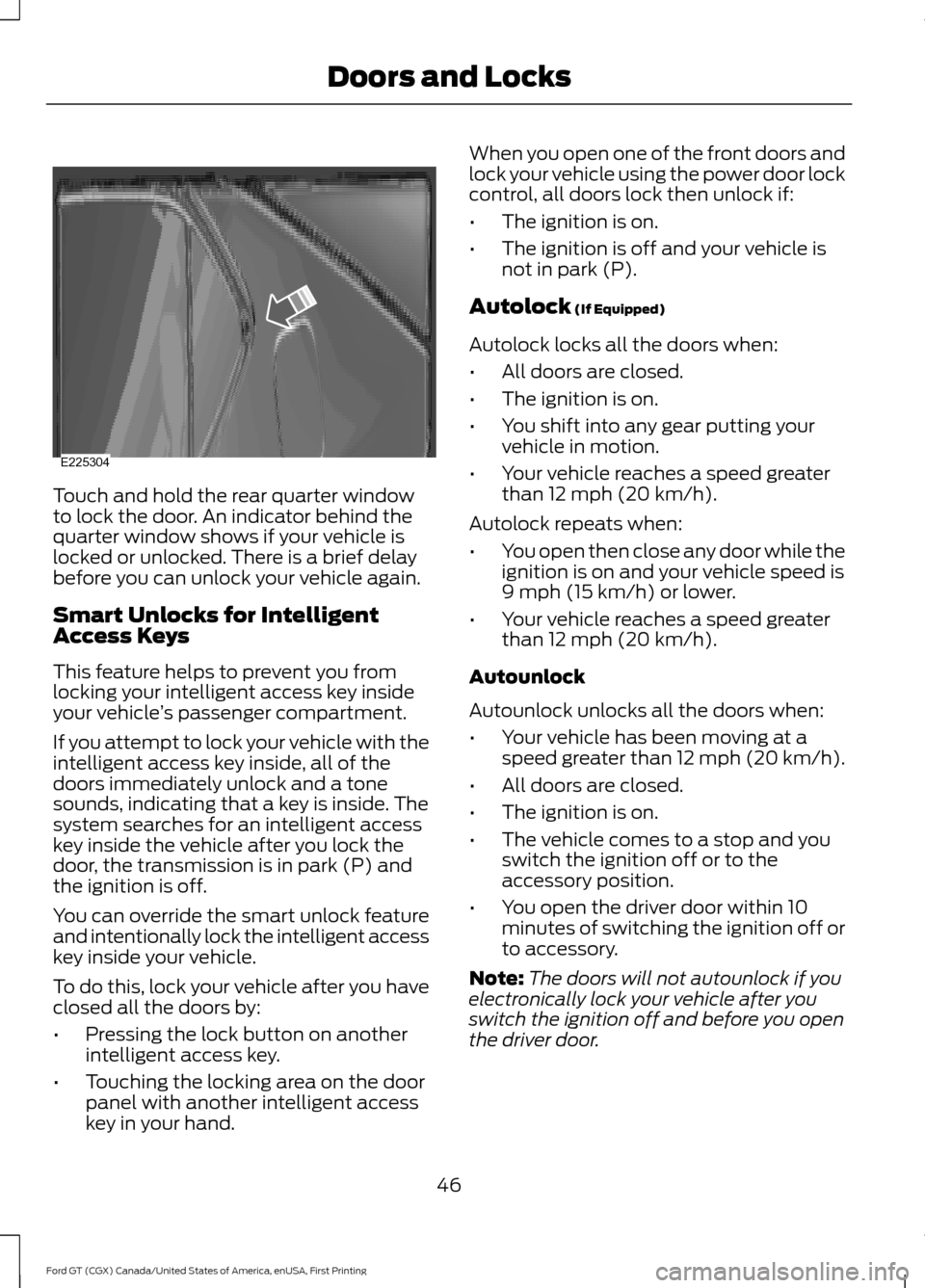
Touch and hold the rear quarter window
to lock the door. An indicator behind the
quarter window shows if your vehicle is
locked or unlocked. There is a brief delay
before you can unlock your vehicle again.
Smart Unlocks for Intelligent
Access Keys
This feature helps to prevent you from
locking your intelligent access key inside
your vehicle
’s passenger compartment.
If you attempt to lock your vehicle with the
intelligent access key inside, all of the
doors immediately unlock and a tone
sounds, indicating that a key is inside. The
system searches for an intelligent access
key inside the vehicle after you lock the
door, the transmission is in park (P) and
the ignition is off.
You can override the smart unlock feature
and intentionally lock the intelligent access
key inside your vehicle.
To do this, lock your vehicle after you have
closed all the doors by:
• Pressing the lock button on another
intelligent access key.
• Touching the locking area on the door
panel with another intelligent access
key in your hand. When you open one of the front doors and
lock your vehicle using the power door lock
control, all doors lock then unlock if:
•
The ignition is on.
• The ignition is off and your vehicle is
not in park (P).
Autolock (If Equipped)
Autolock locks all the doors when:
• All doors are closed.
• The ignition is on.
• You shift into any gear putting your
vehicle in motion.
• Your vehicle reaches a speed greater
than
12 mph (20 km/h).
Autolock repeats when:
• You open then close any door while the
ignition is on and your vehicle speed is
9 mph (15 km/h)
or lower.
• Your vehicle reaches a speed greater
than
12 mph (20 km/h).
Autounlock
Autounlock unlocks all the doors when:
• Your vehicle has been moving at a
speed greater than 12 mph (20 km/h).
• All doors are closed.
• The ignition is on.
• The vehicle comes to a stop and you
switch the ignition off or to the
accessory position.
• You open the driver door within 10
minutes of switching the ignition off or
to accessory.
Note: The doors will not autounlock if you
electronically lock your vehicle after you
switch the ignition off and before you open
the driver door.
46
Ford GT (CGX) Canada/United States of America, enUSA, First Printing Doors and LocksE225304
Page 65 of 313
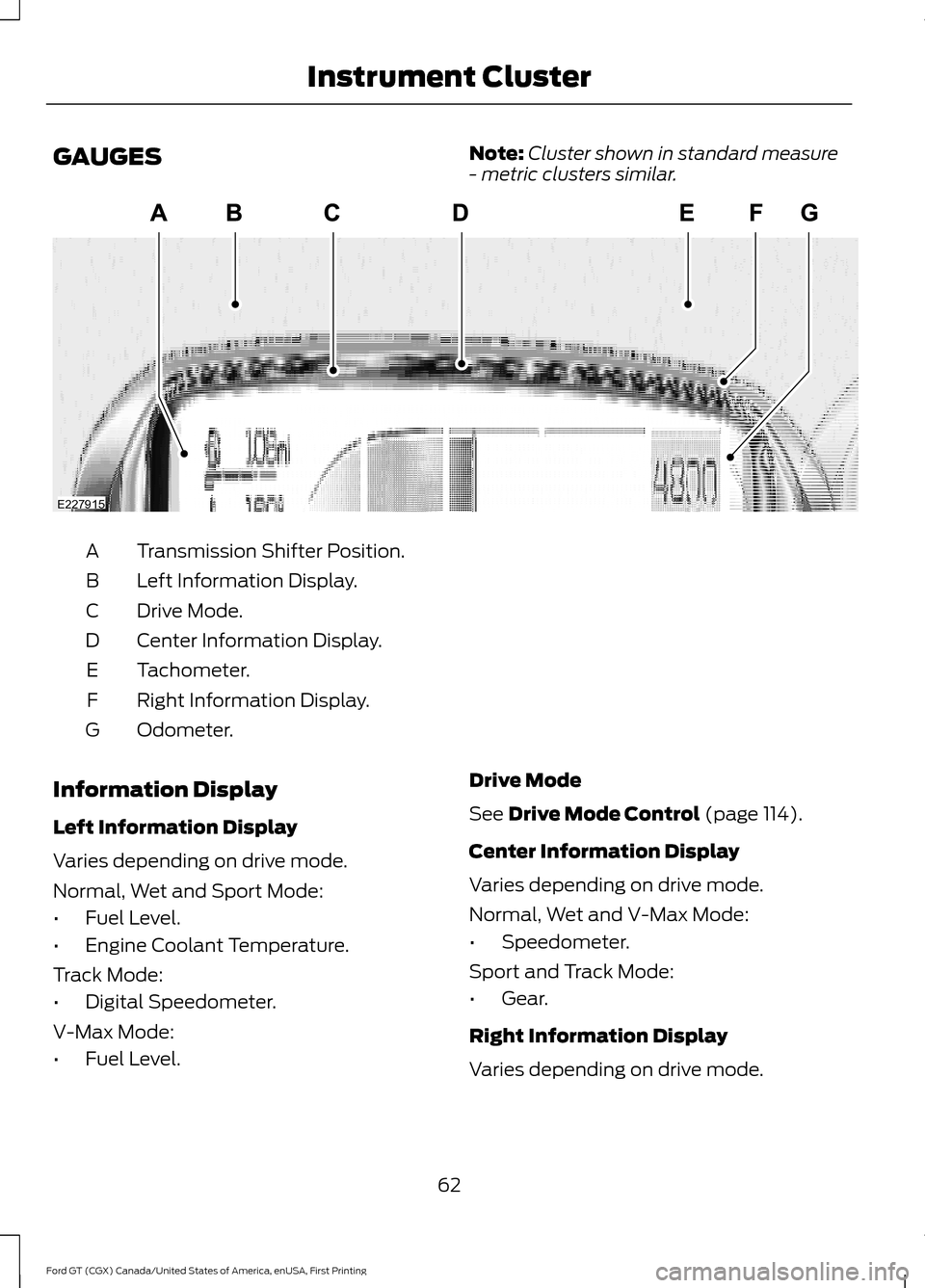
GAUGES
Note:
Cluster shown in standard measure
- metric clusters similar. Transmission Shifter Position.
A
Left Information Display.
B
Drive Mode.
C
Center Information Display.
D
Tachometer.
E
Right Information Display.
F
Odometer.
G
Information Display
Left Information Display
Varies depending on drive mode.
Normal, Wet and Sport Mode:
• Fuel Level.
• Engine Coolant Temperature.
Track Mode:
• Digital Speedometer.
V-Max Mode:
• Fuel Level. Drive Mode
See Drive Mode Control (page 114).
Center Information Display
Varies depending on drive mode.
Normal, Wet and V-Max Mode:
• Speedometer.
Sport and Track Mode:
• Gear.
Right Information Display
Varies depending on drive mode.
62
Ford GT (CGX) Canada/United States of America, enUSA, First Printing Instrument ClusterE227915
Page 70 of 313
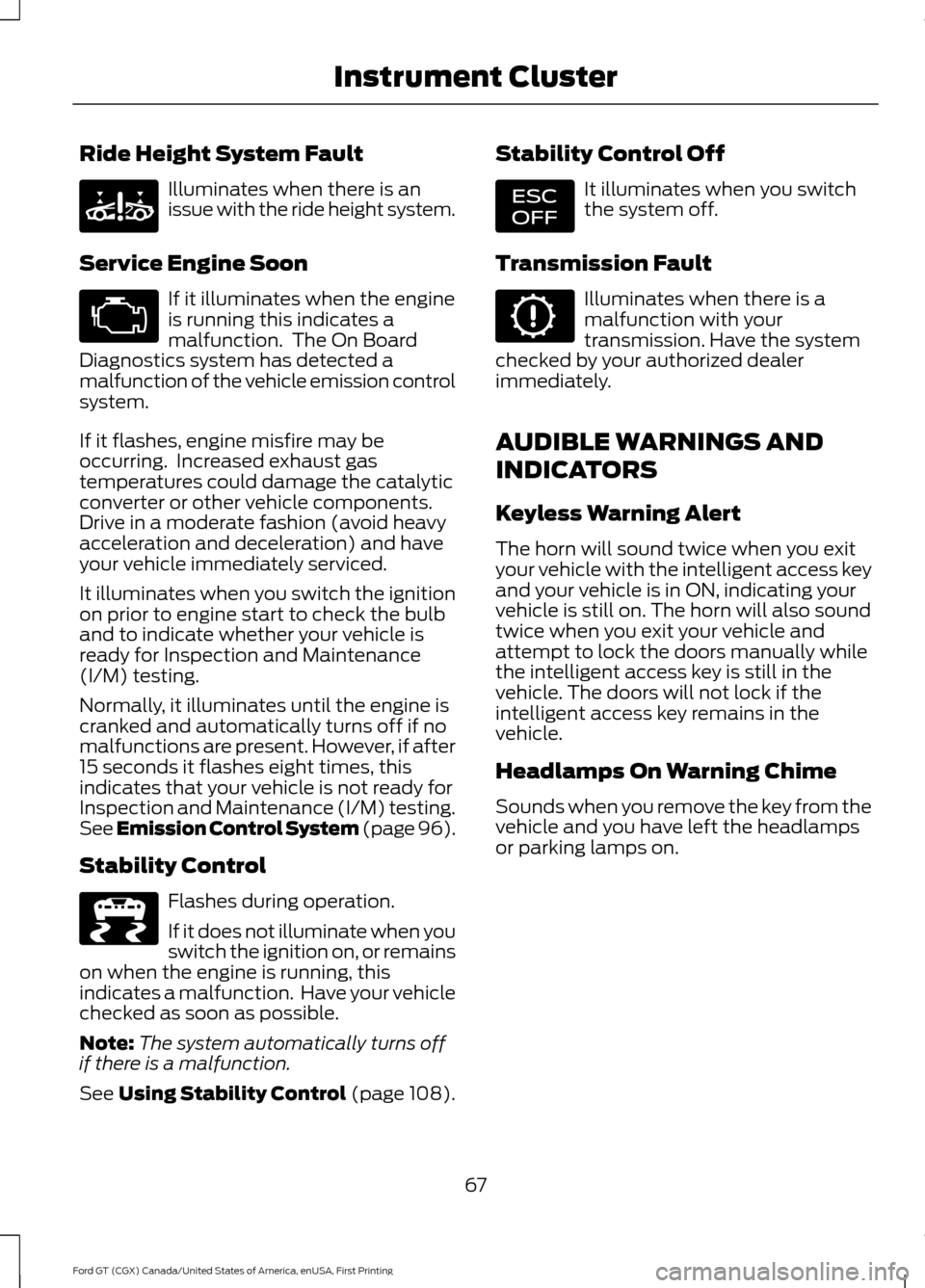
Ride Height System Fault
Illuminates when there is an
issue with the ride height system.
Service Engine Soon If it illuminates when the engine
is running this indicates a
malfunction. The On Board
Diagnostics system has detected a
malfunction of the vehicle emission control
system.
If it flashes, engine misfire may be
occurring. Increased exhaust gas
temperatures could damage the catalytic
converter or other vehicle components.
Drive in a moderate fashion (avoid heavy
acceleration and deceleration) and have
your vehicle immediately serviced.
It illuminates when you switch the ignition
on prior to engine start to check the bulb
and to indicate whether your vehicle is
ready for Inspection and Maintenance
(I/M) testing.
Normally, it illuminates until the engine is
cranked and automatically turns off if no
malfunctions are present. However, if after
15 seconds it flashes eight times, this
indicates that your vehicle is not ready for
Inspection and Maintenance (I/M) testing.
See Emission Control System (page 96).
Stability Control Flashes during operation.
If it does not illuminate when you
switch the ignition on, or remains
on when the engine is running, this
indicates a malfunction. Have your vehicle
checked as soon as possible.
Note: The system automatically turns off
if there is a malfunction.
See Using Stability Control (page 108). Stability Control Off It illuminates when you switch
the system off.
Transmission Fault Illuminates when there is a
malfunction with your
transmission. Have the system
checked by your authorized dealer
immediately.
AUDIBLE WARNINGS AND
INDICATORS
Keyless Warning Alert
The horn will sound twice when you exit
your vehicle with the intelligent access key
and your vehicle is in ON, indicating your
vehicle is still on. The horn will also sound
twice when you exit your vehicle and
attempt to lock the doors manually while
the intelligent access key is still in the
vehicle. The doors will not lock if the
intelligent access key remains in the
vehicle.
Headlamps On Warning Chime
Sounds when you remove the key from the
vehicle and you have left the headlamps
or parking lamps on.
67
Ford GT (CGX) Canada/United States of America, enUSA, First Printing Instrument ClusterE234585 E236447 E236448
Page 78 of 313
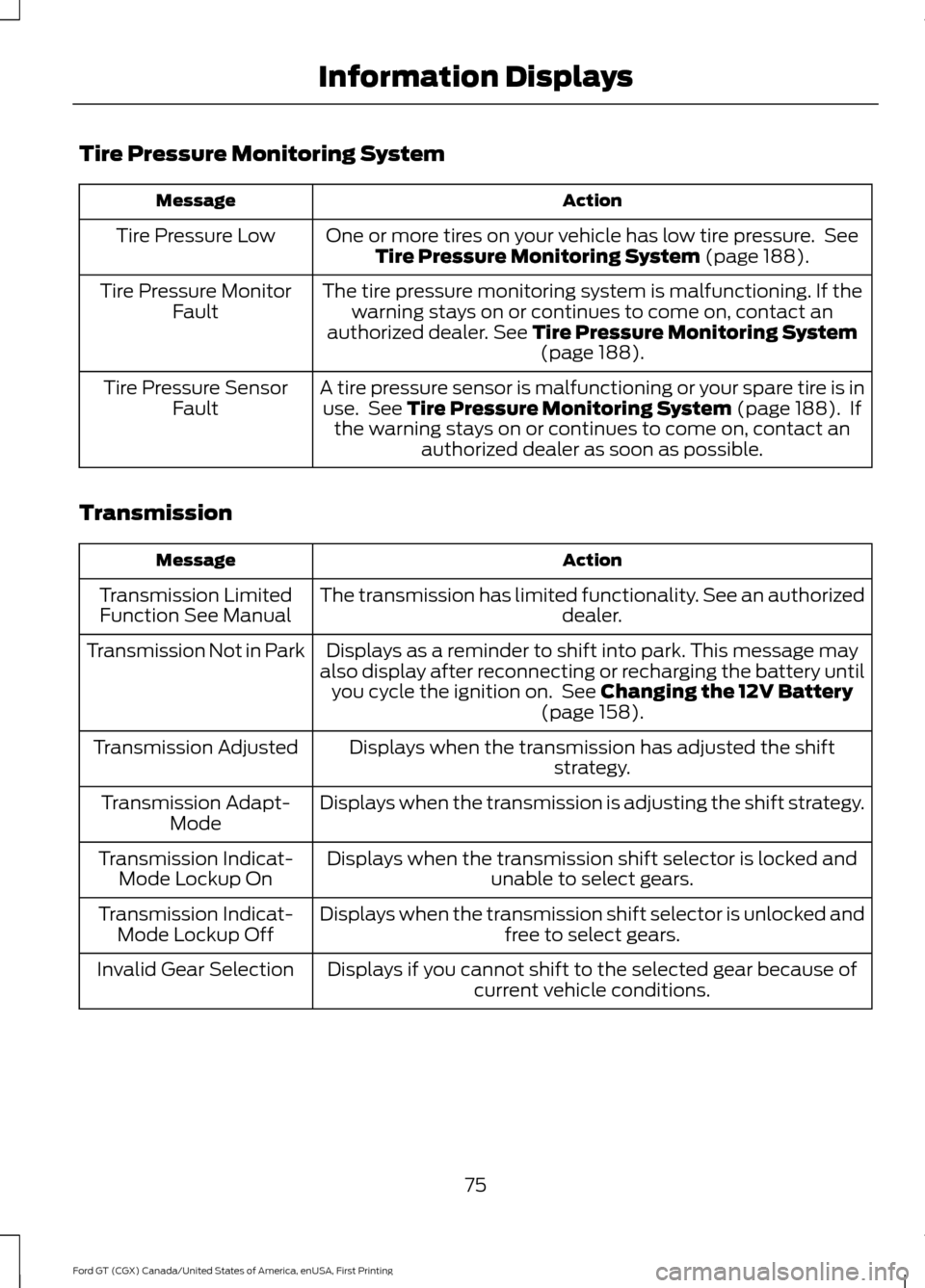
Tire Pressure Monitoring System
Action
Message
One or more tires on your vehicle has low tire pressure. SeeTire Pressure Monitoring System (page 188).
Tire Pressure Low
The tire pressure monitoring system is malfunctioning. If thewarning stays on or continues to come on, contact an
authorized dealer.
See Tire Pressure Monitoring System (page 188).
Tire Pressure Monitor
Fault
A tire pressure sensor is malfunctioning or your spare tire is inuse. See
Tire Pressure Monitoring System (page 188). If
the warning stays on or continues to come on, contact an authorized dealer as soon as possible.
Tire Pressure Sensor
Fault
Transmission Action
Message
The transmission has limited functionality. See an authorized dealer.
Transmission Limited
Function See Manual
Displays as a reminder to shift into park. This message may
also display after reconnecting or recharging the battery until you cycle the ignition on. See
Changing the 12V Battery
(page 158).
Transmission Not in Park
Displays when the transmission has adjusted the shiftstrategy.
Transmission Adjusted
Displays when the transmission is adjusting the shift strategy.
Transmission Adapt-
Mode
Displays when the transmission shift selector is locked and unable to select gears.
Transmission Indicat-
Mode Lockup On
Displays when the transmission shift selector is unlocked andfree to select gears.
Transmission Indicat-
Mode Lockup Off
Displays if you cannot shift to the selected gear because ofcurrent vehicle conditions.
Invalid Gear Selection
75
Ford GT (CGX) Canada/United States of America, enUSA, First Printing Information Displays