reset FORD KUGA 2010 1.G User Guide
[x] Cancel search | Manufacturer: FORD, Model Year: 2010, Model line: KUGA, Model: FORD KUGA 2010 1.GPages: 226, PDF Size: 8.07 MB
Page 135 of 226
FUEL CUT-OFF SWITCH
Vehicles with a Duratec engine
The fuel supply may be cut off as a result
of an accident or sudden vibrations (e.g.
collision when parking).
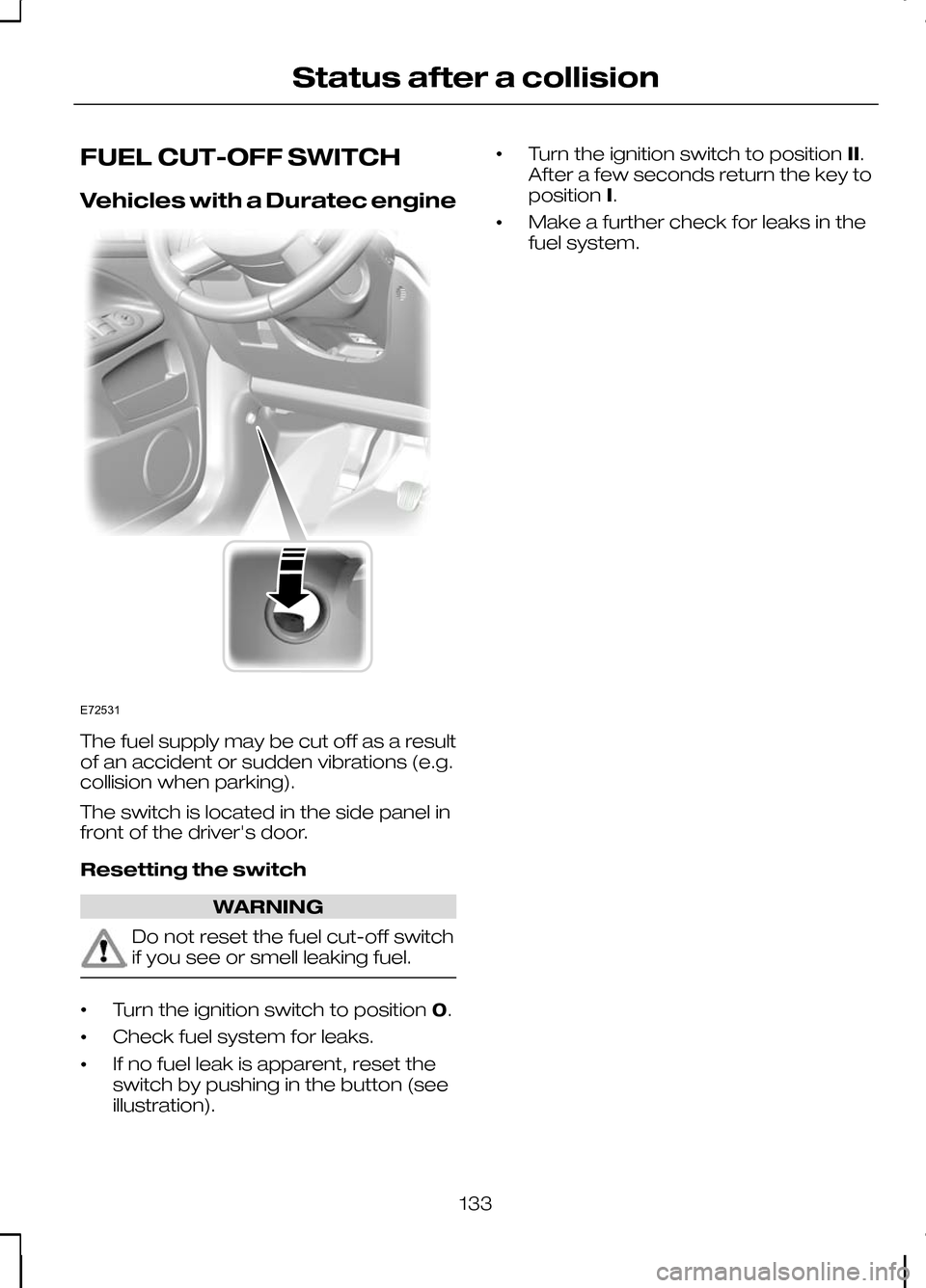
The switch is located in the side panel in
front of the driver's door.
Resetting the switch
WARNING
Do not reset the fuel cut-off switch
if you see or smell leaking fuel.
•
Turn the ignition switch to position
0.
• Check fuel system for leaks.
• If no fuel leak is apparent, reset the
switch by pushing in the button (see
illustration). •
Turn the ignition switch to position
II.
After a few seconds return the key to
position I.
• Make a further check for leaks in the
fuel system.
133
Status after a collisionE72531
Page 169 of 226
Vehicles with stability control
(ESP)
Vehicles with stability control (ESP) may
exhibit some unusual driving
characteristics which can be avoided by
switching the system off. See
Using
stability control (page 113).
TYRE PRESSURE
MONITORING SYSTEM WARNINGS
The system does not relieve you of
your responsibility to regularly check
the tyre pressures.
The system will only provide a low
tyre pressure warning. It will not
inflate the tyres.
Do not drive on significantly
under-inflated tyres. This may cause
the tyres to overheat and fail.
Under-inflation reduces fuel efficiency,
tyre tread life and may also affect your
ability to drive the vehicle safely. CAUTIONS
Do not bend or damage the valves
when you are inflating the tyres.
Have tyres installed by properly
trained technicians.
The Deflation Detection System will alert
you if there is a change of air pressure in
any tyre. It does this by using the ABS
sensors to detect the rolling
circumference of the wheels. When the
circumference changes, this indicates low
pressure in a tyre, a warning message is
displayed in the information display and
the message indicator will illuminate. See
Information messages
(page 73).Apart from a too low tyre pressure or a
damaged tyre, the following situations can
affect the rolling circumference:
•
Vehicle load is uneven.
• When using a trailer or travelling up
and down an incline.
• Using snow chains.
• Driving on soft surfaces such as snow
or mud.
Note:The system will still function
correctly, but there may be an increased detection time.
If a low pressure warning message is
displayed in the information display, check
the tyre pressures as soon as possible
and inflate them to the recommended
pressure. See Technical
specifications (page 168).
If this happens frequently, have the cause
determined and rectified as soon as
possible.
System reset
Note:
Do not reset the system when the
vehicle is moving.
Note:You should reset the system
following any adjustment to the tyre pressures or any changing of tyres.
Note:Turn the ignition on.
Type 2 instrument cluster
1. Using the multifunction lever, navigate
to'SET' > T. Pres.
2. Press and hold the SET/RESET
button until the message Tyre
Pressure set appears.
Type 3 instrument cluster
1. Using the multifunction lever, navigate
tohold 'SET' to set Tyre Pres.
167
Wheels and tyres
Page 170 of 226
2.
Press and hold the SET/RESET
button until the message Tyre Pressure set
appears.
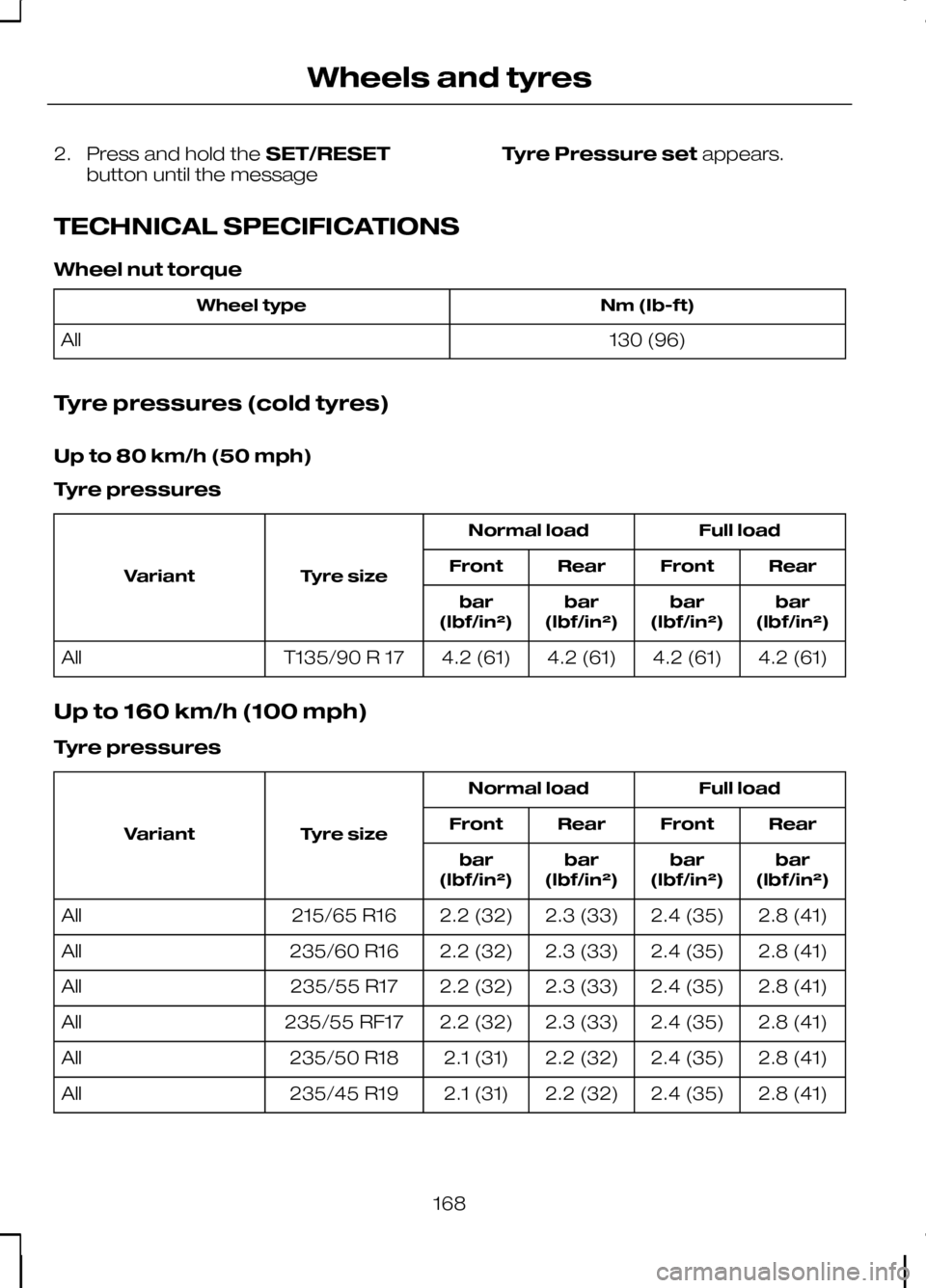
TECHNICAL SPECIFICATIONS
Wheel nut torque Nm (Ib-ft)
Wheel type
130 (96)
All
Tyre pressures (cold tyres)
Up to 80 km/h (50 mph)
Tyre pressures Full load
Normal load
Tyre size
Variant Rear
Front
Rear
Front
bar
(lbf/in²)
bar
(lbf/in²)
bar
(lbf/in²)
bar
(lbf/in²)
4.2 (61)
4.2 (61)
4.2 (61)
4.2 (61)
T135/90 R 17
All
Up to 160 km/h (100 mph)
Tyre pressures Full load
Normal load
Tyre size
Variant Rear
Front
Rear
Front
bar
(lbf/in²)
bar
(lbf/in²)
bar
(lbf/in²)
bar
(lbf/in²)
2.8 (41)
2.4 (35)
2.3 (33)
2.2 (32)
215/65 R16
All
2.8 (41)
2.4 (35)
2.3 (33)
2.2 (32)
235/60 R16
All
2.8 (41)
2.4 (35)
2.3 (33)
2.2 (32)
235/55 R17
All
2.8 (41)
2.4 (35)
2.3 (33)
2.2 (32)
235/55 RF17
All
2.8 (41)
2.4 (35)
2.2 (32)
2.1 (31)
235/50 R18
All
2.8 (41)
2.4 (35)
2.2 (32)
2.1 (31)
235/45 R19
All
168
Wheels and tyres
Page 181 of 226
Accepting a second incoming call
Second incoming calls can be accepted
by pressing either the call accept button,
the
PHONE button, or the MODEbutton
on the remote control.
Rejecting a second incoming call
Second incoming calls can be rejected by
pressing the call reject button. Units
without a telephone keypad can also
reject a second incoming call by pressing
the CD button, or the AM/FMbutton.
Muting the microphone
During a call, it is possible to mute the
microphone. Whilst muted, confirmation
will appear in the display.
Audio units with green call accept
button
Press the call accept button. Press the
button once again to turn this function off.
Audio units without green call
accept button
Press the seek up or down button. Press
the button once again to turn this function
off.
Changing the active phone
Note:Phones must be bonded to the
system before they can be made active.
Using the station storage button
Note:
This process is only for audio units
without a telephone keypad.
1. Press the PHONEbutton on the
audio unit.
2. Press the preset number required (using the station preset buttons 1 -
6). Using the audio unit menu
Note:
After bonding a phone to the
system, this becomes the active phone.
1. Press the PHONEor call accept
button.
2. Press the MENUbutton on the audio
unit.
3. Select the ACTIVE PHONE option
on the audio unit.
4. Scroll through the different stored phones by using the seek buttons to
display the bonded phones.
5. Press the MENUbutton to select the
phone which is to be the active phone.
Debonding a bonded phone
A bonded phone can be deleted from the
system at any time, unless a phone call is
in progress.
1. Press the PHONEor call accept
button.
2. Press the MENUbutton on the audio
unit.
3. Select the DEBOND option on the
audio unit.
4. Scroll through the different phones by using the seek buttons and display the
phone to be debonded.
5. Press the MENUbutton to select the
phone which is to be debonded.
Debonding a bonded phone -
Sony radio
A bonded phone can be deleted from the
system at any time, unless a phone call is
in progress.
1. Press the PHONEbutton.
2. Press the up/down arrow buttons until
you reach the DEBONDoption.
179
Telephone
Page 203 of 226
To enable voice control for custom
playlists and folders, follow the procedure
below:
•
Create folders named with the
structure
"Ford<*>" where <*> is a
number 1-10. For example "Ford3"
without an extension.
• Create playlists named with the
structure
"Ford<*>.m3u" where <*>
is a number 1-10. For example
"Ford5.m3u" without any space
between "Ford"and the number.
Thereafter, custom folders and playlists
will be selectable with voice control. See
Audio unit commands (page 183).
iPod
To enable voice control for custom
playlists, create playlists named with the
structure "Ford<*>" where <*> is a
number 1-10. For example "Ford7"
without any space between "Ford"and
the number.
Thereafter, playlists will be selectable with
voice control. See Audio unit
commands (page 183).
CONNECTING AN EXTERNAL
DEVICE WARNING
Make sure the external device is
securely mounted within the vehicle,
and that trailing connections do not
obstruct any of the driving controls. External devices may be connected using
the auxiliary input socket and the USB
port. See
Auxiliary input (AUX IN)
socket (page 99). See USB port(page
100). Connection
Plug in the device, and if necessary
secure it to prevent movement within the
vehicle.
Connecting an iPod
For optimum convenience and audio
quality, we recommend that you purchase
a dedicated single connection lead
available from your dealer.
Alternatively, it is possible to connect your
iPod using the standard iPod USB cable
and a separate 3.5mm audio jack lead. If
using this method preset the iPod volume
to maximum and turn off any equalizer
settings before making the connections:
•
Connect the headphone output of the
iPod to the AUX IN socket.
• Connect the USB cable from the iPod
to the vehicle USB socket.
CONNECTING AN EXTERNAL
DEVICE - VEHICLES WITH:
BLUETOOTH
Connecting a Bluetooth audio
device CAUTION
As various standards exist,
manufacturers are able to implement
a variety of profiles in their Bluetooth
devices. Because of this, an
incompatibility can occur between the
Bluetooth device and the system, which
in some cases may limit system
functionality. To avoid this situation, only
recommended devices should be used.
Please visit the website
www.ford-mobile-connectivity.com
for full details. 201
Connectivity
Page 219 of 226
D
Detachable tow ball...............................127
Driving with a trailer....................................129
Inserting the tow ball arm..........................128
Maintenance............................................... 129
Removing the tow ball arm.......................129
Unlocking the tow ball arm mechanism.............................................. 128
Diesel particulate filter (DPF)................102 Regeneration............................................... 103
Direction indicators.................................50
Disabling the passenger airbag............25 Disabling the passenger airbag.................26
Enabling the passenger airbag..................26
Fitting the passenger airbag deactivation
switch......................................................... 25
Disarming the alarm................................37 Britain and Ireland only................................38
Disarming the engine immobiliser........36
DPF See: Diesel particulate filter (DPF)............102
Driving hints.............................................131
Driving through water............................131 Driving through water ................................131
E
Electric exterior mirrors..........................62 Electric folding mirrors.................................62
Mirror tilting positions...................................62
Electric seats...........................................93 6-way electric seat......................................93
Electric windows.....................................60 Anti-trap function..........................................60
Driver's door switches.................................60
Global opening and closing........................60
Opening and closing the windows
automatically............................................. 60
Resetting the memory of the electric windows..................................................... 61
Safety switch for rear windows.................60
Electromagnetic compatibility.............212
Emergency equipment........................132
Engine compartment overview - 2.0L Duratorq-TDCi (DW) Diesel...............145
Engine compartment overview - 2.5L Duratec (VI5)........................................144 Engine coolant check...........................148
Checking the coolant level........................148
Topping up...................................................148
Engine immobiliser..................................36 Principle of operation...................................36
Engine oil check.....................................147 Checking the oil level..................................147
Topping up...................................................148
Engine oil dipstick - 2.0L Duratorq-TDCi (DW) Diesel...........................................147
Engine oil dipstick - 2.5L Duratec (VI5).......................................................147
Exterior mirrors.........................................61 Manual folding mirrors..................................61
F
Fastening the seat belts........................24
First aid kit...............................................132
Floor mats...............................................100
Fog lamp See: Front fog lamps....................................47
Front fog lamps.......................................47
Fuel and refuelling.................................104 Technical specifications.............................106
Fuel burning heater See: Auxiliary heater....................................86
Fuel consumption..................................106
Fuel consumption See: Technical specifications....................106
Fuel cut-off switch.................................133 Vehicles with a Duratec engine................133
Fuel filler flap...........................................104
Fuel quality - Diesel...............................104 Long-term storage.....................................104
Fuel quality - Petrol................................104
Fuse box locations................................134 Engine compartment fuse box................134
Passenger compartment fuse box.........134
Fuses.......................................................134
Fuse specification chart.......................135 Engine compartment fuse box................135
Passenger compartment fuse box.........137
217
Index
Page 223 of 226
Switching off the engine.......................103
Vehicles with a turbocharger....................103
Symbols glossary......................................5 Symbols in this handbook.............................5
Symbols on your vehicle...............................5
T
Technical specifications.........................171 Technical specifications..............................171
Telephone commands.........................192 Create a phonebook.................................195
Main settings...............................................197
Phone........................................................... 192
Phone functions..........................................193
Telephone controls................................177 Remote control...........................................177
Telephone setup....................................175 Bond another Bluetooth phone...............176
Making a phone an active phone............175
Phonebook.................................................. 175
Phonebook categories..............................175
Telephone...............................................175 General information....................................175
Telephone See: Using the telephone - Vehicles With:
Navigation System.................................180
See: Using the telephone - Vehicles Without: Navigation System..................................177
Toll reader.................................................99
Towing a trailer.......................................127 Steep gradients...........................................127
Towing points.........................................140
Towing the vehicle on four wheels..................................................140
All vehicles....................................................140
Vehicles with automatic transmission............................................. 141
Towing.....................................................127
Transmission..........................................108
Type approvals.......................................211 FCC/INDUSTRY CANADA NOTICE..........211
RX-42 - declaration of conformity............211
Tyre care.................................................166
Tyre pressure monitoring system.......167 System reset...............................................167
Tyre pressures See: Technical specifications....................168 Tyre repair kit...........................................161
Checking the tyre pressure......................164
General information....................................161
Inflating the tyre...........................................162
Using the tyre repair kit...............................161
Tyres See: Wheels and tyres...............................156
U
USB port.................................................100
Using an iPod........................................204 CD Navigation units...................................206
DVD Navigation units.................................206
Sony radio...................................................205
Using a USB device..............................202 CD Navigation units...................................203
DVD Navigation units.................................204
Sony radio...................................................202
Using booster cables............................154 To connect the booster cables................154
To start the engine.....................................155
Using cruise control..............................120 Cancelling the set speed...........................121
Changing the set speed............................120
Resuming the set speed............................121
Setting a speed...........................................120
Switching cruise control off.......................121
Switching cruise control on.......................120
Using seat belts during pregnancy......25
Using snow chains................................166 Vehicles with stability control (ESP)..........167
Using stability control.............................113
Using the parking aid.............................115 Manoeuvring with the parking aid............115
Switching the parking aid on and off........115
Using the rear view camera..................117 Activating the rear view camera...............117
Deactivating the rear view camera..........119
Using the display..........................................117
Vehicles with parking aid............................119
221
Index