warning FORD KUGA 2010 1.G Owner's Manual
[x] Cancel search | Manufacturer: FORD, Model Year: 2010, Model line: KUGA, Model: FORD KUGA 2010 1.GPages: 226, PDF Size: 8.07 MB
Page 33 of 226
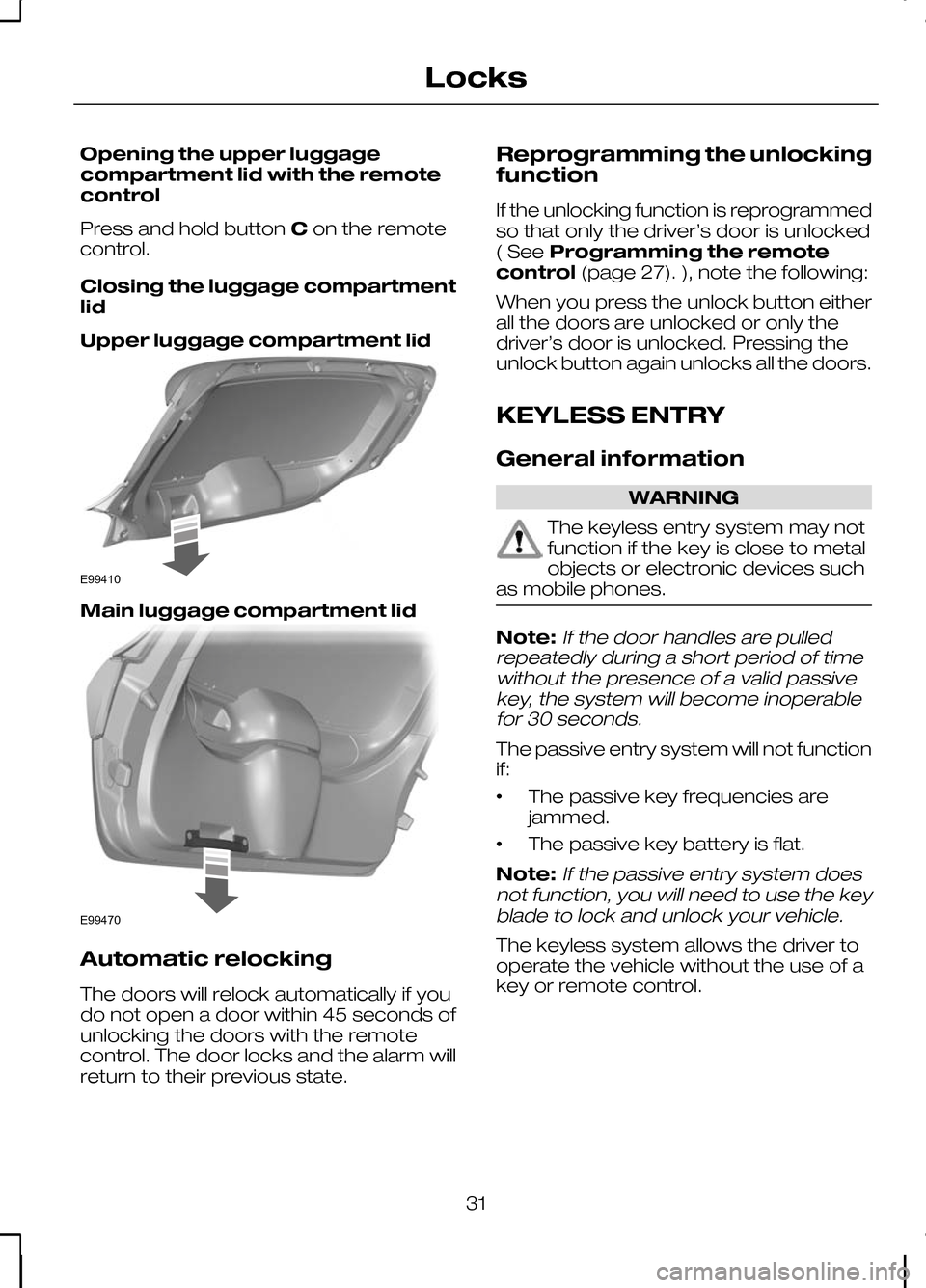
Opening the upper luggage
compartment lid with the remote
control
Press and hold button
Con the remote
control.
Closing the luggage compartment
lid
Upper luggage compartment lid Main luggage compartment lid
Automatic relocking
The doors will relock automatically if you
do not open a door within 45 seconds of
unlocking the doors with the remote
control. The door locks and the alarm will
return to their previous state. Reprogramming the unlocking
function
If the unlocking function is reprogrammed
so that only the driver’s door is unlocked
( See
Programming the remote
control (page 27). ), note the following:
When you press the unlock button either
all the doors are unlocked or only the
driver’s door is unlocked. Pressing the
unlock button again unlocks all the doors.
KEYLESS ENTRY
General information WARNING
The keyless entry system may not
function if the key is close to metal
objects or electronic devices such
as mobile phones. Note:If the door handles are pulled
repeatedly during a short period of time without the presence of a valid passivekey, the system will become inoperablefor 30 seconds.
The passive entry system will not function
if:
• The passive key frequencies are
jammed.
• The passive key battery is flat.
Note:
If the passive entry system does
not function, you will need to use the key blade to lock and unlock your vehicle.
The keyless system allows the driver to
operate the vehicle without the use of a
key or remote control.
31
LocksE99410 E99470
Page 34 of 226
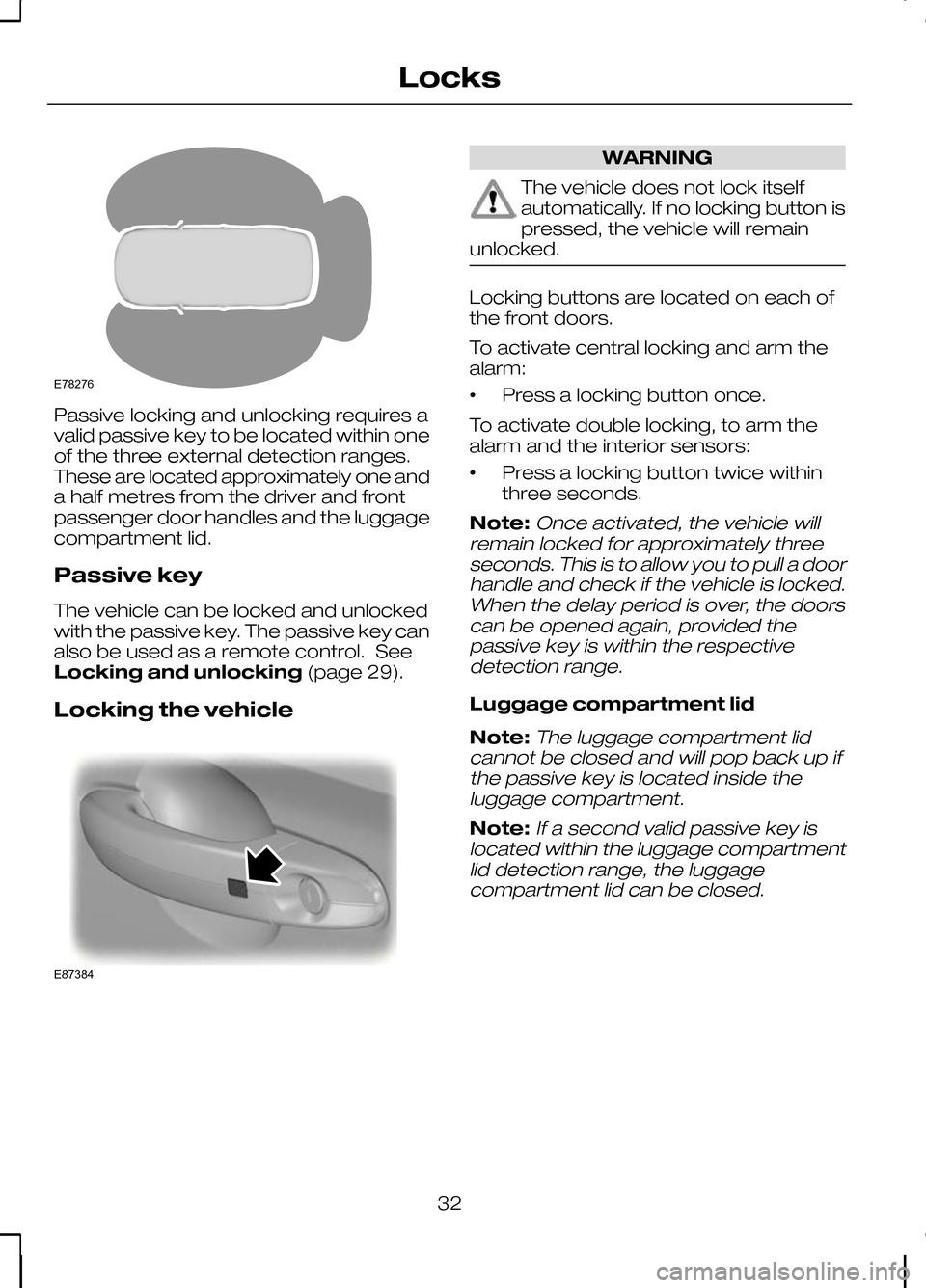
Passive locking and unlocking requires a
valid passive key to be located within one
of the three external detection ranges.
These are located approximately one and
a half metres from the driver and front
passenger door handles and the luggage
compartment lid.
Passive key
The vehicle can be locked and unlocked
with the passive key. The passive key can
also be used as a remote control. See
Locking and unlocking
(page 29).
Locking the vehicle WARNING
The vehicle does not lock itself
automatically. If no locking button is
pressed, the vehicle will remain
unlocked. Locking buttons are located on each of
the front doors.
To activate central locking and arm the
alarm:
•
Press a locking button once.
To activate double locking, to arm the
alarm and the interior sensors:
• Press a locking button twice within
three seconds.
Note:Once activated, the vehicle will
remain locked for approximately three seconds. This is to allow you to pull a doorhandle and check if the vehicle is locked.When the delay period is over, the doorscan be opened again, provided thepassive key is within the respectivedetection range.
Luggage compartment lid
Note:
The luggage compartment lid
cannot be closed and will pop back up if the passive key is located inside theluggage compartment.
Note:If a second valid passive key is
located within the luggage compartment lid detection range, the luggagecompartment lid can be closed.
32
LocksE78276 E87384
Page 36 of 226
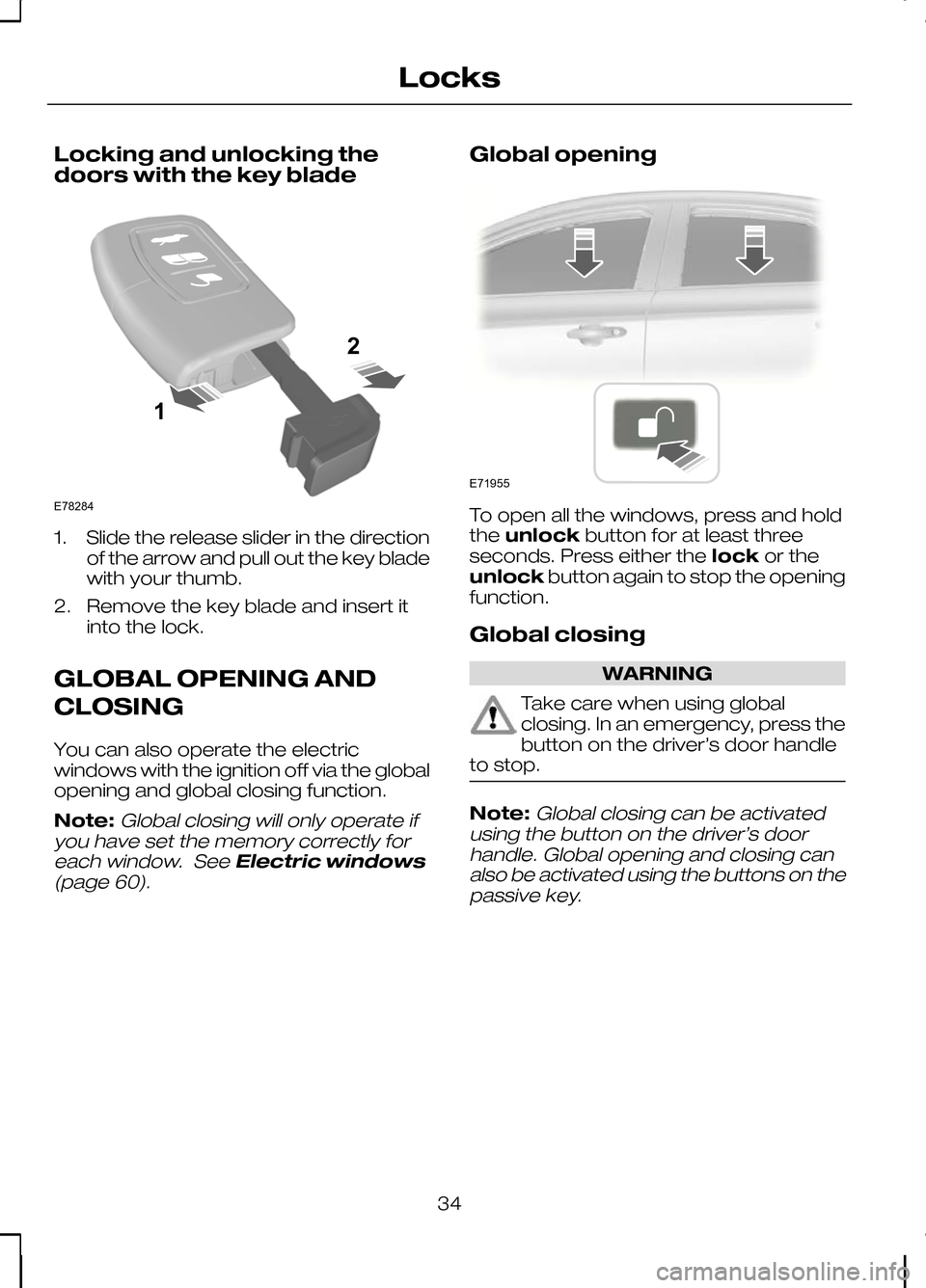
Locking and unlocking the
doors with the key blade
1. Slide the release slider in the direction
of the arrow and pull out the key blade
with your thumb.
2. Remove the key blade and insert it into the lock.
GLOBAL OPENING AND
CLOSING
You can also operate the electric
windows with the ignition off via the global
opening and global closing function.
Note:Global closing will only operate if
you have set the memory correctly for
each window. See Electric windows
(page 60).
Global opening To open all the windows, press and hold
the
unlock button for at least three
seconds. Press either the lockor the
unlock button again to stop the opening
function.
Global closing WARNING
Take care when using global
closing. In an emergency, press the
button on the driver’s door handle
to stop. Note:
Global closing can be activated
using the button on the driver’s door handle. Global opening and closing canalso be activated using the buttons on thepassive key.
34
Locks12E78284 E71955
Page 39 of 226
ARMING THE ALARM
The system is armed as soon as the
vehicle is locked and acts as a deterrent
to unauthorised persons who attempt to
open the doors, bonnet or luggage
compartment, or remove the audio
system.
The alarm sounds for 30 seconds if an
unauthorised person opens a door, the
luggage compartment or the bonnet. The
hazard flasher lights will flash for five
minutes.
Any attempt to start the engine without a
valid key or to remove the audio system
sounds the alarm again.
Automatic arming delay
The 20 seconds arming delay begins
when the bonnet, luggage compartment
and all doors are closed.
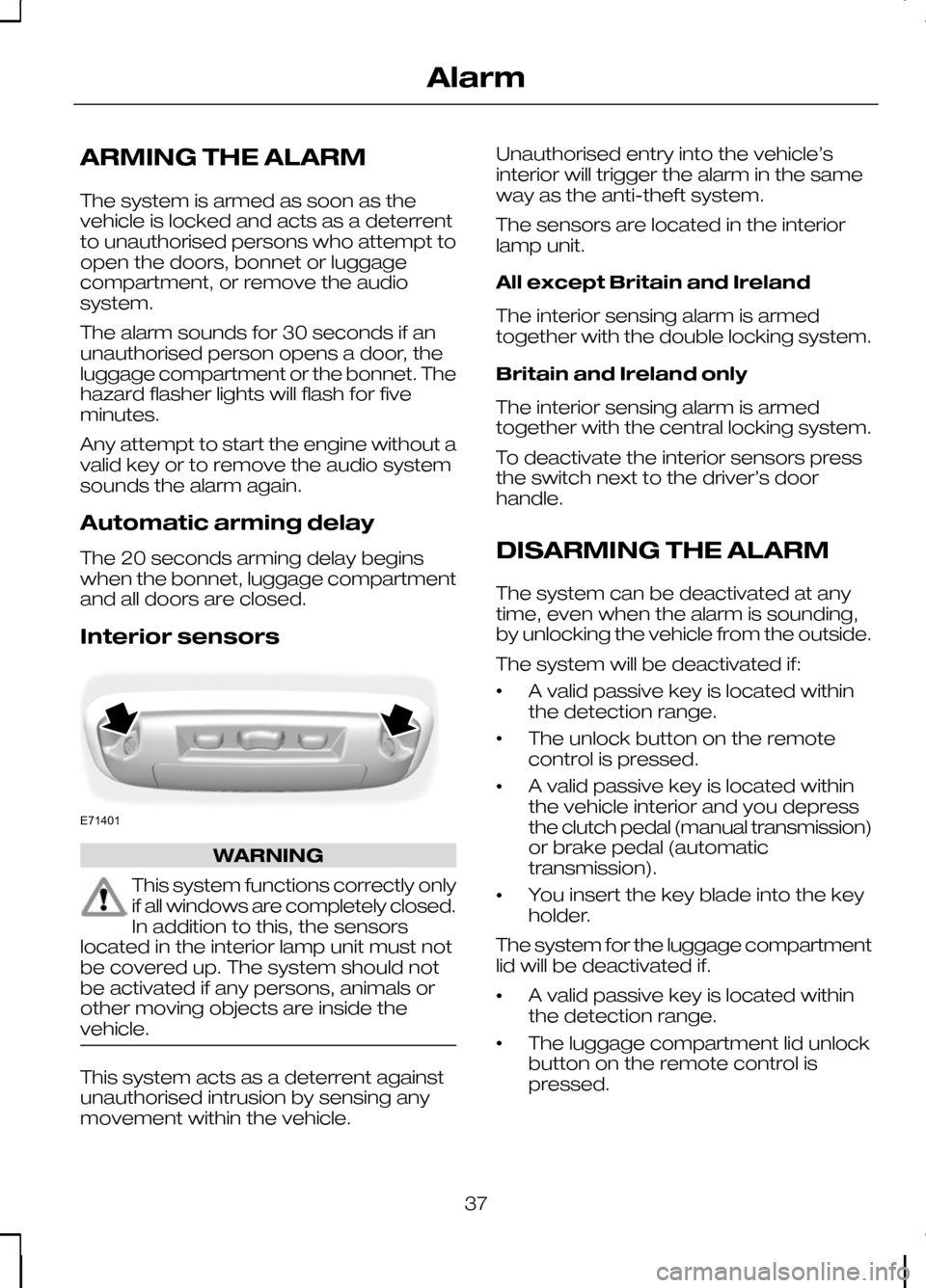
Interior sensors
WARNING
This system functions correctly only
if all windows are completely closed.
In addition to this, the sensors
located in the interior lamp unit must not
be covered up. The system should not
be activated if any persons, animals or
other moving objects are inside the
vehicle. This system acts as a deterrent against
unauthorised intrusion by sensing any
movement within the vehicle. Unauthorised entry into the vehicle’s
interior will trigger the alarm in the same
way as the anti-theft system.
The sensors are located in the interior
lamp unit.
All except Britain and Ireland
The interior sensing alarm is armed
together with the double locking system.
Britain and Ireland only
The interior sensing alarm is armed
together with the central locking system.
To deactivate the interior sensors press
the switch next to the driver’s door
handle.
DISARMING THE ALARM
The system can be deactivated at any
time, even when the alarm is sounding,
by unlocking the vehicle from the outside.
The system will be deactivated if:
•
A valid passive key is located within
the detection range.
• The unlock button on the remote
control is pressed.
• A valid passive key is located within
the vehicle interior and you depress
the clutch pedal (manual transmission)
or brake pedal (automatic
transmission).
• You insert the key blade into the key
holder.
The system for the luggage compartment
lid will be deactivated if.
• A valid passive key is located within
the detection range.
• The luggage compartment lid unlock
button on the remote control is
pressed.
37
AlarmE71401
Page 41 of 226
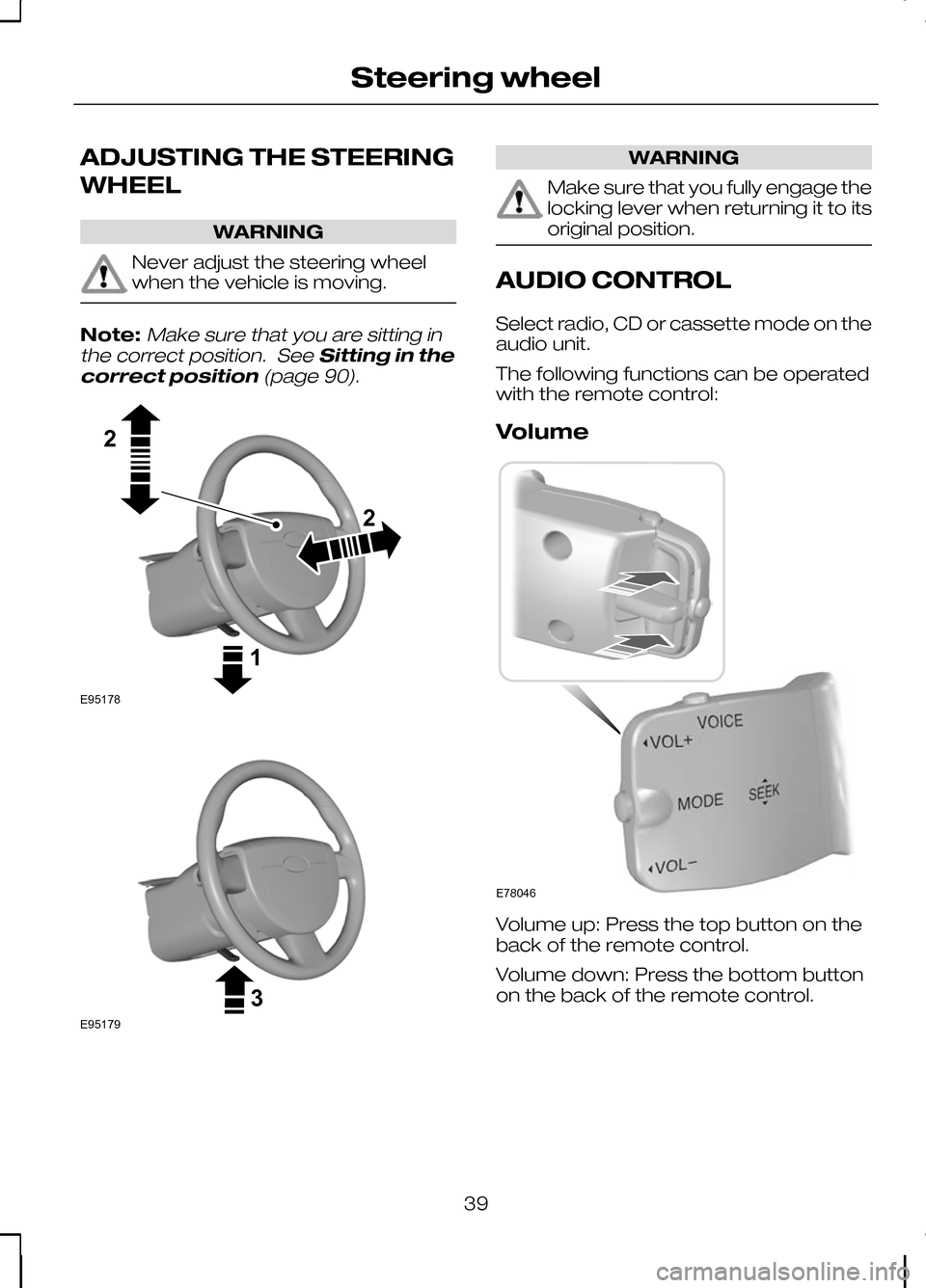
ADJUSTING THE STEERING
WHEEL
WARNING
Never adjust the steering wheel
when the vehicle is moving.
Note:Make sure that you are sitting in
the correct position. See Sitting in the
correct position (page 90). WARNING
Make sure that you fully engage the
locking lever when returning it to its
original position.
AUDIO CONTROL
Select radio, CD or cassette mode on the
audio unit.
The following functions can be operated
with the remote control:
Volume
Volume up: Press the top button on the
back of the remote control.
Volume down: Press the bottom button
on the back of the remote control.
39
Steering wheel122E95178 3E95179 E78046
Page 44 of 226
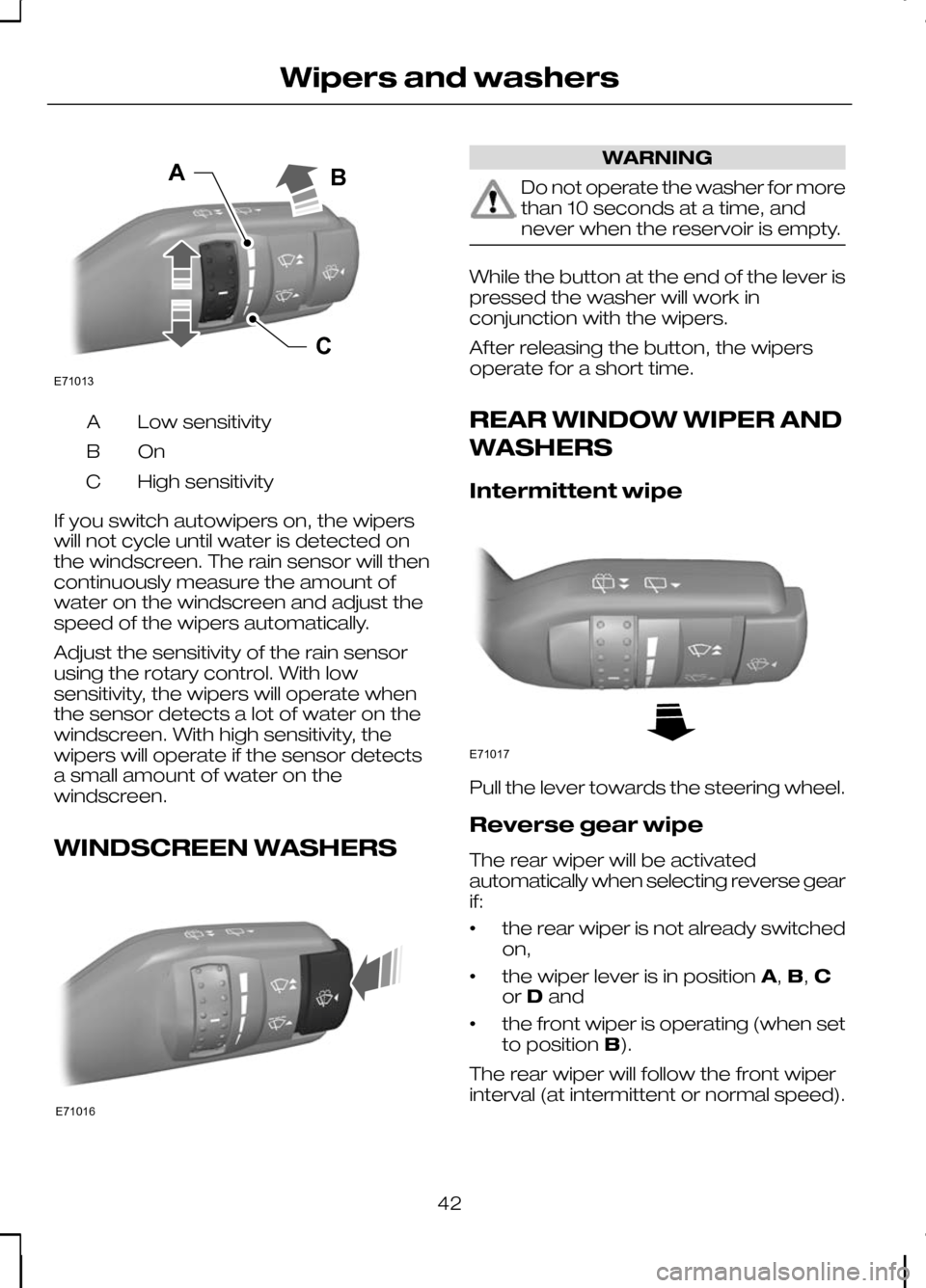
Low sensitivity
A
OnB
High sensitivity
C
If you switch autowipers on, the wipers
will not cycle until water is detected on
the windscreen. The rain sensor will then
continuously measure the amount of
water on the windscreen and adjust the
speed of the wipers automatically.
Adjust the sensitivity of the rain sensor
using the rotary control. With low
sensitivity, the wipers will operate when
the sensor detects a lot of water on the
windscreen. With high sensitivity, the
wipers will operate if the sensor detects
a small amount of water on the
windscreen.
WINDSCREEN WASHERS WARNING
Do not operate the washer for more
than 10 seconds at a time, and
never when the reservoir is empty.
While the button at the end of the lever is
pressed the washer will work in
conjunction with the wipers.
After releasing the button, the wipers
operate for a short time.
REAR WINDOW WIPER AND
WASHERS
Intermittent wipe
Pull the lever towards the steering wheel.
Reverse gear wipe
The rear wiper will be activated
automatically when selecting reverse gear
if:
•
the rear wiper is not already switched
on,
• the wiper lever is in position
A,B, C
or Dand
• the front wiper is operating (when set
to position
B).
The rear wiper will follow the front wiper
interval (at intermittent or normal speed).
42
Wipers and washersE71013CAB E71016 E71017
Page 45 of 226
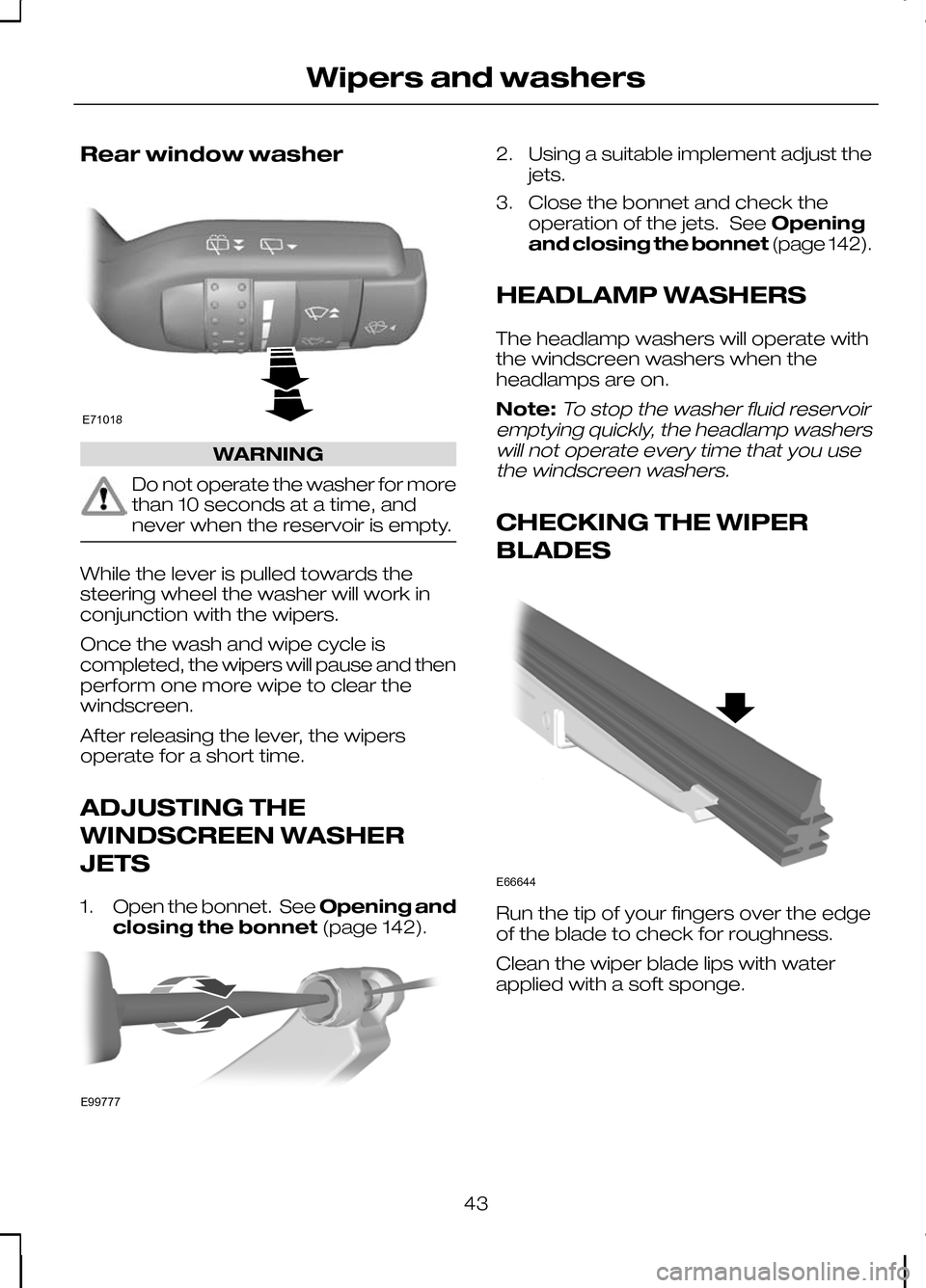
Rear window washer
WARNING
Do not operate the washer for more
than 10 seconds at a time, and
never when the reservoir is empty.
While the lever is pulled towards the
steering wheel the washer will work in
conjunction with the wipers.
Once the wash and wipe cycle is
completed, the wipers will pause and then
perform one more wipe to clear the
windscreen.
After releasing the lever, the wipers
operate for a short time.
ADJUSTING THE
WINDSCREEN WASHER
JETS
1.
Open the bonnet. See Opening and
closing the bonnet (page 142). 2. Using a suitable implement adjust the
jets.
3. Close the bonnet and check the operation of the jets. See Opening
and closing the bonnet (page 142).
HEADLAMP WASHERS
The headlamp washers will operate with
the windscreen washers when the
headlamps are on.
Note:To stop the washer fluid reservoir
emptying quickly, the headlamp washers will not operate every time that you usethe windscreen washers.
CHECKING THE WIPER
BLADES Run the tip of your fingers over the edge
of the blade to check for roughness.
Clean the wiper blade lips with water
applied with a soft sponge.
43
Wipers and washersE71018 E99777 E66644
Page 49 of 226
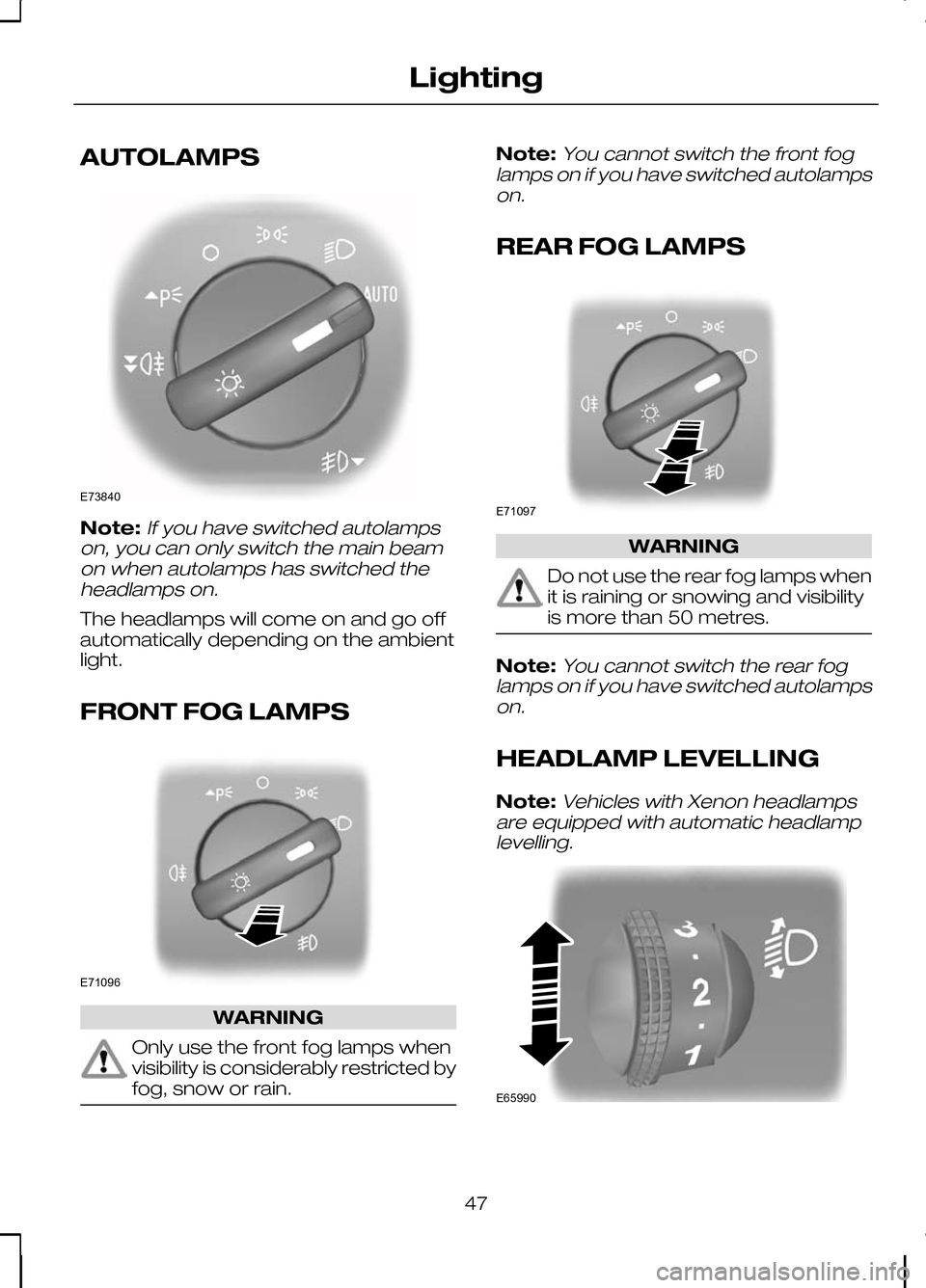
AUTOLAMPS
Note:If you have switched autolamps
on, you can only switch the main beam on when autolamps has switched theheadlamps on.
The headlamps will come on and go off
automatically depending on the ambient
light.
FRONT FOG LAMPS WARNING
Only use the front fog lamps when
visibility is considerably restricted by
fog, snow or rain. Note:
You cannot switch the front fog
lamps on if you have switched autolamps on.
REAR FOG LAMPS WARNING
Do not use the rear fog lamps when
it is raining or snowing and visibility
is more than 50 metres.
Note:
You cannot switch the rear fog
lamps on if you have switched autolamps on.
HEADLAMP LEVELLING
Note:
Vehicles with Xenon headlamps
are equipped with automatic headlamp levelling. 47
LightingE73840 E71096 E71097 E65990
Page 50 of 226
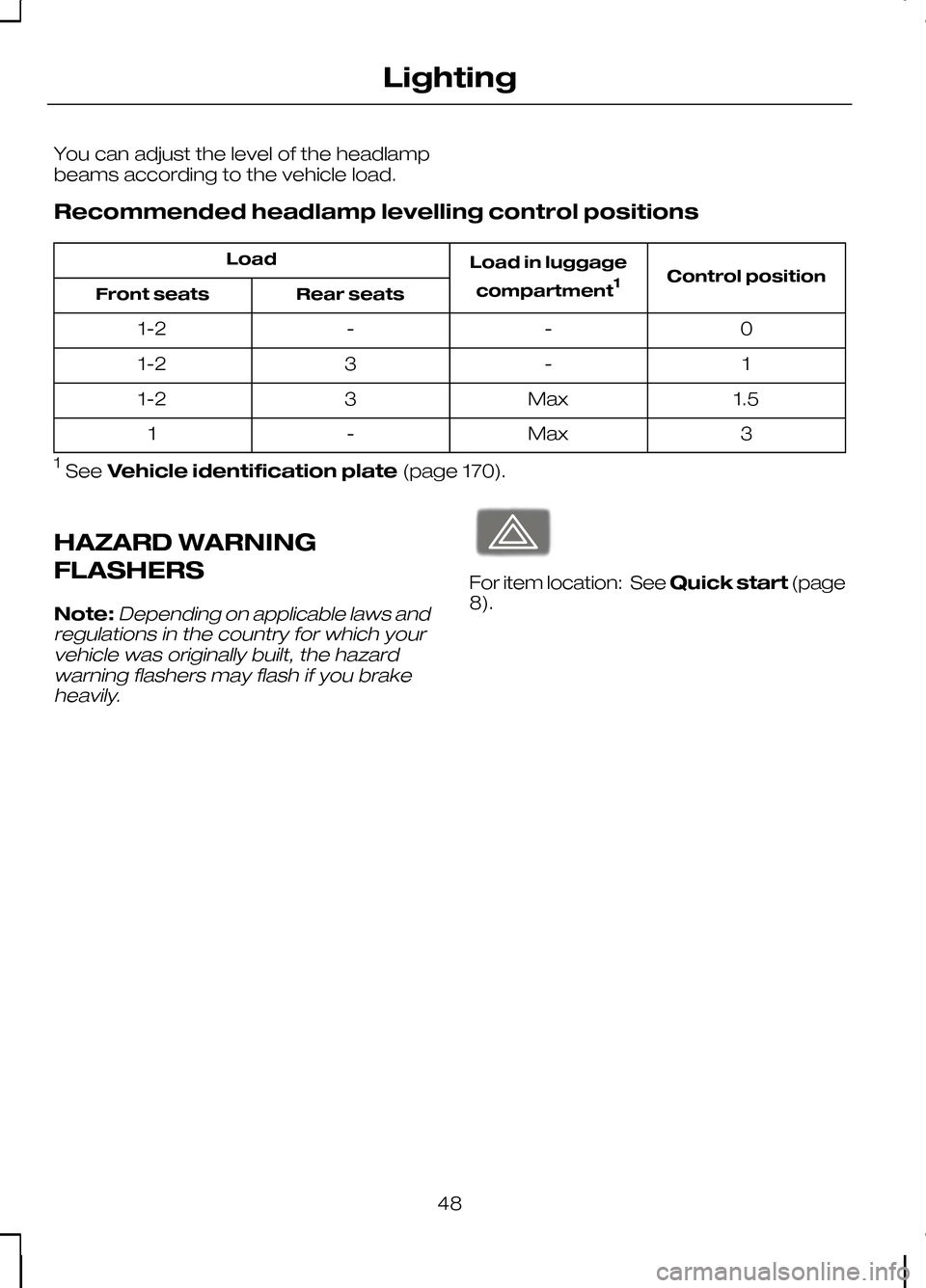
You can adjust the level of the headlamp
beams according to the vehicle load.
Recommended headlamp levelling control positions
Control position
Load in luggage
compartment 1
Load
Rear seats
Front seats
0
-
-
1-2
1
-
3
1-2
1.5
Max
3
1-2
3
Max
-
1
1 See Vehicle identification plate (page 170).
HAZARD WARNING
FLASHERS
Note:Depending on applicable laws and
regulations in the country for which your vehicle was originally built, the hazardwarning flashers may flash if you brakeheavily. For item location: See
Quick start(page
8).
48
LightingE71943
Page 53 of 226
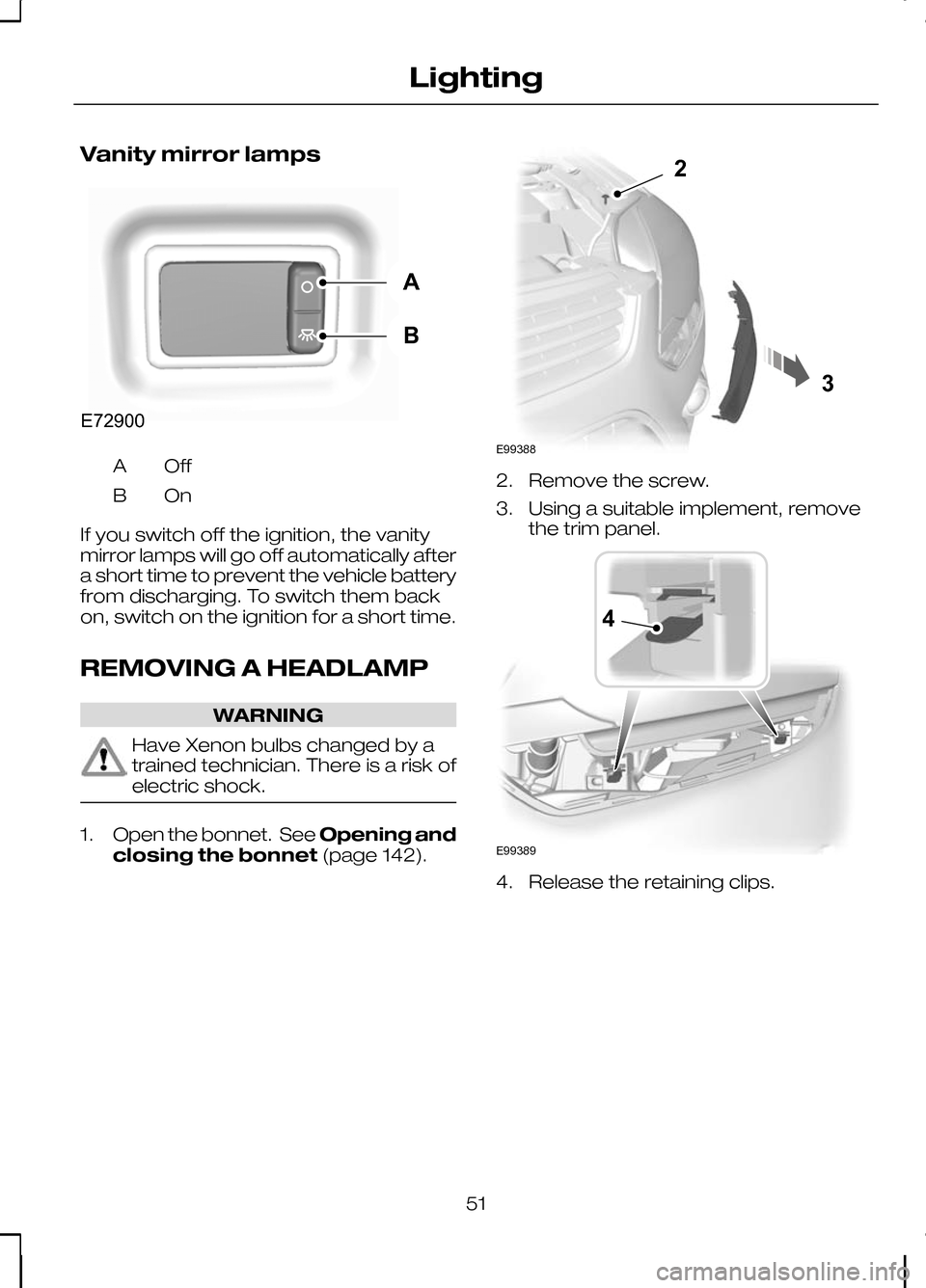
Vanity mirror lamps
OffA
OnB
If you switch off the ignition, the vanity
mirror lamps will go off automatically after
a short time to prevent the vehicle battery
from discharging. To switch them back
on, switch on the ignition for a short time.
REMOVING A HEADLAMP WARNING
Have Xenon bulbs changed by a
trained technician. There is a risk of
electric shock.
1.
Open the bonnet. See Opening and
closing the bonnet (page 142). 2. Remove the screw.
3. Using a suitable implement, remove
the trim panel. 4. Release the retaining clips.
51
LightingABE72900 23E99388 4E99389