Scr FORD KUGA 2011 1.G Workshop Manual
[x] Cancel search | Manufacturer: FORD, Model Year: 2011, Model line: KUGA, Model: FORD KUGA 2011 1.GPages: 2057
Page 363 of 2057
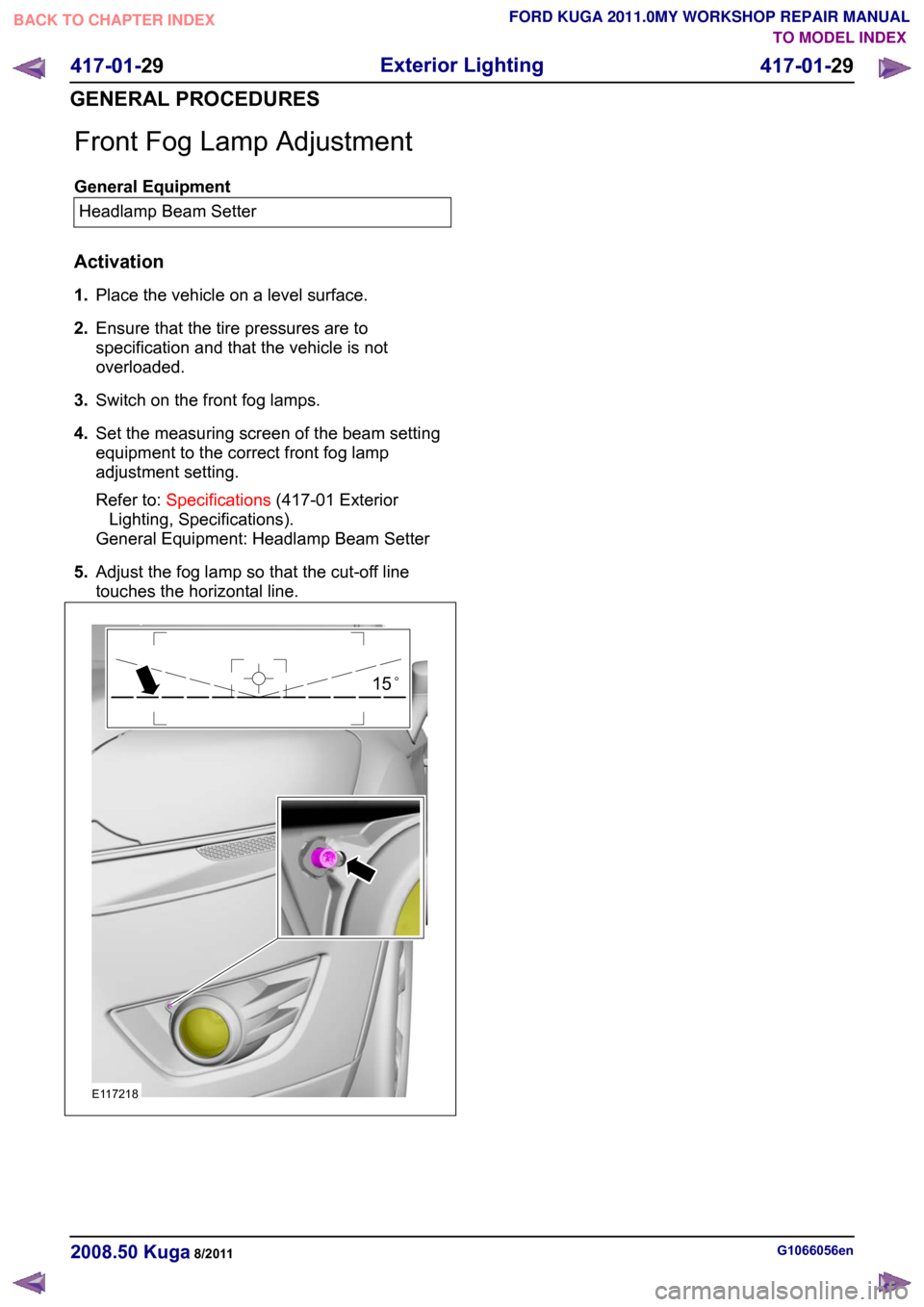
Front Fog Lamp Adjustment
General Equipment
Headlamp Beam Setter
Activation
1. Place the vehicle on a level surface.
2. Ensure that the tire pressures are to
specification and that the vehicle is not
overloaded.
3. Switch on the front fog lamps.
4. Set the measuring screen of the beam setting
equipment to the correct front fog lamp
adjustment setting.
Refer to: Specifications (417-01 Exterior
Lighting, Specifications).
General Equipment: Headlamp Beam Setter
5. Adjust the fog lamp so that the cut-off line
touches the horizontal line. G1066056en
2008.50 Kuga 8/2011 417-01-29
Exterior Lighting
417-01-29
GENERAL PROCEDURESTO MODEL INDEX
BACK TO CHAPTER INDEX
FORD KUGA 2011.0MY WORKSHOP REPAIR MANUALE11721815
Page 364 of 2057
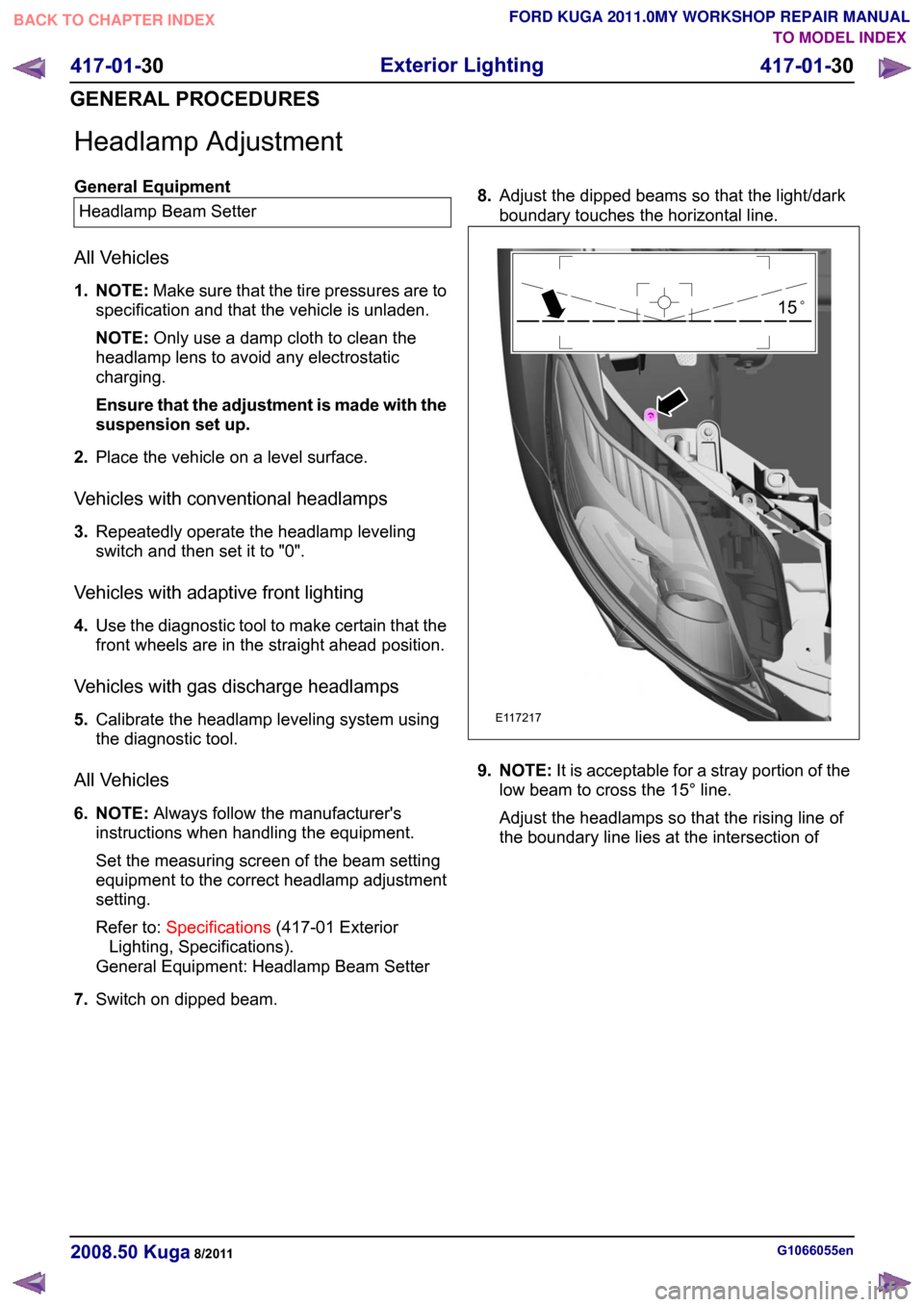
Headlamp Adjustment
General Equipment
Headlamp Beam Setter
All Vehicles
1. NOTE: Make sure that the tire pressures are to
specification and that the vehicle is unladen.
NOTE: Only use a damp cloth to clean the
headlamp lens to avoid any electrostatic
charging.
Ensure that the adjustment is made with the
suspension set up.
2. Place the vehicle on a level surface.
Vehicles with conventional headlamps
3. Repeatedly operate the headlamp leveling
switch and then set it to "0".
Vehicles with adaptive front lighting
4. Use the diagnostic tool to make certain that the
front wheels are in the straight ahead position.
Vehicles with gas discharge headlamps
5. Calibrate the headlamp leveling system using
the diagnostic tool.
All Vehicles
6. NOTE: Always follow the manufacturer's
instructions when handling the equipment.
Set the measuring screen of the beam setting
equipment to the correct headlamp adjustment
setting.
Refer to: Specifications (417-01 Exterior
Lighting, Specifications).
General Equipment: Headlamp Beam Setter
7. Switch on dipped beam. 8.
Adjust the dipped beams so that the light/dark
boundary touches the horizontal line. 9. NOTE:
It is acceptable for a stray portion of the
low beam to cross the 15° line.
Adjust the headlamps so that the rising line of
the boundary line lies at the intersection of G1066055en
2008.50 Kuga 8/2011 417-01-30
Exterior Lighting
417-01-30
GENERAL PROCEDURESTO MODEL INDEX
BACK TO CHAPTER INDEX
FORD KUGA 2011.0MY WORKSHOP REPAIR MANUALE11721715
Page 375 of 2057
SECTION 417-04 Daytime Running Lamps (DRL)
VEHICLE APPLICATION:
2008.50 Kuga
PAGE
CONTENTS
DIAGNOSIS AND TESTING
417-04-2
Daytime Running Lamps (DRL)..........................................................................................
417-04-2
Description of operation......................................................................................................
417-04-3
Inspection and Checking.................................................................................................... 417-04-1
Daytime Running Lamps (DRL)
417-04-1
.TO MODEL INDEX
BACK TO CHAPTER INDEX
FORD KUGA 2011.0MY WORKSHOP REPAIR MANUAL
Page 376 of 2057
Daytime Running Lamps (DRL)
Refer to Wiring Diagrams Section 417-04, for
schematic and connector information.
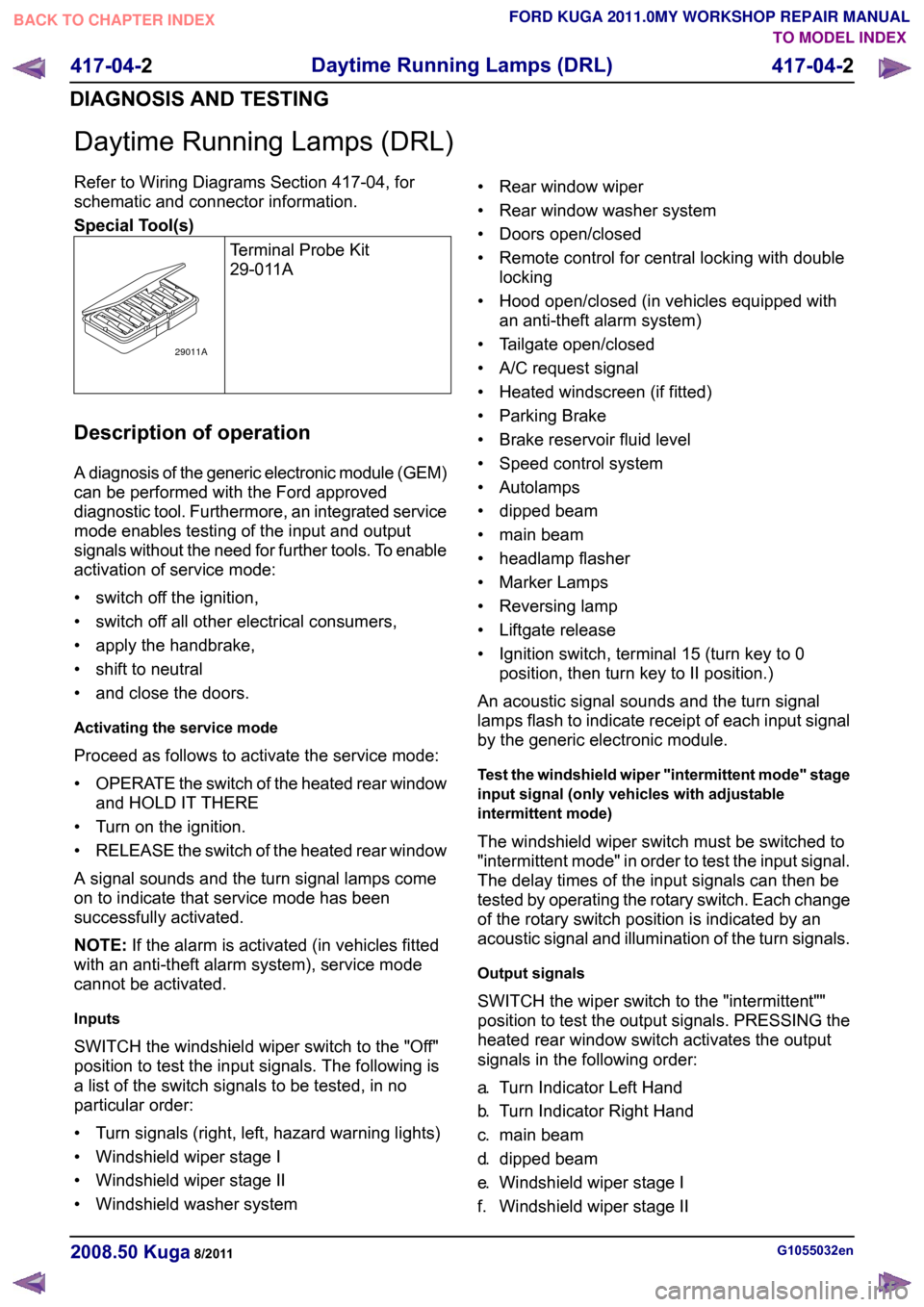
Special Tool(s)
Terminal Probe Kit
29-011ADescription of operation
A diagnosis of the generic electronic module (GEM)
can be performed with the Ford approved
diagnostic tool. Furthermore, an integrated service
mode enables testing of the input and output
signals without the need for further tools. To enable
activation of service mode:
• switch off the ignition,
• switch off all other electrical consumers,
• apply the handbrake,
• shift to neutral
• and close the doors.
Activating the service mode
Proceed as follows to activate the service mode:
•
OPERATE the switch of the heated rear window
and HOLD IT THERE
• Turn on the ignition.
• RELEASE the switch of the heated rear window
A signal sounds and the turn signal lamps come
on to indicate that service mode has been
successfully activated.
NOTE: If the alarm is activated (in vehicles fitted
with an anti-theft alarm system), service mode
cannot be activated.
Inputs
SWITCH the windshield wiper switch to the "Off"
position to test the input signals. The following is
a list of the switch signals to be tested, in no
particular order:
• Turn signals (right, left, hazard warning lights)
• Windshield wiper stage I
• Windshield wiper stage II
• Windshield washer system • Rear window wiper
• Rear window washer system
• Doors open/closed
• Remote control for central locking with double
locking
• Hood open/closed (in vehicles equipped with an anti-theft alarm system)
• Tailgate open/closed
• A/C request signal
• Heated windscreen (if fitted)
• Parking Brake
• Brake reservoir fluid level
• Speed control system
• Autolamps
• dipped beam
• main beam
• headlamp flasher
• Marker Lamps
• Reversing lamp
• Liftgate release
• Ignition switch, terminal 15 (turn key to 0 position, then turn key to II position.)
An acoustic signal sounds and the turn signal
lamps flash to indicate receipt of each input signal
by the generic electronic module.
Test the windshield wiper "intermittent mode" stage
input signal (only vehicles with adjustable
intermittent mode)
The windshield wiper switch must be switched to
"intermittent mode" in order to test the input signal.
The delay times of the input signals can then be
tested by operating the rotary switch. Each change
of the rotary switch position is indicated by an
acoustic signal and illumination of the turn signals.
Output signals
SWITCH the wiper switch to the "intermittent""
position to test the output signals. PRESSING the
heated rear window switch activates the output
signals in the following order:
a. Turn Indicator Left Hand
b. Turn Indicator Right Hand
c. main beam
d. dipped beam
e. Windshield wiper stage I
f. Windshield wiper stage II G1055032en
2008.50 Kuga 8/2011 417-04-2
Daytime Running Lamps (DRL)
417-04-2
DIAGNOSIS AND TESTINGTO MODEL INDEX
BACK TO CHAPTER INDEX
FORD KUGA 2011.0MY WORKSHOP REPAIR MANUAL29011A
Page 377 of 2057
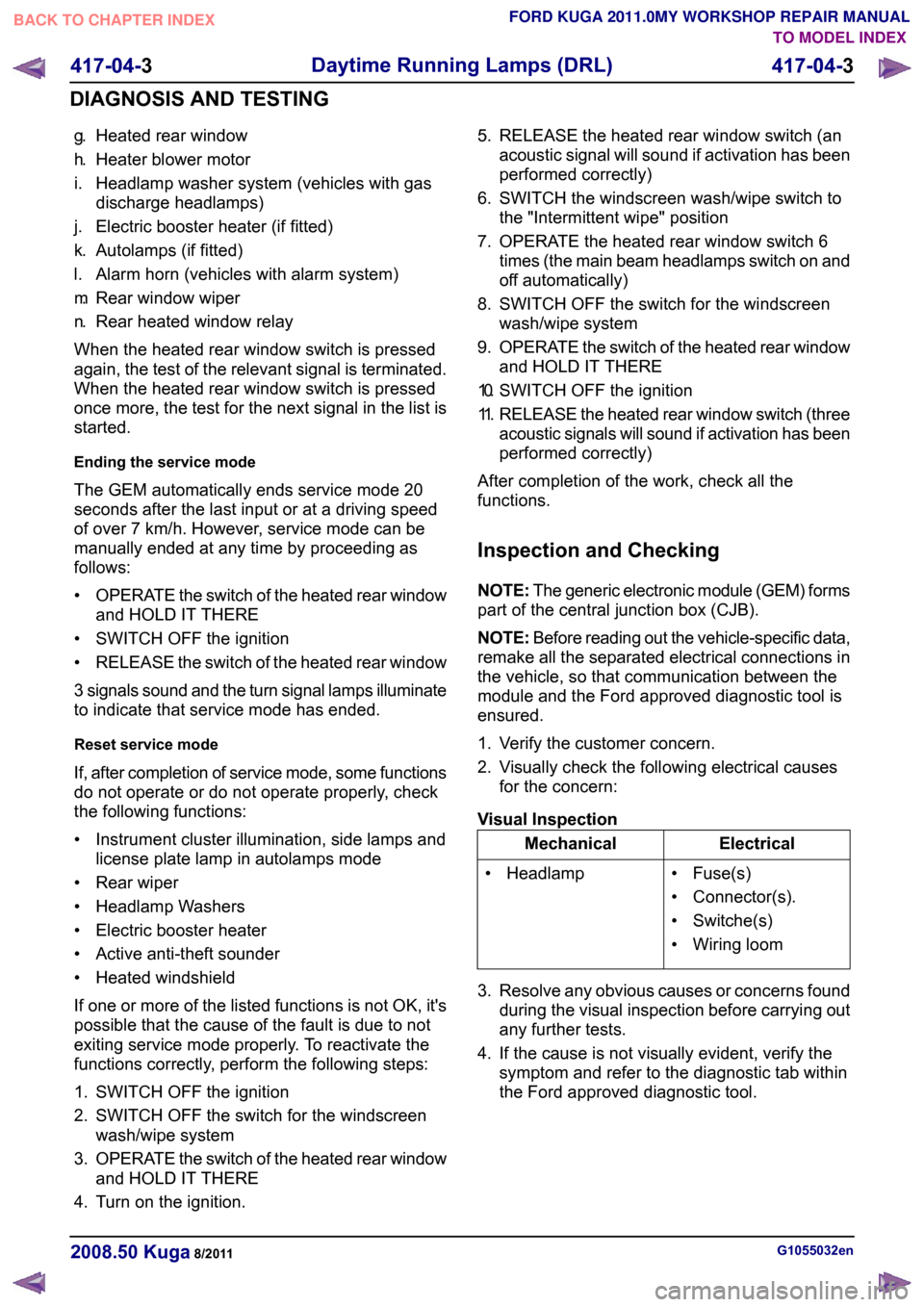
g.
Heated rear window
h. Heater blower motor
i. Headlamp washer system (vehicles with gas discharge headlamps)
j. Electric booster heater (if fitted)
k. Autolamps (if fitted)
l. Alarm horn (vehicles with alarm system)
m. Rear window wiper
n. Rear heated window relay
When the heated rear window switch is pressed
again, the test of the relevant signal is terminated.
When the heated rear window switch is pressed
once more, the test for the next signal in the list is
started.
Ending the service mode
The GEM automatically ends service mode 20
seconds after the last input or at a driving speed
of over 7 km/h. However, service mode can be
manually ended at any time by proceeding as
follows:
• OPERATE the switch of the heated rear window
and HOLD IT THERE
• SWITCH OFF the ignition
• RELEASE the switch of the heated rear window
3 signals sound and the turn signal lamps illuminate
to indicate that service mode has ended.
Reset service mode
If, after completion of service mode, some functions
do not operate or do not operate properly, check
the following functions:
• Instrument cluster illumination, side lamps and license plate lamp in autolamps mode
• Rear wiper
• Headlamp Washers
• Electric booster heater
• Active anti-theft sounder
• Heated windshield
If one or more of the listed functions is not OK, it's
possible that the cause of the fault is due to not
exiting service mode properly. To reactivate the
functions correctly, perform the following steps:
1. SWITCH OFF the ignition
2. SWITCH OFF the switch for the windscreen wash/wipe system
3. OPERATE the switch of the heated rear window
and HOLD IT THERE
4. Turn on the ignition. 5. RELEASE the heated rear window switch (an
acoustic signal will sound if activation has been
performed correctly)
6. SWITCH the windscreen wash/wipe switch to the "Intermittent wipe" position
7. OPERATE the heated rear window switch 6 times (the main beam headlamps switch on and
off automatically)
8. SWITCH OFF the switch for the windscreen wash/wipe system
9. OPERATE the switch of the heated rear window
and HOLD IT THERE
10. SWITCH OFF the ignition
11. RELEASE the heated rear window switch (three
acoustic signals will sound if activation has been
performed correctly)
After completion of the work, check all the
functions.
Inspection and Checking
NOTE: The generic electronic module (GEM) forms
part of the central junction box (CJB).
NOTE: Before reading out the vehicle-specific data,
remake all the separated electrical connections in
the vehicle, so that communication between the
module and the Ford approved diagnostic tool is
ensured.
1. Verify the customer concern.
2. Visually check the following electrical causes for the concern:
Visual Inspection Electrical
Mechanical
• Fuse(s)
• Connector(s).
• Switche(s)
• Wiring loom
• Headlamp
3. Resolve any obvious causes or concerns found during the visual inspection before carrying out
any further tests.
4. If the cause is not visually evident, verify the symptom and refer to the diagnostic tab within
the Ford approved diagnostic tool. G1055032en
2008.50 Kuga 8/2011 417-04-3
Daytime Running Lamps (DRL)
417-04-3
DIAGNOSIS AND TESTINGTO MODEL INDEX
BACK TO CHAPTER INDEX
FORD KUGA 2011.0MY WORKSHOP REPAIR MANUAL
Page 378 of 2057
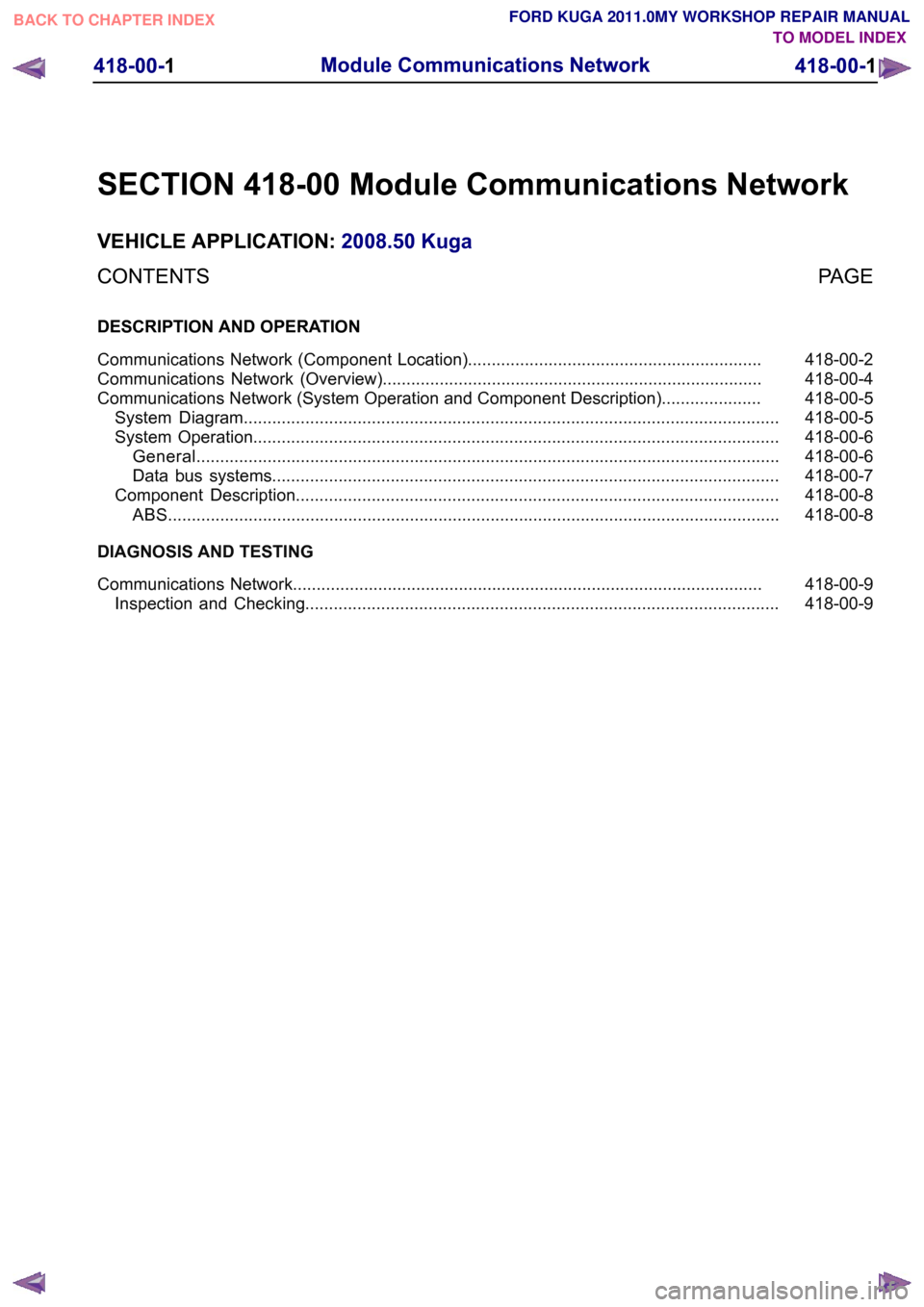
SECTION 418-00 Module Communications Network
VEHICLE APPLICATION:
2008.50 Kuga
PAGE
CONTENTS
DESCRIPTION AND OPERATION
418-00-2
Communications Network (Component Location)..............................................................
418-00-4
Communications Network (Overview)................................................................................
418-00-5
Communications Network (System Operation and Component Description).....................
418-00-5
System Diagram.................................................................................................................
418-00-6
System Operation...............................................................................................................
418-00-6
General ...........................................................................................................................
418-00-7
Data bus systems...........................................................................................................
418-00-8
Component Description......................................................................................................
418-00-8
ABS .................................................................................................................................
DIAGNOSIS AND TESTING 418-00-9
Communications Network...................................................................................................
418-00-9
Inspection and Checking.................................................................................................... 418-00-1
Module Communications Network
418-00-1
.TO MODEL INDEX
BACK TO CHAPTER INDEX
FORD KUGA 2011.0MY WORKSHOP REPAIR MANUAL
Page 380 of 2057
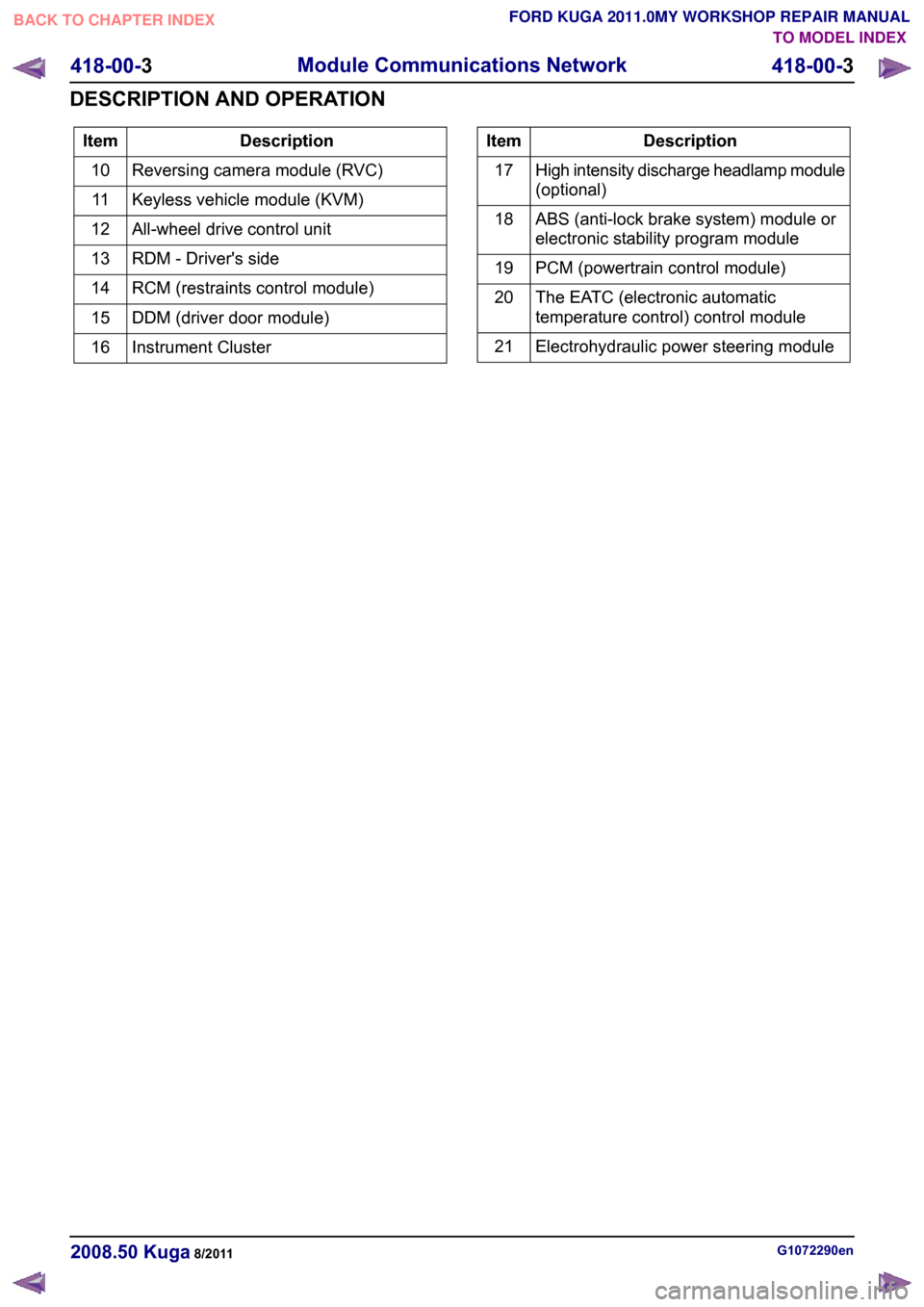
Description
Item
Reversing camera module (RVC)
10
Keyless vehicle module (KVM)
11
All-wheel drive control unit
12
RDM - Driver's side
13
RCM (restraints control module)
14
DDM (driver door module)
15
Instrument Cluster
16 Description
Item
High intensity discharge headlamp module
(optional)
17
ABS (anti-lock brake system) module or
electronic stability program module
18
PCM (powertrain control module)
19
The EATC (electronic automatic
temperature control) control module
20
Electrohydraulic power steering module
21 G1072290en
2008.50 Kuga 8/2011 418-00-3
Module Communications Network
418-00-3
DESCRIPTION AND OPERATIONTO MODEL INDEX
BACK TO CHAPTER INDEX
FORD KUGA 2011.0MY WORKSHOP REPAIR MANUAL
Page 381 of 2057
Communications Network – Overview
In order to minimize module variations, different
equipment levels and functionalities are
incorporated in the same module. For this reason,
modules must be programmed following
replacement. For this purpose, the vehicle-specific
data are read out of the module to be replaced
using "Install programmable modules" routine in
the Ford diagnostic unit and transferred to the new
module. In the process, it is also possible to replace
older software versions with more up-to-date
versions, for example.
If it was not possible to read out any
vehicle-specific data with the Ford diagnostic unit
before replacing a module (the module to be
replaced does not respond), the data available in
the OASIS system (ASBUILT data) must be
entered manually using the Ford diagnostic unit
when programming the module.
G1030778en
2008.50 Kuga 8/2011 418-00-4
Module Communications Network
418-00-4
DESCRIPTION AND OPERATIONTO MODEL INDEX
BACK TO CHAPTER INDEX
FORD KUGA 2011.0MY WORKSHOP REPAIR MANUAL
Page 382 of 2057
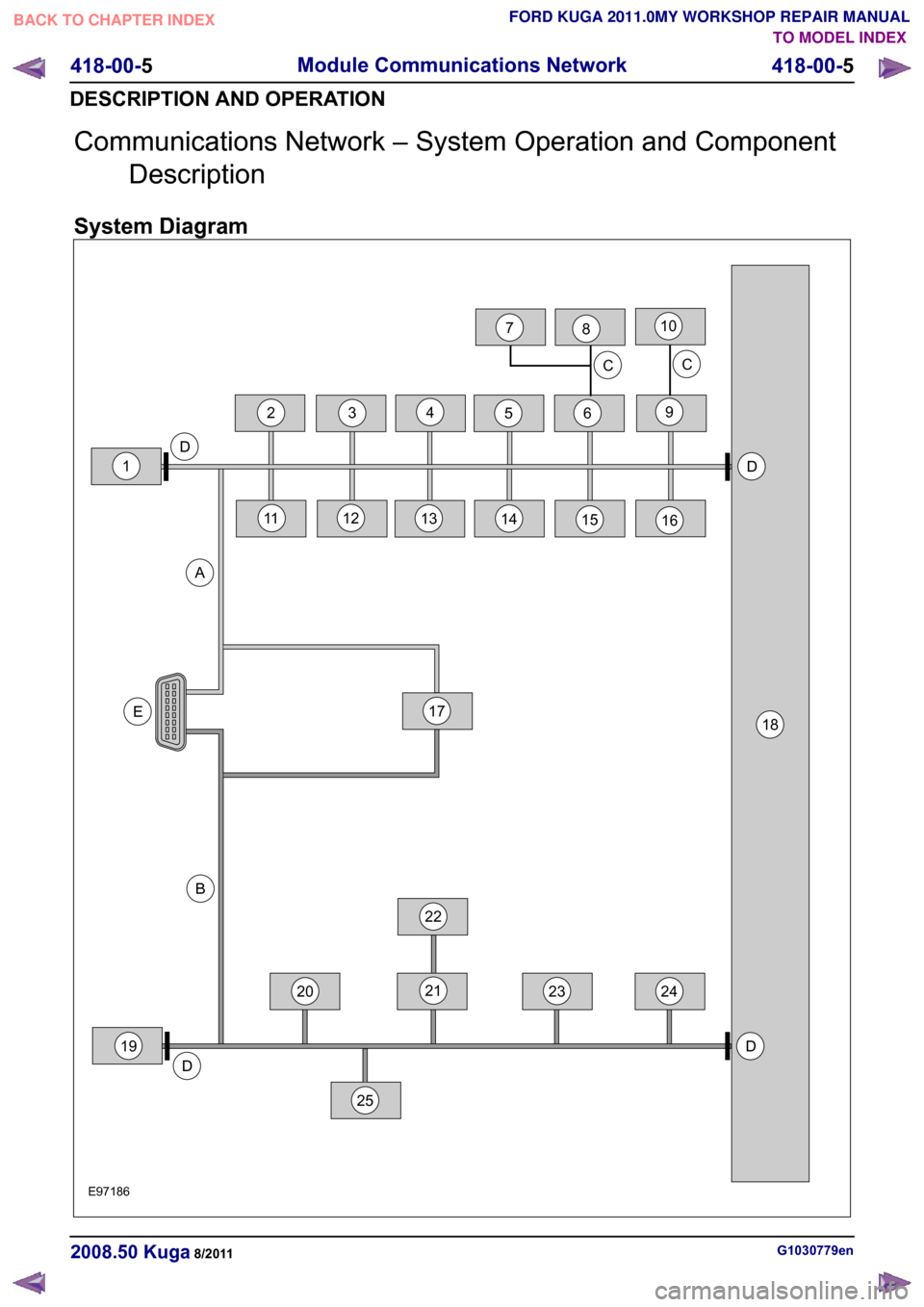
Communications Network – System Operation and Component
Description
System Diagram G1030779en
2008.50 Kuga 8/2011 418-00-5
Module Communications Network
418-00-5
DESCRIPTION AND OPERATIONTO MODEL INDEX
BACK TO CHAPTER INDEX
FORD KUGA 2011.0MY WORKSHOP REPAIR MANUALE971864522DD18E20212319DAB3242513141516D1917C1011126C782
Page 383 of 2057
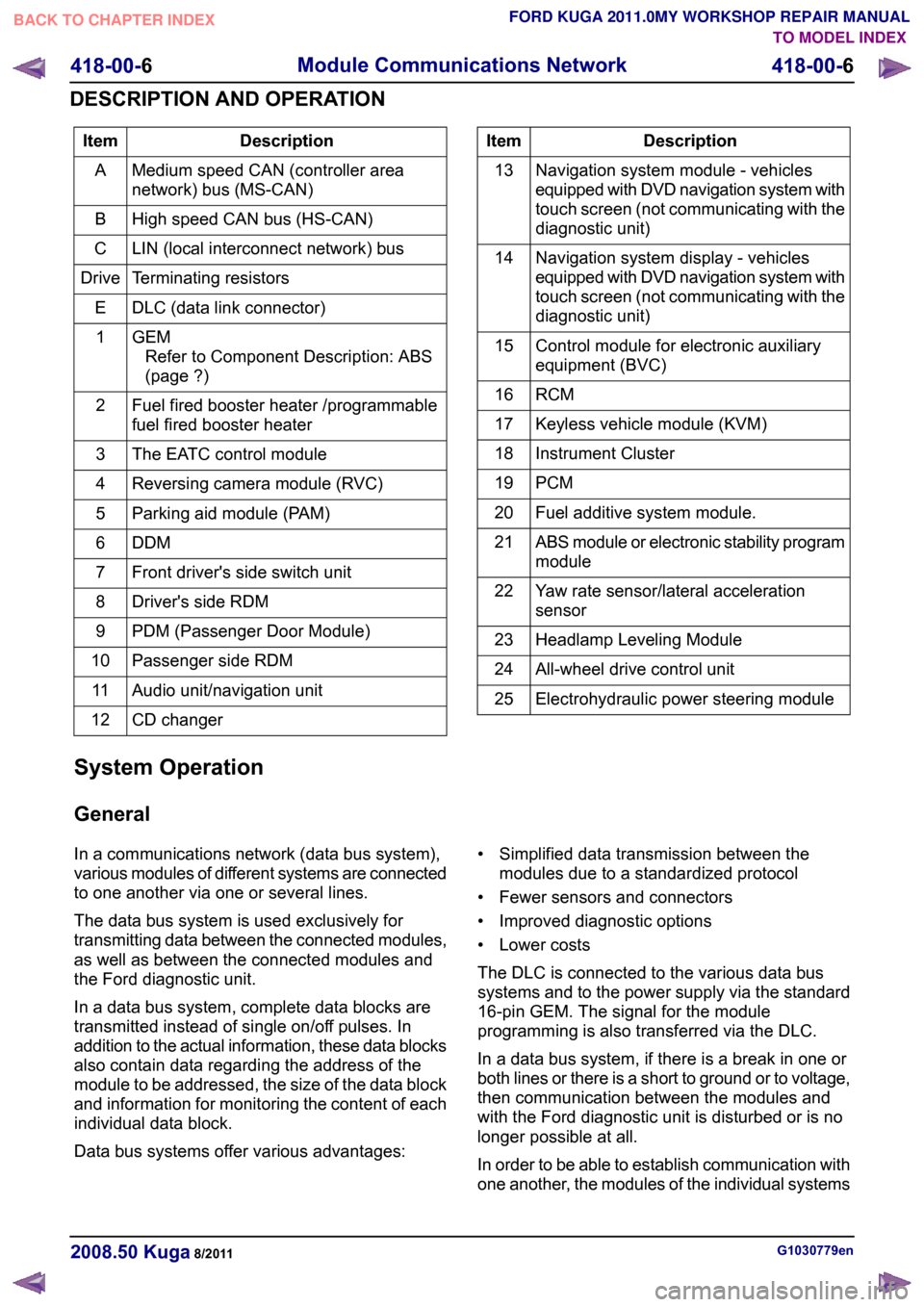
Description
Item
Medium speed CAN (controller area
network) bus (MS-CAN)
A
High speed CAN bus (HS-CAN)
B
LIN (local interconnect network) bus
C
Terminating resistors
Drive
DLC (data link connector)
E
GEMRefer to Component Description: ABS
(page ?)
1
Fuel fired booster heater /programmable
fuel fired booster heater
2
The EATC control module
3
Reversing camera module (RVC)
4
Parking aid module (PAM)
5
DDM6
Front driver's side switch unit
7
Driver's side RDM
8
PDM (Passenger Door Module)
9
Passenger side RDM
10
Audio unit/navigation unit
11
CD changer
12 Description
Item
Navigation system module - vehicles
equipped with DVD navigation system with
touch screen (not communicating with the
diagnostic unit)
13
Navigation system display - vehicles
equipped with DVD navigation system with
touch screen (not communicating with the
diagnostic unit)
14
Control module for electronic auxiliary
equipment (BVC)
15
RCM16
Keyless vehicle module (KVM)
17
Instrument Cluster
18
PCM19
Fuel additive system module.
20
ABS module or electronic stability program
module
21
Yaw rate sensor/lateral acceleration
sensor
22
Headlamp Leveling Module
23
All-wheel drive control unit
24
Electrohydraulic power steering module
25
System Operation
General
In a communications network (data bus system),
various modules of different systems are connected
to one another via one or several lines.
The data bus system is used exclusively for
transmitting data between the connected modules,
as well as between the connected modules and
the Ford diagnostic unit.
In a data bus system, complete data blocks are
transmitted instead of single on/off pulses. In
addition to the actual information, these data blocks
also contain data regarding the address of the
module to be addressed, the size of the data block
and information for monitoring the content of each
individual data block.
Data bus systems offer various advantages: • Simplified data transmission between the
modules due to a standardized protocol
• Fewer sensors and connectors
• Improved diagnostic options
• Lower costs
The DLC is connected to the various data bus
systems and to the power supply via the standard
16-pin GEM. The signal for the module
programming is also transferred via the DLC.
In a data bus system, if there is a break in one or
both lines or there is a short to ground or to voltage,
then communication between the modules and
with the Ford diagnostic unit is disturbed or is no
longer possible at all.
In order to be able to establish communication with
one another, the modules of the individual systems G1030779en
2008.50 Kuga 8/2011 418-00-6
Module Communications Network
418-00-6
DESCRIPTION AND OPERATIONTO MODEL INDEX
BACK TO CHAPTER INDEX
FORD KUGA 2011.0MY WORKSHOP REPAIR MANUAL