plug FORD MAVERICK 2022 User Guide
[x] Cancel search | Manufacturer: FORD, Model Year: 2022, Model line: MAVERICK, Model: FORD MAVERICK 2022Pages: 533, PDF Size: 9.58 MB
Page 308 of 533
WARNING: Do not put coolant in
the windshield washer reservoir. If
sprayed on the windshield, coolant could
make it difficult to see through the
windshield.
Note: Do not use stop leak pellets, cooling
system sealants, or non-specified additives
as they can cause damage to the engine
cooling or heating systems. Resulting
component damage may not be covered by
the vehicle Warranty.
Note: Automotive fluids are not
interchangeable.
It is very important to use prediluted
coolant approved to the correct
specification in order to avoid plugging the
small passageways in the engine cooling
system. See
Capacities and
Specifications (page 355). Do not mix
different colors or types of coolant in your
vehicle. Mixing of engine coolants or using
an incorrect coolant may harm the engine
or cooling system components and could
void the vehicle Warranty.
Note: If prediluted coolant is not available,
use the approved concentrated coolant
diluting it to 50/50 with deionized or
distilled water. See
Capacities and
Specifications (page 355). Using water that
ha
s not been deionized may contribute to
deposit formation, corrosion and plugging
of the small cooling system passageways.
To top up the coolant level do the
following:
1. Unscrew the cap slowly. Any pressure escapes as you unscrew the cap.
2. Add enough prediluted coolant to reach the correct level.
Note: We do not recommend the use of
recycled coolant. 3.
Replace the coolant reservoir cap. Turn
the cap clockwise until it contacts the
hard stop.
4. Check the coolant level in the coolant reservoir the next few times you drive
your vehicle. If necessary, repeat step
2.
If you have to add more than
1.1 qt (1 L) of
engine coolant per month, have your
vehicle checked as soon as possible.
Operating an engine with a low level of
coolant can result in engine overheating
and possible engine damage.
In case of emergency, you can add a large
amount of water without engine coolant
in order to reach a vehicle service location.
Service your vehicle as soon as possible.
Water alone, without engine coolant, can
cause engine damage from corrosion,
overheating or freezing.
Do not use the following as a coolant
substitute, as they can cause engine
damage from overheating or freezing:
• Alcohol.
• Methanol.
• Brine.
• Any coolant mixed with alcohol or
methanol antifreeze.
Do not add extra inhibitors or additives to
the coolant. These can be harmful and
compromise the corrosion protection of
the coolant.
Severe Climates
If you drive in extremely cold climates, you
may need to increase the coolant
concentration above 50%.
Note: A coolant concentration of 60%
provides improved freeze point protection.
Coolant concentrations above 60%
decrease the overheat protection
characteristics of the coolant and could
cause engine damage.
305
2022 Maverick (CFE) Canada/United States of America, enUSA, Edition date: 202106, First-Printing Maintenance
Page 323 of 533
Do not wipe lamps when they are dry.
CLEANING WINDOWS AND WIPER
BLADES
To clean the windshield and wiper blades:
•
Clean the windshield with a
non-abrasive glass cleaner.
Note: When cleaning the interior of the
windshield, avoid getting any glass cleaner
on the instrument panel or door panels.
Wipe any glass cleaner off these surfaces
immediately.
• Clean the wiper blades with washer
fluid or water applied with a soft
sponge or cloth.
Note: Do not use razor blades or other
sharp objects to clean or remove decals
from the inside of the heated rear window.
This can cause damage not covered by the
vehicle Warranty.
CLEANING CHROME, ALUMINIUM
OR STAINLESS STEEL
We recommend that you only use a car
shampoo, a soft cloth and water on
bumpers and other chrome, aluminium or
stainless steel parts.
Note: For additional information and
assistance, we recommend that you contact
an authorized dealer.
Note: Rinse the area well after cleaning.
Note: Do not use abrasive materials, for
example steel wool or plastic pads, as they
can scratch these surfaces.
Note: Do not use chrome cleaner, metal
cleaner or polish on wheels or wheel covers. CLEANING WHEELS
Only use a recommended wheel and tire
cleaner to clean the wheels weekly. For
additional information and assistance, we
recommend that you contact an
authorized dealer.
1. Use a sponge to remove heavy
deposits of dirt and brake dust.
2. Rinse well after cleaning.
Note: Do not apply a cleaning chemical to
warm or hot wheel rims and covers.
If you intend on parking your vehicle for an
extended period after cleaning the wheels
with a wheel cleaner, drive your vehicle for
a few minutes before parking your vehicle.
This reduces the risk of corrosion of the
brake discs, brake pads and linings.
Do not clean the wheels when they are hot.
Note: Some car washes could damage
wheel rims and covers.
Note: Using non-recommended cleaners,
harsh cleaning products, chrome wheel
cleaners or abrasive materials could
damage wheel rims and covers.
CLEANING THE ENGINE
COMPARTMENT
Use a vacuum cleaner to remove debris
from the screen area below windshield.
Note: If you are not familiar with the parts
around the engine do not wash the engine
compartment. Avoid frequent engine
washes.
When washing the engine compartment:
• Never wash or rinse the engine while it
is hot or running.
• Never wash or rinse any ignition coil,
spark plug wire or spark plug well.
• Cover the battery, power distribution
box, and air filter assembly to prevent
water damage.
320
2022 Maverick (CFE) Canada/United States of America, enUSA, Edition date: 202106, First-Printing Vehicle Care
Page 358 of 533
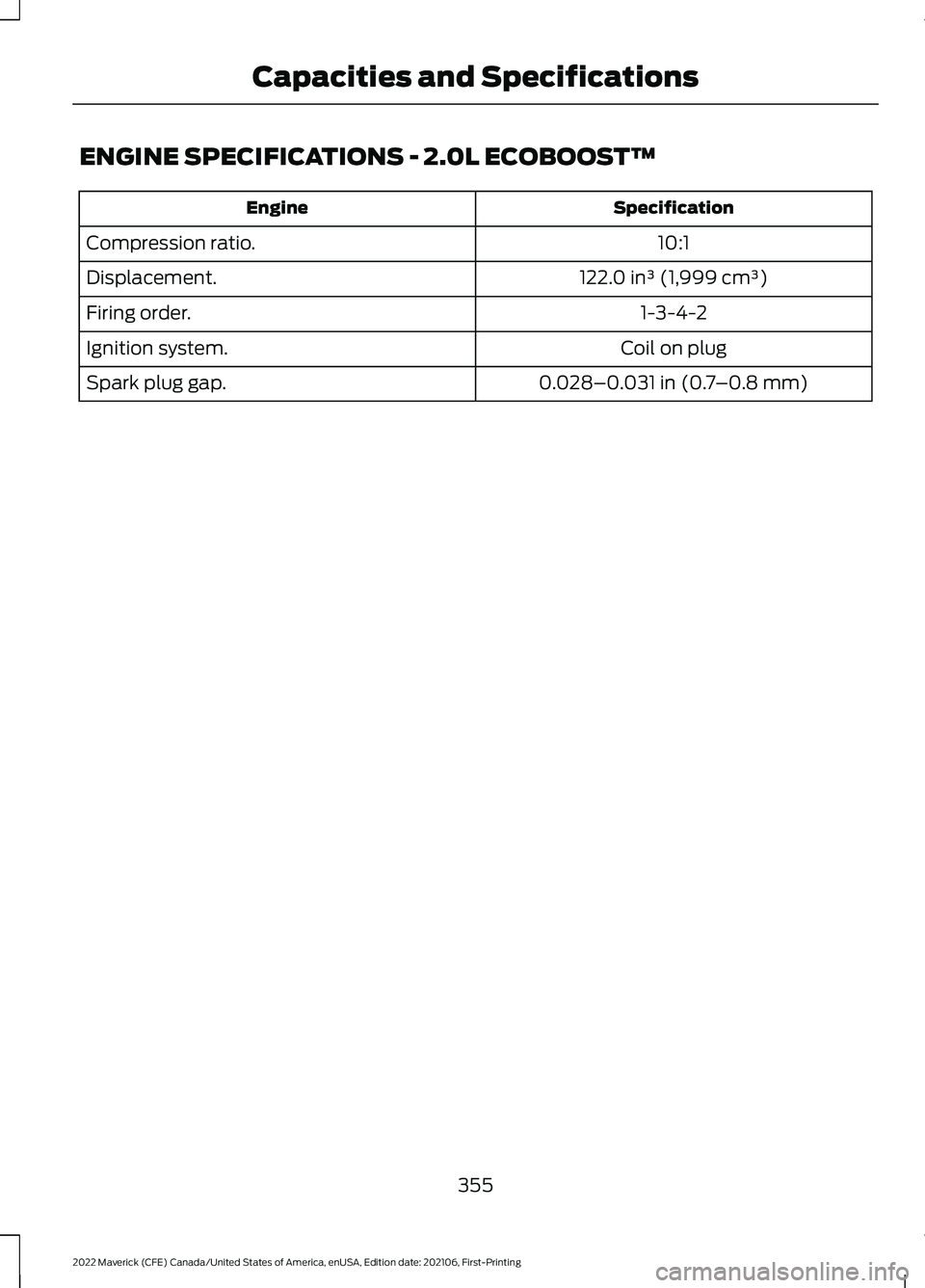
ENGINE SPECIFICATIONS - 2.0L ECOBOOST™
Specification
Engine
10:1
Compression ratio.
122.0 in³ (1,999 cm³)
Displacement.
1-3-4-2
Firing order.
Coil on plug
Ignition system.
0.028–0.031 in (0.7–0.8 mm)
Spark plug gap.
355
2022 Maverick (CFE) Canada/United States of America, enUSA, Edition date: 202106, First-Printing Capacities and Specifications
Page 359 of 533
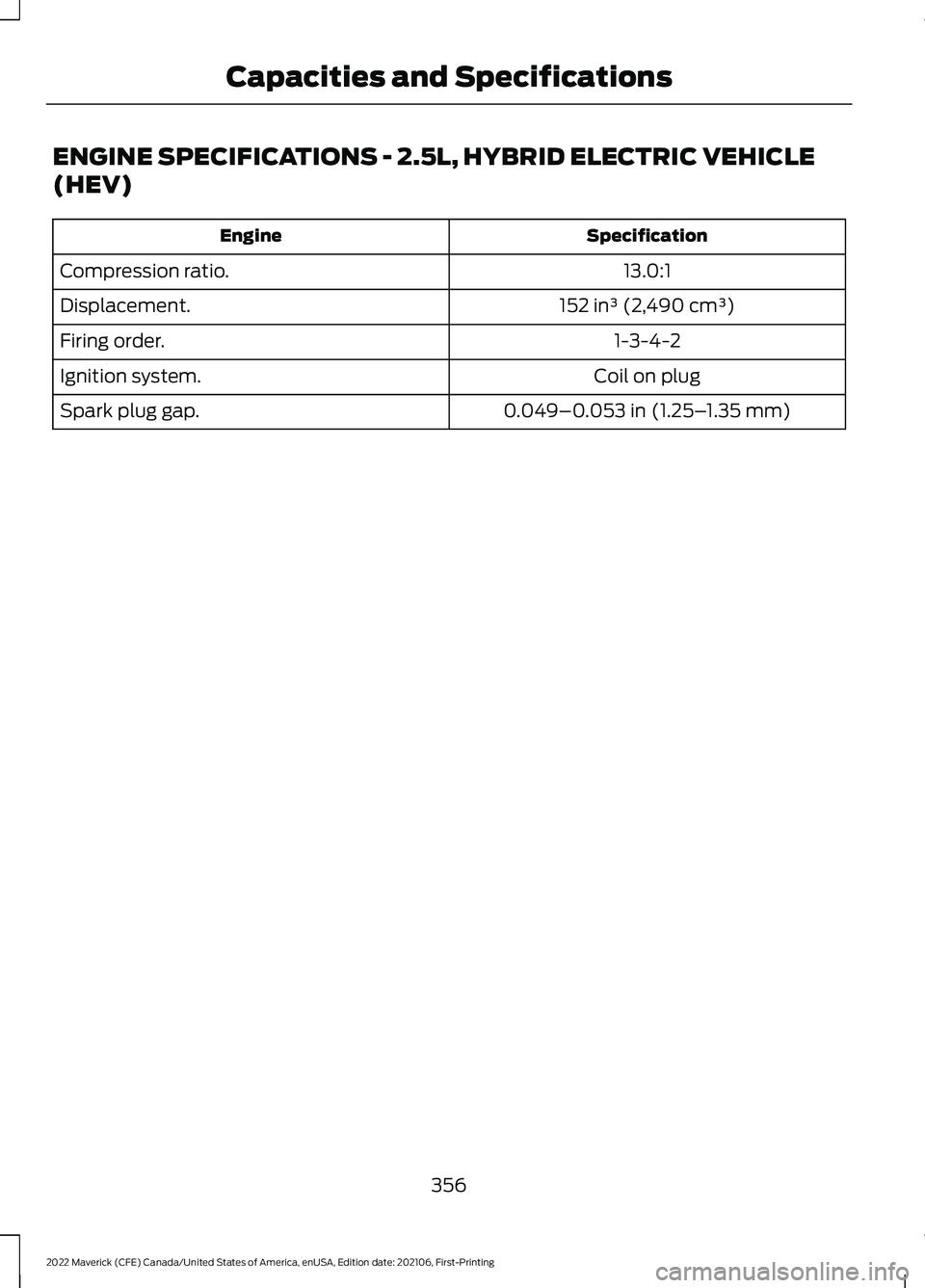
ENGINE SPECIFICATIONS - 2.5L, HYBRID ELECTRIC VEHICLE
(HEV)
Specification
Engine
13.0:1
Compression ratio.
152 in³ (2,490 cm³)
Displacement.
1-3-4-2
Firing order.
Coil on plug
Ignition system.
0.049–0.053 in (1.25–1.35 mm)
Spark plug gap.
356
2022 Maverick (CFE) Canada/United States of America, enUSA, Edition date: 202106, First-Printing Capacities and Specifications
Page 360 of 533
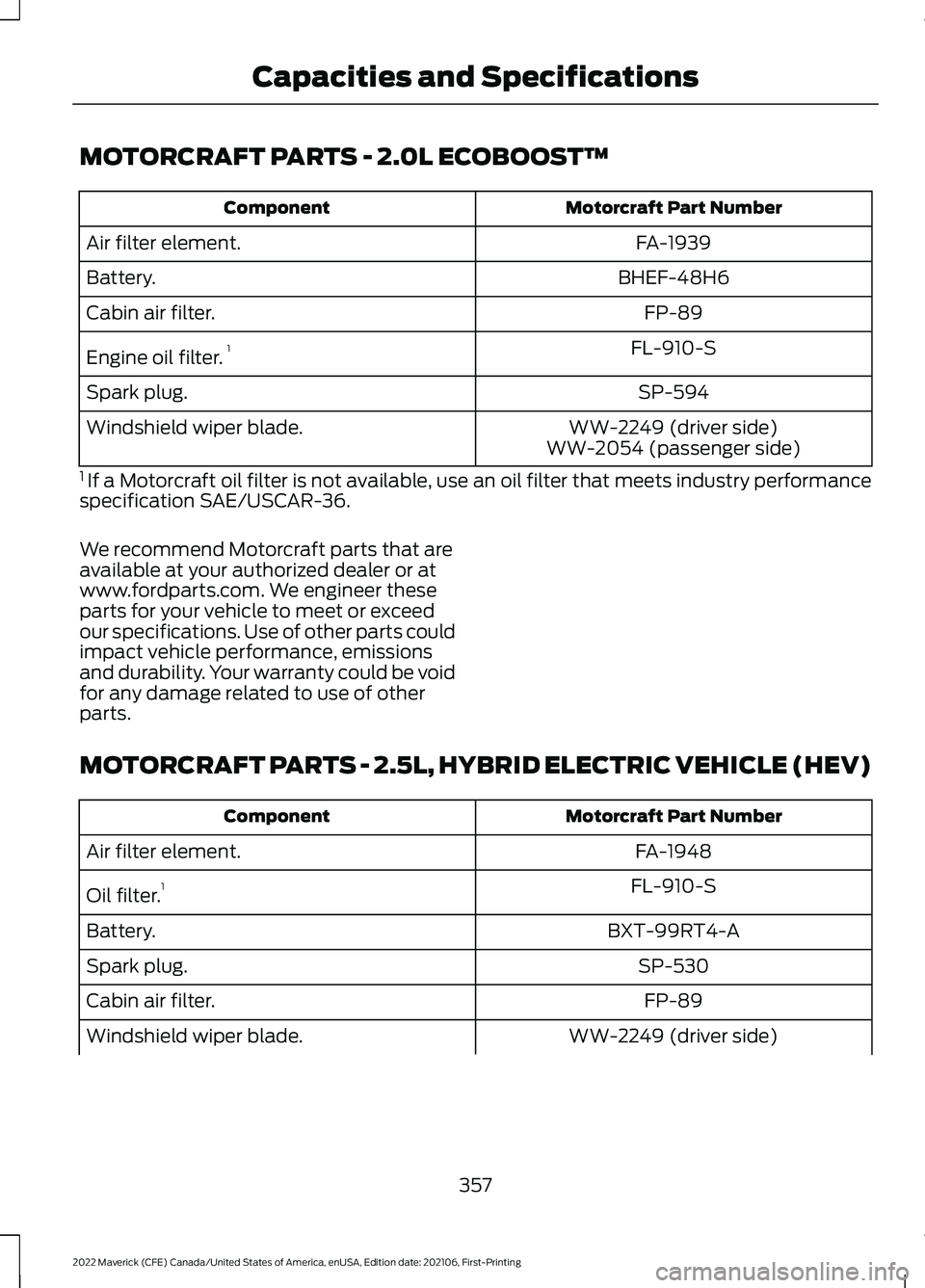
MOTORCRAFT PARTS - 2.0L ECOBOOST™
Motorcraft Part Number
Component
FA-1939
Air filter element.
BHEF-48H6
Battery.
FP-89
Cabin air filter.
FL-910-S
Engine oil filter. 1
SP-594
Spark plug.
WW-2249 (driver side)
Windshield wiper blade.
WW-2054 (passenger side)
1 If a Motorcraft oil filter is not available, use an oil filter that meets industry performance
specification SAE/USCAR-36.
We recommend Motorcraft parts that are
available at your authorized dealer or at
www.fordparts.com. We engineer these
parts for your vehicle to meet or exceed
our specifications. Use of other parts could
impact vehicle performance, emissions
and durability. Your warranty could be void
for any damage related to use of other
parts.
MOTORCRAFT PARTS - 2.5L, HYBRID ELECTRIC VEHICLE (HEV) Motorcraft Part Number
Component
FA-1948
Air filter element.
FL-910-S
Oil filter. 1
BXT-99RT4-A
Battery.
SP-530
Spark plug.
FP-89
Cabin air filter.
WW-2249 (driver side)
Windshield wiper blade.
357
2022 Maverick (CFE) Canada/United States of America, enUSA, Edition date: 202106, First-Printing Capacities and Specifications
Page 382 of 533
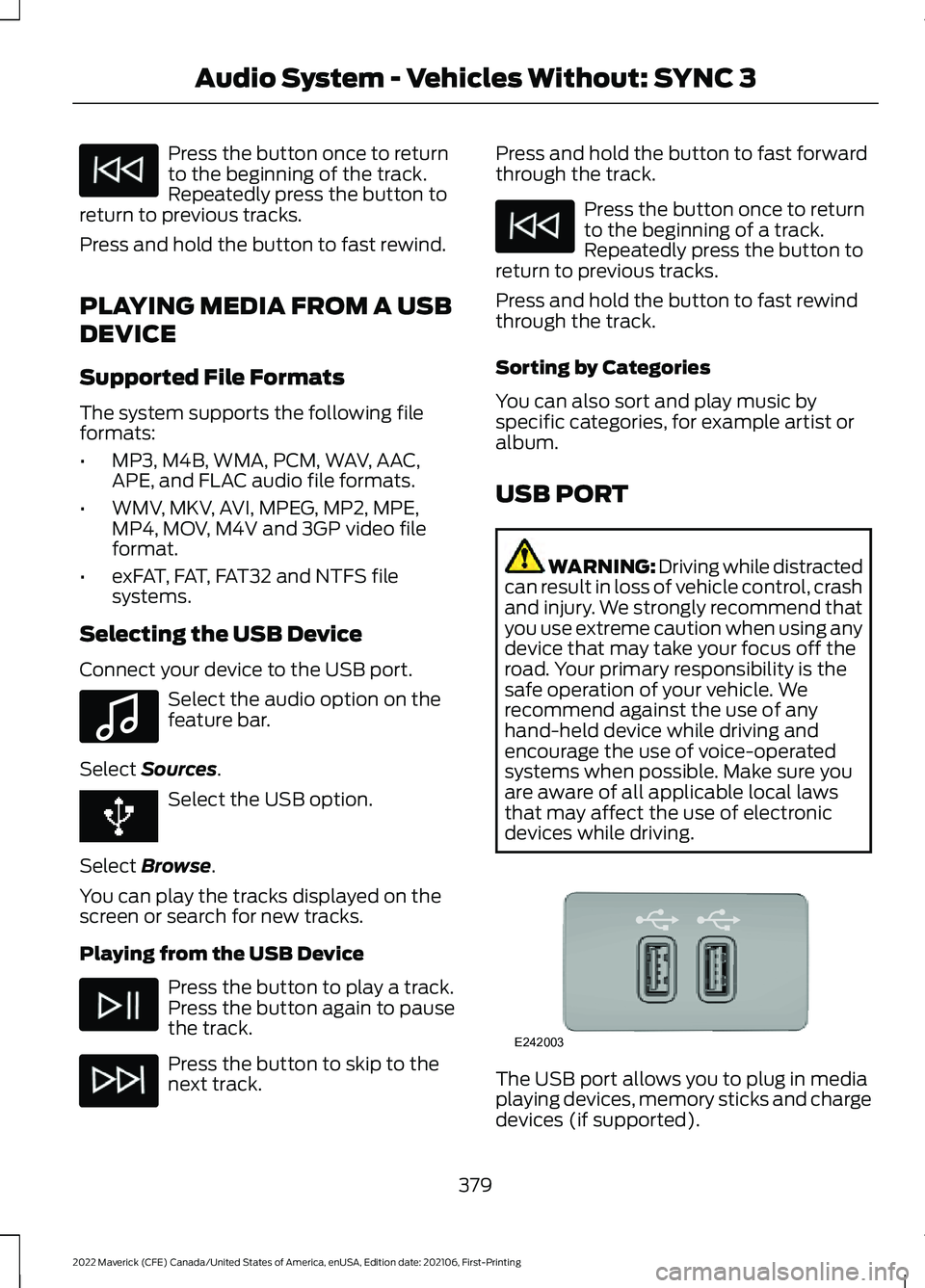
Press the button once to return
to the beginning of the track.
Repeatedly press the button to
return to previous tracks.
Press and hold the button to fast rewind.
PLAYING MEDIA FROM A USB
DEVICE
Supported File Formats
The system supports the following file
formats:
• MP3, M4B, WMA, PCM, WAV, AAC,
APE, and FLAC audio file formats.
• WMV, MKV, AVI, MPEG, MP2, MPE,
MP4, MOV, M4V and 3GP video file
format.
• exFAT, FAT, FAT32 and NTFS file
systems.
Selecting the USB Device
Connect your device to the USB port. Select the audio option on the
feature bar.
Select Sources. Select the USB option.
Select
Browse.
You can play the tracks displayed on the
screen or search for new tracks.
Playing from the USB Device Press the button to play a track.
Press the button again to pause
the track.
Press the button to skip to the
next track. Press and hold the button to fast forward
through the track. Press the button once to return
to the beginning of a track.
Repeatedly press the button to
return to previous tracks.
Press and hold the button to fast rewind
through the track.
Sorting by Categories
You can also sort and play music by
specific categories, for example artist or
album.
USB PORT WARNING: Driving while distracted
can result in loss of vehicle control, crash
and injury. We strongly recommend that
you use extreme caution when using any
device that may take your focus off the
road. Your primary responsibility is the
safe operation of your vehicle. We
recommend against the use of any
hand-held device while driving and
encourage the use of voice-operated
systems when possible. Make sure you
are aware of all applicable local laws
that may affect the use of electronic
devices while driving. The USB port allows you to plug in media
playing devices, memory sticks and charge
devices (if supported).
379
2022 Maverick (CFE) Canada/United States of America, enUSA, Edition date: 202106, First-Printing Audio System - Vehicles Without: SYNC 3 E100027 E242003
Page 402 of 533
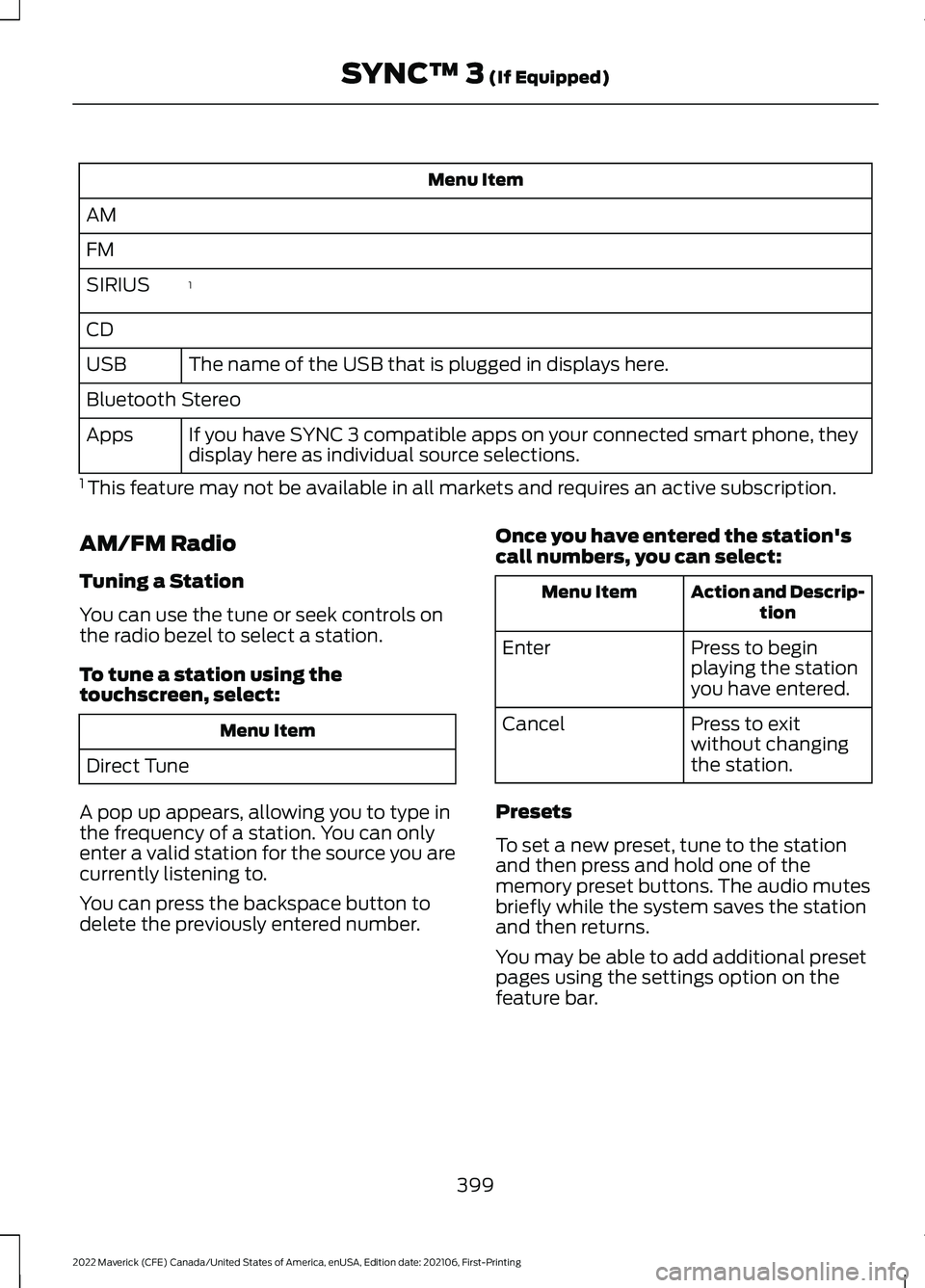
Menu Item
AM
FM 1
SIRIUS
CD
The name of the USB that is plugged in displays here.
USB
Bluetooth Stereo
If you have SYNC 3 compatible apps on your connected smart phone, they
display here as individual source selections.
Apps
1 This feature may not be available in all markets and requires an active subscription.
AM/FM Radio
Tuning a Station
You can use the tune or seek controls on
the radio bezel to select a station.
To tune a station using the
touchscreen, select: Menu Item
Direct Tune
A pop up appears, allowing you to type in
the frequency of a station. You can only
enter a valid station for the source you are
currently listening to.
You can press the backspace button to
delete the previously entered number. Once you have entered the station's
call numbers, you can select: Action and Descrip-
tion
Menu Item
Press to begin
playing the station
you have entered.
Enter
Press to exit
without changing
the station.
Cancel
Presets
To set a new preset, tune to the station
and then press and hold one of the
memory preset buttons. The audio mutes
briefly while the system saves the station
and then returns.
You may be able to add additional preset
pages using the settings option on the
feature bar.
399
2022 Maverick (CFE) Canada/United States of America, enUSA, Edition date: 202106, First-Printing SYNC™ 3 (If Equipped)
Page 410 of 533
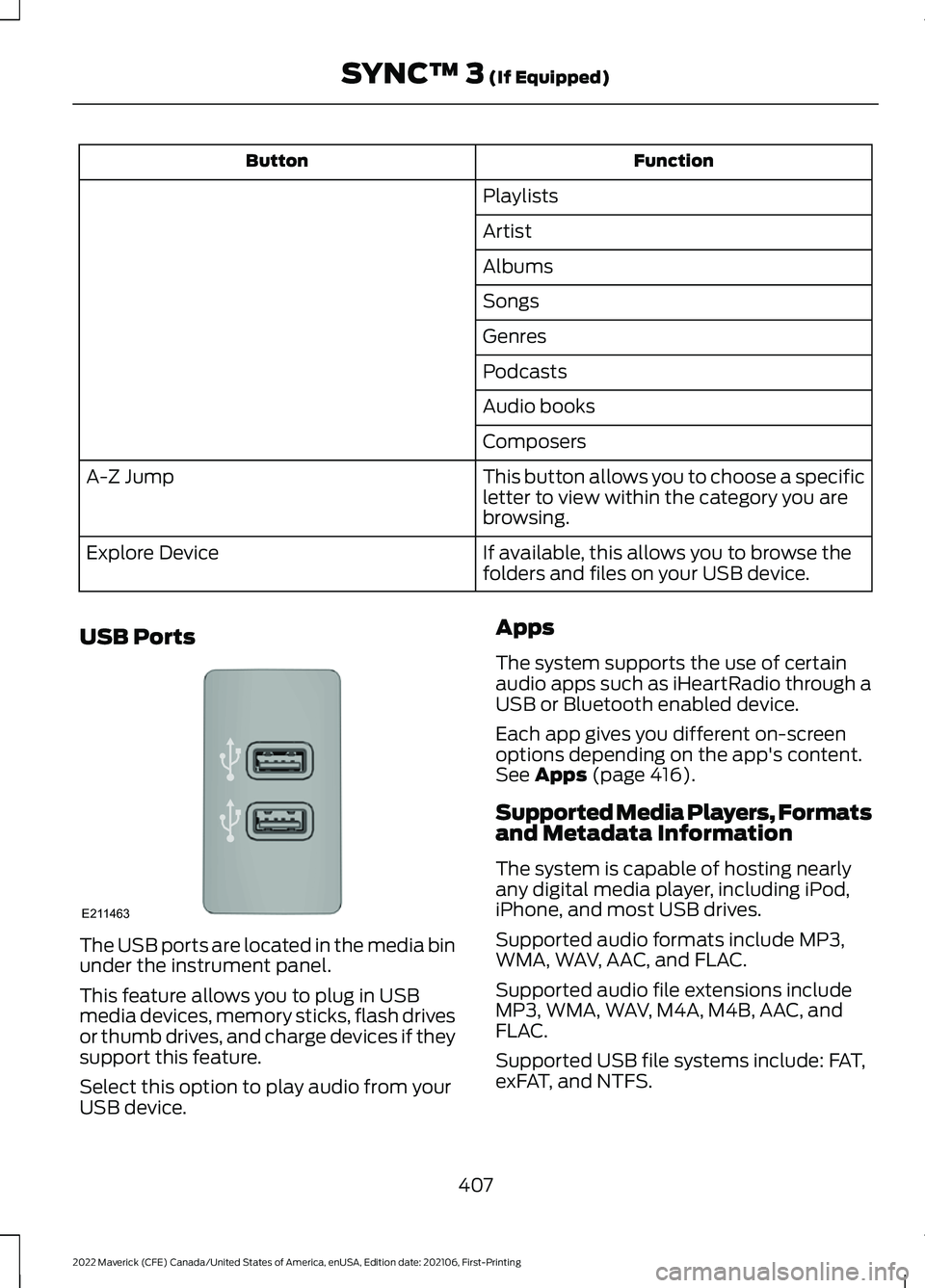
Function
Button
Playlists
Artist
Albums
Songs
Genres
Podcasts
Audio books
Composers
This button allows you to choose a specific
letter to view within the category you are
browsing.
A-Z Jump
If available, this allows you to browse the
folders and files on your USB device.
Explore Device
USB Ports The USB ports are located in the media bin
under the instrument panel.
This feature allows you to plug in USB
media devices, memory sticks, flash drives
or thumb drives, and charge devices if they
support this feature.
Select this option to play audio from your
USB device. Apps
The system supports the use of certain
audio apps such as iHeartRadio through a
USB or Bluetooth enabled device.
Each app gives you different on-screen
options depending on the app's content.
See Apps (page 416).
Supported Media Players, Formats
and Metadata Information
The system is capable of hosting nearly
any digital media player, including iPod,
iPhone, and most USB drives.
Supported audio formats include MP3,
WMA, WAV, AAC, and FLAC.
Supported audio file extensions include
MP3, WMA, WAV, M4A, M4B, AAC, and
FLAC.
Supported USB file systems include: FAT,
exFAT, and NTFS.
407
2022 Maverick (CFE) Canada/United States of America, enUSA, Edition date: 202106, First-Printing SYNC™ 3
(If Equipped)E211463
Page 438 of 533
Less Cost to Properly Maintain Your
Vehicle
The Ford Protect extended service plan
also offers a Premium Maintenance Plan
that covers all scheduled maintenance,
and selected wear items. The coverage is
prepaid, so you never have to worry about
the cost of your vehicle
’s maintenance.
Covered maintenance includes:
• Windshield wiper blades.
• Spark plugs.
• The clutch disc (if equipped).
• Brake pads and linings.
• Shock absorbers.
• Struts.
• Engine belts.
• Engine coolant hoses, clamps and
o-rings.
• Diesel exhaust fluid replenishment (if
equipped).
• Cabin air filter replacement every
20,000 mi (32,000 km) for electric
vehicles only.
Interest Free Finance Options
Just a 5% down payment provides you
with an affordable, no interest, no fee
payment program allowing you all the
security and benefits Ford Protect
extended service plan has to offer while
paying over time. You are pre-approved
with no credit check or hassles. To learn
more, call our Ford Protect extended
service plan specialists at 800-367-3377.
Ford Protect Extended Service Plan
P.O. Box 321067
Detroit, MI 48232 Ford Protect Extended Service
Plan (Canada Only)
You can get more protection for your
vehicle by purchasing a Ford Protect
extended service plan. Ford Protect
extended service plan is the only service
contract backed by Ford Motor Company
of Canada, Limited. Depending on the plan
you purchase, Ford Protect extended
service plan provides benefits such as:
•
Rental reimbursement.
• Coverage for certain maintenance and
wear items.
• Protection against repair costs after
your New Vehicle Limited Warranty
Coverage expires.
• Roadside Assistance benefits.
There are several Ford Protect extended
service plans available in various time,
distance and deductible combinations.
Each plan is tailored to fit your own driving
needs, including reimbursement for towing
and rental. When you purchase Ford
Protect extended service plan, you receive
added peace-of-mind protection
throughout Canada, the United States and
Mexico, provided by a network of
participating authorized Ford Motor
Company dealers.
Note: Repairs performed outside of Canada
and the United States are not eligible for
Ford Protect extended service plan
coverage.
This information is subject to change. Visit
your local Ford of Canada dealer or
www.ford.ca to find the Ford Protect
extended service plan that is right for you.
435
2022 Maverick (CFE) Canada/United States of America, enUSA, Edition date: 202106, First-Printing Ford Protect
Page 444 of 533
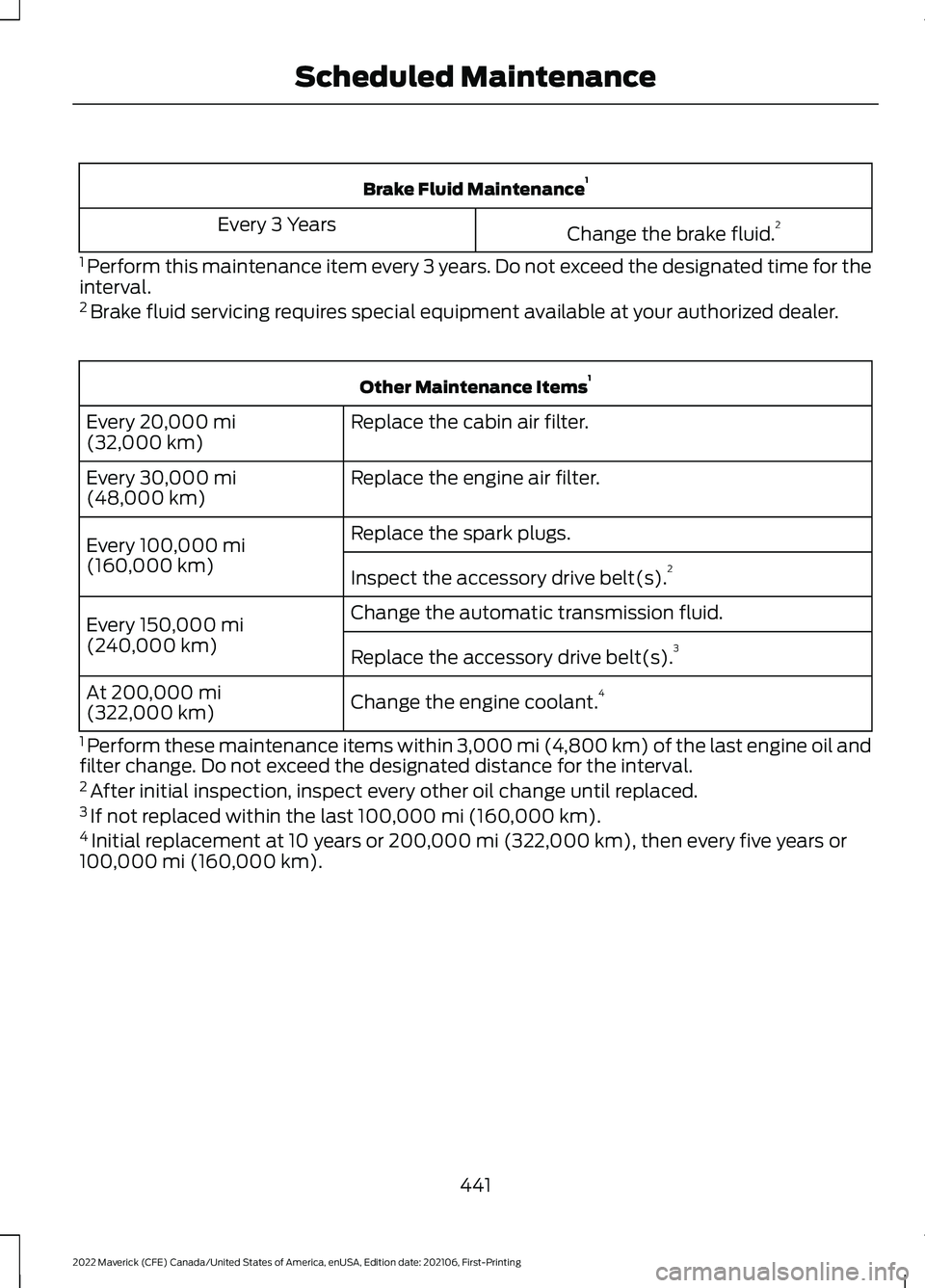
Brake Fluid Maintenance
1
Change the brake fluid. 2
Every 3 Years
1 Perform this maintenance item every 3 years. Do not exceed the designated time for the
interval.
2 Brake fluid servicing requires special equipment available at your authorized dealer. Other Maintenance Items
1
Replace the cabin air filter.
Every 20,000 mi
(32,000 km)
Replace the engine air filter.
Every
30,000 mi
(48,000 km)
Replace the spark plugs.
Every
100,000 mi
(160,000 km) Inspect the accessory drive belt(s). 2
Change the automatic transmission fluid.
Every
150,000 mi
(240,000 km) Replace the accessory drive belt(s). 3
Change the engine coolant. 4
At
200,000 mi
(322,000 km)
1 Perform these maintenance items within
3,000 mi (4,800 km) of the last engine oil and
filter change. Do not exceed the designated distance for the interval.
2 After initial inspection, inspect every other oil change until replaced.
3 If not replaced within the last
100,000 mi (160,000 km).
4 Initial replacement at 10 years or
200,000 mi (322,000 km), then every five years or
100,000 mi (160,000 km).
441
2022 Maverick (CFE) Canada/United States of America, enUSA, Edition date: 202106, First-Printing Scheduled Maintenance