set FORD MAVERICK 2022 User Guide
[x] Cancel search | Manufacturer: FORD, Model Year: 2022, Model line: MAVERICK, Model: FORD MAVERICK 2022Pages: 533, PDF Size: 9.58 MB
Page 28 of 533
MOBILE DEVICE DATA
If you connect a mobile device to your
vehicle, you can display data from your
device on the touchscreen for example,
music and album art. You can share your
vehicle data with mobile apps on your
device through the system. See Apps
(page 416).
The mobile apps function operates by your
connected device sending data to us in the
United States. The data is encrypted and
includes, for example, the vehicle
identification number of your vehicle, the
SYNC module serial number, odometer,
enabled apps, usage statistics and
debugging information. We retain it only
as long as necessary to provide the service,
to troubleshoot, for continuous
improvement and to offer you products
and services that may be of interest to you
according to your preferences and where
allowed by law.
If you connect a cell phone to the system,
the system creates a profile that links to
that cell phone. The cell phone profile
enables more mobile features and efficient
operation. The profile contains, for
example data from your phonebook, read
and unread text messages and call history,
including history of calls when your cell
phone was not connected to the system.
If you connect a media device, the system
creates and retains a media device index
of supported media content. The system
also records a short diagnostic log of
approximately 10 minutes of all recent
system activity. The cell phone profile, media device index
and diagnostic log remain in your vehicle
unless you delete them and are generally
accessible only in your vehicle when you
connect your cell phone or media device.
If you no longer plan to use the system or
your vehicle, we recommend you use the
master reset function to erase the stored
information. See Settings (page 418).
System data cannot be accessed without
special equipment and access to your
vehicle's module.
For additional information about our
privacy policy, refer to the local Ford
website.
Note: To find out if your vehicle has
connectivity technology, visit
www .For dC onne c t e d . c om .
EMERGENCY CALL SYSTEM
DATA
When the emergency call system is active,
it may disclose to emergency services that
your vehicle has been in a crash involving
the deployment of an airbag or activation
of the fuel pump shut-off. Certain versions
or updates to the emergency call system
may also be capable of electronically or
verbally disclosing to emergency services
operators your vehicle location or other
details about your vehicle or crash to assist
emergency services operators to provide
the most appropriate emergency services.
If you do not want to disclose this
information, do not activate the emergency
call system.
Note: You cannot deactivate emergency
call systems that are required by law.
25
2022 Maverick (CFE) Canada/United States of America, enUSA, Edition date: 202106, First-Printing Data Privacy
Page 29 of 533
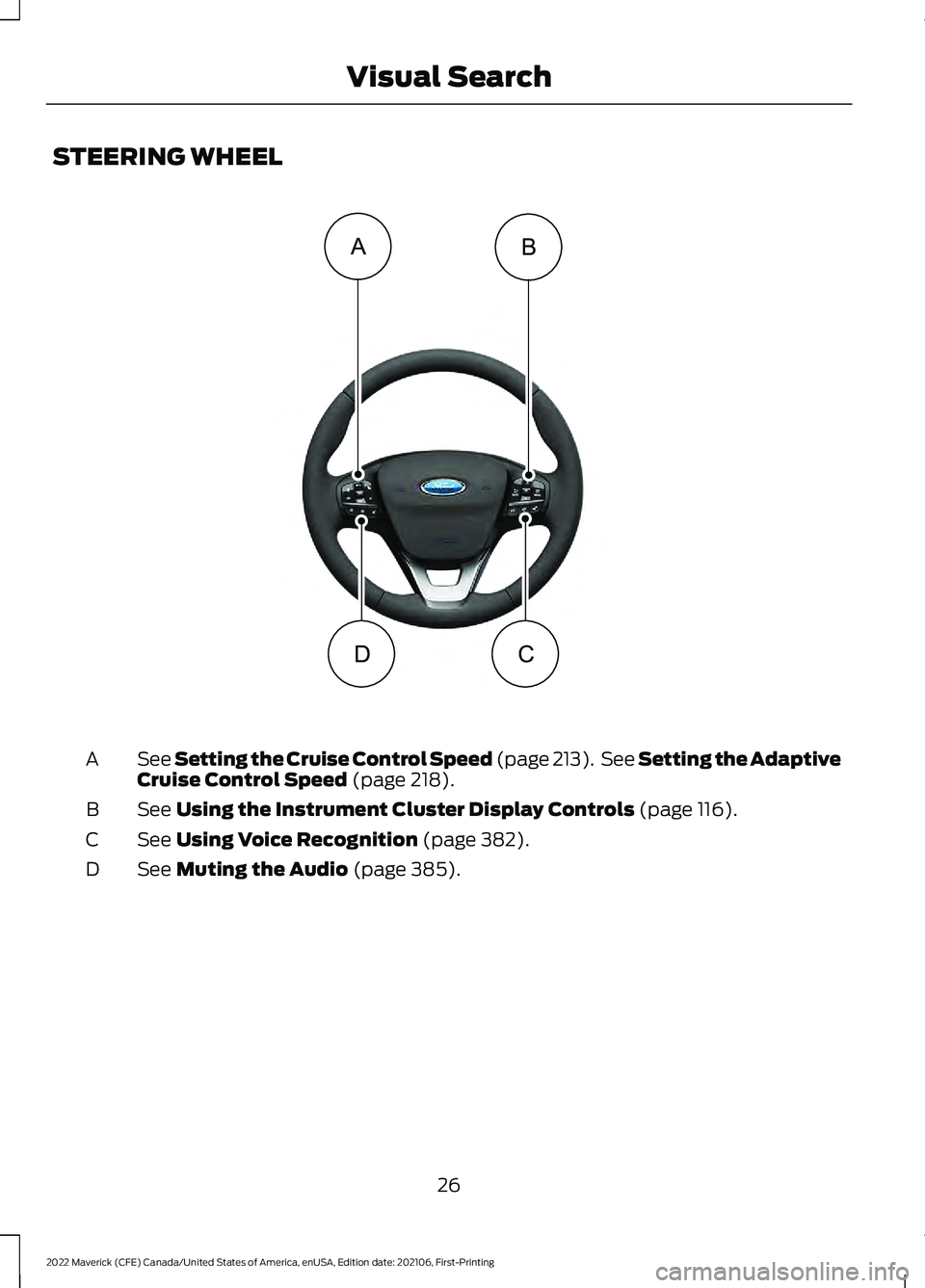
STEERING WHEEL
See Setting the Cruise Control Speed (page 213). See Setting the Adaptive
C
ruise Control Speed (page 218).
A
See
Using the Instrument Cluster Display Controls (page 116).
B
See
Using Voice Recognition (page 382).
C
See
Muting the Audio (page 385).
D
26
2022 Maverick (CFE) Canada/United States of America, enUSA, Edition date: 202106, First-Printing Visual SearchBA
DC E358427
Page 50 of 533
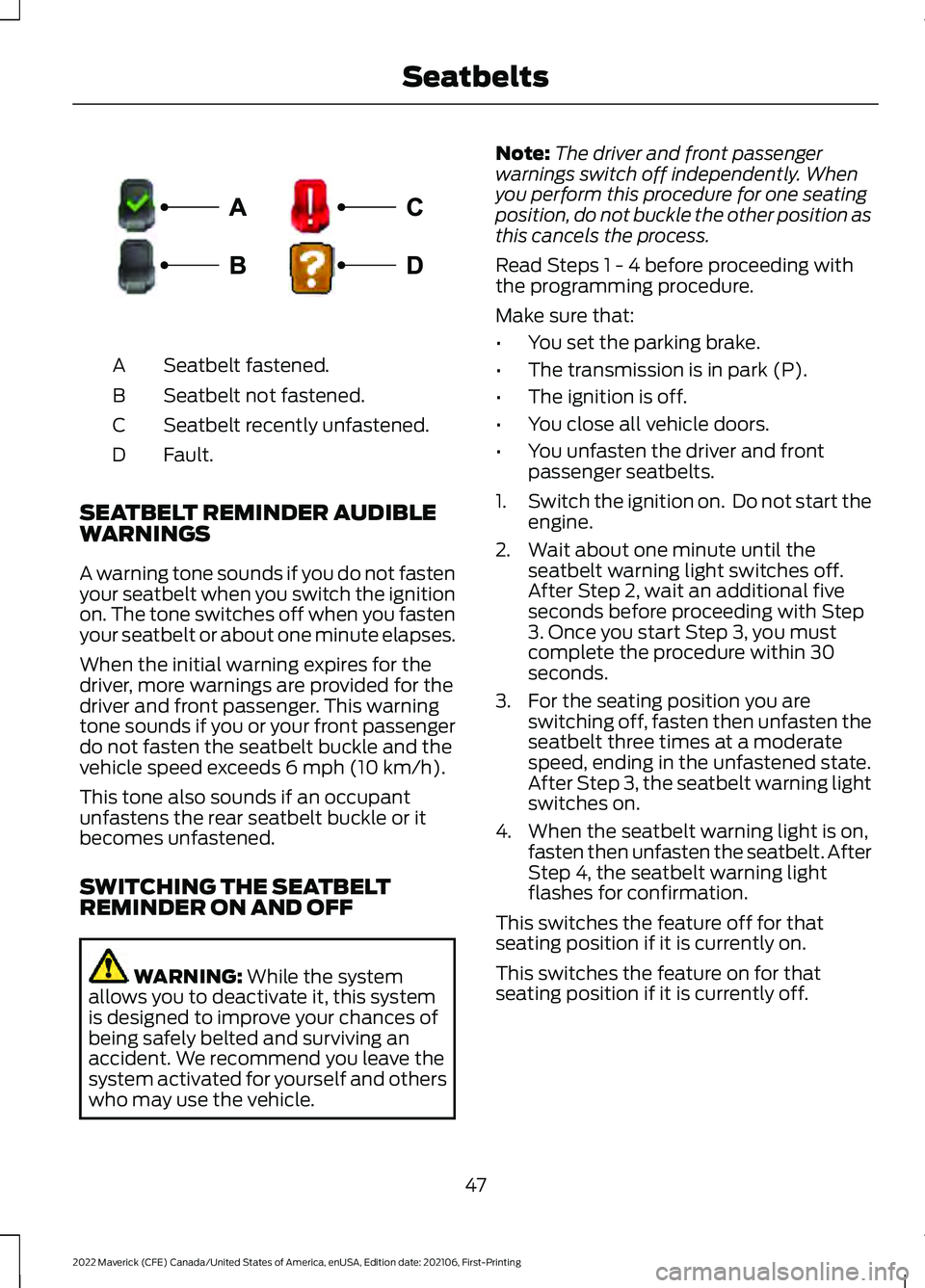
Seatbelt fastened.
A
Seatbelt not fastened.
B
Seatbelt recently unfastened.
C
Fault.
D
SEATBELT REMINDER AUDIBLE
WARNINGS
A warning tone sounds if you do not fasten
your seatbelt when you switch the ignition
on. The tone switches off when you fasten
your seatbelt or about one minute elapses.
When the initial warning expires for the
driver, more warnings are provided for the
driver and front passenger. This warning
tone sounds if you or your front passenger
do not fasten the seatbelt buckle and the
vehicle speed exceeds 6 mph (10 km/h).
This tone also sounds if an occupant
unfastens the rear seatbelt buckle or it
becomes unfastened.
SWITCHING THE SEATBELT
REMINDER ON AND OFF WARNING:
While the system
allows you to deactivate it, this system
is designed to improve your chances of
being safely belted and surviving an
accident. We recommend you leave the
system activated for yourself and others
who may use the vehicle. Note:
The driver and front passenger
warnings switch off independently. When
you perform this procedure for one seating
position, do not buckle the other position as
this cancels the process.
Read Steps 1 - 4 before proceeding with
the programming procedure.
Make sure that:
• You set the parking brake.
• The transmission is in park (P).
• The ignition is off.
• You close all vehicle doors.
• You unfasten the driver and front
passenger seatbelts.
1. Switch the ignition on. Do not start the
engine.
2. Wait about one minute until the seatbelt warning light switches off.
After Step 2, wait an additional five
seconds before proceeding with Step
3. Once you start Step 3, you must
complete the procedure within 30
seconds.
3. For the seating position you are switching off, fasten then unfasten the
seatbelt three times at a moderate
speed, ending in the unfastened state.
After Step 3, the seatbelt warning light
switches on.
4. When the seatbelt warning light is on, fasten then unfasten the seatbelt. After
Step 4, the seatbelt warning light
flashes for confirmation.
This switches the feature off for that
seating position if it is currently on.
This switches the feature on for that
seating position if it is currently off.
47
2022 Maverick (CFE) Canada/United States of America, enUSA, Edition date: 202106, First-Printing SeatbeltsE274703
Page 62 of 533
WHAT IS 911 ASSIST
911 Assist is a SYNC system feature that
can call for help.
For more information, visit
www
. o wner .f or d . c om .
EMERGENCY CALL
REQUIREMENTS WARNING: Do not wait for 911
Assist to make an emergency call if you
can do it yourself. Dial emergency
services immediately to avoid delayed
response time which could increase the
risk of serious injury or death after a
crash. If you do not hear 911 Assist within
five seconds of the crash, the system or
phone may be damaged or
non-functional. WARNING:
Always place your
phone in a secure location in your vehicle
so it does not become a projectile or get
damaged in a crash. Failure to do so may
cause serious injury to someone or
damage the phone which could prevent
911 Assist from working properly. WARNING:
Unless the 911 Assist
setting is set on before a crash, the
system will not dial for help which could
delay response time, potentially
increasing the risk of serious injury or
death after a crash.
• SYNC is powered and working properly
at the time of the incident and
throughout feature activation and use.
• The 911 Assist feature must be set on
before the incident.
• You must pair and connect a
Bluetooth®
enabled and compatible
cell phone to SYNC. •
A connected
Bluetooth® enabled
phone must have the ability to make
and maintain an outgoing call at the
time of the incident.
• A connected
Bluetooth® enabled
phone must have adequate network
coverage, battery power and signal
strength.
• The vehicle must have battery power
and be located in the U.S., Canada or
in a territory in which 911 is the
emergency number.
Note: If any user sets 911 Assist to on or off,
that setting applies for all paired phones. If
911 Assist is off and the phone connected
to SYNC, an icon displays on the status bar.
Note: Every phone operates differently.
While SYNC 911 Assist works with most
cellular phones, some may have trouble
using this feature.
EMERGENCY CALL
LIMITATIONS
The SYNC 911 Assist feature only operates
in the U.S., Canada or in a territory in which
911 is the emergency number. The following
are limitations of this feature:
• Your cellular phone or 911 Assist
hardware sustains damage in a crash.
• The vehicle's battery or the SYNC
system has no power.
• The phone(s) thrown from your vehicle
are the ones paired and connected to
the system.
59
2022 Maverick (CFE) Canada/United States of America, enUSA, Edition date: 202106, First-Printing 911 Assist
Page 69 of 533
WHAT IS MYKEY
MyKey allows you to program keys with
restricted driving modes to promote good
driving habits.
MYKEY SETTINGS
NON-CONFIGURABLE MYKEY
SETTINGS
Seatbelt Reminder or Belt-
Minder™
MyKey mutes the audio system until the
front seat passengers buckle the front seat
belts.
Note:
If your vehicle includes an AM/FM
radio or a very basic audio system, then the
radio may not mute.
Satellite Radio (If Equipped)
Some Satellite radio channels have
restricted access to adult radio content.
Early Low Fuel
The low fuel level warning lamp turns on
earlier.
Driving and Parking Aids
You cannot configure settings for parking
aids, blind spot information system, and
cross traffic alert. These systems turn on
when the vehicle turns on, and you cannot
switch them off with a MyKey.
You cannot configure settings for
pre-collision assist and lane keeping. These
systems turn on when the vehicle turns on,
but you can switch them off with a MyKey.
A new destination in the navigation system
can only be set using voice commands
when using a MyKey, and with your vehicle
moving. Note:
MyKey drivers may be able to switch
the lane departure warning feature off, but
this feature turns back on automatically
with every new key cycle.
CONFIGURABLE MYKEY
SETTINGS
You can configure the following settings
after creating a MyKey. See
Creating a
MyKey (page 67).
Speed Limit WARNING:
Do not set MyKey
maximum speed limit to a limit that will
prevent the driver from maintaining a
safe speed considering posted speed
limits and prevailing road conditions. The
driver is always responsible to drive in
accordance with local laws and
prevailing conditions. Failure to do so
could result in accident or injury.
You can set a speed limit for your vehicle.
Warning messages appear in the
information display and a tone sounds if
your vehicle reaches the set speed. You
cannot override the set speed when using
a MyKey.
Speed Minder
You can set a speed reminder for your
vehicle. Warning messages appear in the
information display and a tone sounds if
your vehicle exceeds the set speed.
Audio System Volume Limit
The audio system maximum volume
reduces. A message appears in the
information display if you attempt to
exceed the volume limit. Automatic
volume control turns off.
66
2022 Maverick (CFE) Canada/United States of America, enUSA, Edition date: 202106, First-Printing MyKey
™
Page 70 of 533
Emergency Assistance
If you set emergency assistance to always
on, you cannot switch it off with a MyKey.
Do Not Disturb
If you set do not disturb to always on, you
cannot switch it off with a MyKey.
Note:
If a phone is connected using Apple
CarPlay or Android Auto while driving with
a MyKey, the driver can receive phone calls
and text messages even if the do not disturb
restriction is on, and if the vehicle comes
with satellite radio, there is no restriction on
the adult content.
Traction and Stability Control
If you set traction control or stability
control to always on, you cannot switch it
off with a MyKey.
CREATING A MYKEY -
VEHICLES WITHOUT: PUSH
BUTTON START
1. Switch the ignition on using an admin key.
Note: You can program the restrictions to
all keys but one. Any keys that you did not
program are administrator keys or admin
keys.
2. Access the main menu in the information display and then scroll
through the menus to change the
settings of your MyKey. From the
MyKey menu select the option Create
MyKey. See Instrument Cluster
Display (page 116). 3. When prompted, hold the OK button
until you see a message informing you
to label this key as a MyKey. The
programmed restrictions apply when
you switch the vehicle off, open and
close the driver door and restart your
vehicle with the programmed key or
remote control.
4. Switch the ignition off.
You successfully created a MyKey.
You can also program configurable
settings for the keys.
Note: We recommend that you label this
key.
67
2022 Maverick (CFE) Canada/United States of America, enUSA, Edition date: 202106, First-Printing MyKey
™
Page 71 of 533
CREATING A MYKEY -
VEHICLES WITH: PUSH
BUTTON START
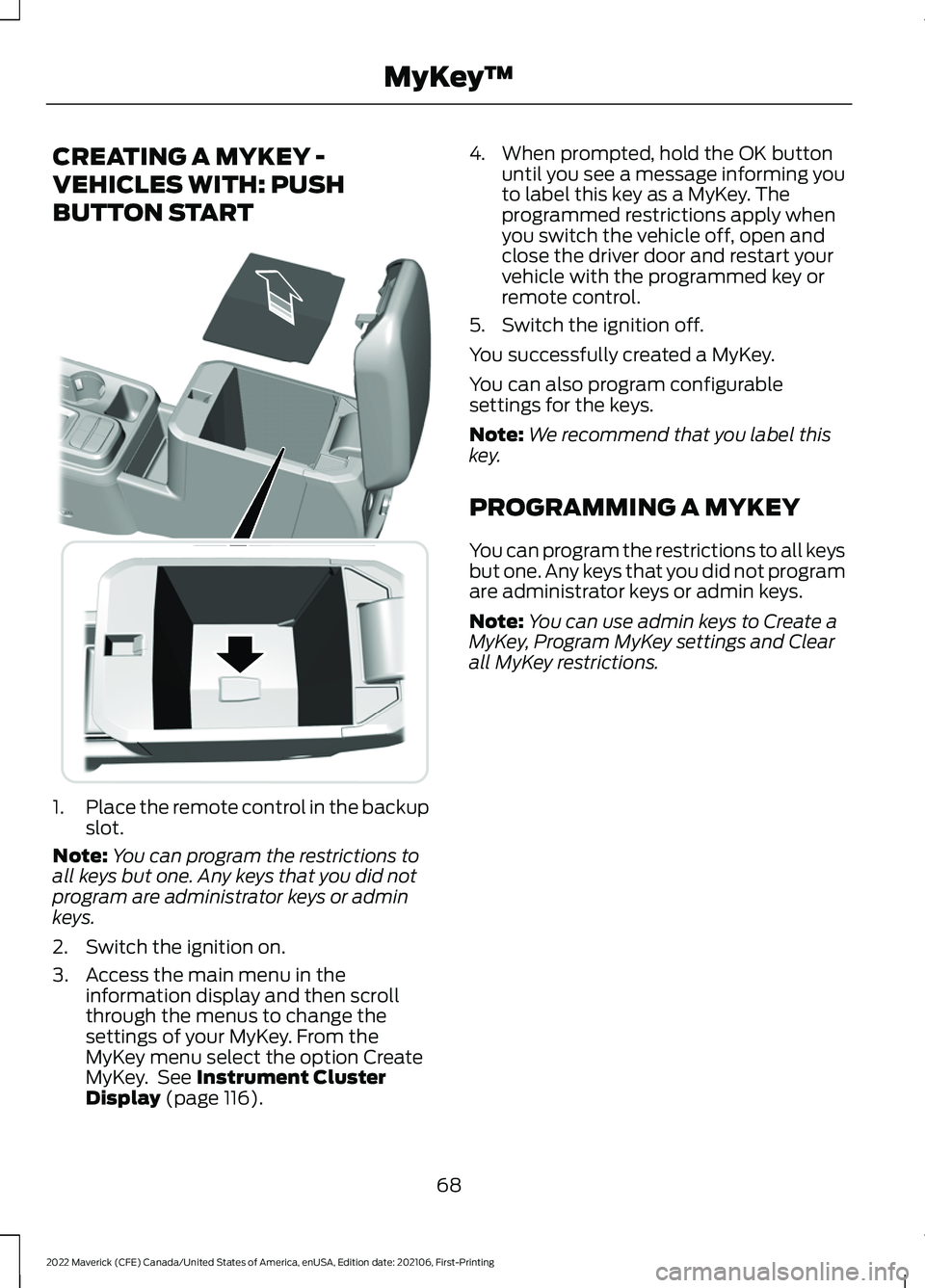
1.
Place the remote control in the backup
slot.
Note: You can program the restrictions to
all keys but one. Any keys that you did not
program are administrator keys or admin
keys.
2. Switch the ignition on.
3. Access the main menu in the information display and then scroll
through the menus to change the
settings of your MyKey. From the
MyKey menu select the option Create
MyKey. See Instrument Cluster
Display (page 116). 4. When prompted, hold the OK button
until you see a message informing you
to label this key as a MyKey. The
programmed restrictions apply when
you switch the vehicle off, open and
close the driver door and restart your
vehicle with the programmed key or
remote control.
5. Switch the ignition off.
You successfully created a MyKey.
You can also program configurable
settings for the keys.
Note: We recommend that you label this
key.
PROGRAMMING A MYKEY
You can program the restrictions to all keys
but one. Any keys that you did not program
are administrator keys or admin keys.
Note: You can use admin keys to Create a
MyKey, Program MyKey settings and Clear
all MyKey restrictions.
68
2022 Maverick (CFE) Canada/United States of America, enUSA, Edition date: 202106, First-Printing MyKey
™E349250
Page 72 of 533
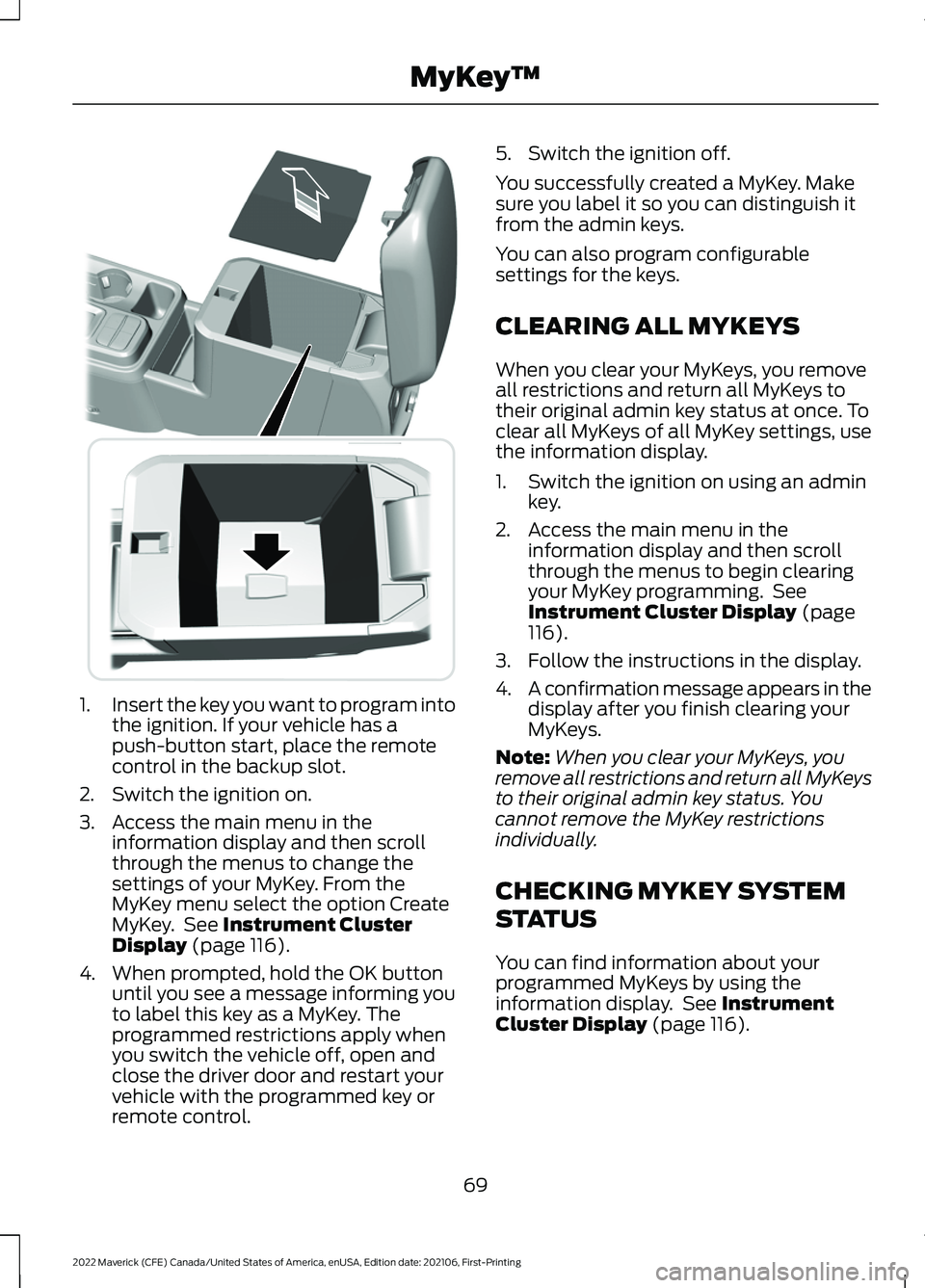
1.
Insert the key you want to program into
the ignition. If your vehicle has a
push-button start, place the remote
control in the backup slot.
2. Switch the ignition on.
3. Access the main menu in the information display and then scroll
through the menus to change the
settings of your MyKey. From the
MyKey menu select the option Create
MyKey. See Instrument Cluster
Display (page 116).
4. When prompted, hold the OK button until you see a message informing you
to label this key as a MyKey. The
programmed restrictions apply when
you switch the vehicle off, open and
close the driver door and restart your
vehicle with the programmed key or
remote control. 5. Switch the ignition off.
You successfully created a MyKey. Make
sure you label it so you can distinguish it
from the admin keys.
You can also program configurable
settings for the keys.
CLEARING ALL MYKEYS
When you clear your MyKeys, you remove
all restrictions and return all MyKeys to
their original admin key status at once. To
clear all MyKeys of all MyKey settings, use
the information display.
1. Switch the ignition on using an admin
key.
2. Access the main menu in the information display and then scroll
through the menus to begin clearing
your MyKey programming. See
Instrument Cluster Display
(page
116).
3. Follow the instructions in the display.
4. A confirmation message appears in the
display after you finish clearing your
MyKeys.
Note: When you clear your MyKeys, you
remove all restrictions and return all MyKeys
to their original admin key status. You
cannot remove the MyKey restrictions
individually.
CHECKING MYKEY SYSTEM
STATUS
You can find information about your
programmed MyKeys by using the
information display. See
Instrument
Cluster Display (page 116).
69
2022 Maverick (CFE) Canada/United States of America, enUSA, Edition date: 202106, First-Printing MyKey
™E349250
Page 77 of 533
Press the button to lock all
doors.
INDIVIDUALLY UNLOCKING AND
LOCKING THE DOORS USING THE
LOCKING BUTTON
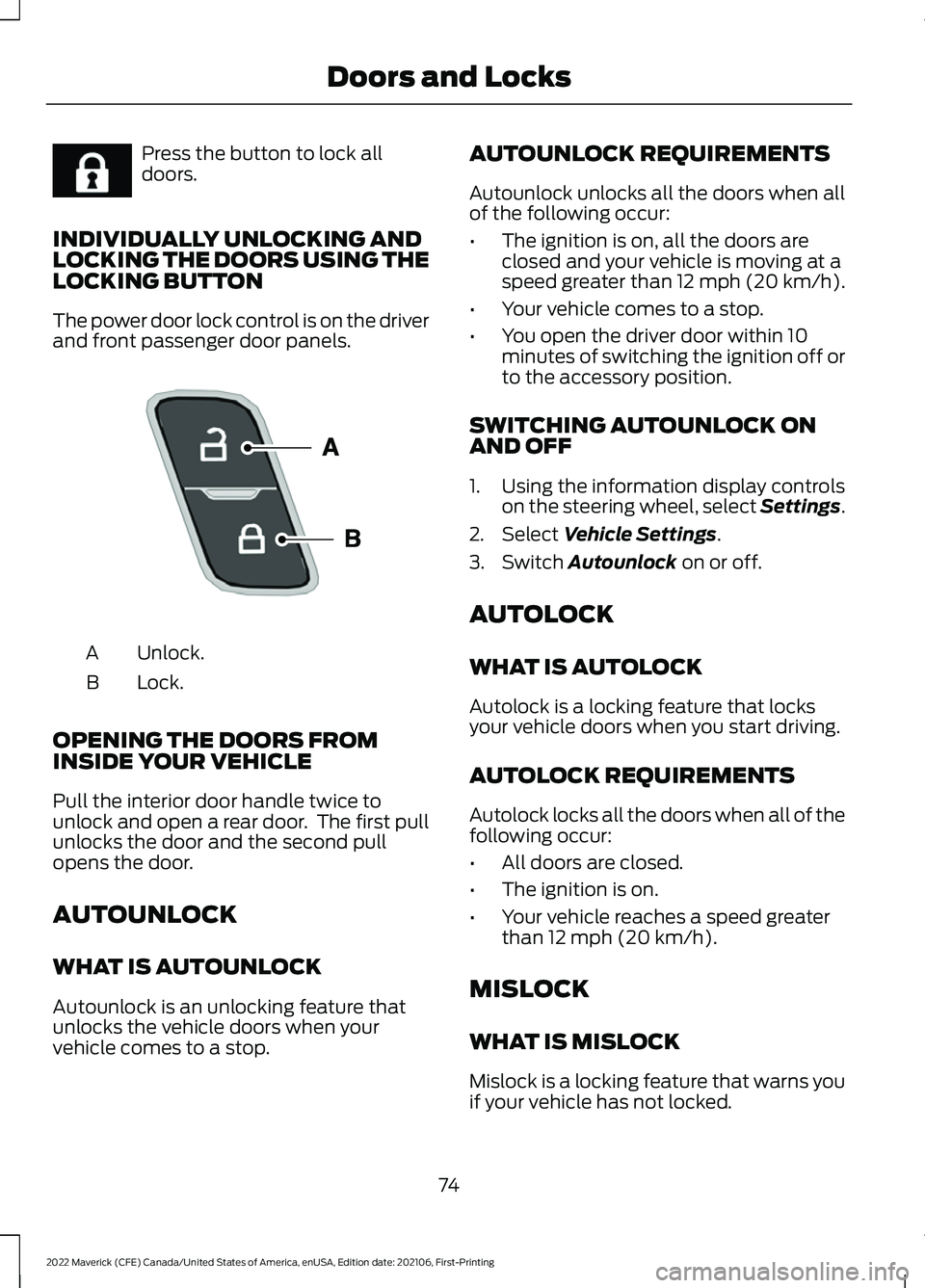
The power door lock control is on the driver
and front passenger door panels. Unlock.
A
Lock.
B
OPENING THE DOORS FROM
INSIDE YOUR VEHICLE
Pull the interior door handle twice to
unlock and open a rear door. The first pull
unlocks the door and the second pull
opens the door.
AUTOUNLOCK
WHAT IS AUTOUNLOCK
Autounlock is an unlocking feature that
unlocks the vehicle doors when your
vehicle comes to a stop. AUTOUNLOCK REQUIREMENTS
Autounlock unlocks all the doors when all
of the following occur:
•
The ignition is on, all the doors are
closed and your vehicle is moving at a
speed greater than 12 mph (20 km/h).
• Your vehicle comes to a stop.
• You open the driver door within 10
minutes of switching the ignition off or
to the accessory position.
SWITCHING AUTOUNLOCK ON
AND OFF
1. Using the information display controls on the steering wheel, select Settings.
2. Select Vehicle Settings.
3. Switch
Autounlock on or off.
AUTOLOCK
WHAT IS AUTOLOCK
Autolock is a locking feature that locks
your vehicle doors when you start driving.
AUTOLOCK REQUIREMENTS
Autolock locks all the doors when all of the
following occur:
• All doors are closed.
• The ignition is on.
• Your vehicle reaches a speed greater
than
12 mph (20 km/h).
MISLOCK
WHAT IS MISLOCK
Mislock is a locking feature that warns you
if your vehicle has not locked.
74
2022 Maverick (CFE) Canada/United States of America, enUSA, Edition date: 202106, First-Printing Doors and LocksE267111 E196954
Page 78 of 533
MISLOCK LIMITATIONS
When you press the lock button once, the
direction indicators do not flash if:
•
Any door or the liftgate is open.
• The hood is open.
When you press the lock button twice
within three seconds, the horn sounds if:
• Any door or the liftgate is open.
• The hood is open.
If you switch mislock off, the horn does not
sound if you press the lock button on the
remote control when a door is open.
SWITCHING MISLOCK ON AND
OFF
1. Using the information display controls on the steering wheel, select Settings.
2. Select Vehicle Settings. 3. Switch
Mislock Chirp on or off.
DOORS AND LOCKS AUDIBLE
WARNINGS
Door Ajar Audible Warning
Sounds when a door is not fully closed and
your vehicle is moving.
DOORS AND LOCKS –
TROUBLESHOOTING
DOORS AND LOCKS – WARNING
LAMPS
Door Ajar Warning Lamp It illuminates when you switch
the ignition on and remains on if
any door or the hood is open.
DOORS AND LOCKS – INFORMATION MESSAGES Action
Message
Displays if a door is open. Fully close the door.
Driver Door Ajar
Passenger Door Ajar
Rear Left Door Ajar
Rear Right Door Ajar
75
2022 Maverick (CFE) Canada/United States of America, enUSA, Edition date: 202106, First-Printing Doors and LocksE249859