steering FORD MAVERICK 2022 Owner's Manual
[x] Cancel search | Manufacturer: FORD, Model Year: 2022, Model line: MAVERICK, Model: FORD MAVERICK 2022Pages: 533, PDF Size: 9.58 MB
Page 122 of 533
4. Select a tire pressure unit.
CHANGING THE TIRE PRESSURE
UNIT - VEHICLES WITH: 6.5 INCH
SCREEN
You can change the tire pressure unit using
the instrument cluster display.
1. Select Display Setup.
2. Select
Tire pressure.
3. Select a pressure unit.
FUEL ECONOMY DISPLAY -
GASOLINE
An instant fuel economy gauge is provided
along with average fuel economy. Average
fuel economy is continuously averaged
since the last reset.
Note: Press and hold the
OK button on the
controls on the steering wheel to reset your
average fuel economy.
FUEL ECONOMY DISPLAY -
HYBRID ELECTRIC VEHICLE
(HEV)
An instant fuel economy gauge is provided
along with average fuel economy. Average
fuel economy is continuously averaged
since the last reset.
When the gasoline engine is off the instant
fuel economy gauges is replaced with an
electric driving message.
Note: Press and hold the
OK button on the
controls on the steering wheel to reset your
average fuel economy. EV COACH - HYBRID ELECTRIC
VEHICLE (HEV)
EV coach can help you get the most out of
your vehicle's electric driving capabilities.
Note:
EV coach is a selectable screen. See
Customizing the Instrument Cluster
Display
(page 117).
When you are accelerating or maintaining
speed you see a blue or white solid bar
indicating vehicle power. You may also see
a blue rectangular box which shows the
power level at which the engine turns on.
• When the power level is within the box,
the color of the bar is blue. This means
you are in electric operation and the
engine is off.
• When the power level is outside of the
box, the color of the bar is white. This
means you are in hybrid operation with
a combination of the electric motor
and the engine providing vehicle power.
When you are decelerating with either your
foot off the accelerator pedal or on the
brake pedal, a green or white solid bar
displays indicating the power being used
to slow down your vehicle. You may also
see a green rectangular box which shows
the amount of power that can be
recaptured by the regenerative braking
system and returned to the high voltage
battery.
• When the power level is within the box,
the color of the bar will be all green.
This means that the regenerative
braking system is being used to
efficiently slow your vehicle down and
return the maximum percentage of
energy to the high voltage battery.
• When the power level is outside of the
box, then the bar is white. This means
both the regenerative braking system
and conventional braking system are
being used.
119
2022 Maverick (CFE) Canada/United States of America, enUSA, Edition date: 202106, First-Printing Instrument Cluster Display
Page 124 of 533
ACCESSING THE TRIP
COMPUTER - VEHICLES WITH:
4.2 INCH SCREEN
1. Use the instrument cluster display
controls to navigate the home screen.
2. Select the trip screen.
3. Press the menu button on the steering
wheel.
4. Select Trip 1 or Trip 2.
ACCESSING THE TRIP
COMPUTER - VEHICLES WITH:
6.5 INCH SCREEN
Using Select Screens
1. Use the instrument cluster display controls to navigate the home menu.
2. Select
Select Screens.
3. Use the control on the steering wheel to navigate the menu. See
Customizing the Instrument Cluster
Display
(page 117).
Using the Home Screen
Once the screens have been added, use
the instrument cluster display controls on
the steering wheel to view each trip screen.
RESETTING THE TRIP
COMPUTER
1. Use the instrument cluster display controls to navigate the home screen.
2. Select the trip screen you want to reset.
3. Press and hold the OK button until the
system reset confirmation appears. RESETTING THE INDIVIDUAL
TRIP VALUES - VEHICLES
WITH: 4.2 INCH SCREEN
1. Use the instrument cluster display
controls to navigate the home screen.
2. Select the trip screen.
3. Press the menu button on the steering
wheel.
4. Select
Reset Individual Values.
5. Select a trip value to reset.
6. Press and hold the OK button until the
system reset confirmation appears.
CONFIGURING THE TRIP
COMPUTER - VEHICLES WITH:
4.2 INCH SCREEN
1. Use the instrument cluster display controls to navigate the home screen.
2. Select the trip screen.
3. Press the menu button on the steering
wheel.
4. Select
Configure View.
5. Select values to display.
TRIP DATA
Trip 1 and 2
Provides trip timer, trip average fuel
economy and total trip distance traveled.
For hybrid vehicles, the trip also shows the
distance traveled on electric power only.
Note: Trip 1 and 2 are selectable screens.
See
Accessing the Trip Computer (page
121).
121
2022 Maverick (CFE) Canada/United States of America, enUSA, Edition date: 202106, First-Printing Trip Computer
Page 126 of 533
WHAT IS REMOTE START
The system allows you to remotely start
your vehicle and to adjust the interior
temperature according to the settings that
you chose.
REMOTE START
PRECAUTIONS
WARNING: Do not start the engine
in a closed garage or in other enclosed
areas. Exhaust fumes are toxic. Always
open the garage door before you start
the engine. Failure to follow this
instruction could result in personal injury
or death.
REMOTE START LIMITATIONS
Remote start does not work under the
following conditions:
• The alarm horn is sounding.
• The hood is open.
• The transmission is not in park (P).
• The ignition is on.
• The battery voltage is below the
minimum operating voltage.
Note: Do not use remote start if your fuel
level is low.
Note: You can use remote start with
FordPass. See Connecting the Vehicle to
a Wi-Fi Network (page 369).
ENABLING REMOTE START
1. Using the information display controls on the steering wheel, select Settings.
2. Select
Vehicle Settings.
3. Select
Remote Start. 4. Switch
System on.
Note: To use remote start, make sure that
the modem is enabled. See
Enabling and
Disabling the Modem (page 369).
REMOTELY STARTING AND
STOPPING THE VEHICLE
Remotely Starting the Vehicle Press the button on the remote
control.
Within three seconds, press the
button twice on the remote
control.
Note: You can also use the FordPass App
to start the vehicle.
Note: The turn signals flash twice.
Note: The parking lamps turn on when the
vehicle is running.
Note: The horn sounds if the system fails
to start.
Note: All other vehicle systems remain off
when you have remotely started the vehicle.
Note: The vehicle remains secured when
you have remotely started the vehicle. A
valid key must be inside your vehicle to
switch the ignition on and drive your vehicle.
Remotely Stopping the Vehicle Within three seconds, press the
button twice on the remote
control.
EXTENDING THE REMOTE
START DURATION
To extend the remote start duration during
remote start, do the following:
123
2022 Maverick (CFE) Canada/United States of America, enUSA, Edition date: 202106, First-Printing Remote Start
(If Equipped)E138623 E138625 E138625
Page 127 of 533
Press the button on the remote
control.
Within three seconds, press the
button on the remote control.
Within three seconds, press the
button again.
If the duration is set to 15 minutes, the
duration extends by another 15 minutes.
This provides a total of 30 minutes.
Note: Remote start can only be extended
once.
Note: A maximum of two remote starts, or
one remote start with an extension, are
allowed. To reset the restart procedure
switch the vehicle to on, then to off.
REMOTE START REMOTE
CONTROL INDICATORS
Remote Control Feedback
An LED on the remote control provides
status feedback of remote start or stop
commands. Status
LED
Remote startsuccessful.
Solid green.
Remote stopsuccessful.
Solid red.
Request failed or
status not received.
Blinking red.
Status incomplete.
Blinking green. REMOTE START SETTINGS -
VEHICLES WITH: SYNC 3
SWITCHING CLIMATE CONTROL
AUTO MODE ON AND OFF
1. Using the information display controls
on the steering wheel, select Settings.
2. Select Vehicle Settings.
3. Select
Remote Start.
4. Select
Climate Control.
5. Switch
Auto on.
Note: If you switch the auto mode on, the
system attempts to heat or cool the interior
to
72°F (22°C).
Note: When you remotely start the engine,
you cannot adjust the climate control
settings until you start your vehicle.
Note: When you switch the ignition on, the
climate control system returns to the last
used settings.
Note: The heated windshield, heated rear
window, heated mirrors, heated seats and
heated steering wheel could turn on in cold
weather. Ventilated seats could turn on in
hot weather.
SWITCHING CLIMATE CONTROL
LAST SETTINGS ON AND OFF
1. Using the information display controls on the steering wheel, select Settings.
2. Select
Vehicle Settings.
3. Select
Remote Start.
4. Select
Climate Control.
5. Switch
Last Settings on.
Note: If you switch the last settings on, the
system remembers the last used settings.
124
2022 Maverick (CFE) Canada/United States of America, enUSA, Edition date: 202106, First-Printing Remote Start
(If Equipped)E138623 E138625
Page 128 of 533
SWITCHING THE HEATED SEAT
SETTINGS ON AND OFF
1. Using the information display controls
on the steering wheel, select Settings.
2. Select Vehicle Settings.
3. Select
Remote Start.
4. Select
Seats.
5. Select
Auto or Off.
Note: If you switch the heated seat settings
on, the heated seats turn on during cold
weather.
Note: You cannot adjust the heated seat
settings when you have remotely started
the engine.
SWITCHING THE HEATED
STEERING WHEEL SETTINGS ON
AND OFF
1. Using the information display controls on the steering wheel, select Settings.
2. Select
Vehicle Settings.
3. Select
Remote Start.
4. Select
Seats and Wheel.
5. Select
Auto or Off.
Note: If you switch the heated steering
wheel settings on, the heated steering wheel
turn on during cold weather.
Note: You cannot adjust the heated
steering wheel settings when you have
remotely started the engine.
SETTING THE REMOTE START
DURATION
You can set a duration for the engine to
run.
1. Using the information display controls on the steering wheel, select Settings.
2. Select
Vehicle Settings.
3. Select
Remote Start. 4. Select
Duration.
125
2022 Maverick (CFE) Canada/United States of America, enUSA, Edition date: 202106, First-Printing Remote Start
(If Equipped)
Page 138 of 533
FRONT SEAT PRECAUTIONS
WARNING: Sitting improperly, out
of position or with the seatback reclined
too far can take weight off the seat
cushion and affect the decision of the
passenger sensing system, resulting in
serious injury or death in the event of a
crash. Always sit upright against your
seat back, with your feet on the floor. WARNING: Do not recline the seat
backrest too far as this can cause the
occupant to slide under the seatbelt,
resulting in personal injury in the event
of a crash. WARNING:
Do not place objects
higher than the top of the seat backrest.
Failure to follow this instruction could
result in personal injury or death in the
event of a sudden stop or crash. WARNING: Do not adjust the driver
seat or seat backrest when your vehicle
is moving. This may result in sudden seat
movement, causing the loss of control
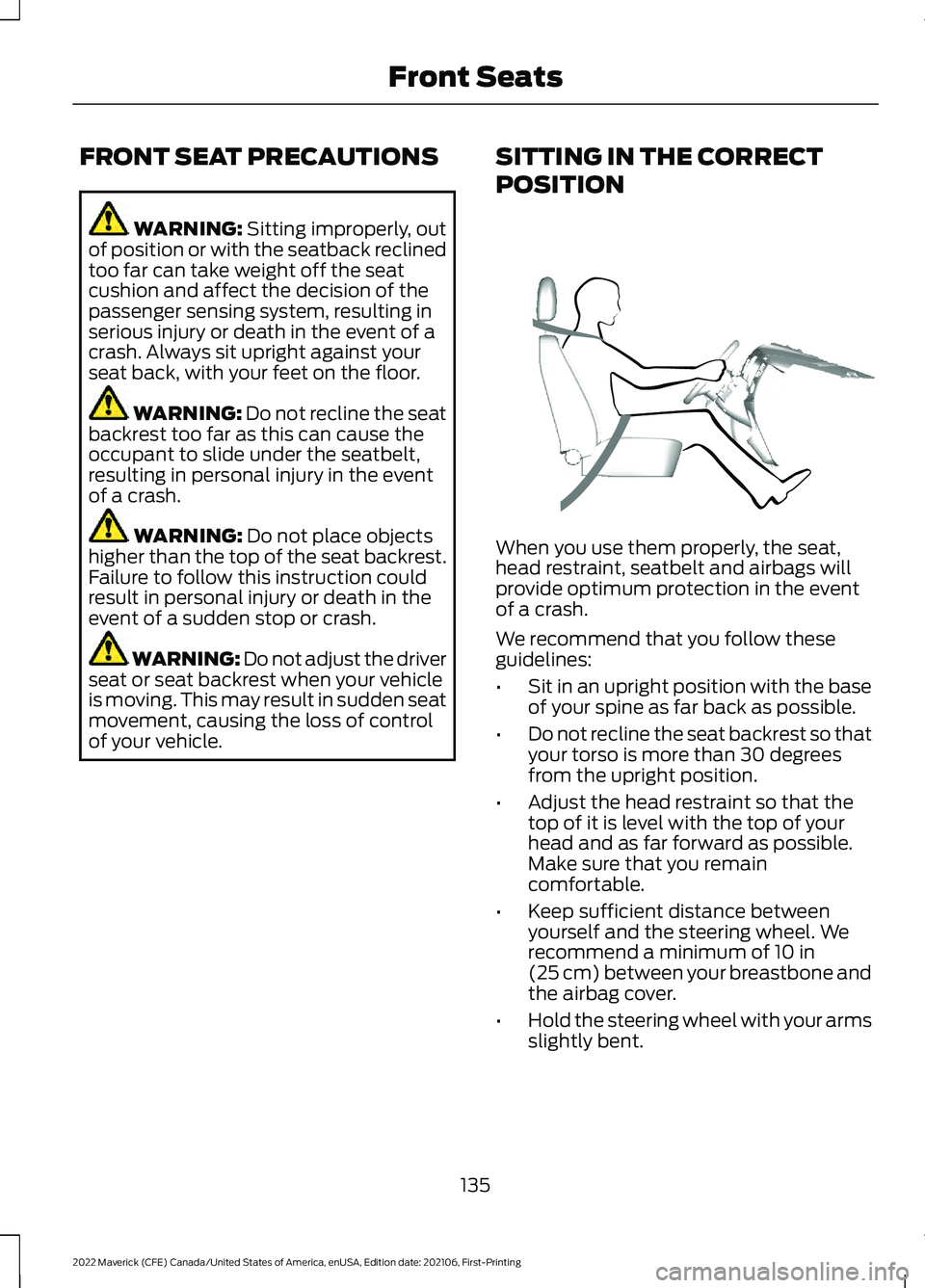
of your vehicle. SITTING IN THE CORRECT
POSITION When you use them properly, the seat,
head restraint, seatbelt and airbags will
provide optimum protection in the event
of a crash.
We recommend that you follow these
guidelines:
•
Sit in an upright position with the base
of your spine as far back as possible.
• Do not recline the seat backrest so that
your torso is more than 30 degrees
from the upright position.
• Adjust the head restraint so that the
top of it is level with the top of your
head and as far forward as possible.
Make sure that you remain
comfortable.
• Keep sufficient distance between
yourself and the steering wheel. We
recommend a minimum of
10 in
(25 cm) between your breastbone and
the airbag cover.
• Hold the steering wheel with your arms
slightly bent.
135
2022 Maverick (CFE) Canada/United States of America, enUSA, Edition date: 202106, First-Printing Front SeatsE68595
Page 164 of 533
STOPPING THE ENGINE WHEN
YOUR VEHICLE IS MOVING -
VEHICLES WITHOUT: PUSH
BUTTON START
WARNING: Switching off the
engine when your vehicle is still moving
results in a significant decrease in
braking assistance. Higher effort is
required to apply the brakes and to stop
your vehicle. A significant decrease in
steering assistance could also occur. The
steering does not lock, but higher effort
could be required to steer your vehicle.
When you switch the ignition off, some
electrical circuits, for example airbags,
also turn off. If you unintentionally switch
the ignition off, shift into neutral (N) and
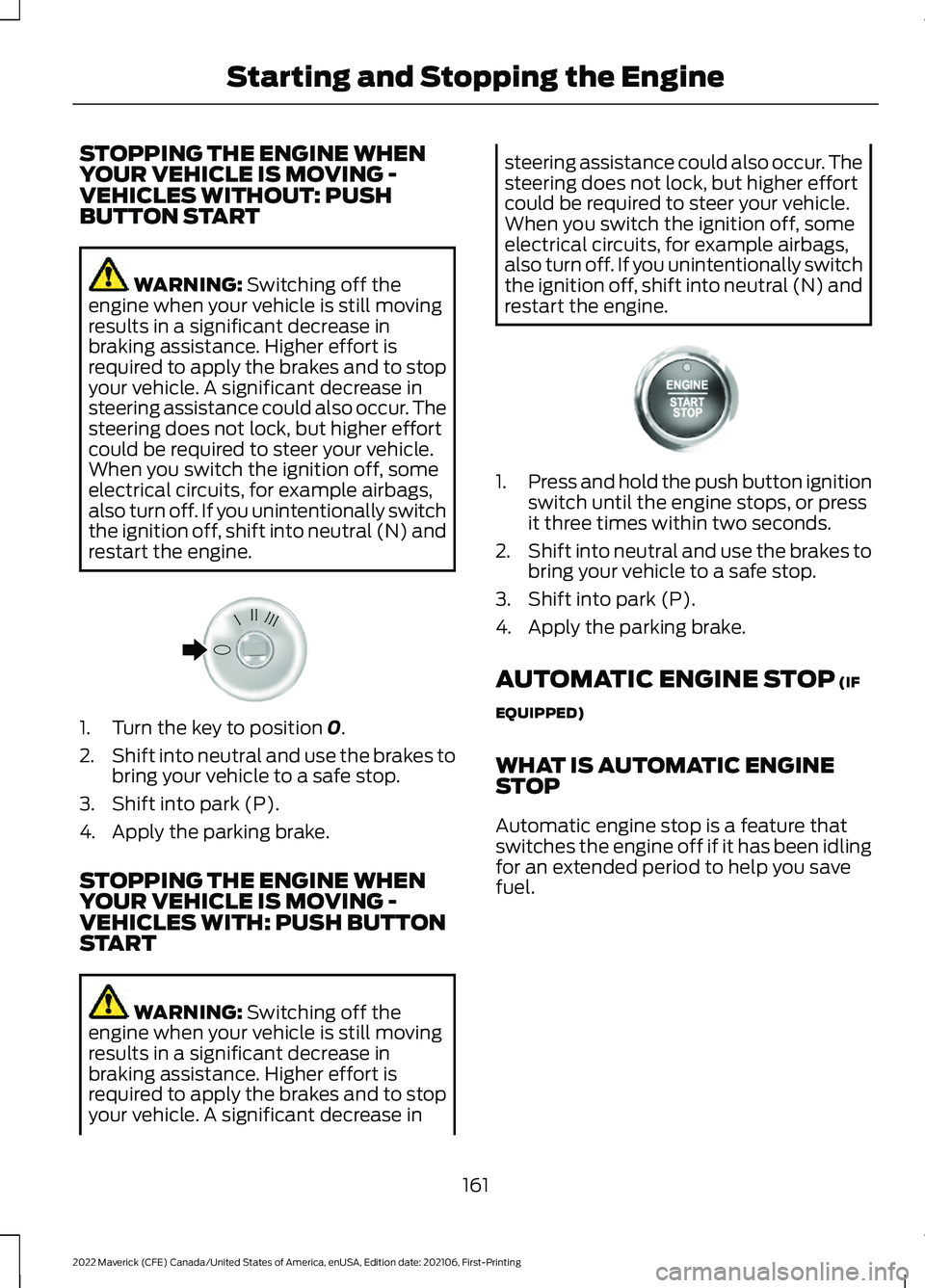
restart the engine. 1. Turn the key to position
0.
2. Shift into neutral and use the brakes to
bring your vehicle to a safe stop.
3. Shift into park (P).
4. Apply the parking brake.
STOPPING THE ENGINE WHEN
YOUR VEHICLE IS MOVING -
VEHICLES WITH: PUSH BUTTON
START WARNING:
Switching off the
engine when your vehicle is still moving
results in a significant decrease in
braking assistance. Higher effort is
required to apply the brakes and to stop
your vehicle. A significant decrease in steering assistance could also occur. The
steering does not lock, but higher effort
could be required to steer your vehicle.
When you switch the ignition off, some
electrical circuits, for example airbags,
also turn off. If you unintentionally switch
the ignition off, shift into neutral (N) and
restart the engine.
1.
Press and hold the push button ignition
switch until the engine stops, or press
it three times within two seconds.
2. Shift into neutral and use the brakes to
bring your vehicle to a safe stop.
3. Shift into park (P).
4. Apply the parking brake.
AUTOMATIC ENGINE STOP
(IF
EQUIPPED)
WHAT IS AUTOMATIC ENGINE
STOP
Automatic engine stop is a feature that
switches the engine off if it has been idling
for an extended period to help you save
fuel.
161
2022 Maverick (CFE) Canada/United States of America, enUSA, Edition date: 202106, First-Printing Starting and Stopping the EngineE322405 E321258
Page 165 of 533
HOW DOES AUTOMATIC ENGINE
STOP WORK
Automatic engine stop turns the engine
off. The ignition also turns off in order to
save battery power. Before the engine
shuts down, a message appears in the
information display showing a timer
counting down. If you do not intervene
within 30 seconds, the engine shuts down.
Another message appears in the
information display to inform you that the
engine has shut down in order to save fuel.
Start your vehicle as you normally do.
SWITCHING AUTOMATIC ENGINE
STOP ON AND OFF
1. Using the information display controls
on the steering wheel, select Settings.
2. Select Vehicle Settings.
3. Switch
30min Max Idle on or off.
Note: You cannot permanently switch off
the automatic shutdown. If you switch it
off, it turns on each time you switch the
ignition on.
OVERRIDING AUTOMATIC ENGINE
STOP
You can stop the engine shutdown, or reset
the timer, at any point before the
30-second countdown has expired by
doing any of the following:
• Pressing the brake pedal or accelerator
pedal.
• Pressing the
OK or RESET button
during the countdown.
Note: You cannot permanently switch off
the automatic engine shutdown feature.
When you switch it off temporarily, it turns
on at the next ignition cycle. STARTING AND STOPPING
THE ENGINE –
TROUBLESHOOTING
STARTING AND STOPPING THE
ENGINE – WARNING LAMPS
Malfunction Indicator Lamp
If it illuminates when the engine
is running, the on-board
diagnostics system is detecting
a malfunction of the vehicle emission
control system.
If it flashes, engine misfire could be
occurring. Increased exhaust gas
temperatures could damage the catalytic
converter or other vehicle components.
Avoid heavy acceleration and deceleration,
and have your vehicle checked as soon as
possible.
Powertrain Warning Lamp If it illuminates when the engine
is running, this indicates a
powertrain or four-wheel drive
fault. If it flashes when you are driving,
immediately reduce the vehicle speed.
Avoid heavy acceleration and deceleration,
and have your vehicle checked as soon as
possible.
If both lamps illuminate when the engine
is running, stop your vehicle as soon as it
is safe to do so. Continuing to drive your
vehicle could cause reduced power or the
engine to stop. Switch the ignition off and
attempt to restart the engine. Have your
vehicle checked as soon as possible.
162
2022 Maverick (CFE) Canada/United States of America, enUSA, Edition date: 202106, First-Printing Starting and Stopping the Engine
Page 171 of 533
WHAT IS AUTO-START-STOP
The system helps reduce fuel consumption
by stopping and restarting the engine when
your vehicle has stopped. The engine
restarts when you release the brake pedal.
In some situations, your vehicle could
restart before you release the brake pedal,
for example:
•
To maintain interior comfort.
• To recharge the battery.
AUTO-START-STOP
PRECAUTIONS WARNING: Apply the parking
brake, shift into park (P), switch the
ignition off and remove the key before
you leave your vehicle. Failure to follow
this instruction could result in personal
injury or death. WARNING:
Apply the parking
brake, shift into park (P), switch the
ignition off and remove the key before
you open the hood or have any service
or repair work completed. If you do not
switch the ignition off, the engine could
restart at any time. Failure to follow this
instruction could result in personal injury
or death.
SWITCHING AUTO-START-
STOP ON AND OFF
The system turns on when you switch the
ignition on. Press the button to switch the
system off.
Note: OFF
illuminates in the switch. Note:
Deactivating the system using the
button lasts only one key cycle.
Press the button again to switch the
system back on.
Note: The system turns off if it detects a
malfunction. If the system malfunctions,
have your vehicle checked as soon as
possible.
STOPPING THE ENGINE
Stop your vehicle, keep your foot on the
brake pedal and the transmission in drive
(D).
Note: Power assist steering turns off when
the engine stops.
RESTARTING THE ENGINE
Release the brake pedal or press the
accelerator pedal.
A message appears in the information
display if the system requires you to take
action.
AUTO-START-STOP
INDICATORS WARNING:
The system may
require the engine to automatically
restart when the auto-start-stop
indicator illuminates green or flashes
amber. Failure to follow this instruction
could result in personal injury. The Auto-Start-Stop indicator
illuminates green when the
engine stops. It flashes amber
and a message appears when you need to
take action.
168
2022 Maverick (CFE) Canada/United States of America, enUSA, Edition date: 202106, First-Printing Auto-Start-Stop - Gasoline
Page 194 of 533
BRAKE PRECAUTIONS
WARNING: Driving your vehicle
with the warning lamp on is dangerous.
A significant decrease in braking
performance may occur. It may take you
longer to stop your vehicle. Have your
vehicle checked as soon as possible.
Driving extended distances with the
parking brake engaged can cause brake
failure and the risk of personal injury.
Wet brakes result in reduced braking
efficiency. Gently press the brake pedal a
few times when driving from a car wash or
standing water to dry the brakes.
ANTI-LOCK BRAKING SYSTEM
ANTI-LOCK BRAKING SYSTEM
LIMITATIONS
The anti-lock braking system does not
eliminate the risk of crash when:
• You drive too closely to the vehicle in
front of you.
• Your vehicle is hydroplaning.
• You take corners too fast.
• The road surface is poor.
Note: If the system activates, the brake
pedal could pulse and travel further.
Maintain pressure on the brake pedal.
ANTI-LOCK BRAKING SYSTEM
INDICATORS
This system helps you maintain steering
control during emergency stops by keeping
the brakes from locking. If it illuminates when you are
driving, this indicates a
malfunction. Your vehicle
continues to have normal braking without
the anti-lock brake system function. Have
your vehicle checked as soon as possible.
It also momentarily illuminates when you
switch the ignition on to confirm the lamp
is functional. If it does not illuminate when
you switch the ignition on, or begins to
flash at any time, have the system checked
by an authorized dealer. It illuminates when you engage
the parking brake and the
ignition is on.
If it illuminates when your vehicle
is moving, make sure the parking
brake is disengaged. If the
parking brake is disengaged, this indicates
low brake fluid level or a brake system
fault. Have your vehicle checked as soon
as possible.
It also momentarily illuminates when you
switch the ignition on to confirm the lamp
is functional. If it does not illuminate when
you switch the ignition on, or begins to
flash at any time, have the system checked
by an authorized dealer.
BRAKE OVER ACCELERATOR
In the event the accelerator pedal
becomes stuck or entrapped, apply steady
and firm pressure to the brake pedal to
slow the vehicle and reduce engine power.
If you experience this condition, apply the
brakes and bring your vehicle to a safe
stop. Move the transmission to park (P),
switch the engine off and apply the parking
brake. Inspect the accelerator pedal for
any interference. If none are found and the
condition persists, have your vehicle towed
to the nearest authorized dealer.
191
2022 Maverick (CFE) Canada/United States of America, enUSA, Edition date: 202106, First-Printing Brakes E270480