steering FORD MAVERICK 2022 Workshop Manual
[x] Cancel search | Manufacturer: FORD, Model Year: 2022, Model line: MAVERICK, Model: FORD MAVERICK 2022Pages: 533, PDF Size: 9.58 MB
Page 248 of 533
Note:
If you switch automatic emergency
braking off, evasive steering assist switches
off.
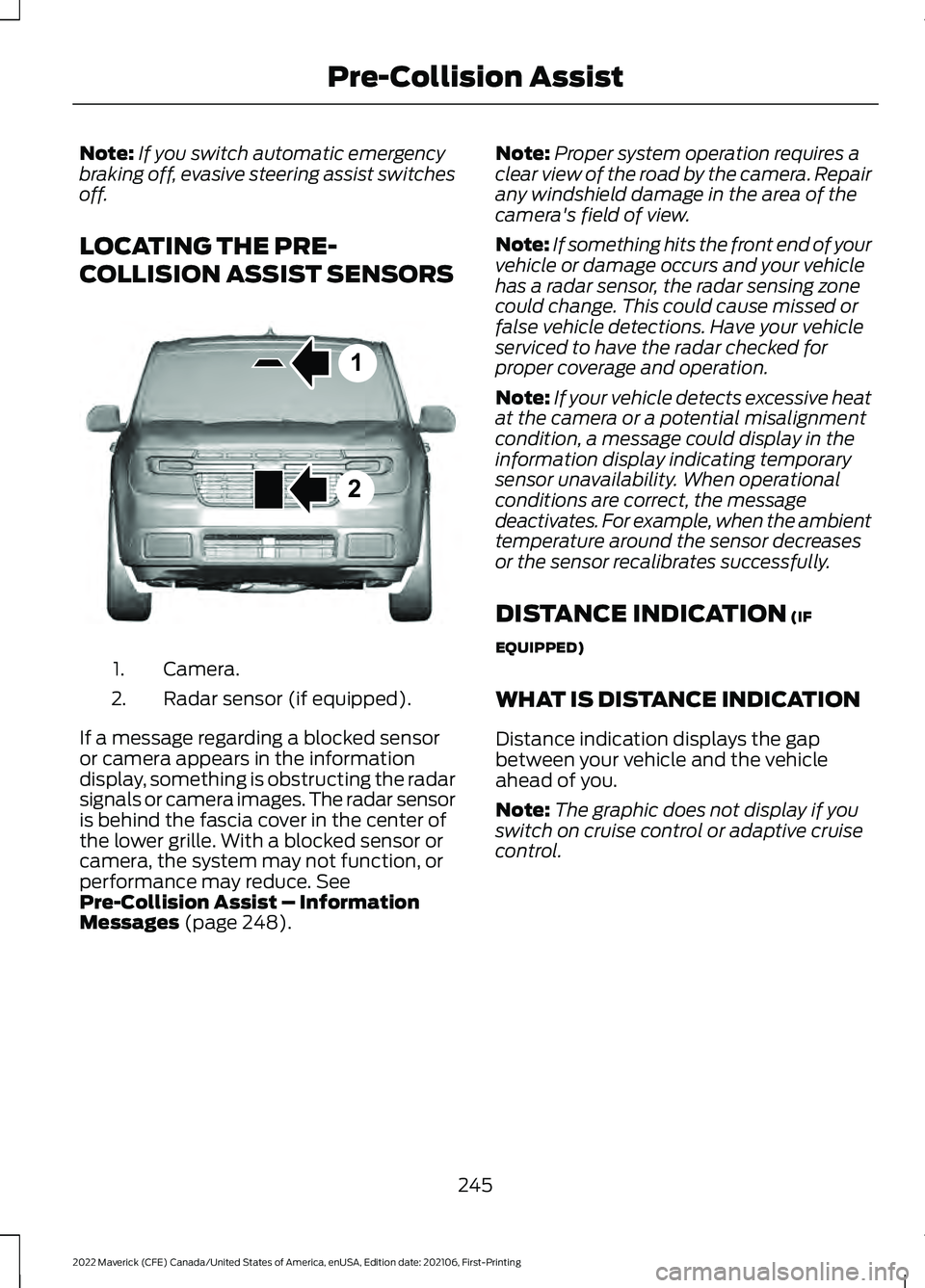
LOCATING THE PRE-
COLLISION ASSIST SENSORS Camera.
1.
Radar sensor (if equipped).
2.
If a message regarding a blocked sensor
or camera appears in the information
display, something is obstructing the radar
signals or camera images. The radar sensor
is behind the fascia cover in the center of
the lower grille. With a blocked sensor or
camera, the system may not function, or
performance may reduce. See
Pre-Collision Assist – Information
Messages
(page 248). Note:
Proper system operation requires a
clear view of the road by the camera. Repair
any windshield damage in the area of the
camera's field of view.
Note: If something hits the front end of your
vehicle or damage occurs and your vehicle
has a radar sensor, the radar sensing zone
could change. This could cause missed or
false vehicle detections. Have your vehicle
serviced to have the radar checked for
proper coverage and operation.
Note: If your vehicle detects excessive heat
at the camera or a potential misalignment
condition, a message could display in the
information display indicating temporary
sensor unavailability. When operational
conditions are correct, the message
deactivates. For example, when the ambient
temperature around the sensor decreases
or the sensor recalibrates successfully.
DISTANCE INDICATION
(IF
EQUIPPED)
WHAT IS DISTANCE INDICATION
Distance indication displays the gap
between your vehicle and the vehicle
ahead of you.
Note: The graphic does not display if you
switch on cruise control or adaptive cruise
control.
245
2022 Maverick (CFE) Canada/United States of America, enUSA, Edition date: 202106, First-Printing Pre-Collision Assist1
2E355015
Page 250 of 533
SWITCHING DISTANCE
INDICATION ON AND OFF
To switch the system on or off, use the
instrument cluster display:
1. Select Settings.
2. Select
Driver Assistance.
3. Select
Pre-Collision Assist.
4. Switch
Distance indication on or off.
DISTANCE INDICATION
INDICATOR
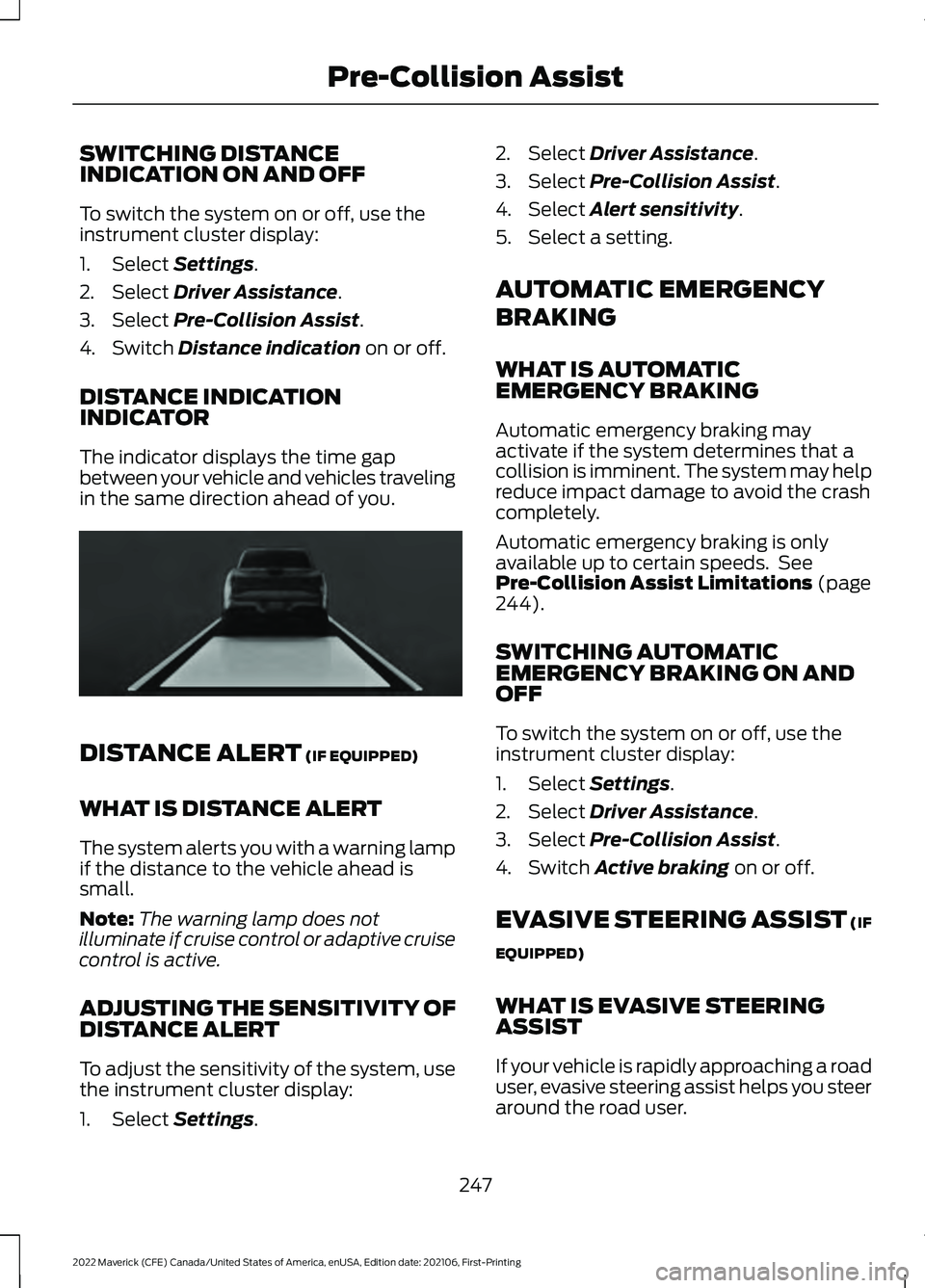
The indicator displays the time gap
between your vehicle and vehicles traveling
in the same direction ahead of you. DISTANCE ALERT
(IF EQUIPPED)
WHAT IS DISTANCE ALERT
The system alerts you with a warning lamp
if the distance to the vehicle ahead is
small.
Note: The warning lamp does not
illuminate if cruise control or adaptive cruise
control is active.
ADJUSTING THE SENSITIVITY OF
DISTANCE ALERT
To adjust the sensitivity of the system, use
the instrument cluster display:
1. Select
Settings. 2. Select
Driver Assistance.
3. Select
Pre-Collision Assist.
4. Select
Alert sensitivity.
5. Select a setting.
AUTOMATIC EMERGENCY
BRAKING
WHAT IS AUTOMATIC
EMERGENCY BRAKING
Automatic emergency braking may
activate if the system determines that a
collision is imminent. The system may help
reduce impact damage to avoid the crash
completely.
Automatic emergency braking is only
available up to certain speeds. See
Pre-Collision Assist Limitations
(page
244).
SWITCHING AUTOMATIC
EMERGENCY BRAKING ON AND
OFF
To switch the system on or off, use the
instrument cluster display:
1. Select
Settings.
2. Select
Driver Assistance.
3. Select
Pre-Collision Assist.
4. Switch
Active braking on or off.
EVASIVE STEERING ASSIST
(IF
EQUIPPED)
WHAT IS EVASIVE STEERING
ASSIST
If your vehicle is rapidly approaching a road
user, evasive steering assist helps you steer
around the road user.
247
2022 Maverick (CFE) Canada/United States of America, enUSA, Edition date: 202106, First-Printing Pre-Collision AssistE356419
Page 251 of 533
After you turn the steering wheel in an
attempt to avoid a crash with the road
user, the system applies additional steering
torque to help you steer around the road
user. After you pass the road user, the
system applies steering torque when you
turn the steering wheel to steer back into
the lane. The system deactivates after you
fully pass the road user.
Note:
Road users are defined as another
stationary vehicle in the same lane or a
vehicle traveling in the same lane in the
same direction as you. See Pre-Collision
Assist Precautions (page 243).
EVASIVE STEERING ASSIST
LIMITATIONS
Evasive steering assist only activates when
all the following occur:
• Automatic emergency braking and
evasive steering assist are on.
• The system detects a road user ahead
and starts to apply the brakes.
• You significantly turn the steering
wheel to steer around a road user. Note:
Evasive steering assist does not
automatically steer around a road user. If
you do not turn the steering wheel, evasive
steering assist does not activate.
Note: Evasive steering assist does not
activate if the distance to the road user
ahead is too small and the system cannot
avoid a crash.
Note: Evasive steering does not activate
with cyclists or pedestrians.
SWITCHING EVASIVE STEERING
ASSIST ON AND OFF
To switch the system on or off, use the
instrument cluster display:
1. Select
Settings.
2. Select
Driver Assistance.
3. Select
Pre-Collision Assist.
4. Switch
Evasive steering on or off.
Note: If you switch automatic emergency
braking off, evasive steering assist turns off.
Note: Automatic emergency braking and
evasive steering assist turn on every time
you switch the ignition on.
PRE-COLLISION ASSIST – TROUBLESHOOTING
PRE-COLLISION ASSIST – INFORMATION MESSAGES Action
Message
You have a blocked sensor due to bad
weather, ice, mud or water in front of the radar sensor. You can typically clean the sensor to resolve.
Pre-Collision Assist Not Available Sensor
Blocked
A fault with the system has occurred. Haveyour vehicle checked as soon as possible.
Pre-Collision Assist Not Available
248
2022 Maverick (CFE) Canada/United States of America, enUSA, Edition date: 202106, First-Printing Pre-Collision Assist
Page 268 of 533
When towing a trailer:
•
Obey country specific regulations for
towing a trailer.
• Do not drive faster than 70 mph
(113 km/h) during the first 500 mi
(800 km).
• Do not make full-throttle starts.
• Check your hitch, electrical connections
and trailer wheel lug nuts thoroughly
after you have traveled 50 mi (80 km).
• When stopped in congested or heavy
traffic during hot weather, place the
transmission in park (P) to aid engine
and transmission cooling and to help
A/C performance.
• Turn off the speed control with heavy
loads or in hilly terrain. The speed
control may turn off when you are
towing on long, steep slopes.
• Shift to a lower gear when driving down
a long or steep hill. Do not continuously
apply the brakes, as they may overheat
and become less effective.
• If your transmission has Grade Assist
or Tow/Haul, use this feature when
towing. This provides engine braking
and helps eliminate excessive
transmission shifting for optimum fuel
economy and transmission cooling.
• Your vehicle has AdvanceTrac with roll
stability control. When towing a trailer,
additional loads could cause the
AdvanceTrac system to engage during
cornering maneuvers. Reduce cornering
speeds to make sure that you can
maintain control of the vehicle and
trailer if the AdvanceTrac system
engages. •
Allow more distance for stopping with
a trailer attached. Anticipate stops and
gradually brake.
• Avoid parking on a slope. However, if
you must park on a slope, turn the
steering wheel to point your vehicle
tires away from traffic flow, set the
parking brake, place the transmission
in park (P) and place wheel chocks in
front and back of the trailer wheels.
Note: Chocks are not included with your
vehicle.
LAUNCHING OR RETRIEVING
A BOAT OR PERSONAL
WATERCRAFT
When backing down a ramp during boat
launching or retrieval:
• Do not allow the static water level to
rise above the bottom edge of the rear
bumper.
• Do not allow waves to break higher
than
6 in (15 cm) above the bottom
edge of the rear bumper.
Exceeding
6 in (15 cm) could allow water
to enter vehicle components, causing
internal damage to the components and
affecting driveability, emissions and
reliability.
Note: Replace the rear axle lubricant
anytime the rear axle has been submerged
in water.
Note: Disconnect the trailer wiring
connector before backing the trailer into the
water.
Note: Reconnect the trailer wiring
connector after removing the trailer from
the water.
265
2022 Maverick (CFE) Canada/United States of America, enUSA, Edition date: 202106, First-Printing Towing a Trailer
Page 273 of 533
Selecting the Trailer Brake Type
Use the instrument cluster display controls
on the steering wheel to select the correct
setting for your trailer.
Note:
Select Default
Electric/Surge/None if the trailer has
electric, surge or no brakes. Selecting the Trailer Brake Effort
Select the correct setting for your trailer.
Note:
Select a different setting if your
trailer's brakes require more initial voltage,
or you prefer more aggressive trailer braking.
INTEGRATED TRAILER BRAKE CONTROLLER –
TROUBLESHOOTING
INTEGRATED TRAILER BRAKE CONTROLLER – INFORMATION
MESSAGES Details
Message
The system detects the trailer wiring
connection is disconnected, during a given ignition cycle.
Trailer Disconnected
The system detects an electrical fault inthe trailer brake circuit. If this message
appears without a trailer attached, see your authorized dealer. If a trailer is attached, inspect and repair the trailer wiring.
Trailer Wiring Fault
Displays the current gain setting for thetrailer brake.
Trailer Brake Gain: {trailer gain value:#0.0}
Displays the current gain setting for the
trailer brake when you do not have a trailer connected.
Trailer Brake Gain: {trailer gain value:#0.0}
No Trailer
270
2022 Maverick (CFE) Canada/United States of America, enUSA, Edition date: 202106, First-Printing Integrated Trailer Brake Controller
(If Equipped)
Page 275 of 533
HOW DOES TRAILER SWAY
CONTROL WORK
The system applies the brakes to the
individual wheels and reduces engine
torque to aid vehicle stability.
If the trailer begins to sway, the stability
control lamp flashes and the message
Trailer Sway Reduce Speed appears in
the information display.
Stop your vehicle as soon as it is safe to
do so. Check the vertical weight on the
tow ball and trailer load distribution.
TRAILER SWAY CONTROL
PRECAUTIONS WARNING: Turning off trailer sway
control increases the risk of loss of
vehicle control, serious injury or death.
Ford does not recommend disabling this
feature except in situations where speed
reduction may be detrimental (such as
hill climbing), the driver has significant
trailer towing experience, and can control
trailer sway and maintain safe operation.
Note: This feature only activates when
significant trailer sway occurs.
Note: This feature does not prevent trailer
sway, but reduces it once it begins.
Note: This feature cannot stop all trailers
from swaying.
Note: In some cases, if vehicle speed is too
high, the system may activate multiple
times, gradually reducing vehicle speed. SWITCHING TRAILER SWAY
CONTROL ON AND OFF
1. Using the instrument cluster display
controls on the steering wheel, select
Settings
.
2. Switch
Trailer Sway Control on or off.
The system turns on each time you start
your vehicle.
272
2022 Maverick (CFE) Canada/United States of America, enUSA, Edition date: 202106, First-Printing Trailer Sway Control
Page 276 of 533
COLD WEATHER
PRECAUTIONS
The functional operation of some
components and systems can be affected
at temperatures below approximately
-13°F (-25°C).
DRIVING ON SNOW AND ICE WARNING:
If you are driving in
slippery conditions that require tire
chains or cables, then it is critical that
you drive cautiously. Keep speeds down,
allow for longer stopping distances and
avoid aggressive steering to reduce the
chances of a loss of vehicle control
which can lead to serious injury or death.
If the rear end of your vehicle slides while
cornering, steer in the direction of the
slide until you regain control of your
vehicle.
On ice and snow, you should drive more
slowly than usual. Your vehicle has a four
wheel anti-lock brake system, do not pump
the brake pedal.
See Anti-Lock Braking
System Limitations (page 191).
BREAKING-IN
Your vehicle requires a break-in period. For
the first 1,000 mi (1,600 km), avoid driving
at high speeds, heavy braking, aggressive
shifting or using your vehicle to tow. During
this time, your vehicle may exhibit some
unusual driving characteristics. DRIVING ECONOMICALLY
The following helps to improve fuel
consumption:
•
Drive smoothly, accelerate gently and
anticipate the road ahead to avoid
heavy braking.
• Regularly check your tire pressures and
make sure that they are inflated to the
correct pressure.
• Follow the recommended maintenance
schedule and carry out the
recommended checks.
• Plan your journey and check the traffic
before you set off. It is more efficient
to combine errands into a single trip
whenever possible.
• Avoid idling the engine in cold weather
or for extended periods. Start the
engine only when you are ready to set
off.
• Do not carry unnecessary weight in your
vehicle as extra weight wastes fuel.
• Do not add unnecessary accessories
to the exterior of your vehicle, for
example running boards. If you use a
roof rack, remember to fold it down or
remove it when not in use.
• Do not shift into neutral when you are
braking or when your vehicle is slowing
down.
• Shut all windows when driving at high
speeds.
• Switch off all electric systems when
not in use, for example air conditioning.
Make sure that you unplug any
accessories from the auxiliary power
points when not in use.
273
2022 Maverick (CFE) Canada/United States of America, enUSA, Edition date: 202106, First-Printing Driving Hints
Page 277 of 533
DRIVING IN SPECIAL
CONDITIONS
EMERGENCY MANEUVERS
In an unavoidable emergency where you
must make a sudden sharp maneuver, turn
the steering wheel only as rapidly and as
far as required to avoid the emergency.
Apply smooth pressure to the accelerator
pedal or brake pedal as needed. Avoid
abrupt steering, acceleration and braking
changes. Abrupt changes could increase
the risk of vehicle roll over, loss of vehicle
control and personal injury. If possible, use
any available road surfaces to bring your
vehicle under control.
DRIVING THROUGH MUD AND
WATER
Mud
Be cautious of sudden changes in vehicle
speed or direction when you are driving in
mud. Even all-wheel drive and four-wheel
drive vehicles can lose traction in mud. If
your vehicle slides, steer in the direction of
the slide until you regain control of your
vehicle. After driving through mud, clean
off residue stuck to rotating driveshafts
and tires. Excess residue can cause an
imbalance that could damage drive
components.
Note:
If your vehicle gets stuck in mud, it
could be rocked out by shifting between
forward and reverse gears, stopping
between shifts in a steady pattern. Press
lightly on the accelerator in each gear.
Note: Do not rock your vehicle if the engine
is not at normal operating temperature, as
damage to the transmission could occur. Note:
Do not rock your vehicle for more
than a minute, as damage to the
transmission and tires could occur or the
engine could overheat.
Water
If you must drive though deep water, drive
slowly. The water could limit traction or
brake capability. See Driving Through
Shallow Water (page 275).
When driving though water, determine the
depth and avoid water higher than the
center of the wheel.
Once through water, always try the brakes.
Wet brakes do not stop your vehicle as
quickly as dry brakes. Apply light pressure
to the brake pedal while slowly moving the
vehicle to dry the brakes.
Note: Driving through deep water could
cause damage to the transmission. If the
front or rear axle is submerged in water,
have the axle lubricant and power transfer
unit lubricant checked and changed if
necessary.
DRIVING ON HILLY OR SLOPING
TERRAIN WARNING:
Extreme care should
be used when steering the vehicle in
reverse down a slope so as not to cause
the vehicle to swerve out of control.
Although natural obstacles could make it
necessary to travel diagonally up or down
a hill or steep incline, you should try to drive
straight up or straight down.
274
2022 Maverick (CFE) Canada/United States of America, enUSA, Edition date: 202106, First-Printing Driving Hints
Page 278 of 533
Note:
Avoid turning on steep slopes or hills.
A danger lies in losing traction, slipping
sideways and possible vehicle roll over.
Whenever driving on a hill, determine
beforehand the route you can use. Do not
drive over the crest of a hill without seeing
what conditions are on the other side. Do
not drive in reverse over a hill without the
aid of an observer.
Apply just enough power to the wheels to
climb the hill. Too much power causes the
tires to slip, spin or lose traction, and you
could lose control of your vehicle. When
descending a steep hill, do not descend
the hill in neutral. Avoid sudden hard
braking to keep the front wheels rolling and
to maintain your vehicle's steering.
Note: Your vehicle has anti-lock brakes,
apply the brakes steadily. Do not pump the
brakes.
Note: If your vehicle gets stuck driving on
hilly or sloping terrain, it could be rocked out
by shifting between forward and reverse
gears, stopping between shifts in a steady
pattern. Press lightly on the accelerator in
each gear.
Note: Do not rock your vehicle if the engine
is not at normal operating temperature, as
damage to the transmission could occur.
Note: Do not rock your vehicle for more
than a minute, as damage to the
transmission and tires could occur or the
engine could overheat.
DRIVING IN SAND
When driving over sand, try to keep all four
wheels on the most solid area of the trail.
Steadily drive through the terrain. Apply
the accelerator slowly and avoid excessive
wheel slip. Do not drive your vehicle in
deep sand for an extended period of time.
This could overheat the system. A
message appears in the instrument cluster
display. Note:
If your vehicle gets stuck driving on
hilly or sloping terrain, it could be rocked out
by shifting between forward and reverse
gears, stopping between shifts in a steady
pattern. Press lightly on the accelerator in
each gear.
Note: Do not rock your vehicle if the engine
is not at normal operating temperature, as
damage to the transmission could occur.
Note: Do not rock your vehicle for more
than a minute, as damage to the
transmission and tires could occur or the
engine could overheat
DRIVING THROUGH SHALLOW
WATER WARNING: Do not attempt to
cross a deep or flowing body of water.
Failure to follow this instruction could
result in the loss of control of your
vehicle, personal injury or death.
Note: Driving through standing water can
cause vehicle damage.
Note: Engine damage can occur if water
enters the air filter.
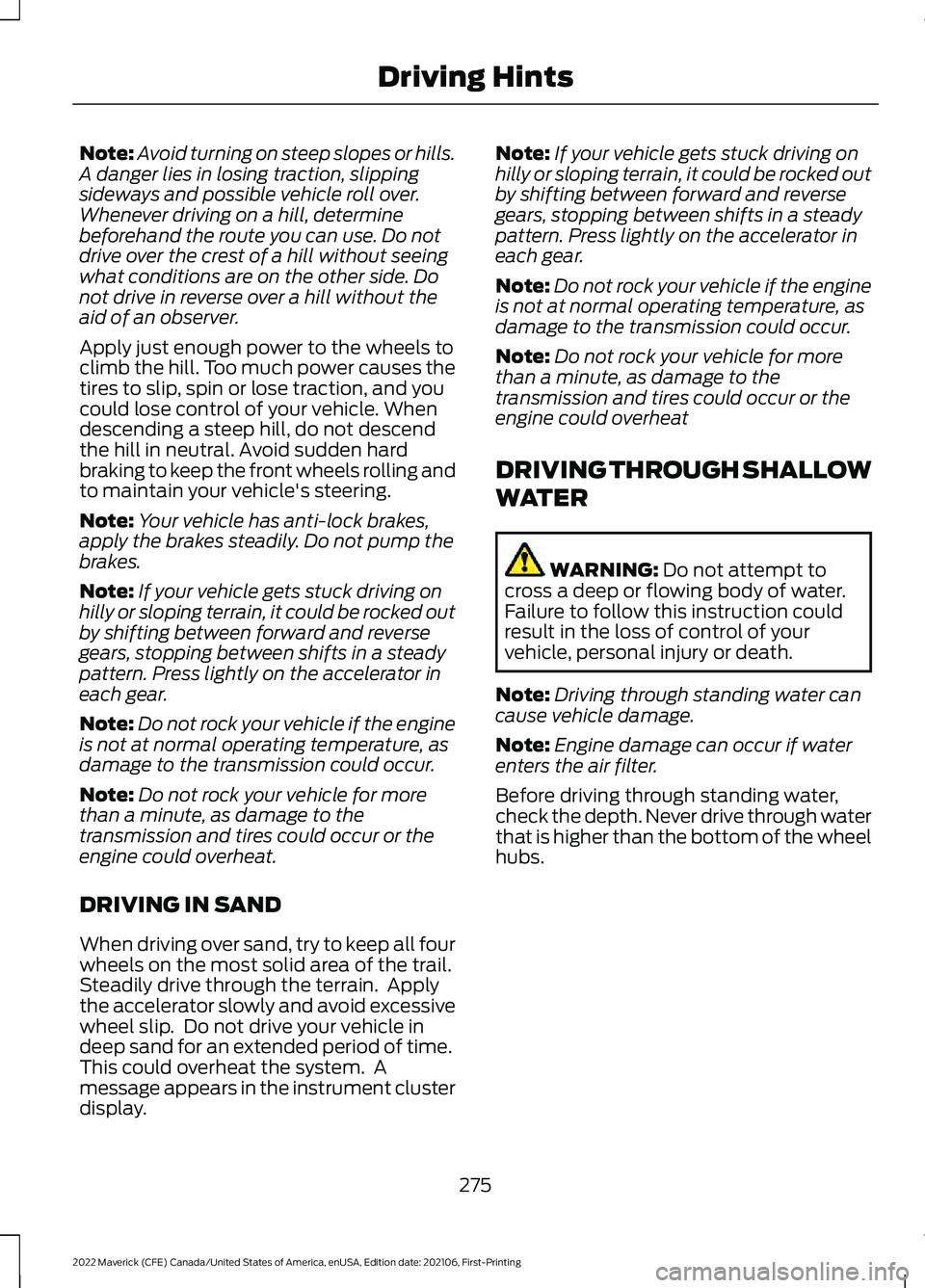
Before driving through standing water,
check the depth. Never drive through water
that is higher than the bottom of the wheel
hubs.
275
2022 Maverick (CFE) Canada/United States of America, enUSA, Edition date: 202106, First-Printing Driving Hints
Page 279 of 533
When driving through standing water, drive
very slowly and do not stop your vehicle.
Your brake performance and traction could
be limited. After driving through water and
as soon as it is safe to do so:
•
Lightly press the brake pedal to dry the
brakes and to check that they work.
• Turn the steering wheel to check that
the steering power assist works.
Check the function of the following:
• Horn
• Exterior lights
FLOOR MATS WARNING: Use a floor mat
designed to fit the footwell of your
vehicle that does not obstruct the pedal
area. Failure to follow this instruction
could result in the loss of control of your
vehicle, personal injury or death. WARNING:
Pedals that cannot
move freely can cause loss of vehicle
control and increase the risk of serious
personal injury. WARNING:
Secure the floor mat
to both retention devices so that it
cannot slip out of position and interfere
with the pedals. Failure to follow this
instruction could result in the loss of
control of your vehicle, personal injury or
death. WARNING: Do not place additional
floor mats or any other covering on top
of the original floor mats. This could
result in the floor mat interfering with the
operation of the pedals. Failure to follow
this instruction could result in the loss of
control of your vehicle, personal injury or
death. WARNING:
Always make sure that
objects cannot fall into the driver foot
well while your vehicle is moving. Objects
that are loose can become trapped
under the pedals causing a loss of
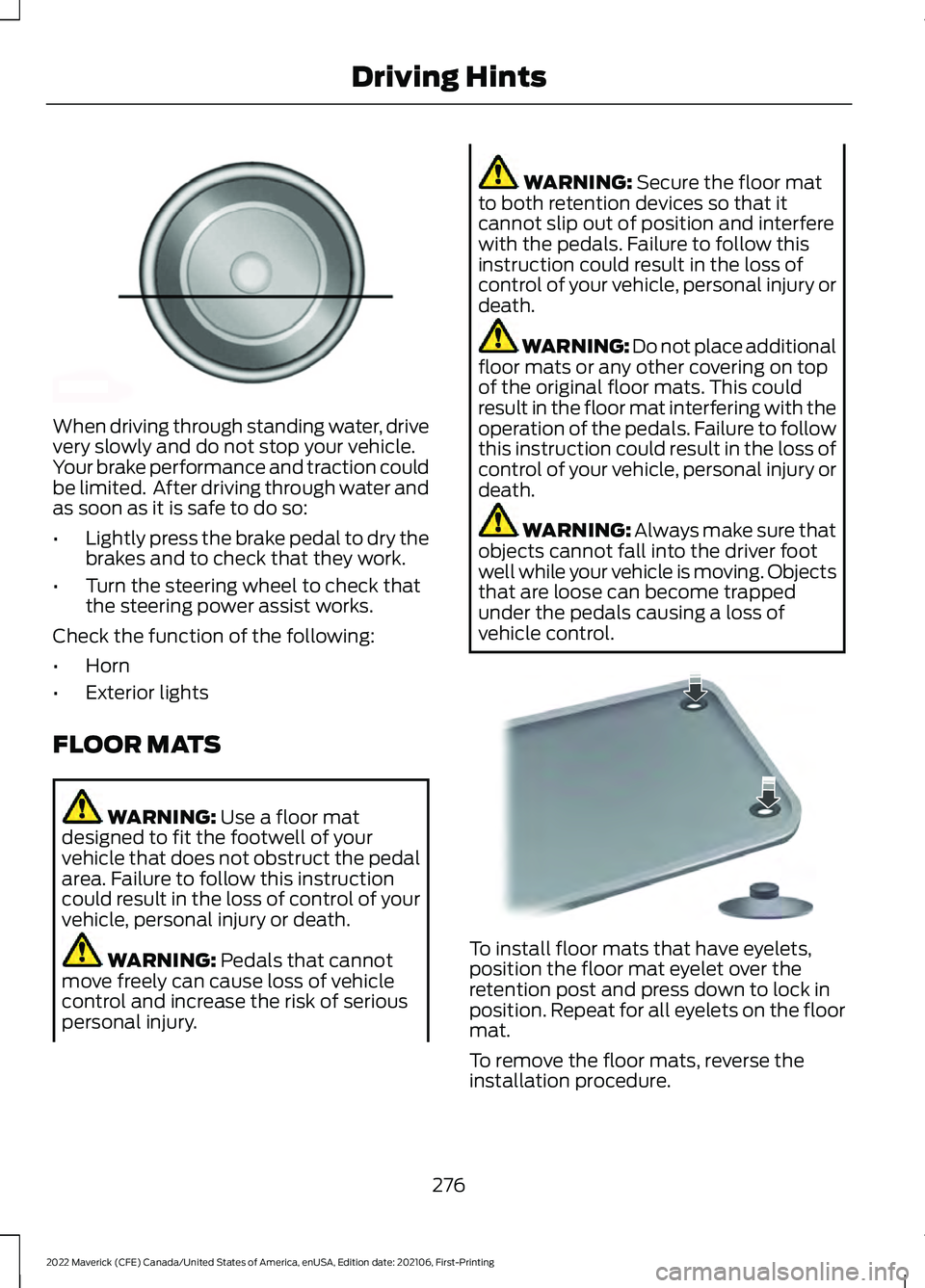
vehicle control. To install floor mats that have eyelets,
position the floor mat eyelet over the
retention post and press down to lock in
position. Repeat for all eyelets on the floor
mat.
To remove the floor mats, reverse the
installation procedure.
276
2022 Maverick (CFE) Canada/United States of America, enUSA, Edition date: 202106, First-Printing Driving HintsE176913 E142666