service FORD MAVERICK 2023 User Guide
[x] Cancel search | Manufacturer: FORD, Model Year: 2023, Model line: MAVERICK, Model: FORD MAVERICK 2023Pages: 556, PDF Size: 14.79 MB
Page 57 of 556
WARNING: Keep the areas in frontof the airbags free from obstruction. Donot affix anything to or over the airbagcovers. Objects could become projectilesduring airbag deployment. Failure tofollow this instruction could result inpersonal injury or death.
WARNING: To reduce risk of injury,do not obstruct or place objects in thedeployment path of the airbag.
WARNING: Do not place arearward facing child restraint in front ofan active airbag. Failure to follow thisinstruction could result in personal injuryor death.
WARNING: Do not attempt toservice, repair, or modify thesupplementary restraint system orassociated components. Failure tofollow this instruction could result inpersonal injury or death.
WARNING: Several airbag systemcomponents get hot after inflation. Toreduce the risk of injury, do not touchthem after inflation.
WARNING: If a supplementaryrestraint system component hasdeployed, it will not function again. Havethe system and associated componentsinspected as soon as possible. Failure tofollow this instruction could result inpersonal injury or death.
PROPERLY ADJUSTING THE
DRIVER AND FRONT
PASSENGER SEATS
WARNING: National HighwayTraffic Safety Administration (NHTSA)recommends a minimum distance of atleast 10 in (25 cm) between anoccupant's chest and the driver airbagmodule.
To properly position yourself away fromthe airbag:
•Move your seat to the rear as far as youcan while still reaching the pedalscomfortably.
•Recline the seat slightly one or twodegrees from the upright position.
After all occupants have adjusted theirseats and put on seatbelts, it is veryimportant that they continue to sitproperly. Properly seated occupants situpright, lean against the seat backrest, andcenter themselves on the seat cushion,with their feet comfortably extended onthe floor. Sitting improperly can increasethe chance of injury in a crash event. Forexample, if an occupant slouches, liesdown, turns sideways, sits forward, leansforward or sideways, or puts one or bothfeet up, the chance of injury during a crashgreatly increases.
CHILDREN AND AIRBAGS
WARNING: Do not place arearward facing child restraint in front ofan active airbag. Failure to follow thisinstruction could result in personal injuryor death.
53
2023 Maverick (CFE) Canada/United States of America, enUSA, Edition date: 202208, First-PrintingAirbags
Page 59 of 556
•When the front passenger sensingsystem enables the front passengerfrontal airbag, the passenger airbagstatus indicator illuminates the onlamp.
If a person of adult size is sitting in the frontpassenger seat, but the passenger airbagstatus indicator off lamp is illuminated, itis possible that the person is not sittingproperly in the seat. If this happens:
•Switch your vehicle off and ask theperson to place the seat backrest in anupright position.
•Have the person sit upright in the seat,centered on the seat cushion, with theperson's legs comfortably extended.
•Restart your vehicle and have theperson remain in this position for abouttwo minutes. This allows the systemto detect that person and enable thepassenger frontal airbag.
•If the indicator off lamp remainsilluminated even after this, advise theperson to ride in the rear seat.
After all occupants have adjusted theirseats and put on seatbelts, it is veryimportant that they continue to sit upright,leaning against the seat backrest, andcentered on the seat cushion, with theirfeet comfortably extended on the floor.
Sitting improperly can increase the chanceof injury in a crash event. For example, ifan occupant slouches, lies down, turnssideways, sits forward, leans forward orsideways, or puts one or both feet up, thechance of injury during a crash greatlyincreases.
If you think that the state of the passengerairbag status indicator lamp is incorrect,check the following:
•Objects lodged underneath the seat.
•Objects between the seat cushion andthe center console.
•Objects hanging off the seat backrest.
•Objects stowed in the seat backrestmap pocket.
•Objects placed on the occupant's lap.
•Cargo interference with the seat
•Other passengers pushing or pulling onthe seat.
•Rear passenger feet and knees restingor pushing on the seat.
The listed conditions could cause theweight of a properly seated occupant tobe incorrectly interpreted by the frontpassenger sensing system. The person inthe front passenger seat could appearheavier or lighter due to the conditionslisted.
Make sure the front passengersensing system is operatingproperly. See Crash Sensorsand Airbag Indicator (page 57).
If the airbag readiness light is on, do thefollowing:
•Pull your vehicle over.
•Switch your vehicle off.
•Check for any objects lodgedunderneath the front passenger seator cargo interfering with the seat.
•Remove the obstruction if found.
•Restart your vehicle.
•Wait at least two minutes and verifythat the airbag readiness light in theinstrument cluster is no longerilluminated.
•If the airbag readiness light in theinstrument cluster remains illuminated,there may be a problem due to thefront passenger sensing system.
Do not attempt to repair or service thesystem. Take your vehicle in for serviceimmediately.
55
2023 Maverick (CFE) Canada/United States of America, enUSA, Edition date: 202208, First-PrintingAirbagsE67017
Page 61 of 556
CRASH SENSORS AND
AIRBAG INDICATOR
WARNING: Modifying or addingequipment to the front of your vehiclecould affect the performance of theairbag system, increasing the risk ofinjury. This includes the hood, bumpersystem, frame, front body structure, towhooks, hood pins, push bar andsnowplows.
Your vehicle has a collection of crash andoccupant sensors. These sensors provideinformation to the restraints controlmodule which deploys the following:
•Seatbelt pretensioners.
•Driver airbag.
•Passenger airbag.
•Knee airbag(s).
•Seat mounted side airbags.
•Safety Canopy.
Based on the type of crash, the restraintscontrol module deploys the appropriatesafety devices.
The restraints control module alsomonitors the readiness of the above safetydevices plus the crash and occupantsensors. The safety system displays anindicator in the instrument cluster when itis ready. The system sends out a tone if itis not working. The airbag does not requireroutine maintenance.
One or more of the following indicates adifficulty with the system:
The readiness light does notimmediately illuminate after youswitch the ignition on.
•The readiness light either flashes orstays on.
•You hear a series of five beeps. Thetone pattern periodically repeats untilthe problem, the light or both arerepaired.
If any of these things happen, evenintermittently, have the supplementalrestraint system serviced at an authorizeddealer immediately. Unless serviced, thesystem may not function properly in theevent of a crash.
The fact that the seatbelt pretensionersor front airbags did not activate for bothfront seat occupants in a crash does notmean that something is wrong with thesystem. Rather, it means the restraintscontrol module determined the accidentconditions (crash severity, seatbelt usage)were not appropriate to activate thesesafety devices.
•The design of the front airbags is toactivate only in frontal and near-frontalcrashes (not rollovers, side impacts orrear impacts) unless the crash causessufficient frontal deceleration.
•The design of the front seatbeltpretensioners is to activate in frontal,near-frontal and side crashes, and inrollovers. The design of the rearseatbelt pretensioners is to activate infrontal crashes, side crashes and inrollovers.
•The design of the knee airbag(s) is todeploy based on crash severity andoccupant conditions.
57
2023 Maverick (CFE) Canada/United States of America, enUSA, Edition date: 202208, First-PrintingAirbagsE67017
Page 63 of 556
WHAT IS 911 ASSIST
911 Assist is a SYNC system feature thatcan call for help.
For more information, visitwww.owner.ford.com.
HOW DOES 911 ASSIST WORK
If a crash deploys an airbag, excluding kneeairbags and rear inflatable seatbelts, oractivates the fuel pump shut-off, yourvehicle may be able to contact emergencyservices by dialing 911 through a paired andconnected Bluetooth® enabled phone.
Not all crashes deploy an airbag or activatethe fuel pump shut-off. If a connected cellphone sustains damage or loses itsconnection to SYNC during a crash, SYNCsearches for and tries to connect to apreviously paired cell phone. SYNC thenattempts to call the emergency services.
Before making the call:
•SYNC provides about 10 seconds tocancel the call. If you fail to cancel thecall, SYNC attempts to dial 911.
•SYNC says the following, or a similarmessage: SYNC will attempt to call 911,to cancel the call, press Cancel on yourscreen or press and hold the phonebutton on your steering wheel.
If you do not cancel the call and SYNCmakes a successful call a pre-recordedmessage plays for the 911 operator. Theoccupants in your vehicle are able to talkwith the operator. Be prepared to provideyour name, phone number and locationimmediately because not all 911 systemsare capable of receiving this informationelectronically.
During an emergency call the systemtransmits vehicle data to the emergencyservice.
EMERGENCY CALL
REQUIREMENTS
WARNING: Do not wait for 911Assist to make an emergency call if youcan do it yourself. Dial emergencyservices immediately to avoid delayedresponse time which could increase therisk of serious injury or death after acrash. If you do not hear 911 Assist withinfive seconds of the crash, the system orphone may be damaged ornon-functional.
WARNING: Always place yourphone in a secure location in your vehicleso it does not become a projectile or getdamaged in a crash. Failure to do so maycause serious injury to someone ordamage the phone which could prevent911 Assist from working properly.
WARNING: Unless the 911 Assistsetting is set on before a crash, thesystem will not dial for help which coulddelay response time, potentiallyincreasing the risk of serious injury ordeath after a crash.
•SYNC is powered and working properlyat the time of the incident andthroughout feature activation and use.
•The 911 Assist feature must be set onbefore the incident.
•You must pair and connect aBluetooth® enabled and compatiblecell phone to SYNC.
•A connected Bluetooth® enabledphone must have the ability to makeand maintain an outgoing call at thetime of the incident.
59
2023 Maverick (CFE) Canada/United States of America, enUSA, Edition date: 202208, First-Printing911 Assist
Page 93 of 556
WIPERS
WIPER PRECAUTIONS
Do not operate the wipers on a drywindshield. This could scratch the glass ordamage the wiper blades. Use thewindshield washers before wiping a drywindshield.
Fully defrost the windshield before youswitch the windshield wipers on.
Switch the windshield wipers off beforeentering a car wash.
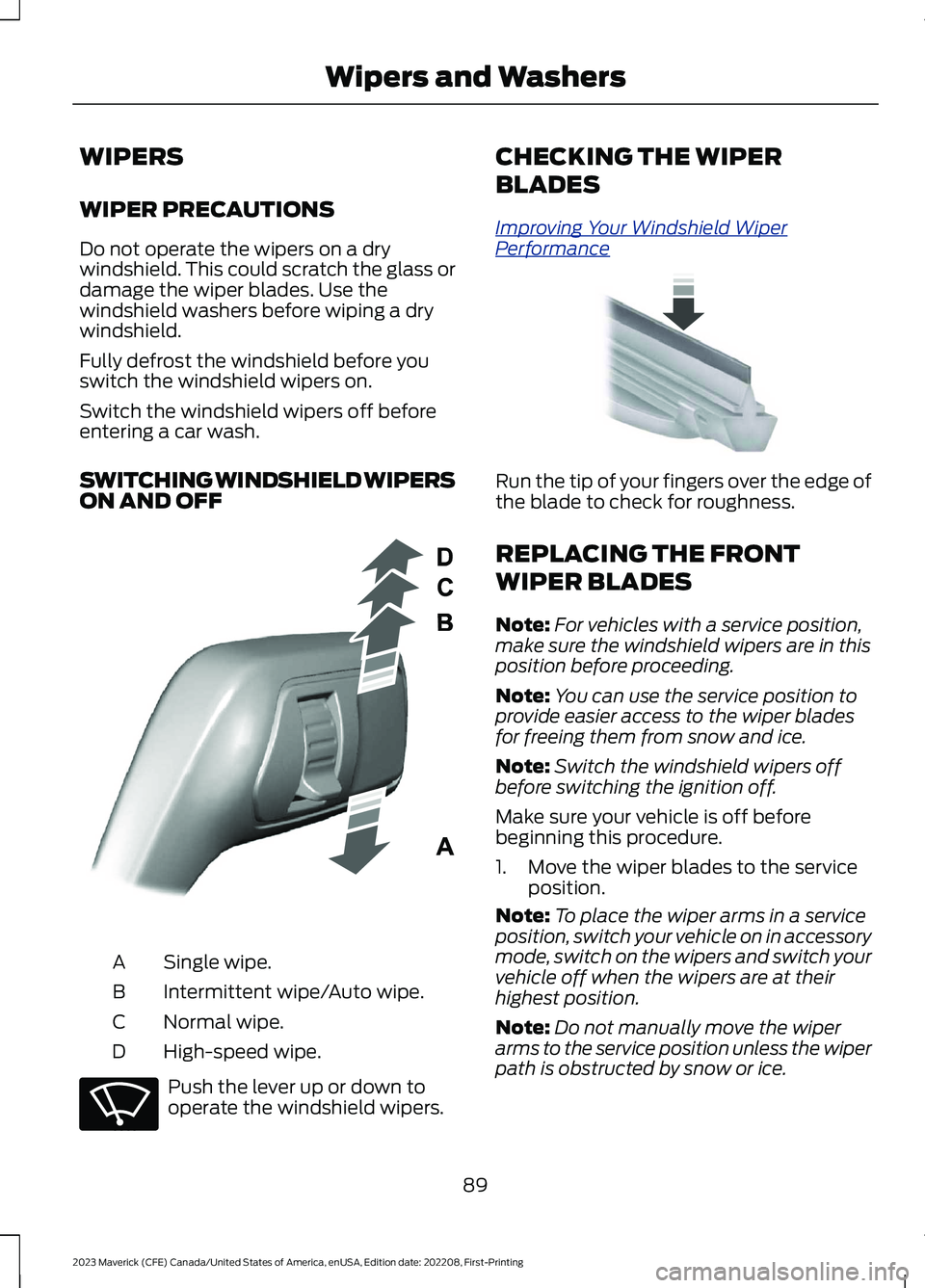
SWITCHING WINDSHIELD WIPERSON AND OFF
Single wipe.A
Intermittent wipe/Auto wipe.B
Normal wipe.C
High-speed wipe.D
Push the lever up or down tooperate the windshield wipers.
CHECKING THE WIPER
BLADES
Improving Your Windshield WiperPerformance
Run the tip of your fingers over the edge ofthe blade to check for roughness.
REPLACING THE FRONT
WIPER BLADES
Note:For vehicles with a service position,make sure the windshield wipers are in thisposition before proceeding.
Note:You can use the service position toprovide easier access to the wiper bladesfor freeing them from snow and ice.
Note:Switch the windshield wipers offbefore switching the ignition off.
Make sure your vehicle is off beforebeginning this procedure.
1.Move the wiper blades to the serviceposition.
Note:To place the wiper arms in a serviceposition, switch your vehicle on in accessorymode, switch on the wipers and switch yourvehicle off when the wipers are at theirhighest position.
Note:Do not manually move the wiperarms to the service position unless the wiperpath is obstructed by snow or ice.
89
2023 Maverick (CFE) Canada/United States of America, enUSA, Edition date: 202208, First-PrintingWipers and WashersE295996 E270969 E142463
Page 101 of 556
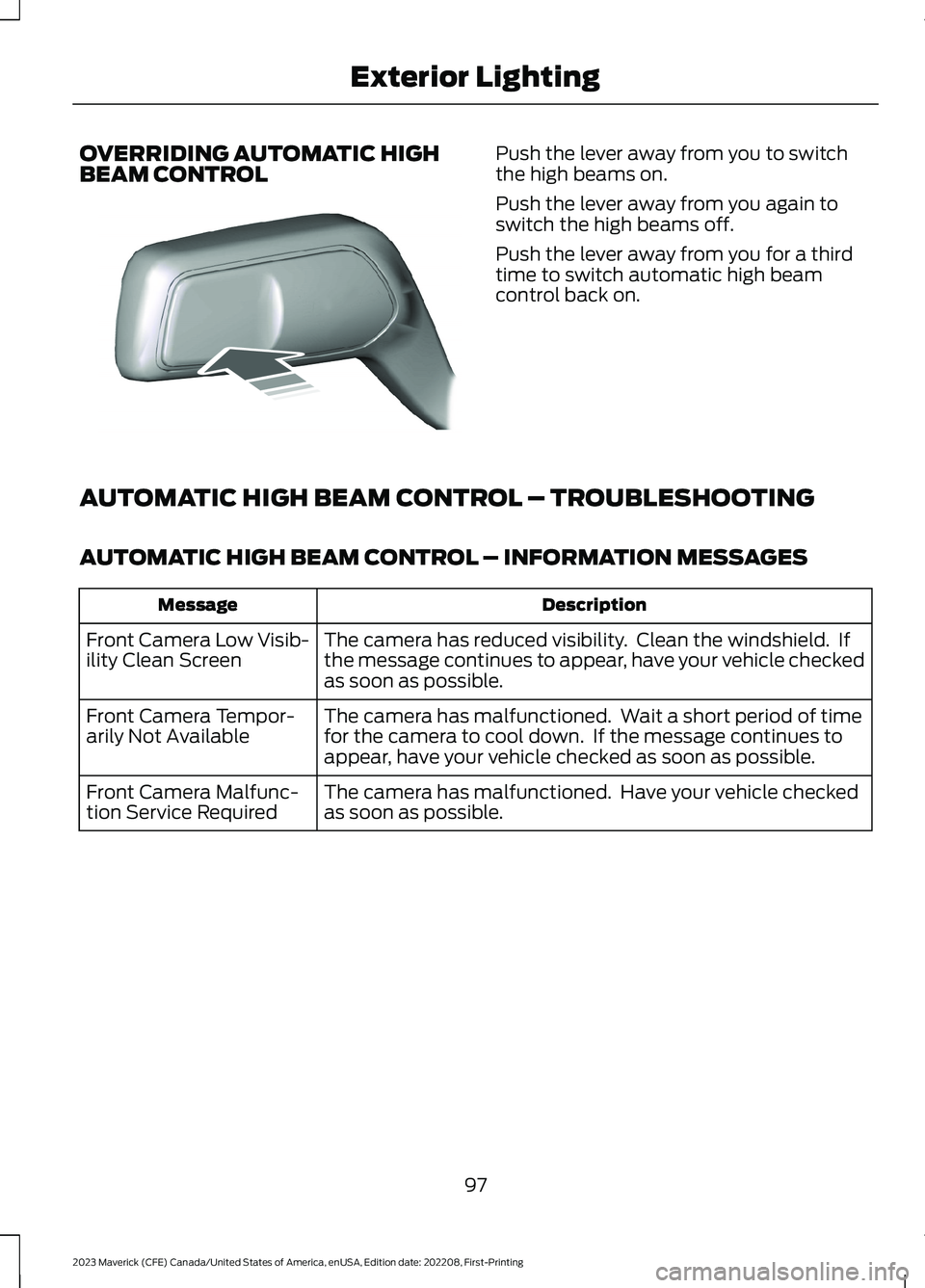
OVERRIDING AUTOMATIC HIGHBEAM CONTROLPush the lever away from you to switchthe high beams on.
Push the lever away from you again toswitch the high beams off.
Push the lever away from you for a thirdtime to switch automatic high beamcontrol back on.
AUTOMATIC HIGH BEAM CONTROL – TROUBLESHOOTING
AUTOMATIC HIGH BEAM CONTROL – INFORMATION MESSAGES
DescriptionMessage
The camera has reduced visibility. Clean the windshield. Ifthe message continues to appear, have your vehicle checkedas soon as possible.
Front Camera Low Visib-ility Clean Screen
The camera has malfunctioned. Wait a short period of timefor the camera to cool down. If the message continues toappear, have your vehicle checked as soon as possible.
Front Camera Tempor-arily Not Available
The camera has malfunctioned. Have your vehicle checkedas soon as possible.Front Camera Malfunc-tion Service Required
97
2023 Maverick (CFE) Canada/United States of America, enUSA, Edition date: 202208, First-PrintingExterior LightingE248603
Page 116 of 556
INSTRUMENT CLUSTER
WARNING LAMPS
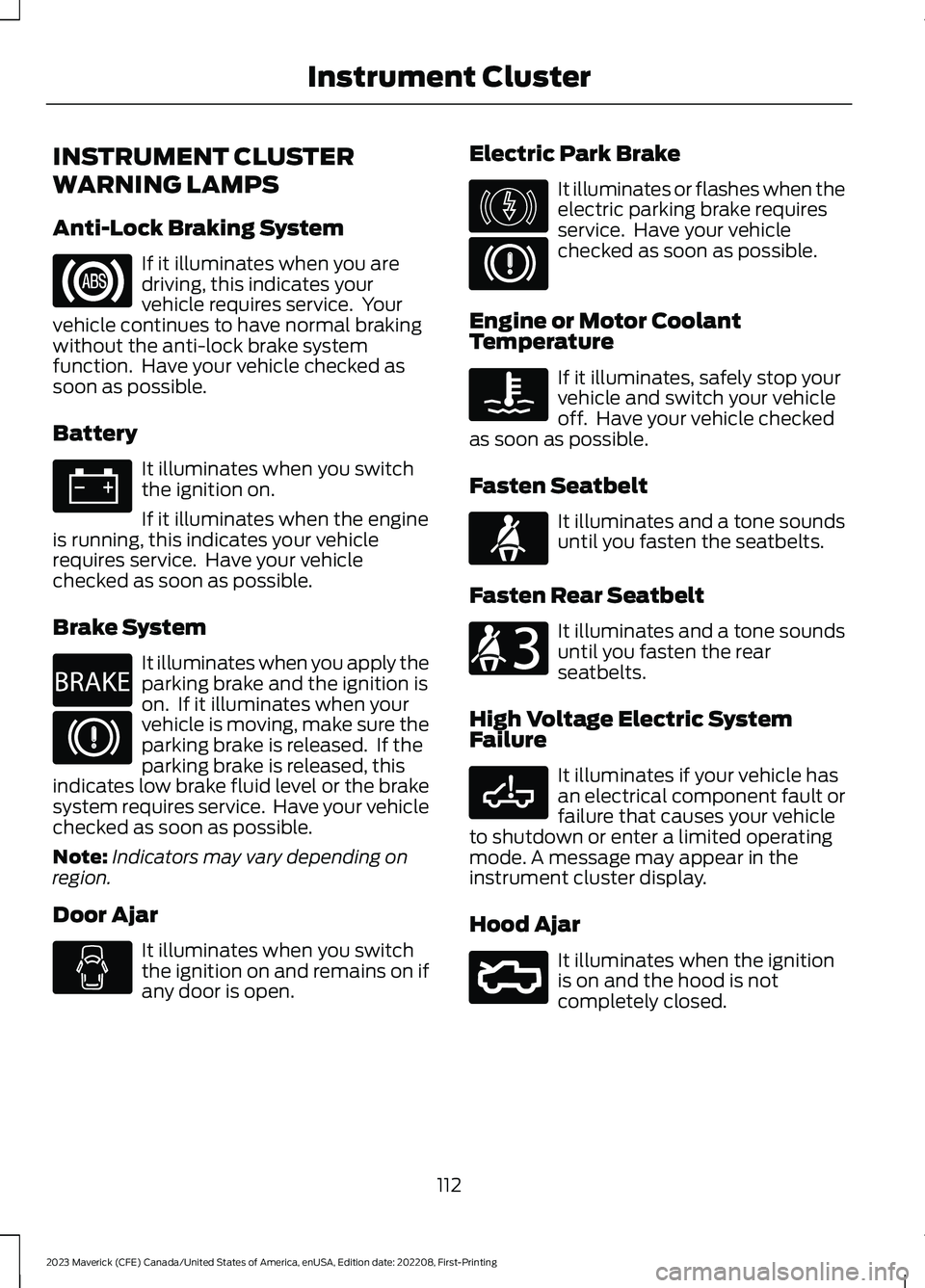
Anti-Lock Braking System
If it illuminates when you aredriving, this indicates yourvehicle requires service. Yourvehicle continues to have normal brakingwithout the anti-lock brake systemfunction. Have your vehicle checked assoon as possible.
Battery
It illuminates when you switchthe ignition on.
If it illuminates when the engineis running, this indicates your vehiclerequires service. Have your vehiclechecked as soon as possible.
Brake System
It illuminates when you apply theparking brake and the ignition ison. If it illuminates when yourvehicle is moving, make sure theparking brake is released. If theparking brake is released, thisindicates low brake fluid level or the brakesystem requires service. Have your vehiclechecked as soon as possible.
Note:Indicators may vary depending onregion.
Door Ajar
It illuminates when you switchthe ignition on and remains on ifany door is open.
Electric Park Brake
It illuminates or flashes when theelectric parking brake requiresservice. Have your vehiclechecked as soon as possible.
Engine or Motor CoolantTemperature
If it illuminates, safely stop yourvehicle and switch your vehicleoff. Have your vehicle checkedas soon as possible.
Fasten Seatbelt
It illuminates and a tone soundsuntil you fasten the seatbelts.
Fasten Rear Seatbelt
It illuminates and a tone soundsuntil you fasten the rearseatbelts.
High Voltage Electric SystemFailure
It illuminates if your vehicle hasan electrical component fault orfailure that causes your vehicleto shutdown or enter a limited operatingmode. A message may appear in theinstrument cluster display.
Hood Ajar
It illuminates when the ignitionis on and the hood is notcompletely closed.
112
2023 Maverick (CFE) Canada/United States of America, enUSA, Edition date: 202208, First-PrintingInstrument ClusterE67020 E67021 E270480 E67024 E146190 E67024 E103308 E71880 E206718 E332963 E296055
Page 117 of 556
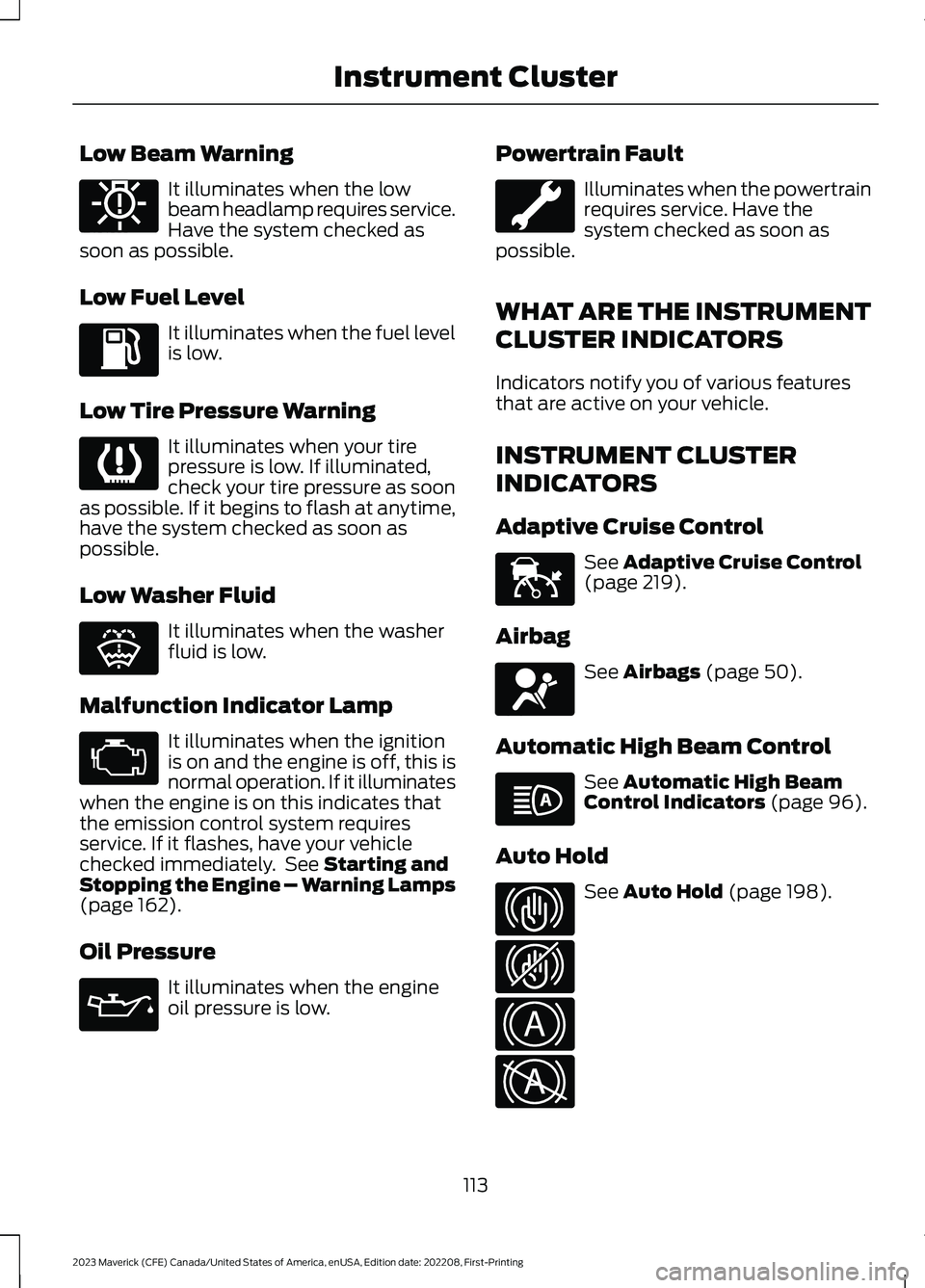
Low Beam Warning
It illuminates when the lowbeam headlamp requires service.Have the system checked assoon as possible.
Low Fuel Level
It illuminates when the fuel levelis low.
Low Tire Pressure Warning
It illuminates when your tirepressure is low. If illuminated,check your tire pressure as soonas possible. If it begins to flash at anytime,have the system checked as soon aspossible.
Low Washer Fluid
It illuminates when the washerfluid is low.
Malfunction Indicator Lamp
It illuminates when the ignitionis on and the engine is off, this isnormal operation. If it illuminateswhen the engine is on this indicates thatthe emission control system requiresservice. If it flashes, have your vehiclechecked immediately. See Starting andStopping the Engine – Warning Lamps(page 162).
Oil Pressure
It illuminates when the engineoil pressure is low.
Powertrain Fault
Illuminates when the powertrainrequires service. Have thesystem checked as soon aspossible.
WHAT ARE THE INSTRUMENT
CLUSTER INDICATORS
Indicators notify you of various featuresthat are active on your vehicle.
INSTRUMENT CLUSTER
INDICATORS
Adaptive Cruise Control
See Adaptive Cruise Control(page 219).
Airbag
See Airbags (page 50).
Automatic High Beam Control
See Automatic High BeamControl Indicators (page 96).
Auto Hold
See Auto Hold (page 198).
113
2023 Maverick (CFE) Canada/United States of America, enUSA, Edition date: 202208, First-PrintingInstrument ClusterE181350 E139232 E132353 E67028 E67022 E144524 E67017 E146105 E323448 E323449 E322410 E322411
Page 167 of 556
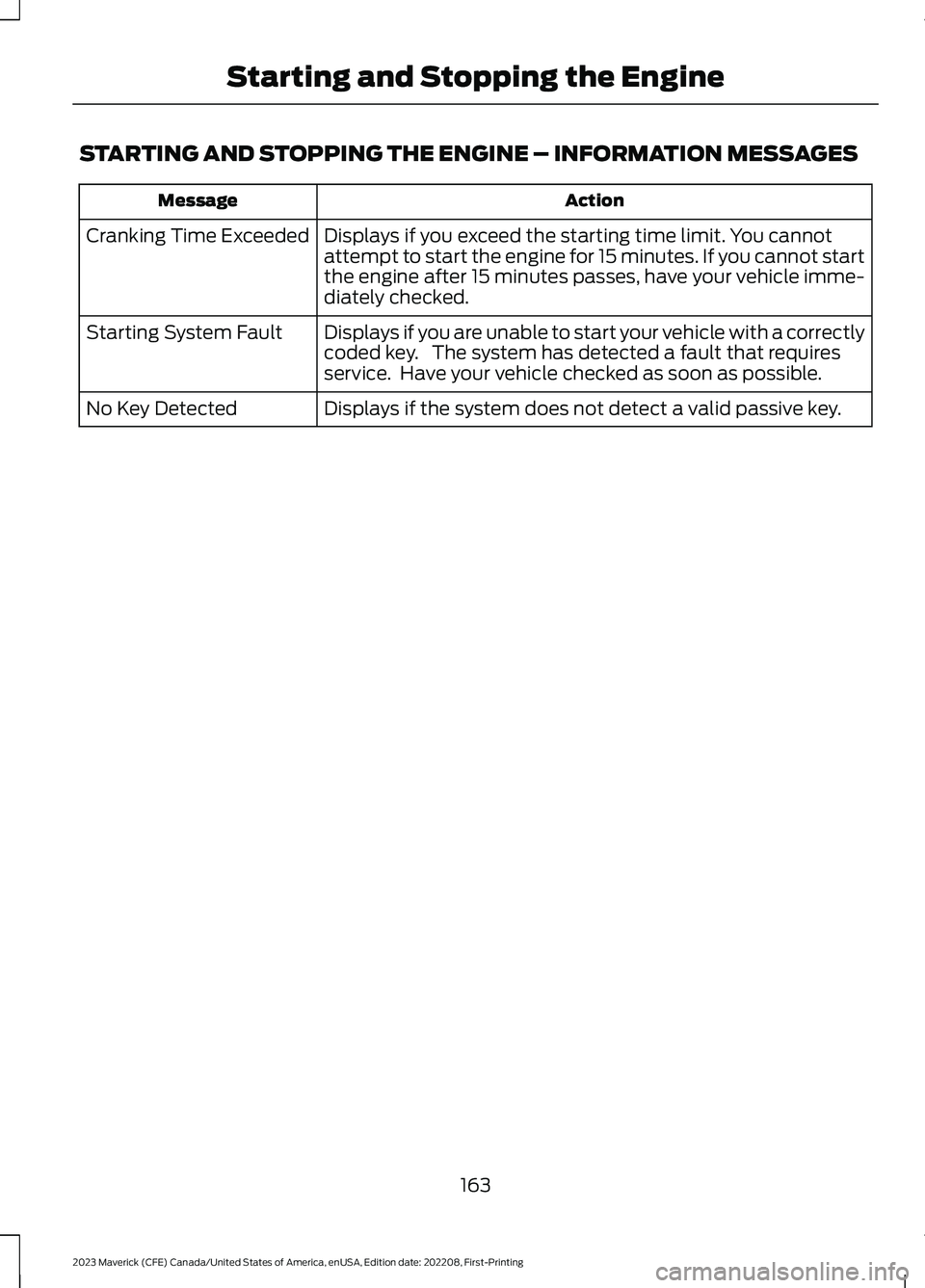
STARTING AND STOPPING THE ENGINE – INFORMATION MESSAGES
ActionMessage
Displays if you exceed the starting time limit. You cannotattempt to start the engine for 15 minutes. If you cannot startthe engine after 15 minutes passes, have your vehicle imme-diately checked.
Cranking Time Exceeded
Displays if you are unable to start your vehicle with a correctlycoded key. The system has detected a fault that requiresservice. Have your vehicle checked as soon as possible.
Starting System Fault
Displays if the system does not detect a valid passive key.No Key Detected
163
2023 Maverick (CFE) Canada/United States of America, enUSA, Edition date: 202208, First-PrintingStarting and Stopping the Engine
Page 172 of 556
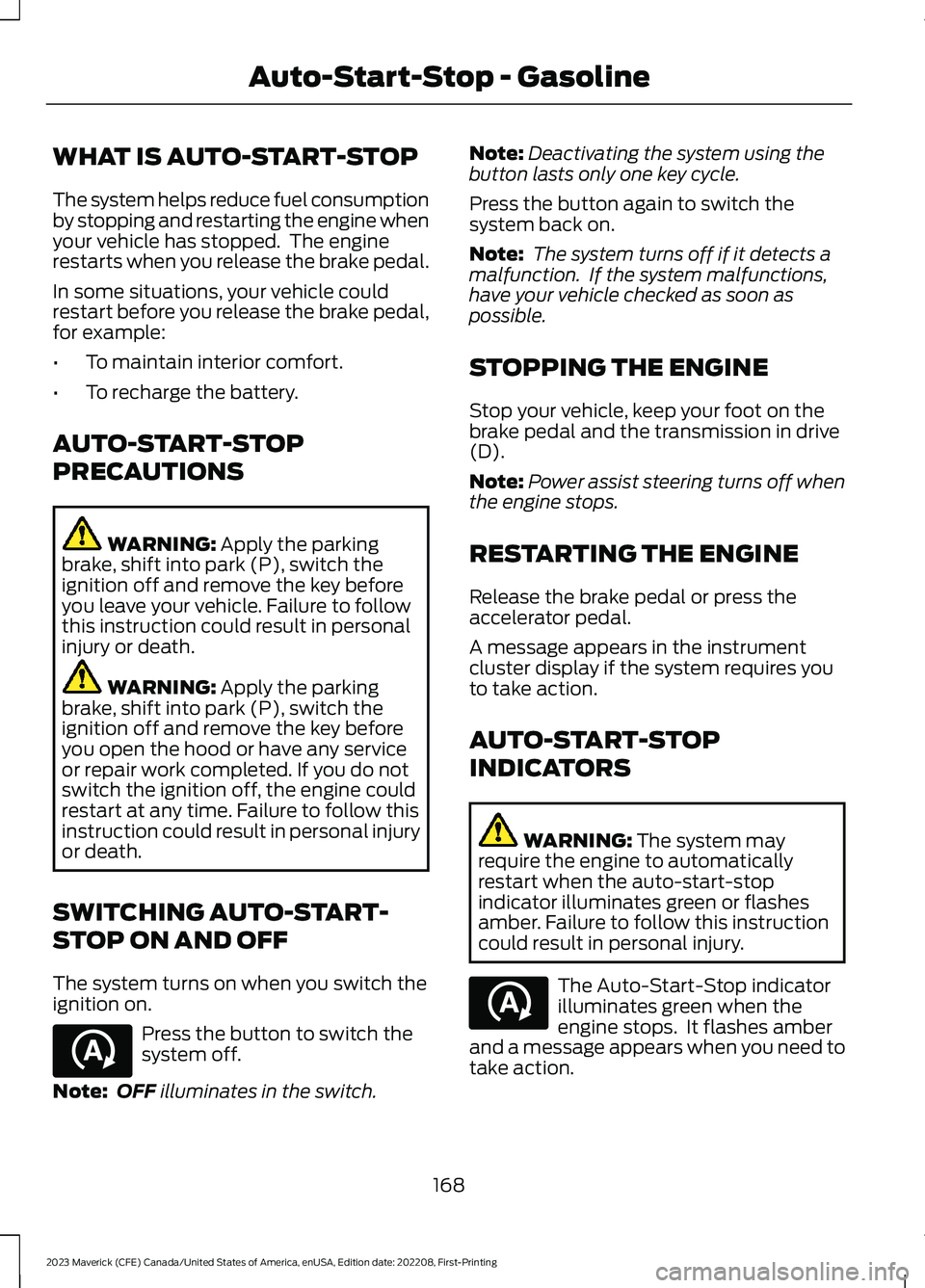
WHAT IS AUTO-START-STOP
The system helps reduce fuel consumptionby stopping and restarting the engine whenyour vehicle has stopped. The enginerestarts when you release the brake pedal.
In some situations, your vehicle couldrestart before you release the brake pedal,for example:
•To maintain interior comfort.
•To recharge the battery.
AUTO-START-STOP
PRECAUTIONS
WARNING: Apply the parkingbrake, shift into park (P), switch theignition off and remove the key beforeyou leave your vehicle. Failure to followthis instruction could result in personalinjury or death.
WARNING: Apply the parkingbrake, shift into park (P), switch theignition off and remove the key beforeyou open the hood or have any serviceor repair work completed. If you do notswitch the ignition off, the engine couldrestart at any time. Failure to follow thisinstruction could result in personal injuryor death.
SWITCHING AUTO-START-
STOP ON AND OFF
The system turns on when you switch theignition on.
Press the button to switch thesystem off.
Note:OFF illuminates in the switch.
Note:Deactivating the system using thebutton lasts only one key cycle.
Press the button again to switch thesystem back on.
Note: The system turns off if it detects amalfunction. If the system malfunctions,have your vehicle checked as soon aspossible.
STOPPING THE ENGINE
Stop your vehicle, keep your foot on thebrake pedal and the transmission in drive(D).
Note:Power assist steering turns off whenthe engine stops.
RESTARTING THE ENGINE
Release the brake pedal or press theaccelerator pedal.
A message appears in the instrumentcluster display if the system requires youto take action.
AUTO-START-STOP
INDICATORS
WARNING: The system mayrequire the engine to automaticallyrestart when the auto-start-stopindicator illuminates green or flashesamber. Failure to follow this instructioncould result in personal injury.
The Auto-Start-Stop indicatorilluminates green when theengine stops. It flashes amberand a message appears when you need totake action.
168
2023 Maverick (CFE) Canada/United States of America, enUSA, Edition date: 202208, First-PrintingAuto-Start-Stop - GasolineE121377 E121377