service FORD MAVERICK 2023 Workshop Manual
[x] Cancel search | Manufacturer: FORD, Model Year: 2023, Model line: MAVERICK, Model: FORD MAVERICK 2023Pages: 556, PDF Size: 14.79 MB
Page 357 of 556
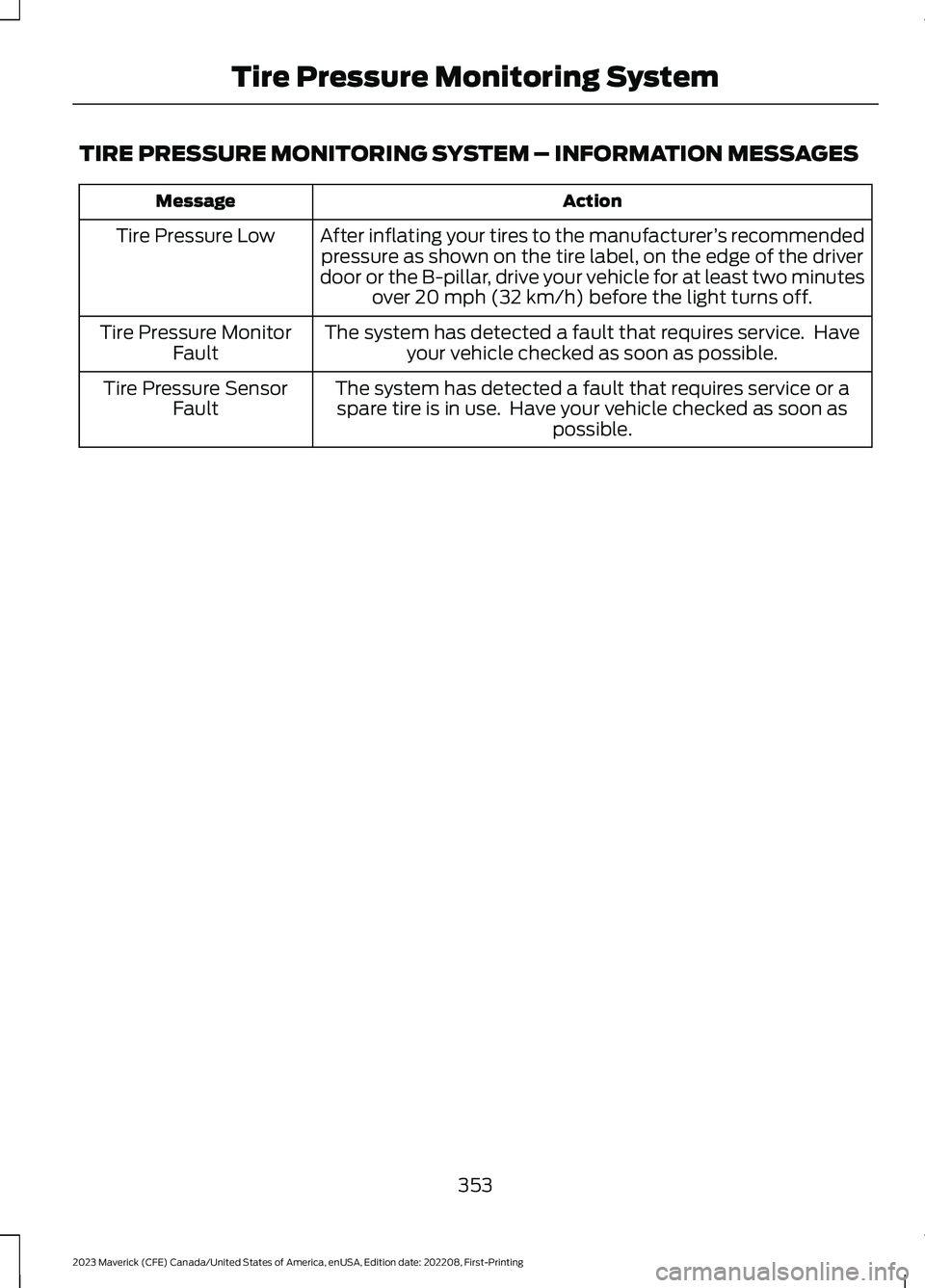
TIRE PRESSURE MONITORING SYSTEM – INFORMATION MESSAGES
ActionMessage
After inflating your tires to the manufacturer’s recommendedpressure as shown on the tire label, on the edge of the driverdoor or the B-pillar, drive your vehicle for at least two minutesover 20 mph (32 km/h) before the light turns off.
Tire Pressure Low
The system has detected a fault that requires service. Haveyour vehicle checked as soon as possible.Tire Pressure MonitorFault
The system has detected a fault that requires service or aspare tire is in use. Have your vehicle checked as soon aspossible.
Tire Pressure SensorFault
353
2023 Maverick (CFE) Canada/United States of America, enUSA, Edition date: 202208, First-PrintingTire Pressure Monitoring System
Page 358 of 556
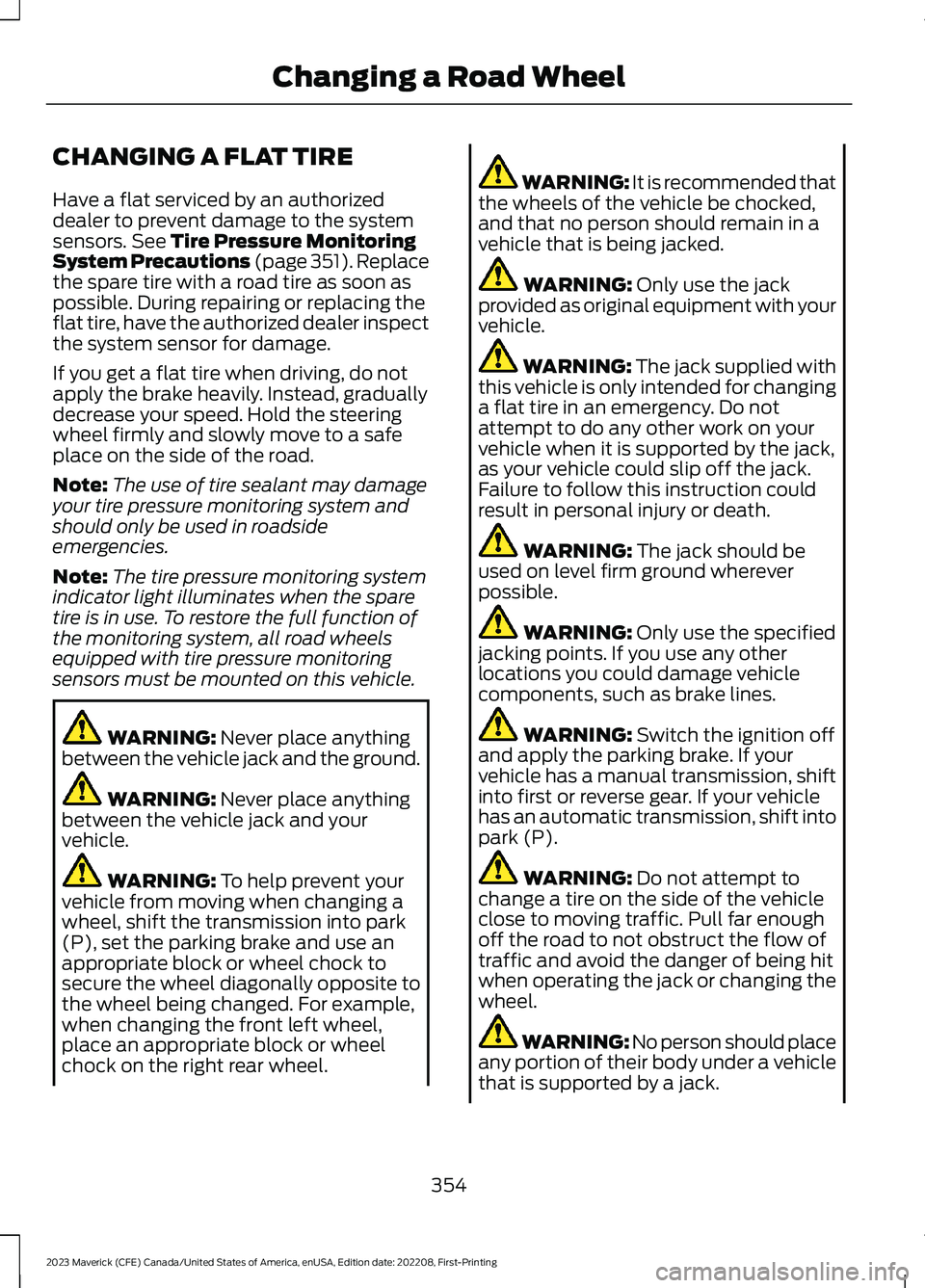
CHANGING A FLAT TIRE
Have a flat serviced by an authorizeddealer to prevent damage to the systemsensors. See Tire Pressure MonitoringSystem Precautions (page 351).Replacethe spare tire with a road tire as soon aspossible. During repairing or replacing theflat tire, have the authorized dealer inspectthe system sensor for damage.
If you get a flat tire when driving, do notapply the brake heavily. Instead, graduallydecrease your speed. Hold the steeringwheel firmly and slowly move to a safeplace on the side of the road.
Note:The use of tire sealant may damageyour tire pressure monitoring system andshould only be used in roadsideemergencies.
Note:The tire pressure monitoring systemindicator light illuminates when the sparetire is in use. To restore the full function ofthe monitoring system, all road wheelsequipped with tire pressure monitoringsensors must be mounted on this vehicle.
WARNING: Never place anythingbetween the vehicle jack and the ground.
WARNING: Never place anythingbetween the vehicle jack and yourvehicle.
WARNING: To help prevent yourvehicle from moving when changing awheel, shift the transmission into park(P), set the parking brake and use anappropriate block or wheel chock tosecure the wheel diagonally opposite tothe wheel being changed. For example,when changing the front left wheel,place an appropriate block or wheelchock on the right rear wheel.
WARNING: It is recommended thatthe wheels of the vehicle be chocked,and that no person should remain in avehicle that is being jacked.
WARNING: Only use the jackprovided as original equipment with yourvehicle.
WARNING: The jack supplied withthis vehicle is only intended for changinga flat tire in an emergency. Do notattempt to do any other work on yourvehicle when it is supported by the jack,as your vehicle could slip off the jack.Failure to follow this instruction couldresult in personal injury or death.
WARNING: The jack should beused on level firm ground whereverpossible.
WARNING: Only use the specifiedjacking points. If you use any otherlocations you could damage vehiclecomponents, such as brake lines.
WARNING: Switch the ignition offand apply the parking brake. If yourvehicle has a manual transmission, shiftinto first or reverse gear. If your vehiclehas an automatic transmission, shift intopark (P).
WARNING: Do not attempt tochange a tire on the side of the vehicleclose to moving traffic. Pull far enoughoff the road to not obstruct the flow oftraffic and avoid the danger of being hitwhen operating the jack or changing thewheel.
WARNING: No person should placeany portion of their body under a vehiclethat is supported by a jack.
354
2023 Maverick (CFE) Canada/United States of America, enUSA, Edition date: 202208, First-PrintingChanging a Road Wheel
Page 360 of 556
•Exceed 50 mph (80 km/h).
•Load the vehicle beyond maximumvehicle load rating listed on the SafetyCompliance Label.
•Tow a trailer.
•Use snow chains on the end of thevehicle with the dissimilar spare tire.
•Use more than one dissimilar spare tireat a time.
•Use commercial car washingequipment.
•Try to repair the dissimilar spare tire.
Use of one of the dissimilar spare tireslisted above at any one wheel location canlead to impairment of the following:
•Handling, stability and brakingperformance.
•Comfort and noise.
•Ground clearance and parking at curbs.
•Winter weather driving capability.
•Wet weather driving capability.
•All-wheel driving capability.
3.Full-size dissimilar spare withoutlabel on wheel
When driving with the full-size dissimilarspare wheel and tire assembly, do not:
•Exceed 70 mph (113 km/h).
•Use more than one dissimilar sparewheel and tire assembly at a time.
•Use commercial car washingequipment.
•Use snow chains on the end of thevehicle with the dissimilar spare wheeland tire assembly.
The usage of a full-size dissimilar sparewheel and tire assembly can lead toimpairment of the following:
•Handling, stability and brakingperformance.
•Comfort and noise.
•Ground clearance and parking at curbs.
•Winter weather driving capability.
•Wet weather driving capability.
•All-wheel driving capability
When driving with the full-size dissimilarspare wheel and tire assembly additionalcaution should be given to:
•Towing a trailer.
•Driving vehicles equipped with acamper body.
•Driving vehicles with a load on thecargo rack.
Drive cautiously when using a full-sizedissimilar spare wheel and tire assemblyand seek service as soon as possible.
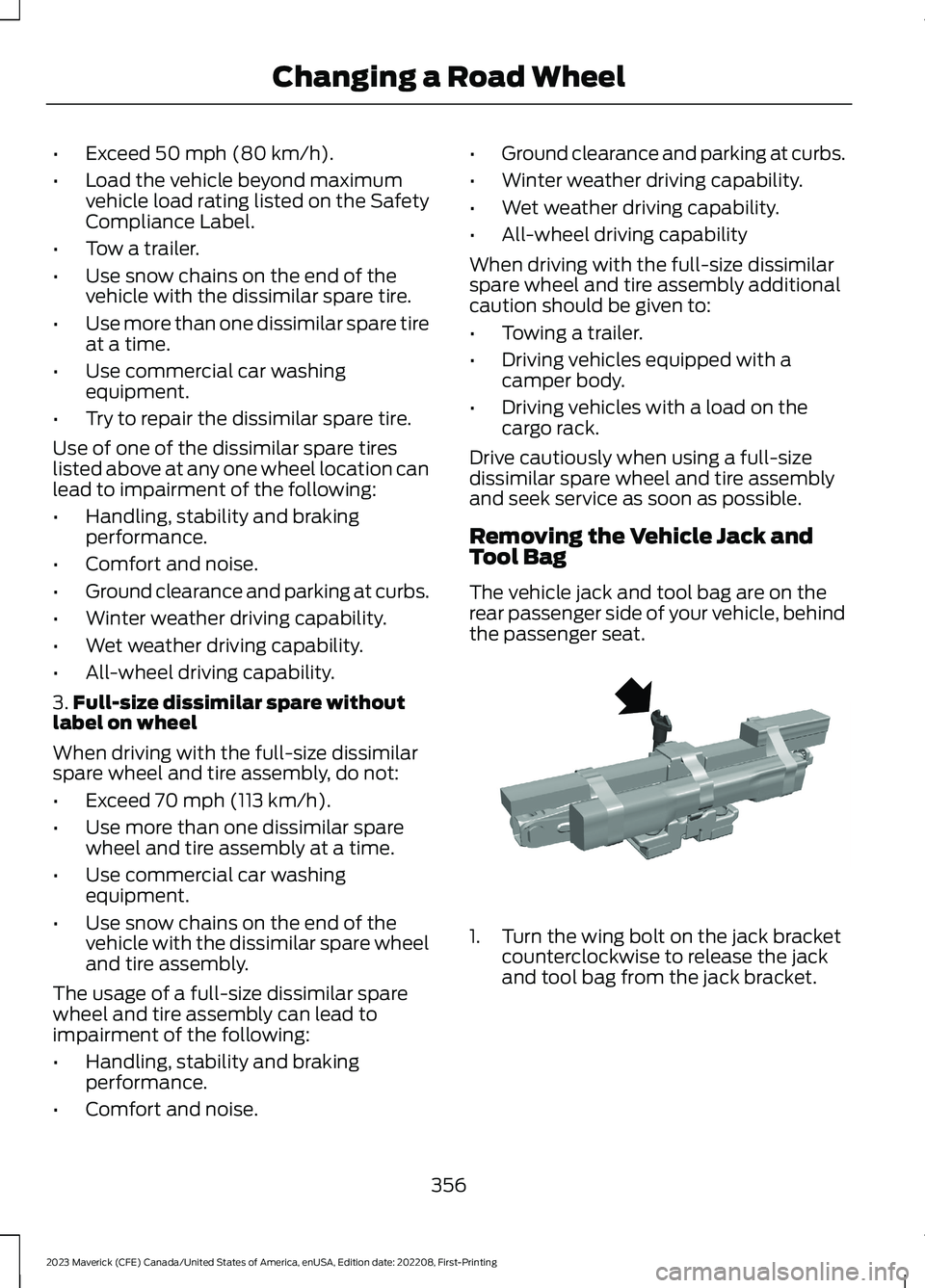
Removing the Vehicle Jack andTool Bag
The vehicle jack and tool bag are on therear passenger side of your vehicle, behindthe passenger seat.
1.Turn the wing bolt on the jack bracketcounterclockwise to release the jackand tool bag from the jack bracket.
356
2023 Maverick (CFE) Canada/United States of America, enUSA, Edition date: 202208, First-PrintingChanging a Road WheelE352020
Page 361 of 556
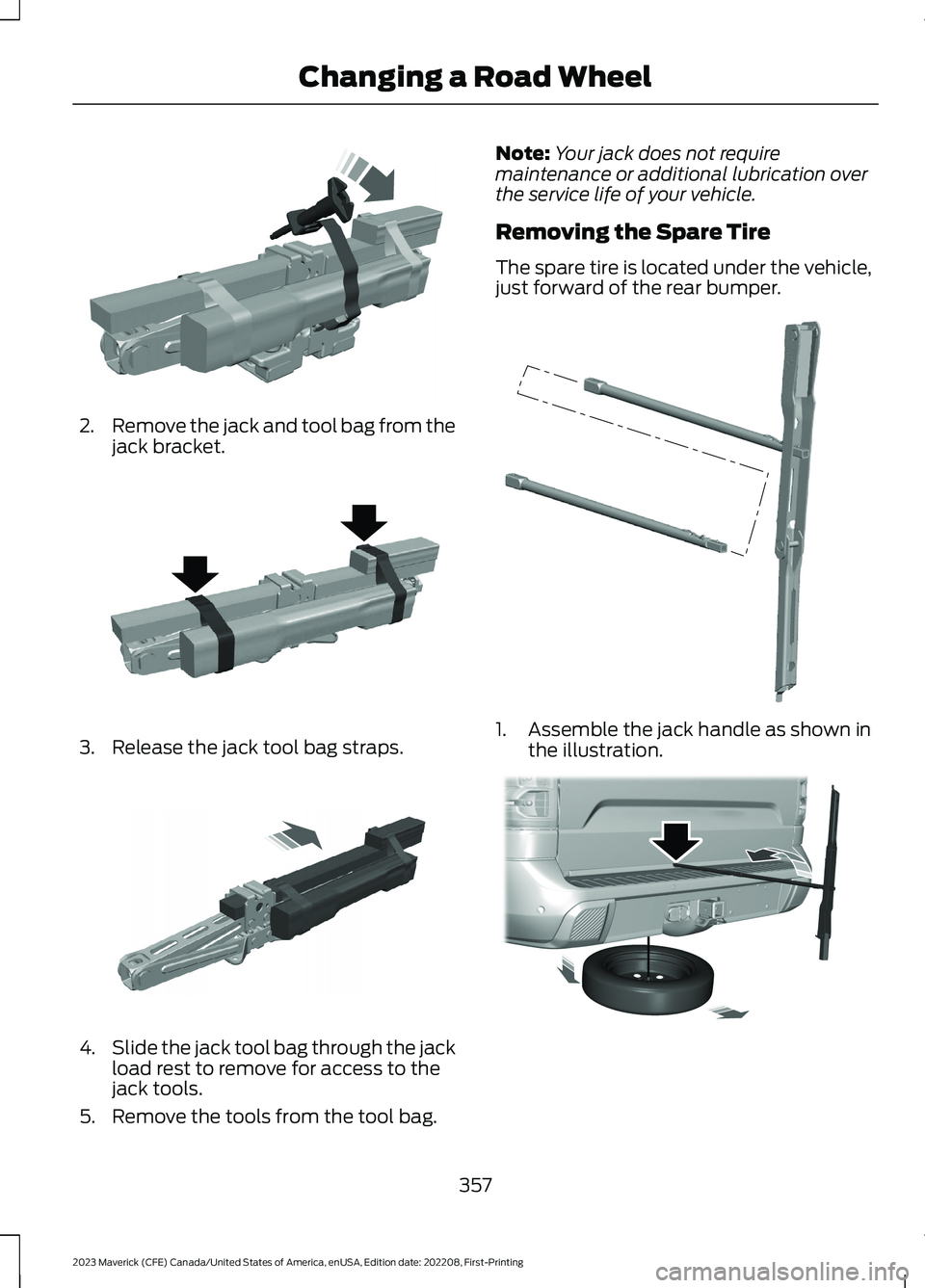
2.Remove the jack and tool bag from thejack bracket.
3.Release the jack tool bag straps.
4.Slide the jack tool bag through the jackload rest to remove for access to thejack tools.
5.Remove the tools from the tool bag.
Note:Your jack does not requiremaintenance or additional lubrication overthe service life of your vehicle.
Removing the Spare Tire
The spare tire is located under the vehicle,just forward of the rear bumper.
1.Assemble the jack handle as shown inthe illustration.
357
2023 Maverick (CFE) Canada/United States of America, enUSA, Edition date: 202208, First-PrintingChanging a Road WheelE352025 E352022 E352033 E352148 E352181
Page 364 of 556
Stowing the Spare Tire
Note:Failure to follow the spare tirestowage instructions could result in failureof the cable or loss of the spare tire.
1.Lay the tire on the ground with thevalve stem facing down.
2.Slide the wheel partially under thevehicle and install the retainer throughthe wheel center. Pull on the cable toalign the components at the end of thecable.
3.Turn the jack handle clockwise untilthe tire is raised to its stowed positionunderneath the vehicle. The effort toturn the jack handle increasessignificantly and the spare tire carrierratchets or slips when the tire is raisedto the maximum tightness. Tighten tothe point where the ratchet or slipoccurs, a minimum of three times asindicated by an audible click each time.The spare tire carrier does not allowyou to overtighten. If the spare tirecarrier ratchets or slips with little effort,contact your authorized dealer.
4.Check that the tire lies flat against theframe and is properly tightened. Try topush or pull, then turn the tire to besure it does not move. Loosen andretighten, if necessary. Failure toproperly stow the spare tire couldresult in failure of the winch cable andloss of the tire.
5.Repeat this tightness check procedurewhen servicing the spare tire pressure,every six months, as per your scheduledmaintenance information, or at anytime that the spare tire is disturbedthrough service of other components.
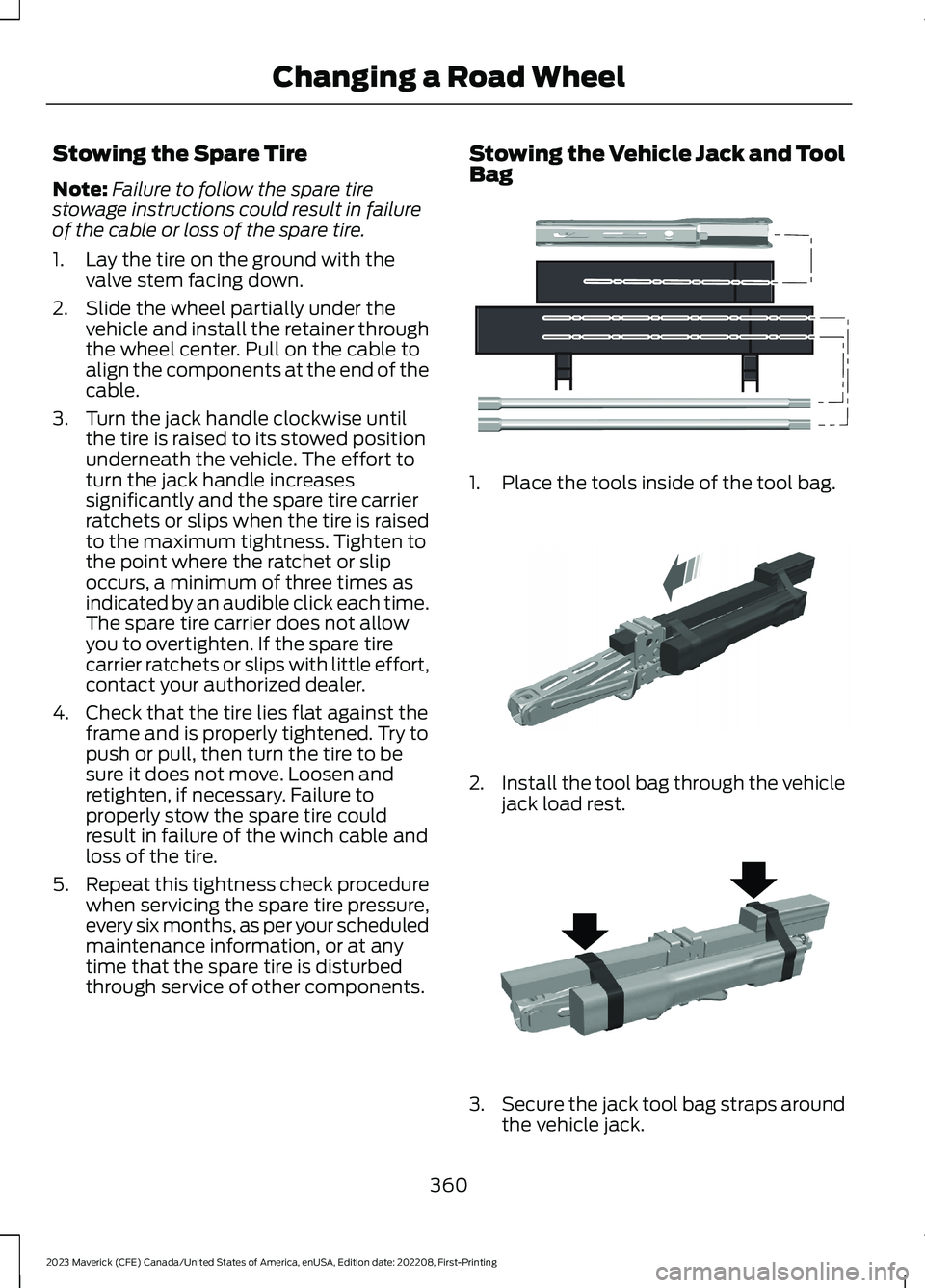
Stowing the Vehicle Jack and ToolBag
1.Place the tools inside of the tool bag.
2.Install the tool bag through the vehiclejack load rest.
3.Secure the jack tool bag straps aroundthe vehicle jack.
360
2023 Maverick (CFE) Canada/United States of America, enUSA, Edition date: 202208, First-PrintingChanging a Road WheelE352149 E352034 E352022
Page 369 of 556
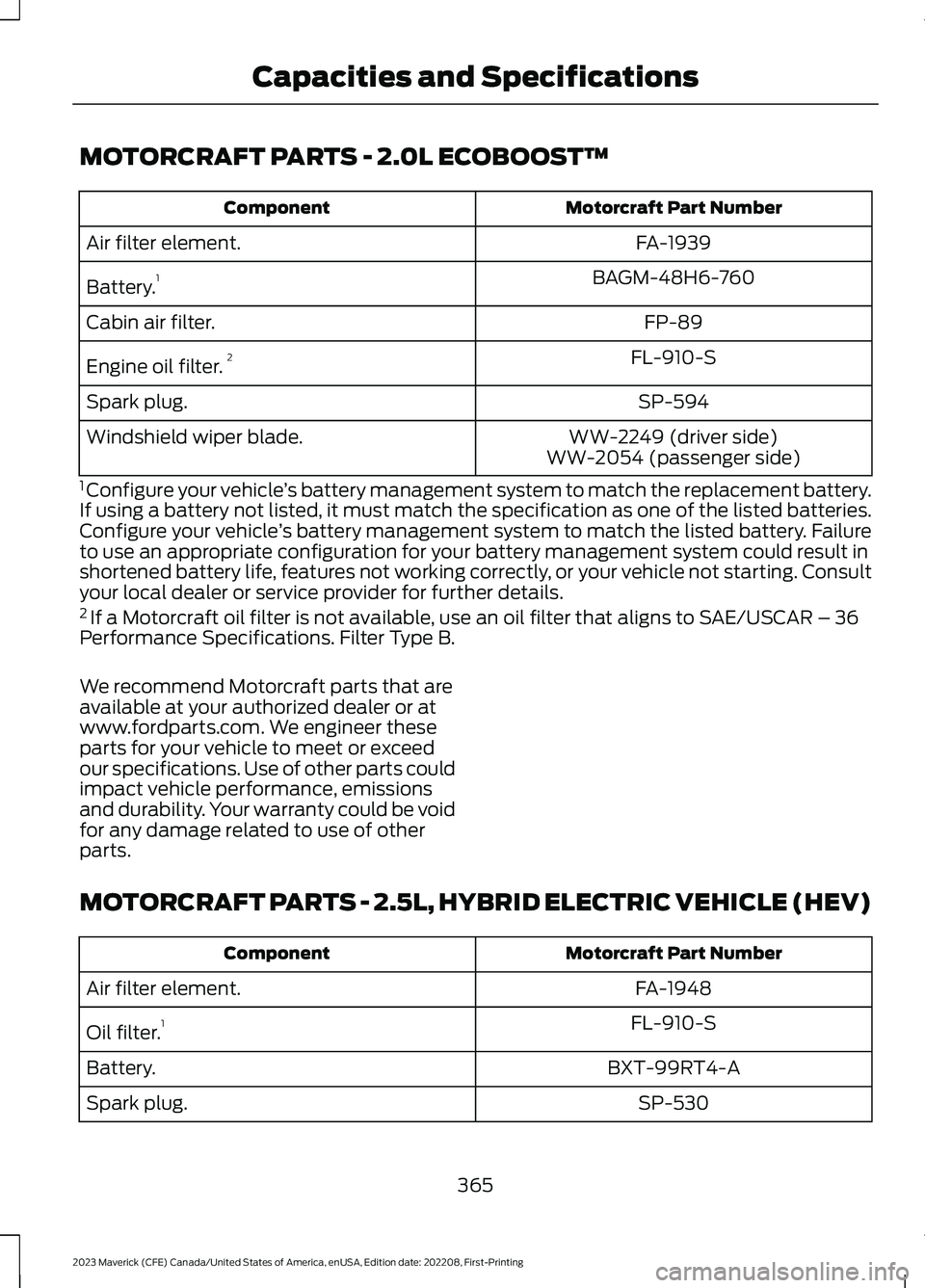
MOTORCRAFT PARTS - 2.0L ECOBOOST™
Motorcraft Part NumberComponent
FA-1939Air filter element.
BAGM-48H6-760Battery.1
FP-89Cabin air filter.
FL-910-SEngine oil filter.2
SP-594Spark plug.
WW-2249 (driver side)Windshield wiper blade.WW-2054 (passenger side)
1 Configure your vehicle’s battery management system to match the replacement battery.If using a battery not listed, it must match the specification as one of the listed batteries.Configure your vehicle’s battery management system to match the listed battery. Failureto use an appropriate configuration for your battery management system could result inshortened battery life, features not working correctly, or your vehicle not starting. Consultyour local dealer or service provider for further details.2 If a Motorcraft oil filter is not available, use an oil filter that aligns to SAE/USCAR – 36Performance Specifications. Filter Type B.
We recommend Motorcraft parts that areavailable at your authorized dealer or atwww.fordparts.com. We engineer theseparts for your vehicle to meet or exceedour specifications. Use of other parts couldimpact vehicle performance, emissionsand durability. Your warranty could be voidfor any damage related to use of otherparts.
MOTORCRAFT PARTS - 2.5L, HYBRID ELECTRIC VEHICLE (HEV)
Motorcraft Part NumberComponent
FA-1948Air filter element.
FL-910-SOil filter.1
BXT-99RT4-ABattery.
SP-530Spark plug.
365
2023 Maverick (CFE) Canada/United States of America, enUSA, Edition date: 202208, First-PrintingCapacities and Specifications
Page 377 of 556
AIR CONDITIONING SYSTEM
CAPACITY AND
SPECIFICATION - 2.0L
ECOBOOST™
WARNING: The air conditioningrefrigerant system contains refrigerantunder high pressure. Only qualifiedpersonnel should service the airconditioning refrigerant system. Opening
the air conditioning refrigerant systemcan cause personal injury.
Use refrigerant and oil that meets thedefined specifications.
If you do not use refrigerant and oil thatmeets the defined specifications, it couldresult in:
•Component damage that your vehiclewarranty does not cover.
•Reduced vehicle performance.
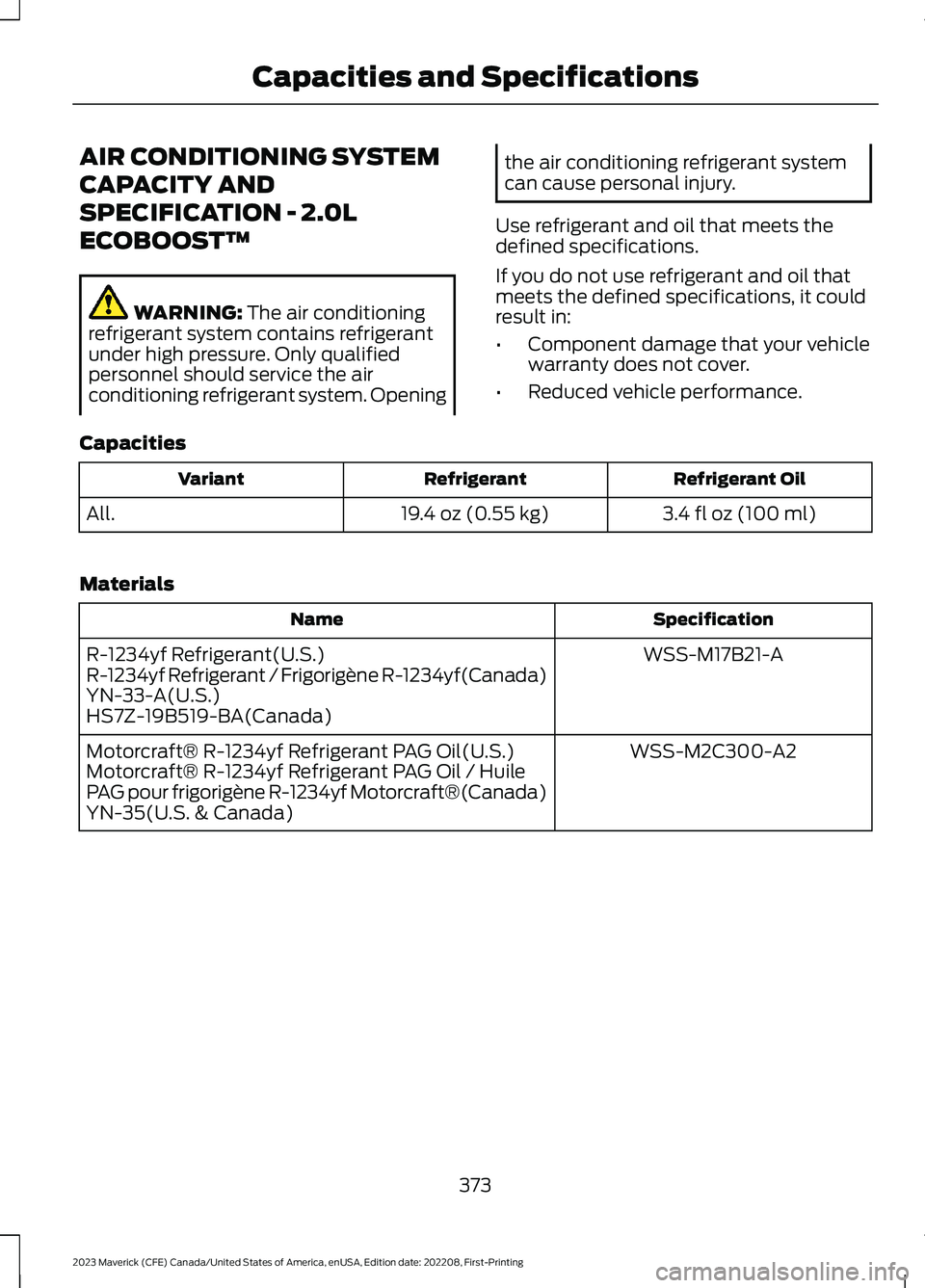
Capacities
Refrigerant OilRefrigerantVariant
3.4 fl oz (100 ml)19.4 oz (0.55 kg)All.
Materials
SpecificationName
WSS-M17B21-AR-1234yf Refrigerant(U.S.)R-1234yf Refrigerant / Frigorigène R-1234yf(Canada)YN-33-A(U.S.)HS7Z-19B519-BA(Canada)
WSS-M2C300-A2Motorcraft® R-1234yf Refrigerant PAG Oil(U.S.)Motorcraft® R-1234yf Refrigerant PAG Oil / HuilePAG pour frigorigène R-1234yf Motorcraft®(Canada)YN-35(U.S. & Canada)
373
2023 Maverick (CFE) Canada/United States of America, enUSA, Edition date: 202208, First-PrintingCapacities and Specifications
Page 378 of 556
AIR CONDITIONING SYSTEM
CAPACITY AND
SPECIFICATION - 2.5L, HYBRID
ELECTRIC VEHICLE (HEV)
WARNING: The air conditioningrefrigerant system contains refrigerantunder high pressure. Only qualifiedpersonnel should service the airconditioning refrigerant system. Opening
the air conditioning refrigerant systemcan cause personal injury.
Use refrigerant and oil that meets thedefined specifications.
If you do not use refrigerant and oil thatmeets the defined specifications, it couldresult in:
•Component damage that your vehiclewarranty does not cover.
•Reduced vehicle performance.
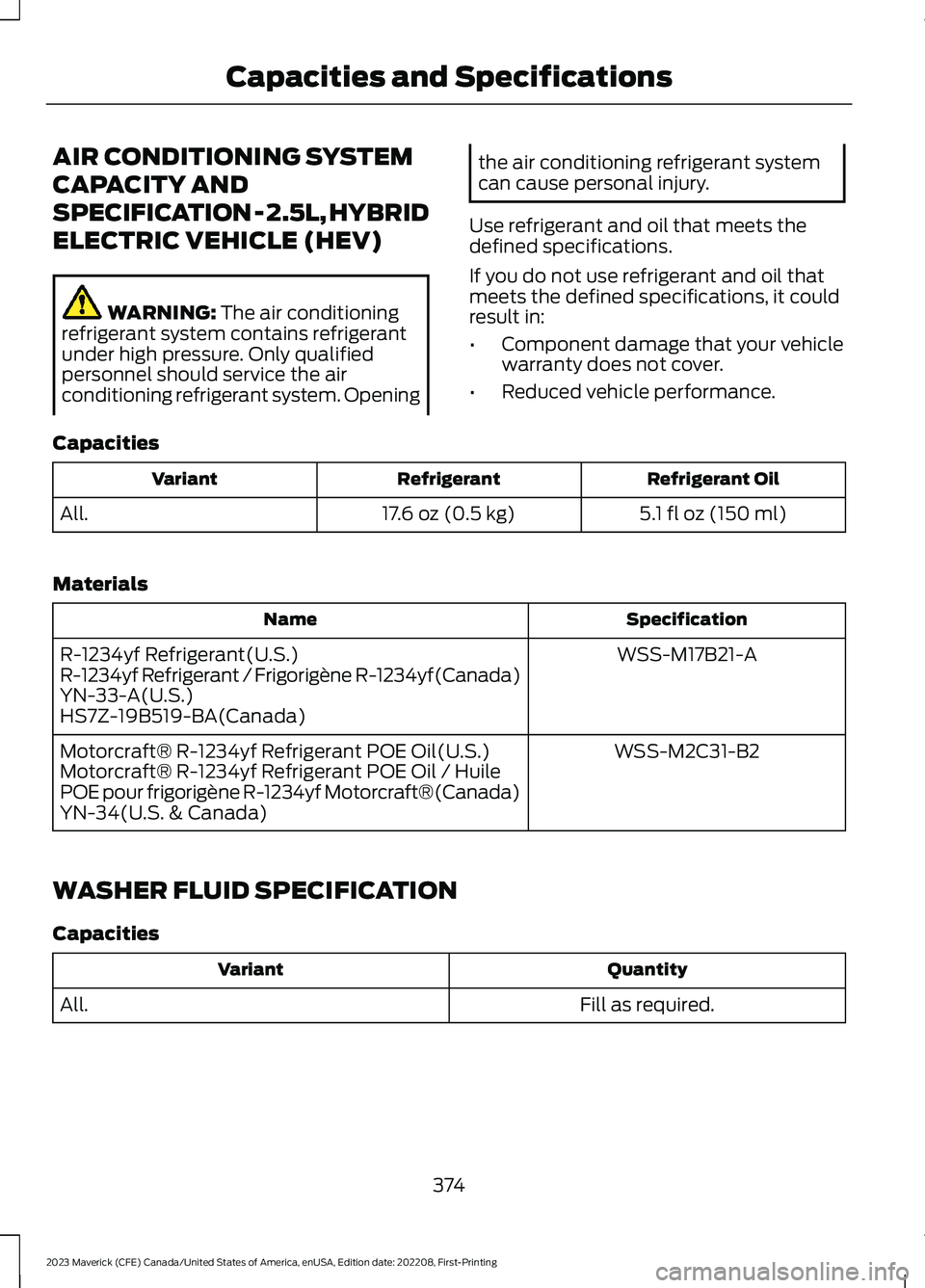
Capacities
Refrigerant OilRefrigerantVariant
5.1 fl oz (150 ml)17.6 oz (0.5 kg)All.
Materials
SpecificationName
WSS-M17B21-AR-1234yf Refrigerant(U.S.)R-1234yf Refrigerant / Frigorigène R-1234yf(Canada)YN-33-A(U.S.)HS7Z-19B519-BA(Canada)
WSS-M2C31-B2Motorcraft® R-1234yf Refrigerant POE Oil(U.S.)Motorcraft® R-1234yf Refrigerant POE Oil / HuilePOE pour frigorigène R-1234yf Motorcraft®(Canada)YN-34(U.S. & Canada)
WASHER FLUID SPECIFICATION
Capacities
QuantityVariant
Fill as required.All.
374
2023 Maverick (CFE) Canada/United States of America, enUSA, Edition date: 202208, First-PrintingCapacities and Specifications
Page 381 of 556
WHAT IS A CONNECTED
VEHICLE
A connected vehicle has technology thatallows your vehicle to connect to a mobilenetwork and for you to access a range offeatures. When used in conjunction withthe FordPass app, it could allow you tomonitor and control your vehicle further,for example checking the tire pressures,and the vehicle location. For additionalinformation, refer to the local Ford website.
CONNECTED VEHICLE
REQUIREMENTS
Connected service and related featurefunctionality requires a compatible vehiclenetwork.
Some remote features require additionalservice activation. Log in to your Fordaccount for details. Some restrictions, thirdparty terms and message or data ratesmay apply.
CONNECTED VEHICLE
LIMITATIONS
Evolving technology, cellular networks, orregulations could affect functionality andavailability, or continued provision of somefeatures. These changes could even stopsome features from functioning.
CONNECTING THE VEHICLE TO
A MOBILE NETWORK
WHAT IS THE MODEM
The modem allows access to arange of features built into yourvehicle.
ENABLING AND DISABLING THEMODEM
1.Press Settings.
2.Press FordPass Connect.
3.Press Connectivity Settings.
4.Switch connectivity features on or off.
CONNECTING FORDPASS TO THEMODEM
1.Make sure that the modem is enabledusing the vehicle settings menu.
2.Open the FordPass app on your deviceand log in.
3.Add your vehicle or select your vehicleif already added.
4.Select the option to activate yourvehicle.
5.Make sure that the name on the screenmatches the name shown in yourFordPass account.
6.Confirm that FordPass account isconnected to the modem.
CONNECTING THE VEHICLE TO
A WI-FI NETWORK
1.Press Settings.
2.Press Wi-Fi.
3.Switch Wi-Fi on.
4.Press View Available Networks.
5.Select an available Wi-Fi network.
Note:Enter the network password toconnect to a secure network.
377
2023 Maverick (CFE) Canada/United States of America, enUSA, Edition date: 202208, First-PrintingConnected Vehicle
Page 384 of 556
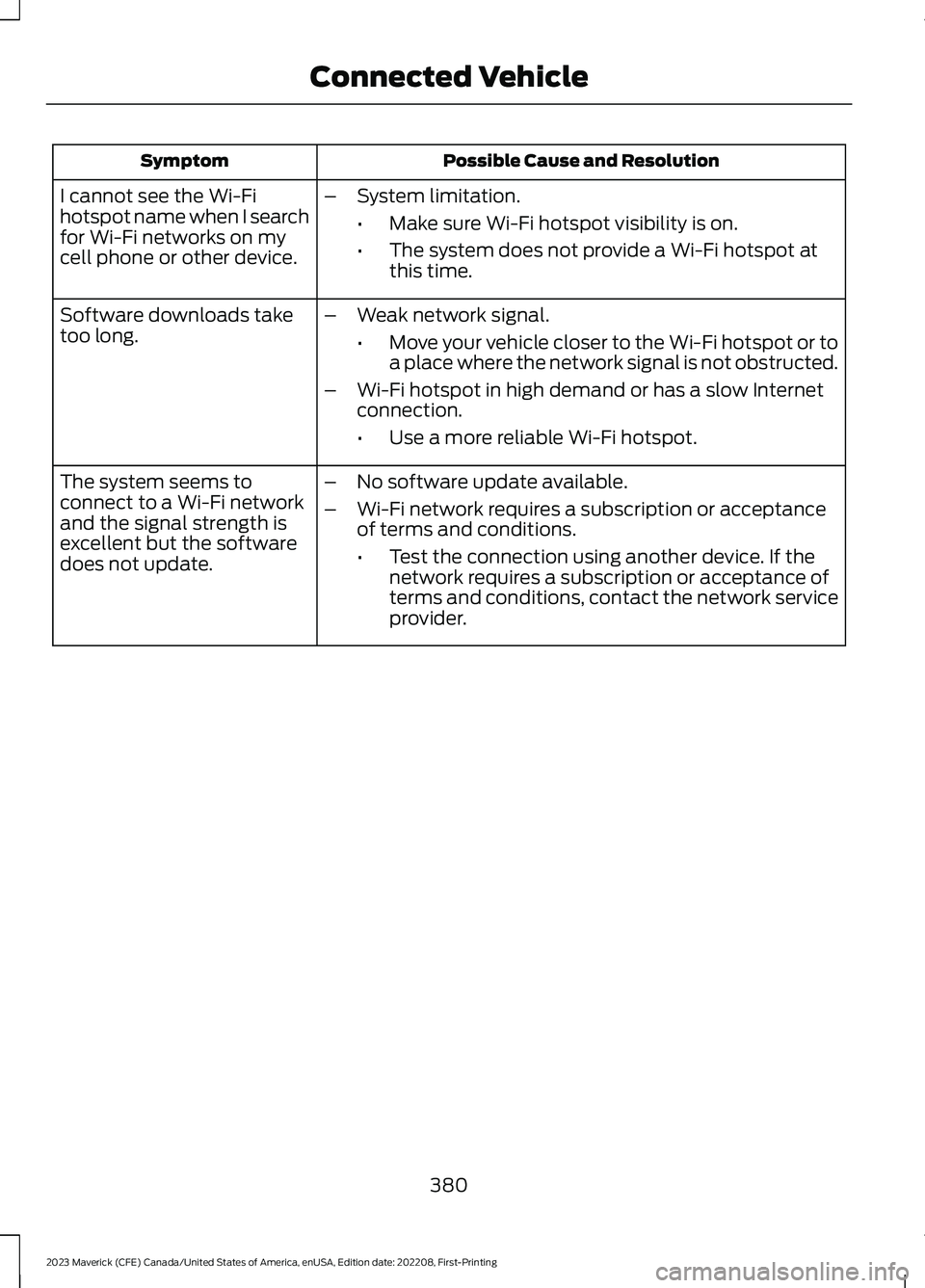
Possible Cause and ResolutionSymptom
I cannot see the Wi-Fihotspot name when I searchfor Wi-Fi networks on mycell phone or other device.
–System limitation.
•Make sure Wi-Fi hotspot visibility is on.
•The system does not provide a Wi-Fi hotspot atthis time.
–Weak network signal.
•Move your vehicle closer to the Wi-Fi hotspot or toa place where the network signal is not obstructed.
–Wi-Fi hotspot in high demand or has a slow Internetconnection.
•Use a more reliable Wi-Fi hotspot.
Software downloads taketoo long.
–No software update available.
–Wi-Fi network requires a subscription or acceptanceof terms and conditions.
•Test the connection using another device. If thenetwork requires a subscription or acceptance ofterms and conditions, contact the network serviceprovider.
The system seems toconnect to a Wi-Fi networkand the signal strength isexcellent but the softwaredoes not update.
380
2023 Maverick (CFE) Canada/United States of America, enUSA, Edition date: 202208, First-PrintingConnected Vehicle