audio FORD MAVERICK 2023 Service Manual
[x] Cancel search | Manufacturer: FORD, Model Year: 2023, Model line: MAVERICK, Model: FORD MAVERICK 2023Pages: 556, PDF Size: 14.79 MB
Page 421 of 556
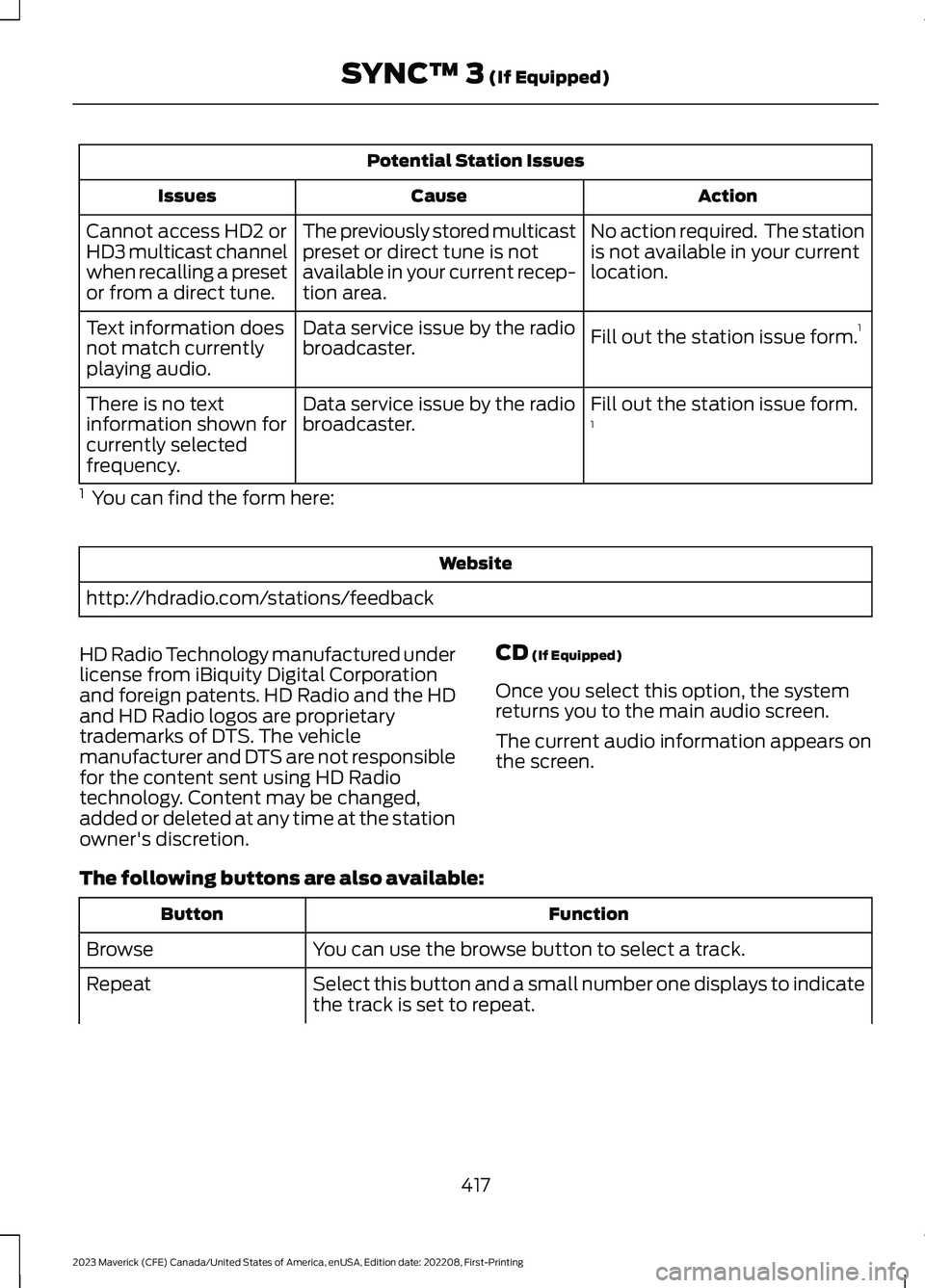
Potential Station Issues
ActionCauseIssues
No action required. The stationis not available in your currentlocation.
The previously stored multicastpreset or direct tune is notavailable in your current recep-tion area.
Cannot access HD2 orHD3 multicast channelwhen recalling a presetor from a direct tune.
Fill out the station issue form.1Data service issue by the radiobroadcaster.Text information doesnot match currentlyplaying audio.
Fill out the station issue form.1Data service issue by the radiobroadcaster.There is no textinformation shown forcurrently selectedfrequency.
1 You can find the form here:
Website
http://hdradio.com/stations/feedback
HD Radio Technology manufactured underlicense from iBiquity Digital Corporationand foreign patents. HD Radio and the HDand HD Radio logos are proprietarytrademarks of DTS. The vehiclemanufacturer and DTS are not responsiblefor the content sent using HD Radiotechnology. Content may be changed,added or deleted at any time at the stationowner's discretion.
CD (If Equipped)
Once you select this option, the systemreturns you to the main audio screen.
The current audio information appears onthe screen.
The following buttons are also available:
FunctionButton
You can use the browse button to select a track.Browse
Select this button and a small number one displays to indicatethe track is set to repeat.Repeat
417
2023 Maverick (CFE) Canada/United States of America, enUSA, Edition date: 202208, First-PrintingSYNC™ 3 (If Equipped)
Page 422 of 556
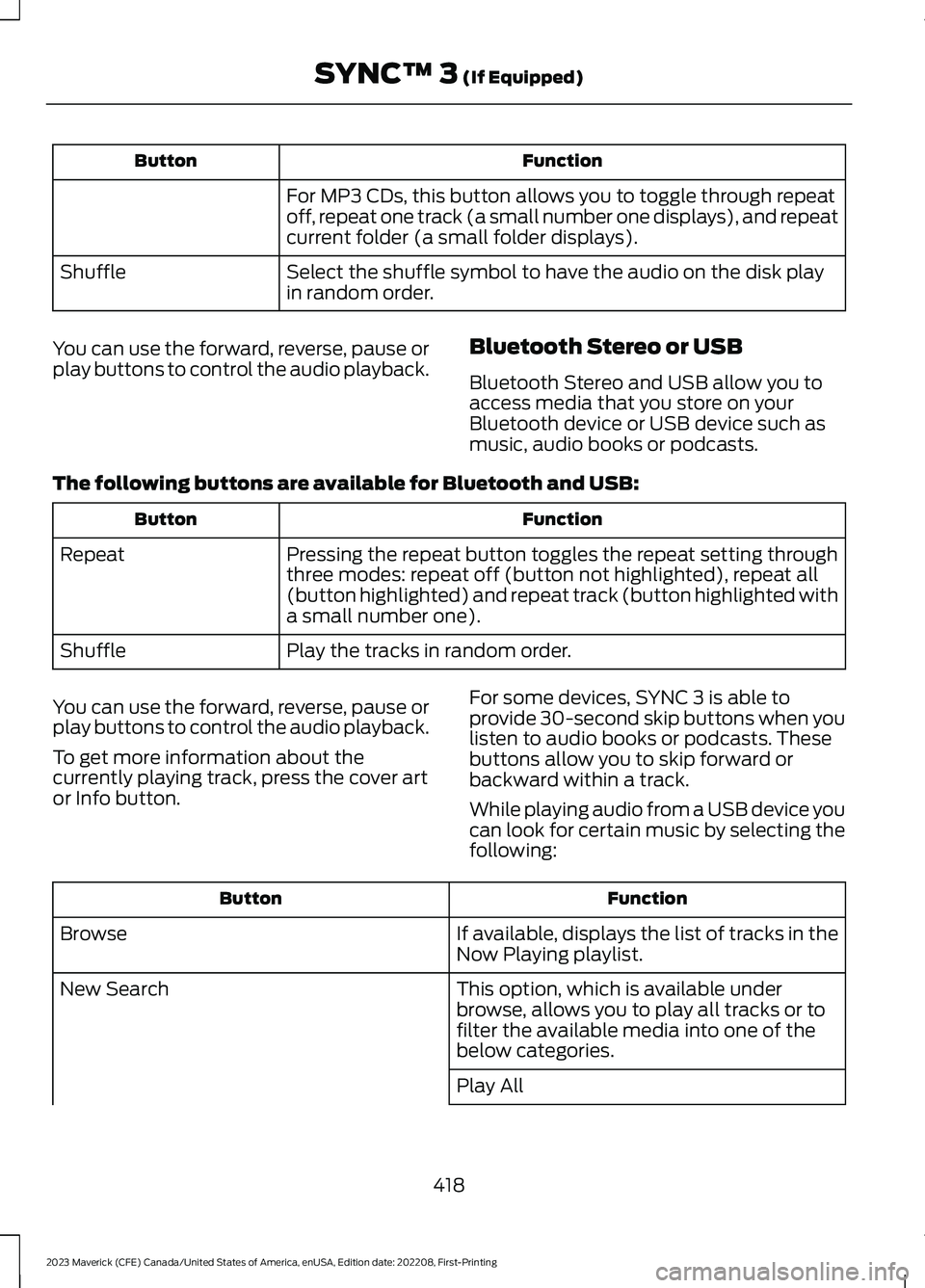
FunctionButton
For MP3 CDs, this button allows you to toggle through repeatoff, repeat one track (a small number one displays), and repeatcurrent folder (a small folder displays).
Select the shuffle symbol to have the audio on the disk playin random order.Shuffle
You can use the forward, reverse, pause orplay buttons to control the audio playback.Bluetooth Stereo or USB
Bluetooth Stereo and USB allow you toaccess media that you store on yourBluetooth device or USB device such asmusic, audio books or podcasts.
The following buttons are available for Bluetooth and USB:
FunctionButton
Pressing the repeat button toggles the repeat setting throughthree modes: repeat off (button not highlighted), repeat all(button highlighted) and repeat track (button highlighted witha small number one).
Repeat
Play the tracks in random order.Shuffle
You can use the forward, reverse, pause orplay buttons to control the audio playback.
To get more information about thecurrently playing track, press the cover artor Info button.
For some devices, SYNC 3 is able toprovide 30-second skip buttons when youlisten to audio books or podcasts. Thesebuttons allow you to skip forward orbackward within a track.
While playing audio from a USB device youcan look for certain music by selecting thefollowing:
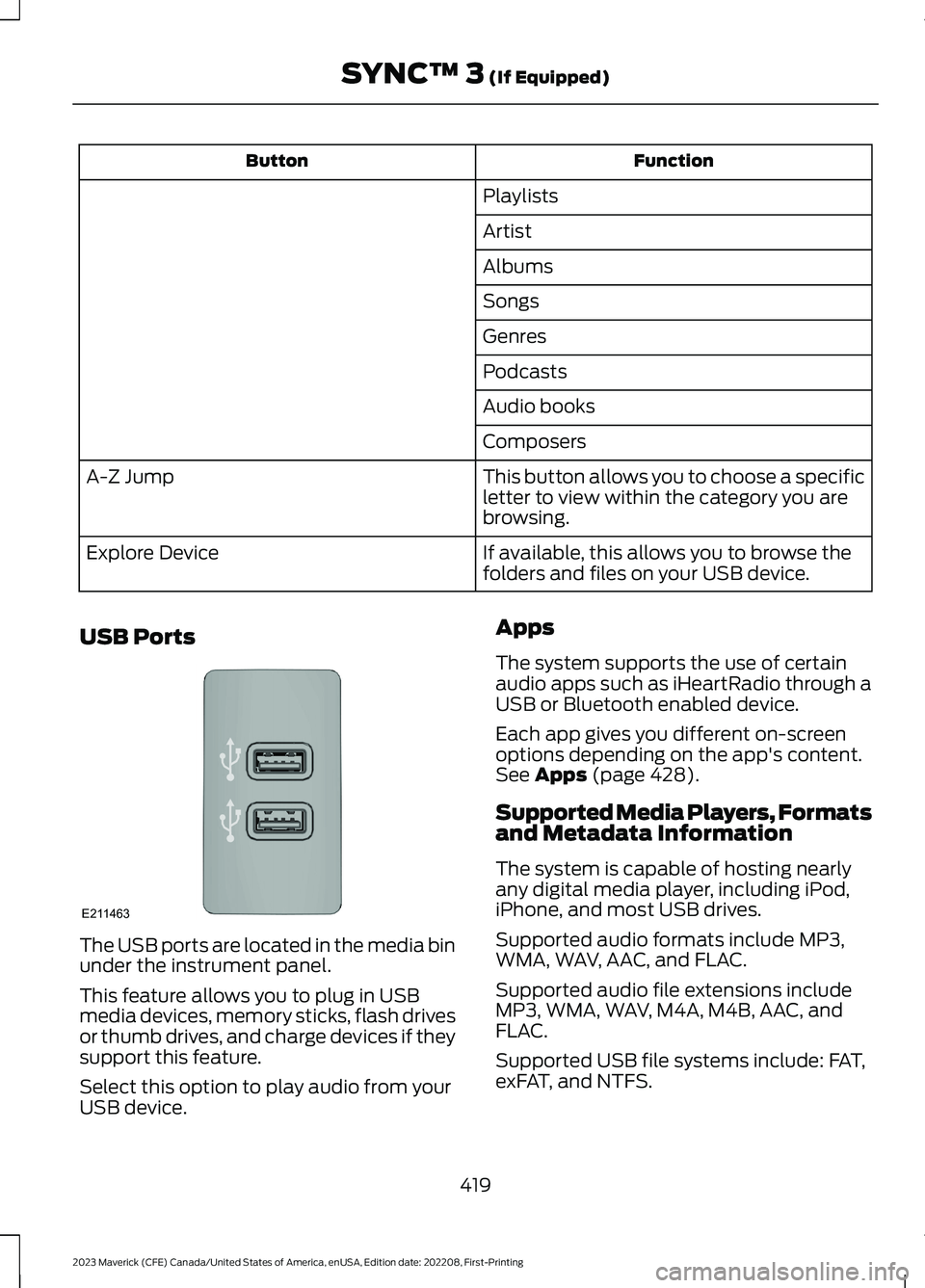
FunctionButton
If available, displays the list of tracks in theNow Playing playlist.Browse
This option, which is available underbrowse, allows you to play all tracks or tofilter the available media into one of thebelow categories.
New Search
Play All
418
2023 Maverick (CFE) Canada/United States of America, enUSA, Edition date: 202208, First-PrintingSYNC™ 3 (If Equipped)
Page 423 of 556
FunctionButton
Playlists
Artist
Albums
Songs
Genres
Podcasts
Audio books
Composers
This button allows you to choose a specificletter to view within the category you arebrowsing.
A-Z Jump
If available, this allows you to browse thefolders and files on your USB device.Explore Device
USB Ports
The USB ports are located in the media binunder the instrument panel.
This feature allows you to plug in USBmedia devices, memory sticks, flash drivesor thumb drives, and charge devices if theysupport this feature.
Select this option to play audio from yourUSB device.
Apps
The system supports the use of certainaudio apps such as iHeartRadio through aUSB or Bluetooth enabled device.
Each app gives you different on-screenoptions depending on the app's content.See Apps (page 428).
Supported Media Players, Formatsand Metadata Information
The system is capable of hosting nearlyany digital media player, including iPod,iPhone, and most USB drives.
Supported audio formats include MP3,WMA, WAV, AAC, and FLAC.
Supported audio file extensions includeMP3, WMA, WAV, M4A, M4B, AAC, andFLAC.
Supported USB file systems include: FAT,exFAT, and NTFS.
419
2023 Maverick (CFE) Canada/United States of America, enUSA, Edition date: 202208, First-PrintingSYNC™ 3 (If Equipped)E211463
Page 435 of 556
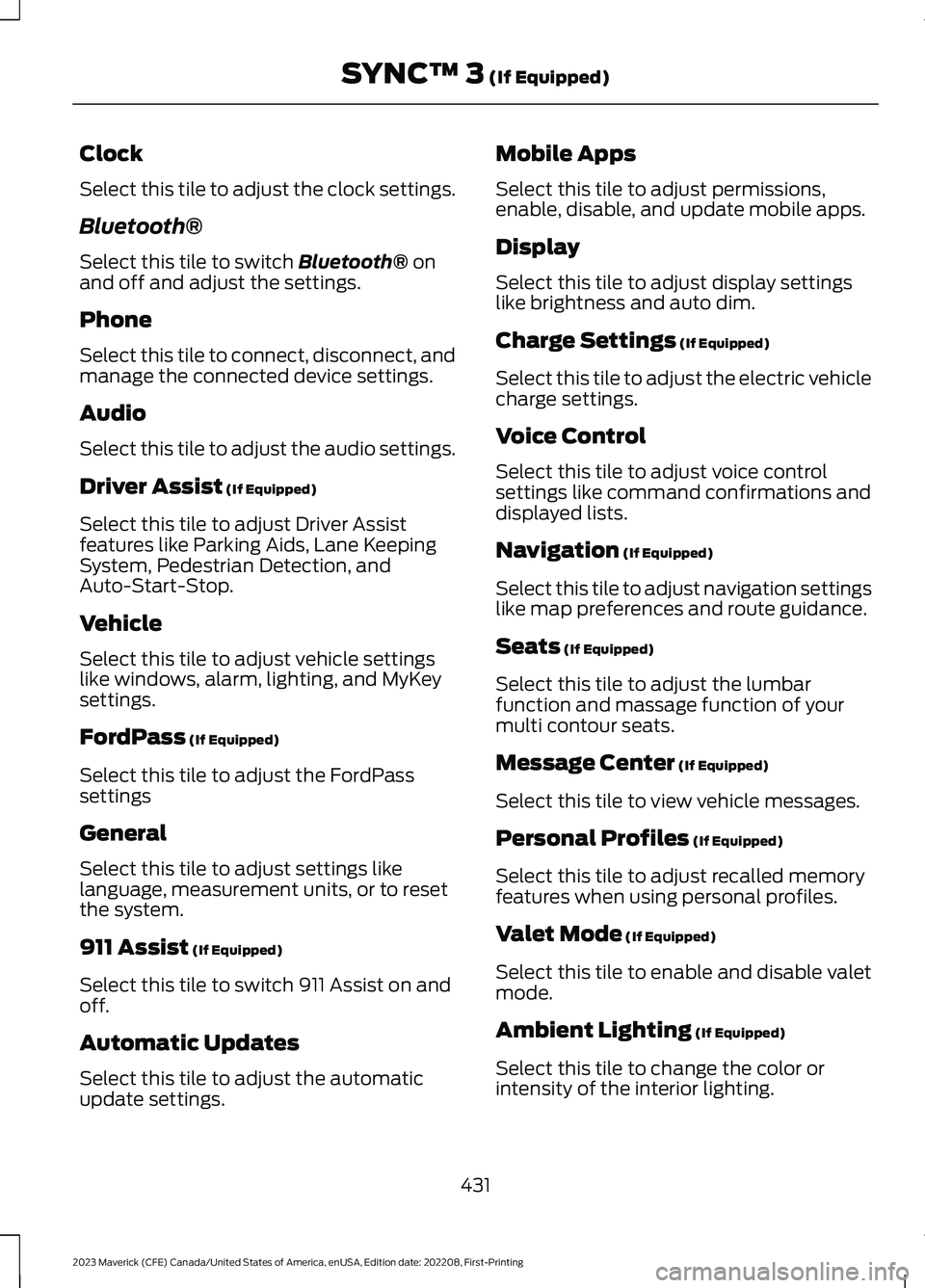
Clock
Select this tile to adjust the clock settings.
Bluetooth®
Select this tile to switch Bluetooth® onand off and adjust the settings.
Phone
Select this tile to connect, disconnect, andmanage the connected device settings.
Audio
Select this tile to adjust the audio settings.
Driver Assist (If Equipped)
Select this tile to adjust Driver Assistfeatures like Parking Aids, Lane KeepingSystem, Pedestrian Detection, andAuto-Start-Stop.
Vehicle
Select this tile to adjust vehicle settingslike windows, alarm, lighting, and MyKeysettings.
FordPass (If Equipped)
Select this tile to adjust the FordPasssettings
General
Select this tile to adjust settings likelanguage, measurement units, or to resetthe system.
911 Assist (If Equipped)
Select this tile to switch 911 Assist on andoff.
Automatic Updates
Select this tile to adjust the automaticupdate settings.
Mobile Apps
Select this tile to adjust permissions,enable, disable, and update mobile apps.
Display
Select this tile to adjust display settingslike brightness and auto dim.
Charge Settings (If Equipped)
Select this tile to adjust the electric vehiclecharge settings.
Voice Control
Select this tile to adjust voice controlsettings like command confirmations anddisplayed lists.
Navigation (If Equipped)
Select this tile to adjust navigation settingslike map preferences and route guidance.
Seats (If Equipped)
Select this tile to adjust the lumbarfunction and massage function of yourmulti contour seats.
Message Center (If Equipped)
Select this tile to view vehicle messages.
Personal Profiles (If Equipped)
Select this tile to adjust recalled memoryfeatures when using personal profiles.
Valet Mode (If Equipped)
Select this tile to enable and disable valetmode.
Ambient Lighting (If Equipped)
Select this tile to change the color orintensity of the interior lighting.
431
2023 Maverick (CFE) Canada/United States of America, enUSA, Edition date: 202208, First-PrintingSYNC™ 3 (If Equipped)
Page 437 of 556
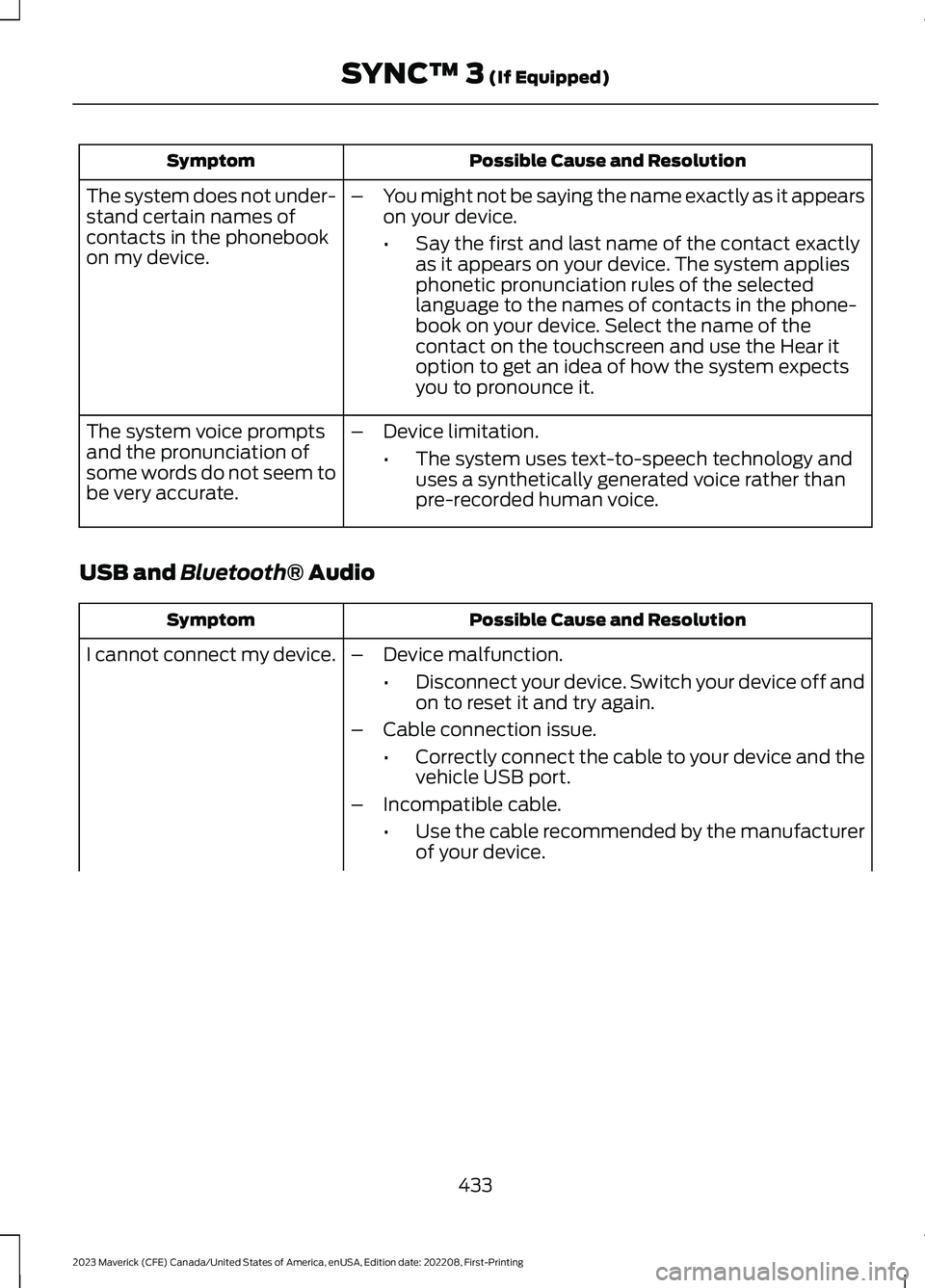
Possible Cause and ResolutionSymptom
–You might not be saying the name exactly as it appearson your device.
•Say the first and last name of the contact exactlyas it appears on your device. The system appliesphonetic pronunciation rules of the selectedlanguage to the names of contacts in the phone-book on your device. Select the name of thecontact on the touchscreen and use the Hear itoption to get an idea of how the system expectsyou to pronounce it.
The system does not under-stand certain names ofcontacts in the phonebookon my device.
–Device limitation.
•The system uses text-to-speech technology anduses a synthetically generated voice rather thanpre-recorded human voice.
The system voice promptsand the pronunciation ofsome words do not seem tobe very accurate.
USB and Bluetooth® Audio
Possible Cause and ResolutionSymptom
I cannot connect my device.–Device malfunction.
•Disconnect your device. Switch your device off andon to reset it and try again.
–Cable connection issue.
•Correctly connect the cable to your device and thevehicle USB port.
–Incompatible cable.
•Use the cable recommended by the manufacturerof your device.
433
2023 Maverick (CFE) Canada/United States of America, enUSA, Edition date: 202208, First-PrintingSYNC™ 3 (If Equipped)
Page 438 of 556
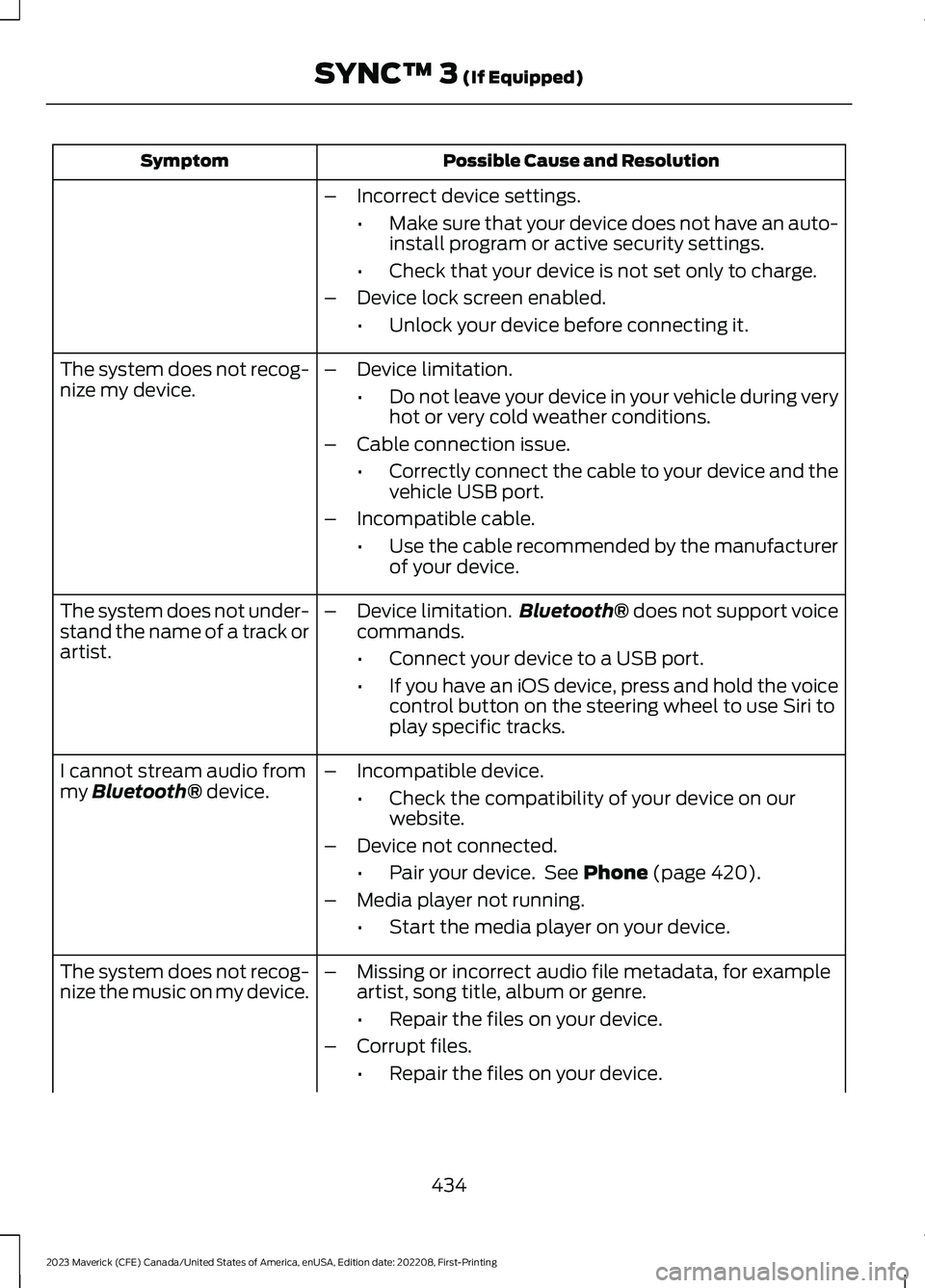
Possible Cause and ResolutionSymptom
–Incorrect device settings.
•Make sure that your device does not have an auto-install program or active security settings.
•Check that your device is not set only to charge.
–Device lock screen enabled.
•Unlock your device before connecting it.
The system does not recog-nize my device.–Device limitation.
•Do not leave your device in your vehicle during veryhot or very cold weather conditions.
–Cable connection issue.
•Correctly connect the cable to your device and thevehicle USB port.
–Incompatible cable.
•Use the cable recommended by the manufacturerof your device.
The system does not under-stand the name of a track orartist.
–Device limitation.Bluetooth® does not support voicecommands.
•Connect your device to a USB port.
•If you have an iOS device, press and hold the voicecontrol button on the steering wheel to use Siri toplay specific tracks.
I cannot stream audio frommy Bluetooth® device.–Incompatible device.
•Check the compatibility of your device on ourwebsite.
–Device not connected.
•Pair your device. See Phone (page 420).
–Media player not running.
•Start the media player on your device.
The system does not recog-nize the music on my device.–Missing or incorrect audio file metadata, for exampleartist, song title, album or genre.
•Repair the files on your device.
–Corrupt files.
•Repair the files on your device.
434
2023 Maverick (CFE) Canada/United States of America, enUSA, Edition date: 202208, First-PrintingSYNC™ 3 (If Equipped)
Page 439 of 556
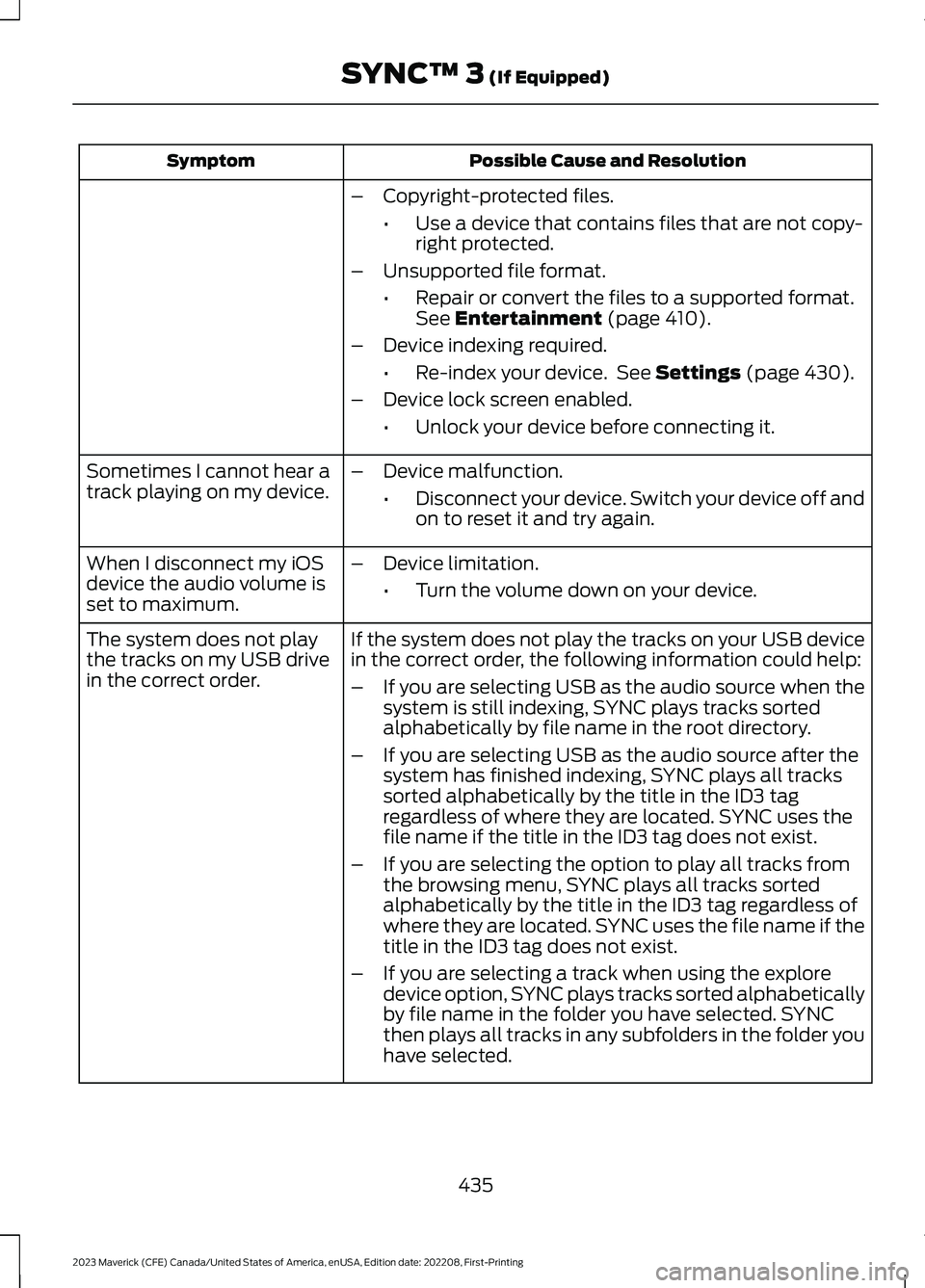
Possible Cause and ResolutionSymptom
–Copyright-protected files.
•Use a device that contains files that are not copy-right protected.
–Unsupported file format.
•Repair or convert the files to a supported format.See Entertainment (page 410).
–Device indexing required.
•Re-index your device. See Settings (page 430).
–Device lock screen enabled.
•Unlock your device before connecting it.
Sometimes I cannot hear atrack playing on my device.–Device malfunction.
•Disconnect your device. Switch your device off andon to reset it and try again.
When I disconnect my iOSdevice the audio volume isset to maximum.
–Device limitation.
•Turn the volume down on your device.
If the system does not play the tracks on your USB devicein the correct order, the following information could help:The system does not playthe tracks on my USB drivein the correct order.–If you are selecting USB as the audio source when thesystem is still indexing, SYNC plays tracks sortedalphabetically by file name in the root directory.
–If you are selecting USB as the audio source after thesystem has finished indexing, SYNC plays all trackssorted alphabetically by the title in the ID3 tagregardless of where they are located. SYNC uses thefile name if the title in the ID3 tag does not exist.
–If you are selecting the option to play all tracks fromthe browsing menu, SYNC plays all tracks sortedalphabetically by the title in the ID3 tag regardless ofwhere they are located. SYNC uses the file name if thetitle in the ID3 tag does not exist.
–If you are selecting a track when using the exploredevice option, SYNC plays tracks sorted alphabeticallyby file name in the folder you have selected. SYNCthen plays all tracks in any subfolders in the folder youhave selected.
435
2023 Maverick (CFE) Canada/United States of America, enUSA, Edition date: 202208, First-PrintingSYNC™ 3 (If Equipped)
Page 440 of 556
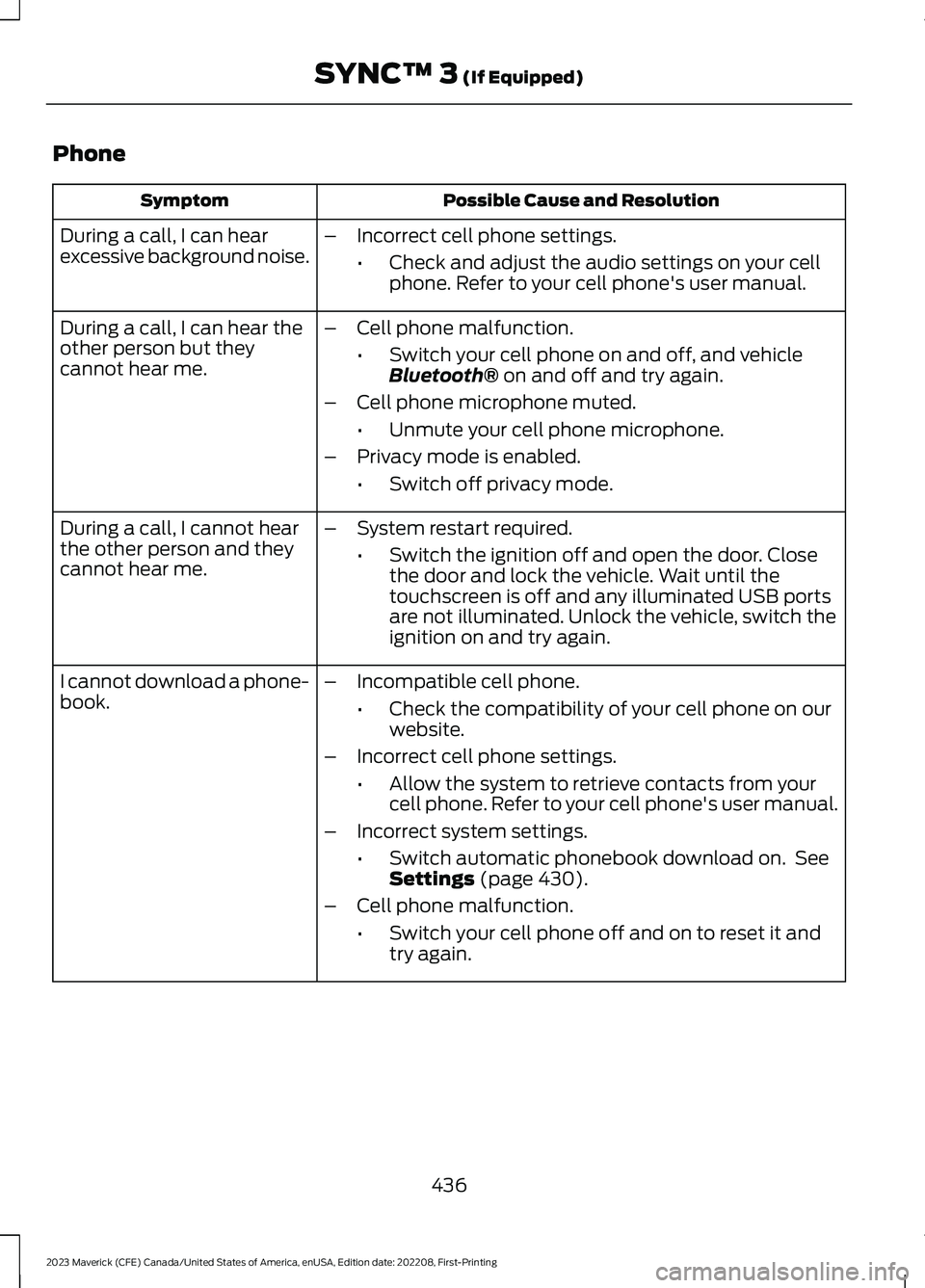
Phone
Possible Cause and ResolutionSymptom
During a call, I can hearexcessive background noise.–Incorrect cell phone settings.
•Check and adjust the audio settings on your cellphone. Refer to your cell phone's user manual.
During a call, I can hear theother person but theycannot hear me.
–Cell phone malfunction.
•Switch your cell phone on and off, and vehicleBluetooth® on and off and try again.
–Cell phone microphone muted.
•Unmute your cell phone microphone.
–Privacy mode is enabled.
•Switch off privacy mode.
During a call, I cannot hearthe other person and theycannot hear me.
–System restart required.
•Switch the ignition off and open the door. Closethe door and lock the vehicle. Wait until thetouchscreen is off and any illuminated USB portsare not illuminated. Unlock the vehicle, switch theignition on and try again.
I cannot download a phone-book.–Incompatible cell phone.
•Check the compatibility of your cell phone on ourwebsite.
–Incorrect cell phone settings.
•Allow the system to retrieve contacts from yourcell phone. Refer to your cell phone's user manual.
–Incorrect system settings.
•Switch automatic phonebook download on. SeeSettings (page 430).
–Cell phone malfunction.
•Switch your cell phone off and on to reset it andtry again.
436
2023 Maverick (CFE) Canada/United States of America, enUSA, Edition date: 202208, First-PrintingSYNC™ 3 (If Equipped)
Page 448 of 556
Resetting the System
1.Simultaneously press and hold theseek up and the audio unit powerbuttons until the screen goes black.
2.Wait three minutes to allow the systemto complete the reset.
3.Press the audio unit power button toswitch the system on.
Note:You can reset the system to restorefunctionality that has stopped working. Thesystem reset is designed to restorefunctionality and not delete any data thatyou have stored.
Additional Information andAssistance
For additional information and assistance,we recommend that you contact anauthorized dealer or refer to our website.
444
2023 Maverick (CFE) Canada/United States of America, enUSA, Edition date: 202208, First-PrintingSYNC™ 3 (If Equipped)
Page 510 of 556
INTELLECTUAL PROPERTY RIGHTS:All title and intellectual property rights inand to the SOFTWARE (including but notlimited to any images, photographs,animations, video, audio, music, text and"applets" incorporated into theSOFTWARE), the accompanying printedmaterials, and any copies of theSOFTWARE, are owned by FORD MOTORCOMPANY, or its affiliates or suppliers. TheSOFTWARE is licensed, not sold. You maynot copy the printed materialsaccompanying the SOFTWARE. All titleand intellectual property rights in and tothe content which may be accessedthrough use of the SOFTWARE is theproperty of the respective content ownerand may be protected by applicablecopyright or other intellectual propertylaws and treaties. This EULA grants you norights to use such content outside itsintended use. All rights not specificallygranted under this EULA are reserved byFORD MOTOR COMPANY, its affiliates,and third party software and serviceproviders and suppliers. Use of any on-lineservices which may be accessed throughthe SOFTWARE may be governed by therespective terms of use relating to suchservices. If this SOFTWARE containsdocumentation that is provided only inelectronic form, you may print one copy ofsuch electronic documentation.
EXPORT RESTRICTIONS: Youacknowledge that the SOFTWARE issubject to U.S. and European Union exportjurisdiction. You agree to comply with allapplicable international and national lawsthat apply to the SOFTWARE, includingthe U.S. Export Administration Regulations,as well as end-user, end-use anddestination restrictions issued by U.S. andother governments.
TRADEMARKS: This EULA does not grantyou any rights in connection with anytrademarks or service marks of FORDMOTOR COMPANY, its affiliates, and thirdparty software and service providers.
PRODUCT SUPPORT: Please refer toFORD MOTOR COMPANY instructionsprovided in the documentation for theDEVICES product support, such as thevehicle owner guide.
Should you have any questions concerningthis EULA, or if you desire to contact FORDMOTOR COMPANY for any other reason,please refer to the address provided in thedocumentation for the DEVICES.
No Liability for Certain Damages:EXCEPT AS PROHIBITED BY LAW, FORDMOTOR COMPANY, ANY THIRD PARTYSOFTWARE OR SERVICES SUPPLIERS,AND THEIR AFFILIATES SHALL HAVE NOLIABILITY FOR ANY INDIRECT, SPECIAL,CONSEQUENTIAL OR INCIDENTALDAMAGES ARISING FROM OR INCONNECTION WITH THE USE ORPERFORMANCE OF THE SOFTWARE. THISLIMITATION SHALL APPLY EVEN IF ANYREMEDY FAILS OF ITS ESSENTIALPURPOSE. THERE ARE NO WARRANTIESOTHER THAN THOSE THAT MAY BEEXPRESSLY PROVIDED FOR YOUR NEWVEHICLE.
SYNC® Automotive Important SafetyInformation Read and followinstructions:
•Before using your SYNC® system, readand follow all instructions and safetyinformation provided in this end usermanual ("Owner Guide".) Notfollowing precautions found in theOwner Guide can lead to an accidentor other serious injuries.
506
2023 Maverick (CFE) Canada/United States of America, enUSA, Edition date: 202208, First-PrintingCustomer Information