audio FORD MAVERICK 2023 Owners Manual
[x] Cancel search | Manufacturer: FORD, Model Year: 2023, Model line: MAVERICK, Model: FORD MAVERICK 2023Pages: 556, PDF Size: 14.79 MB
Page 16 of 556
Connected Vehicle – Troubleshooting -Vehicles With: Modem..........................378
Connected Vehicle – Troubleshooting -Vehicles With: SYNC 3/SYNC 2.5......379
Vehicle Wi-Fi Hotspot
Creating a Vehicle Wi-Fi Hotspot..........381
Changing the Vehicle Wi-Fi HotspotName or Password.................................381
Vehicle Wi-Fi Hotspot – Troubleshooting........................................................................382
Audio System - VehiclesWithout: SYNC 3
General Information..................................383
Audio Unit......................................................383
AM/FM Radio...............................................384
Connecting a Bluetooth® Device.........385
Streaming Bluetooth Audio...................386
Playing Media From a USB Device.......387
USB Port.........................................................387
Apps................................................................388
Using Voice Recognition..........................390
Audio System – Troubleshooting..........391
Audio System - Vehicles With:SYNC 3
Audio System Precautions......................392
Switching the Audio Unit On and Off........................................................................392
Selecting the Audio Source....................392
Playing or Pausing the Audio Source........................................................................392
Adjusting the Volume................................392
Switching Shuffle Mode On and Off........................................................................392
Switching Repeat Mode On and Off........................................................................392
Setting a Memory Preset.........................393
Muting the Audio........................................393
Adjusting the Sound Settings................393
Setting the Clock and Date.....................393
AM/FM Radio...............................................394
Digital Radio.................................................395
Satellite Radio.............................................396
Audio System – Troubleshooting.........397
SYNC™ 3
General Information...................................401
Using Voice Recognition..........................403
Entertainment..............................................410
Phone.............................................................420
Navigation.....................................................422
Electric Vehicle Information....................427
Apps................................................................428
Settings..........................................................430
SYNC™ 3 Troubleshooting.....................432
Vehicle Software Updates -Vehicles Without: SYNC 3
Vehicle Software Updates......................445
Accessories
Accessories...................................................446
12V Pre-Wired Connections
What are the 12V Pre-Wired Connections........................................................................447
12V Pre-Wired Connections Precautions........................................................................447
Locating the 12V Pre-Wired Connections........................................................................447
Ford Protect
What Is Ford Protect.................................448
Scheduled Maintenance
General Maintenance Information......450
Normal Scheduled Maintenance.........453
Special Operating Conditions ScheduledMaintenance............................................456
12
2023 Maverick (CFE) Canada/United States of America, enUSA, Edition date: 202208, First-PrintingTable of Contents
Page 30 of 556
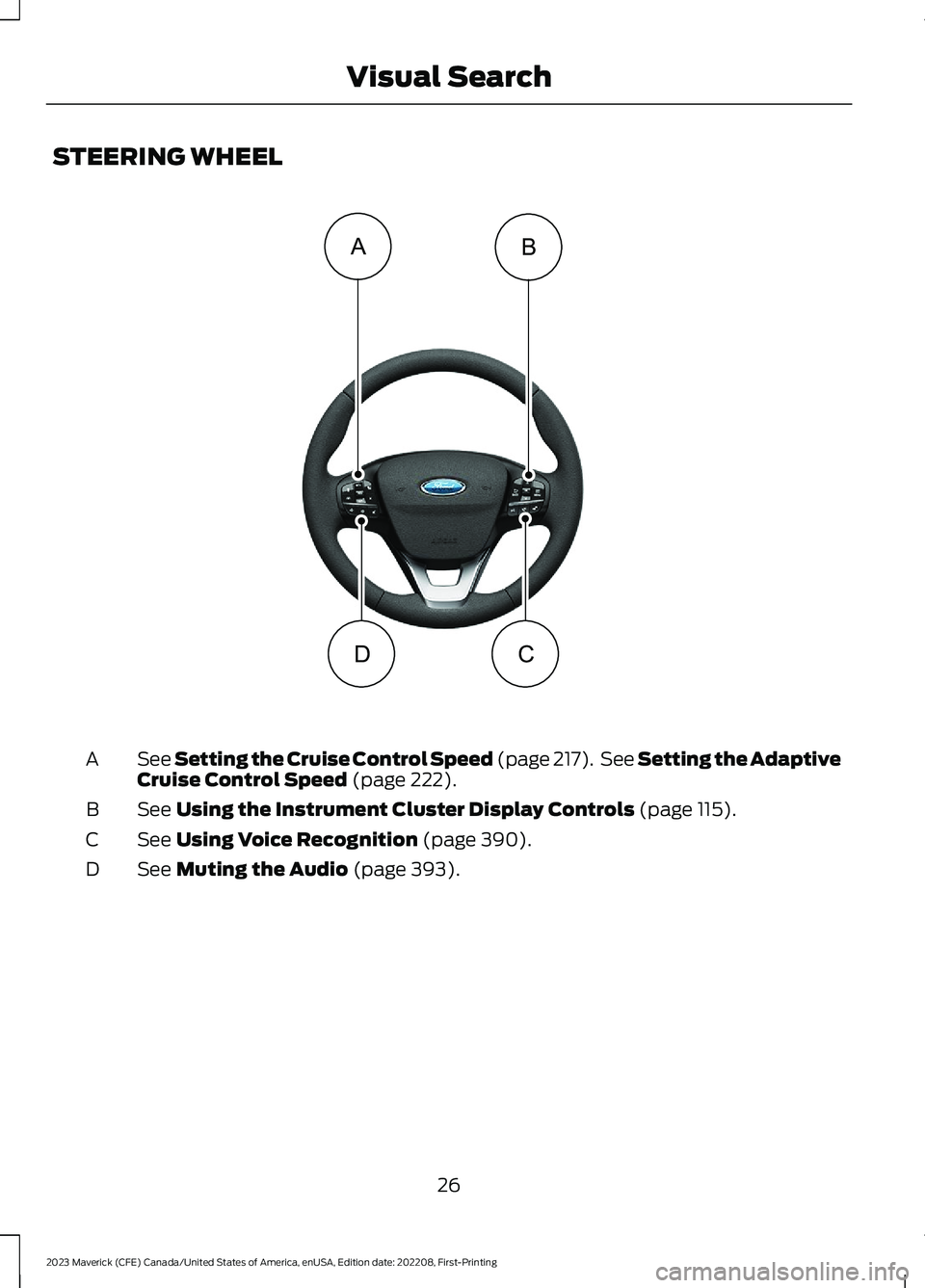
STEERING WHEEL
See Setting the Cruise Control Speed (page 217). See Setting the AdaptiveCruise Control Speed (page 222).A
See Using the Instrument Cluster Display Controls (page 115).B
See Using Voice Recognition (page 390).C
See Muting the Audio (page 393).D
26
2023 Maverick (CFE) Canada/United States of America, enUSA, Edition date: 202208, First-PrintingVisual SearchBADC E358427
Page 50 of 556
1.Press the button and slide the heightadjuster up or down.
2.Release the button and pull down onthe height adjuster to make sure it islocked in place.
SEATBELT REMINDER
HOW DOES THE SEATBELTREMINDER WORK
WARNING: The system will onlyprovide protection when you use theseatbelt correctly.
This system monitors all seating positionsand provides audio and graphic feedback.
SEATBELT REMINDERINDICATORS
This lamp illuminates if you donot fasten your seatbelt whenyou switch the ignition on. Thelamp switches off when you fasten yourseatbelt or about one minute has elapsed.
When the initial warning expires for thedriver, more warnings are provided for thedriver and front passenger. This lampilluminates if you or your front passengerdo not fasten the seatbelt buckle and thevehicle speed exceeds 6 mph (10 km/h).
Note:To avoid inadvertent warnings, donot place large objects on the frontpassenger seat.
This lamp illuminates when youswitch the ignition on, identifyingthe number of seating positionswith fastened buckles. It illuminates againwhen a seating position changes fromunfastened to fastened.
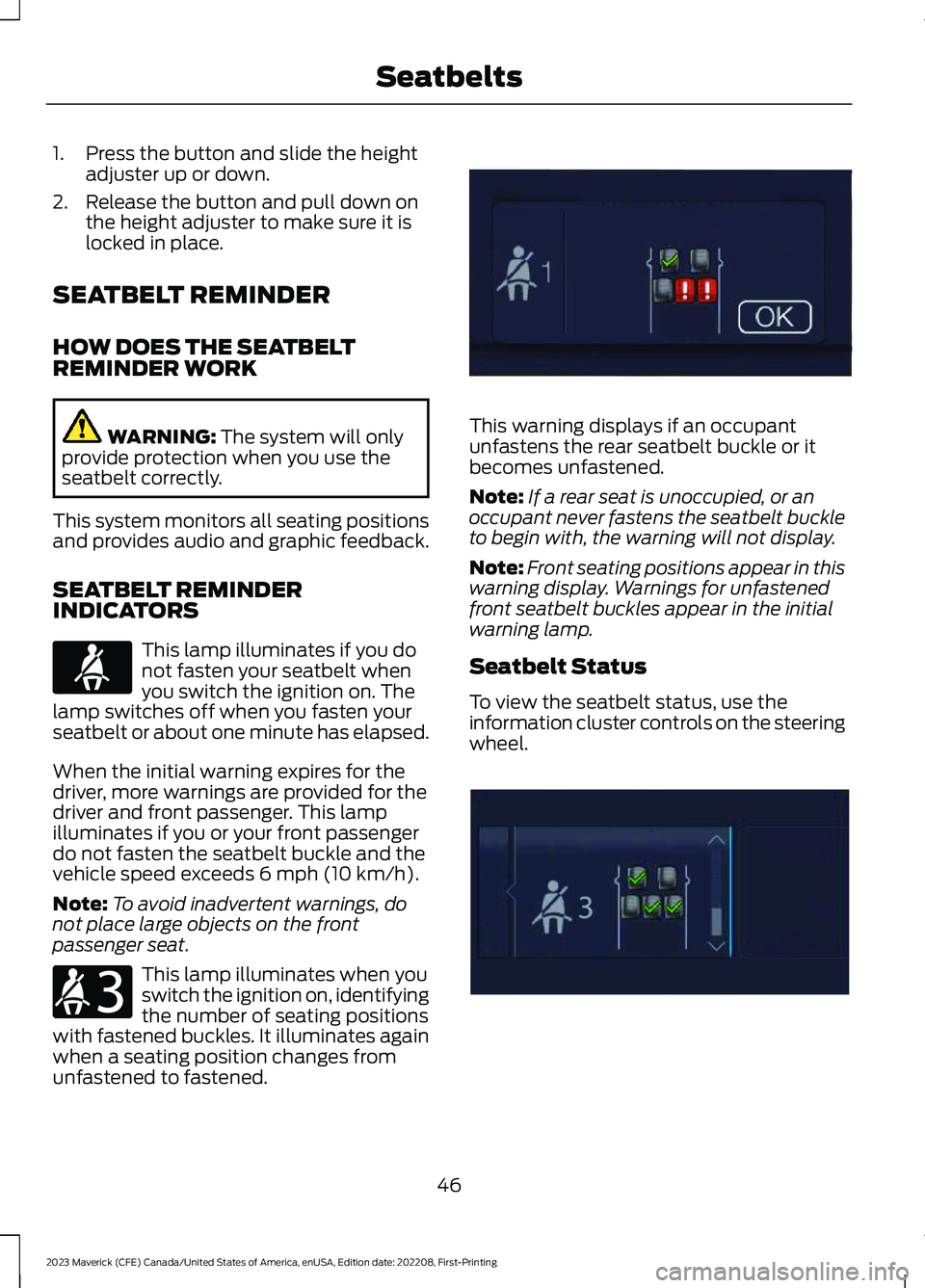
This warning displays if an occupantunfastens the rear seatbelt buckle or itbecomes unfastened.
Note:If a rear seat is unoccupied, or anoccupant never fastens the seatbelt buckleto begin with, the warning will not display.
Note:Front seating positions appear in thiswarning display. Warnings for unfastenedfront seatbelt buckles appear in the initialwarning lamp.
Seatbelt Status
To view the seatbelt status, use theinformation cluster controls on the steeringwheel.
46
2023 Maverick (CFE) Canada/United States of America, enUSA, Edition date: 202208, First-PrintingSeatbeltsE71880 E206718 E331448 E281361
Page 71 of 556
WHAT IS MYKEY
MyKey allows you to program keys withrestricted driving modes to promote gooddriving habits.
You can program the restrictions to all keysexcept one. Any keys that you did notprogram are administrator keys or adminkeys.
Note:Every MyKey receives the samerestrictions and settings. You cannotprogram them individually.
MYKEY SETTINGS
NON-CONFIGURABLE MYKEYSETTINGS
Seatbelt Reminder or Belt-Minder™
MyKey mutes the audio system until thefront seat passengers buckle the front seatbelts.
Note:If your vehicle includes an AM/FMradio or a very basic audio system, the radiomay not mute.
Satellite Radio (If Equipped)
Some satellite radio channels haverestricted access to adult radio content.
Early Low Fuel
The low fuel level warning lamp turns onearlier.
Driving and Parking Aids
You cannot configure settings for parkingaids, blind spot information system, andcross traffic alert. These systems turn onwhen the vehicle turns on, and you cannotswitch them off with a MyKey.
You cannot configure settings forpre-collision assist and lane keeping. Thesesystems turn on when the vehicle turns on.
A new destination in the navigation systemcan only be set using voice commandswhen using a MyKey, and with your vehiclemoving.
Note:MyKey drivers may be able to switchthe lane keeping assist off, but this featureturns back on automatically with every newkey cycle.
CONFIGURABLE MYKEYSETTINGS
You can configure the following settingsafter creating a MyKey. See Creating aMyKey (page 68).
Speed Limit
WARNING: Do not set MyKeymaximum speed limit to a limit that willprevent the driver from maintaining asafe speed considering posted speedlimits and prevailing road conditions. Thedriver is always responsible to drive inaccordance with local laws andprevailing conditions. Failure to do socould result in accident or injury.
You can set a speed limit for your vehicle.Warning messages appear on thetouchscreen and a tone sounds if yourvehicle reaches the set speed. You cannotoverride the set speed when using a MyKey.
Speed Minder
You can set a speed reminder for yourvehicle. Warning messages appear on thetouchscreen and a tone sounds if yourvehicle exceeds the set speed.
67
2023 Maverick (CFE) Canada/United States of America, enUSA, Edition date: 202208, First-PrintingMyKey™
Page 72 of 556
Audio System Volume Limit
The audio system maximum volumereduces. A message appears on thetouchscreen if you attempt to exceed thevolume limit. Automatic volume controlturns off.
911 Assist
If you set 911 assist to always on, youcannot switch it off with a MyKey.
Do Not Disturb
If you set do not disturb to always on, youcannot switch it off with a MyKey.
Note:If a phone is connected using AppleCarPlay or Android Auto while driving witha MyKey, the driver can receive phone callsand text messages even if the do not disturbrestriction is on. And if the vehicle comeswith satellite radio, there is no restriction onthe adult content.
Traction and Stability Control
If you set traction control or stabilitycontrol to always on, you cannot switch itoff with a MyKey.
CREATING A MYKEY
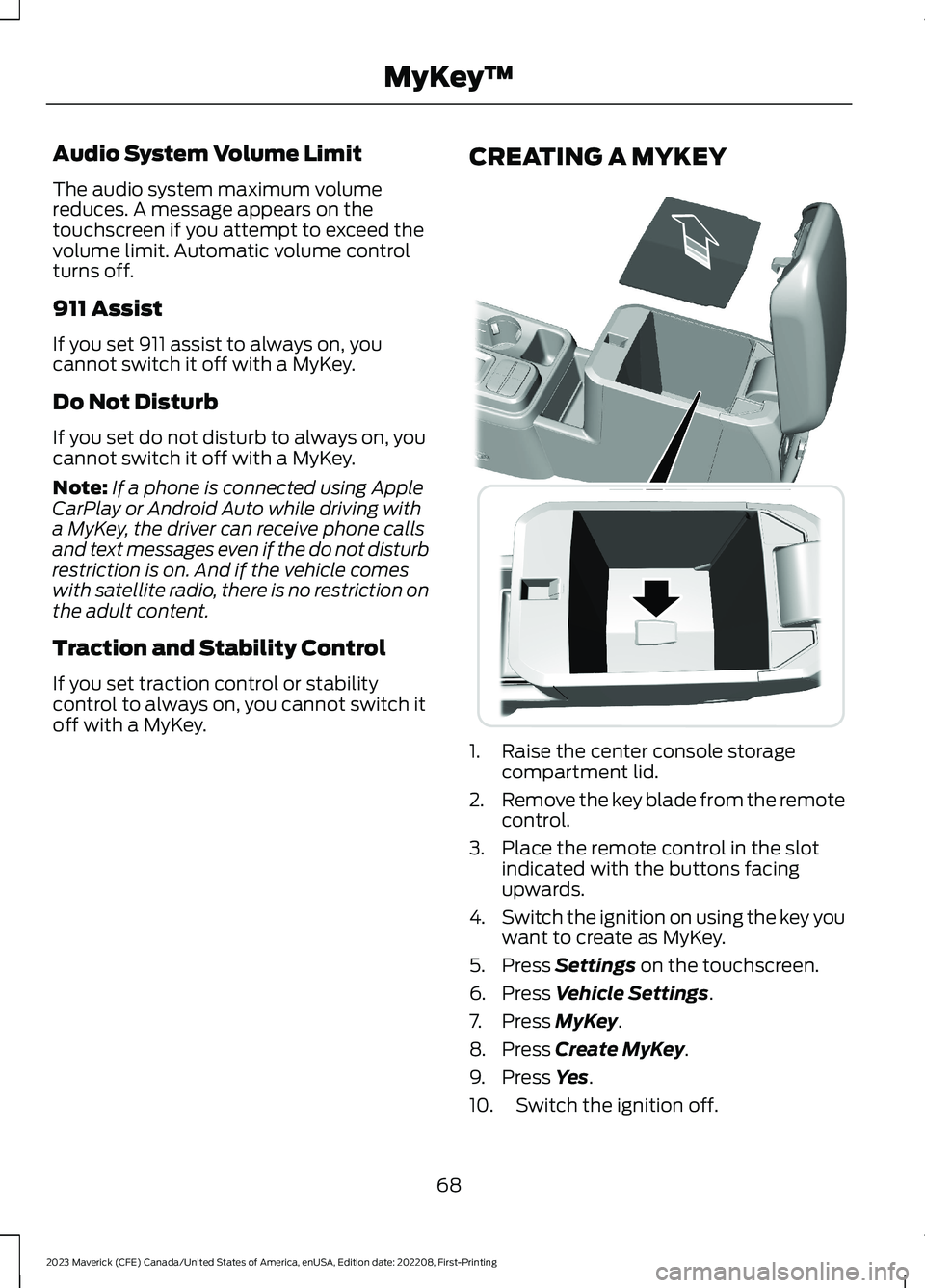
1.Raise the center console storagecompartment lid.
2.Remove the key blade from the remotecontrol.
3.Place the remote control in the slotindicated with the buttons facingupwards.
4.Switch the ignition on using the key youwant to create as MyKey.
5.Press Settings on the touchscreen.
6.Press Vehicle Settings.
7.Press MyKey.
8.Press Create MyKey.
9.Press Yes.
10.Switch the ignition off.
68
2023 Maverick (CFE) Canada/United States of America, enUSA, Edition date: 202208, First-PrintingMyKey™E349250
Page 119 of 556
USING THE INSTRUMENT
CLUSTER DISPLAY CONTROLS
WARNING: Driving while distractedcan result in loss of vehicle control, crashand injury. We strongly recommend thatyou use extreme caution when using anydevice that may take your focus off theroad. Your primary responsibility is thesafe operation of your vehicle. Werecommend against the use of anyhand-held device while driving andencourage the use of voice-operatedsystems when possible. Make sure youare aware of all applicable local lawsthat may affect the use of electronicdevices while driving.
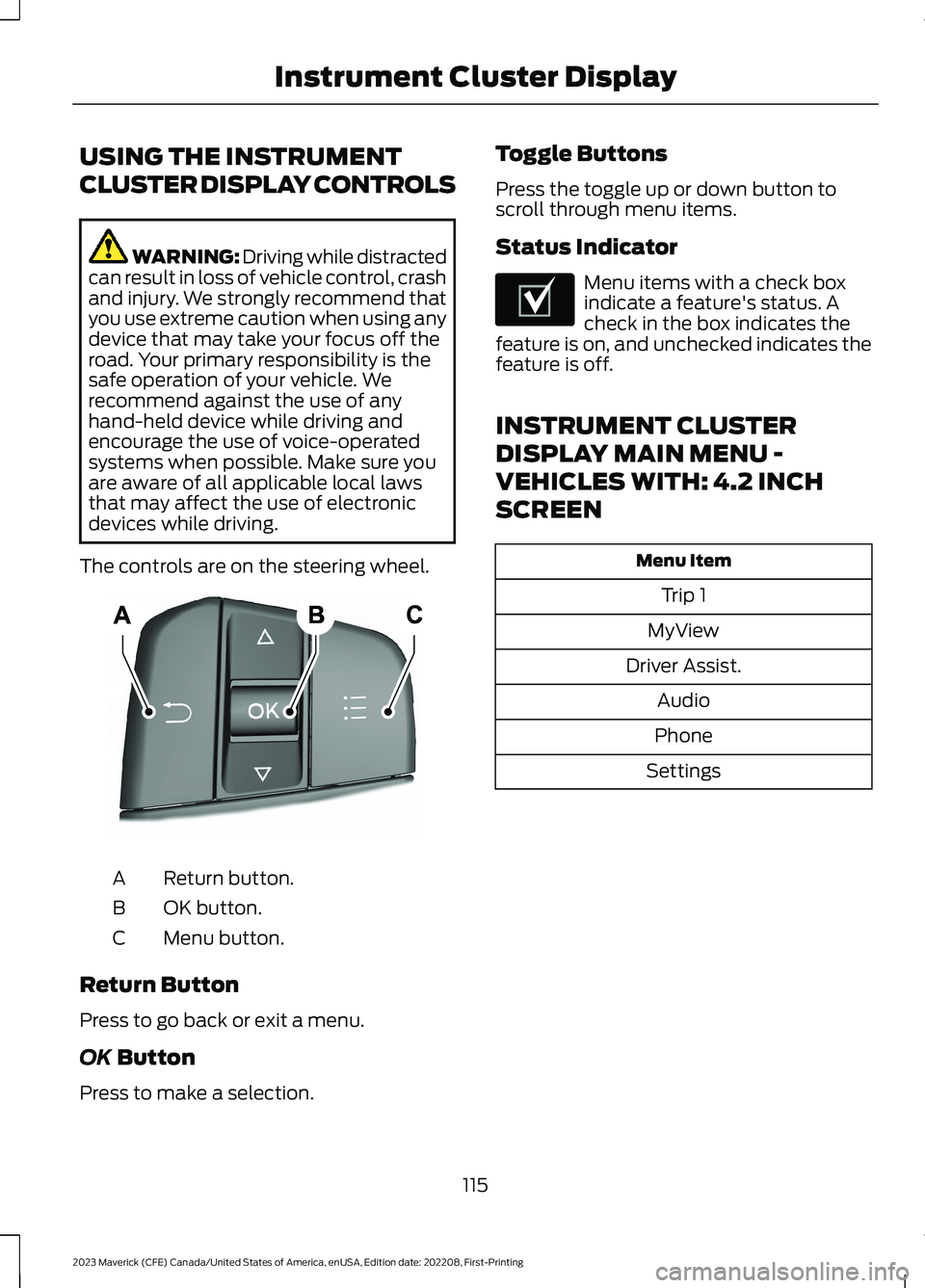
The controls are on the steering wheel.
Return button.A
OK button.B
Menu button.C
Return Button
Press to go back or exit a menu.
OK Button
Press to make a selection.
Toggle Buttons
Press the toggle up or down button toscroll through menu items.
Status Indicator
Menu items with a check boxindicate a feature's status. Acheck in the box indicates thefeature is on, and unchecked indicates thefeature is off.
INSTRUMENT CLUSTER
DISPLAY MAIN MENU -
VEHICLES WITH: 4.2 INCH
SCREEN
Menu Item
Trip 1
MyView
Driver Assist.
Audio
Phone
Settings
115
2023 Maverick (CFE) Canada/United States of America, enUSA, Edition date: 202208, First-PrintingInstrument Cluster DisplayE250032 E204495
Page 120 of 556
INSTRUMENT CLUSTER
DISPLAY MAIN MENU -
VEHICLES WITH: 6.5 INCH
SCREEN
Menu Item
Select Screens
Audio
Phone
Settings
Display Setup
CUSTOMIZING THE
INSTRUMENT CLUSTER
DISPLAY - VEHICLES WITH: 4.2
INCH SCREEN
1.Using the information display controlson the steering wheel, select MyView.
2.Press the menu button.
3.Select a screen.
4.Press the OK button.
CUSTOMIZING THE
INSTRUMENT CLUSTER
DISPLAY - VEHICLES WITH: 6.5
INCH SCREEN
Adding Screens Using SelectScreens
You can select various screens to show onthe instrument cluster display.
1.Select Select Screens.
2.Use the controls on the steering wheelto highlight a screen to add.
3.Press the OK button.
Note:The amount of screens you can addis limited. If the selected screen does notappear, you must deselect items from themenu.
Select Screens
Calm screen
Fuel economy
Trip 1
Trip 2
This trip
EV Coach
Tire pressure
Intelligent AWD
Off-Road
Trailer light check
Seatbelts
Auto StartStop
Now playing
Note:Some options may appear slightlydifferent or not at all if items are optional.
Configuring Gauges
You can select which values yourspeedometer shows in the instrumentcluster display.
1.Select Display Setup.
2.Select a speed unit to display.
116
2023 Maverick (CFE) Canada/United States of America, enUSA, Edition date: 202208, First-PrintingInstrument Cluster Display
Page 151 of 556
LOCATING THE USB PORTS
Data Transfer USB Ports
The USB ports could be in the followinglocations:
•On the lower instrument panel.
•Inside the center console.
Note: These USB ports can also chargedevices.
Note: Not all USB ports in your vehicle havedata transfer capabilities.
Note: We recommend using only USB-IFcertified cables and adapters. Non-certifiedcables and adapters may not work.
Charge Only USB Ports
The USB ports could be in the followinglocations:
•On the lower instrument panel.
•On the upper instrument panel.
•Inside the media bin.
•Inside the center console.
•On the rear of the center console.
•In the cargo area.
PLAYING MEDIA USING THE
USB PORT
WARNING: Driving while distractedcan result in loss of vehicle control, crashand injury. We strongly recommend thatyou use extreme caution when using anydevice that may take your focus off theroad. Your primary responsibility is the
safe operation of your vehicle. Werecommend against the use of anyhand-held device while driving andencourage the use of voice-operatedsystems when possible. Make sure youare aware of all applicable local lawsthat may affect the use of electronicdevices while driving.
Connect your device to a data transfer USBport.
Press the audio button on thefeature bar.
Select Sources.
Select the USB option.
Press to play a track. Press againto pause the track.
Press to skip to the next track.
Press and hold to fast forwardthrough the track.
Press once to return to thebeginning of a track. Repeatedlypress to return to previoustracks.
Press and hold to fast rewind.
CHARGING A DEVICE
Connect your device to the USB port.
Data Transfer USB Ports
You can charge your device through thedata transfer USB port when SYNC is on.
147
2023 Maverick (CFE) Canada/United States of America, enUSA, Edition date: 202208, First-PrintingUSB PortsE250655 E263583 E100027 E250655
Page 216 of 556
When using a programmed MyKey, youcannot switch the rear parking aid off.
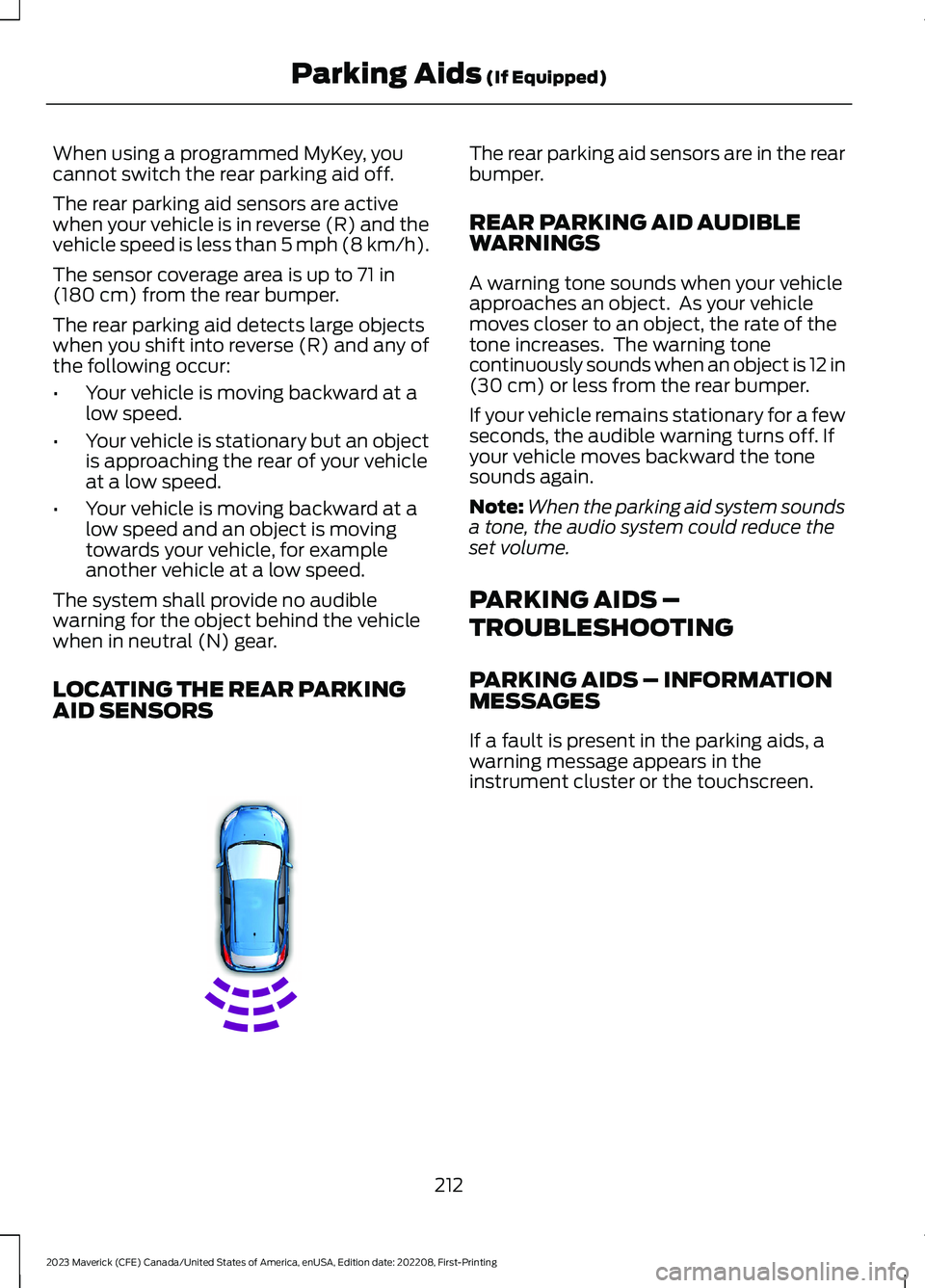
The rear parking aid sensors are activewhen your vehicle is in reverse (R) and thevehicle speed is less than 5 mph (8 km/h).
The sensor coverage area is up to 71 in(180 cm) from the rear bumper.
The rear parking aid detects large objectswhen you shift into reverse (R) and any ofthe following occur:
•Your vehicle is moving backward at alow speed.
•Your vehicle is stationary but an objectis approaching the rear of your vehicleat a low speed.
•Your vehicle is moving backward at alow speed and an object is movingtowards your vehicle, for exampleanother vehicle at a low speed.
The system shall provide no audiblewarning for the object behind the vehiclewhen in neutral (N) gear.
LOCATING THE REAR PARKINGAID SENSORS
The rear parking aid sensors are in the rearbumper.
REAR PARKING AID AUDIBLEWARNINGS
A warning tone sounds when your vehicleapproaches an object. As your vehiclemoves closer to an object, the rate of thetone increases. The warning tonecontinuously sounds when an object is 12 in(30 cm) or less from the rear bumper.
If your vehicle remains stationary for a fewseconds, the audible warning turns off. Ifyour vehicle moves backward the tonesounds again.
Note:When the parking aid system soundsa tone, the audio system could reduce theset volume.
PARKING AIDS –
TROUBLESHOOTING
PARKING AIDS – INFORMATIONMESSAGES
If a fault is present in the parking aids, awarning message appears in theinstrument cluster or the touchscreen.
212
2023 Maverick (CFE) Canada/United States of America, enUSA, Edition date: 202208, First-PrintingParking Aids (If Equipped)E130178
Page 307 of 556
Protected ComponentRatingItem
Not used (spare).10 A20
Climate control.7.5 A21E-shifter module.
Instrument cluster.7.5 A22Smart data link connector.Steering column controlmodule.
Audio unit.20 A23
Not used (spare).20 A24
Left-hand front powerwindows.30 A25
Right-hand front powerwindows.Left-hand rear powerwindows.Right-hand rear powerwindows.
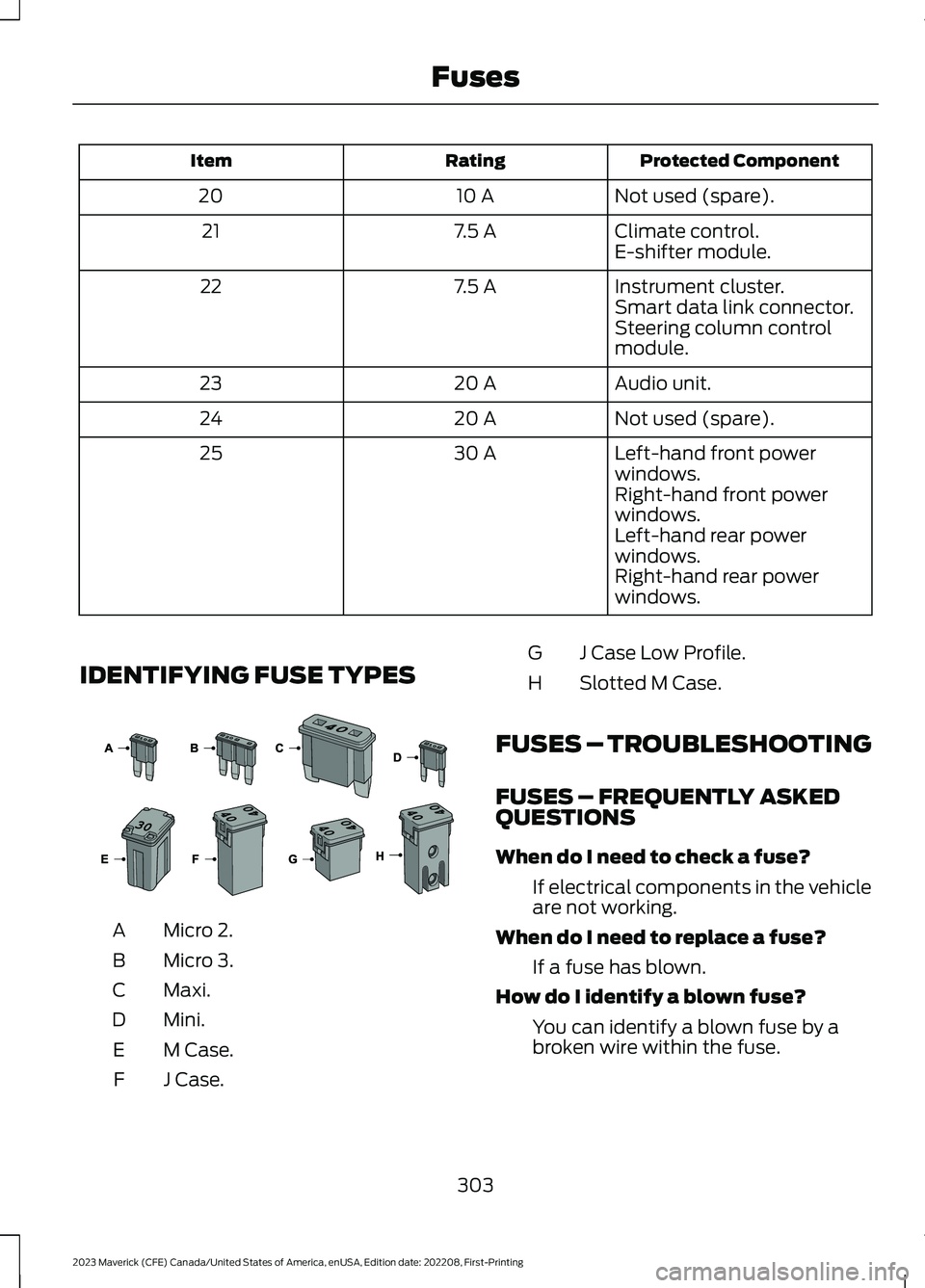
IDENTIFYING FUSE TYPES
Micro 2.A
Micro 3.B
Maxi.C
Mini.D
M Case.E
J Case.F
J Case Low Profile.G
Slotted M Case.H
FUSES – TROUBLESHOOTING
FUSES – FREQUENTLY ASKEDQUESTIONS
When do I need to check a fuse?
If electrical components in the vehicleare not working.
When do I need to replace a fuse?
If a fuse has blown.
How do I identify a blown fuse?
You can identify a blown fuse by abroken wire within the fuse.
303
2023 Maverick (CFE) Canada/United States of America, enUSA, Edition date: 202208, First-PrintingFuses E267379