display FORD MAVERICK 2023 Manual PDF
[x] Cancel search | Manufacturer: FORD, Model Year: 2023, Model line: MAVERICK, Model: FORD MAVERICK 2023Pages: 556, PDF Size: 14.79 MB
Page 250 of 556
CROSS TRAFFIC ALERT – TROUBLESHOOTING
CROSS TRAFFIC ALERT – INFORMATION MESSAGES
ActionMessage
Displays instead of indication arrows whenthe system detects a vehicle. Check forapproaching traffic.
Cross Traffic Alert
Indicates blocked cross traffic alert systemsensors. Clean the sensors. If the messagecontinues to appear, have your vehiclechecked as soon as possible.
Cross Traffic Not Available Sensor BlockedSee Manual
The system has malfunctioned. Have yourvehicle checked as soon as possible.Cross Traffic System Fault
Displays if you attach a trailer to yourvehicle.Cross Traffic Alert Deactivated TrailerAttached
Note:When connecting a trailer, the systemmay detect the trailer and turn the systemOFF. If the system does not turn OFFautomatically, switch the cross traffic alertsystem OFF manually.
246
2023 Maverick (CFE) Canada/United States of America, enUSA, Edition date: 202208, First-PrintingCross Traffic Alert (If Equipped)
Page 253 of 556
Adjusting the Pre-Collision AssistSettings
You can adjust the following settings byusing the controls in the pre-collision assistmenu:
•Change alert and distance alertsensitivity to one of three possiblesettings.
•Switch distance indication and alert onor off.
•If required, switch automaticemergency braking on or off.
•If required, switch evasive steeringassist on or off.
Note:Automatic emergency braking andevasive steering automatically turns onevery time you switch the ignition on.
Note:If you switch automatic emergencybraking off, evasive steering assist switchesoff.
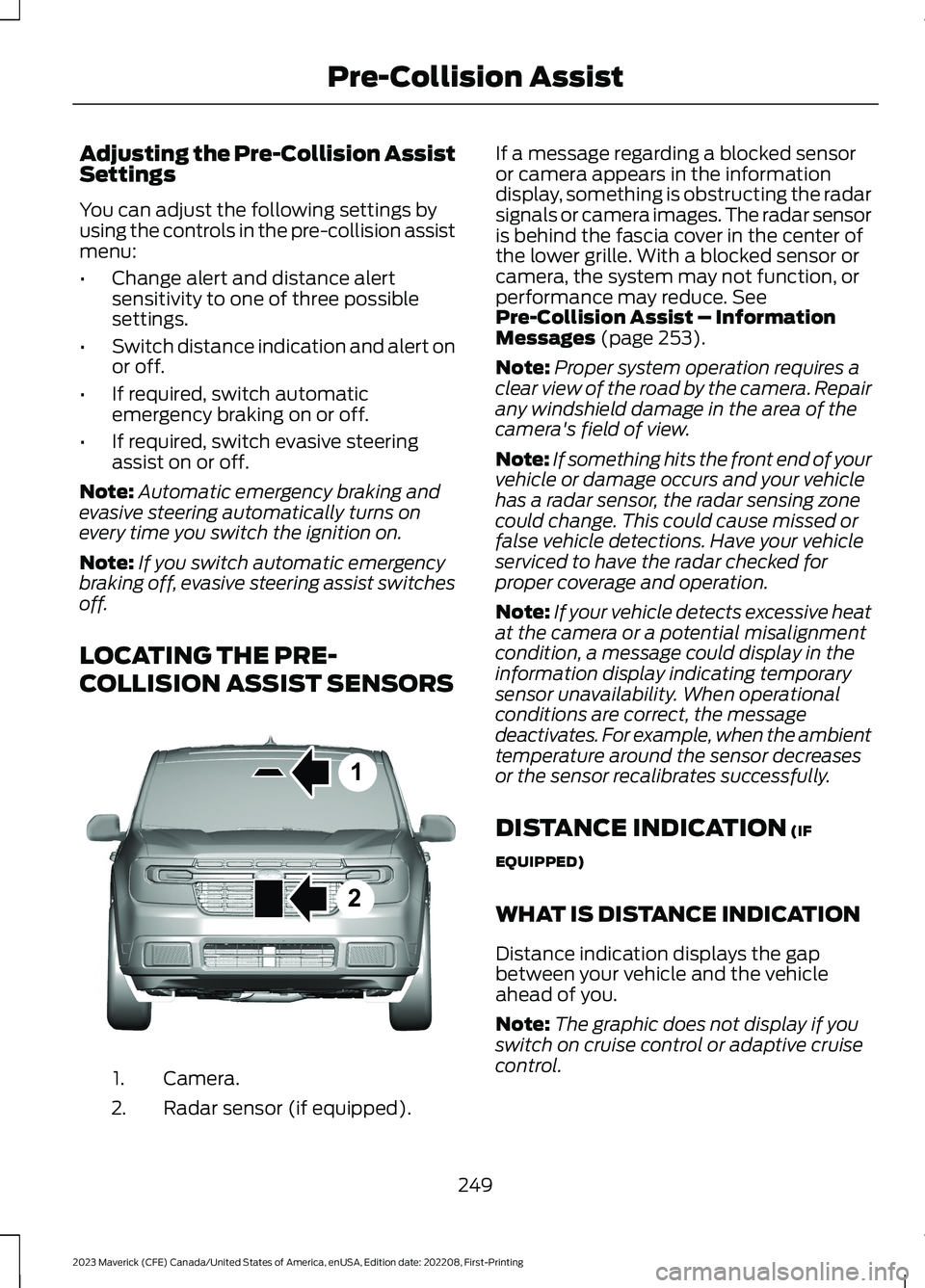
LOCATING THE PRE-
COLLISION ASSIST SENSORS
Camera.1.
Radar sensor (if equipped).2.
If a message regarding a blocked sensoror camera appears in the informationdisplay, something is obstructing the radarsignals or camera images. The radar sensoris behind the fascia cover in the center ofthe lower grille. With a blocked sensor orcamera, the system may not function, orperformance may reduce. SeePre-Collision Assist – InformationMessages (page 253).
Note:Proper system operation requires aclear view of the road by the camera. Repairany windshield damage in the area of thecamera's field of view.
Note:If something hits the front end of yourvehicle or damage occurs and your vehiclehas a radar sensor, the radar sensing zonecould change. This could cause missed orfalse vehicle detections. Have your vehicleserviced to have the radar checked forproper coverage and operation.
Note:If your vehicle detects excessive heatat the camera or a potential misalignmentcondition, a message could display in theinformation display indicating temporarysensor unavailability. When operationalconditions are correct, the messagedeactivates. For example, when the ambienttemperature around the sensor decreasesor the sensor recalibrates successfully.
DISTANCE INDICATION (IF
EQUIPPED)
WHAT IS DISTANCE INDICATION
Distance indication displays the gapbetween your vehicle and the vehicleahead of you.
Note:The graphic does not display if youswitch on cruise control or adaptive cruisecontrol.
249
2023 Maverick (CFE) Canada/United States of America, enUSA, Edition date: 202208, First-PrintingPre-Collision Assist12E355015
Page 255 of 556
SWITCHING DISTANCEINDICATION ON AND OFF
To switch the system on or off, use theinstrument cluster display:
1.Select Settings.
2.Select Driver Assistance.
3.Select Pre-Collision Assist.
4.Switch Distance indication on or off.
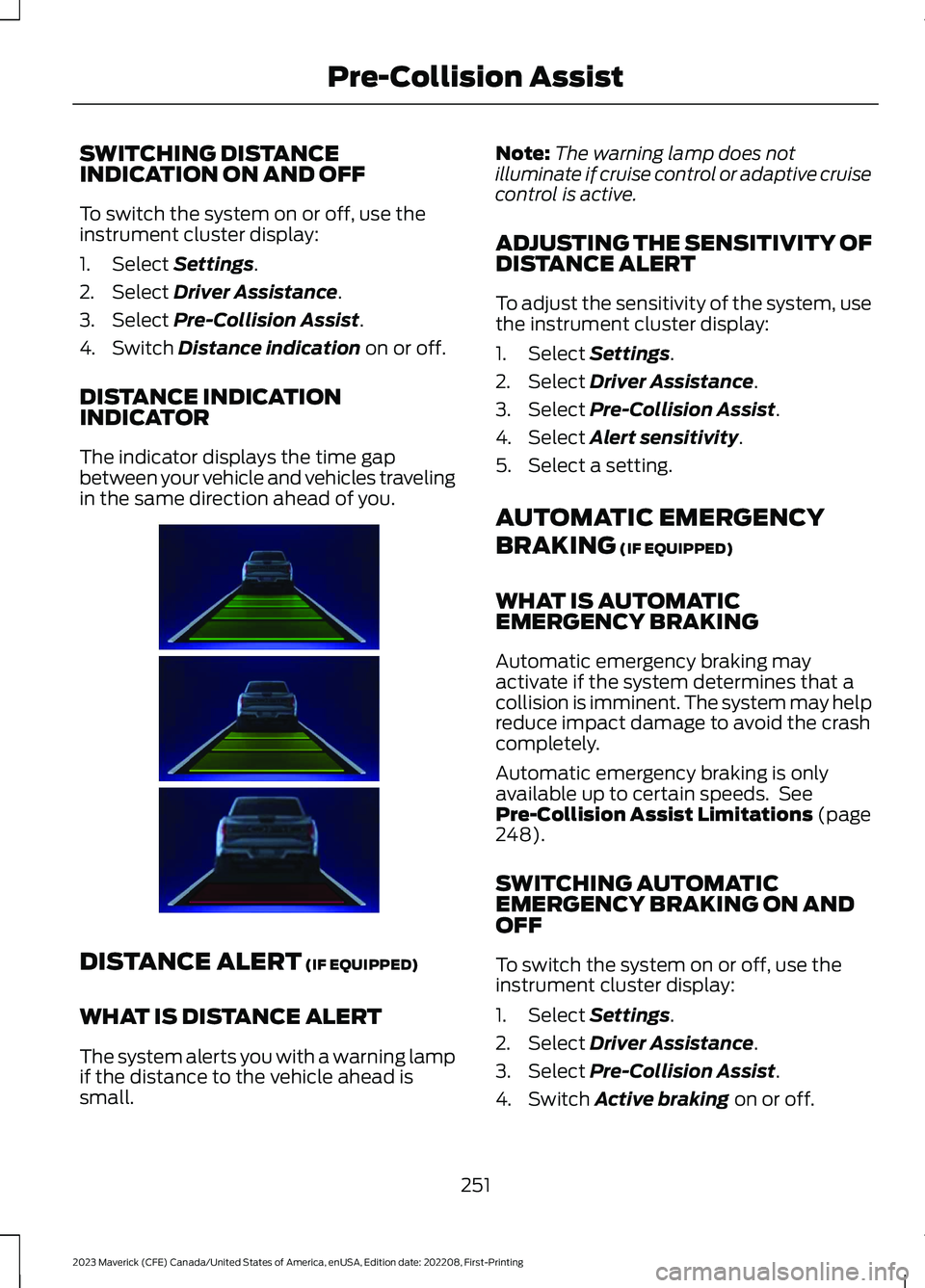
DISTANCE INDICATIONINDICATOR
The indicator displays the time gapbetween your vehicle and vehicles travelingin the same direction ahead of you.
DISTANCE ALERT (IF EQUIPPED)
WHAT IS DISTANCE ALERT
The system alerts you with a warning lampif the distance to the vehicle ahead issmall.
Note:The warning lamp does notilluminate if cruise control or adaptive cruisecontrol is active.
ADJUSTING THE SENSITIVITY OFDISTANCE ALERT
To adjust the sensitivity of the system, usethe instrument cluster display:
1.Select Settings.
2.Select Driver Assistance.
3.Select Pre-Collision Assist.
4.Select Alert sensitivity.
5.Select a setting.
AUTOMATIC EMERGENCY
BRAKING (IF EQUIPPED)
WHAT IS AUTOMATICEMERGENCY BRAKING
Automatic emergency braking mayactivate if the system determines that acollision is imminent. The system may helpreduce impact damage to avoid the crashcompletely.
Automatic emergency braking is onlyavailable up to certain speeds. SeePre-Collision Assist Limitations (page248).
SWITCHING AUTOMATICEMERGENCY BRAKING ON ANDOFF
To switch the system on or off, use theinstrument cluster display:
1.Select Settings.
2.Select Driver Assistance.
3.Select Pre-Collision Assist.
4.Switch Active braking on or off.
251
2023 Maverick (CFE) Canada/United States of America, enUSA, Edition date: 202208, First-PrintingPre-Collision AssistE383896
Page 256 of 556
EVASIVE STEERING ASSIST (IF
EQUIPPED)
WHAT IS EVASIVE STEERINGASSIST
If your vehicle is rapidly approaching a roaduser, evasive steering assist helps you steeraround the road user.
After you turn the steering wheel in anattempt to avoid a crash with the roaduser, the system applies additional steeringtorque to help you steer around the roaduser. After you pass the road user, thesystem applies steering torque when youturn the steering wheel to steer back intothe lane. The system deactivates after youfully pass the road user.
Note:Road users are defined as anotherstationary vehicle in the same lane, a vehicletraveling in the same lane in the samedirection as yours, a cyclist traveling in thesame direction as yours or a pedestrianwithin your driving path. See Pre-CollisionAssist Precautions (page 247).
EVASIVE STEERING ASSISTLIMITATIONS
Evasive steering assist only activates whenall the following occur:
•Automatic emergency braking andevasive steering assist are on.
•The system detects a road user aheadand starts to apply the brakes.
•You significantly turn the steeringwheel to steer around a road user.
Note:Evasive steering assist does notautomatically steer around a road user. Ifyou do not turn the steering wheel, evasivesteering assist does not activate.
Note:Evasive steering assist does notactivate if the distance to the road userahead is too small and the system cannotavoid a crash.
Note:Evasive steering does not activatewith cyclists or pedestrians.
SWITCHING EVASIVE STEERINGASSIST ON AND OFF
To switch the system on or off, use theinstrument cluster display:
1.Select Settings.
2.Select Driver Assistance.
3.Select Pre-Collision Assist.
4.Switch Evasive steering on or off.
Note:If you switch automatic emergencybraking off, evasive steering assist turns off.
Note:Automatic emergency braking andevasive steering assist turn on every timeyou switch the ignition on.
252
2023 Maverick (CFE) Canada/United States of America, enUSA, Edition date: 202208, First-PrintingPre-Collision Assist
Page 258 of 556
PRE-COLLISION ASSIST –FREQUENTLY ASKED QUESTIONS
Camera Troubleshooting
The windshield in front of the camerais dirty or obstructed.
Clean the outside of the windshield infront of the camera.
The windshield in front of the camerais clean, but the message remains inthe instrument cluster display.
Wait a short time. It could take severalminutes for the camera to detect thatthere is no obstruction.
Radar Troubleshooting (If Equipped)
The surface of the radar in the grille isdirty or obstructed.
Clean the grille surface in front of theradar or remove the object causing theobstruction.
The surface of the radar in the grille isclean, but the message remains in theinstrument cluster display.
Wait a short time. It could take severalminutes for the radar to detect thatthere is no obstruction.
Heavy rain, spray or fog is interferingwith the radar signals.
The pre-collision assist system istemporarily disabled. Pre-collisionassist reactivates a short time afterthe weather conditions improve.
Swirling water or snow or ice on thesurface of the road could interfere withthe radar signals.
The pre-collision assist system istemporarily disabled. Pre-collisionassist reactivates a short time afterthe weather conditions improve.
Radar is out of alignment due to a frontend impact.
Have your vehicle serviced to have theradar checked for proper coverage andoperation.
254
2023 Maverick (CFE) Canada/United States of America, enUSA, Edition date: 202208, First-PrintingPre-Collision Assist
Page 260 of 556
SWITCHING DRIVER ALERT ON
AND OFF
To switch the system on or off, use theinstrument cluster display:
1.Select Settings.
2.Select Driver Assistance.
3.Switch Driver Alert on or off.
Note:The system remains on or offdepending on how it was last set.
Resetting Driver Alert
You can reset the system by either:
•Switching the ignition off and on.
•Stopping the vehicle and then openingand closing the driver door.
DRIVER ALERT INDICATORS
System Warnings
The warning system has two stages:
1.A temporary warning is issued to adviseyou to take a rest. This message onlyappears for a short time.
2.If you do not rest and the systemcontinues to detect that your drivingdeteriorates, it issues a further warning.This remains in the instrument clusterdisplay until you cancel it.
Note:The system does not warn you if thevehicle speed falls below approximately40 mph (65 km/h).
DRIVER ALERT – TROUBLESHOOTING
DRIVER ALERT – INFORMATION MESSAGES
ActionMessage
Stop and rest as soon as it is safe to do so.Driver Alert Warning Rest Now
Take a rest soon.Driver Alert Warning Rest Suggested
256
2023 Maverick (CFE) Canada/United States of America, enUSA, Edition date: 202208, First-PrintingDriver Alert
Page 276 of 556
WHAT IS THE INTEGRATED
TRAILER BRAKE CONTROLLER
The trailer brake controller assists insmooth and effective trailer braking basedon the towing vehicle’s brake pressure.
INTEGRATED TRAILER BRAKE
CONTROLLER PRECAUTIONS
WARNING: Use the integratedtrailer brake controller to properly adjustthe trailer brakes and check allconnections before towing a trailer.Failure to follow this instruction couldresult in the loss of control of yourvehicle, personal injury or death.
•Only use the manual control lever forproper adjustment of the gain duringtrailer setup. Misuse, such asapplication during trailer sway, couldcause instability of trailer or towvehicle.
•Avoid towing in adverse weatherconditions. The trailer brake controllerdoes not provide anti-lock control ofthe trailer wheels. Trailer wheels canlock up on slippery surfaces, resultingin reduced stability of trailer and towvehicle.
•The trailer brake controller is only afactory-installed or dealer-installeditem. Ford is not responsible forwarranty or performance of thecontroller due to misuse or customerinstallation.
Note:Do not attempt removal of the trailerbrake controller without consulting theWorkshop Manual. Damage to the unit mayresult.
Note:Make sure to set the integrated trailerbrake controller gain to 0 if you are using anaftermarket trailer brake controller.
USING THE INTEGRATED
TRAILER BRAKE CONTROLLER
1.Make sure the trailer brakes are in goodworking condition, functioning normallyand properly adjusted. See your trailerdealer if necessary.
Note:An authorized dealer can diagnosethe trailer brake controller to determineexactly which trailer fault has occurred. Yourvehicle warranty does not cover issues withyour trailer.
2.Hook up the trailer and make theelectrical connections according to thetrailer manufacturer's instructions.
Note:Select default mode if the trailer hassurge brakes, or no brakes at all. The systemhas no effect on the braking performanceof the trailer in either of these cases.
Note:If a trailer is connected by a four-pinconnector, the trailer braking function willnot be supported.
3.When you plug in a trailer with electricor electric-over-hydraulic brakes, amessage confirming connectionappears in the information display.
4.Use the gain adjustment to find thedesired starting point. A gain setting of6.0 is a good starting point for heavierloads.
Note:Use the following steps to adjust thegain setting whenever road, weather andtrailer, or vehicle loading conditions, changefrom when you initially set the gain.
5.In a traffic-free environment, tow thetrailer on a dry, level surface andsqueeze the manual control levercompletely.
272
2023 Maverick (CFE) Canada/United States of America, enUSA, Edition date: 202208, First-PrintingIntegrated Trailer Brake Controller (If Equipped)
Page 277 of 556
6.If the trailer wheels lock up, indicatedby squealing tires, reduce the gainsetting. If the trailer wheels turn freely,increase the gain setting. Repeat Steps5 and 6 until the gain setting is at apoint just below trailer wheel lock-up.If towing a heavier trailer, trailer wheellock-up may not be attainable evenwith the maximum gain setting of 10.
Note:Only perform this procedure atspeeds of approximately 20–25 mph(30–40 km/h).
Note:The trailer brake controller reducesoutput at vehicle speeds below 11 mph(18 km/h) so that trailer and vehicle brakingis not jerky or harsh. This feature is onlyavailable when applying the brakes usingyour vehicle's brake pedal, not thecontroller.
Note:Your vehicle's brake system and thetrailer brake system work independently ofeach other. Changing the gain setting on thecontroller does not affect the operation ofyour vehicle's brakes whether you attach atrailer or not.
Note:With the proper electrical connection,pressing your vehicle brake pedal or usingthe manual control lever illuminates bothtrailer and vehicle brake lamps.
Note:When you switch the engine off, thecontroller output is disabled and the displayand module shut down. The controllermodule and display turn on when you switchthe ignition on.
Note:Trailer braking is suspended duringstop/start events to minimize battery draw.
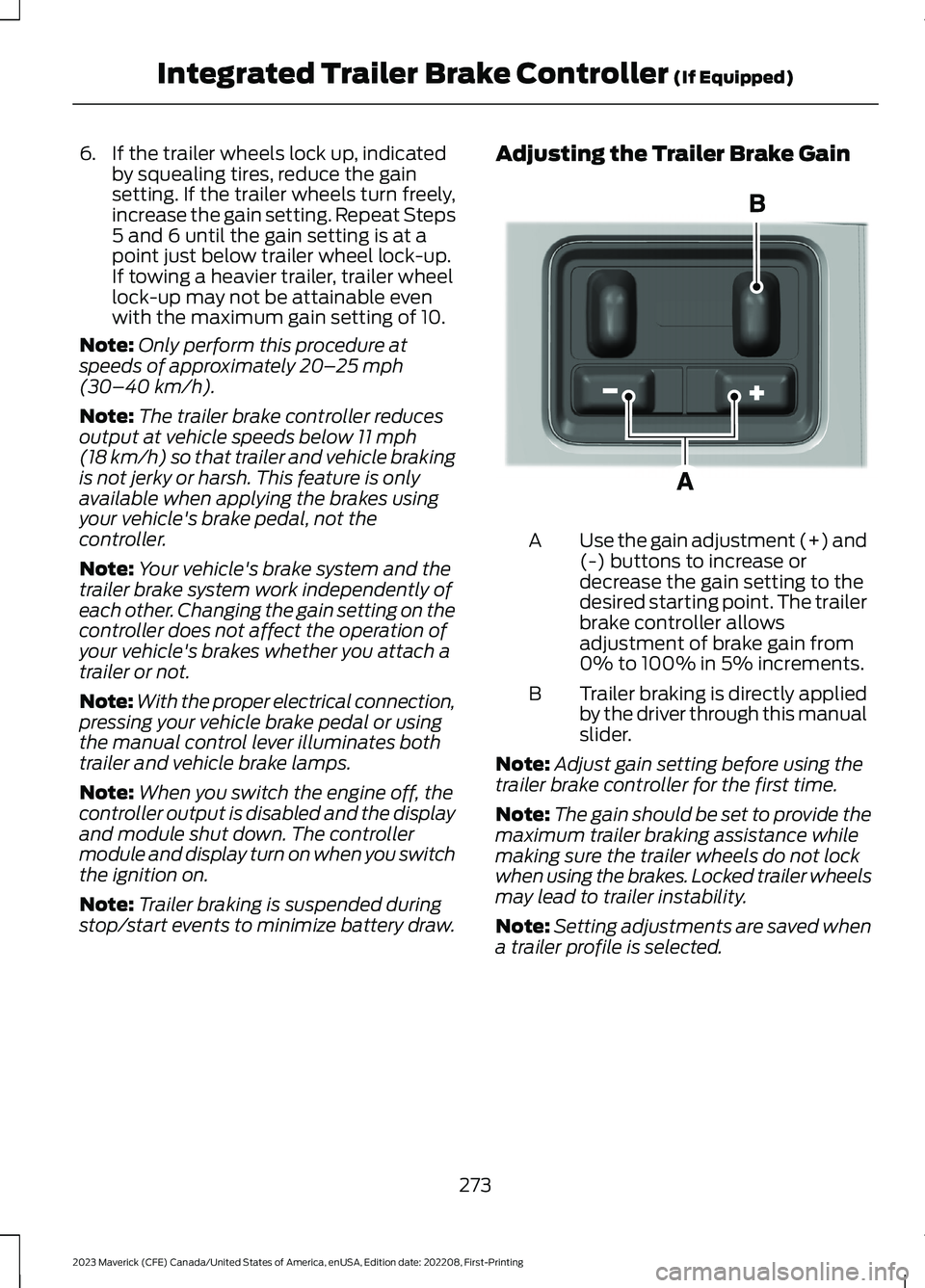
Adjusting the Trailer Brake Gain
Use the gain adjustment (+) and(-) buttons to increase ordecrease the gain setting to thedesired starting point. The trailerbrake controller allowsadjustment of brake gain from0% to 100% in 5% increments.
A
Trailer braking is directly appliedby the driver through this manualslider.
B
Note:Adjust gain setting before using thetrailer brake controller for the first time.
Note:The gain should be set to provide themaximum trailer braking assistance whilemaking sure the trailer wheels do not lockwhen using the brakes. Locked trailer wheelsmay lead to trailer instability.
Note:Setting adjustments are saved whena trailer profile is selected.
273
2023 Maverick (CFE) Canada/United States of America, enUSA, Edition date: 202208, First-PrintingIntegrated Trailer Brake Controller (If Equipped)E333154
Page 278 of 556
ADJUSTING THE INTEGRATED
TRAILER BRAKE CONTROLLER
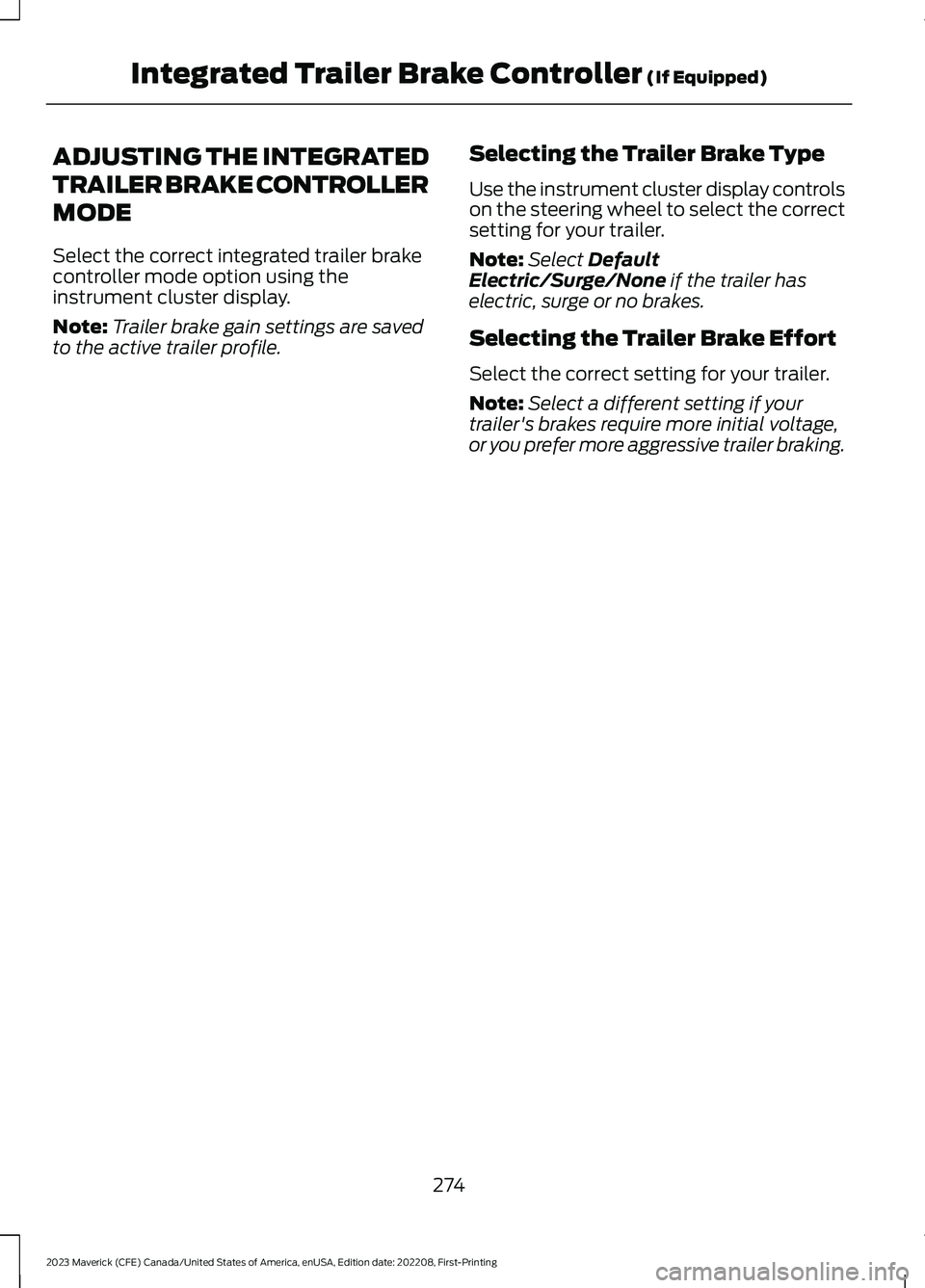
MODE
Select the correct integrated trailer brakecontroller mode option using theinstrument cluster display.
Note:Trailer brake gain settings are savedto the active trailer profile.
Selecting the Trailer Brake Type
Use the instrument cluster display controlson the steering wheel to select the correctsetting for your trailer.
Note:Select DefaultElectric/Surge/None if the trailer haselectric, surge or no brakes.
Selecting the Trailer Brake Effort
Select the correct setting for your trailer.
Note:Select a different setting if yourtrailer's brakes require more initial voltage,or you prefer more aggressive trailer braking.
274
2023 Maverick (CFE) Canada/United States of America, enUSA, Edition date: 202208, First-PrintingIntegrated Trailer Brake Controller (If Equipped)
Page 279 of 556
INTEGRATED TRAILER BRAKE CONTROLLER –
TROUBLESHOOTING
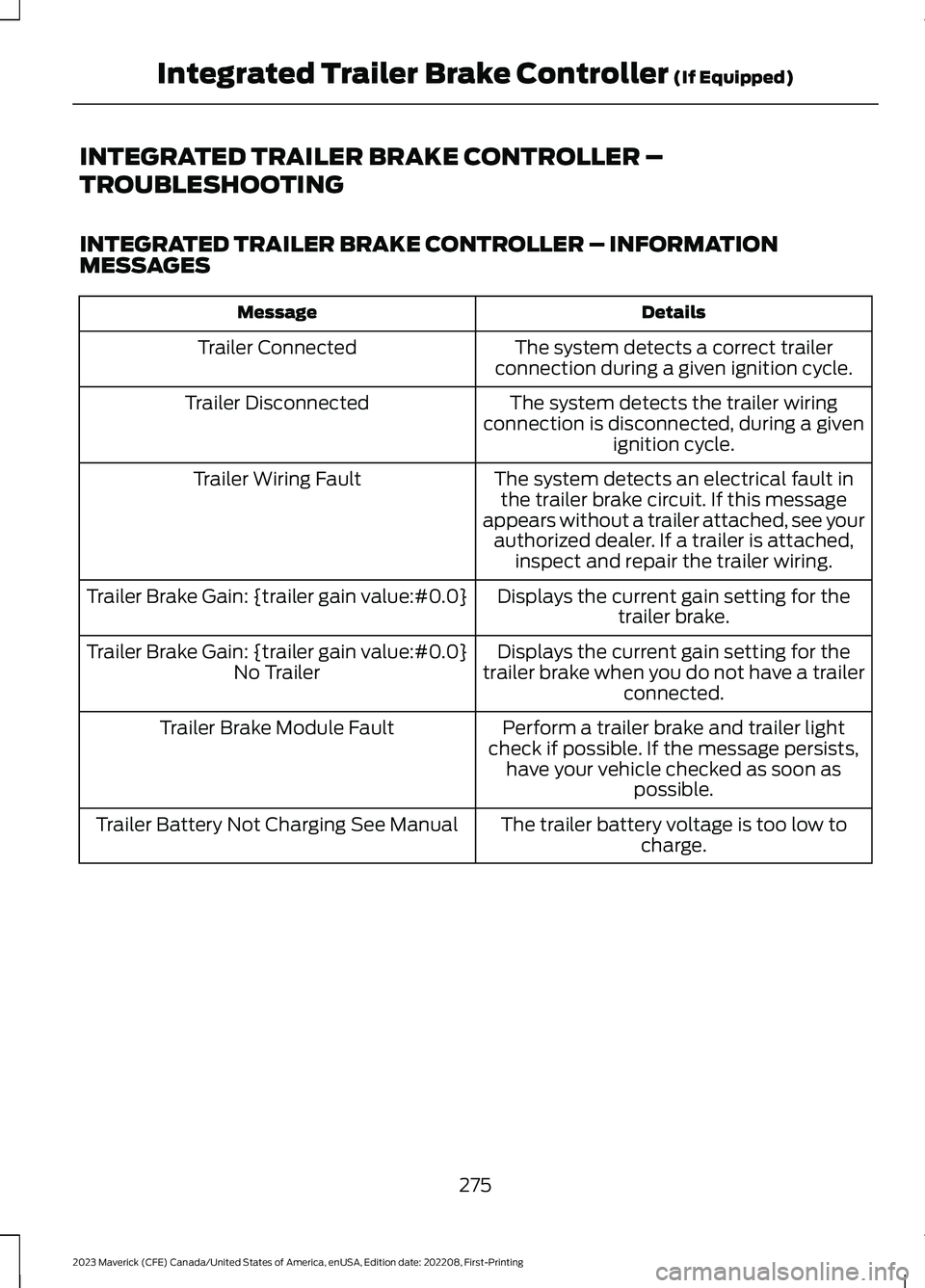
INTEGRATED TRAILER BRAKE CONTROLLER – INFORMATIONMESSAGES
DetailsMessage
The system detects a correct trailerconnection during a given ignition cycle.Trailer Connected
The system detects the trailer wiringconnection is disconnected, during a givenignition cycle.
Trailer Disconnected
The system detects an electrical fault inthe trailer brake circuit. If this messageappears without a trailer attached, see yourauthorized dealer. If a trailer is attached,inspect and repair the trailer wiring.
Trailer Wiring Fault
Displays the current gain setting for thetrailer brake.Trailer Brake Gain: {trailer gain value:#0.0}
Displays the current gain setting for thetrailer brake when you do not have a trailerconnected.
Trailer Brake Gain: {trailer gain value:#0.0}No Trailer
Perform a trailer brake and trailer lightcheck if possible. If the message persists,have your vehicle checked as soon aspossible.
Trailer Brake Module Fault
The trailer battery voltage is too low tocharge.Trailer Battery Not Charging See Manual
275
2023 Maverick (CFE) Canada/United States of America, enUSA, Edition date: 202208, First-PrintingIntegrated Trailer Brake Controller (If Equipped)