ECO FORD MAVERICK 2023 Owners Manual
[x] Cancel search | Manufacturer: FORD, Model Year: 2023, Model line: MAVERICK, Model: FORD MAVERICK 2023Pages: 556, PDF Size: 14.79 MB
Page 8 of 556
Customizing the Instrument ClusterDisplay - Vehicles With: 6.5 InchScreen...........................................................116
Personalized Settings..................................117
Fuel Economy Display - Gasoline...........118
Fuel Economy Display - Hybrid ElectricVehicle (HEV)............................................118
EV Coach - Hybrid Electric Vehicle (HEV)..........................................................................118
Brake Coach - Hybrid Electric Vehicle(HEV)............................................................119
Trip Summary - Hybrid Electric Vehicle(HEV)............................................................119
Trip Computer
Accessing the Trip Computer - VehiclesWith: 4.2 Inch Screen.............................120
Accessing the Trip Computer - VehiclesWith: 6.5 Inch Screen.............................120
Resetting the Trip Computer...................120
Resetting the Individual Trip Values -Vehicles With: 4.2 Inch Screen...........120
Configuring the Trip Computer - VehiclesWith: 4.2 Inch Screen.............................120
Trip Data.........................................................120
Remote Start
What Is Remote Start................................122
Remote Start Precautions........................122
Remote Start Limitations.........................122
Enabling Remote Start..............................122
Remotely Starting and Stopping theVehicle..........................................................122
Extending the Remote Start Duration.........................................................................122
Remote Start Remote Control Indicators.........................................................................123
Remote Start Settings...............................123
Climate Control - VehiclesWith: Dual AutomaticTemperature Control(DATC)
Identifying the Climate Control Unit.....125
Switching Climate Control On and Off.........................................................................125
Switching Recirculated Air On and Off.........................................................................125
Switching Air Conditioning On and Off.........................................................................125
Switching Maximum Defrost On and Off.........................................................................125
Switching Maximum Cooling On and Off.........................................................................125
Switching the Heated Wiper Park On andOff.................................................................125
Setting the Blower Motor Speed...........126
Switching the Heated Mirrors On and Off.........................................................................126
Setting the Temperature..........................126
Directing the Flow of Air............................126
Auto Mode......................................................126
Climate Control Hints................................128
Climate Control - VehiclesWith: Electronic AutomaticTemperature Control(EATC)
Identifying the Climate Control Unit.....130
Switching Climate Control On and Off.........................................................................130
Switching Recirculated Air On and Off.........................................................................130
Switching Air Conditioning On and Off.........................................................................130
Switching Maximum Defrost On and Off.........................................................................130
Switching Maximum Cooling On and Off.........................................................................130
Switching the Heated Wiper Park On andOff.................................................................130
Setting the Blower Motor Speed............131
4
2023 Maverick (CFE) Canada/United States of America, enUSA, Edition date: 202208, First-PrintingTable of Contents
Page 13 of 556
Cross Traffic Alert
What Is Cross Traffic Alert......................244
How Does Cross Traffic Alert Work......244
Cross Traffic Alert Precautions..............244
Cross Traffic Alert Limitations...............244
Switching Cross Traffic Alert On and Off........................................................................244
Locating the Cross Traffic Alert Sensors........................................................................245
Cross Traffic Alert Indicators..................245
Cross Traffic Alert – Troubleshooting........................................................................246
Pre-Collision Assist
What Is Pre-Collision Assist....................247
How Does Pre-Collision Assist Work........................................................................247
Pre-Collision Assist Precautions...........247
Pre-Collision Assist Limitations............248
Switching Pre-Collision Assist On andOff................................................................248
Locating the Pre-Collision Assist Sensors........................................................................249
Distance Indication....................................249
Distance Alert................................................251
Automatic Emergency Braking...............251
Evasive Steering Assist.............................252
Pre-Collision Assist – Troubleshooting........................................................................253
Driver Alert
What Is Driver Alert....................................255
How Does Driver Alert Work...................255
Driver Alert Precautions...........................255
Driver Alert Limitations.............................255
Switching Driver Alert On and Off........256
Driver Alert Indicators...............................256
Driver Alert – Troubleshooting..............256
Load Carrying
Load Carrying Precautions......................257
Using a Slide-In Camper..........................258
Locating the Safety ComplianceCertification Labels...............................258
What Is the Gross Axle Weight Rating........................................................................258
What Is the Gross Vehicle Weight Rating........................................................................258
What Is the Gross Combined WeightRating..........................................................258
Calculating Payload...................................259
Calculating the Load Limit......................259
Pickup Bed
Pickup Bed Precautions...........................262
Pickup Bed Anchor Points.......................262
Tailgate Anchor Points.............................263
Pickup Bed Slots........................................264
Connecting a Trailer
Connecting a Trailer Precautions.........265
Connecting a Trailer...................................265
Towing a Trailer
Towing a Trailer Precautions..................267
Trailer Brake Precautions.........................267
Towing a Trailer Limitations...................268
Loading Your Trailer...................................268
Trailer Towing Hints...................................268
Launching or Retrieving a Boat orPersonal Watercraft..............................269
Towing Weights and Dimensions.........270
Integrated Trailer BrakeController
What Is the Integrated Trailer BrakeController...................................................272
Integrated Trailer Brake ControllerPrecautions...............................................272
Using the Integrated Trailer BrakeController...................................................272
Adjusting the Integrated Trailer BrakeController Mode......................................274
9
2023 Maverick (CFE) Canada/United States of America, enUSA, Edition date: 202208, First-PrintingTable of Contents
Page 14 of 556
Integrated Trailer Brake Controller –Troubleshooting......................................275
Trailer Sway Control
How Does Trailer Sway Control Work.........................................................................277
Trailer Sway Control Precautions..........277
Switching Trailer Sway Control On andOff.................................................................277
Driving Hints
Cold Weather Precautions......................278
Driving on Snow and Ice...........................278
Breaking-In....................................................278
Driving Economically.................................278
Driving in Special Conditions..................279
Driving Through Shallow Water............280
Floor Mats.....................................................280
Crash and BreakdownInformation
Roadside Assistance.................................282
High Voltage Battery Vehicle Precautions- Hybrid Electric Vehicle (HEV).........283
Switching the Hazard Flashers On andOff................................................................284
Jump Starting the Vehicle.......................284
Post-Crash Alert System.........................287
Post Impact Braking..................................288
Automatic Crash Shutoff........................288
Recovery Towing.........................................289
Transporting the Vehicle.........................290
Towing Your Vehicle
Towing Your Vehicle Precautions.........292
Recreationally Towing Your Vehicle -Gasoline, FWD.........................................292
Recreationally Towing Your Vehicle -Gasoline, AWD.........................................292
Recreationally Towing Your Vehicle -Hybrid Electric Vehicle (HEV)............292
Emergency Towing - Gasoline...............293
Emergency Towing - Hybrid ElectricVehicle (HEV)..........................................293
Towing Your Vehicle – Troubleshooting- Hybrid Electric Vehicle (HEV).........294
Fuses
Fuse Precautions........................................295
Under Hood Fuse Box...............................295
Body Control Module Fuse Box.............301
Identifying Fuse Types..............................303
Fuses – Troubleshooting.........................303
Maintenance
Maintenance Precautions.......................304
Opening and Closing the Hood............304
Under Hood Overview - 2.5L.................306
Under Hood Overview - 2.0L EcoBoost™........................................................................307
Engine Oil......................................................308
Checking the Coolant...............................309
Changing the Engine Air Filter - 2.0LEcoBoost™................................................313
Changing the Engine Air Filter - 2.5L,Hybrid Electric Vehicle (HEV).............314
Changing the Fuel Filter............................315
Drive Belt Routing Overview - 2.0LEcoBoost™................................................315
Changing the 12V Battery.........................315
Changing the 12V Battery - HybridElectric Vehicle (HEV)...........................318
Adjusting the Headlamps.......................320
Exterior Bulbs................................................321
Interior Bulbs................................................326
Vehicle Care
Cleaning Products.......................................327
Cleaning the Exterior.................................328
Cleaning the Interior..................................329
Repairing Minor Paint Damage..............332
Waxing Your Vehicle..................................332
10
2023 Maverick (CFE) Canada/United States of America, enUSA, Edition date: 202208, First-PrintingTable of Contents
Page 15 of 556
Storing Your Vehicle
Preparing Your Vehicle for Storage......333
Removing Your Vehicle From Storage........................................................................334
Wheel and Tire Information
Locating the Tire label..............................335
Department of Transportation UniformTire Quality Grades................................335
Information on the Tire Sidewall..........336
Glossary of Tire Terminology..................341
Tire Replacement Requirements..........342
Using Snow Chains....................................344
Tire Care
Checking the Tire Pressures...................346
Inflating the Tires.......................................346
Inspecting the Tire for Wear...................347
Inspecting the Tire for Damage.............347
Inspecting the Wheel Valve Stems......348
Tire Rotation.................................................348
Tire Pressure MonitoringSystem
What Is the Tire Pressure MonitoringSystem.......................................................350
Tire Pressure Monitoring SystemOverview....................................................350
Tire Pressure Monitoring SystemPrecautions................................................351
Tire Pressure Monitoring SystemLimitations.................................................351
Viewing the Tire Pressures......................352
Tire Pressure Monitoring System –Troubleshooting......................................352
Changing a Road Wheel
Changing a Flat Tire...................................354
Wheel Nuts....................................................361
Capacities and Specifications
Engine Specifications - 2.0L EcoBoost™........................................................................363
Engine Specifications - 2.5L, HybridElectric Vehicle (HEV)..........................364
Motorcraft Parts - 2.0L EcoBoost™.....365
Motorcraft Parts - 2.5L, Hybrid ElectricVehicle (HEV)..........................................365
Engine Oil Capacity and Specification -2.0L EcoBoost™.....................................367
Engine Oil Capacity and Specification -2.5L, Hybrid Electric Vehicle (HEV).......................................................................368
Cooling System Capacity andSpecification - 2.0L EcoBoost™......369
Cooling System Capacity andSpecification - 2.5L, Hybrid ElectricVehicle (HEV)..........................................370
Fuel Tank Capacity - Excluding: HybridElectric Vehicle (HEV)............................371
Fuel Tank Capacity - Hybrid ElectricVehicle (HEV)...........................................372
Air Conditioning System Capacity andSpecification - 2.0L EcoBoost™.......373
Air Conditioning System Capacity andSpecification - 2.5L, Hybrid ElectricVehicle (HEV)...........................................374
Washer Fluid Specification.....................374
Brake Fluid Specification.........................375
Vehicle Identification
Vehicle Identification Number...............376
Connected Vehicle
What Is a Connected Vehicle..................377
Connected Vehicle Requirements........377
Connected Vehicle Limitations..............377
Connecting the Vehicle to a MobileNetwork......................................................377
Connecting the Vehicle to a Wi-FiNetwork......................................................377
11
2023 Maverick (CFE) Canada/United States of America, enUSA, Edition date: 202208, First-PrintingTable of Contents
Page 16 of 556
Connected Vehicle – Troubleshooting -Vehicles With: Modem..........................378
Connected Vehicle – Troubleshooting -Vehicles With: SYNC 3/SYNC 2.5......379
Vehicle Wi-Fi Hotspot
Creating a Vehicle Wi-Fi Hotspot..........381
Changing the Vehicle Wi-Fi HotspotName or Password.................................381
Vehicle Wi-Fi Hotspot – Troubleshooting........................................................................382
Audio System - VehiclesWithout: SYNC 3
General Information..................................383
Audio Unit......................................................383
AM/FM Radio...............................................384
Connecting a Bluetooth® Device.........385
Streaming Bluetooth Audio...................386
Playing Media From a USB Device.......387
USB Port.........................................................387
Apps................................................................388
Using Voice Recognition..........................390
Audio System – Troubleshooting..........391
Audio System - Vehicles With:SYNC 3
Audio System Precautions......................392
Switching the Audio Unit On and Off........................................................................392
Selecting the Audio Source....................392
Playing or Pausing the Audio Source........................................................................392
Adjusting the Volume................................392
Switching Shuffle Mode On and Off........................................................................392
Switching Repeat Mode On and Off........................................................................392
Setting a Memory Preset.........................393
Muting the Audio........................................393
Adjusting the Sound Settings................393
Setting the Clock and Date.....................393
AM/FM Radio...............................................394
Digital Radio.................................................395
Satellite Radio.............................................396
Audio System – Troubleshooting.........397
SYNC™ 3
General Information...................................401
Using Voice Recognition..........................403
Entertainment..............................................410
Phone.............................................................420
Navigation.....................................................422
Electric Vehicle Information....................427
Apps................................................................428
Settings..........................................................430
SYNC™ 3 Troubleshooting.....................432
Vehicle Software Updates -Vehicles Without: SYNC 3
Vehicle Software Updates......................445
Accessories
Accessories...................................................446
12V Pre-Wired Connections
What are the 12V Pre-Wired Connections........................................................................447
12V Pre-Wired Connections Precautions........................................................................447
Locating the 12V Pre-Wired Connections........................................................................447
Ford Protect
What Is Ford Protect.................................448
Scheduled Maintenance
General Maintenance Information......450
Normal Scheduled Maintenance.........453
Special Operating Conditions ScheduledMaintenance............................................456
12
2023 Maverick (CFE) Canada/United States of America, enUSA, Edition date: 202208, First-PrintingTable of Contents
Page 17 of 556
Customer Information
Rollover Warning........................................459
Our Sustainability Report.......................459
The Better Business Bureau Auto LineProgram.....................................................459
The Mediation and Arbitration Program.......................................................................460
Ordering a Canadian French Owner'sManual.......................................................460
Reporting Safety Defects in the UnitedStates..........................................................461
Reporting Safety Defects in Canada.........................................................................461
Third Party Software CopyrightAcknowledgment...................................463
Radio Frequency Certification Labels........................................................................463
Perchlorate...................................................502
Replacement Parts Recommendation........................................................................502
Mobile Communications Equipment........................................................................502
Federal Highway AdministrationRegulation.................................................503
End User License Agreement................503
Emission Law...............................................528
Export Unique Options.............................529
Warranty Information...............................530
Appendices
Electromagnetic Compatibility.............532
13
2023 Maverick (CFE) Canada/United States of America, enUSA, Edition date: 202208, First-PrintingTable of Contents
Page 21 of 556
ABOUT THIS MANUAL
Thank you for choosing Ford. Werecommend that you take some time toget to know your vehicle by reading thismanual. The more that you know aboutyour vehicle, the greater the safety andpleasure you will get from driving it.
WARNING: Driving whiledistracted can result in loss of vehiclecontrol, crash and injury. We stronglyrecommend that you use extremecaution when using any device that maytake your focus off the road. Yourprimary responsibility is the safeoperation of your vehicle. Werecommend against the use of anyhand-held device while driving andencourage the use of voice-operatedsystems when possible. Make sure youare aware of all applicable local lawsthat may affect the use of electronicdevices while driving.
Note: This manual describes productfeatures and options available throughoutthe range of available models, sometimeseven before they are generally available. Itmay describe options not fitted to thevehicle you have purchased.
Note: Some of the illustrations in thismanual may show features as used indifferent models, so may appear differentto you on your vehicle.
Note: Always use and operate your vehiclein line with all applicable laws andregulations.
Note: Pass on this manual when sellingyour vehicle. It is an integral part of yourvehicle.
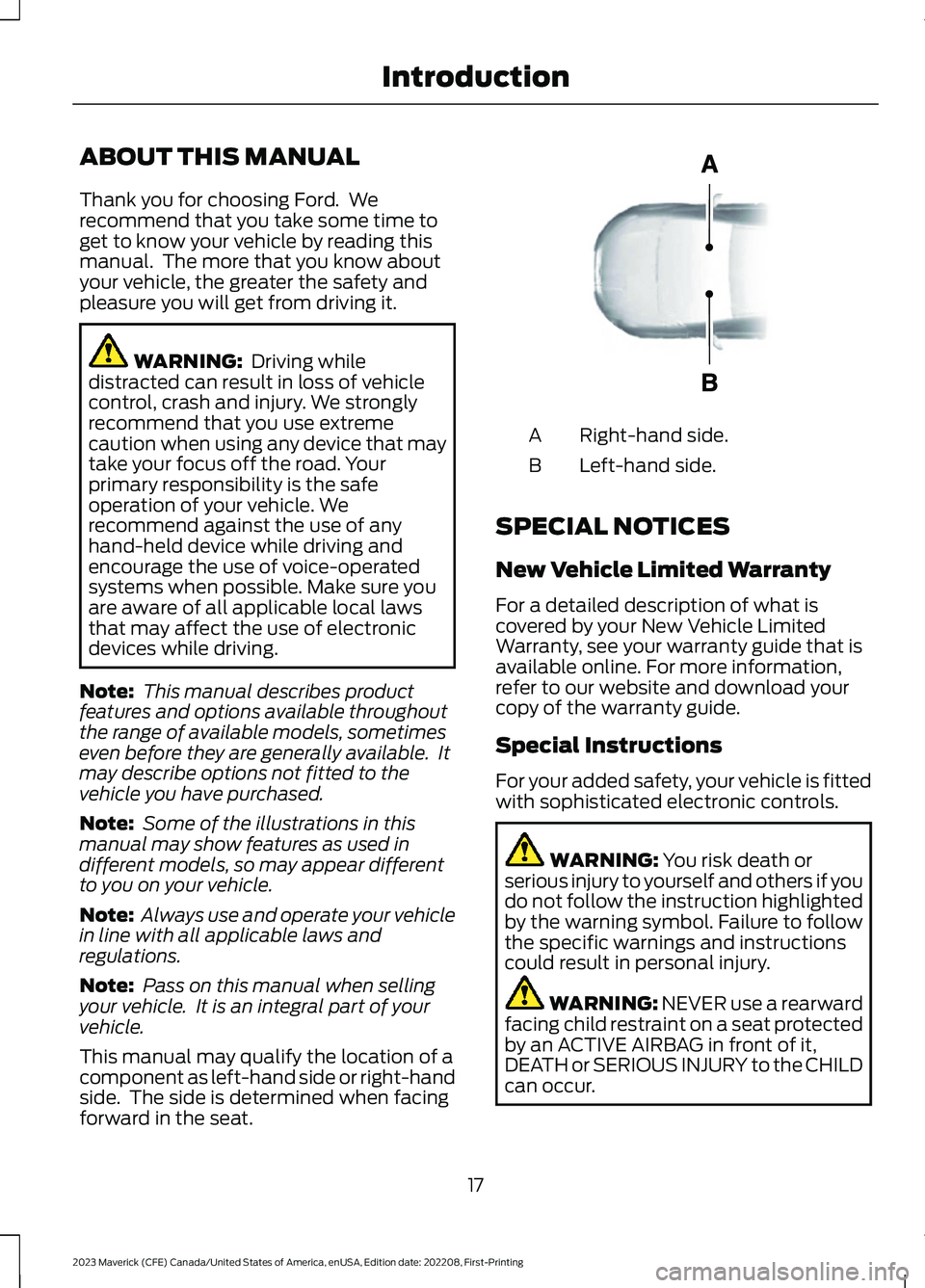
This manual may qualify the location of acomponent as left-hand side or right-handside. The side is determined when facingforward in the seat.
Right-hand side.A
Left-hand side.B
SPECIAL NOTICES
New Vehicle Limited Warranty
For a detailed description of what iscovered by your New Vehicle LimitedWarranty, see your warranty guide that isavailable online. For more information,refer to our website and download yourcopy of the warranty guide.
Special Instructions
For your added safety, your vehicle is fittedwith sophisticated electronic controls.
WARNING: You risk death orserious injury to yourself and others if youdo not follow the instruction highlightedby the warning symbol. Failure to followthe specific warnings and instructionscould result in personal injury.
WARNING: NEVER use a rearwardfacing child restraint on a seat protectedby an ACTIVE AIRBAG in front of it,DEATH or SERIOUS INJURY to the CHILDcan occur.
17
2023 Maverick (CFE) Canada/United States of America, enUSA, Edition date: 202208, First-PrintingIntroductionE154903
Page 22 of 556
On Board Diagnostics Data LinkConnector
WARNING: Do not connectwireless plug-in devices to the data linkconnector. Unauthorized third partiescould gain access to vehicle data andimpair the performance of safety relatedsystems. Only allow repair facilities thatfollow our service and repair instructionsto connect their equipment to the datalink connector.
Your vehicle has an OBD Data LinkConnector (DLC) that is used inconjunction with a diagnostic scan tool forvehicle diagnostics, repairs andreprogramming services. Installing anaftermarket device that uses the DLCduring normal driving for purposes such asremote insurance company monitoring,transmission of vehicle data to otherdevices or entities, or altering theperformance of the vehicle, may causeinterference with or even damage tovehicle systems. We do not recommendor endorse the use of unapprovedaftermarket plug-in devices. The vehicleWarranty will not cover damage causedby an aftermarket plug-in device.
Notice to Owners of Pickup Trucksand Utility Type Vehicles
WARNING: Utility vehicles have asignificantly higher rollover rate thanother types of vehicles.
Before you drive your vehicle, please readthis Owner’s Guide carefully. Your vehicleis not a passenger car. As with othervehicles of this type, failure to operate thisvehicle correctly may result in loss ofvehicle control, vehicle rollover, personalinjury or death.
Using Your Vehicle With aSnowplow
Do not use this vehicle forsnowplowing.
Your vehicle does not have a snowplowingpackage.
Using Your Vehicle as anAmbulance
Do not use this vehicle as anambulance.
Your vehicle does not have the AmbulancePreparation Package.
18
2023 Maverick (CFE) Canada/United States of America, enUSA, Edition date: 202208, First-PrintingIntroduction
Page 26 of 556
WARNING: Do not connectwireless plug-in devices to the data linkconnector. Unauthorized third partiescould gain access to vehicle data andimpair the performance of safety relatedsystems. Only allow repair facilities thatfollow our service and repair instructionsto connect their equipment to the datalink connector.
We respect your privacy and arecommitted to protecting it. Theinformation contained in this publicationwas correct at the time of release, but astechnology rapidly changes, werecommend that you visit the local Fordwebsite for the latest information.
Your vehicle has electronic control unitsthat have data recording functionality andthe ability to permanently or temporarilystore data. This data could includeinformation on the condition and status ofyour vehicle, vehicle maintenancerequirements, events and malfunctions.The types of data that can be recorded aredescribed in this section. Some of the datarecorded is stored in event logs or errorlogs.
Note:Error logs are reset following a serviceor repair.
Note:We may provide information inresponse to requests from law enforcement,other government authorities and thirdparties acting with lawful authority orthrough a legal process. Such informationcould be used by them in legal proceedings.
Data recorded includes, for example:
•Operating states of systemcomponents, for example fuel level,tire pressure and battery charge level.
•Vehicle and component status, forexample wheel speed, deceleration,lateral acceleration and seatbeltstatus.
•Events or errors in essential systems,for example headlamps and brakes.
•System responses to driving situations,for example airbag deployment andstability control.
•Environmental conditions, for exampletemperature.
Some of this data, when used incombination with other information, forexample an accident report, damage to avehicle or eyewitness statements, couldbe associated with a specific person.
Services That We Provide
If you use our services, we collect and usedata, for example account information,vehicle location and driving characteristics,that could identify you. We transmit thisdata through a dedicated, protectedconnection. We only collect and use datato enable your use of our services to whichyou have subscribed, with your consent orwhere permitted by law. For additionalinformation, see the terms and conditionsof the services to which you havesubscribed.
For additional information about ourprivacy policy, refer to the local Fordwebsite.
Services That Third PartiesProvide
We recommend that you review the termsand conditions and data privacyinformation for any services equipped withyour vehicle or to which you subscribe. Wetake no responsibility for services that thirdparties provide.
22
2023 Maverick (CFE) Canada/United States of America, enUSA, Edition date: 202208, First-PrintingData Privacy
Page 27 of 556
SERVICE DATA
Service data recorders in your vehicle arecapable of collecting and storingdiagnostic information about your vehicle.This potentially includes information aboutthe performance or status of varioussystems and modules in the vehicle, suchas engine, throttle, steering or brakesystems. In order to properly diagnose andservice your vehicle, Ford Motor Company(Ford of Canada in Canada), and serviceand repair facilities may access or shareamong them vehicle diagnosticinformation received through a directconnection to your vehicle whendiagnosing or servicing your vehicle.Additionally, Ford Motor Company (Fordof Canada, in Canada) may, wherepermitted by law, use vehicle diagnosticinformation for vehicle improvement orwith other information we may have aboutyou, for example, your contact information,to offer you products or services that mayinterest you. Data may be provided to ourservice providers such as part suppliersthat may help diagnose malfunctions, andwho are similarly obligated to protect data.We retain this data only as long asnecessary to perform these functions or tocomply with law. We may provideinformation where required in response toofficial requests to law enforcement orother government authorities or thirdparties acting with lawful authority or courtorder, and such information may be usedin legal proceedings. For U.S. only (ifequipped), if you choose to use connectedapps and services, you consent that certaindiagnostic information may also beaccessed electronically by Ford MotorCompany and Ford authorized servicefacilities, and that the diagnosticinformation may be used to provideservices to you, personalizing yourexperience, troubleshoot, and to improveproducts and services and offer youproducts and services that may interest
you, where permitted by law. For Canadaonly, for more information, please reviewthe Ford of Canada privacy policy atwww.ford.ca, including our U.S. datastorage and use of service providers inother jurisdictions who may be subject tolegal requirements in Canada, the UnitedStates and other countries applicable tothem, for example, lawful requirements todisclose personal information togovernmental authorities in thosecountries.
EVENT DATA
This vehicle is equipped with an event datarecorder. The main purpose of an eventdata recorder is to record, in certain crashor near crash-like situations, such as anairbag deployment or hitting a roadobstacle; this data will assist inunderstanding how a vehicle’s systemsperformed. The event data recorder isdesigned to record data related to vehicledynamics and safety systems for a shortperiod of time, typically 30 seconds or less.
The event data recorder in this vehicle isdesigned to record such data as:
•How various systems in your vehiclewere operating.
•Whether or not the driver andpassenger seatbelts werebuckled/fastened.
•How far (if at all) the driver wasdepressing the accelerator and/or thebrake pedal.
•How fast the vehicle was traveling.
•Where the driver was positioning thesteering wheel.
This data can help provide a betterunderstanding of the circumstances inwhich crashes and injuries occur.
23
2023 Maverick (CFE) Canada/United States of America, enUSA, Edition date: 202208, First-PrintingData Privacy