ECO FORD MAVERICK 2023 Service Manual
[x] Cancel search | Manufacturer: FORD, Model Year: 2023, Model line: MAVERICK, Model: FORD MAVERICK 2023Pages: 556, PDF Size: 14.79 MB
Page 88 of 556
PASSIVE ANTI-THEFT
SYSTEM
WHAT IS THE PASSIVE ANTI-THEFT SYSTEM
The passive anti-theft system preventssomeone from starting the vehicle with anincorrectly coded key.
Note:Do not leave a duplicate coded keyin your vehicle. Always take the keys andlock all the doors when leaving your vehicle.
HOW DOES THE PASSIVE ANTI-THEFT SYSTEM WORK
The passive anti-theft system arms whenyou switch the ignition off.
It disarms when the ignition is switched onwith a correctly coded key.
Note:The system is not compatible withnon-Ford aftermarket remote start systems.
Note:Do not leave a duplicate coded keyin your vehicle. Always take the keys andlock all doors when leaving your vehicle.
ANTI-THEFT ALARM SYSTEM
(IF EQUIPPED)
WHAT IS THE ANTI-THEFT ALARMSYSTEM
The anti-theft alarm system warns you ofan unauthorized entry to your vehicle.
HOW DOES THE ANTI-THEFTALARM SYSTEM WORK
When armed, the anti-theft alarm istriggered in any of the following ways:
•If someone opens a door, the liftgateor the hood without a correctly codedkey or remote control.
•If you turn the power on without acorrectly coded key.
•If the interior sensors detect movementinside your vehicle.
•If the inclination sensors detect anattempt to raise your vehicle.
•If someone disconnects the vehiclebattery or the battery backup alarm.
If the anti-theft alarm is triggered, thealarm horn sounds for 30 seconds and thedirection indicators flash for 5 minutes.
Any further attempts to carry out one ofthe above sounds the alarm again.
WHAT IS THE PERIMETER ALARM
The perimeter alarm is designed to detectunauthorized access to your vehicle.
WHAT ARE THE INTERIORSENSORS
The interior sensors are designed to detectany movement inside your vehicle.
The interior sensors are in the overheadconsole.
Note:Do not cover the interior sensors.
WHAT ARE THE INCLINATIONSENSORS
The inclination sensor is designed to detectan attempt to raise your vehicle, forexample to remove a wheel or to tow itaway.
84
2023 Maverick (CFE) Canada/United States of America, enUSA, Edition date: 202208, First-PrintingSecurity
Page 89 of 556
WHAT IS THE BATTERY BACKUPALARM
The battery backup alarm is an additionalalarm sounder that has its own battery. Itcan detect if the vehicle battery isdisconnected to overcome the alarmsystem.
ARMING THE ANTI-THEFT ALARMSYSTEM
The alarm is ready to arm when yourvehicle is switched off.
Lock your vehicle with your remote controlto arm the alarm.
DISARMING THE ANTI-THEFTALARM SYSTEM
Disarm the alarm by performing any of thefollowing actions:
•Unlock the doors or luggagecompartment with the remote control.
•Switch your vehicle on or start yourvehicle.
ANTI-THEFT ALARM SYSTEM
SETTINGS
WHAT ARE THE ALARM SECURITYLEVELS
You can select two levels of alarm security,all sensors and perimeter sensing.
All Sensors
All sensors is the standard setting.
In all sensors, all equipped sensors are onwhen you arm the alarm.
Note:Do not arm the alarm with all sensorsif passengers, animals or other movingobjects are inside your vehicle.
Perimeter Sensing
In perimeter sensing, the interior sensorsare off when you arm the alarm.
All the other equipped sensors activatewhen you arm the alarm in this mode.
SETTING THE ALARM SECURITYLEVEL
To select a different security level, use theinstrument cluster display:
1.Select Settings.
2.Select Vehicle.
3.Select Alarm.
4.Select a setting.
WHAT IS ASK ON EXIT
You can choose which level of security yourequire after you switch the ignition off.
Note:If you do not choose a setting, thesystem defaults to all sensors.
SWITCHING ASK ON EXIT ON ANDOFF
To switch the system on or off, use theinstrument cluster display:
1.Select Settings.
2.Select Vehicle.
3.Select Alarm.
4.Switch Ask on exit on or off.
85
2023 Maverick (CFE) Canada/United States of America, enUSA, Edition date: 202208, First-PrintingSecurity
Page 92 of 556
ADJUSTING THE STEERING
WHEEL
WARNING: Do not adjust thesteering wheel when your vehicle ismoving.
Note:Make sure that you are sitting in thecorrect position. See Sitting in the CorrectPosition (page 135).
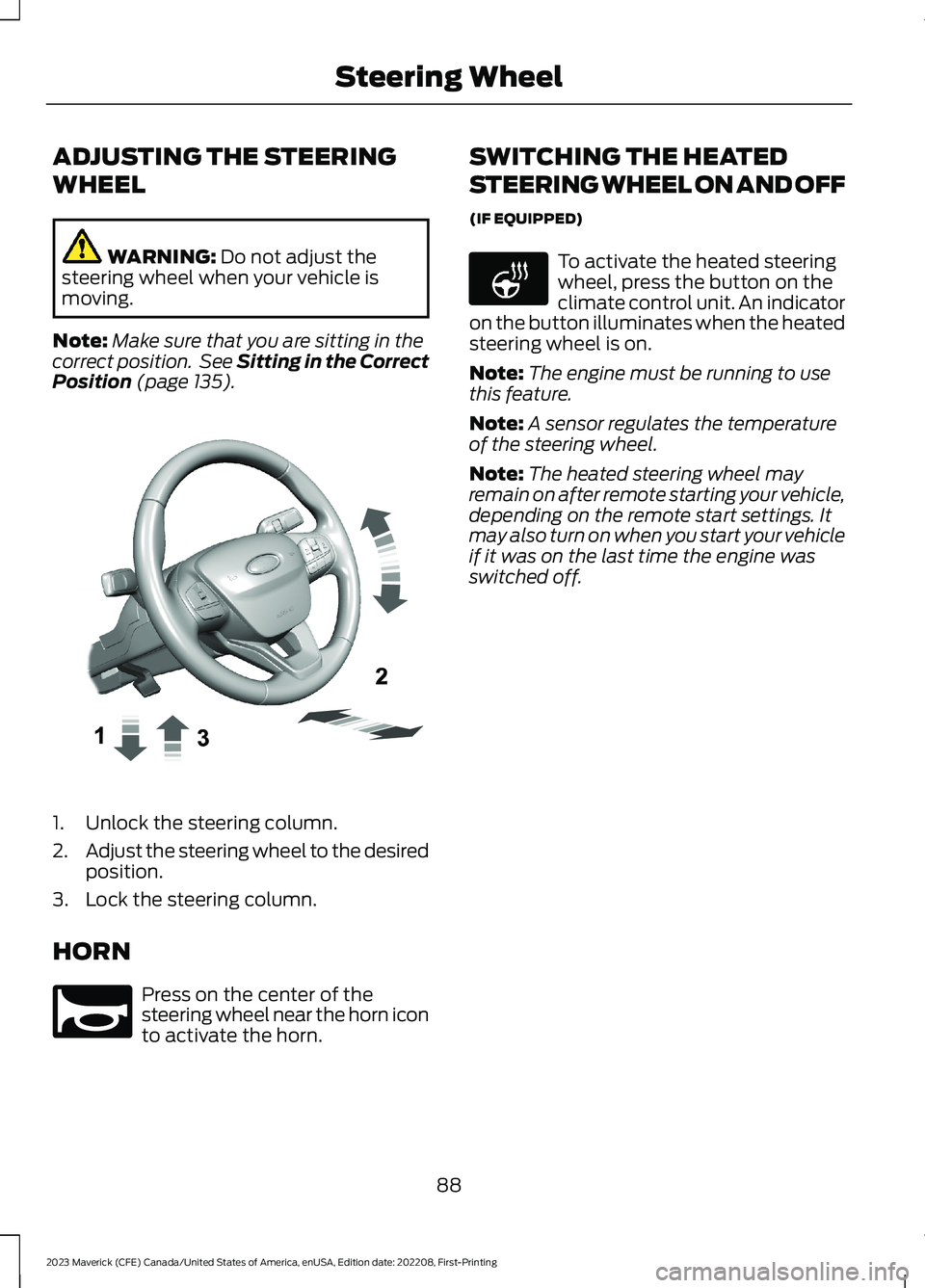
1.Unlock the steering column.
2.Adjust the steering wheel to the desiredposition.
3.Lock the steering column.
HORN
Press on the center of thesteering wheel near the horn iconto activate the horn.
SWITCHING THE HEATED
STEERING WHEEL ON AND OFF
(IF EQUIPPED)
To activate the heated steeringwheel, press the button on theclimate control unit. An indicatoron the button illuminates when the heatedsteering wheel is on.
Note:The engine must be running to usethis feature.
Note:A sensor regulates the temperatureof the steering wheel.
Note:The heated steering wheel mayremain on after remote starting your vehicle,depending on the remote start settings. Itmay also turn on when you start your vehicleif it was on the last time the engine wasswitched off.
88
2023 Maverick (CFE) Canada/United States of America, enUSA, Edition date: 202208, First-PrintingSteering WheelE377742 E270945 E256621
Page 96 of 556
EXTERIOR LIGHTING
CONTROL
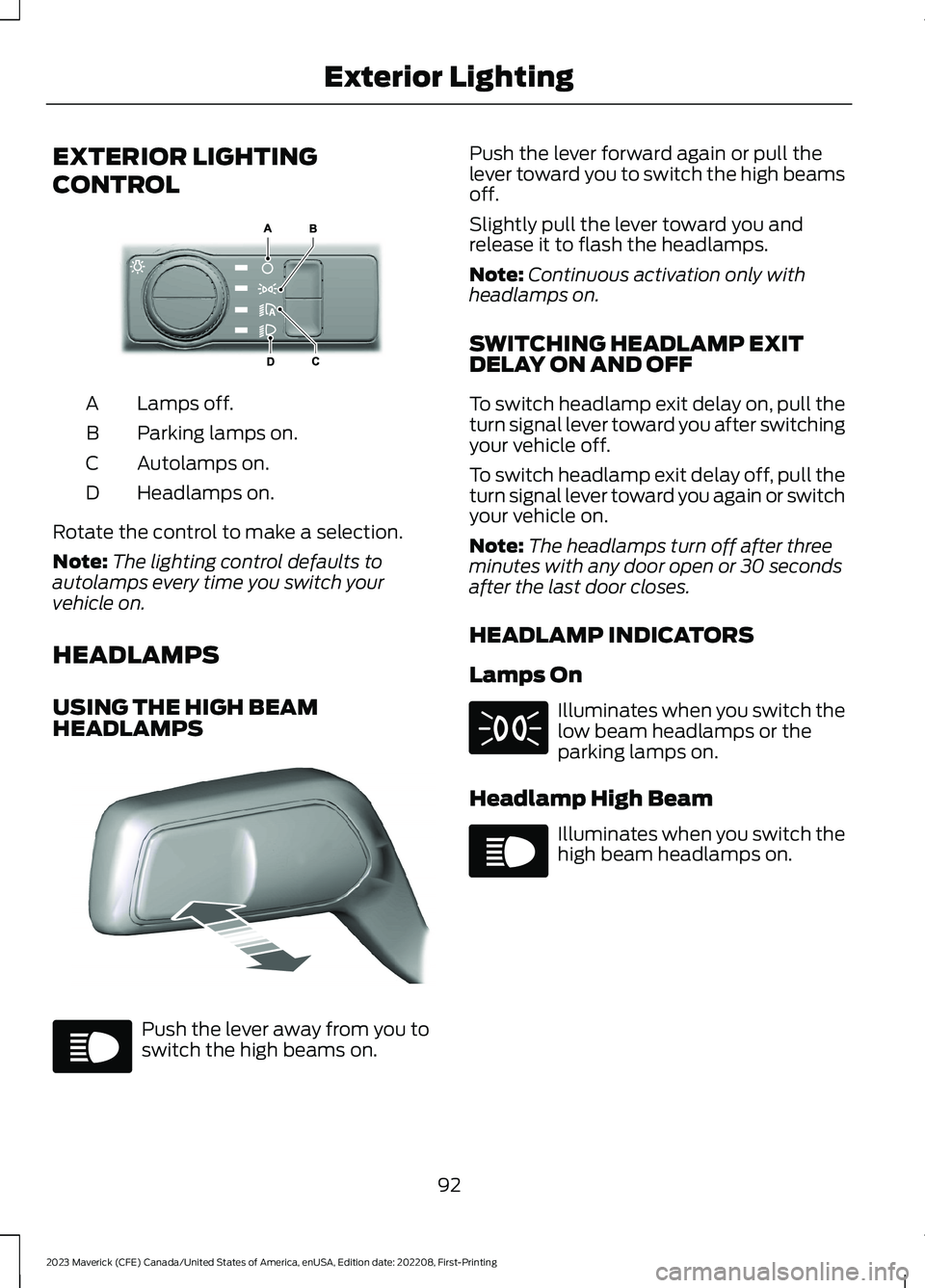
Lamps off.A
Parking lamps on.B
Autolamps on.C
Headlamps on.D
Rotate the control to make a selection.
Note:The lighting control defaults toautolamps every time you switch yourvehicle on.
HEADLAMPS
USING THE HIGH BEAMHEADLAMPS
Push the lever away from you toswitch the high beams on.
Push the lever forward again or pull thelever toward you to switch the high beamsoff.
Slightly pull the lever toward you andrelease it to flash the headlamps.
Note:Continuous activation only withheadlamps on.
SWITCHING HEADLAMP EXITDELAY ON AND OFF
To switch headlamp exit delay on, pull theturn signal lever toward you after switchingyour vehicle off.
To switch headlamp exit delay off, pull theturn signal lever toward you again or switchyour vehicle on.
Note:The headlamps turn off after threeminutes with any door open or 30 secondsafter the last door closes.
HEADLAMP INDICATORS
Lamps On
Illuminates when you switch thelow beam headlamps or theparking lamps on.
Headlamp High Beam
Illuminates when you switch thehigh beam headlamps on.
92
2023 Maverick (CFE) Canada/United States of America, enUSA, Edition date: 202208, First-PrintingExterior LightingE327629 E328253 E67019 E71341 E67019
Page 97 of 556
HEADLAMPS –
TROUBLESHOOTING
HEADLAMPS – FREQUENTLYASKED QUESTIONS
Why is there condensation in theheadlamps?
•Headlamps have vents toaccommodate normal changes in airpressure. Condensation can be anatural by-product of this design.When moist air enters the lampassembly through the vents, there is apossibility that condensation can occurwhen the temperature is cold. Whennormal condensation occurs, a finemist can form on the interior of thelens. The fine mist eventually clearsand exits through the vents duringnormal operation.
How much condensation isacceptable?
•The presence of a fine mist, forexample no streaks, drip marks or largedroplets. A fine mist covers less than50% of the lens.
How long may it take for theacceptable condensation to becleared?
•Clearing time may take as long as 48hours under dry weather conditions.
How much condensation isunacceptable?
•A water puddle inside the lamp.Streaks, drip marks or large dropletspresent on the interior of the lens.
What should I do if unacceptablecondensation is present?
•Have your vehicle checked as soon aspossible.
Why do my headlamps turn offwhen I have them switched onwhen I switch my vehicle off?
•The battery saver turns the headlampsoff after a short period of time after youswitch your vehicle off.
AUTOLAMPS
WHAT ARE AUTOLAMPS
WARNING: The system does notrelieve you of your responsibility to drivewith due care and attention. You mayneed to override the system if it does notturn the headlamps on in low visibilityconditions, for example daytime fog.
Autolamps turn the headlamps on in lowlight situations or when the windshieldwipers operate.
AUTOLAMP SETTINGS
1.Using the instrument cluster controlson the steering wheel, select Settings.
2.Select Vehicle.
3.Select Lighting.
4.Select Autolamp Delay.
5.Select a setting and press the OKbutton.
93
2023 Maverick (CFE) Canada/United States of America, enUSA, Edition date: 202208, First-PrintingExterior Lighting
Page 102 of 556
SWITCHING ALL OF THE
INTERIOR LAMPS ON AND OFF
The lamps turn on under the followingconditions:
•You open any door.
•You press a button on the remotecontrol.
•You press the all lamps on button onthe overhead console.
Press to switch all interior lampson or off.
SWITCHING THE FRONT
INTERIOR LAMPS ON AND OFF
Press the edge of the lamp lens.
SWITCHING THE REAR
INTERIOR LAMPS ON AND OFF
Press the edge of the lamp lens.
Note:If you switch the rear lamps onthrough the overhead console, you cannotswitch them off with the rear lamp switch.
INTERIOR LAMP FUNCTION
WHAT IS THE INTERIOR LAMPFUNCTION
The interior lamp function switches thecourtesy and door lamps on or off.
SWITCHING THE INTERIOR LAMPFUNCTION ON AND OFF
Set the switch to the middle position.
ADJUSTING THE INSTRUMENT
PANEL LIGHTING
BRIGHTNESS
The instrument lighting dimmer buttonsare on the lighting control.
Repeatedly press one of thebuttons to adjust the brightness.
AMBIENT LIGHTING
SWITCHING AMBIENT LIGHTINGON AND OFF - VEHICLESWITHOUT: SYNC 3
1.Press Settings on the touchscreen.
2.Press Vehicle Settings.
3.Press Ambient Light.
Drag the slider above zero brightness toswitch ambient lighting on.
Drag the slider to zero brightness to switchambient lighting off.
98
2023 Maverick (CFE) Canada/United States of America, enUSA, Edition date: 202208, First-PrintingInterior LightingE259649 E249791 E299443 E291299 E296433
Page 104 of 556
OPENING AND CLOSING THE
WINDOWS
WARNING: Do not leave childrenunattended in your vehicle and do notlet them play with the power windows.Failure to follow this instruction couldresult in personal injury.
WARNING: When closing thepower windows, verify they are free ofobstruction and make sure that childrenand pets are not in the proximity of thewindow openings.
Press the window control switchto open the window. Lift thewindow control switch to closethe window.
To reduce wind noise or pulsing noise whenjust one window is open, slightly open theopposite window.
One-Touch Down (If Equipped)
Press the window control switch fully andrelease it. Press again or lift it to stop thewindow.
One-Touch Up (If Equipped)
Lift the window control switch fully andrelease it. Press or lift it again to stop thewindow.
Resetting One-Touch Up
Start the engine.
1.Lift and hold the window control switchuntil you fully close the door window.Continue to hold the window controlswitch for a few seconds after youclose the window.
2.Release the window control switch.
3.Press and hold the window controlswitch until you fully open the doorwindow.
4.Release the window control switch.
5.Lift and hold the window control switchuntil you fully close the window.
6.Test for correct window operation bycarrying out the one-touch down andone-touch up features.
Accessory Delay
When you switch the ignition off, thewindow switches remain operational forseveral minutes or until you open eitherfront door.
WINDOW BOUNCE-BACK
WHAT IS WINDOW BOUNCE-BACK
The window stops and reverses somedistance if it detects an obstacle whenclosing.
OVERRIDING WINDOW BOUNCE-BACK
WARNING: If you overridebounce-back, the window does notreverse if it detects an obstacle. Takecare when closing the windows to avoidpersonal injury or damage to yourvehicle.
WARNING: Bounce-back is off untilyou reset the memory. Take care whenclosing the windows to avoid personalinjury or damage to your vehicle.
Note:The window stops if you release theswitch before the window fully closes.
100
2023 Maverick (CFE) Canada/United States of America, enUSA, Edition date: 202208, First-PrintingWindows
Page 105 of 556
Pull up the window switch and hold withina few seconds of the window reaching thebounce-back position. The window travelsup with no bounce-back protection. Thewindow stops if you release the switchbefore the window fully closes.
LOCKING THE REAR WINDOW
CONTROLS
Press the control to lock orunlock the rear window controls.It illuminates when you lock therear window controls.
OPENING AND CLOSING THE
SLIDING WINDOWS (IF EQUIPPED)
WARNING: When closing thepower windows, verify they are free ofobstruction and make sure that childrenand pets are not in the proximity of thewindow openings.
WARNING: Do not leave childrenunattended in your vehicle and do notlet them play with the power windows.Failure to follow this instruction couldresult in personal injury.
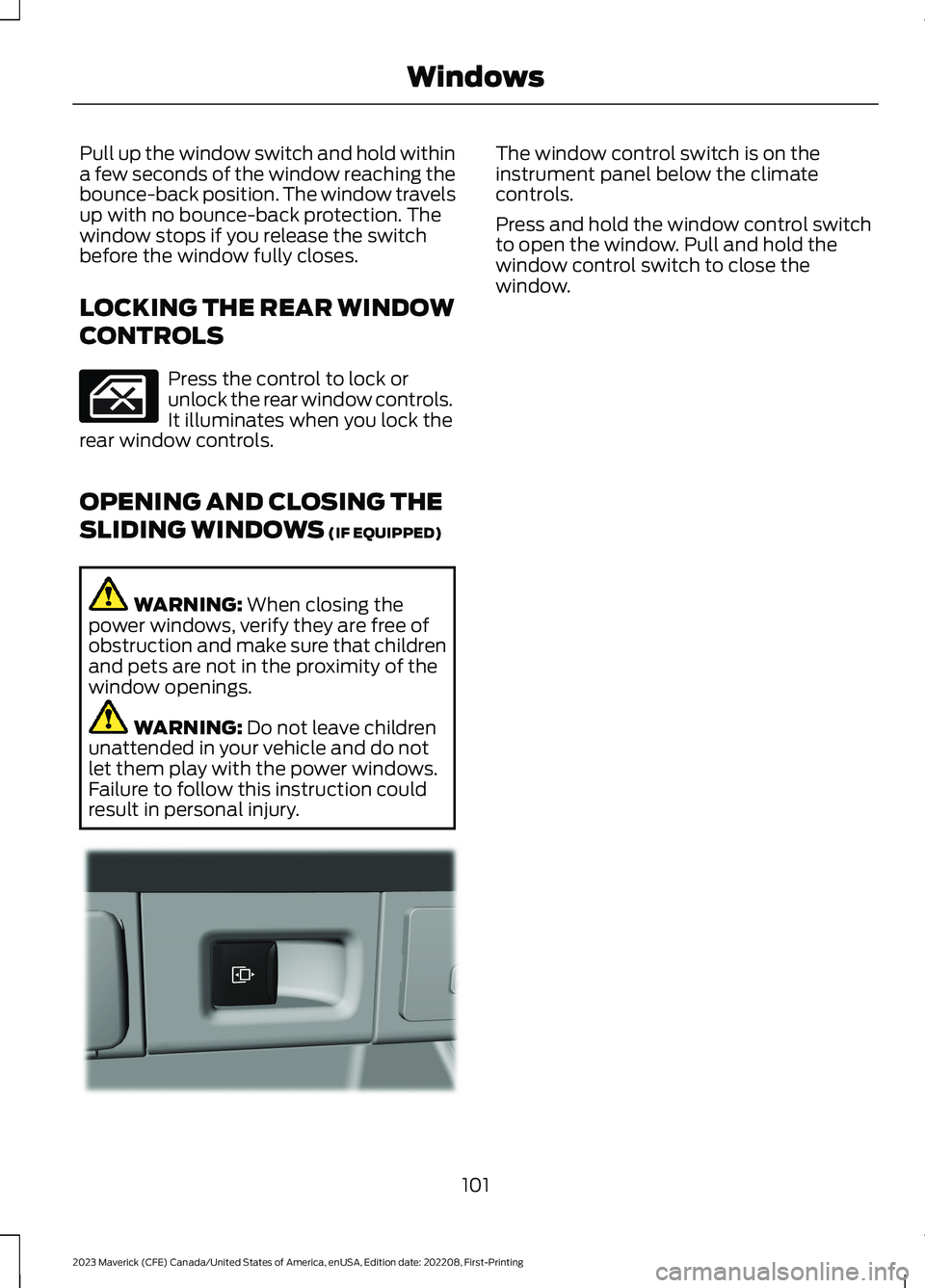
The window control switch is on theinstrument panel below the climatecontrols.
Press and hold the window control switchto open the window. Pull and hold thewindow control switch to close thewindow.
101
2023 Maverick (CFE) Canada/United States of America, enUSA, Edition date: 202208, First-PrintingWindows E354505
Page 107 of 556
ADJUSTING THE EXTERIOR
MIRRORS
WARNING: Do not adjust themirrors when your vehicle is moving. Thiscould result in the loss of control of yourvehicle, serious personal injury or death.
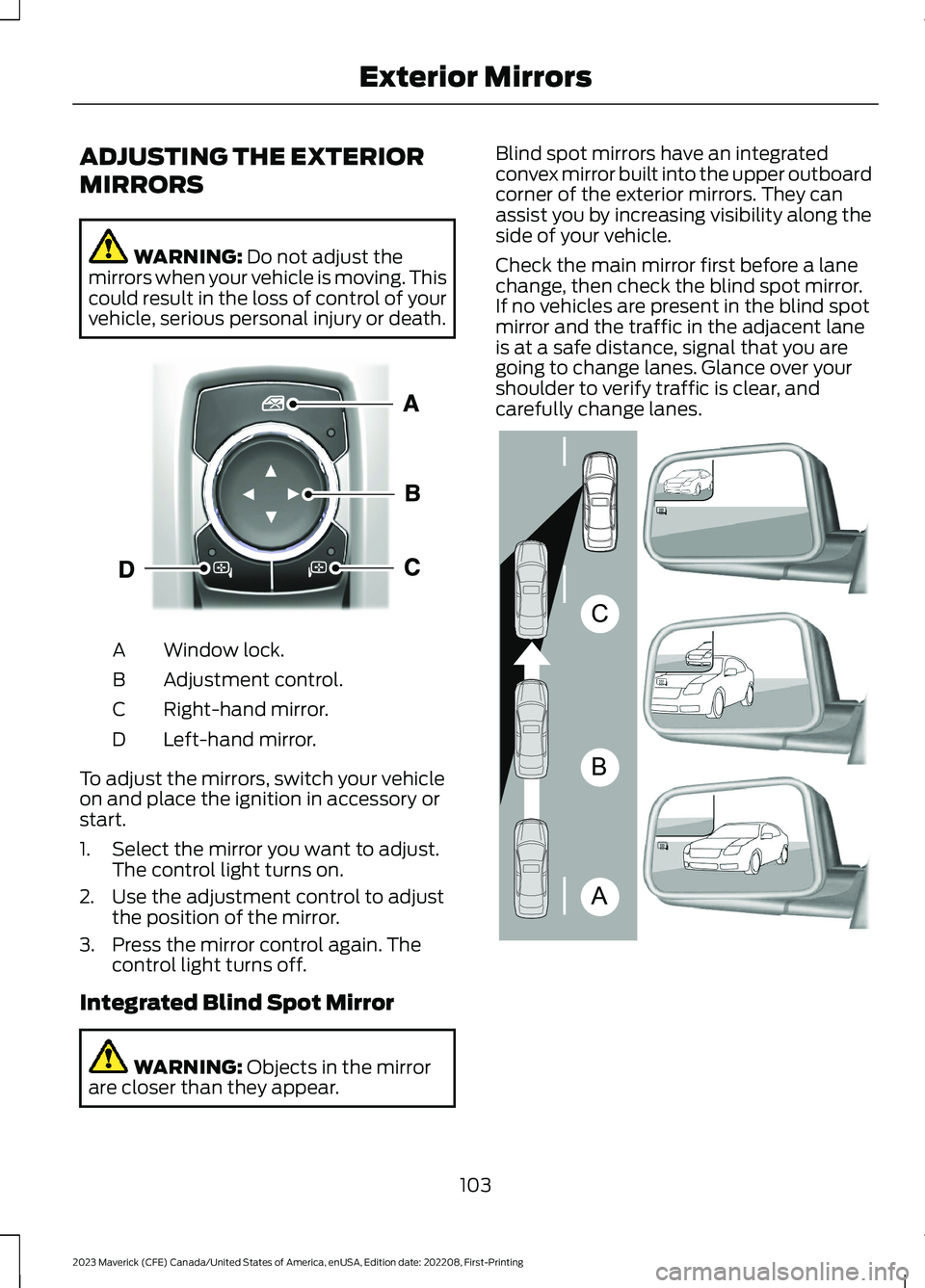
Window lock.A
Adjustment control.B
Right-hand mirror.C
Left-hand mirror.D
To adjust the mirrors, switch your vehicleon and place the ignition in accessory orstart.
1.Select the mirror you want to adjust.The control light turns on.
2.Use the adjustment control to adjustthe position of the mirror.
3.Press the mirror control again. Thecontrol light turns off.
Integrated Blind Spot Mirror
WARNING: Objects in the mirrorare closer than they appear.
Blind spot mirrors have an integratedconvex mirror built into the upper outboardcorner of the exterior mirrors. They canassist you by increasing visibility along theside of your vehicle.
Check the main mirror first before a lanechange, then check the blind spot mirror.If no vehicles are present in the blind spotmirror and the traffic in the adjacent laneis at a safe distance, signal that you aregoing to change lanes. Glance over yourshoulder to verify traffic is clear, andcarefully change lanes.
103
2023 Maverick (CFE) Canada/United States of America, enUSA, Edition date: 202208, First-PrintingExterior MirrorsE377111 ABCE138665
Page 108 of 556
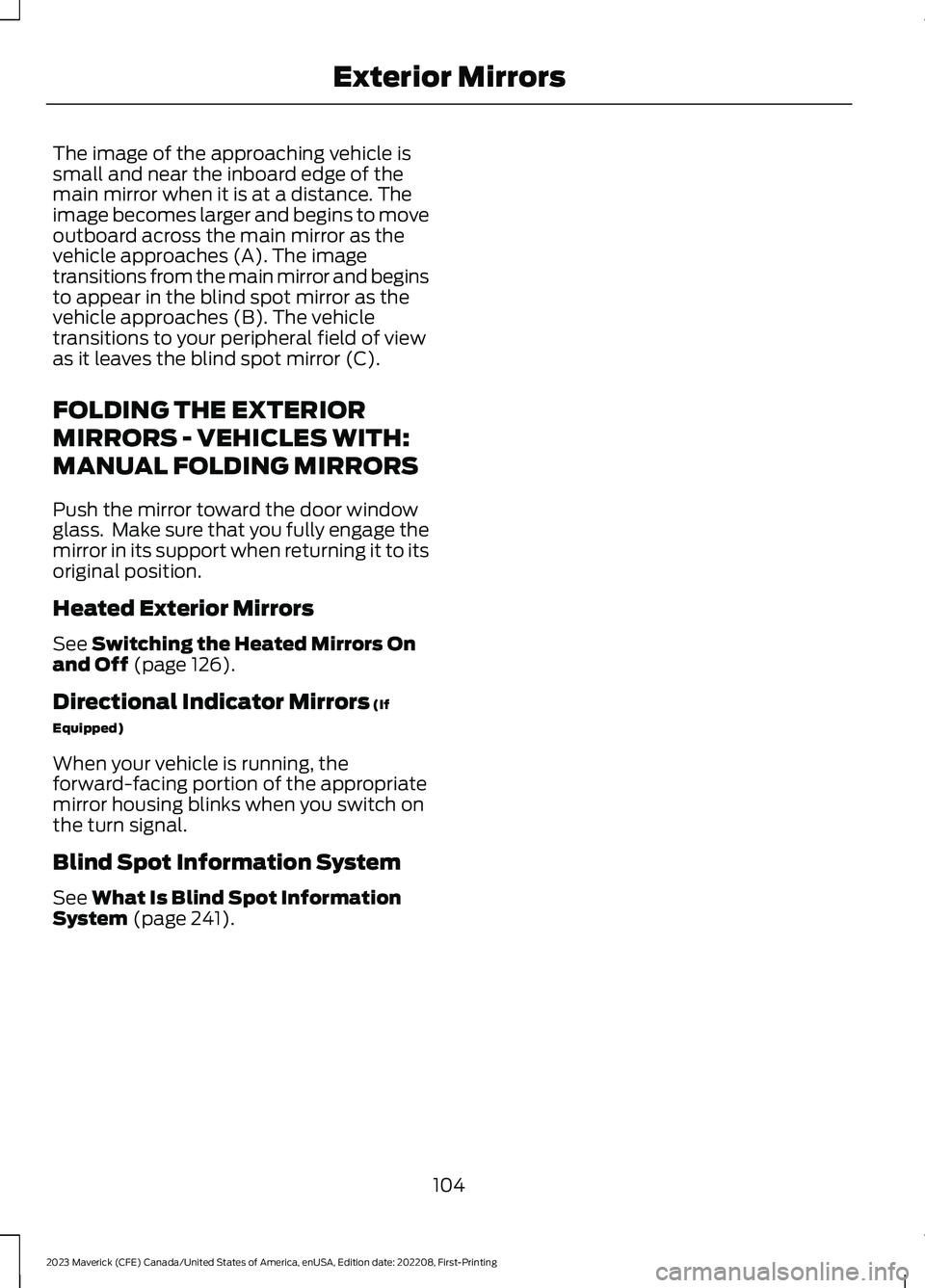
The image of the approaching vehicle issmall and near the inboard edge of themain mirror when it is at a distance. Theimage becomes larger and begins to moveoutboard across the main mirror as thevehicle approaches (A). The imagetransitions from the main mirror and beginsto appear in the blind spot mirror as thevehicle approaches (B). The vehicletransitions to your peripheral field of viewas it leaves the blind spot mirror (C).
FOLDING THE EXTERIOR
MIRRORS - VEHICLES WITH:
MANUAL FOLDING MIRRORS
Push the mirror toward the door windowglass. Make sure that you fully engage themirror in its support when returning it to itsoriginal position.
Heated Exterior Mirrors
See Switching the Heated Mirrors Onand Off (page 126).
Directional Indicator Mirrors (If
Equipped)
When your vehicle is running, theforward-facing portion of the appropriatemirror housing blinks when you switch onthe turn signal.
Blind Spot Information System
See What Is Blind Spot InformationSystem (page 241).
104
2023 Maverick (CFE) Canada/United States of America, enUSA, Edition date: 202208, First-PrintingExterior Mirrors