reset FORD MONDEO 2014 4.G User Guide
[x] Cancel search | Manufacturer: FORD, Model Year: 2014, Model line: MONDEO, Model: FORD MONDEO 2014 4.GPages: 446, PDF Size: 29.09 MB
Page 103 of 446
Downloaded from www.Manualslib.com manuals search engine Doors and Locks
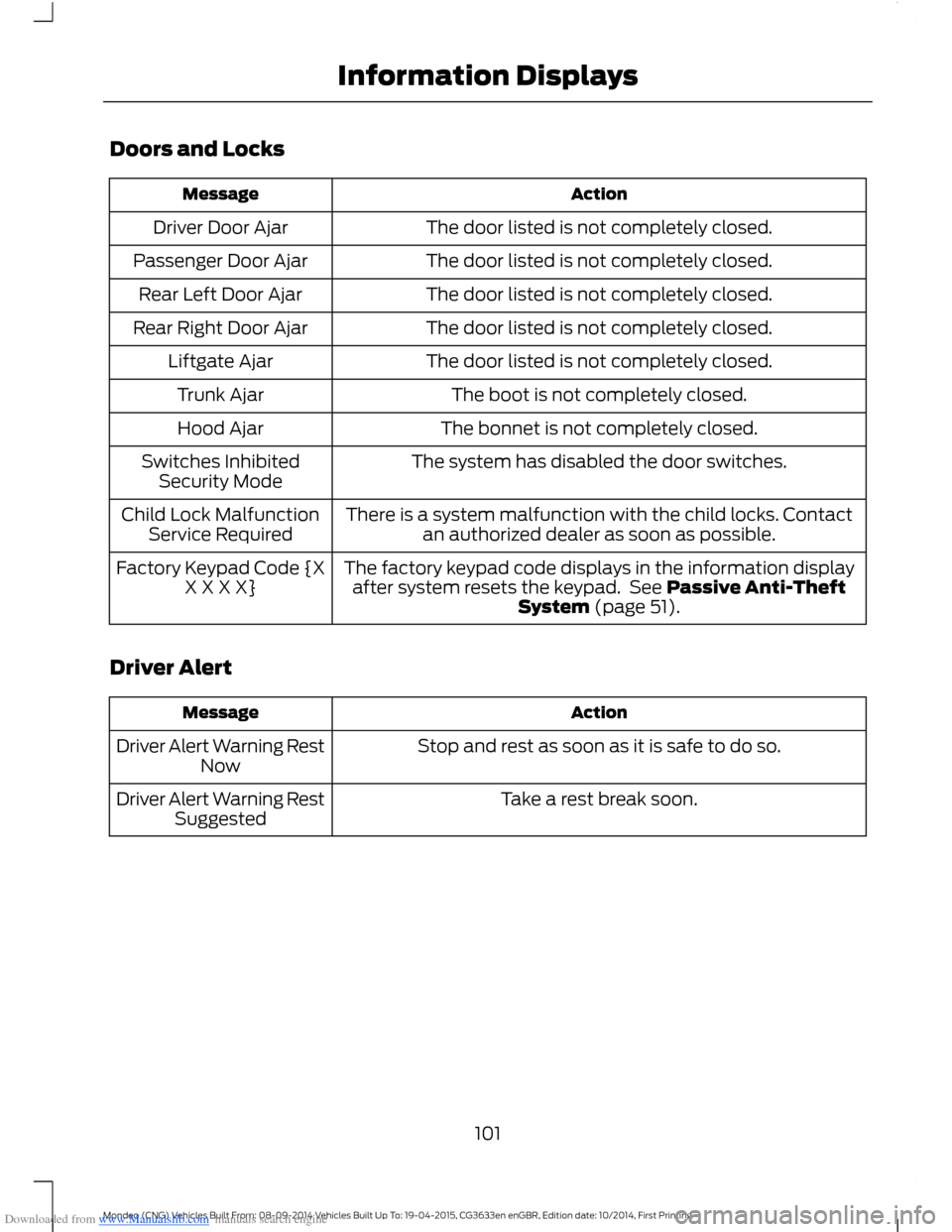
ActionMessage
The door listed is not completely closed.Driver Door Ajar
The door listed is not completely closed.Passenger Door Ajar
The door listed is not completely closed.Rear Left Door Ajar
The door listed is not completely closed.Rear Right Door Ajar
The door listed is not completely closed.Liftgate Ajar
The boot is not completely closed.Trunk Ajar
The bonnet is not completely closed.Hood Ajar
The system has disabled the door switches.Switches InhibitedSecurity Mode
There is a system malfunction with the child locks. Contactan authorized dealer as soon as possible.Child Lock MalfunctionService Required
The factory keypad code displays in the information displayafter system resets the keypad. See Passive Anti-TheftSystem (page 51).
Factory Keypad Code {XX X X X}
Driver Alert
ActionMessage
Stop and rest as soon as it is safe to do so.Driver Alert Warning RestNow
Take a rest break soon.Driver Alert Warning RestSuggested
101Mondeo (CNG) Vehicles Built From: 08-09-2014 Vehicles Built Up To: 19-04-2015, CG3633en enGBR, Edition date: 10/2014, First PrintingInformation Displays
Page 129 of 446
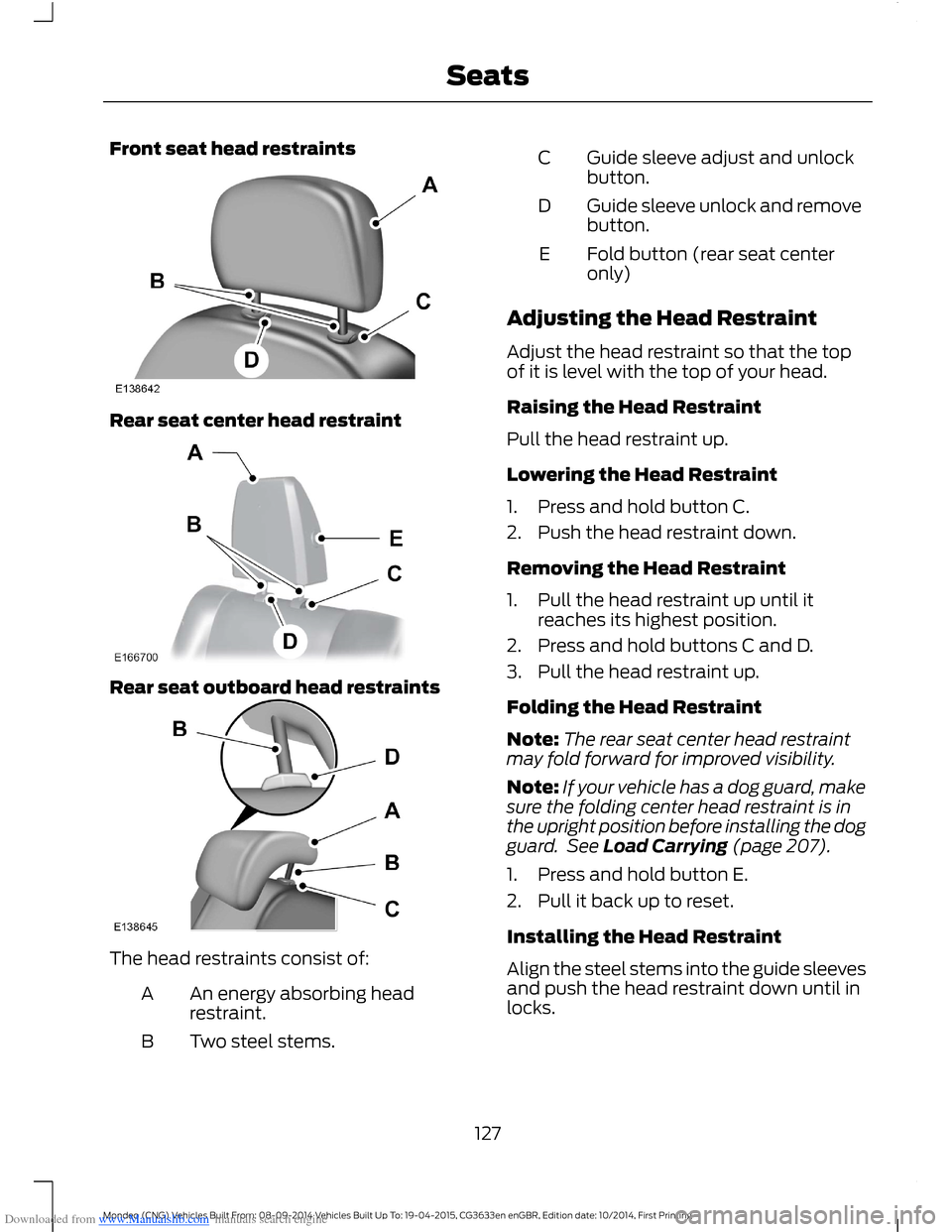
Downloaded from www.Manualslib.com manuals search engine Front seat head restraints
Rear seat center head restraint
Rear seat outboard head restraints
The head restraints consist of:
An energy absorbing headrestraint.A
Two steel stems.B
Guide sleeve adjust and unlockbutton.C
Guide sleeve unlock and removebutton.D
Fold button (rear seat centeronly)E
Adjusting the Head Restraint
Adjust the head restraint so that the topof it is level with the top of your head.
Raising the Head Restraint
Pull the head restraint up.
Lowering the Head Restraint
1.Press and hold button C.
2.Push the head restraint down.
Removing the Head Restraint
1.Pull the head restraint up until itreaches its highest position.
2.Press and hold buttons C and D.
3.Pull the head restraint up.
Folding the Head Restraint
Note:The rear seat center head restraintmay fold forward for improved visibility.
Note:If your vehicle has a dog guard, makesure the folding center head restraint is inthe upright position before installing the dogguard. See Load Carrying (page 207).
1.Press and hold button E.
2.Pull it back up to reset.
Installing the Head Restraint
Align the steel stems into the guide sleevesand push the head restraint down until inlocks.
127Mondeo (CNG) Vehicles Built From: 08-09-2014 Vehicles Built Up To: 19-04-2015, CG3633en enGBR, Edition date: 10/2014, First PrintingSeats
Page 134 of 446
Downloaded from www.Manualslib.com manuals search engine Saving a PreSet Position
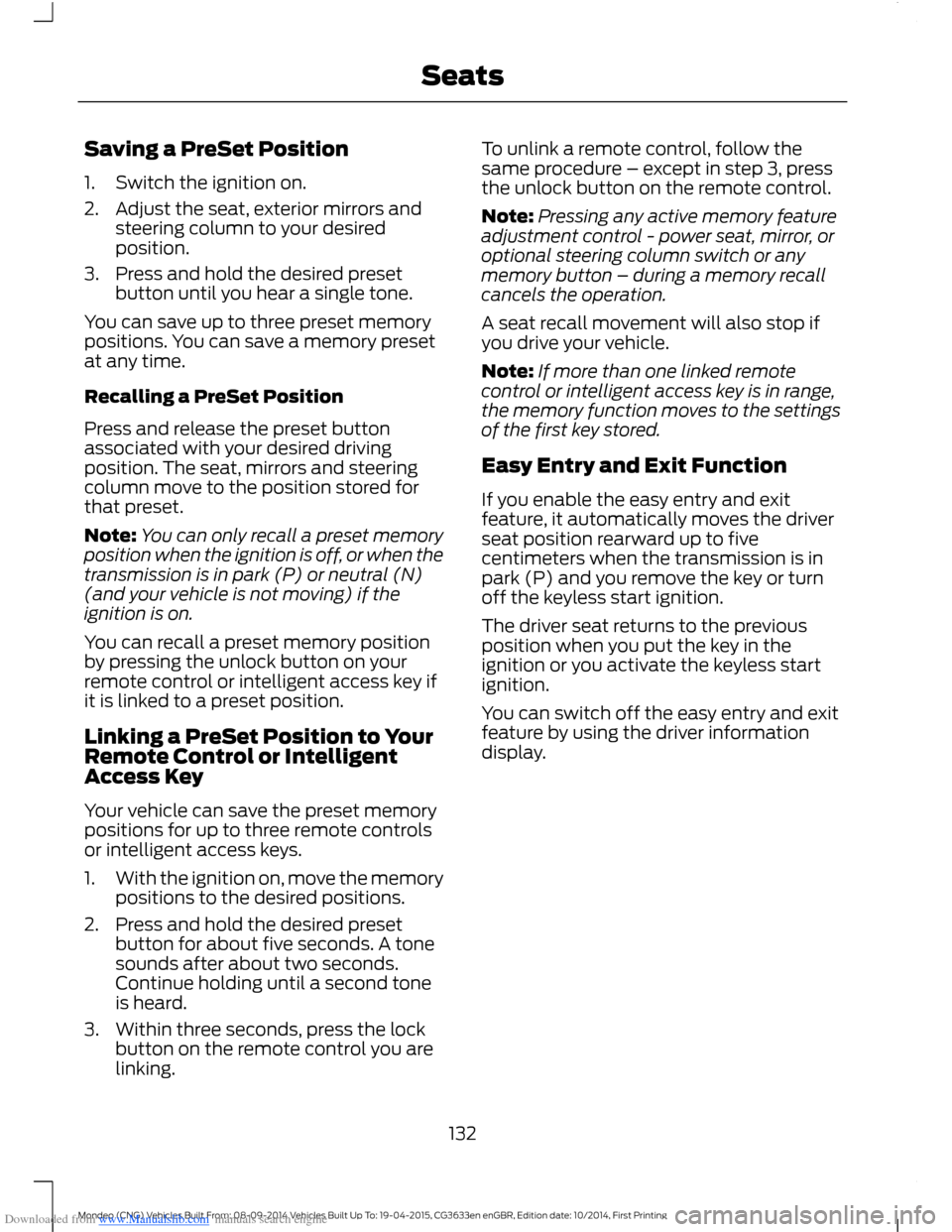
1.Switch the ignition on.
2.Adjust the seat, exterior mirrors andsteering column to your desiredposition.
3.Press and hold the desired presetbutton until you hear a single tone.
You can save up to three preset memorypositions. You can save a memory presetat any time.
Recalling a PreSet Position
Press and release the preset buttonassociated with your desired drivingposition. The seat, mirrors and steeringcolumn move to the position stored forthat preset.
Note:You can only recall a preset memoryposition when the ignition is off, or when thetransmission is in park (P) or neutral (N)(and your vehicle is not moving) if theignition is on.
You can recall a preset memory positionby pressing the unlock button on yourremote control or intelligent access key ifit is linked to a preset position.
Linking a PreSet Position to YourRemote Control or IntelligentAccess Key
Your vehicle can save the preset memorypositions for up to three remote controlsor intelligent access keys.
1.With the ignition on, move the memorypositions to the desired positions.
2.Press and hold the desired presetbutton for about five seconds. A tonesounds after about two seconds.Continue holding until a second toneis heard.
3.Within three seconds, press the lockbutton on the remote control you arelinking.
To unlink a remote control, follow thesame procedure – except in step 3, pressthe unlock button on the remote control.
Note:Pressing any active memory featureadjustment control - power seat, mirror, oroptional steering column switch or anymemory button – during a memory recallcancels the operation.
A seat recall movement will also stop ifyou drive your vehicle.
Note:If more than one linked remotecontrol or intelligent access key is in range,the memory function moves to the settingsof the first key stored.
Easy Entry and Exit Function
If you enable the easy entry and exitfeature, it automatically moves the driverseat position rearward up to fivecentimeters when the transmission is inpark (P) and you remove the key or turnoff the keyless start ignition.
The driver seat returns to the previousposition when you put the key in theignition or you activate the keyless startignition.
You can switch off the easy entry and exitfeature by using the driver informationdisplay.
132Mondeo (CNG) Vehicles Built From: 08-09-2014 Vehicles Built Up To: 19-04-2015, CG3633en enGBR, Edition date: 10/2014, First PrintingSeats
Page 144 of 446
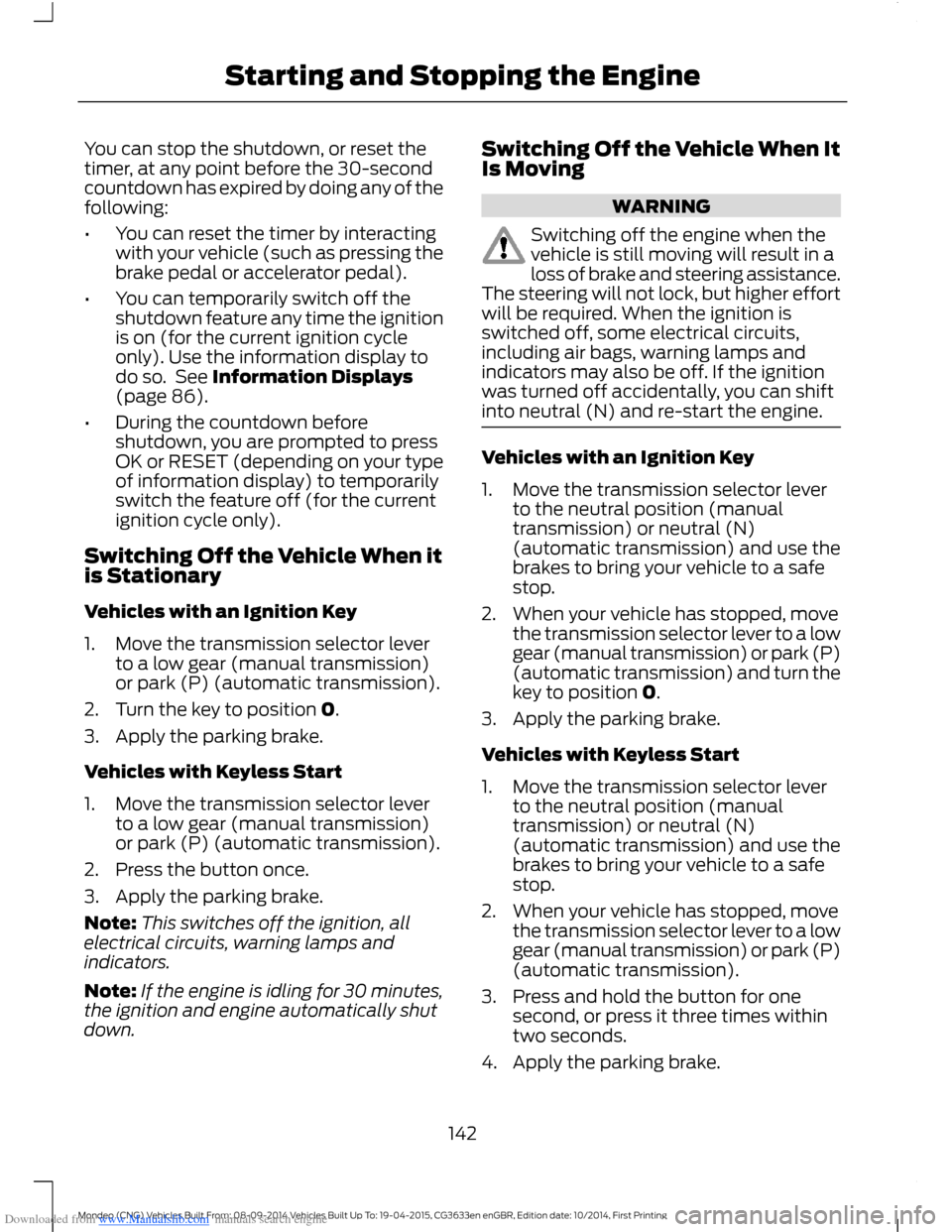
Downloaded from www.Manualslib.com manuals search engine You can stop the shutdown, or reset thetimer, at any point before the 30-secondcountdown has expired by doing any of thefollowing:
•You can reset the timer by interactingwith your vehicle (such as pressing thebrake pedal or accelerator pedal).
•You can temporarily switch off theshutdown feature any time the ignitionis on (for the current ignition cycleonly). Use the information display todo so. See Information Displays(page 86).
•During the countdown beforeshutdown, you are prompted to pressOK or RESET (depending on your typeof information display) to temporarilyswitch the feature off (for the currentignition cycle only).
Switching Off the Vehicle When itis Stationary
Vehicles with an Ignition Key
1.Move the transmission selector leverto a low gear (manual transmission)or park (P) (automatic transmission).
2.Turn the key to position 0.
3.Apply the parking brake.
Vehicles with Keyless Start
1.Move the transmission selector leverto a low gear (manual transmission)or park (P) (automatic transmission).
2.Press the button once.
3.Apply the parking brake.
Note:This switches off the ignition, allelectrical circuits, warning lamps andindicators.
Note:If the engine is idling for 30 minutes,the ignition and engine automatically shutdown.
Switching Off the Vehicle When ItIs Moving
WARNING
Switching off the engine when thevehicle is still moving will result in aloss of brake and steering assistance.The steering will not lock, but higher effortwill be required. When the ignition isswitched off, some electrical circuits,including air bags, warning lamps andindicators may also be off. If the ignitionwas turned off accidentally, you can shiftinto neutral (N) and re-start the engine.
Vehicles with an Ignition Key
1.Move the transmission selector leverto the neutral position (manualtransmission) or neutral (N)(automatic transmission) and use thebrakes to bring your vehicle to a safestop.
2.When your vehicle has stopped, movethe transmission selector lever to a lowgear (manual transmission) or park (P)(automatic transmission) and turn thekey to position 0.
3.Apply the parking brake.
Vehicles with Keyless Start
1.Move the transmission selector leverto the neutral position (manualtransmission) or neutral (N)(automatic transmission) and use thebrakes to bring your vehicle to a safestop.
2.When your vehicle has stopped, movethe transmission selector lever to a lowgear (manual transmission) or park (P)(automatic transmission).
3.Press and hold the button for onesecond, or press it three times withintwo seconds.
4.Apply the parking brake.
142Mondeo (CNG) Vehicles Built From: 08-09-2014 Vehicles Built Up To: 19-04-2015, CG3633en enGBR, Edition date: 10/2014, First PrintingStarting and Stopping the Engine
Page 186 of 446
Downloaded from www.Manualslib.com manuals search engine Resuming the Set Speed
Press and release RES+. The vehiclereturns to the previously set speed and gapsetting. The set speed displayscontinuously in the information displaywhile the system is active.
Switching the System Off
Press and release the Adaptive CruiseControl CAN/OFF button when thesystem is in stand by mode or switch theignition off.
Note:The set speed memory erases whenyou switch off the system.
Following a Vehicle
WARNINGS
When following a vehicle, yourvehicle does not decelerateautomatically to a stop, nor doesyour vehicle always decelerate quicklyenough to avoid a crash without driverintervention. Always apply the brakes whennecessary. Failing to do so may result in acrash, serious injury or death.
Adaptive cruise control only warnsof vehicles detected by the radarsensor. In some cases there may beno warning or a delayed warning. Youshould always apply the brakes whennecessary. Failing to do so may result in acrash, serious injury or death.
When a vehicle ahead of you enters thesame lane or a slower vehicle is ahead inthe same lane, the vehicle speed adjuststo maintain a preset gap.
The lead vehicle graphic illuminates.
Your vehicle maintains a constant gapbehind the vehicle ahead until:
•The vehicle in front of you acceleratesto a speed above the set speed.
•The vehicle in front of you moves outof your lane or out of view.
•The vehicle speed falls below 12 mph(20 km/h).
•A new gap is set.
The system applies the brakes to slow yourvehicle to maintain a safe gap from thevehicle in front. The maximum brakingwhich the system can apply is limited. Youcan override the system by applying thebrakes.
If the system predicts that its maximumbraking level is insufficient, an audiblewarning sounds and a message appearsin the information display while the systemcontinues to brake.
The system is designed to assist you bywarning you of the risk of a crash with thevehicle in front of you.
The system is designed to alert you bywarning chimes and a visual warning in theinformation display.
Brake support is turned on to enable fullbraking effectiveness and reduce theseverity of a crash with the vehicle in frontof you.
Note:The brakes may emit a sound whenmodulated by the adaptive cruise controlsystem.
184Mondeo (CNG) Vehicles Built From: 08-09-2014 Vehicles Built Up To: 19-04-2015, CG3633en enGBR, Edition date: 10/2014, First PrintingCruise Control
Page 193 of 446
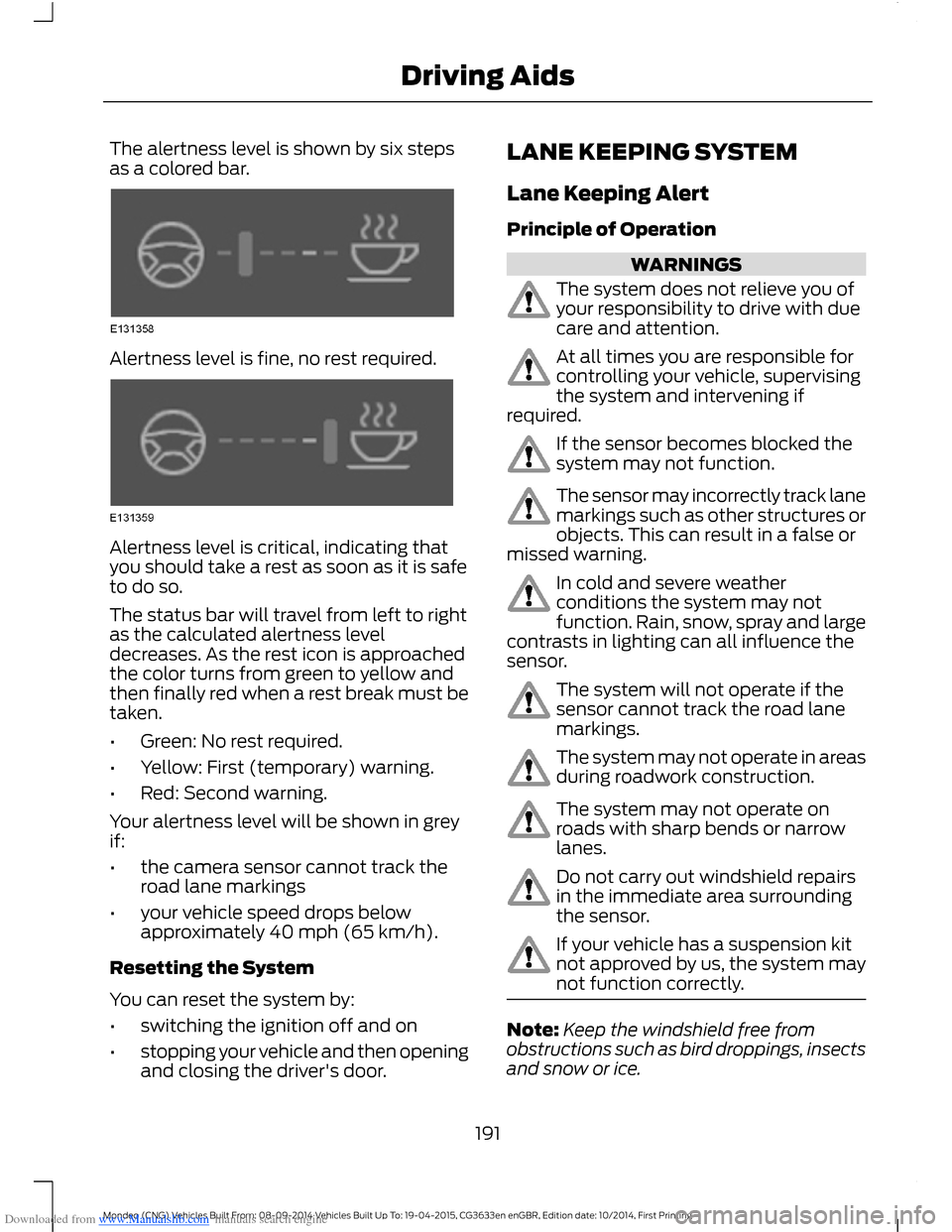
Downloaded from www.Manualslib.com manuals search engine The alertness level is shown by six stepsas a colored bar.
Alertness level is fine, no rest required.
Alertness level is critical, indicating thatyou should take a rest as soon as it is safeto do so.
The status bar will travel from left to rightas the calculated alertness leveldecreases. As the rest icon is approachedthe color turns from green to yellow andthen finally red when a rest break must betaken.
•Green: No rest required.
•Yellow: First (temporary) warning.
•Red: Second warning.
Your alertness level will be shown in greyif:
•the camera sensor cannot track theroad lane markings
•your vehicle speed drops belowapproximately 40 mph (65 km/h).
Resetting the System
You can reset the system by:
•switching the ignition off and on
•stopping your vehicle and then openingand closing the driver's door.
LANE KEEPING SYSTEM
Lane Keeping Alert
Principle of Operation
WARNINGS
The system does not relieve you ofyour responsibility to drive with duecare and attention.
At all times you are responsible forcontrolling your vehicle, supervisingthe system and intervening ifrequired.
If the sensor becomes blocked thesystem may not function.
The sensor may incorrectly track lanemarkings such as other structures orobjects. This can result in a false ormissed warning.
In cold and severe weatherconditions the system may notfunction. Rain, snow, spray and largecontrasts in lighting can all influence thesensor.
The system will not operate if thesensor cannot track the road lanemarkings.
The system may not operate in areasduring roadwork construction.
The system may not operate onroads with sharp bends or narrowlanes.
Do not carry out windshield repairsin the immediate area surroundingthe sensor.
If your vehicle has a suspension kitnot approved by us, the system maynot function correctly.
Note:Keep the windshield free fromobstructions such as bird droppings, insectsand snow or ice.
191Mondeo (CNG) Vehicles Built From: 08-09-2014 Vehicles Built Up To: 19-04-2015, CG3633en enGBR, Edition date: 10/2014, First PrintingDriving Aids
Page 199 of 446
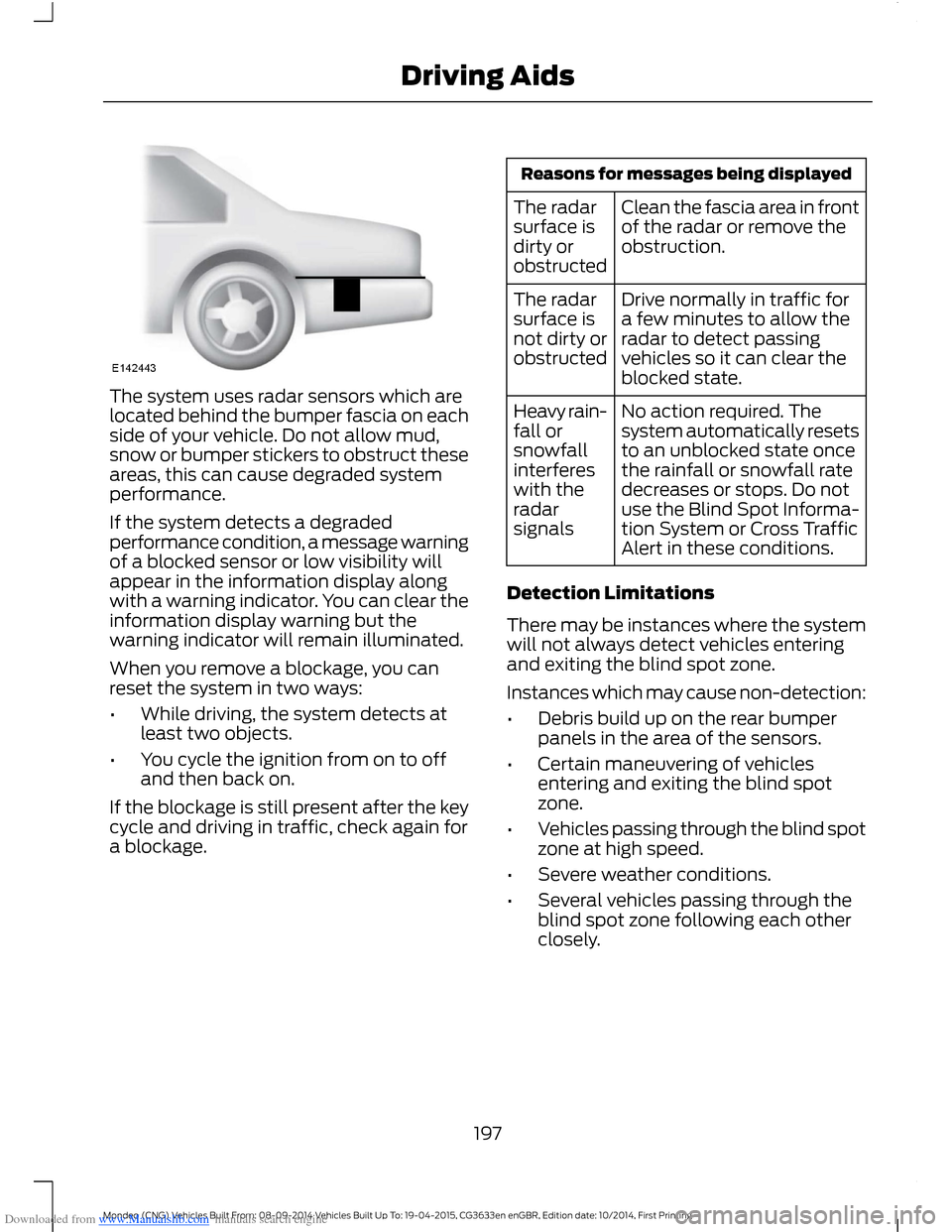
Downloaded from www.Manualslib.com manuals search engine The system uses radar sensors which arelocated behind the bumper fascia on eachside of your vehicle. Do not allow mud,snow or bumper stickers to obstruct theseareas, this can cause degraded systemperformance.
If the system detects a degradedperformance condition, a message warningof a blocked sensor or low visibility willappear in the information display alongwith a warning indicator. You can clear theinformation display warning but thewarning indicator will remain illuminated.
When you remove a blockage, you canreset the system in two ways:
•While driving, the system detects atleast two objects.
•You cycle the ignition from on to offand then back on.
If the blockage is still present after the keycycle and driving in traffic, check again fora blockage.
Reasons for messages being displayed
Clean the fascia area in frontof the radar or remove theobstruction.
The radarsurface isdirty orobstructed
Drive normally in traffic fora few minutes to allow theradar to detect passingvehicles so it can clear theblocked state.
The radarsurface isnot dirty orobstructed
No action required. Thesystem automatically resetsto an unblocked state oncethe rainfall or snowfall ratedecreases or stops. Do notuse the Blind Spot Informa-tion System or Cross TrafficAlert in these conditions.
Heavy rain-fall orsnowfallinterfereswith theradarsignals
Detection Limitations
There may be instances where the systemwill not always detect vehicles enteringand exiting the blind spot zone.
Instances which may cause non-detection:
•Debris build up on the rear bumperpanels in the area of the sensors.
•Certain maneuvering of vehiclesentering and exiting the blind spotzone.
•Vehicles passing through the blind spotzone at high speed.
•Severe weather conditions.
•Several vehicles passing through theblind spot zone following each otherclosely.
197Mondeo (CNG) Vehicles Built From: 08-09-2014 Vehicles Built Up To: 19-04-2015, CG3633en enGBR, Edition date: 10/2014, First PrintingDriving Aids
Page 268 of 446
Downloaded from www.Manualslib.com manuals search engine When the Temporary Spare Tire isInstalled
If you need to replace a road wheel andtire with the temporary spare wheel, thesystem will continue to identify a defect.This is to remind you to repair the damagedroad wheel and tire and refit the repairedroad wheel and tire assembly to yourvehicle. To restore the correct operationof the system, you must have the repaired
road wheel and tire assembly refitted toyour vehicle.
When You Believe the System is NotOperating Correctly
The main function of the system is to warnyou when the tire pressures are low. It canalso warn you in the event the system isno longer capable of operating correctly.See the following chart for informationconcerning the system:
ActionDescriptionWarning lamp
1.Make sure tires are at the correctpressure. See Wheels and Tires(page 260). The tire pressures are alsoon the tire inflation pressure label(located on the edge of driver dooror the B-Pillar).
2.After inflating the tires to the correctpressure you must carry out the tirepressure monitoring system resetprocedure. See Tire PressureMonitoring System ResetProcedure in this chapter.
Tire(s) under-inflatedSolid warning lamp
Repair the damaged road wheel and tireand refit the repaired road wheel and tireassembly to your vehicle to restore thecorrect operation of the system.
Spare tire in use
If the tires are correctly inflated and thespare tire is not in use but the lightremains on, the system has detected afault that requires service.
Tire pressure monitoringsystem malfunction
Repair the damaged road wheel and tireand refit the repaired road wheel and tireassembly to your vehicle to restore thecorrect operation of the system.
Spare tire in useSolid warning lampinitially followed bya flashing warninglamp
If the tires are correctly inflated and thespare tire is not in use but the lightremains on, the system has detected afault that requires service.
Tire pressure monitoringsystem malfunction
266Mondeo (CNG) Vehicles Built From: 08-09-2014 Vehicles Built Up To: 19-04-2015, CG3633en enGBR, Edition date: 10/2014, First PrintingWheels and Tires
Page 269 of 446
Downloaded from www.Manualslib.com manuals search engine Tire Pressure Monitoring SystemReset Procedure
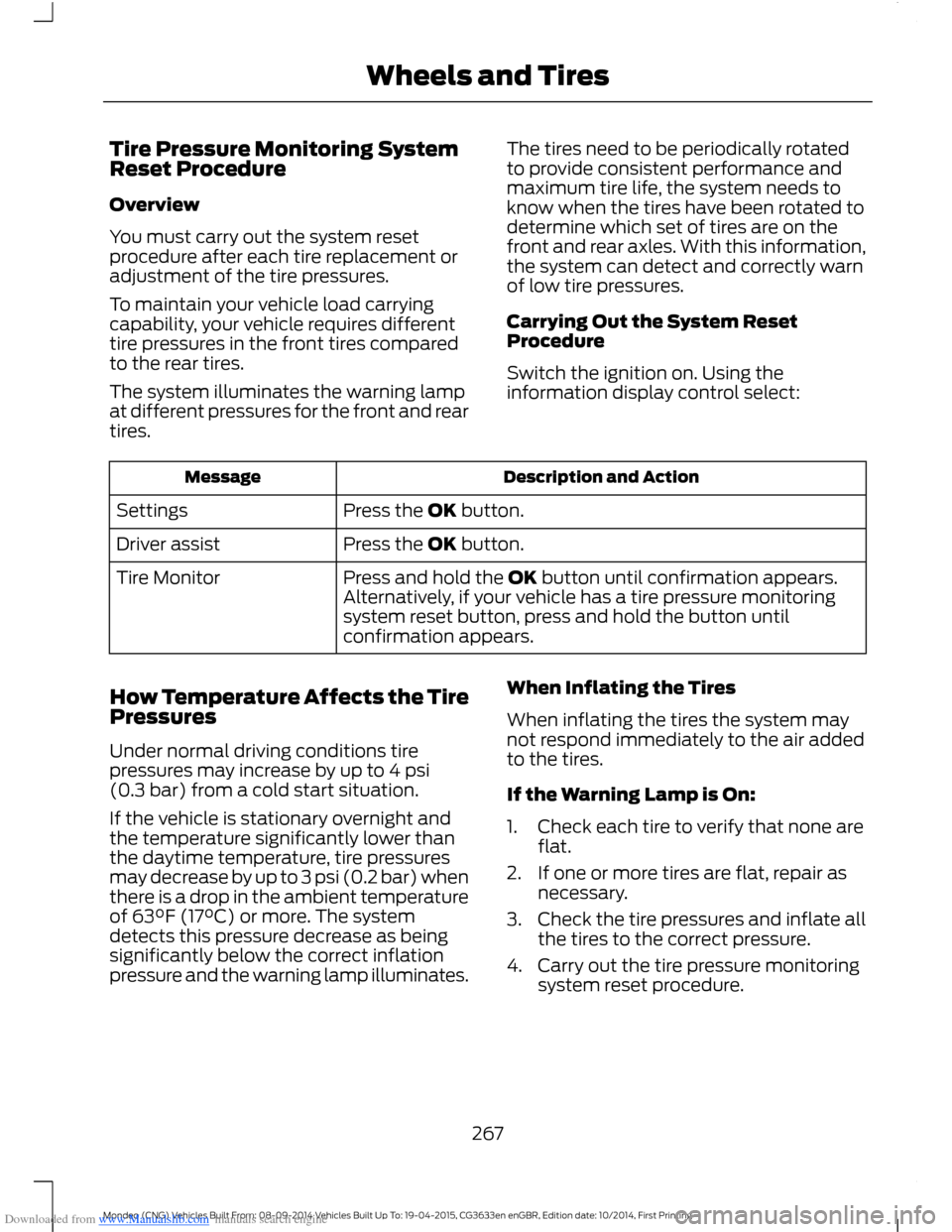
Overview
You must carry out the system resetprocedure after each tire replacement oradjustment of the tire pressures.
To maintain your vehicle load carryingcapability, your vehicle requires differenttire pressures in the front tires comparedto the rear tires.
The system illuminates the warning lampat different pressures for the front and reartires.
The tires need to be periodically rotatedto provide consistent performance andmaximum tire life, the system needs toknow when the tires have been rotated todetermine which set of tires are on thefront and rear axles. With this information,the system can detect and correctly warnof low tire pressures.
Carrying Out the System ResetProcedure
Switch the ignition on. Using theinformation display control select:
Description and ActionMessage
Press the OK button.Settings
Press the OK button.Driver assist
Press and hold the OK button until confirmation appears.Alternatively, if your vehicle has a tire pressure monitoringsystem reset button, press and hold the button untilconfirmation appears.
Tire Monitor
How Temperature Affects the TirePressures
Under normal driving conditions tirepressures may increase by up to 4 psi(0.3 bar) from a cold start situation.
If the vehicle is stationary overnight andthe temperature significantly lower thanthe daytime temperature, tire pressuresmay decrease by up to 3 psi (0.2 bar) whenthere is a drop in the ambient temperatureof 63°F (17°C) or more. The systemdetects this pressure decrease as beingsignificantly below the correct inflationpressure and the warning lamp illuminates.
When Inflating the Tires
When inflating the tires the system maynot respond immediately to the air addedto the tires.
If the Warning Lamp is On:
1.Check each tire to verify that none areflat.
2.If one or more tires are flat, repair asnecessary.
3.Check the tire pressures and inflate allthe tires to the correct pressure.
4.Carry out the tire pressure monitoringsystem reset procedure.
267Mondeo (CNG) Vehicles Built From: 08-09-2014 Vehicles Built Up To: 19-04-2015, CG3633en enGBR, Edition date: 10/2014, First PrintingWheels and Tires
Page 296 of 446
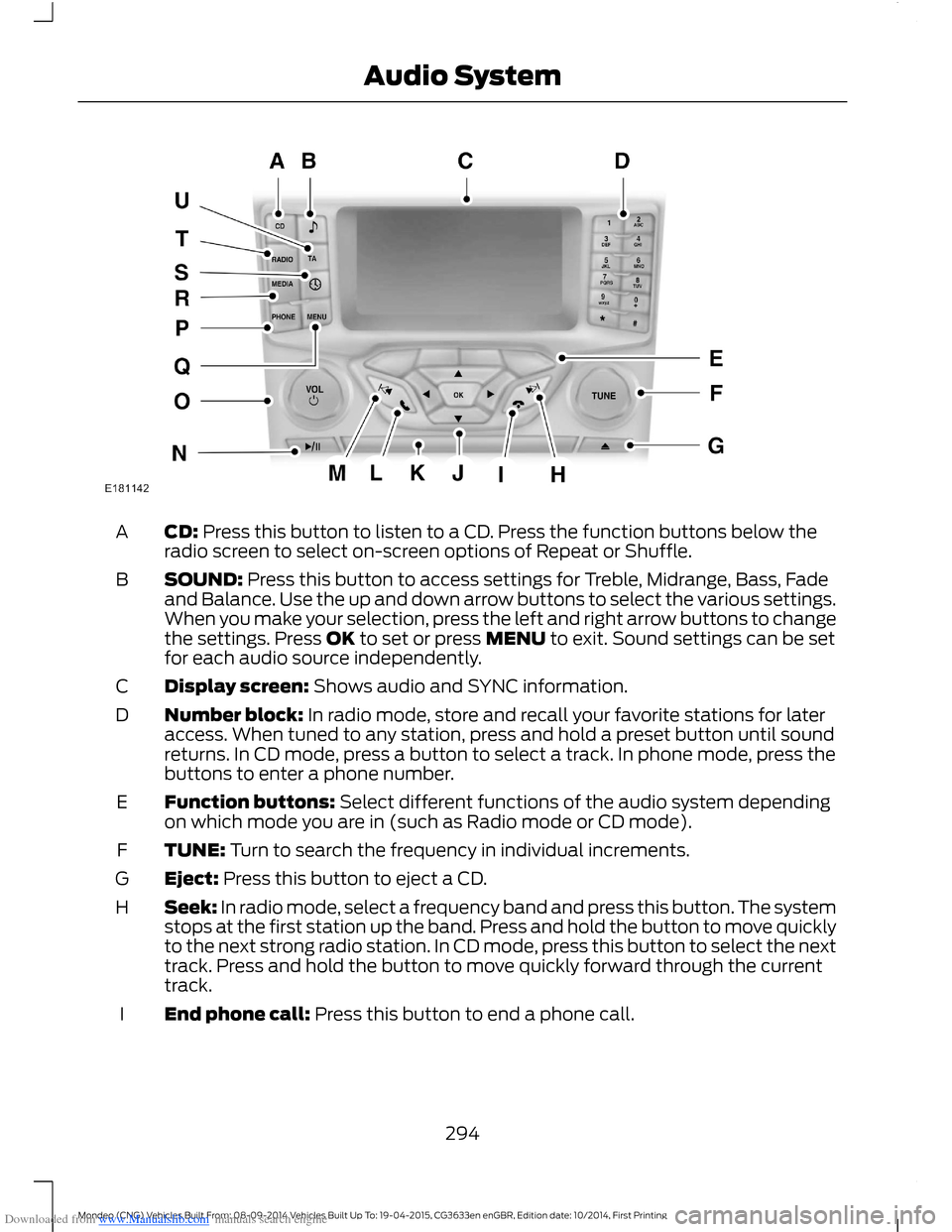
Downloaded from www.Manualslib.com manuals search engine CD: Press this button to listen to a CD. Press the function buttons below theradio screen to select on-screen options of Repeat or Shuffle.A
SOUND: Press this button to access settings for Treble, Midrange, Bass, Fadeand Balance. Use the up and down arrow buttons to select the various settings.When you make your selection, press the left and right arrow buttons to changethe settings. Press OK to set or press MENU to exit. Sound settings can be setfor each audio source independently.
B
Display screen: Shows audio and SYNC information.C
Number block: In radio mode, store and recall your favorite stations for lateraccess. When tuned to any station, press and hold a preset button until soundreturns. In CD mode, press a button to select a track. In phone mode, press thebuttons to enter a phone number.
D
Function buttons: Select different functions of the audio system dependingon which mode you are in (such as Radio mode or CD mode).E
TUNE: Turn to search the frequency in individual increments.F
Eject: Press this button to eject a CD.G
Seek: In radio mode, select a frequency band and press this button. The systemstops at the first station up the band. Press and hold the button to move quicklyto the next strong radio station. In CD mode, press this button to select the nexttrack. Press and hold the button to move quickly forward through the currenttrack.
H
End phone call: Press this button to end a phone call.I
294Mondeo (CNG) Vehicles Built From: 08-09-2014 Vehicles Built Up To: 19-04-2015, CG3633en enGBR, Edition date: 10/2014, First PrintingAudio System