trans FORD MUSTANG 1969 Volume One Chassis
[x] Cancel search | Manufacturer: FORD, Model Year: 1969, Model line: MUSTANG, Model: FORD MUSTANG 1969Pages: 413, PDF Size: 75.81 MB
Page 61 of 413
02-02-42
Brake System
02-02-42
CALIPER
ABUTMENTS
OUTBOARD
CALIPER HOUSING
DUST
BOOT RETAINING GROOVE
DUST
BOOT (4)
PISTON
SEAL (4)
EXTERNAL
TRANSFER
TUBE
SCREW
INBOARD
CALIPER HOUSING
FLEXIBLE
HOSE-^
H1367-C
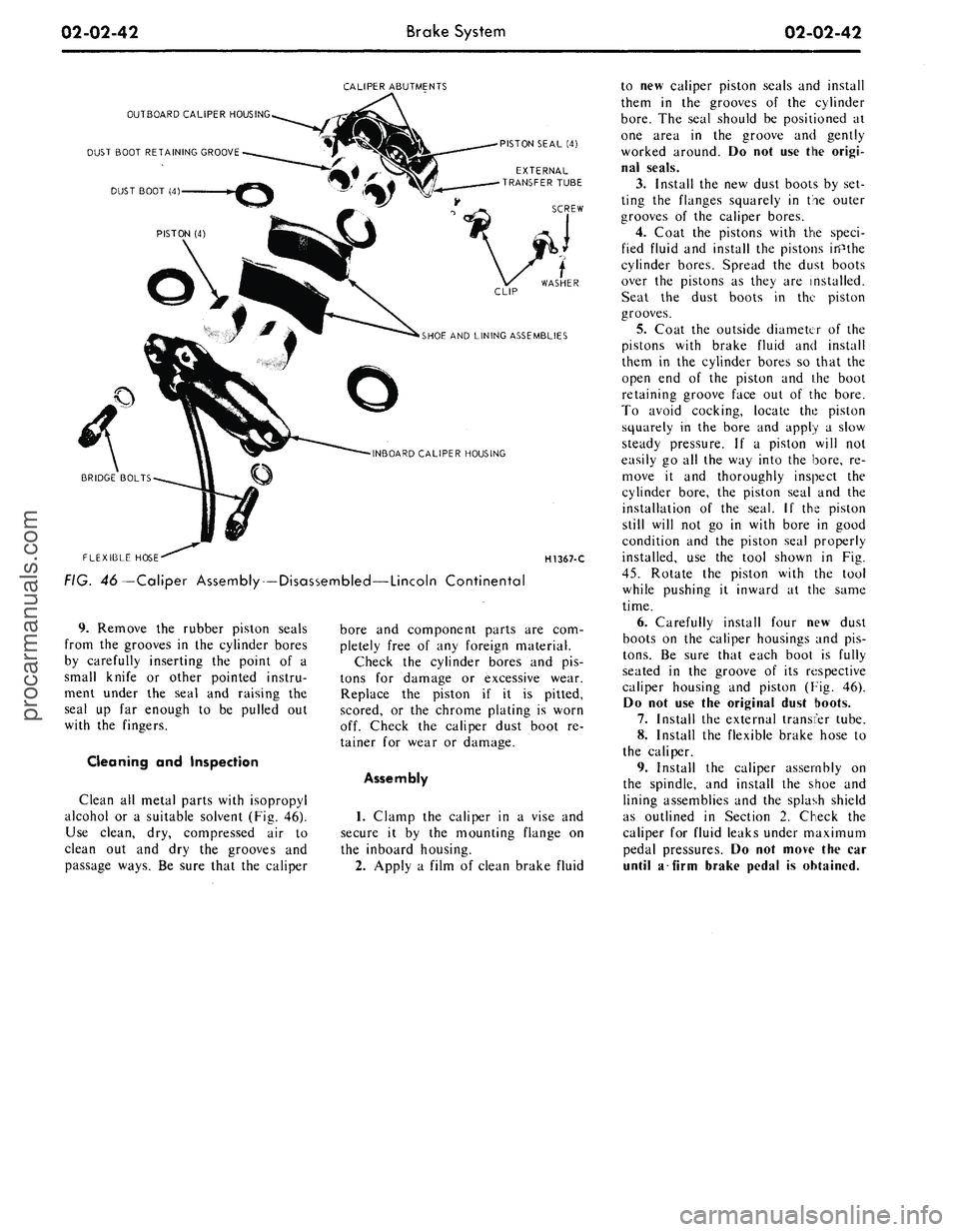
FIG. 46—Caliper Assembly — Disassembled—Lincoln Continental
9. Remove the rubber piston seals
from the grooves in the cylinder bores
by carefully inserting the point of a
small knife or other pointed instru-
ment under the seal and raising the
seal up far enough to be pulled out
with the fingers.
Cleaning and Inspection
Clean all metal parts with isopropyl
alcohol or a suitable solvent (Fig. 46).
Use clean, dry, compressed air to
clean out and dry the grooves and
passage ways. Be sure that the caliper
bore and component parts are com-
pletely free of any foreign material.
Check the cylinder bores and pis-
tons for damage or excessive wear.
Replace the piston if it is pitted,
scored, or the chrome plating is worn
off. Check the caliper dust boot re-
tainer for wear or damage.
Assembly
1.
Clamp the caliper in a vise and
secure it by the mounting flange on
the inboard housing.
2.
Apply a film of clean brake fluid
to new caliper piston seals and install
them in the grooves of the cylinder
bore.
The seal should be positioned at
one area in the groove and gently
worked around. Do not use the origi-
nal seals.
3.
Install the new dust boots by set-
ting the flanges squarely in the outer
grooves of the caliper bores.
4.
Coat the pistons with the speci-
fied fluid and install the pistons inPthe
cylinder bores. Spread the dust boots
over the pistons as they are installed.
Seat the dust boots in the piston
grooves.
5.
Coat the outside diameter of the
pistons with brake fluid and install
them in the cylinder bores so that the
open end of the piston and ihe boot
retaining groove face out of the bore.
To avoid cocking, locate the piston
squarely in the bore and apply a slow
steady pressure. If a piston will not
easily go all the way into the bore, re-
move it and thoroughly inspect the
cylinder bore, the piston seal and the
installation of the seal. If the piston
still will not go in with bore in good
condition and the piston seal properly
installed, use the tool shown in Fig.
45.
Rotate the piston with the tool
while pushing it inward at the same
time.
6. Carefully install four new dust
boots on the caliper housings and pis-
tons.
Be sure that each boot is fully
seated in the groove of its respective
caliper housing and piston (Fig. 46).
Do not use the original dust boots.
7.
Install the external transfer tube.
8. Install the flexible brake hose to
the caliper.
9. Install the caliper assembly on
the spindle, and install the shoe and
lining assemblies and the splash shield
as outlined in Section 2. Check the
caliper for fluid leaks under maximum
pedal pressures. Do not move the car
until a firm brake pedal is obtained.procarmanuals.com
Page 67 of 413
03-01-02
Suspension — Steering, Wheels And Tires — General Service
03-01-02
1 TESTING
POWER STEERING-
PRELIMINARY TESTS
The following preliminary checks
should always be made before per-
forming any operations.
AIR BLEEDING
Air in the power steering system
(shown by bubbles in the fluid) should
be bled. After making sure that the
reservoir is filled to specification (the
fluid must be at normal operating
temperature when the check is made),
turn the steering wheel through its full
travel three or four times. Do not hold
the wheels against their stops. Re-
check the fluid level.
CHECK FLUID LEVEL
Run the engine until the fluid is at
normal operating temperature. Then
turn the steering wheel all the way to
the left and right several times, and
shut off the engine.
Check the fluid level in the power
steering reservoir. The level must show
on the cross hatching between the bot-
tom of the dipstick and the full mark
(Fig. 1). If the level is low, add
enough automatic transmission fluid
C1AZ-19582-A to raise the level to
the F mark on the dipstick. Do not
overfill the reservoir.
CHECK PUMP BELT
If the pump belt is broken, glazed,
or worn, replace it with a new belt.
Use only the specified type of belt.
Refer to Part 3-13 for belt adjustment
procedure.
CHECK FOR FLUID
LEAKS
With the engine idling, turn the
steering wheel from stop to stop sever-
al times. Check all possible leakage
points. Tighten all loose fittings, and
replace any damaged lines or defective
seats.
CHECK TURNING EFFORT
With the front wheels properly al-
igned and tire pressures correct, check
the effort required to turn the steering
wheel.
G 1508- A
FIG.
1—Power
Steering Pump
Dipstick
1.
With the vehicle on dry concrete,
set the parking brakes.
2.
With the engine warmed up and
running at idle speed, turn the steering
wheel to the left and right several
times to warm the fluid.
3.
Attach a pull scale to the rim of
the steering wheel. Measure the pull
required to turn the wheel one com-
plete revolution in each direction. The
effort required to rotate the steering
wheel should not exceed specifications
given in Part 3-13.
POWER STEERING PUMP FLOW
AND PRESSURE TESTS—
EXCEPT LINCOLN CONTINENTAL
AND CONTINENTAL MARK III
The power steering flow and pres-
sure tests will show whether the pump,
steering gear or power assist control
RETURN LINE
POWER
STEERING PUMP
Sr
valve is causing the trouble. Steps out-
lined below should be followed to de-
termine the cause of the trouble.
PUMP FLOW TEST
1.
Depending on the equipment
present on the vehicle (air condition-
ing, power brakes, standard transmis-
sion),
one of the following options
may be used to connect the pump
pressure and return hoses to the test
tool (T56L-3361O-D and T68L-
33610-A):
a. Disconnect the pressure and re-
turn lines at the power steering pump
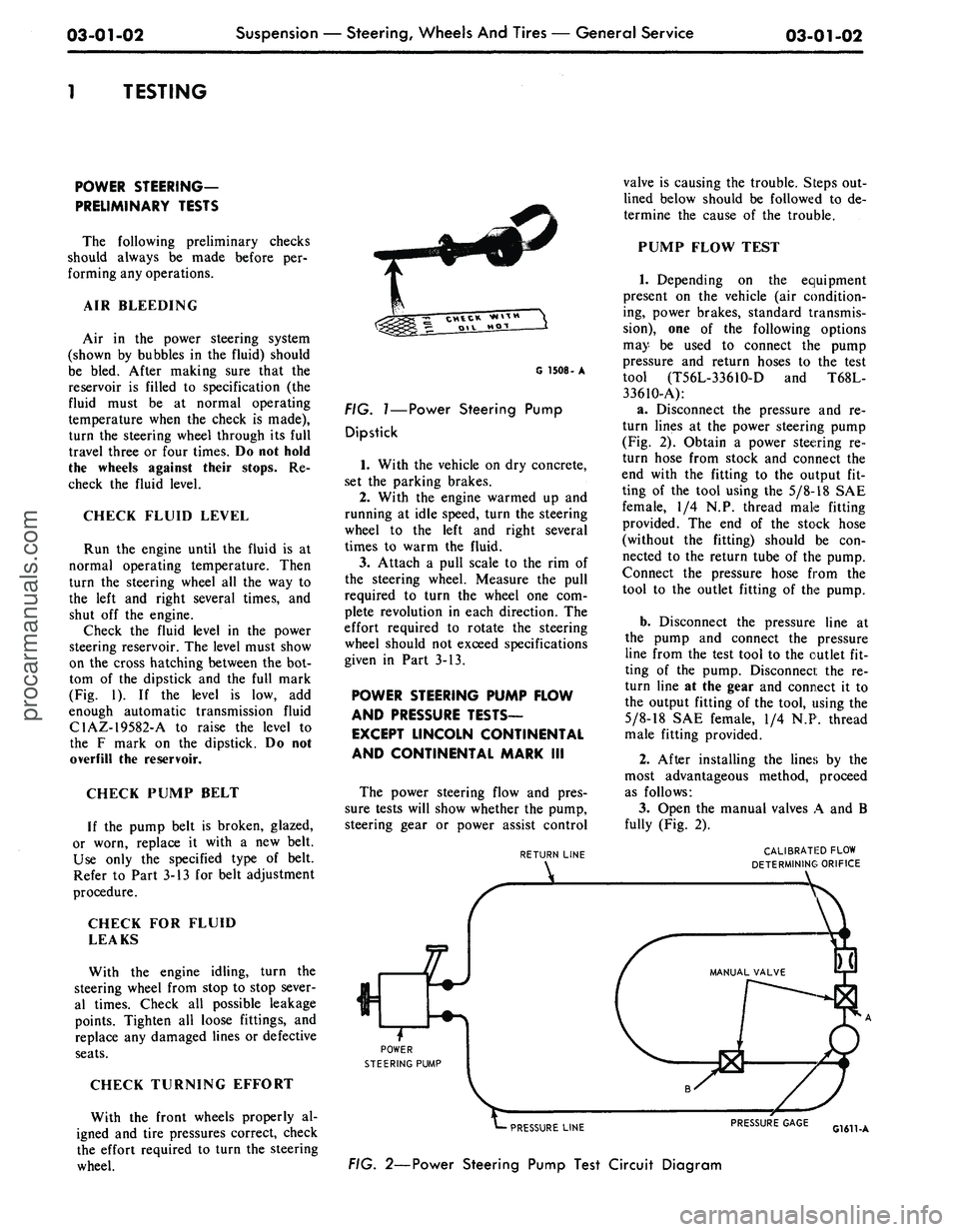
(Fig. 2). Obtain a power steering re-
turn hose from stock and connect the
end with the fitting to the output fit-
ting of the tool using the
5/8-18
SAE
female, 1/4 N.P. thread male fitting
provided. The end of the stock hose
(without the fitting) should be con-
nected to the return tube of the pump.
Connect the pressure hose from the
tool to the outlet fitting of the pump.
b.
Disconnect the pressure line at
the pump and connect the pressure
line from the test tool to the outlet fit-
ting of the pump. Disconnect the re-
turn line at the gear and connect it to
the output fitting of the tool, using the
5/8-18
SAE female, 1/4 N.P. thread
male fitting provided.
2.
After installing the lines by the
most advantageous method, proceed
as follows:
3.
Open the manual valves A and B
fully (Fig. 2).
CALIBRATED FLOW
DETERMINING ORIFICE
PRESSURE LINE
FIG. 2—Power Steering Pump Test Circuit Diagram
PRESSURE GAGE
G1611-Aprocarmanuals.com
Page 115 of 413
03-05-02
Steering Columns
And
Linkage
03-05-02
which also will shear away during
im-
pact.
TILT STEERING COLUMNS
The steering column
is of the col-
lapsible type
to
lessen
the
possibility
of injury
to the
driver
of the
vehicle
should
he
become involved
in an
acci-
dent.
The
lower
end of the
steering
column tube
at the
bellows area will
collapse approximately
six
inches
upon
a
hard impact.
The shift tube
and the
steering shaft
are provided with plastic dowels
and
will shear
and
allow them
to
collapse
in proportion
to the
outer tube upon
impact.
Once
the
steering column
has
been
collapsed,
a
complete
new
column
must
be
installed.
The tilt column features nine driv-
ing positions (four
up and
four down
from
a
center position).
The
.column
also features
a
turn signal switch with
a lane-changer position turn indicating
position
and
emergency warning flash-
er control.
TILT-AWAY STEERING COLUMNS
The tilt-away steering column
fea-
tures nine driving positions (four
up
and four down from
a
center position)
and
a
tilt-away position that
is
auto-
matically accomplished
on
Mustang
and Cougar models when
the
ignition
key
is
turned
to the
OFF
position
and
the left door
is
opened.
On
Thunder-
bird models,
the
tilt-away occurs when
the shift lever
is
placed
in
PARK
and
the driverns door
is
opened.
The steering column
is of the col-
lapsible type
to
lessen
the
possibility
of injury
to the
driver
of the
vehicle
should
he
become involved
in an
acci-
dent.
The
lower
end of the
steering
column tube
at the
bellows area will
collapse approximately
six
inches
upon
a
hard impact.
The shift tube
and the
steering shaft
are provided with plastic dowels
and
will shear
and
allow them
to
collapse
in proportion
to the
outer tube upon
impact.
Once
the
steering column
has
been
collapsed,
a
complete
new
column
must
be
installed along with mounting
brackets which will also shear away
during impact.
IN-VEHICLE ADJUSTMENTS
AND
REPAIRS
STEERING WHEEL SPOKE
POSITION ADJUSTMENT
When
the
steering gear
is on the
high point,
the
front wheels should
be
in
the
straight-ahead position
and the
steering wheel spokes should
be in
their normal position with
the
Pitman
arm pointing directly forward.
If the
spokes
are not in
their normal posi-
tion, they
can be
adjusted without
dis-
turbing
the
toe-in adjustment (Part
3-1).
STEERING WHEEL
REPLACEMENT
1.
Disconnect
the
negative cable
from
the
battery.
2.
Working from
the
underside
of
the steering wheel spoke, remove
the
crash
pad
attaching screws. Lift
the
crash
pad
from
the
wheel.
(On
Conti-
nental Mark
III
models,
pry out the
crash
pad
insert
and
remove
the two
screws that secure
the
crash
pad. Re-
move
the
crash
pad. On
models
equipped with steering wheel mounted
speed controls, refer
to
Group
16 for
removal instructions). Remove
the
horn ring
(if so
equipped)
by
turning
it counterclockwise.
3.
Remove
the
steering wheel
nut,
and then remove
the
steering wheel
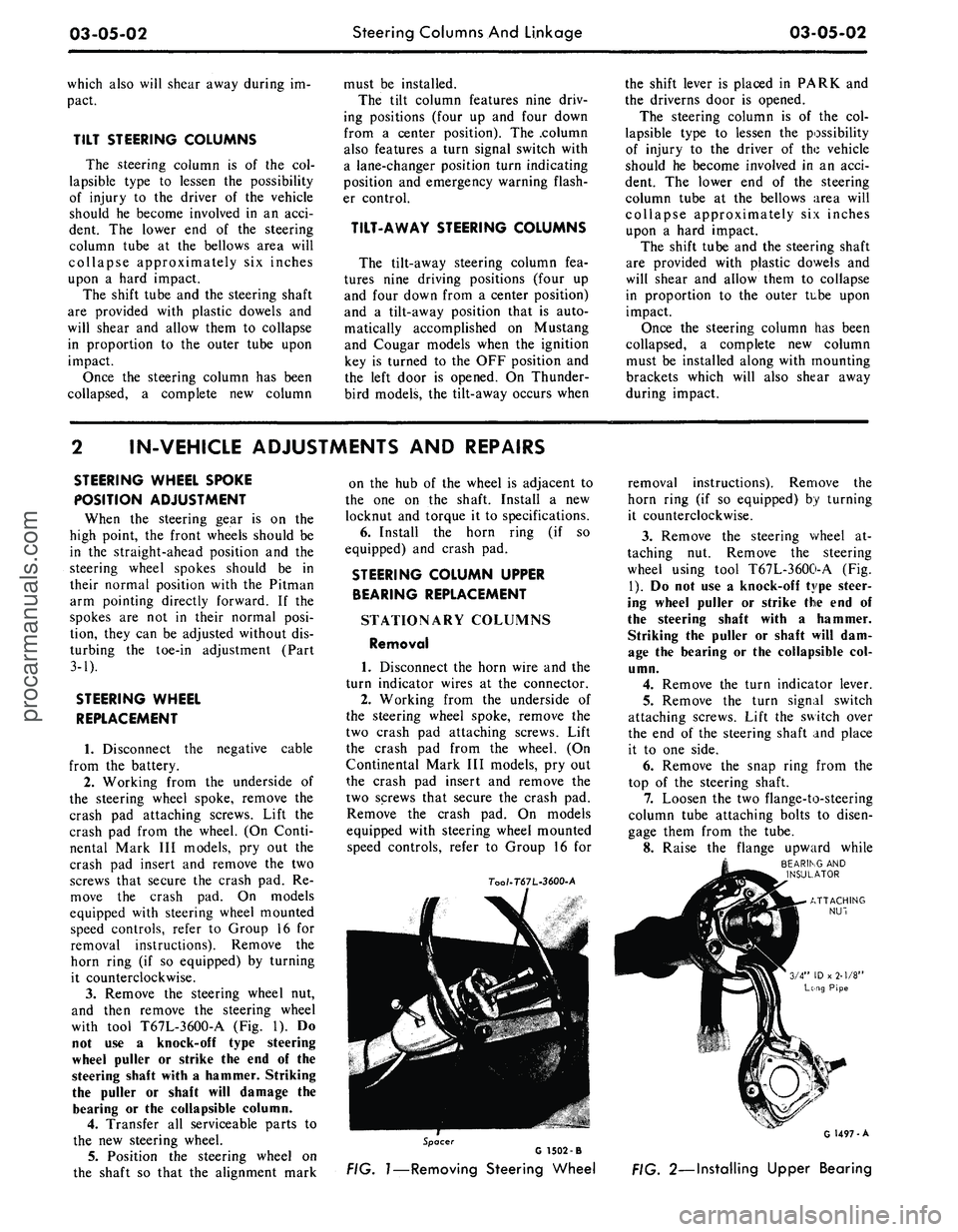
with tool T67L-3600-A
(Fig. 1). Do
not
use a
knock-off type steering
wheel puller
or
strike
the end of the
steering shaft with
a
hammer. Striking
the puller
or
shaft will damage
the
bearing
or the
collapsible column.
4.
Transfer
all
serviceable parts
to
the
new
steering wheel.
5.
Position
the
steering wheel
on
the shaft
so
that
the
alignment mark
on
the hub of the
wheel
is
adjacent
to
the
one on the
shaft. Install
a new
locknut
and
torque
it to
specifications.
6. Install
the
horn ring
(if so
equipped)
and
crash
pad.
STEERING COLUMN UPPER
BEARING REPLACEMENT
STATIONARY COLUMNS
Removal
1. Disconnect
the
horn wire
and the
turn indicator wires
at the
connector.
2.
Working from
the
underside
of
the steering wheel spoke, remove
the
two crash
pad
attaching screws. Lift
the crash
pad
from
the
wheel.
(On
Continental Mark
III
models,
pry out
the crash
pad
insert
and
remove
the
two screws that secure
the
crash
pad.
Remove
the
crash
pad. On
models
equipped with steering wheel mounted
speed controls, refer
to
Group
16 for
7oo/-T67L-3600-A
removal instructions). Remove
the
horn ring
(if so
equipped)
by
turning
it counterclockwise.
3.
Remove
the
steering wheel
at-
taching
nut.
Remove
the
steering
wheel using tool T67L-3600-A
(Fig.
1).
Do not use a
knock-off type steer-
ing wheel puller
or
strike
the end of
the steering shaft with
a
hammer.
Striking
the
puller
or
shaft will
dam-
age
the
bearing
or the
collapsible
col-
umn.
4.
Remove
the
turn indicator lever.
5.
Remove
the
turn signal switch
attaching screws. Lift
the
switch over
the
end of the
steering shaft
and
place
it
to one
side.
6. Remove
the
snap ring from
the
top
of the
steering shaft.
7.
Loosen
the two
flange-to-steering
column tube attaching bolts
to
disen-
gage them from
the
tube.
8. Raise
the
flange upward while
BEARING
AND
INSULATOR
Spacer
G 1502 -B
FIG.
1—Removing
Steering Wheel
G 1497-A
FIG. 2—Installing Upper Bearingprocarmanuals.com
Page 120 of 413
03-05-07
Steering Columns And Linkage
03-05-07
the steering column
(F in Fig. 8).
7.
Disconnect
the
transmission shift
rod
at the
shift tube.
8. Working under
the
hood, install
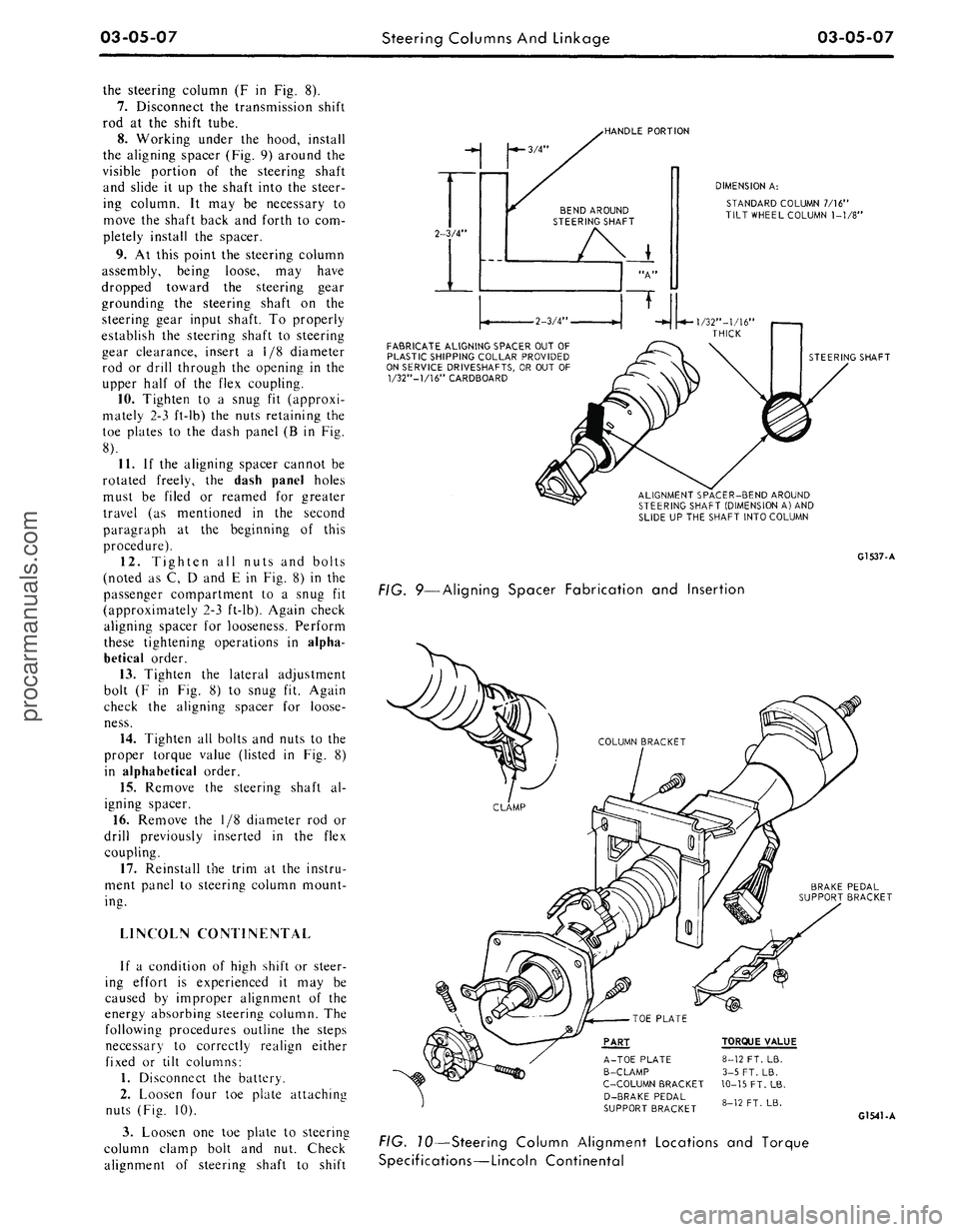
the aligning spacer (Fig.
9)
around
the
visible portion
of the
steering shaft
and slide
it up the
shaft into
the
steer-
ing column.
It may be
necessary
to
move
the
shaft back
and
forth
to
com-
pletely install
the
spacer.
9.
At
this point
the
steering column
assembly, being loose,
may
have
dropped toward
the
steering gear
grounding
the
steering shaft
on the
steering gear input shaft.
To
properly
establish
the
steering shaft
to
steering
gear clearance, insert
a 1/8
diameter
rod
or
drill through
the
opening
in the
upper half
of the
flex coupling.
10.
Tighten
to a
snug
fit
(approxi-
mately
2-3
ft-lb)
the
nuts retaining
the
toe plates
to the
dash panel
(B in Fig.
8).
11.
If the
aligning spacer cannot
be
rotated freely,
the
dash panel holes
must
be
filed
or
reamed
for
greater
travel
(as
mentioned
in the
second
paragraph
at the
beginning
of
this
procedure).
12.
Tighten
all
nuts
and
bolts
(noted
as C, D and E in
Fig.
8) in the
passenger compartment
to a
snug
fit
(approximately 2-3 ft-lb). Again check
aligning spacer
for
looseness. Perform
these tightening operations
in
alpha-
betical order.
13.
Tighten
the
lateral adjustment
bolt
(F in Fig. 8) to
snug
fit.
Again
check
the
aligning spacer
for
loose-
ness.
14.
Tighten
all
bolts and nuts
to the
proper torque value (listed
in Fig. 8)
in alphabetical order.
15.
Remove
the
steering shaft
al-
igning spacer.
16.
Remove
the 1/8
diameter
rod or
drill previously inserted
in the
flex
coupling.
17.
Reinstall
the
trim
at the
instru-
ment panel
to
steering column mount-
ing.
LINCOLN CONTINENTAL
If
a
condition
of
high shift
or
steer-
ing effort
is
experienced
it may be
caused
by
improper alignment
of the
energy absorbing steering column.
The
following procedures outline
the
steps
necessary
to
correctly realign either
fixed
or
tilt columns:
1.
Disconnect
the
battery.
2.
Loosen four
toe
plate attaching
nuts (Fig.
10).
3.
Loosen
one toe
plate
to
steering
column clamp bolt
and nut.
Check
alignment
of
steering shaft
to
shift
-HANDLE PORTION
2-3/4"
-*- 3/4"
BEND AROUND
STEERING SHAFT
DIMENSION
A:
STANDARD COLUMN 7/16"
TILT WHEEL COLUMN
1-1/8"
•2-3/4
FABRICATE ALIGNING SPACER OUT OF
PLASTIC SHIPPING COLLAR PROVIDED
ON SERVICE DRIVESHAFTS, OR OUT
OF
1/32"—1/16" CARDBOARD
STEERING SHAFT
ALIGNMENT SPACER-BEND AROUND
STEERING SHAFT (DIMENSION
A)
AND
SLIDE UP THE SHAFT INTO COLUMN
G1537-A
FIG. 9—Aligning Spacer Fabrication
and
Insertion
BRAKE PEDAL
SUPPORT BRACKET
PART
A-TOE PLATE
B-CLAMP
C-C0LUMN BRACKET
D-BRAKE PEDAL
SUPPORT BRACKET
TORQUE VALUE
8-12 FT. LB.
3-5 FT. LB.
10-15
FT.
LB.
8-12 FT. LB.
G1541-A
FIG. 10—Steering Column Alignment Locations
and
Torque
Specifications—Lincoln Continentalprocarmanuals.com
Page 121 of 413
03-05-08
Steering Columns And Linkage
03-05-08
tube.
In some instances the column
will shift into proper alignment when
the toe plate attaching nuts are loos-
ened. (Alignment is acceptable if a
.010 inch feeler blade can be passed
freely, completely around the area be-
tween the outer diameter of the steer-
ing shaft and the shift tube.) if the
misalignment condition can be attrib-
uted to this area, file or ream the dash
panel holes for greater clearance. If
the alignment is maintained after the
toe plate nuts and toe plate to column
clamp bolt and nut are torqued to the
8-12 ft-lb specification, no further ad-
justment is necessary.
4.
Remove instrument panel lower
trim panel. Vehicles equipped with a
combination radio stereo tape player
will require removal of the radio and
tape player assembly in order to gain
access to the upper R.H. steering col-
umn support bracket bolt.
5.
Loosen the seven bolts at the
steering column support bracket and
brake pedal support bracket.
6. Install a 3/16 inch diameter rod
spacer in the flex coupling to assure
proper clearance between upper and
lower steering shaft.
7.
Raise the vehicle, remove the
transmission splash shield, and visual-
ly align the column to center the
steering shaft in the column. Tighten
two toe plate attaching nuts sufficient-
ly to hold the column alignment (two
persons may be required for this oper-
ation).
8. Lower the vehicle.
9. Check the clearance between the
steering column support bracket and
the instrument panel bracket. It may
be necessary to add shims (Part Num-
ber MK-3054-A .060 inch thick, or
C3AZ-3054-A, .113 inch thick) be-
tween the support bracket and the in-
strument panel bracket to prevent
movement of the column when the
support bracket bolts are tightened.
10.
Loosen the two toe plate at-
taching nuts previously tightened. Re-
check steering column alignment. In
some instances it may be necessary to
enlarge the holes in the dash panel in
order to obtain proper column align-
ment.
11.
With the column properly al-
igned, torque the four toe plate at-
taching nuts to 4-9 ft-lbs.
12.
Torque the toe plate to steering
column clamp bolt to 3-5 ft-lbs.
13.
Recheck steering shaft to shift
tube alignment. A 0.10 inch feeler
blade should pass freely, completely
around the area between the outer di-
ameter of the steering shaft and shift-
er tube.
14.
Raise the vehicle.
15.
Adjust transmission shift link-
age.
16.
Install transmission splash
shield.
17.
Lower the vehicle.
18.
Install the radio stereo tape
player if so equipped.
19.
Install instrument panel lower
trim panel.
20.
Connect the battery.
REMOVAL AND INSTALLATION
STEERING COLUMN
FORD, MERCURY, METEOR
Removal
1.
Disconnect the battery cable
from the negative post.
2.
Disconnect the turn signal switch
wires at the connector.
3.
Disconnect the neutral start
switch and back-up light switch wires
from the switches.
4.
Disconnect the transmission con-
trol rod(s) from the lever(s) at the
lower end of the column.
5.
Remove the bolt that secures the
flex coupling to the steering gear.
6. Remove the nuts that secure the
column retainer and seal at the toe
plate (Fig. 11).
7.
Ford, Meteor: Remove the two
screws that secure the lower trim
shroud to the upper trim shroud. Re-
move the two shrouds.
Mercury: Remove the two screws
that secure the lower trim shroud to
the upper trim shroud. Remove the
top shroud Disconnect the ignition
switch light bulb. Remove the ignition
and light switch bezels and spring clip
and remove the lower shroud. Discon-
nect the light switch electrical connec-
tor block.
8. Remove the two screws that se-
cure the intermediate bracket to the
column lower bracket.
9. While supporting the steering
column, remove the two nuts that se-
cure the column lower bracket to the
instrument panel. Remove the brack-
ets.
10.
Lift the steering column and
wheel from the vehicle.
Installation
1.
Position the steering column in
the vehicle. Index the block tooth on
the steering gear shaft with the corre-
sponding slot on the flex coupling. In-
stall and tighten the flex coupling-
to-steering gear attaching bolt.
2.
Place the column upper bracket
and column lower bracket in position
on the column and install but do not
tighten the four attaching nuts.
3.
Install and tighten the two nuts
that secure the column lower bracket
to the instrument panel. Make certain
the column is properly positioned rela-
tive to the flex coupling input shaft
connection.
4.
Install and tighten the screws
that secure the intermediate bracket to
the column lower bracket.
5.
Tighten the four attaching nuts
at the upper and lower brackets and
the two nuts at the upper bracket to
instrument panel. The dial pointer (if
so equipped) should be adjusted to
coincide with the selector lever.
6. Install and tighten the nuts and
bolts that secure the column retainer
and seal at the toe plate. Make sure
the steering shaft is centered in the
column before tightening the nuts.
7.
Ford, Meteor: Install and tighten
the two screws that secure the lower
trim shroud to the upper trim shroud.
Mercury: Connect the light switch
harness block. Install the ignition and
light switch bezels. Connect the igni-
tion switch light bulb. Install the top
shroud and the two screws that secure
the lower trim shroud to the upper
shroud.
8. Connect the transmission control
rod(s) to the lever(s) at the lower end
of the column.
9. Connect the neutral start switch
and back-up light switch to their re-
spective terminals.
10.
Connect the turn signal switch
wires.
11.
Connect the negative battery
cable to the battery.
12.
Check the operation of the
steering tilt mechanism if so equipped
and the switches.procarmanuals.com
Page 122 of 413
03-05-09
Steering Columns And Linkage
03-05-09
FAIRLANE, FALCON
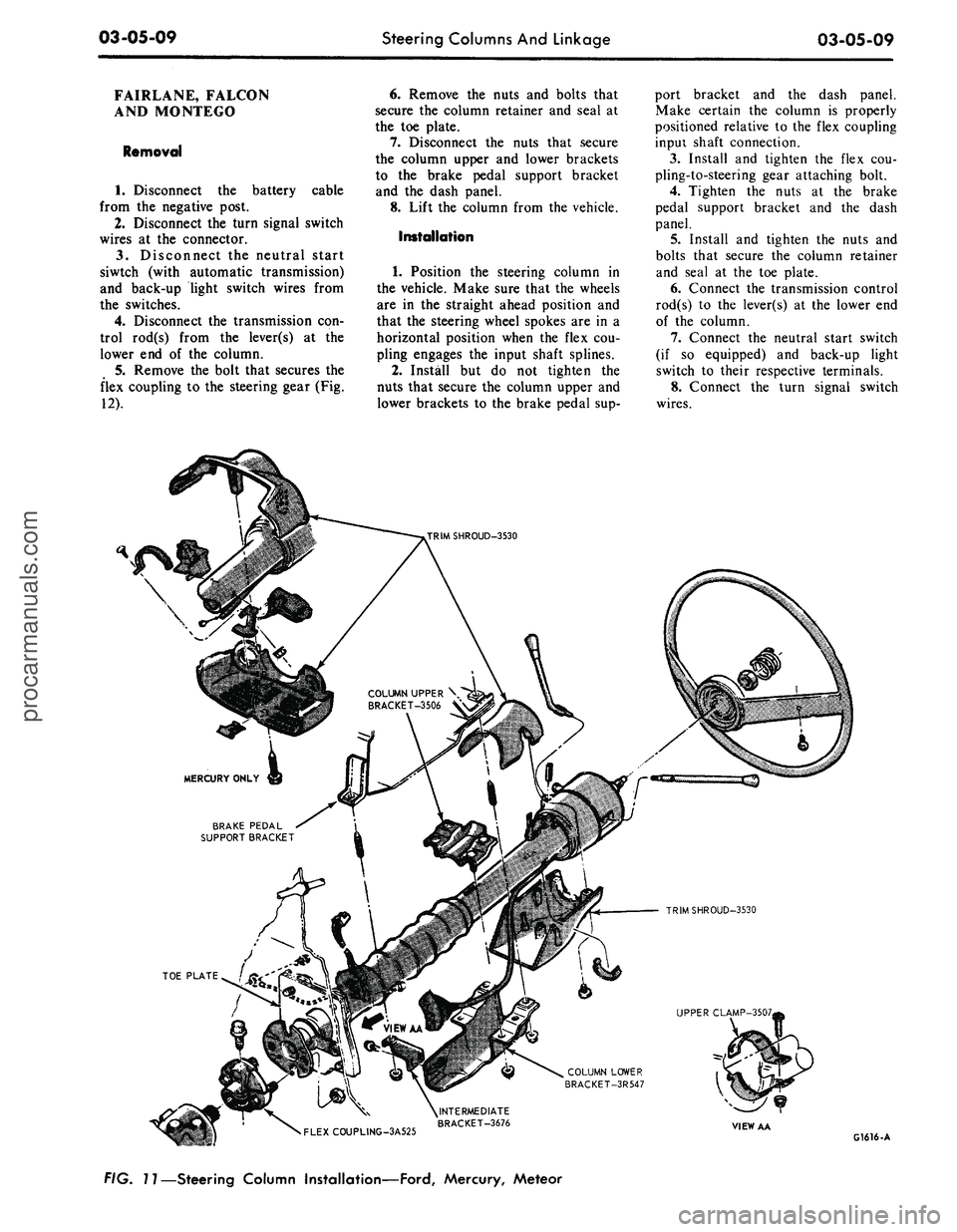
AND MONTEGO
Removal
1.
Disconnect the battery cable
from the negative post.
2.
Disconnect the turn signal switch
wires at the connector.
3.
Disconnect the neutral start
siwtch (with automatic transmission)
and back-up light switch wires from
the switches.
4.
Disconnect the transmission con-
trol rod(s) from the lever(s) at the
lower end of the column.
5.
Remove the bolt that secures the
flex coupling to the steering gear (Fig.
12).
6. Remove the nuts and bolts that
secure the column retainer and seal at
the toe plate.
7.
Disconnect the nuts that secure
the column upper and lower brackets
to the brake pedal support bracket
and the dash panel.
8. Lift the column from the vehicle.
Installation
1.
Position the steering column in
the vehicle. Make sure that the wheels
are in the straight ahead position and
that the steering wheel spokes are in a
horizontal position when the flex cou-
pling engages the input shaft splines.
2.
Install but do not tighten the
nuts that secure the column upper and
lower brackets to the brake pedal sup-
port bracket and the dash panel.
Make certain the column is properly
positioned relative to the flex coupling
inpui shaft connection.
3.
Install and tighten the flex cou-
pling-to-steering gear attaching bolt.
4.
Tighten the nuts at the brake
pedal support bracket and the dash
panel.
5.
Install and tighten the nuts and
bolts that secure the column retainer
and seal at the toe plate.
6. Connect the transmission control
rod(s) to the lever(s) at the lower end
of the column.
7.
Connect the neutral start switch
(if so equipped) and back-up light
switch to their respective terminals.
8. Connect the turn signal switch
wires.
COLUMN UPPER \
BRACKET-3506 V
BRAKE PEDAL
SUPPORT BRACKET
TRIMSHROUD-3530
UPPER CLAMP-3507,
COLUMN LOWER
BRACKET-3R547
•
FLEXCOUPLING-3A525
^INTERMEDIATE
BRACKET-3676
VIEW AA
G1616-A
FIG. 11—Steering Column Installation—Ford, Mercury, Meteorprocarmanuals.com
Page 127 of 413
03-05-14
Steering Columns And Linkage
03-05-14
8. Connect the turn signal and
emergency flasher switch wires at the
multiple connectors. Connect the wires
to the neutral start switch. Adjust-
ments for the neutral start switch are
detailed in Group 7 of this manual.
9. Connect the tilt-column control
cable to the release cable retainer and
vacuum motor (if so equipped). To re-
move cable slack, loosen the bracket
attaching screw and pull it slightly
toward the column, then tighten the
screw. If difficulty in adjusting this
control is experienced, the retainer
slot may be filed to gain additional
travel.
10.
Install the instrument panel
steering column plate and cover and
the instrument panel lower outer fin-
ish panel.
11.
Connect the negative cable to
the battery.
12.
Start the engine and check the
operation of the steering column and
switches.
LINCOLN CONTINENTAL
Removal
1.
Disconnect the battery.
2.
Disconnect the rod from the
lever at the lower end of the selector
tube.
Loosen the clamp bolt that locks
the flexible coupling to the steering
shaft.
3.
Working from the underside of
the steering wheel spoke, remove the
two screws that secure the crash pad.
Remove the pad. Do not use a ham-
mer or knock-off type wheel puller.
Striking the puller or shaft may cause
damage to the bearings and/or col-
lapsible column. Remove the steering
wheel as shown in Fig. 15.
4.
Remove the instrument panel
steering column finish plate.
5.
Remove the four screws that at-
tach the lower retainer to the dash
panel.
6. Disconnect the turn signal switch
and emergency flasher wires at the
connectors. Disconnect the wires from
the neutral start switch.
7.
While supporting the steering
column, remove the bolts that attach
the lower clamp to the upper bracket
(Fig. 15). Lift the column from the ve-
hicle.
Installation
1.
Position the column in the vehi-
cle,
making sure that the steering
shaft engages the flex coupling.
2.
Install the column retainer-
to-dash panel attaching screws, but do
not tighten them.
3.
Install the lower clamp and the
attaching nuts. Tighten the nuts fing-
ertight.
4.
Move the lower flange as re-
quired to center the steering shaft in
the tube. Aligning procedures are de-
tailed in Part 3-1. Tighten the lower
flange attaching nuts when the shaft is
centered.
5.
Connect the shift rod to the shift
lever at the lower end of the column.
6. Install and tighten the flex cou-
pling attaching bolt.
7.
Tighten the instrument panel-
to-clamp attaching nuts.
8. Connect the turn signal and
emergency flasher switch wirss at the
multiple connectors. Connect the wires
to the neutral start switch. Adjust-
ments for the neutral start switch are
detailed in Group 7 of this manual.
9. Install the instrument panel
steering column finish plate.
10.
Install the steering wheel and
crash pad.
MAJOR REPAIR OPERATIONS
STEERING COLUMN
SHIFT TUBE REPLACEMENT
STATIONARY COLUMN
WITH STANDARD
TRANSMISSION
Removal
1.
Working from the underside of
the steering wheel spoke, remove the
two screws that secure the crash pad.
Remove the pad. (On Continental
Mark III models, pry out the crash
pad insert and remove the two screws
that secure the crash pad. Remove the
crash pad. On models equipped with
steering wheel mounted speed con-
trols,
refer to Group 16 for removal
instructions).
2.
Remove the steering wheel from
the steering shaft with tool T67L-
3600-A (Fig. 1). Then, remove the
tool from the steering wheel. Do not
use a knock-off type steering Wheel
puller or strike the end of the steering
shaft with a hammer. Striking the
puller or shaft will damage the bear-
ing or the collapsible column.
3.
Remove the steering column
from the vehicle.
4.
Remove the selector lever from
the hub (Fig. 16).
5.
Remove the bearing upper snap
ring. It may be necessary to pull the
turn signal switch out to remove the
snap ring.
6. Remove the screws that attach
the shift tube bearing, shift arms, and
shift tube to the lower end of the
steering column.
7.
Slip the shift tube and steering
shaft from the lower end of the steer-
ing column tube. The upper bearing
has a slight press fit on the steering
shaft.
8. Remove the C-washer from the
upper end of the steering shaft, and
pull the shift tube from the steering
shaft.
9. Remove the shift tube bearing
from the lower end of the tube
Installation
1.
Position the shift tube bearing
(Fig. 16) on the tube and insert the
steering shaft in the shift tube.
2.
Install the C-washer on the
upper end of the steering shaft.
3.
Insert the shift tube and steering
shaft into the steerint column tube
and install the three attaching screws
at the lower end of the steering col-
umn tube.
4.
Position the bearing and insula-
tor on the shaft if it was disturbed
during removal. Work it down onto
the shaft as far as possible, then place
a piece of 3/4 ID x 2 1/8 inch pipe
over the end of shaft and install the
steering wheel attaching nut (Fig. 2).
5.
Tighten the nut until the bearing
is seated in the flange, then remove
the nut and pipe from the shaft.
6. Position the turn signal switch
on the flange and install the three at-
taching screws. Install the upper snap
ring.
7.
Install the selector lever and the
turn signal lever in the column.
8. Adjust and install the neutral
start switch as detailed in Group 7.
9. Install the steering column in the
vehicle.procarmanuals.com
Page 128 of 413

03-05-15
Steering Columns And Linkage
03-05-15
SHIFT
TUBE
STEERING
COLUMN
TUBE
SELECTOR
I
LEVER
HUB
\
CENTERING
I
WASHER
QUADRANT
BEARING
UPPER
SNAP RING
TURN SIGNAL AND
EMERGENCY FLASHER
SWITCH
PLASTIC
CONDUIT
STEERING
SHAFT
CONNECTOR
FIG. 16—Typical Stationary Steering Column Disassembled—Standard Transmission
G 1494-A
SNAP RING
STEERING WHEEL-3600
SEAL - 7C102
BEARING -3517
SNAP RING
FLANGE -3511
SELECTOR BEZEL-
LEVER- 7210 ZtL
GEAR SHIFT LEVER
(FIRST
&
REVERSE)
/
7303
/ 9
WASHER - 7242
BUSHING - 733
- 7347
UPPER CLAMP-01698
GEARSHIFT LEVER
(SECOND & THIRD) - 7302
SEAL-
LOWER CLAMP - 01699
^^r**——
FLEX JOINT - 3A525
FIG. 17—Typical Stationary Steering Column Disassembled—Automatic Transmission
G1501-Aprocarmanuals.com
Page 136 of 413
03-06-02
Manual Steering
03-06-02
IN-VEHICLE ADJUSTMENTS AND REPAIRS
STEERING WORM AND
SECTOR
GEAR ADJUSTMENTS
The ball nut assembly and the sec-
tor gear must be adjusted properly to
maintain minimum steering shaft end
play (a factor of preload adjustment)
and minimum backlash between sector
gear and ball nut. There are only two
possible adjustments within the recir-
culating ball-type steering gear, and
these should be made in the following
order to avoid damage or gear failure.
1.
Disconnect the Pitman arm from
the steering Pitman-to-idler arm rod.
2.
Loosen the nut which locks the
sector adjusting screw (Fig. 3), and
turn the adjusting screw counterclock-
wise.
(On models equipped with the
Cobra Jet engine, it may be necessary
to use a suitable holding tool with an
extension and a long screwdriver to
make the gear adjustment).
3.
Measure the worm bearing pre-
load by attaching an in-lb torque
wrench to the steering wheel nut (Fig.
4).
With the steering wheel off center,
read the pull required to rotate the
input shaft approximately 1 1/2 turns
either side of center. If the torque or
preload is not within specification
(Part 3-1), adjust as explained in the
next step.
.•ADJUSTER
LOCK
NUT
SECTOR
SHAFT
ADJUSTING
SCREW
G
1627-A
FIG. 3—Steering Gear
Adjustments—Typical
4.
Loosen the steering shaft bearing
adjuster lock nut, and tighten or back
off the bearing adjuster (Fig. 1) to
bring the preload within the specified
limits.
5.
Tighten the steering shaft bear-
ing adjuster lock nut, and recheck the
preload.
6. Turn the steering wheel slowly to
either stop. Turn gently against the
stop to avoid possible damage to the
ball return guides. Then rotate the
wheel 2-3/4 turns to center the ball
nut.
7.
Turn the sector adjusting screw
clockwise until the specified torque
(Part 3-13) is necessary to rotate the
worm past its center (high spot) (Fig.
1).
8. While holding the sector adjust-
ing screw, tighten the sector adjusting
screw locknut to specification, and re-
check the backlash adjustment.
9. Connect the Pitman arm to the
steering arm-to-idler arm rod.
G-1495-A
FIG. 4—Checking Steering Gear
Preload—Typical
REMOVAL AND INSTALLATION
STEERING GEAR
REMOVAL
1.
Remove the bolt(s) that retains
the flex coupling to the steering shaft.
2.
Remove the nut and lock washer
that secures the Pitman arm to the
sector shaft using Tool T64P-3590-F
(Fig. 5).
3.
To obtain clearance on some
models equipped with standard trans-
mission, it may be necessary to dis-
connect the clutch linkage. On some
8-cylinder models, it may be necessary
to lower the exhaust system.
4.
Remove the steering gear-to-side
rail bolts and remove the gear.
Too /-MB
STEERING
GEAR
HOUSING
T64P-3590.F
(PITMAN
"APU'^M
-
.-. •
-"
•.:,.17''i.a—
r.iMI.
A
F'G.
5—Removing Pitman Arm
INSTALLATION
1.
Position the steering gear and
flex coupling in place; then, install
and torque the steering gear-to-side
rail bolts to specification (Part 3-13).
2.
If the clutch linkage has been
disconnected, reposition, install and
adjust it. If the exhaust system has
been lowered, reinstall it to its proper
position.
3.
Position the Pitman arm and the
sector shaft and install the attaching
nut and lock washer. Torque the nut
to specification.
4.
Install and connect the flex cou-
pling attaching nut(s) and torque it to
specification (Part 3-13).procarmanuals.com
Page 142 of 413
03-07-04
Ford Design Non-Integral Power Steering System
03-07-04
12.
Stop the engine, and check the
control valve and hose connections for
fluid leaks. Correct the cause of any
leaks.
13.
Check the fluid level, and refill
the reservoir if necessary.
14.
With the engine running check
the position of the steering wheel
when the front wheels are in the
straight-ahead position.Do not make
any adjustments until toe-in is
checked.
15.
Keep the engine running, and
check toe-in. If either toe-in or steer-
ing wheel position is not correct make
all necessary adjustments (Part 3-1) at
the spindle connecting rod sleeves.
16.
Check the effort to turn the
wheels in both directions. The effort
should be about equal in both direc-
tions.
POWER CYLINDER
REMOVAL
1.
Disconnect the two fluid lines
from the power cylinder and allow
them to drain into a container.
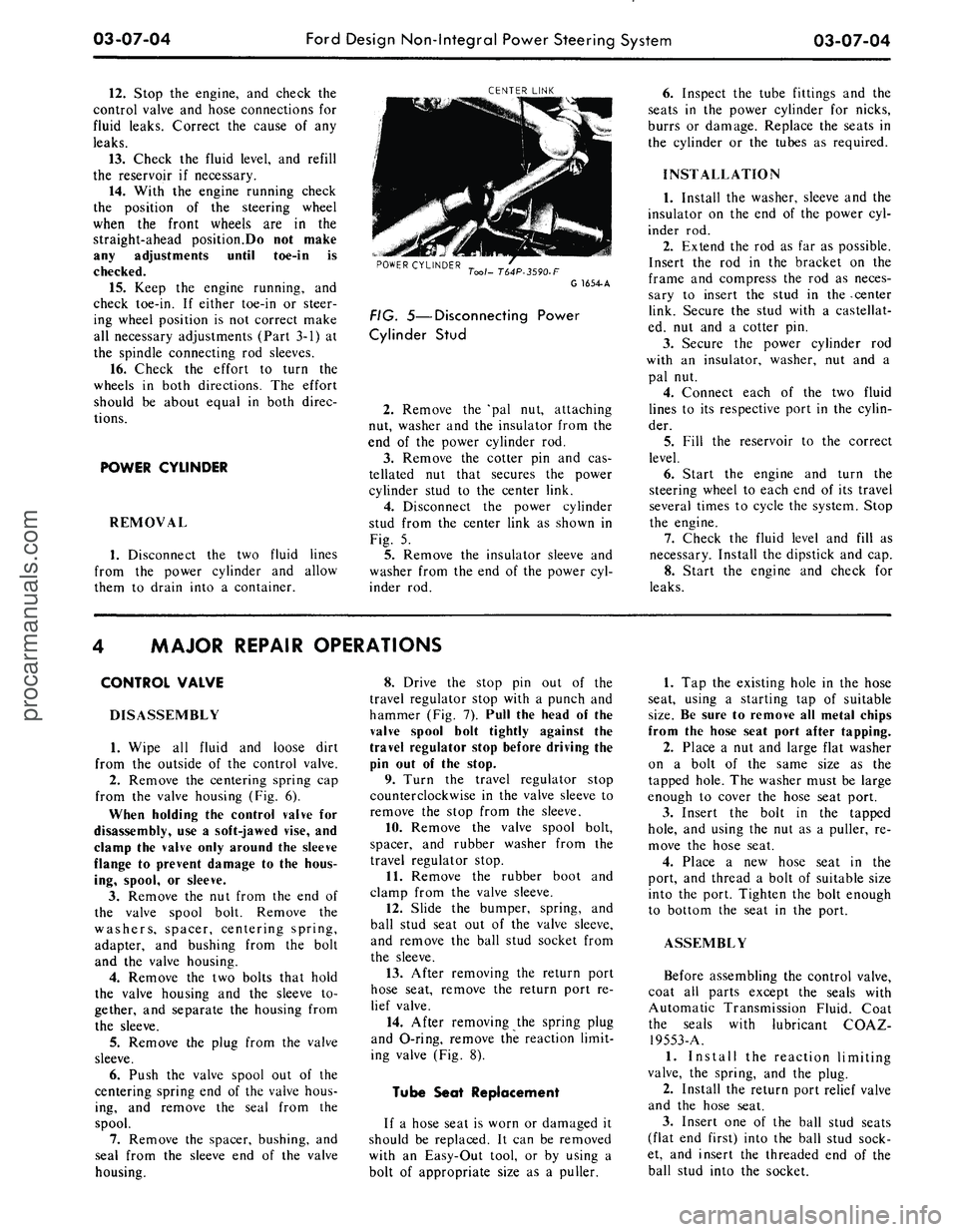
CENTER LINK
POWER CYLINDER
Tool- T64P-3590-F
G 1654-A
FIG. 5—Disconnecting Power
Cylinder Stud
2.
Remove the 'pal nut, attaching
nut, washer and the insulator from the
end of the power cylinder rod.
3.
Remove the cotter pin and cas-
tellated nut that secures the power
cylinder stud to the center link.
4.
Disconnect the power cylinder
stud from the center link as shown in
Fig. 5.
5.
Remove the insulator sleeve and
washer from the end of the power cyl-
inder rod.
6. Inspect the tube fittings and the
seats in the power cylinder for nicks,
burrs or damage. Replace the seats in
the cylinder or the tubes as required.
INSTALLATION
1.
Install the washer, sleeve and the
insulator on the end of the power cyl-
inder rod.
2.
Extend the rod as far as possible.
Insert the rod in the bracket on the
frame and compress the rod as neces-
sary to insert the stud in the -center
link. Secure the stud with a castellat-
ed, nut and a cotter pin.
3.
Secure the power cylinder rod
with an insulator, washer, nut and a
pal nut.
4.
Connect each of the two fluid
lines to its respective port in the cylin-
der.
5.
Fill the reservoir to the correct
level.
6. Start the engine and turn the
steering wheel to each end of its travel
several times to cycle the system. Stop
the engine.
7.
Check the fluid level and fill as
necessary. Install the dipstick and cap.
8. Start the engine and check for
leaks.
MAJOR REPAIR OPERATIONS
CONTROL VALVE
DISASSEMBLY
1.
Wipe all fluid and loose dirt
from the outside of the control valve.
2.
Remove the centering spring cap
from the valve housing (Fig. 6).
When holding the control valve for
disassembly, use a soft-jawed vise, and
clamp the valve only around the sleeve
flange to prevent damage to the hous-
ing, spool, or sleeve.
3.
Remove the nut from the end of
the valve spool bolt. Remove the
washers, spacer, centering spring,
adapter, and bushing from the bolt
and the valve housing.
4.
Remove the two bolts that hold
the valve housing and the sleeve to-
gether, and separate the housing from
the sleeve.
5.
Remove the plug from the valve
sleeve.
6. Push the valve spool out of the
centering spring end of the valve hous-
ing, and remove the seal from the
spool.
7.
Remove the spacer, bushing, and
seal from the sleeve end of the valve
housing.
8. Drive the stop pin out of the
travel regulator stop with a punch and
hammer (Fig. 7). Pull the head of the
valve spool bolt tightly against the
travel regulator stop before driving the
pin out of the stop.
9. Turn the travel regulator stop
counterclockwise in the valve sleeve to
remove the stop from the sleeve.
10.
Remove the valve spool bolt,
spacer, and rubber washer from the
travel regulator stop.
11.
Remove the rubber boot and
clamp from the valve sleeve.
12.
Slide the bumper, spring, and
ball stud seat out of the valve sleeve,
and remove the ball stud socket from
the sleeve.
13.
After removing the return port
hose seat, remove the return port re-
lief valve.
14.
After removing the spring plug
and O-ring, remove the reaction limit-
ing valve (Fig. 8).
Tube Seat Replacement
If a hose seat is worn or damaged it
should be replaced. It can be removed
with an Easy-Out tool, or by using a
bolt of appropriate size as a puller.
1.
Tap the existing hole in the hose
seat, using a starting tap of suitable
size.
Be sure to remove all metal chips
from the hose seat port after tapping.
2.
Place a nut and large flat washer
on a bolt of the same size as the
tapped hole. The washer must be large
enough to cover the hose seat port.
3.
Insert the bolt in the tapped
hole,
and using the nut as a puller, re-
move the hose seat.
4.
Place a new hose seat in the
port, and thread a bolt of suitable size
into the port. Tighten the bolt enough
to bottom the seat in the port.
ASSEMBLY
Before assembling the control valve,
coat all parts except the seals with
Automatic Transmission Fluid. Coat
the seals with lubricant COAZ-
19553-A.
1.
Install the reaction limiting
valve, the spring, and the plug.
2.
Install the return port relief valve
and the hose seat.
3.
Insert one of the ball stud seats
(flat end first) into the ball stud sock-
et, and insert the threaded end of the
ball stud into the socket.procarmanuals.com