tow FORD MUSTANG 1969 Volume One Chassis
[x] Cancel search | Manufacturer: FORD, Model Year: 1969, Model line: MUSTANG, Model: FORD MUSTANG 1969Pages: 413, PDF Size: 75.81 MB
Page 330 of 413
07-02-22
C4 Automatic Transmission
07-02-22
Handle
Fress
Ram
ress
Ram
Hand!
Tool
-
T66L-7003-S9
Too/
-
T66L-7003-B5
INSTALL BUSHING WITH GROOVE
JAND SLOT
IN
THIS POSITION
REMOVAL
INSTALLATION
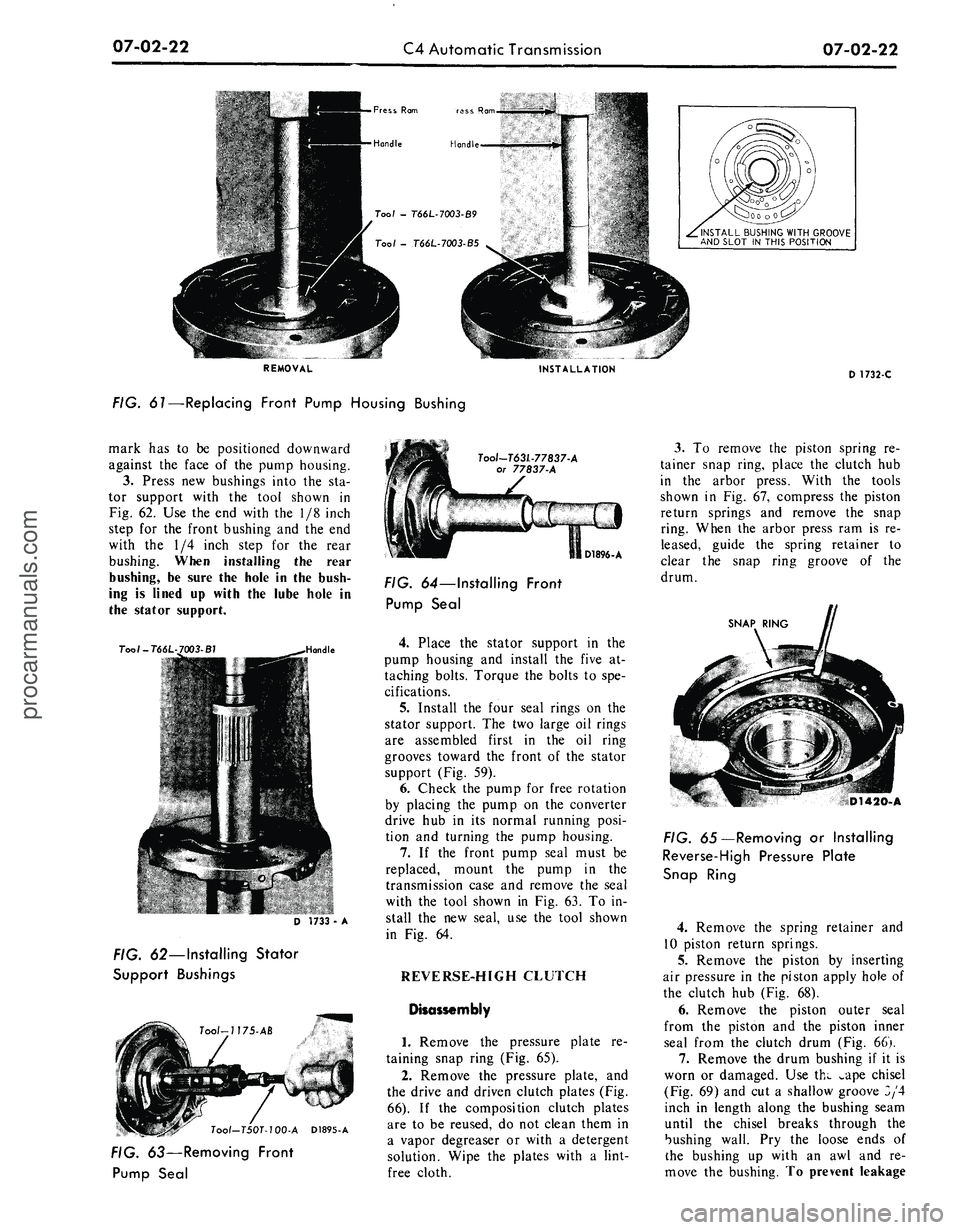
FIG. 61—Replacing Front Pump Housing Bushing
D 1732-C
mark
has to be
positioned downward
against
the
face
of the
pump housing.
3.
Press
new
bushings into
the sta-
tor support with
the
tool shown
in
Fig. 62.
Use the end
with
the 1/8
inch
step
for the
front bushing
and the end
with
the 1/4
inch step
for the
rear
bushing. When installing
the
rear
bushing,
be
sure
the
hole
in the
bush-
ing
is
lined
up
with
the
lube hole
in
the stator support.
T00I-T66L
Toot-T63L-77837-A
or 77837-A
D 1733
-
A
FIG. 62—Installing Stator
Support Bushings
Tool-T50T-100-A D1895-A
FIG. 63—Removing Front
Pump Seal
D1896-A
FIG. 64—Installing Front
Pump Seal
4.
Place
the
stator support
in the
pump housing
and
install
the
five
at-
taching bolts. Torque
the
bolts
to
spe-
cifications.
5.
Install
the
four seal rings
on the
stator support.
The two
large
oil
rings
are assembled first
in the oil
ring
grooves toward
the
front
of the
stator
support (Fig.
59).
6. Check
the
pump
for
free rotation
by placing
the
pump
on the
converter
drive
hub in its
normal running posi-
tion
and
turning
the
pump housing.
7.
If the
front pump seal must
be
replaced, mount
the
pump
in the
transmission case
and
remove
the
seal
with
the
tool shown
in Fig.
63.
To in-
stall
the new
seal,
use the
tool shown
in
Fig. 64.
REVERSE-HIGH CLUTCH
Disassembly
1.
Remove
the
pressure plate
re-
taining snap ring (Fig.
65).
2.
Remove
the
pressure plate,
and
the drive
and
driven clutch plates (Fig.
66).
If the
composition clutch plates
are
to be
reused,
do not
clean them
in
a vapor degreaser
or
with
a
detergent
solution. Wipe
the
plates with
a
lint-
free cloth.
3.
To
remove
the
piston spring
re-
tainer snap ring, place
the
clutch
hub
in
the
arbor press. With
the
tools
shown
in Fig. 67,
compress
the
piston
return springs
and
remove
the
snap
ring. When
the
arbor press
ram is re-
leased, guide
the
spring retainer
to
clear
the
snap ring groove
of the
drum.
SNAP RING
D1420-A
FIG. 65—Removing
or
Installing
Reverse-High Pressure Plate
Snap Ring
4.
Remove
the
spring retainer
and
10 piston return springs.
5.
Remove
the
piston
by
inserting
air pressure
in the
piston apply hole
of
the clutch
hub
(Fig.
68).
6. Remove
the
piston outer seal
from
the
piston
and the
piston inner
seal from
the
clutch drum (Fig.
66).
7.
Remove
the
drum bushing
if it is
worn
or
damaged.
Use
thw ^ape chisel
(Fig. 69)
and cut a
shallow groove
3/4
inch
in
length along
the
bushing seam
until
the
chisel breaks through
the
bushing wall.
Pry the
loose ends
of
the bushing
up
with
an awl and re-
move
the
bushing.
To
prevent leakageprocarmanuals.com
Page 335 of 413
07-02-27
C4 Automatic Transmission
07-02-27
'OIL RINGS
SNAP RING
SECONDARY
GOVERNOR VALVE
1 v s
GOVERNOR HOUSING
D1907-A
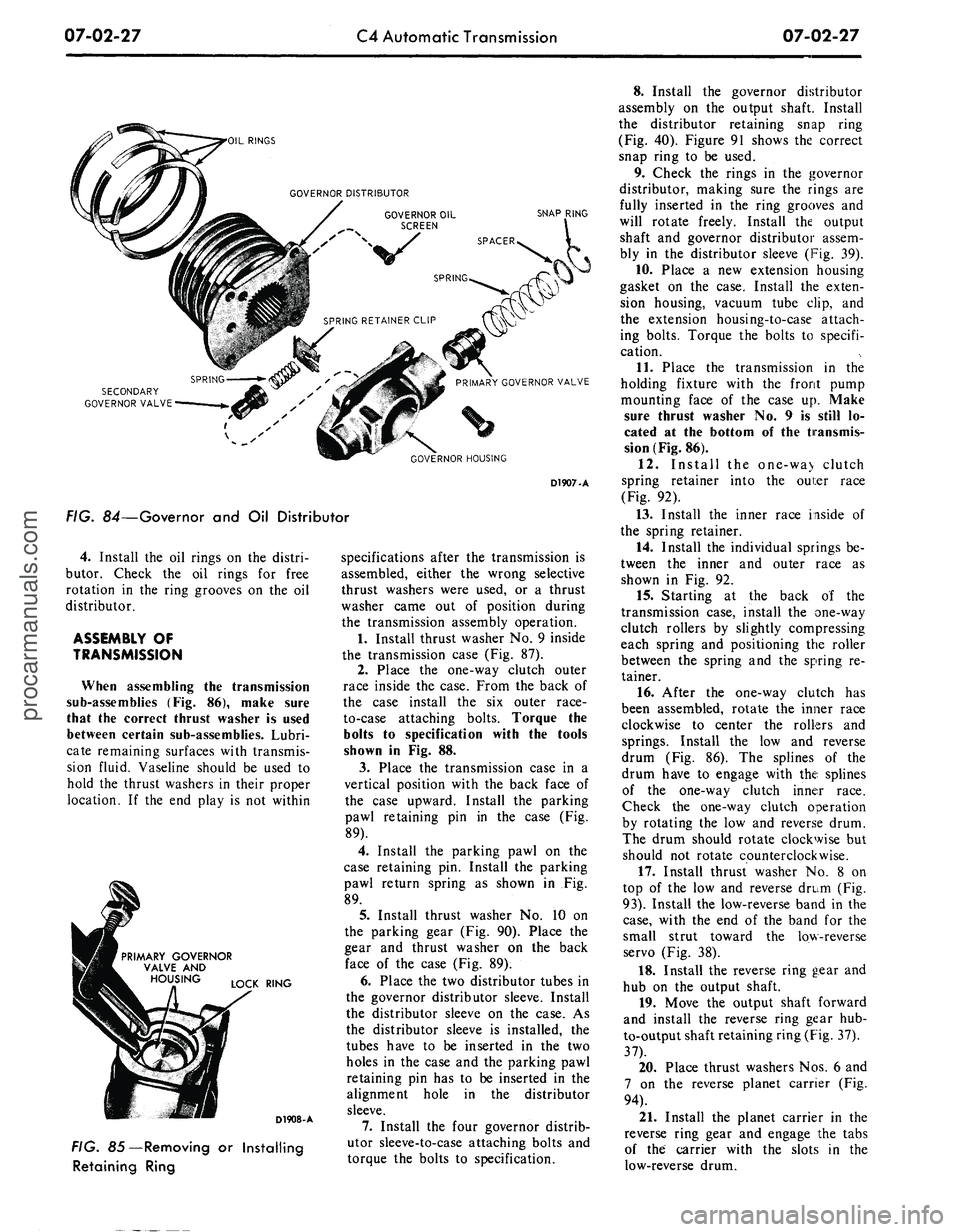
FIG. 84—Governor and Oil Distributor
4.
Install the oil rings on the distri-
butor. Check the oil rings for free
rotation in the ring grooves on the oil
distributor.
ASSEMBLY OF
TRANSMISSION
When assembling the transmission
sub-assemblies (Fig. 86), make sure
that the correct thrust washer is used
between certain sub-assemblies. Lubri-
cate remaining surfaces with transmis-
sion fluid. Vaseline should be used to
hold the thrust washers in their proper
location. If the end play is not within
PRIMARY GOVERNOR
VALVE AND
LOCK RING
D1908-A
FIG. 85—Removing or Installing
Retaining Ring
specifications after the transmission is
assembled, either the wrong selective
thrust washers were used, or a thrust
washer came out of position during
the transmission assembly operation.
1.
Install thrust washer No. 9 inside
the transmission case (Fig. 87).
2.
Place the one-way clutch outer
race inside the case. From the back of
the case install the six outer race-
to-case attaching bolts. Torque the
bolts to specification with the tools
shown in Fig. 88.
3.
Place the transmission case in a
vertical position with the back face of
the case upward. Install the parking
pawl retaining pin in the case (Fig.
89).
4.
Install the parking pawl on the
case retaining pin. Install the parking
pawl return spring as shown in Fig.
89.
5.
Install thrust washer No. 10 on
the parking gear (Fig. 90). Place the
gear and thrust washer on the back
face of the case (Fig. 89).
6. Place the two distributor tubes in
the governor distributor sleeve. Install
the distributor sleeve on the case. As
the distributor sleeve is installed, the
tubes have to be inserted in the two
holes in the case and the parking pawl
retaining pin has to be inserted in the
alignment hole in the distributor
sleeve.
7.
Install the four governor distrib-
utor sleeve-to-case attaching bolts and
torque the bolts to specification.
8. Install the governor distributor
assembly on the output shaft. Install
the distributor retaining snap ring
(Fig. 40). Figure 91 shows the correct
snap ring to be used.
9. Check the rings in the governor
distributor, making sure the rings are
fully inserted in the ring grooves and
will rotate freely. Install the output
shaft and governor distributor assem-
bly in the distributor sleeve (Fig. 39).
10.
Place a new extension housing
gasket on the case. Install the exten-
sion housing, vacuum tube clip, and
the extension housing-to-case attach-
ing bolts. Torque the bolts to specifi-
cation.
11.
Place the transmission in the
holding fixture with the front pump
mounting face of the case up. Make
sure thrust washer No. 9 is still lo-
cated at the bottom of the transmis-
sion (Fig. 86).
12.
Install the one-wa> clutch
spring retainer into the oui:er race
(Fig. 92).
13.
Install the inner race inside of
the spring retainer.
14.
Install the individual springs be-
tween the inner and outer race as
shown in Fig. 92.
15.
Starting at the back of the
transmission case, install the one-way
clutch rollers by slightly compressing
each spring and positioning the roller
between the spring and the spring re-
tainer.
16.
After the one-way clutch has
been assembled, rotate the inner race
clockwise to center the rollers and
springs. Install the low and reverse
drum (Fig. 86). The splines of the
drum have to engage with the splines
of the one-way clutch inner race.
Check the one-way clutch operation
by rotating the low and reverse drum.
The drum should rotate clockwise but
should not rotate counterclockwise.
17.
Install thrust washer No. 8 on
top of the low and reverse drum (Fig.
93).
Install the low-reverse band in the
case,
with the end of the band for the
small strut toward the low-reverse
servo (Fig. 38).
18.
Install the reverse ring gear and
hub on the output shaft.
19.
Move the output shaft forward
and install the reverse ring gear hub-
to-output shaft retaining ring (Fig. 37).
37).
20.
Place thrust washers Nos. 6 and
7 on the reverse planet carrier (Fig.
94).
21.
Install the planet carrier in the
reverse ring gear and engage the tabs
of the carrier with the slots in the
low-reverse drum.procarmanuals.com
Page 349 of 413
07-03-09
FMX Transmission
07-03-09
4.
Remove the pointer back-up
shield attaching screws and the shield.
5.
Disconnect the dial indicator
light.
6. Disconnect the neutral start
switch and dial indicator light wires
from their connectors at the dash
panel.
7.
Remove the selector housing and
lever assembly attaching bolts. Re-
move the selector lever and housing.
8. Remove the selector lever to
housing attaching nut. Remove the
lever from the housing.
9. Install the selector lever in the
housing and install the attaching nut.
Torque the nut to 20 to 25 ft-lbs.
10.
Install the selector lever handle.
11.
Position the selector lever as
shown in Figure 10. With a feeler
gauge check the clearance between the
detent pawl and plate. The clearince
should be 0.005 to 0.010 inch. If nec-
essary, adjust the height of the detent
pawl as shown in Figure 10.
12.
Remo"~ the handle from tte se-
lector lever.
13.
Install the selector housing and
lever assembly as shown in Figure 4.
Torque the attaching bolts 4-6 ft-lbs.
14.
Connect the dial indicator light.
15.
Connect the neutral start switch
and dial indicator light wires to their
respective connectors at the dash
panel.
16.
Install the pointer back-up
shield and tighten the attaching
screws.
17.
Install the selector lever handle
and tighten the attaching screw.
18.
Position the selector lever in the
D position.
19.
Raise the vehicle. Install the
transmission manual lever rod to the
selector lever. Adjust the manual link-
age.
20.
Lower the vehicle and check the
transmission operation in each selec-
tor lever detent position.
BAND ADJUSTMENTS
FRONT BAND
ADJUSTMENT
1.
Drain the fluid from the trans-
mission by loosening the pan attach-
ing bolts starting at the rear of the
pan and working toward the front.
When most of the fluid has drained
from the pan, remove the remainder
of the attaching bolts. Use a clean
drain can equipped with a 100-mesh
screen if the fluid is to be reused.
Too/—
7225-C-13B
/A
-inch
Spacer
FRONT SERVO
ACTUATING LEVER
D 2048-A
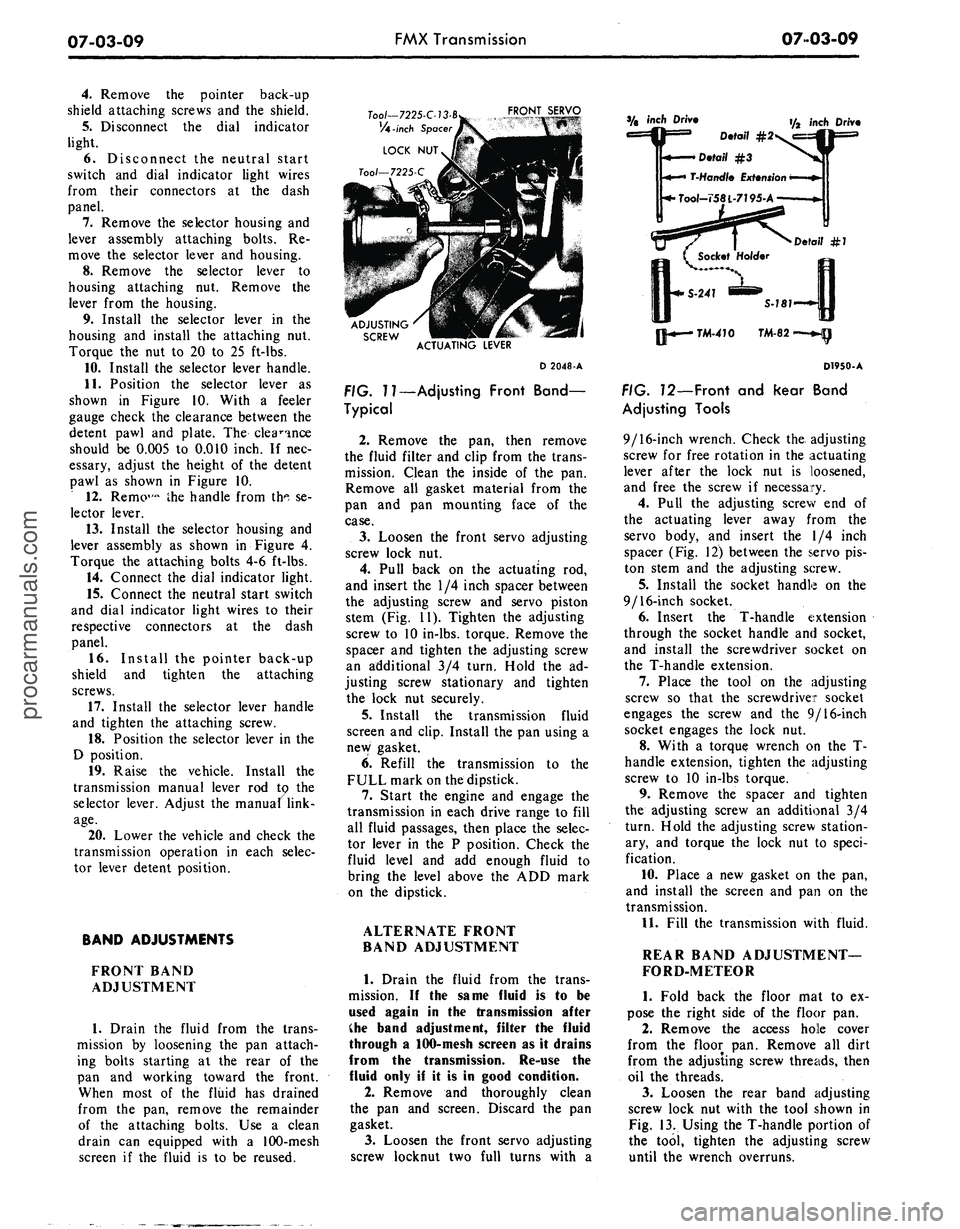
FIG.
7
7—Adjusting Front Band—
Typical
2.
Remove the pan, then remove
the fluid filter and clip from the trans-
mission. Clean the inside of the pan.
Remove all gasket material from the
pan and pan mounting face of the
case.
3.
Loosen the front servo adjusting
screw lock nut.
4.
Pull back on the actuating rod,
and insert the 1/4 inch spacer between
the adjusting screw and servo piston
stem (Fig. 11). Tighten the adjusting
screw to 10 in-lbs. torque. Remove the
spacer and tighten the adjusting screw
an additional 3/4 turn. Hold the ad-
justing screw stationary and tighten
the lock nut securely.
5.
Install the transmission fluid
screen and clip. Install the pan using a
new gasket.
6. Refill the transmission to the
FULL mark on the dipstick.
7.
Start the engine and engage the
transmission in each drive range to fill
all fluid passages, then place the selec-
tor lever in the P position. Check the
fluid level and add enough fluid to
bring the level above the ADD mark
on the dipstick.
ALTERNATE FRONT
BAND ADJUSTMENT
1.
Drain the fluid from the trans-
mission. If the same fluid is to be
used again in the transmission after
Che band adjustment, filter the fluid
through a 100-mesh screen as it drains
from the transmission. Re-use the
fluid only if it is in good condition.
2.
Remove and thoroughly clean
the pan and screen. Discard the pan
gasket.
3.
Loosen the front servo adjusting
screw locknut two full turns with a
inch Driv
Detail #2
D.tai\
#3
T-Hond/e
Extension
Tool-758L-7195-A
f/2 inch Driv
Detail
#7
Qj-«—
TM-470 TM-82
D1950-A
FIG. 12—Front and Rear Band
Adjusting Tools
9/16-inch wrench. Check the. adjusting
screw for free rotation in the actuating
lever after the lock nut is loosened,
and free the screw if necessary.
4.
Pull the adjusting screw end of
the actuating lever away from the
servo body, and insert the 1/4 inch
spacer (Fig. 12) between the servo pis-
ton stem and the adjusting screw.
5.
Install the socket handle on the
9/16-inch socket.
6. Insert the T-handle extension
through the socket handle and socket,
and install the screwdriver socket on
the T-handle extension.
7.
Place the tool on the adjusting
screw so that the screwdriver socket
engages the screw and the 9/16-inch
socket engages the lock nut.
8. With a torque wrench on the T-
handle extension, tighten the adjusting
screw to 10 in-lbs torque.
9. Remove the spacer and tighten
the adjusting screw an additional 3/4
turn. Hold the adjusting screw station-
ary, and torque the lock nut to speci-
fication.
10.
Place a new gasket on the pan,
and install the screen and pan on the
transmission.
11.
Fill the transmission with fluid.
REAR BAND ADJUSTMENT—
FORD-METEOR
1.
Fold back the floor mat to ex-
pose the right side of the floor pan.
2.
Remove the access hole cover
from the floor pan. Remove all dirt
from the adjusting screw threads, then
oil the threads.
3.
Loosen the rear band adjusting
screw lock nut with the tool shown in
Fig. 13. Using the T-handle portion of
the tool, tighten the adjusting screw
until the wrench overruns.procarmanuals.com
Page 351 of 413
07-03-11
FMX Transmission
07
03-11
GOVERNOR
COMPENSATOR
PRESSURE TUBE
MAIN CONTROL
VALVE TUBE
COUNTERWEIGHT
D 1815-A
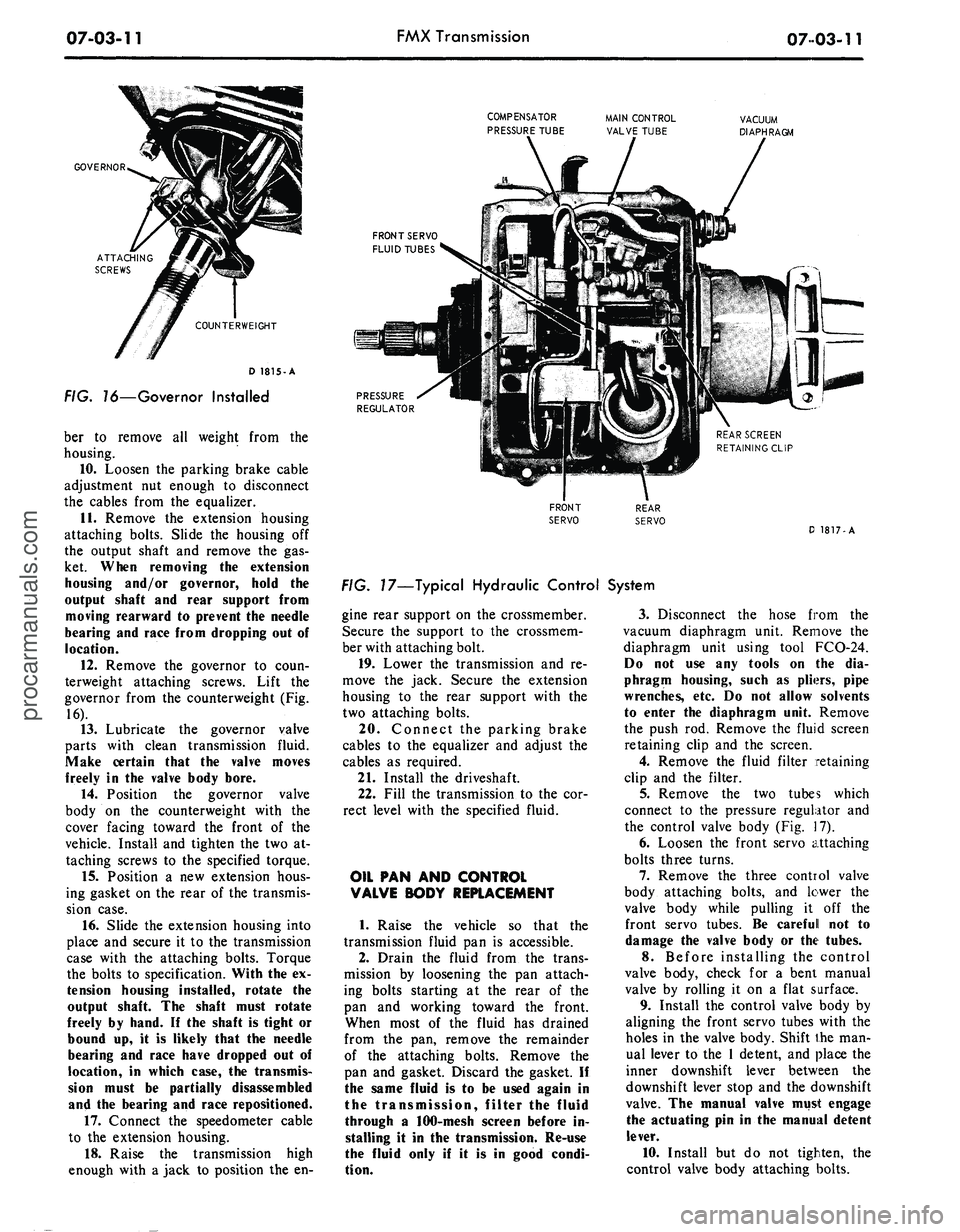
FIG. 16—Governor Installed
ber to remove all weight from the
housing.
10.
Loosen the parking brake cable
adjustment nut enough to disconnect
the cables from the equalizer.
11.
Remove the extension housing
attaching bolts. Slide the housing off
the output shaft and remove the gas-
ket. When removing
the
extension
housing and/or governor, hold
the
output shaft
and
rear support from
moving rearward
to
prevent
the
needle
bearing
and
race from dropping
out of
location.
12.
Remove the governor to coun-
terweight attaching screws. Lift the
governor from the counterweight (Fig.
16).
13.
Lubricate the governor valve
parts with clean transmission fluid.
Make certain that
the
valve moves
freely
in the
valve body bore.
14.
Position the governor valve
body on the counterweight with the
cover facing toward the front of the
vehicle. Install and tighten the two at-
taching screws to the specified torque.
15.
Position a new extension hous-
ing gasket on the rear of the transmis-
sion case.
16.
Slide the extension housing into
place and secure it to the transmission
case with the attaching bolts. Torque
the bolts to specification. With the ex-
tension housing installed, rotate
the
output shaft.
The
shaft must rotate
freely
by
hand.
If the
shaft
is
tight
or
bound
up, it is
likely that
the
needle
bearing
and
race have dropped
out of
location,
in
which case,
the
transmis-
sion must
be
partially disassembled
and
the
bearing
and
race repositioned.
17.
Connect the speedometer cable
to the extension housing.
18.
Raise the transmission high
enough with a jack to position the en-
FRONT SERVO
FLUID TUBES
PRESSURE
REGULATOR
D 1817-A
FIG. 17—Typical Hydraulic Control System
gine rear support on the crossmember.
Secure the support to the crossmem-
ber with attaching bolt.
19.
Lower the transmission and re-
move the jack. Secure the extension
housing to the rear support with the
two attaching bolts.
20.
Connect the parking brake
cables to the equalizer and adjust the
cables as required.
21.
Install the driveshaft.
22.
Fill the transmission to the cor-
rect level with the specified fluid.
OIL
PAN AND
CONTROL
VALVE BODY REPLACEMENT
1. Raise the vehicle so that the
transmission fluid pan is accessible.
2.
Drain the fluid from the trans-
mission by loosening the pan attach-
ing bolts starting at the rear of the
pan and working toward the front.
When most of the fluid has drained
from the pan, remove the remainder
of the attaching bolts. Remove the
pan and gasket. Discard the gasket. If
the same fluid is to be used again in
the transmission, filter the fluid
through a 100-mesh screen before in-
stalling it in the transmission. Re-use
the fluid only if it is in good condi-
tion.
3.
Disconnect the hose from the
vacuum diaphragm unit. Remove the
diaphragm unit using tool FCO-24.
Do
not use any
tools
on the dia-
phragm housing, such
as
pliers, pipe
wrenches,
etc. Do not
allow solvents
to enter
the
diaphragm unit. Remove
the push rod. Remove the fluid screen
retaining clip and the screen.
4.
Remove the fluid filter retaining
clip and the filter.
5.
Remove the two tubes which
connect to the pressure regulator and
the control valve body (Fig. 17).
6. Loosen the front servo attaching
bolts three turns.
7.
Remove the three control valve
body attaching bolts, and lower the
valve body while pulling it off the
front servo tubes. Be carefull not to
damage
the
valve body
or the
tubes.
8.
Before installing the control
valve body, check for a bent manual
valve by rolling it on a flat surface.
9. Install the control valve body by
aligning the front servo tubes with the
holes in the valve body. Shift the man-
ual lever to the 1 detent, and place the
inner downshift lever between the
downshift lever stop and the downshift
valve.
The
manual valve must engage
the actuating
pin in the
manual detent
lever.
10.
Install but do not tighten, the
control valve body attaching bolts.procarmanuals.com
Page 352 of 413
07-03-12
FMX Transmission
07-03-12
11.
Move the control valve body
toward the center of the case until the
clearance is less than 0.050 inch, be-
tween the manual valve and the act-
uating pin on the manual detent lever.
12.
Torque the attaching bolts to
specification. Be sure that the rear
fluid filter retaining clip is installed
under the valve body bolt as shown in
Figure 17.
13.
Install the tubes to the pressure
regulator and the control valve body.
14.
Turn the manual valve one full
turn in each manual lever detent posi-
tion. If the manual valve binds against
the actuating pin in any detent posi-
tion, loosen the valve body attaching
bolts and move the body away from
the center of the case. Move the valve
body only enough to relieve the bind-
ing. Torque the attaching bolts and
recheck the manual valve for binding.
15.
Position the push rod in the
bore of the vacuum diaphragm unit.
Using the diaphragm unit as a guide,
insert the push rod into the threaded
opening of the case. Torque the dia-
phragm unit to specification. Connect
the vacuum hose.
16.
Torque the front servo attach-
ing bolts to specification.
17.
Adjust the front band. If the
unit is a model PHB-C, D, E, F, G or
H, adjust the rear band at this time.
18.
Install the fluid filter and the
filter retaining clip.
19.
Position a new fluid pan gasket
on the bottom of the transmission
case,
and install the pan. Torque the
pan screws to specification.
20.
Adjust the rear band on
PHB-A and PHD models.
21.
Fill the transmission with fluid.
If
the
fluid that
was
drained from
the
transmission
is to be
used
again,
filter
the fluid through
a
100-mesh screen
as
it
is
poured back into
the
transmis-
sion.
Re-use
the
fluid only
if it is in
good
condition.
22.
If the control valve body was
replaced, adjust the transmission con-
trol linkage.
PRESSURE REGULATOR
REPLACEMENT
1. Drain the fluid from the trans-
mission, and remove the pan and fluid
filter.
2.
Remove the small compensator
pressure tube and the large control
pressure tube from the control valve
body and the pressure regulator.
3.
Remove the pressure regulator
spring retainer, springs, and spacer.
Maintain pressure
on the
retainer
to
prevent
the
springs from flying
out.
4.
Remove the pressure regulator
attaching bolts and washers, and re-
move the regulator.
5.
Position the replacement regula-
tor body on the transmission case and
install the two attaching bolts. Torque
the bolts to specification.
6. Check the converter pressure and
control pressure valves to be sure the
valves operate freely in the bores.
7.
Install the valve springs, spacer,
and retainer.
8. Install the large control pressure
tube,
and the small compensator pres-
sure tube.
9. Install the fluid filter and the
pan, and fill the transmission to the
correct level with the specified fluid.
FRONT SERVO REPLACEMENT
1. Drain the fluid from the trans-
mission, and remove the pan and fluid
filter.
2.
Remove the vacuum diaphragm
unit.
3.
Loosen the three control valve
body attaching bolts.
4.
Remove the attaching bolts from
the front servo (Fig. 17), hold the
strut with the fingers, and remove the
servo.
5.
To install the front servo, posi-
tion the front band forward in the
case with the end of the band facing
downward. Make sure the front servo
anchor pin is in position in the case
web.
Align the large end of the servo
strut with the servo actuating lever,
and align the small end with the band
end.
6. Rotate the band, strut, and servo
to align the anchor end of the band
with the anchor in the case.
Push the servo body onto the con-
trol valve body tubes.
7.
Install the attaching bolts and
torque to specification.
8. Torque the control valve body
attaching bolts to specification.
Check the clearance between the
manual valve and manual lever actuat-
ing pin as given in Oil Pan and Con-
trol Valve Body Replacement.
9. Adjust the front band.
10.
Install the vacuum diaphragm
unit and rod.
11.
Install the fluid filter and pan,
and fill the transmission with fluid.
12.
Adjust the downshift and manu-
al linkage.
REAR SERVO REPLACEMENT
1. Drain the fluid from the trans-
mission, and remove the pan and fluid
filter.
2.
Remove the vacuum diaphragm
unit.
3.
Remove the control valve body
and the two front servo tubes.
4.
Remove the attaching bolts from
the rear servo, hold the actuating and
anchor struts with the fingers, and re-
move the servo. Remove the servo
dowel on PHB models.
5.
To install the rear servo, position
the servo anchor strut on the servo
band, and rotate the band to engage
the strut.
6. Hold the servo anchor strut in
position with the fingers, position the
actuating lever strut, and install the
servo. Insert the servo dowel on PHB
models.
7.
Install the servo attaching bolts,
and torque them to specification. The
longer bolt must
be
installed
in the
inner bolt
hole.
8.
Install the two front servo tubes
and the control valve body.
Check the clearance between the
manual valve and the manual lever
actuating pin as given above in Oil
Pan and Control Valve Body Replace-
ment.
9. Adjust the rear band.
10.
Install the fluid filter and pan,
and fill the transmission with fluid.
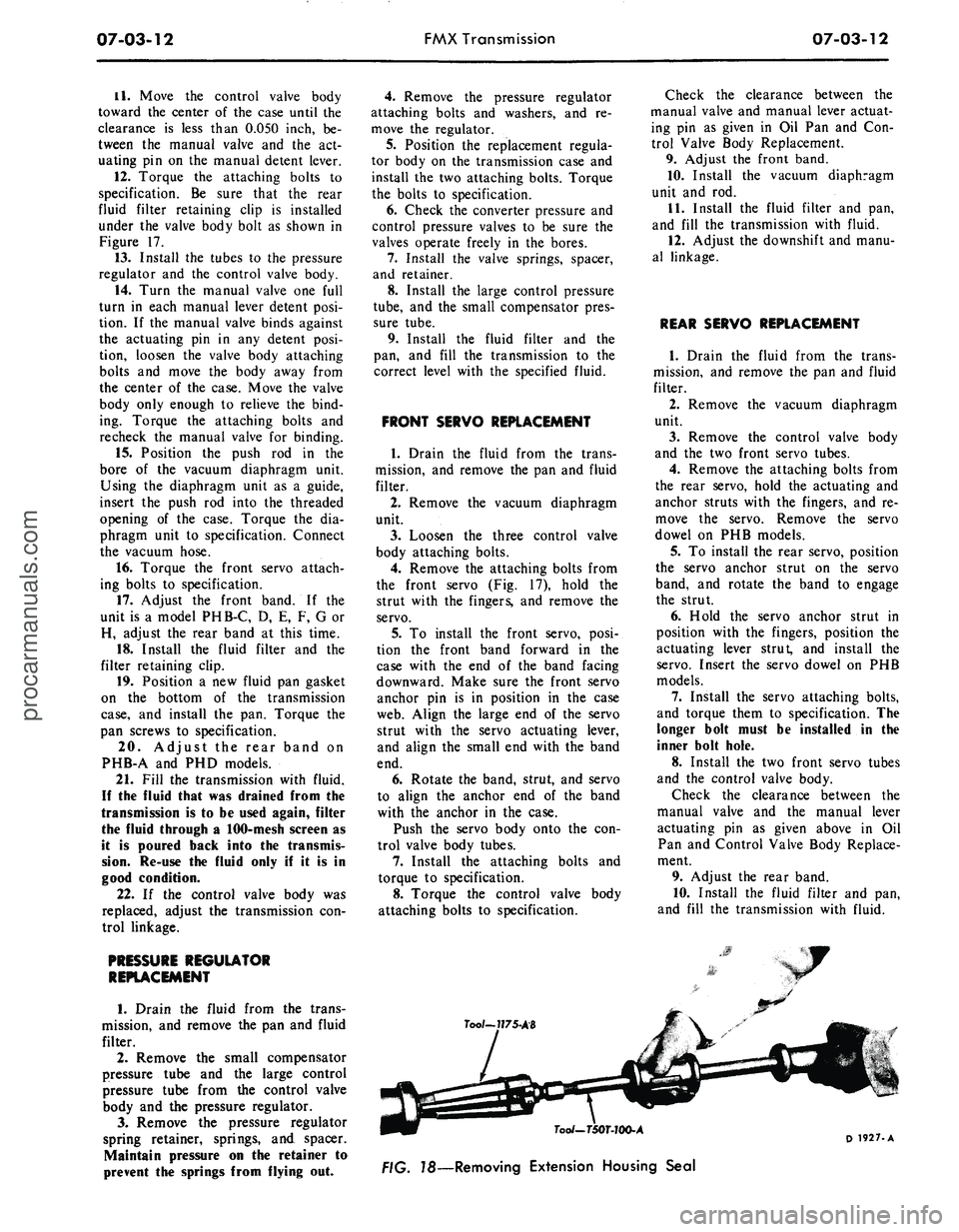
Too/~7?75-AB
7oo/-T50T-JOO-A
78—Removing Extension Housing Seal
D 1927-Aprocarmanuals.com
Page 353 of 413
07-03-13
FMX Transmission
07-03-13
EXTENSION HOUSING
BUSHING AND REAR SEAL
REPLACEMENT
1.
Disconnect the drive shaft from
the transmission.
2.
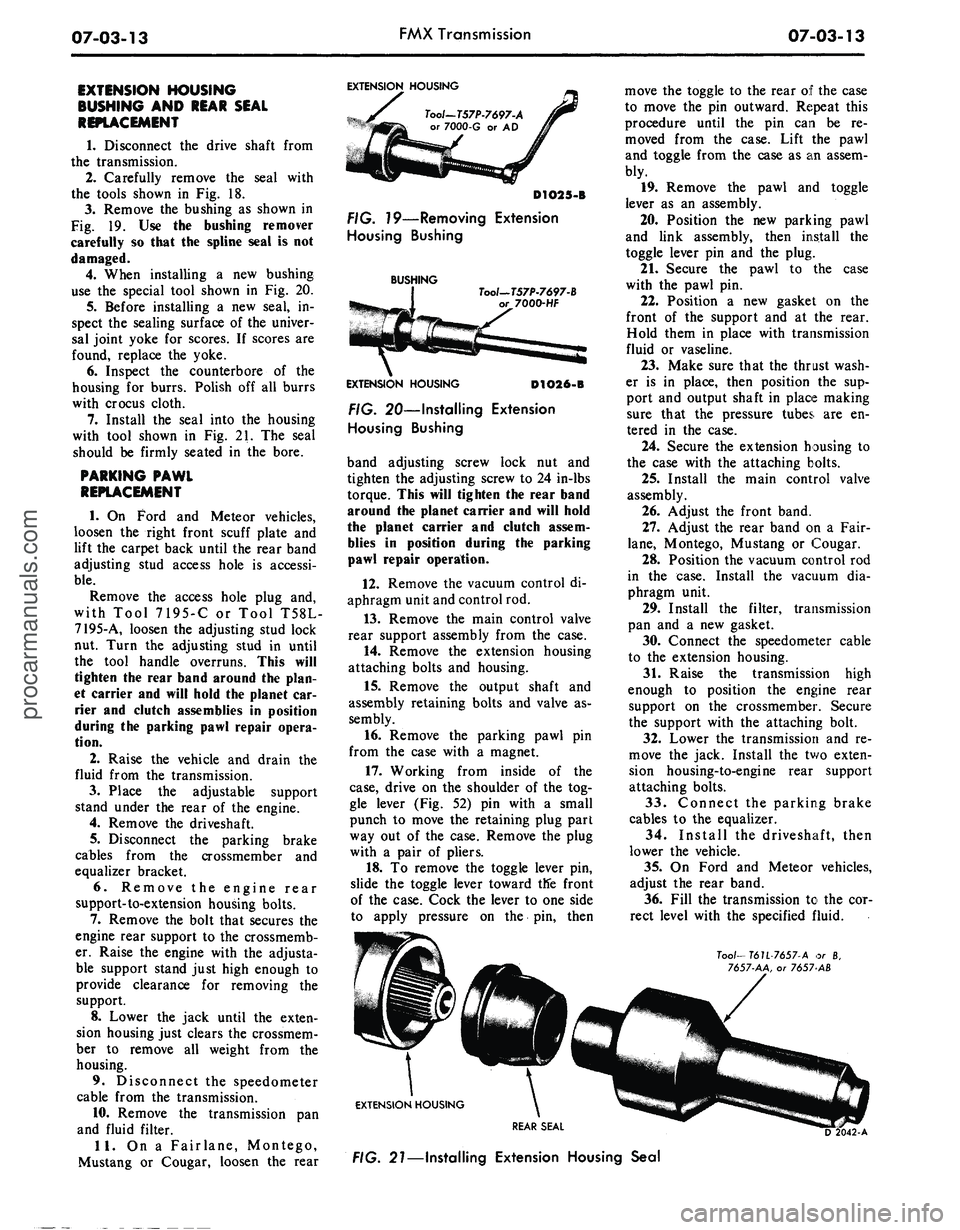
Carefully remove the seal with
the tools shown in Fig. 18.
3.
Remove the bushing as shown in
Fig. 19. Use the bushing remover
carefully so that the spline seal is not
damaged.
4.
When installing a new bushing
use the special tool shown in Fig. 20.
5.
Before installing a new seal, in-
spect the sealing surface of the univer-
sal joint yoke for scores. If scores are
found, replace the yoke.
6. Inspect the counterbore of the
housing for burrs. Polish off all burrs
with crocus cloth.
7.
Install the seal into the housing
with tool shown in Fig. 21. The seal
should be firmly seated in the bore.
PARKING PAWL
REPLACEMENT
1.
On Ford and Meteor vehicles,
loosen the right front scuff plate and
lift the carpet back until the rear band
adjusting stud access hole is accessi-
ble.
Remove the access hole plug and,
with Tool 7195-C or Tool T58L-
7195-A, loosen the adjusting stud lock
nut. Turn the adjusting stud in until
the tool handle overruns. This will
tighten the rear band around the plan-
et carrier and will hold the planet car-
rier and clutch assemblies in position
during the parking pawl repair opera-
tion.
2.
Raise the vehicle and drain the
fluid from the transmission.
3.
Place the adjustable support
stand under the rear of the engine.
4.
Remove the driveshaft.
5.
Disconnect the parking brake
cables from the crossmember and
equalizer bracket.
6. Remove the engine rear
support-to-extension housing bolts.
7.
Remove the bolt that secures the
engine rear support to the crossmemb-
er. Raise the engine with the adjusta-
ble support stand just high enough to
provide clearance for removing the
support.
8. Lower the jack until the exten-
sion housing just clears the crossmem-
ber to remove all weight from the
housing.
9. Disconnect the speedometer
cable from the transmission.
10.
Remove the transmission pan
and fluid filter.
11.
On a Fairlane, Montego,
Mustang or Cougar, loosen the rear
EXTENSION HOUSING
Tool-T57P-7697-A
or 7000-G or AD
D1O25-B
FIG. 79—Removing Extension
Housing Bushing
BUSHING
Tool—T57P-7697-B
7000-HF
EXTENSION HOUSING
D1O26-B
FIG. 20—Installing Extension
Housing Bushing
band adjusting screw lock nut and
tighten the adjusting screw to 24 in-lbs
torque. This will tighten the rear band
around the planet carrier and will hold
the planet carrier and clutch assem-
blies in position during the parking
pawl repair operation.
12.
Remove the vacuum control di-
aphragm unit and control rod.
13.
Remove the main control valve
rear support assembly from the case.
14.
Remove the extension housing
attaching bolts and housing.
15.
Remove the output shaft and
assembly retaining bolts and valve as-
sembly.
16.
Remove the parking pawl pin
from the case with a magnet.
17.
Working from inside of the
case,
drive on the shoulder of the tog-
gle lever (Fig. 52) pin with a small
punch to move the retaining plug part
way out of the case. Remove the plug
with a pair of pliers.
18.
To remove the toggle lever pin,
slide the toggle lever toward tlfe front
of the case. Cock the lever to one side
to apply pressure on the pin, then
move the toggle to the rear of the case
to move the pin outward. Repeat this
procedure until the pin can be re-
moved from the case. Lift the pawl
and toggle from the case as an assem-
bly.
19.
Remove the pawl and toggle
lever as an assembly.
20.
Position the new parking pawl
and link assembly, then install the
toggle lever pin and the plug.
21.
Secure the pawl to the case
with the pawl pin.
22.
Position a new gasket on the
front of the support and at the rear.
Hold them in place with transmission
fluid or vaseline.
23.
Make sure that the thrust wash-
er is in place, then position the sup-
port and output shaft in place making
sure that the pressure tubes are en-
tered in the case.
24.
Secure the extension housing to
the case with the attaching bolts.
25.
Install the main control valve
assembly.
26.
Adjust the front band.
27.
Adjust the rear band on a Fair-
lane,
Montego, Mustang or Cougar.
28.
Position the vacuum control rod
in the case. Install the vacuum dia-
phragm unit.
29.
Install the filter, transmission
pan and a new gasket.
30.
Connect the speedometer cable
to the extension housing.
31.
Raise the transmission high
enough to position the engine rear
support on the crossmember. Secure
the support with the attaching bolt.
32.
Lower the transmission and re-
move the jack. Install the two exten-
sion housing-to-engine rear support
attaching bolts.
33.
Connect the parking brake
cables to the equalizer.
34.
Install the driveshaft, then
lower the vehicle.
35.
On Ford and Meteor vehicles,
adjust the rear band.
36.
Fill the transmission to the cor-
rect level with the specified fluid.
Too/—
T6U-7657-A or 8,
7657-AA, or 7657 AB
EXTENSION HOUSING
REAR SEAL
FIG. 21—Installing Extension Housing Sealprocarmanuals.com
Page 358 of 413
07-03-18
FMX Transmission
07-03-18
Press
Rom
Handle
Tool - T64L-7003-A4
Tool - T64L.7003.B4
REMOVAL INSTALLATION
FIG. 27—Replacing Rear Brake Drum Support Bushing
D 1751-A
chisel
and cut
along
the
bushing seam
until
the
chisel breaks through
the
bushing wall.
Pry the
loose ends
of
the bushing
up
with
an awl and re-
move
the
bushing.
2.
Insert
a new
bushing into
the in-
stallation tool
and
position
the
tool
and bushing over
the
output shaft
hub.
Then, press
the
bushing
on the
output
shaft
hub as
shown
in Fig. 28.
Press
Ram
Tool - T64L-7003.A7
FIG. 28—Installing Output Shaft
Bushing
PRIMARY
SUN
GEAR SHAFT
1.
Position
the
primary
sun
gear
shaft
in the
clutch bench fixture.
2.
Check
the fit of the
seal rings
in
their respective bores.
If
equipped
with cast iron seal rings,
a
clearance
of 0.002-0.009 inch should exist
be-
tween
the
ends
of the
rings.
If equipped with teflon seals that
are worn
or
damaged,
cut the
seals
from
the
shaft with
a
sharp knife.
Be
careful
not to
score
the
ring grooves.
3.
Replace
the
teflon seals with cast
iron seal rings,
and
check
for
free
movement
in the
groove.
REAR CLUTCH
1.
Remove
the
clutch pressure plate
snap ring,
and
remove
the
pressure
plate from
the
drum. Remove
the
waved cushion spring. Remove
the
composition
and
steel plates.
2.
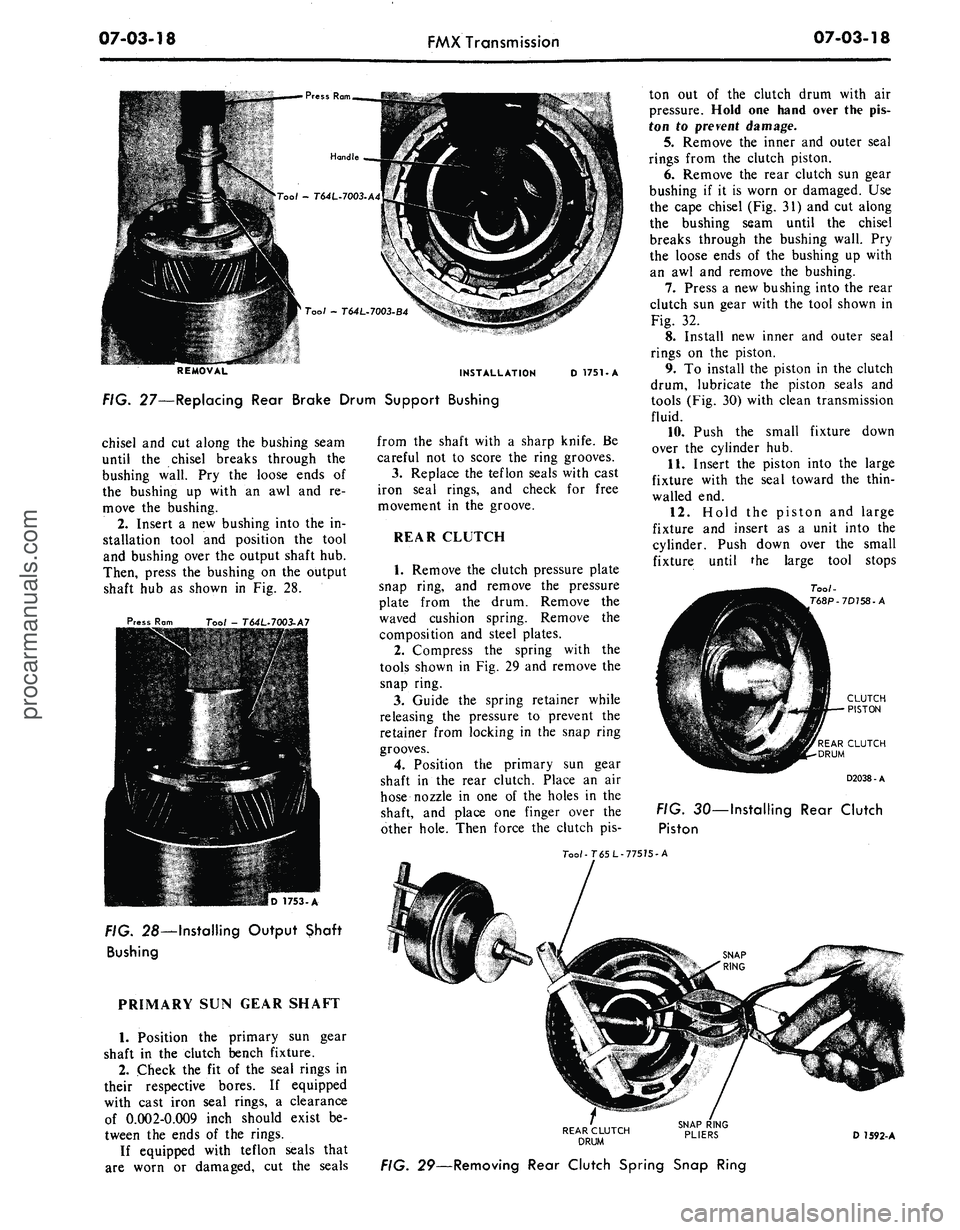
Compress
the
spring with
the
tools shown
in Fig. 29 and
remove
the
snap ring.
3.
Guide
the
spring retainer while
releasing
the
pressure
to
prevent
the
retainer from locking
in the
snap ring
grooves.
4.
Position
the
primary
sun
gear
shaft
in the
rear clutch. Place
an air
hose nozzle
in one of the
holes
in the
shaft,
and
place
one
finger over
the
other hole. Then force
the
clutch
pis-
ton
out of the
clutch drum with
air
pressure. Hold
one
hand over
the pis-
ton
to
prevent damage.
5.
Remove
the
inner
and
outer seal
rings from
the
clutch piston.
6. Remove
the
rear clutch
sun
gear
bushing
if it is
worn
or
damaged.
Use
the cape chisel
(Fig. 31) and cut
along
the bushing seam until
the
chisel
breaks through
the
bushing wall.
Pry
the loose ends
of the
bushing
up
with
an
awl and
remove
the
bushing.
7.
Press
a new
bushing into
the
rear
clutch
sun
gear with
the
tool shown
in
Fig.
32.
8. Install
new
inner
and
outer seal
rings
on the
piston.
9.
To
install
the
piston
in the
clutch
drum, lubricate
the
piston seals
and
tools
(Fig. 30)
with clean transmission
fluid.
10.
Push
the
small fixture down
over
the
cylinder
hub.
11.
Insert
the
piston into
the
large
fixture with
the
seal toward
the
thin-
walled
end.
12.
Hold
the
piston
and
large
fixture
and
insert
as a
unit into
the
cylinder. Push down over
the
small
fixture until
the
large tool stops
Too/-
T68P-7D758-A
REAR CLUTCH
DRUM
D2038-A
FIG.
30—
Installing
Rear Clutch
Piston
Too/-T65L-77575-A
REAR CLUTCH
DRUM
D 1592-A
FIG. 29—Removing Rear Clutch Spring Snap Ringprocarmanuals.com
Page 361 of 413
07-03-21
FMX Transmission
07-03-21
Tool—1175-AB
Tool— T50T-100-A
D1962-A
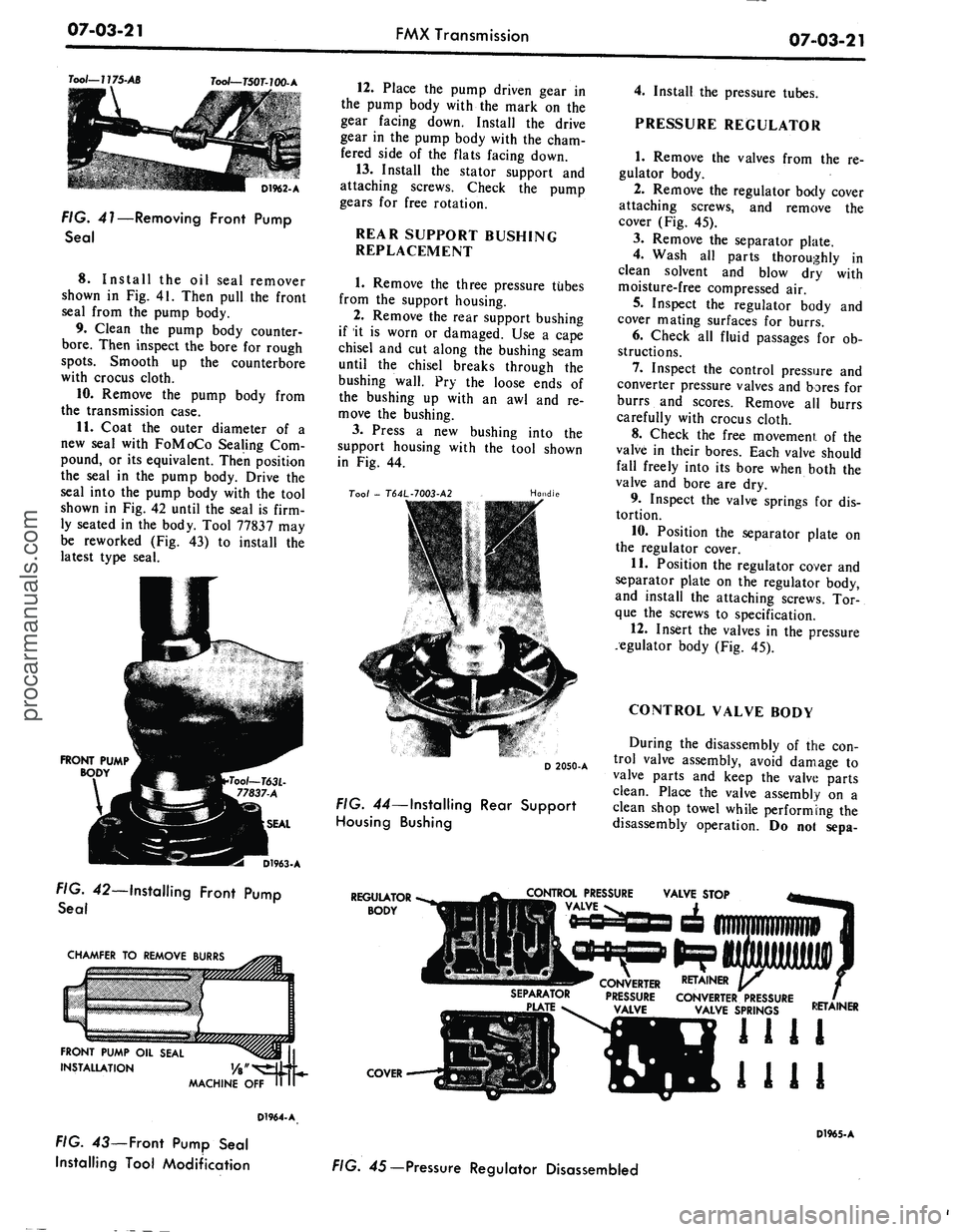
FIG. 41—Removing Front Pump
Seal
8. Install
the oil
seal remover
shown
in Fig. 41.
Then pull
the
front
seal from
the
pump body.
9. Clean
the
pump body counter-
bore.
Then inspect
the
bore
for
rough
spots.
Smooth
up the
counterbore
with crocus cloth.
10.
Remove
the
pump body from
the transmission case.
11.
Coat
the
outer diameter
of a
new seal with FoMoCo Sealing
Com-
pound,
or its
equivalent. Then position
the seal
in the
pump body. Drive
the
seal into
the
pump body with
the
tool
shown
in Fig. 42
until
the
seal
is
firm-
ly seated
in the
body. Tool 77837
may
be reworked
(Fig. 43) to
install
the
latest type seal.
FRONT PUMP
BODY
D1963-A
FIG. 42—Installing Front Pump
Seal
CHAMFER
TO
REMOVE BURRS
FRONT PUMP
OIL
SEAL
INSTALLATION
MACHINE
OFF
D1964-A
FIG.
43—
Front Pump Seal
Installing Tool Modification
12.
Place
the
pump driven gear
in
the pump body with
the
mark
on the
gear facing down. Install
the
drive
gear
in the
pump body with
the
cham-
fered side
of the
flats facing down.
13.
Install
the
stator support
and
attaching screws. Check
the
pump
gears
for
free rotation.
REAR SUPPORT BUSHING
REPLACEMENT
1.
Remove
the
three pressure tubes
from
the
support housing.
2.
Remove
the
rear support bushing
if
it is
worn
or
damaged.
Use a
cape
chisel
and cut
along
the
bushing seam
until
the
chisel breaks through
the
bushing wall.
Pry the
loose ends
of
the bushing
up
with
an awl and re-
move
the
bushing.
3.
Press
a new
bushing into
the
support housing with
the
tool shown
in
Fig. 44.
Too/
-
T64L-7003-A2
Handle
D 2050-A
FIG. 44—Installing Rear Support
Housing Bushing
4.
Install
the
pressure tubes.
PRESSURE REGULATOR
1.
Remove
the
valves from
the re-
gulator body.
2.
Remove
the
regulator body cover
attaching screws,
and
remove
the
cover
(Fig. 45).
3.
Remove
the
separator plate.
4.
Wash
all
parts thoroughly
in
clean solvent
and
blow
dry
with
moisture-free compressed
air.
5.
Inspect
the
regulator body
and
cover mating surfaces
for
burrs.
6. Check
all
fluid passages
for ob-
structions.
7.
Inspect
the
control pressure
and
converter pressure valves
and
bores
for
burrs
and
scores. Remove
all
burrs
carefully with crocus cloth.
8. Check
the
free movement
of the
valve
in
their bores. Each valve should
fall freely into
its
bore when both
the
valve
and
bore
are dry.
9. Inspect
the
valve springs
for dis-
tortion.
10.
Position
the
separator plate
on
the regulator cover.
11.
Position
the
regulator cover
and
separator plate
on the
regulator body,
and install
the
attaching screws.
Tor-
que
the
screws
to
specification.
12.
Insert
the
valves
in the
pressure
regulator body
(Fig. 45).
CONTROL VALVE BODY
During
the
disassembly
of the con-
trol valve assembly, avoid damage
to
valve parts
and
keep
the
valve parts
clean. Place
the
valve assembly
on a
clean shop towel while performing
the
disassembly operation.
Do not
sepa-
REGULATOR
BODY
CONTROL PRESSURE
VALVE
SEPARATOR
CONVERTER RETAINER
PRESSURE CONVERTER PRESSURE
VALVE SPRINGS
COVER
RETAINER
1111
1111
D1965-A
FIG. 45— Pressure Regulator Disassembledprocarmanuals.com
Page 366 of 413
07-03-26
FMX Transmission
07-03-26
MANUAL SHAFT
AND LEVER
DETENT SPRING—«^ DETENT PLUNGER
DETENT
/ LEVER
MANUAL SHAFT
NUT
INNER DOWNSHIFT LEVER
/ DOWNSHIFT
/ SHAFT
NUT
TOGGLE LIFT
ijG
LEVER SPRING
TOGGLE LEVER-
PAWL RETURN SPRING-
TOGGLE LEVER
PIN-
PLUG'
D1967-A
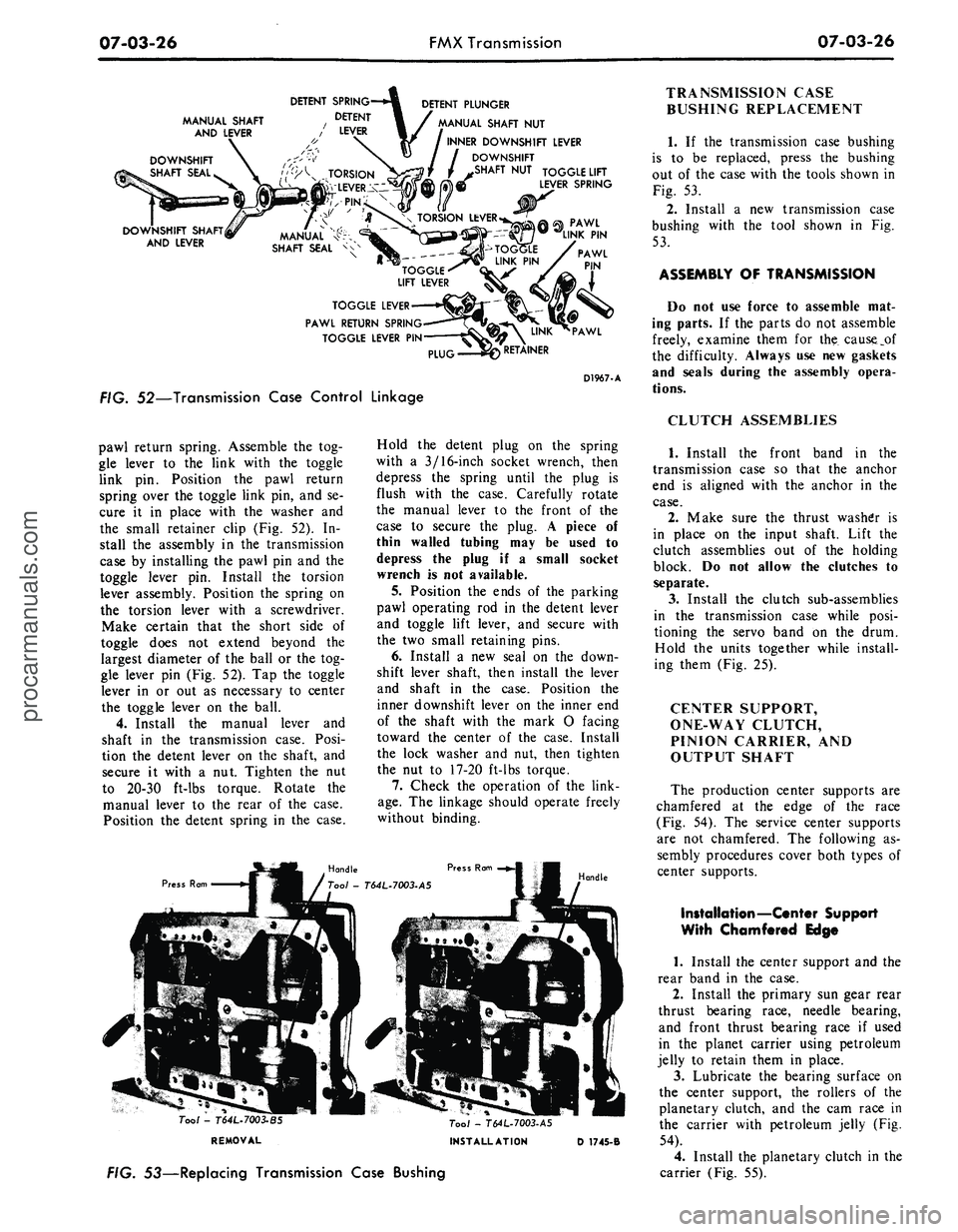
FIG. 52—Transmission Case Control Linkage
pawl return spring. Assemble
the tog-
gle lever
to the
link with
the
toggle
link
pin.
Position
the
pawl return
spring over
the
toggle link pin,
and se-
cure
it in
place with
the
washer
and
the small retainer clip
(Fig. 52). In-
stall
the
assembly
in the
transmission
case
by
installing
the
pawl
pin and the
toggle lever
pin.
Install
the
torsion
lever assembly. Position
the
spring
on
the torsion lever with
a
screwdriver.
Make certain that
the
short side
of
toggle does
not
extend beyond
the
largest diameter
of the
ball
or the
tog-
gle lever
pin
(Fig. 52).
Tap the
toggle
lever
in or out as
necessary
to
center
the toggle lever
on the
ball.
4.
Install
the
manual lever
and
shaft
in the
transmission case. Posi-
tion
the
detent lever
on the
shaft,
and
secure
it
with
a nut.
Tighten
the nut
to 20-30 ft-lbs torque. Rotate
the
manual lever
to the
rear
of the
case.
Position
the
detent spring
in the
case.
Press Ram
Hold
the
detent plug
on the
spring
with
a
3/16-inch socket wrench, then
depress
the
spring until
the
plug
is
flush with
the
case. Carefully rotate
the manual lever
to the
front
of the
case
to
secure
the
plug.
A
piece
of
thin walled tubing
may be
used
to
depress
the
plug
if a
small socket
wrench
is not
available.
5.
Position
the
ends
of the
parking
pawl operating
rod in the
detent lever
and toggle lift lever,
and
secure with
the
two
small retaining pins.
6. Install
a new
seal
on the
down-
shift lever shaft, then install
the
lever
and shaft
in the
case. Position
the
inner downshift lever
on the
inner
end
of
the
shaft with
the
mark
O
facing
toward
the
center
of the
case. Install
the lock washer
and nut,
then tighten
the
nut to
17-20 ft-lbs torque.
7.
Check
the
operation
of the
link-
age.
The
linkage should operate freely
without binding.
Handle
Tool -
T64L.7003-BS
REMOVAL
Tool - T64L-7003-A5
INSTALLATION
D 1745-B
FIG. 53—Replacing Transmission Case Bushing
TRANSMISSION CASE
BUSHING REPLACEMENT
1.
If the
transmission case bushing
is
to be
replaced, press
the
bushing
out
of the
case with
the
tools shown
in
Fig.
53.
2.
Install
a new
transmission case
bushing with
the
tool shown
in Fig.
53.
ASSEMBLY
OF
TRANSMISSION
Do
not use
force
to
assemble
mat-
ing parts.
If the
parts
do not
assemble
freely, examine them
for the
cause_pf
the difficulty. Always
use new
gaskets
and seals during
the
assembly opera-
tions.
CLUTCH ASSEMBLIES
1.
Install
the
front band
in the
transmission case
so
that
the
anchor
end
is
aligned with
the
anchor
in the
case.
2.
Make sure
the
thrust washer
is
in place
on the
input shaft. Lift
the
clutch assemblies
out of the
holding
block.
Do not
allow
the
clutches
to
separate.
3.
Install
the
clutch sub-assemblies
in
the
transmission case while posi-
tioning
the
servo band
on the
drum.
Hold
the
units together while install-
ing them (Fig.
25).
CENTER SUPPORT,
ONE-WAY CLUTCH,
PINION CARRIER,
AND
OUTPUT SHAFT
The production center supports
are
chamfered
at the
edge
of the
race
(Fig.
54). The
service center supports
are
not
chamfered.
The
following
as-
sembly procedures cover both types
of
center supports.
Installation—Center Support
With Chamfered Edge
1.
Install
the
center support
and the
rear band
in the
case.
2.
Install
the
primary
sun
gear rear
thrust bearing race, needle bearing,
and front thrust bearing race
if
used
in
the
planet carrier using petroleum
jelly
to
retain them
in
place.
3.
Lubricate
the
bearing surface
on
the center support,
the
rollers
of the
planetary clutch,
and the cam
race
in
the carrier with petroleum jelly
(Fig.
54).
4.
Install
the
planetary clutch
in the
carrier (Fig.
55).procarmanuals.com
Page 367 of 413
07-03-27
FMX Transmission
0703-27
CENTER SUPPORT
PLANETARY CLUTCH
"CAM TYPE" CLUTCH RACE
CHAMFER ON PRODUCTION
PART, ONLY-SERVICE PART NOT CHAMFERED
PLANET CARRIER
D1938-A
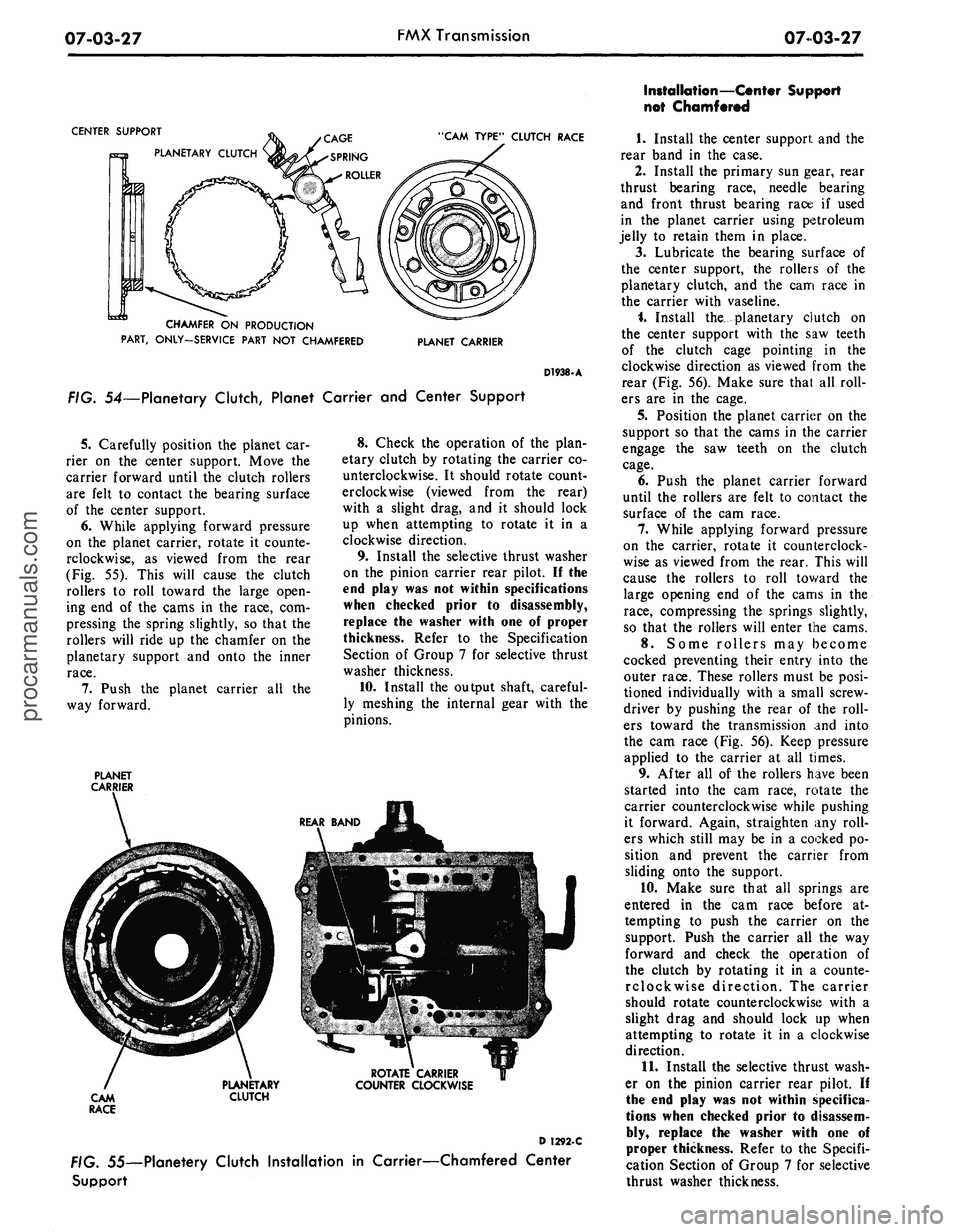
FIG. 54—Planetary Clutch, Planet Carrier and Center Support
5.
Carefully position the planet car-
rier on the center support. Move the
carrier forward until the clutch rollers
are felt to contact the bearing surface
of the center support.
6. While applying forward pressure
on the planet carrier, rotate it counte-
rclockwise, as viewed from the rear
(Fig. 55). This will cause the clutch
rollers to roll toward the large open-
ing end of the cams in the race, com-
pressing the spring slightly, so that the
rollers will ride up the chamfer on the
planetary support and onto the inner
race.
7.
Push the planet carrier all the
way forward.
PLANET
CARRIER
8. Check the operation of the plan-
etary clutch by rotating the carrier co-
unterclockwise. It should rotate count-
erclockwise (viewed from the rear)
with a slight drag, and it should lock
up when attempting to rotate it in a
clockwise direction.
9. Install the selective thrust washer
on the pinion carrier rear pilot. II the
end play was not within specifications
when checked prior to disassembly,
replace the washer with one of proper
thickness. Refer to the Specification
Section of Group 7 for selective thrust
washer thickness.
10.
Install the output shaft, careful-
ly meshing the internal gear with the
pinions.
ROTATE CARRIER
COUNTER CLOCKWISE
D 1292-C
. 55—Planetery Clutch Installation in Carrier—Chamfered Center
Support
Installation—Center Support
not Chamfered
1.
Install the center support and the
rear band in the case.
2.
Install the primary sun gear, rear
thrust bearing race, needle bearing
and front thrust bearing race if used
in the planet carrier using petroleum
jelly to retain them in place.
3.
Lubricate the bearing surface of
the center support, the rollers of the
planetary clutch, and the cam race in
the carrier with vaseline.
i. Install the^ planetary clutch on
the center support with the saw teeth
of the clutch cage pointing in the
clockwise direction as viewed from the
rear (Fig. 56). Make sure that all roll-
ers are in the cage.
5.
Position the planet carrier on the
support so that the cams in the carrier
engage the saw teeth on the clutch
cage.
6. Push the planet carrier forward
until the rollers are felt to contact the
surface of the cam race.
7.
While applying forward pressure
on the carrier, rotate it counterclock-
wise as viewed from the rear. This will
cause the rollers to roll toward the
large opening end of the cams in the
race,
compressing the springs slightly,
so that the rollers will enter the cams.
8. Some rollers may become
cocked preventing their entry into the
outer race. These rollers must be posi-
tioned individually with a small screw-
driver by pushing the rear of the roll-
ers toward the transmission and into
the cam race (Fig. 56). Keep pressure
applied to the carrier at all times.
9. After all of the rollers have been
started into the cam race, rotate the
carrier counterclockwise while pushing
it forward. Again, straighten any roll-
ers which still may be in a cocked po-
sition and prevent the carrier from
sliding onto the support.
10.
Make sure that all springs are
entered in the cam race before at-
tempting to push the carrier on the
support. Push the carrier all the way
forward and check the operation of
the clutch by rotating it in a counte-
rclockwise direction. The carrier
should rotate counterclockwise with a
slight drag and should lock up when
attempting to rotate it in a clockwise
direction.
11.
Install the selective thrust wash-
er on the pinion carrier rear pilot. If
the end play was not within specifica-
tions when checked prior to disassem-
bly, replace the washer with one of
proper thickness. Refer to the Specifi-
cation Section of Group 7 for selective
thrust washer thickness.procarmanuals.com