display FORD MUSTANG 2010 5.G User Guide
[x] Cancel search | Manufacturer: FORD, Model Year: 2010, Model line: MUSTANG, Model: FORD MUSTANG 2010 5.GPages: 318, PDF Size: 2.91 MB
Page 30 of 318
Warning messages that have been reset are divided into three categories:
•They will not disappear until a condition is changed.
•They will reappear on the display ten minutes from the reset.
•They will not reappear until an ignition off-on cycle has been
completed.
This acts as a reminder that these warning conditions still exist within
the vehicle.
Warnings that can be reset:
DRIVER DOOR AJAR— Displayed when the driver’s door is not
completely closed.
PASSENGER DOOR AJAR— Displayed when the passenger side door
is not completely closed.
Warnings that return after 10 minutes:
OIL PRESSURE LOW— Displayed when the engine oil pressure is low.
If this warning message is displayed, check the level of the engine oil.
Refer toEngine oilin theMaintenance and Specificationschapter for
information about adding engine oil. If the oil level is OK and this
warning persists, shut down the engine immediately and contact your
authorized dealer as soon as possible.
CHECK CHARGING SYSTEM— Displayed when the electrical system
is not maintaining proper voltage. If you are operating electrical
accessories when the engine is idling at a low speed, turn off as many of
the electrical loads as soon as possible. If the warning stays on or comes
on when the engine is operating at normal speeds, contact your
authorized dealer as soon as possible.
CHECK TRACTION CONTROL (if equipped)— Displayed when the
Traction Control™ system is not operating properly. If this message is
displayed on the message center the Traction Control™ system will be
partially operable. If this warning stays on, contact your authorized
dealer for service as soon as possible. For further information, refer to
Traction Control™in theDrivingchapter.
CHECK FUEL FILL INLET— Displayed when the fuel fill inlet may
not be properly closed. Refer toEasy Fuel™ “no cap” fuel systemin
theMaintenance and Specificationschapter.
FUEL LEVEL LOW— Displayed as an early reminder of a low fuel
condition.
2010 05+ Mustang(197)
Owners Guide, 1st Printing
USA(fus)
Instrument Cluster
30
Page 31 of 318
Warnings that return after the ignition key is turned from off to
on:
CHECK BRAKE SYSTEM— Displayed when the braking system is not
operating properly. If the warning stays on or continues to come on,
contact your authorized dealer as soon as possible.
LOW TIRE PRESSURE— Displayed when one or more tires on your
vehicle have low tire pressure. Refer toInflating your tiresin theTires,
Wheels and Loadingchapter.
TIRE PRESSURE MONITOR FAULT— Displayed when the Tire
Pressure Monitoring System is malfunctioning. If the warning stays on or
continues to come on, contact your authorized dealer as soon as
possible.
TIRE PRESSURE SENSOR FAULT— Displayed when a tire pressure
sensor is malfunctioning, or your spare tire is in use. For more
information on how the system operates under these conditions, refer to
Understanding your tire pressure monitoring system (TPMS)in the
Tires, Wheels and Loadingchapter. If the warning stays on or
continues to come on, contact your authorized dealer as soon as
possible.
SECURITY EVENT OCCURRED (if equipped)— Displayed when
the active anti-theft system (if equipped) was activated since the prior
ignition cycle.
BRAKE FLUID LEVEL LOW— Indicates the brake fluid level is low
and the brake system should be inspected immediately. Refer to
Brake/clutch fluidin theMaintenance and Specificationschapter.
2010 05+ Mustang(197)
Owners Guide, 1st Printing
USA(fus)
Instrument Cluster
31
Page 32 of 318
AUDIO SYSTEMS
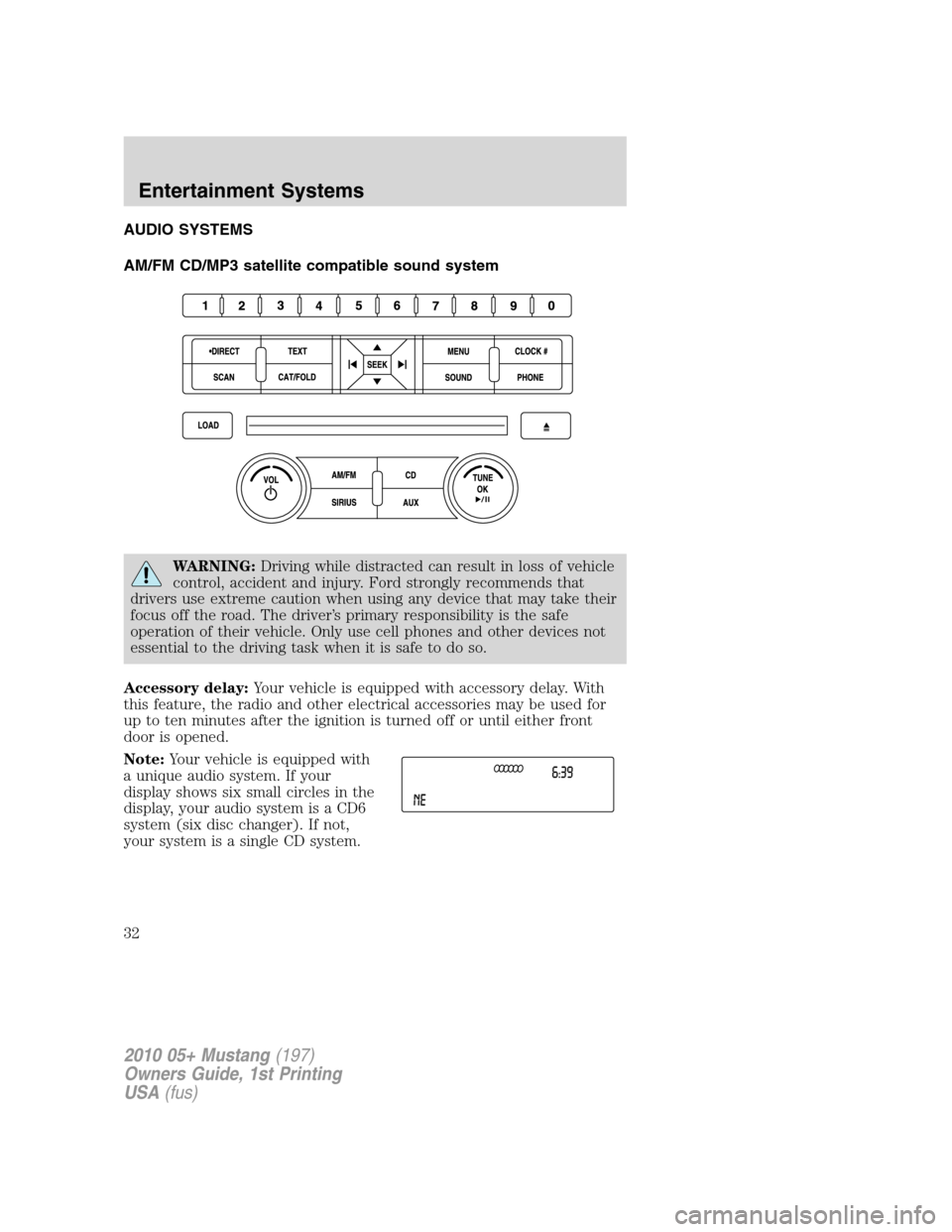
AM/FM CD/MP3 satellite compatible sound system
WARNING:Driving while distracted can result in loss of vehicle
control, accident and injury. Ford strongly recommends that
drivers use extreme caution when using any device that may take their
focus off the road. The driver’s primary responsibility is the safe
operation of their vehicle. Only use cell phones and other devices not
essential to the driving task when it is safe to do so.
Accessory delay:Your vehicle is equipped with accessory delay. With
this feature, the radio and other electrical accessories may be used for
up to ten minutes after the ignition is turned off or until either front
door is opened.
Note:Your vehicle is equipped with
a unique audio system. If your
display shows six small circles in the
display, your audio system is a CD6
system (six disc changer). If not,
your system is a single CD system.
2010 05+ Mustang(197)
Owners Guide, 1st Printing
USA(fus)
Entertainment Systems
32
Page 33 of 318
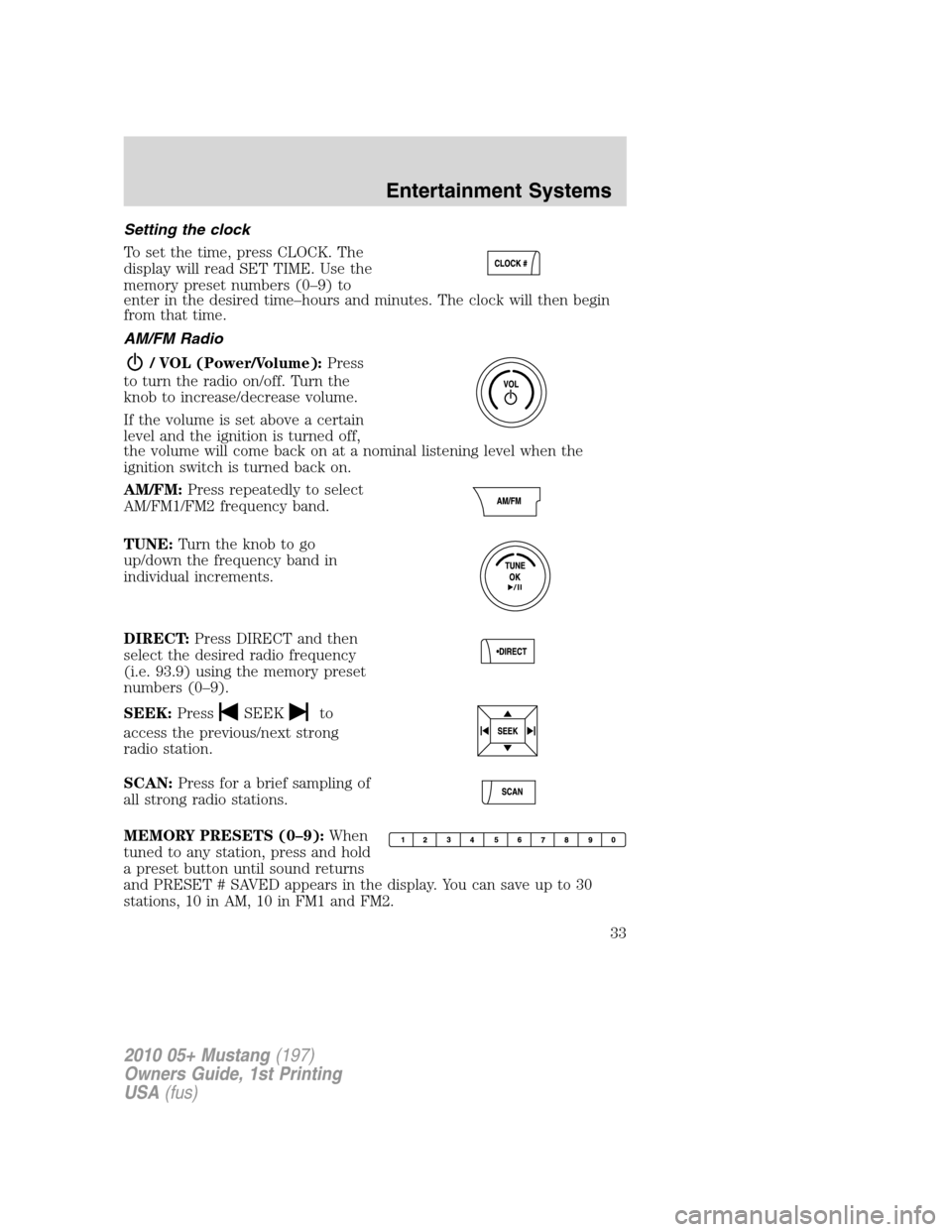
Setting the clock
To set the time, press CLOCK. The
display will read SET TIME. Use the
memory preset numbers (0–9) to
enter in the desired time–hours and minutes. The clock will then begin
from that time.
AM/FM Radio
/ VOL (Power/Volume):Press
to turn the radio on/off. Turn the
knob to increase/decrease volume.
If the volume is set above a certain
level and the ignition is turned off,
the volume will come back on at a nominal listening level when the
ignition switch is turned back on.
AM/FM:Press repeatedly to select
AM/FM1/FM2 frequency band.
TUNE:Turn the knob to go
up/down the frequency band in
individual increments.
DIRECT:Press DIRECT and then
select the desired radio frequency
(i.e. 93.9) using the memory preset
numbers (0–9).
SEEK:Press
SEEKto
access the previous/next strong
radio station.
SCAN:Press for a brief sampling of
all strong radio stations.
MEMORY PRESETS (0–9):When
tuned to any station, press and hold
a preset button until sound returns
and PRESET # SAVED appears in the display. You can save up to 30
stations, 10 in AM, 10 in FM1 and FM2.
2010 05+ Mustang(197)
Owners Guide, 1st Printing
USA(fus)
Entertainment Systems
33
Page 34 of 318
Saving presets automatically:Autoset allows you to set the strongest
local radio stations without losing your original manually set preset
stations for AM/FM1/FM2.
To activate the autoset feature:Press MENU repeatedly until AUTO
PRESET ON/OFF appears in the display. Use
SEEKto toggle
AUTO PRESET to ON, and either wait five seconds for the search to
initiate or press OK to immediately initiate the search. If you press
another control within those five seconds, the search will not initiate.
The 10 strongest stations will be filled and the station stored in preset 1
will begin playing.
If there are fewer than 10 strong stations, the system will store the last
one in the remaining presets.
RDS Radio
Available only in FM mode. This feature allows you to search
RDS-equipped stations for a certain category of music format: CLASSIC,
COUNTRY, JAZZ/RB, ROCK, etc.
To activate:Press MENU repeatedly until RDS (ON/OFF) appears in the
display. Use
SEEKto toggle RDS ON/OFF. When RDS is OFF,
you will not be able to search for RDS equipped stations or view the
station name or type.
CAT (Category) / FOLD
(Folder):This feature allows you
to select from various music
categories.
To change RDS categories:Press MENU repeatedly until RDS ON/OFF
appears in the display. Use
SEEKto toggle RDS between
ON/OFF. Press CAT. PRESS UP OR DOWN TO CHANGE RDS
CATEGORY will appear in the display. Press
SEEKto scroll
through all possible categories. When the desired category appears in the
display, press
SEEKto find the next station playing that
selection or press SCAN for a brief sampling of all stations playing that
category of music.
CD/MP3 Player
CD:Press to enter CD/MP3 mode. If
a disc is already loaded into the
system, CD/MP3 play will begin
where it ended last. If no CD is loaded, NO DISC will appear in the
display.
2010 05+ Mustang(197)
Owners Guide, 1st Printing
USA(fus)
Entertainment Systems
34
Page 35 of 318
LOAD:
For a single CD system–This
control is not operational. To load a
CD, simply insert the disc, label side up, into the CD slot.
For a CD6 system–Press LOAD. When the display reads SELECT
SLOT, choose the desired slot number using memory presets 1–6. When
the display reads LOAD CD #, load the desired disc, label side up. If you
do not choose a slot within five seconds, the system will choose for you.
Once loaded, the first track will begin to play.
To auto load up to six discs–Press and hold LOAD until the display
reads AUTOLOAD #. Load the desired disc, label side up. The system
will prompt you to load discs for the remaining available slots. Insert the
discs, one at a time, label side up, when prompted. Once loaded, the disc
in preset #1 will begin to play.
Press the number preset buttons (1–6) to choose the disc you want to
play.
/Play/Pause:Press to
play/pause a track when playing a
CD.
EJECT:
For a single CD system–press
EJECT to eject the CD.
For a CD6 system–press EJECT and select the desired CD slot by
pressing the corresponding memory preset number. The display will read
EJECTING #. When the system has ejected the CD, the display will read
REMOVE CD #. Remove the CD. If you do not remove the CD, the
system will reload the disc.
To auto eject all loaded discs–Press and hold EJECT. The system will
eject all discs and prompt you when to remove them.
SEEK:Press
SEEKto
access the previous/next track.
CAT (Category) / FOLD
(Folder):
In MP3 mode only–Press
CAT/FOLD and then
press
SEEKto access the previous/next folder.
2010 05+ Mustang(197)
Owners Guide, 1st Printing
USA(fus)
Entertainment Systems
35
Page 36 of 318
SCAN:Press for a brief sampling of
all tracks on the current disc or
MP3folder.
DIRECT:
In CD mode–Press DIRECT. The
display will read DIRECT TRACK
MODE SELECT TRACK. Enter the desired track number using the
memory preset buttons (0–9). The system will then begin playing that
track.
In MP3 folder mode–Press DIRECT and the memory preset buttons
(0–9) of the desired folder. The system will advance to that specific
folder.
TEXT:
In MP3 mode only–Press TEXT
repeatedly to view Album (AL),
Folder (FL), Song (SO) and Artist (AR) in the display, if available.
In TEXT MODE:Sometimes the display requires additional text to be
displayed. When theindicatorisactive,press TEXT and then
press
SEEKto view the additional display text.
COMPRESSION:Press MENU repeatedly until COMPRESSION ON/OFF
appears in the display. Use
SEEKto toggle between ON/OFF.
When COMPRESSION is ON, the system will bring the soft and loud CD
passages together for a more consistent listening level.
SHUFFLE:Press MENU repeatedly until SHUFFLE ON/OFF appears in
the display. Use
SEEKto toggle between ON/OFF. If you wish to
engage shuffle mode right away, press
SEEKto begin random
play. Otherwise, random play will begin when the current track is
finished playing. The system will only shuffle the disc currently playing.
Satellite Radio (if equipped)
Satellite radio is available only with a valid SIRIUS radio
subscription. Check with your authorized dealer for availability.
SIRIUS:Press repeatedly to access
satellite radio mode, if equipped.
Press repeatedly to cycle through
SAT1, SAT2 and SAT3 modes.
2010 05+ Mustang(197)
Owners Guide, 1st Printing
USA(fus)
Entertainment Systems
36
Page 37 of 318
TUNE:Turn to go to the next /
previous available SIRIUS satellite
station.
DIRECT:Press DIRECT then enter
the desired channel (i.e. 002) using
the memory preset buttons (0–9). If
you only enter one digit, press OK
and the system will go to that satellite channel. If you enter three digits,
the system will automatically go to that channel, if available. You may
cancel your entry by pressing DIRECT. If an invalid station number is
entered, INVALID CHANNEL will appear in the display and the system
will continue playing the current station.
SEEK:Press
SEEKto seek
to the previous/next channel. If a
specific category is selected, (Jazz,
Rock, News, etc.),
press
SEEKto seek to the previous/next channel in the selected
category. Press and hold
SEEKto fast seek through the
previous/next channels.
SCAN:Press SCAN for a brief
sampling of all available SIRIUS
satellite channels. If a specific
category is selected, (Jazz, Rock, News, etc.) press SCAN for a brief
sampling of all available SIRIUS satellite channels within the selected
category.
MEMORY PRESETS (0–9):There
are 30 available presets, 10 each for
SAT1, SAT2 and SAT3. To save
satellite channels in your memory presets, tune to the desired channel
then press and hold a memory preset number (0–9) until sound returns.
TEXT:Press and release to display
the artist and song title. While in
TEXT MODE, press again to scroll
through the Artist (AR), Song (SO), Channel (CH) and Category (CA).
In TEXT MODE:Sometimes the display requires additional text to be
displayed. When theindicatorisactive,press TEXT and then
press
SEEKto view the additional display text.
2010 05+ Mustang(197)
Owners Guide, 1st Printing
USA(fus)
Entertainment Systems
37
Page 38 of 318
CAT (Category) / FOLD
(Folder):Press to toggle between
turning the most recently selected
satellite radio category on or off. The category icon (CAT) will illuminate
in the display when a specific category is selected (the icon will not
illuminate during CATEGORY ALL). If no category has ever been
selected, NO CATEGORY SELECTED will display.
Note:Separate categories can be set for SAT1, SAT2 or SAT3.
Refer toSatellite radio menufor further information on selecting a
satellite radio category.
SATELLITE RADIO MENU:Press
MENU when satellite radio mode is
active to access. Press OK to enter
into the satellite radio menu. Press
SEEKto cycle through the
following options:
•CATEGORY MENU-Press OK to enter category mode.
Press
SEEKto scroll through the list of available SIRIUS
channel Categories (Pop, Rock, News, etc.) Press OK when the
desired category appears in the display. After a category is selected,
press
SEEKto search for that specific category of channels
only (i.e. ROCK). You may also select CATEGORY ALL to seek all
available SIRIUS categories and channels. Press OK to close and
return to the main menu.
•SONG SEEK MENU-Press OK to enter song seek menu.
Press
SEEKto scroll through the following options:
a. SAVE THIS SONG:Press OK to save the currently playing song’s
title in the system’s memory. (If you try to save something other than
a song, CANT SAVE will appear in the display.) When the chosen song
is playing on any satellite radio channel, the system will alert you with
an audible prompt. Press OK while SONG ALERT is in the display and
the system will take you to the channel playing the desired song. You
can save up to 20 song titles. If you attempt to save more than 20
titles, the display will read REPLACE SONG? Press OK to access the
saved titles and press
SEEKto cycle through the saved titles.
When the song title appears in the display that you would like to
replace, press OK. SONG REPLACED will appear in the display.
b. DELETE A SONG:Press OK to delete a song from the system’s
memory. Press
SEEKto cycle through the saved songs. When
the song appears in the display that you would like to delete, press
2010 05+ Mustang(197)
Owners Guide, 1st Printing
USA(fus)
Entertainment Systems
38
Page 39 of 318
OK. The song will appear in the display for confirmation. Press OK
again and the display will read SONG DELETED. If you do not want
to delete the currently listed song, press
SEEKto select either
RETURN or CANCEL.
Note:If there are no songs presently saved, the display will read NO
SONGS.
c. DELETE ALL SONGS:Press OK to delete all song’s from the
system’s memory. The display will read ARE YOU SURE ? Press OK to
confirm deletion of all saved songs and the display will read ALL
DELETED.
Note:If there are no songs presently saved, the display will read NO
SONGS.
d. DISABLE ALERTS/ENABLE ALERTS:Press OK to
enable/disable the satellite alert status which alerts you when your
selected songs are playing on a satellite radio channel. (The system
default is disabled.) SONG ALERTS ENABLED/DISABLED will appear
in the display. The menu listing will display the opposite state. For
example, if you have chosen to enable the song alerts, the menu
listing will read DISABLE as the alerts are currently on, so your other
optionistoturnthemoff.
•CHANNEL LOCKOUT MENU-Press OK to enter the Channel
Lockout menu. Press the
SEEKto scroll through the following
options:
a. LOCK/UNLOCK THIS CHANNEL:Press OK when
LOCK/UNLOCK THIS CHANNEL is displayed and the display will read
ENTER PIN. Enter your four-digit PIN number (initial PIN is 1234)
and the system will lock/unlock the channel and CHANNEL LOCKED
or UNLOCKED will be displayed.
Note:you must be tuned to the specific channel you want to
lock/unlock when using this feature.
b. CHANGE PIN:Press OK when CHANGE PIN is displayed. The
display will read ENTER OLD PIN. Enter your current (old) PIN
number and when the system accepts your entry it will display
ENTER NEW PIN. Enter your new four-digit PIN and the system will
save the new PIN and PIN SAVED will display.
c. UNLOCK ALL CHANNELS:Press OK when UNLOCK ALL
CHANNELS is displayed and the display will read ENTER PIN. Enter
your four-digit PIN and the system will unlock all channels and the
display will read CHANNEL UNLOCKED.
d. RESET PIN:Press OK when RESET PIN is displayed. The display
will read ARE YOUR SURE. Press OK again to automatically reset the
2010 05+ Mustang(197)
Owners Guide, 1st Printing
USA(fus)
Entertainment Systems
39