display FORD MUSTANG 2010 5.G Owner's Guide
[x] Cancel search | Manufacturer: FORD, Model Year: 2010, Model line: MUSTANG, Model: FORD MUSTANG 2010 5.GPages: 318, PDF Size: 2.91 MB
Page 73 of 318
TILT STEERING WHEEL (IF EQUIPPED)
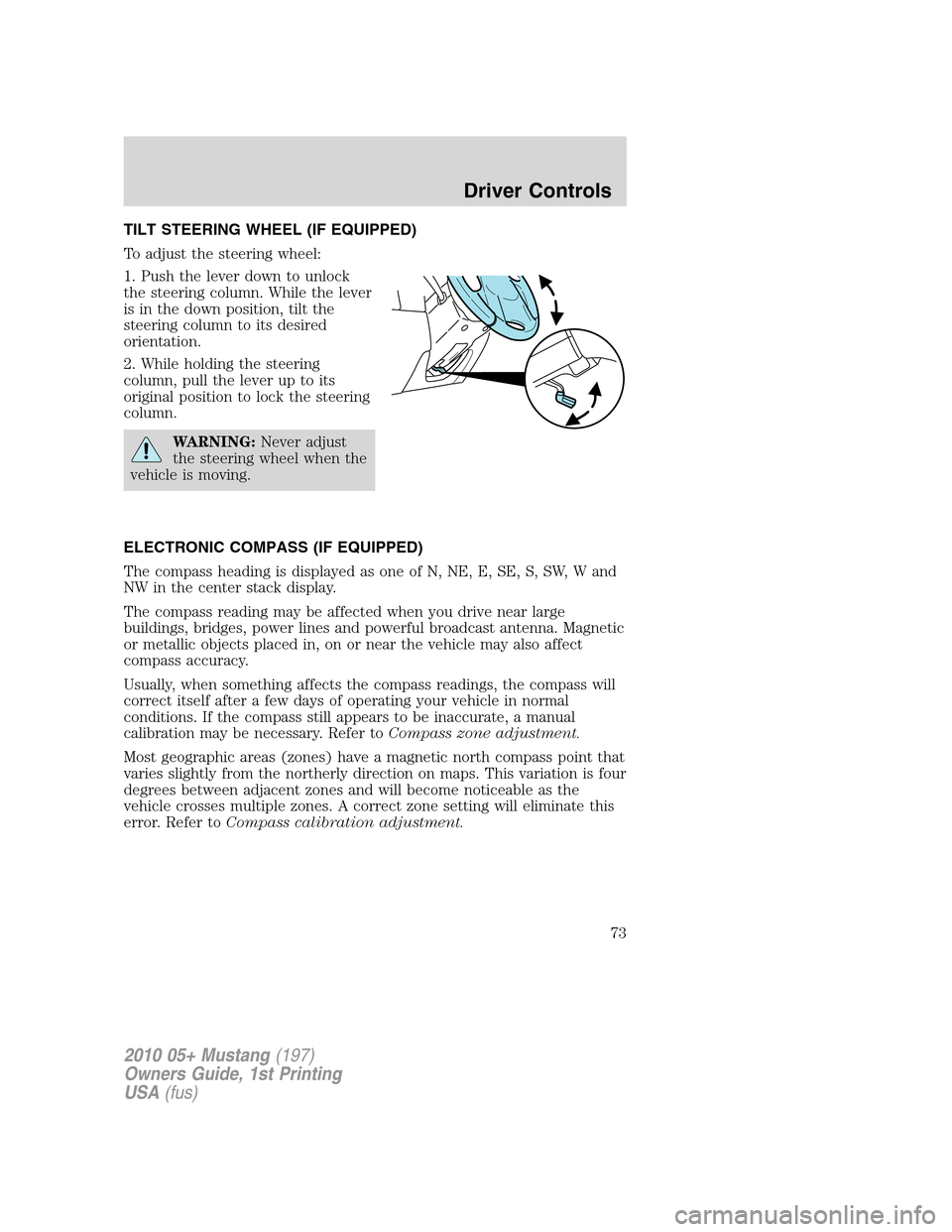
To adjust the steering wheel:
1. Push the lever down to unlock
the steering column. While the lever
is in the down position, tilt the
steering column to its desired
orientation.
2. While holding the steering
column, pull the lever up to its
original position to lock the steering
column.
WARNING:Never adjust
the steering wheel when the
vehicle is moving.
ELECTRONIC COMPASS (IF EQUIPPED)
The compass heading is displayed as one of N, NE, E, SE, S, SW, W and
NW in the center stack display.
The compass reading may be affected when you drive near large
buildings, bridges, power lines and powerful broadcast antenna. Magnetic
or metallic objects placed in, on or near the vehicle may also affect
compass accuracy.
Usually, when something affects the compass readings, the compass will
correct itself after a few days of operating your vehicle in normal
conditions. If the compass still appears to be inaccurate, a manual
calibration may be necessary. Refer toCompass zone adjustment.
Most geographic areas (zones) have a magnetic north compass point that
varies slightly from the northerly direction on maps. This variation is four
degrees between adjacent zones and will become noticeable as the
vehicle crosses multiple zones. A correct zone setting will eliminate this
error. Refer toCompass calibration adjustment.
2010 05+ Mustang(197)
Owners Guide, 1st Printing
USA(fus)
Driver Controls
73
Page 74 of 318
Compass zone adjustment
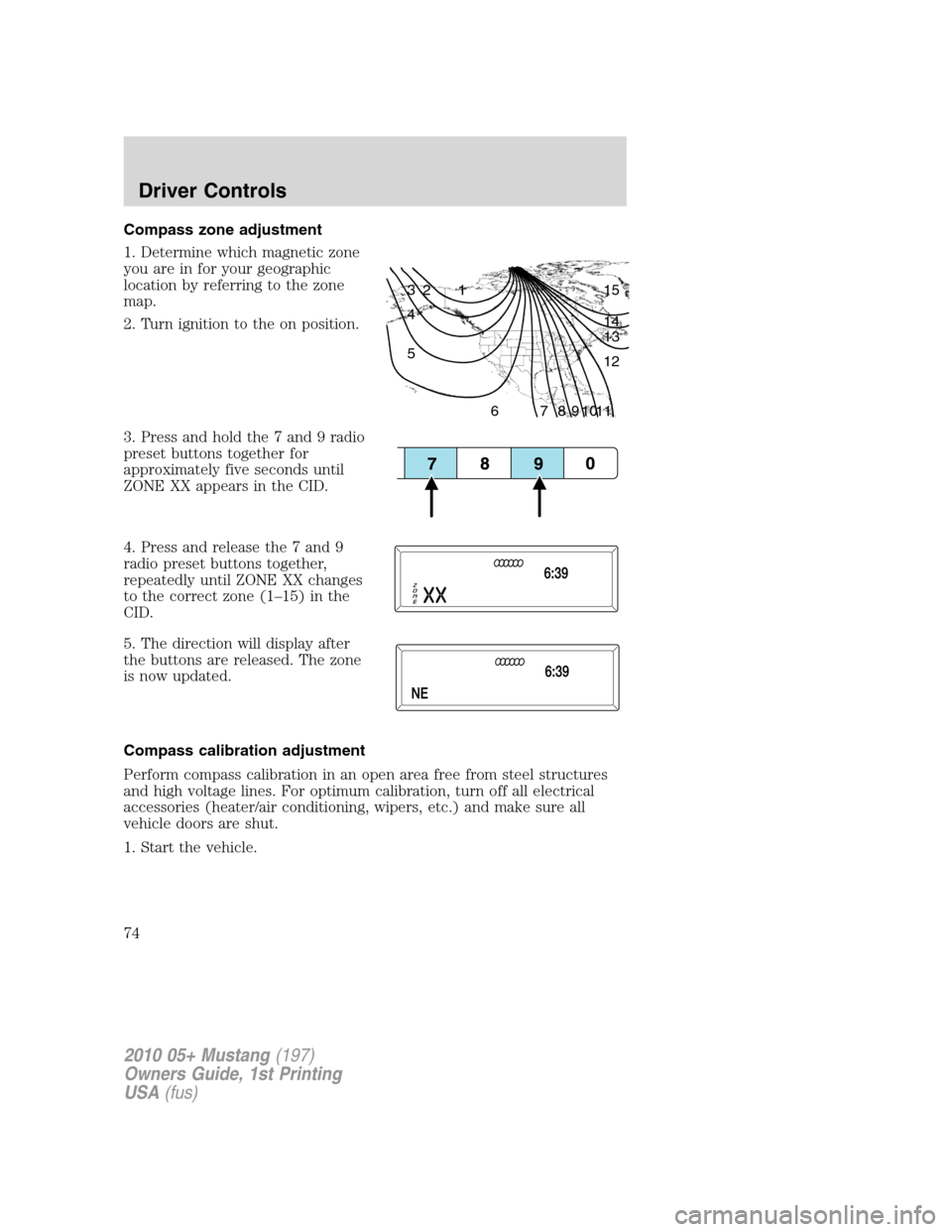
1. Determine which magnetic zone
you are in for your geographic
location by referring to the zone
map.
2. Turn ignition to the on position.
3. Press and hold the 7 and 9 radio
preset buttons together for
approximately five seconds until
ZONE XX appears in the CID.
4. Press and release the 7 and 9
radio preset buttons together,
repeatedly until ZONE XX changes
to the correct zone (1–15) in the
CID.
5. The direction will display after
the buttons are released. The zone
is now updated.
Compass calibration adjustment
Perform compass calibration in an open area free from steel structures
and high voltage lines. For optimum calibration, turn off all electrical
accessories (heater/air conditioning, wipers, etc.) and make sure all
vehicle doors are shut.
1. Start the vehicle.
1 2 3
4
5
6 7 8 9 101112 13 14 15
2010 05+ Mustang(197)
Owners Guide, 1st Printing
USA(fus)
Driver Controls
74
Page 75 of 318
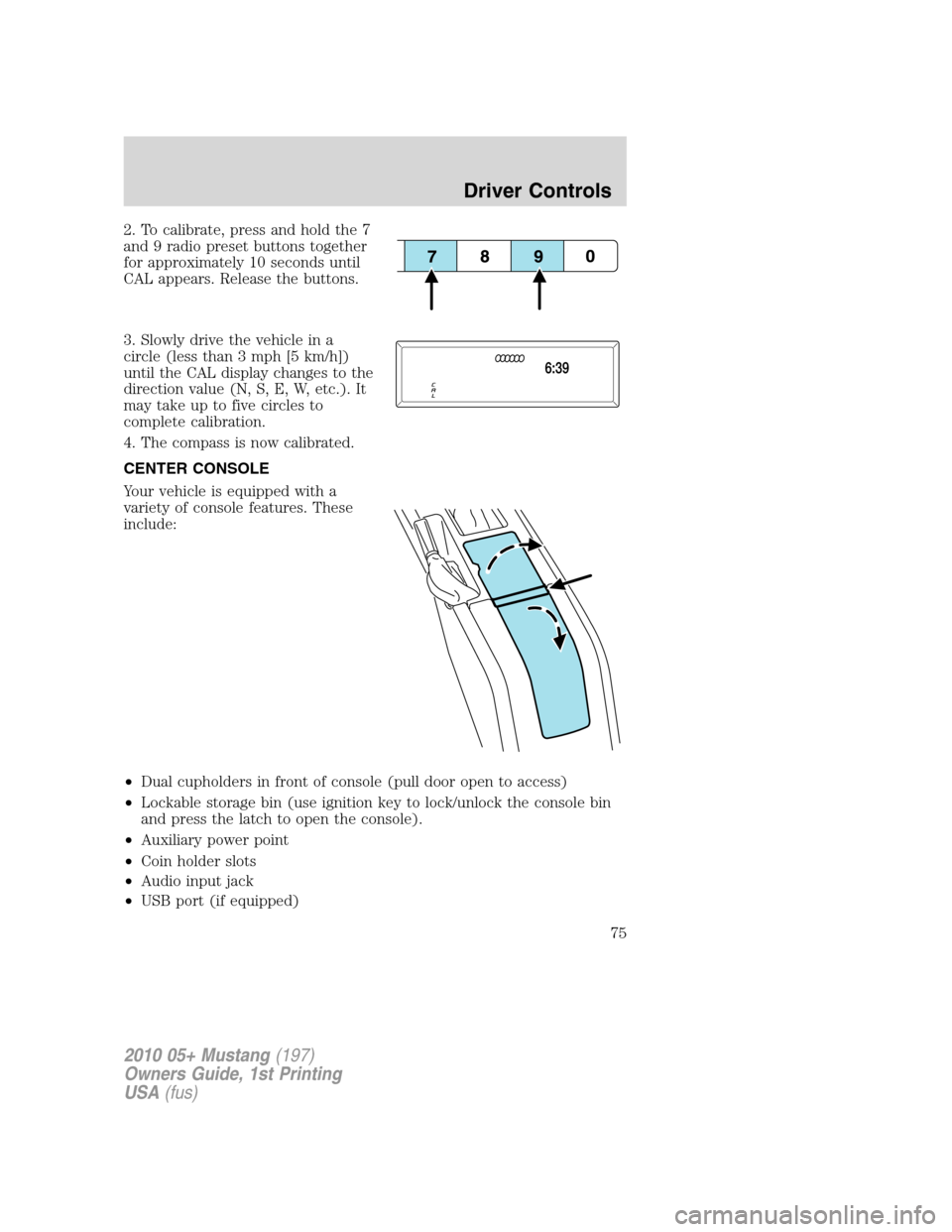
2. To calibrate, press and hold the 7
and 9 radio preset buttons together
for approximately 10 seconds until
CAL appears. Release the buttons.
3. Slowly drive the vehicle in a
circle (less than 3 mph [5 km/h])
until the CAL display changes to the
direction value (N, S, E, W, etc.). It
may take up to five circles to
complete calibration.
4. The compass is now calibrated.
CENTER CONSOLE
Your vehicle is equipped with a
variety of console features. These
include:
•Dual cupholders in front of console (pull door open to access)
•Lockable storage bin (use ignition key to lock/unlock the console bin
and press the latch to open the console).
•Auxiliary power point
•Coin holder slots
•Audio input jack
•USB port (if equipped)
2010 05+ Mustang(197)
Owners Guide, 1st Printing
USA(fus)
Driver Controls
75
Page 80 of 318
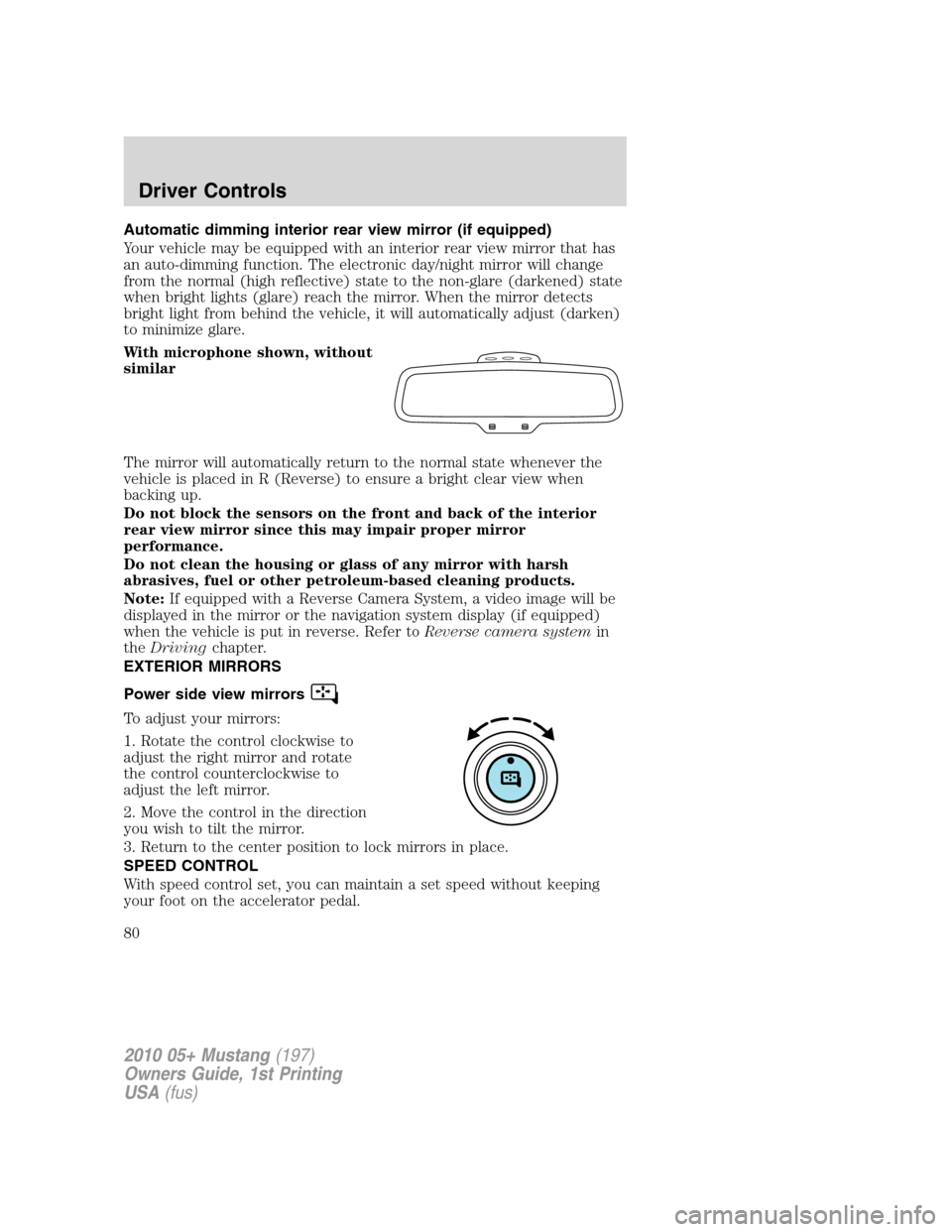
Automatic dimming interior rear view mirror (if equipped)
Your vehicle may be equipped with an interior rear view mirror that has
an auto-dimming function. The electronic day/night mirror will change
from the normal (high reflective) state to the non-glare (darkened) state
when bright lights (glare) reach the mirror. When the mirror detects
bright light from behind the vehicle, it will automatically adjust (darken)
to minimize glare.
With microphone shown, without
similar
The mirror will automatically return to the normal state whenever the
vehicle is placed in R (Reverse) to ensure a bright clear view when
backing up.
Do not block the sensors on the front and back of the interior
rear view mirror since this may impair proper mirror
performance.
Do not clean the housing or glass of any mirror with harsh
abrasives, fuel or other petroleum-based cleaning products.
Note:If equipped with a Reverse Camera System, a video image will be
displayed in the mirror or the navigation system display (if equipped)
when the vehicle is put in reverse. Refer toReverse camera systemin
theDrivingchapter.
EXTERIOR MIRRORS
Power side view mirrors
To adjust your mirrors:
1. Rotate the control clockwise to
adjust the right mirror and rotate
the control counterclockwise to
adjust the left mirror.
2. Move the control in the direction
you wish to tilt the mirror.
3. Return to the center position to lock mirrors in place.
SPEED CONTROL
With speed control set, you can maintain a set speed without keeping
your foot on the accelerator pedal.
2010 05+ Mustang(197)
Owners Guide, 1st Printing
USA(fus)
Driver Controls
80
Page 214 of 318
REARVIEW CAMERA SYSTEM (IF EQUIPPED)
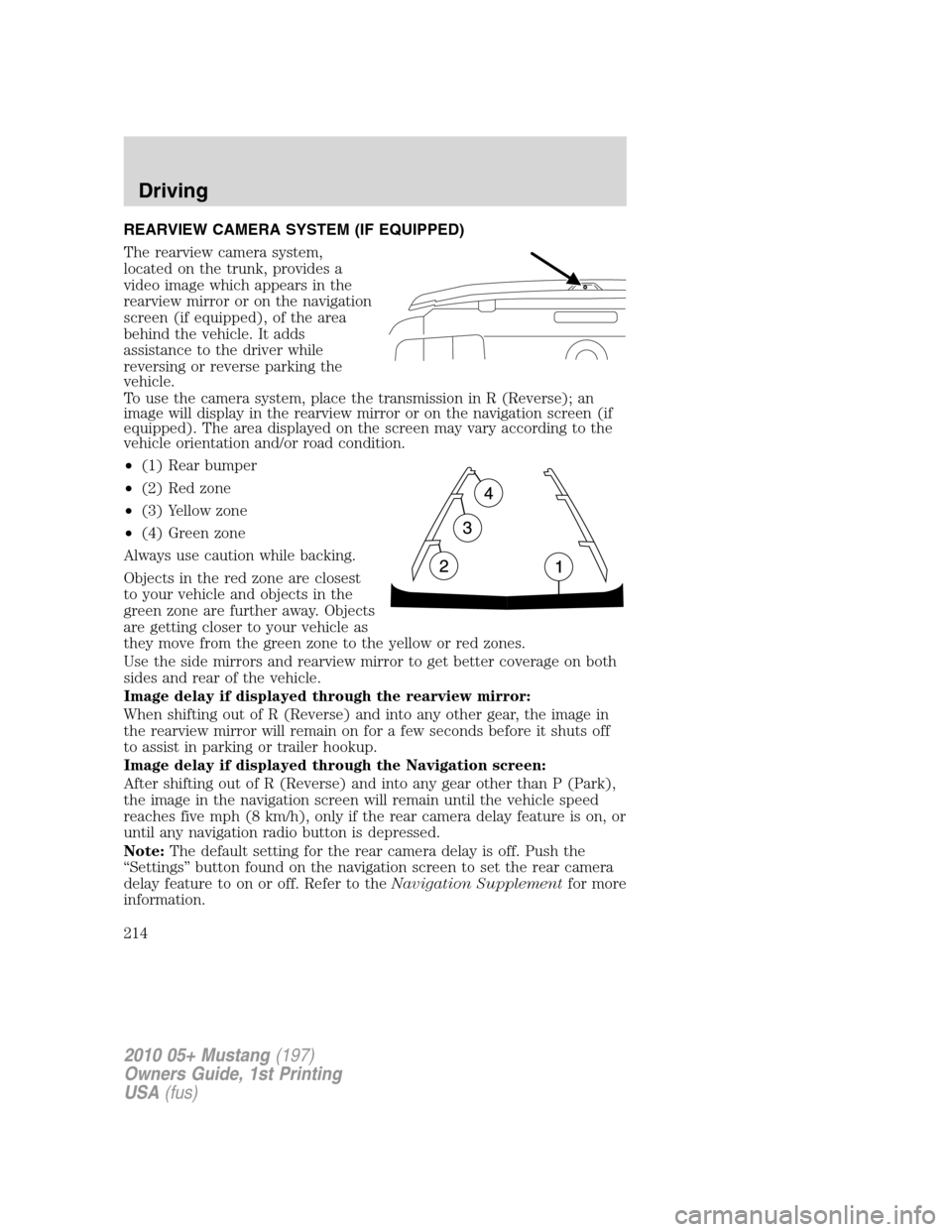
The rearview camera system,
located on the trunk, provides a
video image which appears in the
rearview mirror or on the navigation
screen (if equipped), of the area
behind the vehicle. It adds
assistance to the driver while
reversing or reverse parking the
vehicle.
To use the camera system, place the transmission in R (Reverse); an
image will display in the rearview mirror or on the navigation screen (if
equipped). The area displayed on the screen may vary according to the
vehicle orientation and/or road condition.
•(1) Rear bumper
•(2) Red zone
•(3) Yellow zone
•(4) Green zone
Always use caution while backing.
Objects in the red zone are closest
to your vehicle and objects in the
green zone are further away. Objects
are getting closer to your vehicle as
they move from the green zone to the yellow or red zones.
Use the side mirrors and rearview mirror to get better coverage on both
sides and rear of the vehicle.
Image delay if displayed through the rearview mirror:
When shifting out of R (Reverse) and into any other gear, the image in
the rearview mirror will remain on for a few seconds before it shuts off
to assist in parking or trailer hookup.
Image delay if displayed through the Navigation screen:
After shifting out of R (Reverse) and into any gear other than P (Park),
the image in the navigation screen will remain until the vehicle speed
reaches five mph (8 km/h), only if the rear camera delay feature is on, or
until any navigation radio button is depressed.
Note:The default setting for the rear camera delay is off. Push the
“Settings” button found on the navigation screen to set the rear camera
delay feature to on or off. Refer to theNavigation Supplementfor more
information.
2010 05+ Mustang(197)
Owners Guide, 1st Printing
USA(fus)
Driving
214
Page 222 of 318
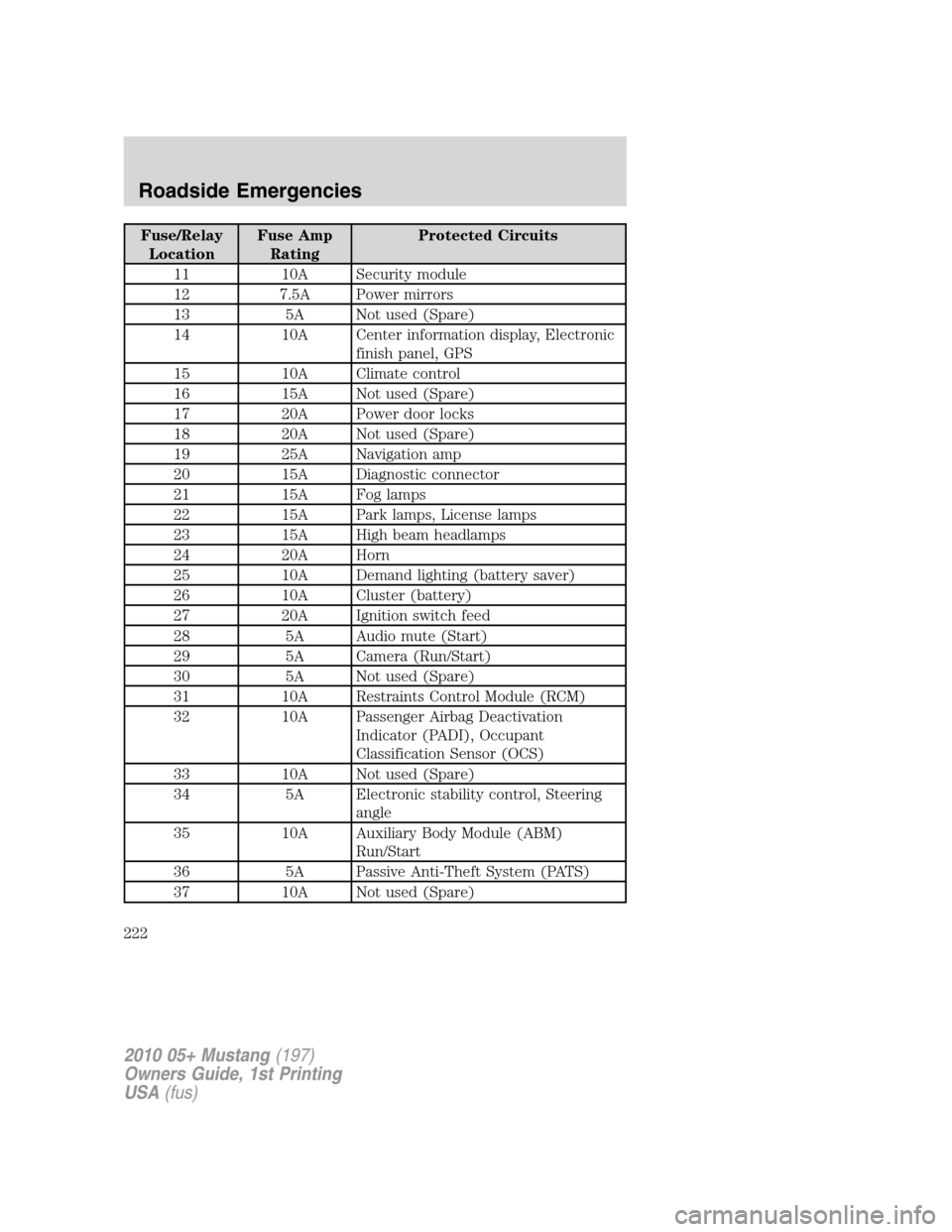
Fuse/Relay
LocationFuse Amp
RatingProtected Circuits
11 10A Security module
12 7.5A Power mirrors
13 5A Not used (Spare)
14 10A Center information display, Electronic
finish panel, GPS
15 10A Climate control
16 15A Not used (Spare)
17 20A Power door locks
18 20A Not used (Spare)
19 25A Navigation amp
20 15A Diagnostic connector
21 15A Fog lamps
22 15A Park lamps, License lamps
23 15A High beam headlamps
24 20A Horn
25 10A Demand lighting (battery saver)
26 10A Cluster (battery)
27 20A Ignition switch feed
28 5A Audio mute (Start)
29 5A Camera (Run/Start)
30 5A Not used (Spare)
31 10A Restraints Control Module (RCM)
32 10A Passenger Airbag Deactivation
Indicator (PADI), Occupant
Classification Sensor (OCS)
33 10A Not used (Spare)
34 5A Electronic stability control, Steering
angle
35 10A Auxiliary Body Module (ABM)
Run/Start
36 5A Passive Anti-Theft System (PATS)
37 10A Not used (Spare)
2010 05+ Mustang(197)
Owners Guide, 1st Printing
USA(fus)
Roadside Emergencies
222
Page 316 of 318
lighting up panel and
interior .......................................61
J
Jack ............................................226
positioning ...............................226
storage .....................................226
Jump-starting your vehicle ......243
K
Keyless entry system
autolock ...............................93, 95
Keys .....................................91, 104
positions of the ignition .........194
L
Lamps
autolamp system .......................59
bulb replacement
specifications chart ..................65
daytime running light ...............61
fog lamps ...................................60
headlamps .................................59
headlamps, flash to pass ..........61
instrument panel, dimming .....61
interior lamps .....................64–65
replacing bulbs .........................66
LATCH anchors .........................152
Lights, warning and indicator ....12
anti-lock brakes (ABS) ..........200
Limited slip axle (see Traction
Loc) ............................................207
Load limits .................................184
Locks ............................................92
autolock ...............................93, 95
doors ..........................................92
Lubricant specifications ...........301Lug nuts ....................................241
Lumbar support, seats .............113
M
Manual transmission .................212
fluid capacities ........................301
lubricant specifications ..........301
reverse .....................................213
Message center .....................20–22
display color ..............................24
english/metric button ...............26
MyColor display ........................24
system check button ................22
warning messages .....................29
Mirrors ...................................79–80
automatic dimming rearview
mirror ........................................80
heated ........................................54
side view mirrors (power) .......80
Motorcraft parts ........264, 283, 300
N
Navigation system .......................50
O
Octane rating ............................287
Oil (see Engine oil) ..................270
P
Parking brake ............................200
Parts (see Motorcraft parts) ....300
Passenger Occupant
Classification Sensor .................119
Power distribution box (see
Fuses) ........................................223
Power mirrors .............................80
2010 05+ Mustang(197)
Owners Guide, 1st Printing
USA(fus)
Index
316