audio FORD MUSTANG 2014 5.G User Guide
[x] Cancel search | Manufacturer: FORD, Model Year: 2014, Model line: MUSTANG, Model: FORD MUSTANG 2014 5.GPages: 461, PDF Size: 5.47 MB
Page 125 of 461
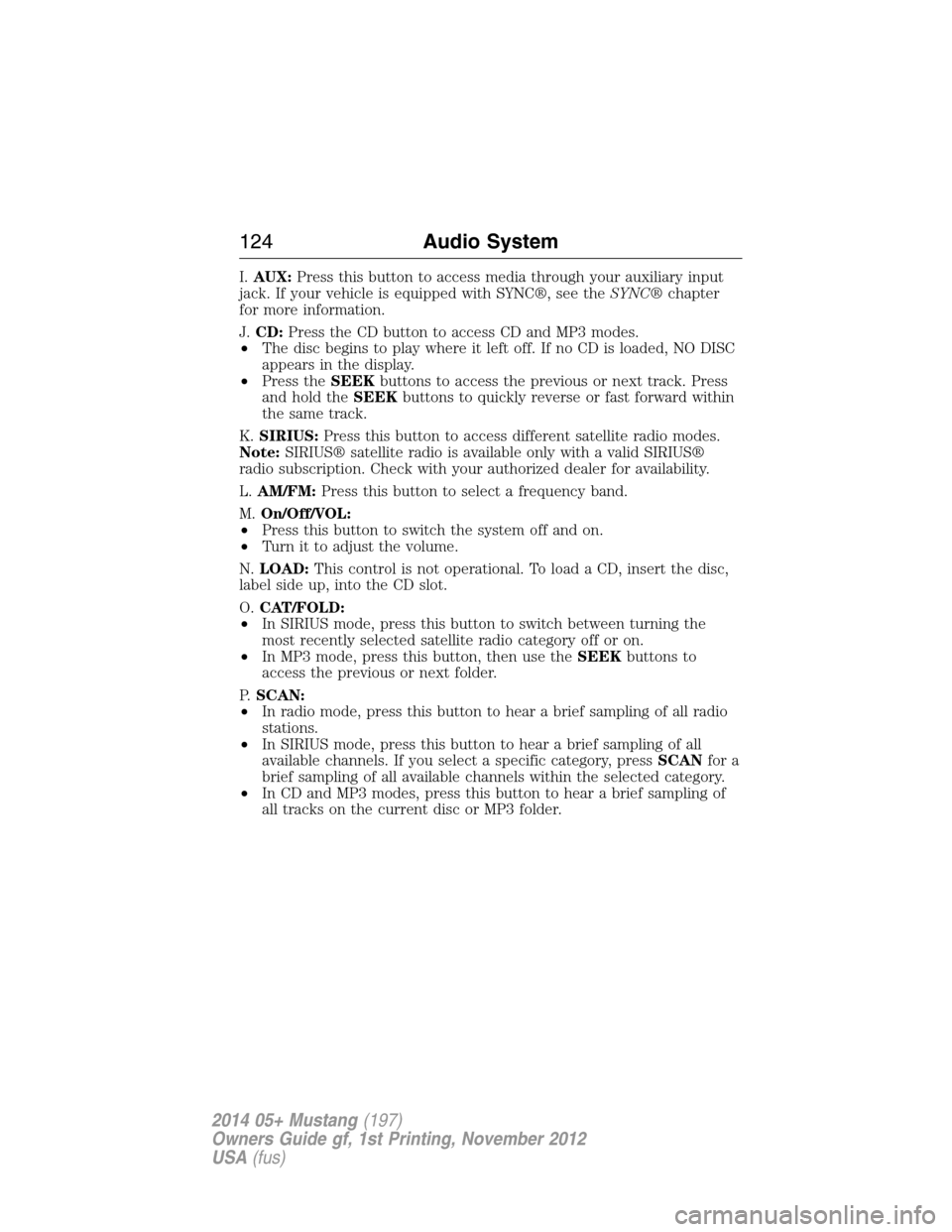
I.AUX:Press this button to access media through your auxiliary input
jack. If your vehicle is equipped with SYNC®, see theSYNC®chapter
for more information.
J.CD:Press the CD button to access CD and MP3 modes.
•The disc begins to play where it left off. If no CD is loaded, NO DISC
appears in the display.
•Press theSEEKbuttons to access the previous or next track. Press
and hold theSEEKbuttons to quickly reverse or fast forward within
the same track.
K.SIRIUS:Press this button to access different satellite radio modes.
Note:SIRIUS® satellite radio is available only with a valid SIRIUS®
radio subscription. Check with your authorized dealer for availability.
L.AM/FM:Press this button to select a frequency band.
M.On/Off/VOL:
•Press this button to switch the system off and on.
•Turn it to adjust the volume.
N.LOAD:This control is not operational. To load a CD, insert the disc,
label side up, into the CD slot.
O.CAT/FOLD:
•In SIRIUS mode, press this button to switch between turning the
most recently selected satellite radio category off or on.
•In MP3 mode, press this button, then use theSEEKbuttons to
access the previous or next folder.
P.SCAN:
•In radio mode, press this button to hear a brief sampling of all radio
stations.
•In SIRIUS mode, press this button to hear a brief sampling of all
available channels. If you select a specific category, pressSCANfor a
brief sampling of all available channels within the selected category.
•In CD and MP3 modes, press this button to hear a brief sampling of
all tracks on the current disc or MP3 folder.
124Audio System
2014 05+ Mustang(197)
Owners Guide gf, 1st Printing, November 2012
USA(fus)
Page 126 of 461
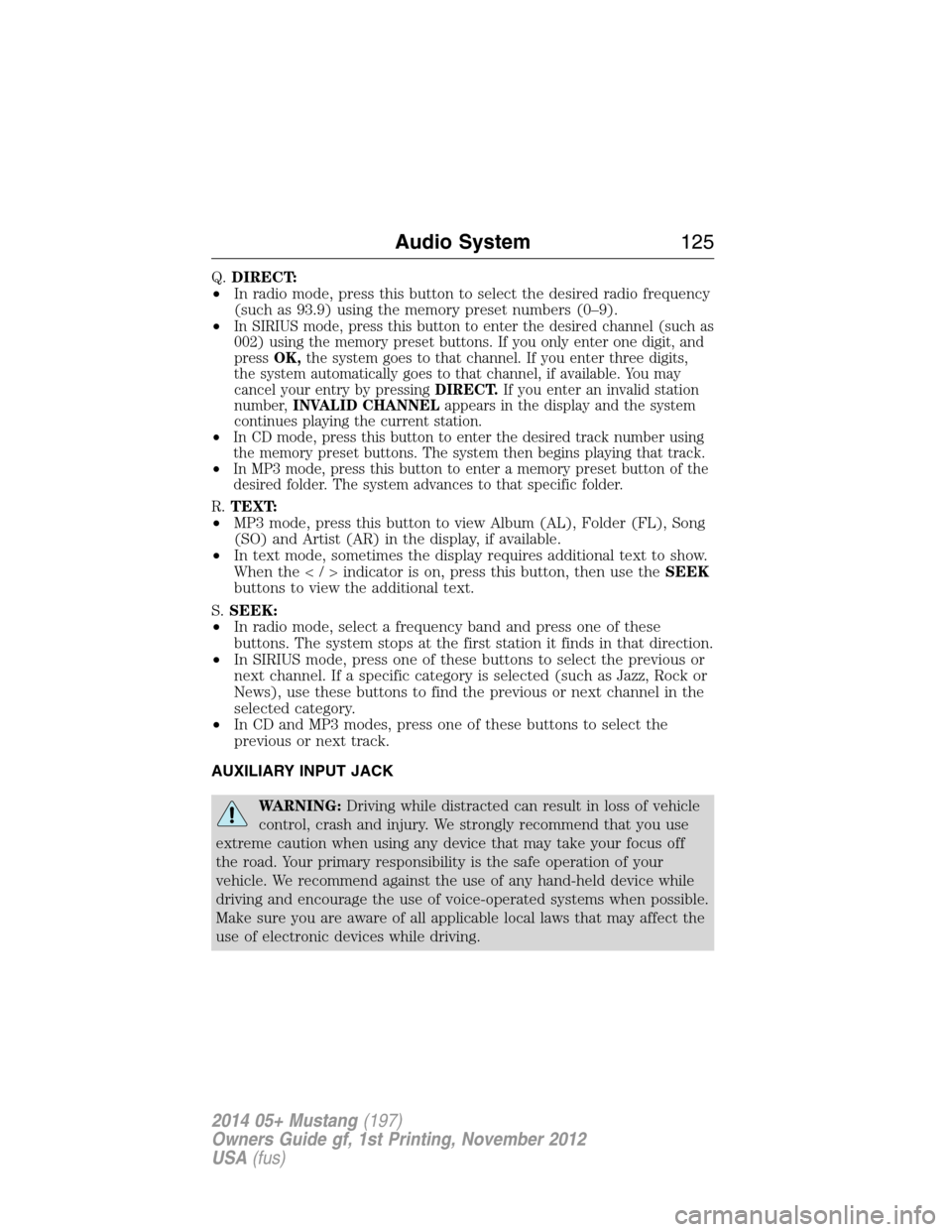
Q.DIRECT:
•In radio mode, press this button to select the desired radio frequency
(such as 93.9) using the memory preset numbers (0–9).
•
In SIRIUS mode, press this button to enter the desired channel (such as
002) using the memory preset buttons. If you only enter one digit, and
pressOK,the system goes to that channel. If you enter three digits,
the system automatically goes to that channel, if available. You may
cancel your entry by pressingDIRECT.If you enter an invalid station
number,INVALID CHANNELappears in the display and the system
continues playing the current station.
•In CD mode, press this button to enter the desired track number using
the memory preset buttons. The system then begins playing that track.
•In MP3 mode, press this button to enter a memory preset button of the
desired folder. The system advances to that specific folder.
R.TEXT:
•MP3 mode, press this button to view Album (AL), Folder (FL), Song
(SO) and Artist (AR) in the display, if available.
•In text mode, sometimes the display requires additional text to show.
When theindicatorison,press this button, then use theSEEK
buttons to view the additional text.
S.SEEK:
•In radio mode, select a frequency band and press one of these
buttons. The system stops at the first station it finds in that direction.
•In SIRIUS mode, press one of these buttons to select the previous or
next channel. If a specific category is selected (such as Jazz, Rock or
News), use these buttons to find the previous or next channel in the
selected category.
•In CD and MP3 modes, press one of these buttons to select the
previous or next track.
AUXILIARY INPUT JACK
WARNING:Driving while distracted can result in loss of vehicle
control, crash and injury. We strongly recommend that you use
extreme caution when using any device that may take your focus off
the road. Your primary responsibility is the safe operation of your
vehicle. We recommend against the use of any hand-held device while
driving and encourage the use of voice-operated systems when possible.
Make sure you are aware of all applicable local laws that may affect the
use of electronic devices while driving.
Audio System125
2014 05+ Mustang(197)
Owners Guide gf, 1st Printing, November 2012
USA(fus)
Page 127 of 461
WARNING:For safety reasons, do not connect or adjust the
settings on your portable music player while your vehicle is
moving.
WARNING:Store the portable music player in a secure location,
such as the center console or the glove box, when your vehicle is
moving. Hard objects may become projectiles in a crash or sudden stop,
which may increase the risk of serious injury. The audio extension cable
must be long enough to allow the portable music player to be safely
stored while your vehicle is moving.
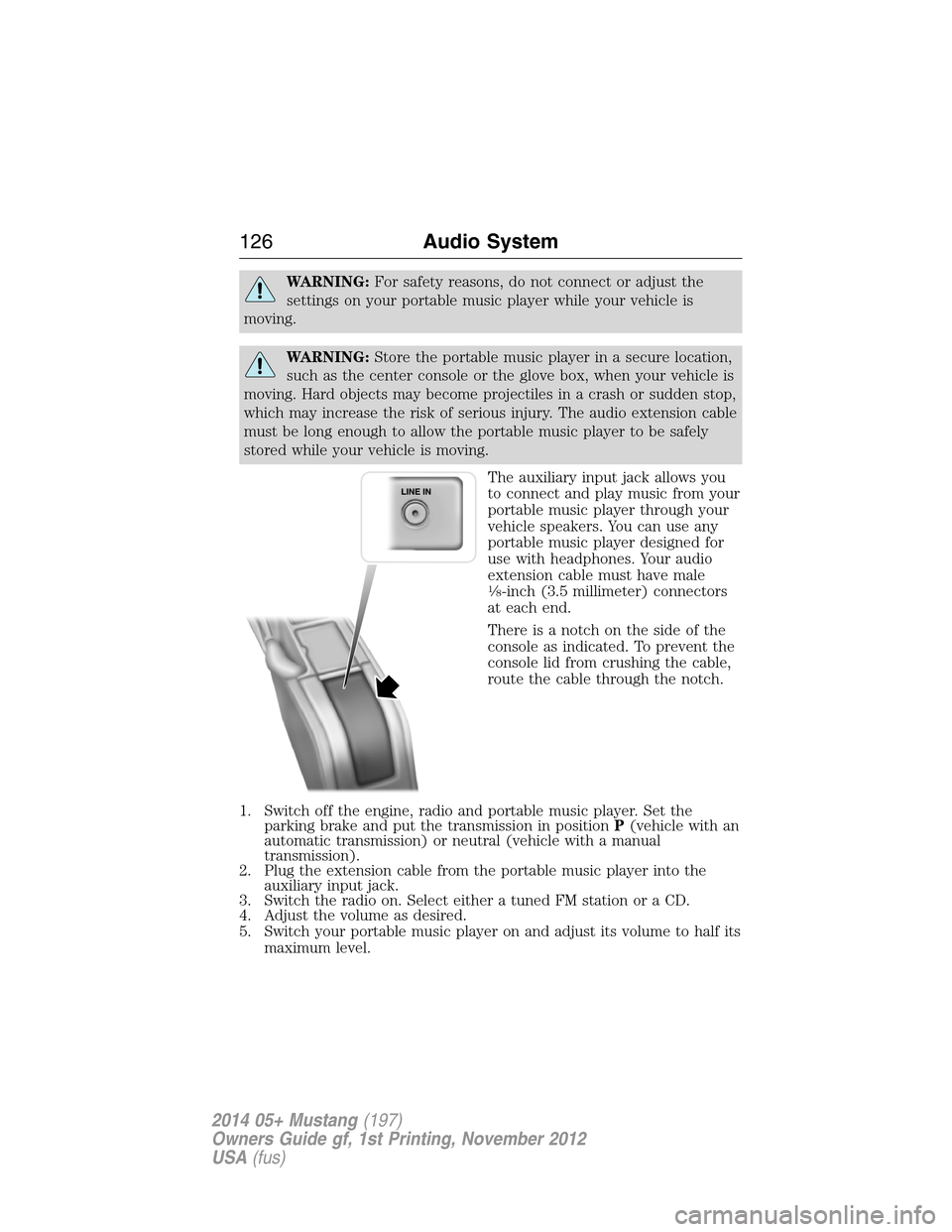
The auxiliary input jack allows you
to connect and play music from your
portable music player through your
vehicle speakers. You can use any
portable music player designed for
use with headphones. Your audio
extension cable must have male
18-inch (3.5 millimeter) connectors
at each end.
There is a notch on the side of the
console as indicated. To prevent the
console lid from crushing the cable,
route the cable through the notch.
1. Switch off the engine, radio and portable music player. Set the
parking brake and put the transmission in positionP(vehicle with an
automatic transmission) or neutral (vehicle with a manual
transmission).
2. Plug the extension cable from the portable music player into the
auxiliary input jack.
3. Switch the radio on. Select either a tuned FM station or a CD.
4. Adjust the volume as desired.
5. Switch your portable music player on and adjust its volume to half its
maximum level.
126Audio System
2014 05+ Mustang(197)
Owners Guide gf, 1st Printing, November 2012
USA(fus)
Page 128 of 461
6. PressAUXuntilLINEorLINE INappears in the display. You
should hear music from your device even if it is low.
7. Adjust the volume on your portable music player until it reaches the
volume level of the FM station or CD. Do this by switching back and
forth between the AUX and FM or CD controls.
USB PORT (IF EQUIPPED)
WARNING:Driving while distracted can result in loss of vehicle
control, crash and injury. We strongly recommend that you use
extreme caution when using any device that may take your focus off
the road. Your primary responsibility is the safe operation of your
vehicle. We recommend against the use of any hand-held device while
driving and encourage the use of voice-operated systems when possible.
Make sure you are aware of all applicable local laws that may affect the
use of electronic devices while driving.
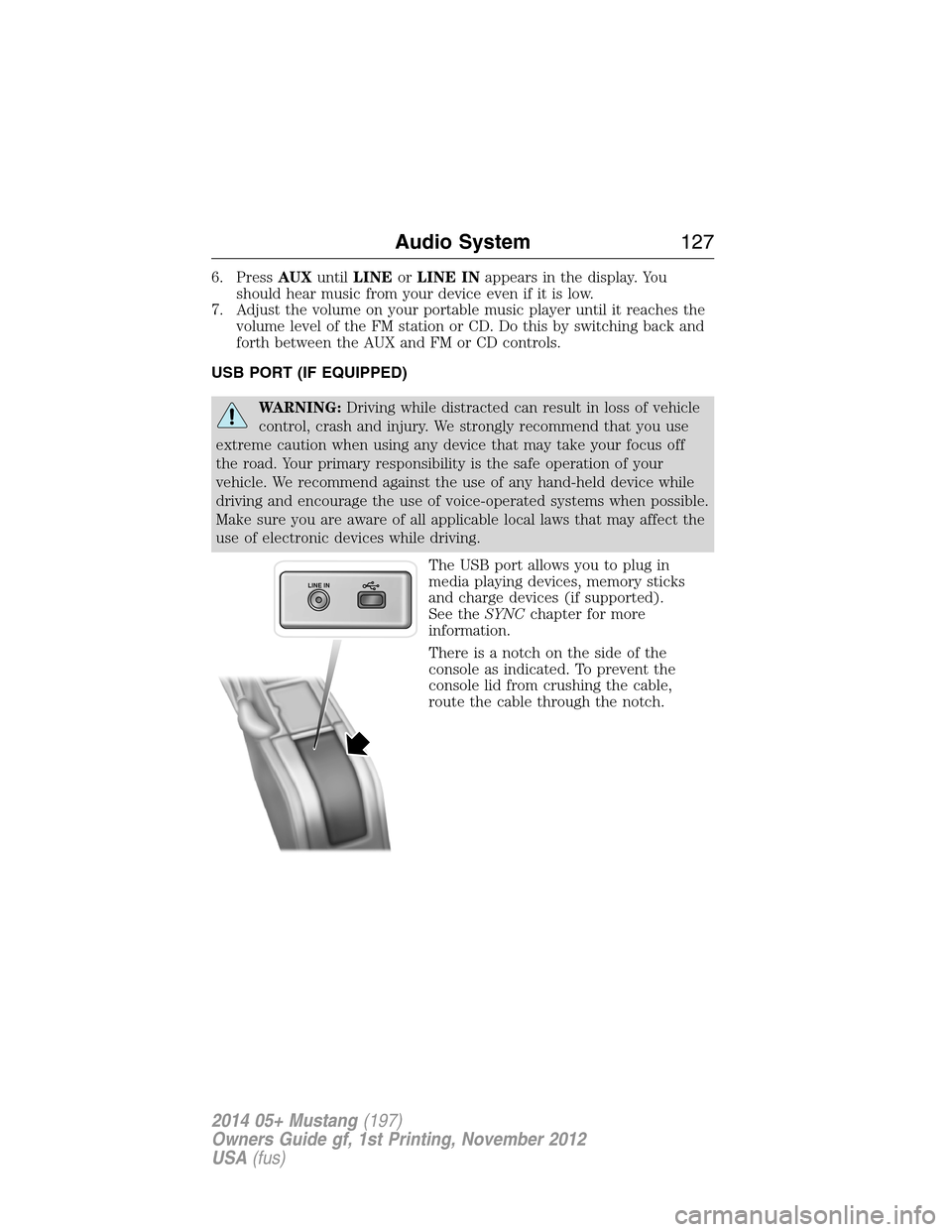
The USB port allows you to plug in
media playing devices, memory sticks
and charge devices (if supported).
See theSYNCchapter for more
information.
There is a notch on the side of the
console as indicated. To prevent the
console lid from crushing the cable,
route the cable through the notch.
LINE IN
Audio System127
2014 05+ Mustang(197)
Owners Guide gf, 1st Printing, November 2012
USA(fus)
Page 129 of 461
SATELLITE RADIO INFORMATION (IF EQUIPPED)
Satellite Radio Channels
SIRIUS® broadcasts a variety of music, news, sports, weather, traffic
and entertainment satellite radio channels. For more information and a
complete list of SIRIUS satellite radio channels, visit www.siriusxm.com
in the United States, www.sirius.ca in Canada, or call SIRIUS at
1–888–539–7474.
Note:This receiver includes the eCos real-time operating system. eCos
is published under the eCos License.
Satellite Radio Reception Factors
Potential satellite radio reception issues
Antenna
obstructionsFor optimal reception performance, keep the
antenna clear of snow and ice build-up and
keep luggage and other material as far away
from the antenna as possible.
TerrainHills, mountains, tall buildings, bridges,
tunnels, freeway overpasses, parking garages,
dense tree foliage and thunderstorms can
interfere with your reception.
Station overloadWhen you pass a ground-based broadcast
repeating tower, a stronger signal may
overtake a weaker one and the audio system
may mute.
Satellite radio signal
interferenceYour display may show ACQUIRING...to
indicate the interference and the audio
system may mute.
128Audio System
2014 05+ Mustang(197)
Owners Guide gf, 1st Printing, November 2012
USA(fus)
Page 130 of 461
SIRIUS Satellite Radio Service
Note:SIRIUS reserves the unrestricted right to change, rearrange, add
or delete programming including canceling, moving or adding particular
channels, and its prices, at any time, with or without notice to you. Ford
Motor Company shall not be responsible for any such programming
changes.
SIRIUS satellite radio is a
subscription-based satellite radio
service that broadcasts a variety of
music, sports, news, weather, traffic
and entertainment programming.
Your factory-installed SIRIUS satellite
radio system includes hardware and
a limited subscription term which begins on the date of sale or lease of
your vehicle. See an authorized dealer for availability.
For more information on extended subscription terms (a service fee is
required), the online media player and a complete list of SIRIUS satellite
radio channels, and other features, please visit www.siriusxm.com in the
United States, www.sirius.ca in Canada, or call SIRIUS at 1–888–539–7474.
Satellite Radio Electronic Serial Number (ESN)
You need your ESN to activate, modify or track your satellite radio
account. When in satellite radio mode, you can view this number by
pressingSIRIUSand memory preset 1 at the same time. To access your
ESN, press the bottom left corner of the touchscreen, thenSIRIUS>
Options.
Troubleshooting
Radio display Condition Possible action
Acquiring Radio requires more
than two seconds to
produce audio for the
selected channel.No action required.
This message should
disappear shortly.
Sat Fault/SIRIUS
system failureThere is an internal
module or system
failure present.If this message does
not clear shortly, or
with an ignition key
cycle, your receiver
may have a fault. See
an authorized dealer
for service.
Audio System129
2014 05+ Mustang(197)
Owners Guide gf, 1st Printing, November 2012
USA(fus)
Page 131 of 461
Radio display Condition Possible action
Invalid Channel The channel is no
longer available.Tune to another
channel or choose
another preset.
Unsubscribed Channel Your subscription does
not include this
channel.Contact SIRIUS at
1–888–539–7474 to
subscribe to the
channel, or tune to
another channel.
No Signal The signal is lost from
the SIRIUS satellite or
SIRIUS tower to your
vehicle antenna.The signal is blocked.
When you move into
an open area, the
signal should return.
Updating Update of channel
programming in
progress.No action required.
The process may take
up to three minutes.
Call SIRIUS
1–888–539–7474Your satellite service is
no longer available.Call SIRIUS at
1–888–539–7474 to
resolve subscription
issues.
No Channels Available All the channels in the
selected category are
either skipped or
locked.Use the channel guide
to turn off the Lock or
Skip function on that
station.
Subscription Updated SIRIUS has updated
the channels available
for your vehicle.No action required.
130Audio System
2014 05+ Mustang(197)
Owners Guide gf, 1st Printing, November 2012
USA(fus)
Page 154 of 461
CENTER CONSOLE
Stow items in the cupholder carefully as items may become loose during
hard braking, acceleration or collisions, including hot drinks which may
spill.
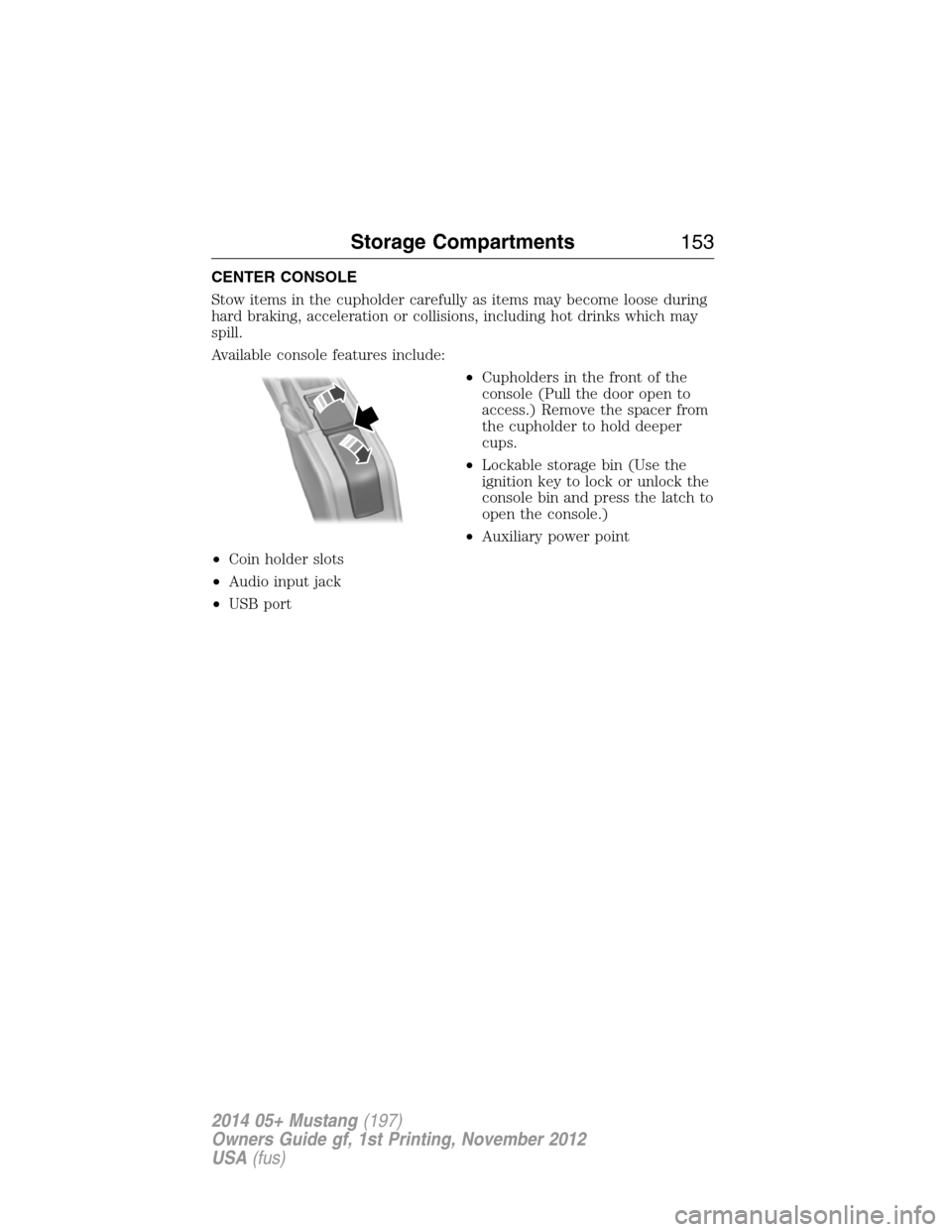
Available console features include:
•Cupholders in the front of the
console (Pull the door open to
access.) Remove the spacer from
the cupholder to hold deeper
cups.
•Lockable storage bin (Use the
ignition key to lock or unlock the
console bin and press the latch to
open the console.)
•Auxiliary power point
•Coin holder slots
•Audio input jack
•USB port
Storage Compartments153
2014 05+ Mustang(197)
Owners Guide gf, 1st Printing, November 2012
USA(fus)
Page 237 of 461
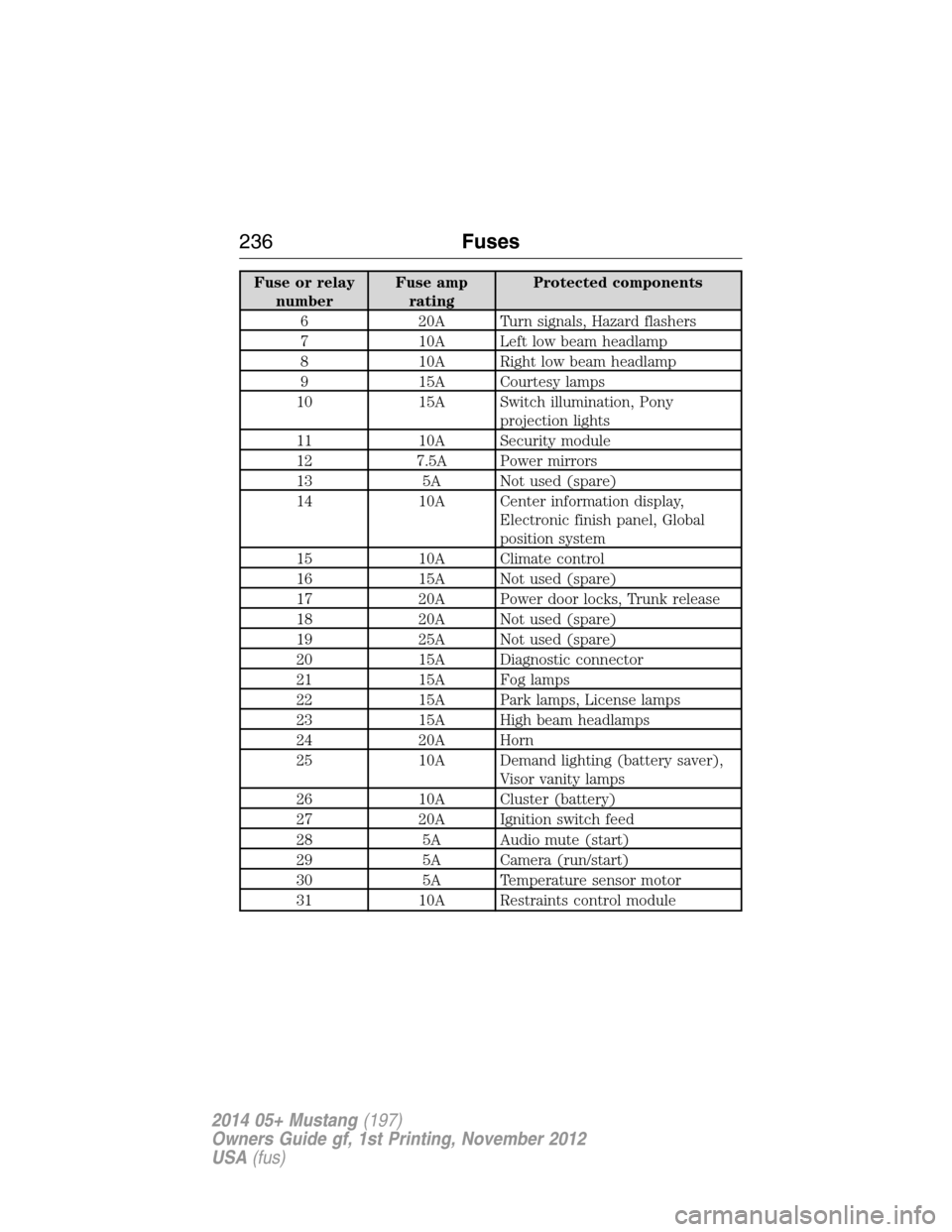
Fuse or relay
numberFuse amp
ratingProtected components
6 20A Turn signals, Hazard flashers
7 10A Left low beam headlamp
8 10A Right low beam headlamp
9 15A Courtesy lamps
10 15A Switch illumination, Pony
projection lights
11 10A Security module
12 7.5A Power mirrors
13 5A Not used (spare)
14 10A Center information display,
Electronic finish panel, Global
position system
15 10A Climate control
16 15A Not used (spare)
17 20A Power door locks, Trunk release
18 20A Not used (spare)
19 25A Not used (spare)
20 15A Diagnostic connector
21 15A Fog lamps
22 15A Park lamps, License lamps
23 15A High beam headlamps
24 20A Horn
25 10A Demand lighting (battery saver),
Visor vanity lamps
26 10A Cluster (battery)
27 20A Ignition switch feed
28 5A Audio mute (start)
29 5A Camera (run/start)
30 5A Temperature sensor motor
31 10A Restraints control module
236Fuses
2014 05+ Mustang(197)
Owners Guide gf, 1st Printing, November 2012
USA(fus)
Page 339 of 461
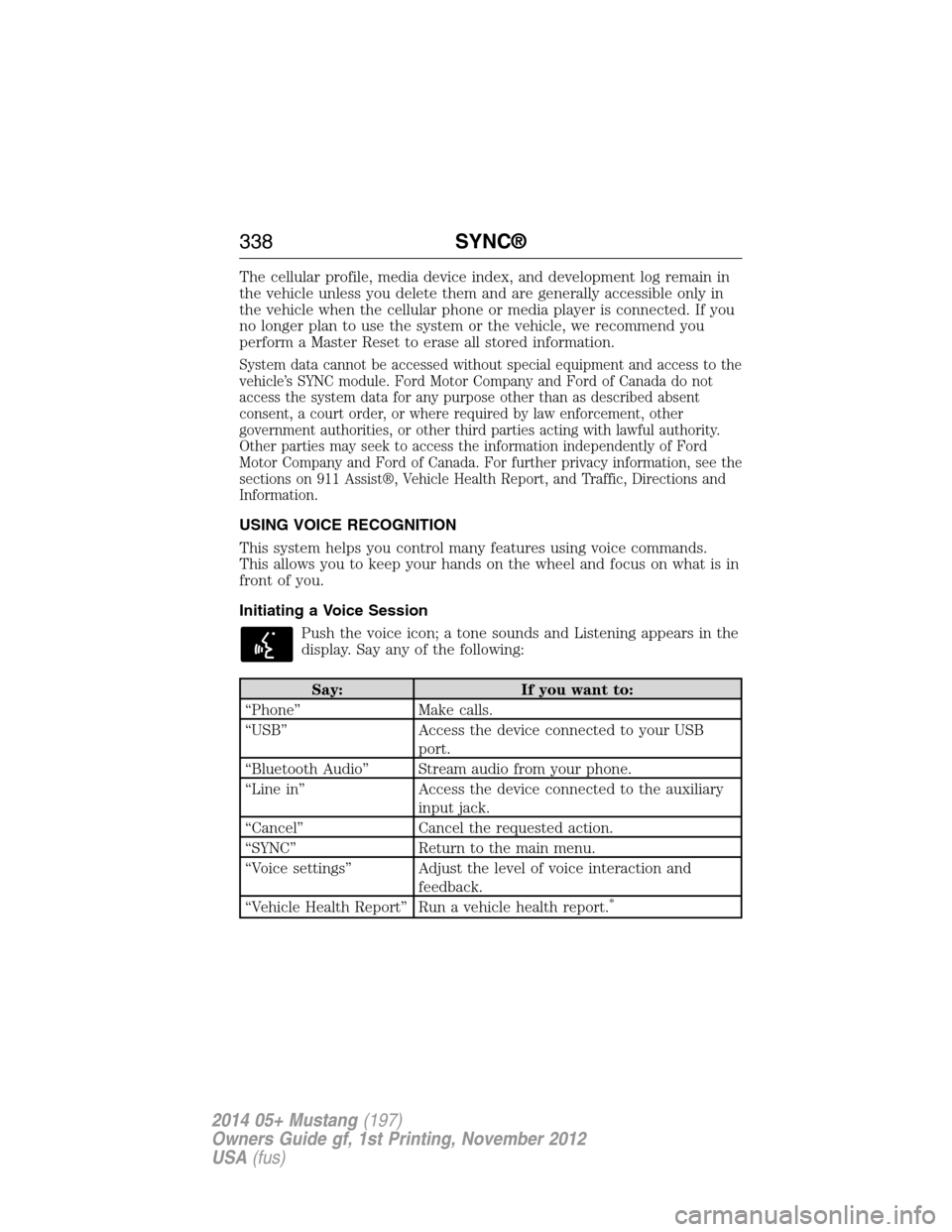
The cellular profile, media device index, and development log remain in
the vehicle unless you delete them and are generally accessible only in
the vehicle when the cellular phone or media player is connected. If you
no longer plan to use the system or the vehicle, we recommend you
perform a Master Reset to erase all stored information.
System data cannot be accessed without special equipment and access to the
vehicle’s SYNC module. Ford Motor Company and Ford of Canada do not
access the system data for any purpose other than as described absent
consent, a court order, or where required by law enforcement, other
government authorities, or other third parties acting with lawful authority.
Other parties may seek to access the information independently of Ford
Motor Company and Ford of Canada. For further privacy information, see the
sections on 911 Assist®, Vehicle Health Report, and Traffic, Directions and
Information.
USING VOICE RECOGNITION
This system helps you control many features using voice commands.
This allows you to keep your hands on the wheel and focus on what is in
front of you.
Initiating a Voice Session
Push the voice icon; a tone sounds and Listening appears in the
display. Say any of the following:
Say: If you want to:
“Phone” Make calls.
“USB” Access the device connected to your USB
port.
“Bluetooth Audio” Stream audio from your phone.
“Line in” Access the device connected to the auxiliary
input jack.
“Cancel” Cancel the requested action.
“SYNC” Return to the main menu.
“Voice settings” Adjust the level of voice interaction and
feedback.
“Vehicle Health Report” Run a vehicle health report.
*
338SYNC®
2014 05+ Mustang(197)
Owners Guide gf, 1st Printing, November 2012
USA(fus)