audio FORD MUSTANG 2014 5.G Owners Manual
[x] Cancel search | Manufacturer: FORD, Model Year: 2014, Model line: MUSTANG, Model: FORD MUSTANG 2014 5.GPages: 461, PDF Size: 5.47 MB
Page 4 of 461
Instrument Cluster 92
Gauges.............................................92
Warning lamps and indicators.............................94
Audible warnings and indicators...........................98
Information Displays 99
Controls.............................................99
Information messages..................................114
Audio System 120
AM/FMstereowithCD/MP3 .............................122
Auxiliary input jack...................................125
USBport...........................................127
Satellite radio information...............................128
Climate Control 131
Manual heating and air conditioning........................131
Navigation system based climate control....................133
Rear window defroster.................................136
Cabin air filter.......................................137
Seats 138
Sitting in the correct position............................138
Head restraints.......................................139
Manual seats........................................142
Power seats.........................................143
Heated seats........................................144
Rear seats..........................................145
Universal Garage Door Opener (If Equipped) 147
HomeLink® wireless control system.......................148
Auxiliary Power Points 152
Table of Contents3
2014 05+ Mustang(197)
Owners Guide gf, 1st Printing, November 2012
USA(fus)
Page 59 of 461
PRINCIPLES OF OPERATION
MyKey® allows you to program keys with restricted driving modes to
promote good driving habits. All but one of the keys programmed to the
vehicle can be activated with these restricted modes. Any keys that have
not been programmed are referred to as an administrator key or admin
key which can be used to:
•create a restricted key
•program optional MyKey settings
•clear all MyKey features altogether.
Once a key has been programmed, you can access the following
information using the information display control:
•How many admin keys and MyKeys are programmed to the vehicle.
•The total distance the vehicle has been driven with a MyKey.
For vehicles equipped with intelligent access (push button start), when
both a MyKey and an admin intelligent access key (fob) are present, the
admin fob will be recognized by the vehicle to start the engine.
Standard Settings
These settings cannot be changed.
•Belt-Minder. This cannot be disabled and the five-minute timer does
not expire. The audio system is muted when this feature is activated.
•Early low fuel.
•When the fuel gauge reads approximately 3/32nd tank, or your
estimated travel distance is 62 miles (100 kilometers) until the
tank is empty, whichever comes first.
•The fuel indicator lamp illuminates in yellow and the information
display shows a low fuel message.
•When the fuel tank gauge reads “E,” another set of warnings occur:
the information display shows a red warning light and the words
“Low Fuel” in red.
•Driver assist features, if equipped on your vehicle, are forced on:
parking aid, blind spot information system (BLIS) with cross traffic
alert and the collision warning system.
58MyKey
2014 05+ Mustang(197)
Owners Guide gf, 1st Printing, November 2012
USA(fus)
Page 60 of 461
Optional Settings
These settings can be configured right after a MyKey is first created or
changed afterward with an admin key.
•Vehicle speed limit of 80 mph (130 km/h). Visual warnings are
displayed followed by an audible tone when vehicle speed has reached
80 mph (130 km/h).
•Vehicle speed warning of 45, 55 or 65 mph (75, 90, or 105 km/h).
Visual warnings are displayed followed by an audible tone when the
preselected vehicle speed is exceeded.
•Audio system maximum volume of 45%. A message in the audio
system is displayed when attempting to exceed the limited volume.
•AdvanceTrac. The system cannot be turned off when Always-on has
been set.
CREATING A MYKEY
Use the information display controls to create a MyKey.
For Type 1 information display controls:
1. Insert the key you want to program into the ignition or, if the vehicle
is equipped with push button start, put the Intelligent Access key in
the backup slot; see theStarting and Stopping the Enginechapter
for the backup slot location.
2. Turn the ignition on.
3. Press SETUP using the information display buttons until PRESS
RESET TO CREATE MYKEY is displayed.
4. Press and release the RESET button. HOLD RESET TO CONFIRM
MYKEY will be displayed.
5. Press and hold the RESET button for two seconds until MARK THIS
AS RESTRICTED is displayed Wait until KEY RESTRICTED AT
NEXT START is displayed.
The key is successfully programmed. Make sure you label it so you can
distinguish it from the admin keys.
For Type 2 information display controls:
1. Insert the key you want to program into the ignition or, if the vehicle
is equipped with push button start, put the Intelligent Access key in
the backup slot; see theStarting and Stopping the Enginechapter
for the backup slot location.
2. Turn the ignition on.
3. At the main menu screen select SETTING then MYKEY by pressing
OK or the right arrow key.
MyKey59
2014 05+ Mustang(197)
Owners Guide gf, 1st Printing, November 2012
USA(fus)
Page 76 of 461
ADJUSTING THE STEERING WHEEL
WARNING:Do not adjust the steering wheel when your vehicle
is moving.
Note:Make sure that you are sitting in the correct position. SeeSitting
in the Correct Positionin theSeatschapter.
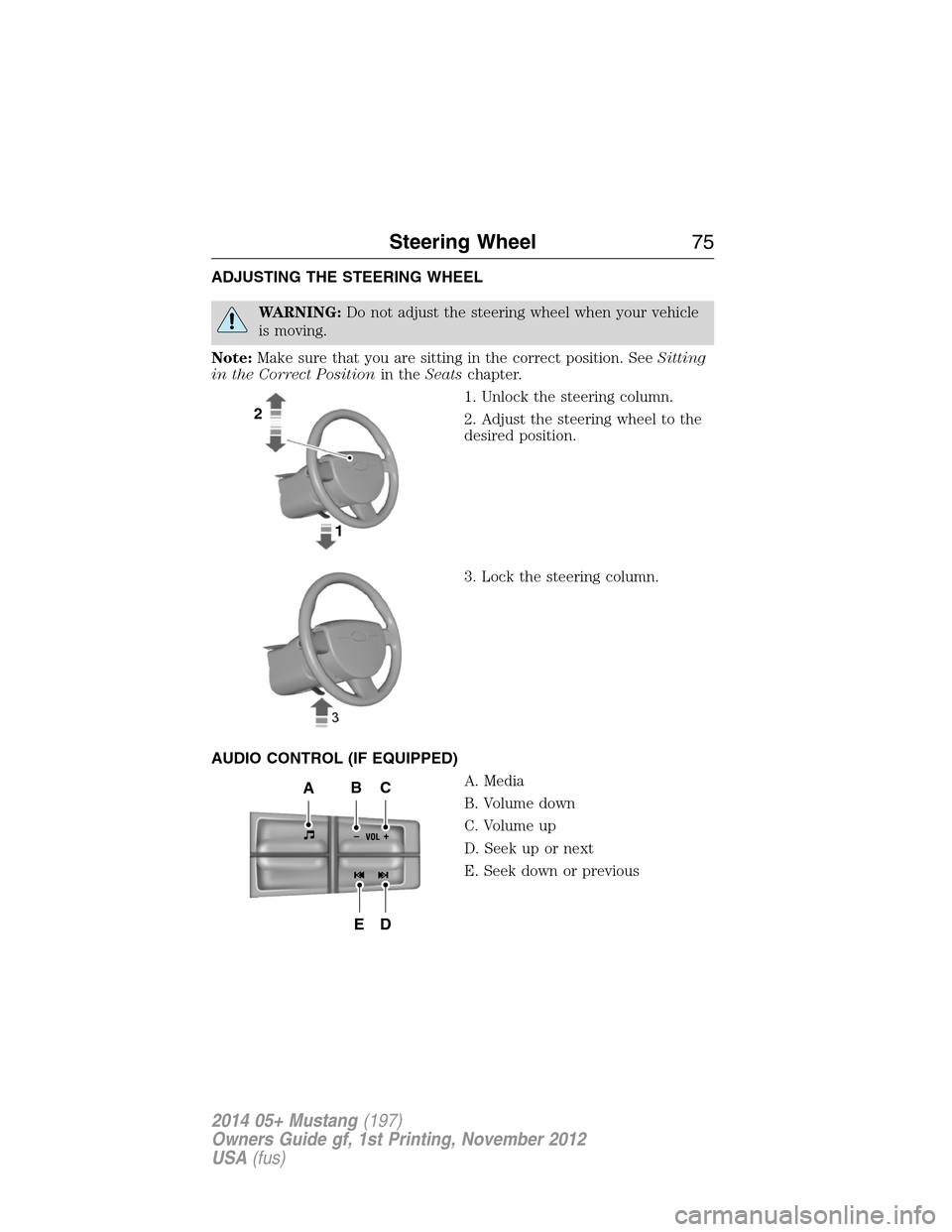
1. Unlock the steering column.
2. Adjust the steering wheel to the
desired position.
3. Lock the steering column.
AUDIO CONTROL (IF EQUIPPED)
A. Media
B. Volume down
C. Volume up
D. Seek up or next
E. Seek down or previous
2
1
-+
ABC
ED
Steering Wheel75
2014 05+ Mustang(197)
Owners Guide gf, 1st Printing, November 2012
USA(fus)
Page 77 of 461
Press the media button repeatedly to scroll through available audio
modes.
Press the seek buttons to select the next or previous stored preset or
track. Press and hold to select the next or previous frequency or seek
through a track.
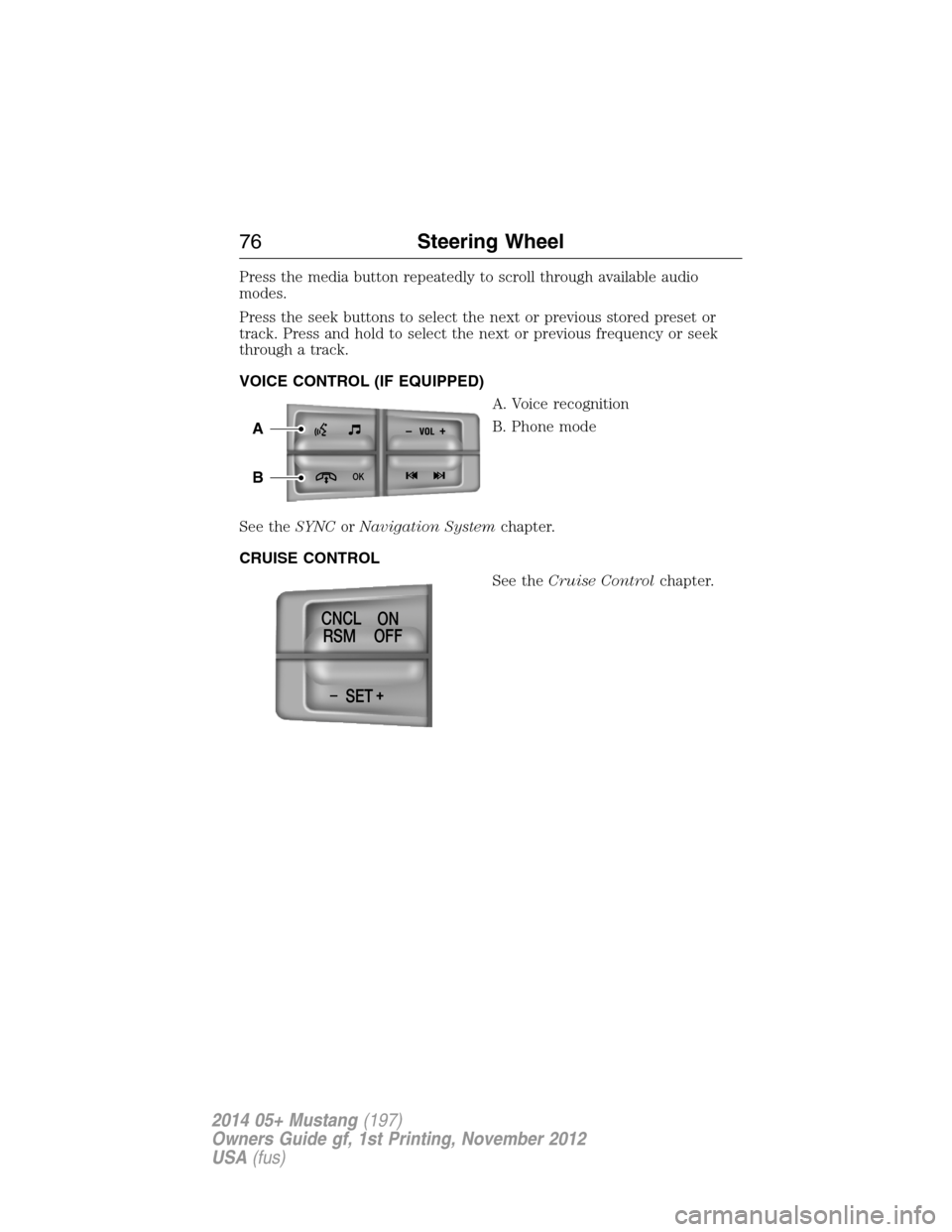
VOICE CONTROL (IF EQUIPPED)
A. Voice recognition
B. Phone mode
See theSYNCorNavigation Systemchapter.
CRUISE CONTROL
See theCruise Controlchapter.
-+
OK
A
B
-+SET CNCL
RSMON
OFF
76Steering Wheel
2014 05+ Mustang(197)
Owners Guide gf, 1st Printing, November 2012
USA(fus)
Page 118 of 461
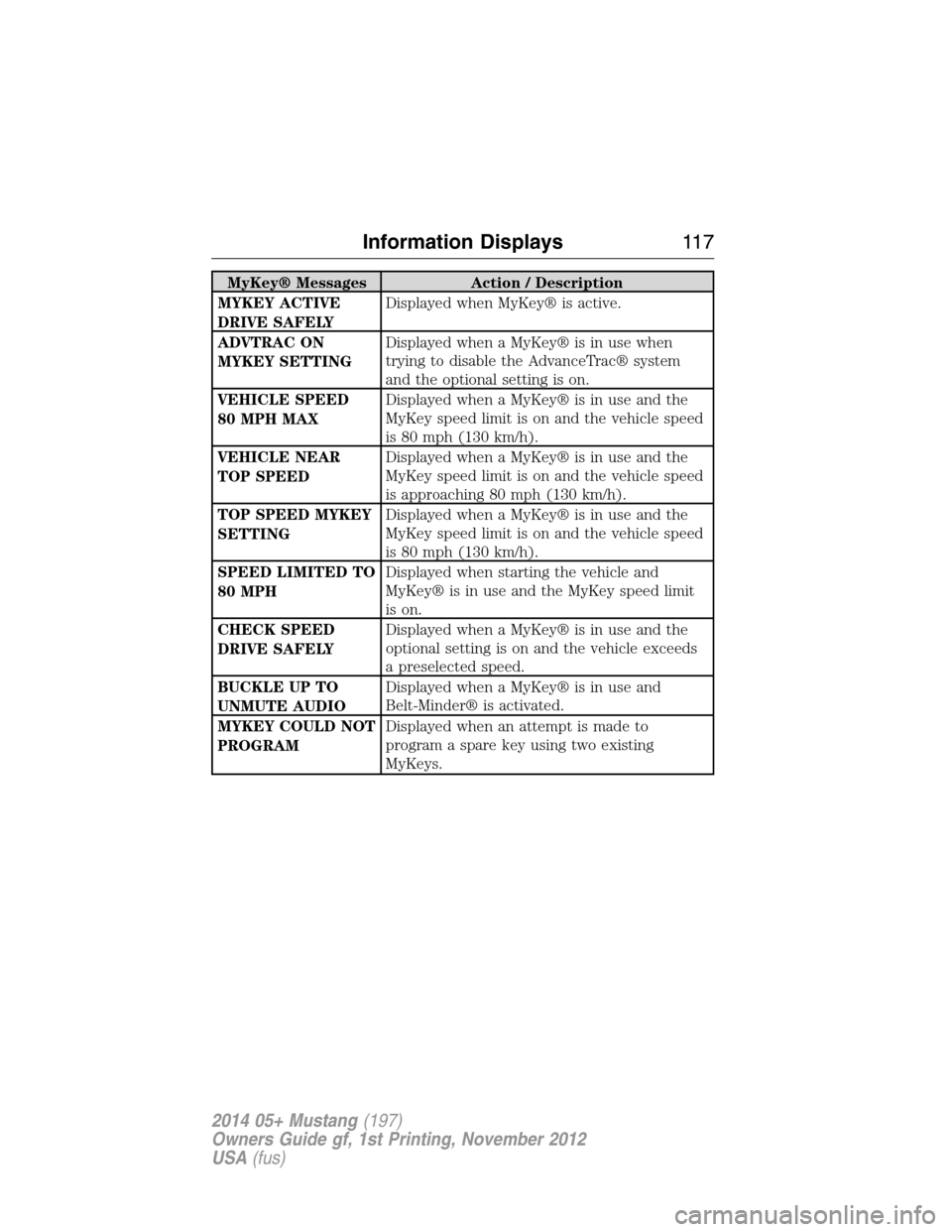
MyKey® Messages Action / Description
MYKEY ACTIVE
DRIVE SAFELYDisplayed when MyKey® is active.
ADVTRAC ON
MYKEY SETTINGDisplayed when a MyKey® is in use when
trying to disable the AdvanceTrac® system
and the optional setting is on.
VEHICLE SPEED
80 MPH MAXDisplayed when a MyKey® is in use and the
MyKey speed limit is on and the vehicle speed
is 80 mph (130 km/h).
VEHICLE NEAR
TOP SPEEDDisplayed when a MyKey® is in use and the
MyKey speed limit is on and the vehicle speed
is approaching 80 mph (130 km/h).
TOP SPEED MYKEY
SETTINGDisplayed when a MyKey® is in use and the
MyKey speed limit is on and the vehicle speed
is 80 mph (130 km/h).
SPEED LIMITED TO
80 MPHDisplayed when starting the vehicle and
MyKey® is in use and the MyKey speed limit
is on.
CHECK SPEED
DRIVE SAFELYDisplayed when a MyKey® is in use and the
optional setting is on and the vehicle exceeds
a preselected speed.
BUCKLE UP TO
UNMUTE AUDIODisplayed when a MyKey® is in use and
Belt-Minder® is activated.
MYKEY COULD NOT
PROGRAMDisplayed when an attempt is made to
program a spare key using two existing
MyKeys.
Information Displays11 7
2014 05+ Mustang(197)
Owners Guide gf, 1st Printing, November 2012
USA(fus)
Page 121 of 461
GENERAL INFORMATION
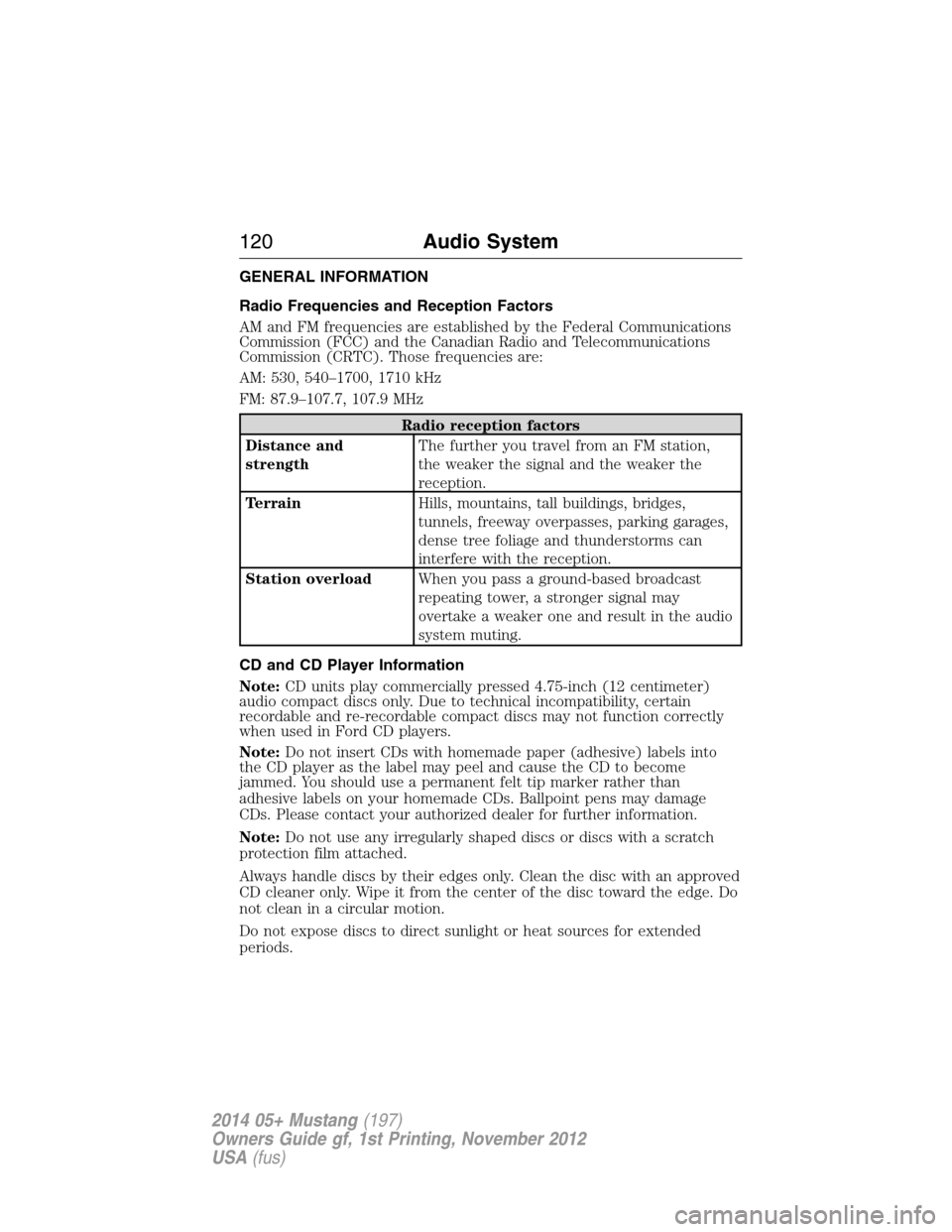
Radio Frequencies and Reception Factors
AM and FM frequencies are established by the Federal Communications
Commission (FCC) and the Canadian Radio and Telecommunications
Commission (CRTC). Those frequencies are:
AM: 530, 540–1700, 1710 kHz
FM: 87.9–107.7, 107.9 MHz
Radio reception factors
Distance and
strengthThe further you travel from an FM station,
the weaker the signal and the weaker the
reception.
TerrainHills, mountains, tall buildings, bridges,
tunnels, freeway overpasses, parking garages,
dense tree foliage and thunderstorms can
interfere with the reception.
Station overloadWhen you pass a ground-based broadcast
repeating tower, a stronger signal may
overtake a weaker one and result in the audio
system muting.
CD and CD Player Information
Note:CD units play commercially pressed 4.75-inch (12 centimeter)
audio compact discs only. Due to technical incompatibility, certain
recordable and re-recordable compact discs may not function correctly
when used in Ford CD players.
Note:Do not insert CDs with homemade paper (adhesive) labels into
the CD player as the label may peel and cause the CD to become
jammed. You should use a permanent felt tip marker rather than
adhesive labels on your homemade CDs. Ballpoint pens may damage
CDs. Please contact your authorized dealer for further information.
Note:Do not use any irregularly shaped discs or discs with a scratch
protection film attached.
Always handle discs by their edges only. Clean the disc with an approved
CD cleaner only. Wipe it from the center of the disc toward the edge. Do
not clean in a circular motion.
Do not expose discs to direct sunlight or heat sources for extended
periods.
120Audio System
2014 05+ Mustang(197)
Owners Guide gf, 1st Printing, November 2012
USA(fus)
Page 122 of 461
MP3 Track and Folder Structure
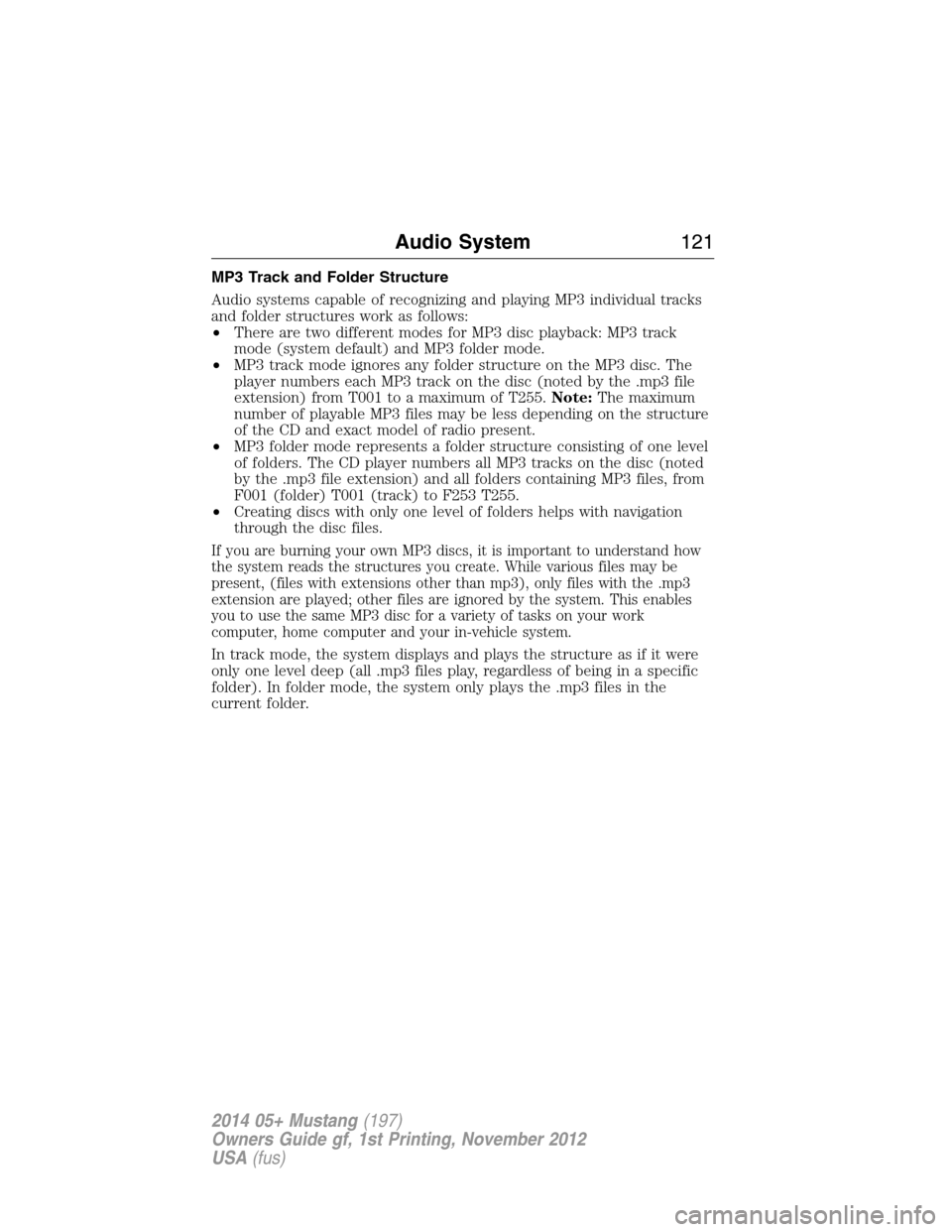
Audio systems capable of recognizing and playing MP3 individual tracks
and folder structures work as follows:
•There are two different modes for MP3 disc playback: MP3 track
mode (system default) and MP3 folder mode.
•MP3 track mode ignores any folder structure on the MP3 disc. The
player numbers each MP3 track on the disc (noted by the .mp3 file
extension) from T001 to a maximum of T255.Note:The maximum
number of playable MP3 files may be less depending on the structure
of the CD and exact model of radio present.
•MP3 folder mode represents a folder structure consisting of one level
of folders. The CD player numbers all MP3 tracks on the disc (noted
by the .mp3 file extension) and all folders containing MP3 files, from
F001 (folder) T001 (track) to F253 T255.
•Creating discs with only one level of folders helps with navigation
through the disc files.
If you are burning your own MP3 discs, it is important to understand how
the system reads the structures you create. While various files may be
present, (files with extensions other than mp3), only files with the .mp3
extension are played; other files are ignored by the system. This enables
you to use the same MP3 disc for a variety of tasks on your work
computer, home computer and your in-vehicle system.
In track mode, the system displays and plays the structure as if it were
only one level deep (all .mp3 files play, regardless of being in a specific
folder). In folder mode, the system only plays the .mp3 files in the
current folder.
Audio System121
2014 05+ Mustang(197)
Owners Guide gf, 1st Printing, November 2012
USA(fus)
Page 123 of 461
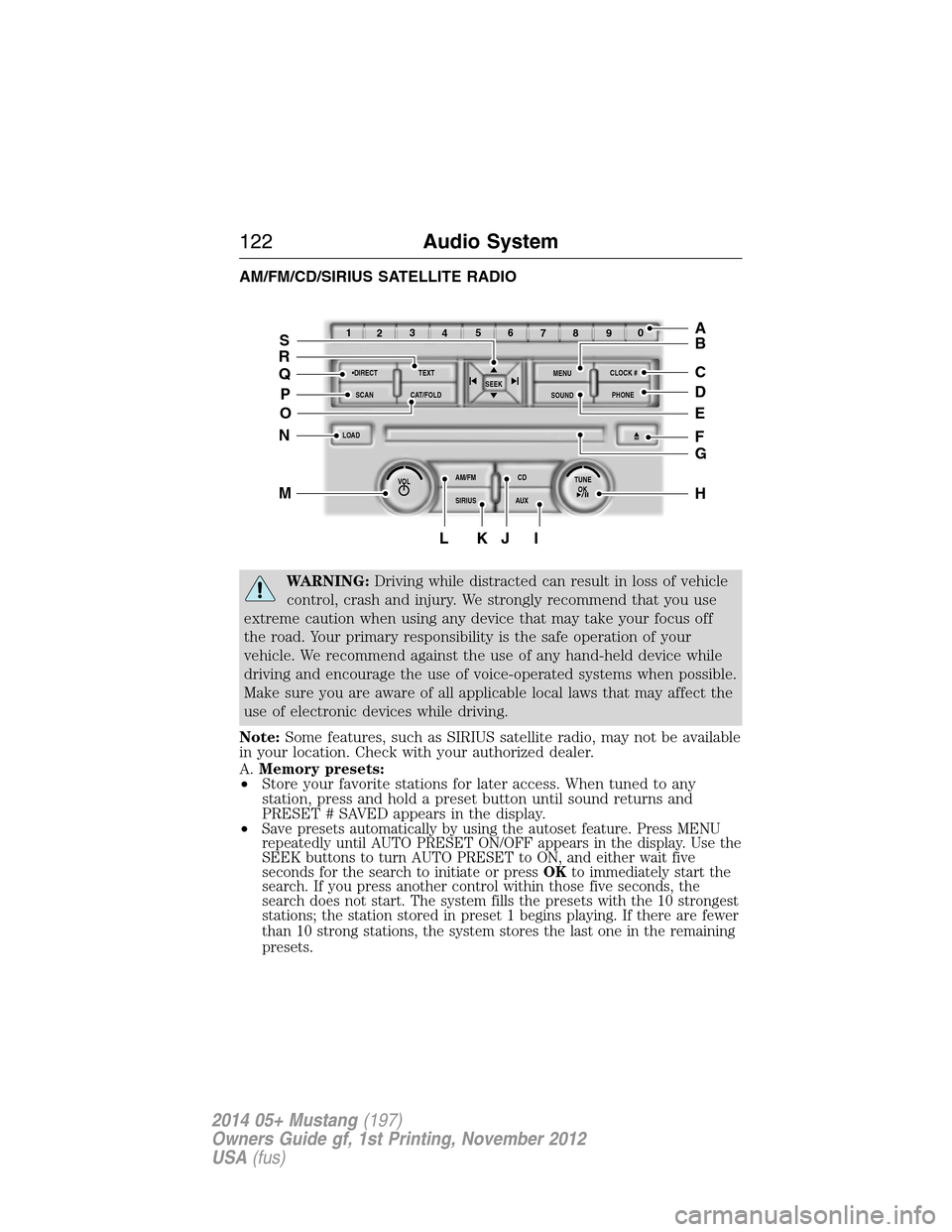
AM/FM/CD/SIRIUS SATELLITE RADIO
WARNING:Driving while distracted can result in loss of vehicle
control, crash and injury. We strongly recommend that you use
extreme caution when using any device that may take your focus off
the road. Your primary responsibility is the safe operation of your
vehicle. We recommend against the use of any hand-held device while
driving and encourage the use of voice-operated systems when possible.
Make sure you are aware of all applicable local laws that may affect the
use of electronic devices while driving.
Note:Some features, such as SIRIUS satellite radio, may not be available
in your location. Check with your authorized dealer.
A.Memory presets:
•Store your favorite stations for later access. When tuned to any
station, press and hold a preset button until sound returns and
PRESET # SAVED appears in the display.
•
Save presets automatically by using the autoset feature. Press MENU
repeatedly until AUTO PRESET ON/OFF appears in the display. Use the
SEEK buttons to turn AUTO PRESET to ON, and either wait five
seconds for the search to initiate or pressOKto immediately start the
search. If you press another control within those five seconds, the
search does not start. The system fills the presets with the 10 strongest
stations; the station stored in preset 1 begins playing. If there are fewer
than 10 strong stations, the system stores the last one in the remaining
presets.
OKTUNE LOAD
VOLCD
AUX AM/FM
SIRIUS TEXT
SCANCAT/FOLDCLOCK #
SOUNDMENU
SEEK
1
23
45
6
78
90
PHONE
BRC
D
F
IKJL
HM
N
P
Q
EO
G
A
S
122Audio System
2014 05+ Mustang(197)
Owners Guide gf, 1st Printing, November 2012
USA(fus)
Page 124 of 461
Note:Autoset does not delete your original preset stations.
Note:In order to re-run the autoset features, you must first turn it off
before turning it back on.
B.MENU:Press this button to access different audio features:
•Compressionbrings the soft and loud CD passages together for a
more consistent listening level.
•Shuffleplays the current CD tracks in random order.
•RDS Radioallows you to search RDS-equipped stations for a certain
category of music format such as CLASSIC, COUNTRY, JAZZ/RB or
ROCK.
•SIRIUSallows you to access different satellite radio options.
C.CLOCK:Press this button to set the time. Use the memory presets
buttons to enter the time, and then pressOK.
D.PHONE:Press this button to access the phone features of the
SYNC® system. See theSYNC®chapter for more information. If your
vehicle is not equipped with SYNC®, the display reads NO PHONE.
E.SOUND:Press this button to access settings for Treble, Middle, Bass,
Balance and Fade. Use theSEEKorTUNEcontrols to change the
settings.
•Basslevels can be increased or decreased.
•Treblelevels can be increased or decreased.
•Balanceadjusts the sound between left and right speakers.
•Fadeadjusts the sound between the front and back speakers.
•Speed Compensated Volumeadjusts the volume to compensate for
speed and wind noise. You can set the system between off and +7.
•All Seat Mode/Driver Seat Mode/Top Down Mode (if equipped)
optimizes sound quality for the chosen seating position.
•DSP Mode (if equipped)allows you to choose between STEREO
SURROUND mode and STEREO mode.
F.Eject:Press this button to eject a CD.
G.CD slot:Insert a CD.
H.TUNE/OK/Play/Pause:
•In radio mode, turn the control to manually search through the radio
frequency band.
•In SIRIUS mode, turn the control to find the next or previous
available satellite radio station.
•OKallows you to confirm commands with phone and media features.
If your vehicle is equipped with SYNC®, see theSYNC®chapter for
more information.
•
Play/Pause allows you to play or pause a track when listening to a CD.
Audio System123
2014 05+ Mustang(197)
Owners Guide gf, 1st Printing, November 2012
USA(fus)