ECO mode FORD MUSTANG 2014 5.G Owner's Manual
[x] Cancel search | Manufacturer: FORD, Model Year: 2014, Model line: MUSTANG, Model: FORD MUSTANG 2014 5.GPages: 461, PDF Size: 5.47 MB
Page 184 of 461
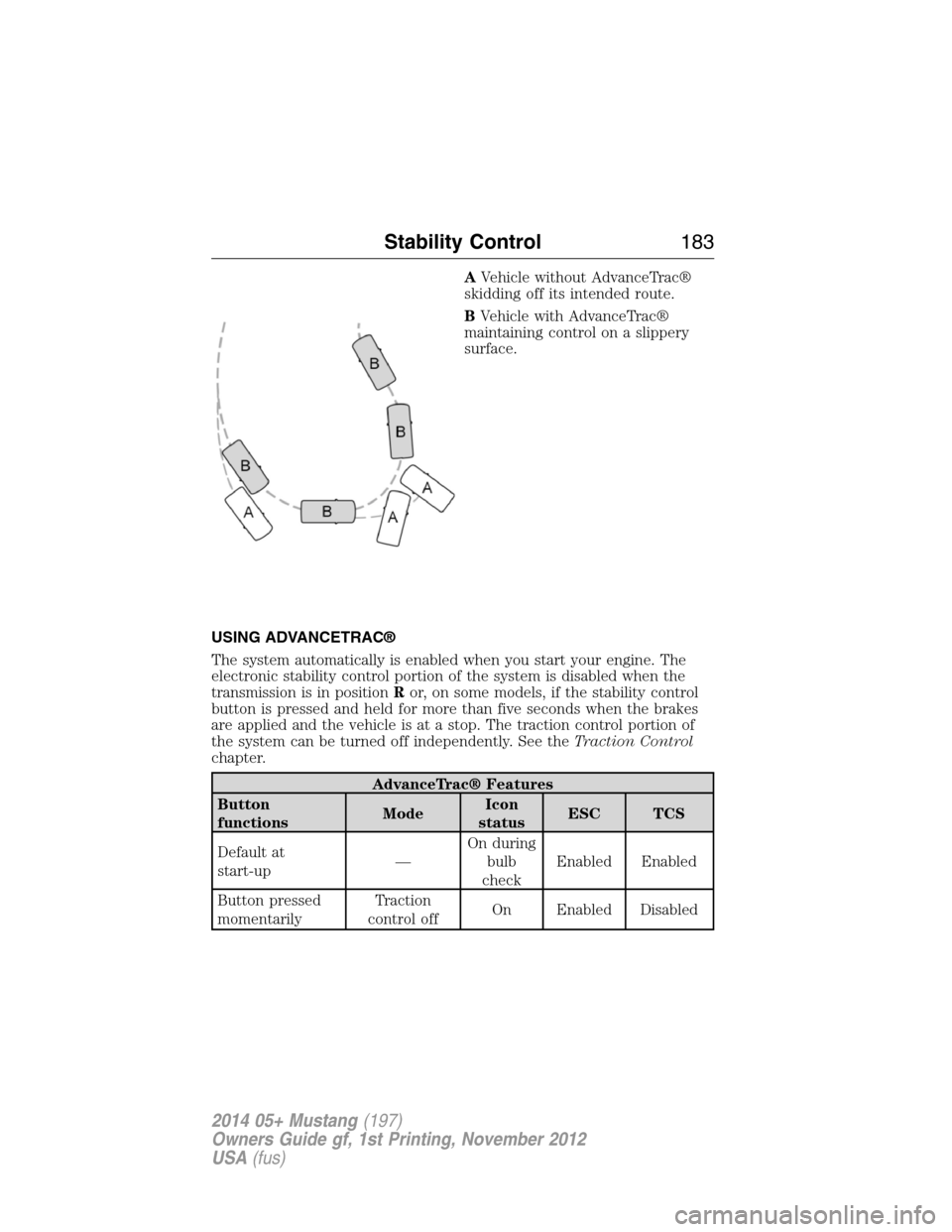
AVehicle without AdvanceTrac®
skidding off its intended route.
BVehicle with AdvanceTrac®
maintaining control on a slippery
surface.
USING ADVANCETRAC®
The system automatically is enabled when you start your engine. The
electronic stability control portion of the system is disabled when the
transmission is in positionRor, on some models, if the stability control
button is pressed and held for more than five seconds when the brakes
are applied and the vehicle is at a stop. The traction control portion of
the system can be turned off independently. See theTraction Control
chapter.
AdvanceTrac® Features
Button
functionsModeIcon
statusESC TCS
Default at
start-up—On during
bulb
checkEnabled Enabled
Button pressed
momentarilyTraction
control offOn Enabled Disabled
Stability Control183
2014 05+ Mustang(197)
Owners Guide gf, 1st Printing, November 2012
USA(fus)
Page 185 of 461
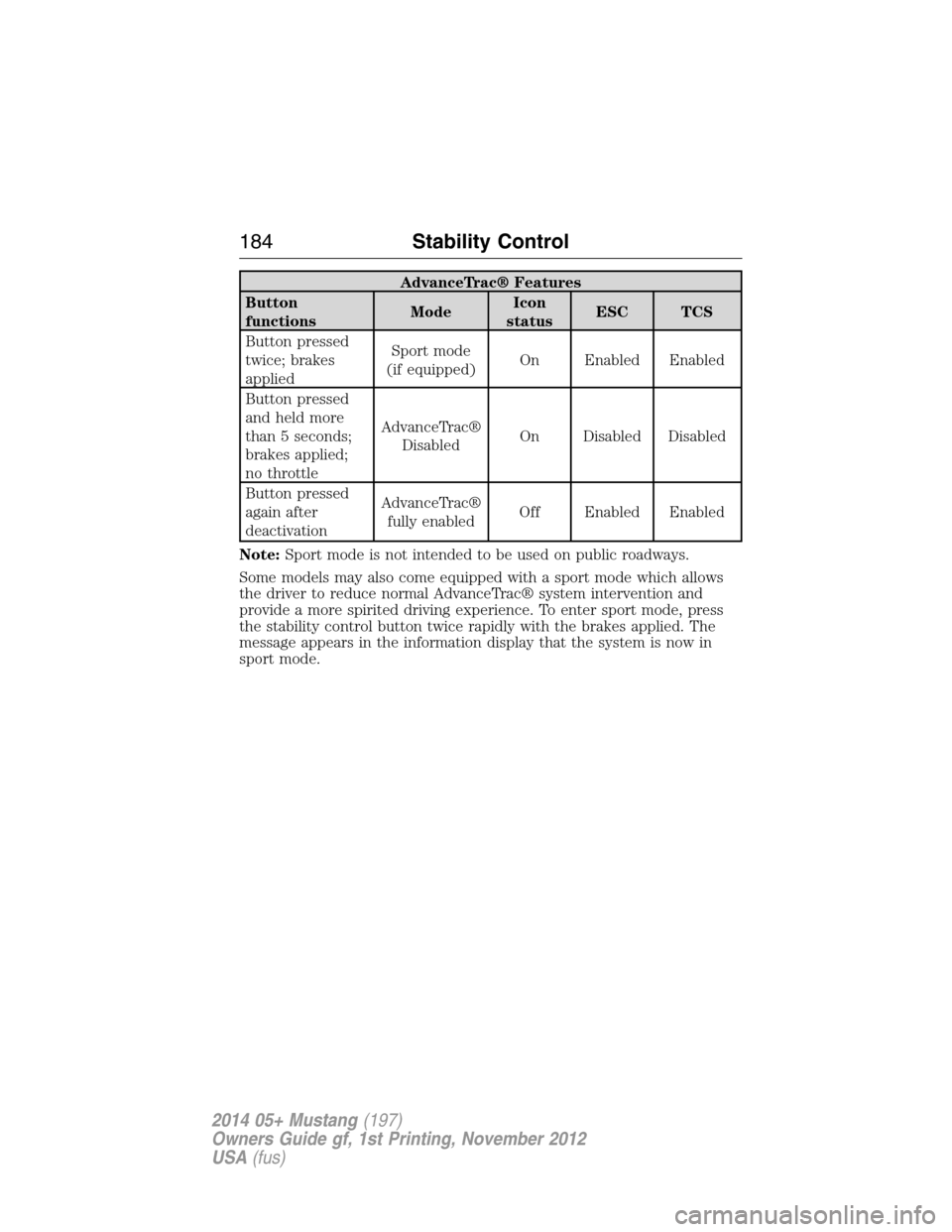
AdvanceTrac® Features
Button
functionsModeIcon
statusESC TCS
Button pressed
twice; brakes
appliedSport mode
(if equipped)On Enabled Enabled
Button pressed
and held more
than 5 seconds;
brakes applied;
no throttleAdvanceTrac®
DisabledOn Disabled Disabled
Button pressed
again after
deactivationAdvanceTrac®
fully enabledOff Enabled Enabled
Note:Sport mode is not intended to be used on public roadways.
Some models may also come equipped with a sport mode which allows
the driver to reduce normal AdvanceTrac® system intervention and
provide a more spirited driving experience. To enter sport mode, press
the stability control button twice rapidly with the brakes applied. The
message appears in the information display that the system is now in
sport mode.
184Stability Control
2014 05+ Mustang(197)
Owners Guide gf, 1st Printing, November 2012
USA(fus)
Page 203 of 461
RECOMMENDED TOWING WEIGHTS
Note:Do not tow with the Shelby GT500 model. It cannot tow a trailer.
Note:Do not exceed the trailer weight for your vehicle configuration
listed in the chart below.
Note:Make sure to take into consideration trailer frontal area. Do not
exceed 12 feet
2(1.11 meters2) trailer frontal area.
Note:For high altitude operation, reduce the gross combined weight by
2% per 1000 feet (300 meters) starting at the 1000 foot (300 meter)
elevation point.
Note:Certain states require electric trailer brakes for trailers over a
specified weight. Be sure to check state regulations for this specified
weight. The maximum trailer weights listed may be limited to this
specified weight, as your vehicle’s electrical system may not include
the wiring connector needed to use electric trailer brakes.
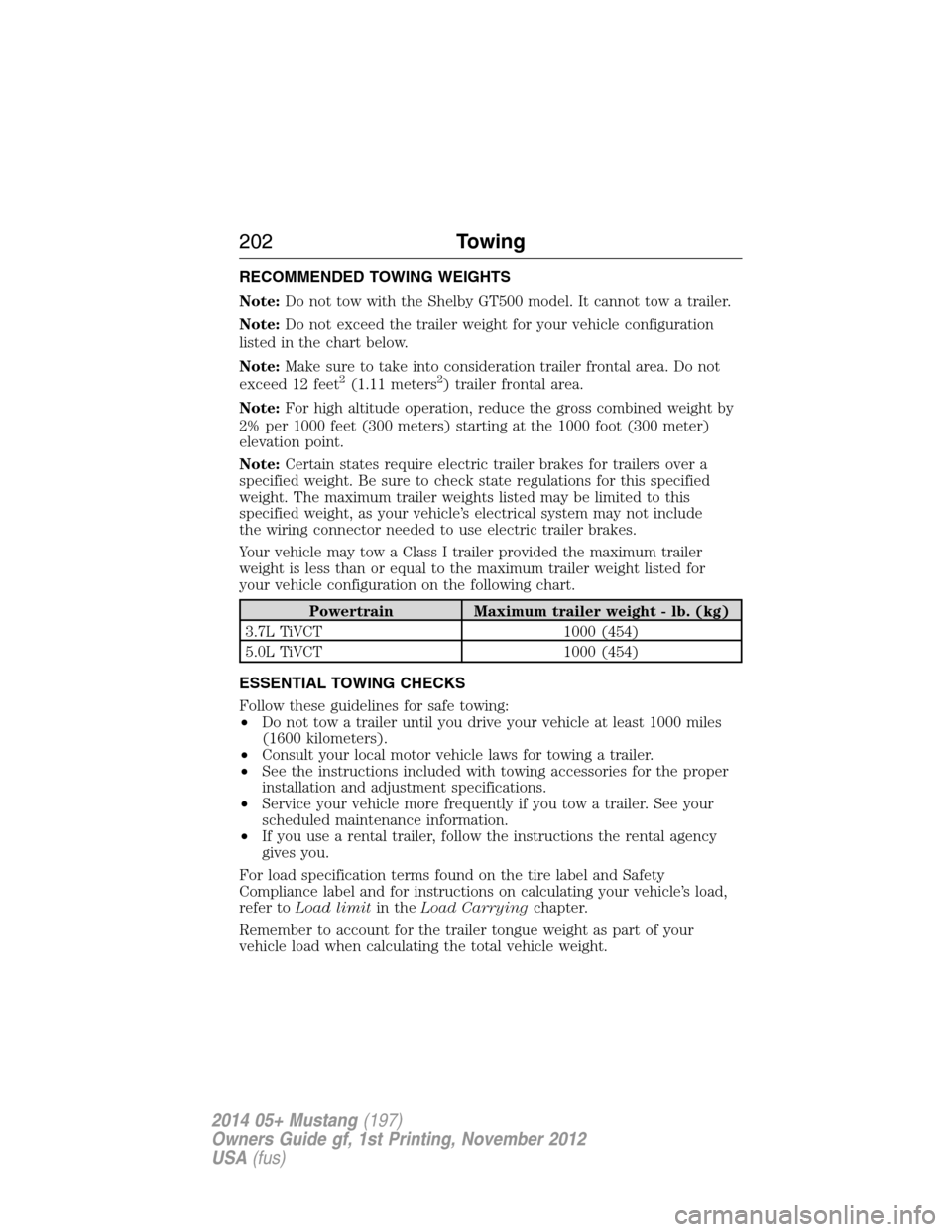
Your vehicle may tow a Class I trailer provided the maximum trailer
weight is less than or equal to the maximum trailer weight listed for
your vehicle configuration on the following chart.
Powertrain Maximum trailer weight - lb. (kg)
3.7L TiVCT 1000 (454)
5.0L TiVCT 1000 (454)
ESSENTIAL TOWING CHECKS
Follow these guidelines for safe towing:
•Do not tow a trailer until you drive your vehicle at least 1000 miles
(1600 kilometers).
•Consult your local motor vehicle laws for towing a trailer.
•See the instructions included with towing accessories for the proper
installation and adjustment specifications.
•Service your vehicle more frequently if you tow a trailer. See your
scheduled maintenance information.
•If you use a rental trailer, follow the instructions the rental agency
gives you.
For load specification terms found on the tire label and Safety
Compliance label and for instructions on calculating your vehicle’s load,
refer toLoad limitin theLoad Carryingchapter.
Remember to account for the trailer tongue weight as part of your
vehicle load when calculating the total vehicle weight.
202Towing
2014 05+ Mustang(197)
Owners Guide gf, 1st Printing, November 2012
USA(fus)
Page 207 of 461
The rear wheels (drive wheels) must be on a tow dolly when towing your
vehicle from the front using wheel lift equipment. This prevents damage
to the transmission.
The front wheels should be on a tow dolly when towing your vehicle
from the rear using wheel lift equipment. This prevents damage to the
front fascia.
TOWING THE VEHICLE ON FOUR WHEELS
Emergency Towing
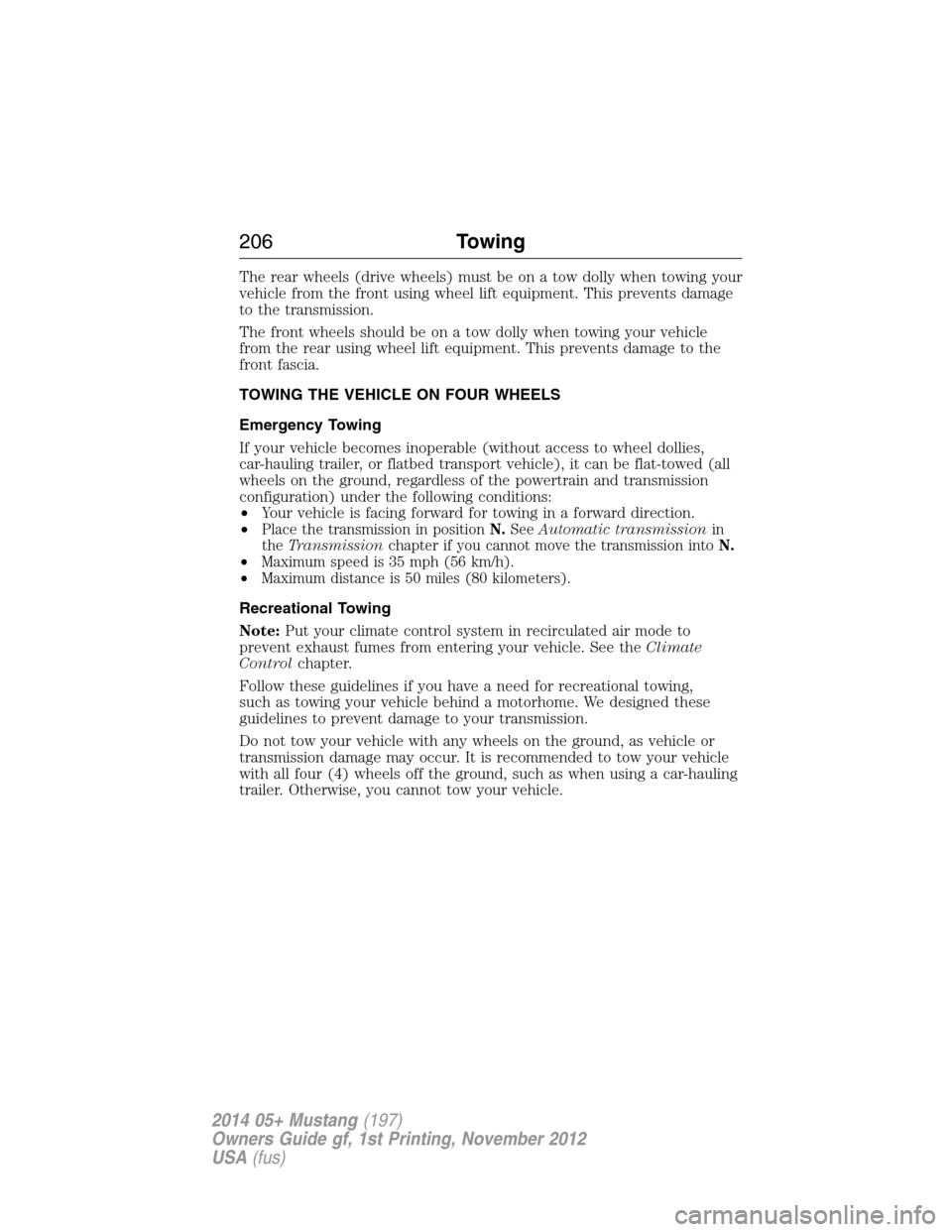
If your vehicle becomes inoperable (without access to wheel dollies,
car-hauling trailer, or flatbed transport vehicle), it can be flat-towed (all
wheels on the ground, regardless of the powertrain and transmission
configuration) under the following conditions:
•Your vehicle is facing forward for towing in a forward direction.
•
Place the transmission in positionN.SeeAutomatic transmissionin
theTransmissionchapter if you cannot move the transmission intoN.
•Maximum speed is 35 mph (56 km/h).
•Maximum distance is 50 miles (80 kilometers).
Recreational Towing
Note:Put your climate control system in recirculated air mode to
prevent exhaust fumes from entering your vehicle. See theClimate
Controlchapter.
Follow these guidelines if you have a need for recreational towing,
such as towing your vehicle behind a motorhome. We designed these
guidelines to prevent damage to your transmission.
Do not tow your vehicle with any wheels on the ground, as vehicle or
transmission damage may occur. It is recommended to tow your vehicle
with all four (4) wheels off the ground, such as when using a car-hauling
trailer. Otherwise, you cannot tow your vehicle.
206Towing
2014 05+ Mustang(197)
Owners Guide gf, 1st Printing, November 2012
USA(fus)
Page 213 of 461
BREAKING-IN
You need to break in new tires for approximately 300 miles
(480 kilometers). During this time, your vehicle may exhibit some unique
driving characteristics. Avoid driving too fast during the first 1000 miles
(1600 kilometers). Vary your speed frequently and change up through
the gears early. Do not labor the engine. Do not tow during the first
1000 miles (1600 kilometers).
ECONOMICAL DRIVING
Fuel economy is affected by several things, such as how you drive, the
conditions you drive under and how you maintain your vehicle.
There are some things to keep in mind that may improve your fuel
economy:
•Accelerate and slow down in a smooth, moderate fashion.
•Drive at steady speeds without stopping.
•Anticipate stops; slowing down may eliminate the need to stop.
•Combine errands and minimize stop-and-go driving.
•Close the windows for high-speed driving.
•Drive at reasonable speeds (traveling at 55 mph [88 km/h] uses 15%
less fuel than traveling at 65 mph [105 km/h]).
•Keep the tires properly inflated and use only the recommended size.
•Use the recommended engine oil.
•Perform all regularly scheduled maintenance.
There are also some things you may not want to do because they may
reduce your fuel economy:
•Sudden or hard accelerations.
•Rev the engine before turning it off.
•Idle for periods longer than one minute.
•Warm up your vehicle on cold mornings.
•Use the air conditioner or front defroster.
•Use the speed control in hilly terrain.
•Rest your foot on the brake pedal while driving.
212Driving Hints
2014 05+ Mustang(197)
Owners Guide gf, 1st Printing, November 2012
USA(fus)
Page 219 of 461
FUEL CUT-OFF SWITCH
WARNING:Failure to inspect and if necessary repair fuel leaks
after a collision may increase the risk of fire and serious injury.
Ford Motor Company recommends that the fuel system be inspected by
an authorized dealer after any collision.
In the event of a moderate to severe collision, this vehicle is equipped
with a fuel pump shut-off feature that stops the flow of fuel to the
engine. Not every impact will cause a shut-off.
Should your vehicle shut off after a collision, you may restart your
vehicle by doing the following:
1. Turn the ignition off and wait approximately 10 seconds.
2. Turn the ignition on.
3. Repeat steps 1 and 2 to re-enable the fuel pump.
JUMP-STARTING THE VEHICLE
WARNING:The gases around the battery can explode if exposed
to flames, sparks, or lit cigarettes. An explosion could result in
injury or vehicle damage.
WARNING:Batteries contain sulfuric acid which can burn skin,
eyes and clothing, if contacted.
Do not attempt to push-start your automatic transmission vehicle.
Automatic transmissions do not have push-start capability. Attempting
to push-start a vehicle with an automatic transmission may cause
transmission damage.
When the battery is disconnected or a new battery is installed, the
automatic transmission must relearn its shift strategy. As a result, the
transmission may exhibit a combination of firm and soft shifts. This
operation is considered normal and will not affect function or durability
of the transmission. Over time, the adaptive learning process will fully
update transmission operation.
218Roadside Emergencies
2014 05+ Mustang(197)
Owners Guide gf, 1st Printing, November 2012
USA(fus)
Page 340 of 461
Say: If you want to:
“Services” Access the SYNC Services portal.*
“Mobile apps” Access mobile applications.*
“Help” Hear a list of voice commands available in the
current mode.
*If equipped, U.S. only.
System Interaction and Feedback
The system provides feedback through audible tones, prompts, questions
and spoken confirmations depending on the situation and the chosen
level of interaction (voice settings). You can customize the voice
recognition system to provide more or less instruction and feedback.
The default setting is to a higher level of interaction in order to help you
learn to use the system. You can change these settings at any time.
Adjusting the Interaction Level
Push the voice icon; when prompted, say “Voice settings”, then
any of the following:
When you say: The system:
“Interaction mode standard” Provides more detailed interaction and
guidance.
“Interaction mode advanced” Provides less audible interaction and
more tone prompts.
The system defaults to the standard interaction mode.
Confirmation prompts are short questions the system asks when it is not
sure of your request or when there are multiple possible responses to your
request. (For example, the system may ask “Phone, is that correct?”) If
turned off, the system simply makes a best guess as to what you requested
and you may still occasionally be asked to confirm settings.
“Confirmation prompts on”
“Confirmation prompts off”
The system creates candidate lists when it has the same confidence level
of several options based on your voice command. When turned on, you
may be prompted with as many as four possibilities for clarification.
SYNC®339
2014 05+ Mustang(197)
Owners Guide gf, 1st Printing, November 2012
USA(fus)
Page 341 of 461
For example, “Say 1 after the tone to call John Doe at home. Say 2 after
the tone to call Johnny Doe on mobile. Say 3 after the tone to call Jane
Doe at home.” Or, “Say 1 after the tone to play John Doe, Say 2 after the
tone to play Johnny Doe.”
“Phone candidate lists on”
“Phone candidate lists off”
“Media candidate lists on”
“Media candidate lists off”
Helpful Hints
•Make sure the interior of the vehicle is as quiet as possible. Wind
noise from open windows and road vibrations may prevent the system
from correctly recognizing spoken commands.
•After pressing the voice icon, wait until after the tone sounds and
Listening appears before saying a command. Any command spoken
prior to this does not register with the system.
•Speak naturally, without long pauses between words.
•At any time you can interrupt the system while it is speaking by
pressing the voice icon.
USING SYNC WITH YOUR PHONE
Hands-free calling is one of the main features of SYNC. While the system
supports a variety of features, many are dependent on your cellular
phone’s functionality. At a minimum, most cellular phones with Bluetooth
wireless technology support the following functions:
•Answering an incoming call.
•Ending a call.
•Using privacy mode.
•Dialing a number.
•Redialing.
•Call waiting notification.
•Caller ID.
Other features, such as text messaging using Bluetooth and automatic
phonebook download, are phone-dependent features. To check your
phone’s compatibility, see your phone’s user manual and visit
www.SYNCMyRide.com, www.SYNCMyRide.ca or www.syncmaroute.ca.
340SYNC®
2014 05+ Mustang(197)
Owners Guide gf, 1st Printing, November 2012
USA(fus)
Page 345 of 461
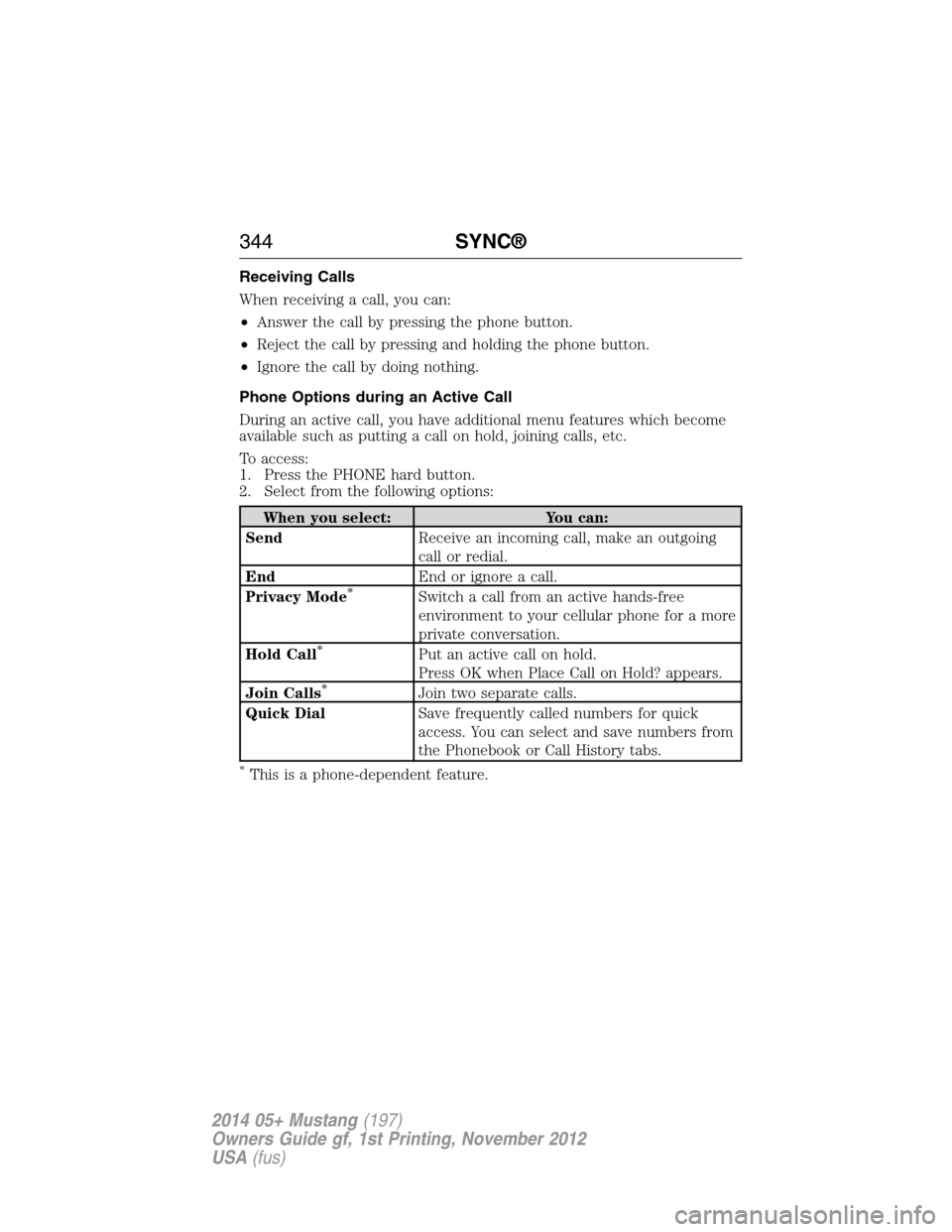
Receiving Calls
When receiving a call, you can:
•Answer the call by pressing the phone button.
•Reject the call by pressing and holding the phone button.
•Ignore the call by doing nothing.
Phone Options during an Active Call
During an active call, you have additional menu features which become
available such as putting a call on hold, joining calls, etc.
To access:
1. Press the PHONE hard button.
2. Select from the following options:
When you select: You can:
SendReceive an incoming call, make an outgoing
call or redial.
EndEnd or ignore a call.
Privacy Mode
*Switch a call from an active hands-free
environment to your cellular phone for a more
private conversation.
Hold Call
*Put an active call on hold.
Press OK when Place Call on Hold? appears.
Join Calls
*Join two separate calls.
Quick DialSave frequently called numbers for quick
access. You can select and save numbers from
the Phonebook or Call History tabs.
*This is a phone-dependent feature.
344SYNC®
2014 05+ Mustang(197)
Owners Guide gf, 1st Printing, November 2012
USA(fus)
Page 378 of 461
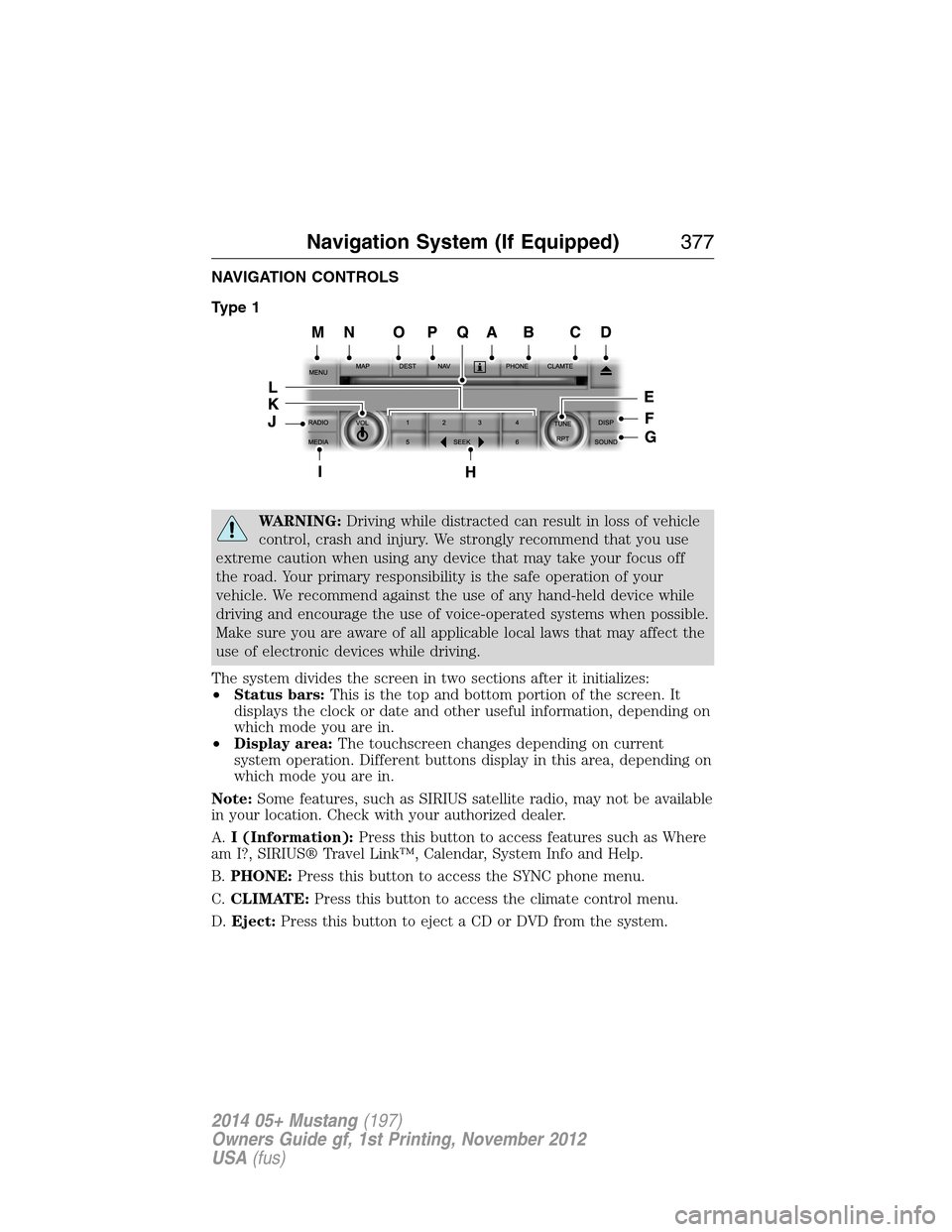
NAVIGATION CONTROLS
Type 1
WARNING:Driving while distracted can result in loss of vehicle
control, crash and injury. We strongly recommend that you use
extreme caution when using any device that may take your focus off
the road. Your primary responsibility is the safe operation of your
vehicle. We recommend against the use of any hand-held device while
driving and encourage the use of voice-operated systems when possible.
Make sure you are aware of all applicable local laws that may affect the
use of electronic devices while driving.
The system divides the screen in two sections after it initializes:
•Status bars:This is the top and bottom portion of the screen. It
displays the clock or date and other useful information, depending on
which mode you are in.
•Display area:The touchscreen changes depending on current
system operation. Different buttons display in this area, depending on
which mode you are in.
Note:Some features, such as SIRIUS satellite radio, may not be available
in your location. Check with your authorized dealer.
A.I (Information):Press this button to access features such as Where
am I?, SIRIUS® Travel Link™, Calendar, System Info and Help.
B.PHONE:Press this button to access the SYNC phone menu.
C.CLIMATE:Press this button to access the climate control menu.
D.Eject:Press this button to eject a CD or DVD from the system.
Navigation System (If Equipped)377
2014 05+ Mustang(197)
Owners Guide gf, 1st Printing, November 2012
USA(fus)