display FORD MUSTANG 2014 5.G Owner's Manual
[x] Cancel search | Manufacturer: FORD, Model Year: 2014, Model line: MUSTANG, Model: FORD MUSTANG 2014 5.GPages: 461, PDF Size: 5.47 MB
Page 107 of 461
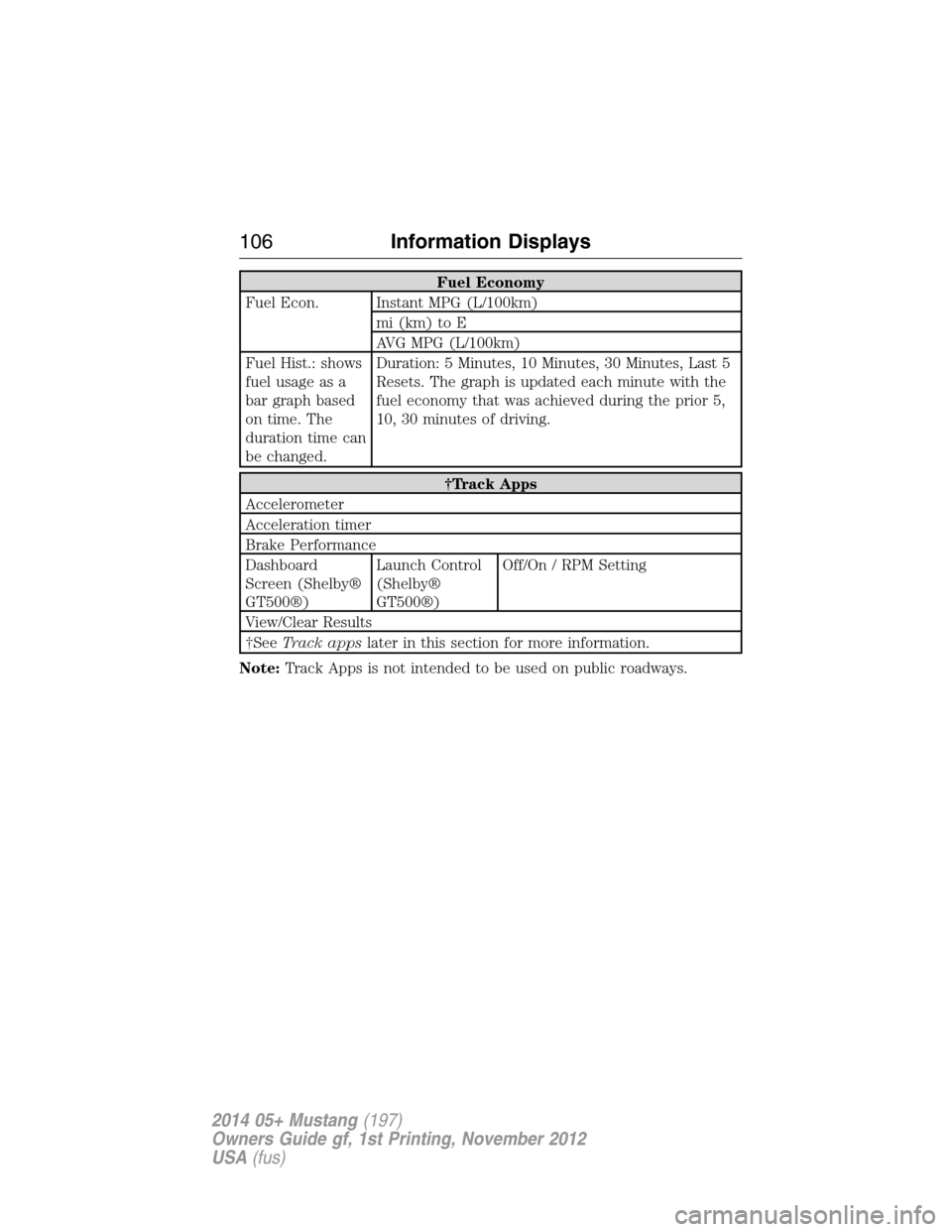
Fuel Economy
Fuel Econ. Instant MPG (L/100km)
mi (km) to E
AVG MPG (L/100km)
Fuel Hist.: shows
fuel usage as a
bar graph based
on time. The
duration time can
be changed.Duration: 5 Minutes, 10 Minutes, 30 Minutes, Last 5
Resets. The graph is updated each minute with the
fuel economy that was achieved during the prior 5,
10, 30 minutes of driving.
†Track Apps
Accelerometer
Acceleration timer
Brake Performance
Dashboard
Screen (Shelby®
GT500®)Launch Control
(Shelby®
GT500®)Off/On / RPM Setting
View/Clear Results
†SeeTrack appslater in this section for more information.
Note:Track Apps is not intended to be used on public roadways.
106Information Displays
2014 05+ Mustang(197)
Owners Guide gf, 1st Printing, November 2012
USA(fus)
Page 108 of 461
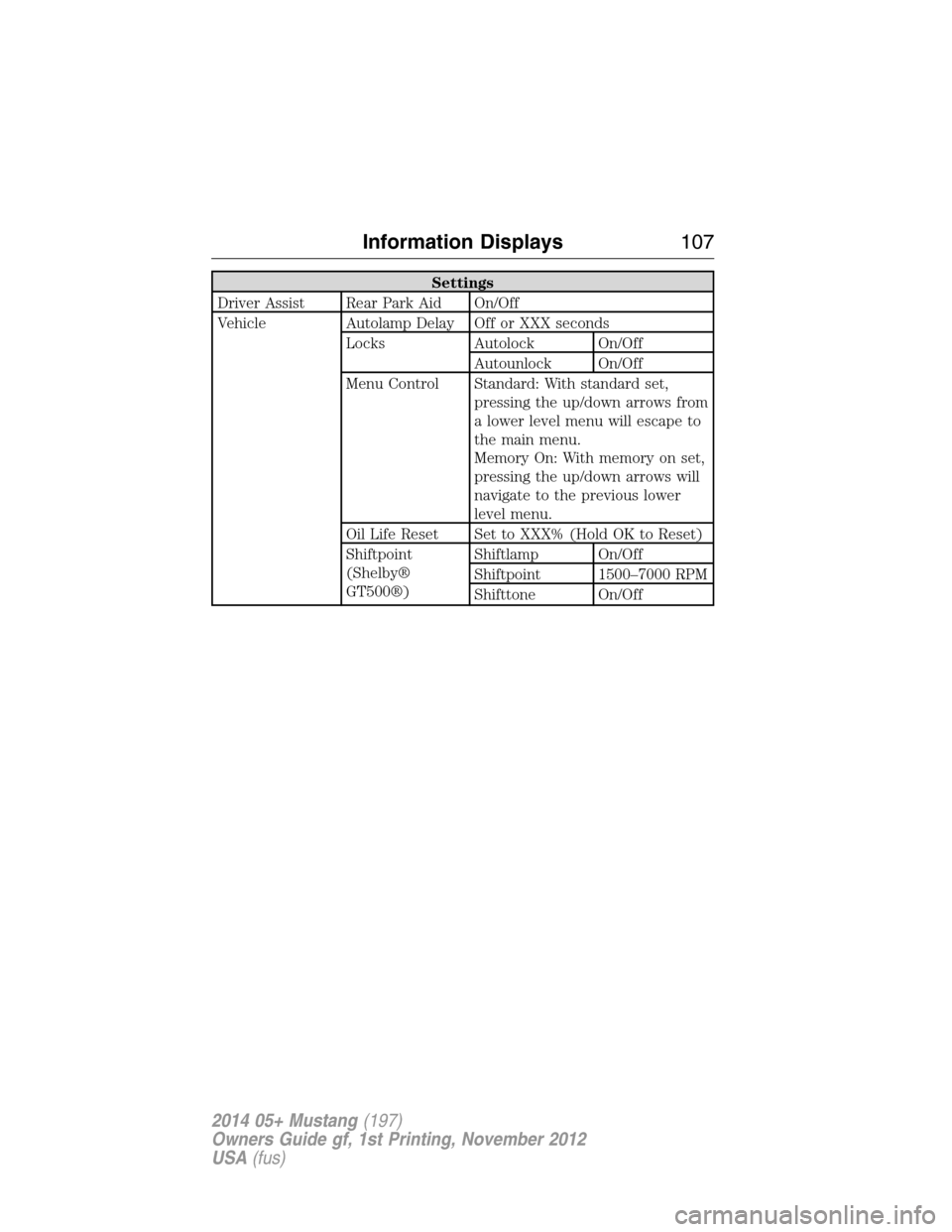
Settings
Driver Assist Rear Park Aid On/Off
Vehicle Autolamp Delay Off or XXX seconds
Locks Autolock On/Off
Autounlock On/Off
Menu Control Standard: With standard set,
pressing the up/down arrows from
a lower level menu will escape to
the main menu.
Memory On: With memory on set,
pressing the up/down arrows will
navigate to the previous lower
level menu.
Oil Life Reset Set to XXX% (Hold OK to Reset)
Shiftpoint
(Shelby®
GT500®)Shiftlamp On/Off
Shiftpoint 1500–7000 RPM
Shifttone On/Off
Information Displays107
2014 05+ Mustang(197)
Owners Guide gf, 1st Printing, November 2012
USA(fus)
Page 109 of 461
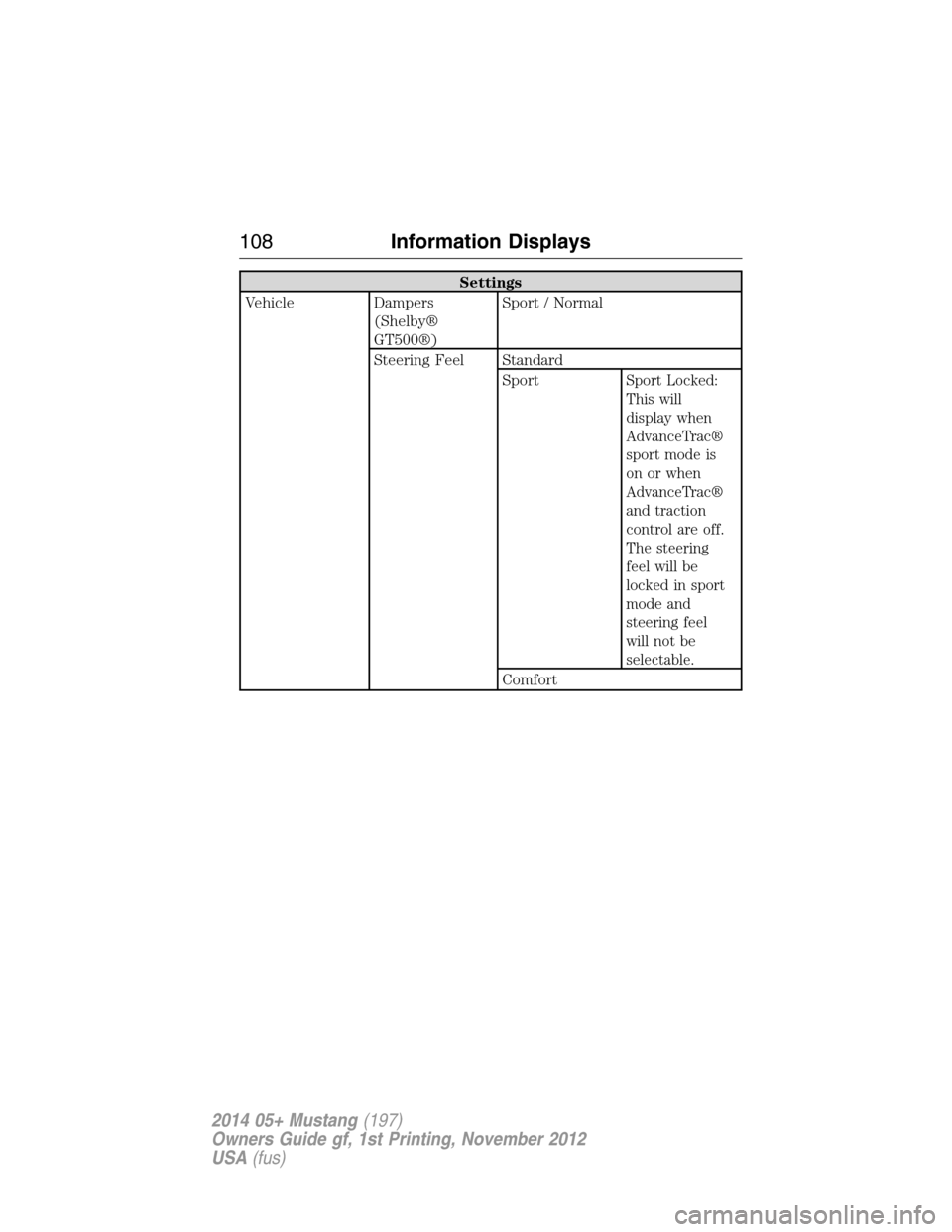
Settings
Vehicle Dampers
(Shelby®
GT500®)Sport / Normal
Steering Feel Standard
Sport
Sport Locked:
This will
display when
AdvanceTrac®
sport mode is
on or when
AdvanceTrac®
and traction
control are off.
The steering
feel will be
locked in sport
mode and
steering feel
will not be
selectable.
Comfort
108Information Displays
2014 05+ Mustang(197)
Owners Guide gf, 1st Printing, November 2012
USA(fus)
Page 110 of 461
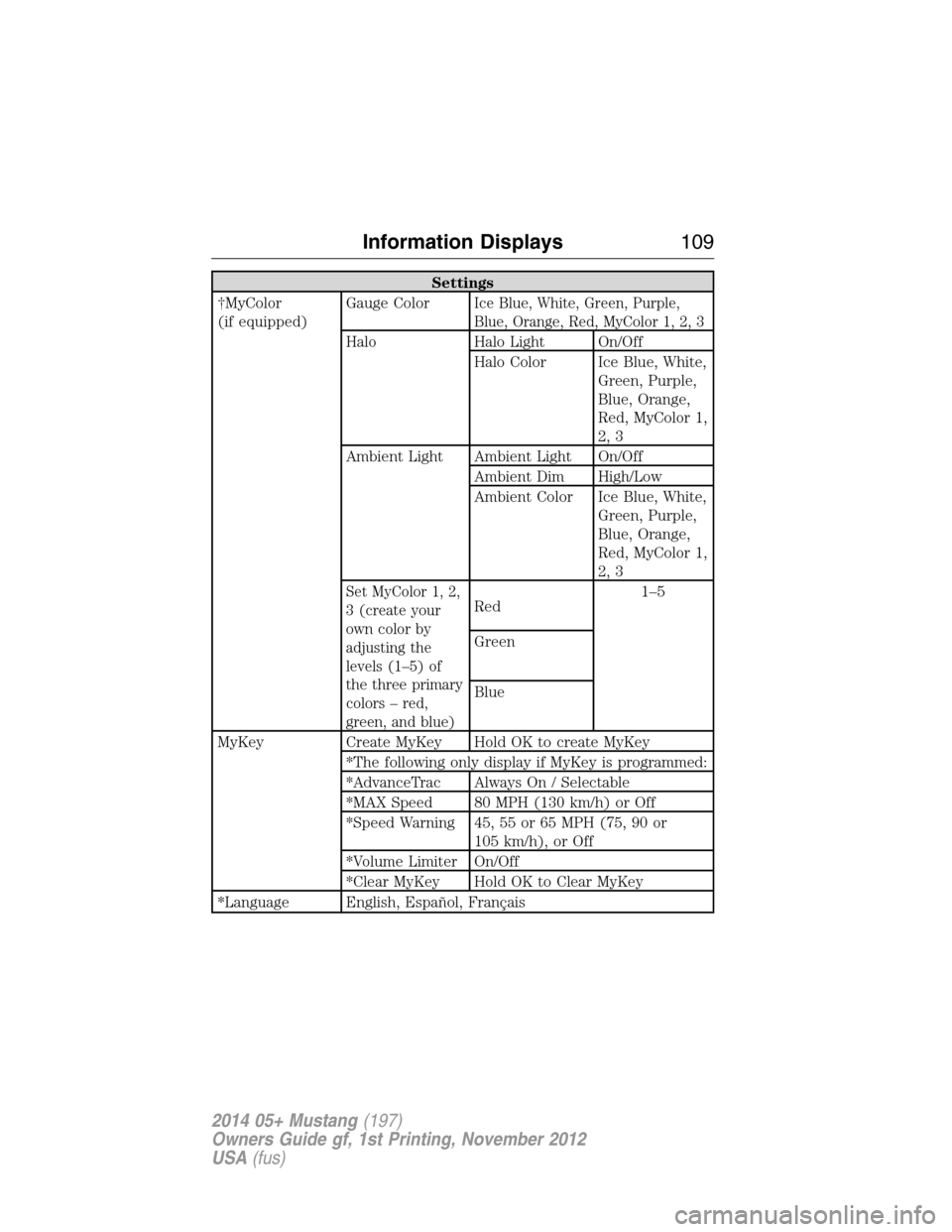
Settings
†MyColor
(if equipped)Gauge Color
Ice Blue, White, Green, Purple,
Blue, Orange, Red, MyColor 1, 2, 3
Halo Halo Light On/Off
Halo Color Ice Blue, White,
Green, Purple,
Blue, Orange,
Red, MyColor 1,
2, 3
Ambient Light Ambient Light On/Off
Ambient Dim High/Low
Ambient Color Ice Blue, White,
Green, Purple,
Blue, Orange,
Red, MyColor 1,
2, 3
Set MyColor 1, 2,
3 (create your
own color by
adjusting the
levels (1–5) of
the three primary
colors – red,
green, and blue)Red1–5
Green
Blue
MyKey Create MyKey Hold OK to create MyKey
*The following only display if MyKey is programmed:
*AdvanceTrac Always On / Selectable
*MAX Speed 80 MPH (130 km/h) or Off
*Speed Warning 45, 55 or 65 MPH (75, 90 or
105 km/h), or Off
*Volume Limiter On/Off
*Clear MyKey Hold OK to Clear MyKey
*Language English, Español, Français
Information Displays109
2014 05+ Mustang(197)
Owners Guide gf, 1st Printing, November 2012
USA(fus)
Page 111 of 461
Settings
Units English or Metric
System Reset Hold OK to Reset System to Factory Default
†The instrument cluster gauges are backlit white when the headlamps
are off. When the headlamps are on, you can select one of the preset
colors or MyColor 1, 2, 3 for the nighttime gauge backlighting. A gauge
in a warning condition will be backlit red when the headlamps are on.
*Track Application features and messages in the information display
are only available in English.
Information
MyKey Admin Keys (Number of admin keys)
MyKeys (Number of MyKeys programmed)
MyKey Miles (km) (Distance traveled using a
programmed MyKey)
System Check Some items will only display during a system check
if a problem has been detected. If an issue exists on
one of the monitored systems, the number of
warnings that need immediate attention will display
in red and the number of informational warnings will
display in amber. Use the up/down arrow buttons to
scroll through the list; press the right arrow button
to display specific information on the highlighted
warning.
TRIP COMPUTER (Trip A and B)
Resetting or Pausing the Trip Computer
•Press OK to pause the Trip A or B screen, press again to un-pause.
•Press and hold OK to reset the currently displayed trip information.
Trip Time
Registers the time of individual journeys.
Trip Distance
Registers the mileage of individual journeys.
Fuel Used
Shows the amount of fuel used for a given trip.
11 0Information Displays
2014 05+ Mustang(197)
Owners Guide gf, 1st Printing, November 2012
USA(fus)
Page 112 of 461
Average MPG (L/100km)
Shows the average distance traveled per unit of fuel used for a given
trip.
Odometer
Registers the total mileage of the vehicle.
VIRTUAL GAUGES
Note:In order to provide real-time values, some gauges may display
more value fluctuation than others during normal operation.
Some gauges shown in standard measure. Metric similar.
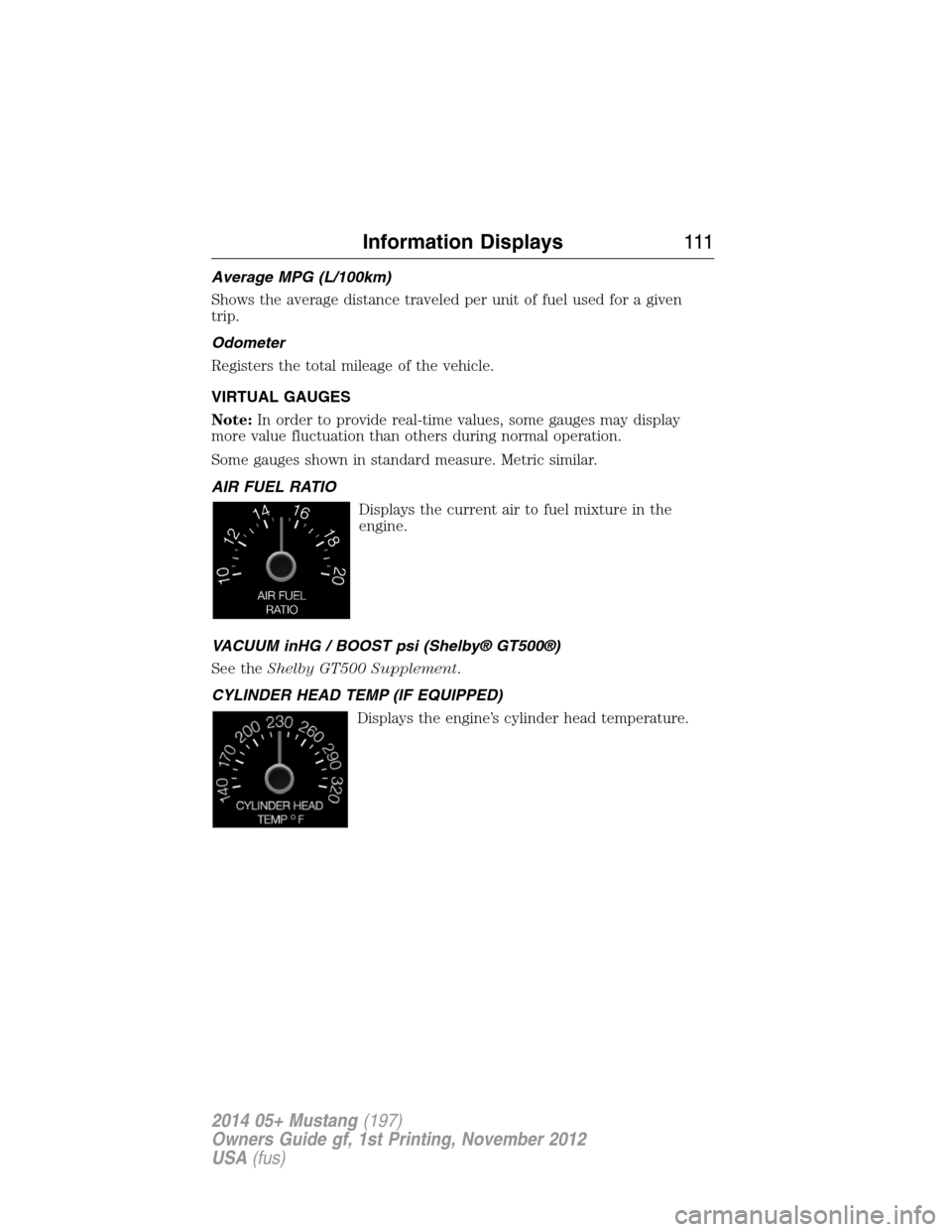
AIR FUEL RATIO
Displays the current air to fuel mixture in the
engine.
VACUUM inHG / BOOST psi (Shelby® GT500®)
See theShelby GT500 Supplement.
CYLINDER HEAD TEMP (IF EQUIPPED)
Displays the engine’s cylinder head temperature.
Information Displays111
2014 05+ Mustang(197)
Owners Guide gf, 1st Printing, November 2012
USA(fus)
Page 113 of 461
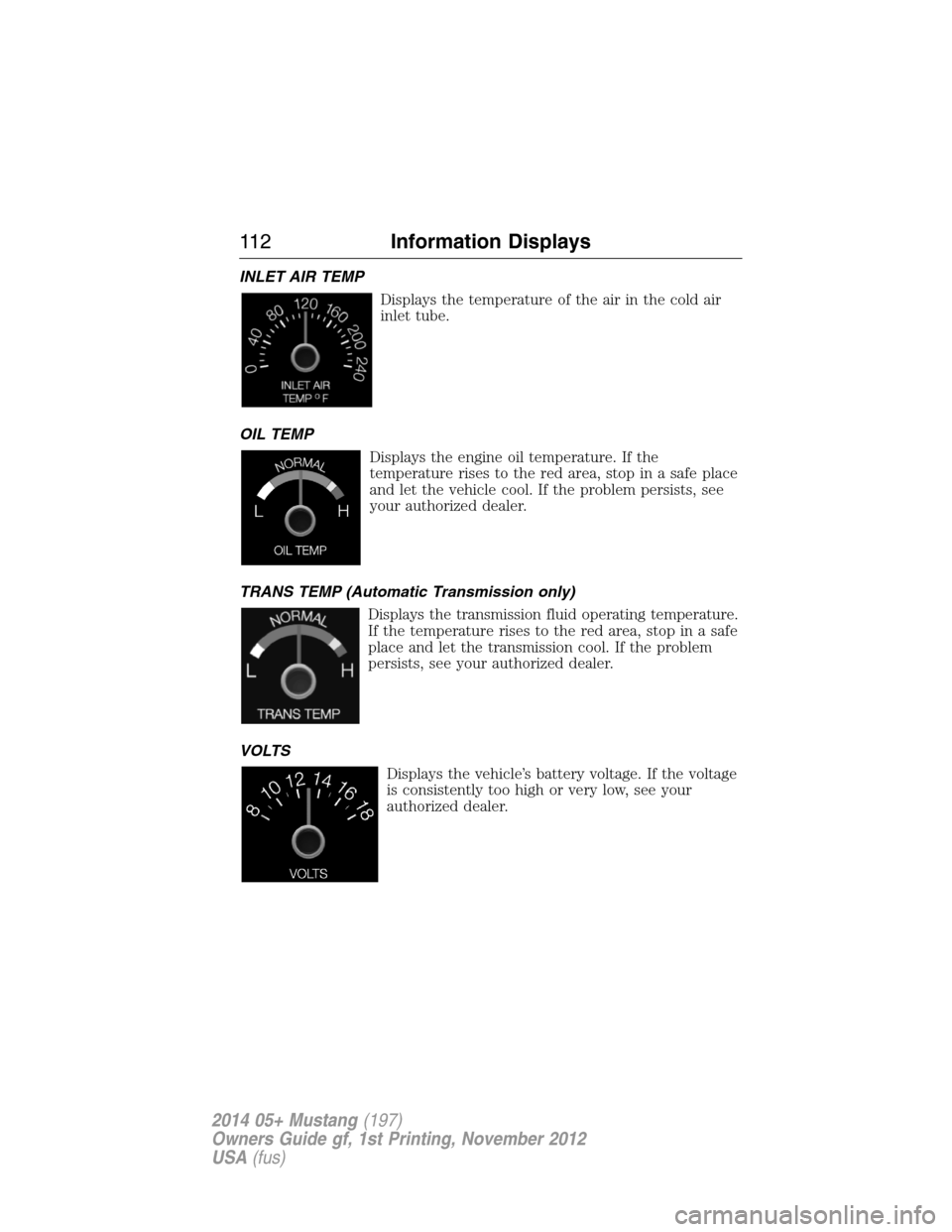
INLET AIR TEMP
Displays the temperature of the air in the cold air
inlet tube.
OIL TEMP
Displays the engine oil temperature. If the
temperature rises to the red area, stop in a safe place
and let the vehicle cool. If the problem persists, see
your authorized dealer.
TRANS TEMP (Automatic Transmission only)
Displays the transmission fluid operating temperature.
If the temperature rises to the red area, stop in a safe
place and let the transmission cool. If the problem
persists, see your authorized dealer.
VOLTS
Displays the vehicle’s battery voltage. If the voltage
is consistently too high or very low, see your
authorized dealer.
11 2Information Displays
2014 05+ Mustang(197)
Owners Guide gf, 1st Printing, November 2012
USA(fus)
Page 114 of 461
TRACK APPS (IF EQUIPPED)
WARNING:Track Apps is for track use only. Remember that
even advanced technology cannot defy the laws of physics. It is
always possible to lose control of a vehicle due to inappropriate driver
input for the conditions. Aggressive driving on any road condition can
cause you to lose control of your vehicle increasing the risk of personal
injury or property damage.
Note:Track Apps are for track use only. They are not to be used under
any other driving conditions.
Note:Viewed or cleared results cannot be used unless the vehicle is at a
complete stop. The right arrow on the display menu will be inactive.
1/4 mile results may not be displayed if the vehicle does not reach
100 mph (160 km/h) during the track run.
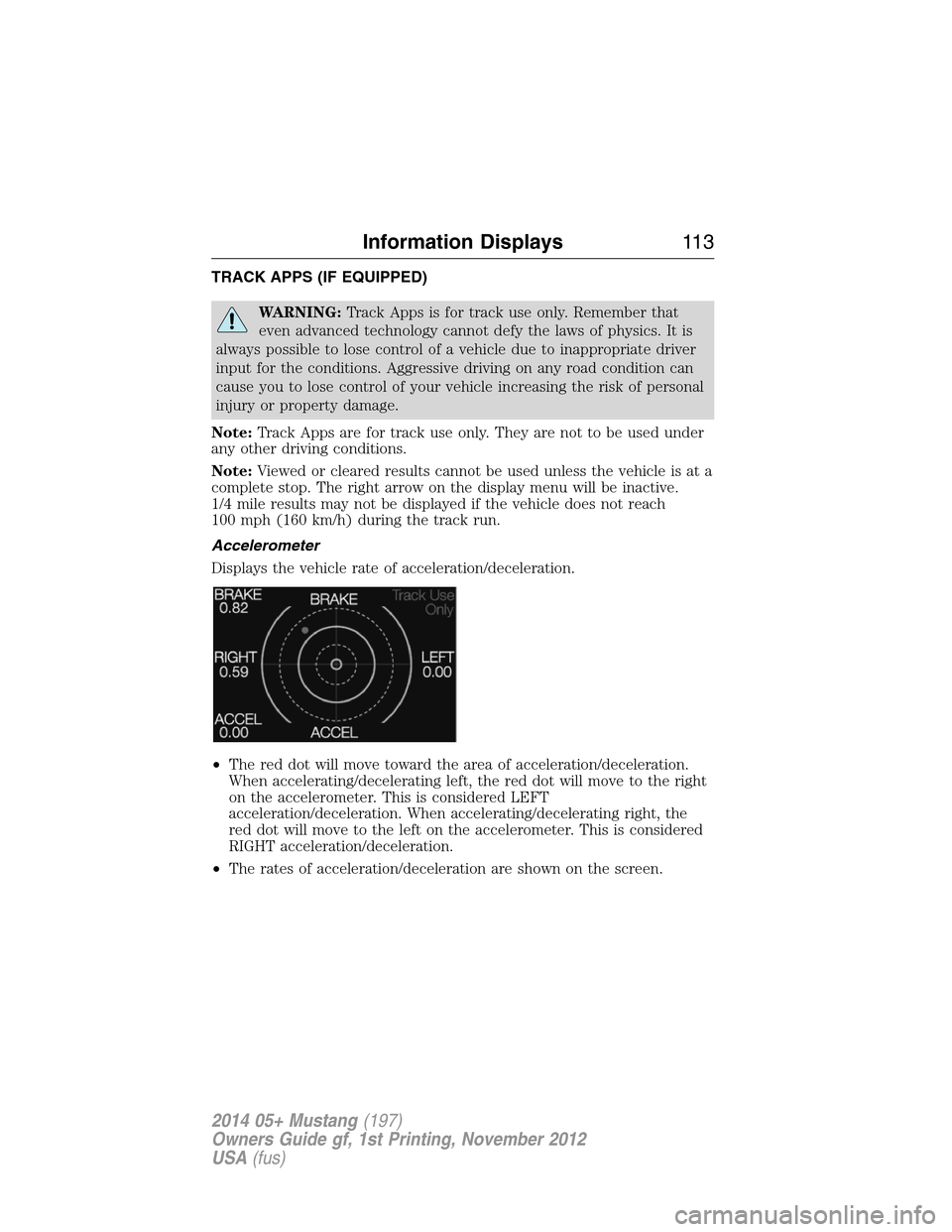
Accelerometer
Displays the vehicle rate of acceleration/deceleration.
•The red dot will move toward the area of acceleration/deceleration.
When accelerating/decelerating left, the red dot will move to the right
on the accelerometer. This is considered LEFT
acceleration/deceleration. When accelerating/decelerating right, the
red dot will move to the left on the accelerometer. This is considered
RIGHT acceleration/deceleration.
•The rates of acceleration/deceleration are shown on the screen.
Information Displays11 3
2014 05+ Mustang(197)
Owners Guide gf, 1st Printing, November 2012
USA(fus)
Page 115 of 461
Acceleration Timer
Displays the vehicle’s rate of acceleration.
1. Choose desired speed or distance.
2. Choose Automatic Start or Countdown Start.
3. Follow the on-screen prompts.
Brake Performance
Displays the vehicle’s rate of deceleration.
1. Choose desired speed to start recording data.
2. Follow the on-screen prompts.
Dashboard Screen (Shelby® GT500®)
For dashboard screen information, see theShelby GT500 Supplement.
Launch Control (Shelby® GT500®)
For launch control information, see theShelby GT500 Supplement.
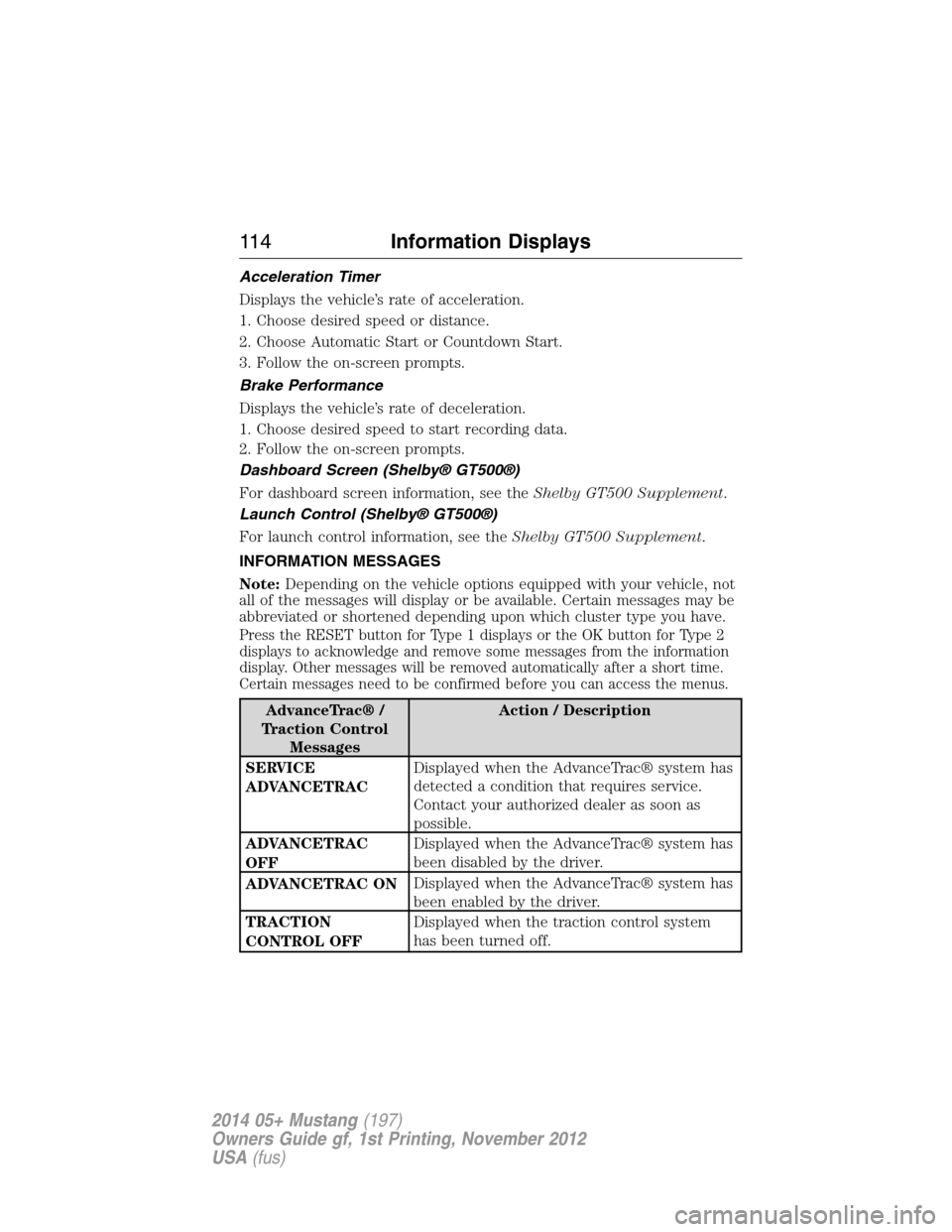
INFORMATION MESSAGES
Note:Depending on the vehicle options equipped with your vehicle, not
all of the messages will display or be available. Certain messages may be
abbreviated or shortened depending upon which cluster type you have.
Press the RESET button for Type 1 displays or the OK button for Type 2
displays to acknowledge and remove some messages from the information
display. Other messages will be removed automatically after a short time.
Certain messages need to be confirmed before you can access the menus.
AdvanceTrac® /
Traction Control
MessagesAction / Description
SERVICE
ADVANCETRACDisplayed when the AdvanceTrac® system has
detected a condition that requires service.
Contact your authorized dealer as soon as
possible.
ADVANCETRAC
OFFDisplayed when the AdvanceTrac® system has
been disabled by the driver.
ADVANCETRAC ONDisplayed when the AdvanceTrac® system has
been enabled by the driver.
TRACTION
CONTROL OFFDisplayed when the traction control system
has been turned off.
11 4Information Displays
2014 05+ Mustang(197)
Owners Guide gf, 1st Printing, November 2012
USA(fus)
Page 116 of 461
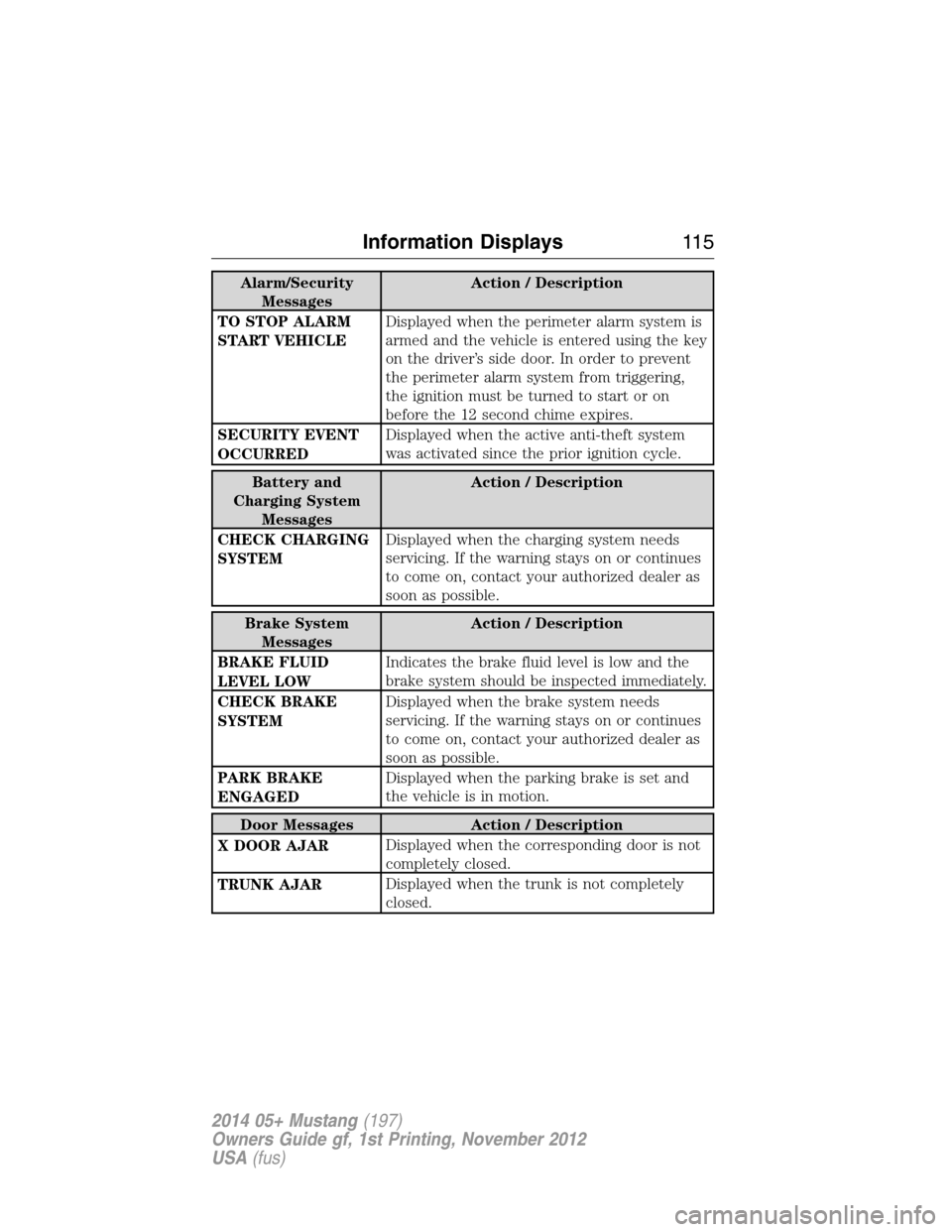
Alarm/Security
MessagesAction / Description
TO STOP ALARM
START VEHICLEDisplayed when the perimeter alarm system is
armed and the vehicle is entered using the key
on the driver’s side door. In order to prevent
the perimeter alarm system from triggering,
the ignition must be turned to start or on
before the 12 second chime expires.
SECURITY EVENT
OCCURREDDisplayed when the active anti-theft system
was activated since the prior ignition cycle.
Battery and
Charging System
MessagesAction / Description
CHECK CHARGING
SYSTEMDisplayed when the charging system needs
servicing. If the warning stays on or continues
to come on, contact your authorized dealer as
soon as possible.
Brake System
MessagesAction / Description
BRAKE FLUID
LEVEL LOWIndicates the brake fluid level is low and the
brake system should be inspected immediately.
CHECK BRAKE
SYSTEMDisplayed when the brake system needs
servicing. If the warning stays on or continues
to come on, contact your authorized dealer as
soon as possible.
PARK BRAKE
ENGAGEDDisplayed when the parking brake is set and
the vehicle is in motion.
Door Messages Action / Description
X DOOR AJARDisplayed when the corresponding door is not
completely closed.
TRUNK AJARDisplayed when the trunk is not completely
closed.
Information Displays11 5
2014 05+ Mustang(197)
Owners Guide gf, 1st Printing, November 2012
USA(fus)