ignition FORD MUSTANG 2016 6.G Repair Manual
[x] Cancel search | Manufacturer: FORD, Model Year: 2016, Model line: MUSTANG, Model: FORD MUSTANG 2016 6.GPages: 391, PDF Size: 8.9 MB
Page 307 of 391
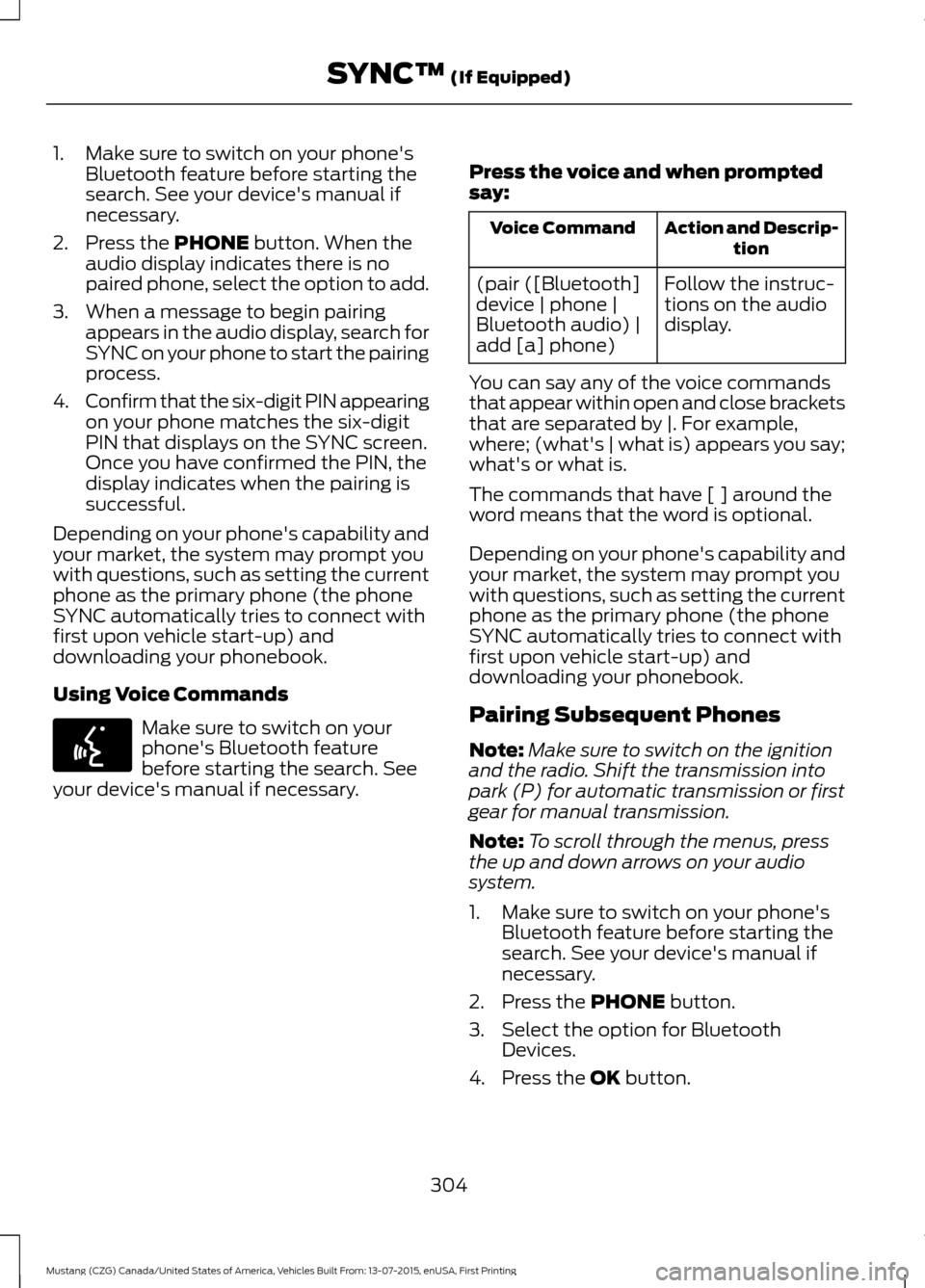
1. Make sure to switch on your phone's
Bluetooth feature before starting the
search. See your device's manual if
necessary.
2. Press the PHONE button. When the
audio display indicates there is no
paired phone, select the option to add.
3. When a message to begin pairing appears in the audio display, search for
SYNC on your phone to start the pairing
process.
4. Confirm that the six-digit PIN appearing
on your phone matches the six-digit
PIN that displays on the SYNC screen.
Once you have confirmed the PIN, the
display indicates when the pairing is
successful.
Depending on your phone's capability and
your market, the system may prompt you
with questions, such as setting the current
phone as the primary phone (the phone
SYNC automatically tries to connect with
first upon vehicle start-up) and
downloading your phonebook.
Using Voice Commands Make sure to switch on your
phone's Bluetooth feature
before starting the search. See
your device's manual if necessary. Press the voice and when prompted
say: Action and Descrip-
tion
Voice Command
Follow the instruc-
tions on the audio
display.
(pair ([Bluetooth]
device | phone |
Bluetooth audio) |
add [a] phone)
You can say any of the voice commands
that appear within open and close brackets
that are separated by |. For example,
where; (what's | what is) appears you say;
what's or what is.
The commands that have [ ] around the
word means that the word is optional.
Depending on your phone's capability and
your market, the system may prompt you
with questions, such as setting the current
phone as the primary phone (the phone
SYNC automatically tries to connect with
first upon vehicle start-up) and
downloading your phonebook.
Pairing Subsequent Phones
Note: Make sure to switch on the ignition
and the radio. Shift the transmission into
park (P) for automatic transmission or first
gear for manual transmission.
Note: To scroll through the menus, press
the up and down arrows on your audio
system.
1. Make sure to switch on your phone's Bluetooth feature before starting the
search. See your device's manual if
necessary.
2. Press the
PHONE button.
3. Select the option for Bluetooth Devices.
4. Press the
OK button.
304
Mustang (CZG) Canada/United States of America, Vehicles Built From: 13-07-2015, enUSA, First Printing SYNC™
(If Equipped)E142599
Page 316 of 391
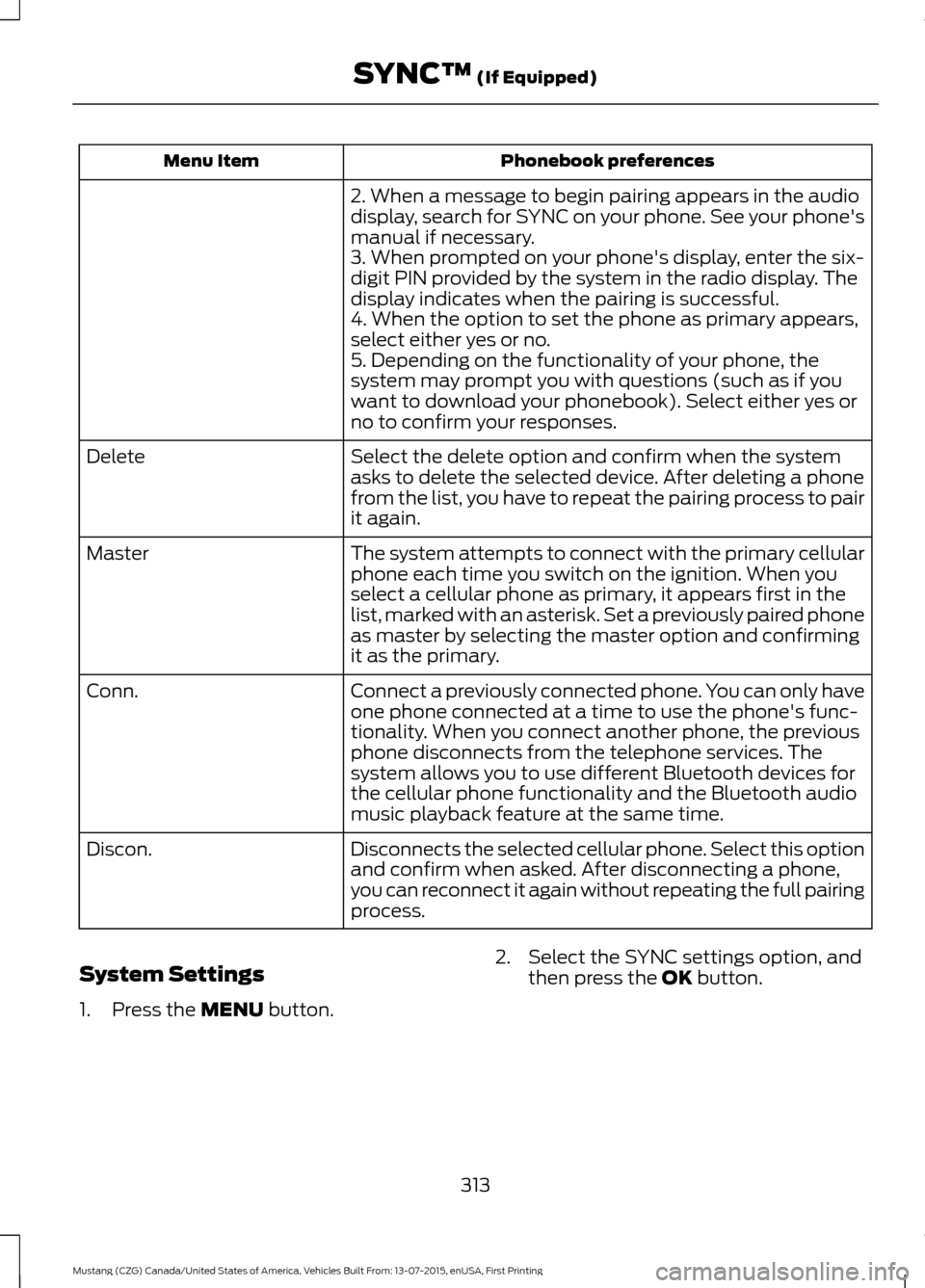
Phonebook preferences
Menu Item
2. When a message to begin pairing appears in the audio
display, search for SYNC on your phone. See your phone's
manual if necessary.
3. When prompted on your phone's display, enter the six-
digit PIN provided by the system in the radio display. The
display indicates when the pairing is successful.
4. When the option to set the phone as primary appears,
select either yes or no.
5. Depending on the functionality of your phone, the
system may prompt you with questions (such as if you
want to download your phonebook). Select either yes or
no to confirm your responses.
Select the delete option and confirm when the system
asks to delete the selected device. After deleting a phone
from the list, you have to repeat the pairing process to pair
it again.
Delete
The system attempts to connect with the primary cellular
phone each time you switch on the ignition. When you
select a cellular phone as primary, it appears first in the
list, marked with an asterisk. Set a previously paired phone
as master by selecting the master option and confirming
it as the primary.
Master
Connect a previously connected phone. You can only have
one phone connected at a time to use the phone's func-
tionality. When you connect another phone, the previous
phone disconnects from the telephone services. The
system allows you to use different Bluetooth devices for
the cellular phone functionality and the Bluetooth audio
music playback feature at the same time.
Conn.
Disconnects the selected cellular phone. Select this option
and confirm when asked. After disconnecting a phone,
you can reconnect it again without repeating the full pairing
process.
Discon.
System Settings
1. Press the MENU button. 2. Select the SYNC settings option, and
then press the
OK button.
313
Mustang (CZG) Canada/United States of America, Vehicles Built From: 13-07-2015, enUSA, First Printing SYNC™
(If Equipped)
Page 338 of 391
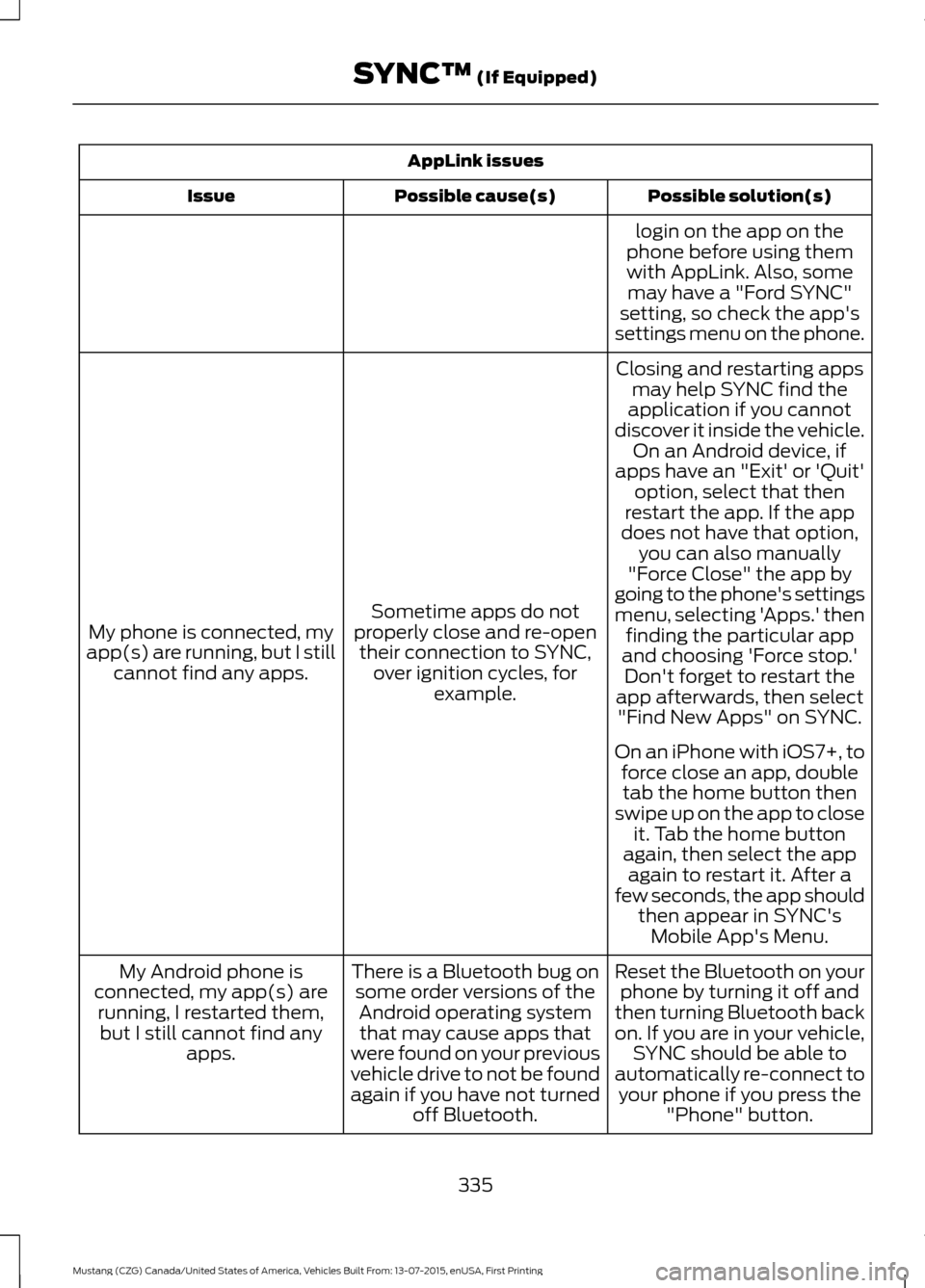
AppLink issues
Possible solution(s)
Possible cause(s)
Issue
login on the app on the
phone before using them with AppLink. Also, some may have a "Ford SYNC"
setting, so check the app's
settings menu on the phone.
Closing and restarting apps may help SYNC find the
application if you cannot
discover it inside the vehicle. On an Android device, if
apps have an "Exit' or 'Quit'
Sometime apps do not
properly close and re-open their connection to SYNC, over ignition cycles, for example.
My phone is connected, my
app(s) are running, but I still cannot find any apps. option, select that then
restart the app. If the app
does not have that option, you can also manually
"Force Close" the app by
going to the phone's settings
menu, selecting 'Apps.' then finding the particular app
and choosing 'Force stop.' Don't forget to restart the
app afterwards, then select "Find New Apps" on SYNC.
On an iPhone with iOS7+, to force close an app, doubletab the home button then
swipe up on the app to close it. Tab the home button
again, then select the app again to restart it. After a
few seconds, the app should then appear in SYNC'sMobile App's Menu.
Reset the Bluetooth on your phone by turning it off and
then turning Bluetooth back
on. If you are in your vehicle, SYNC should be able to
automatically re-connect to your phone if you press the "Phone" button.
There is a Bluetooth bug on
some order versions of theAndroid operating systemthat may cause apps that
were found on your previous
vehicle drive to not be found
again if you have not turned off Bluetooth.
My Android phone is
connected, my app(s) are running, I restarted them,but I still cannot find any apps.
335
Mustang (CZG) Canada/United States of America, Vehicles Built From: 13-07-2015, enUSA, First Printing SYNC™ (If Equipped)
Page 386 of 391
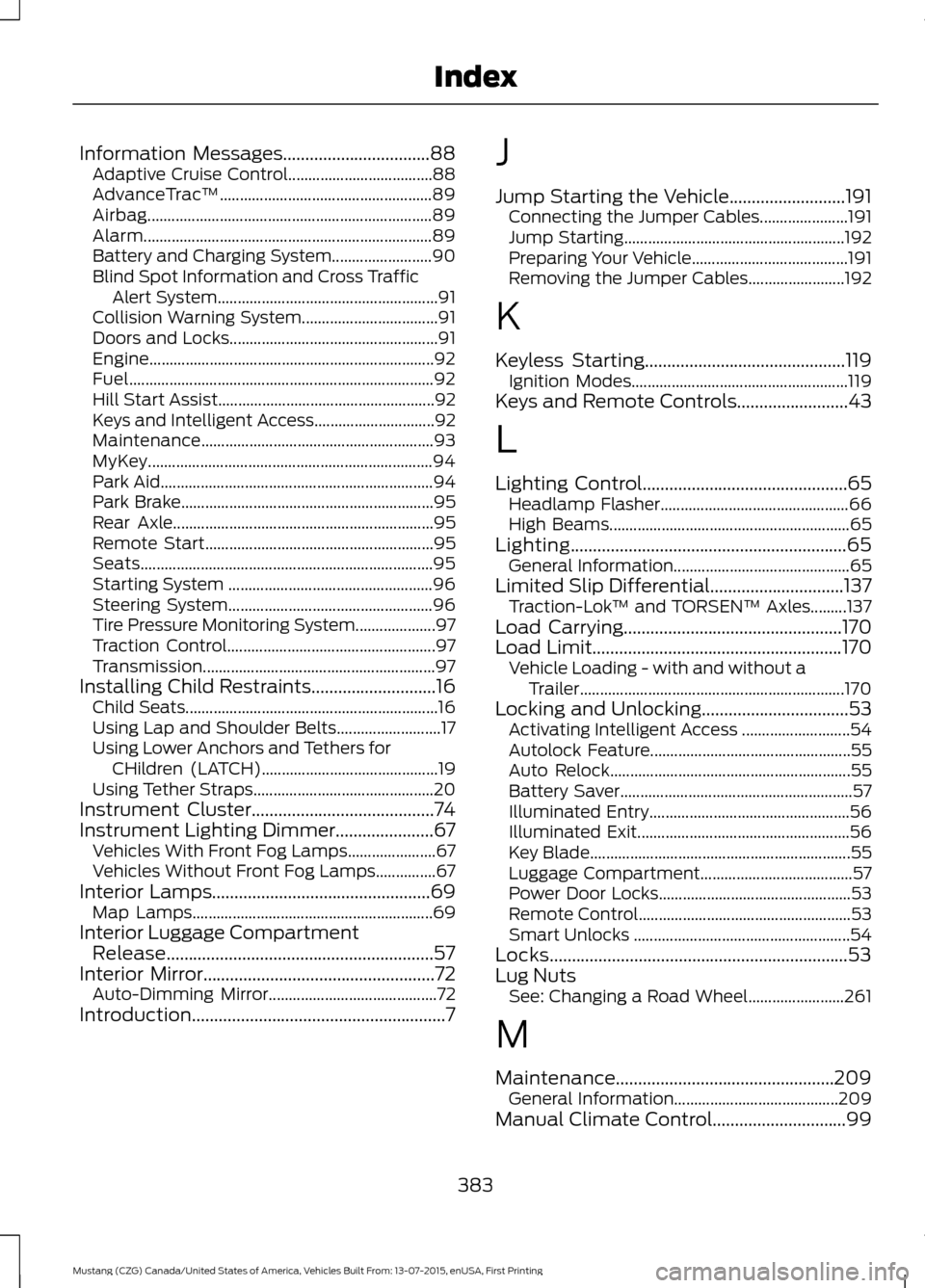
Information Messages.................................88
Adaptive Cruise Control.................................... 88
AdvanceTrac ™..................................................... 89
Airbag....................................................................... 89
Alarm........................................................................\
89
Battery and Charging System......................... 90
Blind Spot Information and Cross Traffic Alert System....................................................... 91
Collision Warning System.................................. 91
Doors and Locks.................................................... 91
Engine....................................................................... 92
Fuel........................................................................\
.... 92
Hill Start Assist...................................................... 92
Keys and Intelligent Access.............................. 92
Maintenance.......................................................... 93
MyKey....................................................................... 94
Park Aid.................................................................... 94
Park Brake............................................................... 95
Rear Axle................................................................. 95
Remote Start......................................................... 95
Seats........................................................................\
. 95
Starting System ................................................... 96
Steering System................................................... 96
Tire Pressure Monitoring System.................... 97
Traction Control.................................................... 97
Transmission.......................................................... 97
Installing Child Restraints............................16
Child Seats............................................................... 16
Using Lap and Shoulder Belts.......................... 17
Using Lower Anchors and Tethers for CHildren (LATCH)............................................ 19
Using Tether Straps............................................. 20
Instrument Cluster
.........................................74
Instrument Lighting Dimmer......................67 Vehicles With Front Fog Lamps...................... 67
Vehicles Without Front Fog Lamps...............67
Interior Lamps
.................................................69
Map Lamps............................................................ 69
Interior Luggage Compartment Release
............................................................57
Interior Mirror....................................................72 Auto-Dimming Mirror.......................................... 72
Introduction.........................................................7 J
Jump Starting the Vehicle..........................191
Connecting the Jumper Cables...................... 191
Jump Starting....................................................... 192
Preparing Your Vehicle....................................... 191
Removing the Jumper Cables........................ 192
K
Keyless Starting
.............................................119
Ignition Modes...................................................... 119
Keys and Remote Controls.........................43
L
Lighting Control..............................................65 Headlamp Flasher............................................... 66
High Beams............................................................ 65
Lighting..............................................................65 General Information............................................ 65
Limited Slip Differential..............................137 Traction-Lok ™ and TORSEN™ Axles.........137
Load Carrying
.................................................170
Load Limit........................................................170
Vehicle Loading - with and without a
Trailer.................................................................. 170
Locking and Unlocking
.................................53
Activating Intelligent Access ........................... 54
Autolock Feature.................................................. 55
Auto Relock............................................................ 55
Battery Saver.......................................................... 57
Illuminated Entry.................................................. 56
Illuminated Exit..................................................... 56
Key Blade................................................................. 55
Luggage Compartment...................................... 57
Power Door Locks................................................ 53
Remote Control..................................................... 53
Smart Unlocks ...................................................... 54
Locks...................................................................53
Lug Nuts See: Changing a Road Wheel........................ 261
M
Maintenance.................................................209 General Information......................................... 209
Manual Climate Control..............................99
383
Mustang (CZG) Canada/United States of America, Vehicles Built From: 13-07-2015, enUSA, First Printing Index