warning FORD MUSTANG 2023 Owners Manual
[x] Cancel search | Manufacturer: FORD, Model Year: 2023, Model line: MUSTANG, Model: FORD MUSTANG 2023Pages: 535, PDF Size: 15.46 MB
Page 183 of 535
REAR PARKING AID (IF EQUIPPED)
WARNING: The system may notdetect objects with surfaces that absorbreflection. Always drive with due careand attention. Failure to take care mayresult in a crash.
WARNING: The system may notdetect small or moving objects,particularly those close to the ground.
WARNING: To help avoid personalinjury, always use caution when inreverse (R) and when using the sensingsystem.
WARNING: The parking aid systemcan only assist you to detect objectswhen your vehicle is moving at parkingspeeds. To help avoid personal injury youmust take care when using the parkingaid system.
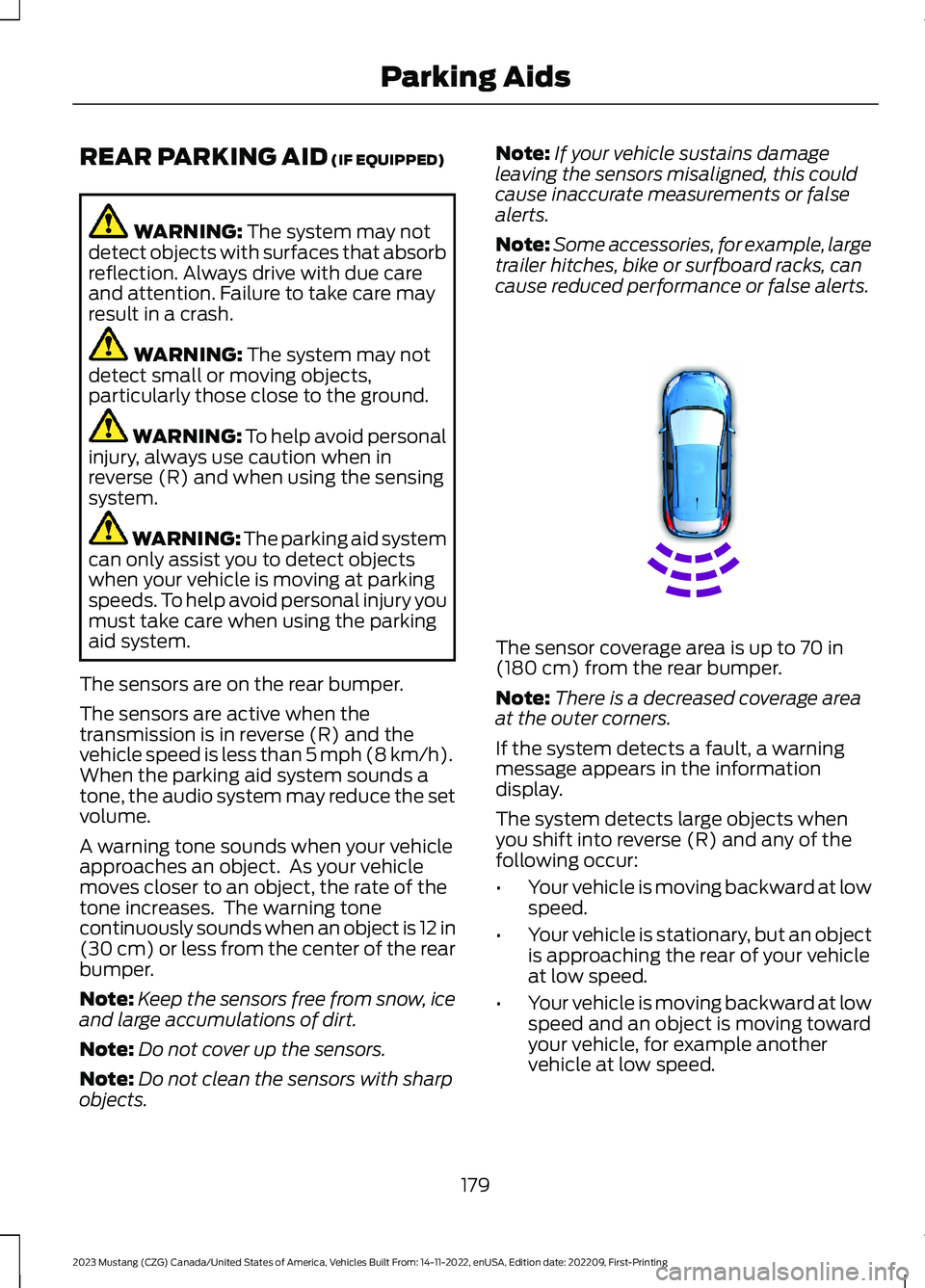
The sensors are on the rear bumper.
The sensors are active when thetransmission is in reverse (R) and thevehicle speed is less than 5 mph (8 km/h).When the parking aid system sounds atone, the audio system may reduce the setvolume.
A warning tone sounds when your vehicleapproaches an object. As your vehiclemoves closer to an object, the rate of thetone increases. The warning tonecontinuously sounds when an object is 12 in(30 cm) or less from the center of the rearbumper.
Note:Keep the sensors free from snow, iceand large accumulations of dirt.
Note:Do not cover up the sensors.
Note:Do not clean the sensors with sharpobjects.
Note:If your vehicle sustains damageleaving the sensors misaligned, this couldcause inaccurate measurements or falsealerts.
Note:Some accessories, for example, largetrailer hitches, bike or surfboard racks, cancause reduced performance or false alerts.
The sensor coverage area is up to 70 in(180 cm) from the rear bumper.
Note:There is a decreased coverage areaat the outer corners.
If the system detects a fault, a warningmessage appears in the informationdisplay.
The system detects large objects whenyou shift into reverse (R) and any of thefollowing occur:
•Your vehicle is moving backward at lowspeed.
•Your vehicle is stationary, but an objectis approaching the rear of your vehicleat low speed.
•Your vehicle is moving backward at lowspeed and an object is moving towardyour vehicle, for example anothervehicle at low speed.
179
2023 Mustang (CZG) Canada/United States of America, Vehicles Built From: 14-11-2022, enUSA, Edition date: 202209, First-PrintingParking AidsE130178
Page 184 of 535
If your vehicle remains stationary for twoseconds, the audible warning turns off. Ifyour vehicle moves backward, the tonesounds again.
Note:If the detected object is 12 in (30 cm)or less from the rear bumper, the audiblewarning does not turn off.
Object Distance Indicator (If Equipped)
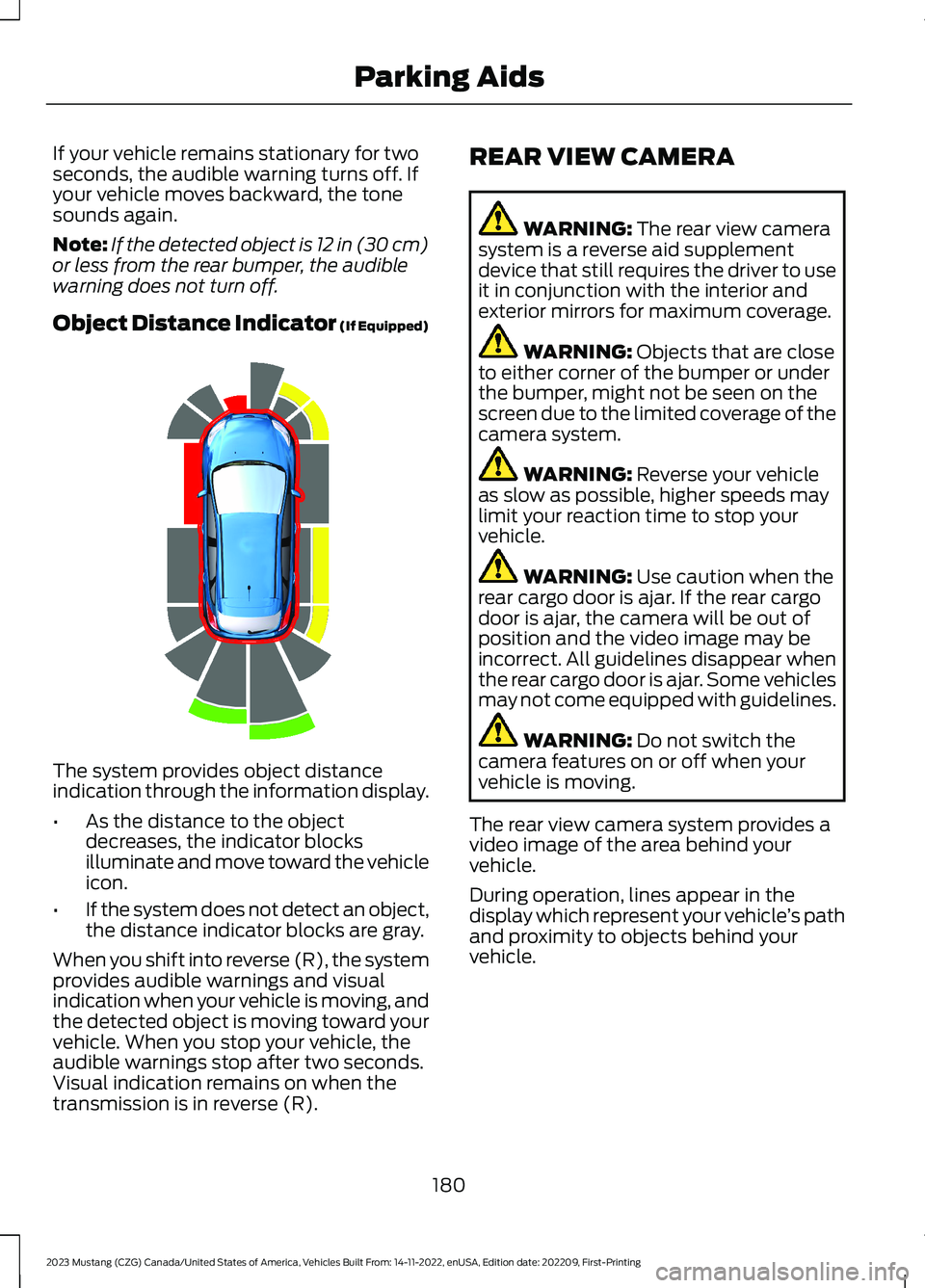
The system provides object distanceindication through the information display.
•As the distance to the objectdecreases, the indicator blocksilluminate and move toward the vehicleicon.
•If the system does not detect an object,the distance indicator blocks are gray.
When you shift into reverse (R), the systemprovides audible warnings and visualindication when your vehicle is moving, andthe detected object is moving toward yourvehicle. When you stop your vehicle, theaudible warnings stop after two seconds.Visual indication remains on when thetransmission is in reverse (R).
REAR VIEW CAMERA
WARNING: The rear view camerasystem is a reverse aid supplementdevice that still requires the driver to useit in conjunction with the interior andexterior mirrors for maximum coverage.
WARNING: Objects that are closeto either corner of the bumper or underthe bumper, might not be seen on thescreen due to the limited coverage of thecamera system.
WARNING: Reverse your vehicleas slow as possible, higher speeds maylimit your reaction time to stop yourvehicle.
WARNING: Use caution when therear cargo door is ajar. If the rear cargodoor is ajar, the camera will be out ofposition and the video image may beincorrect. All guidelines disappear whenthe rear cargo door is ajar. Some vehiclesmay not come equipped with guidelines.
WARNING: Do not switch thecamera features on or off when yourvehicle is moving.
The rear view camera system provides avideo image of the area behind yourvehicle.
During operation, lines appear in thedisplay which represent your vehicle’s pathand proximity to objects behind yourvehicle.
180
2023 Mustang (CZG) Canada/United States of America, Vehicles Built From: 14-11-2022, enUSA, Edition date: 202209, First-PrintingParking AidsE190459
Page 186 of 535
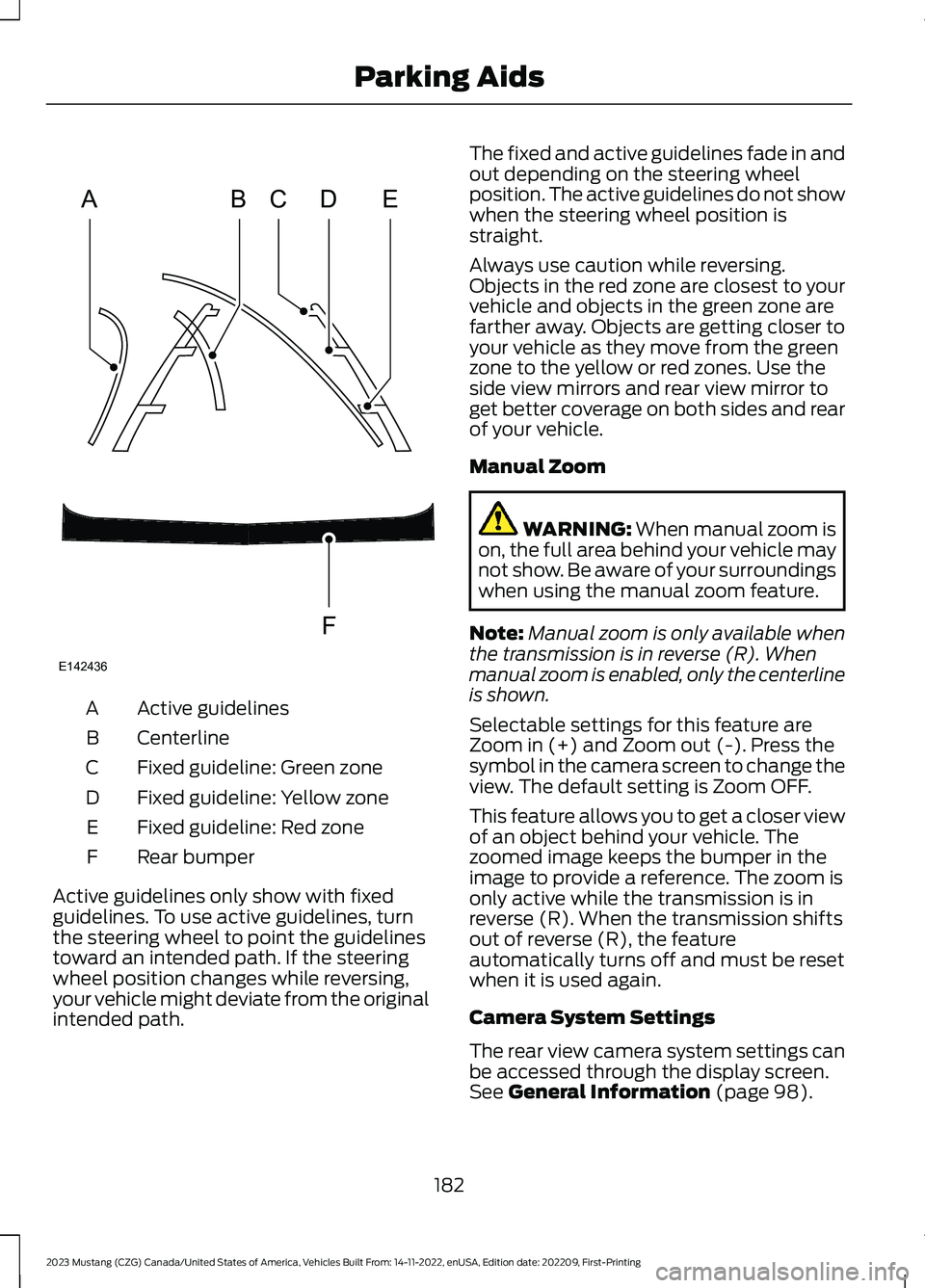
Active guidelinesA
CenterlineB
Fixed guideline: Green zoneC
Fixed guideline: Yellow zoneD
Fixed guideline: Red zoneE
Rear bumperF
Active guidelines only show with fixedguidelines. To use active guidelines, turnthe steering wheel to point the guidelinestoward an intended path. If the steeringwheel position changes while reversing,your vehicle might deviate from the originalintended path.
The fixed and active guidelines fade in andout depending on the steering wheelposition. The active guidelines do not showwhen the steering wheel position isstraight.
Always use caution while reversing.Objects in the red zone are closest to yourvehicle and objects in the green zone arefarther away. Objects are getting closer toyour vehicle as they move from the greenzone to the yellow or red zones. Use theside view mirrors and rear view mirror toget better coverage on both sides and rearof your vehicle.
Manual Zoom
WARNING: When manual zoom ison, the full area behind your vehicle maynot show. Be aware of your surroundingswhen using the manual zoom feature.
Note:Manual zoom is only available whenthe transmission is in reverse (R). Whenmanual zoom is enabled, only the centerlineis shown.
Selectable settings for this feature areZoom in (+) and Zoom out (-). Press thesymbol in the camera screen to change theview. The default setting is Zoom OFF.
This feature allows you to get a closer viewof an object behind your vehicle. Thezoomed image keeps the bumper in theimage to provide a reference. The zoom isonly active while the transmission is inreverse (R). When the transmission shiftsout of reverse (R), the featureautomatically turns off and must be resetwhen it is used again.
Camera System Settings
The rear view camera system settings canbe accessed through the display screen.See General Information (page 98).
182
2023 Mustang (CZG) Canada/United States of America, Vehicles Built From: 14-11-2022, enUSA, Edition date: 202209, First-PrintingParking AidsABCDFEE142436
Page 188 of 535
WHAT IS CRUISE CONTROL
Cruise control lets you maintain a setspeed without keeping your foot on theaccelerator pedal.
Requirements
Use cruise control when the vehicle speedis greater than 20 mph (30 km/h).
SWITCHING CRUISE CONTROL
ON AND OFF
WARNING: Do not use cruisecontrol on winding roads, in heavy trafficor when the road surface is slippery. Thiscould result in loss of vehicle control,serious injury or death.
The cruise controls are on the steeringwheel. See Cruise Control (page 76).
Switching Cruise Control On
Press the button.
Switching Cruise Control Off
Press the button when thesystem is in standby mode.
The system also turns off when you switchthe ignition off.
Note:The set speed erases when youswitch the system off.
SETTING THE CRUISE
CONTROL SPEED
WARNING: When you are goingdownhill, your vehicle speed couldincrease above the set speed. Thesystem does not apply the brakes.
Drive to the speed you prefer.
Press either button to set thecurrent speed.
Take your foot off the accelerator pedal.
Note:The indicator changes color in theinformation display.
Changing the Set Speed
Press and release the button toincrease the set speed in smallincrements.
Press and hold the button to accelerate.Release the button when you reach yourpreferred speed.
Press and release the button todecrease the set speed in smallincrements.
Press and hold the button to decelerate.Release the button when you reach yourpreferred speed.
Note: If you accelerate by pressing theaccelerator pedal, the set speed does notchange. When you release the acceleratorpedal, your vehicle returns to the speed thatyou previously set.
184
2023 Mustang (CZG) Canada/United States of America, Vehicles Built From: 14-11-2022, enUSA, Edition date: 202209, First-PrintingCruise ControlE265296 E265297 E246884 E246885 E246884 E246885
Page 189 of 535
CANCELING THE SET SPEED
Press the button, or tap thebrake pedal to cancel the setspeed.
Note:The system remembers the setspeed.
Note:The system cancels if the vehiclespeed drops below 10 mph (16 km/h) underthe set speed when driving uphill.
RESUMING THE SET SPEED
Press the button.
CRUISE CONTROL
INDICATORS
Illuminates when you switch thesystem on.
USING ADAPTIVE CRUISE
CONTROL (IF EQUIPPED)
WARNING: You are responsible forcontrolling your vehicle at all times. Thesystem is designed to be an aid and doesnot relieve you of your responsibility todrive with due care and attention. Failureto follow this instruction could result inthe loss of control of your vehicle,personal injury or death.
WARNING: Pay close attention tochanging road conditions such asentering or leaving a highway, on roadswith intersections or roundabouts, roadswithout visible lanes of travel, roads thatare winding, slippery, unpaved, or steepslopes.
WARNING: The system only warnsof vehicles detected by the radar sensor.In some cases there may be no warningor a delayed warning. Apply the brakeswhen necessary. Failure to follow thisinstruction could result in personal injuryor death.
WARNING: Do not use the systemin poor visibility, for example fog, heavyrain, spray or snow.
WARNING: Do not use tire sizesother than those recommended becausethis can affect the normal operation ofthe system. Failure to do so may resultin a loss of vehicle control, which couldresult in serious injury.
WARNING: The system may notdetect stationary or slow movingvehicles below 6 mph (10 km/h).
WARNING: The system does notdetect pedestrians or objects in the road.
WARNING: The system does notdetect oncoming vehicles in the samelane.
WARNING: The system is not acrash warning or avoidance system.
The system adjusts your vehicle speed tomaintain the set gap between you and thevehicle in front of you in the same lane.You can select four gap settings.
185
2023 Mustang (CZG) Canada/United States of America, Vehicles Built From: 14-11-2022, enUSA, Edition date: 202209, First-PrintingCruise ControlE265298 E71340
Page 190 of 535
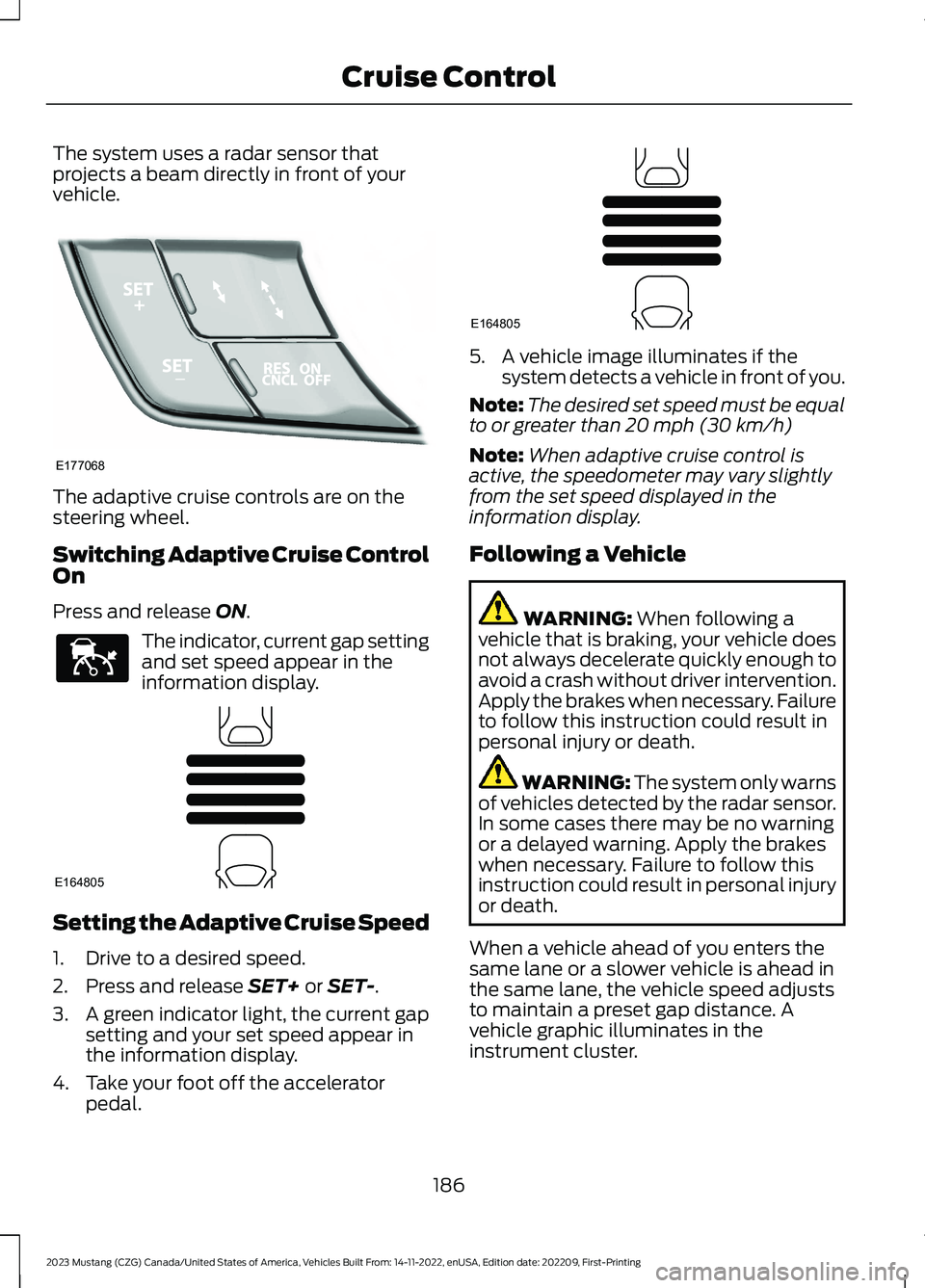
The system uses a radar sensor thatprojects a beam directly in front of yourvehicle.
The adaptive cruise controls are on thesteering wheel.
Switching Adaptive Cruise ControlOn
Press and release ON.
The indicator, current gap settingand set speed appear in theinformation display.
Setting the Adaptive Cruise Speed
1.Drive to a desired speed.
2.Press and release SET+ or SET-.
3.A green indicator light, the current gapsetting and your set speed appear inthe information display.
4.Take your foot off the acceleratorpedal.
5.A vehicle image illuminates if thesystem detects a vehicle in front of you.
Note:The desired set speed must be equalto or greater than 20 mph (30 km/h)
Note:When adaptive cruise control isactive, the speedometer may vary slightlyfrom the set speed displayed in theinformation display.
Following a Vehicle
WARNING: When following avehicle that is braking, your vehicle doesnot always decelerate quickly enough toavoid a crash without driver intervention.Apply the brakes when necessary. Failureto follow this instruction could result inpersonal injury or death.
WARNING: The system only warnsof vehicles detected by the radar sensor.In some cases there may be no warningor a delayed warning. Apply the brakeswhen necessary. Failure to follow thisinstruction could result in personal injuryor death.
When a vehicle ahead of you enters thesame lane or a slower vehicle is ahead inthe same lane, the vehicle speed adjuststo maintain a preset gap distance. Avehicle graphic illuminates in theinstrument cluster.
186
2023 Mustang (CZG) Canada/United States of America, Vehicles Built From: 14-11-2022, enUSA, Edition date: 202209, First-PrintingCruise ControlE177068 E144529 E164805 E164805
Page 191 of 535
Your vehicle maintains a consistent gapfrom the vehicle ahead until:
•The vehicle in front of you acceleratesto a speed above the set speed.
•The vehicle in front of you moves outof the lane you are in.
•Your vehicle speed falls below 12 mph(20 km/h).
•You set a new gap distance.
The system applies the brakes to slow yourvehicle to maintain a safe gap distancefrom the vehicle in front. The system onlyapplies limited braking. You can overridethe system by applying the brakes.
If the system determines that its maximumbraking level is not sufficient, an audiblewarning sounds, a message appears in theinformation display and an indicatorflashes when the system continues tobrake. Take immediate action.
Note:When you are following a vehicle andyou switch on a direction indicator, adaptivecruise control may provide a smalltemporary acceleration to help you pass.
Note:The brakes may emit noise whenapplied by the system.
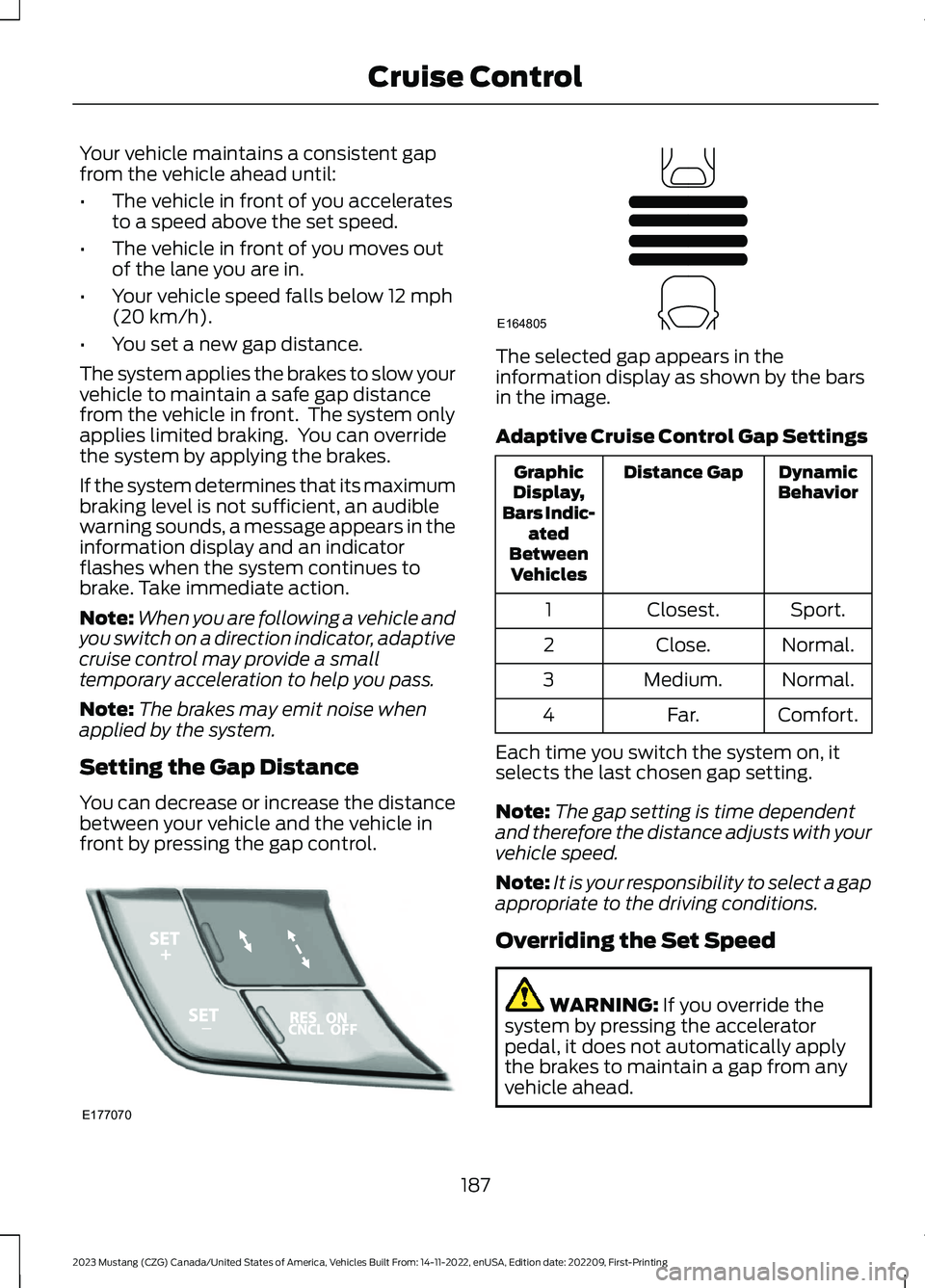
Setting the Gap Distance
You can decrease or increase the distancebetween your vehicle and the vehicle infront by pressing the gap control.
The selected gap appears in theinformation display as shown by the barsin the image.
Adaptive Cruise Control Gap Settings
DynamicBehaviorDistance GapGraphicDisplay,Bars Indic-atedBetweenVehicles
Sport.Closest.1
Normal.Close.2
Normal.Medium.3
Comfort.Far.4
Each time you switch the system on, itselects the last chosen gap setting.
Note:The gap setting is time dependentand therefore the distance adjusts with yourvehicle speed.
Note:It is your responsibility to select a gapappropriate to the driving conditions.
Overriding the Set Speed
WARNING: If you override thesystem by pressing the acceleratorpedal, it does not automatically applythe brakes to maintain a gap from anyvehicle ahead.
187
2023 Mustang (CZG) Canada/United States of America, Vehicles Built From: 14-11-2022, enUSA, Edition date: 202209, First-PrintingCruise ControlE177070 E164805
Page 192 of 535
When you press the accelerator pedal, youoverride the set speed and gap distance.
When you override the system,the green indicator lightilluminates and the vehicleimage does not appear in the informationdisplay.
The system resumes operation when yourelease the accelerator pedal. The vehiclespeed decreases to the set speed, or alower speed if following a slower vehicle.
Changing the Set Speed
Press and release the button toincrease the set speed in smallincrements. Press and hold thebutton to increase the set speed in largeincrements. Release the button when theset speed is equal to your desired speed.
Press and release the button todecrease the set speed in smallincrements. Press and hold thebutton to decrease the set speed in largeincrements. Release the button when theset speed is equal to your desired speed.
You can use the accelerator or brake pedalto adjust the set speed. Press either buttonto set the speed.
The system may apply the brakes to slowthe vehicle to the new set speed. The setspeed displays continuously in theinformation display when the system isactive.
Canceling the Set Speed
Press and release the button.The set speed does not erase.
Note:For vehicles with manualtransmission, if you press the clutch pedalfor an extended period, this action alsocancels the set speed.
Resuming the Set Speed
Press and release the button.Your vehicle speed returns to thepreviously set speed and gapsetting. The set speed displayscontinuously in the information displaywhen the system is active.
Note:Only use resume if you are aware ofthe set speed and intend to return to it.
Automatic Cancellation
The system does not operate below12 mph (20 km/h).
Note:If the engine speed drops too low, anaudible warning sounds and a messageappears in the information display.Automatic braking releases.
Hilly Condition Usage
Select a lower gear when the system isactive in situations such as prolongeddownhill driving on steep slopes, forexample in mountainous areas. Thesystem needs additional engine braking inthese situations to reduce the load on thevehicle’s regular brake system to preventit from overheating.
Note:An audible alarm sounds and thesystem shuts down if it applies brakes foran extended period of time. This allows thebrakes to cool. The system functionsnormally again after the brakes cool.
Switching Adaptive Cruise ControlOff
Press and release OFF, or on vehicles withspeed limiter, the speedometer icon whenthe system is in standby mode to switchthe system off.
Note:You erase the set speed and gapsetting when you switch the system off.
188
2023 Mustang (CZG) Canada/United States of America, Vehicles Built From: 14-11-2022, enUSA, Edition date: 202209, First-PrintingCruise ControlE144529 E246884 E246885 E265298
Page 193 of 535
Detection Issues
WARNING: On rare occasions,detection issues can occur due to theroad infrastructures, for example bridges,tunnels and safety barriers. In thesecases, the system may brake late orunexpectedly. At all times, you areresponsible for controlling your vehicle,supervising the system and intervening,if required.
WARNING: If the systemmalfunctions, have your vehicle checkedas soon as possible.
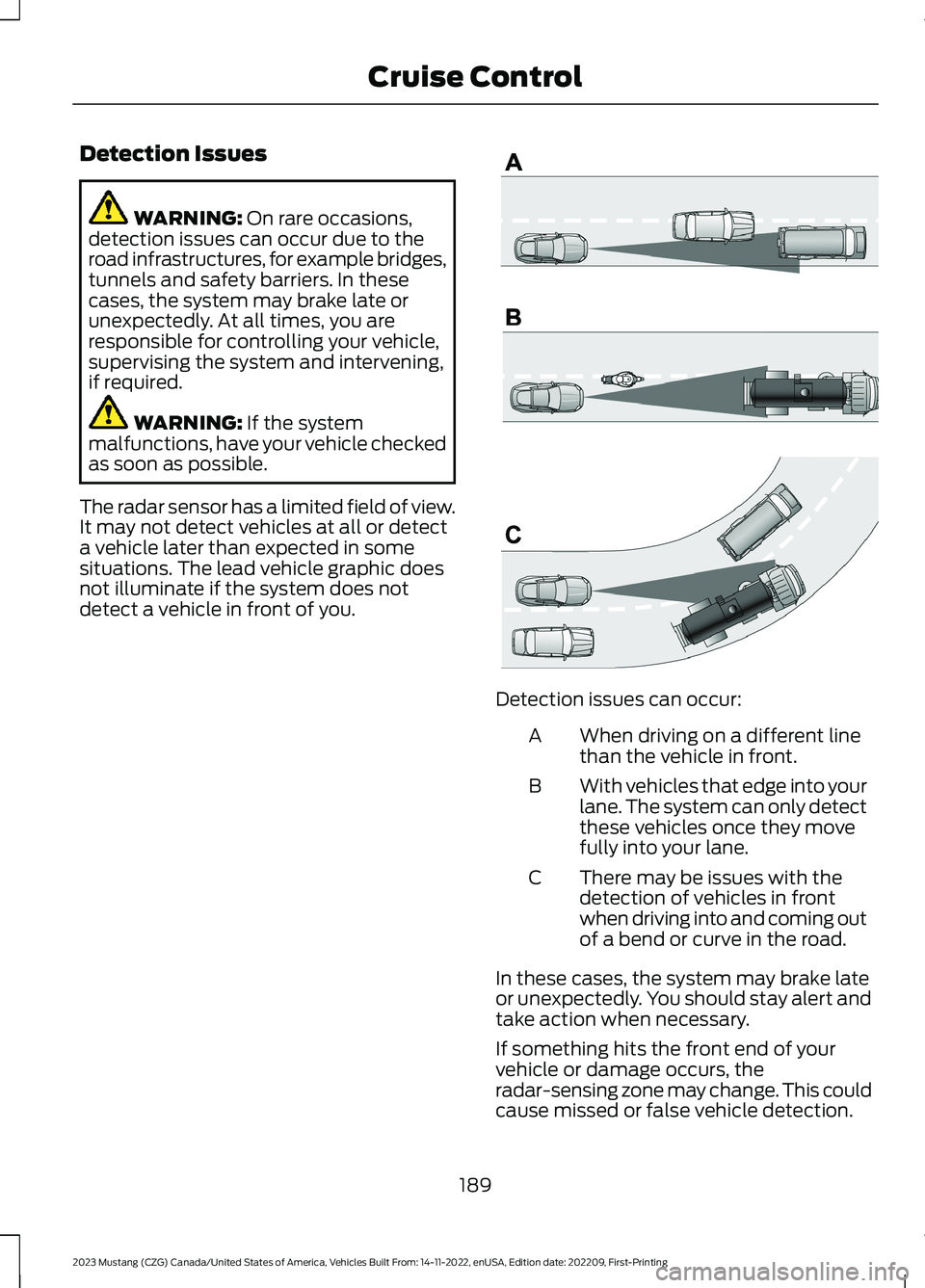
The radar sensor has a limited field of view.It may not detect vehicles at all or detecta vehicle later than expected in somesituations. The lead vehicle graphic doesnot illuminate if the system does notdetect a vehicle in front of you.
Detection issues can occur:
When driving on a different linethan the vehicle in front.A
With vehicles that edge into yourlane. The system can only detectthese vehicles once they movefully into your lane.
B
There may be issues with thedetection of vehicles in frontwhen driving into and coming outof a bend or curve in the road.
C
In these cases, the system may brake lateor unexpectedly. You should stay alert andtake action when necessary.
If something hits the front end of yourvehicle or damage occurs, theradar-sensing zone may change. This couldcause missed or false vehicle detection.
189
2023 Mustang (CZG) Canada/United States of America, Vehicles Built From: 14-11-2022, enUSA, Edition date: 202209, First-PrintingCruise ControlE71621
Page 194 of 535
System Not Available
The system may not turn on if there is:
•A blocked sensor.
•High brake temperature.
•A failure in the system or a relatedsystem.
Blocked Sensor
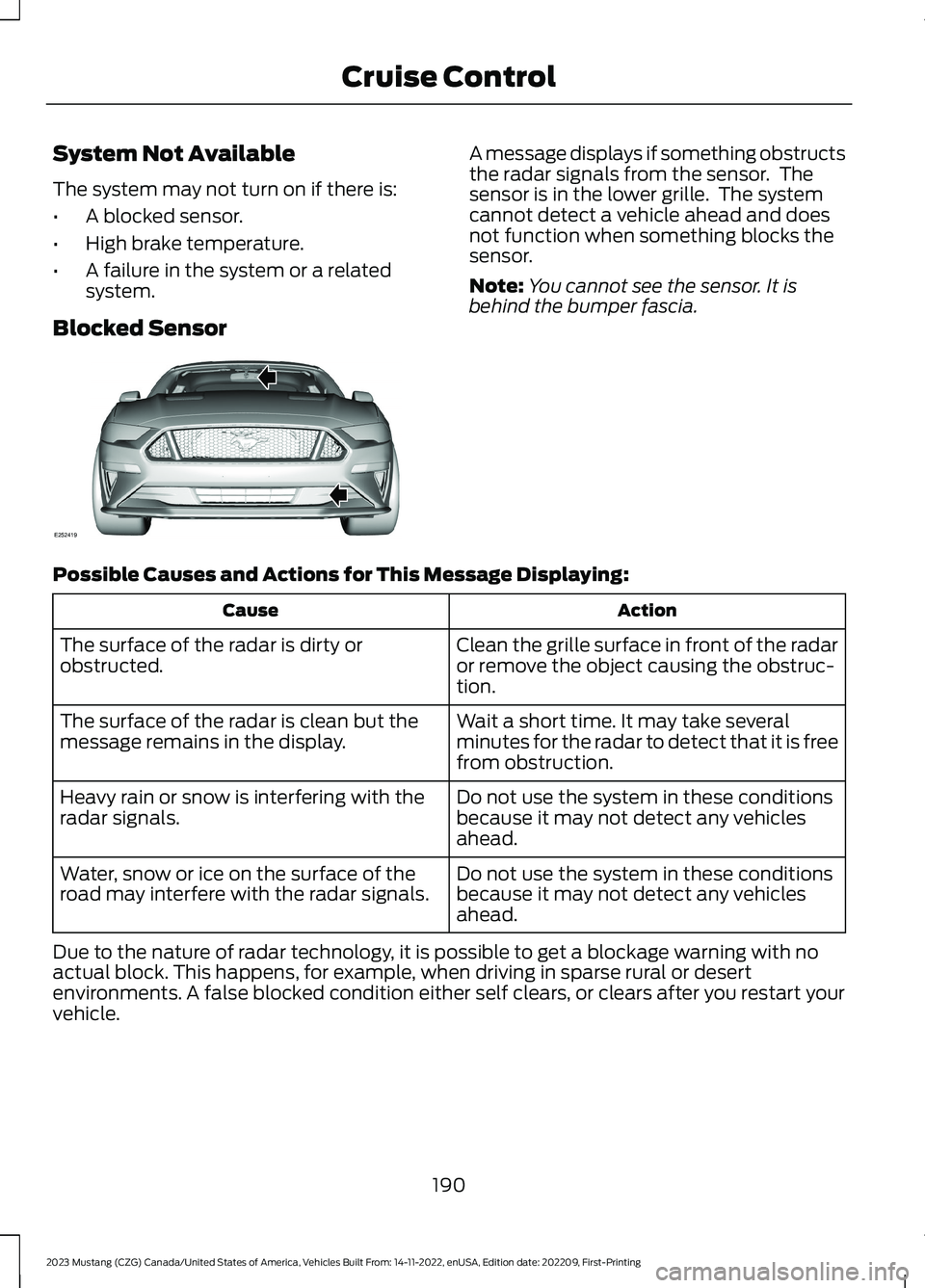
A message displays if something obstructsthe radar signals from the sensor. Thesensor is in the lower grille. The systemcannot detect a vehicle ahead and doesnot function when something blocks thesensor.
Note:You cannot see the sensor. It isbehind the bumper fascia.
Possible Causes and Actions for This Message Displaying:
ActionCause
Clean the grille surface in front of the radaror remove the object causing the obstruc-tion.
The surface of the radar is dirty orobstructed.
Wait a short time. It may take severalminutes for the radar to detect that it is freefrom obstruction.
The surface of the radar is clean but themessage remains in the display.
Do not use the system in these conditionsbecause it may not detect any vehiclesahead.
Heavy rain or snow is interfering with theradar signals.
Do not use the system in these conditionsbecause it may not detect any vehiclesahead.
Water, snow or ice on the surface of theroad may interfere with the radar signals.
Due to the nature of radar technology, it is possible to get a blockage warning with noactual block. This happens, for example, when driving in sparse rural or desertenvironments. A false blocked condition either self clears, or clears after you restart yourvehicle.
190
2023 Mustang (CZG) Canada/United States of America, Vehicles Built From: 14-11-2022, enUSA, Edition date: 202209, First-PrintingCruise ControlE252419