wheel FORD MUSTANG 2023 Owners Manual
[x] Cancel search | Manufacturer: FORD, Model Year: 2023, Model line: MUSTANG, Model: FORD MUSTANG 2023Pages: 535, PDF Size: 15.46 MB
Page 336 of 535
WARNING: The jack supplied withthis vehicle is only intended for changinga flat tire in an emergency. Do notattempt to do any other work on yourvehicle when it is supported by the jack,as your vehicle could slip off the jack.Failure to follow this instruction couldresult in personal injury or death.
WARNING: Do not attempt tochange a tire on the side of the vehicleclose to moving traffic. Pull far enoughoff the road to avoid the danger of beinghit when operating the jack or changingthe wheel.
WARNING: Park your vehicle sothat you do not obstruct the flow oftraffic or place yourself in any danger andset up a warning triangle.
WARNING: Always use the jackprovided as original equipment with yourvehicle. If using a jack other than the oneprovided, make sure the jack capacity isadequate for the vehicle weight,including any vehicle cargo ormodifications. If you are unsure if the jackcapacity is adequate, contact theauthorized dealer.
WARNING: Check that the vehiclejack is not damaged or deformed andthe thread is lubricated and clean.
WARNING: The jack supplied withthis vehicle is only intended for changingwheels. Do not use the vehicle jack otherthan when you are changing a wheel inan emergency.
WARNING: Use only the specifiedjacking points. If you use other locations,you could damage the body, steering,suspension, engine, braking system orthe fuel lines.
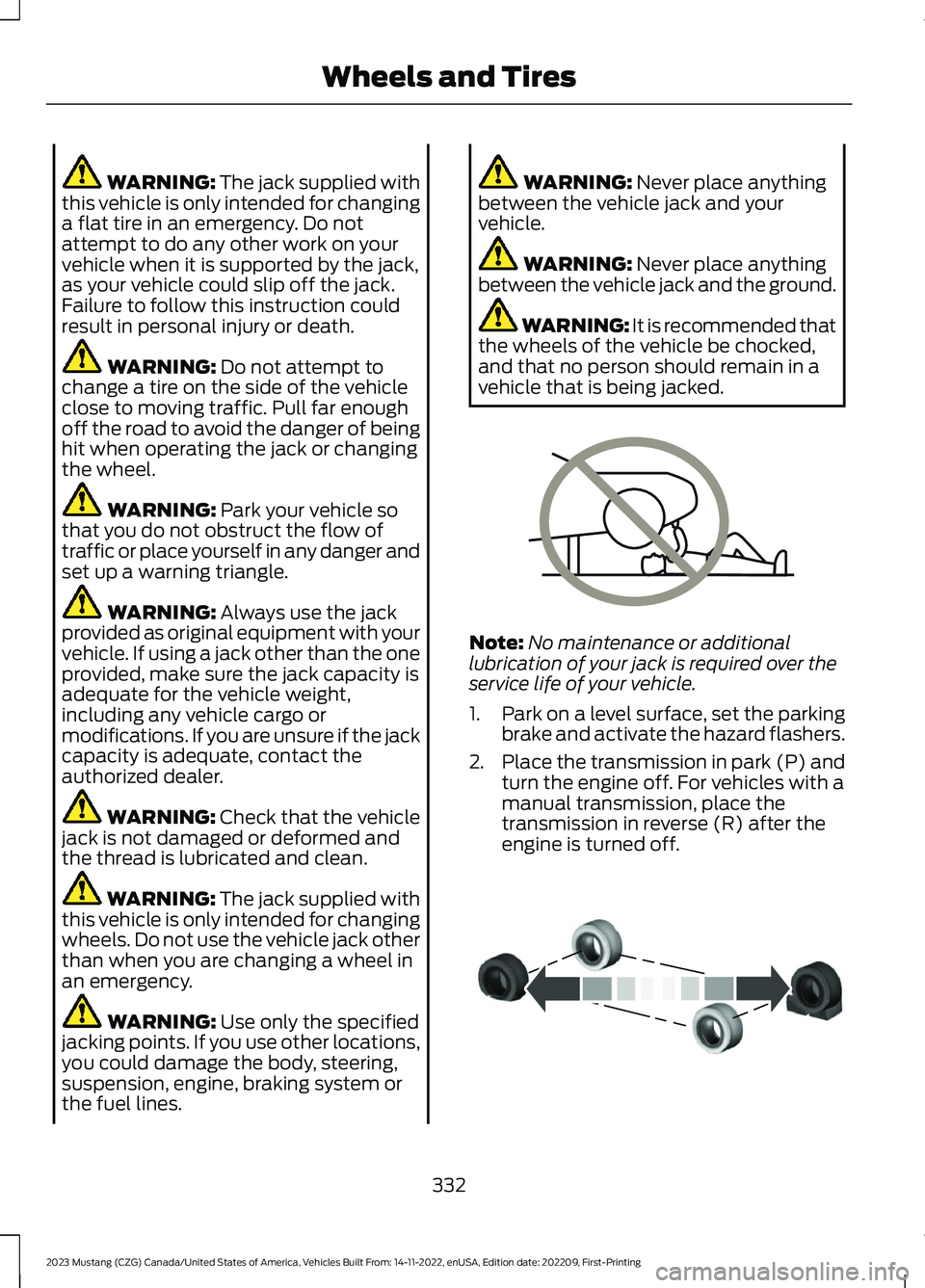
WARNING: Never place anythingbetween the vehicle jack and yourvehicle.
WARNING: Never place anythingbetween the vehicle jack and the ground.
WARNING: It is recommended thatthe wheels of the vehicle be chocked,and that no person should remain in avehicle that is being jacked.
Note:No maintenance or additionallubrication of your jack is required over theservice life of your vehicle.
1.Park on a level surface, set the parkingbrake and activate the hazard flashers.
2.Place the transmission in park (P) andturn the engine off. For vehicles with amanual transmission, place thetransmission in reverse (R) after theengine is turned off.
332
2023 Mustang (CZG) Canada/United States of America, Vehicles Built From: 14-11-2022, enUSA, Edition date: 202209, First-PrintingWheels and TiresE166722 E175447
Page 337 of 535
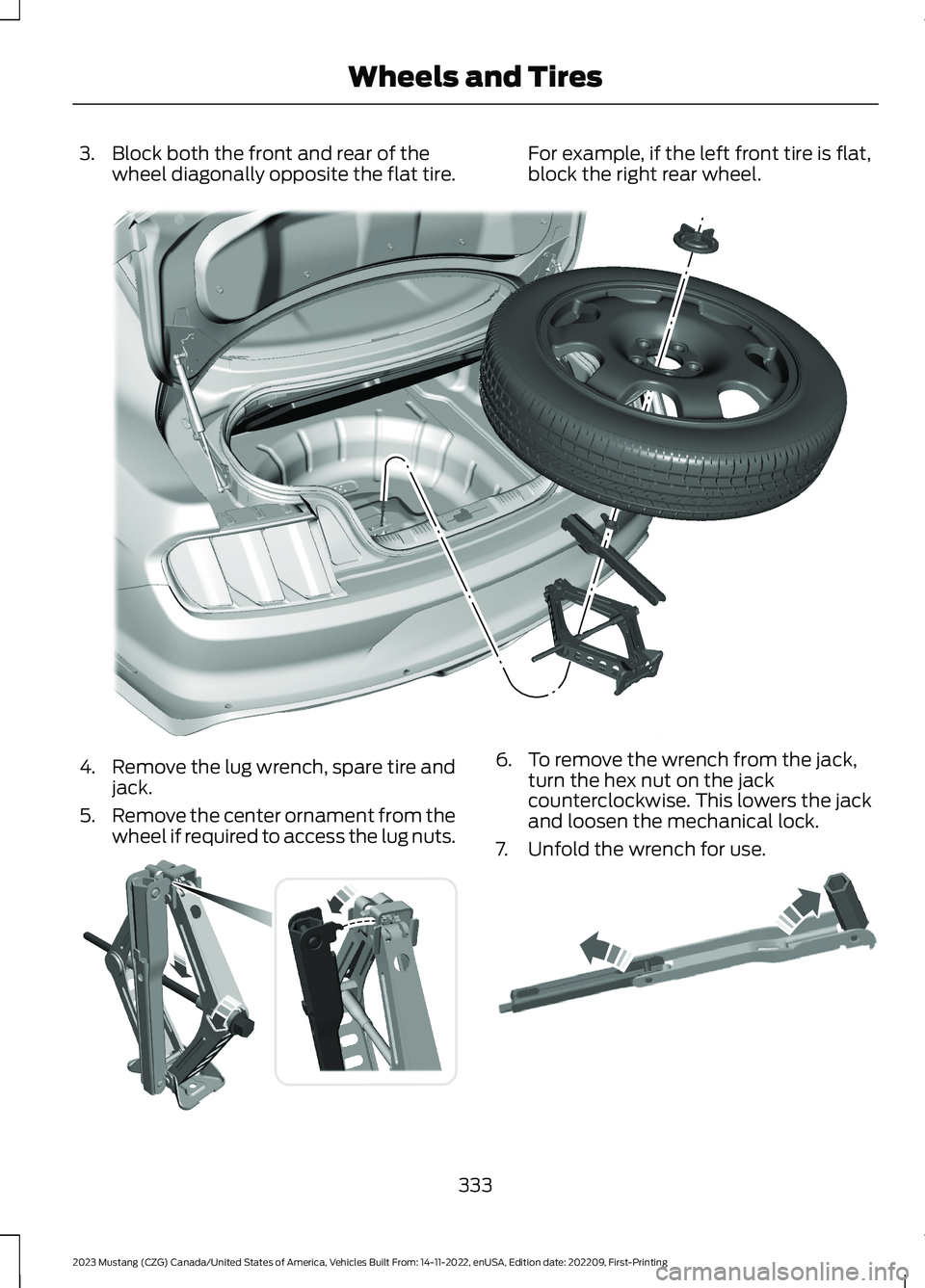
3.Block both the front and rear of thewheel diagonally opposite the flat tire.For example, if the left front tire is flat,block the right rear wheel.
4.Remove the lug wrench, spare tire andjack.
5.Remove the center ornament from thewheel if required to access the lug nuts.
6.To remove the wrench from the jack,turn the hex nut on the jackcounterclockwise. This lowers the jackand loosen the mechanical lock.
7.Unfold the wrench for use.
333
2023 Mustang (CZG) Canada/United States of America, Vehicles Built From: 14-11-2022, enUSA, Edition date: 202209, First-PrintingWheels and TiresE174938 E175694 E181744
Page 338 of 535
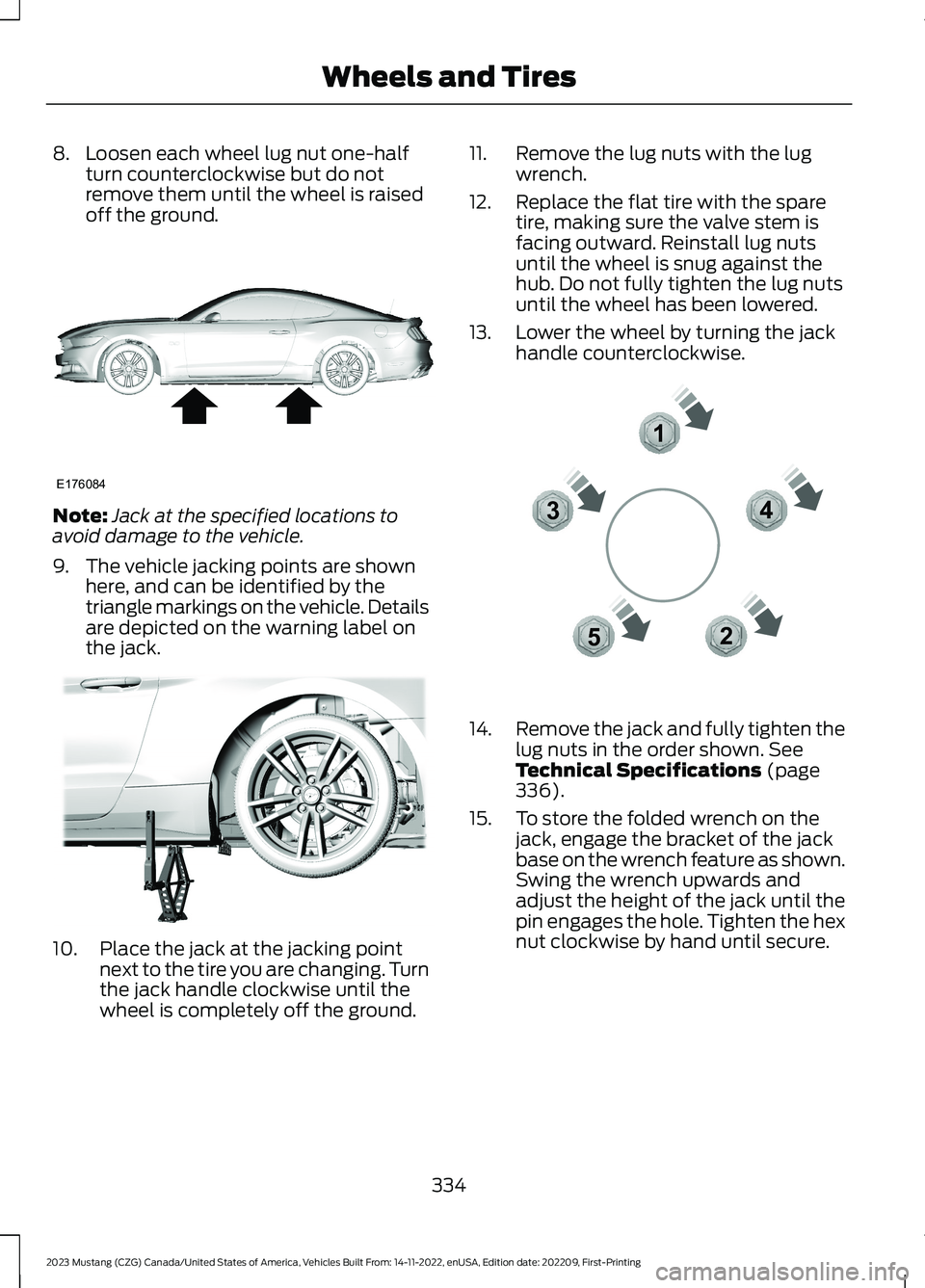
8.Loosen each wheel lug nut one-halfturn counterclockwise but do notremove them until the wheel is raisedoff the ground.
Note:Jack at the specified locations toavoid damage to the vehicle.
9.The vehicle jacking points are shownhere, and can be identified by thetriangle markings on the vehicle. Detailsare depicted on the warning label onthe jack.
10.Place the jack at the jacking pointnext to the tire you are changing. Turnthe jack handle clockwise until thewheel is completely off the ground.
11.Remove the lug nuts with the lugwrench.
12.Replace the flat tire with the sparetire, making sure the valve stem isfacing outward. Reinstall lug nutsuntil the wheel is snug against thehub. Do not fully tighten the lug nutsuntil the wheel has been lowered.
13.Lower the wheel by turning the jackhandle counterclockwise.
14.Remove the jack and fully tighten thelug nuts in the order shown. SeeTechnical Specifications (page336).
15.To store the folded wrench on thejack, engage the bracket of the jackbase on the wrench feature as shown.Swing the wrench upwards andadjust the height of the jack until thepin engages the hole. Tighten the hexnut clockwise by hand until secure.
334
2023 Mustang (CZG) Canada/United States of America, Vehicles Built From: 14-11-2022, enUSA, Edition date: 202209, First-PrintingWheels and TiresE176084 E174939 12345E306781
Page 339 of 535
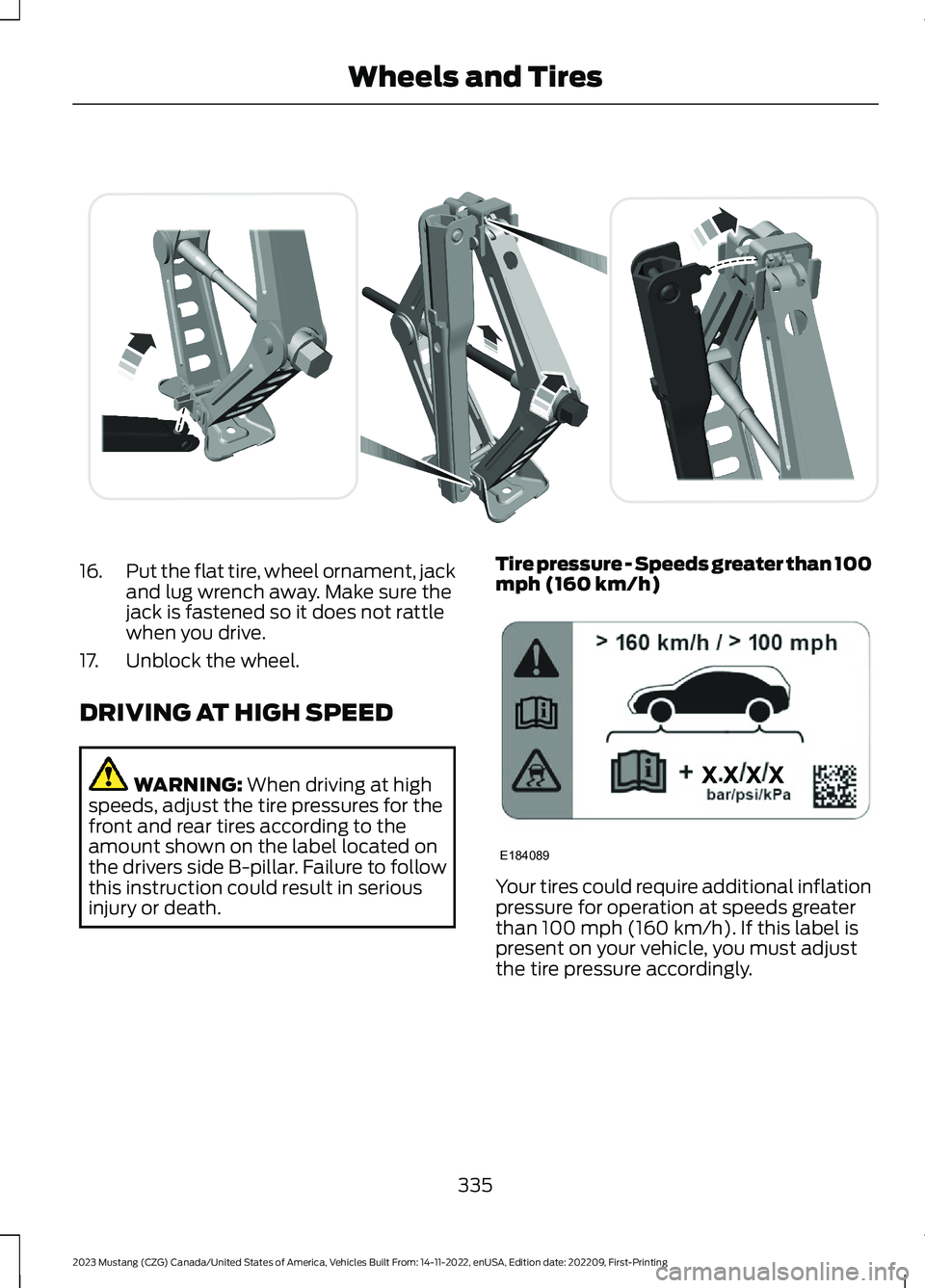
16.Put the flat tire, wheel ornament, jackand lug wrench away. Make sure thejack is fastened so it does not rattlewhen you drive.
17.Unblock the wheel.
DRIVING AT HIGH SPEED
WARNING: When driving at highspeeds, adjust the tire pressures for thefront and rear tires according to theamount shown on the label located onthe drivers side B-pillar. Failure to followthis instruction could result in seriousinjury or death.
Tire pressure - Speeds greater than 100mph (160 km/h)
Your tires could require additional inflationpressure for operation at speeds greaterthan 100 mph (160 km/h). If this label ispresent on your vehicle, you must adjustthe tire pressure accordingly.
335
2023 Mustang (CZG) Canada/United States of America, Vehicles Built From: 14-11-2022, enUSA, Edition date: 202209, First-PrintingWheels and TiresE176165 E184089
Page 340 of 535
TECHNICAL SPECIFICATIONS
Wheel Lug Nut Torque Specifications
WARNING: When you install a wheel, always remove any corrosion, dirt or foreignmaterials present on the mounting surfaces of the wheel or the surface of the wheelhub, brake drum or brake disc that contacts the wheel. Make sure to secure any fastenersthat attach the rotor to the hub so they do not interfere with the mounting surfaces ofthe wheel. Installing wheels without correct metal-to-metal contact at the wheelmounting surfaces can cause the wheel nuts to loosen and the wheel to come off whileyour vehicle is in motion, resulting in loss of vehicle control, personal injury or death.
lb.ft (Nm)Bolt Size
150 (204)M14 X 1.5
1 Torque specifications are for nut and bolt threads free of dirt and rust. Use only Fordrecommended replacement fasteners.
Retighten the lug nuts to the specified torque within 100 mi (160 km) after any wheeldisturbance (such as tire rotation, changing a flat tire, wheel removal).
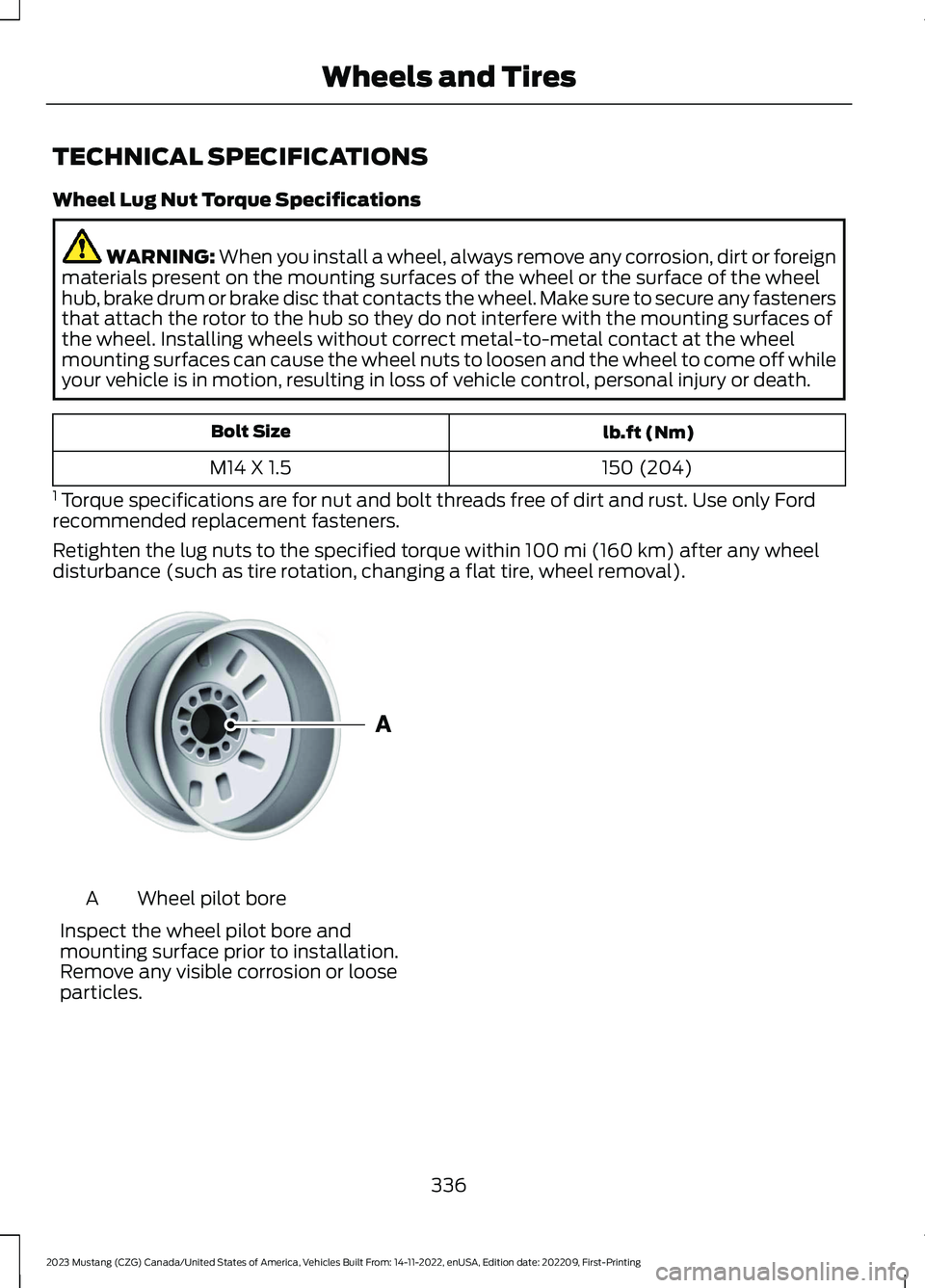
Wheel pilot boreA
Inspect the wheel pilot bore andmounting surface prior to installation.Remove any visible corrosion or looseparticles.
336
2023 Mustang (CZG) Canada/United States of America, Vehicles Built From: 14-11-2022, enUSA, Edition date: 202209, First-PrintingWheels and TiresE145950
Page 388 of 535
(read and unread), and call history,including history of calls when your cellularphone was not connected to the system.In addition, if you connect a media device,the system creates and retains an index ofsupported media content. The system alsorecords a short development log ofapproximately 10 minutes of all recentsystem activity. The log profile and othersystem data may be used to improve thesystem and help diagnose any problemsthat may occur.
The cellular profile, media device index,and development log will remain in thevehicle unless you delete them and aregenerally accessible only in the vehiclewhen you connect the cellular phone ormedia player. If you no longer plan to usethe system or the vehicle, we recommendyou perform a Master Reset to erase allstored information.
No one can access system data withoutspecial equipment and access to thevehicle's SYNC module. Ford MotorCompany and Ford of Canada will notaccess the system data for any purposeother than as described absent consent, a
court order, or where required by lawenforcement, other governmentauthorities, or other third parties actingwith lawful authority. Other parties mayseek to access the informationindependently of Ford Motor Company andFord of Canada. For further privacyinformation, see the section on 911 Assist.See SYNC™ Applications and Services(page 387).
USING VOICE RECOGNITION
This system helps you control manyfeatures using voice commands. Thisallows you to keep your hands on thewheel and focus on what is around you.
Initiating a Voice Session
Press the voice button. A list ofavailable voice commandsappear in the display.
Global Voice Commands
These voice commands are alwaysavailable. You can say them at any time.
Global Voice Commands
Gives you available commands you can useon the current screen.Help
Gives you a list of possible voicecommands.List of Commands
This command ends the voice session. Youcan also cancel a session by pressing seekup, seek down, or holding the voice buttonfor two or more seconds.
Cancel
384
2023 Mustang (CZG) Canada/United States of America, Vehicles Built From: 14-11-2022, enUSA, Edition date: 202209, First-PrintingSYNC™ (If Equipped)E142599
Page 391 of 535
__ is a dynamic listing, meaning that itcould be the name of anything, such as acontact or phone number.
Phone Controls
Use the phone buttons on your steeringwheel to answer, reject, or hang up a call.
Accessing Features through thePhone Menu
You can access your call history,phonebook, sent text messages, as wellas access phone and system settings.
1.Press the PHONE button to enter thephone menu.
2.Scroll through the menu to viewcontacts, text messages, and thephone dialer.
SYNC™ APPLICATIONS AND
SERVICES
•911 Assist: Can alert 911 in the event ofan emergency.
•SYNC AppLink: Allows you to connectto and use certain applications (if yourphone is compatible).
These features may require activation.Available AppLink enabled apps vary bymarket.
911 Assist
WARNING: Unless the 911 Assistsetting is set on before a crash, thesystem will not dial for help which coulddelay response time, potentiallyincreasing the risk of serious injury ordeath after a crash.
WARNING: Do not wait for 911Assist to make an emergency call if youcan do it yourself. Dial emergencyservices immediately to avoid delayedresponse time which could increase therisk of serious injury or death after acrash. If you do not hear 911 Assist withinfive seconds of the crash, the system orphone may be damaged ornon-functional.
WARNING: Always place yourphone in a secure location in your vehicleso it does not become a projectile or getdamaged in a crash. Failure to do so maycause serious injury to someone ordamage the phone which could prevent911 Assist from working properly.
Note:The SYNC 911 Assist feature must beset on before the incident.
Note:The SYNC 911 Assist feature onlyoperates in the U.S., Canada or in a territoryin which 911 is the emergency number.
Note:Before setting this feature on, makesure that you read the 911 Assist PrivacyNotice later in this section for importantinformation.
Note:If any user switches 911 Assist to onor off, that setting applies for all pairedphones. If 911 Assist is switched off, eithera voice message plays or a display messageor an icon comes on when your vehicle isstarted and after a previously paired phoneconnects.
Note:Every phone operates differently.While SYNC 911 Assist works with mostcellular phones, some may have troubleusing this feature.
387
2023 Mustang (CZG) Canada/United States of America, Vehicles Built From: 14-11-2022, enUSA, Edition date: 202209, First-PrintingSYNC™ (If Equipped)
Page 392 of 535
If a crash deploys an airbag, excluding kneeairbags and rear inflatable seatbelts, oractivates the fuel pump shut-off, yourvehicle may be able to contact emergencyservices by dialing 911 through a paired andconnected Bluetooth®-enabled phone.
See Supplementary Restraints System(page 48). Important information aboutairbag deployment is in this chapter.
See Roadside Emergencies (page 233).Important information about the fuel pumpshut-off is in this chapter.
Setting 911 Assist On or Off
Press the Settings button then select:
Action and DescriptionMenuItem
Select the desired option, onor off.911 Assist
To make sure that 911 Assist worksproperly:
•SYNC must be powered and workingproperly at the time of the incident andthroughout feature activation and use.
•The 911 Assist feature must be set onbefore the incident.
•You must pair and connect aBluetooth® enabled and compatiblecell phone to SYNC.
•A connected Bluetooth® enabledphone must have the ability to makeand maintain an outgoing call at thetime of the incident.
•A connected Bluetooth® enabledphone must have adequate networkcoverage, battery power and signalstrength.
•The vehicle must have battery powerand be located in the U.S., Canada orin a territory in which 911 is theemergency number.
In the Event of a Crash
Not all crashes deploy an airbag or activatethe fuel pump shut-off (the triggers for 911Assist). If a connected cell phone sustainsdamage or loses its connection to SYNCduring a crash, SYNC searches for and triesto connect to a previously paired cellphone; SYNC then attempts to call theemergency services.
Before making the call:
•SYNC provides a short window of time(about 10 seconds) to cancel the call.If you fail to cancel the call, SYNCattempts to dial 911.
•SYNC says the following, or a similarmessage: "SYNC will attempt to call911, to cancel the call, press Cancel onyour screen or press and hold thephone button on your steering wheel".
If you do not cancel the call, and SYNCmakes a successful call, a pre-recordedmessage plays for the 911 operator, andthen the occupant(s) in your vehicle areable to talk with the operator. Be preparedto provide your name, phone number andlocation immediately, because not all 911systems are capable of receiving thisinformation electronically.
911 Assist May Not Work If
•Your cellular phone or 911 Assisthardware sustains damage in a crash.
•The vehicle's battery or the SYNCsystem has no power.
•The phone(s) thrown from your vehicleare the ones paired and connected tothe system.
388
2023 Mustang (CZG) Canada/United States of America, Vehicles Built From: 14-11-2022, enUSA, Edition date: 202209, First-PrintingSYNC™ (If Equipped)
Page 393 of 535
911 Assist Privacy Notice
When you switch on 911 Assist, it maydisclose to emergency services that yourvehicle has been in a crash involving thedeployment of an airbag or activation ofthe fuel pump shut-off. Certain versions orupdates to 911 Assist may also be capableof electronically or verbally disclosing to911 operators your vehicle location or otherdetails about your vehicle or crash to assist911 operators to provide the mostappropriate emergency services. If you donot want to disclose this information, donot switch the feature on.
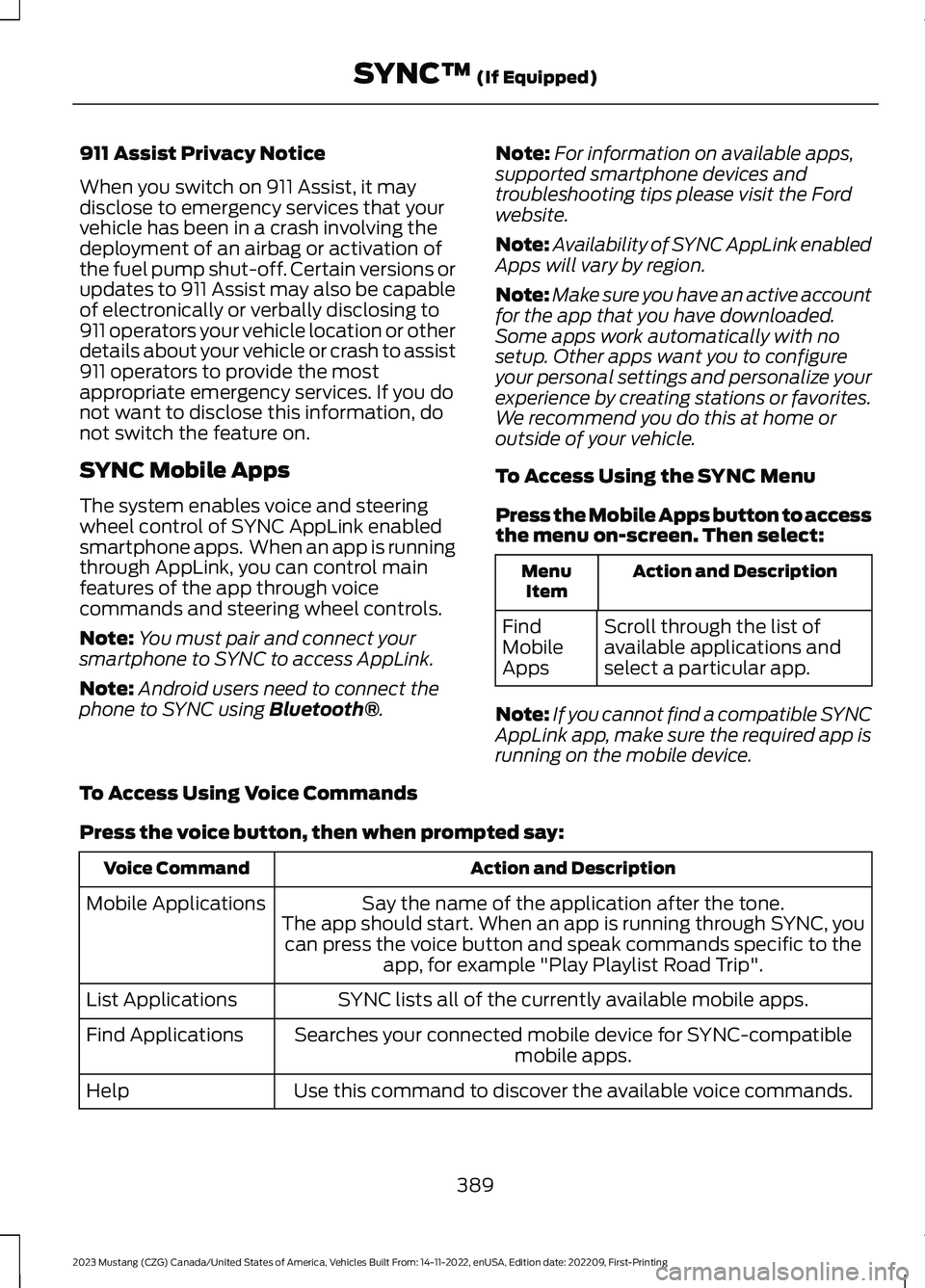
SYNC Mobile Apps
The system enables voice and steeringwheel control of SYNC AppLink enabledsmartphone apps. When an app is runningthrough AppLink, you can control mainfeatures of the app through voicecommands and steering wheel controls.
Note:You must pair and connect yoursmartphone to SYNC to access AppLink.
Note:Android users need to connect thephone to SYNC using Bluetooth®.
Note:For information on available apps,supported smartphone devices andtroubleshooting tips please visit the Fordwebsite.
Note:Availability of SYNC AppLink enabledApps will vary by region.
Note:Make sure you have an active accountfor the app that you have downloaded.Some apps work automatically with nosetup. Other apps want you to configureyour personal settings and personalize yourexperience by creating stations or favorites.We recommend you do this at home oroutside of your vehicle.
To Access Using the SYNC Menu
Press the Mobile Apps button to accessthe menu on-screen. Then select:
Action and DescriptionMenuItem
Scroll through the list ofavailable applications andselect a particular app.
FindMobileApps
Note:If you cannot find a compatible SYNCAppLink app, make sure the required app isrunning on the mobile device.
To Access Using Voice Commands
Press the voice button, then when prompted say:
Action and DescriptionVoice Command
Say the name of the application after the tone.The app should start. When an app is running through SYNC, youcan press the voice button and speak commands specific to theapp, for example "Play Playlist Road Trip".
Mobile Applications
SYNC lists all of the currently available mobile apps.List Applications
Searches your connected mobile device for SYNC-compatiblemobile apps.Find Applications
Use this command to discover the available voice commands.Help
389
2023 Mustang (CZG) Canada/United States of America, Vehicles Built From: 14-11-2022, enUSA, Edition date: 202209, First-PrintingSYNC™ (If Equipped)
Page 394 of 535
App Permissions
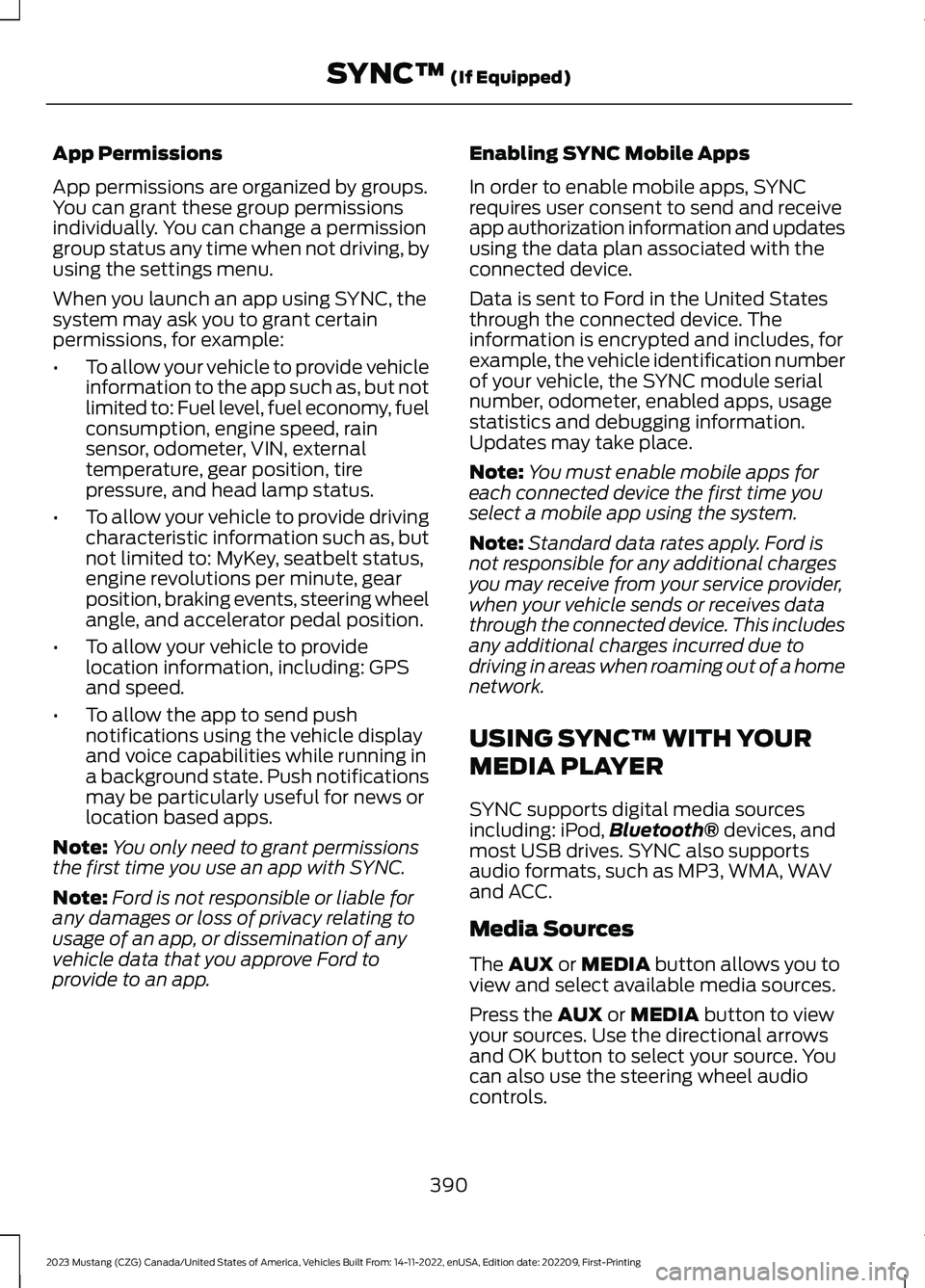
App permissions are organized by groups.You can grant these group permissionsindividually. You can change a permissiongroup status any time when not driving, byusing the settings menu.
When you launch an app using SYNC, thesystem may ask you to grant certainpermissions, for example:
•To allow your vehicle to provide vehicleinformation to the app such as, but notlimited to: Fuel level, fuel economy, fuelconsumption, engine speed, rainsensor, odometer, VIN, externaltemperature, gear position, tirepressure, and head lamp status.
•To allow your vehicle to provide drivingcharacteristic information such as, butnot limited to: MyKey, seatbelt status,engine revolutions per minute, gearposition, braking events, steering wheelangle, and accelerator pedal position.
•To allow your vehicle to providelocation information, including: GPSand speed.
•To allow the app to send pushnotifications using the vehicle displayand voice capabilities while running ina background state. Push notificationsmay be particularly useful for news orlocation based apps.
Note:You only need to grant permissionsthe first time you use an app with SYNC.
Note:Ford is not responsible or liable forany damages or loss of privacy relating tousage of an app, or dissemination of anyvehicle data that you approve Ford toprovide to an app.
Enabling SYNC Mobile Apps
In order to enable mobile apps, SYNCrequires user consent to send and receiveapp authorization information and updatesusing the data plan associated with theconnected device.
Data is sent to Ford in the United Statesthrough the connected device. Theinformation is encrypted and includes, forexample, the vehicle identification numberof your vehicle, the SYNC module serialnumber, odometer, enabled apps, usagestatistics and debugging information.Updates may take place.
Note:You must enable mobile apps foreach connected device the first time youselect a mobile app using the system.
Note:Standard data rates apply. Ford isnot responsible for any additional chargesyou may receive from your service provider,when your vehicle sends or receives datathrough the connected device. This includesany additional charges incurred due todriving in areas when roaming out of a homenetwork.
USING SYNC™ WITH YOUR
MEDIA PLAYER
SYNC supports digital media sourcesincluding: iPod,Bluetooth® devices, andmost USB drives. SYNC also supportsaudio formats, such as MP3, WMA, WAVand ACC.
Media Sources
The AUX or MEDIA button allows you toview and select available media sources.
Press the AUX or MEDIA button to viewyour sources. Use the directional arrowsand OK button to select your source. Youcan also use the steering wheel audiocontrols.
390
2023 Mustang (CZG) Canada/United States of America, Vehicles Built From: 14-11-2022, enUSA, Edition date: 202209, First-PrintingSYNC™ (If Equipped)