wheel FORD MUSTANG 2023 Owners Manual
[x] Cancel search | Manufacturer: FORD, Model Year: 2023, Model line: MUSTANG, Model: FORD MUSTANG 2023Pages: 535, PDF Size: 15.46 MB
Page 406 of 535
Switching Automatic System UpdatesOn
Select the settings option on thefeature bar.
1.Select Automatic Updates.
2.Switch Automatic System Updateson.
The system is now set to check for andreceive system updates when it isconnected to a Wi-Fi network.
Note:You can use the system when adownload is in progress.
Note:If the system is disconnected fromthe Wi-Fi network when a download is inprogress, the download continues the nexttime the system is connected to a Wi-Finetwork.
Additional Information andAssistance
For additional information and assistance,we recommend that you contact anauthorized dealer or refer to the local Fordwebsite.
USING VOICE RECOGNITION
The SYNC 3 system allows you to use voicecommands to control features like audioand climate controls. By using voicecommands, you can keep your hands onthe wheel and your eyes on the road.
You can access each feature controlled bySYNC 3 through a variety of commands.
To activate the SYNC 3 voicecommands push the voicebutton on the steering wheel andwait for the prompt.
___ is a dynamic listing, meaning that it canbe the name of anything, such as artist, thename of contact or number. The contextand the description of the command tellyou what to say for this dynamic option.
There are some commands that work forevery feature, these commands are:
Action and DescriptionVoice Command
Brings you to the main menu.Main Menu
Returns you to the previous screen.Go back
Ends the voice session.Cancel
Gives you a list of possible voice commands.List of Commands
You can name any feature and the system gives a list ofcommands available for the feature. For example, you couldsay:
___ List of Commands
Phone List of Commands
Navigation List of Commands
402
2023 Mustang (CZG) Canada/United States of America, Vehicles Built From: 14-11-2022, enUSA, Edition date: 202209, First-PrintingSYNC™ 3 (If Equipped)E280315 E142599
Page 424 of 535
A/C: Touch to switch the air conditioningon or off. Use A/C with recirculated air toimprove cooling performance andefficiency.
Note:In certain conditions, such asmaximum defrost, the air conditioningcompressor may continue to operate eventhough you switch off the air conditioning.
Switching the Climate Control Onand Off
Touch the button.
Switching the Climate ControlledSeats On and Off
Touch the button to cyclethrough the various climatecontrolled seat settings.
Switching Dual Zone Mode On andOff
Touch the button to switch ontemperature control for theright-hand side of the vehicle.
Switching the Heated ExteriorMirrors On and Off
Touch the button.
Switching the Heated WindshieldOn and Off
Touch the button to clear thewindshield of thin ice and fog.The heated windshield turns offafter a short period of time.
Switching the Heated RearWindow On and Off
Touch the button to clear therear window of thin ice and fog.
Switching the Heated Seats Onand Off
Touch the button to cyclethrough the various heatsettings.
Switching the Heated SteeringWheel On and Off
Touch the button.
Switching Maximum AirConditioning On and Off
Touch the button for maximumcooling.
Recirculated air flows through theinstrument panel air vents, air conditioningturns on and the blower motor adjusts tothe highest speed.
Switching Maximum Defrost Onand Off
Touch the button for maximumdefrosting.
Air flows through the windshield air vents,and the blower motor adjusts to thehighest speed.
You can also use this setting to defog andclear the windshield of a thin covering ofice.
Note:To prevent window fogging, youcannot select recirculated air whenmaximum defrost is on.
420
2023 Mustang (CZG) Canada/United States of America, Vehicles Built From: 14-11-2022, enUSA, Edition date: 202209, First-PrintingSYNC™ 3 (If Equipped) E265282 E265280 E266189 E184884 E256621
Page 432 of 535
SiriusXM Traffic and Travel Link (If
Equipped)
SiriusXM Traffic and Travel Link is availableon vehicles equipped with navigation andonly in select markets. You must activateand subscribe to receive SiriusXM Trafficand Travel Link information. It helps youlocate the best gas prices, find movielistings, get current traffic alerts, view theweather map, get accurate ski conditionsand see current sports scores.
The system calculates a reasonableefficient route based on available speedlimits, traffic, and road conditions. You mayknow a local shortcut that is more efficientat a given time than the route provided bySYNC 3, but you should expect a slightdifference in minutes or miles with theSYNC 3 route.
Michelin Travel Guide (If Equipped)
The Michelin travel guide is a service thatprovides additional information aboutcertain places of interest, for examplerestaurants, hotels and tourist sites. Pointsof interest that have Michelin travel guideinformation display a button to show youmore information. Push the button to seethe additional information. If you havepaired your phone with the system, youcan press the phone button to directlyestablish a call with the selected point ofinterest.
Navigation Map Accuracy andUpdates
HERE is the digital map provider for thenavigation application. If you find map dataerrors, you may report them directly toHERE by going to www.here.com. HEREevaluates all reported map errors andresponds with the result of theirinvestigation by e-mail.
The navigation system map data maycontain inaccurate or incompleteinformation due to the passage of time,changing circumstances, sources used andthe nature of collecting comprehensivegeographic data, any of which may lead toincorrect results. Inaccurate speed limitinformation, turn restrictions and otherroad attributes may affect the determinedroute and associated guidance
Annual navigation map updates areavailable for purchase through yourdealership. Depending on your purchaseagreement, you might be eligible for a freemap update. You can choose to downloadthe map data update onto a USB, order aUSB, or use Wi-Fi to deliver automaticupdates. To update your map data overWi-Fi, your vehicle must be connected toa Wi-Fi access point. Map data files arelarge, so it is highly recommended toperform the update when free Wi-Fi isavailable otherwise high data rates mayapply. For USB updates, free map updateeligibility, and other details, contactdealers at 1-866-462-8837 in the UnitedStates and Canada or 800-557-5539 inMexico or visit our local website for moreinformation.
APPS
The system allows you interact with selectmobile apps while keeping your eyes onthe road. Voice commands, your steeringwheel buttons, or a quick tap on yourtouchscreen give you advanced control ofcompatible mobile apps. You can alsostream your favorite music or podcasts,share your time of arrival with friends, andkeep connected safely.
428
2023 Mustang (CZG) Canada/United States of America, Vehicles Built From: 14-11-2022, enUSA, Edition date: 202209, First-PrintingSYNC™ 3 (If Equipped)
Page 437 of 535
SYNC™ 3 TROUBLESHOOTING
Voice Recognition
Possible Cause and ResolutionSymptom
The system does not under-stand what I am saying.–You might not be using supported voice commands.
•See Using Voice Recognition (page 402).
•For a complete list of voice commands, refer to ourwebsite.
–You might be speaking too soon.
•Wait for the voice prompt before you speak.
The system does not under-stand the name of a track orartist.
–Device limitation.Bluetooth® does not support voicecommands.
•Connect your device to a USB port.
•If you have an iOS device, press and hold the voicecontrol button on the steering wheel to use Siri toplay specific tracks.
–You might not be using supported voice commands.
•See Using Voice Recognition (page 402).
•For a complete list of voice commands, refer to ourwebsite.
–You might not be saying the name exactly as it appearson your device.
•Say the name of the track or artist exactly as itappears on your device. Spell out any abbreviationsin the name.
–The name contains special characters, for example *,- or +.
•Rename the files on your device or use the touch-screen to select and play the track.
The system does not under-stand the name of a contactin the phonebook on mydevice and calls the wrongcontact.
–You might not be saying the name exactly as it appearson your device.
•Say the first and last name of the contact exactlyas it appears on your device. Spell out any abbrevi-ations in the name.
–The name contains special characters, for example *,- or +.
•Rename the contact on your device or use thetouchscreen to select and call the contact.
433
2023 Mustang (CZG) Canada/United States of America, Vehicles Built From: 14-11-2022, enUSA, Edition date: 202209, First-PrintingSYNC™ 3 (If Equipped)
Page 439 of 535
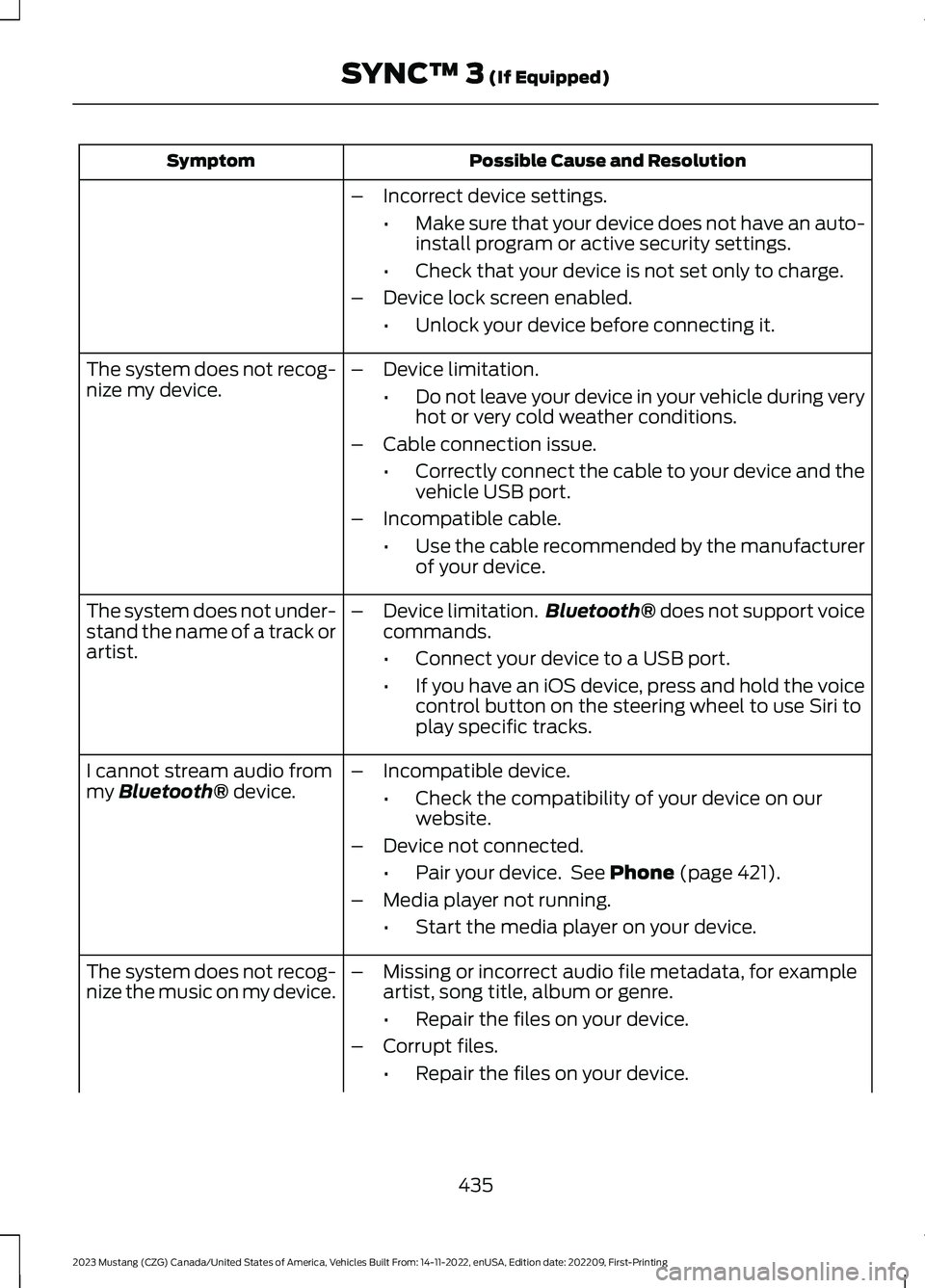
Possible Cause and ResolutionSymptom
–Incorrect device settings.
•Make sure that your device does not have an auto-install program or active security settings.
•Check that your device is not set only to charge.
–Device lock screen enabled.
•Unlock your device before connecting it.
The system does not recog-nize my device.–Device limitation.
•Do not leave your device in your vehicle during veryhot or very cold weather conditions.
–Cable connection issue.
•Correctly connect the cable to your device and thevehicle USB port.
–Incompatible cable.
•Use the cable recommended by the manufacturerof your device.
The system does not under-stand the name of a track orartist.
–Device limitation.Bluetooth® does not support voicecommands.
•Connect your device to a USB port.
•If you have an iOS device, press and hold the voicecontrol button on the steering wheel to use Siri toplay specific tracks.
I cannot stream audio frommy Bluetooth® device.–Incompatible device.
•Check the compatibility of your device on ourwebsite.
–Device not connected.
•Pair your device. See Phone (page 421).
–Media player not running.
•Start the media player on your device.
The system does not recog-nize the music on my device.–Missing or incorrect audio file metadata, for exampleartist, song title, album or genre.
•Repair the files on your device.
–Corrupt files.
•Repair the files on your device.
435
2023 Mustang (CZG) Canada/United States of America, Vehicles Built From: 14-11-2022, enUSA, Edition date: 202209, First-PrintingSYNC™ 3 (If Equipped)
Page 458 of 535
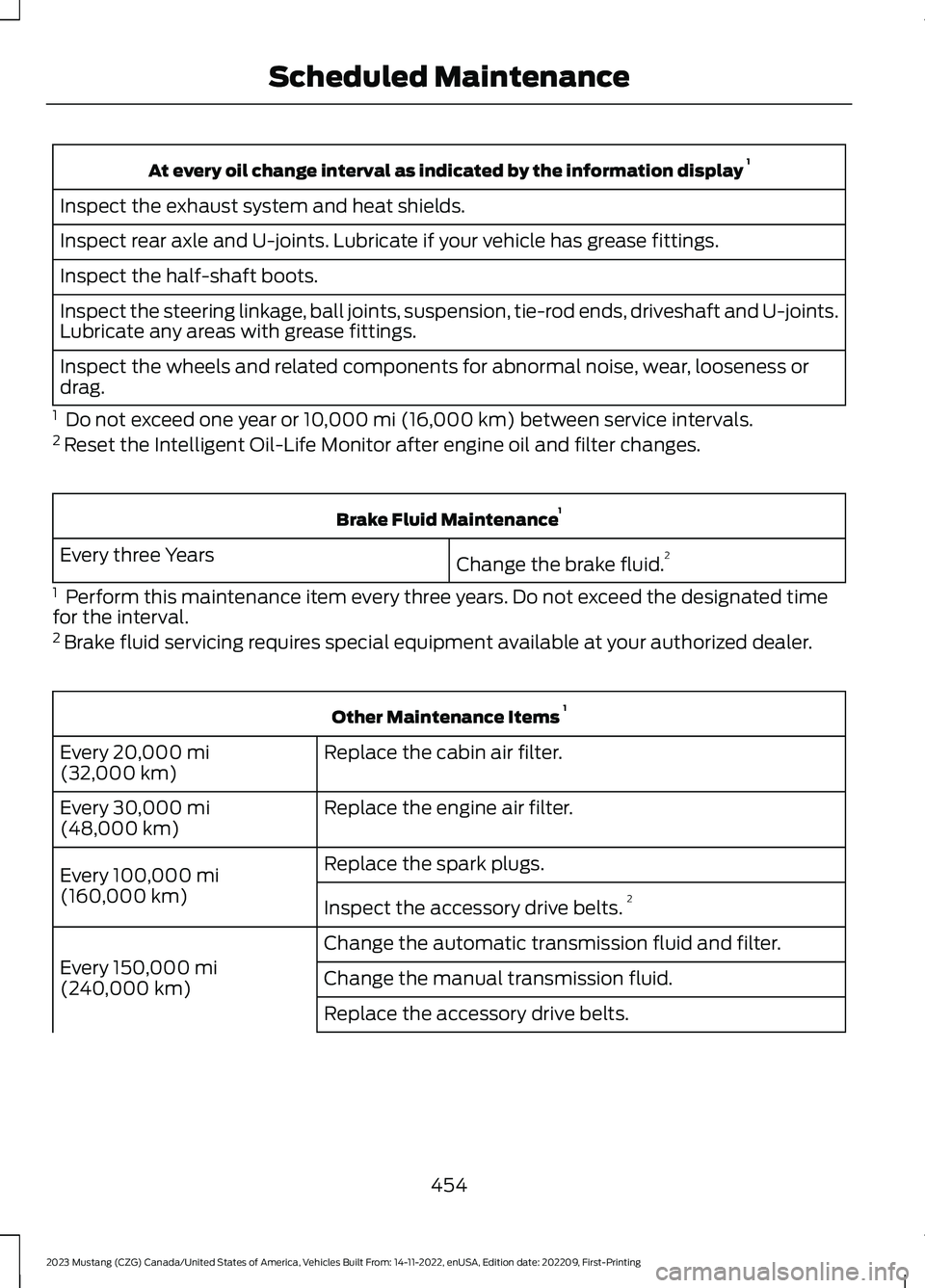
At every oil change interval as indicated by the information display 1
Inspect the exhaust system and heat shields.
Inspect rear axle and U-joints. Lubricate if your vehicle has grease fittings.
Inspect the half-shaft boots.
Inspect the steering linkage, ball joints, suspension, tie-rod ends, driveshaft and U-joints.Lubricate any areas with grease fittings.
Inspect the wheels and related components for abnormal noise, wear, looseness ordrag.
1 Do not exceed one year or 10,000 mi (16,000 km) between service intervals.2 Reset the Intelligent Oil-Life Monitor after engine oil and filter changes.
Brake Fluid Maintenance1
Change the brake fluid.2Every three Years
1 Perform this maintenance item every three years. Do not exceed the designated timefor the interval.2 Brake fluid servicing requires special equipment available at your authorized dealer.
Other Maintenance Items 1
Replace the cabin air filter.Every 20,000 mi(32,000 km)
Replace the engine air filter.Every 30,000 mi(48,000 km)
Replace the spark plugs.Every 100,000 mi(160,000 km)Inspect the accessory drive belts.2
Change the automatic transmission fluid and filter.
Every 150,000 mi(240,000 km)Change the manual transmission fluid.
Replace the accessory drive belts.
454
2023 Mustang (CZG) Canada/United States of America, Vehicles Built From: 14-11-2022, enUSA, Edition date: 202209, First-PrintingScheduled Maintenance
Page 460 of 535
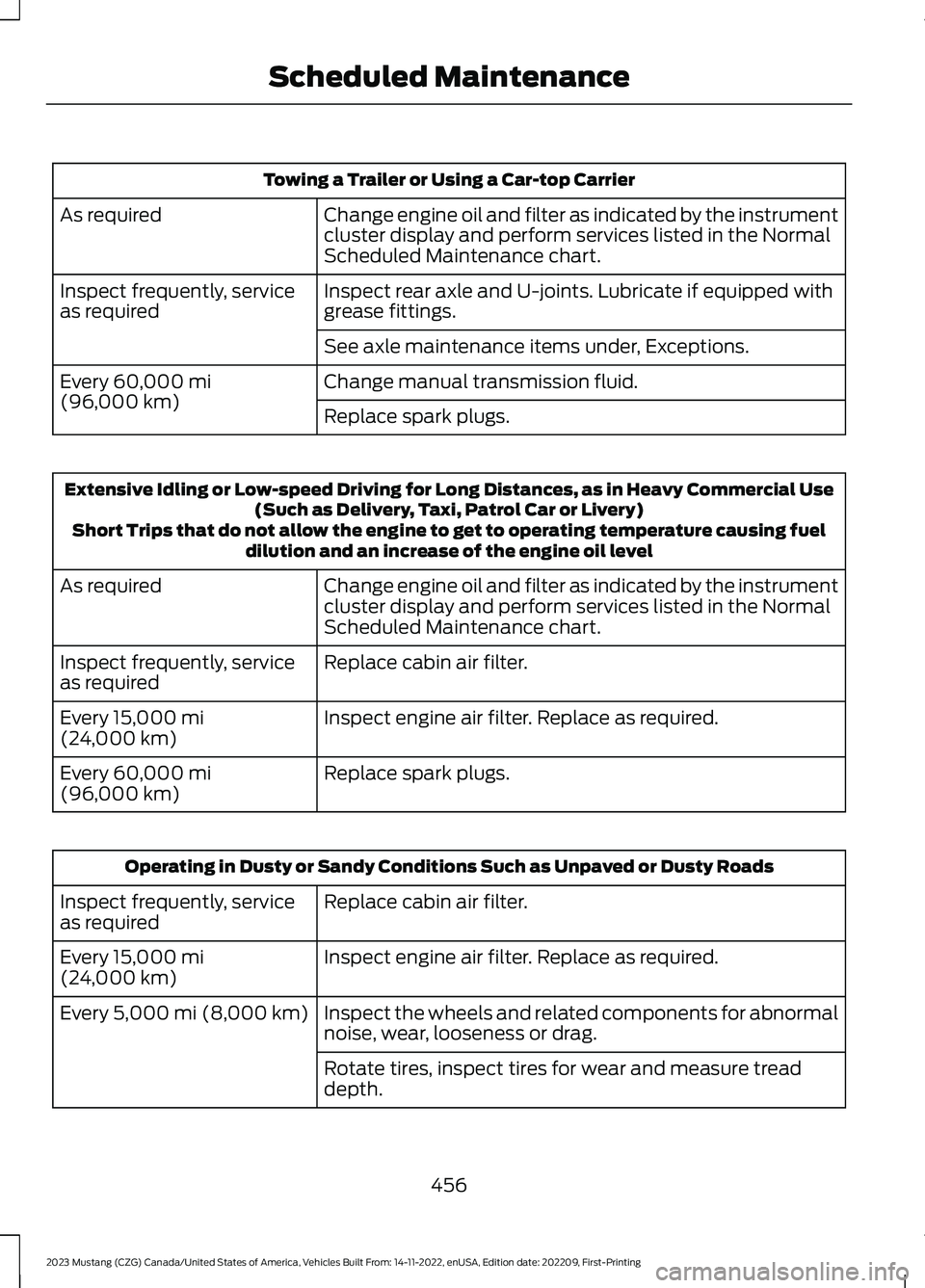
Towing a Trailer or Using a Car-top Carrier
Change engine oil and filter as indicated by the instrumentcluster display and perform services listed in the NormalScheduled Maintenance chart.
As required
Inspect rear axle and U-joints. Lubricate if equipped withgrease fittings.Inspect frequently, serviceas required
See axle maintenance items under, Exceptions.
Change manual transmission fluid.Every 60,000 mi(96,000 km)Replace spark plugs.
Extensive Idling or Low-speed Driving for Long Distances, as in Heavy Commercial Use(Such as Delivery, Taxi, Patrol Car or Livery)Short Trips that do not allow the engine to get to operating temperature causing fueldilution and an increase of the engine oil level
Change engine oil and filter as indicated by the instrumentcluster display and perform services listed in the NormalScheduled Maintenance chart.
As required
Replace cabin air filter.Inspect frequently, serviceas required
Inspect engine air filter. Replace as required.Every 15,000 mi(24,000 km)
Replace spark plugs.Every 60,000 mi(96,000 km)
Operating in Dusty or Sandy Conditions Such as Unpaved or Dusty Roads
Replace cabin air filter.Inspect frequently, serviceas required
Inspect engine air filter. Replace as required.Every 15,000 mi(24,000 km)
Inspect the wheels and related components for abnormalnoise, wear, looseness or drag.Every 5,000 mi (8,000 km)
Rotate tires, inspect tires for wear and measure treaddepth.
456
2023 Mustang (CZG) Canada/United States of America, Vehicles Built From: 14-11-2022, enUSA, Edition date: 202209, First-PrintingScheduled Maintenance
Page 506 of 535
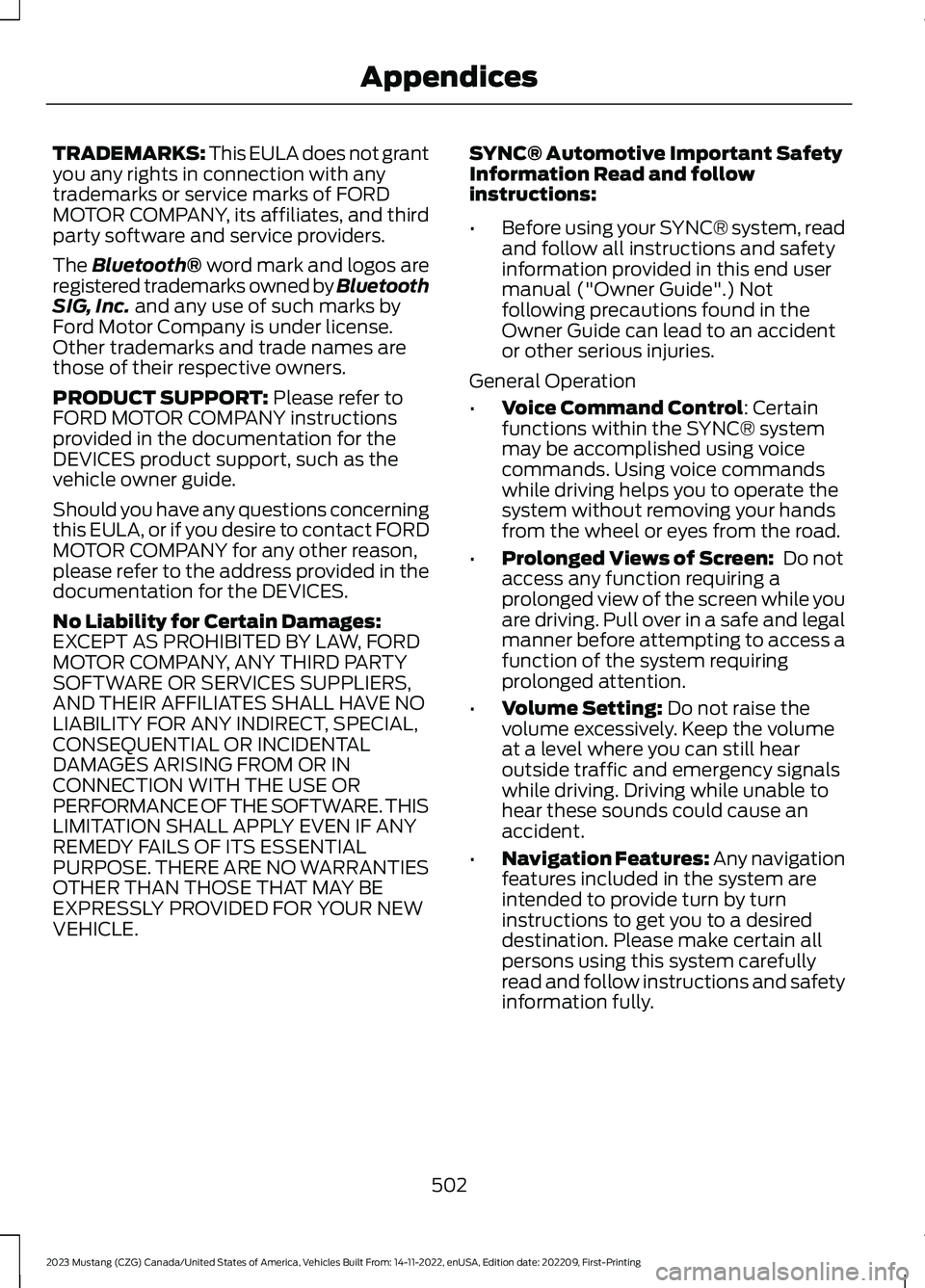
TRADEMARKS: This EULA does not grantyou any rights in connection with anytrademarks or service marks of FORDMOTOR COMPANY, its affiliates, and thirdparty software and service providers.
The Bluetooth® word mark and logos areregistered trademarks owned by BluetoothSIG, Inc. and any use of such marks byFord Motor Company is under license.Other trademarks and trade names arethose of their respective owners.
PRODUCT SUPPORT: Please refer toFORD MOTOR COMPANY instructionsprovided in the documentation for theDEVICES product support, such as thevehicle owner guide.
Should you have any questions concerningthis EULA, or if you desire to contact FORDMOTOR COMPANY for any other reason,please refer to the address provided in thedocumentation for the DEVICES.
No Liability for Certain Damages:EXCEPT AS PROHIBITED BY LAW, FORDMOTOR COMPANY, ANY THIRD PARTYSOFTWARE OR SERVICES SUPPLIERS,AND THEIR AFFILIATES SHALL HAVE NOLIABILITY FOR ANY INDIRECT, SPECIAL,CONSEQUENTIAL OR INCIDENTALDAMAGES ARISING FROM OR INCONNECTION WITH THE USE ORPERFORMANCE OF THE SOFTWARE. THISLIMITATION SHALL APPLY EVEN IF ANYREMEDY FAILS OF ITS ESSENTIALPURPOSE. THERE ARE NO WARRANTIESOTHER THAN THOSE THAT MAY BEEXPRESSLY PROVIDED FOR YOUR NEWVEHICLE.
SYNC® Automotive Important SafetyInformation Read and followinstructions:
•Before using your SYNC® system, readand follow all instructions and safetyinformation provided in this end usermanual ("Owner Guide".) Notfollowing precautions found in theOwner Guide can lead to an accidentor other serious injuries.
General Operation
•Voice Command Control: Certainfunctions within the SYNC® systemmay be accomplished using voicecommands. Using voice commandswhile driving helps you to operate thesystem without removing your handsfrom the wheel or eyes from the road.
•Prolonged Views of Screen: Do notaccess any function requiring aprolonged view of the screen while youare driving. Pull over in a safe and legalmanner before attempting to access afunction of the system requiringprolonged attention.
•Volume Setting: Do not raise thevolume excessively. Keep the volumeat a level where you can still hearoutside traffic and emergency signalswhile driving. Driving while unable tohear these sounds could cause anaccident.
•Navigation Features: Any navigationfeatures included in the system areintended to provide turn by turninstructions to get you to a desireddestination. Please make certain allpersons using this system carefullyread and follow instructions and safetyinformation fully.
502
2023 Mustang (CZG) Canada/United States of America, Vehicles Built From: 14-11-2022, enUSA, Edition date: 202209, First-PrintingAppendices
Page 529 of 535
A
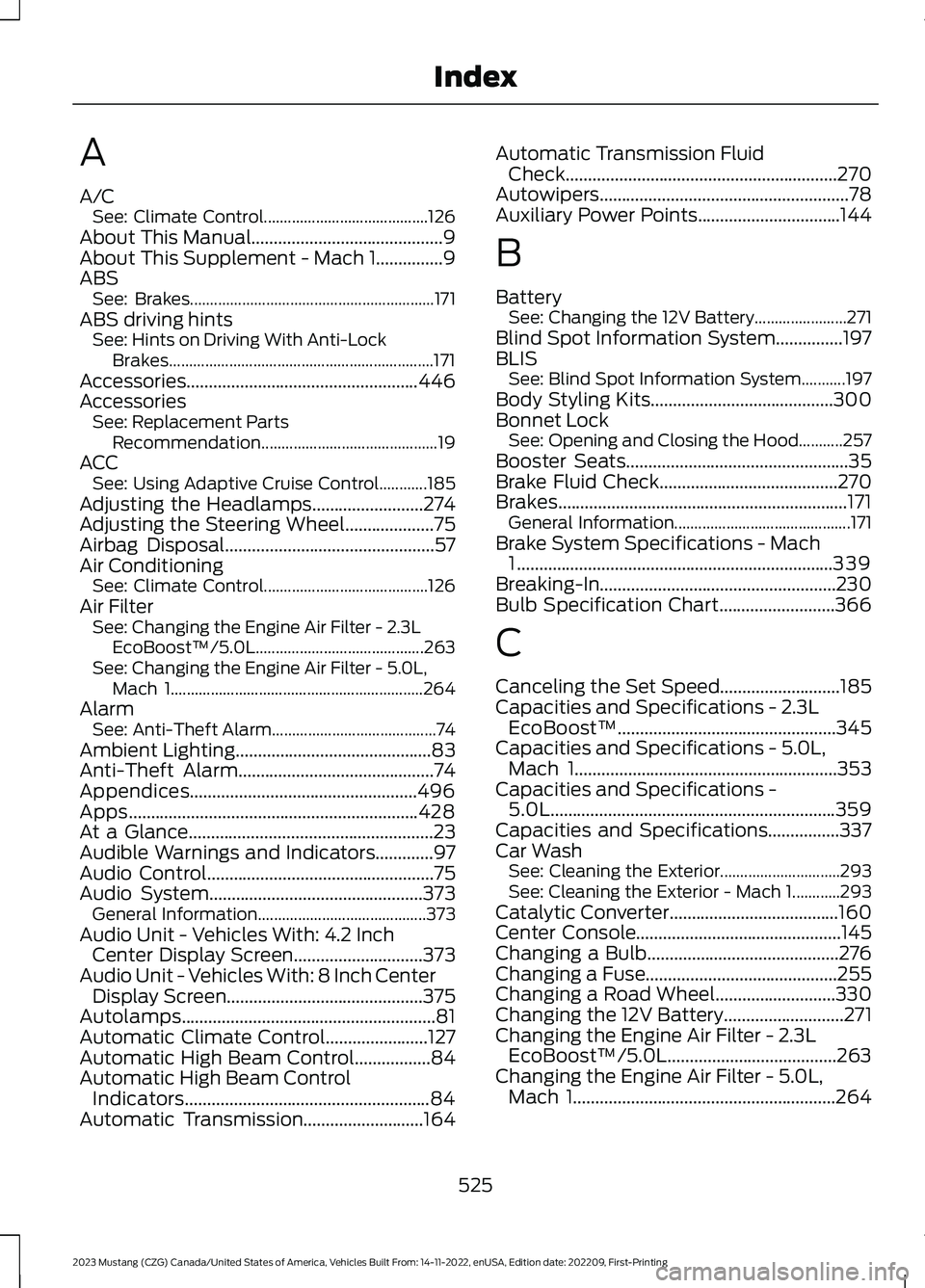
A/CSee: Climate Control.........................................126About This Manual...........................................9About This Supplement - Mach 1...............9ABSSee: Brakes.............................................................171ABS driving hintsSee: Hints on Driving With Anti-LockBrakes..................................................................171Accessories....................................................446AccessoriesSee: Replacement PartsRecommendation............................................19ACCSee: Using Adaptive Cruise Control............185Adjusting the Headlamps.........................274Adjusting the Steering Wheel....................75Airbag Disposal...............................................57Air ConditioningSee: Climate Control.........................................126Air FilterSee: Changing the Engine Air Filter - 2.3LEcoBoost™/5.0L..........................................263See: Changing the Engine Air Filter - 5.0L,Mach 1...............................................................264AlarmSee: Anti-Theft Alarm.........................................74Ambient Lighting............................................83Anti-Theft Alarm............................................74Appendices...................................................496Apps.................................................................428At a Glance.......................................................23Audible Warnings and Indicators.............97Audio Control...................................................75Audio System................................................373General Information..........................................373Audio Unit - Vehicles With: 4.2 InchCenter Display Screen.............................373Audio Unit - Vehicles With: 8 Inch CenterDisplay Screen............................................375Autolamps.........................................................81Automatic Climate Control.......................127Automatic High Beam Control.................84Automatic High Beam ControlIndicators.......................................................84Automatic Transmission...........................164
Automatic Transmission FluidCheck.............................................................270Autowipers........................................................78Auxiliary Power Points................................144
B
BatterySee: Changing the 12V Battery.......................271Blind Spot Information System...............197BLISSee: Blind Spot Information System...........197Body Styling Kits.........................................300Bonnet LockSee: Opening and Closing the Hood...........257Booster Seats..................................................35Brake Fluid Check........................................270Brakes.................................................................171General Information............................................171Brake System Specifications - Mach1.......................................................................339Breaking-In.....................................................230Bulb Specification Chart..........................366
C
Canceling the Set Speed...........................185Capacities and Specifications - 2.3LEcoBoost™.................................................345Capacities and Specifications - 5.0L,Mach 1...........................................................353Capacities and Specifications -5.0L................................................................359Capacities and Specifications................337Car WashSee: Cleaning the Exterior..............................293See: Cleaning the Exterior - Mach 1............293Catalytic Converter......................................160Center Console..............................................145Changing a Bulb...........................................276Changing a Fuse...........................................255Changing a Road Wheel...........................330Changing the 12V Battery...........................271Changing the Engine Air Filter - 2.3LEcoBoost™/5.0L......................................263Changing the Engine Air Filter - 5.0L,Mach 1...........................................................264
525
2023 Mustang (CZG) Canada/United States of America, Vehicles Built From: 14-11-2022, enUSA, Edition date: 202209, First-PrintingIndex
Page 530 of 535
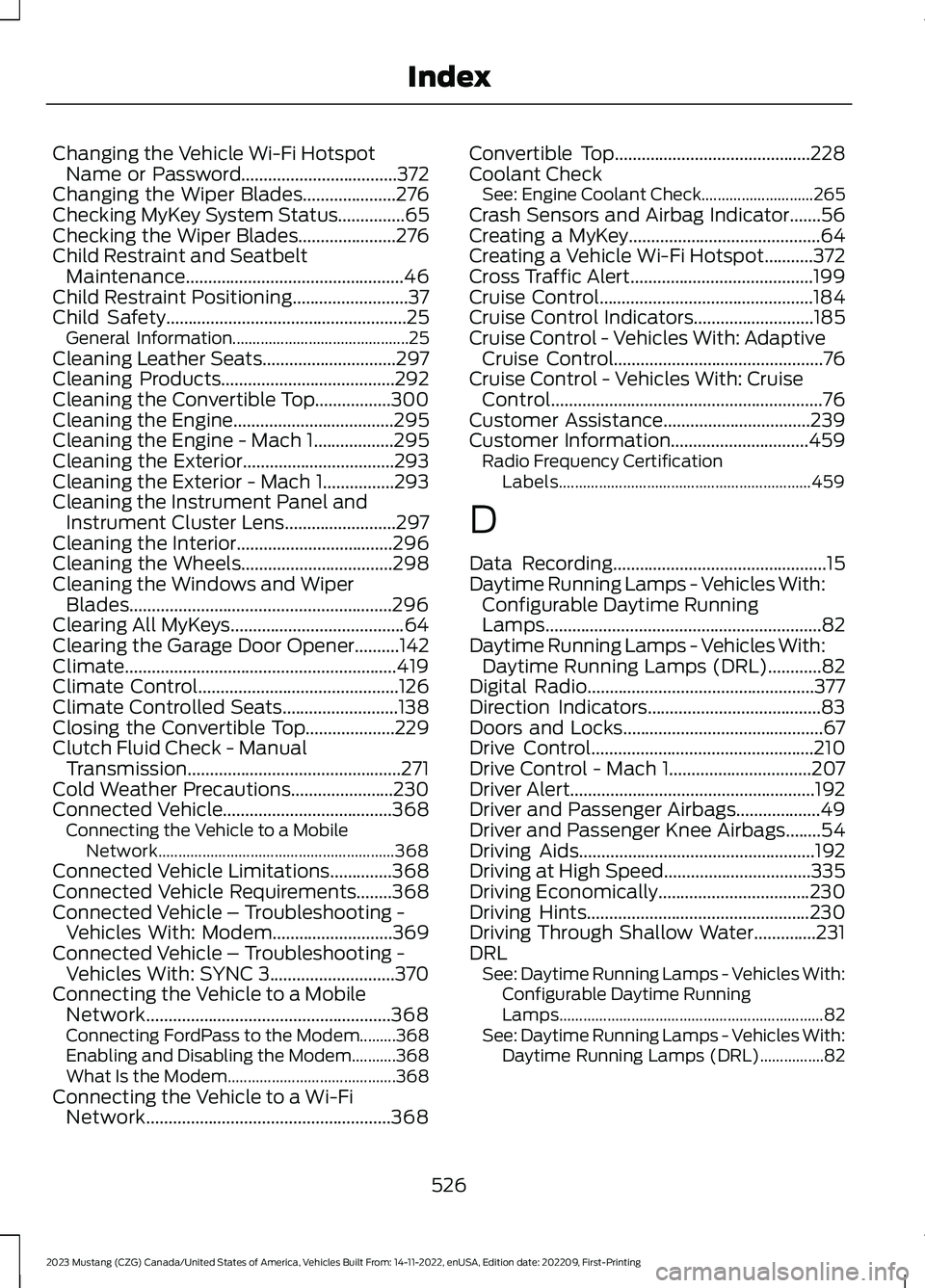
Changing the Vehicle Wi-Fi HotspotName or Password...................................372Changing the Wiper Blades.....................276Checking MyKey System Status...............65Checking the Wiper Blades......................276Child Restraint and SeatbeltMaintenance.................................................46Child Restraint Positioning..........................37Child Safety......................................................25General Information............................................25Cleaning Leather Seats..............................297Cleaning Products.......................................292Cleaning the Convertible Top.................300Cleaning the Engine....................................295Cleaning the Engine - Mach 1..................295Cleaning the Exterior..................................293Cleaning the Exterior - Mach 1................293Cleaning the Instrument Panel andInstrument Cluster Lens.........................297Cleaning the Interior...................................296Cleaning the Wheels..................................298Cleaning the Windows and WiperBlades...........................................................296Clearing All MyKeys.......................................64Clearing the Garage Door Opener..........142Climate.............................................................419Climate Control.............................................126Climate Controlled Seats..........................138Closing the Convertible Top....................229Clutch Fluid Check - ManualTransmission................................................271Cold Weather Precautions.......................230Connected Vehicle......................................368Connecting the Vehicle to a MobileNetwork...........................................................368Connected Vehicle Limitations..............368Connected Vehicle Requirements........368Connected Vehicle – Troubleshooting -Vehicles With: Modem...........................369Connected Vehicle – Troubleshooting -Vehicles With: SYNC 3............................370Connecting the Vehicle to a MobileNetwork.......................................................368Connecting FordPass to the Modem.........368Enabling and Disabling the Modem...........368What Is the Modem..........................................368Connecting the Vehicle to a Wi-FiNetwork.......................................................368
Convertible Top............................................228Coolant CheckSee: Engine Coolant Check............................265Crash Sensors and Airbag Indicator.......56Creating a MyKey...........................................64Creating a Vehicle Wi-Fi Hotspot...........372Cross Traffic Alert.........................................199Cruise Control................................................184Cruise Control Indicators...........................185Cruise Control - Vehicles With: AdaptiveCruise Control...............................................76Cruise Control - Vehicles With: CruiseControl.............................................................76Customer Assistance.................................239Customer Information...............................459Radio Frequency CertificationLabels...............................................................459
D
Data Recording................................................15Daytime Running Lamps - Vehicles With:Configurable Daytime RunningLamps..............................................................82Daytime Running Lamps - Vehicles With:Daytime Running Lamps (DRL)............82Digital Radio...................................................377Direction Indicators.......................................83Doors and Locks.............................................67Drive Control..................................................210Drive Control - Mach 1................................207Driver Alert.......................................................192Driver and Passenger Airbags...................49Driver and Passenger Knee Airbags........54Driving Aids.....................................................192Driving at High Speed.................................335Driving Economically..................................230Driving Hints..................................................230Driving Through Shallow Water..............231DRLSee: Daytime Running Lamps - Vehicles With:Configurable Daytime RunningLamps..................................................................82See: Daytime Running Lamps - Vehicles With:Daytime Running Lamps (DRL)................82
526
2023 Mustang (CZG) Canada/United States of America, Vehicles Built From: 14-11-2022, enUSA, Edition date: 202209, First-PrintingIndex