buttons FORD MUSTANG 2023 User Guide
[x] Cancel search | Manufacturer: FORD, Model Year: 2023, Model line: MUSTANG, Model: FORD MUSTANG 2023Pages: 535, PDF Size: 15.46 MB
Page 145 of 535
Note:If programming a garage door openeror gate operator, it is advised to unplug thedevice during the “cycling” process toprevent possible overheating.
PROGRAMMING THE GARAGE
DOOR OPENER TO YOUR
HAND-HELD TRANSMITTER
This process is to program your in-vehicleHomeLink function button with yourhand-held transmitter.
Note:The programming steps belowassume you will be programming HomeLinkthat was not previously programmed. If yourHomeLink was previously programmed, youmay need to erase your HomeLink buttons.See Clearing the Garage Door Opener(page 142).
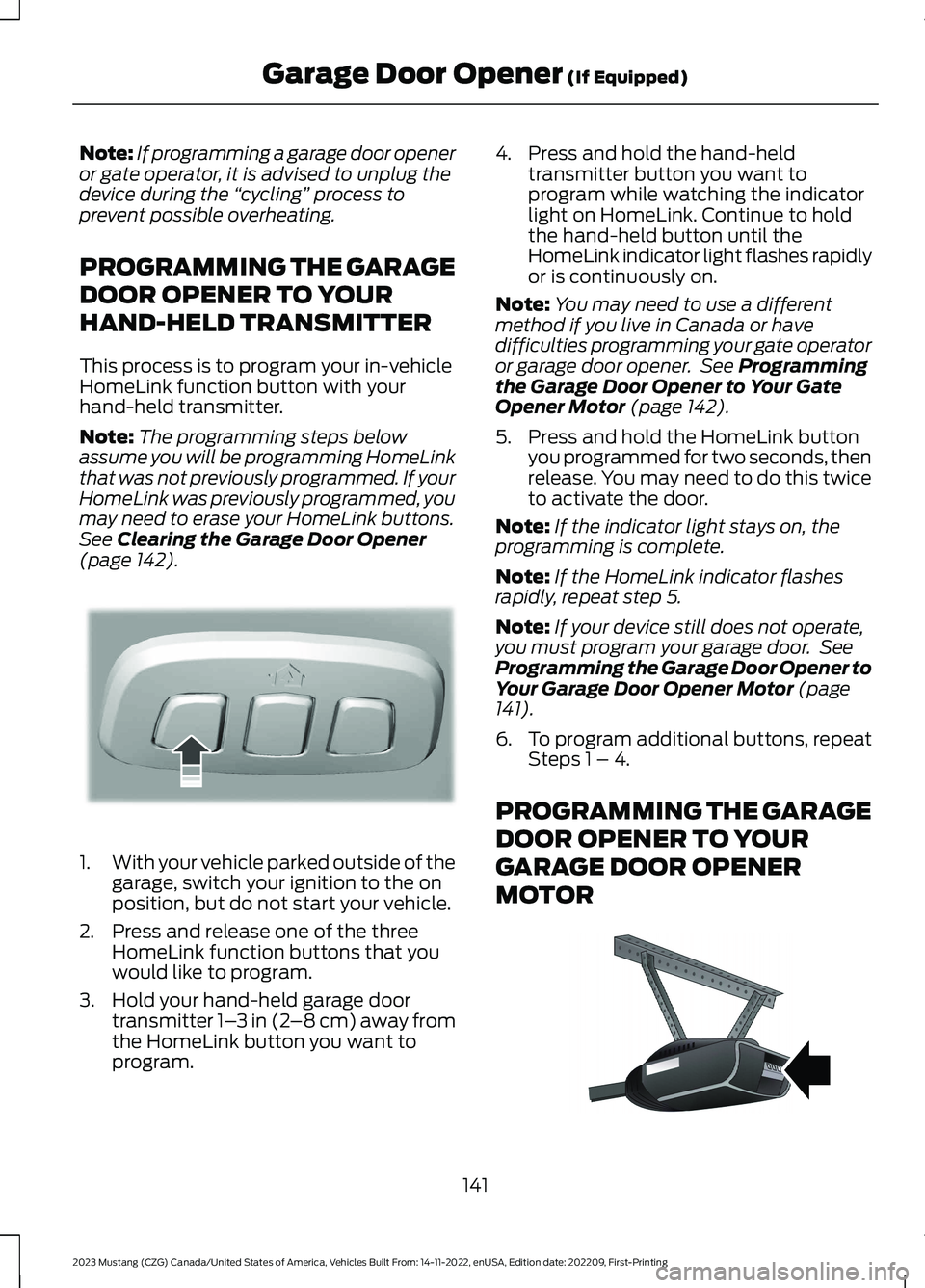
1.With your vehicle parked outside of thegarage, switch your ignition to the onposition, but do not start your vehicle.
2.Press and release one of the threeHomeLink function buttons that youwould like to program.
3.Hold your hand-held garage doortransmitter 1–3 in (2–8 cm) away fromthe HomeLink button you want toprogram.
4.Press and hold the hand-heldtransmitter button you want toprogram while watching the indicatorlight on HomeLink. Continue to holdthe hand-held button until theHomeLink indicator light flashes rapidlyor is continuously on.
Note:You may need to use a differentmethod if you live in Canada or havedifficulties programming your gate operatoror garage door opener. See Programmingthe Garage Door Opener to Your GateOpener Motor (page 142).
5.Press and hold the HomeLink buttonyou programmed for two seconds, thenrelease. You may need to do this twiceto activate the door.
Note:If the indicator light stays on, theprogramming is complete.
Note:If the HomeLink indicator flashesrapidly, repeat step 5.
Note:If your device still does not operate,you must program your garage door. SeeProgramming the Garage Door Opener toYour Garage Door Opener Motor (page141).
6.To program additional buttons, repeatSteps 1 – 4.
PROGRAMMING THE GARAGE
DOOR OPENER TO YOUR
GARAGE DOOR OPENER
MOTOR
141
2023 Mustang (CZG) Canada/United States of America, Vehicles Built From: 14-11-2022, enUSA, Edition date: 202209, First-PrintingGarage Door Opener (If Equipped)E188212 E142659
Page 146 of 535
1.Press the learn button on the garagedoor opener motor, you have 30seconds to complete the next twosteps.
2.Return to your vehicle.
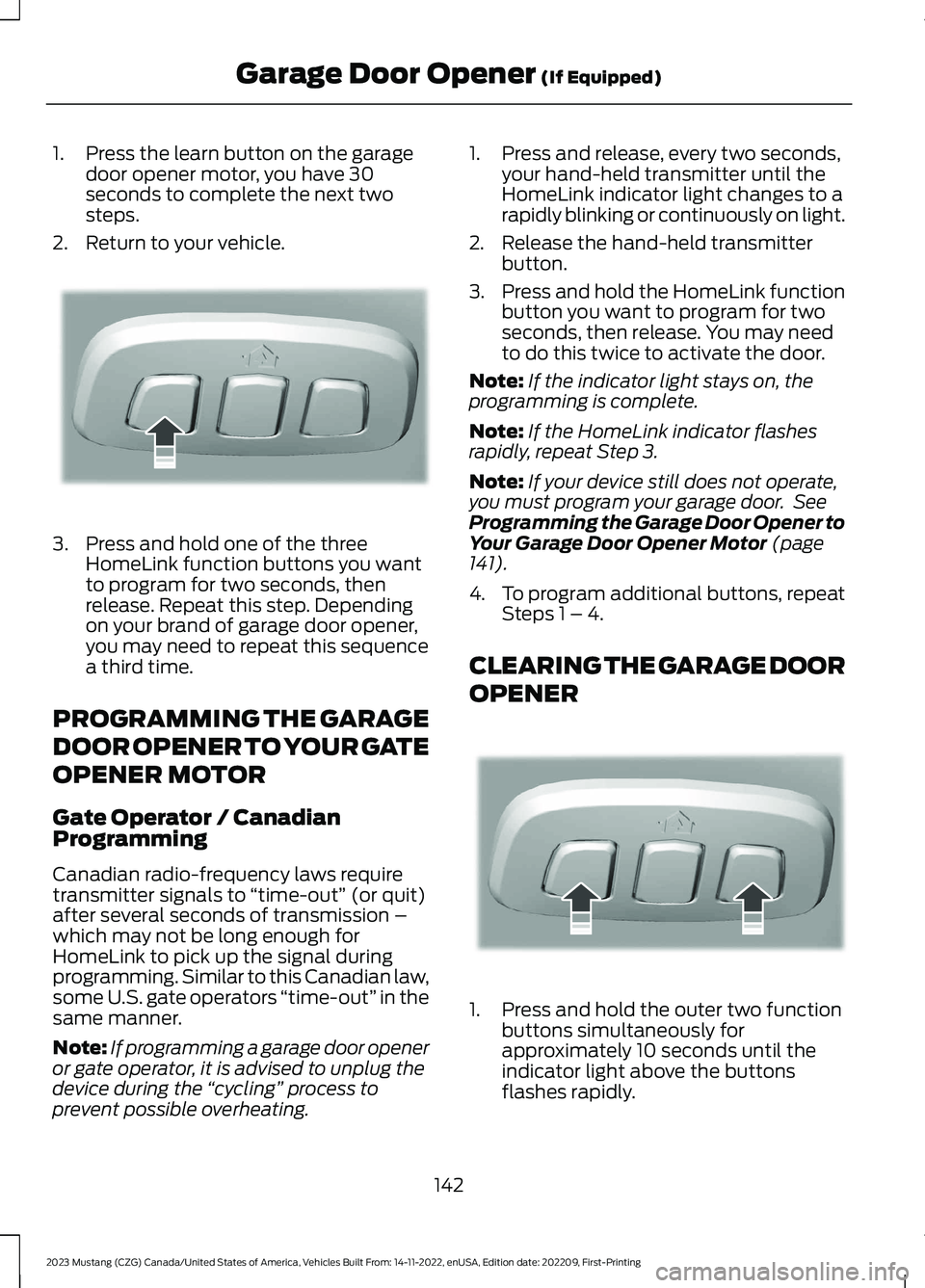
3.Press and hold one of the threeHomeLink function buttons you wantto program for two seconds, thenrelease. Repeat this step. Dependingon your brand of garage door opener,you may need to repeat this sequencea third time.
PROGRAMMING THE GARAGE
DOOR OPENER TO YOUR GATE
OPENER MOTOR
Gate Operator / CanadianProgramming
Canadian radio-frequency laws requiretransmitter signals to “time-out” (or quit)after several seconds of transmission –which may not be long enough forHomeLink to pick up the signal duringprogramming. Similar to this Canadian law,some U.S. gate operators “time-out” in thesame manner.
Note:If programming a garage door openeror gate operator, it is advised to unplug thedevice during the “cycling” process toprevent possible overheating.
1.Press and release, every two seconds,your hand-held transmitter until theHomeLink indicator light changes to arapidly blinking or continuously on light.
2.Release the hand-held transmitterbutton.
3.Press and hold the HomeLink functionbutton you want to program for twoseconds, then release. You may needto do this twice to activate the door.
Note:If the indicator light stays on, theprogramming is complete.
Note:If the HomeLink indicator flashesrapidly, repeat Step 3.
Note:If your device still does not operate,you must program your garage door. SeeProgramming the Garage Door Opener toYour Garage Door Opener Motor (page141).
4.To program additional buttons, repeatSteps 1 – 4.
CLEARING THE GARAGE DOOR
OPENER
1.Press and hold the outer two functionbuttons simultaneously forapproximately 10 seconds until theindicator light above the buttonsflashes rapidly.
142
2023 Mustang (CZG) Canada/United States of America, Vehicles Built From: 14-11-2022, enUSA, Edition date: 202209, First-PrintingGarage Door Opener (If Equipped)E188212 E188213
Page 147 of 535
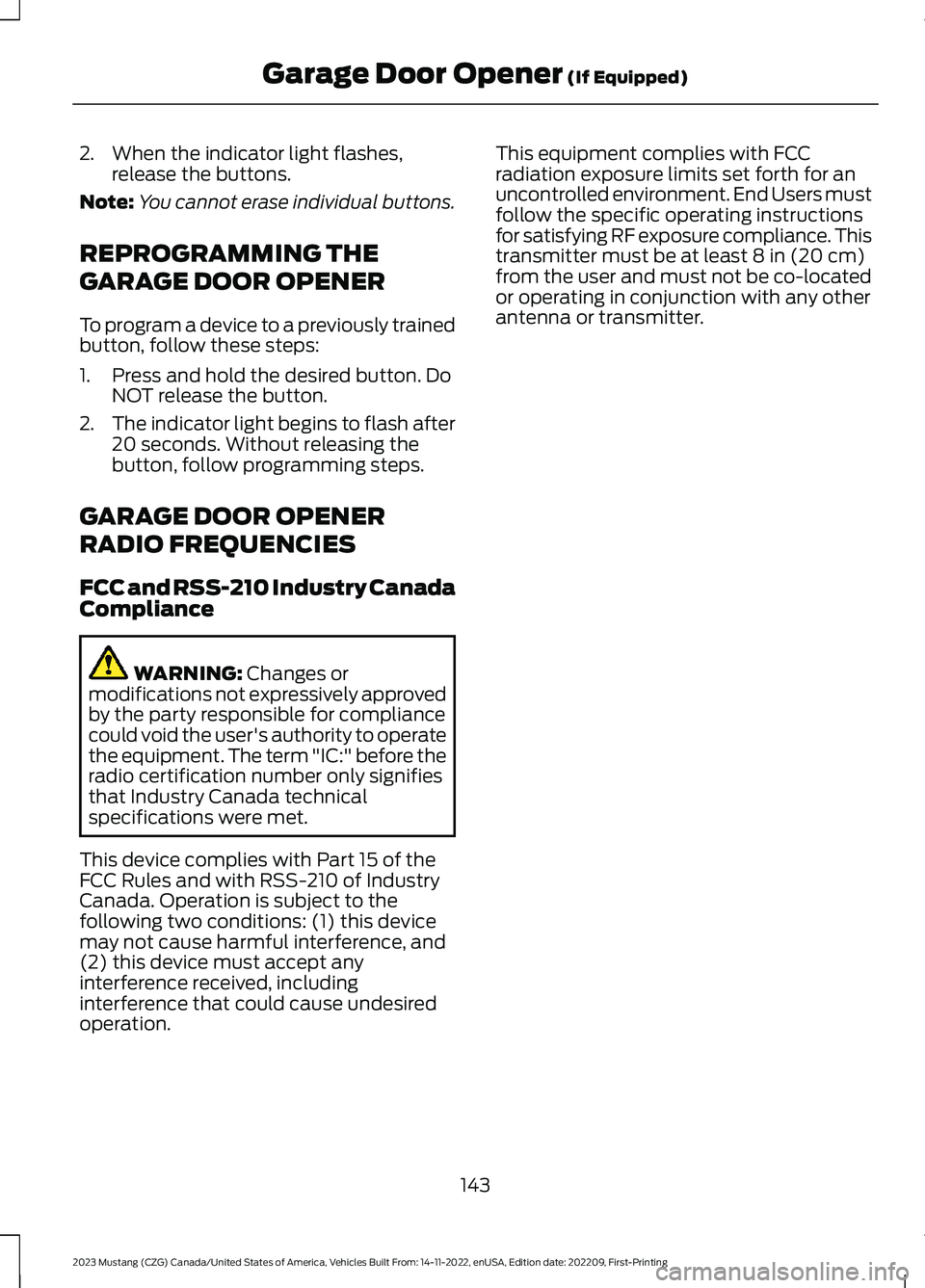
2.When the indicator light flashes,release the buttons.
Note:You cannot erase individual buttons.
REPROGRAMMING THE
GARAGE DOOR OPENER
To program a device to a previously trainedbutton, follow these steps:
1.Press and hold the desired button. DoNOT release the button.
2.The indicator light begins to flash after20 seconds. Without releasing thebutton, follow programming steps.
GARAGE DOOR OPENER
RADIO FREQUENCIES
FCC and RSS-210 Industry CanadaCompliance
WARNING: Changes ormodifications not expressively approvedby the party responsible for compliancecould void the user's authority to operatethe equipment. The term "IC:" before theradio certification number only signifiesthat Industry Canada technicalspecifications were met.
This device complies with Part 15 of theFCC Rules and with RSS-210 of IndustryCanada. Operation is subject to thefollowing two conditions: (1) this devicemay not cause harmful interference, and(2) this device must accept anyinterference received, includinginterference that could cause undesiredoperation.
This equipment complies with FCCradiation exposure limits set forth for anuncontrolled environment. End Users mustfollow the specific operating instructionsfor satisfying RF exposure compliance. Thistransmitter must be at least 8 in (20 cm)from the user and must not be co-locatedor operating in conjunction with any otherantenna or transmitter.
143
2023 Mustang (CZG) Canada/United States of America, Vehicles Built From: 14-11-2022, enUSA, Edition date: 202209, First-PrintingGarage Door Opener (If Equipped)
Page 152 of 535
The system does not function if:
•The key frequencies are jammed.
•The key battery has no charge.
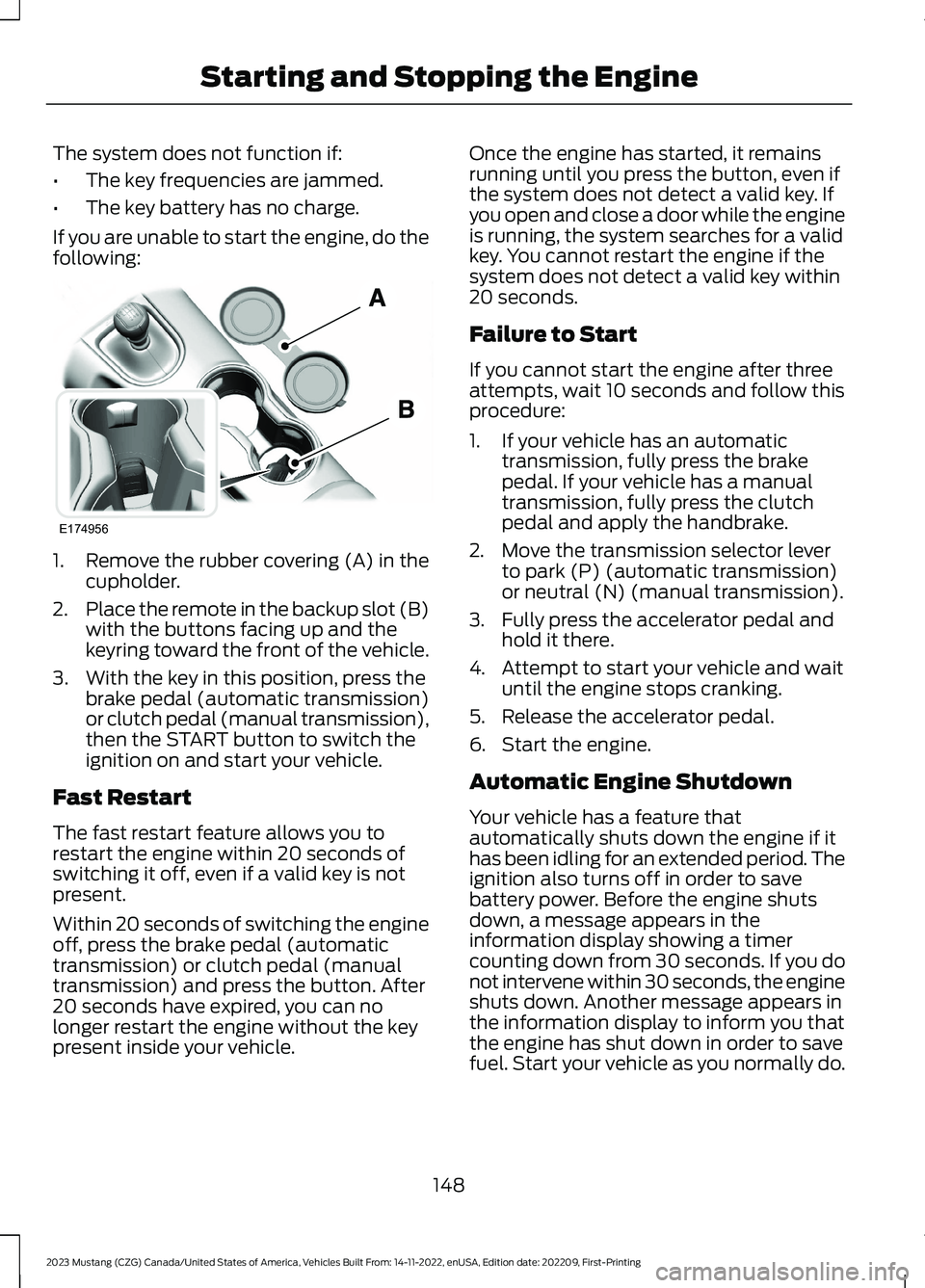
If you are unable to start the engine, do thefollowing:
1.Remove the rubber covering (A) in thecupholder.
2.Place the remote in the backup slot (B)with the buttons facing up and thekeyring toward the front of the vehicle.
3.With the key in this position, press thebrake pedal (automatic transmission)or clutch pedal (manual transmission),then the START button to switch theignition on and start your vehicle.
Fast Restart
The fast restart feature allows you torestart the engine within 20 seconds ofswitching it off, even if a valid key is notpresent.
Within 20 seconds of switching the engineoff, press the brake pedal (automatictransmission) or clutch pedal (manualtransmission) and press the button. After20 seconds have expired, you can nolonger restart the engine without the keypresent inside your vehicle.
Once the engine has started, it remainsrunning until you press the button, even ifthe system does not detect a valid key. Ifyou open and close a door while the engineis running, the system searches for a validkey. You cannot restart the engine if thesystem does not detect a valid key within20 seconds.
Failure to Start
If you cannot start the engine after threeattempts, wait 10 seconds and follow thisprocedure:
1.If your vehicle has an automatictransmission, fully press the brakepedal. If your vehicle has a manualtransmission, fully press the clutchpedal and apply the handbrake.
2.Move the transmission selector leverto park (P) (automatic transmission)or neutral (N) (manual transmission).
3.Fully press the accelerator pedal andhold it there.
4.Attempt to start your vehicle and waituntil the engine stops cranking.
5.Release the accelerator pedal.
6.Start the engine.
Automatic Engine Shutdown
Your vehicle has a feature thatautomatically shuts down the engine if ithas been idling for an extended period. Theignition also turns off in order to savebattery power. Before the engine shutsdown, a message appears in theinformation display showing a timercounting down from 30 seconds. If you donot intervene within 30 seconds, the engineshuts down. Another message appears inthe information display to inform you thatthe engine has shut down in order to savefuel. Start your vehicle as you normally do.
148
2023 Mustang (CZG) Canada/United States of America, Vehicles Built From: 14-11-2022, enUSA, Edition date: 202209, First-PrintingStarting and Stopping the EngineE174956
Page 213 of 535
To create or save MyMode, press thebutton on the steering wheel and accessthe menu. See General Information(page 98).The available systems display.Choose your desired settings using theappropriate buttons and menus. Press andhold OK to save your settings. MyModeadds to the drive mode list and you canselect the next time you drive your vehicle.
Note:The system has diagnostic checksthat continuously monitor the system tomake sure it properly operates. If a mode isunavailable due to a system fault or changein gear position, the selected mode defaultsto normal.
Note:Pre-Collision Assist automaticallydisables when you select track mode. SeePre-Collision Assist (page 203).
Note:If your vehicle has adaptive dampers,the steering setting optimizes to work witheach drive mode. Other steering settingsmay not be available.
Selectable Steering
Press the steering button on theinstrument panel to change thesteering feel. The first pressilluminates the selected mode. Each timeyou press the button, it changes the mode.
Modes:
•Normal - Default factory setting.
•Sport - Slightly higher effort requiredfor steering with more road force feltthrough the steering wheel.
•Comfort - Slightly less effort requiredfor steering with less road force feltthrough the steering wheel.
Note:You may feel a soft feedback bumpin the steering wheel after you make aselection.
Note:The steering setting defaults tonormal if you disconnect or remove thebattery.
Active Exhaust (If Equipped)
Use the information display toadjust the tone of the exhaust.
Active Exhaust modes:
•Quiet - Lowers the noise of the exhaust.
•Normal - Default factory setting.
•Sport - Raises the noise of the exhaust.
•Track - Tunes the exhaust for trackperformance.
Note:The track exhaust mode setting isonly for use at tracks and not for use onpublic roadways. Use of this setting resultsin increased exterior noise, which may notmeet state and local laws and regulations.It is the obligation of the driver to operatethe vehicle in a manner that complies withstate and local requirements. Only use thetrack exhaust mode setting at a competitiontrack or an off-road course where elevatedexterior vehicle noise is acceptable.
Rev Match (If Equipped)
This feature provides a smoother drivingexperience, particularly during a downshiftevent. You can accomplish this by a shiftposition prediction that commands a quickengine RPM match to the selected gear.You can switch this feature on and offthrough the information display. SeeGeneral Information (page 98).
Note:The system remembers your lastselection through ignition cycles.
Note:Rev match is only available with amanual transmission.
209
2023 Mustang (CZG) Canada/United States of America, Vehicles Built From: 14-11-2022, enUSA, Edition date: 202209, First-PrintingDriving AidsE174705 E287122
Page 216 of 535
To create or save MyMode, press thebutton on the steering wheel and accessthe menu. See General Information(page 98).The available systems display.Select your desired settings using theappropriate buttons and menus. Press andhold OK to save your settings. MyMode isadded to the drive mode list and can beselected the next time you drive yourvehicle.
Note:The system has diagnostic checksthat continuously monitor the system tomake sure it properly operates. If a mode isunavailable due to a system fault or changein gear position, the selected mode defaultsto normal.
Note:Pre-Collision Assist is automaticallydisabled when track mode is selected. SeePre-Collision Assist (page 203).
Note:If your vehicle has adaptive dampers,the steering setting is optimized to work witheach drive mode. Other steering settingsmay not be available.
Selectable Steering
Note:The steering setting defaults tonormal if the battery is disconnected orremoved.
Press the steering button on theinstrument panel to change thesteering feel. The first pressilluminates the selected mode. Each timeyou press the button, it changes the mode.
Modes:
•Normal - Default factory setting.
•Sport - Slightly higher effort requiredfor steering with more road force feltthrough the steering wheel.
•Comfort - Slightly less effort requiredfor steering with less road force feltthrough the steering wheel.
Note:A soft feedback bump in the steeringwheel may be felt after you make aselection.
Adaptive Dampers (If Equipped)
Press the button on the steeringwheel to adjust the suspension.The first press illuminates thecurrent mode. Each time you press thebutton, it changes the mode.
Adaptive damper modes:
•Normal — Available in normal andsport drive modes.
•Sport — Available in normal, sport andtrack drive modes.
•Track — Available only in track drivemode.
•Drag Strip — Available only in drag stripdrive mode.
Active Exhaust (If Equipped)
Press the button on theinstrument panel under thedisplay to adjust the tone of theexhaust.
Active Exhaust modes:
•Quiet - Lowers the noise of the exhaust.
•Normal - Default factory setting.
•Sport - Raises the noise of the exhaust.
•Track - Tunes the exhaust for trackperformance.
Note:The track exhaust mode setting isonly for use at tracks and not for use onpublic roadways. Use of this setting resultsin increased exterior noise, which may notmeet state and local laws and regulations.It is the obligation of the driver to operatethe vehicle in a manner that complies withstate and local requirements. Only use thetrack exhaust mode setting at a competitiontrack or an off-road course where elevatedexterior vehicle noise is acceptable.
212
2023 Mustang (CZG) Canada/United States of America, Vehicles Built From: 14-11-2022, enUSA, Edition date: 202209, First-PrintingDriving AidsE174705 E282723 E287122
Page 280 of 535
CHECKING THE WIPER
BLADES
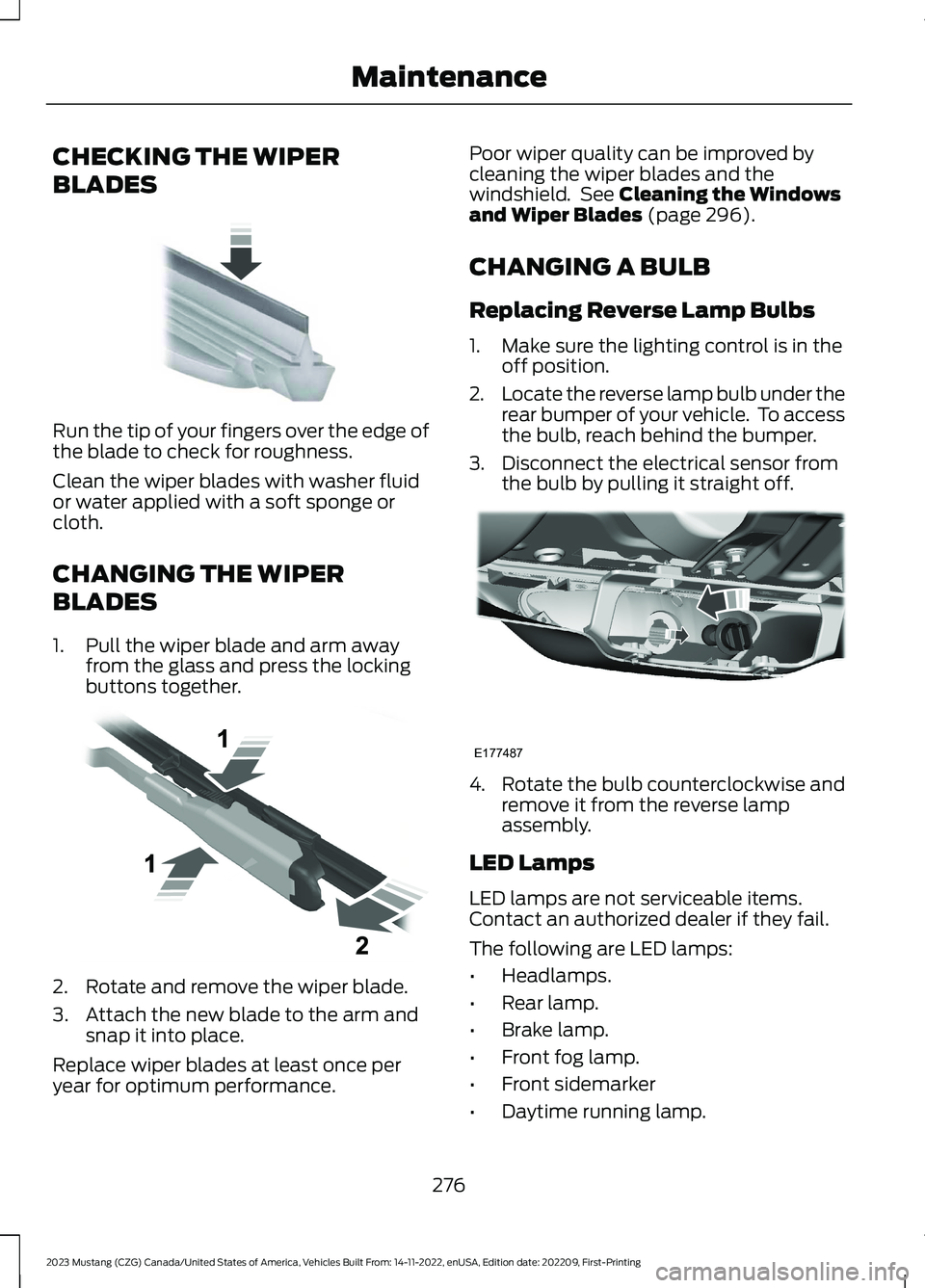
Run the tip of your fingers over the edge ofthe blade to check for roughness.
Clean the wiper blades with washer fluidor water applied with a soft sponge orcloth.
CHANGING THE WIPER
BLADES
1.Pull the wiper blade and arm awayfrom the glass and press the lockingbuttons together.
2.Rotate and remove the wiper blade.
3.Attach the new blade to the arm andsnap it into place.
Replace wiper blades at least once peryear for optimum performance.
Poor wiper quality can be improved bycleaning the wiper blades and thewindshield. See Cleaning the Windowsand Wiper Blades (page 296).
CHANGING A BULB
Replacing Reverse Lamp Bulbs
1.Make sure the lighting control is in theoff position.
2.Locate the reverse lamp bulb under therear bumper of your vehicle. To accessthe bulb, reach behind the bumper.
3.Disconnect the electrical sensor fromthe bulb by pulling it straight off.
4.Rotate the bulb counterclockwise andremove it from the reverse lampassembly.
LED Lamps
LED lamps are not serviceable items.Contact an authorized dealer if they fail.
The following are LED lamps:
•Headlamps.
•Rear lamp.
•Brake lamp.
•Front fog lamp.
•Front sidemarker
•Daytime running lamp.
276
2023 Mustang (CZG) Canada/United States of America, Vehicles Built From: 14-11-2022, enUSA, Edition date: 202209, First-PrintingMaintenanceE142463 E129990 E177487
Page 378 of 535
Note:Depending on your vehicle optionpackage, the controls may look differentfrom what you see here.
Note:Some features, such as satelliteradio, may not be available in your location.Check with an authorized dealer.
Accessing the Apps Menu
Press and release the button toaccess the apps menu. Followthe on-screen prompts to makeyour selection.
Accessing the Clock Settings
Press and release the button toaccess the clock setting.
Use the center arrow controls tochange the hours and minutes.
Accessing the Media Source Menu
Press and release to open themedia source menu.
You can press this multiple times tochange to a SYNC-Media device or scrollthrough the media sources using the arrowbuttons. Press OK to select a source.
Accessing the Phone Features
Press and release the button toaccess the phone features of theSYNC system.
Accessing the Settings Menu
Press and release the button toaccess the settings menu.Follow the on-screen promptsto make your selection.
Accessing the Sound Settings
Press and release the button toaccess settings for Treble,Midrange, Bass, Fade andBalance.
Adjusting the Volume
Turn to adjust the volume.
Changing Radio Stations
In radio mode, turn to search through theradio frequency band.
374
2023 Mustang (CZG) Canada/United States of America, Vehicles Built From: 14-11-2022, enUSA, Edition date: 202209, First-PrintingAudio SystemE249410 E265036 E265035 E142607 E265373 E265696
Page 379 of 535
In satellite radio mode, turn to find theprevious or next available satellite radiostation.
Listening to the Radio
Press and release to listen to theradio or change radio stations.
Muting the Audio
Press and release the button tomute the playing audio.
Playing or Pausing Media
Press and release the button toeither play or pause the audio.
Switching the Audio Unit On andOff
Press and release the button.
Switching the Display On and Off
Press and release the button.
Using the Display Control
Use the up and down arrow buttons toselect the various settings. When you makeyour selection, press the left and rightarrow buttons to change the settings.
Press and release to confirm aselection.
Using the Number Block
In radio mode, store and recall your favoriteradio stations. To store a favorite stationpress and hold until the sound returns. Inphone mode, enter a phone number.
Using Seek, Fast Forward andReverse
In radio mode, select a frequency band andpress and release either button. Thesystem stops at the first station it finds inthat direction.
In satellite radio mode, press and releaseto select the next or previous satellite radiostation. If you select a specific category(such as jazz, rock or news), press to findthe next or previous station in the categoryyou select.
AUDIO UNIT - VEHICLES WITH:
8 INCH CENTER DISPLAY
SCREEN
WARNING: Driving while distractedcan result in loss of vehicle control, crashand injury. We strongly recommend thatyou use extreme caution when using anydevice that may take your focus off theroad. Your primary responsibility is thesafe operation of your vehicle. Werecommend against the use of anyhand-held device while driving andencourage the use of voice-operatedsystems when possible. Make sure youare aware of all applicable local lawsthat may affect the use of electronicdevices while driving.
375
2023 Mustang (CZG) Canada/United States of America, Vehicles Built From: 14-11-2022, enUSA, Edition date: 202209, First-PrintingAudio SystemE265033 E272035 E265041 E265045 E265044 E287199
Page 391 of 535
__ is a dynamic listing, meaning that itcould be the name of anything, such as acontact or phone number.
Phone Controls
Use the phone buttons on your steeringwheel to answer, reject, or hang up a call.
Accessing Features through thePhone Menu
You can access your call history,phonebook, sent text messages, as wellas access phone and system settings.
1.Press the PHONE button to enter thephone menu.
2.Scroll through the menu to viewcontacts, text messages, and thephone dialer.
SYNC™ APPLICATIONS AND
SERVICES
•911 Assist: Can alert 911 in the event ofan emergency.
•SYNC AppLink: Allows you to connectto and use certain applications (if yourphone is compatible).
These features may require activation.Available AppLink enabled apps vary bymarket.
911 Assist
WARNING: Unless the 911 Assistsetting is set on before a crash, thesystem will not dial for help which coulddelay response time, potentiallyincreasing the risk of serious injury ordeath after a crash.
WARNING: Do not wait for 911Assist to make an emergency call if youcan do it yourself. Dial emergencyservices immediately to avoid delayedresponse time which could increase therisk of serious injury or death after acrash. If you do not hear 911 Assist withinfive seconds of the crash, the system orphone may be damaged ornon-functional.
WARNING: Always place yourphone in a secure location in your vehicleso it does not become a projectile or getdamaged in a crash. Failure to do so maycause serious injury to someone ordamage the phone which could prevent911 Assist from working properly.
Note:The SYNC 911 Assist feature must beset on before the incident.
Note:The SYNC 911 Assist feature onlyoperates in the U.S., Canada or in a territoryin which 911 is the emergency number.
Note:Before setting this feature on, makesure that you read the 911 Assist PrivacyNotice later in this section for importantinformation.
Note:If any user switches 911 Assist to onor off, that setting applies for all pairedphones. If 911 Assist is switched off, eithera voice message plays or a display messageor an icon comes on when your vehicle isstarted and after a previously paired phoneconnects.
Note:Every phone operates differently.While SYNC 911 Assist works with mostcellular phones, some may have troubleusing this feature.
387
2023 Mustang (CZG) Canada/United States of America, Vehicles Built From: 14-11-2022, enUSA, Edition date: 202209, First-PrintingSYNC™ (If Equipped)