buttons FORD MUSTANG 2023 Owners Manual
[x] Cancel search | Manufacturer: FORD, Model Year: 2023, Model line: MUSTANG, Model: FORD MUSTANG 2023Pages: 535, PDF Size: 15.46 MB
Page 68 of 535
Emergency Assistance
If you set emergency assistance to alwayson, you cannot switch it off with a MyKey.
Do Not Disturb
If you set do not disturb to always on, youcannot switch it off with a MyKey.
Note:If a phone is connected using AppleCarPlay or Android Auto while driving witha MyKey, the driver can receive phone callsand text messages even if the do not disturbrestriction is on. If the vehicle comes withsatellite radio, the adult content is notrestricted.
Traction Control
If you set traction control to always on, youcannot switch it off with a MyKey.
CREATING A MYKEY
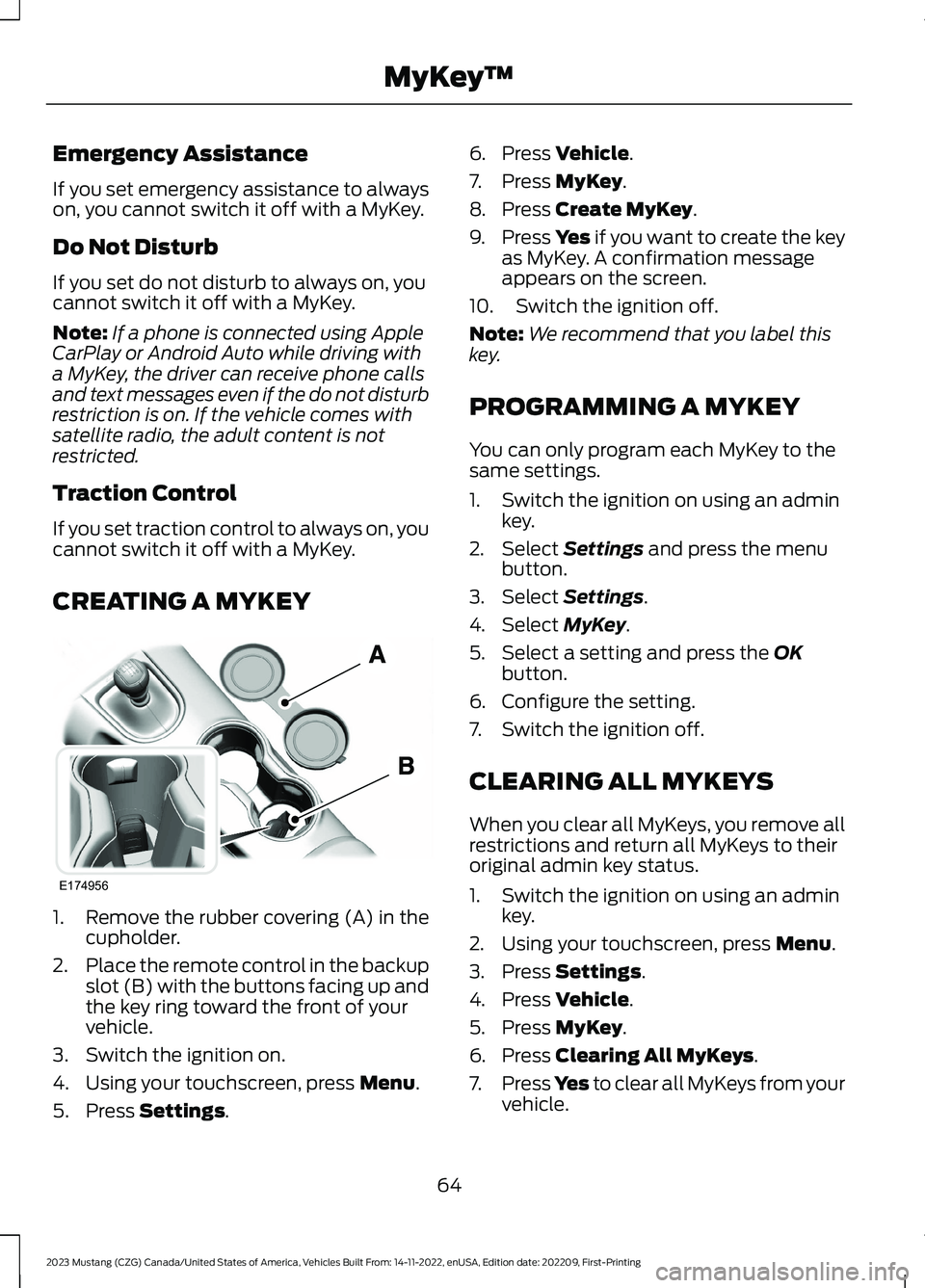
1.Remove the rubber covering (A) in thecupholder.
2.Place the remote control in the backupslot (B) with the buttons facing up andthe key ring toward the front of yourvehicle.
3.Switch the ignition on.
4.Using your touchscreen, press Menu.
5.Press Settings.
6.Press Vehicle.
7.Press MyKey.
8.Press Create MyKey.
9.Press Yes if you want to create the keyas MyKey. A confirmation messageappears on the screen.
10.Switch the ignition off.
Note:We recommend that you label thiskey.
PROGRAMMING A MYKEY
You can only program each MyKey to thesame settings.
1.Switch the ignition on using an adminkey.
2.Select Settings and press the menubutton.
3.Select Settings.
4.Select MyKey.
5.Select a setting and press the OKbutton.
6.Configure the setting.
7.Switch the ignition off.
CLEARING ALL MYKEYS
When you clear all MyKeys, you remove allrestrictions and return all MyKeys to theiroriginal admin key status.
1.Switch the ignition on using an adminkey.
2.Using your touchscreen, press Menu.
3.Press Settings.
4.Press Vehicle.
5.Press MyKey.
6.Press Clearing All MyKeys.
7.Press Yes to clear all MyKeys from yourvehicle.
64
2023 Mustang (CZG) Canada/United States of America, Vehicles Built From: 14-11-2022, enUSA, Edition date: 202209, First-PrintingMyKey™E174956
Page 69 of 535
CHECKING MYKEY SYSTEM
STATUS
You can find information about thedistance traveled using a MyKey, and thenumber of admin keys and MyKeys createdfor your vehicle.
1.Switch the ignition on.
2.Press Settings on the touchscreen.
3.Press Vehicle Settings.
4.Press MyKey.
5.Press MyKey Information.
6.Switch the ignition off.
USING MYKEY WITH REMOTE
START SYSTEMS
MyKey is not compatible with unapproved,aftermarket remote start systems. If youchoose to install a remote start system,see an authorized dealer for an approvedremote start system.
MYKEY – TROUBLESHOOTING
MYKEY – INFORMATION MESSAGES - VEHICLES WITH: PUSH BUTTONSTART
DescriptionMessage
Displays when trying to create a MyKey and there is no adminkey in the backup position. See Creating a MyKey (page64).
Place Key in BackupLocation
Displays when trying to create a MyKey with a key alreadydesignated as a MyKey.Key is Already a MyKey
Displays to confirm that you have a restricted key after youswitch the ignition off.This Key restricted atNext Key Cycle. LabelKey as MyKey
65
2023 Mustang (CZG) Canada/United States of America, Vehicles Built From: 14-11-2022, enUSA, Edition date: 202209, First-PrintingMyKey™
Page 71 of 535
LOCKING AND UNLOCKING
You can use the power door lock controlor the remote control to lock and unlockyour vehicle.
Note:Do not use the door latch assemblyto attach any accessory, such as handles orsteps, as this can cause damage to yourvehicle.
Power Door Locks
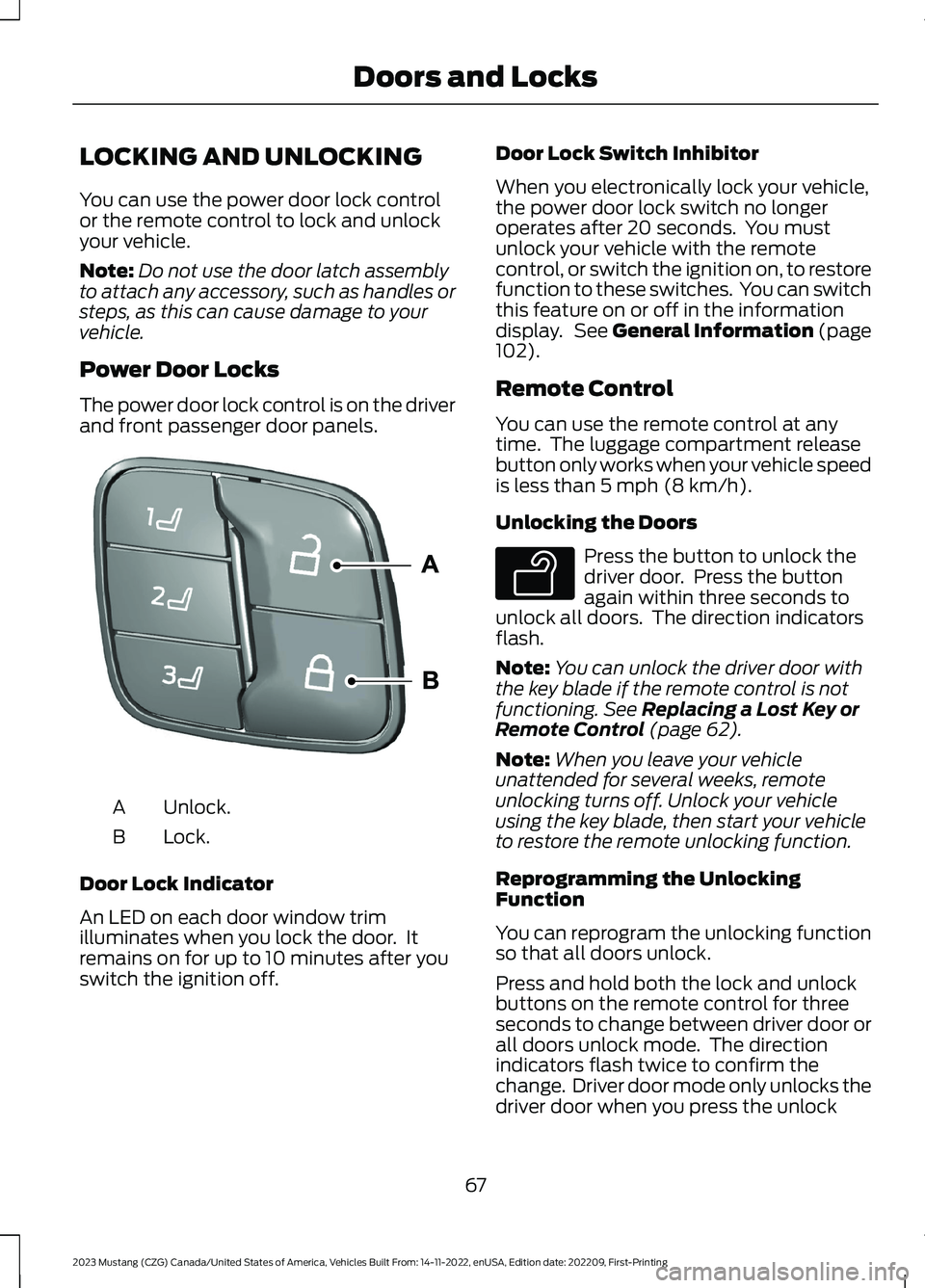
The power door lock control is on the driverand front passenger door panels.
Unlock.A
Lock.B
Door Lock Indicator
An LED on each door window trimilluminates when you lock the door. Itremains on for up to 10 minutes after youswitch the ignition off.
Door Lock Switch Inhibitor
When you electronically lock your vehicle,the power door lock switch no longeroperates after 20 seconds. You mustunlock your vehicle with the remotecontrol, or switch the ignition on, to restorefunction to these switches. You can switchthis feature on or off in the informationdisplay. See General Information (page102).
Remote Control
You can use the remote control at anytime. The luggage compartment releasebutton only works when your vehicle speedis less than 5 mph (8 km/h).
Unlocking the Doors
Press the button to unlock thedriver door. Press the buttonagain within three seconds tounlock all doors. The direction indicatorsflash.
Note:You can unlock the driver door withthe key blade if the remote control is notfunctioning. See Replacing a Lost Key orRemote Control (page 62).
Note:When you leave your vehicleunattended for several weeks, remoteunlocking turns off. Unlock your vehicleusing the key blade, then start your vehicleto restore the remote unlocking function.
Reprogramming the UnlockingFunction
You can reprogram the unlocking functionso that all doors unlock.
Press and hold both the lock and unlockbuttons on the remote control for threeseconds to change between driver door orall doors unlock mode. The directionindicators flash twice to confirm thechange. Driver door mode only unlocks thedriver door when you press the unlock
67
2023 Mustang (CZG) Canada/United States of America, Vehicles Built From: 14-11-2022, enUSA, Edition date: 202209, First-PrintingDoors and LocksE332156 E138629
Page 85 of 535
Flashing the Headlamp High Beam
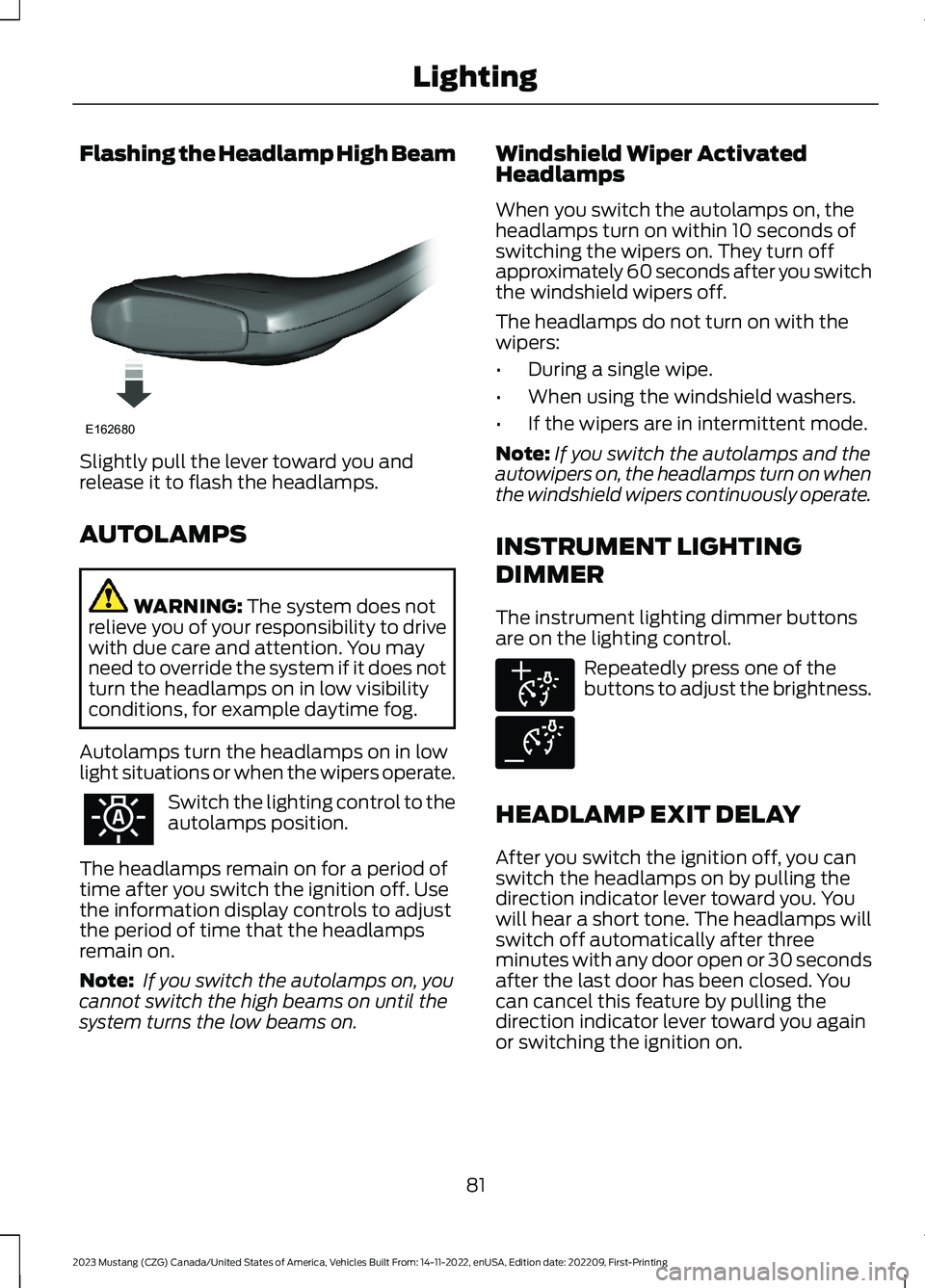
Slightly pull the lever toward you andrelease it to flash the headlamps.
AUTOLAMPS
WARNING: The system does notrelieve you of your responsibility to drivewith due care and attention. You mayneed to override the system if it does notturn the headlamps on in low visibilityconditions, for example daytime fog.
Autolamps turn the headlamps on in lowlight situations or when the wipers operate.
Switch the lighting control to theautolamps position.
The headlamps remain on for a period oftime after you switch the ignition off. Usethe information display controls to adjustthe period of time that the headlampsremain on.
Note: If you switch the autolamps on, youcannot switch the high beams on until thesystem turns the low beams on.
Windshield Wiper ActivatedHeadlamps
When you switch the autolamps on, theheadlamps turn on within 10 seconds ofswitching the wipers on. They turn offapproximately 60 seconds after you switchthe windshield wipers off.
The headlamps do not turn on with thewipers:
•During a single wipe.
•When using the windshield washers.
•If the wipers are in intermittent mode.
Note:If you switch the autolamps and theautowipers on, the headlamps turn on whenthe windshield wipers continuously operate.
INSTRUMENT LIGHTING
DIMMER
The instrument lighting dimmer buttonsare on the lighting control.
Repeatedly press one of thebuttons to adjust the brightness.
HEADLAMP EXIT DELAY
After you switch the ignition off, you canswitch the headlamps on by pulling thedirection indicator lever toward you. Youwill hear a short tone. The headlamps willswitch off automatically after threeminutes with any door open or 30 secondsafter the last door has been closed. Youcan cancel this feature by pulling thedirection indicator lever toward you againor switching the ignition on.
81
2023 Mustang (CZG) Canada/United States of America, Vehicles Built From: 14-11-2022, enUSA, Edition date: 202209, First-PrintingLightingE162680 E291299 E291298
Page 102 of 535
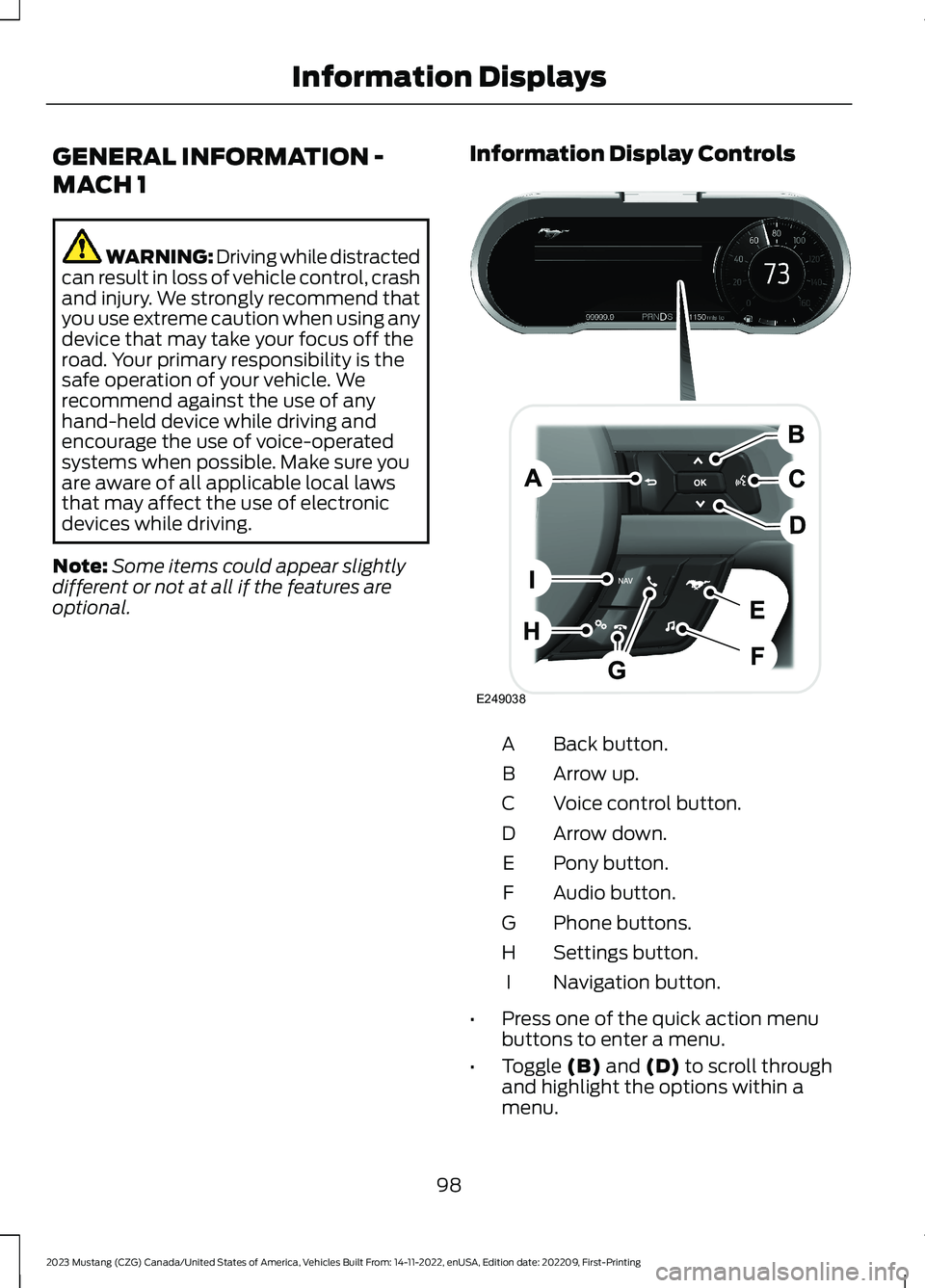
GENERAL INFORMATION -
MACH 1
WARNING: Driving while distractedcan result in loss of vehicle control, crashand injury. We strongly recommend thatyou use extreme caution when using anydevice that may take your focus off theroad. Your primary responsibility is thesafe operation of your vehicle. Werecommend against the use of anyhand-held device while driving andencourage the use of voice-operatedsystems when possible. Make sure youare aware of all applicable local lawsthat may affect the use of electronicdevices while driving.
Note:Some items could appear slightlydifferent or not at all if the features areoptional.
Information Display Controls
Back button.A
Arrow up.B
Voice control button.C
Arrow down.D
Pony button.E
Audio button.F
Phone buttons.G
Settings button.H
Navigation button.I
•Press one of the quick action menubuttons to enter a menu.
•Toggle (B) and (D) to scroll throughand highlight the options within amenu.
98
2023 Mustang (CZG) Canada/United States of America, Vehicles Built From: 14-11-2022, enUSA, Edition date: 202209, First-PrintingInformation DisplaysE249038
Page 106 of 535
Vacuum.D
Cylinder head temperature.E
Transmission oil temperature.F
Axle temperature.G
Engine oil pressure.H
GENERAL INFORMATION -
VEHICLES WITH: 4.2 INCH
INSTRUMENT CLUSTER
DISPLAY SCREEN
WARNING: Driving while distractedcan result in loss of vehicle control, crashand injury. We strongly recommend thatyou use extreme caution when using anydevice that may take your focus off theroad. Your primary responsibility is thesafe operation of your vehicle. Werecommend against the use of anyhand-held device while driving andencourage the use of voice-operatedsystems when possible. Make sure youare aware of all applicable local lawsthat may affect the use of electronicdevices while driving.
Note:Some items could appear slightlydifferent or not at all if the features areoptional.
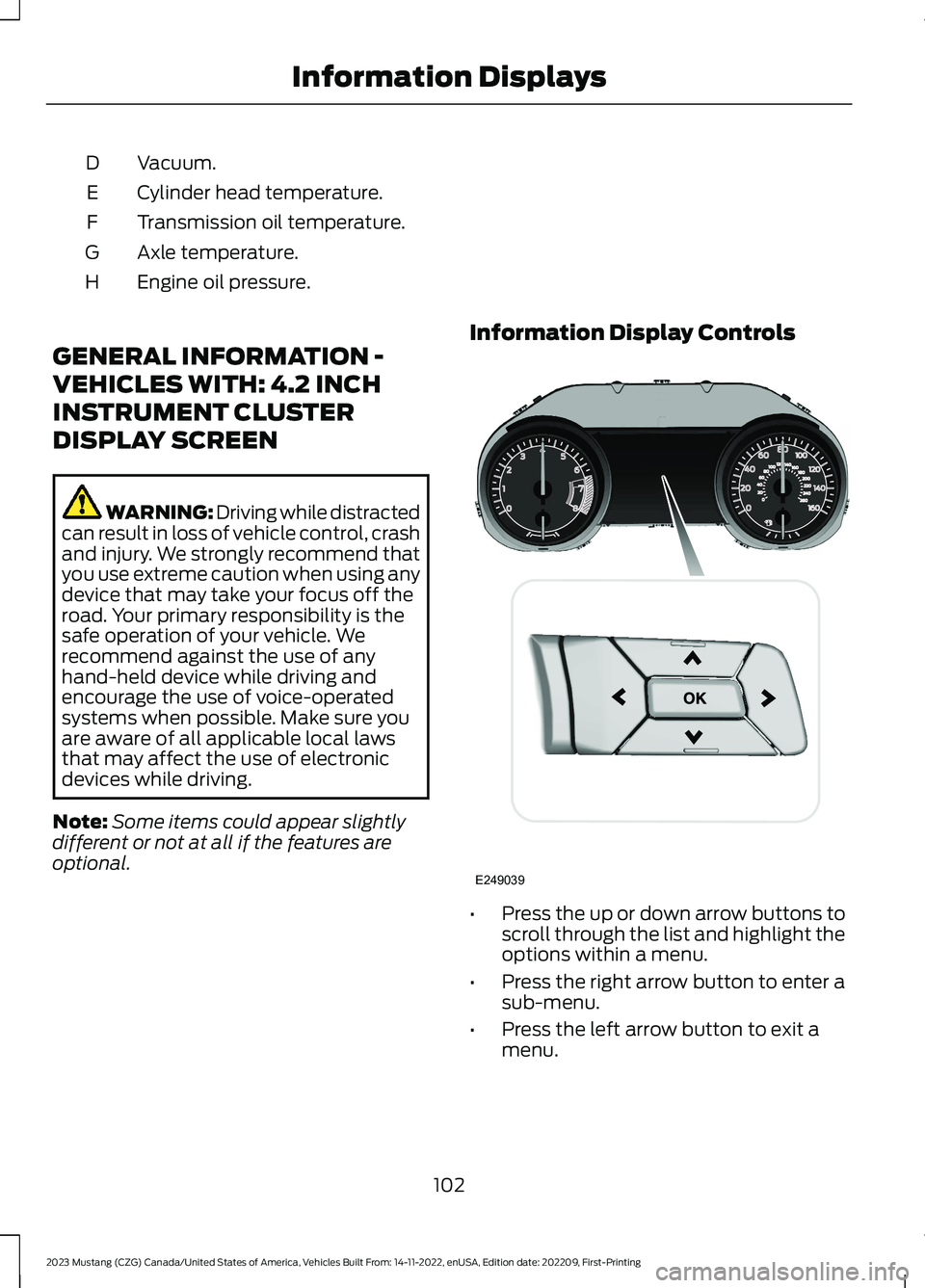
Information Display Controls
•Press the up or down arrow buttons toscroll through the list and highlight theoptions within a menu.
•Press the right arrow button to enter asub-menu.
•Press the left arrow button to exit amenu.
102
2023 Mustang (CZG) Canada/United States of America, Vehicles Built From: 14-11-2022, enUSA, Edition date: 202209, First-PrintingInformation DisplaysE249039
Page 113 of 535
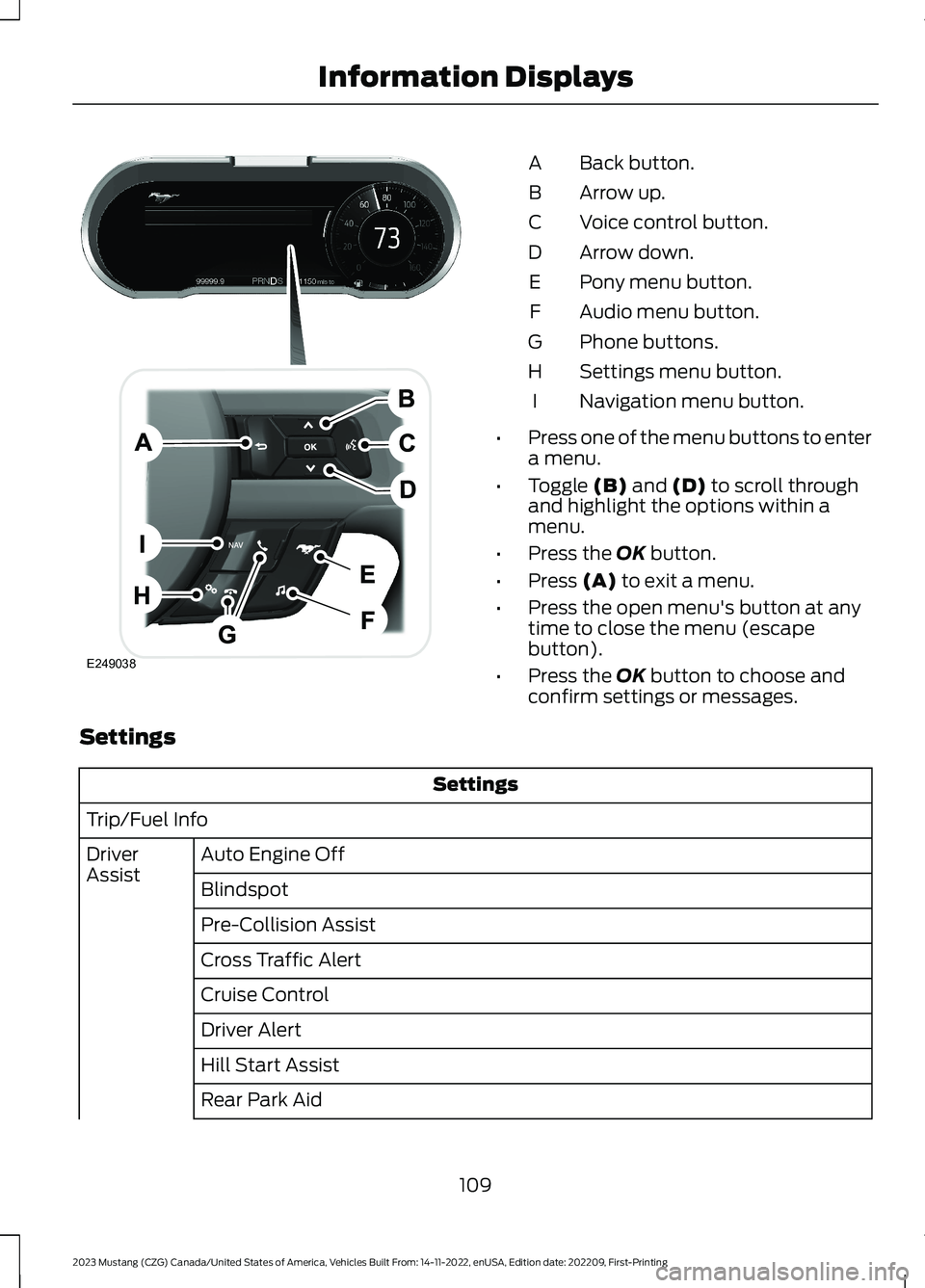
Back button.A
Arrow up.B
Voice control button.C
Arrow down.D
Pony menu button.E
Audio menu button.F
Phone buttons.G
Settings menu button.H
Navigation menu button.I
•Press one of the menu buttons to entera menu.
•Toggle (B) and (D) to scroll throughand highlight the options within amenu.
•Press the OK button.
•Press (A) to exit a menu.
•Press the open menu's button at anytime to close the menu (escapebutton).
•Press the OK button to choose andconfirm settings or messages.
Settings
Settings
Trip/Fuel Info
Auto Engine OffDriverAssistBlindspot
Pre-Collision Assist
Cross Traffic Alert
Cruise Control
Driver Alert
Hill Start Assist
Rear Park Aid
109
2023 Mustang (CZG) Canada/United States of America, Vehicles Built From: 14-11-2022, enUSA, Edition date: 202209, First-PrintingInformation DisplaysE249038
Page 138 of 535
WARNING: The adjustable headrestraint is a safety device. Wheneverpossible it should be installed andproperly adjusted when the seat isoccupied. Failure to adjust the headrestraint properly could reduce itseffectiveness during certain impacts.
WARNING: Install the headrestraint properly to help minimize therisk of neck injury in the event of a crash.
Note:Adjust the seatback to an uprightdriving position before adjusting the headrestraint. Adjust the head restraint so thatthe top of it is level with the top of your headand as far forward as possible. Make surethat you remain comfortable. If you areextremely tall, adjust the head restraint toits highest position.
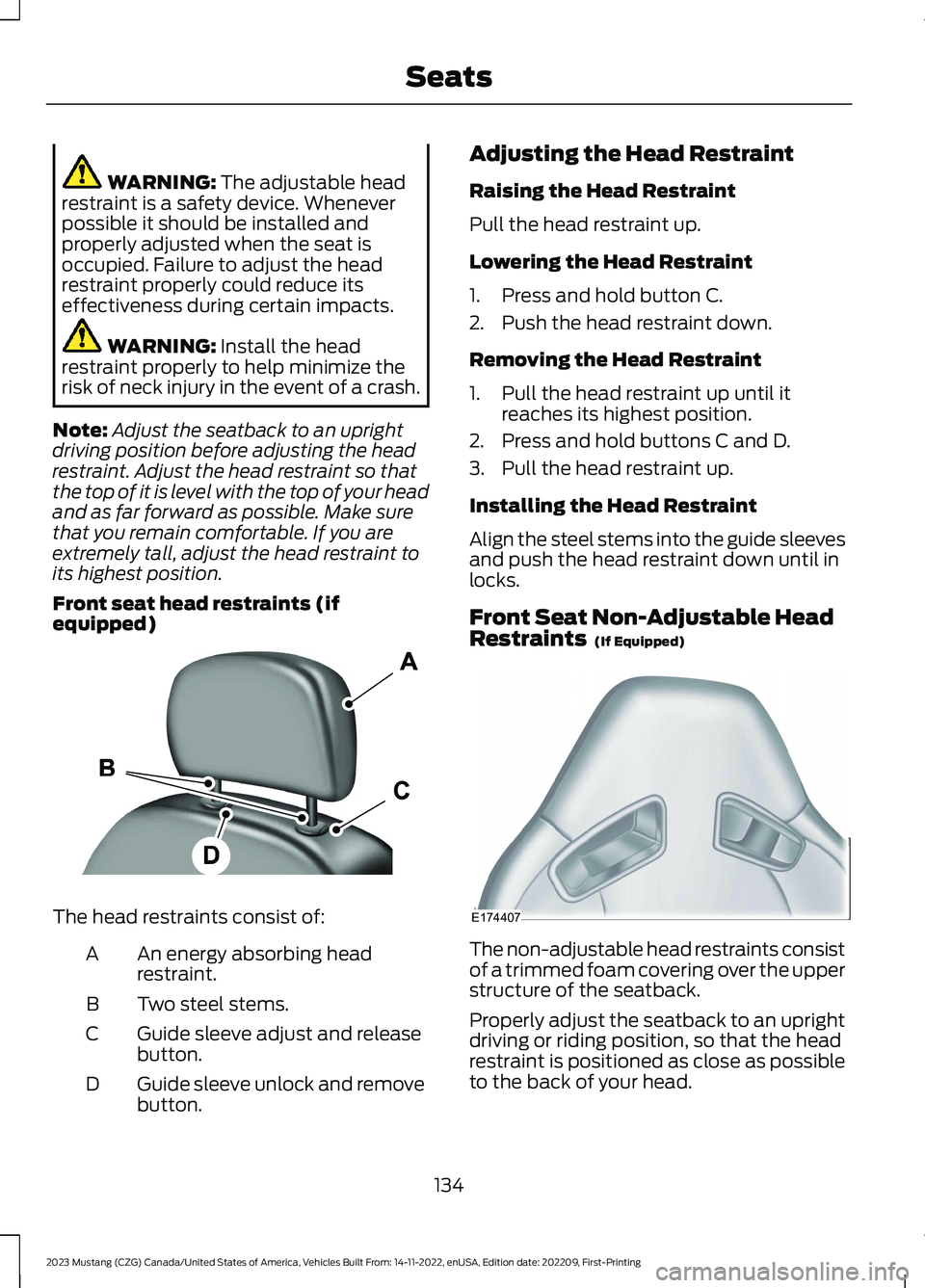
Front seat head restraints (ifequipped)
The head restraints consist of:
An energy absorbing headrestraint.A
Two steel stems.B
Guide sleeve adjust and releasebutton.C
Guide sleeve unlock and removebutton.D
Adjusting the Head Restraint
Raising the Head Restraint
Pull the head restraint up.
Lowering the Head Restraint
1.Press and hold button C.
2.Push the head restraint down.
Removing the Head Restraint
1.Pull the head restraint up until itreaches its highest position.
2.Press and hold buttons C and D.
3.Pull the head restraint up.
Installing the Head Restraint
Align the steel stems into the guide sleevesand push the head restraint down until inlocks.
Front Seat Non-Adjustable HeadRestraints (If Equipped)
The non-adjustable head restraints consistof a trimmed foam covering over the upperstructure of the seatback.
Properly adjust the seatback to an uprightdriving or riding position, so that the headrestraint is positioned as close as possibleto the back of your head.
134
2023 Mustang (CZG) Canada/United States of America, Vehicles Built From: 14-11-2022, enUSA, Edition date: 202209, First-PrintingSeatsE138642 E174407
Page 141 of 535
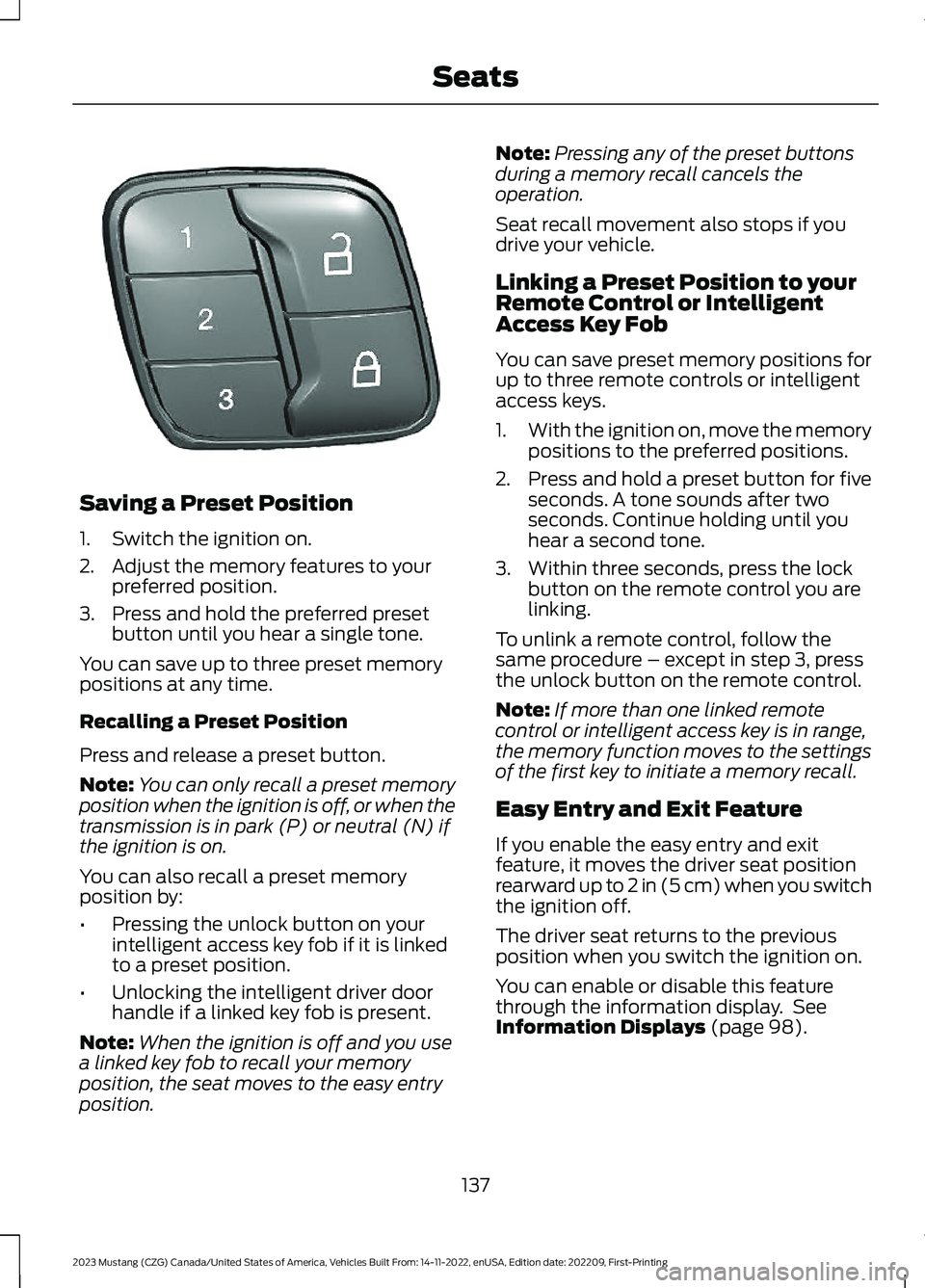
Saving a Preset Position
1.Switch the ignition on.
2.Adjust the memory features to yourpreferred position.
3.Press and hold the preferred presetbutton until you hear a single tone.
You can save up to three preset memorypositions at any time.
Recalling a Preset Position
Press and release a preset button.
Note:You can only recall a preset memoryposition when the ignition is off, or when thetransmission is in park (P) or neutral (N) ifthe ignition is on.
You can also recall a preset memoryposition by:
•Pressing the unlock button on yourintelligent access key fob if it is linkedto a preset position.
•Unlocking the intelligent driver doorhandle if a linked key fob is present.
Note:When the ignition is off and you usea linked key fob to recall your memoryposition, the seat moves to the easy entryposition.
Note:Pressing any of the preset buttonsduring a memory recall cancels theoperation.
Seat recall movement also stops if youdrive your vehicle.
Linking a Preset Position to yourRemote Control or IntelligentAccess Key Fob
You can save preset memory positions forup to three remote controls or intelligentaccess keys.
1.With the ignition on, move the memorypositions to the preferred positions.
2.Press and hold a preset button for fiveseconds. A tone sounds after twoseconds. Continue holding until youhear a second tone.
3.Within three seconds, press the lockbutton on the remote control you arelinking.
To unlink a remote control, follow thesame procedure – except in step 3, pressthe unlock button on the remote control.
Note:If more than one linked remotecontrol or intelligent access key is in range,the memory function moves to the settingsof the first key to initiate a memory recall.
Easy Entry and Exit Feature
If you enable the easy entry and exitfeature, it moves the driver seat positionrearward up to 2 in (5 cm) when you switchthe ignition off.
The driver seat returns to the previousposition when you switch the ignition on.
You can enable or disable this featurethrough the information display. SeeInformation Displays (page 98).
137
2023 Mustang (CZG) Canada/United States of America, Vehicles Built From: 14-11-2022, enUSA, Edition date: 202209, First-PrintingSeatsE331901
Page 144 of 535
WHAT IS THE GARAGE DOOR
OPENER
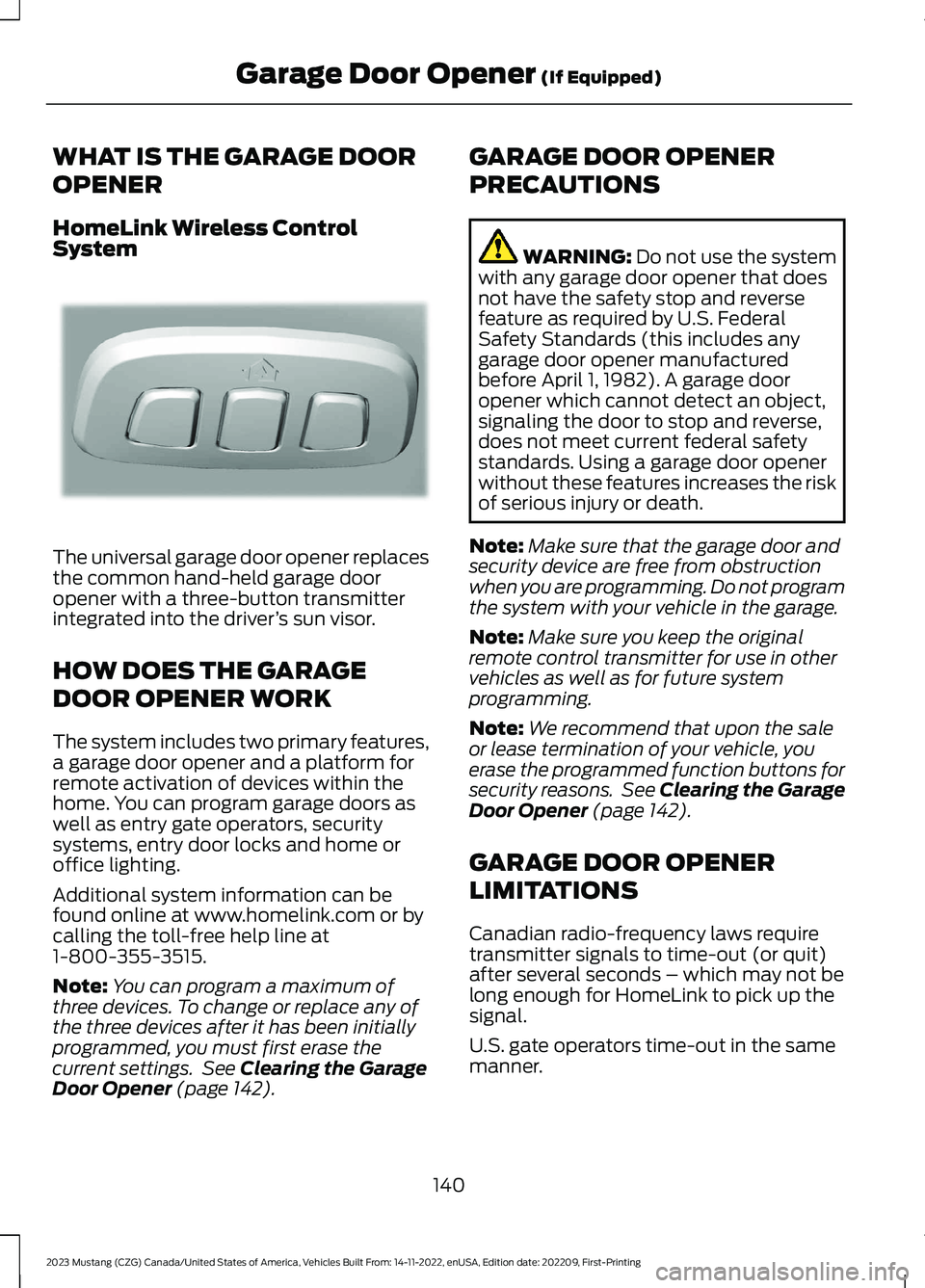
HomeLink Wireless ControlSystem
The universal garage door opener replacesthe common hand-held garage dooropener with a three-button transmitterintegrated into the driver’s sun visor.
HOW DOES THE GARAGE
DOOR OPENER WORK
The system includes two primary features,a garage door opener and a platform forremote activation of devices within thehome. You can program garage doors aswell as entry gate operators, securitysystems, entry door locks and home oroffice lighting.
Additional system information can befound online at www.homelink.com or bycalling the toll-free help line at1-800-355-3515.
Note:You can program a maximum ofthree devices. To change or replace any ofthe three devices after it has been initiallyprogrammed, you must first erase thecurrent settings. See Clearing the GarageDoor Opener (page 142).
GARAGE DOOR OPENER
PRECAUTIONS
WARNING: Do not use the systemwith any garage door opener that doesnot have the safety stop and reversefeature as required by U.S. FederalSafety Standards (this includes anygarage door opener manufacturedbefore April 1, 1982). A garage dooropener which cannot detect an object,signaling the door to stop and reverse,does not meet current federal safetystandards. Using a garage door openerwithout these features increases the riskof serious injury or death.
Note:Make sure that the garage door andsecurity device are free from obstructionwhen you are programming. Do not programthe system with your vehicle in the garage.
Note:Make sure you keep the originalremote control transmitter for use in othervehicles as well as for future systemprogramming.
Note:We recommend that upon the saleor lease termination of your vehicle, youerase the programmed function buttons forsecurity reasons. See Clearing the GarageDoor Opener (page 142).
GARAGE DOOR OPENER
LIMITATIONS
Canadian radio-frequency laws requiretransmitter signals to time-out (or quit)after several seconds – which may not belong enough for HomeLink to pick up thesignal.
U.S. gate operators time-out in the samemanner.
140
2023 Mustang (CZG) Canada/United States of America, Vehicles Built From: 14-11-2022, enUSA, Edition date: 202209, First-PrintingGarage Door Opener (If Equipped)E188211