start stop button FORD MUSTANG 2023 User Guide
[x] Cancel search | Manufacturer: FORD, Model Year: 2023, Model line: MUSTANG, Model: FORD MUSTANG 2023Pages: 535, PDF Size: 15.46 MB
Page 180 of 535
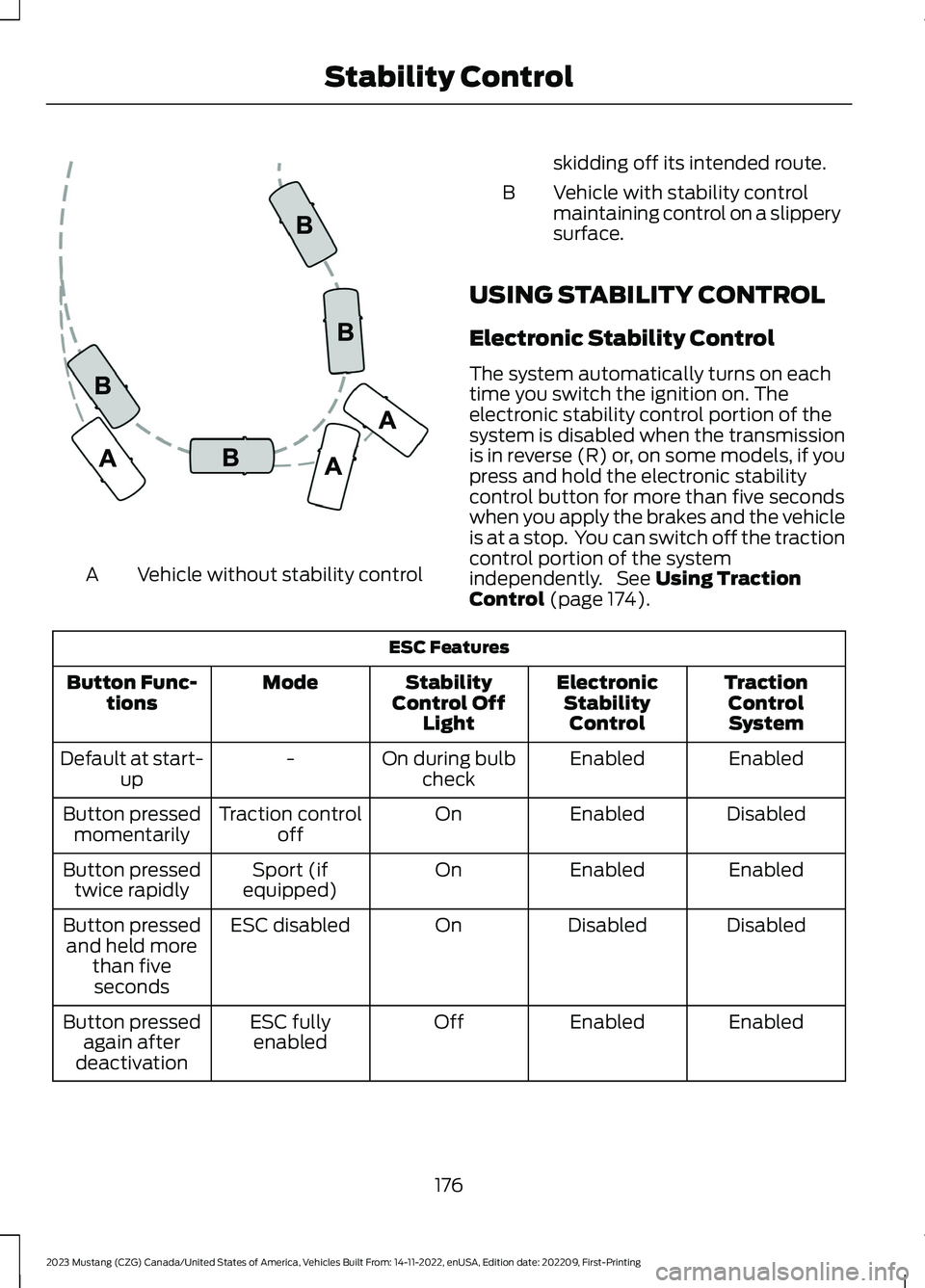
Vehicle without stability controlA
skidding off its intended route.
Vehicle with stability controlmaintaining control on a slipperysurface.
B
USING STABILITY CONTROL
Electronic Stability Control
The system automatically turns on eachtime you switch the ignition on. Theelectronic stability control portion of thesystem is disabled when the transmissionis in reverse (R) or, on some models, if youpress and hold the electronic stabilitycontrol button for more than five secondswhen you apply the brakes and the vehicleis at a stop. You can switch off the tractioncontrol portion of the systemindependently. See Using TractionControl (page 174).
ESC Features
TractionControlSystem
ElectronicStabilityControl
StabilityControl OffLight
ModeButton Func-tions
EnabledEnabledOn during bulbcheck-Default at start-up
DisabledEnabledOnTraction controloffButton pressedmomentarily
EnabledEnabledOnSport (ifequipped)Button pressedtwice rapidly
DisabledDisabledOnESC disabledButton pressedand held morethan fiveseconds
EnabledEnabledOffESC fullyenabledButton pressedagain afterdeactivation
176
2023 Mustang (CZG) Canada/United States of America, Vehicles Built From: 14-11-2022, enUSA, Edition date: 202209, First-PrintingStability ControlE72903
Page 238 of 535
Vehicles Sold in Canada: GettingRoadside Assistance
To fully assist you should you have avehicle concern, Ford Motor Company ofCanada, Limited offers a complimentaryroadside assistance program. This programis eligible within Canada or the continentalUnited States.
The service is available 24 hours a day,seven days a week.
This program is separate from the NewVehicle Limited Warranty, but the coverageis concurrent with the powertrain coverageperiod of your vehicle. Canadian roadsidecoverage and benefits may differ from theU.S. coverage.
If you require more information, please callus in Canada at 1-800-665-2006, or visitour website at www.ford.ca.
HAZARD FLASHERS
Note:The hazard flashers operate whenthe ignition is in any position, or if the key isnot in the ignition. If used when the vehicleis not running, the battery loses charge. Asa result, there may be insufficient power torestart your vehicle.
The flasher control is on theinstrument panel. Use yourhazard flashers when yourvehicle is creating a safety hazard for othermotorists.
•Press the flasher control and all frontand rear direction indicators flash.
•Press the button again to switch themoff.
FUEL SHUTOFF
WARNING: If your vehicle has beeninvolved in a crash, have the fuel systemchecked. Failure to follow this instructioncould result in fire, personal injury ordeath.
Note: When you try to restart your vehicleafter a fuel shutoff, the vehicle makes surethat various systems are safe to restart.Once the vehicle determines the systemsare safe, then the vehicle allows you torestart.
Note:In the event that your vehicle doesnot restart after your third attempt, contacta qualified technician.
The fuel pump shutoff stops the flow offuel to the engine in the event of amoderate to severe crash. Not everyimpact causes a shutoff.
Should your vehicle shut off after a crash,you may restart your vehicle.
1.Press START/STOP to switch off yourvehicle.
2.Press the brake pedal andSTART/STOP to switch on yourvehicle.
3.Remove your foot from the brake pedaland press START/STOP to switch offyour vehicle.
4.You can attempt to start the vehicleby pressing the brake pedal andSTART/STOP, or press START/STOPwithout pressing the brake pedal.
5.If the vehicle does not start, repeatsteps 1 through 4.
234
2023 Mustang (CZG) Canada/United States of America, Vehicles Built From: 14-11-2022, enUSA, Edition date: 202209, First-PrintingRoadside EmergenciesE75790
Page 267 of 535
Engine Oil Pressure Warning Lamp
WARNING: If it illuminates whenyou are driving do not continue yourjourney, even if the oil level is correct.Have your vehicle checked.
It illuminates when you switchthe ignition on.
If it illuminates when the engineis running this indicates a malfunction.Stop your vehicle as soon as it is safe todo so and switch the engine off. Check theengine oil level. If the oil level is sufficient,this indicates a system malfunction. Haveyour vehicle checked as soon as possible.
OIL CHANGE INDICATOR
RESET
Use the information display controls onthe steering wheel to reset the oil changeindicator.
From the main menu scroll to:
Action and descriptionMessage
Press the right arrow button,then from this menu scrollto the following message.
Settings
Press OKAdvancedSettings
Press the right arrow button,then from this menu scrollto the following message.
Vehicle
Press the right arrow button,then from this menu scrollto the following message.
Oil Life
Action and descriptionMessage
Press and hold the OKbutton until the instrumentcluster displays thefollowing message.
Hold OK toReset
Reset Successful
When the oil change indic-ator resets the instrumentcluster displays 100%.
Remaining Life
{00}%
If the instrument clusterdisplays one of the followingmessages, repeat theprocess.
Not Reset
Reset Cancelled
CHANGING THE ENGINE AIR
FILTER - 2.3L ECOBOOST™/
5.0L
WARNING: To reduce the risk ofvehicle damage and personal burninjuries, do not start your engine with theair cleaner removed and do not removeit while the engine is running.
Note: Failure to use the correct air filterelement may result in severe enginedamage. Your warranty may not coverthese damages.
Only use the specified replacement airfilter. See Motorcraft Parts (page 342).
263
2023 Mustang (CZG) Canada/United States of America, Vehicles Built From: 14-11-2022, enUSA, Edition date: 202209, First-PrintingMaintenanceE67022
Page 290 of 535
Note:The pre-collision assist system turnsoff when using Track Apps or when youswitch off your stability control system.
Acceleration Timer
Displays your vehicle's rate of accelerationfor a given speed or distance range.
Accelerometer
Displays your vehicle's rate of accelerationor deceleration. A dot moves toward thearea of acceleration or deceleration.
LEFT Acceleration or Deceleration
When accelerating or decelerating left, thedot moves to the right on theaccelerometer.
RIGHT Acceleration or Deceleration
When accelerating or decelerating right,the dot moves to the left on theaccelerometer.
Brake Performance
Displays your vehicle's rate of decelerationfor a given speed range.
Exhaust Mode
Gives the driver the ability to choose thevehicle's exhaust mode.
Note:The Track Exhaust Mode setting isonly for use at tracks and not for use onpublic roadways. Use of this setting resultsin increased exterior noise, which may notmeet state and local laws and regulations.It is the obligation of the driver to operatethe vehicle in a manner that complies withstate and local requirements. Only use theTrack Exhaust Mode setting at acompetition track or an off-road coursewhere elevated exterior vehicle noise isacceptable.
Lap Timer
Gives you the ability to record lap times atthree separate tracks.
Launch Control (If Equipped)
Maximizes your vehicle's traction from astanding start.
Follow these steps to use launch control:
1.Bring your vehicle to a complete stop.
2.Make sure launch control is enabled.The indicator illuminates in theinstrument display when launch controlis enabled. See Warning Lamps andIndicators (page 93).
3.Fully press the clutch pedal.
4.Shift the transmission into first gear.
5.Fully depress the accelerator pedal andallow the engine RPM to stabilize.
6.Release the clutch pedal.
Line Lock
Line lock is a feature intended for use attracks only and should not be used onpublic roadways. Use of this feature mayresult in significantly increased rear tirewear. It is intended to condition the reartires to maximize traction prior to track use.Line lock maintains brake force at the frontwheels, allowing the rear wheels to spinwith minimal vehicle movement.
This feature is located in the Track Appsmenu. Make selections through the 5-wayinformation display control and OK buttonlocated on the steering wheel.
Using Line Lock
There are three line lock stages:
•Initiated.
•Engaged.
•Off.
286
2023 Mustang (CZG) Canada/United States of America, Vehicles Built From: 14-11-2022, enUSA, Edition date: 202209, First-PrintingTrack Use (If Equipped)
Page 435 of 535
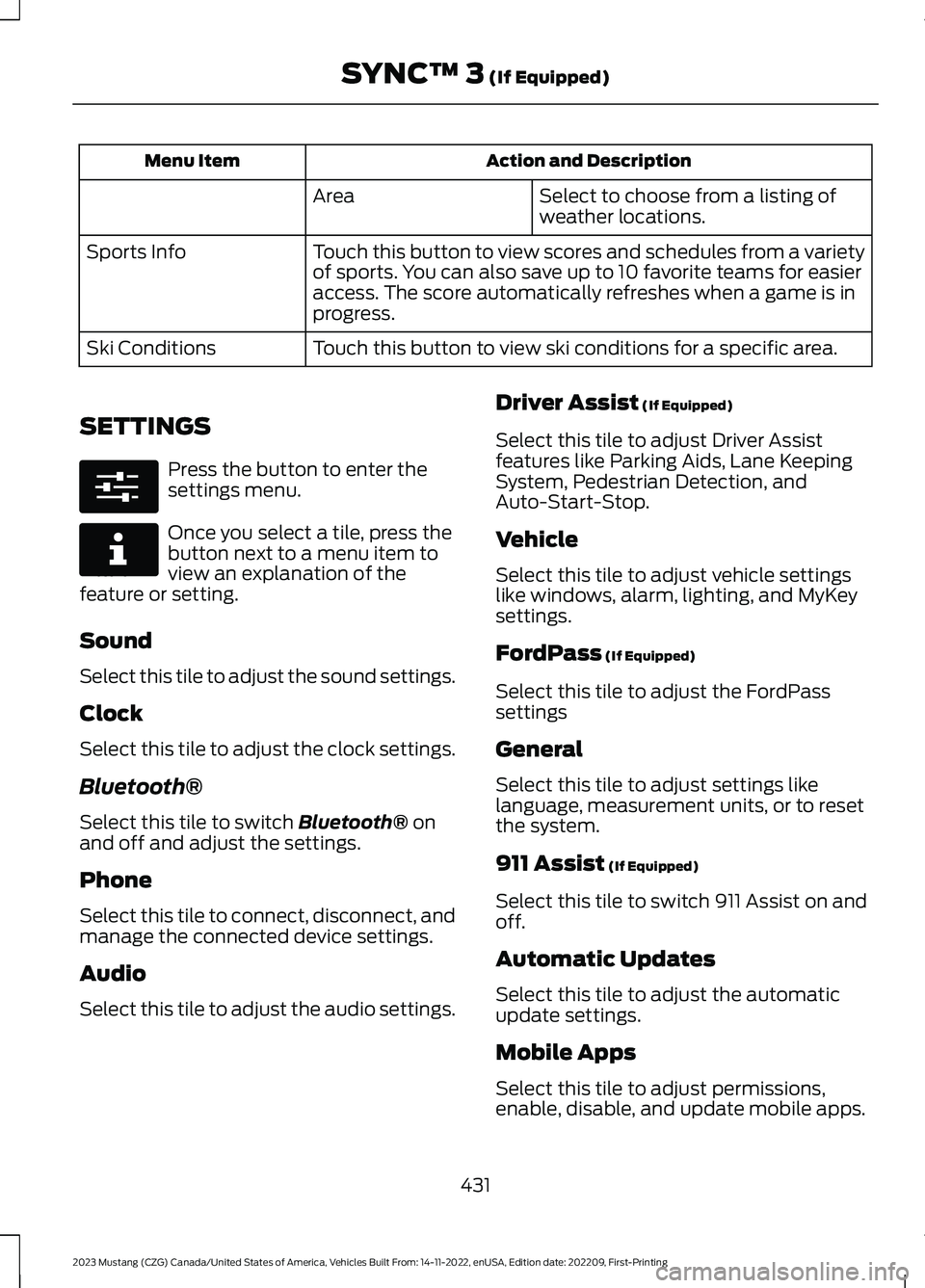
Action and DescriptionMenu Item
Select to choose from a listing ofweather locations.Area
Touch this button to view scores and schedules from a varietyof sports. You can also save up to 10 favorite teams for easieraccess. The score automatically refreshes when a game is inprogress.
Sports Info
Touch this button to view ski conditions for a specific area.Ski Conditions
SETTINGS
Press the button to enter thesettings menu.
Once you select a tile, press thebutton next to a menu item toview an explanation of thefeature or setting.
Sound
Select this tile to adjust the sound settings.
Clock
Select this tile to adjust the clock settings.
Bluetooth®
Select this tile to switch Bluetooth® onand off and adjust the settings.
Phone
Select this tile to connect, disconnect, andmanage the connected device settings.
Audio
Select this tile to adjust the audio settings.
Driver Assist (If Equipped)
Select this tile to adjust Driver Assistfeatures like Parking Aids, Lane KeepingSystem, Pedestrian Detection, andAuto-Start-Stop.
Vehicle
Select this tile to adjust vehicle settingslike windows, alarm, lighting, and MyKeysettings.
FordPass (If Equipped)
Select this tile to adjust the FordPasssettings
General
Select this tile to adjust settings likelanguage, measurement units, or to resetthe system.
911 Assist (If Equipped)
Select this tile to switch 911 Assist on andoff.
Automatic Updates
Select this tile to adjust the automaticupdate settings.
Mobile Apps
Select this tile to adjust permissions,enable, disable, and update mobile apps.
431
2023 Mustang (CZG) Canada/United States of America, Vehicles Built From: 14-11-2022, enUSA, Edition date: 202209, First-PrintingSYNC™ 3 (If Equipped)E280315 E268570
Page 444 of 535
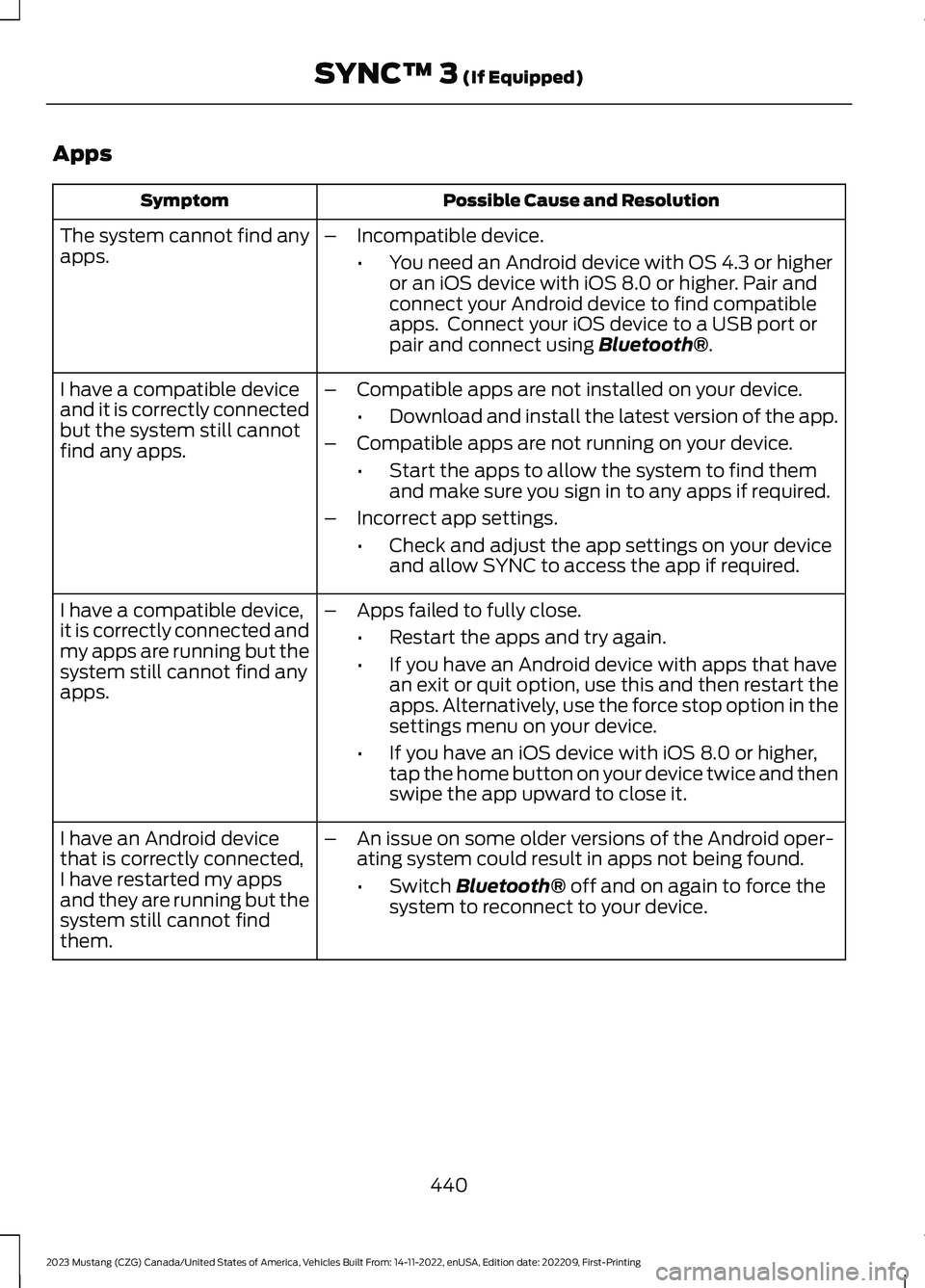
Apps
Possible Cause and ResolutionSymptom
The system cannot find anyapps.–Incompatible device.
•You need an Android device with OS 4.3 or higheror an iOS device with iOS 8.0 or higher. Pair andconnect your Android device to find compatibleapps. Connect your iOS device to a USB port orpair and connect using Bluetooth®.
I have a compatible deviceand it is correctly connectedbut the system still cannotfind any apps.
–Compatible apps are not installed on your device.
•Download and install the latest version of the app.
–Compatible apps are not running on your device.
•Start the apps to allow the system to find themand make sure you sign in to any apps if required.
–Incorrect app settings.
•Check and adjust the app settings on your deviceand allow SYNC to access the app if required.
I have a compatible device,it is correctly connected andmy apps are running but thesystem still cannot find anyapps.
–Apps failed to fully close.
•Restart the apps and try again.
•If you have an Android device with apps that havean exit or quit option, use this and then restart theapps. Alternatively, use the force stop option in thesettings menu on your device.
•If you have an iOS device with iOS 8.0 or higher,tap the home button on your device twice and thenswipe the app upward to close it.
I have an Android devicethat is correctly connected,I have restarted my appsand they are running but thesystem still cannot findthem.
–An issue on some older versions of the Android oper-ating system could result in apps not being found.
•Switch Bluetooth® off and on again to force thesystem to reconnect to your device.
440
2023 Mustang (CZG) Canada/United States of America, Vehicles Built From: 14-11-2022, enUSA, Edition date: 202209, First-PrintingSYNC™ 3 (If Equipped)