battery charge FORD MUSTANG MACH E 2023 User Guide
[x] Cancel search | Manufacturer: FORD, Model Year: 2023, Model line: MUSTANG MACH E, Model: FORD MUSTANG MACH E 2023Pages: 496, PDF Size: 13.09 MB
Page 165 of 496
WHAT IS THE POWER OUTLET
The power outlet can power devices usinga 12 V outlet adapter.
POWER OUTLET
PRECAUTIONS
When you switch the vehicle on, you canuse the socket to power 12 V applianceswith a maximum current rating of 20 A. Donot use the power point over the vehiclecapacity of 12 V DC 240 W or a fuse couldblow. Do not plug in any device thatsupplies power to the vehicle through thepower points. This could result in damageto vehicle systems. Do not hang anyaccessory from the accessory plug. Alwayskeep the power point caps closed whennot in use. Do not insert objects other thanan accessory plug into the power point.
To prevent the battery from running out ofcharge:
•Do not use the power point longer thannecessary when the vehicle is off.
•Do not leave devices plugged inovernight or when you park your vehiclefor extended periods.
LOCATING THE POWER
OUTLETS
Power outlets are in the followinglocations:
•In the media bin below the instrumentpanel.
•Inside the main center console bin.
•On the rear of the main center consolebin.
•In the cargo area.
161
2023 Mustang Mach-E (CGW) Canada/United States of America, enUSA, Edition date: 202209, DOMPower Outlet
Page 166 of 496
WHAT IS THE WIRELESS
ACCESSORY CHARGER
The wireless accessory charger allows youto charge one compatible Qi wirelesscharging device on the charging area.
WIRELESS ACCESSORY
CHARGER PRECAUTIONS
WARNING: Wireless chargingdevices can affect the operation ofimplanted medical devices, includingcardiac pacemakers. If you have anyimplanted medical devices, werecommend that you consult with yourphysician.
Keep the charging area clean and removeforeign objects prior to charging a device.
Do not place items with a magnetic stripor radio-frequency identification chip, forexample passports, parking tickets,transportation passes or credit cards, nearthe charging area when charging a device.Damage could occur to the magnetic stripor radio-frequency identification chip.
Do not place metal objects, for exampleremote controls, coins and candywrappers, on or near the charging areawhen charging a device. Metal objects mayheat up and degrade the chargingperformance, in addition to causinginterruptions in charging.
Charging could be interrupted, degraded,or could stop if any of the following occur:
•The system detects a foreign object.
•The device is misaligned on thecharging area.
•The device moves on the activecharging area when the vehicle is inmotion.
•The vehicle ambient temperature is toohigh.
•You attempt to charge a non-Qicompatible device on the wirelesscharger.
Note:During charging, the device and thecharger could heat up, this is normal. If thebattery gets hotter than usual, the devicemay stop charging.
LOCATING THE WIRELESS
ACCESSORY CHARGER
The charging area is in the frontconsole below the instrumentpanel.
CHARGING A WIRELESS
DEVICE
Place the device on the center of thecharging surface with the charging sidedown. The charging stops after your devicereaches a full charge.
You can use the charger when the vehicleis in accessory mode, when the vehicle isrunning, or when SYNC is on.
Displays on the status bar whenwireless charging is in progress.
Note:The charging performance may beaffected if your device is in a case. It may benecessary to remove the case to wirelesslycharge your device.
Note:Software and firmware updates mayaffect device compatibility, including theuse of unofficial software or firmware. Youshould verify charging functionality with yourspecific devices in-vehicle.
162
2023 Mustang Mach-E (CGW) Canada/United States of America, enUSA, Edition date: 202209, DOMWireless Accessory ChargerE297549 E263583
Page 169 of 496
Within 10 seconds of switching your vehicleoff, press the brake pedal and press thepush button start. After 10 seconds, youcan no longer start your vehicle if it doesnot detect a valid remote control.
Once your vehicle starts, it remains on untilyou press the push button start, even if itdoes not detect a valid remote control.
If you open and close a door while yourvehicle is on, the system searches for avalid remote control. You cannot start yourvehicle if the system does not detect avalid remote control within 10 seconds.
ACCESSING THE PASSIVE KEY
BACKUP POSITION
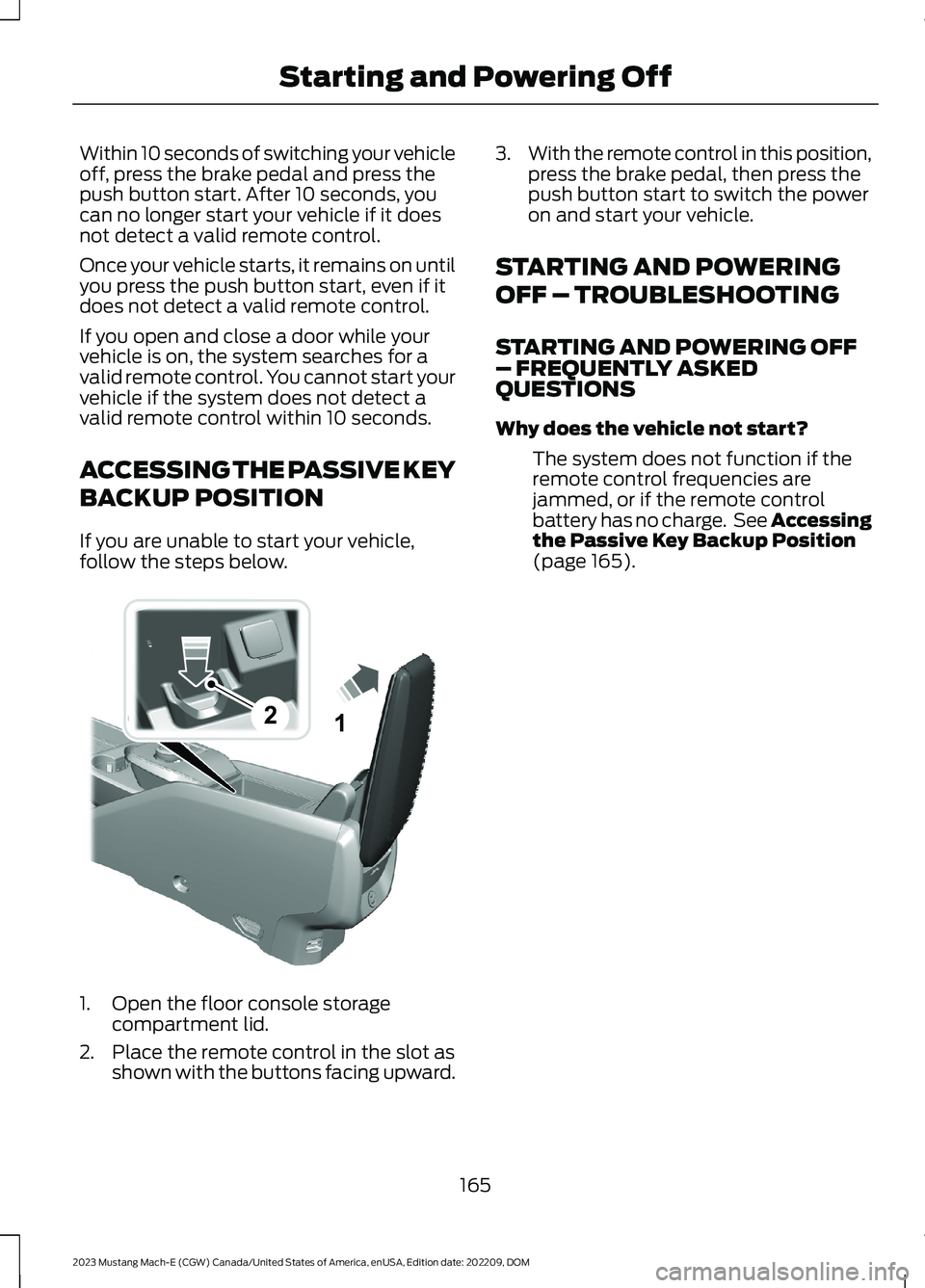
If you are unable to start your vehicle,follow the steps below.
1.Open the floor console storagecompartment lid.
2.Place the remote control in the slot asshown with the buttons facing upward.
3.With the remote control in this position,press the brake pedal, then press thepush button start to switch the poweron and start your vehicle.
STARTING AND POWERING
OFF – TROUBLESHOOTING
STARTING AND POWERING OFF– FREQUENTLY ASKEDQUESTIONS
Why does the vehicle not start?
The system does not function if theremote control frequencies arejammed, or if the remote controlbattery has no charge. See Accessingthe Passive Key Backup Position(page 165).
165
2023 Mustang Mach-E (CGW) Canada/United States of America, enUSA, Edition date: 202209, DOMStarting and Powering Off21E315884
Page 170 of 496
WHAT IS THE HIGH VOLTAGE
BATTERY
The high voltage battery is a highlysophisticated lithium ion battery system,used to store electrified energy to poweryour vehicle.
HIGH VOLTAGE BATTERY
PRECAUTIONS
WARNING: This battery packshould only be serviced by an authorizedelectric vehicle technician. Improperhandling can result in personal injury ordeath.
WARNING: Keep your hands andclothing clear of the cooling fan.
Your vehicle consists of varioushigh-voltage components and wiring. Allof the high-voltage power flows throughspecific wiring assemblies labeled as suchor covered with a solid orange convolute,or orange striped tape, or both. Do notcome in contact with these components.
PRESERVING YOUR HIGH
VOLTAGE BATTERY
When using the battery at a low state ofcharge, your vehicle could start disablingaccessory features to protect battery life.
If your vehicle reaches a 0% state ofcharge, recharge your vehicle as soon aspossible.
In everyday use it is acceptable to use thefull state of charge window, however thereare a few best practices we recommendin order to maintain the health and life ofyour battery.
Overnight Charging
You can increase the longevity andperformance of your high voltage batteryby using the charge scheduling anddeparture and comfort settings on yourtouchscreen or in the FordPass app.
With Charge Scheduling you can improvethe high voltage battery's longevity bydelaying the start of charging and settinga maximum charging limit. It isrecommended to set your preferredcharging times to be at least 2-3 hoursafter your typical plug in time. This allowsthe battery to cool before charging begins.Additionally, setting the maximum chargelevel to 90% for everyday usage reducesstrain on the battery.
You can improve driving range andperformance by scheduling departuretimes and cabin comfort level with theDeparture and Comfort feature. This willnot only warm or cool the cabin but alsocondition the battery to ensure best drivingrange and performance by the setdeparture time.
DC Charging
Frequent use of DC charging could resultin reducing your battery's efficiency andlifespan. This is more pronounced on thestandard range battery pack versus theextended range battery pack. See Whatis DC Charging (page 168).
Storage Temperature
Storing your vehicle in temperaturesbetween 32°F (0°C) and 113°F (45°C) isthe most beneficial for the high voltagebattery.
At temperatures just above the freezingpoint or lower, you should plug your vehiclein to maintain battery performance andmaximize driving range.
166
2023 Mustang Mach-E (CGW) Canada/United States of America, enUSA, Edition date: 202209, DOMHigh Voltage Battery
Page 171 of 496
Storage State of Charge
You can increase the battery life bymaintaining the state of charge below100%. When you park your vehicle for anextended period of 30 days or more, werecommend the battery state of charge beat approximately 50%. Storing yourvehicle's high voltage battery at higherstates of charge is less favorable thanstoring at lower states of charge.
Note:To achieve this state of charge forstorage, you can drive your vehicle down to50% and set a charge limit for your location.See Setting the Charging Schedule andPreferences (page 184).
RECYCLING AND DISPOSING
OF THE HIGH VOLTAGE
BATTERY
Please recycle in accordance with localregulations.
HIGH VOLTAGE BATTERY –
TROUBLESHOOTING
HIGH VOLTAGE BATTERY –WARNING LAMPS
Illuminates when the powertrainrequires service. Have thesystem checked as soon aspossible.
167
2023 Mustang Mach-E (CGW) Canada/United States of America, enUSA, Edition date: 202209, DOMHigh Voltage Battery
Page 172 of 496
WHAT IS AC CHARGING
Charging Basics
AC charging is the preferred method ofcharging. AC charging preserves the healthof the high voltage battery for longer highvoltage battery life.
WHAT IS DC CHARGING
DC charging allows you to charge thevehicle's high voltage battery insignificantly less time than the standardcharge method. You can charge on the gobefore the battery has exhausted all of itspower, or when traveling using the tripplanner as part of your FordPass App.
For the convenience of DC charging andtime, there is a different fee structuredepending on the charging station andnetwork you choose.
Note:Charge times could vary dependingon ambient air temperature, power level,charger type, and location in which you arecharging.
Note:The DC charging rate could bereduced to maximize the life of the battery.
CHARGING YOUR VEHICLE
PRECAUTIONS
WARNING: Do not allow chargingequipment to be immersed in water orliquids. Failure to follow this warningcould result in fire, serious personal injuryor death.
WARNING: Do not attempt to openthe charging equipment. Failure to followthis instruction could result in personalinjury, death or property damage.
WARNING: Do not use the chargingequipment if it is faulty or has beendamaged. Failure to follow thisinstruction could result in personal injury,death or property damage.
WARNING: Install chargingequipment in compliance with localregulations. Failure to follow this warningcould result in fire, serious personal injuryor death.
CHARGING EQUIPMENT
Understanding the Ford Mobile ChargerVideo Link
WARNING: Do not use anungrounded wall outlet. The wall outletmust be in good condition and meetup-to-date local codes. Have a qualifiedelectrician check the wall outlet, if yoususpect that it is not properly grounded.Failure to follow this instruction couldresult in electric shock, personal injury,or death.
WARNING: It is recommended thatelectrical outlets for use with yourcharging equipment be installed by alicensed, qualified electrician.Installations must comply with theprovisions of all local codes. Failure tofollow this warning could result inpersonal injury or death.
WARNING: Do NOT DROP thecontrol box or coupler.
WARNING: Do NOT use if storedoutside temperature range specified.
168
2023 Mustang Mach-E (CGW) Canada/United States of America, enUSA, Edition date: 202209, DOMCharging Your Vehicle
Page 175 of 496
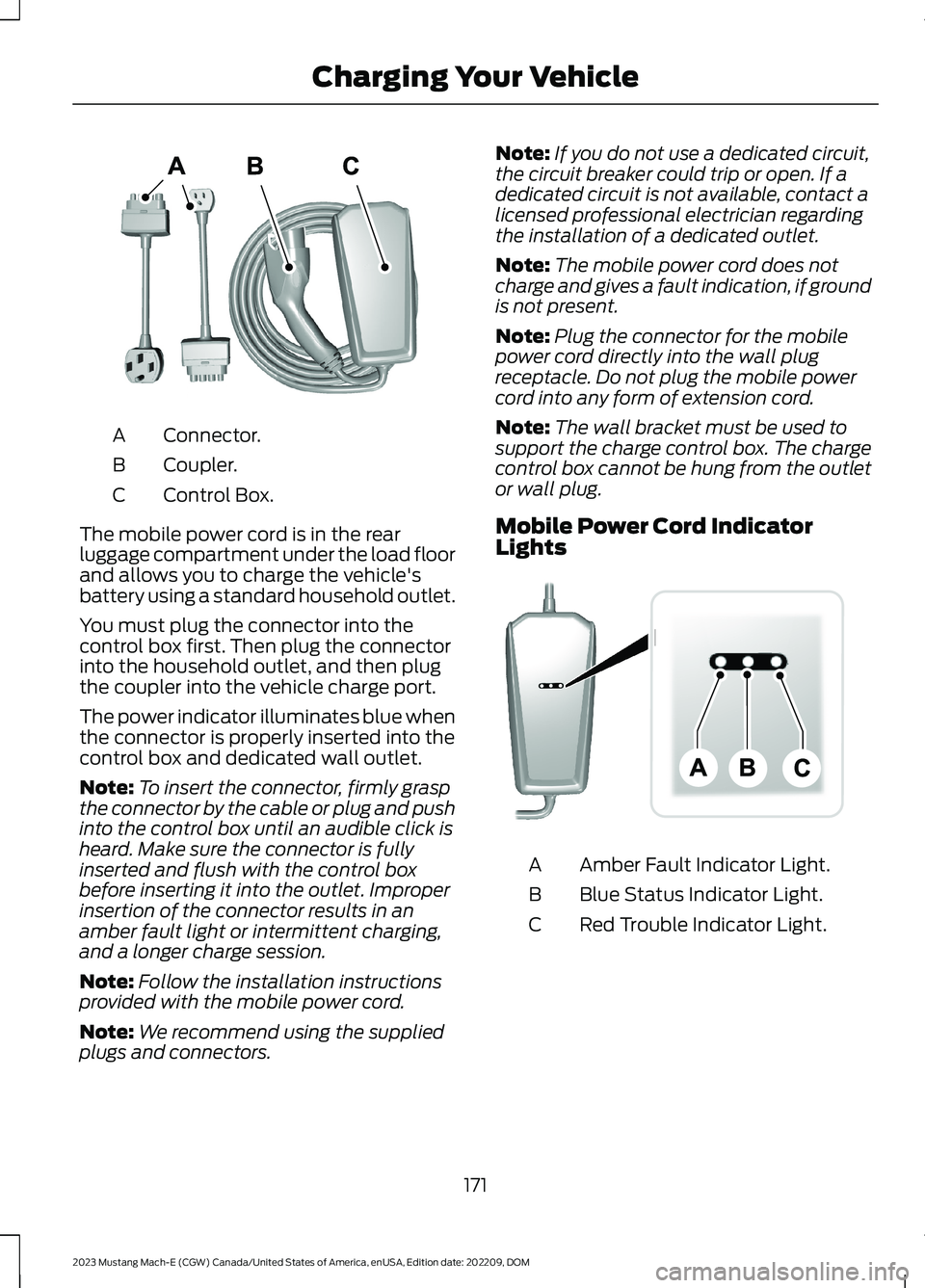
Connector.A
Coupler.B
Control Box.C
The mobile power cord is in the rearluggage compartment under the load floorand allows you to charge the vehicle'sbattery using a standard household outlet.
You must plug the connector into thecontrol box first. Then plug the connectorinto the household outlet, and then plugthe coupler into the vehicle charge port.
The power indicator illuminates blue whenthe connector is properly inserted into thecontrol box and dedicated wall outlet.
Note:To insert the connector, firmly graspthe connector by the cable or plug and pushinto the control box until an audible click isheard. Make sure the connector is fullyinserted and flush with the control boxbefore inserting it into the outlet. Improperinsertion of the connector results in anamber fault light or intermittent charging,and a longer charge session.
Note:Follow the installation instructionsprovided with the mobile power cord.
Note:We recommend using the suppliedplugs and connectors.
Note:If you do not use a dedicated circuit,the circuit breaker could trip or open. If adedicated circuit is not available, contact alicensed professional electrician regardingthe installation of a dedicated outlet.
Note:The mobile power cord does notcharge and gives a fault indication, if groundis not present.
Note:Plug the connector for the mobilepower cord directly into the wall plugreceptacle. Do not plug the mobile powercord into any form of extension cord.
Note:The wall bracket must be used tosupport the charge control box. The chargecontrol box cannot be hung from the outletor wall plug.
Mobile Power Cord IndicatorLights
Amber Fault Indicator Light.A
Blue Status Indicator Light.B
Red Trouble Indicator Light.C
171
2023 Mustang Mach-E (CGW) Canada/United States of America, enUSA, Edition date: 202209, DOMCharging Your VehicleE336365 E336515
Page 181 of 496
CARE INSTRUCTIONS
Do not use cleaners or solvents as thiscould damage your mobile power cord. Donot place stress on the charger cables. Ifunit overheats, remove the mobile powercord from direct sunlight.
SAFETY FEATURES
The charger includes the following safetyfeatures to protect against the risk ofelectric shock:
•Service Ground Check: The chargerconstantly checks for the presence ofa service ground connection. If theservice ground ever fails, the chargerred indicator turns ON and shuts downpower to the vehicle.
•Thermal Event Sensor: Charger modulesenses out-of-ordinary thermal eventsand decreases the charging current orshuts the unit down if required.
•Ground fault circuit interrupter (GFCI)Protection: The charger has a groundfault circuit interrupter (GFCI) reactionsystem to protect against electricshock. If the charger module detectsan output ground fault, it shuts downpower to the output cable andilluminates the red indicator.
•Insulation: The charger module,connector, cable assembly, and chargecoupler are completely insulated.There are no exposed live parts, toprotect against electric shock.
•Unintentional Disconnection: Thecharge coupler is designed to minimizeunintentional disconnection. A pilotsignal wire in the cable and chargecoupler eliminates the possibility ofelectric shock when not connected toa vehicle or if an unintended disconnectoccurs during a charge. Disconnectionduring charging is safe.
LOCATING THE CHARGE PORT
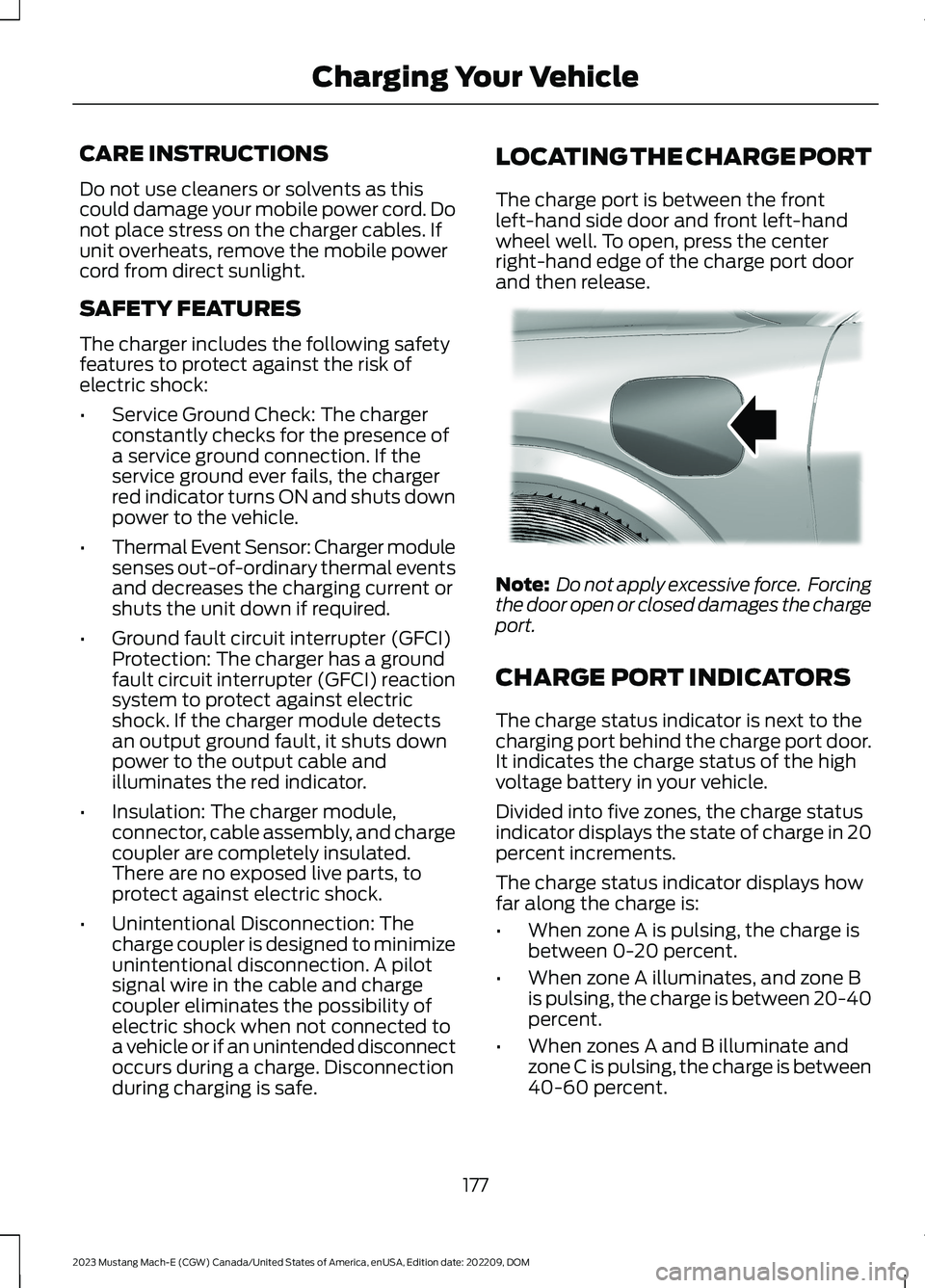
The charge port is between the frontleft-hand side door and front left-handwheel well. To open, press the centerright-hand edge of the charge port doorand then release.
Note: Do not apply excessive force. Forcingthe door open or closed damages the chargeport.
CHARGE PORT INDICATORS
The charge status indicator is next to thecharging port behind the charge port door.It indicates the charge status of the highvoltage battery in your vehicle.
Divided into five zones, the charge statusindicator displays the state of charge in 20percent increments.
The charge status indicator displays howfar along the charge is:
•When zone A is pulsing, the charge isbetween 0-20 percent.
•When zone A illuminates, and zone Bis pulsing, the charge is between 20-40percent.
•When zones A and B illuminate andzone C is pulsing, the charge is between40-60 percent.
177
2023 Mustang Mach-E (CGW) Canada/United States of America, enUSA, Edition date: 202209, DOMCharging Your VehicleE317346
Page 182 of 496
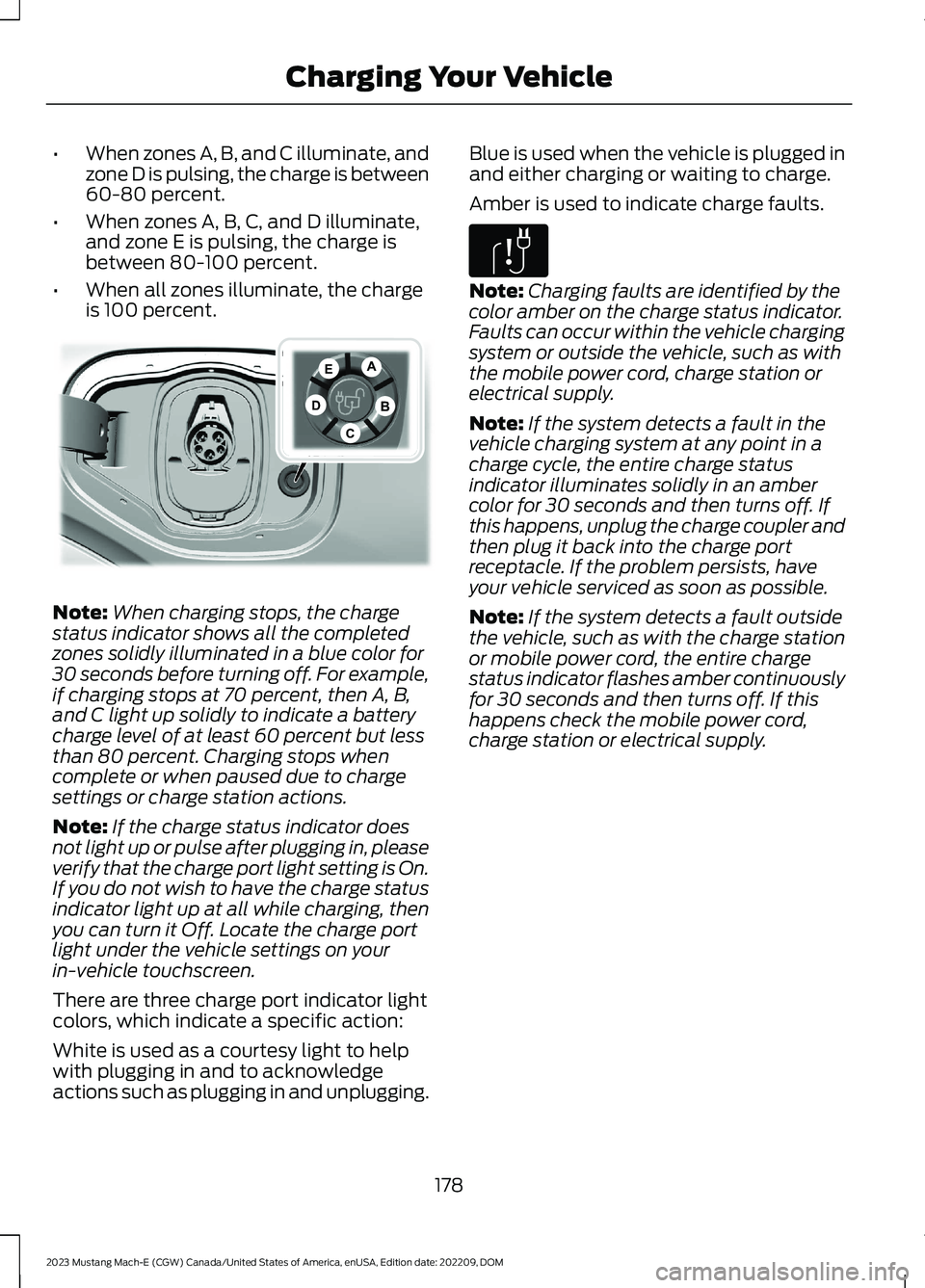
•When zones A, B, and C illuminate, andzone D is pulsing, the charge is between60-80 percent.
•When zones A, B, C, and D illuminate,and zone E is pulsing, the charge isbetween 80-100 percent.
•When all zones illuminate, the chargeis 100 percent.
Note:When charging stops, the chargestatus indicator shows all the completedzones solidly illuminated in a blue color for30 seconds before turning off. For example,if charging stops at 70 percent, then A, B,and C light up solidly to indicate a batterycharge level of at least 60 percent but lessthan 80 percent. Charging stops whencomplete or when paused due to chargesettings or charge station actions.
Note:If the charge status indicator doesnot light up or pulse after plugging in, pleaseverify that the charge port light setting is On.If you do not wish to have the charge statusindicator light up at all while charging, thenyou can turn it Off. Locate the charge portlight under the vehicle settings on yourin-vehicle touchscreen.
There are three charge port indicator lightcolors, which indicate a specific action:
White is used as a courtesy light to helpwith plugging in and to acknowledgeactions such as plugging in and unplugging.
Blue is used when the vehicle is plugged inand either charging or waiting to charge.
Amber is used to indicate charge faults.
Note:Charging faults are identified by thecolor amber on the charge status indicator.Faults can occur within the vehicle chargingsystem or outside the vehicle, such as withthe mobile power cord, charge station orelectrical supply.
Note:If the system detects a fault in thevehicle charging system at any point in acharge cycle, the entire charge statusindicator illuminates solidly in an ambercolor for 30 seconds and then turns off. Ifthis happens, unplug the charge coupler andthen plug it back into the charge portreceptacle. If the problem persists, haveyour vehicle serviced as soon as possible.
Note:If the system detects a fault outsidethe vehicle, such as with the charge stationor mobile power cord, the entire chargestatus indicator flashes amber continuouslyfor 30 seconds and then turns off. If thishappens check the mobile power cord,charge station or electrical supply.
178
2023 Mustang Mach-E (CGW) Canada/United States of America, enUSA, Edition date: 202209, DOMCharging Your VehicleEDCABE317499 E306677
Page 183 of 496
AC CHARGING
CONNECTING THE CHARGER
Charging Using the Mobile PowerCord
CAUTION: TO REDUCE THE RISK OFFIRE- The plug must be properlygrounded. Use a dedicated circuit. If youdo not use a dedicated circuit, the circuitbreaker could trip or open. If you do nothave a dedicated circuit, contact a licensedprofessional electrician for properinstallation.
To charge the high voltage battery:
You must unwrap the mobile power cordcompletely before charging.
1.Put the vehicle in park (P).
Note:Your vehicle must be in park (P) tocharge and for the charge status indicatorto illuminate.
2.Press the center right edge of thecharge port door and then release toopen the door.
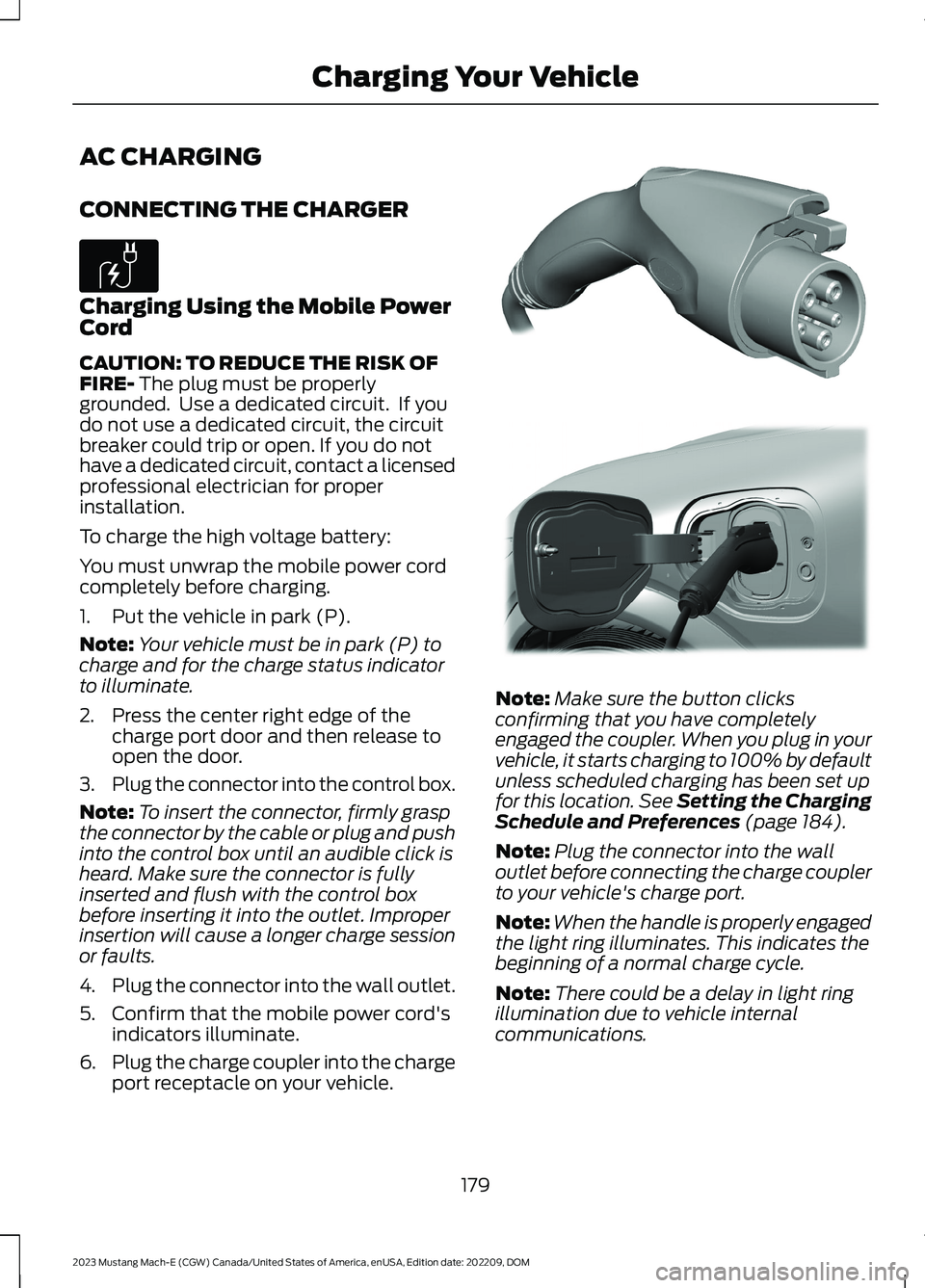
3.Plug the connector into the control box.
Note:To insert the connector, firmly graspthe connector by the cable or plug and pushinto the control box until an audible click isheard. Make sure the connector is fullyinserted and flush with the control boxbefore inserting it into the outlet. Improperinsertion will cause a longer charge sessionor faults.
4.Plug the connector into the wall outlet.
5.Confirm that the mobile power cord'sindicators illuminate.
6.Plug the charge coupler into the chargeport receptacle on your vehicle.
Note:Make sure the button clicksconfirming that you have completelyengaged the coupler. When you plug in yourvehicle, it starts charging to 100% by defaultunless scheduled charging has been set upfor this location. See Setting the ChargingSchedule and Preferences (page 184).
Note:Plug the connector into the walloutlet before connecting the charge couplerto your vehicle's charge port.
Note:When the handle is properly engagedthe light ring illuminates. This indicates thebeginning of a normal charge cycle.
Note:There could be a delay in light ringillumination due to vehicle internalcommunications.
179
2023 Mustang Mach-E (CGW) Canada/United States of America, enUSA, Edition date: 202209, DOMCharging Your VehicleE306676 E335725 E329078