battery charge FORD MUSTANG MACH E 2023 Owner's Manual
[x] Cancel search | Manufacturer: FORD, Model Year: 2023, Model line: MUSTANG MACH E, Model: FORD MUSTANG MACH E 2023Pages: 496, PDF Size: 13.09 MB
Page 185 of 496
STOPPING CHARGING
WARNING: To safely discontinuecharging at any time, follow thedisconnect instructions in stoppingcharging. Charging will automatically andsafely come to a stop. The BLUESTATUS indicator remains ON solidwhen the coupler is removed.
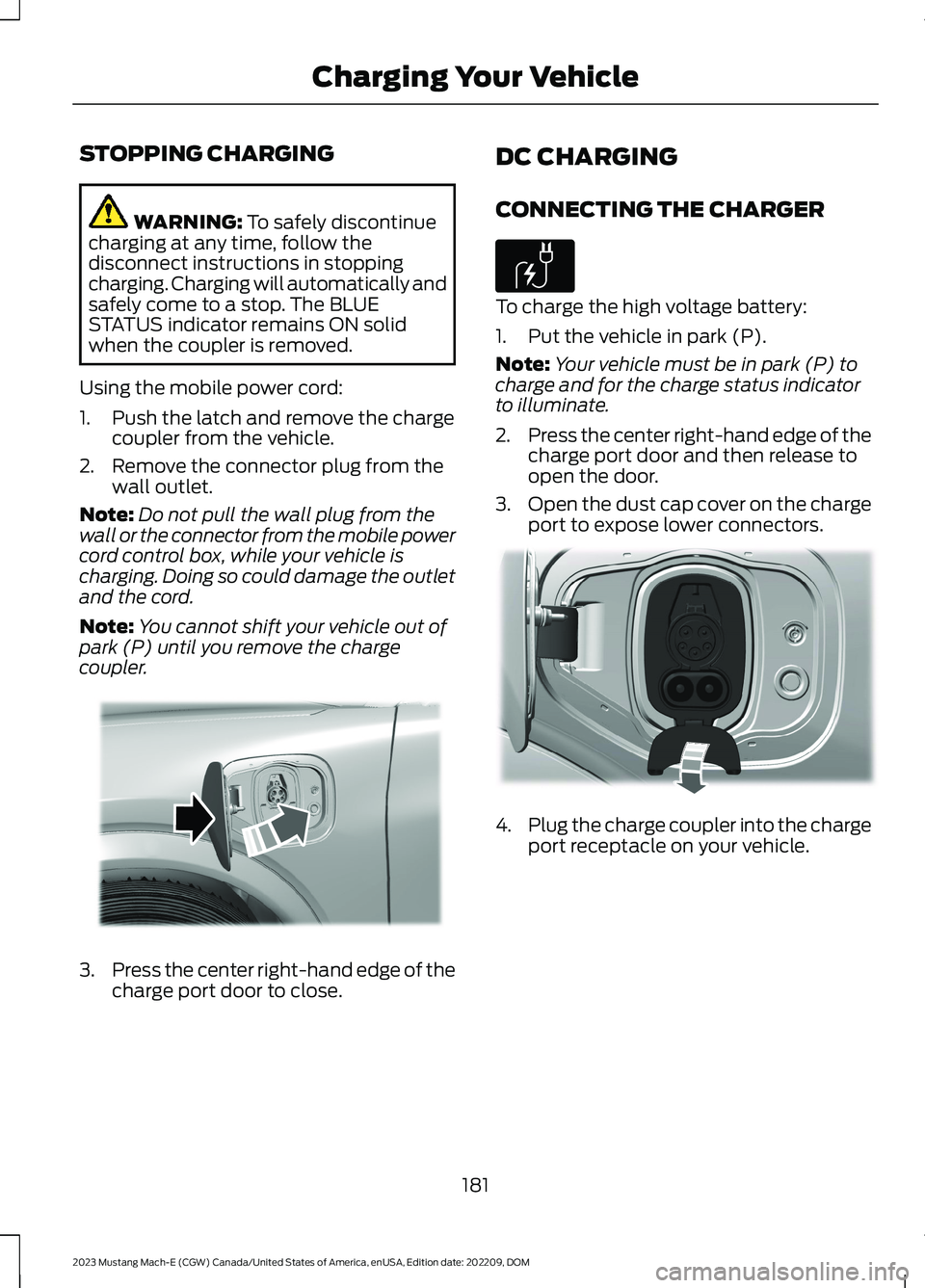
Using the mobile power cord:
1.Push the latch and remove the chargecoupler from the vehicle.
2.Remove the connector plug from thewall outlet.
Note:Do not pull the wall plug from thewall or the connector from the mobile powercord control box, while your vehicle ischarging. Doing so could damage the outletand the cord.
Note:You cannot shift your vehicle out ofpark (P) until you remove the chargecoupler.
3.Press the center right-hand edge of thecharge port door to close.
DC CHARGING
CONNECTING THE CHARGER
To charge the high voltage battery:
1.Put the vehicle in park (P).
Note:Your vehicle must be in park (P) tocharge and for the charge status indicatorto illuminate.
2.Press the center right-hand edge of thecharge port door and then release toopen the door.
3.Open the dust cap cover on the chargeport to expose lower connectors.
4.Plug the charge coupler into the chargeport receptacle on your vehicle.
181
2023 Mustang Mach-E (CGW) Canada/United States of America, enUSA, Edition date: 202209, DOMCharging Your VehicleE317333 E306676 E335267
Page 186 of 496
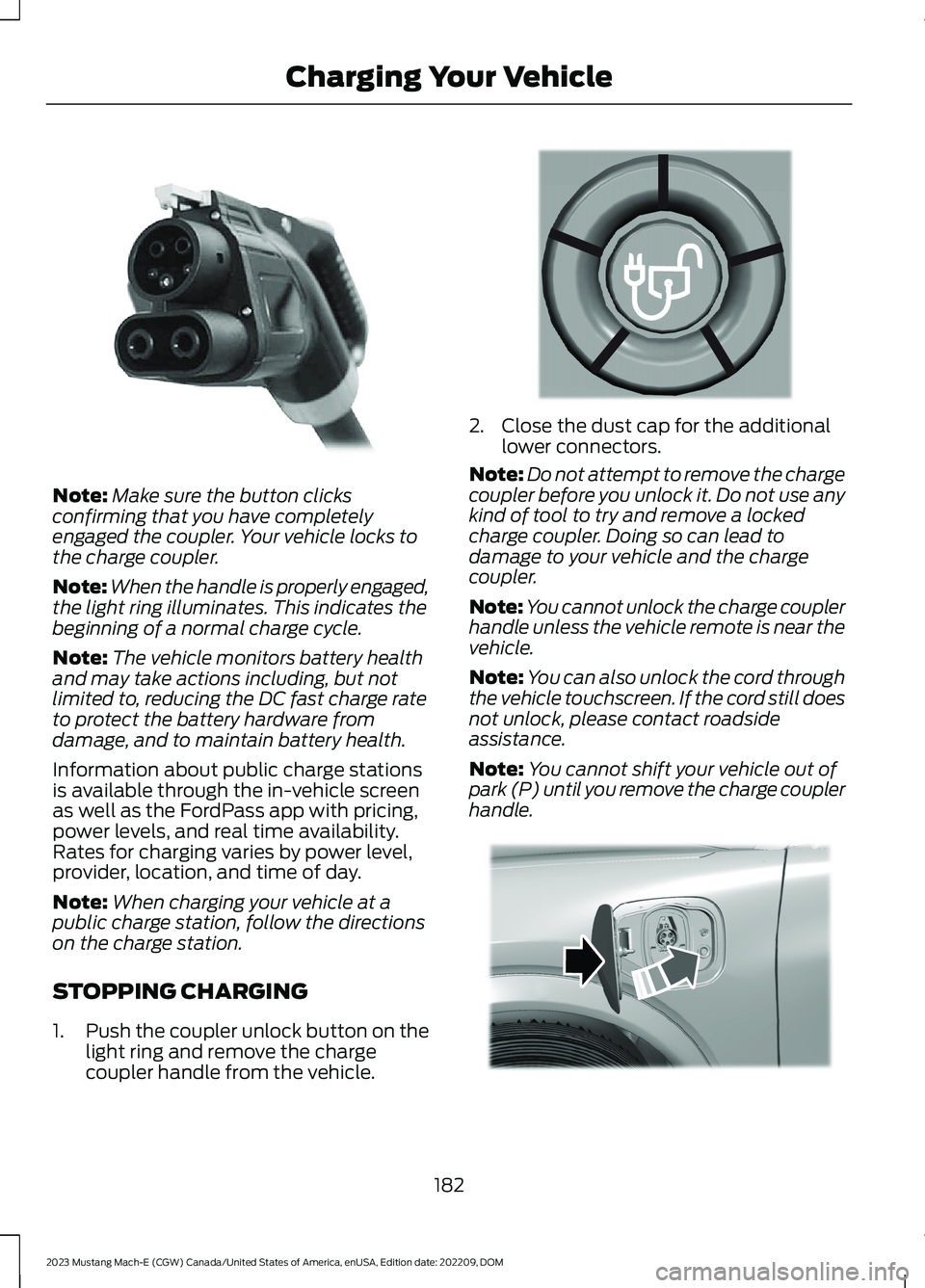
Note:Make sure the button clicksconfirming that you have completelyengaged the coupler. Your vehicle locks tothe charge coupler.
Note:When the handle is properly engaged,the light ring illuminates. This indicates thebeginning of a normal charge cycle.
Note:The vehicle monitors battery healthand may take actions including, but notlimited to, reducing the DC fast charge rateto protect the battery hardware fromdamage, and to maintain battery health.
Information about public charge stationsis available through the in-vehicle screenas well as the FordPass app with pricing,power levels, and real time availability.Rates for charging varies by power level,provider, location, and time of day.
Note:When charging your vehicle at apublic charge station, follow the directionson the charge station.
STOPPING CHARGING
1.Push the coupler unlock button on thelight ring and remove the chargecoupler handle from the vehicle.
2.Close the dust cap for the additionallower connectors.
Note:Do not attempt to remove the chargecoupler before you unlock it. Do not use anykind of tool to try and remove a lockedcharge coupler. Doing so can lead todamage to your vehicle and the chargecoupler.
Note:You cannot unlock the charge couplerhandle unless the vehicle remote is near thevehicle.
Note:You can also unlock the cord throughthe vehicle touchscreen. If the cord still doesnot unlock, please contact roadsideassistance.
Note:You cannot shift your vehicle out ofpark (P) until you remove the charge couplerhandle.
182
2023 Mustang Mach-E (CGW) Canada/United States of America, enUSA, Edition date: 202209, DOMCharging Your VehicleE335188 E349661 E317333
Page 188 of 496
SETTING THE CHARGING
SCHEDULE AND
PREFERENCES
You can schedule charging totake advantage of lower-costelectricity rates during off-peakhours if you have signed up for a time ofuse pricing plan with your utility provider.You can also set an upper charge limit foryour battery and a departure time andcabin temperature so your vehicle is readyto go when you are.
Scheduled charging can be set up in theon vehicle display or in the FordPass app.
To view your charge settings:
1.
Press the button on thetouchscreen to open the applicationdrawer.
2.Press Charging.
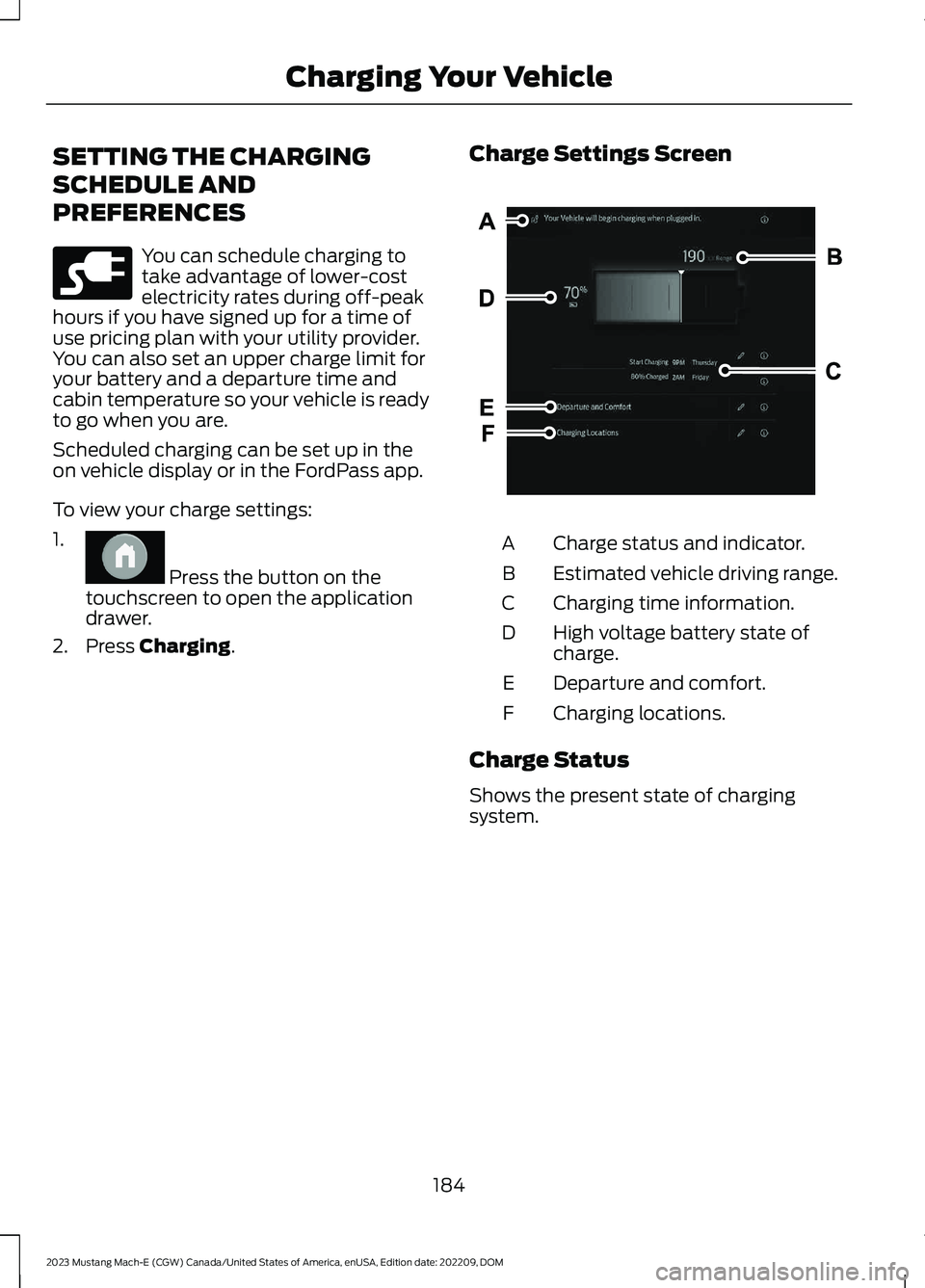
Charge Settings Screen
Charge status and indicator.A
Estimated vehicle driving range.B
Charging time information.C
High voltage battery state ofcharge.D
Departure and comfort.E
Charging locations.F
Charge Status
Shows the present state of chargingsystem.
184
2023 Mustang Mach-E (CGW) Canada/United States of America, enUSA, Edition date: 202209, DOMCharging Your VehicleE228962 E386798 E387038
Page 189 of 496
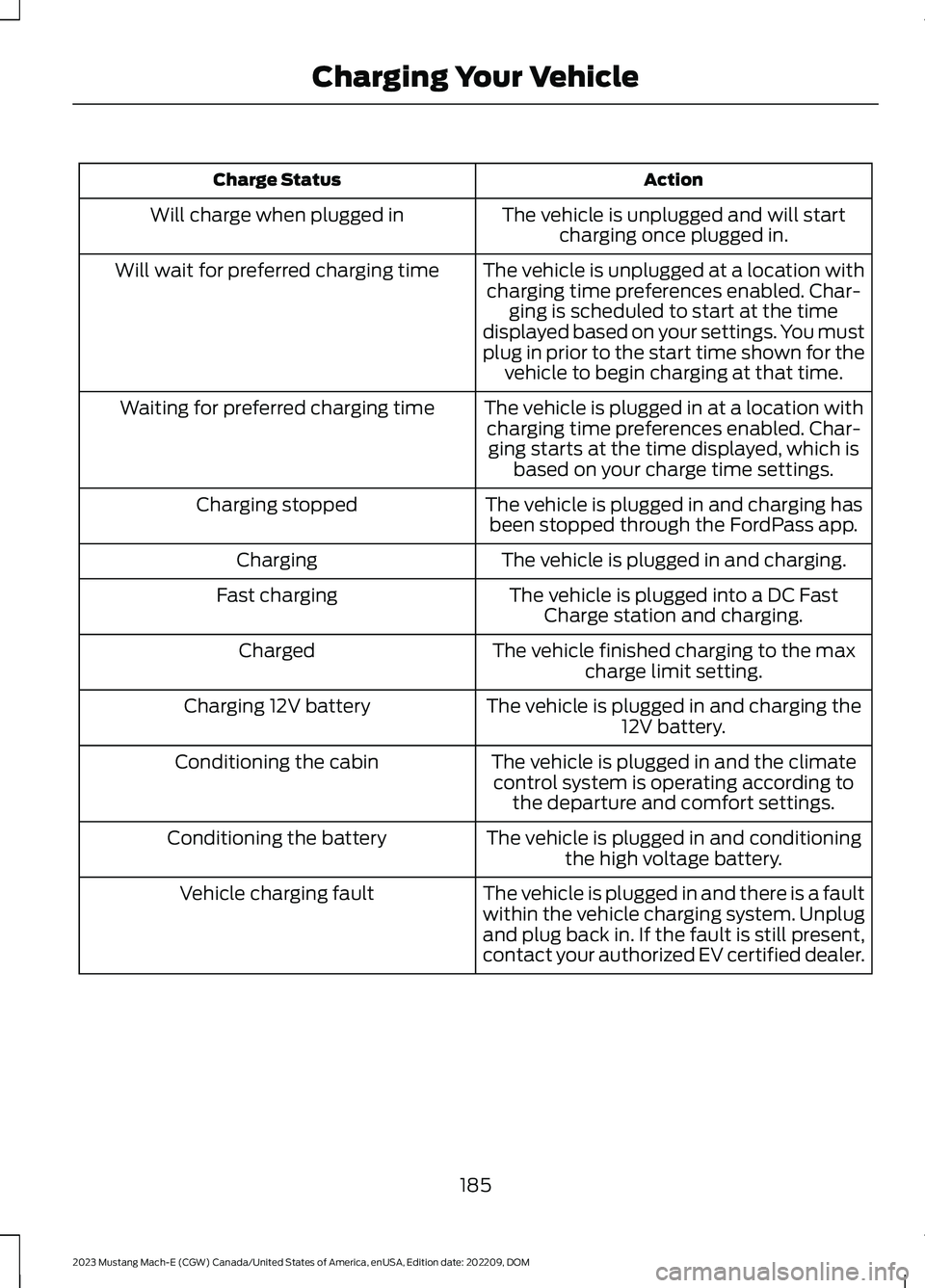
ActionCharge Status
The vehicle is unplugged and will startcharging once plugged in.Will charge when plugged in
The vehicle is unplugged at a location withcharging time preferences enabled. Char-ging is scheduled to start at the timedisplayed based on your settings. You mustplug in prior to the start time shown for thevehicle to begin charging at that time.
Will wait for preferred charging time
The vehicle is plugged in at a location withcharging time preferences enabled. Char-ging starts at the time displayed, which isbased on your charge time settings.
Waiting for preferred charging time
The vehicle is plugged in and charging hasbeen stopped through the FordPass app.Charging stopped
The vehicle is plugged in and charging.Charging
The vehicle is plugged into a DC FastCharge station and charging.Fast charging
The vehicle finished charging to the maxcharge limit setting.Charged
The vehicle is plugged in and charging the12V battery.Charging 12V battery
The vehicle is plugged in and the climatecontrol system is operating according tothe departure and comfort settings.
Conditioning the cabin
The vehicle is plugged in and conditioningthe high voltage battery.Conditioning the battery
The vehicle is plugged in and there is a faultwithin the vehicle charging system. Unplugand plug back in. If the fault is still present,contact your authorized EV certified dealer.
Vehicle charging fault
185
2023 Mustang Mach-E (CGW) Canada/United States of America, enUSA, Edition date: 202209, DOMCharging Your Vehicle
Page 190 of 496
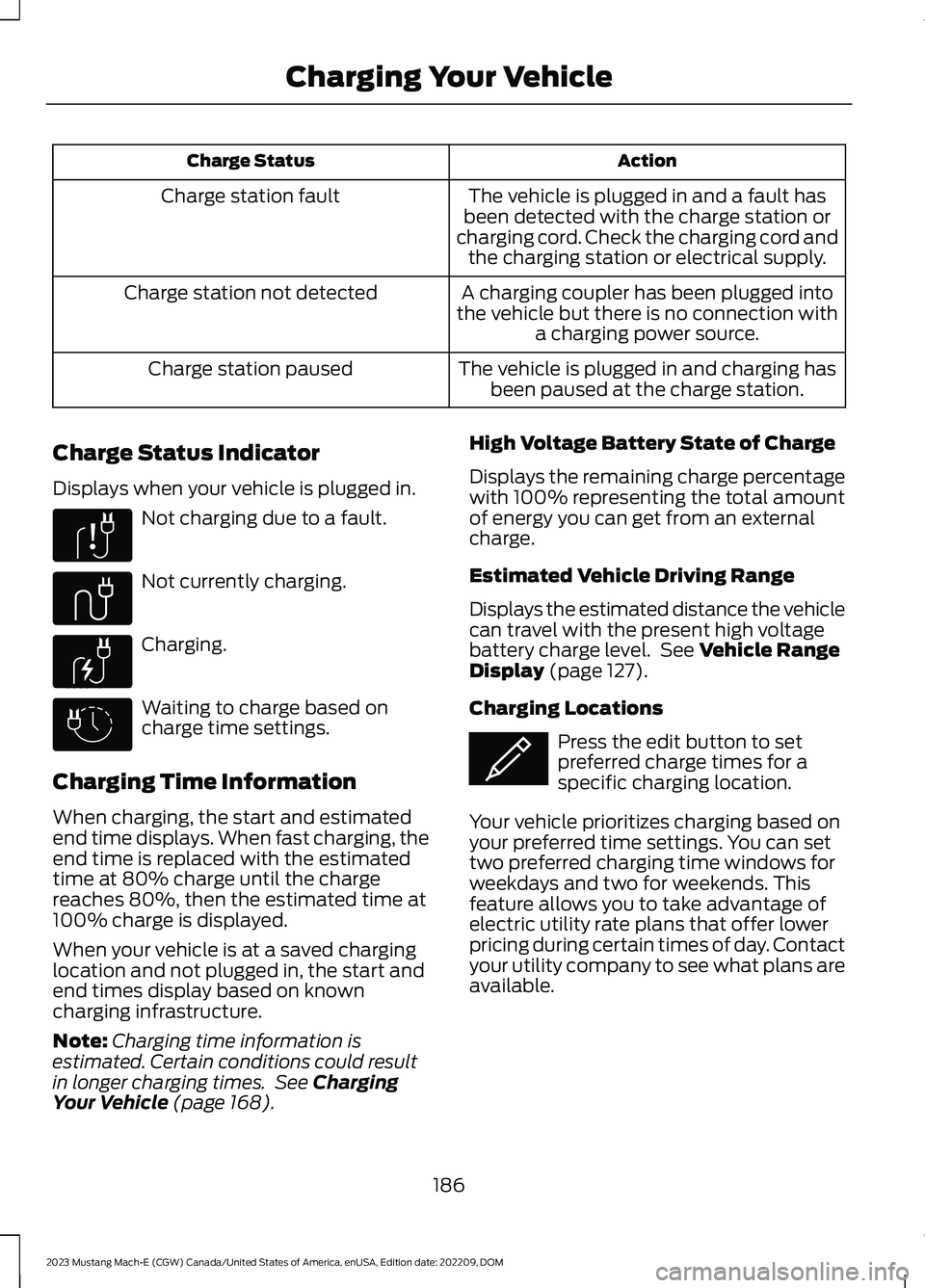
ActionCharge Status
The vehicle is plugged in and a fault hasbeen detected with the charge station orcharging cord. Check the charging cord andthe charging station or electrical supply.
Charge station fault
A charging coupler has been plugged intothe vehicle but there is no connection witha charging power source.
Charge station not detected
The vehicle is plugged in and charging hasbeen paused at the charge station.Charge station paused
Charge Status Indicator
Displays when your vehicle is plugged in.
Not charging due to a fault.
Not currently charging.
Charging.
Waiting to charge based oncharge time settings.
Charging Time Information
When charging, the start and estimatedend time displays. When fast charging, theend time is replaced with the estimatedtime at 80% charge until the chargereaches 80%, then the estimated time at100% charge is displayed.
When your vehicle is at a saved charginglocation and not plugged in, the start andend times display based on knowncharging infrastructure.
Note:Charging time information isestimated. Certain conditions could resultin longer charging times. See ChargingYour Vehicle (page 168).
High Voltage Battery State of Charge
Displays the remaining charge percentagewith 100% representing the total amountof energy you can get from an externalcharge.
Estimated Vehicle Driving Range
Displays the estimated distance the vehiclecan travel with the present high voltagebattery charge level. See Vehicle RangeDisplay (page 127).
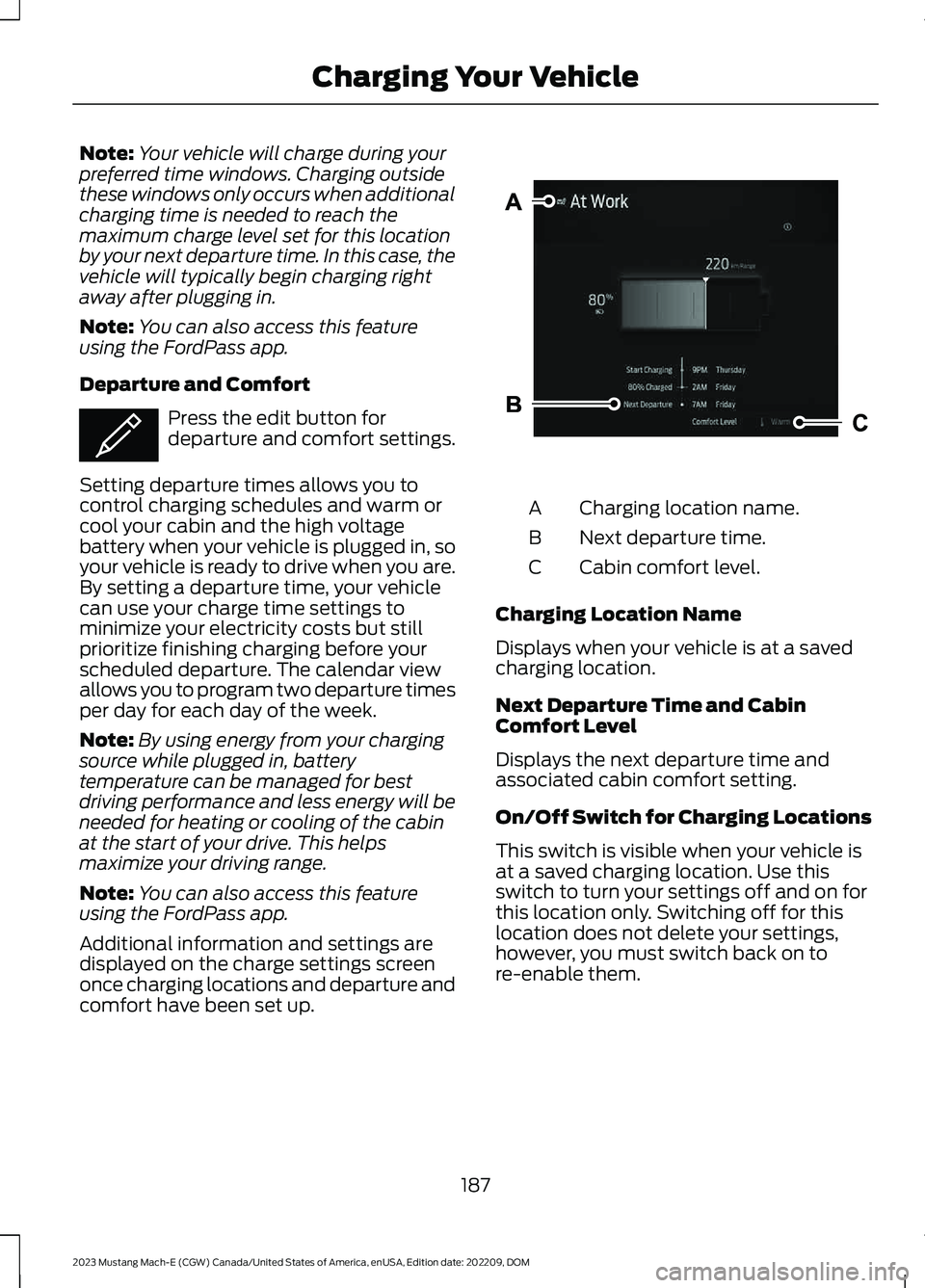
Charging Locations
Press the edit button to setpreferred charge times for aspecific charging location.
Your vehicle prioritizes charging based onyour preferred time settings. You can settwo preferred charging time windows forweekdays and two for weekends. Thisfeature allows you to take advantage ofelectric utility rate plans that offer lowerpricing during certain times of day. Contactyour utility company to see what plans areavailable.
186
2023 Mustang Mach-E (CGW) Canada/United States of America, enUSA, Edition date: 202209, DOMCharging Your VehicleE306677 E335144 E306676 E306678 E353986
Page 191 of 496
Note:Your vehicle will charge during yourpreferred time windows. Charging outsidethese windows only occurs when additionalcharging time is needed to reach themaximum charge level set for this locationby your next departure time. In this case, thevehicle will typically begin charging rightaway after plugging in.
Note:You can also access this featureusing the FordPass app.
Departure and Comfort
Press the edit button fordeparture and comfort settings.
Setting departure times allows you tocontrol charging schedules and warm orcool your cabin and the high voltagebattery when your vehicle is plugged in, soyour vehicle is ready to drive when you are.By setting a departure time, your vehiclecan use your charge time settings tominimize your electricity costs but stillprioritize finishing charging before yourscheduled departure. The calendar viewallows you to program two departure timesper day for each day of the week.
Note:By using energy from your chargingsource while plugged in, batterytemperature can be managed for bestdriving performance and less energy will beneeded for heating or cooling of the cabinat the start of your drive. This helpsmaximize your driving range.
Note:You can also access this featureusing the FordPass app.
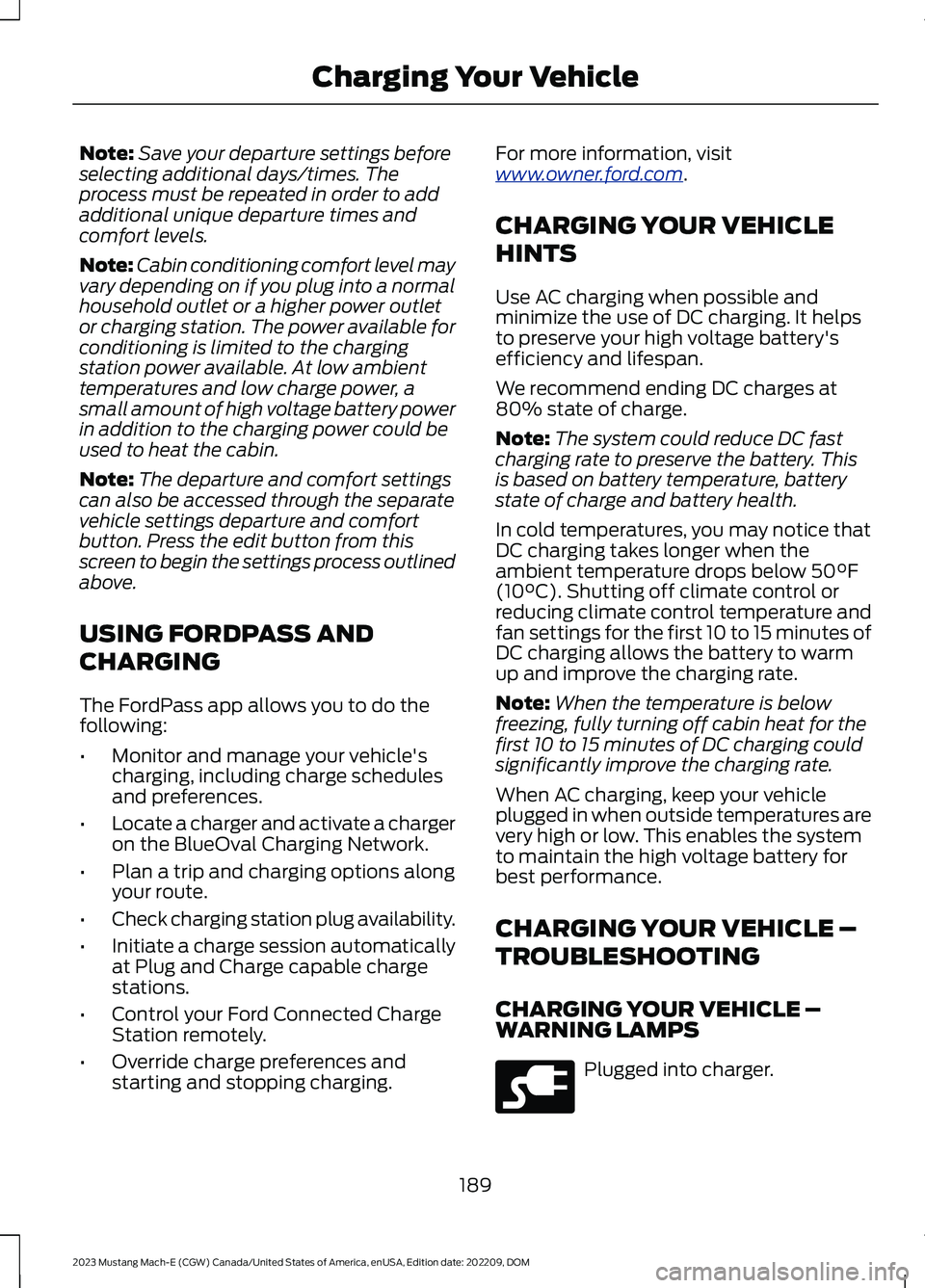
Additional information and settings aredisplayed on the charge settings screenonce charging locations and departure andcomfort have been set up.
Charging location name.A
Next departure time.B
Cabin comfort level.C
Charging Location Name
Displays when your vehicle is at a savedcharging location.
Next Departure Time and CabinComfort Level
Displays the next departure time andassociated cabin comfort setting.
On/Off Switch for Charging Locations
This switch is visible when your vehicle isat a saved charging location. Use thisswitch to turn your settings off and on forthis location only. Switching off for thislocation does not delete your settings,however, you must switch back on tore-enable them.
187
2023 Mustang Mach-E (CGW) Canada/United States of America, enUSA, Edition date: 202209, DOMCharging Your VehicleE353986 E387041
Page 193 of 496
Note:Save your departure settings beforeselecting additional days/times. Theprocess must be repeated in order to addadditional unique departure times andcomfort levels.
Note:Cabin conditioning comfort level mayvary depending on if you plug into a normalhousehold outlet or a higher power outletor charging station. The power available forconditioning is limited to the chargingstation power available. At low ambienttemperatures and low charge power, asmall amount of high voltage battery powerin addition to the charging power could beused to heat the cabin.
Note:The departure and comfort settingscan also be accessed through the separatevehicle settings departure and comfortbutton. Press the edit button from thisscreen to begin the settings process outlinedabove.
USING FORDPASS AND
CHARGING
The FordPass app allows you to do thefollowing:
•Monitor and manage your vehicle'scharging, including charge schedulesand preferences.
•Locate a charger and activate a chargeron the BlueOval Charging Network.
•Plan a trip and charging options alongyour route.
•Check charging station plug availability.
•Initiate a charge session automaticallyat Plug and Charge capable chargestations.
•Control your Ford Connected ChargeStation remotely.
•Override charge preferences andstarting and stopping charging.
For more information, visitwww.owner.ford.com.
CHARGING YOUR VEHICLE
HINTS
Use AC charging when possible andminimize the use of DC charging. It helpsto preserve your high voltage battery'sefficiency and lifespan.
We recommend ending DC charges at80% state of charge.
Note:The system could reduce DC fastcharging rate to preserve the battery. Thisis based on battery temperature, batterystate of charge and battery health.
In cold temperatures, you may notice thatDC charging takes longer when theambient temperature drops below 50°F(10°C). Shutting off climate control orreducing climate control temperature andfan settings for the first 10 to 15 minutes ofDC charging allows the battery to warmup and improve the charging rate.
Note:When the temperature is belowfreezing, fully turning off cabin heat for thefirst 10 to 15 minutes of DC charging couldsignificantly improve the charging rate.
When AC charging, keep your vehicleplugged in when outside temperatures arevery high or low. This enables the systemto maintain the high voltage battery forbest performance.
CHARGING YOUR VEHICLE –
TROUBLESHOOTING
CHARGING YOUR VEHICLE –WARNING LAMPS
Plugged into charger.
189
2023 Mustang Mach-E (CGW) Canada/United States of America, enUSA, Edition date: 202209, DOMCharging Your VehicleE228962
Page 194 of 496
CHARGING YOUR VEHICLE – INFORMATION MESSAGES
ActionMessage
Your vehicle needs confirmation it is unplugged beforeallowing a start. You must make sure your vehicle is unpluggedand you respond to the message promptly before startingyour vehicle.
Vehicle Plugged In ? YesNo
Indicates that HV battery can no longer support the 12Vbattery. Plug In your vehicle to charge the high voltage batteryand maintain the 12V battery at a healthy state.
Plug in to Maintain 12VBattery
The vehicle is plugged in and a fault has been detected withthe charge station or charging cord. Please check the chargingcord and the charging station or electrical supply.
Charge Station Fault SeeManual
190
2023 Mustang Mach-E (CGW) Canada/United States of America, enUSA, Edition date: 202209, DOMCharging Your Vehicle
Page 195 of 496
CHARGING YOUR VEHICLE –FREQUENTLY ASKED QUESTIONS
Why does my vehicle not charge withthe mobile power cord?
Ensure you properly connect theconnector and control box. Unplug thecharge coupler from the vehicle andunplug the connector from the walloutlet. Then check the connector tobe sure that the connector isconnected properly into the mobilepower cord control box. If the mobilepower cord is warm or in a hotenvironment, try charging in a coolerarea. Try a different outlet or adifferent connector if you have oneavailable. If the problem persists,contact an authorized EV certifieddealer.
Why does my vehicle have a hum or fannoise when charging?
A hum or a fan noise could be presentwhen charging the high voltagebattery. This is a normal operation asyour vehicle is keeping the battery coolwhile charging.
191
2023 Mustang Mach-E (CGW) Canada/United States of America, enUSA, Edition date: 202209, DOMCharging Your Vehicle
Page 196 of 496
ELECTRIC MOTOR
PRECAUTIONS
WARNING: When your vehicle isstationary, keep the brake pedal fullypressed when shifting gears. Failure tofollow this instruction could result inpersonal injury, death or propertydamage.
WARNING: Do not apply the brakepedal and accelerator pedalsimultaneously. Applying both pedalssimultaneously for more than a fewseconds will limit power, which mayresult in difficulty maintaining speed intraffic and could lead to serious injury.
WARNING: Apply the parkingbrake, shift into park (P), switch thevehicle off and remove the key or remotecontrol before you leave your vehicle.Failure to follow this instruction couldresult in personal injury or death.
Note:You may not be able to shift out ofpark (P) unless the intelligent access key isinside your vehicle.
SELECTOR POSITIONS
PARK (P)
WARNING: Shift into park (P) onlywhen your vehicle is stationary.
In park (P) power is not transmitted to thedriven wheels.
Note:A tone sounds if you attempt to exityour vehicle without the selector in park (P).
Note:Your vehicle may not shift out of park(P) if the vehicle battery has run out ofcharge. See Jump Starting the Vehicle(page 309).
Note:Your vehicle may not shift out of park(P) if a fuse is blown. See Fuses (page 314).
Note:The electronic parking brake couldapply when the selector is in park (P). SeeAutomatically Releasing the ElectricParking Brake (page 200).
Note:Your vehicle could shift into park (P)if you attempt to exit your vehicle withoutthe selector in park (P). See How DoesAutomatic Return to Park (P) Work (page194).
Note:A tone could sound when you selectpark (P).
REVERSE (R)
WARNING: Shift into reverse (R)only when your vehicle is stationary.
In reverse (R) power is transmitted to thedriven wheels.
NEUTRAL (N)
WARNING: In neutral (N) yourvehicle is free to roll.
In neutral (N) power is not transmitted tothe driven wheels.
DRIVE (D)
In drive (D) power is transmitted to thedriven wheels.
192
2023 Mustang Mach-E (CGW) Canada/United States of America, enUSA, Edition date: 202209, DOMElectric Motor