wheel FORD MUSTANG MACH E 2023 User Guide
[x] Cancel search | Manufacturer: FORD, Model Year: 2023, Model line: MUSTANG MACH E, Model: FORD MUSTANG MACH E 2023Pages: 496, PDF Size: 13.09 MB
Page 70 of 496
WHAT IS 911 ASSIST
911 Assist is a SYNC system feature thatcan call for help.
For more information, visitwww.owner.ford.com.
HOW DOES 911 ASSIST WORK
If a crash deploys an airbag, excluding kneeairbags and rear inflatable seatbelts, oractivates the battery shut-off, your vehiclemay be able to contact emergency servicesby dialing 911 through a paired andconnected Bluetooth®-enabled phone.
Not all crashes will deploy an airbag oractivate the battery shut-off. If aconnected cell phone sustains damage orloses its connection to SYNC during acrash, SYNC will search for and try toconnect to a previously paired cell phone.SYNC will then attempt to call theemergency services.
Before making the call:
•SYNC provides about 10 seconds tocancel the call. If you fail to cancel thecall, SYNC attempts to dial 911.
•SYNC says the following, or a similarmessage: "SYNC will attempt to call911, to cancel the call, press Cancel onyour screen or press and hold thephone button on your steering wheel."
If you do not cancel the call and SYNCmakes a successful call a pre-recordedmessage plays for the 911 operator. Theoccupants in your vehicle are able to talkwith the operator. Be prepared to provideyour name, phone number and locationimmediately because not all 911 systemsare capable of receiving this informationelectronically.
During an emergency call the systemtransmits vehicle data to the emergencyservice.
EMERGENCY CALL
REQUIREMENTS
WARNING: Do not wait for 911Assist to make an emergency call if youcan do it yourself. Dial emergencyservices immediately to avoid delayedresponse time which could increase therisk of serious injury or death after acrash. If you do not hear 911 Assist withinfive seconds of the crash, the system orphone may be damaged ornon-functional.
WARNING: Always place yourphone in a secure location in your vehicleso it does not become a projectile or getdamaged in a crash. Failure to do so maycause serious injury to someone ordamage the phone which could prevent911 Assist from working properly.
WARNING: Unless the 911 Assistsetting is set on before a crash, thesystem will not dial for help which coulddelay response time, potentiallyincreasing the risk of serious injury ordeath after a crash.
•SYNC must be powered and workingproperly at the time of the incident andthroughout feature activation and use.
•The 911 Assist feature must be set onbefore the incident.
•You must pair and connect aBluetooth® enabled and compatiblecell phone to SYNC.
•A connected Bluetooth® enabledphone must have the ability to makeand maintain an outgoing call at thetime of the incident.
66
2023 Mustang Mach-E (CGW) Canada/United States of America, enUSA, Edition date: 202209, DOM911 Assist
Page 105 of 496
PASSIVE ANTI-THEFT
SYSTEM
WHAT IS THE PASSIVE ANTI-THEFT SYSTEM
The passive anti-theft system preventssomeone from starting the vehicle with anincorrectly coded key.
Note:Do not leave a duplicate coded keyin your vehicle. Always take the keys andlock all the doors when leaving your vehicle.
HOW DOES THE PASSIVE ANTI-THEFT SYSTEM WORK
The passive anti-theft system arms whenyou switch the ignition off.
It disarms when the ignition is switched onwith a correctly coded key.
Note:The system is not compatible withnon-Ford aftermarket remote start systems.
Note:Do not leave a duplicate coded keyin your vehicle. Always take the keys andlock all doors when leaving your vehicle.
ANTI-THEFT ALARM SYSTEM
WHAT IS THE ANTI-THEFT ALARMSYSTEM
The anti-theft alarm system warns you ofan unauthorized entry to your vehicle.
HOW DOES THE ANTI-THEFTALARM SYSTEM WORK
When armed, the anti-theft alarm istriggered in any of the following ways:
•If someone opens a door, the liftgateor the hood without a correctly codedkey or remote control.
•If you turn the power on without acorrectly coded key.
•If the interior sensors detect movementinside your vehicle.
•If the inclination sensors detect anattempt to raise your vehicle.
•If someone disconnects the vehiclebattery or the battery backup alarm.
If the anti-theft alarm is triggered, thealarm horn sounds for 30 seconds and thedirection indicators flash for 5 minutes.
Any further attempts to carry out one ofthe above sounds the alarm again.
WHAT ARE THE INTERIORSENSORS
The interior sensors detect movementinside your vehicle.
The interior sensors are in the overheadconsole.
Note:Do not cover the interior sensors.
Note:If you set the cabin comfort level foryour departure time with the alarm armed,the interior sensors deactivate for theduration of the cabin preconditioning toavoid a false alarm.
WHAT ARE THE INCLINATIONSENSORS
The inclination sensor is designed to detectan attempt to raise your vehicle, forexample to remove a wheel or to tow itaway.
101
2023 Mustang Mach-E (CGW) Canada/United States of America, enUSA, Edition date: 202209, DOMSecurity
Page 109 of 496
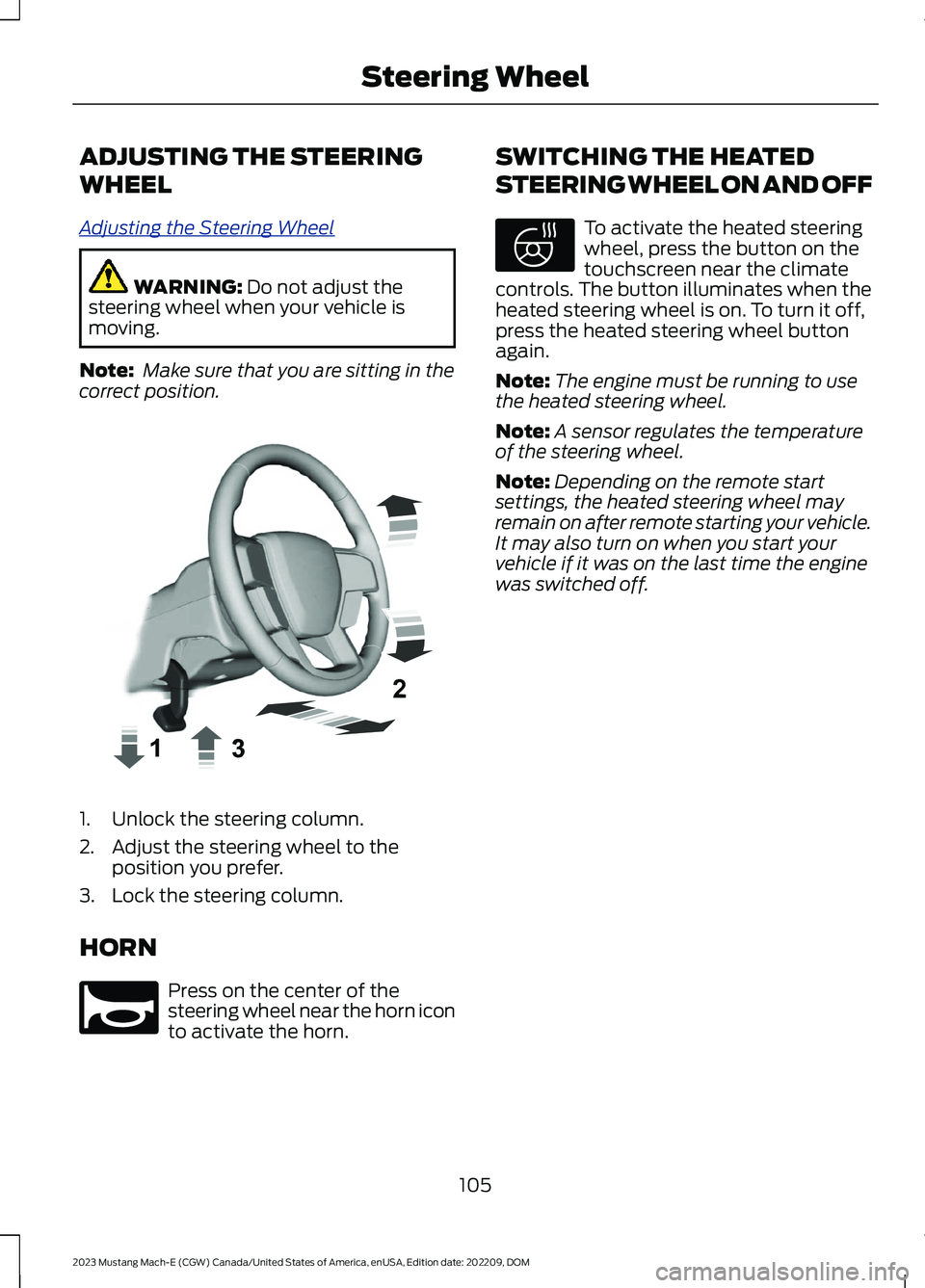
ADJUSTING THE STEERING
WHEEL
Adjusting the Steering Wheel
WARNING: Do not adjust thesteering wheel when your vehicle ismoving.
Note: Make sure that you are sitting in thecorrect position.
1.Unlock the steering column.
2.Adjust the steering wheel to theposition you prefer.
3.Lock the steering column.
HORN
Press on the center of thesteering wheel near the horn iconto activate the horn.
SWITCHING THE HEATED
STEERING WHEEL ON AND OFF
To activate the heated steeringwheel, press the button on thetouchscreen near the climatecontrols. The button illuminates when theheated steering wheel is on. To turn it off,press the heated steering wheel buttonagain.
Note:The engine must be running to usethe heated steering wheel.
Note:A sensor regulates the temperatureof the steering wheel.
Note:Depending on the remote startsettings, the heated steering wheel mayremain on after remote starting your vehicle.It may also turn on when you start yourvehicle if it was on the last time the enginewas switched off.
105
2023 Mustang Mach-E (CGW) Canada/United States of America, enUSA, Edition date: 202209, DOMSteering WheelE359744 E270945 E369755
Page 129 of 496
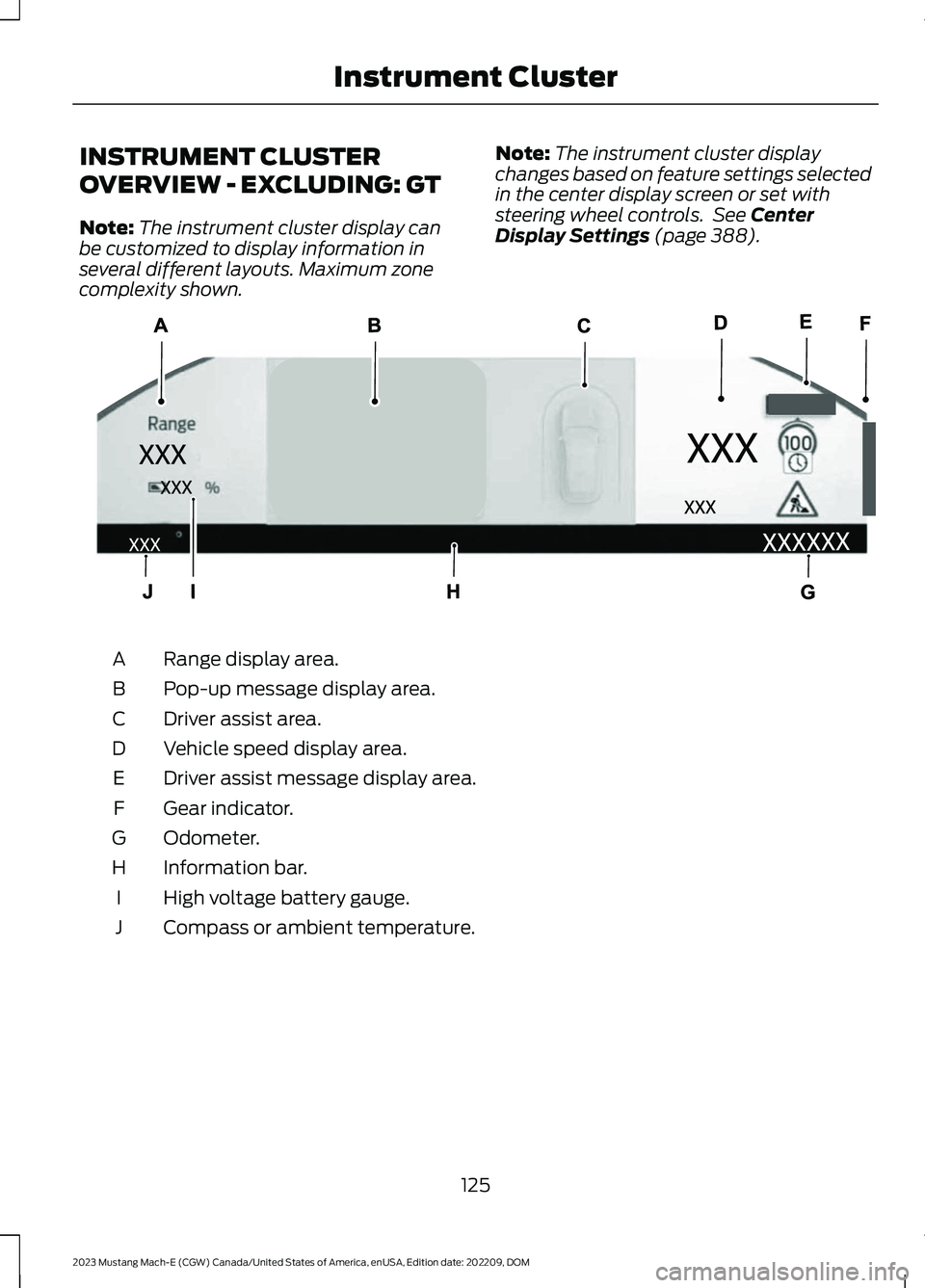
INSTRUMENT CLUSTER
OVERVIEW - EXCLUDING: GT
Note:The instrument cluster display canbe customized to display information inseveral different layouts. Maximum zonecomplexity shown.
Note:The instrument cluster displaychanges based on feature settings selectedin the center display screen or set withsteering wheel controls. See CenterDisplay Settings (page 388).
Range display area.A
Pop-up message display area.B
Driver assist area.C
Vehicle speed display area.D
Driver assist message display area.E
Gear indicator.F
Odometer.G
Information bar.H
High voltage battery gauge.I
Compass or ambient temperature.J
125
2023 Mustang Mach-E (CGW) Canada/United States of America, enUSA, Edition date: 202209, DOMInstrument ClusterE323745
Page 130 of 496
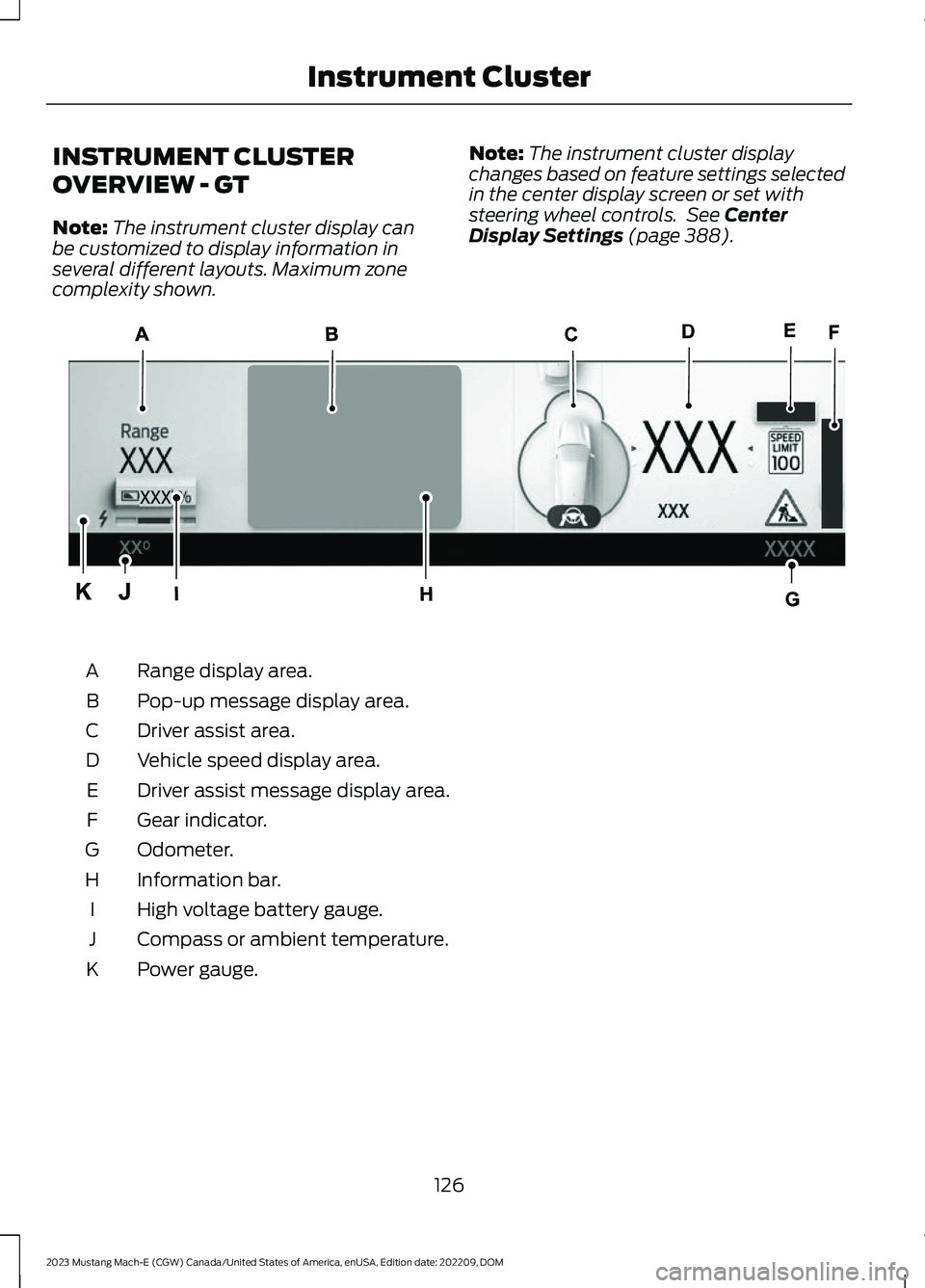
INSTRUMENT CLUSTER
OVERVIEW - GT
Note:The instrument cluster display canbe customized to display information inseveral different layouts. Maximum zonecomplexity shown.
Note:The instrument cluster displaychanges based on feature settings selectedin the center display screen or set withsteering wheel controls. See CenterDisplay Settings (page 388).
Range display area.A
Pop-up message display area.B
Driver assist area.C
Vehicle speed display area.D
Driver assist message display area.E
Gear indicator.F
Odometer.G
Information bar.H
High voltage battery gauge.I
Compass or ambient temperature.J
Power gauge.K
126
2023 Mustang Mach-E (CGW) Canada/United States of America, enUSA, Edition date: 202209, DOMInstrument ClusterE354433
Page 131 of 496
POWER GAUGE - GT
The power gauge displays the amount ofpower going to the wheels whenaccelerating or maintaining speed. Whenthe system limits the available maximumpower, the right side of the gauge showsgray lines representing the proportionalreduction in available power. When slowingdown by lifting your foot off the acceleratorpedal or pressing the brake, the gaugedisplays the amount of power theregenerative system captures and returnsto the high voltage battery.
SPEEDOMETER
Indicates the vehicle speed.
VEHICLE RANGE DISPLAY
Displays the approximate range yourvehicle can travel on the battery's currentstate of charge. Estimates vary based onthe energy used when driving and theenergy available in the high voltage battery.
The amount of energy being used whendriving is affected by:
•Mild or aggressive acceleration orbraking.
•Your vehicle's speed.
•Use of accessories, such as climatecontrol.
•Ambient temperature and weatherconditions.
•Driving in a city or on a highway.
•Driving on flat or hilly roads.
•Towing.
The available energy capacity in the highvoltage battery is affected by coldtemperatures and battery degradation.See Preserving Your High VoltageBattery (page 166).
When your navigation system has an activeroute the distance to your destination ornext charging station is displayed.
Note:It is normal for the vehicle rangeestimates to vary due to changes in averageenergy usage and battery temperature. Thiscould cause different range estimates eachtime you fully charge your battery. SeeMaximizing Your Driving Range (page 302).
Note:When you leave your vehicleunplugged, it periodically uses energy fromthe high voltage battery to recharge the12-volt accessory battery, resulting in areduced driving range.
HIGH VOLTAGE BATTERY
GAUGE
Displays the high voltage battery state ofcharge in the form of a gauge or apercentage. A full fill or 100% chargerepresents the total amount of energy youcan get from plugging your vehicle in.
The gauge is normally blue. When a lowbattery condition is reached the gauge isamber. When the battery is depleted thegauge is red.
When the full battery gauge is displayedand your navigation system has an activeroute, a symbol is added that representsthe battery charge level needed to reachyour destination or next charging station.
Charging Status
Additional charge information displayswhen you power on your vehicle withoutpressing the brake pedal and your vehicleis plugged in. Charging status includes thecharge start or charge end time asappropriate. When DC charging, the time
127
2023 Mustang Mach-E (CGW) Canada/United States of America, enUSA, Edition date: 202209, DOMInstrument Cluster
Page 139 of 496
Note:You can also use the phone as a keyto stop the vehicle.
EXTENDING THE REMOTE
START DURATION
Using your FordPass app, press the buttonshowing addition time.
Note:You can also use phone as a key toextend the remote start duration.
If the duration is set to 15 minutes, theduration extends by another 15 minutes.This provides a total of 30 minutes.
Note:Remote start can only be extendedonce.
Note:A maximum of two remote starts, orone remote start with an extension, areallowed. To reset the restart procedureswitch the vehicle to on, then to off.
REMOTE START SETTINGS
To access the settings menu:
1.
Press the button on thetouchscreen.
2.Press Vehicle.
3.Press Remote Start Setup.
Switching Climate Control AutoMode On and Off
1.Press Auto or Last settings.
Note:If you switch the auto mode on, thesystem attempts to heat or cool the interiorto 72°F (22°C). When you switch the vehicleon, the climate control system returns tothe last used settings.
Note:If you switch the last settings on, thesystem remembers the last used settings.
Heated Seat Settings (If Equipped)
1.Press Seats.
2.Press Auto or Off.
Note:If you switch the heated seat settingson, the heated seats turn on during coldweather.
Heated Steering Wheel Settings (If
Equipped)
1.Press Seats and Steering Wheel.
2.Press Auto or Off.
Note:If you switch the heated steeringwheel settings on, the heated steering wheelturns on during cold weather.
Remote Start Duration
1.Press Duration.
2.Press the duration you prefer.
135
2023 Mustang Mach-E (CGW) Canada/United States of America, enUSA, Edition date: 202209, DOMRemote StartE386797
Page 147 of 496
FRONT SEAT PRECAUTIONS
WARNING: Sitting improperly, outof position or with the seatback reclinedtoo far can take weight off the seatcushion and affect the decision of thepassenger sensing system, resulting inserious injury or death in the event of acrash. Always sit upright against yourseat back, with your feet on the floor.
WARNING: Do not recline the seatbackrest too far as this can cause theoccupant to slide under the seatbelt,resulting in personal injury in the eventof a crash.
WARNING: Do not place objectshigher than the top of the seat backrest.Failure to follow this instruction couldresult in personal injury or death in theevent of a sudden stop or crash.
WARNING: Do not adjust the driverseat or seat backrest when your vehicleis moving. This may result in sudden seatmovement, causing the loss of controlof your vehicle.
SITTING IN THE CORRECT
POSITION
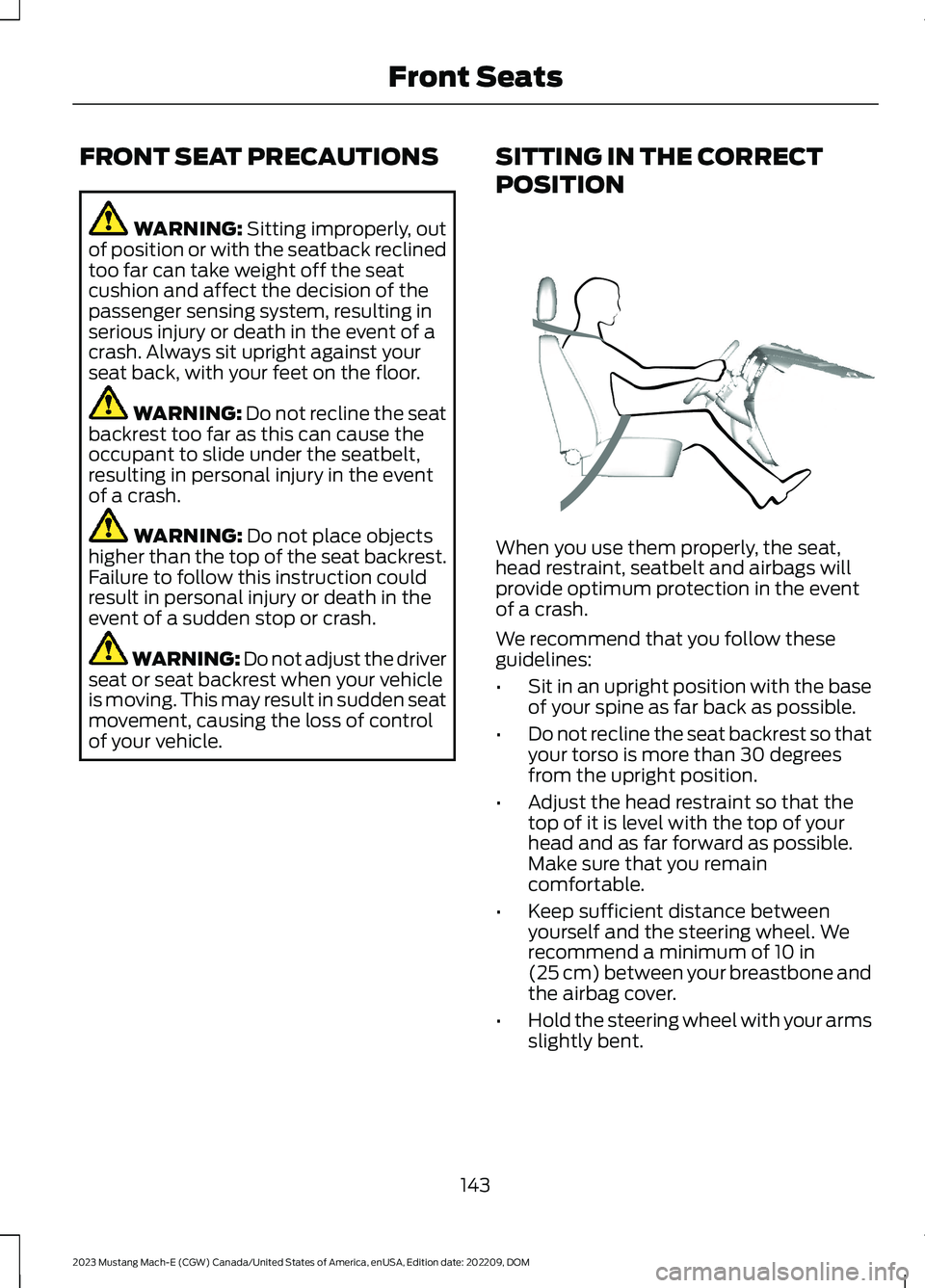
When you use them properly, the seat,head restraint, seatbelt and airbags willprovide optimum protection in the eventof a crash.
We recommend that you follow theseguidelines:
•Sit in an upright position with the baseof your spine as far back as possible.
•Do not recline the seat backrest so thatyour torso is more than 30 degreesfrom the upright position.
•Adjust the head restraint so that thetop of it is level with the top of yourhead and as far forward as possible.Make sure that you remaincomfortable.
•Keep sufficient distance betweenyourself and the steering wheel. Werecommend a minimum of 10 in(25 cm) between your breastbone andthe airbag cover.
•Hold the steering wheel with your armsslightly bent.
143
2023 Mustang Mach-E (CGW) Canada/United States of America, enUSA, Edition date: 202209, DOMFront SeatsE68595
Page 181 of 496
CARE INSTRUCTIONS
Do not use cleaners or solvents as thiscould damage your mobile power cord. Donot place stress on the charger cables. Ifunit overheats, remove the mobile powercord from direct sunlight.
SAFETY FEATURES
The charger includes the following safetyfeatures to protect against the risk ofelectric shock:
•Service Ground Check: The chargerconstantly checks for the presence ofa service ground connection. If theservice ground ever fails, the chargerred indicator turns ON and shuts downpower to the vehicle.
•Thermal Event Sensor: Charger modulesenses out-of-ordinary thermal eventsand decreases the charging current orshuts the unit down if required.
•Ground fault circuit interrupter (GFCI)Protection: The charger has a groundfault circuit interrupter (GFCI) reactionsystem to protect against electricshock. If the charger module detectsan output ground fault, it shuts downpower to the output cable andilluminates the red indicator.
•Insulation: The charger module,connector, cable assembly, and chargecoupler are completely insulated.There are no exposed live parts, toprotect against electric shock.
•Unintentional Disconnection: Thecharge coupler is designed to minimizeunintentional disconnection. A pilotsignal wire in the cable and chargecoupler eliminates the possibility ofelectric shock when not connected toa vehicle or if an unintended disconnectoccurs during a charge. Disconnectionduring charging is safe.
LOCATING THE CHARGE PORT
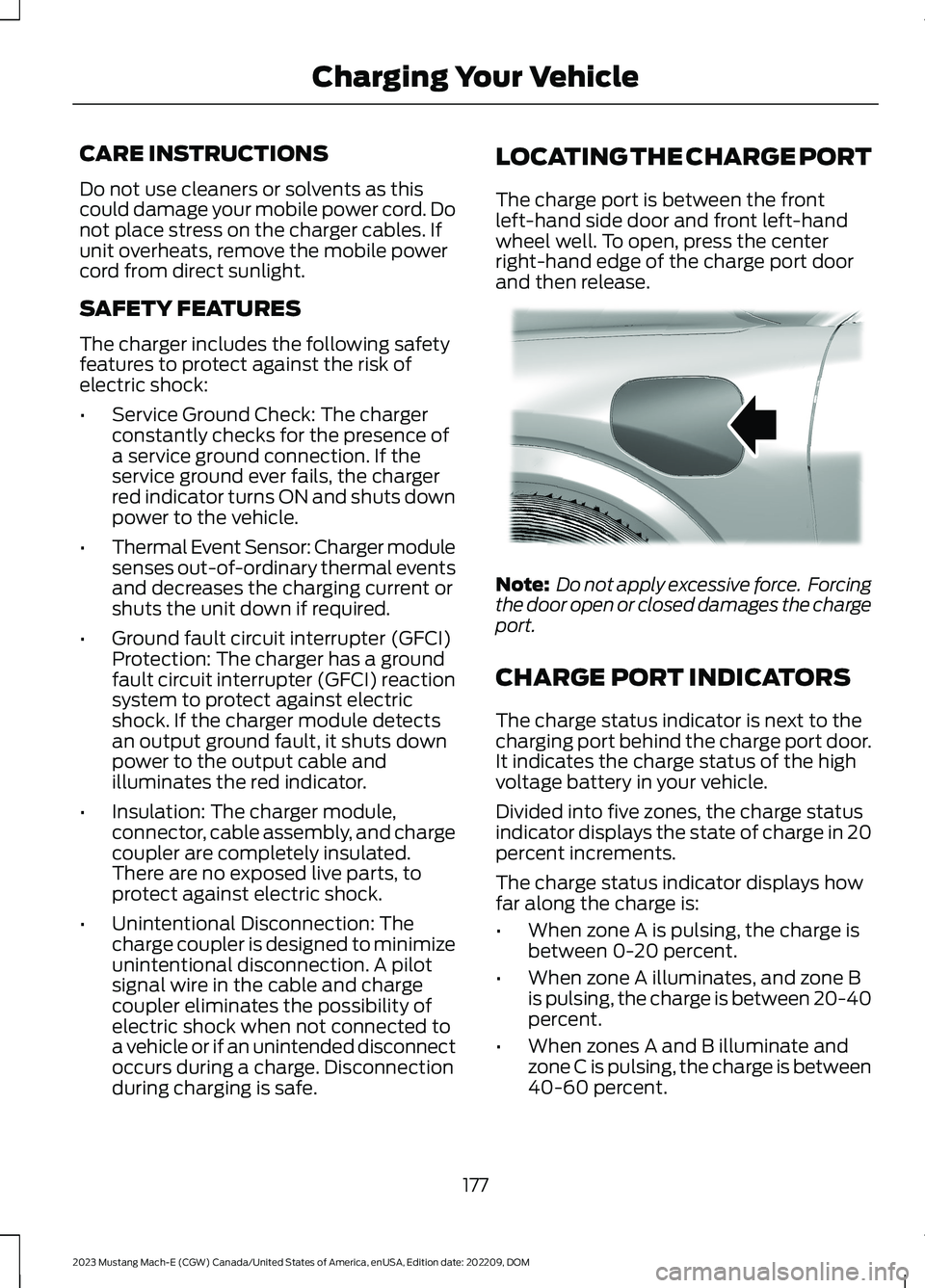
The charge port is between the frontleft-hand side door and front left-handwheel well. To open, press the centerright-hand edge of the charge port doorand then release.
Note: Do not apply excessive force. Forcingthe door open or closed damages the chargeport.
CHARGE PORT INDICATORS
The charge status indicator is next to thecharging port behind the charge port door.It indicates the charge status of the highvoltage battery in your vehicle.
Divided into five zones, the charge statusindicator displays the state of charge in 20percent increments.
The charge status indicator displays howfar along the charge is:
•When zone A is pulsing, the charge isbetween 0-20 percent.
•When zone A illuminates, and zone Bis pulsing, the charge is between 20-40percent.
•When zones A and B illuminate andzone C is pulsing, the charge is between40-60 percent.
177
2023 Mustang Mach-E (CGW) Canada/United States of America, enUSA, Edition date: 202209, DOMCharging Your VehicleE317346
Page 192 of 496
On/Off Switch for Departure andComfort
This switch is visible when you have atleast one departure time set. Use thisswitch to turn all departure times off andon. Switching off departure and comfortdoes not delete your settings, however,you must switch back on to re-enablethem.
Charging Location Setup
Follow these steps to set time and chargelevel preferences for a charging location.
Press the edit button forcharging locations on the chargesettings screen.
1.Select an address from the list ofrecent charge locations. If thepreviously saved charge locations arenot listed, then you must first selectadd new location. You can also editsettings for previously saved locations.
2.Confirm that this is the location youwant to save with the help of the mapview. Edit the location name if desiredand set a maximum charge level. Pressnext.
Note:Charging will stop when your vehiclereaches the maximum charge level setting.
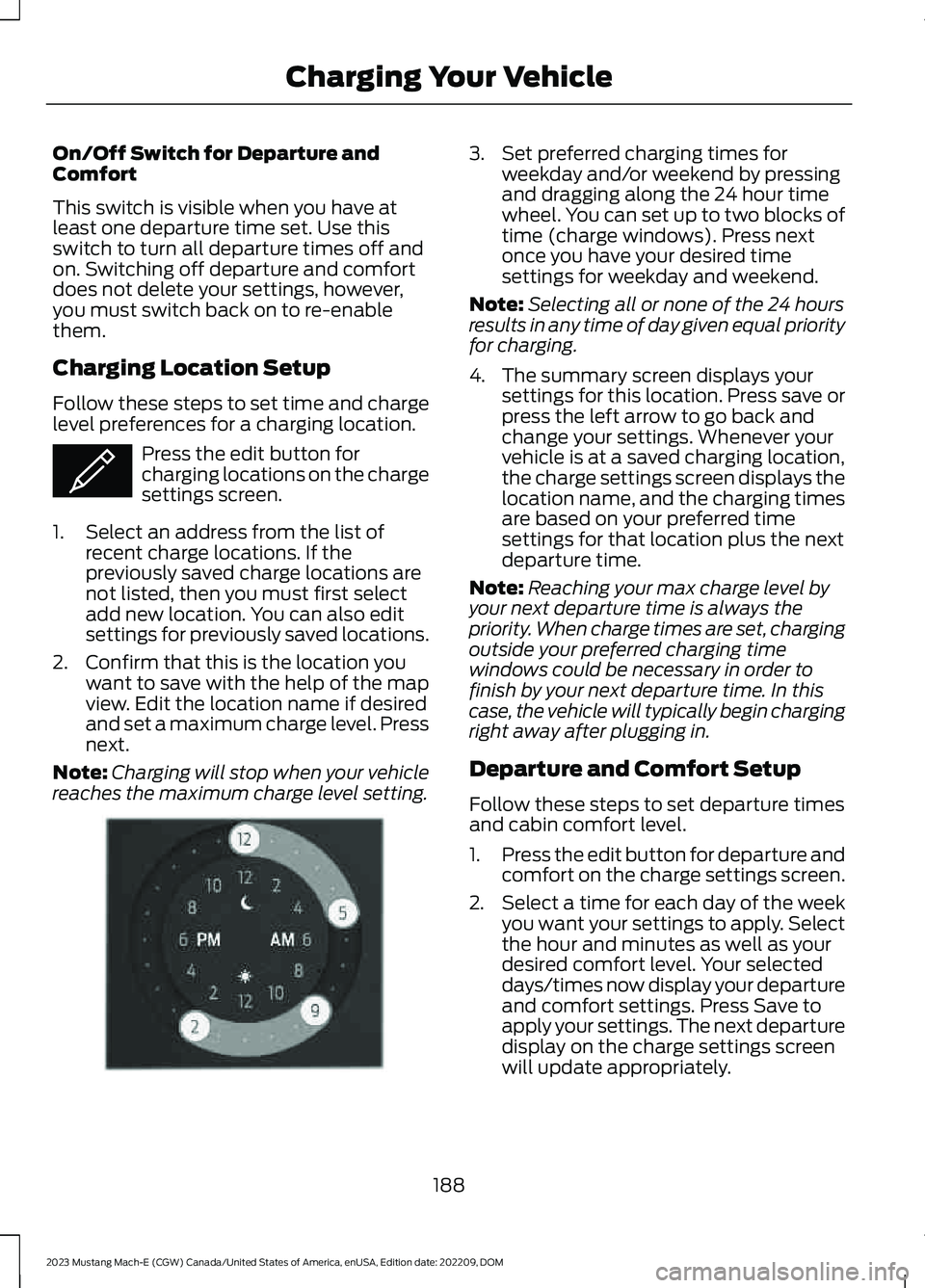
3.Set preferred charging times forweekday and/or weekend by pressingand dragging along the 24 hour timewheel. You can set up to two blocks oftime (charge windows). Press nextonce you have your desired timesettings for weekday and weekend.
Note:Selecting all or none of the 24 hoursresults in any time of day given equal priorityfor charging.
4.The summary screen displays yoursettings for this location. Press save orpress the left arrow to go back andchange your settings. Whenever yourvehicle is at a saved charging location,the charge settings screen displays thelocation name, and the charging timesare based on your preferred timesettings for that location plus the nextdeparture time.
Note:Reaching your max charge level byyour next departure time is always thepriority. When charge times are set, chargingoutside your preferred charging timewindows could be necessary in order tofinish by your next departure time. In thiscase, the vehicle will typically begin chargingright away after plugging in.
Departure and Comfort Setup
Follow these steps to set departure timesand cabin comfort level.
1.Press the edit button for departure andcomfort on the charge settings screen.
2.Select a time for each day of the weekyou want your settings to apply. Selectthe hour and minutes as well as yourdesired comfort level. Your selecteddays/times now display your departureand comfort settings. Press Save toapply your settings. The next departuredisplay on the charge settings screenwill update appropriately.
188
2023 Mustang Mach-E (CGW) Canada/United States of America, enUSA, Edition date: 202209, DOMCharging Your VehicleE353986 E353985